change wheel AUDI Q7 2015 Owner´s Manual
[x] Cancel search | Manufacturer: AUDI, Model Year: 2015, Model line: Q7, Model: AUDI Q7 2015Pages: 350, PDF Size: 86 MB
Page 107 of 350
M
"' 0 ..J
"". rl I.O
"' rl
"' rl
On the road
Steering
Manually adjustable steering wheel
Applies to vehicles: with manu ally adjustable steering
w hee l
The height and reach of the steering wheel
can be adjusted.
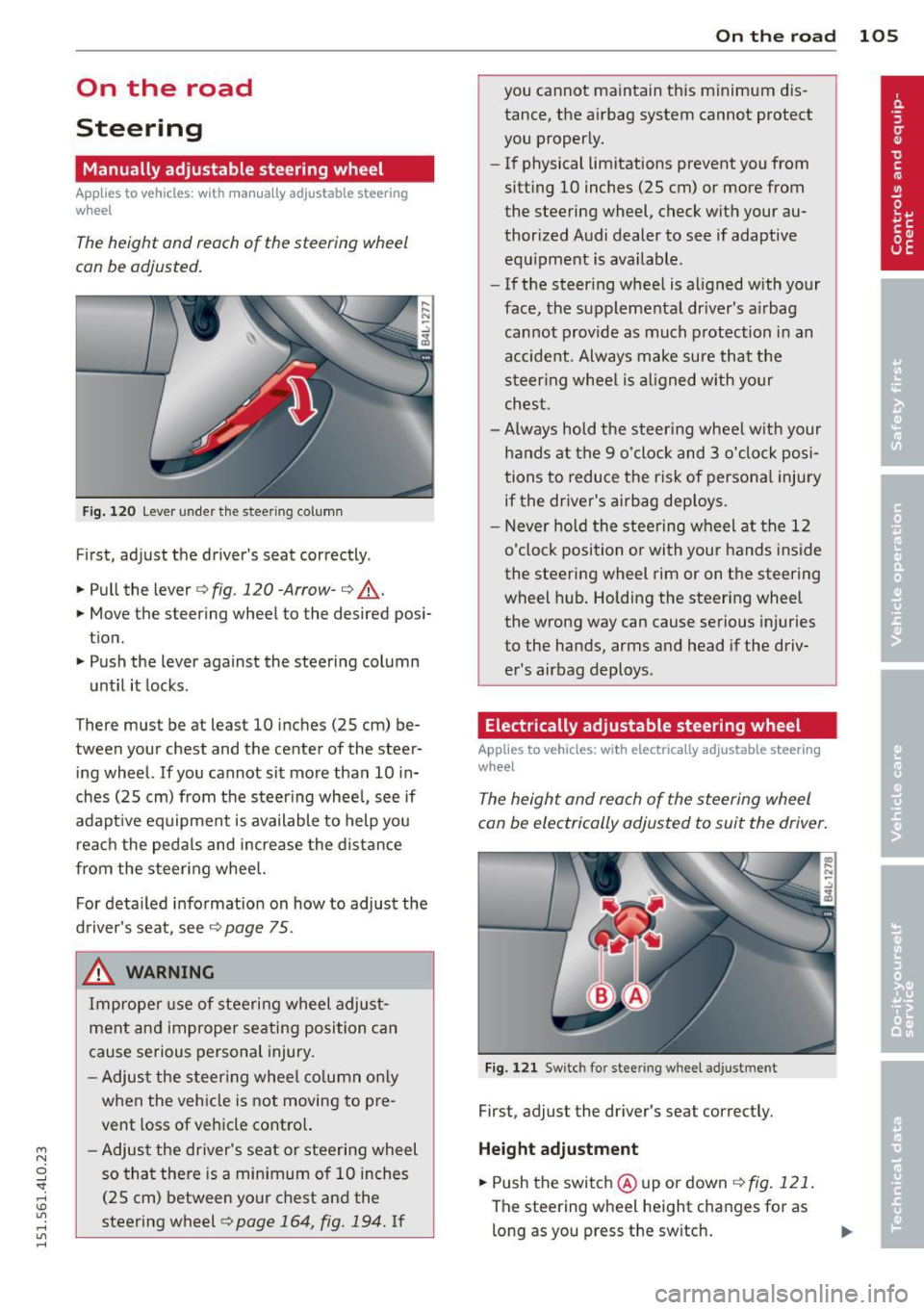
Fig. 120 Lever under the steer ing column
First, adjust the driver's seat correctly .
.. Pull the lever
q fig. 120 -Arrow-q ,A.
.. Move the steering wheel to the desired posi
tion.
.. Push the lever against the steering column
until it locks.
There must be at least 10 inches
(25 cm) be
tween your chest and the center of the steer
ing wheel.
If you cannot sit more than 10 in
ches
(25 cm) from the steering wheel, see if
adapt ive equipment is available to help you
reach the pedals and increase the distance
from the steering whee l.
For detailed information on how to adjust the
driver's seat, see
¢page 75 .
& WARNING
Improper use of steering wheel adjust
ment and improper seating position can
cause serious personal injury.
- Adjust the steering wheel column only
when the veh icle is not moving to pre
vent loss of vehicle control.
-
- Adjust the driver's seat or steering wheel
so that there is a minimum of 10 inches
(25 cm) between your chest and the
steering wheel ¢
page 164, fig. 194. If
On the road 105
you cannot maintain this minimum dis
tance, the airbag system cannot protect
you properly.
- If physical limitations prevent you from
sitting 10 inches
(25 cm) or more from
the steering wheel, check with your au
thorized Audi dealer to see if adaptive
equipment is available.
- If the steering wheel is aligned with your
face, the supplemental dr iver's a irbag
cannot provide as much protection in an
accident. Always make sure that the
steering wheel is aligned with your
chest.
- Always hold the steer ing wheel w ith your
hands at the 9 o'clock and 3 o'clock posi
tions to reduce the risk of personal injury
if the driver's airbag dep loys .
- Never hold the steering wheel at the 12
o'clock position or with your hands inside
the steering wheel rim or on the steering
wheel hub . Holding the steering wheel
the wrong way can cause serious injuries
to the hands, arms and head if the driv
er's airbag deploys.
Electrically adjustable steering wheel
App lies to vehicles: with electrically adjustable steering
w heel
The height and reach of the steering wheel
can be electrically adjusted to suit the driver.
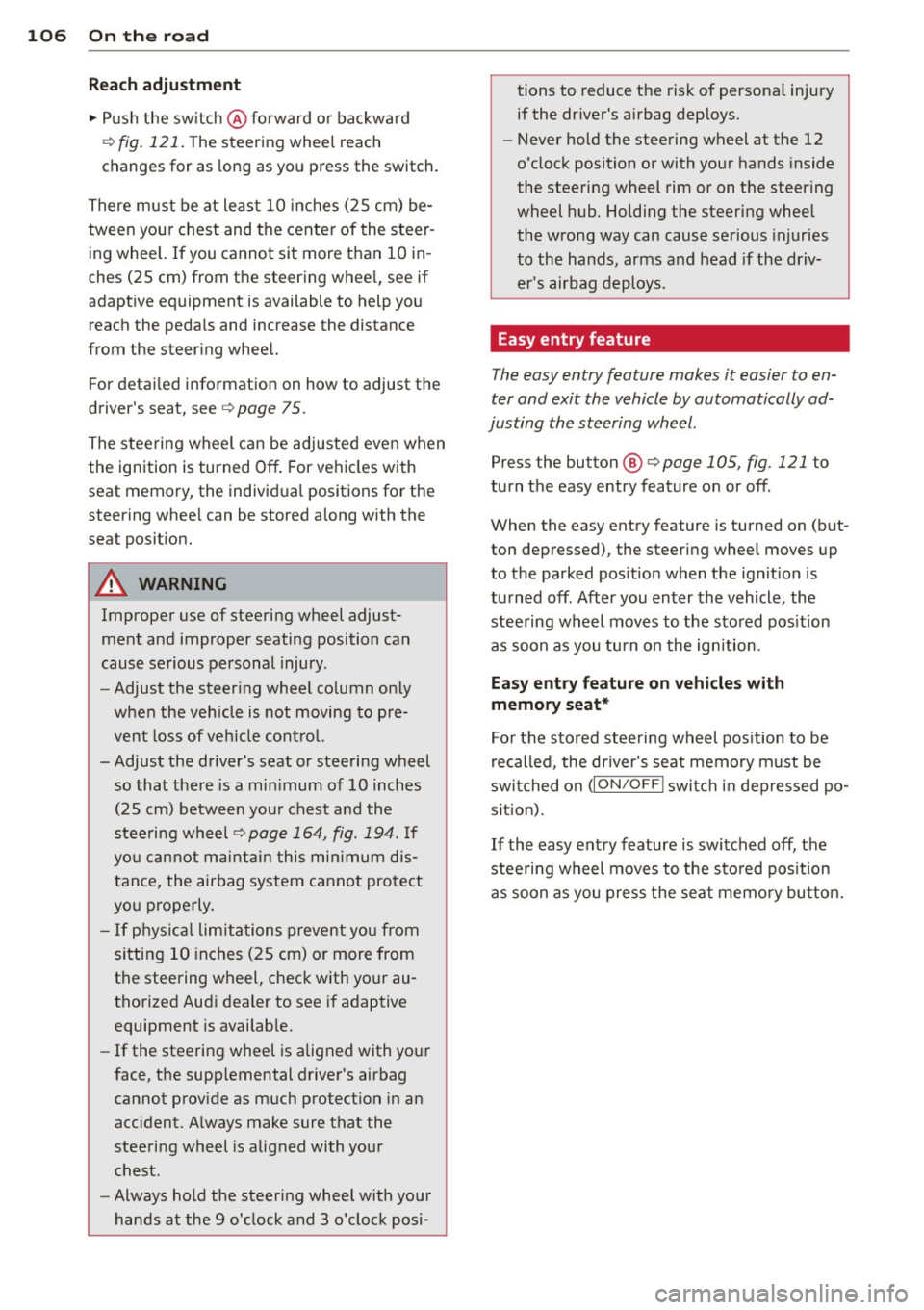
Fig. 121 Switch for stee ring wheel adjustment
First, adjust the driver's seat correctly.
Height adjustment
.. Push the switch @ up or down <=> fig. 121 .
The steering wheel height changes for as
long as you press the sw itch.
Page 108 of 350
106 On the road
Reach adjustm ent
.. Push the sw itch @ forward or backward
¢
fig. 121 . The steering whee l reach
changes for as long as yo u press the switch.
There must be at least 10 inches (25 cm) be
tween you r chest and the center of the steer
ing wheel. If you cannot sit more than 10 in
ches (25 cm) from the steering whee l, see if
adaptive equipment is available to help you
reach the pedals and increase the distance
from the steer ing wheel.
F or detai led informat ion on how to adjust the
driver's seat, see¢
page 75.
The stee ring wheel can be adjusted even when
the ignition is turned
Off. For ve hicles with
seat memory, the individ ual positions for the
steering whee l can be stored along with the
seat posit ion.
A WARNING
Improper use of steering wheel adjust
ment and improper seating position can
cause se rious personal injury.
- Adjust the steer ing whee l co lumn on ly
when the veh icle is not moving to pre
vent loss of veh icle contro l.
- Adjust the driver's seat or steering wheel so that the re is a min imum of 10 inches
(25 cm) between your chest and the
steering wheel¢
page 164, fig . 194. If
yo u cannot ma intain this min imum d is
tan ce, the airbag system c annot pro tect
yo u properly.
- If phys ica l limitations prevent yo u from
sitting 10 inches (25 cm) or more from
the steering wheel, check with your au
tho rized Audi dea le r to see if adaptive
equipment is availab le.
- If the steering wheel is aligned with your
face, the supp lemental driver's airbag
cannot prov ide as much protect ion in an
acc ident. A lways make sure that the
steeri ng wheel is aligned with your
chest.
- Always hold the steering wheel with your
hands at the 9 o'clock and 3 o'clock posi- tions to reduce the risk of persona
l injury
if the dr iver's airbag dep loys .
- Never hold the steering wheel at the 12
o'clock position or with your hands inside
the steering wheel rim or on the steering
wheel hub. Holding the steering wheel
the wrong way can cause serious injuries
to the hands, arms and head if the driv
er's airbag deploys.
Easy entry feature
The easy entry feature makes it easier to en
ter and exit the vehicle by automatically ad
justing the steering wheel.
Press the button @¢ page 105, fig. 121 to
turn the easy entry feature on or
off.
When the easy entry feature is turned on (but
ton depressed), the steering wheel moves up
to the parked pos ition when the ignit ion is
turned
off. After you enter the vehicle, the
stee ring wheel moves to the stored pos it ion
as soon as you tu rn o n the ignition.
Easy ent ry feature on vehicles w ith
memory seat*
For t he stored steering wheel pos ition to be
re called, the dr iver's seat memory m ust be
swi tched on
(ION/OF F I swi tch in dep ressed po
s it ion).
If the easy ent ry feature is switched
off, the
stee ring wheel moves to the sto red pos ition
a s soon as you press the sea t memo ry bu tton.
Page 130 of 350

128 Adaptive cruise control
Vehicles offset to one side
Applies to vehicles: with adaptive cruise control
Fig. 144 Vehicle traveling a head o utside the detect ion
range of t he rada r se nsor
Vehicles mov ing up ahead but offset i n the
lan e cannot be detected by ACC until they are
in sensor range.
Lane changes by other vehicles
Applies to vehicles: with adaptive cruise control
Fig. 145 A vehicle changes lanes
Vehicles that cut into your lane a sho rt dis
tance in front of you cannot be detected by
ACC until they are in senso r range.
Vehicles that are difficult to detect
Applies to vehicles: with adaptive cruis e contro l
Fig. 146 Two -wheeled vehicle drivi ng ahead
Some vehicles moving up ahead in your lane
of trave l are difficult to detect, for examp le
two -wheeled veh icles, vehicles w ith high
ground clearance, loads sticking out the back .
Vehicles like this are often detected late or in
some situations not at all.
Stationary vehicles
Applies to vehicles: with adaptive cruise contro l
Fig. 147 Turning and stationary ve hicle
Fig. 148 Sheering out and stat ionary veh icle
If a vehicle that has been detected by ACC ex
its the highway or sheers out into the neigh
boring travel lane, and there is a stationary
vehicle ahead of that vehicle, ACC will not de·
tect or react to that stationary vehicle
<=> fig. 147 and c::> fig. 148 .
Page 147 of 350
M N
0 ...J
'SI: ,...., \!) 1.1'1 ,...., 1.1'1 ,....,
Parking systems
General information
App lies to vehicles: with rea r park assis t/Audi park ing sys
tem plus w ith rearview camera/front -and rearview cam
era
Depending on your vehicle's equipment, vari
ous parking aids will help you when parking
and maneuvering.
The
rear park assist is an acoustic park assist
system that will give you a sound warning to let you know there is something
behind the
veh icle ¢page
146.
The Audi parking system plus with rearview
camera
audibly and visually tells you there is
something
in front of and behind the vehicle .
A rearview camera also shows you what is be
hind the vehicle¢ page
146.
The Audi parking system plus with front- and
rearview camera
audibly and visually tells you
there is something
in front of and behind the
veh icle. A front and rearview camera also
shows you what is in front of and behind the
veh icle ¢page
150.
& WARNING
- Always look for traffic and check the area
around your vehicle by looking at it di
rect ly as well. The parking system cannot
replace the driver's attention. The driver
is a lways responsible for safety during
park ing and for all other maneuvers.
- Please note that some surfaces, such as clothing, are not detected by the system.
- Sensors and cameras have blind spots in
wh ich people and objects cannot be de
tected. Be especially cautious of children
and animals.
- The sensors can be displaced by impacts
or damage to the radiator grille, bumper,
wheel housing and the underbody . The
park ing systems may become impaired
as a resu lt. Have your authorized Audi
dealer or qualified workshop check their
function .
- Make sure the sensors are not covered by
stickers, deposits or any other obstruc-
Parking systems 145
tions as it may impair the sensor func
tion. For informat ion on cleaning, refer
to
¢ page 242.
([) Note
-Some objects are not detected by the
system under certain circumstances:
- Objects such as barrier chains, trailer
draw bars, vertical poles or fences
- Objects above the sensors such as wall
extensions
- Objects w ith specific surfaces or struc
tures such as chain link fences or pow
der snow.
- If you continue driving closer to a low-ly
ing object, it may disappear from the
sensor range. Note that you w ill no lon
ger be warned about this obstacle.
@ Tips
-The system may provide a warning even
though there are no obstacles in the cov
erage area in some situations, such as:
- certain road surfaces or for long grass.
- externa l ultrasonic sources e .g . from
cleaning vehicles.
- heavy rain, snow or thick vehicle ex
haust.
- We recommend tha t you practice park
ing in a traff ic-free location or parking
lot to become familiar with the system.
When doing this, there should be good
light and weather cond itions.
- You can change the vo lume and pitch of
the s ignals as well as the disp lay
¢page
155.
- Please refer to the instructions for tow
ing a trailer ¢page
155.
-What appears in the MMI display is
somewhat time-delayed.
Page 151 of 350
M
"' 0 ..J
"". rl I.O
"' rl
"' rl
-You can change the volume and pitch of
the signals as well as the display
Qpage 155.
Cross parking
Applies to vehicles: with Audi parking system plus w ith
rearview camera
This view may be used when parking in a ga
rage or in a parking space.
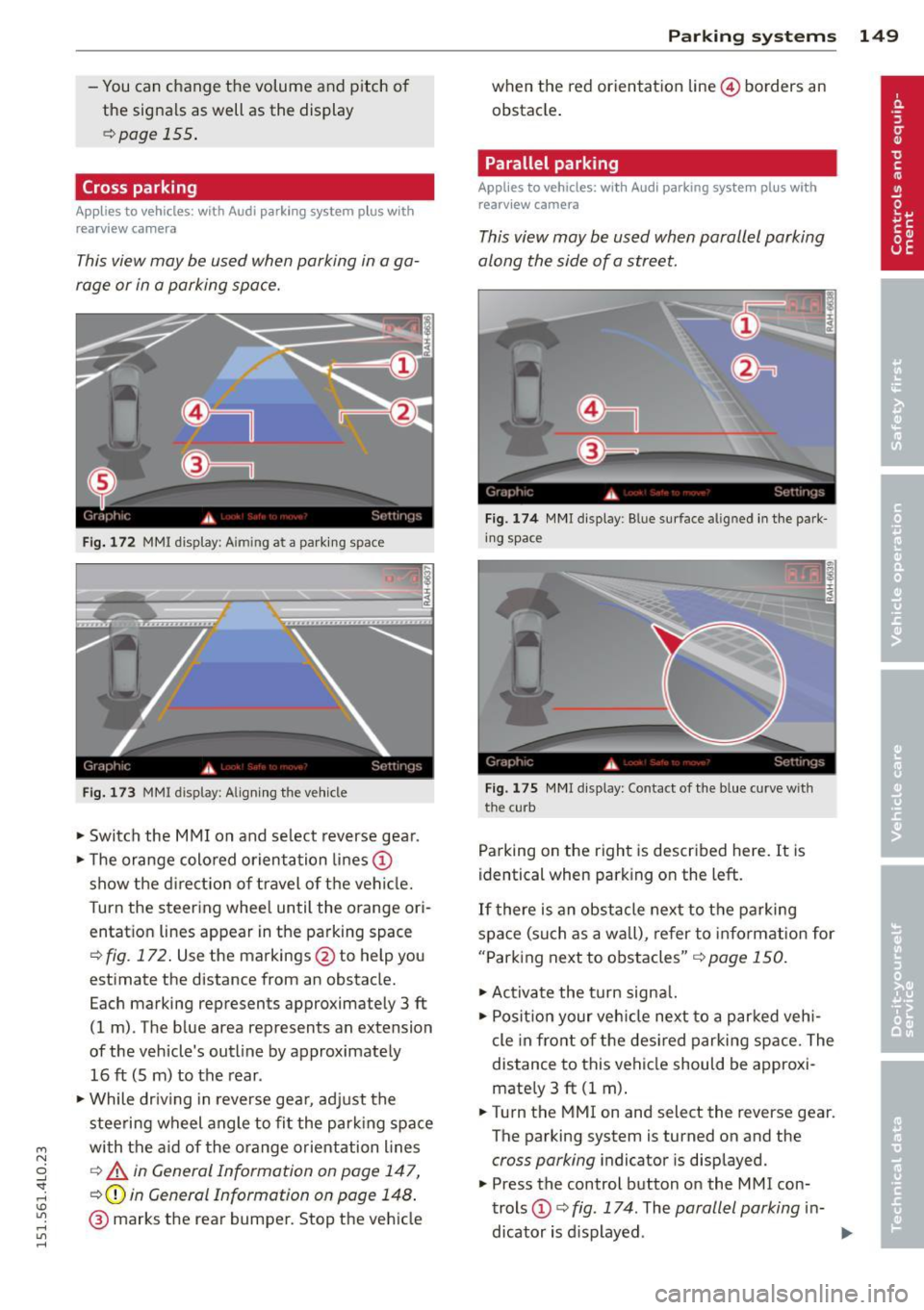
Fig. 172 MMI display: A im ing at a parking space
Fig. 173 MMI display: Aligning the vehicle
"'Switch the MMI on and select reverse gear.
"'Th e orange colored orientation lines@
show the direction of travel of the vehicle.
Turn the steering wheel until the orange ori
entation lines appear in the parking space
Q fig. 172. Use the markings @to help you
estimate the distance from an obstacle.
Each marking represents approximately 3 ft
(1 m) . The blue area represents an extension
of the vehicle's outline by approximately
16 ft (5 m) to the rear .
"'Wh ile driving in reverse gear, adjust the
steering wheel angle to fit the parking space
with the aid of the orange orientation lines
c::> A in General Information on page 147,
Q@in General Information on page 148.
@ marks the rear bumper. Stop the vehicle
Parking systems 149
when the red orientation line© borders an
obstacle.
Parallel parking
Applies to vehicles: with Audi parking system plus with
rearview camera
This view may be used when parallel parking
along the side of a street.
Fig.174 MMI display: Blue surface aligned in the park
ing space
Fig. 175 MMI display : Contact of the blue curve w ith
the cu rb
Parking on the right is described here. It is
identical when parking on the left.
If there is an obstacle next to the parking
space (such as a wall), refer to information for
"Parking next to obstacles"
c::> page 150.
"'Activate the turn signal.
"' Position your vehicle next to a parked vehi
cle in front of the desired parking space. The
distance to this vehicle should be approxi
mately 3
ft (1 m).
"' Turn the MMI on and select the reverse gear.
The parking system is turned on and the
cross parking indicator is displayed.
"' Press the control button on the MMI con
trols @
c::> fig. 174. The parallel parking in-
dicator is displayed.
II>
Page 153 of 350
M
"' 0 ..J
""'. rl I.O
"' rl
"' rl
-If the position or the installation angle
of a camera was changed, after a colli
sion for example, do not continue to use
the system for safety reasons . Have it
checked by your authorized Audi dealer
ship .
- Use the
Rear mode and the Corner view
(rear)
mode only when the rear lid is
completely closed, otherwise the image
in the display will be inaccurate.
- Objects and obstacles
above the camera
are not displayed.
- Camera lenses enlarge and distort the
field of vision. The objects appear both altered and inaccurate on the screen.
(0 Note
- Always read and follow the applicable
warnings ¢0
in General information on
page 145 .
-The MMI display shows the direction in
which the rear of the vehicle is traveling
based on the steering wheel angle. The
vehicle front swings out more than the
vehicle rear. Maintain plenty of distance
so that your outside mirror or a corner of
your vehicle does not collide with any ob
stacles.
@ Tips
If the rear lid is open, the image in the
rearview camera is displayed without ori
entation lines and without blue surfac es.
Switching on or off
Applies to vehicles: with Audi parking system plus w ith
front- and rearview camera
Fig. 177 Center console : P,•A but ton
Parking systems 151
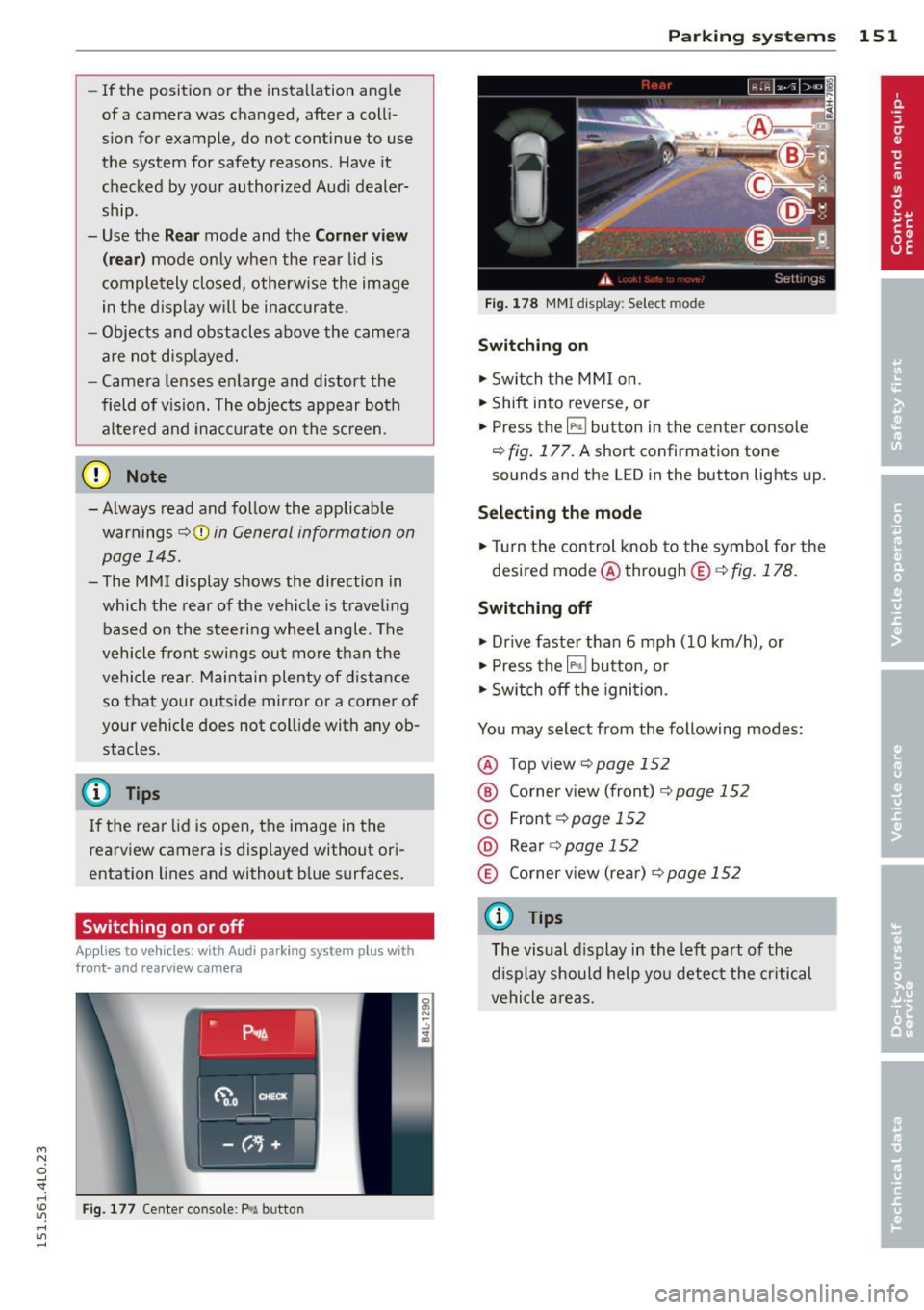
Fig. 178 MMI display: Select mode
Switching on
.,. Switch the MMI on.
.,. Shift into reverse, or
.,. Press the
IP.1! button in the center console
¢
fig. 177. A short confirmation tone
sounds and the L ED in the button lights up.
Selecting the mode
.,. Turn the control knob to the symbol for the
desired mode @through @¢fig.178.
Switching off
.,. Drive faster than 6 mph (10 km/h) , or
.,. Press the
l""'I button, or
.,. Switch off the ignition .
You may select from the following modes:
@ Topview ¢page152
@ Corner view (front) ¢ page 152
© Front¢ page 152
@ Rear o page 152
® Corner view (rear)¢ page 152
(D Tips
The visual display in the left part of the
display should help you detect the critical
vehicle areas.
Page 156 of 350
154 Parking systems
distance to this vehicle should be approxi
mately 3 ft (1 m).
• Turn the
MMI on and select the reverse gear.
The parking system is turned on and the
parallel parking indicator is displayed .
• Press the contro l button on the
MMI con
trols
(D ¢ fig . 186 . The cross parking indica
tor is displayed .
•Backup and align yo ur vehicle so the blue
area @ borders on the rear end of the vehi
cle or on the pa rking space line¢ .&.
in Gen
eral information on page 150, ¢(Din Gen
eral information on page 151 .
The blue area
represents an extension of the veh icle's out
line by approximately
16 ft (5 m) to the rear .
The long side of the blue area should be on
the curb . The entire blue area must fit into
the parking space .
• With the vehicle stopped, turn the steer ing
wheel to the right as far as it will go.
• Back into the parking space until the blue
curve ¢
fig. 187 touches the curb¢.&. in
General information on page 150,
~ CD in
General information on page 151.
Stop the
vehicle.
• With the veh icle stopped, turn the steer ing
wheel to the left as far as i t will go .
• Continue to back into the parking space un
t il the vehicle is parked pa rallel to the curb
¢.&. in General information on page 150,
¢(Din General information on page 151.
@ marks the rear bumper. Stop the vehicle,
at the latest, when the red orientation line
© borders an obstacle. Keep an eye on the
front of your vehicle while doing th is .
Parking next to obstacles
When there is an obstacle (such as a wall)
next to the parking space, choose a space w ith
mo re space on the sides. Position the long
side of the blue area so that there is sufficient
space from the curb. The area must not be on
the curb . You wi ll also need to start turning
the steering wheel much earlier . There should
be a sufficient amount of space between the
curb and the blue curve, and the blue curve
c::> fig. 187 must not touch the curb.
(D Tips
The left or right orientation lines and sur
faces will be displayed, depending on the
turn signal being used.
Trailer mode
Applies to vehicles: with Audi parking system plus with
front· and rearview camera a nd tra iler h itch
This view assists you in positioning the vehicle
in front of a trailer.
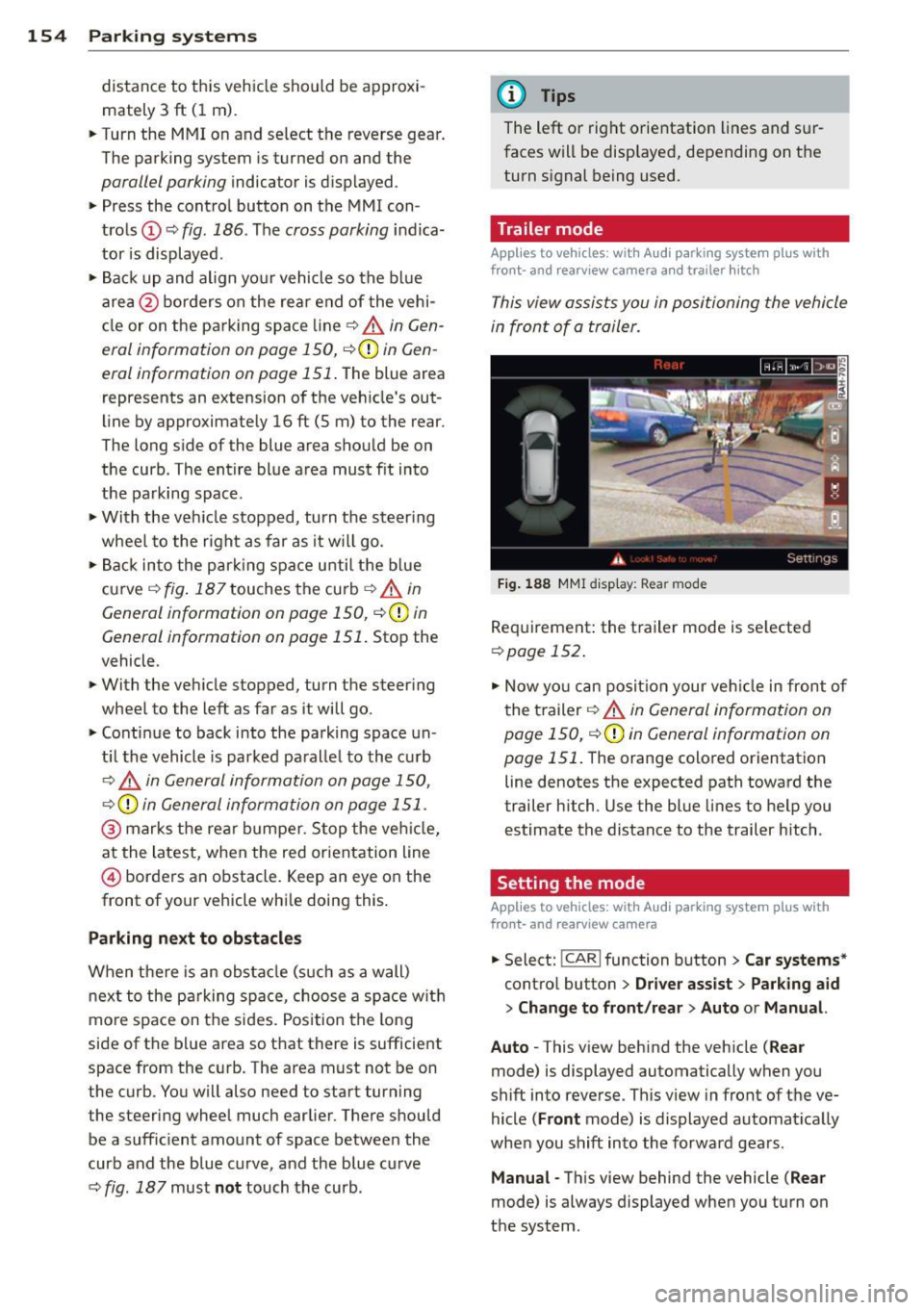
Fig. 188 MMI dis p lay : R ea r m od e
Requirement: the trailer mode is se lected
c:> page 152 .
• Now you can position your veh icle in front of
the trailer
c::> .&. in General information on
page 150,
c::>(D in General information on
page 151 .
The orange colored orientation
line denotes the expected path toward the
trailer h itch. Use the blue lines to help you
estimate the distance to the trailer hitch .
Setting the mode
Applies to vehicles: with Audi parking system plus with
front· and rearview camera
• Select: !CAR I function button> Car systems *
control button > Driver assist > Parking aid
> Change to front /rear > Auto or Manual.
Auto -
This v iew behind the vehicle ( Rear
mode) is displayed automatically when you
shift into reverse . This view in front of the ve
hicle
( Front mode) is displayed automat ically
whe n you shift into the forward gears.
Manual -This view behind the vehicle ( Rear
mode) is always displayed when you turn on
the system .
Page 163 of 350

M N
0 ...J
'SI: ,...., \!) ..,.,
,...., ..,., ,....,
Displaying the vehicle level
The current vehicle leve l is shown with seg
ments fi lled out in the segment disp lay @. If
on ly the bottom segment is filled out, the ve
hicle is at highway leve l. If all segments are
fi lled out, the vehicle is at high level 2 and has
the greatest amount of ground clearance pos
sible.
While the vehicle is being raised or lowered,
the target level is indicated by an arrow @
¢
fig. 191 or a white border @¢ fig. 192. The
arrow/border disappears aga in when the vehi
cle is at the target level.
Jacking mode when changing a flat tire
Applies to vehicles: with Adaptive Air Suspension
This mode must be activated in the MMI be
fore raising the vehicle with a jack or on a ve
hicle lift.
.,. Select: ICARI funct ion button> ! SETUP I func
t ion button >
Jacking mode. Or
.,. Select:
I CARI funct ion button > Car systems*
control button > Servicing & checks > Air
susp.: tire change .
The vehicle jack mode must be activated be
fore changing a wheel so that the automatic
control processes fo r the a ir suspension do
not make lift ing with the vehicle jack more dif
ficult.
The check lamp
II i n the instrument cluster
d isp lay illuminates in vehicle jack mode.
0) Tips
The vehicle jack mode is switched off auto
mat ically at speeds above 9 mph (15 km/
h).
Towing a trailer
Appl ies to vehicles: with towing hitch and Adaptive Air
Suspension
Automatic lowering is not desirable when
towing a trailer.
.,. Se lect: ICAR I function button> !SETUP I func
tion button >
Towing mode . Or
Adaptive A ir Suspension 161
.,. Select: !CAR I function button > Car systems*
contro l button > Vehicle settings > Air
susp.: towing .
As long as towing mode is activated, a vehicle
with a trai ler appears in the
adaptive air sus
pension
main menu.
Level Adjustment when towing a trailer
- Before hitching up the trailer and before ad
jus ting the tongue weight at the trailer, the
automatic or comfort mode
must be select
ed so that the ve hicle can be at normal level
¢ page 159, MMI settings.
-If driving in dynamic mode is desired, this
mode
must be selected before hitching up
the trailer and before adjusting the tongue
weight. However, note that your vehicle is lowered and ground clearance is reduced.
- If you have to dr ive under difficult road con
ditions, you can select offroad or lift mode,
after hitch ing up the trailer or after adjust
ing the tongue weight.
- If the veh icle is at
normal level, and you se
lect offroad mode wh ile traveling at speeds
higher than 22 mph (35 km/h), the veh icle
w ill not be ra ised. Offroad mode will appear
as the active mode in the MMI Display.
- If the veh icle is in offroad mode at
high level
1 ,
it automatically lowers to normal level
when the ve hicl e is t ravel ing at speeds ex
ceeding approximately 31 mph (SO km/h).
The vehicle is automatically raised to
high
level 1
again when the traveling speed falls
be low approximately 25 mph (40 km/h).
Restrictions when operating with a trailer
When operating w ith a tra iler, the lift mode
can only be selected up to about 12 mph (20
km/h). Lift mode is automatically cance led
again when a speed of about 25 mph (40 km/
h) is exceeded.
If the vehicle is in automatic, comfort, offroad
or lift mode before the trai ler towing mode is
activated, the dynamic mode cannot be acti
vated.
If the vehicle is in dynamic mode before tow-
ing operation is activated, it can be driven in
IJI,-
Page 198 of 350
196 Airbag system
turned off, and the PASSENGER AIR BAG
OFF light will stay on.
Repair, care and disposal of the airbags
Parts of the airbag system are installed at
many different places on your Audi. Installing,
removing, servicing or repairing a part in an
area of the vehicle can damage a part of an
airbag system and prevent that system from
working properly in a collision.
There are some important things you have to know to make sure that the effectiveness of
the system will not be impaired and that dis
carded components do not cause injury or pol
lute the environment.
& WARNING
Improper care, servicing and repair proce
dures can increase the risk of personal in
jury and death by preventing an airbag from deploying when needed or deploying an airbag unexpectedly:
- Never cover, obstruct, or change the
steering wheel horn pad or airbag cover
or the instrument panel or modify them
in any way .
- Never attach any objects such as cu pholders or telephone mountings to the
surfaces covering the airbag units.
- For cleaning the horn pad or instrument
panel, use only a soft, dry cloth or one
moistened with plain water . Solvents or
cleaners could damage the airbag cover
or change the stiffness or strength of the
material so that the airbag cannot de
ploy and protect properly.
- Never repair, adjust, or change any parts
of the airbag system.
-All work on the steering wheel, instru
ment panel, front seats or electrical sys
tem (including the installation of audio
equipment, cellular telephones and CB
radios, etc.) must be performed by a
qualified technician who has the training
and special equipment necessary. -
For any work on the airbag system, we
strongly recommend that you see your
authorized Audi dealer or qualified work
shop.
- Never modify the front bumper or parts
of the vehicle body.
- Always make sure that the side airbag can inflate without interference:
- Never install seat covers or replace
ment upholstery over the front seat
backs that have not been specifically
approved by Audi.
- Never use additional seat cushions that
cover the areas where the side airbags
inflate.
- Damage to the original seat covers or
to the seam in the area of the side air
bag module must always be repaired
immediately by an authorized Audi
dealer.
- The airbag system can be activated only
once. After an airbag has inflated, it
must be replaced by an authorized Audi
dealer or qualified technician who has
the technical information, training and
special equipment necessary .
- The airbag system can be deployed only
once . After an airbag has been deployed,
it must be replaced with new replace
ment parts designed and approved espe
cially for your Audi model version. Re placement of complete airbag systems
or airbag components must be per
formed by qualified workshops only.
Make sure that any airbag service action
is entered in your Audi Warranty
& Main
tenance booklet under
AIRBAG REPLACE
MENT RECORD .
-For safety reasons in severe accidents,
the alternator and starter are separated
from the vehicle battery with a pyrotech nic circuit interrupter.
- Work on the pyrotechnic circuit inter
rupter must only be performed by a
qualified dealer - risk of an accident!
- If the vehicle or the circuit interrupter
is scrapped , all applicable safety pre
cautions must be followed.
Page 226 of 350
224 Intellig ent technol ogy
roads . If the systems begin acting to sta
bilize your vehicle, you should immedi
ately change your speed to match the
road and traff ic conditions. Do not let
the inc reased safety prov ided by these
systems tempt you to take r isks. Doing
so w ill increase the risk of a loss of vehi
cl e con tro l, coll is ion and serio us personal
injuries.
- Always adapt you r speed to road, traff ic
and weather condit ions. The risk of los
ing contro l of the veh icle increases when
driv ing too fast, especia lly t hrough
c u rves and on slippery or wet roads, and
when driving too close to vehicles up
ahead. The ESC and its integrated sys
tems cannot always prevent collisions -
there is still a r isk of accidents!
- Always acce lerate with special care on
even, smooth surfaces such as those that
Switching on/off
are wet or covered with ice and snow.
The drive wheels can spin even w ith
these assistance systems that cannot al
ways help to reduce the risk of loss of ve
h icle control.
(D Tips
- ABS and ASR only work correctly when
all four wheels are equipped with identi
cal tires. D ifferent tire sizes can lead to a
reduction in engine power.
- You may hear noises when the systems
descr ibed are working.
- If the ind icator light
DJ or fil (USA
mode ls)/ ti] (Canada models) appears,
there may be a malfunction
<:;> page 16,
<:;>page 18.
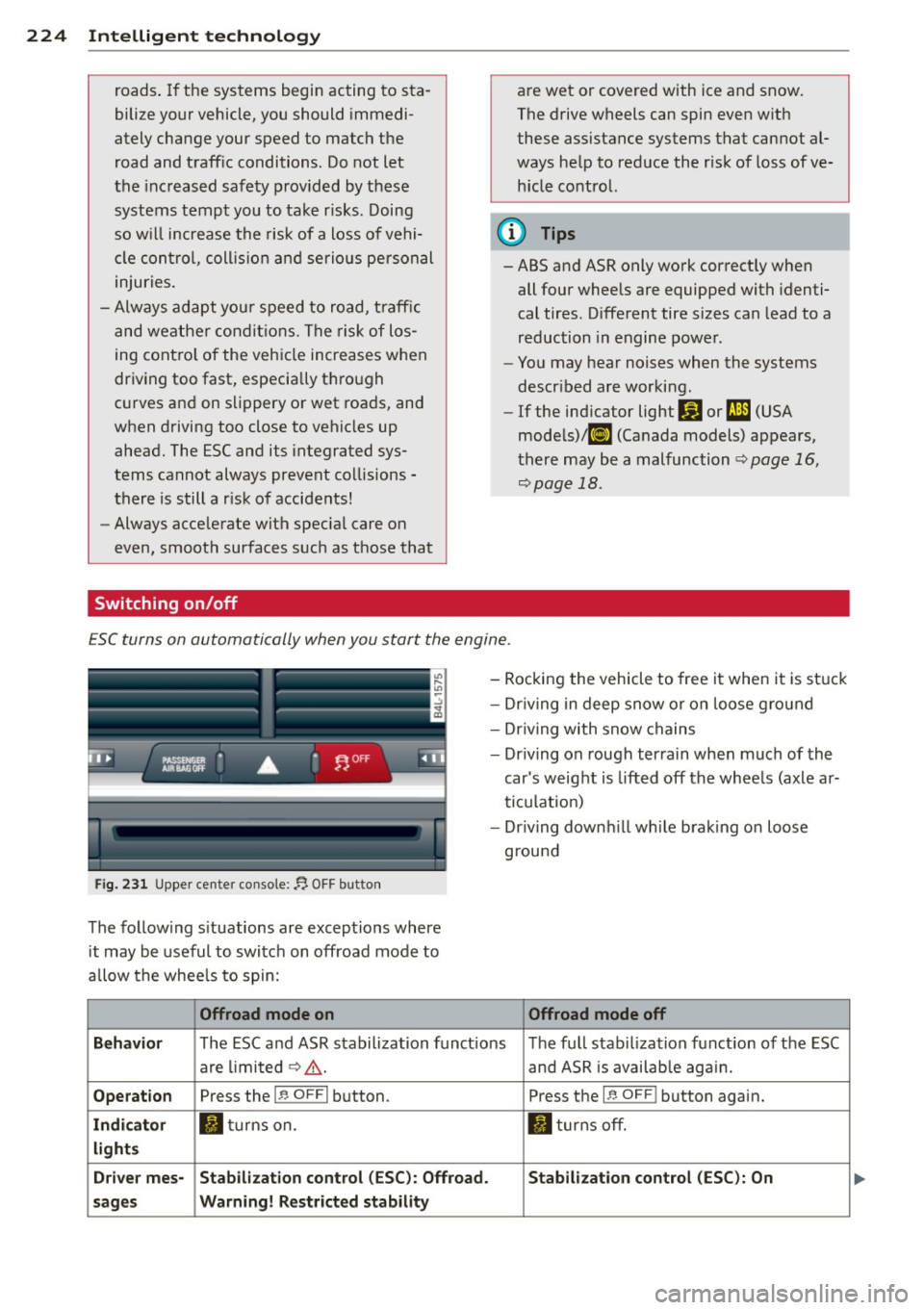
ESC turns on automatically when you start the engine .
,.-------------.,
------------------
Fig. 231 Upper cente r console: f'J OFF button
The follow ing s ituations are exceptions where
it may be useful to switch on offroad mode to
a llow the whee ls to spin:
Offroad mode on
- Rocking the vehicle to free it when it is st uck
- Dr iving in deep snow or on loose ground
- Dr iving with snow chains
- Dr iving on rough terrain when much of the
car's weight is lifted off the whee ls (axle ar
ticulation)
- Dr iving downh ill wh ile brak ing on loose
ground
Offroad mode off
Beha vior
The ESC and ASR stabilization funct ions The fu ll stab ilization funct ion of the ESC
are limited <:;>,&..
and ASR is availab le agai n.
Operat ion Press the I~ O FFI button . Press the I~ OFFI button again.
Indi ca to r IJ tu rnson. II turns off.
li g ht s
D riv er m es- Stabil izat ion cont rol (ES C): O ffroad. S tabil ization contro l (ESC) : On
sa ges Warning! R estricted st ab ility