wheel AUDI Q7 2017 Owner´s Manual
[x] Cancel search | Manufacturer: AUDI, Model Year: 2017, Model line: Q7, Model: AUDI Q7 2017Pages: 402, PDF Size: 100.39 MB
Page 364 of 402
Emergency assistance
-If a tire pressure of 29 psi (200 kPA) cannot
reached after inflating for 6 minutes, then
the tire is too severely damaged. Do not
continue driving.
- If the tire cannot be repaired with the tire
sealant, see an authorized Audi dealer or au
thorized Audi Service Facility for ass istance.
(D} Tips
Do not operate the compressor for more than
six minutes continuously, or it can overheat.
Once the compressor has cooled, you can con
tinue to use it .
Completing
"' Adhere the sticke r that says "max . SO mph
(max. 80 km/h)" that is provided w ith the tir e
mobility kit within the driver's fie ld of vision.
"'S top the vehicle after driving for about 10 mi
nutes and check the tire pressure .
"' If the tire pressure is lower than 19 psi (130
kPA), then the tire is too severely damaged. Do
not continue driving.
A WARNING
Pay attention to the following after repairing
the tire :
- Do not drive faster than SO mph (80 km/h).
- Avoid hard acceleration, braking sharply, and fast cornering.
- The vehicle may become more difficult to
control.
- If the tire is too severely damaged, see an
authorized Audi dealer or authorized Aud i
Service Facility for assistance .
@ For the sake of the environment
You can give the used tire sealant bottle to an
authorized Audi dealer or authorized Audi
Service Facility for disposal.
@ Tips
Remember to obtain a new bottle of sealant
from an authorized Audi dea ler or authorized
Audi Service Facility after repairing a tire.
362
Replacing a wheel
' Preparation
You must complete the preparation before
changing a tire .
"'Read and follow the important safety precau-
tions¢
page 360.
"' Set the park ing brake.
"' Select the P selector lever posit ion.
"' When towing a trailer: disconnect the trailer
from your vehicle.
"' Lay out the vehicle tool kit¢
page 360 and the
spare tire.
"' Switch on wheel change mode* in the Infotain
ment system:
! MENUI button> Vehicle> left
control button >
Service & checks > Air suspen
sion: wheel change.
"'Switch the ignition off.
The vehicle jack mode* switches off automatical ly at speeds above 6 mph (10 km/h).
A WARNING
When using the ve hicle jack* on a road with a
steep hill or offroad, you must take extra pre
cautions to prevent the vehicle from rolling. Use suitable objects to block the front and
back of the wheel that is diagonal from the
wheel with the flat tire.
A WARNING
You or your passengers could be injured while
changing a whee l if you do not follow these
safety precautions:
- If you have a flat tire, move a safe distance
off the road. Turn off the engine, turn the
emergency f lashers on and use other warn
ing devices to alert other motorists.
- Make sure that passengers wait in a safe
place away from the vehicle and well away
from the road and traffic.
- To help prevent the vehicle from moving
suddenly and possibly slipping off the jack*,
always fully set the parking brake and block
the front and back of the wheel diagonally opposite the wheel being changed. When
one front wheel is lifted off the ground,
~
Page 365 of 402
u (0 ...... N r--. N ...... 0
0
:E
(Park) will
not prevent the vehicle from
moving.
- Before you change a wheel , be sure the
ground is level and firm. If necessary, use a
sturdy board under the jack*.
-Always store the veh icle tool kit, the jack*
and the replaced tire in the luggage com
partment
c::> page 261 .
(D Tips
-Obey all laws .
- Before changing the wheel, you must acti- vate the jacking mode*, so that the a uto
matic controls for the air suspension * do
not make it more diff icu lt to lift the vehicle
with the jack*
c::> page 363 .
Removing the caps
Fig . 280 Whee l: whee l bo lts w it h c aps
"'Slide the plastic clip (from the vehicle tool kit)
onto the cap until it engages
c::> fig. 280 .
"'Remove the cap with the plastic clip .
Loosening the wheel bolts
Fig . 28 1 Whee l: loose ning the w hee l bo lt
Em ergen cy a ssis tanc e
"' Slide the wheel wrench (from the vehicle tool
kit) a ll the way onto the wheel bolt.
"' Turn the whee l bolt approximately one turn to
the left -arrow- . To reach the required to rque,
hold the end of the wheel wrench . If the wheel
bolt will not loosen, press carefully on the
wheel wrench with your foot . H old onto the ve
hicle secu rely whi le during th is and make sure
your stance is stable .
_& WARNING
To reduce the risk of an a cciden t, only loosen
the wheel bolts gently (one t urn) before rais
ing the vehicle with the vehicle jack* .
Raising the vehicle
Fig. 282 S ill panels : ma rki ngs
F ig. 283 Sill : po siti onin g t he ve hi cle jack
"' Place the veh icle jack* (vehicle tool kit) on a
firm surface. Use a flat, stab le support if neces
sary . On a slipp ery surface such as ti le, you
should use a non -slip pad (such as a rubber
mat)
¢ ,& .
"' Find the marking on the sill that is closest to
the tire that w ill be changed
c::> fig. 282 . Behind
the mark ing, there is a lifting point o n the side
sill for the veh icle jack* . .,.
363
Page 366 of 402

Emerg ency assis ta nce
• Using the hex socket wrench © (from the vehi
cle tool kit), turn the vehicle jack* under the
li ft ing point on the side sill unt il it is high
enough that the arm@¢
fig. 283 is under the
designated plastic mount.
• Al ign the vehicle jack* so the arm @engages in
the des ignated lift ing po int i n the door s ill and
the base @ lies f lat on the ground . The base @
mus t be d irectly unde r the lifting point @.
• To lift the vehicle , place the ratchet @(from
the vehicle too l kit) with the correct side on the
hex socket wrench ©-
• Move the ratchet @clockwise back and forth
unt il the wheel lifts up slightly from the
ground.
A WARNING
- Make sure the vehicle jack* is stable. There
is a risk of injury when the ground is slick or
soft, because the vehicle jack* could slide or
sink.
- Only raise your vehicle with the vehicle jack*
provided by the facto ry .
If you use a vehicle
jack des igned for ano ther veh icle, yo ur vehi
cle can slide and cause in jury.
- Position the vehicle jack* on ly at the desig
nated mounting points on the s ide s ill and
align the jac k. O therwise, the veh icle jack *
could slip and ca use an in jury if it does not
have sufficient hold on the vehicle.
- Vehicles with a ir suspension*: changes in
temperature or load can affect the height of
the stopped vehicle.
- To reduce the risk of an accident, never start
the engine when the vehicle is raised.
- T o reduce the risk of injury, support the ve
hicle securely with suitab le stands if work is
to be performed underneath the vehicle.
- To help prevent injury to you rself and yo ur
passenge rs :
- Do not ra ise the vehicle unt il you are sure
the jack* is securely engaged.
- Passengers must not remain in the vehicle
when it is jacked up .
- Make sure that passengers wait in a safe
place away from the vehicle and well away
from the road and traff ic .
364
- Make sure jack position is correct, adjust
as necessary and then continue to ra ise
the jack*.
- If work has to be done under the vehicle,
ensure that it is safely supported on suita
ble stands -risk of injury!
- Never start the engine when the vehicle is
on the jack* -risk of accident!
(D Note
Do not lift the vehicle by the si ll. Position the
vehicle jack* only at the designated mounting po ints on the side sill. Otherw ise, your vehicle
will be damaged.
@ Tips
The vehicle jack mode* switches off automati
cally at speeds above 6 mph (10 km/h).
Removing and installing a wheel
Fig . 28 4 Whee l: in terna l hex socke t to t urn th e whee l
bo lts
Fig . 285 Whee l: alignme nt pin in t he top ho le
Remo ving a wheel
• Remove the top wheel bolt completely using
the hex socket in the screwdriver handle (in the .,,_
Page 367 of 402
u co ...... N r-... N ...... 0
0
:E: '
clean surface .
.,. Install the alignment pin (from the vehicle tool
kit) by hand into the empty hole
c:> fig . 285.
.,. Remove the rest of the wheel bol ts.
"" Remove the wheel
c:>(D . The alignment pin re -
mains in the hole while do ing this .
Install a whee l
Read the directions on c:> page 365 when instal
ling unidirectional tires .
.,. Slide the wheel on over the alignment pin
c:> (D.
.,. Install the wh eel bo lts and tighten gent ly using
the hex socket.
.,. Remove the alignment pin and also tighten the
remaining wheel bolt .
.,. Carefully lower the vehicle using the vehicle
jack* .
.,. Tighten the wheel bolts in a diagona l pattern
us ing t he wheel wrench .
The wheel bolts must be clean and loosen/tight e n easi ly. Check the contact surfaces for the
wheel and hub . Contaminants on these surfaces
must be removed before installing the wheel.
& WARNING
Never use the hex socket in the screwdr iver
handle or the hex socket wrench with the
ratchet to loosen or tighten the whee l bolts.
You will not attain the req uired tightening
specification, which w ill increase the risk of an
accident .
When removing or installing the whee l, the
r im could hit the brake rotor and damage the
rotor. Work carefu lly and have a second per
son help you.
(D} Tips
- When mounting tires w ith u nidi re ctional
t read desig n
make sure the tread pattern is
po inted the r ight way
c:> page 365.
- The wheel bolts should be clean and easy to
turn . Check for d irt and corrosion on the
mating surfaces of both the wheel and the
-
Em ergenc y ass is tanc e
hub. Remove all dirt from these s urfaces be
fore remounting the whee l.
Unidirectional tires
A unidirectional tire profi le is identified by a rrows
that point in the running direct ion on the tire
s idewall. You must always adhere to the spec i
fied ru nning direction . Th is is necessary ensure
the tire 's opt imum performance in regard to ad
hesion , running no ise, frict ion and hyd roplaning.
To benefit fully from the advantages of the uni directional t ire design, you should replace faulty
t ir es as soon as possible and restore the cor rect
run ning direction on a ll of the t ires .
Finishing
.,. Rei nstall the caps on the wheel bo lts if neces
sary .
.,. Store the ve hicle too l kit in its designated
place.
.,. Store the replaced tire securely in the luggage
compartment
i=> page 261.
.,. Check the tire pressure on the installed wheel
as soon as possible .
.,. Correct the t ire pressure and store it in the In
fotainment system
i=> page 352 .
.,. The whee l bolt tigh tening specification must be
120
ft l bs ( 160 Nm) . Check it as soon as possi
b le with a torque wren ch. Drive carefu lly unti l
then.
.,. Have the fau lty whee l replaced as quickly as
possible .
(D Tips
-If you notice that the wheel bo lts are cor
roded and d ifficult to turn while changing a
tire, they shou ld be replaced before you
check the tightening torque.
- Dr ive at reduced speed unti l you have the
tightening torques checked.
Notes on wheel changing
Please read the information c:> page 340 if you
are going to use a replacemen t tire which is d if-
ferent from the tires on your vehicle. .,,.
365
Page 368 of 402
Emergency assistance
After you change a t ire:
- Check the tire pressure on the replacement
tire immediately after installation.
- Have the wheel bolt tightening torque
checked with a torque wrench as soon as po s
sible by your authorized Audi dealer or quali
fied workshop.
- With steel and alloy wheel rims, the wheel
bolts are correctly tightened at a torque of
120 ft lbs (160 Nm ).
- If you notice that the wheel bolt s are corroded
and difficult to turn while changing a tire,
they should be replaced before you check the
tightening torque.
- Replace the flat tire with a new one and have
it installed on your vehicle as soon as possi
ble . Remount the wheel cover.
Until then , drive with extra care and at reduced
speeds .
A WARNING
-If you are going to equ ip your ve hicle w ith
t ir es o r rims w hich d iffer from those which
were factory installed, then be s ure to read
the informat ion¢
page 340.
- Always make sure the damaged whee l or
even a flat tire and the jack* and tool k it are
prope rly secured in the luggage compart
m ent and are not loose in the passenge r
compartmen t.
- In an accident o r sudden mane uver they
could fly forward , injuring anyone in the ve
hicle .
- Always store damaged wheel, jack* and tools securely i n the l uggage compa rtme nt.
Otherwi se, in an accident or sudd en man eu
ver they c ould fly fo rward, causing injury to
p assenge rs in the vehicle .
366
-
Page 372 of 402
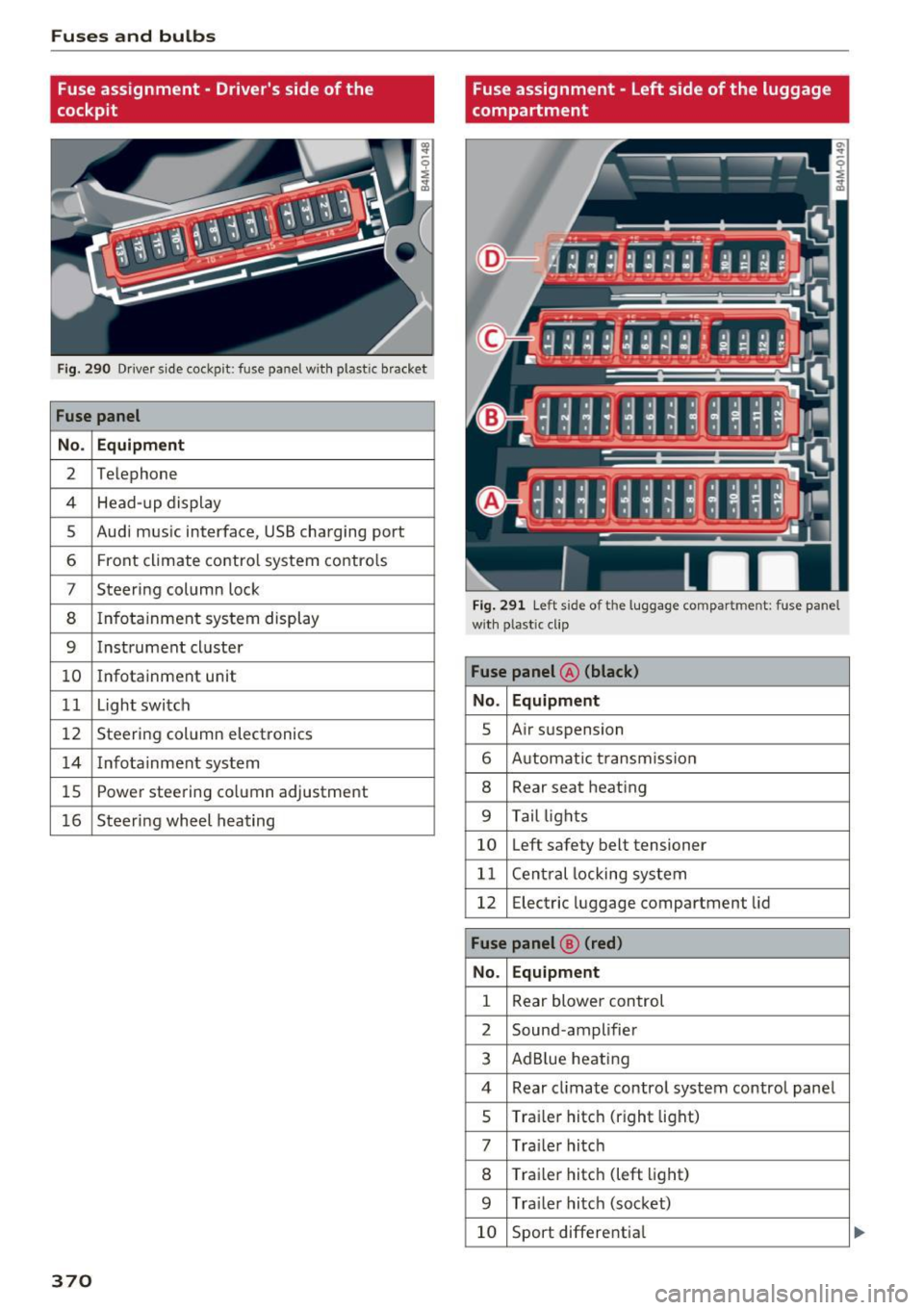
Fuses and bulbs
Fuse assignment - Driver's side of the
cockpit
Fig . 290 D river side cockpit: fuse panel wit h plastic bracket
Fuse panel
No . Equipment
2 Te lep hone
4 Head-up display
5 Audi mus ic interface, USB charging port
6 Front climate contro l system contro ls
7 Steering column lock
8 Infotainment system display
9 Instrument cl uster
10 Infotainment unit
11 Light switch
12 Steer ing column electronics
14 Infotainment system
lS Powe
r steering co lumn adjustme nt
1 6 Steer ing wheel heating
370
Fuse assignment - Left side of the luggage
compartment
Fig. 291 L eft side of the lu ggage compartment: fuse panel
wi th plastic cl ip
Fuse panel @ (black)
No. Equipment
5 Air suspension
6 Automat ic t ransmiss ion
8 Rear seat heating
9 Tail lights
10 Left safety belt tensioner
11 Central locking system
12 Electric luggage compartment lid
Fuse panel@ (red)
No . Equipment
1 Rear blower control
2 Sound-amplifier
3 AdBlue heating
4 Rear cl imate contro l system control panel
5 Traile r hitch (right light)
7 Tra iler hitch
8 Trai le r hitch (left light)
9 Trailer hitch (socket)
10 Sport differential
Page 377 of 402
u (0 ...... N r--. N ...... 0
0
:E
the arrow to remove
c:> fig. 295.
.. Insert the towing loop all the way into the
threaded opening and tighten it with a wheel
wrench .
.. After using, place the towing loop back in the
vehicle tool kit.
_& WARNING
If the towing loop is not tightened unti l it
stops when installing, the threads may be
pulled o ut when towing the vehicle and that
cou ld cause an acc ident .
(D Note
The trim is attached to the bumper with sev
eral hooks. To reduce the risk of damage, do
no t use any force when remov ing and instal
ling .
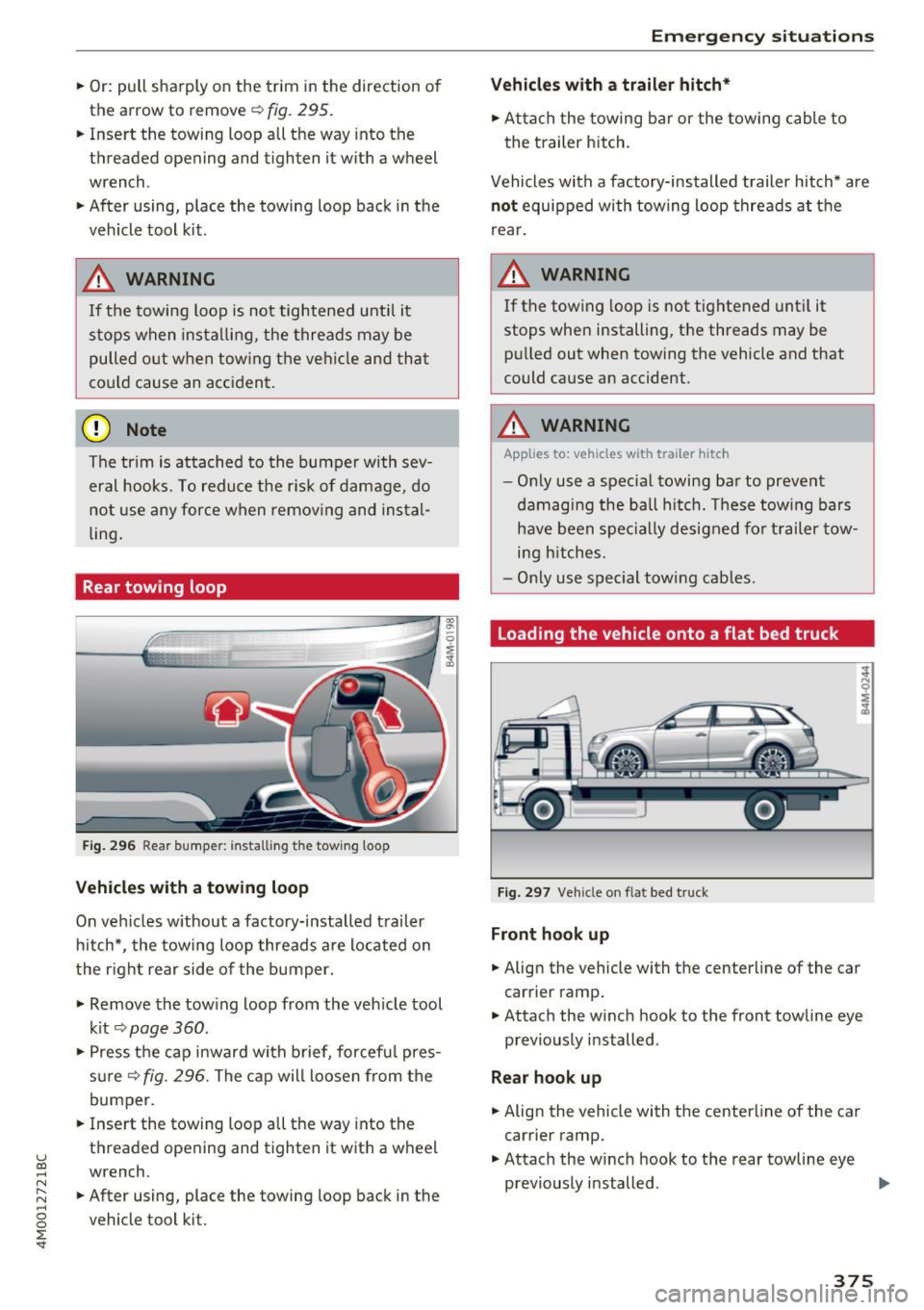
Rear towing loop
Fig. 296 Rear bumper: installi ng the tow ing loop
Vehicles with a towing loop
On vehicles w ithout a factory-installed trailer
hitch*, the towing loop threads a re located on
the right rear side of the bumper.
-
.,. Remove the tow ing loop from the veh icle tool
k it
c:> page 360 .
.. Press the cap inward wi th brief, forcef ul pres
s ur e
c:>fig. 296. The cap will loosen from the
bumper.
.. Inse rt the towing loop all the way into the
threaded opening and tighten it with a wheel
wrench .
.. After using, place the towing loop back in the
vehicle tool kit.
Emergency situations
Vehicles with a trailer hitch*
.. Attach the towing bar or the towing cable to
the trailer hitch.
Vehicles with a facto ry -installed trailer hitch* are
not equipped with towing loop threads at the
rear.
_& WARNING
If the towing loop is not tightened until it
stops when installing, the threads may be pulled out when towing the vehicle and that
could cause an accident.
_& WARNING
-Applies to: vehicles with trailer hitch
- Only use a spec ial towing bar to prevent
damaging the ball hitch. These towing bars
have been specially designed for trailer tow
i ng hitches.
- Only use special towing cables.
Loading the vehicle onto a flat bed truck
Fig. 297 Vehicle on flat bed truck
Front hook up
.. Align the vehicle with the centerline of the car
carrier ramp .
.,. Attach the w inch hook to the front towline eye
previously installed .
Rear hook up
.. Align the vehicle with the centerline of the car
carrier ramp.
.. Attach the w inch hook to the rear towline eye
previously installed . .,.
375
Page 384 of 402
Consumer Info rmation
today's a utomo biles, have steadily reduced the
scope of maintenance and repairs which can be
carried out by veh icle owners.
Also , sa fet y and
en vironmental
concerns place very strict limits
on the nature of repairs and adjustmen ts to en
g ine and transmission parts wh ich an owner can
perform .
Maintenance, adjustments and repairs usually re
qu ire special tools, testing devices and other
equ ipment available to specially trained work
shop personnel in order to assure proper per
forma nce, re liability and safety of the veh icle and
its many systems .
Improper maintenance, adjustments and repairs
can impair the operation and reliab ility of your
ve hicle and eve n void your vehicle warranty .
Therefo re, proof of se rvicing in a ccordance w ith
the m aintenance sched ule may be a condition for
up ho ld ing a possible wa rranty claim made within
the wa rranty pe riod.
Above all , ope rational safety can be adversely af
fected, cre ating unne cessa ry risks fo r you and
your passengers.
I f in doubt about any servicing, have it done by
your author ized Audi dealer or any other properly
eq uipped and qualified workshop . We strongly
urge you to g ive your author ized Audi dealer the
opportunity to perform a ll scheduled mainte
nance and necessa ry repairs. Your dealer has the
facilities, origina l parts and tra ined specialists to
keep your veh icle runn ing prope rly.
Performing limited maintenance yourself
The fo llow ing pages describe a limited number of
procedures whic h can be performed on your vehi
cle with ordinary tools, should the need arise and
tra ined personnel be unava ilable. Before per
forming any of these procedures, always thor
ough ly read all of the app licab le text and carefu l
ly follow the instructions g iven . A lways rigorously
observe the
WARNINGS prov ided .
Befo re yo u check anything in the engine com
partment, always read and heed all WARNINGS
c::> & and c::> & in Working in the engine compart
ment on page 322 .
382
A WARNING
-
-Ser ious personal in jury may occur as a result
of imp roperly performed maintenance, ad
justments or repairs .
- Always be extreme ly careful when work ing
on the vehicle . Always follow commonly ac
cepted safety practices and general com mon sense. Never r is k personal in jury.
- Do not attempt any of the mainte nance,
checks or repairs described on the following pages if you are no t fu lly fam iliar with these
or other proce dures with respect to the ve
hicle, o r are uncert ain how to p ro ceed.
- Do not do any work wi thout the prope r tools
a nd equi pmen t. H ave the necess ary wo rk
done by your authorized Au di dealer or an
other properly equipped and qualified work
shop.
- The engine compartment of any motor veh i
cle is a potentially hazardous area . Never
reach into the a rea around or touch the radi
ator fan. It is temperature controlled and
can switch on suddenly - even when the en
gine is off and the ignition key has been re
moved. The rad iator fan switches on auto
mat ica lly when the coolant reaches a certain
temperature and will con tinue to ru n until
the coolant temperat ure drops.
- Always remove the igni tion key before any
one gets u nder the vehicle.
- Always support your vehicle with safety
stands if it is necessary to work underneath
the vehicle. The ja ck* s upplied w ith the vehi
cle is no t ad equate fo r thi s pu rpose and
could collapse causing se rious personal in
jury .
- If you must wor k underne ath the vehicle
with the wheels on t he ground, always make
sure the vehicle is on level ground, that the
wheels a re always sec urely blocked and that
the engine cannot be started.
- Always make sure the transmission se lector
lever (automatic t ransm iss ion) is in P (Park
position) and the park b rake is applied.
Page 387 of 402

u co ...... N r-... N ...... 0
0
:E: '
A/C MAX (button)
A/C (button) ... ........ ..... ... ... . 72, 76
72, 75
ABS .. .. ... . .. .. ............. .. .. .. . 14 8
Accesso ries 66 ,383
Active lane ass ist
C leaning the camera area ......... ... .
also refer to Aud i active lane ass ist .. .. .
Adapt ive a ir suspension
refer to Air suspension ...... .. .. .... .
Adapt ive cr uise control ..... ... .. .. .... .
C leaning the sensor . ..... ... .. .. .... .
Distance indicator and distance warning .
Messages .. .. ............. .. .. .... .
Predictive contro l
............... .....
Traff ic jam ass ist ............. .. .... .
Ad B lue
. . .. .. .. .. .. .. .... ... .. .. .... .
355
123
134
10 7
355 1 16
116 113
114
3 18
Messages . ... .... .. .... ... .. .. .... . 318
Add it io nal accesso ries . . . . . . . . . . . . . . . . . 383
Ad justing a ir distribution (automat ic climate
control) . . . . . . . . . . . . . . . . . . . . . . . . . . .
73, 76
Ad justing the rear seats . . . . . . . . . . . . . . . . . 60
Ad justing the so und . . . . . . . . . . . . . . . . . . . 253
Ad justing the tempe rature (automatic climate
control) . . . . . . . . . . . . . . . . . . . . . . . . . . .
73, 76
Ad justing the vol ume . . . . . . . . . . . . . . . . . . . 14
Advanced key
refer to Conven ience key . . . . . . . . . . . . . . . 8 2
Airbag . . . . . . . . . . . . . . . . . . . . . . . . . . . . . . 273
Ai rbag system . .. .. .. ..... ... .. .. . 2 73,29 1
Advanced Airbag System components . . . 280
Care . . . . . . . . . . . . . . . . . . . . . . . . . . . . . . 288
Chi ldren . . . . . . . . . . . . . . . . . . . . . . . . . . . 297
Chi ld restraints 297
Components (front a irbags) . . . . . . . . . . . 280
Da nger of fitt ing a child safety seat on t he
front passenger seat . . . . . . . . . . . . . . . . . 2 7 4
D . l 1sposa . . . . . . . . . . . . . . . . . . . . . . . . . . . 288
Fron t air bags . . . . . . . . . . . . . . . . . . . . . . . 278
H ow do the fro nt airbags work? . . . . . . . . 283
How many airbags does my vehi cle have? 280
How the Advanced Airbag System compo-
nents work together . . . . . . . . . . . . . . . . .
282
Indicator light . . . . . . . . . . . . . . . . . . . . . . 285
Mon itoring . . . . . . . . . . . . . . . . . . . . . . . . . 285
PASSENGER AIR BAG light . . . . . . . . . . . . 285
Index
Repairs
Safety instr uctions . ..... . ..... ... .. . .
When m ust t he system be inspected? .. . 288
287
285
Air pressu re
T ires
..... .... .. .. ............... .. 343
Air suspension . . . . . . . . . . . . . . . . . . . . . . . 134
T ra iler mode . . . . . . . . . . . . . . . . . . . . . . . . 100
Alignment pin (changing the wheel) . . . . . . 360
All -wheel stee ring . . . . . . . . . . . . . . . . 134, 152
All season tires . . . . . . . . . . . . . . . . . . . . . . . 348
All weat her lights . . . . . . . . . . . . . . . . . . . . . . 48
All wheel d rive
refer to q uattro
AMI 152
refer to Aud i music interface . . . . . . . 234, 235
Android Auto
refer to Audi smartphone interface 247
An ti-free ze
Windsh ield washer sys tem . . . . . . . . . . . .
331
An ti-lock b raking system
refer to A BS . . . . . . . . . . . . . . . . . . . . . . . . 148
Anti-Slip Regu lation
refer to ASR . . . . . . . . . . . . . . . . . . . . . . . . 148
Apple Car Play
refer to Audi smartphone interface . . . . . 247
Asht ray . . . . . . . . . . . . . . . . . . . . . . . . . . . . . . 65
ASR · · · · · · · .... .. .. ............... .. 148
Audi active lane assist . . . . . . . . . . . . . . . . . 1 23
Messages . . . . . . . . . . . . . . . . . . . . . . . . . . 124
Audi con nect eme rgency call a nd service . . 203
Online roads ide ass istance . . . . . . . . . . . . 2 04
Audi connect vehicle contro l . . . . . . . . . . . . 199
Parki ng locat ion . . . . . . . . . . . . . . . . . . . . . 200
Remote locking and unlock ing . . . . . . . . . 200
Vehicle status report . . . . . . . . . . . . . . . . . 200
Audi connect (Infotainment) . . . . . . . . 189, 196
Data protection . . . . . . . . . . . . . . . . . . . . . 197
Se rvices ove rview . .. .... ...... ... .. ..
Start ing ..... ... .. ................ .
Audi drive select
. .. .. .... . ..... ... .. ..
Audi Ente rtainment mob ile ........... ..
Audi music interface . . ............... ..
Audi music stream
refer to W i-F i . ... .. ... .. ..... ... .. . .
190
190
134
2 36
234
232
Audio files . . . . . . . . . . . . . . . . . . . . . . . . . . . 23 7
385
Page 394 of 402
Index
MMI search
refer to Free text search . . . . . . . . . . 165, 239
MMI touch . . . . . . . . . . . . . . . . . . . . . . . . . . . 160
Monitoring the Advanced Airbag System 285
MP3
refer to Jukebox . . . . . . . . . . . . . . . . . . . . . 230
Multifunction steering wheel
Button . . . . . . . . . . . . . . . . . . . . . . . . . . . . . 14
Map zoom .. .. ... ............ .... .. .. 13
Operating . . . . . . . . . . . . . . . . . . . . . . . . . . . 12
Speech dialog system . . . . . . . . . . . . . . . . . 14
Switching tabs . . . . . . . . . . . . . . . . . . . . . . . 12
Multi Media Interface . . . . . . . . . . . . . . . . . . 156
Music collection
refer to Jukebox . . . . . . . . . . . . . . . . . . . . . 230
Mute . . . . . . . . . . . . . . . . . . . . . . . . . . . . . . . . 14
also refer to Muting . . . . . . . . . . . . . . . . . . 253
Mute (muting) . . . . . . . . . . . . . . . . . . . . . . . . 14
Muting .... .. .. ... ............ .... .. . 253
Muting (mute) . . . . . . . . . . . . . . . . . . . . . . . . 14
myAudi . . . . . . . . . . . . . . . . . . . . . . . . . 189, 209
L ogging in in the vehicle . . . . . . . . . . . . . . 189
PIN . . . . . . . . . . . . . . . . . . . . . . . . . . . . . . . 189
N
Natura l leather care/cleaning . . . . . . . . . . . 357
NAV/MAP button . . . . . . . . . . . . . . . . . . . . . 205
Navigating ( instrument cluster) . . . . . . . . . . 19
Navigation . . . . . . . . . . . . . . . . . . . . . . . . . . . 205
Announcements . . . . . . . . . . . . . . . . . . . . . 214
Better route . . . . . . . . . . . . . . . . . . . . . . . . 221
also refer to Map . . . . . . . . . . . . . . . . . . . . 215
Navigation (instrument cluster) . . . . . . . . . . 18
Net . . . . . . . . . . . . . . . . . . . . . . . . . . . . . . . . . 67
Network connection (Wi-Fi) . . . . . . . . . . . . . 195
NHTSA Contacting . . . . . . . . . . . . . . . . . . . . . . . . . 263
Night vision assist . . . . . . . . . . . . . . . . . . . . 131
Cleaning the camera . . . . . . . . . . . . . . . . . 355
Nitrogen ox ide (NOx) catalytic converter
refer to Ad Blue . . . . . . . . . . . . . . . . . . . . . . 318
Number of seats . . . . . . . . . . . . . . . . . . . . . . 265
0
Occupant protection . . . . . . . . . . . . . . . . . . . 117
392
Occupant seating positions . . . . . . . . . . . . . 257
Octane rating . . . . . . . . . . . . . . . . . . . . . . . . 314
Odometer . . . . . . . . . . . . . . . . . . . . . . . . . . . . 12
Offroad driving . . . . . . . . . . . . . . . . . . . . . . . . 89
Offroad mode . . . . . . . . . . . . . . . . . . . . . . . . 149
OFF (button) . . . . . . . . . . . . . . . . . . . . . . . 72, 75
Oil
refer to Engine oil . . . . . . . . . . . . . . . 324, 326
On-board computer . . . . . . . . . . . . . . . . . . . . 15
On-Board Diagnostic System (OBD) Data Link Connector (DLC) . . . . . . . . . . . . . . 21
Electronic speed limiter . . . . . . . . . . . . . . . 102
Malfunction indicator lamp (MIL) . . . . . . . . 21
On/Off knob (MMI) . . . . . . . . . . . . . . . . . . . . 156
Online destinations
refer to Point of interest search . . . . . . . . 209
Online map . .. .. .. .. .. ............. .. 217
Online map update . .. .. ... .......... .. 219
Online media . . . . . . . . . . . . . . . . . . . . . . . . . 233
Online roadside assistance Audi connect emergency call and service 204
Online serv ices
refer to Aud i connect (Infotainment) . . . . 189
Open ing.... .. .. .. .. .. ... ..... ... .. ... 34
Fuel filler door . . . . . . . . . . . . . . . . . . . . . . 316
Operating Multifunction steering wheel . . . . . . . . . . . 12
Multi Media Interface . . . . . . . . . . . . . . . . 158
Voice recognition system . . . . . . . . . . . . . 169
Options menu . . . . . . . . . . . . . . . . . . . . 159, 163
Other consumers . . . . . . . . . . . . . . . . . . . . . . 16
Outside temperature display . . . . . . . . . . . . . 10
Overview (Cockpit) . . . . . . . . . . . . . . . . . . . . . . 8
p
Paint damage . . . . . . . . . . . . . . . . . . . . . . . . 356
Paint number . . . . . . . . . . . . . . . . . . . . . . . . 378
Panorama glass roof . . . . . . . . . . . . . . . . . . . . 45
Emergency operation . . . . . . . . . . . . . . . . . . 45
Parenta l control
DVD .......... .. .. .. ... ............ 240
Parking aid Cleaning sensors/camera . . . . . . . . . . . . . 355
Parking brake
refer to Electromechanical parking brake . 87