USB AUDI Q7 2017 Owner´s Manual
[x] Cancel search | Manufacturer: AUDI, Model Year: 2017, Model line: Q7, Model: AUDI Q7 2017Pages: 402, PDF Size: 100.39 MB
Page 242 of 402
Media
Playlist
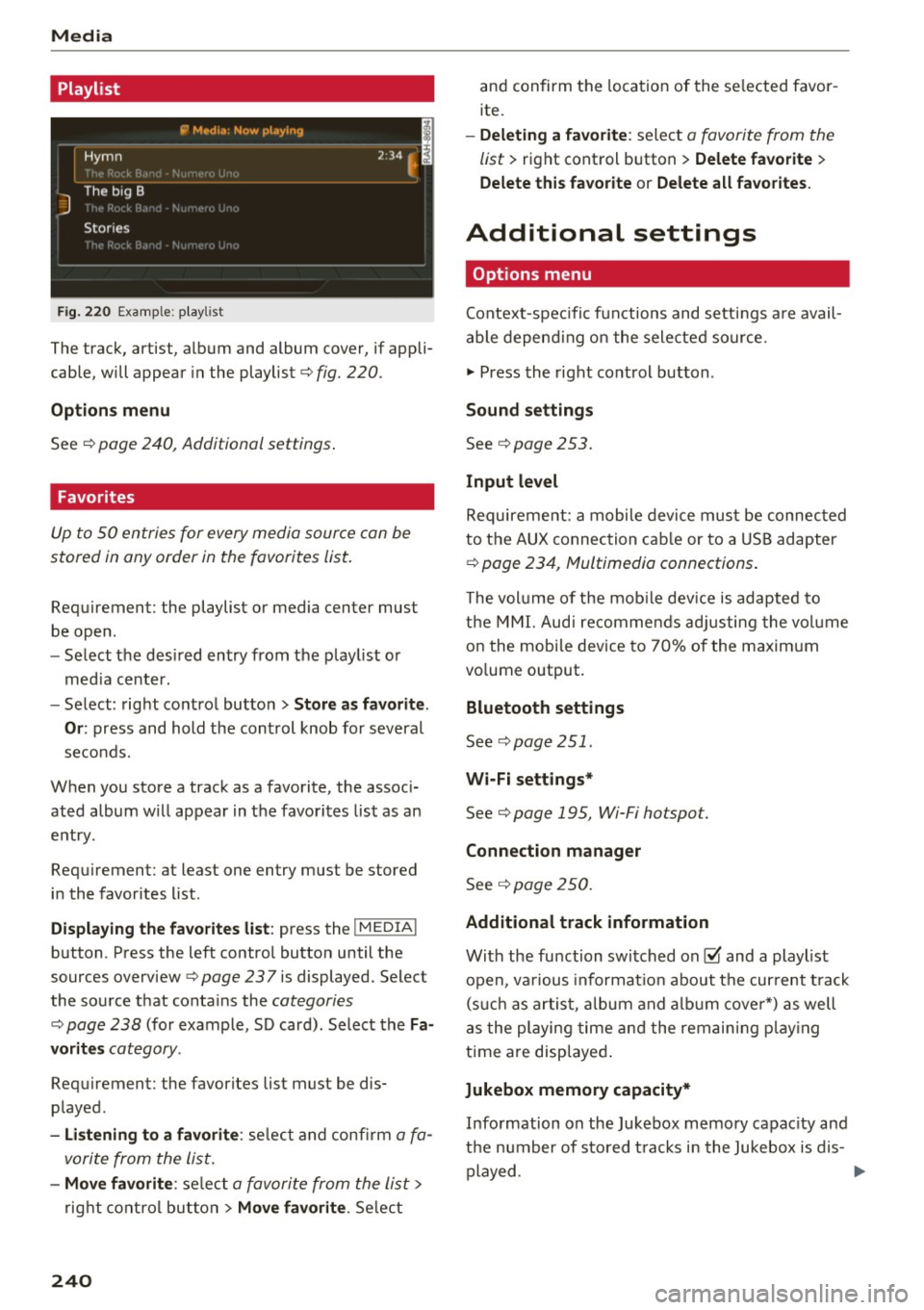
Fig . 2 20 Example: p lay list
The track, artist, album and album cover, if appli
cable, will appear in the playlist
¢ fig. 220 .
Option s menu
See ¢ page 240, Additional settings .
Favorites
Up to 50 entries for every media source can be
stored in any order in the favorites list.
Requirement: the playlist or media center must
be open.
- Select the des ired entry from the play list or
med ia center.
- Select: right control button
> Store a s favorit e.
Or :
press and hold the cont rol knob for several
seco nds.
When you store a track as a favorite, the assoc i
ated album w ill appear in the favorites list as an
entry.
Requirement: at least one entry must be stored
in the favorites list.
Displaying the fa vo rite s list : press the !MEDIA !
button. Press the left contro l button until the
sources overview
c=> page 23 7 is displayed. Select
the source that conta ins the
categories
¢ page 238 (for example, SD card). Select the Fa
v orit es
category .
Requirement: the favorites list must be dis
played.
- List ening to a favorite : select and confirm a fa
vorite from the list.
- Mov e favorite : select a favorite from the list>
right cont rol button > Move fa vorite . Select
240
and confirm the location of the se lected favor
ite.
- Deleting a f avorit e: select a favorite from the
list>
right control b utton> Delete fa vorite >
Delete thi s favorite or Delete all fa vo rite s.
Additional settings
' Options menu
Context-spec ifi c fu nctions and settings a re avail
able depend ing on the sele cted source.
" Press the right control button .
Sound settings
See c:::> page 253.
Input l evel
Requirement: a mobile device mus t be connec ted
to the AUX connection cab le or to a USB adapter
c:::> page 234, f\1ultimedia connections.
The volume of the mob ile dev ice is adapted to
t h e MMI. Aud i recommends adj usting the volume
on the mobi le device to 70% of the maximum
vo lume output.
Bluetooth settings
See c:::> page 2 51.
Wi-Fi settings*
See ¢ page 195, Wi-Fi hotspot.
Connection manager
See c:::> page 250.
Additional track information
With the fu nction switched on~ and a playlist
open, va rious informat io n about t he cur rent t rack
(such as artist, a lbum and alb um cove r*) as well
as the playing time and the remain ing p lay ing
time are displayed .
Jukebox memory capacity*
Information on the Jukebox memory capac ity and
the number of stored t racks i n the Jukebox is dis-
played. ""'
Page 245 of 402
u co .... N r-... N .... 0
0
:E: '
Supported media and file formats
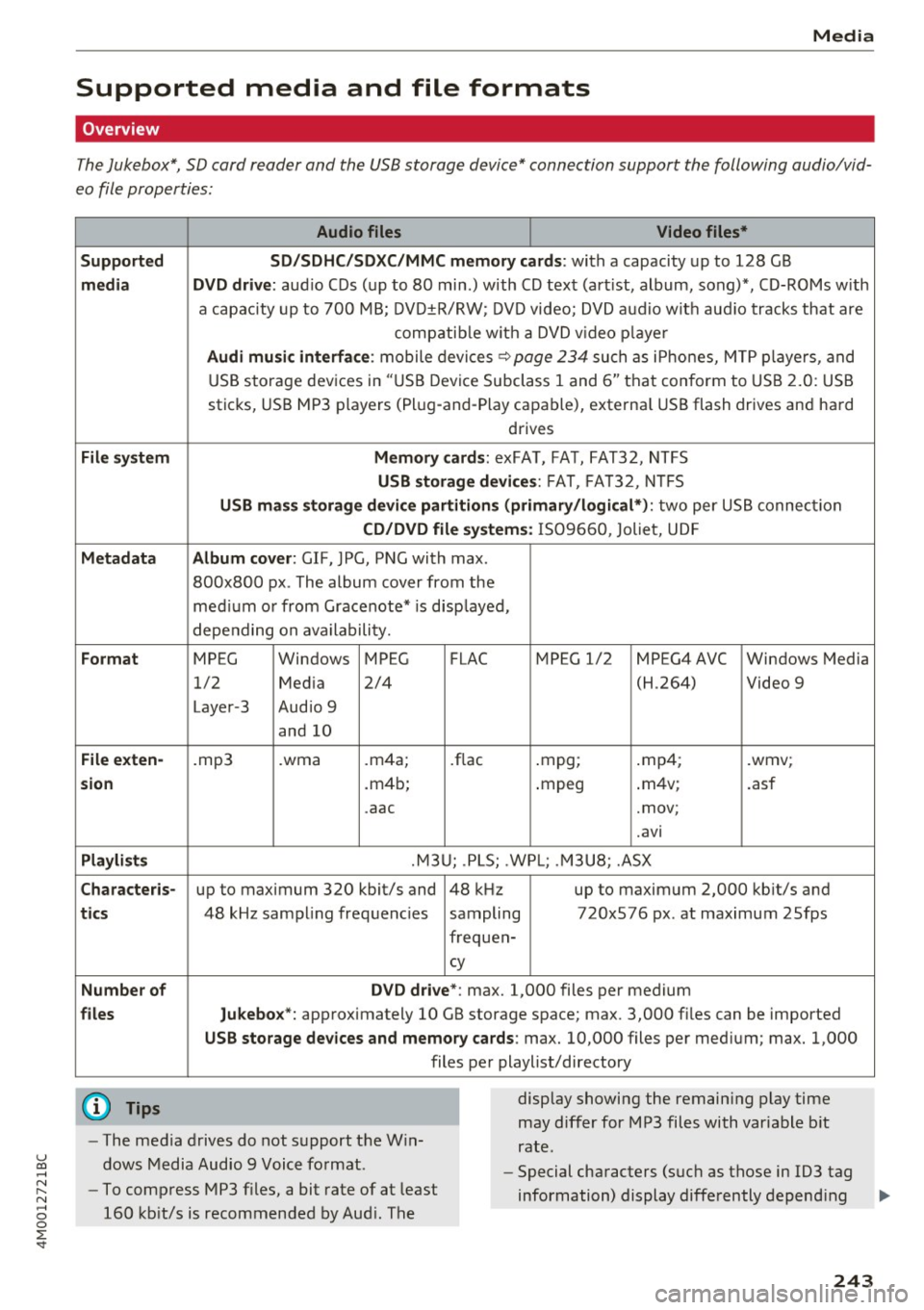
Overview
The Jukebox*, SD card reader and th e USB storage d evice* connection support the follo wing audio/vid
e o file prop erti es :
Audio files Video files*
Supported SD/SDHC/SDXC/MMC memory cards :
with a capacity up to 12 8 GB
media DVD drive : audio C Ds ( up to 80 min.) with CD tex t (art ist, album, song)*, CD-ROMs w ith
a capac ity up to 700 MB; DV D±R/RW; DVD video; DVD a udio wit h aud io tracks that are
compatib le w it h a DVD v ideo p laye r
Audi musi c interfa ce : mobile devices~ page 234 such as i Phones, M TP playe rs, and
USB storage dev ices in "USB D evice Subclass 1 and 6" tha t conform to USB 2.0: USB
sticks, USB MP3 players (Pl ug -and-Play capable), external USB flash drives and hard
drives
File sys tem Memor y cards: exFA T, FA T, FAT32, NTFS
USB storag e devices : FAT, FA T32, N TFS
USB mas s storage device partitions (primary /logical*) : two per US B connec tion
CD/DVD file systems : IS 0 9660 , Joliet, UD F
Metadata Album cover : GIF, JPG, PN G with max.
800x800 px . The album cover from the
med ium o r from Gracenote* is disp layed,
depending on availability.
Format MPEG Windows MPEG FLAC MPEG 1/2 MPEG4AVC Windows Media
1/2 Med ia 2/4 (H.264) Video 9
Laye r-3 Audio 9
and 10
File exten-.mp3 .wma .m4a; .flac .mpg; .mp4; .wmv;
sion .m4b; .mpeg .
m4v; .asf
.aac .mov;
.avi
Playlist s .M3U; .PLS; .WP L; . M3U8; .ASX
Characte ris-up to maximum 320 kbit/s and 48 kHz up to maximum 2,000 kb it/s and
ti cs 48 kHz sampling frequencies sampling 720x576 px. at maximum 2Sfps
frequen-
cy
Number of DVD d rive *: max. 1,000 files per medium
files Jukebox*: approx imately 10 GB storage space; max. 3,000 fil es can be imported
USB sto rage dev ices and memory ca rds: max. 10,000 files per med ium; max. 1,000
files per playlist/directory
{O) Tips
- The media drives do not s upport the W in
dows Media Audio 9 Voice format. display
showing the remaining play time
may differ for MP3 files with variable b it
rate.
- Special characters (suc h as those in 103 tag
- To compress MP3 files, a bit rate of at least
160 kb it/s is recommended by Aud i. The information) display differently depend
ing ..,.
243
Page 246 of 402

Media
on the system language and canno t always
be g uaranteed . - Some M
TP player f unctions are not s upport
ed, s uch as rating m us ic tracks and v ideo
playback.
- T he man ufa ctu rer of the storage device can
p rovide information about its "USB Device
Subclass" .
CD drive
Applies to: veh icles w ith a CD drive
The following audio file proper ties are supported by the CD drive:
Audio files
Supported
Aud io CDs (up to 8 0 min) wi th CD text (artist, a lb um, t rack) *, C D-RO Ms wi th a capac i-
media ty of up to 700 MB
File system CD file system: IS09660, Joliet, UDF
Metadata Album cover : GIF, J PG, P NG wit h max. 800x800 px. The album cover from the medi-
um may be d isp layed, depend ing on avai lab ility.
Format M PE G 1/ 2 Windows Med ia A u- MP EG 2/4 FLAC
Layer -3 dio 9 and 10
File e xtension .mp3 .wma .m4a; .flac
. m4b ;
. aac
Playlists .M3U ; .P LS ; .WPL; .M3U8; .ASX
Characteristics up to maxim um 320 kbit/s and 48 k Hz sampli ng frequenc ies 48 k Hz sampling
frequency
Number of Maxim um 1,000 f iles pe r medium
files
(D} Tips
- To comp ress MP3 f iles, a bit rate of at least
160 kb it/s is recommended. The display
showing t he remaining play t ime may differ
fo r MP3 files w ith variable bit rate . -
Special cha racters (such as t hose in 1D3 tag
information) display differently depending
on the system language and can not always
be guaranteed .
Troubleshooting
Problem Solution
Audi music interface /Bluetooth
Read the ins tructions in the chapter ~ page 234, Multimedia con-
audio player *: mobile dev ice is nectionsl ~ page 231, 8/uetooth audio pl ayer . You can lear n
not supporte d. abo ut s uppor ted mobi le devices in t he A udi database fo r mobile
dev ices a t
www.audiu sa .com/bluetooth .
Audi music interface:
the volume Ad just the volume of the mobile device to approximate ly 70% of
is too high/too low when start ing the maximum output¢
page 240, Input lev el.
playback thro ugh t he AUX inp ut.
244
...
Page 248 of 402
Media Problem Solution
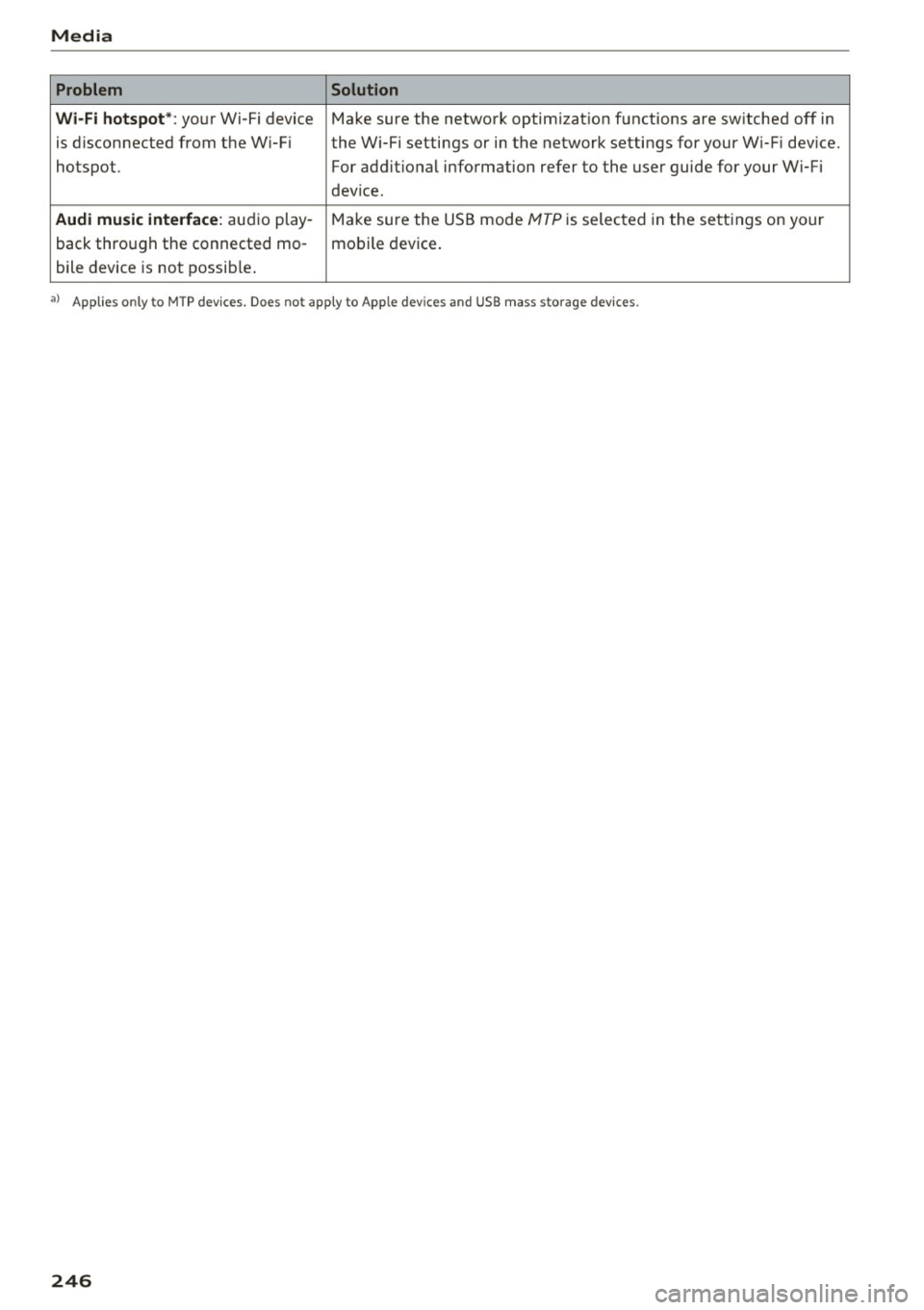
Wi -Fi hotspot* :
your Wi-Fi device Make sure the network optimization functions are switched off in
is d isconnected from the W i-Fi the Wi-Fi settings or in the network settings for your W i-Fi device.
hotspot. For additional information refer to the user guide for your Wi-Fi
dev ice .
Audi music interface: audio play -Make sure the USB mode MTP is selected in the settings on your
back through the connected mo- mobile device.
bile device is not possib le .
a> Applies only to MTP dev ices. Does not apply to Apple devices and USB mass sto rage devices.
246
Page 249 of 402
u co ...... N r-... N ...... 0
0
:E: '
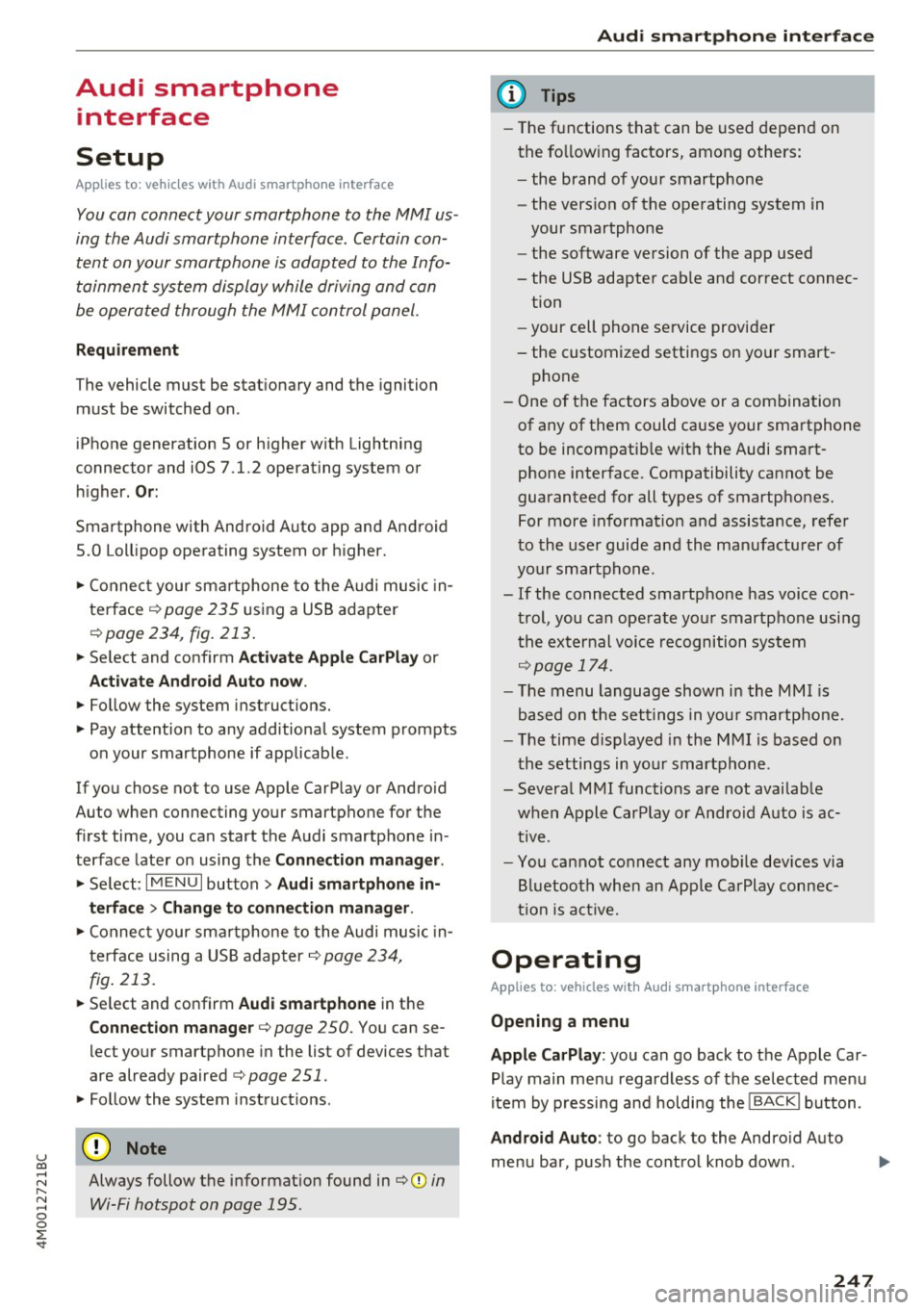
Setup
App lies to: veh icles with Audi smartpho ne interface
You can connect your smartphone to the MMI us
ing the Audi smartphone interface . Certain con
tent on your smartphone is adapted to the Info
tainment system display while driving and can
be operated through the MMI control panel.
Requirement
The vehicle must be stationary and the ignition
must be switched on.
iPhone generation 5 or higher with Lightning
connector and iOS 7.1.2 operating system or
h igher.
Or:
Smartphone with Android Auto app and Android
5 .0 Loll ipop operating system or higher.
.,. Connect your smar tphone to the Audi music in
te rface
c:> page 235 using a USB adapter
c:>page 234, fig. 213 .
.. Se lect and confirm A cti va te Apple CarPl ay or
Acti vate And roid Auto now.
.. Follow the system instruct ions.
.,. Pay attention to any add itional system prompts
on your smartphone if applicable.
If you chose not to use Apple CarPlay or Android
Auto when connecting your smartphone for the
first time, you can start the Audi smartphone in
terface later on using the
Connection m an ager .
.. Se lect: I MENU I button > Audi smartphone in·
terfa ce
> Change to connecti on manager .
.. Connect your smar tphone to the Audi music in
terface using a USB adapter
c:> page 234,
fig . 213.
.. Se lect and confirm Audi smartphone in the
Connection manager c:> page 250. You can se
lect your smartphone in the list of devices that
are already paired
c:> page 251.
.,. Follow the system instruct ions.
Always follow the informat ion found in
c:>(D in
Wi-Fi hotspot on page 195 .
Audi smartphon e int erfac e
{!) Tips
-The functions that can be used depend on
the fo llow ing factors, among others:
- the brand of your smartphone
- the vers ion of the operating system in
your smartphone
- the software ve rsion of the app used
- the USB adapter cab le and correct connec-
tion
- your cell phone se rvice provider
- the customized settings on your smart -
phone
- One of the factors
above or a combina tion
of any of them could cause your smartphone
to be incompatib le wit h the Audi smart
phone interface. Compatibility cannot be
guaranteed for all types of smartphones.
For more informat ion and assistance, refe r
to the use r guide and the manufactu rer of
your smartphone .
- If the connected smartphone has voice con
tr ol, you can operate your smartpho ne usi ng
t he external voice recognition system
c:>page 174.
-The menu language show n in the MMI is
based on the settings in you r smartphone .
- T he time d isplayed in the MMI is based o n
t he settings in your smartphone.
- Several MMI functions are not avai lab le
when Apple Car Play or Andro id Auto is ac
tive.
- You ca nnot co nnect any mob ile dev ices via
Bl uetooth when an App le CarPlay connec
tion is ac tive .
Operating
Applies to: vehicles wit h Audi smartp hone interface
Opening a menu
App le CarP lay :
you can go back to the Apple Car
Play main menu regardless of the se lec ted menu
item by p ressing and holdi ng the
I BACKI button .
Android Auto : to go back to the Android Auto
me nu bar, push the control knob down.
247
Page 250 of 402
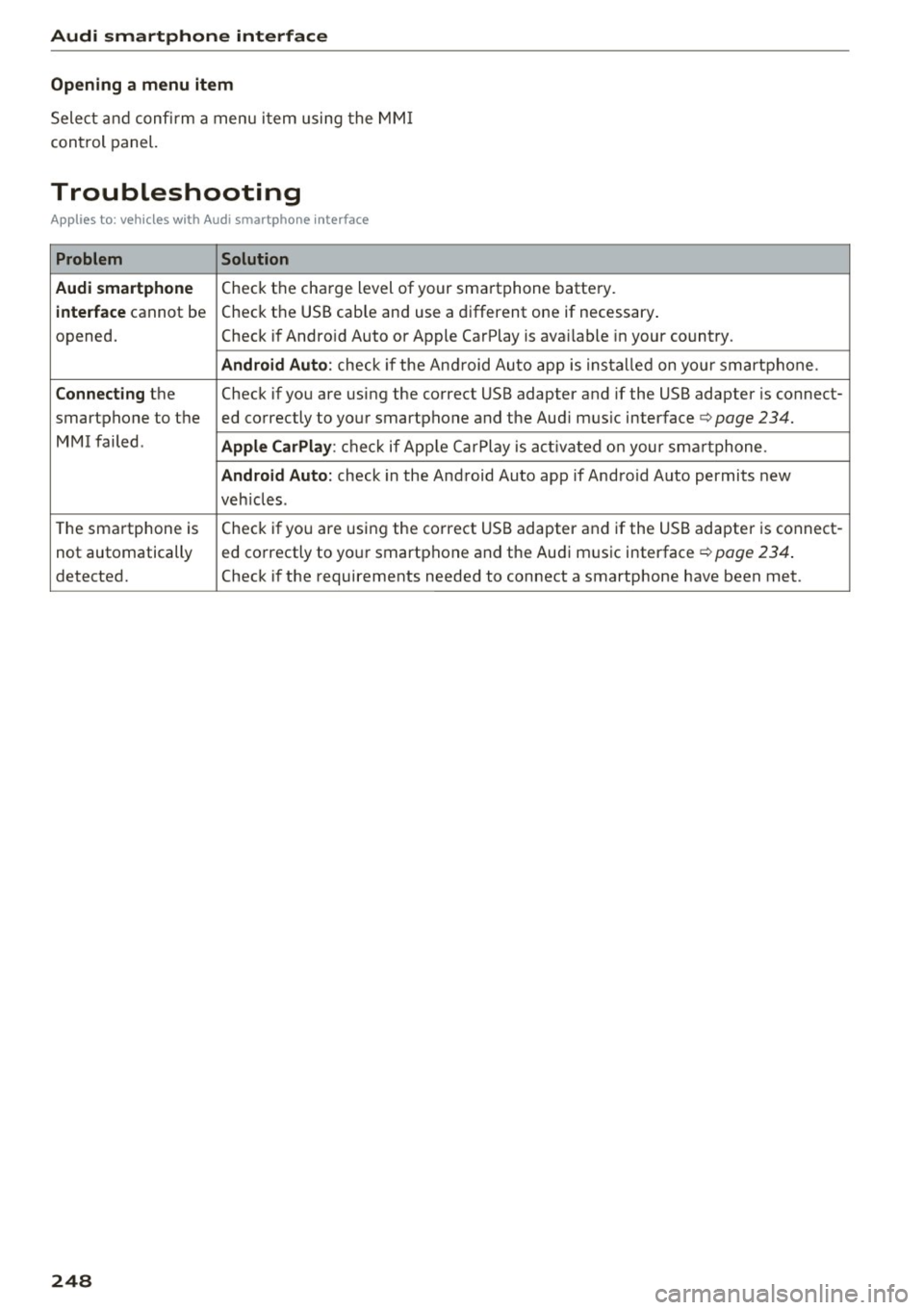
Audi smartphone interface
Opening a menu item
Select and confirm a menu i tem using the MM I
con trol panel.
Troubleshooting
App lies to: vehicles with Audi smartphone interface
Problem Solution
Audi smartphone
Check the cha rge level of your sma rtphone battery.
interface cannot be Check t
he USB cab le and use a d ifferent one if necessary .
opened. Check if Andro id Auto or Apple CarPlay is ava ilable in your co untry .
Android Auto : check if the An droid Au to app is ins ta lled on yo ur smart phone .
Connecting the Check if yo u are us ing the correct USB adapter and if the USB adapter is connect-
smartphone to the ed correctly to yo ur smartphone and the Aud i m us ic interface ¢
page 234.
MMI failed . Apple CarPlay : che ck if App le Ca rPlay is act ivated on your sm artphone .
Android Auto: check in the And roid Auto app if And roid Auto permits new
veh icles .
T he sma rtphone is Check if yo
u are us ing the co rre ct USB adapter and if the USB adapter is connect-
not automatically ed co
rrectly to yo ur smartp hone and the Aud i m usic interface ¢
page 234.
detected. Check if the requirements needed to connect a smartphone have been met.
248
Page 253 of 402
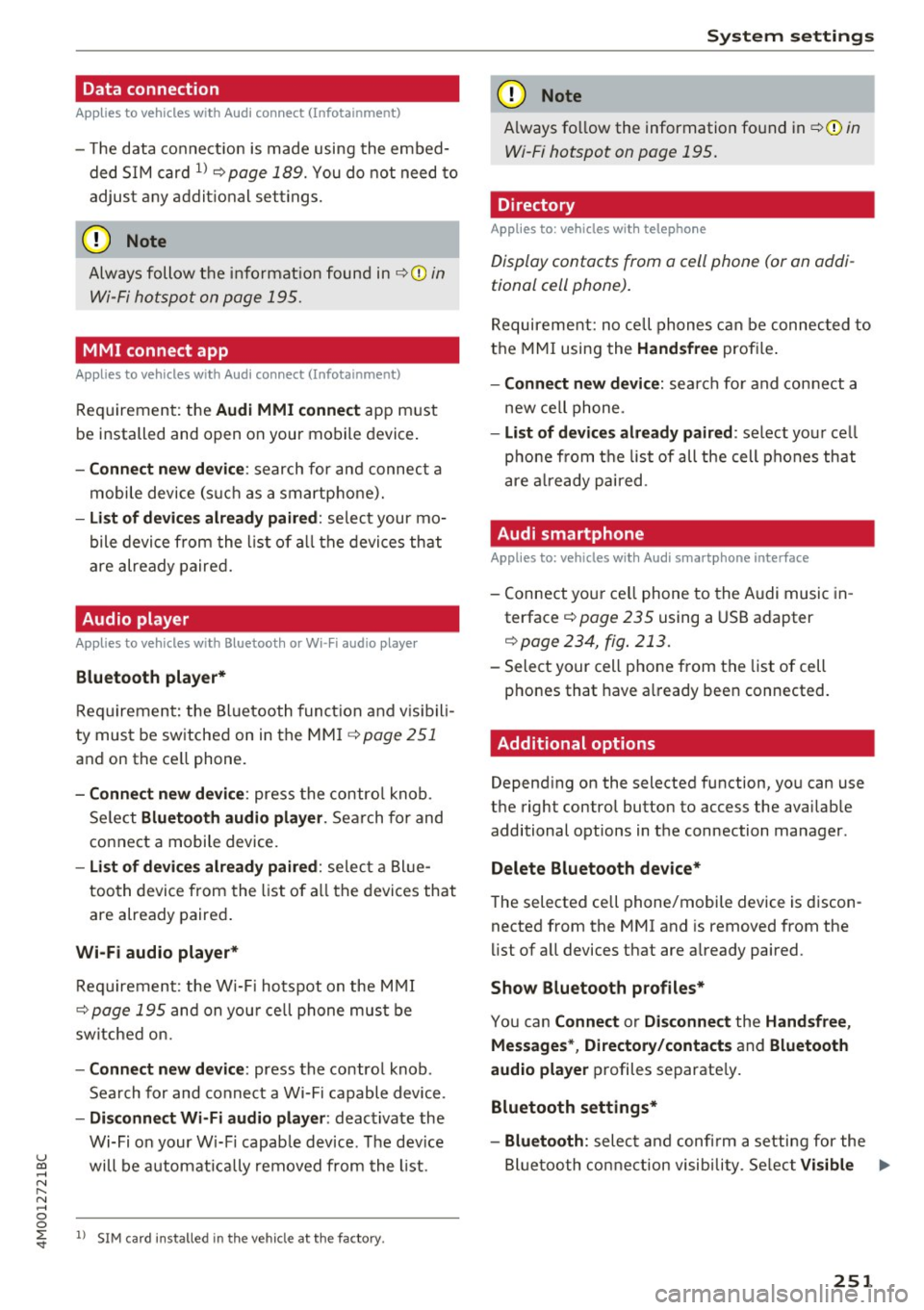
Data connection
Applies to vehicles w ith A ud i con nect (Infota inme nt)
- T he data connect ion is made using the embed
ded SIM card
l) ¢page 189. You do not need to
adjust any addit ional se ttings.
(D Note
Always follow the info rmat ion found in ~CD in
Wi-Fi hotspot on page 195.
MMI connect app
A pp lies to vehicles w it h Aud i connect (Infota inme nt)
Req uirement: the Audi MMI connec t app must
be installed and open on your mobile device .
-Co nne ct n ew d ev ic e: search for and connec t a
mobile device (such as a smartphone).
- List of d evice s alr ead y paired : select your mo
bile device from the l ist of a ll the devices that
are already paired.
Audio player
Ap plies to vehicles w ith B luetoot h or Wi -Fi aud io playe r
Bluetooth play er*
Requirement: the Bluetooth funct ion and vis ibili
ty must be switched on in the MM I
¢ page 251
and on the ce ll phone.
- Conn ect new d ev ice : press the contro l knob.
Se lect
Bluet ooth a udio pla ye r. Search for and
connect a mobile device.
- List of devi ce s alrea dy pai red : select a Bl ue
too th device from the list of a ll the devices that
are already paired .
Wi-Fi audio pla yer *
Requirement: the W i-Fi hotspot on the M MI
~ page 195 and on you r ce ll phone must be
sw itched on.
- Conn ect new de vice: press the control knob .
Search for and connect a Wi-Fi capable device .
-Di sconn ect Wi-Fi audio pla yer : deactivate the
Wi-Fi on your W i-Fi capab le device. The dev ice
u ~ will be automatically removed from the l ist.
N r-... N ..... 0
0
~ l) S IM card in stalle d in t he vehicle at th e factory.
Sys te m set ting s
(D Note
Always fo llow the information found in ~ 0 in
Wi-Fi hotspot on page 195.
Directory
Applies to : veh icles w it h te lepho ne
Display contacts from a cell phone (or an addi
tional cell phone).
Requirement: no cell phones can be connec ted to
the MMI using the
Handsfr ee prof ile .
- Connect new d evice : search fo r and connect a
new ce ll phone .
-List o f device s alr eady pai red: select your ce ll
pho ne from the list of all the cell phones that
are a lready pai red .
Audi smartphone
Applies to : veh icles w ith Audi s m artp hone interface
- Connect your ce ll phone to the Audi music in
terface ~
page 235 using a USB adapter
¢ page 234, fig . 213 .
- Select your cell phone from the list of cell
phones that have a lready been connected.
Additional options
Depending on the selected function, you can use
the right control button to access the availab le
additional options in the connection manager.
Delete Bluetooth de vic e*
The selected cell phone/mobile device is discon
nected from the MMI and is removed from the
list of all devices that are already paired.
Show Bluetooth profiles *
You can Connect or Disconne ct the H and sfr ee,
Me ssage s*, Director y/conta ct s
and Bluet ooth
aud io pl ayer
profiles separate ly.
Bluetooth settings *
- Bluetooth :
select and confi rm a setting for the
Bl uetooth connection visib ility . Se lect
Vi sible ...,
251
Page 254 of 402
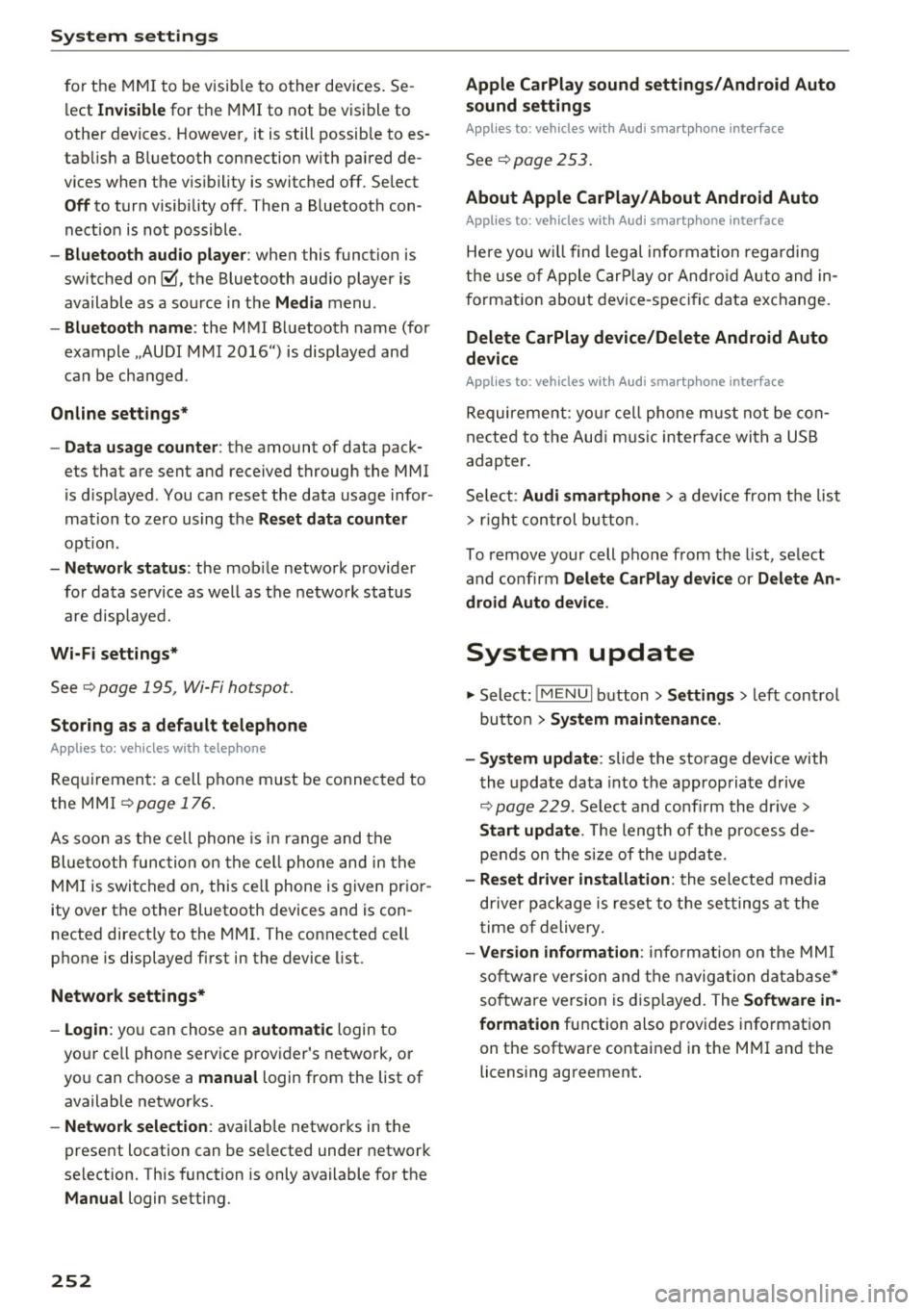
System settings
for the MMI to be visib le to other devices . Se
lect
Invisible for the MMI to not be visible to
other devices. However, it is still possib le to es
tab lish a Bluetooth connection with paired de
vices when the v is ibility is switched off. Select
Off to turn visibility off . Then a Bluetooth con
nect ion is not possible .
-Bluetooth audio player : when this function is
switched on~. the Bluetooth aud io player is
available as a sou rce in the
Media menu .
-Bluetooth name : the MMI Bluetooth name (for
example .,AUDI MMI 2016") is displayed and
can be changed .
Online settings*
- Data usage counter :
the amount of data pack
ets that are sent and received through the MMI
is d isplayed . You can reset the data usage infor
mation to zero using the
Reset data counter
option.
-Network status: the mobile network p rovider
for data service as well as the network status
are displayed.
Wi-Fi settings*
See c> page 195, Wi-Fi hotspot.
Storing as a default telephone
Applies to: vehicles with telephone
Requirement: a cell phone must be connected to
the MMI
c> page 176 .
As soon as the cell phone is in range and the
Bluetooth function on the ce ll phone and in the
MMI is switched on, this cell phone is given prior
ity over the other Bluetooth devices and is con
nected directly to the MMI. The connected cell
phone is displayed first in the device list.
Network settings*
- Login :
you can chose an automatic login to
your ce ll phone service provider's network, or
yo u can choose a
manual login from the list of
available networks.
- Network selection: available networ ks in the
present location can be selected under network
selection. This function is only available for the
Manual login setting.
252
Apple CarPlay sound settings/ Android Auto
sound settings
Applies to: vehicles with Audi smartphone interface
See ¢ page 253.
About Apple CarPlay/ About Android Auto
Applies to: vehicles with Audi smartphone interface
Here you w ill find lega l informa tion regarding
the use of Apple CarPlay or Andro id Auto and in
formation about device-specific data exchange.
Delete CarPlay device/Delete Android Auto
device
Applies to: vehicles with Audi smartphone interface
Requirement: yo ur cell phone must not be con
nected to the Aud i m usic interface with a USB
adapter .
Select:
Audi smartphone > a device from the list
> r igh t control button.
To remove your cell phone from the list, select
and confirm
Delete CarPlay device or Delete An
droid Auto device .
System update
.,,. Select : !ME NUI button> Settings > left control
button >
System maintenance.
- System update:
slide the storage device with
the update data into the appropriate drive
¢ page 229. Select and confi rm the drive>
Start update. The length of the process de
pends on the size of the update.
- Reset driver installation: the selected media
driver package is reset to the settings at the
time of delivery.
-Version information : info rmation on the MMI
sof tware version and the navigation database*
so ftware version is disp layed. The
Software in
formation
function also prov ides information
on the software contained in the MMI and the
licensing agreement.
Page 372 of 402
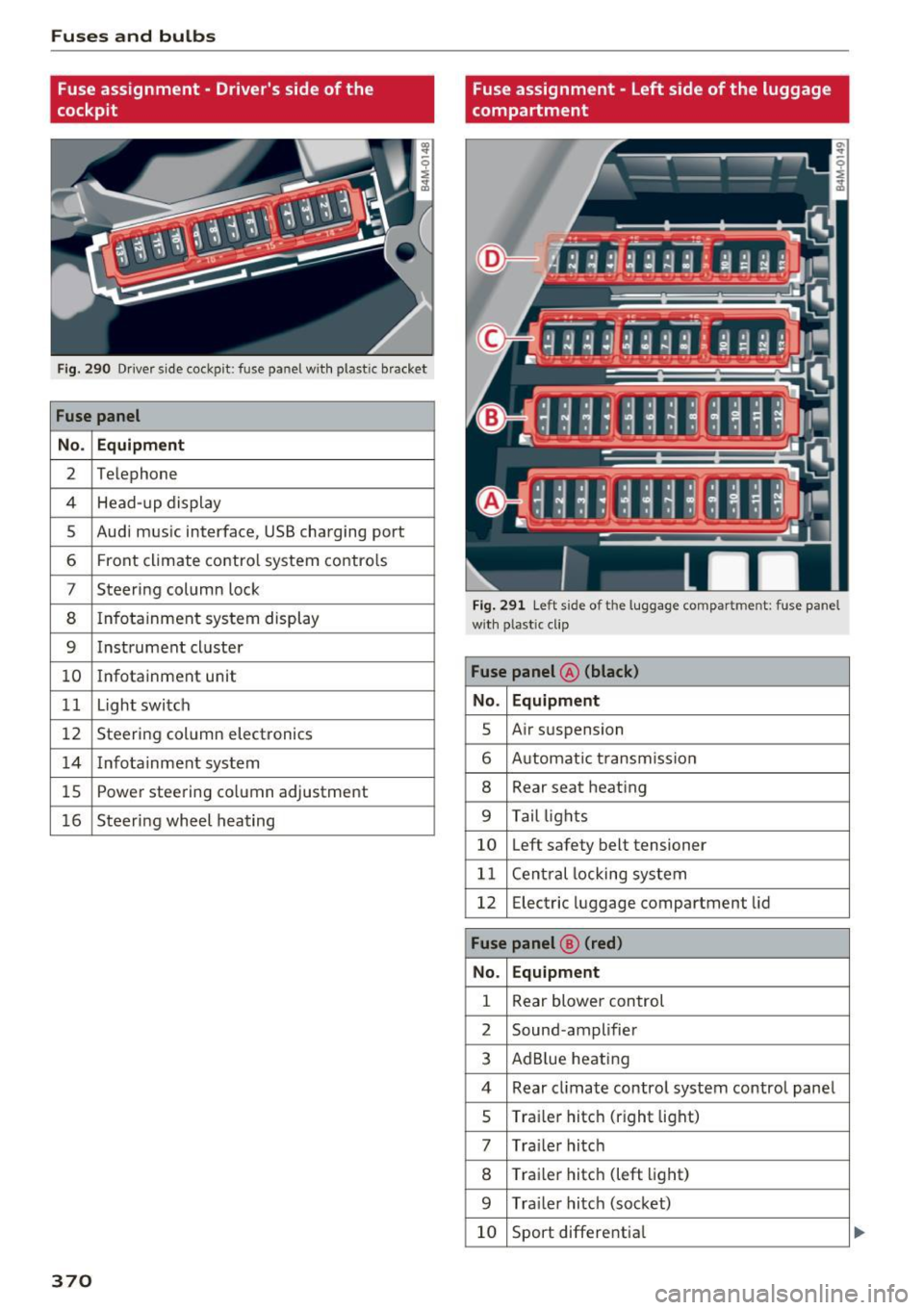
Fuses and bulbs
Fuse assignment - Driver's side of the
cockpit
Fig . 290 D river side cockpit: fuse panel wit h plastic bracket
Fuse panel
No . Equipment
2 Te lep hone
4 Head-up display
5 Audi mus ic interface, USB charging port
6 Front climate contro l system contro ls
7 Steering column lock
8 Infotainment system display
9 Instrument cl uster
10 Infotainment unit
11 Light switch
12 Steer ing column electronics
14 Infotainment system
lS Powe
r steering co lumn adjustme nt
1 6 Steer ing wheel heating
370
Fuse assignment - Left side of the luggage
compartment
Fig. 291 L eft side of the lu ggage compartment: fuse panel
wi th plastic cl ip
Fuse panel @ (black)
No. Equipment
5 Air suspension
6 Automat ic t ransmiss ion
8 Rear seat heating
9 Tail lights
10 Left safety belt tensioner
11 Central locking system
12 Electric luggage compartment lid
Fuse panel@ (red)
No . Equipment
1 Rear blower control
2 Sound-amplifier
3 AdBlue heating
4 Rear cl imate contro l system control panel
5 Traile r hitch (right light)
7 Tra iler hitch
8 Trai le r hitch (left light)
9 Trailer hitch (socket)
10 Sport differential
Page 388 of 402
Index
Audio player
Bluetooth audio player . . . . . . . . . . . . . . . 231
W i-Fi aud io player . . . . . . . . . . . . . . . . . . . 232
Aud io track . . . . . . . . . . . . . . . . . . . . . . . . . . 24 0
Aud i pre sense . . . . . . . . . . . . . . . . . . . . . . . 117
Messages . . . . . . . . . . . . . . . . . . . . . . . . . . 122
Se ttings . . . . . . . . . . . . . . . . . . . . . . . . . . . 122
Aud i Serv ice Repair Man uals and Literature 381
Aud i side assis t . . . . . . . . . . . . . . . . . . . . . . . 126
Aud i smartphone interface ......... 247, 251
Audi virtua l cockpit
refer to Instr ument cluster . . . . . . . . . . . . . 10
AUTO Autom atic headlig hts . . . . . . . . . . . . . . . . . 48
Auto Lock (central locki ng system) . . . . . . . . 34
Automatic belt ret ractor . . . . . . . . . . . . . . . 268
Automatic climate control . . . . . . . . . . . . . . . 7 1
O per ation . . . . . . . . . . . . . . . . . . . . . . . . 72, 75
Automatic climate control system Aud i drive select . . . . . . . . . . . . . . . . . . . . . 134
Setup . . . . . . . . . . . . . . . . . . . . . . . . . . . 74, 77
Automatic transm ission . . . . . . . . . . . . . . . . . 91
Eme rgency program . . . . . . . . . . . . . . . . . . 95
H ill descent control . . . . . . . . . . . . . . . . . . . 94
Kick-down . . . . . . . . . . . . . . . . . . . . . . . . . . . 95
M anual sh ift ing . . . . . . . . . . . . . . . . . . . . . . 94
P a rking lock emergency re lease . . . . . . . . . 96
Selecto r leve r pos itions . . . . . . . . . . . . . . . . 9 1
Automatic wipe/wash system . . . . . . . . . . . . 55
Auto Safety Hotline . . . . . . . . . . . . . . . . . . . 263
AUTO (button) Autom atic clima te control. . . . . . . . . . . 73, 76
Auxiliary heater (automatic climate
control) . . . . . . . . . . . . . . . . . . . . . . . . . . . 7 4, 77
AUX inp ut . . . . . . . . . . . . . . . . . . . . . . . . . . . 235
Ave rage cons umption . . . . . . . . . . . . . . . . . . . 15
Average speed . . . . . . . . . . . . . . . . . . . . . . . . 15
B
BAC K button 156
B alance (sound) . . . . . . . . . . . . . . . . . . . . . . 253
Bass (sound) . . . . . . . . . . . . . . . . . . . . . . . . . 253
Battery Ju mp starting . . . . . . . . . . . . . . . . . . . . . . . 372
also refer to Veh icle battery . . . . . . . . . . . 330
Before driving 256
386
Be lt tens ioners . . . . . . . . . . . . . . . . . . . . . . . 271
B lended gasol ine . . . . . . . . . . . . . . . . . . . . . 314
B lower (automat ic climate contro l) . . . . . 73, 76
Bl uetoot h
Audio player . . . . . . . . . . . . . . . . . . . . . . . . 231
Connect ing a cell phone . . . . . . . . . . . . . . 176
Settings . . . . . . . . . . . . . . . . . . . . . . . . . . . 251
Boos te r seats . . . . . . . . . . . . . . . . . . . . . . . . 305
Brake flu id
Checking the brake fluid level . . . . . . . . . . 329
Brakes . . . . . . . . . . . . . . . . . . . . . . . . . . . . . . 150
B rake ass ist . . . . . . . . . . . . . . . . . . . . . . . . 148
Brake fl uid . . . . . . . . . . . . . . . . . . . . . . . . . 329
E lectromechanical parking brake . . . . . . . . 87
Emergency braking function . . . . . . . . . . . . 87
New brake pads . . . . . . . . . . . . . . . . . . . . . 150
Wo rn brake pads . . . . . . . . . . . . . . . . . . . . . 29
Breaking in New brake pads . . . . . . . . . . . . . . . . . . . . . 150
New engine . . . . . . . . . . . . . . . . . . . . . . . . . 79
New tires . . . . . . . . . . . . . . . . . . . . . . . . . . 340
Browser
refer to Media center . . . . . . . . . . . . . . . . . 238
Bu lbs . . . . . . . . . . . . . . . . . . . . . . . . . . . . . . . 371
Buttons Cont rol panel (M MI) . . . . . . . . . . . . . . . . . 156
Mult ifunct ion s teer ing whee l 12
C
Cable (USB adapter/AUX connector cable) 234
California Proposition 65 Warning . . . . . . . 322
Battery specif ic . . . . . . . . . . . . . . . . . . . . . 330
Call list . . . . . . . . . . . . . . . . . . . . . . . . . . . . . 179
Call options . . . . . . . . . . . . . . . . . . . . . . . . . . 186
Capacities AdBl ue ... .. .. .. .. .. ... . .. .... ... .. 318
Fuel tank...... .. .. .. ............. .. 379
Washer fluid reservoir . . . . . . . . . . . . . . . . 379
Care . . . . . . . . . . . . . . . . . . . . . . . . . . . . . . . . 354
Cargo area
refer to L oading the l uggage compa rt-
ment ..... .. .. .. .. .. ............. .. 261
Cargo floor . . . . . . . . . . . . . . . . . . . . . . . . . . . 69
Cata lytic converter . . . . . . . . . . . . . . . . . . . . 321
CD d rive (med ia d rives) . . . . . . . . . . . . . . . . 230