lock AUDI Q7 2017 Owner´s Manual
[x] Cancel search | Manufacturer: AUDI, Model Year: 2017, Model line: Q7, Model: AUDI Q7 2017Pages: 402, PDF Size: 100.39 MB
Page 37 of 402
-The LE D in the drive r's door rai l blinks when
you lock the vehicle . If t he LED lights up for
approximately 30 seconds after locking,
there is a malfunct ion in the cent ral locking
system. Have the p roblem corrected by an
a uth orized Audi dea ler or authorized Audi
Se rvice Fac ility.
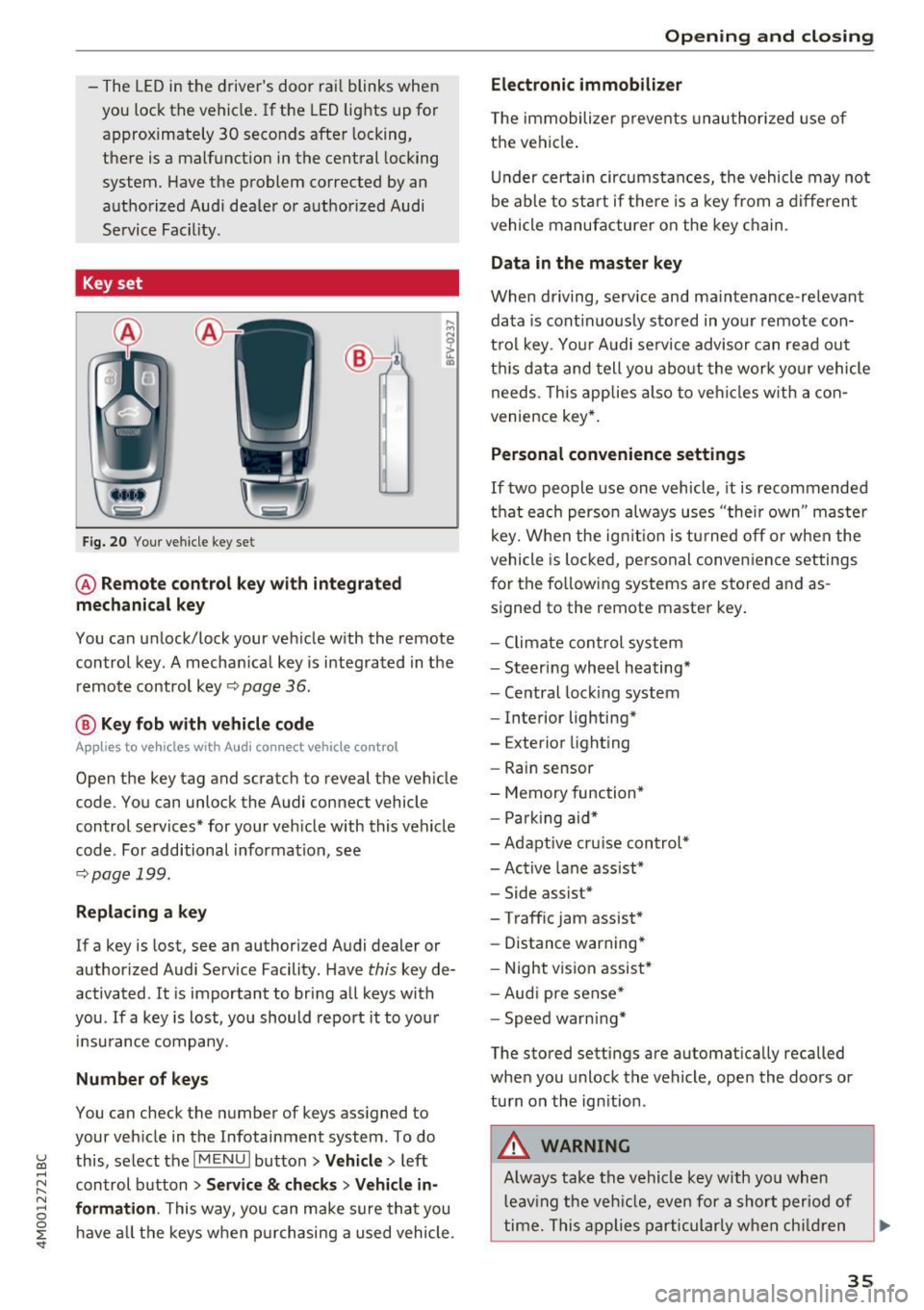
Key set
Fig. 20 You r ve hicle key set
@ Remote control key with integrated
mechanical key
You can unlock/ lock your veh icle w ith the remote
control key . A mecha nica l key is integ rated in the
remo te contro l key ~
page 36.
@ Key fob with vehicle code
Appl ies to vehicles w ith Audi connect vehicle control
Open the key tag and scratch to reveal the veh icle
code. You can unlock the Audi connect vehicle
control services* for your veh icle with this vehicle
code . For additional informat ion, see
~ pag e 199.
Replacing a key
If a key is lost, see an authorized A udi dealer or
author ized Audi Service Facility. Have
this key de
activated .
It is important to bring a ll keys with
you . If a key is lost, you should report it to you r
in sura nce company.
Number of keys
You can check the number of keys ass igned to
your veh icle in the Infotainment system . To do
~ this, select the I M ENU I butto n >Vehicl e> left ......
~ control b utton > Service & checks > Vehicle in-
N 8 formation . This way, you can m ake sure th at you
0 :E ha ve all th e keys when p urch asing a used vehicle .
Electronic immobilizer
T he immobilizer preve nts unau thori zed use of
t h e vehi cle.
Un der certai n circumstan ces, the vehicle may not
be able to start if there is a key from a diffe ren t
vehicle manufa cture r on the key c hain .
Data in the master key
When driving, service and ma intenance-re levant
da ta is cont inuo usly stored in you r remote con
t rol key . Yo ur Audi se rvice advisor can rea d ou t
t hi s data and tell you abo ut the w ork yo ur vehicle
needs. This app lies also to ve hicles w ith a con
ven ience key* .
Personal co nvenience settings
If two people use one vehicle, it is recommended
th at each perso n always u ses "thei r own " maste r
k ey. W hen the ig nitio n is t urne d off or when the
vehicle is lo cked , pe rsonal conve nien ce settings
for the follow in g systems are stored and as
s igned to the remote master key .
- Climate con trol sys te m
- Steer ing whee l heating *
- Ce ntral loc king system
- Interior lighting*
- Exterior light ing
- Rain sensor
- Memory function *
- Par king aid*
- Adapt ive cr uise con trol*
- Ac tive lane assist*
- Side assist*
- Traff ic jam assist *
- Distance warning*
- Night visio n assis t*
- Aud i p re sense *
- Spe ed wa rn in g*
The stored settings are automat ica lly recalled
whe n you unlock the vehicle, ope n the doo rs or
tu rn on th e ign ition .
_&. WARNING
-Always tak e t he ve hicle key w ith yo u wh en
l e av ing t he veh icle, eve n for a shor t per io d of
ti m e. Th is app lies par tic ularly w he n c hildr en
-
35
Page 38 of 402
Opening and clo sin g
remain in the vehicle. Otherw ise the children
cou ld start the engine or operate electrical
equipment such as power windows.
@ Tips
- The operation of the remote contro l key can
be temporarily disrupted by interfe rence
from transmitters near the vehicle working i n the same frequency range (such as a cell
phone or radio equipment) . A lways check i f
your vehicle is locked!
- For an explanation on conformity with the
FCC regulations in the United States and the
Industry Canada regulations, see
¢ page 384 .
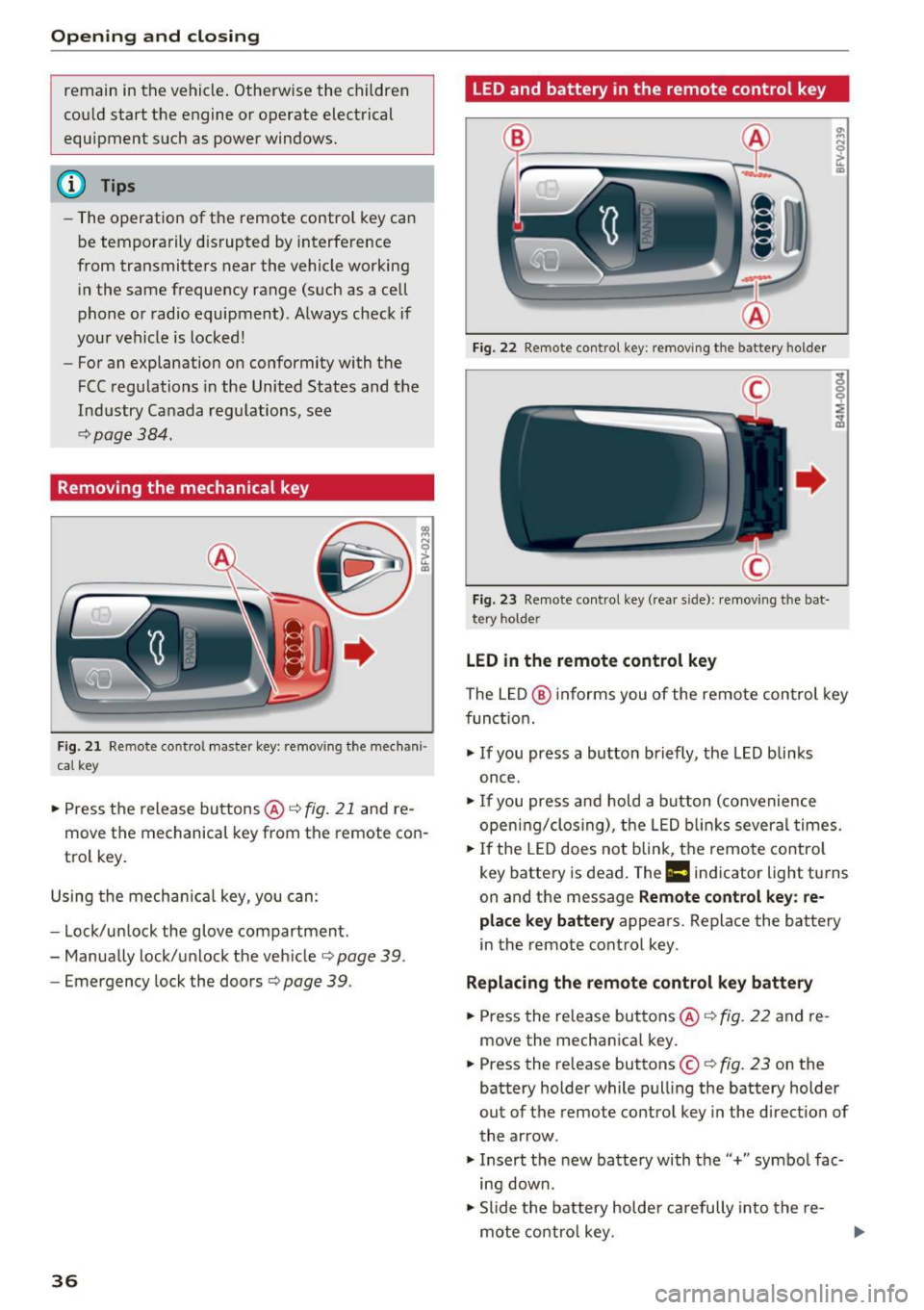
Removing the mechanical key
Fig. 2 1 Remote cont ro l ma ster key: remov ing t he mec han i·
cal ke y
.. Press the release buttons@¢ fig. 21 and re
move the mechanical key from the remote con
trol key .
Using the mecha nica l key , you can:
- Lock/un lock the glove compartment.
- Manually lock/u nlock the veh icle
c::;, page 39.
- Emergency lock the doors c::;, page 39 .
36
LED and battery in the remote control key
Fig. 22 Remote con tro l key : remo ving t he ba tte ry h olde r
Fig. 23 Remo te control key (rea r sid e): remov ing t he b at·
t ery ho lde r
LED in the remote control key
The L ED @ informs you of the remote con trol key
func tion.
"' If you press a bu tton briefly, the LED blinks
once .
"'If you press and hold a b utton (co nvenience
open ing/clos ing), the LED b links several times.
"' If the LED does not blink, the remote contro l
key battery is dead. The
Ill indicator light tu rns
on and the message
Remote control key : re
place key battery
appears. Replace the battery
i n the remote control key.
Replacing the remote control k ey batte ry
"'Press the release buttons @¢ fig. 22 and re
move the mechan ica l key.
"' Press the release buttons ©
c::;, fig. 23 on the
battery holder while pull ing the battery holder
out of the remote control key in the direction of
the arrow .
"' Insert the new battery with the'' +" symbo l fac·
ing down.
"' Slide the battery holde r carefully into the re·
mote co ntro l key .
Page 39 of 402
u (0 ...... N r--. N ...... 0
0
:E
@J For the sake of the environment
Discharged batteries must be disposed of us
ing methods that will not harm the environ
ment . Do not dispose of them in household
trash .
(D Tips
The replacement battery must meet the same
specifications as the original battery in the re
mote control key.
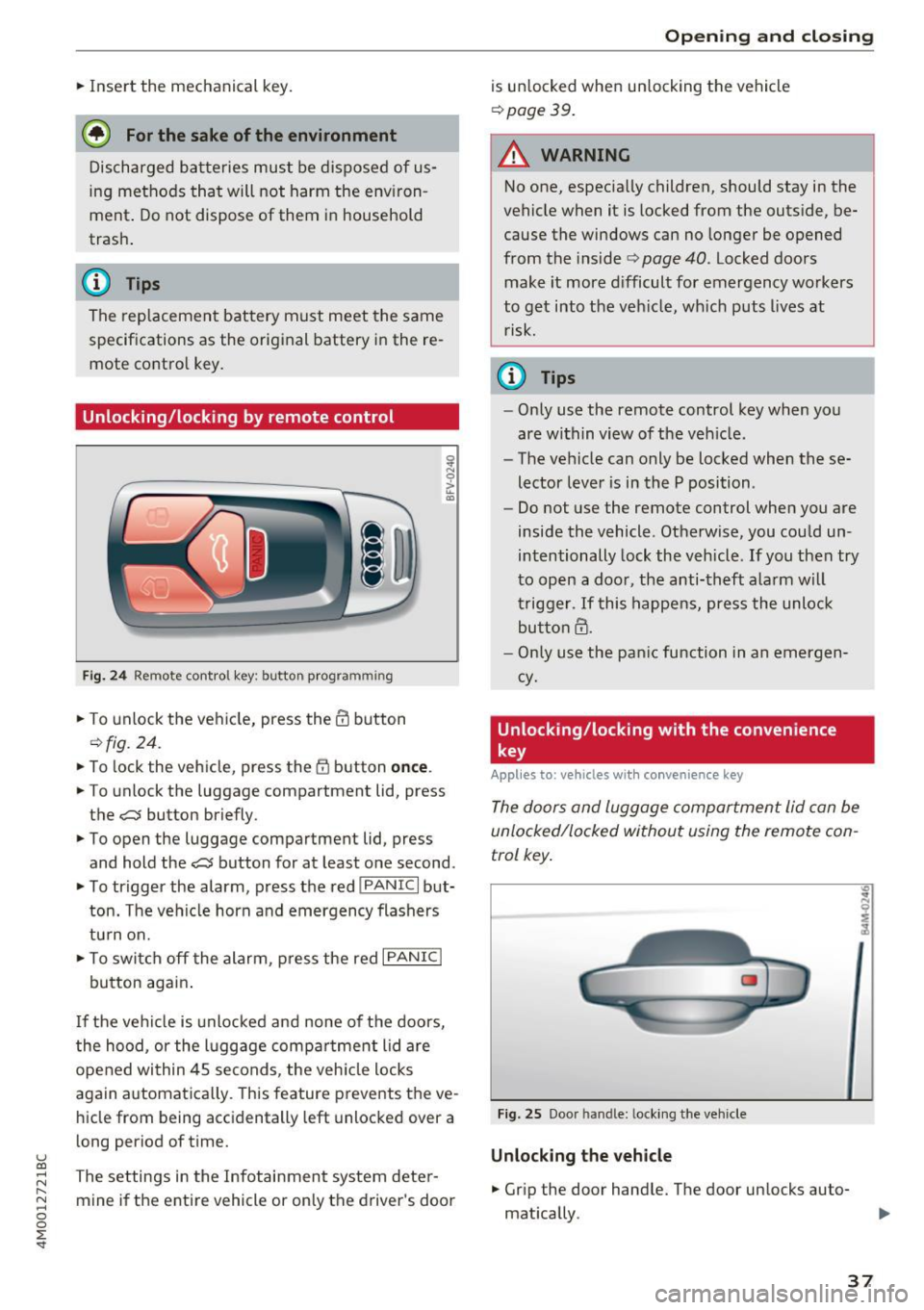
Unlocking/locking by remote control
Fig . 24 Remote control key : button programm ing
.. To unlock the vehicle, press the@ button
¢fig. 24.
.. To lock the vehicle, press the {fJ button once.
.. To unlo ck the luggage compartment lid, press
the
c::::J button briefly .
.. To open the luggage compartment lid, press
and hold the
C:$ button for at least one second .
.. To trigger the alarm, press the red
I PANIC I but
ton. The vehicle horn and emergency flashers
turn on .
.. To switch off the alarm, press the red
I PANIC I
button again .
If the vehicle is unlocked and none of the doors,
the hood, or the luggage compa rtment lid are
opened within 45 seconds, the veh icle locks
again automatically. This feature prevents the ve
hicle from being accidentally left unlocked over a
long period of time.
The settings in the Infotainment system deter
mine if the entire vehicle or only the driver's door
Open ing and closing
is un locked when unlocking the vehicle
¢ page 39.
.&_ WARNING
-No one, especially children, should stay in the
vehicle when it is locked from the outside, be
cause the windows can no longer be opened
from the inside ¢
page 40. Locked doors
make it more difficult for emergency workers
to get into the veh icle, wh ich puts lives at
r isk.
@ Tips
- Only use the remote control key when you
are within view of the veh icle.
- The vehicle can only be locked when these
lector lever is in the P position .
- Do not use the remote control when you are
inside the vehicle . Otherwise, you could un
intentionally lock the vehicle . If you then try
to open a door, the anti-theft alarm will
trigger. If this happens, press the unloc k
button@.
- Only use the panic function in an emergen
cy .
Unlocking/locking with the convenience
key
App lies to: vehicles with convenience key
The doors and luggage compartment lid can be
unlocked/locked without using the remote con
trol key .
Fig. 25 Door handle: locking the vehicle
Unlocking the vehicle
.. Gr ip the door hand le. The door un locks auto
mat ically .
37
Page 40 of 402
Opening and clo sin g
• Pullon the door handle to open the door.
Locking the v ehic le
• Se lect the P posit ion, because the vehicle can
not be locked otherwise .
• To lock the veh icle, close the door and touch
the sensor in the door handle
o nce ¢ fig. 25 . Do
not hold the door handle while doing this .
You can un lock/lock the vehicle at every door.
The remote control key cannot be more than ap
p roximate ly 4 feet (1. 5 m) away from the door
handle. It makes no difference whether the mas
ter key is in your jacket pocket or in your brief case, for example .
If you hold the door handle while locking, this
can impair the locking function.
The door cannot be opened for a br ief period di
rectly af ter lock ing it. This way you have the op
portun ity to check if the doors locked correctly.
The settings in the Infotainment system deter
mine if the ent ire ve hicle or only one of the doors
is unlocked when unlocki ng the vehicle
¢ page 39 .
A WARNING
Read and following a ll WARNINGS ¢&. in De
scription on page 34 .
@ Tips
If your vehicle is le ft standing fo r a long peri
od of time, note the following:
- T he energy management system grad uall y
turns off unnecessa ry cohvenience functions
to prevent the vehicle batte ry from draining
and to ma intain the vehicle's ab ility to start
for as long as possib le. You may not be able
to unlock your vehicle using the convenie nce
key.
38
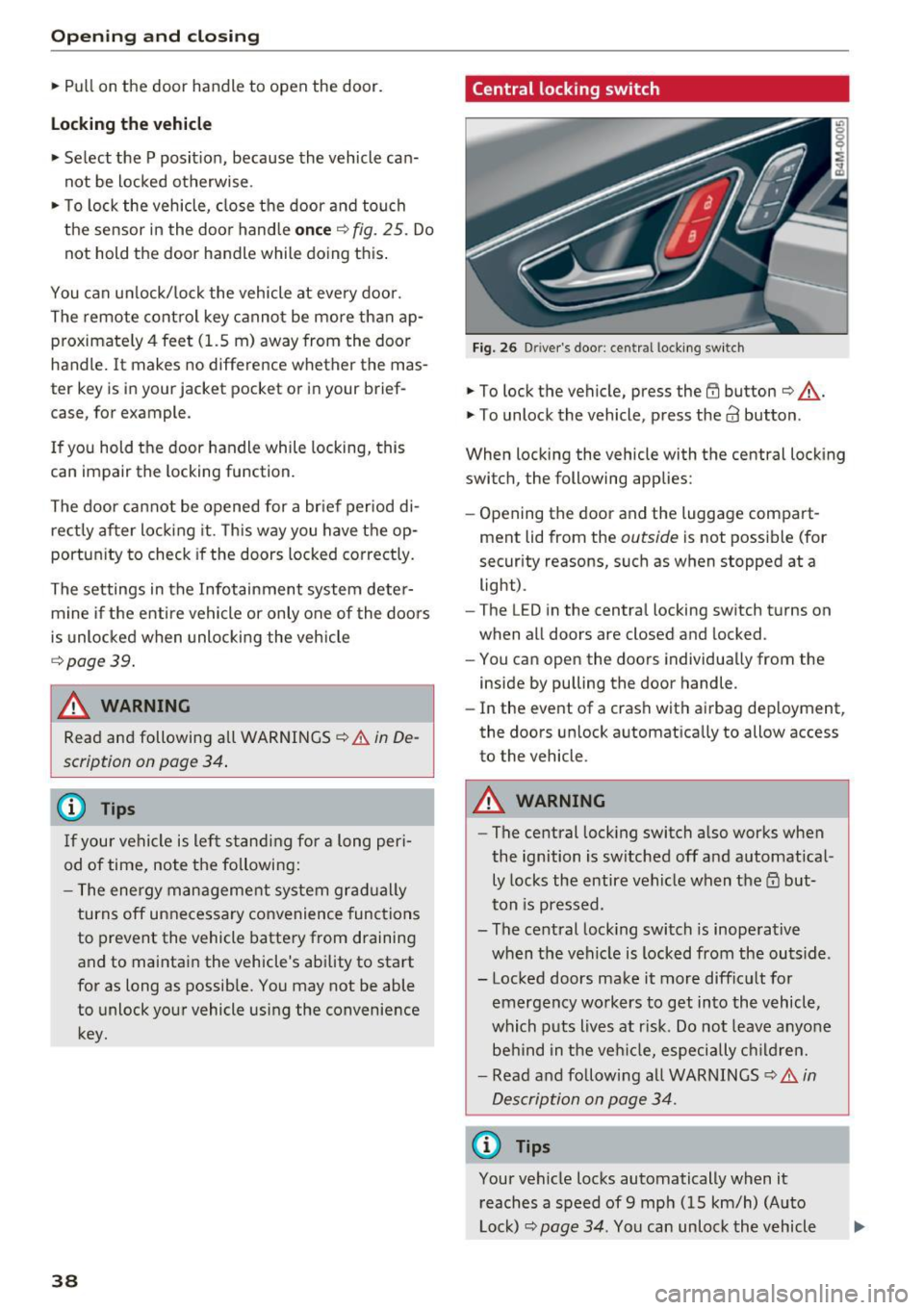
Central locking switch
Fig. 26 D river 's doo r: cen tra l lo cking sw it c h
• To lock the vehicle, press the @ button ¢&. -
• To unlock the vehicle, press the
63 button.
When locking the vehicle with the central locking
switch , the following applies:
- Opening the door and the luggage compart
ment lid from the
outside is not possib le (for
security reasons, such as when stopped at a light) .
- The L ED in the centra l locking switch turns on
when all doors are closed and locked .
- You can open the doors ind iv idually from the
inside by pulling the door handle .
- In the event of a crash with airbag dep loyment,
the doors unlock a utomatica lly to allow access
to the vehicle .
A WARNING
-The central lock ing switch a lso works when
the ignition is switched off and automatical
ly locks the entire vehicle when the
ID but
ton is pressed .
- The central lock ing switch is inoperative
when the vehicle is locked from the outs ide .
- Locked doors ma ke it more diffic ult for
emergency workers to get into the vehicle,
which puts lives at r isk . Do not leave anyone
behind in the ve hicle, especially c hild ren.
- Read and following a ll WARNINGS ¢&.
in
Description on page 34.
{D Tips
Your vehicle locks automatically when it reaches a speed of 9 mph (15 km/h) (Auto
Lock)¢
page 34. You can unloc k the vehicle
Page 41 of 402
u (0 ...... N r--. N ...... 0
0
again using the 63 button i n the cent ra l lock
ing sw itch.
Setting the central locking system
In th e Infotainmen t syst em, you can s et which
doors the central locking system will unlock .
.. Se lect in the Info tainment system: !M ENUI but
ton
> Vehicle > left cont ro l but to n > Vehicle
settings > Central locking .
Door unlocking -
you can decide if All doors or
only the
Driver' s door should unlock . The l ug
gage compartment lid also un loc ks when
All is
selected. If you se lect
Driver's door in a vehicle
with a convenience key*, only the door whose handle you pull will un lock.
If you select
Driver 's door , all the doors and lug
gage compartment lid will unlock if you p ress the
m button on the remote contro l key twice.
Disable rear lid handle -if you selec t On , th e lug
gage com partment lid han dle is locked . In t his
case, the luggage compartment lid can be
opened with the
.c:s button on the remote con
trol key or wit h the
,c:s button in the driver's
door. In vehicles w it h a convenience key*, you can
still open the luggage compa rtment lid us ing the
h andle if an authorized remote control key is
near the p rox imity sensor* .
Fold mirrors * -if you select On , the exterior rear
view mirrors fold in a utomatically whe n you press
the ~ button on the remote control key or to uch
the sensor * in the handle .
Tone when locking1> -if you select On , a tone
will sound when you lock t he vehicle.
~ ll T hi s fun ctio n is not a vail able in all coun tries.
Open ing and closing
Emergency locking/unlocking the doors
Fi g. 27 Drive r's doo r: doo r lock cylinder
Fig. 28 Doo r: e merge ncy lock ing
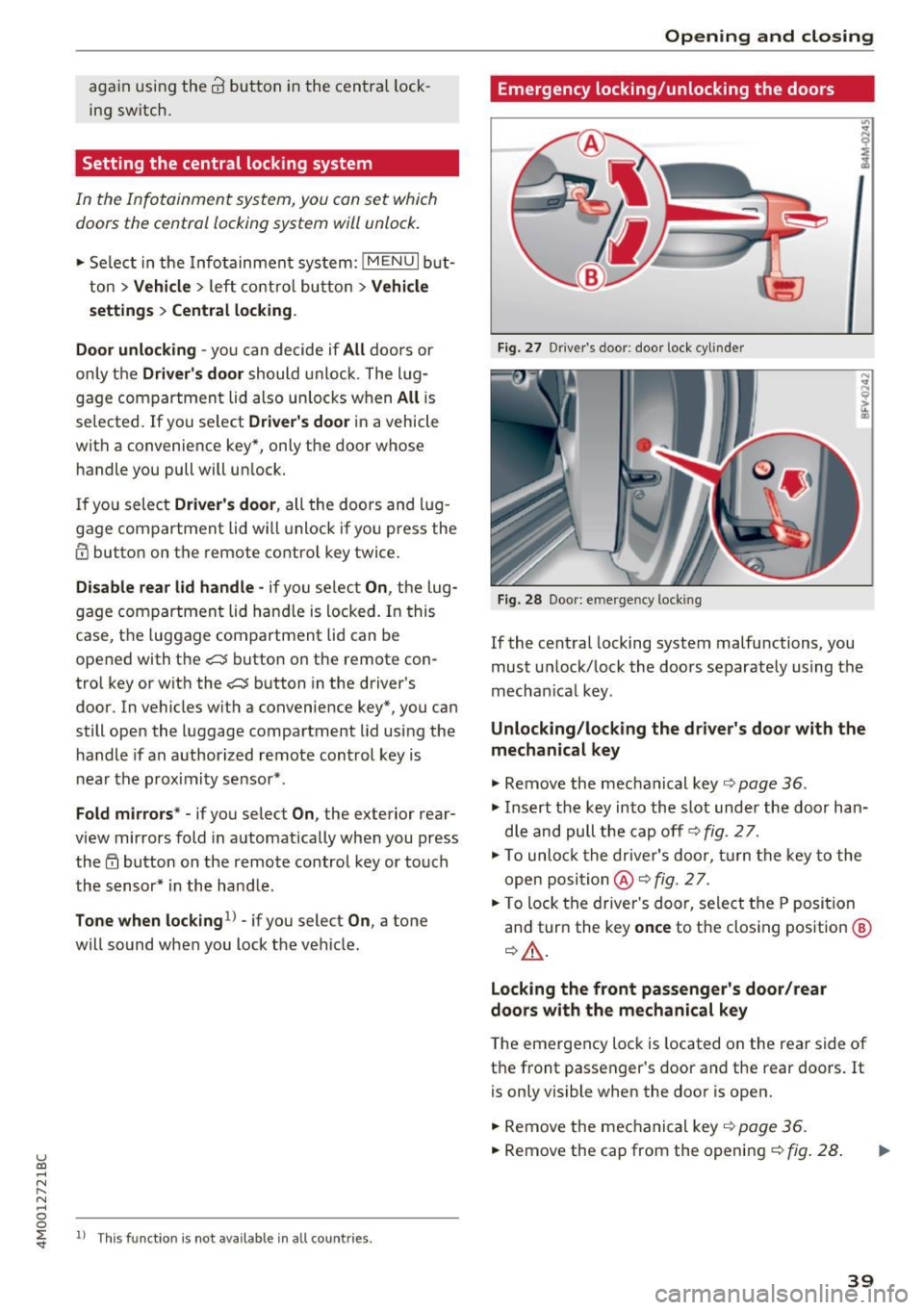
If the central locking system malfu nctions, you
must u nlock/lock the doo rs separately using the
mechan ica l key .
Unlocking/locking the driver's door with the
mechanical key
.. Remove the mechanical key c> page 36 .
.. Insert the key into the slot under the door han
d le and pull the cap off
c> fig. 2 7.
.. To unlo ck the drive r's door, turn th e key to the
open posi tio n
@ c> fig. 2 7.
.. To lock the driver 's doo r, se lect t he P position
an d tur n the key
once to t he clos ing pos ition @
c> A,.
Locking the front passenger's door/rear
door s with the mechanical key
The emergency lock is located on the rear side of
the front passenger's door and the rear doors. It
is only vis ible when the door is open .
.. Remove the me chanical key
c> page 36 .
.. Remove the cap from the openi ng c>fig . 28 .
39
Page 42 of 402
Opening and clo sin g
.. Insert the key in the inside slot and turn it all
the way to the right (right door) o r left (left
door).
A WARNING
Read and following all WARNINGS c::> & in De
scription on page
34.
Anti-theft alarm system
If the anti-theft alarm system detects a vehicle break- in, a udio and v isua l wa rning signals are
tr iggered . The anti-theft alarm system is act ivat
ed when the vehicle is locked as usua l.
It
switches off when the veh icle is unlocked.
I f th e alarm is tr iggered, it w ill shut off automat
ically after a certain amount of time. Switch the
ign it ion on or press the m button on the remo te
con trol key to turn off the alarm.
Luggage compartment
lid
Automatic luggage compartment lid
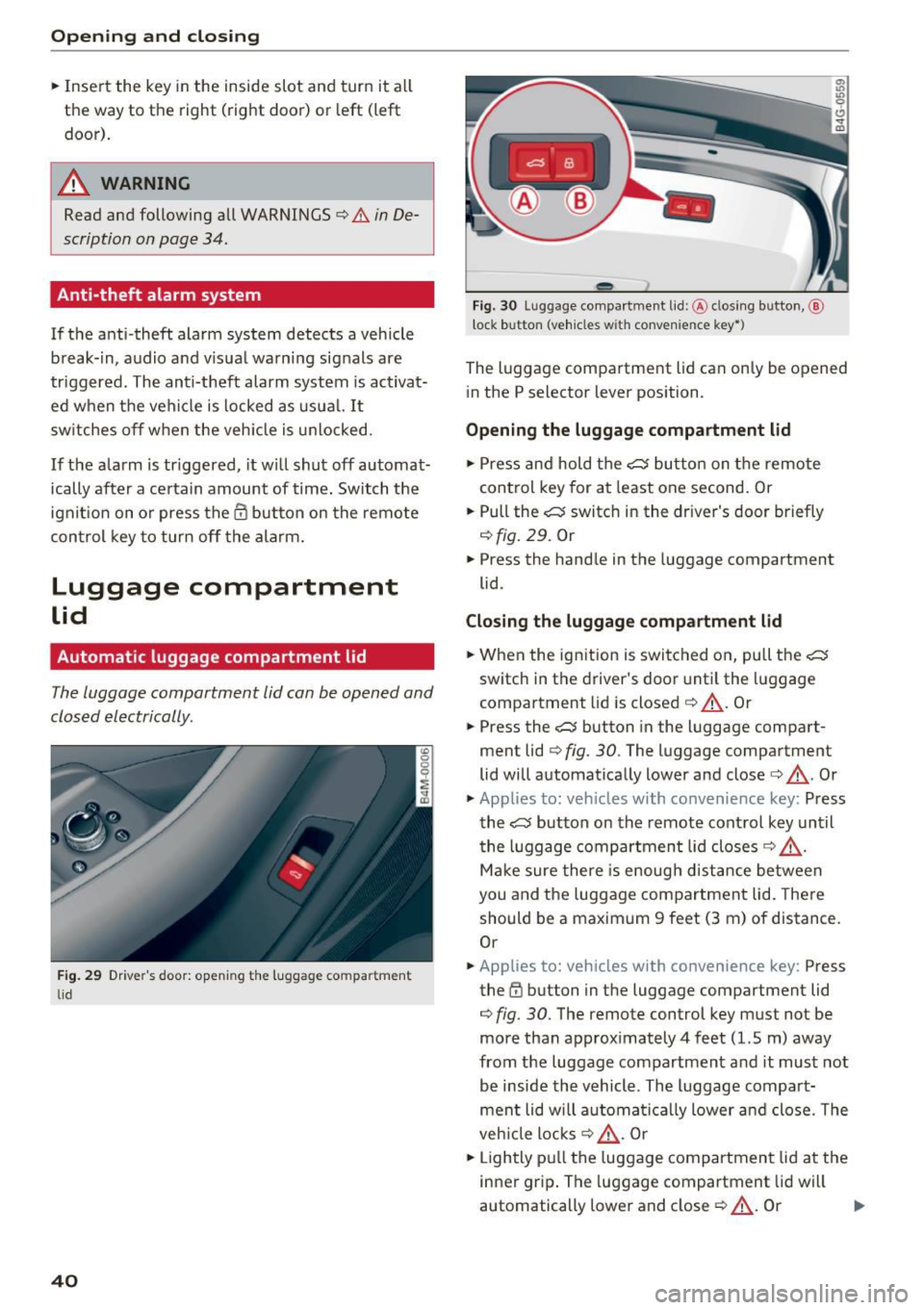
The luggage compartment lid can be opened and
closed electrically .
Fig. 29 Drive r's door: open ing the luggage co m partment
l id
40
- - --
' .;::s lil
--
F ig. 30 Luggage compa rtment lid :@ clos ing button, @
l ock button (veh icles w it h convenie nce key*)
The luggage compa rtment lid can on ly be opened
i n the P selector lever position.
Opening the luggage compartment lid
.. Press and hold the c::5 bu tto n on t he remote
control key for at least one second. Or
.. Pull the
c::5 switch in the dr iver's door briefly
c::>fig. 29 . Or
.. Press the hand le in the luggage compartment
lid .
Closing the luggage compartment lid
.. When the ign ition is switc hed on, pull the c:s
switch in the driver's doo r until the l uggage
compartment lid is closed
c::> &_ . Or
.. Press the
c::5 button in the luggage compart
ment lid
c::> fig . 30. The luggage compartment
lid will automat ically lower and close
c::> &_ . Or
.. Applies to: veh icles with co nvenience key: Press
the
c::5 button on the remote control key unt il
t he luggage compartment lid closes
c::> &_ .
Mak e sure there is e nough distance between
you and the luggage compartment lid. There
should be a maximum 9 feet (3 m) of dis tance .
Or
.. App lies to: veh icles with convenience key: Press
the ~ button in the luggage compartment lid
c::> fig. 30 . The remote control key must not be
more than approx imately 4 feet (1.5 m) away
from the luggage compartment and it must not
be inside the vehicle. The l uggage compa rt
men t lid will a utoma tica lly lower a nd close. The
veh icle locks
c::> &_ . Or
.. Lightly p ull the luggage compartment lid at the
inner grip . The luggage compartment lid wi ll
automatically lower and close
c::> &_ . Or .,,.
Page 43 of 402
~ Press the handle in the luggage compartment
lid. The luggage compartment lid will automat
ically lower and close¢.&_ .
Storin g the luggag e compartm ent lid
op ening posit ion
~ Bring the luggage compartment lid into the de
sired open position. Th e position must b e at a
certain height or higher to sto re .
~ Press and hold the cs but ton for at least four
seconds to store the new open position . A visu
al and audio signal w ill follow .
~ To set a higher open position, wait at least five
seconds and then carefully press the luggage
compartment lid upward.
~ Press and hold the cs button again for at least
four seconds to store the desired opening posi
tion .
The opening/closing process w ill stop immed i
ately if :
- You pull/ release the
cs switch in t he driver's
door , or
- Applies to: vehicles with convenience key:
Press/release the
cs button on the remote
contro l key , or
- Applies to: vehicles with conve nience key : Press
the
cs button or the {f) button in the luggage
compartment lid, or
- You push the handle in the luggage compart
ment lid , or
- When something b locks the luggage compart
ment lid or makes it diff icu lt for the lid to
move .
If you press the handle or one of the cs or tfl but
tons (vehicles w ith convenience key*) now , the
l uggage compartment lid wi ll either open or
close, depending on its angle.
_& WARNING
- After closing the luggage compartment lid,
make sure that it is latched. Otherwise the
luggage compa rtment lid could open sud
denly when driving, which increases the risk
u of an accident. co
~ - Pay careful attent ion when closing the lug-
8 gage compartment lid. Otherw ise, you could
0 :E: '
cause serious injury to yourse lf or others de
spite the pinch protection.
- To reduce the risk of pinching injuries, al
ways make sure that no one is in the operat ing area of the luggage compartment lid; in
cluding the hinge areas and the upper and lower edge of the luggage compartment lid .
- Never drive with the luggage compartment
lid ajar or open, because poisonous gases
can enter the vehicle interior and create the
risk of asphyx iat ion .
- If there is a luggage rack (such as a bicycle
rack) on the luggage compartment lid, the
luggage compartment lid may not open
comp letely under certa in ci rc u mstances or it
could close by itself if open due to the ext ra
weight. To reduce the risk of injury, the
open luggage compartment lid must there
fore have additional support or the cargo must first be removed from the rack .
(D Note
The luggage compartment lid can bump into
objects s uch as the garage ceiling when open
i ng and become damaged.
(D Tips
- The settings in the Infotainment system de
termine if the luggage compartment lid can be opened using the hand le
¢ page 39.
- T here are aud io signa ls when closing the
luggage compartment lid with the remote
cont rol key (vehicles with convenience key*)
or with the
cs button in the dr iver's door.
- When the vehicle is locked, the luggage
compartment lid can be unlocked separately
by pressing the
cs button on the remote
control key. The luggage compartment lid
locks automatically when it is closed again .
- Applies to: vehicles with convenience key:
The luggage compartment lid can be closed
with the convenience from a distance up to
approximately 9 ft (3 m).
- The luggage compartment lid can be oper ated manually if the vehicle battery is low .
It is necessary to use more force when do ing .,.
41
Page 44 of 402
Opening and closing
this. Move the lid slowly to reduce the
amount of force needed .
- When the trailer socket is being used (for
example, for a bicycle rack), the luggage
compartment lid can be opened and closed
using the handle or the foot motion activa
tion (vehicles with convenience key*) .
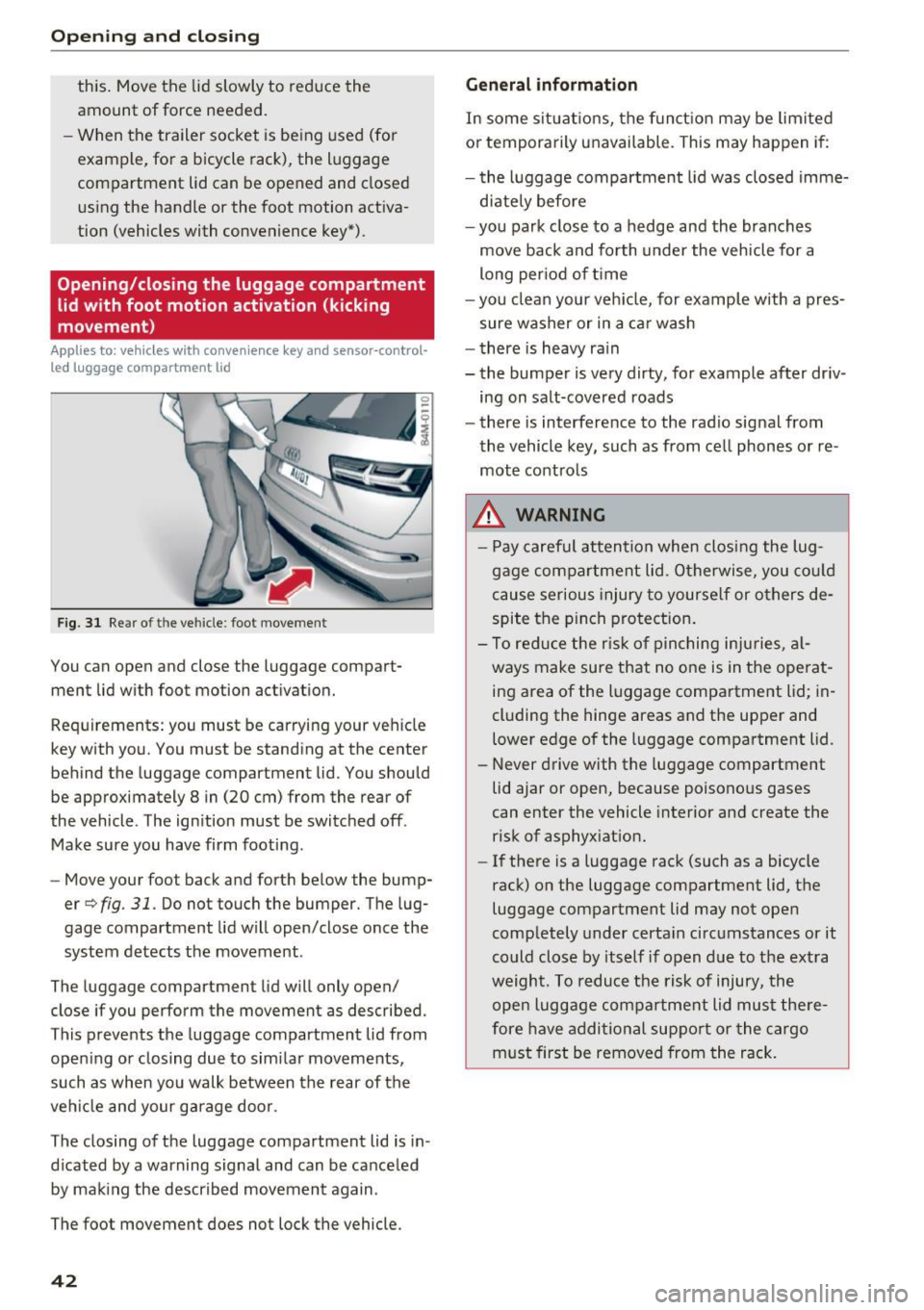
Opening/closing the luggage compartment
lid with foot motion activation (kicking
movement)
Applies to: vehicles with convenience key and sensor-control
led luggage compartment lid
Fig. 31 Rear of th e ve hicle: fo ot move ment
You can open and close the luggage compar t
ment lid wi th foot mo tion activation.
Requirements: you must be carrying your vehicle
key with you. You must be standing at the center
behind the lugg age compartment lid. You should
be approximately 8 in (20 cm) from the rear of
the vehicle . T he ignition must be switched off .
Make sure you have firm footing .
- Move your foot back and forth below the bump
er
Q fig . 31. Do not touch the bumper. The lug
gage compartment lid will open/close once the system detects the movement .
The luggage compartmen t lid will only open/
close if you perform the movement as described.
This prevents the luggage compartment lid from opening or closing due to similar movements,
such as when you walk between the rear of the
vehicle and your garage door .
The closing of the luggage compartment lid is in
dicated by a warning signal and can be canceled by making the described movement again .
The foot movement does not lock the vehicle .
42
General information
In some situations, the function may be limited
or temporarily unavailable . This may happen if:
- the luggage compartment lid was closed imme
diately before
- you park close to a hedge and the branches
move back and forth under the vehicle for a
long period of time
-you clean your vehicle, for example with a pres
sure washer or in a car wash
- there is heavy rain
- the bumper is very dirty, for example after driv -
ing on salt-covered roads
- there is interference to the radio signal from
the vehicle key, such as from cell phones or re
mote controls
.&,. WARNING
- Pay careful attention when closing the lug
gage compartment lid. Otherwise, you could
cause serious injury to yourself or others de
spite the pinch protection.
- To reduce the risk of pinching injuries, al
ways make sure that no one is in the operat
ing area of the luggage compartment lid ; in
cluding the hinge areas and the upper and
lower edge of the luggage compartment lid .
- Never drive with the luggage compartment
lid ajar or open, because poisonous gases
can enter the vehicle interior and create the
risk of asphyxiation.
- If there is a luggage rack (such as a bicycle
rack) on the luggage compartment lid, the
luggage compartment lid may not open
completely under certain circumstances or it
could close by itself if open due to the extra
weight. To reduce the risk of injury, the open luggage compartment lid must there
fore have additional support or the cargo
must first be removed from the rack.
Page 45 of 402
u (0 ...... N r--. N ...... 0
0
:E
release
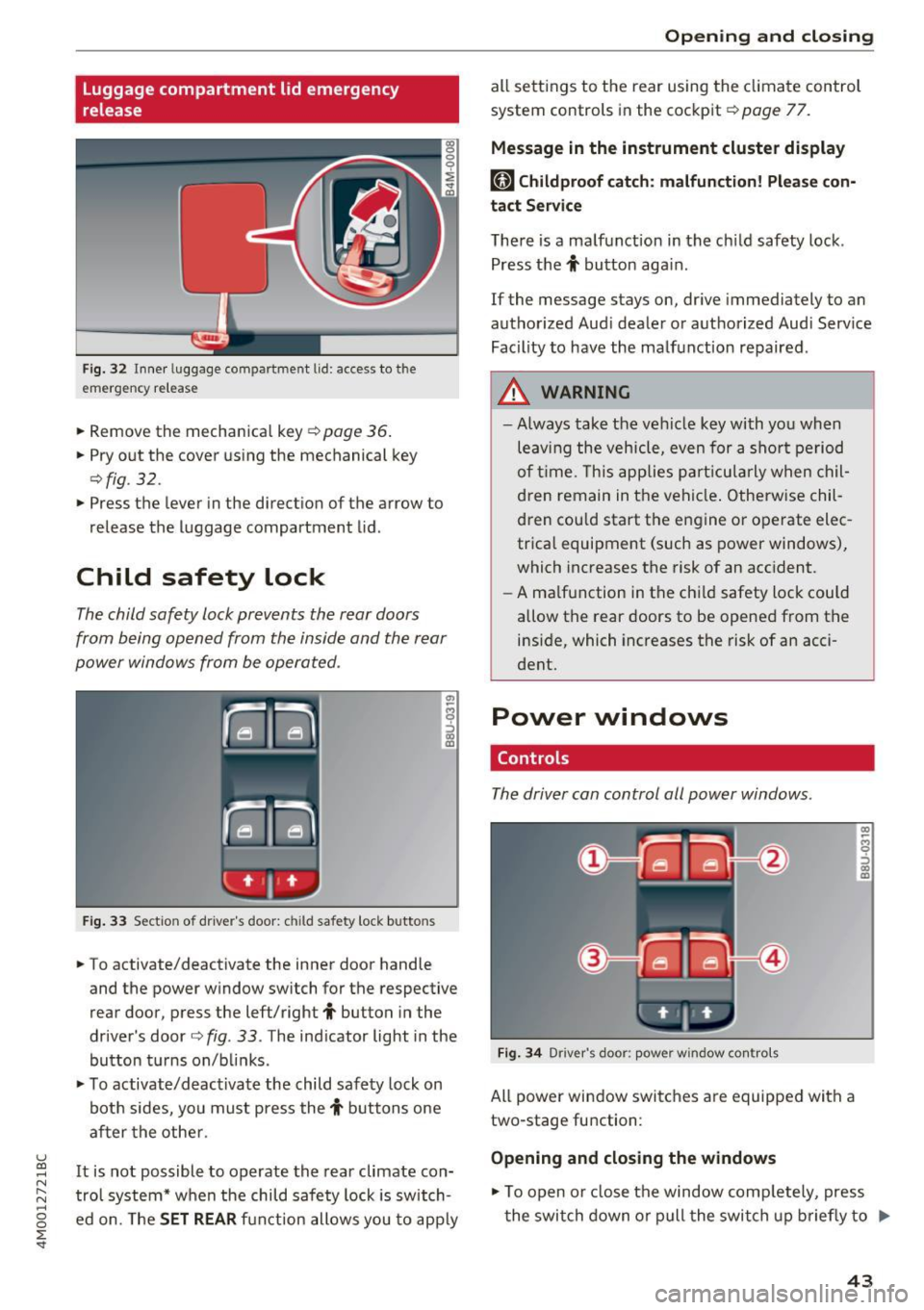
Fig . 32 Inner luggage co mpartme nt lid : access to the
emerge ncy re le ase
• Remove the mechanica l key ~ page 36 .
• Pry o ut the cover us ing the mechanical key
¢ fig . 32 .
• Press the lever in the direct io n of the arrow to
release the luggage compartment lid .
Child safety lock
The child safety lock prevents the rear doors
from being opened from the inside and the rear
power windows from be operated .
Fig. 33 Sect io n of dr ive r's door : chil d sa fety lock b utto ns
• To activate/deactivate the inner door handle
and the power w indow switch for the respective
rear door , press the left/right
t button in the
driver 's door ¢
fig. 33 . The ind icator light in the
bu tton turns on/b links .
• To activate/d eact ivate the child safety lock on
bot h sides, yo u must press the
t buttons one
a fter the othe r.
It is not possible to operate the rear climate con
tro l system* w hen the child safe ty lock is switch
e d on. The
SET REAR fu nction allows y ou to app ly
Open ing and closing
all sett ing s to the rear using the cl imate control
system controls in the cockpit ¢
page 77.
Message in the instrument cluster display
[81 Childproof catch : malfun ction! Please con·
tact Service
The re is a ma lfunction in the ch ild safety lock .
Press the
t button aga in .
If the message stays on, dr ive immediately to an
authorized Aud i dealer o r a uthorized Aud i Serv ice
Facility to have the ma lf u nction repaired .
A WARNING
=
-Always take the ve hicl e key with yo u when
leav ing the vehicle, even for a s hort pe riod
o f ti me. This applie s pa rtic ula rly w hen chil
dren remain in t he vehi cle. O therwise chil
d ren cou ld sta rt the en gine or operate elec
trica l equipment (such as power windows),
which increases the risk of an acc ident.
- A ma lf u nction in the ch ild safety loc k could
allow the rear doors to be opened from t he
inside, which increases the risk of an acci
dent.
Power windows
Controls
The driver can control all power windows.
F ig . 34 Dr iver 's doo r: pow er w indow co ntro ls
All power win dow switc hes are equipped wit h a
two-stage fu nction :
Opening and closing the windows
-
CX) ~ M 0
::'> CX) (D
• To open o r close the window comp letely, press
t he swi tch down or pull the swi tch up briefly to
IJi,,-
43
Page 52 of 402
Lights and Vision
Ir.a Head light a ssista nt: malf unction! See own
er' s manual
Drive to an a utho rized Aud i de aler or authorized
Aud i Serv ice Facility immediately to have the
malfunction corrected . You can still switch the
high beams on or off manually .
II Headlight assi stant : currently unavail able .
Camera view re stricted due to surroundings .
See owner's manual
The camera view is b lo cked , fo r example by a
s t icker o r debr is.
The sensor is located between the interior rear
view mir ror and the windshield . Do not p lace any
stickers in th is area on the windshield .
_& WARNING
High beam assistant is only i ntended to assist
t he driver. The dr iver is still res ponsible for
cont ro lling the headlights and may need to
switch them on and off manually depend ing
on light and visib ility co nditions . It may be
necessary to ope rate them manua lly in s itua
tions such as:
- In adve rse weathe r cond itions such as fog,
heavy ra in, b low ing snow or sp raying water .
- On roads where oncoming traffic may be
partia lly obscured, s uch as exp ressways .
- When there a re road users that do not have
s uf ficient lighting, s uch as bicyclers o r
vehicles with dirty ta il lamps.
- In tight curves and o n steep hills .
- In poorly lit areas .
- Wi th stro ng reflecto rs, such as s igns.
- If the area of the windsh ield near the senso r
is fogged ove r, dirty, i cy or covere d with a
st icker .
Adjusting the exterior lighting
The functions ar e adjust ed in the Infotainm ent
system.
• Se lect in the Infotainment system: I M ENU I but
ton
> Vehi cle > left contro l button > Vehicle
setting s
> Exterior lighting .
50
Automatic headlights
You can adjus t the following se ttings in the Au
to-dimming high beam s
menu:
Activation time -you can adjust if the headlights
swi tch on
Early , Medium or Late accor ding to t he
sens itivity of t he lig ht sen sor .
Headlight assistant * -you can switch the high
bea m assis tant* on and off.
Entry/exit lighting
When it is dark, the Ent ry /exit lighting ill umi
nates the area a round the vehicle when unlocking
the veh icle and after switch ing off the ig nition
and opening the dr ive r's door .
The
Entry /e xit lighting only works when it is
dark and the light sw itch is in the
AUTO posit ion.
Daytime running lights
USA models :
the daytime r unning lights can be
switch ed on/off . S elect
On or Off.
Canada models: this f unction canno t be sw itched
off. They activate automatically each time the ig
nit ion is switched on.
Emergency flas hers
--- ---~
·--~~ ~-~-~
·----- -- --___ , ~ - ::..- -- ,,.. A .. 'l-"'.A - - -~
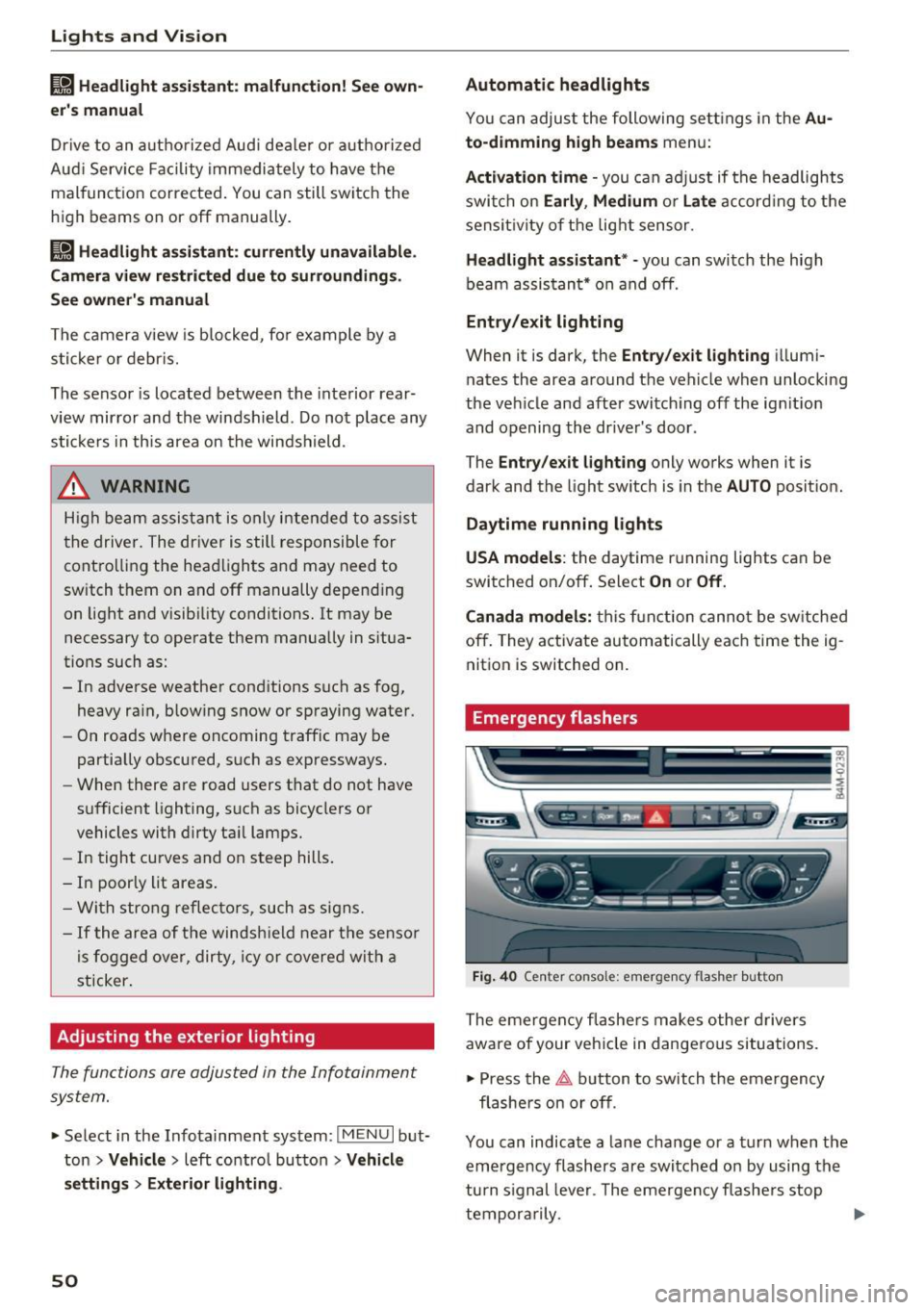
Fig. 4 0 Center conso le: emerge ncy flashe r bu tt o n
The emergen cy fl ashe rs m akes ot her d rivers
aware of your veh icle in dangerous situations.
• Press the
~ button to switch the emergency
flashe rs on or off .
Yo u can indicate a la ne change or a turn when the
eme rgency flashers are switched o n by using the
turn s ignal leve r. T he eme rgency f lashe rs stop
tempor arily .
ll-