power steering AUDI Q7 2017 Owner´s Manual
[x] Cancel search | Manufacturer: AUDI, Model Year: 2017, Model line: Q7, Model: AUDI Q7 2017Pages: 402, PDF Size: 100.39 MB
Page 145 of 402
u (0 ...... N r--. N ...... 0
0
:E
Introduction
Applies to: vehicles with peripheral cameras
With this equipment, the parking system p lus*
c::> page 139 is supplemented w it h various pe riph
e ral cameras. The four cameras give you the fol
l owing views: area around the vehicle, front cor
ner view and rear corner view, view in front of the
vehicle and behind the vehicle .
General information
Applies to: vehicles with peripheral cameras
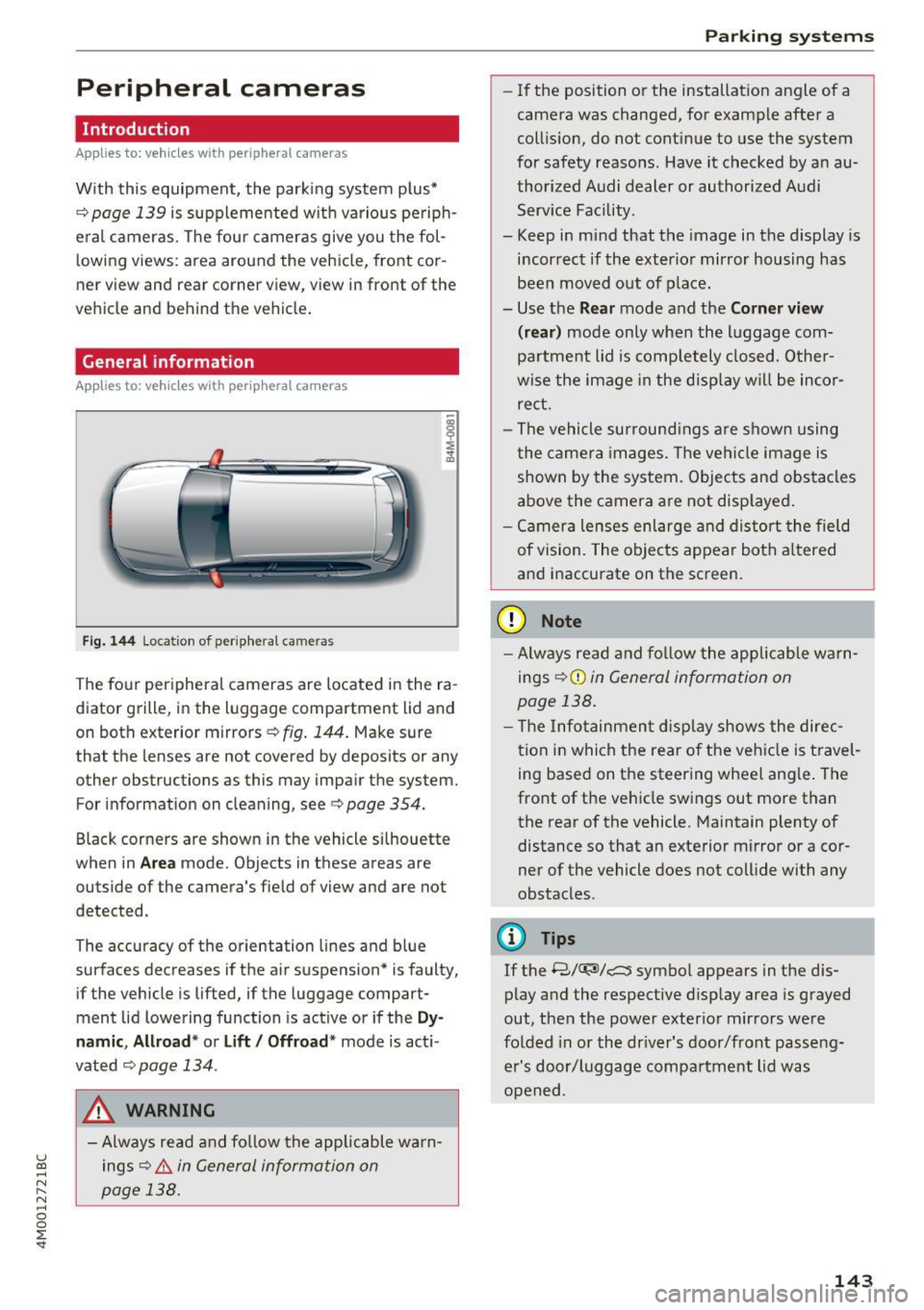
Fi g.
14 4 Location of periphera l cameras
The fo ur per ipheral cameras are located in the ra
diator grille, in the luggage compartment lid and
on both exterior mirrors
c::> fig. 144 . Make sure
that the lenses are not covered by deposits or any other obstructions as this may impair the system.
For information on cleaning, see
c::> page 354.
Black corners are shown in the vehicle s ilhouette
when in
Ar ea mode. Objects in these areas are
outside of the camera's field of view and are not
detected.
The accuracy of the orientation lines and b lue
surfaces decreases if the air suspension* is faulty,
if the vehicle is lifted, if the luggage compart
ment lid lowering function is active or if the
Dy
namic , Allr oad * or Lift / Offroad * mode is act i
vated
c::;, page 134 .
A WARNING
-Always read and fo llow the applicable warn
ings
c::> .& in General informa tion on
page 138.
Parking systems
-If the position or the installation angle of a
camera was changed, for example after a
coll is ion, do not cont inue to use the system
for safety reasons. Have it checked by a n au
thorized Audi dealer or authorized Audi Serv ice Facility.
- Keep in mind that the image in the display is
i n correct if the exterior mirror housing has
been moved out of p la ce.
- Use the
Rear mode and the Corner view
(r ear )
mode only when the luggage com
pa rtment lid is comp letely closed. Other
wise the image in the disp lay w ill be inco r
re ct.
- The vehicle surround ings a re shown using
the camer a images. The vehi cle image is
shown by the system. Objects and obs tacles
above the camera are not disp layed .
- Ca mera lenses enl arge and distort the field
of vision. The objects appear both a ltered
a nd inaccurate on the screen.
(D Note
- Alw ays read and fo llow the applicable wa rn
ings
c::> (i) in General information on
page 138 .
- T he Infotainmen t display shows the direc
t ion in which the rear o f the ve hicle is travel
ing based on the steering wheel ang le . The
front of the vehicle swings out more than
the rear of the vehicle. Maintain plenty of
distance so that an exterior mirror or a cor
ner of the vehicle does not coll ide with any
obstacles.
(D Tips
If the 8/
out, then the power exter io r mirrors were
fo lded in or the dr iver's door/front passe ng
er's door/luggage compa rtment lid was
opened .
143
Page 150 of 402
Intelligent Technology
Intelligent Technology
Electronic stabilization
control (ESC)
Description
Elect ronic stabilization control (ESC) supports
driver safety.
It red uces the risk of slipping and
improves driving stability. ESC detects crit ica l sit
uations such as when the vehicle is oversteering
and understeering or the wheels are spinning.
The vehicle is stabilized by applying the brakes or reducing eng ine torq ue. When the ESC engages,
the
DJ ind icator light blinks in the instrument
cluste r.
The fo llow ing systems are integrated in the ESC:
Ant i-loc k bra king system (ABS)
ABS prevents the whee ls from locking when brak
ing. The vehicle can sti ll be steered even during
hard brak ing. Apply steady pressure to the brake
pedal. Do not pump the pedal. A puls ing in the
brake pedal indicates that the system is acting to
stabilize the vehicle .
Brake assist system
The brake assist system can decrease brak ing dis
tance . It increases braking power when the driver
presses the brake pedal quick ly in emergency sit
uations . You must press and hold the b rake pedal
until the dangerous situat io n is over . In veh icles
with adapt ive cr uise control*, the bra ke assist
sys tem is more sensitive if the d ista nce detec ted
t o the vehicle dr iv ing ahead is too small.
O n ve hicles w ith act ivated and funct io ni ng night
vision assist*, the brake ass ist system ca n re
spond more sens it ively if there is a warning.
Anti-Slip Regulation (ASR )
ASR reduces eng ine power when the drive wheels
begin spinning a nd adap ts the force to the road
conditions . This makes it easie r to start, acceler
ate and dr ive up h ills.
Electron ic differential lock (EDL )
EDL applies the brakes to a wheel that starts
spinning and transfers the drive power to the
148
other driving whee ls. This function is not avai la
ble at higher speeds.
In extreme cases , ED L automat ica lly swi tches off
to keep t he b rake on the braked wheel from over
heating. The veh icle is still working correct ly. ED L
will switch on again automatically when condi
tions have returned to normal.
Steering recommendat ion
The ESC he lps to stabilize the vehicle by chang ing
t h e s teer ing torque.
Select ive wheel torque control
Se lective wheel to rque cont rol is used when d riv
i ng on curves. Braking is targeted toward the
whee ls on the inside of the curve as needed . T his
a ll ows mo re precise dr iving in cu rves .
Automatic post -collision braking system
The "automat ic post -collis io n braking system"
can help to reduce the risk of sliding and of addi
tiona l co llisions after an acc ident. If the a irbag
contro l modu le detects a collision, the veh icle is
braked by the ESC.
The veh icle does not brake automatically if:
- the driver presses the accelerator pedal, or
- the ESC, the brake system or the veh icle elect ri-
cal system are not functioning.
A WARNING
- The ESC and its integrated systems cannot
overcome the lim its imposed by natura l
phys ical laws . This is espec ially important
on s lippery or wet roads . If the systems be
gi n ac ting to stabilize yo ur vehicle, you
should immediately a lter your speed to
match the road and traffic conditions. Do
not let the inc reased safety provided tempt
you into taking risks. This could increase
your r isk of a coll is ion.
- Please note the risk of a collision increases
when driving fast, especially through curves
and on slippery or wet roads, and when dr iv
ing too close to objects ahead. The ESC and
its integrated systems cannot always pre
vent co llisions -there is st ill a risk of acci
dents!
Page 154 of 402
Intelligent Technology
Electromechanical
steering, all-wheel
steering
The electromechanical steering supports the
driver's steering movements .
Power steering adapts electronically based on
the vehicle speed.
Indicator lights and messages
• Stee ring: malfunction! Please stop vehi cle
If th is ind icator light turns on and stays on and
this message appears, the power steer ing may
have fa iled.
Stop the vehicle in a safe location as soon as pos
sib le. Do
not continue driving. See an author iz ed
Aud i dealer or authori zed Aud i Serv ice Facility for
assistance.
• Steering: malfunction! Please stop vehicle.
Pay attention to distan ce at side
If th is ind icator light turns o n and stays o n and
this message appears, the a ll-wheel steering*
may have failed . The side of the vehicle may need
more space on the road.
Red uce your speed and stop the veh icle in a safe
locat ion wit h enough space on the sides as soon
as possible. Do
not continue d riving . See an au
thor ized Audi dealer or authorized Audi Service
Facility for assistance.
'T@ Steering : malfunction! You may continue
dri ving
If t he indicator lig ht t urns on and the message
appears, the steering wheel may be more diff i
cult to move or mo re sensitive tha n usua l. The
steering whee l may a lso be at an angle when
driving straight.
D rive s low ly to an authorized A udi dealer or au
thor ized Audi Se rvice Facility to have the ma l
function corrected.
'T@ Ste ering : ma lfunction! Adapt driving style .
Larger turning radius
I f the indicator lig ht tu rns on and th is message
appears, the a ll-wheel steering* may have failed .
152
Please note that the vehicle has a larger t urning
radi us and the stabi lity w hen turning a corner is
lik e that of a vehicle without all-whee l steer ing.
The steering wheel may also be at an angle when driv ing straight.
Drive slowly to an a uthorized Audi dea ler or au
thorized Audi Serv ice Facility to have t he mal
funct ion corrected.
(D Tips
- If the . or 'T-ij indicato r light only stays on
for a sho rt time, you may cont inue driving .
- For add itiona l information on all-wheel
steering *, see ¢
page 134 .
All-wheel drive (quattro)
General informat ion
I n all whee l drive, the dr iv ing power is dis trib ut
ed between all four whee ls when needed . This
happens automatically depending on your driving
behavior as we ll as the c urrent road cond it ions.
Also see ¢
page 148, Electronic stabili zation
control (ESC).
The all-whee l drive system distributes the driving
power va riably to the front and rear axle. It works
together with selective wheel torq ue control,
which act ivates when dr iv ing through curves
¢ page 148. With the sport d ifferent ial*, power
dist ribution to the rear wheels is variable and can
be adjusted using the drive se lect
¢ page 134.
The all wheel drive concept is designed for high
engine power . Your vehicle is except iona lly pow
erfu l and has excellent driving charac teristics
bot h unde r normal d riving conditions and o n
snow and i ce. Always read and follow safety pre
c au tions
c:::> .&, .
Winter tires
By using all wheel dr ive, your ve hicle has good
forward motion w ith standard tires in win ter con
dit ions. However, using w in ter or all season t ires
o n
all four wheels in the w inte r is re comme nded,
be cau se th is w ill imp rove t he
braking effe ct. IJII>-
Page 400 of 402
Index
Tire pressure monitoring system . . . . . . . 351
Tires and vehicle load limits . . . . . . . . . . . 346
Wheel wrench . . . . . . . . . . . . . . . . . . . . . . . . 360
When must a safety belt be replaced? . . . . 268
When must the airbag system be inspected? 285
Where are lower anchorages located?
310
Wi-F i
Audi music stream . . . . . . . . . . . . . . . . . . .
232
Audio player . . . . . . . . . . . . . . . . . . . . . . . . 232
Hotspot . . . . . . . . . . . . . . . . . . . . . . . . . . . 195
Online media . . . . . . . . . . . . . . . . . . . . . . . 233
also refer to Wi-Fi . . . . . . . . . . . . . . . . . . . 232
Wild animal recognition......... .. .. ... 131
W indows
Child safety lock . . . . . . . . . . . . . . . . . . . . . .
43
Cleaning/removing ice . . . . . . . . . . . . . . . . 356
Defrosting . . . . . . . . . . . . . . . . . . . . . . . 73, 76
Power windows . . . . . . . . . . . . . . . . . . . . . . 43
W indshield
Cleaning . . . . . . . . . . . . . . . . . . . . . . . . . . . . 55
Defrosting . . . . . . . . . . . . . . . . . . . . . . .
73, 76
also refer to Windshield . . . . . . . . . . . . . . . 55
W indshield washer system . . . . . . . . . . 55, 331
Reservoir capacity . . . . . . . . . . . . . . . . . . . 379
Windshield wipers . . . . . . . . . . . . . . . . . . . . . 55
Winter operation Car washes . . . . . . . . . . . . . . . . . . . . . . . . .
354
Cooling system . . . . . . . . . . . . . . . . . . . . . . 328
Defrosting the windows . . . . . . . . . . . . 73, 76
Removing ice from windows . . . . . . . . . . . 356
Seat heating . . . . . . . . . . . . . . . . . . . . . . 73, 76
Snow chains . . . . . . . . . . . . . . . . . . . . . . . . 349
Steering wheel heating . . . . . . . . . . . . . . . . 77
Tires . . . . . . . . . . . . . . . . . . . . . . . . . . . . . . 348
Vehicle battery . . . . . . . . . . . . . . . . . . . . . .
330
Windshield washer system . . . . . . . . . . . . 331
Winter tires . . . . . . . . . . . . . . . . . . . . . . . . . . 348
X
Xenon headlights . . . . . . . . . . . . . . . . . . . . . 371
z
Zooming on the map
Multifunction steering wheel . . . . . . . . . . .
13
Zooming (map) ... ................ 207,215
398