bluetooth AUDI Q7 2017 Owner´s Manual
[x] Cancel search | Manufacturer: AUDI, Model Year: 2017, Model line: Q7, Model: AUDI Q7 2017Pages: 402, PDF Size: 100.39 MB
Page 247 of 402
u co ..... N r--... N ..... 0
0
:E: '
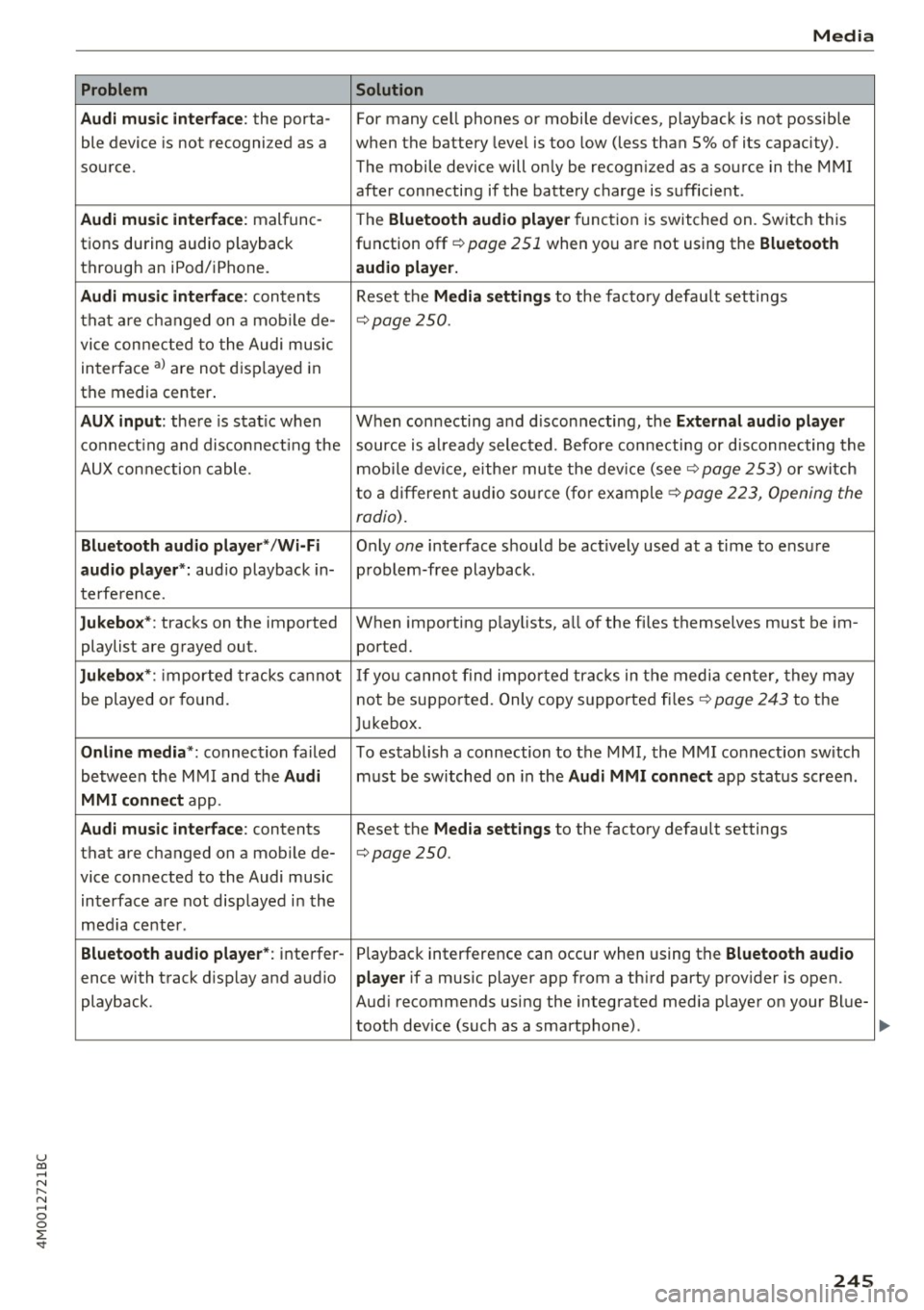
Audi music interface :
the porta-
ble device is not recogni zed as a
source.
Audi music interface : malfunc-
tions during audio playback
through an iPod/ iPhone.
Audi music interface : contents
that are changed on a mobile de-
vice connected to the Audi music
interface al are not displayed in
the media center.
AUX input: there is stat ic when
connecting and disconnecting the
AUX connection cable .
Bluetooth audio player* /Wi-Fi
audio player *:
aud io playback in-
terference.
Jukebox* : tracks on the imported
playlist are grayed out.
Jukebox* : imported tracks cannot
be played or found.
Online media *: connection failed
between the MMI and the
Audi
MMI connect
app.
Audi music interface: contents
that are changed on a mobile de-
vice connected to the Audi music interface are not displayed in the
med ia center .
Bluetooth audio player *: interfer-
ence with track d isplay and audio
playback.
Media
Solution
For many ce ll phones or mobile devices, playback is not possible
when the battery level is too low (less than 5% of its capacity).
The mobile de-vice will only be recognized as a source in the MMI
after connecting if the battery charge is sufficient .
The
Bluetooth audio player f unction is switched on. Switch this
function off
c:> page 2 51 when you a re not using the Bluetooth
audio player.
Reset the Media settings to the facto ry defau lt settings
c:> page250.
When connecting a nd disconnecting, the External audio player
source is already selected. Before connecting or disconnecting the
mobile device, either mute the device (see
c:> page 253) or switch
to a different audio source (for example
c:> page 223, Opening the
radio) .
Only one interface should be act ively used at a time to ensure
problem-free playback .
When importing playlists, a ll of the fi les themselves must be im-
ported.
If yo u cannot find impor ted tracks in the media center, they may
not be supported. Only copy supported files
c:> page 243 to the
Jukebox.
To establish a connection to the MMI, the MMI connection sw itch
must be switched on in the
Audi MMI connect app status screen .
Reset the
Media settings to the factory default settings
c:> page 250.
Playback interference can occur when using the Bluetooth audio
player
if a music player app from a th ird party provider is open.
Aud i recommends using the integrated media player on your Blue-
tooth dev ice (such as a smartphone) .
245
Page 252 of 402
System settings
wait for the signal tone (beep) to say a new
command.
Volume: yo u can adjust the volume of the
p rompts by turning the control knob.
Individual speech training (only when the vehi
cle is stat ionary): you can adapt the voice recog
n it ion system to your voice or pronunciation in
order to improve the system's ability to recognize
your speech . Individua l training is comprised of
20 speech entries that consist of commands and
sequences of numbers. You can delete the pro
grammed voice tra ining w ith the
Reset individu
al speech training
function.
Display brightness
You can adjust the brightness of the Infotain
m ent system disp lay by turning the contro l knob.
Factory settings
The following functions can be reset to the facto
ry default settings :
-Sound settings
- Radio
- Media settings
- Jukebox *
- Directory
-Telephone
- Bluetooth and Wi-Fi*
- Navigation settings*
- Navigation and online memory *
- Voice recognition system*
- Shortcut keys
- Message settings*
-Apps*
-Tool tips
- Audi connect *
- Audi smartphone interface*
You can se lect the desired functions individually
or all at once with the option
Select all entries .
Select and confirm Restore factory settings .
(D Tips
Make sure that not only the settings were de
leted but also the stored data, if applicable .
250
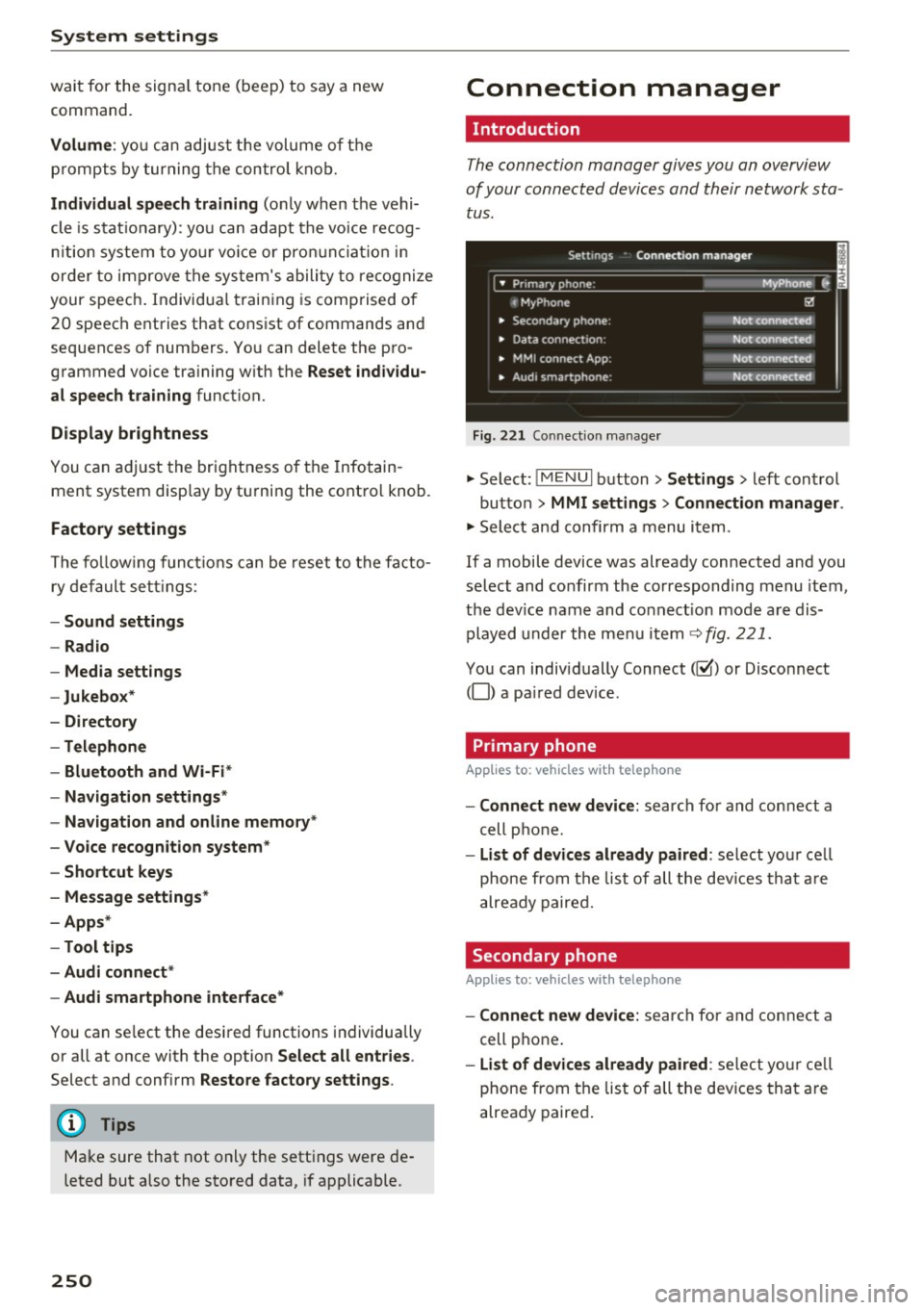
Connection manager
' Introduction
The connection manager gives you an overview
of your connected devices and their network sta
tus.
Settings Conne·ction manager I
====- .. · ~•_P_n_m_•~~-h~o_n~e_: ________ _____ M_ y ~ Phone ~
, MyPhone
• Secondary phone:
• Data connection :
• MMI connect App:
" Audi smartphone:
Fig. 221 Connect io n manager
@
Not connected
Not connected
Not connected
Not connected
"Select : !M ENUI button> Settings > left control
button >
MMI settings> Connection manager .
"Select and confirm a menu item.
If a mobile device was already connected and you
select and confirm the corresponding menu item,
the dev ice name and co nnect ion mode are dis
played under the menu item
c:!;> fig. 221.
You can individually Connect(~ or Disconnect
(0) a paired device .
' Primary phone
Applies to: vehicles with telephone
- Connect new device: search for and connect a
cell phone.
- List of devices already paired : select you r cell
phone from the list of all the devices that are
already paired.
Secondary phone
Applies to: vehicles with telephone
-Connect new device: search for and connect a
cell phone .
-list of devices already paired : select yo ur cell
phone from the list of all the devices that are
already paired.
Page 253 of 402
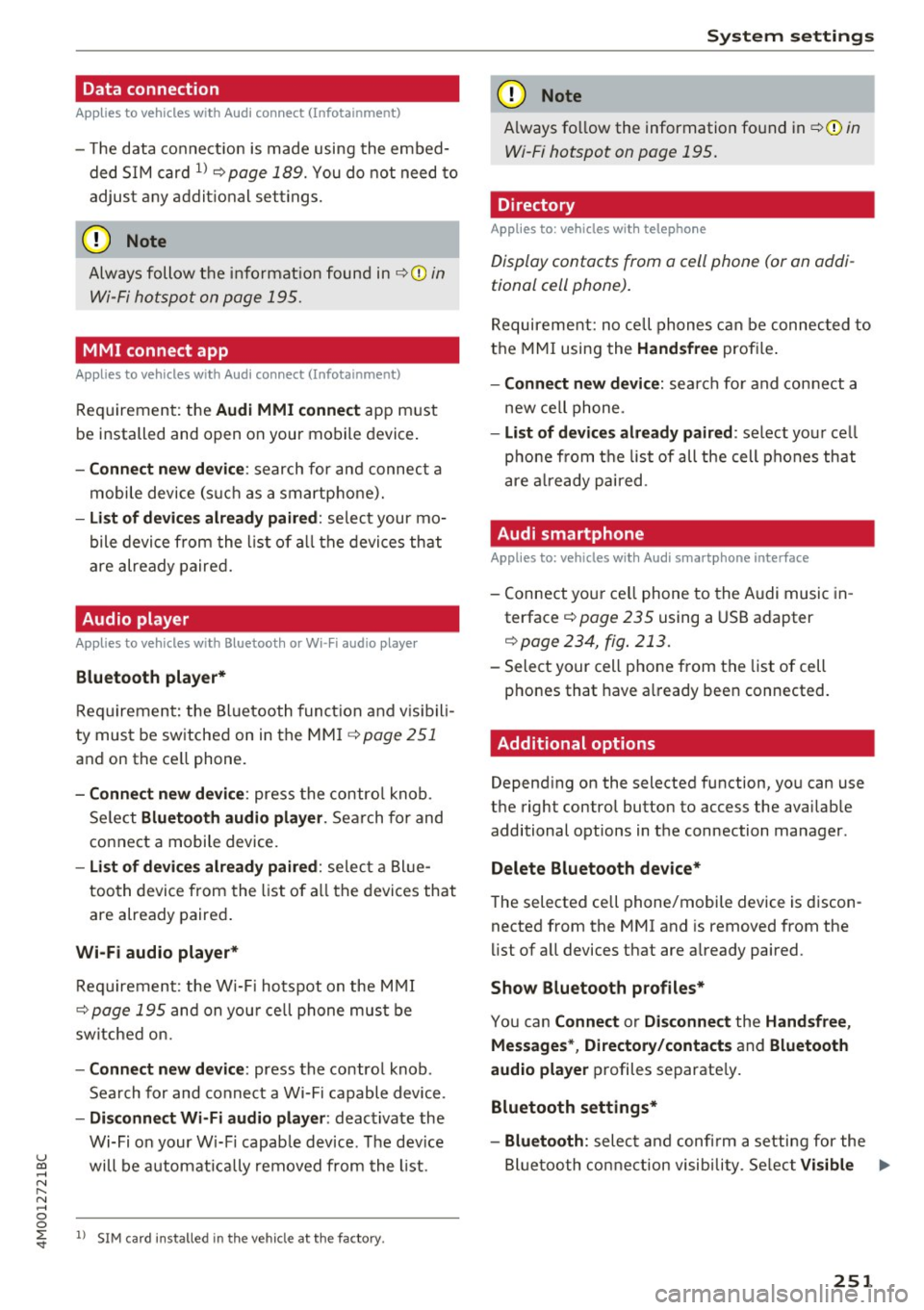
Data connection
Applies to vehicles w ith A ud i con nect (Infota inme nt)
- T he data connect ion is made using the embed
ded SIM card
l) ¢page 189. You do not need to
adjust any addit ional se ttings.
(D Note
Always follow the info rmat ion found in ~CD in
Wi-Fi hotspot on page 195.
MMI connect app
A pp lies to vehicles w it h Aud i connect (Infota inme nt)
Req uirement: the Audi MMI connec t app must
be installed and open on your mobile device .
-Co nne ct n ew d ev ic e: search for and connec t a
mobile device (such as a smartphone).
- List of d evice s alr ead y paired : select your mo
bile device from the l ist of a ll the devices that
are already paired.
Audio player
Ap plies to vehicles w ith B luetoot h or Wi -Fi aud io playe r
Bluetooth play er*
Requirement: the Bluetooth funct ion and vis ibili
ty must be switched on in the MM I
¢ page 251
and on the ce ll phone.
- Conn ect new d ev ice : press the contro l knob.
Se lect
Bluet ooth a udio pla ye r. Search for and
connect a mobile device.
- List of devi ce s alrea dy pai red : select a Bl ue
too th device from the list of a ll the devices that
are already paired .
Wi-Fi audio pla yer *
Requirement: the W i-Fi hotspot on the M MI
~ page 195 and on you r ce ll phone must be
sw itched on.
- Conn ect new de vice: press the control knob .
Search for and connect a Wi-Fi capable device .
-Di sconn ect Wi-Fi audio pla yer : deactivate the
Wi-Fi on your W i-Fi capab le device. The dev ice
u ~ will be automatically removed from the l ist.
N r-... N ..... 0
0
~ l) S IM card in stalle d in t he vehicle at th e factory.
Sys te m set ting s
(D Note
Always fo llow the information found in ~ 0 in
Wi-Fi hotspot on page 195.
Directory
Applies to : veh icles w it h te lepho ne
Display contacts from a cell phone (or an addi
tional cell phone).
Requirement: no cell phones can be connec ted to
the MMI using the
Handsfr ee prof ile .
- Connect new d evice : search fo r and connect a
new ce ll phone .
-List o f device s alr eady pai red: select your ce ll
pho ne from the list of all the cell phones that
are a lready pai red .
Audi smartphone
Applies to : veh icles w ith Audi s m artp hone interface
- Connect your ce ll phone to the Audi music in
terface ~
page 235 using a USB adapter
¢ page 234, fig . 213 .
- Select your cell phone from the list of cell
phones that have a lready been connected.
Additional options
Depending on the selected function, you can use
the right control button to access the availab le
additional options in the connection manager.
Delete Bluetooth de vic e*
The selected cell phone/mobile device is discon
nected from the MMI and is removed from the
list of all devices that are already paired.
Show Bluetooth profiles *
You can Connect or Disconne ct the H and sfr ee,
Me ssage s*, Director y/conta ct s
and Bluet ooth
aud io pl ayer
profiles separate ly.
Bluetooth settings *
- Bluetooth :
select and confi rm a setting for the
Bl uetooth connection visib ility . Se lect
Vi sible ...,
251
Page 254 of 402
System settings
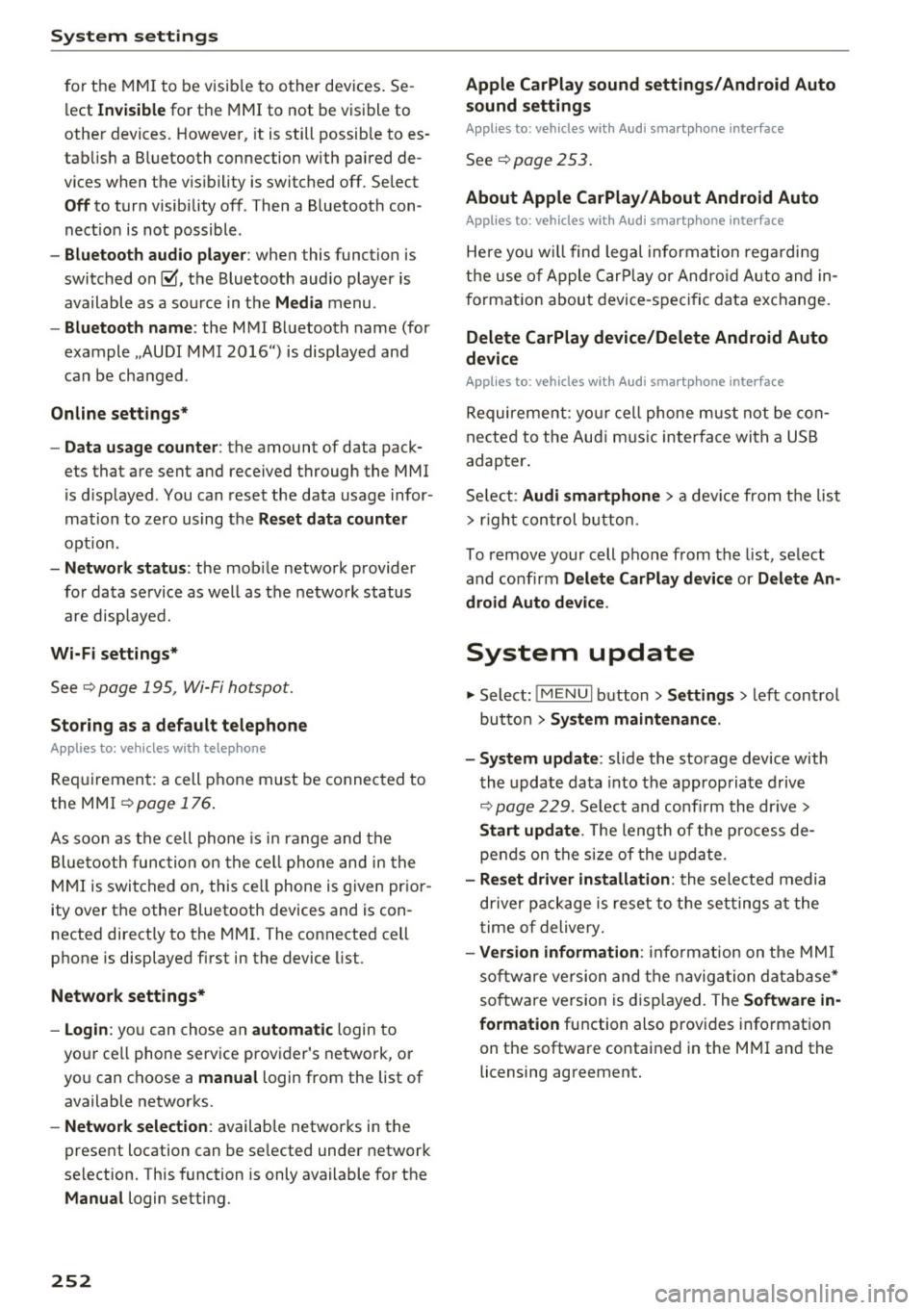
for the MMI to be visib le to other devices . Se
lect
Invisible for the MMI to not be visible to
other devices. However, it is still possib le to es
tab lish a Bluetooth connection with paired de
vices when the v is ibility is switched off. Select
Off to turn visibility off . Then a Bluetooth con
nect ion is not possible .
-Bluetooth audio player : when this function is
switched on~. the Bluetooth aud io player is
available as a sou rce in the
Media menu .
-Bluetooth name : the MMI Bluetooth name (for
example .,AUDI MMI 2016") is displayed and
can be changed .
Online settings*
- Data usage counter :
the amount of data pack
ets that are sent and received through the MMI
is d isplayed . You can reset the data usage infor
mation to zero using the
Reset data counter
option.
-Network status: the mobile network p rovider
for data service as well as the network status
are displayed.
Wi-Fi settings*
See c> page 195, Wi-Fi hotspot.
Storing as a default telephone
Applies to: vehicles with telephone
Requirement: a cell phone must be connected to
the MMI
c> page 176 .
As soon as the cell phone is in range and the
Bluetooth function on the ce ll phone and in the
MMI is switched on, this cell phone is given prior
ity over the other Bluetooth devices and is con
nected directly to the MMI. The connected cell
phone is displayed first in the device list.
Network settings*
- Login :
you can chose an automatic login to
your ce ll phone service provider's network, or
yo u can choose a
manual login from the list of
available networks.
- Network selection: available networ ks in the
present location can be selected under network
selection. This function is only available for the
Manual login setting.
252
Apple CarPlay sound settings/ Android Auto
sound settings
Applies to: vehicles with Audi smartphone interface
See ¢ page 253.
About Apple CarPlay/ About Android Auto
Applies to: vehicles with Audi smartphone interface
Here you w ill find lega l informa tion regarding
the use of Apple CarPlay or Andro id Auto and in
formation about device-specific data exchange.
Delete CarPlay device/Delete Android Auto
device
Applies to: vehicles with Audi smartphone interface
Requirement: yo ur cell phone must not be con
nected to the Aud i m usic interface with a USB
adapter .
Select:
Audi smartphone > a device from the list
> r igh t control button.
To remove your cell phone from the list, select
and confirm
Delete CarPlay device or Delete An
droid Auto device .
System update
.,,. Select : !ME NUI button> Settings > left control
button >
System maintenance.
- System update:
slide the storage device with
the update data into the appropriate drive
¢ page 229. Select and confi rm the drive>
Start update. The length of the process de
pends on the size of the update.
- Reset driver installation: the selected media
driver package is reset to the settings at the
time of delivery.
-Version information : info rmation on the MMI
sof tware version and the navigation database*
so ftware version is disp layed. The
Software in
formation
function also prov ides information
on the software contained in the MMI and the
licensing agreement.
Page 388 of 402
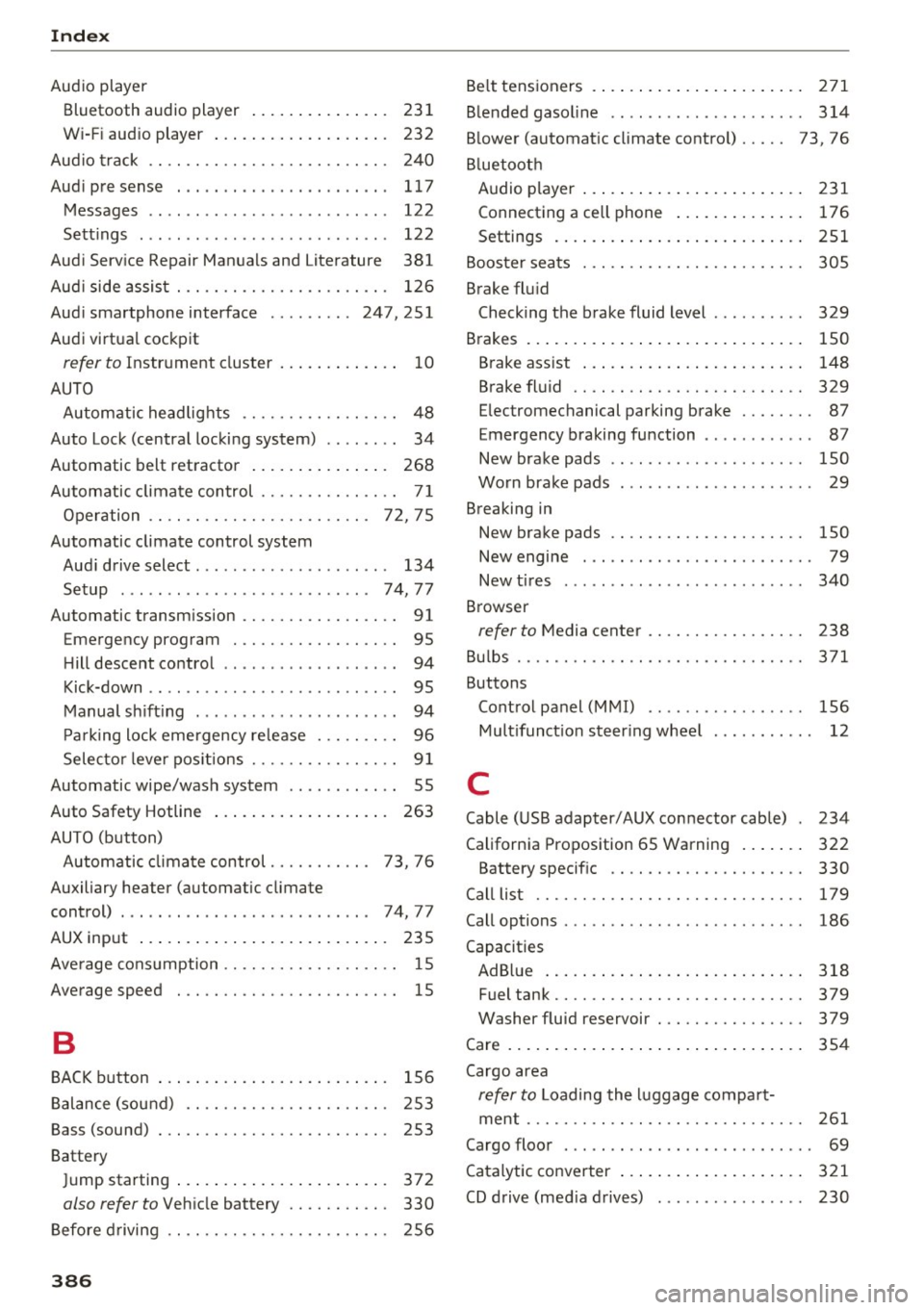
Index
Audio player
Bluetooth audio player . . . . . . . . . . . . . . . 231
W i-Fi aud io player . . . . . . . . . . . . . . . . . . . 232
Aud io track . . . . . . . . . . . . . . . . . . . . . . . . . . 24 0
Aud i pre sense . . . . . . . . . . . . . . . . . . . . . . . 117
Messages . . . . . . . . . . . . . . . . . . . . . . . . . . 122
Se ttings . . . . . . . . . . . . . . . . . . . . . . . . . . . 122
Aud i Serv ice Repair Man uals and Literature 381
Aud i side assis t . . . . . . . . . . . . . . . . . . . . . . . 126
Aud i smartphone interface ......... 247, 251
Audi virtua l cockpit
refer to Instr ument cluster . . . . . . . . . . . . . 10
AUTO Autom atic headlig hts . . . . . . . . . . . . . . . . . 48
Auto Lock (central locki ng system) . . . . . . . . 34
Automatic belt ret ractor . . . . . . . . . . . . . . . 268
Automatic climate control . . . . . . . . . . . . . . . 7 1
O per ation . . . . . . . . . . . . . . . . . . . . . . . . 72, 75
Automatic climate control system Aud i drive select . . . . . . . . . . . . . . . . . . . . . 134
Setup . . . . . . . . . . . . . . . . . . . . . . . . . . . 74, 77
Automatic transm ission . . . . . . . . . . . . . . . . . 91
Eme rgency program . . . . . . . . . . . . . . . . . . 95
H ill descent control . . . . . . . . . . . . . . . . . . . 94
Kick-down . . . . . . . . . . . . . . . . . . . . . . . . . . . 95
M anual sh ift ing . . . . . . . . . . . . . . . . . . . . . . 94
P a rking lock emergency re lease . . . . . . . . . 96
Selecto r leve r pos itions . . . . . . . . . . . . . . . . 9 1
Automatic wipe/wash system . . . . . . . . . . . . 55
Auto Safety Hotline . . . . . . . . . . . . . . . . . . . 263
AUTO (button) Autom atic clima te control. . . . . . . . . . . 73, 76
Auxiliary heater (automatic climate
control) . . . . . . . . . . . . . . . . . . . . . . . . . . . 7 4, 77
AUX inp ut . . . . . . . . . . . . . . . . . . . . . . . . . . . 235
Ave rage cons umption . . . . . . . . . . . . . . . . . . . 15
Average speed . . . . . . . . . . . . . . . . . . . . . . . . 15
B
BAC K button 156
B alance (sound) . . . . . . . . . . . . . . . . . . . . . . 253
Bass (sound) . . . . . . . . . . . . . . . . . . . . . . . . . 253
Battery Ju mp starting . . . . . . . . . . . . . . . . . . . . . . . 372
also refer to Veh icle battery . . . . . . . . . . . 330
Before driving 256
386
Be lt tens ioners . . . . . . . . . . . . . . . . . . . . . . . 271
B lended gasol ine . . . . . . . . . . . . . . . . . . . . . 314
B lower (automat ic climate contro l) . . . . . 73, 76
Bl uetoot h
Audio player . . . . . . . . . . . . . . . . . . . . . . . . 231
Connect ing a cell phone . . . . . . . . . . . . . . 176
Settings . . . . . . . . . . . . . . . . . . . . . . . . . . . 251
Boos te r seats . . . . . . . . . . . . . . . . . . . . . . . . 305
Brake flu id
Checking the brake fluid level . . . . . . . . . . 329
Brakes . . . . . . . . . . . . . . . . . . . . . . . . . . . . . . 150
B rake ass ist . . . . . . . . . . . . . . . . . . . . . . . . 148
Brake fl uid . . . . . . . . . . . . . . . . . . . . . . . . . 329
E lectromechanical parking brake . . . . . . . . 87
Emergency braking function . . . . . . . . . . . . 87
New brake pads . . . . . . . . . . . . . . . . . . . . . 150
Wo rn brake pads . . . . . . . . . . . . . . . . . . . . . 29
Breaking in New brake pads . . . . . . . . . . . . . . . . . . . . . 150
New engine . . . . . . . . . . . . . . . . . . . . . . . . . 79
New tires . . . . . . . . . . . . . . . . . . . . . . . . . . 340
Browser
refer to Media center . . . . . . . . . . . . . . . . . 238
Bu lbs . . . . . . . . . . . . . . . . . . . . . . . . . . . . . . . 371
Buttons Cont rol panel (M MI) . . . . . . . . . . . . . . . . . 156
Mult ifunct ion s teer ing whee l 12
C
Cable (USB adapter/AUX connector cable) 234
California Proposition 65 Warning . . . . . . . 322
Battery specif ic . . . . . . . . . . . . . . . . . . . . . 330
Call list . . . . . . . . . . . . . . . . . . . . . . . . . . . . . 179
Call options . . . . . . . . . . . . . . . . . . . . . . . . . . 186
Capacities AdBl ue ... .. .. .. .. .. ... . .. .... ... .. 318
Fuel tank...... .. .. .. ............. .. 379
Washer fluid reservoir . . . . . . . . . . . . . . . . 379
Care . . . . . . . . . . . . . . . . . . . . . . . . . . . . . . . . 354
Cargo area
refer to L oading the l uggage compa rt-
ment ..... .. .. .. .. .. ............. .. 261
Cargo floor . . . . . . . . . . . . . . . . . . . . . . . . . . . 69
Cata lytic converter . . . . . . . . . . . . . . . . . . . . 321
CD d rive (med ia d rives) . . . . . . . . . . . . . . . . 230