change wheel AUDI Q7 2017 Owner´s Manual
[x] Cancel search | Manufacturer: AUDI, Model Year: 2017, Model line: Q7, Model: AUDI Q7 2017Pages: 402, PDF Size: 100.39 MB
Page 354 of 402
Wheels
store the pressure again in the Infotainment
system
¢ page 352.
mm (T ir e Pr essure Monito ring System) Tire
pressure : malfunction ! See owner' s manual.
If
mm appears after switch ing the ignit ion on o r
while driving and the
[I] indicator light in the in
strument cluster blinks fo r approximately one
minute and then stays on, there is system mal
function. Try to store the correct tire pressures
¢ page 352 . In some cases, you must drive for
several minutes after storing the pressures until
the ind icator light turns off . If the i ndicator light
does t urn off o r tu rns on aga in afte r a short peri
od of time , d rive to an au tho riz ed A ud i dealer o r
author ized Audi Service Facility immed iate ly to
have the ma lfunction co rrected .
A WARNING
-If the t ire pressu re indicator appears in the
display, reduce your speed immediate ly and
avoid any hard steer ing or braking maneu
vers. Stop as soon as possib le and check the
t ires and their pressu re.
- The driver is responsib le for maintaining the
correct tire pressure. You must check the
t ire pressure regu larly.
- Under certain conditions (such as a sporty
dr iv ing style, winter cond itions o r unpaved
roads), the tire p ressure mon itoring system
indicator may be delayed.
@ Tips
- The t ire pressure monitoring system can al
so stop work ing when there is an ESC mal
funct ion.
- Using snow chains may result in a system
malfunction.
- The t ire pressure monitoring system in your
Audi was calibrated with "A udi Orig inal
Tires"
¢ page 340. Using these ti res is rec
ommended .
352
' Storing tire pressures
If the tire pressure changes or a tire is replaced,
it must be confirmed in the Infotainment sys
tem .
"Make sure before stor ing that the t ire pressures
of all four tires meet the specified values and
are adapted to the load
¢ page 343 .
"Switch the ignit io n on.
" Sele ct in the Infotainment system:
IMENU J but
ton
> V ehicle > Servi ce & checks > Tire pres
s u re monitor
> Store tire pre ssure > Ye s, store
now .
'
(D Tips
Do not store the tire pressures if snow chains
are installed .
Run-flat tires
Introduction
Applies to: vehicles with run-flat tires
A run-flat tire helps to maintain vehicle mobility
when there is a loss of pressure.
Run-flat tires have reinforced sidewalls that pro
tect the tire if there is a loss of pressure.
If the ti re pressure monitoring system indicates a
l oss of pressure in one or severa l ti res, you can
continue driving on run-flat tires fo r at least 20
miles (30 km). Drive to an authorized A udi dealer
or authorized Audi Serv ice Facility immediately to
have the problem corrected.
Continuing to d rive on run-flat tire s is no
longe r po ssible if
- there is visible damage to the tires, such as
cracks in the sidewalls .
- strong vibrat ions are felt wh ile driving, or the
tire beg ins to smoke due to a strong build-up of
heat .
- the t ire was heavily damaged, for example in an
accident There is a r isk that parts of the tire
tread will detach and damage important veh i
cle components .
- the Electron ic Stabilization Contro l (ESC) is not
working or is cont inuously running .
Page 364 of 402
Emergency assistance
-If a tire pressure of 29 psi (200 kPA) cannot
reached after inflating for 6 minutes, then
the tire is too severely damaged. Do not
continue driving.
- If the tire cannot be repaired with the tire
sealant, see an authorized Audi dealer or au
thorized Audi Service Facility for ass istance.
(D} Tips
Do not operate the compressor for more than
six minutes continuously, or it can overheat.
Once the compressor has cooled, you can con
tinue to use it .
Completing
"' Adhere the sticke r that says "max . SO mph
(max. 80 km/h)" that is provided w ith the tir e
mobility kit within the driver's fie ld of vision.
"'S top the vehicle after driving for about 10 mi
nutes and check the tire pressure .
"' If the tire pressure is lower than 19 psi (130
kPA), then the tire is too severely damaged. Do
not continue driving.
A WARNING
Pay attention to the following after repairing
the tire :
- Do not drive faster than SO mph (80 km/h).
- Avoid hard acceleration, braking sharply, and fast cornering.
- The vehicle may become more difficult to
control.
- If the tire is too severely damaged, see an
authorized Audi dealer or authorized Aud i
Service Facility for assistance .
@ For the sake of the environment
You can give the used tire sealant bottle to an
authorized Audi dealer or authorized Audi
Service Facility for disposal.
@ Tips
Remember to obtain a new bottle of sealant
from an authorized Audi dea ler or authorized
Audi Service Facility after repairing a tire.
362
Replacing a wheel
' Preparation
You must complete the preparation before
changing a tire .
"'Read and follow the important safety precau-
tions¢
page 360.
"' Set the park ing brake.
"' Select the P selector lever posit ion.
"' When towing a trailer: disconnect the trailer
from your vehicle.
"' Lay out the vehicle tool kit¢
page 360 and the
spare tire.
"' Switch on wheel change mode* in the Infotain
ment system:
! MENUI button> Vehicle> left
control button >
Service & checks > Air suspen
sion: wheel change.
"'Switch the ignition off.
The vehicle jack mode* switches off automatical ly at speeds above 6 mph (10 km/h).
A WARNING
When using the ve hicle jack* on a road with a
steep hill or offroad, you must take extra pre
cautions to prevent the vehicle from rolling. Use suitable objects to block the front and
back of the wheel that is diagonal from the
wheel with the flat tire.
A WARNING
You or your passengers could be injured while
changing a whee l if you do not follow these
safety precautions:
- If you have a flat tire, move a safe distance
off the road. Turn off the engine, turn the
emergency f lashers on and use other warn
ing devices to alert other motorists.
- Make sure that passengers wait in a safe
place away from the vehicle and well away
from the road and traffic.
- To help prevent the vehicle from moving
suddenly and possibly slipping off the jack*,
always fully set the parking brake and block
the front and back of the wheel diagonally opposite the wheel being changed. When
one front wheel is lifted off the ground,
~
Page 365 of 402
u (0 ...... N r--. N ...... 0
0
:E
(Park) will
not prevent the vehicle from
moving.
- Before you change a wheel , be sure the
ground is level and firm. If necessary, use a
sturdy board under the jack*.
-Always store the veh icle tool kit, the jack*
and the replaced tire in the luggage com
partment
c::> page 261 .
(D Tips
-Obey all laws .
- Before changing the wheel, you must acti- vate the jacking mode*, so that the a uto
matic controls for the air suspension * do
not make it more diff icu lt to lift the vehicle
with the jack*
c::> page 363 .
Removing the caps
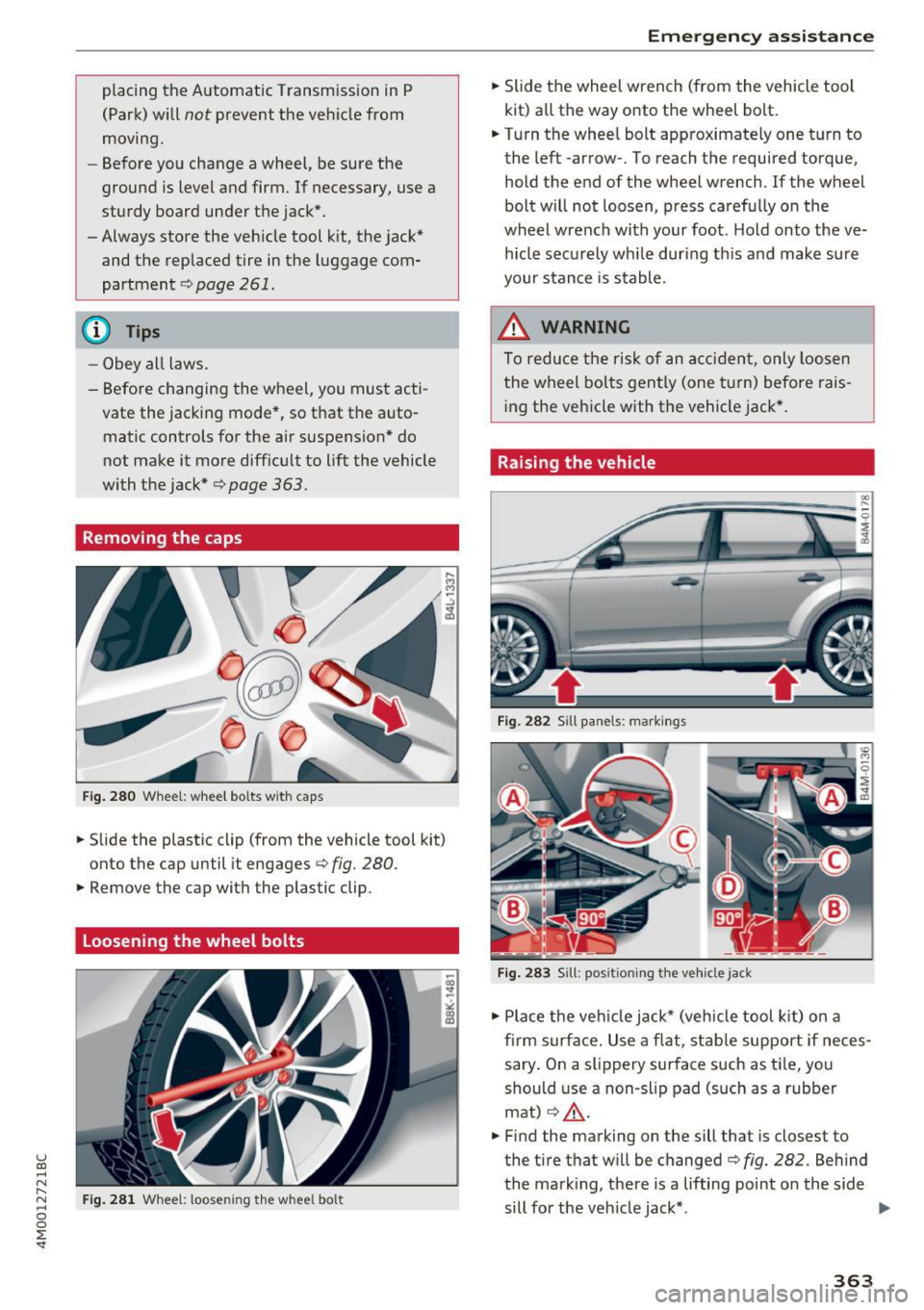
Fig . 280 Whee l: whee l bo lts w it h c aps
"'Slide the plastic clip (from the vehicle tool kit)
onto the cap until it engages
c::> fig. 280 .
"'Remove the cap with the plastic clip .
Loosening the wheel bolts
Fig . 28 1 Whee l: loose ning the w hee l bo lt
Em ergen cy a ssis tanc e
"' Slide the wheel wrench (from the vehicle tool
kit) a ll the way onto the wheel bolt.
"' Turn the whee l bolt approximately one turn to
the left -arrow- . To reach the required to rque,
hold the end of the wheel wrench . If the wheel
bolt will not loosen, press carefully on the
wheel wrench with your foot . H old onto the ve
hicle secu rely whi le during th is and make sure
your stance is stable .
_& WARNING
To reduce the risk of an a cciden t, only loosen
the wheel bolts gently (one t urn) before rais
ing the vehicle with the vehicle jack* .
Raising the vehicle
Fig. 282 S ill panels : ma rki ngs
F ig. 283 Sill : po siti onin g t he ve hi cle jack
"' Place the veh icle jack* (vehicle tool kit) on a
firm surface. Use a flat, stab le support if neces
sary . On a slipp ery surface such as ti le, you
should use a non -slip pad (such as a rubber
mat)
¢ ,& .
"' Find the marking on the sill that is closest to
the tire that w ill be changed
c::> fig. 282 . Behind
the mark ing, there is a lifting point o n the side
sill for the veh icle jack* . .,.
363
Page 366 of 402

Emerg ency assis ta nce
• Using the hex socket wrench © (from the vehi
cle tool kit), turn the vehicle jack* under the
li ft ing point on the side sill unt il it is high
enough that the arm@¢
fig. 283 is under the
designated plastic mount.
• Al ign the vehicle jack* so the arm @engages in
the des ignated lift ing po int i n the door s ill and
the base @ lies f lat on the ground . The base @
mus t be d irectly unde r the lifting point @.
• To lift the vehicle , place the ratchet @(from
the vehicle too l kit) with the correct side on the
hex socket wrench ©-
• Move the ratchet @clockwise back and forth
unt il the wheel lifts up slightly from the
ground.
A WARNING
- Make sure the vehicle jack* is stable. There
is a risk of injury when the ground is slick or
soft, because the vehicle jack* could slide or
sink.
- Only raise your vehicle with the vehicle jack*
provided by the facto ry .
If you use a vehicle
jack des igned for ano ther veh icle, yo ur vehi
cle can slide and cause in jury.
- Position the vehicle jack* on ly at the desig
nated mounting points on the s ide s ill and
align the jac k. O therwise, the veh icle jack *
could slip and ca use an in jury if it does not
have sufficient hold on the vehicle.
- Vehicles with a ir suspension*: changes in
temperature or load can affect the height of
the stopped vehicle.
- To reduce the risk of an accident, never start
the engine when the vehicle is raised.
- T o reduce the risk of injury, support the ve
hicle securely with suitab le stands if work is
to be performed underneath the vehicle.
- To help prevent injury to you rself and yo ur
passenge rs :
- Do not ra ise the vehicle unt il you are sure
the jack* is securely engaged.
- Passengers must not remain in the vehicle
when it is jacked up .
- Make sure that passengers wait in a safe
place away from the vehicle and well away
from the road and traff ic .
364
- Make sure jack position is correct, adjust
as necessary and then continue to ra ise
the jack*.
- If work has to be done under the vehicle,
ensure that it is safely supported on suita
ble stands -risk of injury!
- Never start the engine when the vehicle is
on the jack* -risk of accident!
(D Note
Do not lift the vehicle by the si ll. Position the
vehicle jack* only at the designated mounting po ints on the side sill. Otherw ise, your vehicle
will be damaged.
@ Tips
The vehicle jack mode* switches off automati
cally at speeds above 6 mph (10 km/h).
Removing and installing a wheel
Fig . 28 4 Whee l: in terna l hex socke t to t urn th e whee l
bo lts
Fig . 285 Whee l: alignme nt pin in t he top ho le
Remo ving a wheel
• Remove the top wheel bolt completely using
the hex socket in the screwdriver handle (in the .,,_
Page 368 of 402
Emergency assistance
After you change a t ire:
- Check the tire pressure on the replacement
tire immediately after installation.
- Have the wheel bolt tightening torque
checked with a torque wrench as soon as po s
sible by your authorized Audi dealer or quali
fied workshop.
- With steel and alloy wheel rims, the wheel
bolts are correctly tightened at a torque of
120 ft lbs (160 Nm ).
- If you notice that the wheel bolt s are corroded
and difficult to turn while changing a tire,
they should be replaced before you check the
tightening torque.
- Replace the flat tire with a new one and have
it installed on your vehicle as soon as possi
ble . Remount the wheel cover.
Until then , drive with extra care and at reduced
speeds .
A WARNING
-If you are going to equ ip your ve hicle w ith
t ir es o r rims w hich d iffer from those which
were factory installed, then be s ure to read
the informat ion¢
page 340.
- Always make sure the damaged whee l or
even a flat tire and the jack* and tool k it are
prope rly secured in the luggage compart
m ent and are not loose in the passenge r
compartmen t.
- In an accident o r sudden mane uver they
could fly forward , injuring anyone in the ve
hicle .
- Always store damaged wheel, jack* and tools securely i n the l uggage compa rtme nt.
Otherwi se, in an accident or sudd en man eu
ver they c ould fly fo rward, causing injury to
p assenge rs in the vehicle .
366
-
Page 399 of 402
u co ...... N r-... N ...... 0
0
:E: '
refer to MMI touch
Towing 160
Tow trucks . .. .. ........... .. .. .... . 374
T owing loop ..... .. .. .... ... .. .. . 374,375
TPMS Tire pressure monitoring system . ..... . 351
Traffic information . . . . . . . . . . . . . . . . 220 , 221
Traffic messages ............... .. .... . 216
Traffic sign recognition . . . . . . . . . . . . . . . . 104
Trailer mode (navigation) . . . . . . . . . . . . . . . 214
T railer towing . . . . . . . . . . . . . . . . . . . . . . . . . 98
Information . . . . . . . . . . . . . . . . . . . . . . . . 100
Parking systems . . . . . . . . . . . . . . . . . . . . . 147
Technical requirements . . . . . . . . . . . . . . . . 98
Trailer mode (air suspension) . . . . . . . . . . 100
Turn signa ls . . . . . . . . . . . . . . . . . . . . . . . . . 33
Transport Canada . . . . . . . . . . . . . . . . . . . . . 264
Travel guide
refer to Travel (travel guide) . . . . . . . . . . . 193
Travel (travel guide) . . . . . . . . . . . . . . . . . . . 193
Treb le (sound) . . . . . . . . . . . . . . . . . . . . . . . 253
Turnassist . .. .. ............... .. .... . 119
T urn signal . . . . . . . . . . . . . . . . . . . . . . . . . . . 49
u
ULSD No. 2 (Diesel fuel) ....... .. .. .... . 315
Unfastening safety belts . . . . . . . . . . . . . . . 270
Uniform tire quality grad ing . . . . . . . . . . . . 3S0
Unlocking/locking By remote control . . . . . . . . . . . . . . . . . . . . 3 7
With the central locking switch . . . . . . . . . 38
With the convenience key . . . . . . . . . . . . . . 37
With the lock cylinder . . . . . . . . . . . . . . . . . 39
Updating stations (radio) . . . . . . . . . . . . . . . 223
USB stick
refer to Audi music interface ...... . 234, 23S
V
Vanity m irror. . . . . . . . . . . . . . . . . . . . . . . . . . S4
Vehicle Care/cleaning . . . . . . . . . . . . . . . . . . . . . . . 3S4
D. ' 1mens1ons .
.. ................ .... . . 379
Out of service . . . . . . . . . . . . . . . . . . . . . . . 3S9
Raising . . . . . . . . . . . . . . . . . . . . . . . . . . . . 363
Index
Specifications . . . . . . . . . . . . . . . . . . . . . . . 3 78
Transporting . . . . . . . . . . . . . . . . . . . . . . . 3 77
Vehicle battery . . . . . . . . . . . . . . . . . . . . . . . 330
Charge level . . . . . . . . . . . . . . . . . . . . . . . . 153
Charging . . . . . . . . . . . . . . . . . . . . . . . . . . . 331
Winter operation . . . . . . . . . . . . . . . . . . . . 330
Vehicle control modules . . . . . . . . . . . . . . . . 154
Vehicle jack . . . . . . . . . . . . . . . . . . . . . . . . . . 360
Lifting points . . . . . . . . . . . . . . . . . . . . . . . 363
Wheel change mode . . . . . . . . . . . . . . . . . 362
Vehicle key . . . . . . . . . . . . . . . . . . . . . . . . . . . 35
Vehicle status report Audi connect vehicle contro l . . . . . . . . . . . 200
Vehicle tool kit . . . . . . . . . . . . . . . . . . . . . . . 360
Ventilation . . . . . . . . . . . . . . . . . . . . . . . . . . . 71
Version information . . . . . . . . . . . . . . . . . . . 252
VI EW button . . . . . . . . . . . . . . . . . . . . . . . . . . 12
VIN . . . . . . . . . . . . . . . . . . . . . . . . . . . . . . . . 378
Voice guidance
refer to Multifunction steering wheel . . 12, 14
Voicemail . . . . . . . . . . . . . . . . . . . . . . . . . . . 184
Vo ice recognit ion system . . . . . . . . . . . . . . . 169
Commands . . . . . . . . . . . . . . . . . . . . . . . . . 170
External . . . . . . . . . . . . . . . . . . . . . . . . . . . 174
Operating . . . . . . . . . . . . . . . . . . . . . . . . . . 169
Settings . . . . . . . . . . . . . . . . . . . . . . . . . . . 249
Volume . . . . . . . . . . . . . . . . . . . . . . . . . . . . 254
Volume 253
w
Warning lights
refer to Indicator lights . . . . . . . . . . . . . . . . 22
Warranty coverages . . . . . . . . . . . . . . . . . . . 381
Washing matte finish paint . . . . . . . . . . . . . 354
Web radio . . . . . . . . . . . . . . . . . . . . . . . . . . . 233
Weights.... .... .. ................. .. 379
What happens if you wear your safety belt too
loose? . . . . . . . . . . . . . . . . . . . . . . . . . . . . . . 269
What happens to unbelted occupants? . . . . 266
What impairs driving safety? . . . . . . . . . . . . 256
Wheel bolts . . . . . . . . . . . . . . . . . . . . . . . . . 348
Wheel rep lacement . . . . . . . . . . . . . . . . . . 362
Wheels . . . . . . . . . . . . . . . . . . . . . . . . . . . . . 333
Cleaning . . . . . . . . . . . . . . . . . . . . . . . . . . . 355
Glossary of t ire and loading terminology . 335
Replacing . . . . . . . . . . . . . . . . . . . . . . . . . . 362
397