change wheel AUDI Q7 2017 Owner´s Manual
[x] Cancel search | Manufacturer: AUDI, Model Year: 2017, Model line: Q7, Model: AUDI Q7 2017Pages: 402, PDF Size: 100.39 MB
Page 137 of 402
u (0 ...... N r--. N ...... 0
0
:E
The air suspension* is an electronically-control
l ed air suspens ion and damping sys tem . The ad
justment depends on the driving mode selected, steer ing movements, the driver's braking and ac
celeration, and as the road surface, vehicle speed
and load. The vehicle ground clearance depends
on the mode selected and the speed .
The ground clearance increases s ignificantly
when the vehicle is in the
Allroad mode . At
speeds from approximately 50 mph (80 km/h) to
75 mph (120 km/h), the ground clearance re
duces in stages. When the speed decreases, the
ground clearance increases again automat ically .
The ground clearance is the lowest in
Dynamic
mode.
Steering
The power steering adapts. Ind irect steer ing that
moves easily as in
Comfort mode is especially
suited to long drives on highways. The
Dynamic
mode provides sporty, direct steering.
All-wheel steering*
All-wheel steer ing increases driving comfort by
providing addit ional steering ability at the rear
axle . Steer ing in the opposite d irection at low
speeds decreases the turning rad ius. Steering in
the same d irect io n at high speeds improves the
response time while increasing driving stability at
the same time .
Sport differential*
As a component of the all wheel drive system
(quattro)
~ page 152, the sport diffe rential dis
tributes the dr iv ing power to the rear axle de
pending on the situation. The distribution of
power varies depending on the selected mode
from moderate
( Comfort ) to sporty (Dynamic ).
The goal is a high level of agility and ability to ac
celerate on curves . The vehicle is very responsive
to steering.
Adaptive cruise control (ACC)*
The behavior when accelerating can be adjusted
from comfortab le to sporty, depending on the
drive select mode. Adaptive cruise control also
Assistance systems
responds to the driving behavior of the vehicle
ahead in a more conservative or sporty manner.
Engine sound*
T he eng ine sound adapts to the current mode
and can be subtle to sporty .
(D Note
Applies to: vehicles wi th air suspensio n
-Make sure there is enough clearance above
and below the vehicle when parking. The
height of the ve hicle (gro und clearance) can
change once it is parked due to temperature
fluctuations, changes to the load conditions
and changes to the dr iving modes.
- When transporting the vehicle on a car car
rier, train, ship or by other means, only tie
the vehicle down at the running surface of
the tires, which is the outer c ircumference.
Sec uring the vehicle at the axle compo
nents, suspension struts o r towing eyes is
not permitted because the pressure in the
air suspens ion struts can change during
transport. The vehicle may not be secured
sufficiently if this happens.
@ Tips
The S selecto r lever position automatically en
gages when the
Dynamic mode is selected .
Selecting the driving mode
Applies to: vehicles w ith Aud i dr ive select
~- ------ -
~
Fig. 133 Center console: co ntro ls for d rive select
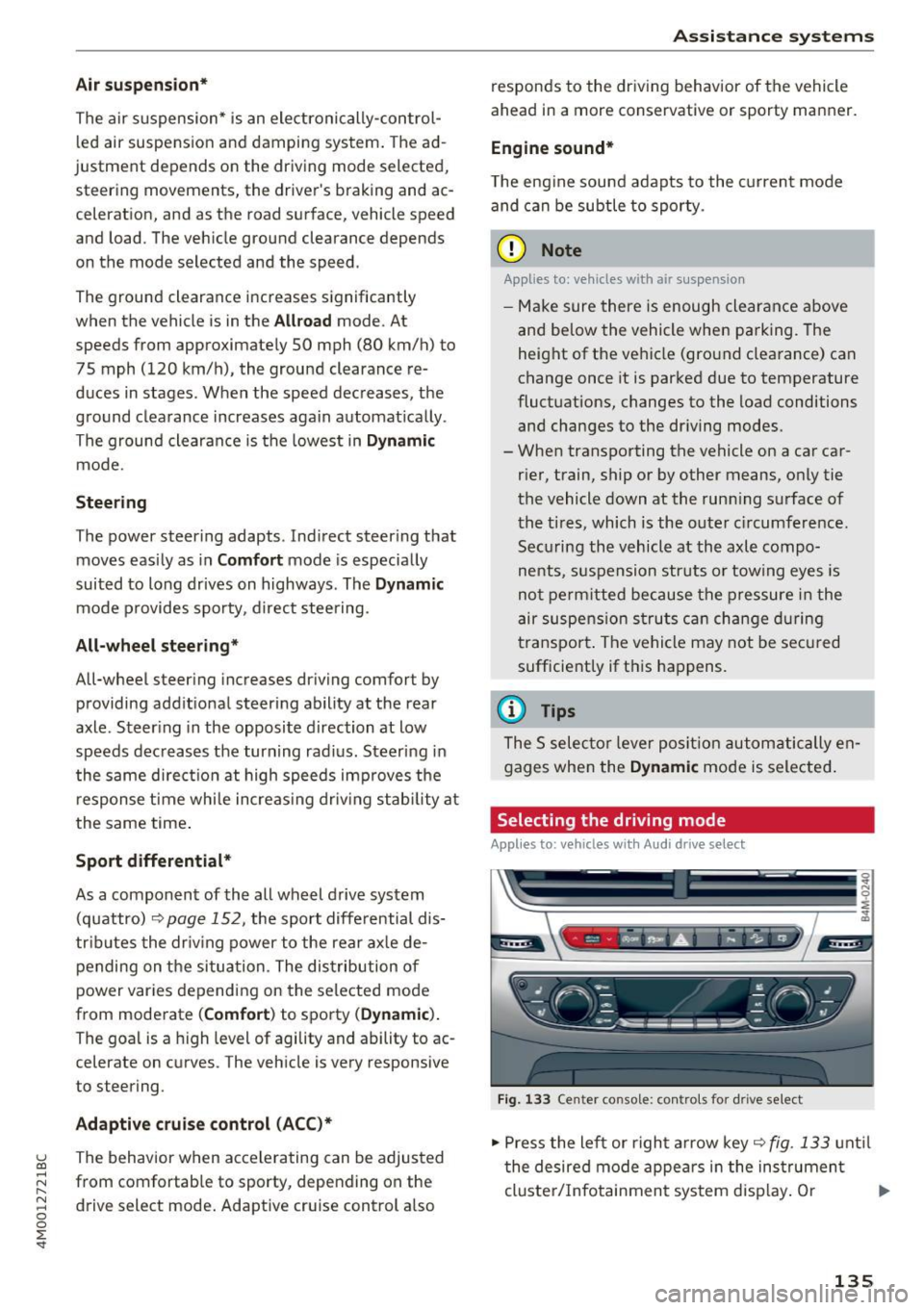
.,. Press the left or right arrow key~ fig. 133 until
the desired mode appears in the instrument
cluste r/Infotainment system disp lay. Or
II>-
135
Page 140 of 402

Parking systems
Parking systems
General information
A ppl ies to: ve hicles w ith a rea r parking sys te m /pa rking sys
tem p lus/rearv iew camera/peripheral ca meras
Depending on your vehicle's equipment , various
parking aids will help you when parking and ma
neuvering.
The
rear parking system is an audible parking aid
that warns you of obstacles
behind the vehicle
¢ page 139.
The
parking system plus assists you when park
ing by audibly and visually indicating objects de
tected
in front of and behind the veh icle
¢ page 139.
The
rearview camera shows the area behind the
vehicle in the Infotainment system display . The
lines in the rearview camera image help you to
park or maneuver
¢ page 140. The parking sys
tem plus functions are also available
¢ page 139.
The
peripheral cameras give various views to
help you when parking or maneuvering
¢ page 143. The parking system plus functions
are also available
¢page 139.
A WARNING i-==
- Always look for traffic and check the area
around your vehicle by looking at it directly
as well. The parking system cannot replace
the driver's attention. The driver is always
responsible when entering or leaving a park
ing space and during similar maneuvers.
-
- Please note that some surfaces , such as
clothing, are not detected by the system .
- Sensors and cameras have blind spots in
which people and objects cannot be detect
ed . Be especially cautious of small children
and animals .
- Always keep your eyes on the vehicle's sur
roundings, using the rearview mirror as
well.
- The sensors can be displaced by impacts or
damage to the radiator grille, bumper,
wheel housing and the underbody. The park ing system may be impa ired as a result.
138
Have an authorized Audi dealer or author
ized Audi Service Facility check their func
tion.
(D Note
- Some objects are not detected or displayed
by the system under certain circumstances:
- objects such as barrier chains, trailer draw
bars, vertical poles or fences
- objects above the sensors such as wall ex
tensions
- objects with certain surfaces or structures
such as chain link fences or powder snow
- If you continue driving closer to a low ob
ject, it may disappear from the sensor
range. Note that you will no longer be
warned about this obstacle.
- Keep enough distance from the curb to re
duce the risk of damage to the rims.
{i) Tips
- The system may provide a warning even
though there are no obstacles in the cover
age area in some situations, such as:
- certain road surfaces or when there is tall
grass
- external ultrasonic sources such as from
cleaning vehicles
- in heavy rain, snow, or thick vehicle ex
haust
- We recommend that you practice parking in
a traffic-free location or parking lot to be
come familiar with the system . When doing
this, there should be good light and weath
er conditions.
- You can change the volume of the signals
and the display ¢
page 146.
- Please refer to the instructions for towing a
trailer located in
¢page 147.
- What appears in the infotainment display is
somewhat time-delayed.
- Th e sensors must be kept clean and free of
snow and ice for the parking aid to operate .
Page 143 of 402
u (0 ...... N r--. N ...... 0
0
:E
Applies to: vehicles with rearv iew camera
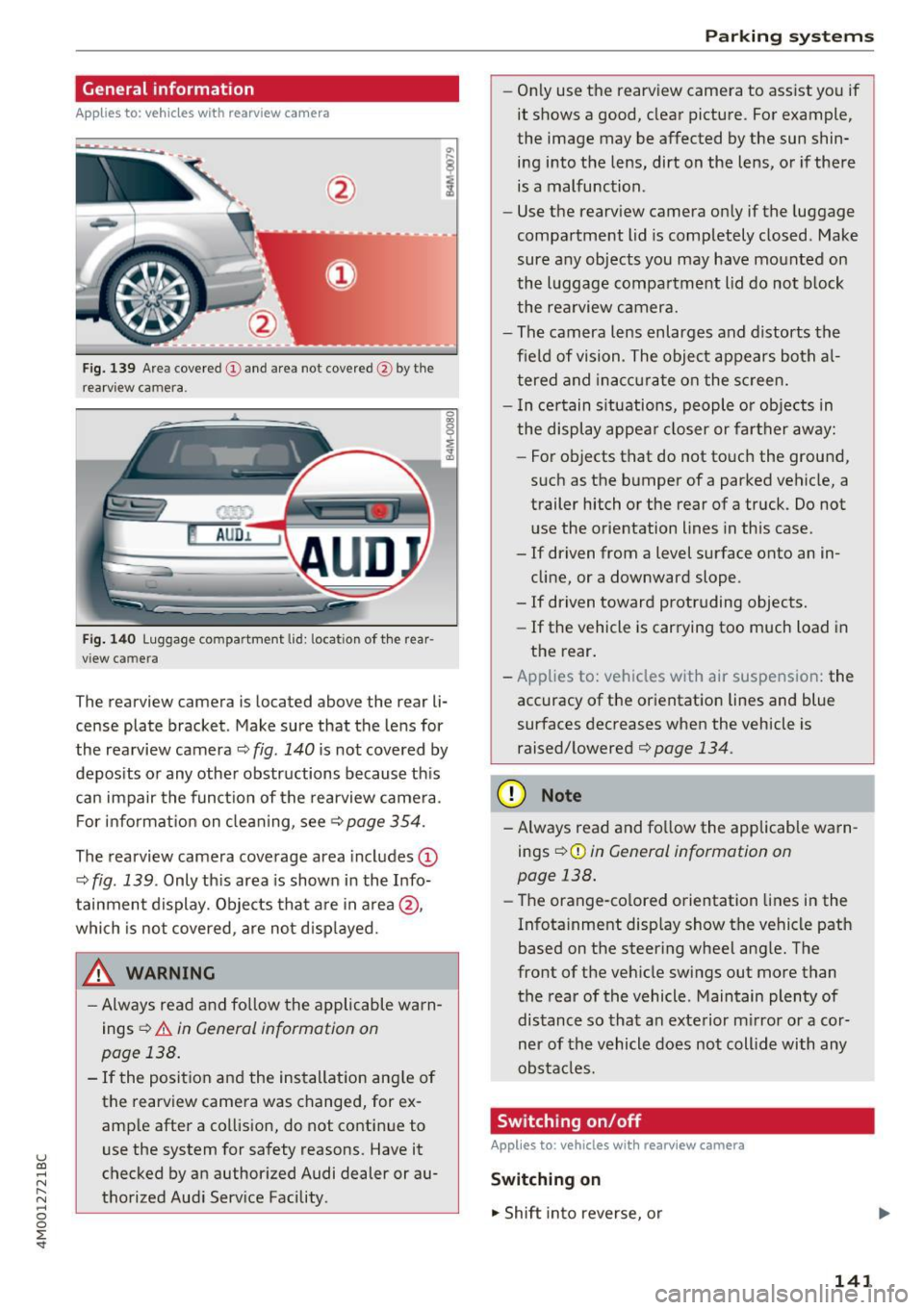
Fig . 139 Area covered (D and area not covered @by the
rearv iew camera.
Fig. 140 Luggage compartment lid: locatio n of the rear
view camera
The rearview camera is located above the rear li
cense plate bracket. Make sure that the lens for
the rearview camera ¢
fig. 140 is not covered by
deposits or any other obstructions because this
can impair the function of the rearview camera.
For information on cleaning, see<=>
page 354.
The rearview camera coverage area includes (D
¢ fig. 139 . Only this area is shown in the Info
tainment display. Objects that are in area @,
which is not covered, are not displayed.
A WARNING
- Always read and follow the applicable warn
ings
<=> A in General information on
page 138.
- If the position and the installation angle of the rearview camera was changed, for ex
ample after a collision, do not continue to
use the system for safety reasons. Have it
checked by an authorized Audi dealer or au
thorized Audi Service Facility .
Parking systems
-Only use the rearview camera to assist you if
it shows a good, clear picture. For example,
the image may be affected by the sun shin
ing into the lens, dirt on the lens, or if there
is a malfunction.
- Use the rearview camera only if the luggage
compartment lid is completely closed. Make
sure any objects you may have mounted on
the luggage compartment lid do not block
the rearview camera.
- The camera lens enlarges and distorts the
field of vision. The object appears both al
tered and inaccurate on the screen.
- In certain situations, people or objects in
the display appear closer or farther away:
- For objects that do not touch the ground,
such as the bumper of a parked vehicle, a
trailer hitch or the rear of a truck. Do not
use the orientation lines in this case.
- If driven from a level surface onto an in
cline, or a downward slope .
- If driven toward protruding objects.
- If the vehicle is carrying too much load in
the rear.
- Applies to: vehicles with air suspension: the
accuracy of the orientation lines and blue
surfaces decreases when the vehicle is
raised/lowered¢
page 134.
(D Note
-Always read and follow the applicable warn
ings¢ (!)
in General information on
page 138.
- Th e orange-colored orientation lines in the
Infotainment display show the vehicle path
based on the steering wheel angle. The
front of the vehicle swings out more than
the rear of the vehicle . Maintain plenty of
distance so that an exterior mirror or a cor
ner of the vehicle does not collide with any
obstacles.
Switching on/off
Applies to: vehicles with rearview camera
Switching on
"' Shift into reverse, or
141
Page 144 of 402
Parking systems
.,. Press the Pw~ button in the center console
¢ page 140 , fig. 136. A short confirmation
tone sounds and the LED in the button turns
on.
Switching off
.,. Drive faster than 6 mph (10 km/h), or
.,. Press the
p,q~ button, or
.,. Switch the ignition off.
@ Tips
- The visual display in the right part of the
display should help you detect the critical
vehicle area.
- You can change the volume of the signals and the display
¢page 146.
Perpendicular parking
App lies to : ve hicles w ith rearview ca mera
This view may be used when parking in a garage
or in a parking space.
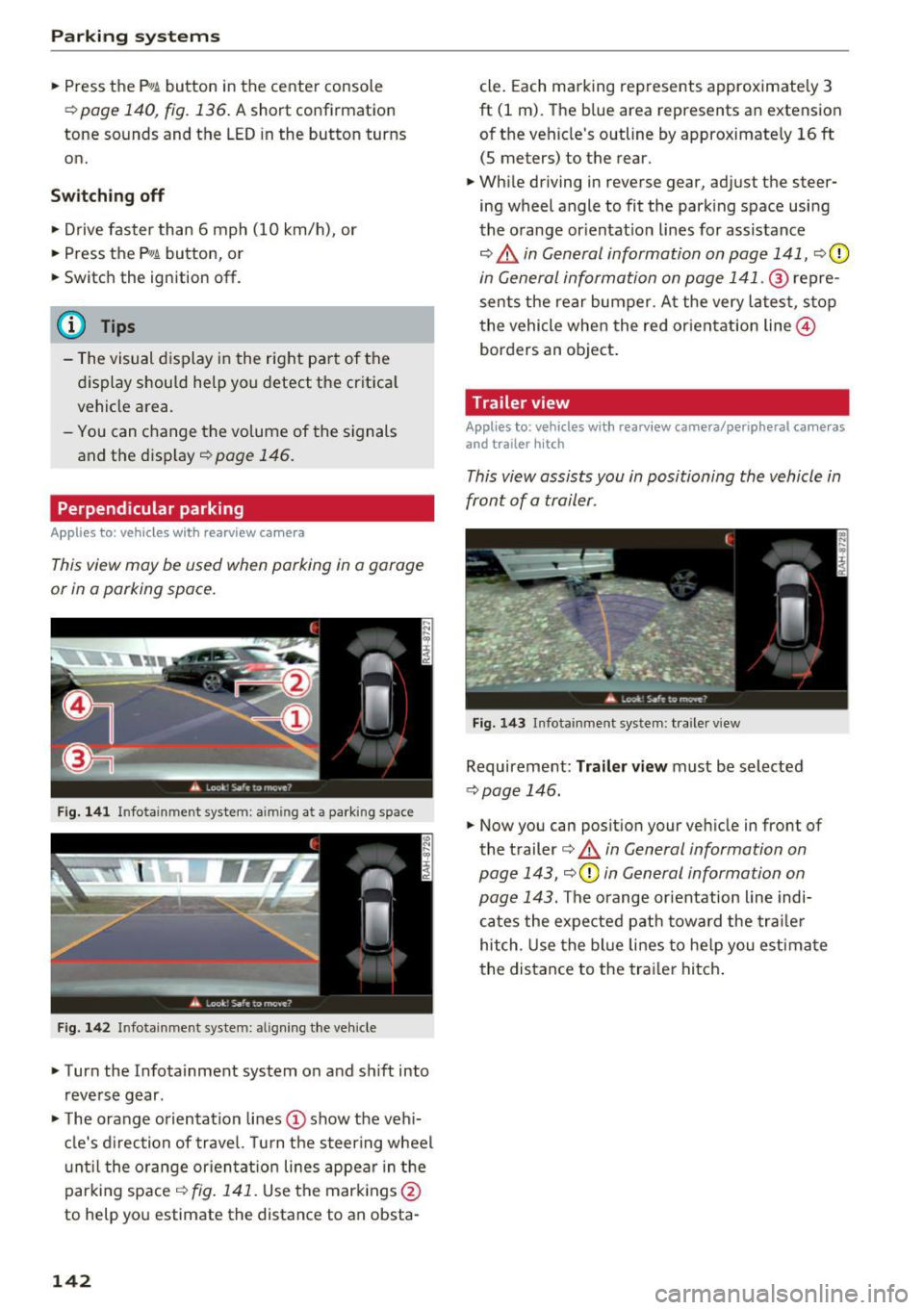
Fig. 141 In fotainme nt system: aim ing at a park ing space
Fig . 142 Infotainment syste m: alig ning the vehicle
.,. Turn the Infota inment system on and shift into
reverse gear .
.,. The orange orientation lines(!) show the vehi
cle's direction of travel. Turn the steering wheel
until the orange orientat ion lines appear in the
parking space ¢
fig. 141. Use the markings @
to help you estimate the distance to an obsta-
142
cle. Each marking represents approximately 3
ft (1 m). The blue area represents an extension
of the vehicle's outline by approximate ly
16 ft
(5 meters) to the rear.
.,. While driving in reverse gear, adjust the steer
ing wheel angle to fit the parking space using
the orange orientat ion lines for assistance
¢ .&, in General information on page 141, ¢(D
in General information on page 141 . ® repre
sents the rear bumper. At the very latest, stop
the vehicle when the red orientation line@
borders an object.
Trailer view
Appl ies to : vehicles wit h rearview camera/peripheral ca meras
and trailer hitch
This view assists you in positioning the vehicle in
front of a trailer.
Fig. 143 Infota inment system : tra iler view
Requirement : Trailer view must be selected
~page 146.
.,. Now you can position your vehicle in front of
the trailer
¢ .&, in General information on
page 143, ¢(Din General information on
page 143.
The orange orientation line indi
cates the expected path toward the trailer
hitch . Use the blue lines to help you estimate
the distance to the trailer hitch.
Page 145 of 402
u (0 ...... N r--. N ...... 0
0
:E
Introduction
Applies to: vehicles with peripheral cameras
With this equipment, the parking system p lus*
c::> page 139 is supplemented w it h various pe riph
e ral cameras. The four cameras give you the fol
l owing views: area around the vehicle, front cor
ner view and rear corner view, view in front of the
vehicle and behind the vehicle .
General information
Applies to: vehicles with peripheral cameras
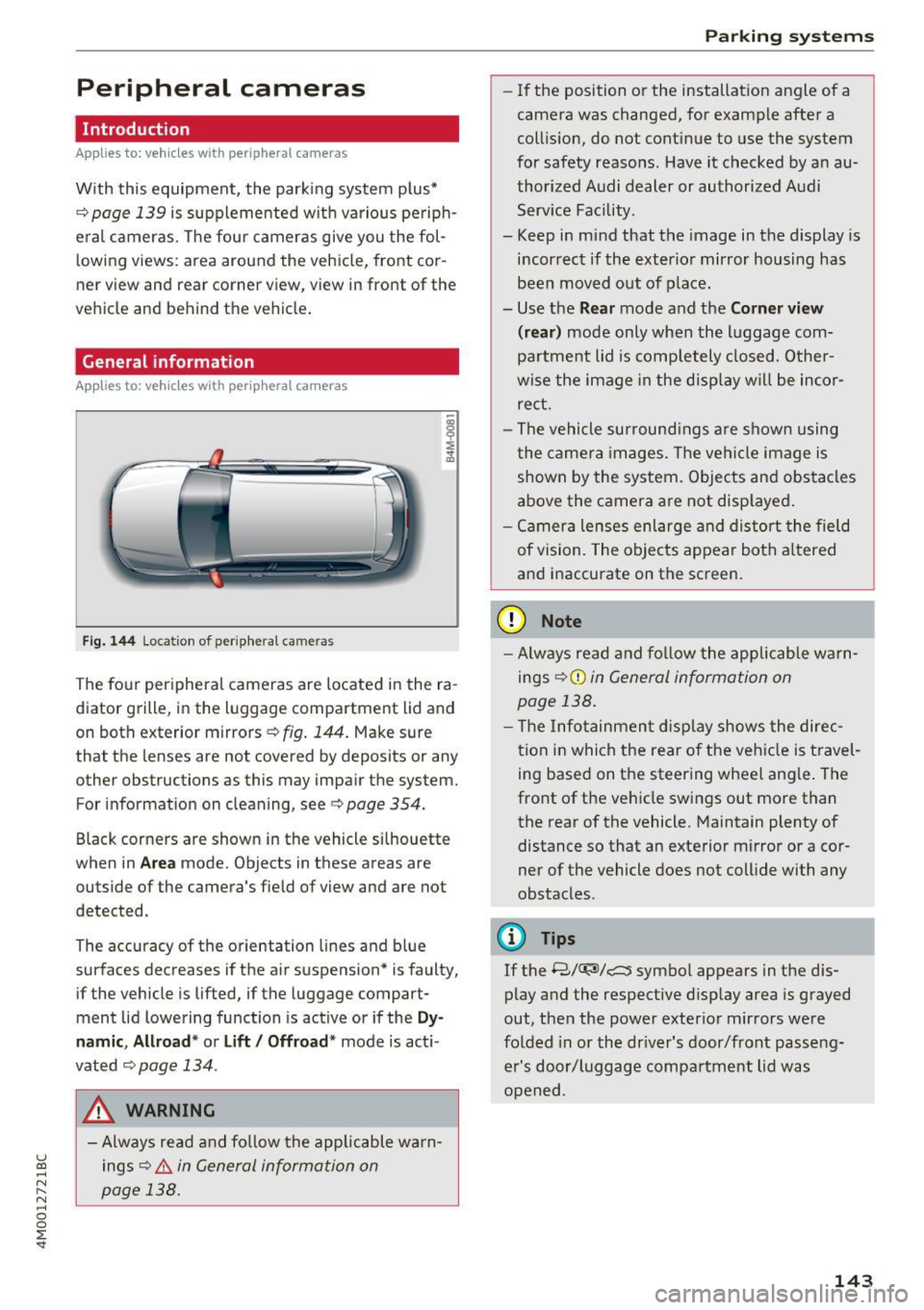
Fi g.
14 4 Location of periphera l cameras
The fo ur per ipheral cameras are located in the ra
diator grille, in the luggage compartment lid and
on both exterior mirrors
c::> fig. 144 . Make sure
that the lenses are not covered by deposits or any other obstructions as this may impair the system.
For information on cleaning, see
c::> page 354.
Black corners are shown in the vehicle s ilhouette
when in
Ar ea mode. Objects in these areas are
outside of the camera's field of view and are not
detected.
The accuracy of the orientation lines and b lue
surfaces decreases if the air suspension* is faulty,
if the vehicle is lifted, if the luggage compart
ment lid lowering function is active or if the
Dy
namic , Allr oad * or Lift / Offroad * mode is act i
vated
c::;, page 134 .
A WARNING
-Always read and fo llow the applicable warn
ings
c::> .& in General informa tion on
page 138.
Parking systems
-If the position or the installation angle of a
camera was changed, for example after a
coll is ion, do not cont inue to use the system
for safety reasons. Have it checked by a n au
thorized Audi dealer or authorized Audi Serv ice Facility.
- Keep in mind that the image in the display is
i n correct if the exterior mirror housing has
been moved out of p la ce.
- Use the
Rear mode and the Corner view
(r ear )
mode only when the luggage com
pa rtment lid is comp letely closed. Other
wise the image in the disp lay w ill be inco r
re ct.
- The vehicle surround ings a re shown using
the camer a images. The vehi cle image is
shown by the system. Objects and obs tacles
above the camera are not disp layed .
- Ca mera lenses enl arge and distort the field
of vision. The objects appear both a ltered
a nd inaccurate on the screen.
(D Note
- Alw ays read and fo llow the applicable wa rn
ings
c::> (i) in General information on
page 138 .
- T he Infotainmen t display shows the direc
t ion in which the rear o f the ve hicle is travel
ing based on the steering wheel ang le . The
front of the vehicle swings out more than
the rear of the vehicle. Maintain plenty of
distance so that an exterior mirror or a cor
ner of the vehicle does not coll ide with any
obstacles.
(D Tips
If the 8/
out, then the power exter io r mirrors were
fo lded in or the dr iver's door/front passe ng
er's door/luggage compa rtment lid was
opened .
143
Page 286 of 402

Airbag system
airbag inflates -even with an Advanced Airbag
System.
- The inflating airbag will hit the child safety
seat or infant carrier with great force and
will smash the child safety seat and child
against the backrest, center armrest, door
or roof .
- Always install rear-facing child safety seats
on the rear seat .
- If you must install a rearward-facing child
safety seat on the front passenger seat be
cause of exceptional circumstances and the
PASSENGER AIR BAG OFF~; light does not
come on and stay on, immediately install
the rear-facing child safety seat in a rear
seating position and have the airbag system inspected by your authorized Audi dealer.
A WARNING
Objects between you and the airbag will in
crease the risk of injury in a crash by interfer
ing with the way the airbag unfolds or by be
ing pushed into you as the airbag inflates.
- Never hold things in your hands or on your
lap when the vehicle is in use.
- Never transport items on or in the area of
the front passenger seat. Objects could move into the area of the front airbags dur
ing braking or other sudden maneuvers and
become dangerous projectiles that can
cause serious personal injury if the airbags
inflate .
- Never place or attach accessories or other
objects (such as cupholders, telephone
brackets, large, heavy or bulky objects) on
the doors, over or near the area marked "AIRBAG'' on the steering wheel, instru
ment panel, seat backrests or between
those areas and yourself. These objects could cause injury in a crash, especially
when the airbags inflate.
- Never recline the front passenger's seat to
transport objects. Items can also move into
the area of the side airbag or the front air bag during braking or in a sudden maneu
ver. Objects near the airbags can become
284
-
projectiles and cause injury, particularly
when the seat is reclined .
- Never place or transport objects on the
front passenger seat. Objects on the front passenger seat could cause the capacitive
sensor in the seat to signal to airbag system
that the seat is occupied by a person when it
in fact is not, or that the person on the seat
is heavier than he or she actually is. The
change in electric capacitance because of
such objects can cause the passenger front
airbag to be turned on when it should be
off, or can cause the airbag to work in a way
that is different from the way it would have
worked without objects on the seat.
- Always make sure that there is nothing on
the front passenger seat that will cause the
capacitive passenger detection system in
the seat to signal to the Airbag System that
the seat is occupied by a person when it is not , or to signal that it is occupied by some
one who is heavier than the person actually
sitting on the seat. The presence of an ob
ject could cause the passenger front airbag
to be turned on when it should be off, or
could cause the airbag to work in a way that
is different from the way it would have
worked without the object on the seat.
A WARNING
The fine dust created when airbags deploy can cause breathing problems for people with a history of asthma or other breathing condi
tions .
- To reduce the risk of breathing problems,
those with asthma or other respiratory con
ditions should get fresh air right away by
getting out of the vehicle or opening win
dows or doors.
- If you are in a collision in which airbags de
ploy, wash your hands and face with mild
soap and water before eating.
- Be careful not to get the dust into your eyes,
or into any cuts or scratches.
- If the residue should get into your eyes,
flush them with water .
Page 290 of 402
Airbag syste m
Make sure that the PASSENGER AIR BAG
OFF
11;; li ght comes on and stays on all t he
t ime whenever the ignition is switched on.
A WARNING
- If the PA SSEN GER AIR BAG OFF 11;; light
does not go out when an adult is si tting on
the front passe nger seat a fter ta king the
steps described above, make sure the adult is p roperly seated and restrained at one of
the rear seating positions.
- Have the airbag system inspected by your
authorized Aud i dealer before transporting
anyone on the front passenger seat.
@ Tips
If the capacitive passenger detection system
determines that the front passenger seat is
empty, the frontal airbag on the passenge r
side w ill be tu rned off, and the
PASSENGER
AIR BAG OFF
11;; light will stay on.
-
Repair , care and disposal of the airbags
Parts of the a irbag system are installed at many
different places on your Audi. Installing, remov ing, servic ing or repa iring a part in an area of the
ve hicle can damage a part of an airbag system
and prevent that system from working properly
i n a collision .
There are some important things you have to
know to make sure that the effectiveness of the
system w ill not be impaired and that discarded
components do not cause injury or pollute the
env ironment.
A WARNING
Improper care, serv icing and repai r proce
dures can increase the r is k of personal injury
and death by preventing an airbag from de
ploying when needed or dep loying an airbag
unexpectedly:
-
- Never cover, obstruct, or change the stee r
ing wheel horn pad or airbag cover or the in
strument pane l or modify them in any way.
288
- Never attach any objects s uch as c upholders
or telephone mountings to the surfaces cov
ering the a irbag un its.
- For cleaning the horn pad or instrument
panel, use only a soft, dry cloth or one mois
tened w ith plain water. Solvents or cleaners
could damage the airbag cover or change
the st iffness or strength of the material so
that the airbag canno t deploy and p rotect
properly.
- Never repair, adjust , or change any parts of
the airbag system.
- All work on the steering wheel, inst rument
panel, front seats or e lectr ica l system ( in
cluding the installation of a udio eq uipment,
cellular telephones and C B radios, etc.)
m ust be perfo rmed by a qualified techn ician
who has the training and specia l equipment
necessary.
- For any work on the airbag system, we strong ly recommend that you see your au
thorized A udi dealer or qualified workshop.
- Never modify the front b umper or parts of
the vehicle body.
- Always make sure that the side a irbag can
inflate w ithout interference:
- Never install seat covers or replacement
upholstery over the front seatbacks that
have not been specifically approved by
A udi.
- Never use additional seat c ushions that
cover the areas where the side airbags in
flate.
- Damage to the orig inal seat cove rs or to
the seam in the area of the s ide airbag
module mus t always be repaired immedi
ate ly by an autho riz ed Au di dealer.
- The a irbag system can deploy on ly once. Af
ter an airbag h as been deployed, i t m ust be
repla ced with new replacement parts de
signed and approved espec ia lly for your
Audi model version . Replacement of com
plete airbag systems or airbag components
must be perfo rmed by qua lified workshops
only. Make su re that any airbag service ac
tion is entered in your A udi Warranty
&
Ma intenance boo klet under AIRBAG RE-
PLAC EM EN T RECORD.
~
Page 340 of 402

Wheels
"XL" "xl" "EXTRA LOAD" or "RF" I I I
on the sidewall.
Rim
means a metal support for a tire
or a tire and tube assembly upon
which the tire beads are seated.
Rim diameter
means nominal diameter of the
bead seat . If you change your
wheel size, you w ill have to p ur
chase new tires to match the new rim diameter .
Rim size designation
means rim diameter and width.
Rim width
means nomina l distance between
rim flanges.
S idewall
means that portion of a tire be
tween the tread and bead .
Speed rating (letter code)
means the speed at which a tire is
designed to be driven for extend
ed periods of time. The rat ings
range from 93 mph (150 km/h)
to 186 mph (298 km/h)
¢ table
on page 334.
You may not find
this information on all tires be
cause it is not requ ired by law.
33 8
The speed rating letter code,
where applicable, is molded on
the tire sidewall and ind icates the
maximum permissible road
speeds
¢ .&. in Winter tires on
page 348.
Tire pressure monitoring system
means a system that detects
when one or mo re of a vehicle's
tires are underinflated and illum i
na tes a low tire pressure warning
telltale .
Tread
means that portion of a tire that
comes into contact w ith the road .
Tread separation
means pulling away of the tread
from the t ire carcass .
Treadwear indicators (TWI)
means the projections within the
principal grooves designed to give
a vis ua l indication of the deg rees
of wear of the t read. See
¢ page 342, Treadwear indicator
for mo re information on measur-
ing tire wear. .,.
Page 346 of 402
Wheels
-The tire must flex more if the tire pressure is too low or if
the vehicle speed or load are
too high . This heats the tire up
too much. This increases the
risk of an accident because it
can cause the tire to burst and
result in loss of vehicle con
trol.
-Incorrect tire pressure in creases tire wear and has a
negative effect on driving and
braking behavior, which in
creases the risk of an accident.
(D Note
Replace lost valve caps to re
duce the risk of damage to the
tire valves.
Tire pressure table
Please note that the information
contained in the following table
was correct at the time of print
ing, and the information is sub
ject to change. If there are differ
ences between this information
and the tire pressures specified
on the label on the driver's side 8-pillar, always follow the specifica
tion on the 8-pillar label
¢ page 343, fig. 275.
344
(i} For the sake of the environment
-Tire pressure that is too low
increases fuel consumption.
-Fuel consumption may also in
crease when driving with the
comfort tire pressure is se
lected .
(D Tips
Audi recommends using the
tire pressure specified for a
normal load
¢ table on
page 345
or for a full load
when the vehicle is partially loaded.
Make sure that the tire designa
tion on your tire matches the des ignation on the tire pressure label
and the tire pressure table.
The following table lists recom mended tire pressures in cold
tires according to the load and
the size of the tires installed.
Page 353 of 402
u co ...... N r-... N ...... 0
0
:E: '
UJ General notes
Each tire, including t he spare (if provided),
should be checked monthly when cold and inflat
e d to the inflation pressure recommended by the
veh icle manufacturer on the vehicle placard or
tire inflat ion pressure label. (If your vehicle has
tires of a different size than the size indicated on
the veh icle placard or t ire inflation pressure la
be l, you shou ld determine the prope r ti re infla
tion pressure fo r those t ires) .
As an added safety feature , your veh icle has been
equ ipped w ith a t ire pressure monitoring system
(TPMS) that illuminates a low tire p ress ure te ll
tale whe n one or more of yo ur t ires is significant
l y under- infla ted . Accordingly, when the low tire
p ressure tellta le ill uminates, yo u should stop and
check your tires as soon as possible, and inflate
them to the proper press ure. Driving on a s ignifi
cantly under-inflated tire causes the tire to over
heat and can lead to t ire failure. Under-inflation
also reduces fuel efficiency and tire tread life,
and may affect the veh icle's handling and stop
p ing ability.
P lease note that the TPMS is not a substitute for
proper tire maintenance, and it is the driver's re
sponsib ility to ma inta in correct tire p ressure,
even if u nder-inflation has not reached t he leve l
to tr igger illum inat io n of the TPMS low tire p res
sure telltale.
Your veh icle has also been equ ipped w ith a TPMS
malfunct ion ind icator to indicate when the sys
tem is not operat ing properly. The TPMS ma l
f u nction indicator is combined w ith the low tire
p ressure tellta le. Whe n the system de tects a
mal function, the te lltale will flash fo r approxi
mate ly one min ute and then remain continuo usly
illum inated. This sequence will continue upon
subseq uent veh icle start-ups as long as the ma l
function ex ists .
When the malfunction indicator is ill uminated,
the system may not be ab le to detect or signa l
low tire press ure as intended. TPMS ma lfunctions
may occur for a var iety of reasons, including the
Wh eel s
insta llation o f replacement or alternate tires or
whee ls on the vehicle that prevent the TPMS
from functioning p roper ly . Always check the
TPMS ma lfunction te lltale after replac ing one or
more tires or wheels on your vehicle to ensure
that the rep lacement or a lternate tires a nd
wheels allow the TPMS to continue to fu nction
prope rly .
If the tire pressure monitoring indicator
appears
The tire pressure indicator in the instrument
cluster informs you if the tire pressure is too low
or if there is a system mo/function .
Using the ABS se nsors, the t ire pressu re moni to r
i ng system compares the tire tread circumfer
en ce and vibr ation character ist ics of the ind ividu
al tires . If the press ure changes in one o r more
t ires , th is is indicated in the instrument cluster
display with an indicato r light
[I] and a message.
If only one tire is affected, the location of that
t ire will be indicated.
T he tire press ures must be stored in the Infotain
ment system again each time the p ressures
change (switching between partial and full load
pressure) or after changing or replac ing a tire on
your vehicle
c:> page 352. The tire pressure mon i
tor ing system on ly mon itors the tire pressure you
have stored . Refer to the t ire pressu re label fo r
the re commended t ire pressu re fo r yo ur vehicle
c:> page 343, fig . 2 76.
T ire tread c irc umference and vibra tion characte r
ist ics can change and ca use a tire press ure wa rn
i ng if :
- the t ire pressure in one or more tires is too low
- the t ires have structural damage
- the t ire was rep laced or the t ire pressu re was
changed and it was not stored
c:> page 352
- tires that a re on ly pa rtially used are replaced
w ith new tires
Indicator lights
[I]-L oss of pressu re in at leas t one tire c:> ,&. .
Check the tires and replace or repair if necessary .
Check/correct the pressures of all four tires and .,.
351