infotainment AUDI Q7 2017 Owner´s Manual
[x] Cancel search | Manufacturer: AUDI, Model Year: 2017, Model line: Q7, Model: AUDI Q7 2017Pages: 402, PDF Size: 100.39 MB
Page 138 of 402
Assistance systems
"'Se lect in the In fo tainment sys tem: I MENU I but-
ton
> Vehicle > Audi dri ve select.
"' Se lect and confirm the desired setting .
You can cha nge t he d riving mode when the vehi
cle is stat ionary or whi le d riving. If traffic per
mits, after changing modes, briefly take you r
foot off the accele rator peda l so that the recent ly
selected mode is a lso activated for the eng ine.
Offroad * or Lift/ Offroad* -activates offroad
functions to s upport dr iv in g o n ro ug h terra in.
The engine, transmission and steering adjust and
the Start/Stop system* switches off. Applies to
a ir suspe nsion*: t he vehicle also lifts for passing
over obstacles to maintain maximum ground
clearance.
Adjusting the Individual mode
Applies to: veh icles w ith Audi drive select
Allroad * -on ly for air suspension *: the vehicle
li fts to maintain hi ghe r g round clearance for d if
fic ult st retc hes of roa d.
Comfort -provides a c omfor t-or ien ted ve hicle
setu p and is s uit ed fo r long drives on hi ghw ays.
Auto -provides a n overa ll comfortab le yet dy
n amic driv in g feel a nd i s s uited f or everyd ay use.
Dynamic -gives the driver a sporty driving fee l
and is suited to a spo rty d rivi ng s tyle .
Individual -c::;, page 136.
A WARNING
Pay attention to traffic whe n ope rating t he
d rive select to reduce th e ris k of an accide nt.
-
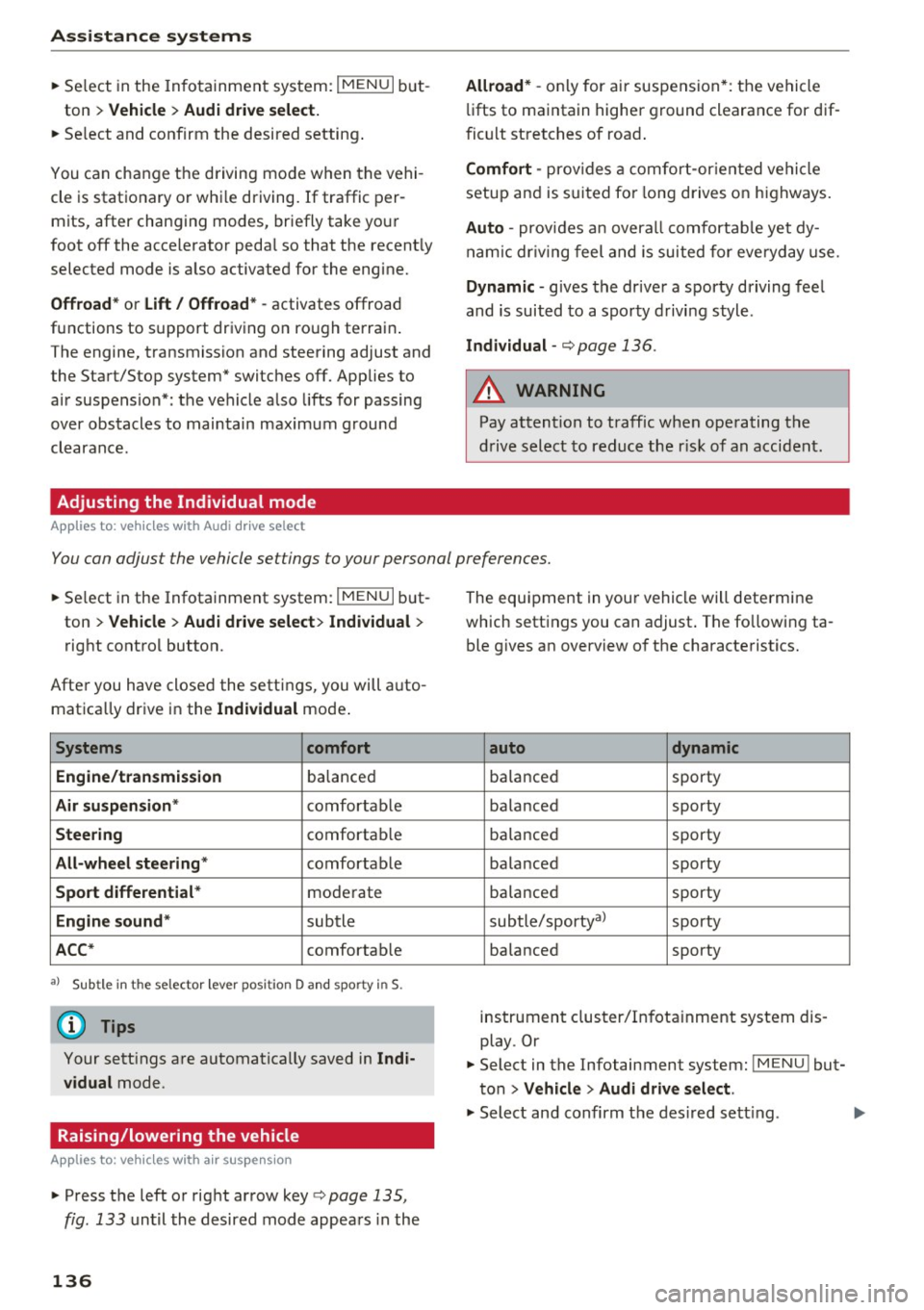
You can adjust the vehicle settings to your personal preferences.
"'Se lect in the Infotainment system: IME NUI but
ton
> Vehicle > Audi drive select > Individual >
rig ht contro l button.
After you have close d the settings, you will a uto
mat ica lly dr ive i n the
Individual mode .
Systems comfort
Engine /transmission
ba lance d
Air suspension * comfortable
Steering comforta ble
All-wheel steering * comfortable
Sport differential * moderate
Engine sound * subtle
ACC* comforta ble
al Sub tle i n th e se lecto r leve r pos it ion D a nd sporty in S.
(D Tips
Y our sett ings a re automa tica lly saved in Indi
vidual
mode.
Raising/lowering the vehicle
Applies to: veh icles w ith air suspens ion
"' Press th e left or right ar row key c::;, page 135,
fig . 133
u nti l the desired mode app ea rs in the
136
The equi pment in you r vehi cle will determine
which sett ings you can adjust . T he fo llow ing ta
ble gives a n overview o f the characte ristics .
auto dynamic
ba
la nce d sporty
ba la nced sporty
ba la nce d sporty
ba la nced sporty
ba lanced sporty
sub tle/sportyal
sporty
ba lance d sporty
instrument cluster/I nfota inment system dis
play. Or
"' Select in the Infotainment system :
IMENU! but
ton
> Vehicle > Audi drive select.
"' Select and confirm the des ired se tting.
Page 139 of 402
CD Note
The lift/ Offroad mode switches to Allroad
mode when dr iving above approximately
20 mph (30 km/h) and the veh icle automati
cally lowers again. These modes may only be
used on a temporary bas is and are not intend
ed for con tinuous driving.
(!) Tips
- The filled-in boxes in the Infotainment sys
tem represent the current vehicle level. If
the box is wh ite or the boxes are blinkin9,
the veh icle is lift ing or lowering. If on ly the
bottom box is fi lled in, the vehicle is at the
l owest level ( least amount of g round clear
ance) . If all the segments are f illed in, then
the vehicle is at the highest level (highest
ground clearance) .
- The target level is hig hlighted with a
red
frame while the vehicle is lifting or lower
ing. The frame is then hidden when the ve
hicle reaches the target level.
- The vehicle lifts up to the highest level
when you se lect
Lift / Offroad . Select an
other mode to lower the vehicle again.
Rear lowering
A ppl ies to: ve hicles w ith air s usp ensio n
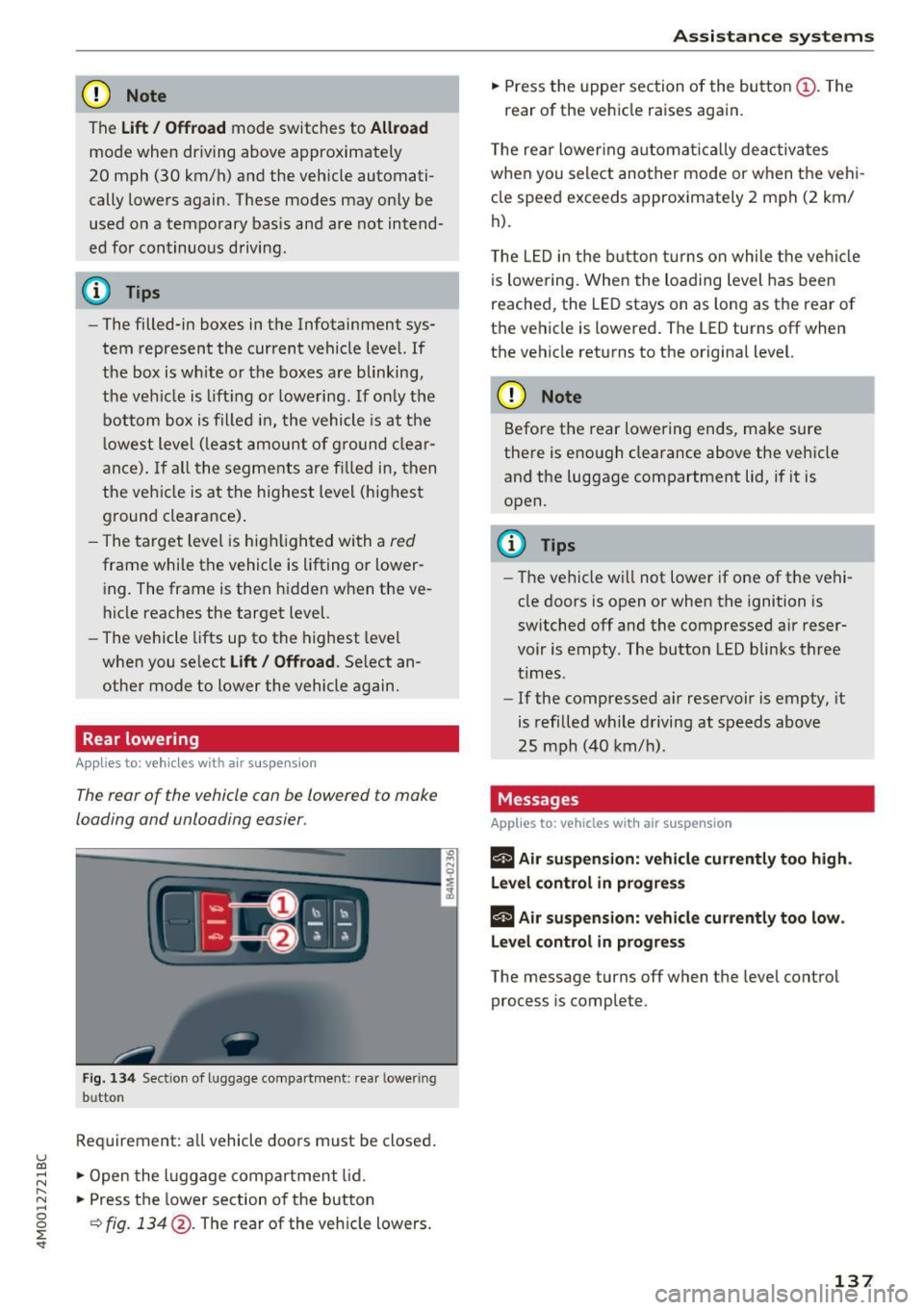
The rear of the vehicle con be Lowered to make
Loading and unloading easier .
Fig. 1 34 Sect ion of l uggage co mpa rt m ent: rear lower ing
b utton
Req uirement: all vehicle doors must be closed .
u (0
;::j .,. Open the l uggage compar tment lid.
~ .,. Press the lower section of the button ~
~ ¢ fig . 134 @. The rear of the veh icle lowers .
.,. Press the upper section of the butto n (D. The
rear of the vehicle raises again.
T he rear lower ing automat ically deactivates
when you select another mode or when the vehi
cle speed exceeds approximately 2 mph (2 km/
h).
T he LED in the button t urns on while the ve hicl e
is lowering. When the loading level has been
reached, the LED stays on as long as the rear of
the vehicle is lowered. The LED turns off when
the vehicle returns to the original level.
CD Note
Before the rear lowering ends, make sure
there is enough clearance above the vehicle
and the luggage compartment lid, if it is
open.
(D Tips
- The ve hicle will not lower if one of the vehi
cle doors is open or when the ignition is
switched off and the compressed air reser
voir is empty. The button LED blinks three
times.
- If the compressed air reservoir is empty, it
is refilled wh ile driving at speeds above
25 mph (40 km/h).
Messages
App lies to : vehicles wit h air suspension
II Air suspension : vehicle currentl y too high.
Lev el control in progre ss
II Air susp ension: vehicle currently too low.
Level control in progr ess
The message turns off when the leve l control
process is complete.
137
Page 140 of 402

Parking systems
Parking systems
General information
A ppl ies to: ve hicles w ith a rea r parking sys te m /pa rking sys
tem p lus/rearv iew camera/peripheral ca meras
Depending on your vehicle's equipment , various
parking aids will help you when parking and ma
neuvering.
The
rear parking system is an audible parking aid
that warns you of obstacles
behind the vehicle
¢ page 139.
The
parking system plus assists you when park
ing by audibly and visually indicating objects de
tected
in front of and behind the veh icle
¢ page 139.
The
rearview camera shows the area behind the
vehicle in the Infotainment system display . The
lines in the rearview camera image help you to
park or maneuver
¢ page 140. The parking sys
tem plus functions are also available
¢ page 139.
The
peripheral cameras give various views to
help you when parking or maneuvering
¢ page 143. The parking system plus functions
are also available
¢page 139.
A WARNING i-==
- Always look for traffic and check the area
around your vehicle by looking at it directly
as well. The parking system cannot replace
the driver's attention. The driver is always
responsible when entering or leaving a park
ing space and during similar maneuvers.
-
- Please note that some surfaces , such as
clothing, are not detected by the system .
- Sensors and cameras have blind spots in
which people and objects cannot be detect
ed . Be especially cautious of small children
and animals .
- Always keep your eyes on the vehicle's sur
roundings, using the rearview mirror as
well.
- The sensors can be displaced by impacts or
damage to the radiator grille, bumper,
wheel housing and the underbody. The park ing system may be impa ired as a result.
138
Have an authorized Audi dealer or author
ized Audi Service Facility check their func
tion.
(D Note
- Some objects are not detected or displayed
by the system under certain circumstances:
- objects such as barrier chains, trailer draw
bars, vertical poles or fences
- objects above the sensors such as wall ex
tensions
- objects with certain surfaces or structures
such as chain link fences or powder snow
- If you continue driving closer to a low ob
ject, it may disappear from the sensor
range. Note that you will no longer be
warned about this obstacle.
- Keep enough distance from the curb to re
duce the risk of damage to the rims.
{i) Tips
- The system may provide a warning even
though there are no obstacles in the cover
age area in some situations, such as:
- certain road surfaces or when there is tall
grass
- external ultrasonic sources such as from
cleaning vehicles
- in heavy rain, snow, or thick vehicle ex
haust
- We recommend that you practice parking in
a traffic-free location or parking lot to be
come familiar with the system . When doing
this, there should be good light and weath
er conditions.
- You can change the volume of the signals
and the display ¢
page 146.
- Please refer to the instructions for towing a
trailer located in
¢page 147.
- What appears in the infotainment display is
somewhat time-delayed.
- Th e sensors must be kept clean and free of
snow and ice for the parking aid to operate .
Page 143 of 402
u (0 ...... N r--. N ...... 0
0
:E
Applies to: vehicles with rearv iew camera
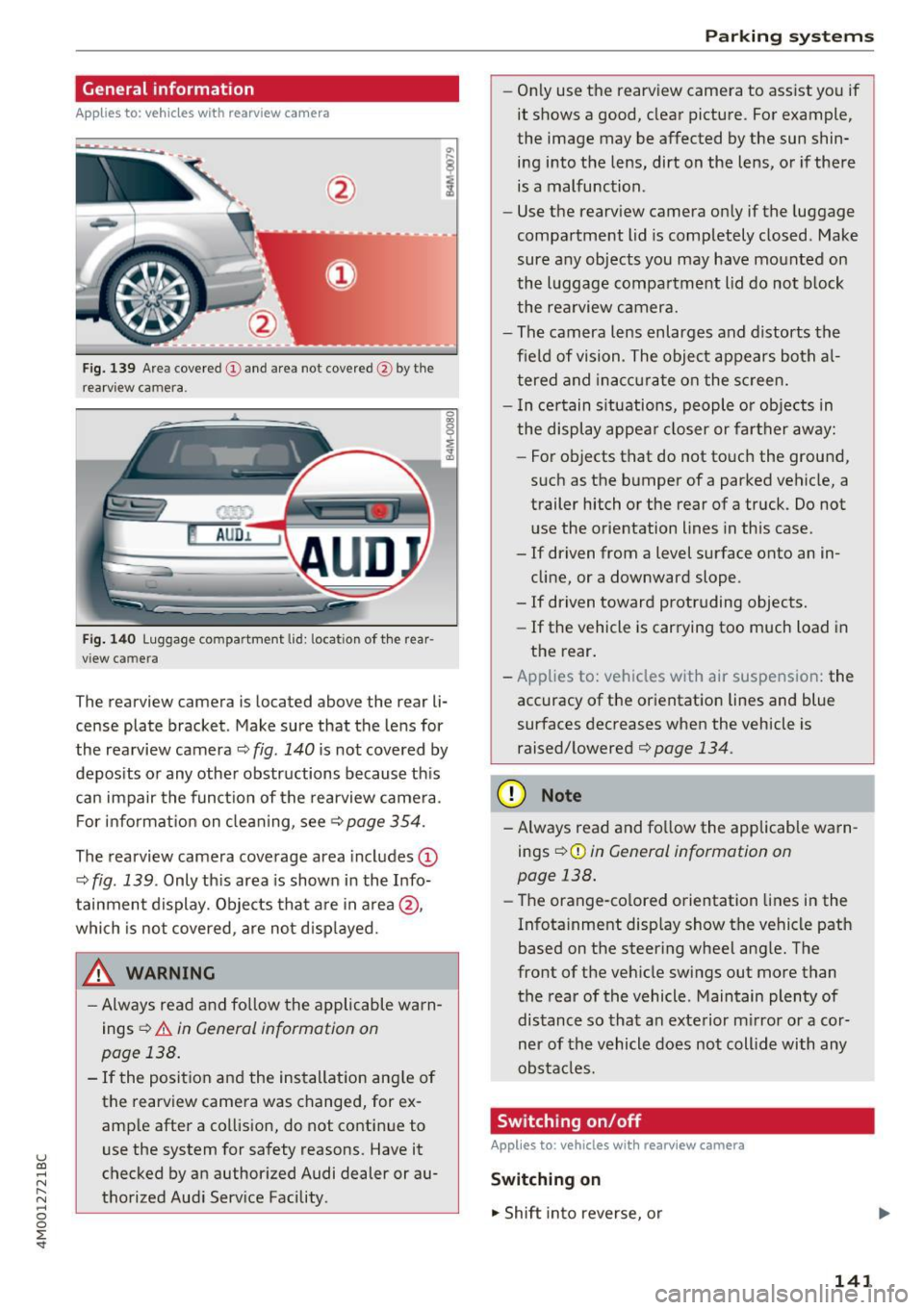
Fig . 139 Area covered (D and area not covered @by the
rearv iew camera.
Fig. 140 Luggage compartment lid: locatio n of the rear
view camera
The rearview camera is located above the rear li
cense plate bracket. Make sure that the lens for
the rearview camera ¢
fig. 140 is not covered by
deposits or any other obstructions because this
can impair the function of the rearview camera.
For information on cleaning, see<=>
page 354.
The rearview camera coverage area includes (D
¢ fig. 139 . Only this area is shown in the Info
tainment display. Objects that are in area @,
which is not covered, are not displayed.
A WARNING
- Always read and follow the applicable warn
ings
<=> A in General information on
page 138.
- If the position and the installation angle of the rearview camera was changed, for ex
ample after a collision, do not continue to
use the system for safety reasons. Have it
checked by an authorized Audi dealer or au
thorized Audi Service Facility .
Parking systems
-Only use the rearview camera to assist you if
it shows a good, clear picture. For example,
the image may be affected by the sun shin
ing into the lens, dirt on the lens, or if there
is a malfunction.
- Use the rearview camera only if the luggage
compartment lid is completely closed. Make
sure any objects you may have mounted on
the luggage compartment lid do not block
the rearview camera.
- The camera lens enlarges and distorts the
field of vision. The object appears both al
tered and inaccurate on the screen.
- In certain situations, people or objects in
the display appear closer or farther away:
- For objects that do not touch the ground,
such as the bumper of a parked vehicle, a
trailer hitch or the rear of a truck. Do not
use the orientation lines in this case.
- If driven from a level surface onto an in
cline, or a downward slope .
- If driven toward protruding objects.
- If the vehicle is carrying too much load in
the rear.
- Applies to: vehicles with air suspension: the
accuracy of the orientation lines and blue
surfaces decreases when the vehicle is
raised/lowered¢
page 134.
(D Note
-Always read and follow the applicable warn
ings¢ (!)
in General information on
page 138.
- Th e orange-colored orientation lines in the
Infotainment display show the vehicle path
based on the steering wheel angle. The
front of the vehicle swings out more than
the rear of the vehicle . Maintain plenty of
distance so that an exterior mirror or a cor
ner of the vehicle does not collide with any
obstacles.
Switching on/off
Applies to: vehicles with rearview camera
Switching on
"' Shift into reverse, or
141
Page 144 of 402
Parking systems
.,. Press the Pw~ button in the center console
¢ page 140 , fig. 136. A short confirmation
tone sounds and the LED in the button turns
on.
Switching off
.,. Drive faster than 6 mph (10 km/h), or
.,. Press the
p,q~ button, or
.,. Switch the ignition off.
@ Tips
- The visual display in the right part of the
display should help you detect the critical
vehicle area.
- You can change the volume of the signals and the display
¢page 146.
Perpendicular parking
App lies to : ve hicles w ith rearview ca mera
This view may be used when parking in a garage
or in a parking space.
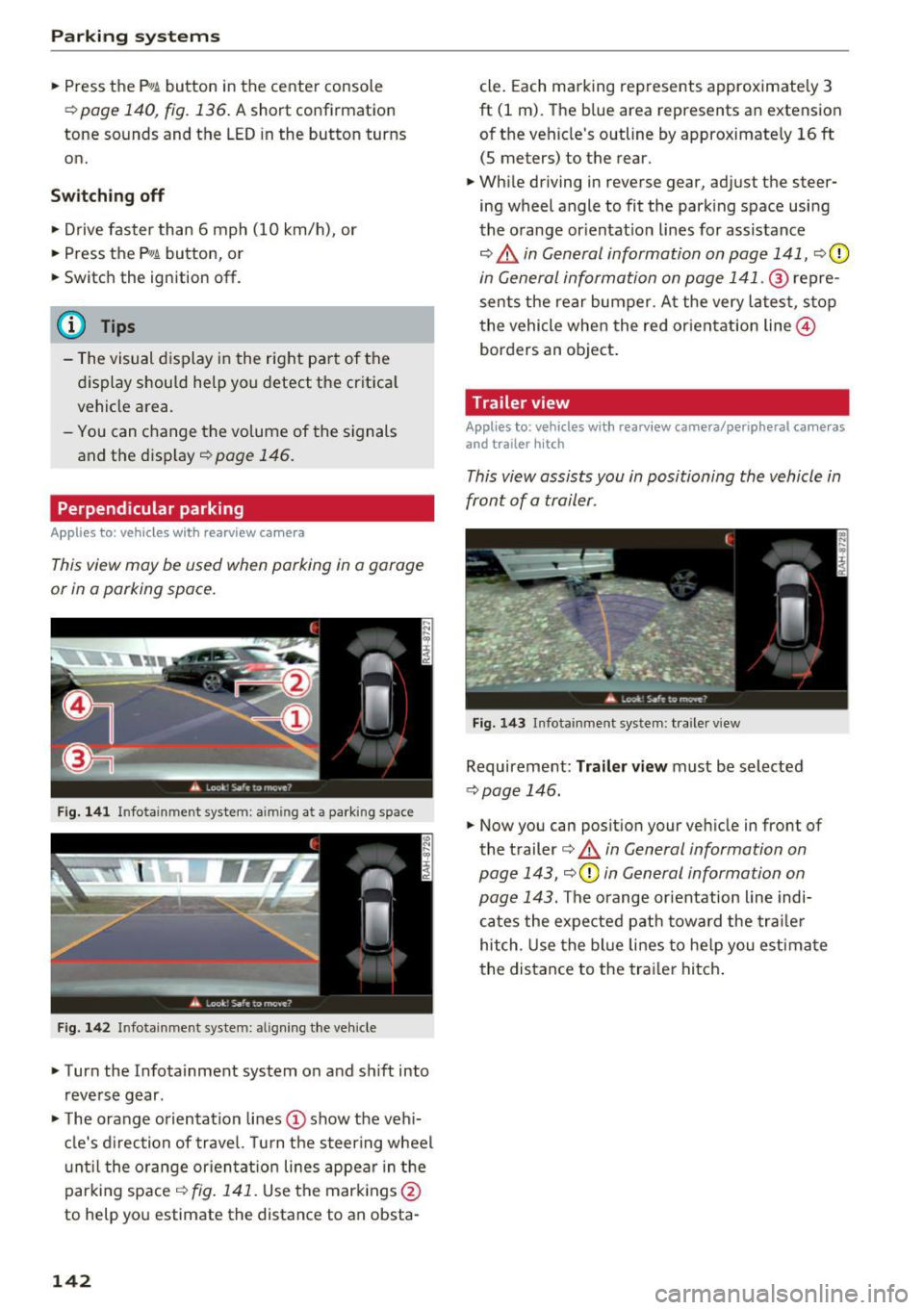
Fig. 141 In fotainme nt system: aim ing at a park ing space
Fig . 142 Infotainment syste m: alig ning the vehicle
.,. Turn the Infota inment system on and shift into
reverse gear .
.,. The orange orientation lines(!) show the vehi
cle's direction of travel. Turn the steering wheel
until the orange orientat ion lines appear in the
parking space ¢
fig. 141. Use the markings @
to help you estimate the distance to an obsta-
142
cle. Each marking represents approximately 3
ft (1 m). The blue area represents an extension
of the vehicle's outline by approximate ly
16 ft
(5 meters) to the rear.
.,. While driving in reverse gear, adjust the steer
ing wheel angle to fit the parking space using
the orange orientat ion lines for assistance
¢ .&, in General information on page 141, ¢(D
in General information on page 141 . ® repre
sents the rear bumper. At the very latest, stop
the vehicle when the red orientation line@
borders an object.
Trailer view
Appl ies to : vehicles wit h rearview camera/peripheral ca meras
and trailer hitch
This view assists you in positioning the vehicle in
front of a trailer.
Fig. 143 Infota inment system : tra iler view
Requirement : Trailer view must be selected
~page 146.
.,. Now you can position your vehicle in front of
the trailer
¢ .&, in General information on
page 143, ¢(Din General information on
page 143.
The orange orientation line indi
cates the expected path toward the trailer
hitch . Use the blue lines to help you estimate
the distance to the trailer hitch.
Page 147 of 402
u (0 ...... N r--. N ...... 0
0
:E
cal display and camera image
q page 146.
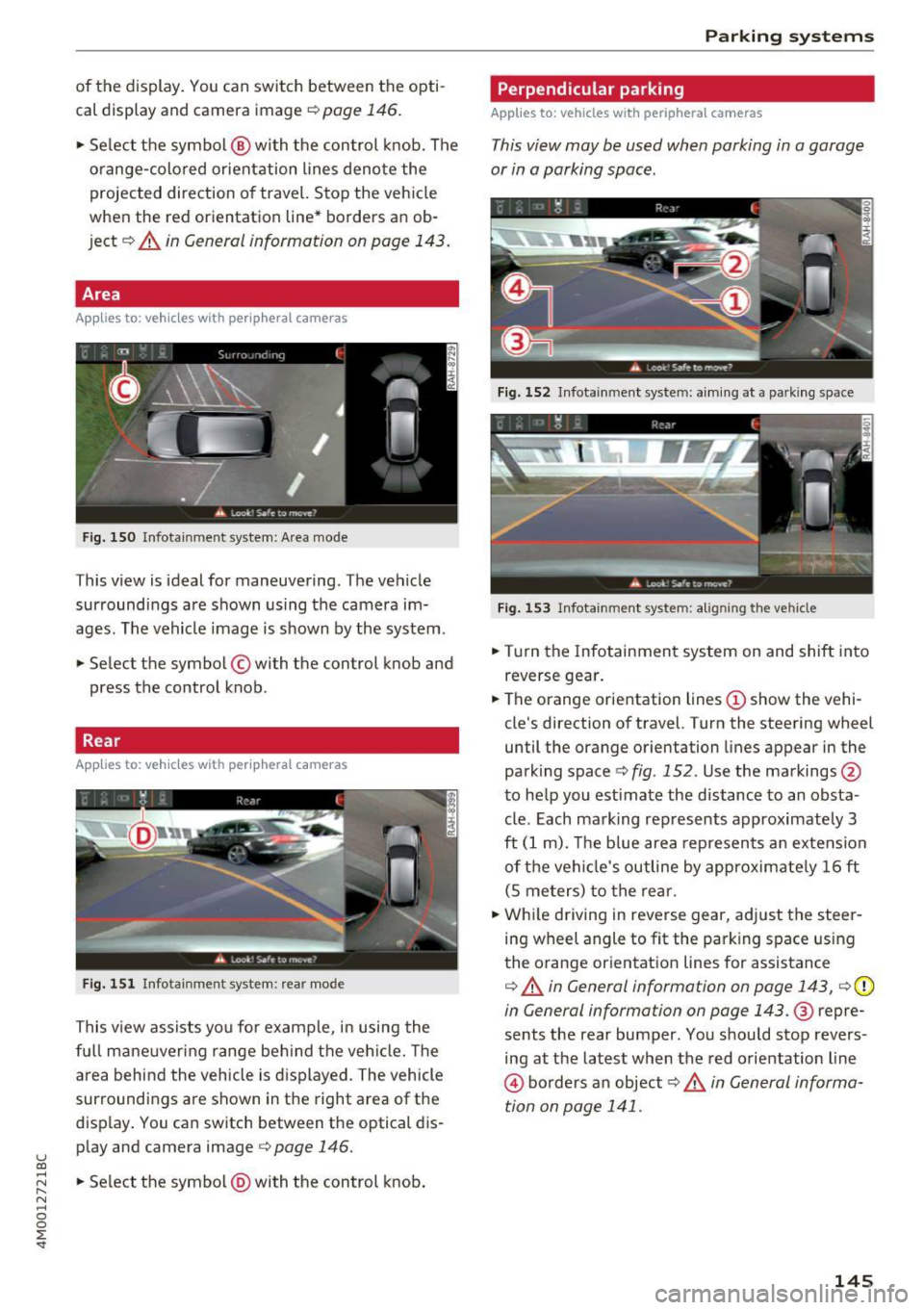
• Se lect the symbol @ with the control knob. The
o range-colored orientation lines denote the
projected direction of travel. Stop the vehicle
when the red orientation line* borders an ob
ject
q A in General information on page 143.
Area
Applies to: vehicles with peripheral cameras
Fig. 150 Infotainment system: A rea mo de
This view is ideal for maneuvering . The vehicle
surroundings are shown using the camera im
ages. The vehicle image is shown by the system.
• Select the symbol © with the control knob and
press the control knob.
Rear
App lies to: vehicles with peripheral cameras
Fig. 151 Infotainment syste m: rear mode
This v iew assists you for example, in using the
full mane uveri ng range beh ind t he vehi cle. Th e
area behind the vehicle is displayed. The vehicle
surroundings are shown in the right area of the
display . You can switch between the optical dis
p lay and camera image
c::> page 146.
• Select the symbol @with the control knob.
Parking systems
Perpendicular parking
Applies to: vehicles with peripheral cameras
This view may be used when parking in a garage
or in a parking space.
Fig . 152 Infotainment system: a iming at a park ing space
Fig. 153 Infotainment system: aligning the vehicle
• Turn the Infotainment system on and shift into
reverse gear.
• The orange orientation lines
(D show the vehi
cle's direction of travel. Turn the steering wheel
until the orange orientation lines appear in the
parking space¢
fig. 152. Use the markings @
to help you estimate the distance to an obsta
cle . Each mark ing represents approximately 3
ft (1 m). The b lue area represen ts an extension
of the vehi cle's outline by approximately 16 ft
(S meters) to the rear.
• While driving in reverse gear, adjust the steer
ing wheel angle to fit the park ing space using
the orange orientat ion lines for assistance
¢ A in General information on page 143, ¢ (D
in General information on page 143 .@ repre
sents the rear bumper. You should stop revers
ing at the latest when the red orientation line
© borders an object¢ ,& in General informa
tion on page 141.
145
Page 148 of 402

Parking sy stem s
Adjusting the parking aid
Applies to: vehicles w ith a rear parking system/parking sys
tem plus/rearview camera/peripheral cameras
The functions are adjusted in the Infotainment
system .
.. Se lect in the Info tainment system: IMENU I but
ton
> Vehi cle > left contro l button > Driver a s
s is ta nc e> Pa rking aid .
Or
.. When the parking aid is active, se lect in the In -
fota inme nt system: right contro l button *.
End sy stem * -stop the parking aid
Activ ate automatically * -sw itch automatic acti
vation on/off
Front volume * -vo lume for the front area
Rear volume -volume for the rear area
Entertainment fader -the volume of the aud io/
video source is lowered when the parking system
is turned on
The new ly selected leve l is demons trated briefly
by the sound generator.
Vi ew * -switch betwee n an optical d isplay
( Graphic ) and camera image ( Camera ) in the
right section of the display.
Trail er view * -sh ow trailer view
*Auto. front /rear came ra change * -the view be
h ind the veh icle
( Rear mode) is displayed auto
mat ica lly when you shift into reverse gear. The
view in front of the vehicle
( Front mode) is d is
p layed automatically when you shift i nto the for
ward gea rs. When first activat ing in a forward
gea r with the
P" IA bu tton, the front s ide view is
d isp layed
( Corner view (front) mode).
If you do not se t the../, the view behind the vehi
cle
( Rear mode) is a lways d isplayed and it does
not swi tch to the
Front mode when a forward
gea r is selec ted .
(D Tips
-Seve ral menus can be accessed w ith the
r ight contro l button only when the park ing
a id is ac tive.
- T he settings for volume and automatic a ct i
vation* are au toma tically s to red and as-
146
signed to the remote con trol key be ing
used.
Error messages
Applies to: vehicles with a rear parking system/parking sys
tem plus/rearview camera/peripheral cameras
Ill Rear park ass ist: malfunction! Ob stacle s
cannot be detected
Ill Front par k ass ist : malfun ct ion! Ob st a cl es
cannot be detect ed
ml Par k assist: malfunction! Obstacles cannot
be detected
When one of these messages appears, there is a
system malfunction. The L ED in the P'#~ button al
so blinks when sw itching it on. The relevant mes
sage on ly appears again w hen you manually acti
vate the park ing aid with the button.
Ill Rea r parking aid : obstacle detection re stri ct
ed
The rear cross -traffic assist* ¢ page 130, Rear
cross-traffic assist
is not available. Either the ESC
i s sw itched off, or the radar sensors may be cov
ered by a bike rack, stickers, leaves, snow or oth
er objects. Switch the ESC on , or clean the area in
front of the sensors if necessary ¢
page 12 7,
fig. 122 . If this message cont in ues to be d is
played, drive immed iate ly to an authorized A udi
dealer or au thor ized A udi Service Faci lity to have
the mal funct ion rep aired.
Parking system plus *
If a sensor or speaker is faulty, the J¼ symbol
will appear i n front of/behind the vehicle in the
I nfotai nment system d isplay. If a rear sensor is
faulty, only obs tacles that are in areas @and @
are show n¢
page 139, fig. 135 . If a fron t senso r
i s fa ulty, only obs tacles tha t are in a reas © and
@ are shown.
Peripheral cameras*
There is a system malfunction if the % symbo l
appe ars and the co rresponding area of the dis
play is shown in black . The camera is not wo rking
i n th is area.
Page 158 of 402
Multi Media Interface
Multi Media Interface
Traffic safety information
Audi recommends performing certain Infotain
ment system functions, such as entering a desti
nation, only when the vehicle is stationary . Al
ways be prepared to stop operat ing the Infotain
ment system in the interest of your safety and
the safety of other road users.
_& WARNING
Only use the Infotainment system when traf
fic cond itions permit and always in a way that
allows you to maintain complete control over
your vehicle.
@ Tips
Certain funct ions are not available wh ile driv
ing .
Introduction
The Multi Media Interface, or MMI for short,
combines various systems for communication,
navigation* and entertainment in your Audi . You
can operate the MMI using the MMI control pan
el, the multifunction steering wheel or the voice
recognition system* .
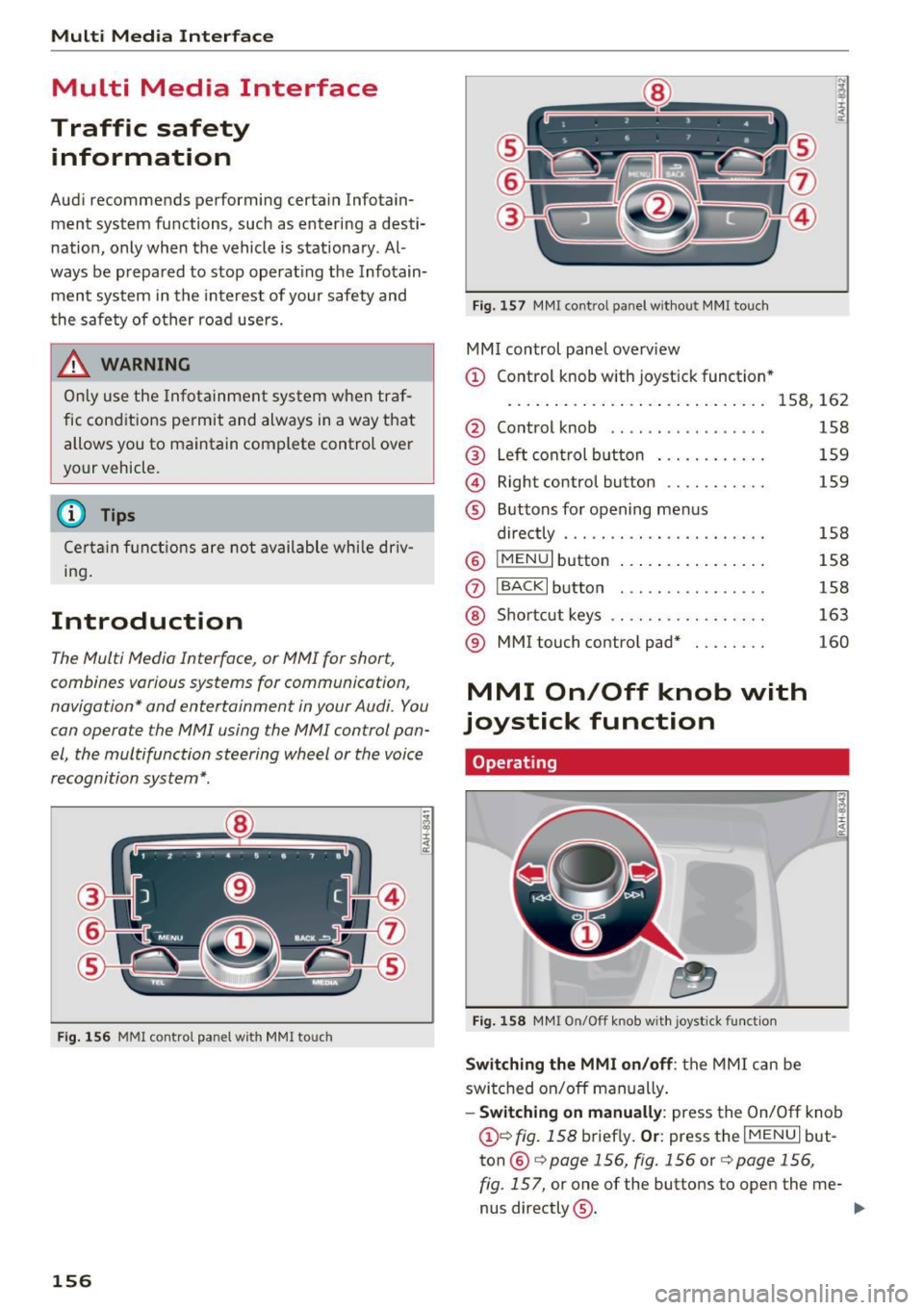
Fig. 156 MMI contro l panel w ith MMI touch
156
Fig. 157 MMI control panel withou t MMI touch
MMI control panel overview
(D Control knob with joystick function *
. . . . . . . . . . . . . . . . . . . . . . . . . . . . 158 , 162
@ Control knob . . . . . . . . . . . . . . . . . 158
® Left control button . . . . . . . . . . . . 159
@ Right control button . . . . . . . . . . . 159
® Buttons for opening menus
directly . . . . . . . . . . . . . . . . . . . . . . 158
@
IMENU I button . . . . . . . . . . . . . . . . 158
(J) I BACK I button . . . . . . . . . . . . . . . . 158
@ Shortcut keys . . . . . . . . . . . . . . . . . 163
® MMI touch control pad* . . . . . . . . 160
MMI On/Off knob with
joystick function
Operating
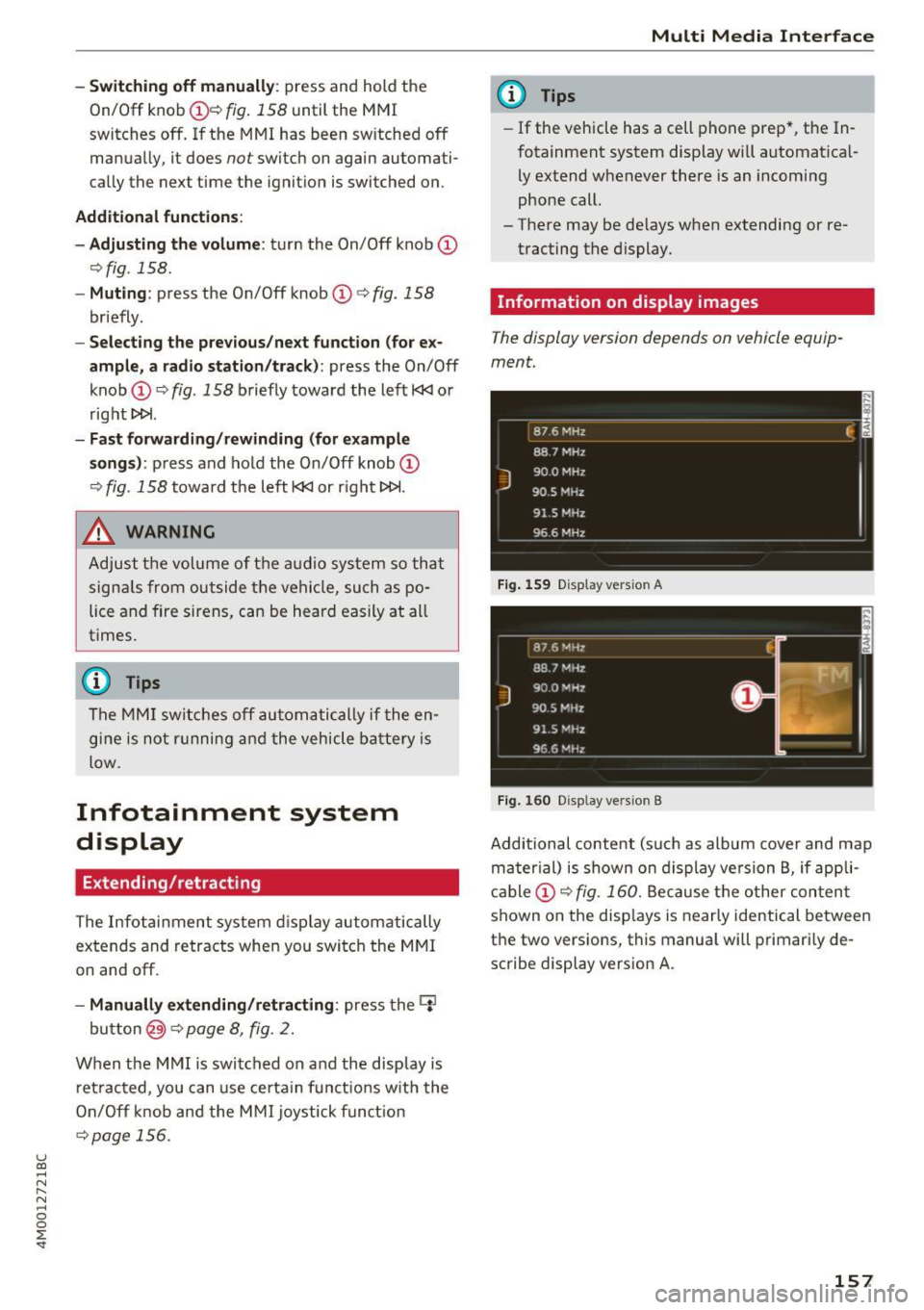
Fig. 158 MMI On/Off knob with joystick function
Switching the MMI on/off : the MMI can be
switched on/off manually .
-Switching on manually: press the On/Off knob
(i)<=> fig. 158 briefly. Or : press the I MENU I but
ton @
c:!)page 156, fig. 156 or c;,page 156,
fig. 157,
or one of the buttons to open the me-
nus directly ®·
IJJI,
Page 159 of 402
u (0 ...... N r--. N ...... 0
0
:E
On/Off knob
CD ¢ fig. 158 until the MMI
switches off. If the MMI has been sw itched off
manually, it does
not switch on again automati
ca lly the next time the ignition is switched on .
Addition al functions :
- Ad ju sting th e volum e:
turn the On/Off knob CD
<=>fig . 158 .
-Muting : press the On/Off knob CD c> fig. 158
briefly .
-Select ing the pre viou s/nex t fun ct ion ( for ex
amp le , a radi o stat ion /tra ck ):
press the On/Off
knob
CD <=> fig . 158 brief ly toward the left l
t>r>I .
-Fast forwardi ng/rew inding (for example
so ng s):
press and hold the On/Off knob CD
¢ fig. 158 toward the left l
.,& WARNING
Adjust the volume of the audio system so that
signa ls from outside the vehicle, such as po
lice and fire sirens, can be heard eas ily at all
times.
@ Tips
The MM I switches off au tomatically if the en
gi ne is not r unning and the vehicle battery is
low.
Infotainment system
display
E xtending /retrac ting
The Infotainment system d isplay automatically
extends and retracts when you switch the MMI
on and off.
- Manuall y extending /retracting : press the C:I
button @ c> page 8, fig. 2.
When the MMI is switched on and the display is retracted, you can use certa in functio ns with the
On/Off knob and the MMI joystick funct ion
¢ page 156.
Multi M edia I nterfac e
(D Tips
-If the vehicle has a cell phone prep*, the In
fotainment system display will automat ica l
ly extend whenever there is an incoming
phone call.
- There may be delays when extending or re
tracting the display.
Information on display images
T he display version depends on v ehicle equip
ment.
87 6 MHz
88.7 MHz
J
900 MHz
90.5 MHz
91 5 MHz
96 6 MHz
·--------·----
F ig . 1 59 Display ve rs io n A
Fi g. 160 Disp la y ve rs ion B
f
Additional content (such as album cover and map
ma ter ial) is shown on display ve rsion B, if appli
cable
CD <=> fig . 160. Because the other conten t
shown on the disp lays is nearly identical between
the two versions, this manua l will primari ly de
scribe display version A .
157
Page 161 of 402
u (0 ...... N r--. N ...... 0
0
:E
with the control buttons
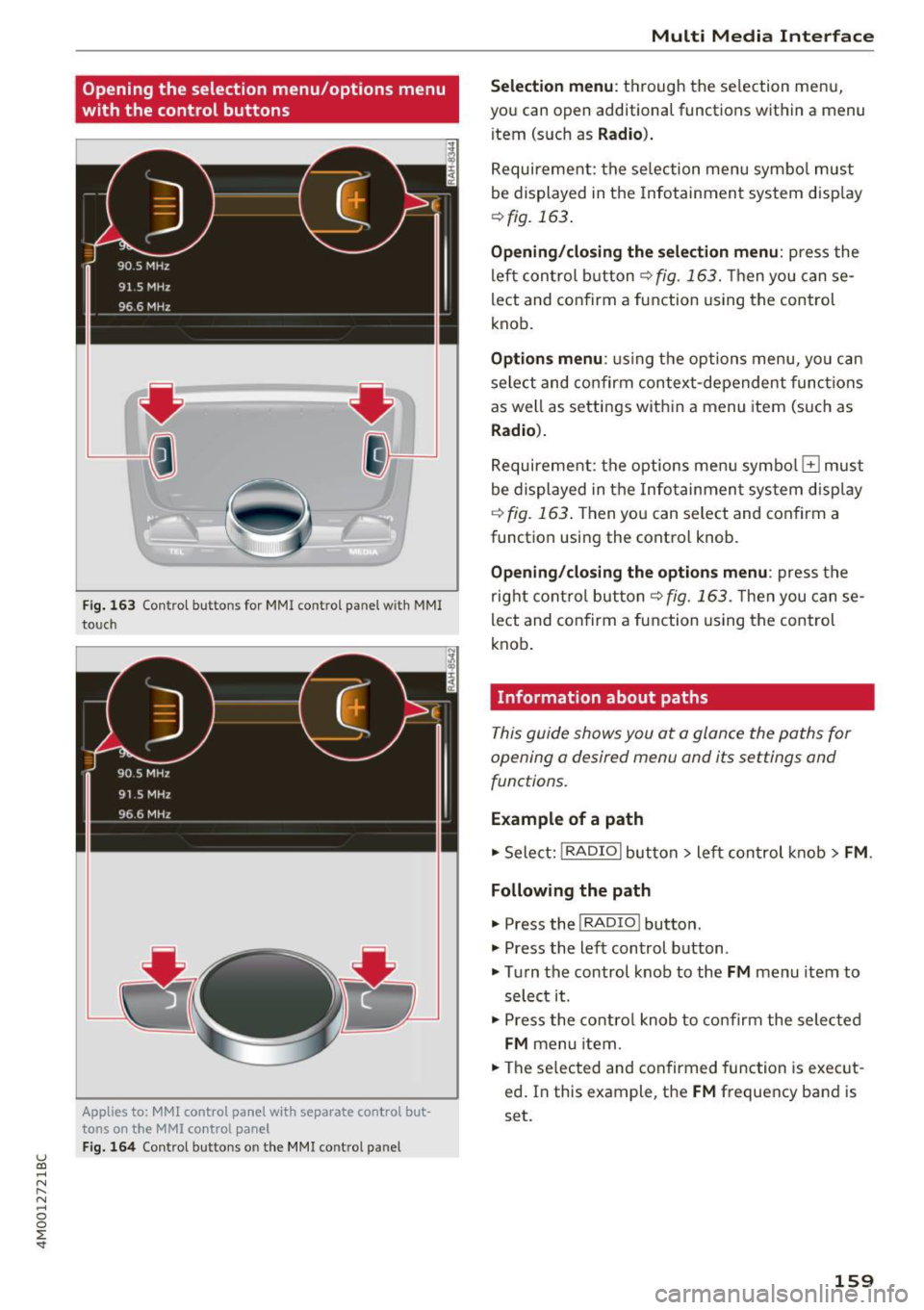
F ig . 163 Contro l bu ttons for MMI contro l panel w ith MMI
to uch
Applies to: MMl control panel with separate control but
tons on the
MMI control panel
Fig. 164 Control buttons o n the MMI control pa nel
Multi M edia I nterfac e
S ele ction menu :
th rough the se lection menu,
you can open additional functions within a menu
item (such as
R adio ).
Requirement: the se lection menu symbo l must
be displayed in the Infotainment system disp lay
¢ fig. 163 .
Opening /closing the selec tion menu : press the
left control button ¢
fig. 163. Then you can se
lect and confirm a function using the control
knob.
Opt ions menu : using the options menu, yo u can
select and confirm context-dependent func tions
as well as settings within a menu item (such as
Radio ).
Requirement: the options menu symbo l El must
be displayed in the Info tainmen t system disp lay
r=> fig. 163 . Then you can select and confirm a
function using the control knob .
Opening/closing the option s menu : press the
right cont rol but ton ¢
fig. 163 . Then you can se
lect and confirm a function using the control
knob .
Information about paths
This guide shows you at a glance the paths for
opening a desired menu and its settings and
functions.
Example of a path
.. Select: !RADIO I button> lef t control k nob> FM .
Following the path
.. Press the I RADIO I button .
.. Press the left control button .
.. Tu rn the control knob to the
FM menu item to
select it .
.. Press the contro l knob to co nfirm the selected
FM menu item .
.. The se lected and confirmed function is exec ut
ed . In this example, the
FM frequency band is
set.
159