warning AUDI Q7 2017 Owner´s Manual
[x] Cancel search | Manufacturer: AUDI, Model Year: 2017, Model line: Q7, Model: AUDI Q7 2017Pages: 402, PDF Size: 100.39 MB
Page 91 of 402

u co ...... N r-... N ...... 0
0
:E: '
-If you do not begin driving immediately or
the engine stalls after releasing the brake pedal, your vehicle may begin to roll back
ward . Press the brake pedal or set the park
ing brake immed iately.
- The intelligent technology of hill hold assist
cannot overcome the lim itations imposed by
natural physical laws. The increased comfort
offered by hill hold ass ist should not cause
you to take safety risks .
- Hi ll hold assist cannot hold the veh icle in
place on all hills (for example, if the ground
is slippery or icy).
- To reduce the risk of an accident, always
make sure the vehicle is situated safely
wh ile stat ionary.
Off road driving
General information
The electronic stabilization contro l (ESC) func
tions were enhanced for driving offroad. Offroad
mode can be activated when driving in situat ions
where slippage or a differential lock function is
necessary
Q page 149. The hill descent ass ist is
a lso available, which automatically brakes the ve
hicle and maintains a constant speed as a result
~page 150. In addition, your Audi prov ides con
tinuous all wheel drive.
H owever , your Aud i is not a purely offroad vehi
cle . Your vehicle was not designed to d rive unde r
extreme ope rating conditions such as driving in
an expedition style.
Only drive in terrain that is suitable for the vehi
cle and your driving ability . Never take any un
necessary risks!
Before driving offroad
- Check the eng ine oil level, the tire pressure, the
coolant level and the fluid level in the washer
fluid reservoir .
- Store pieces of luggage and other objects in the
luggage compartment and secure them from
s li ding out of place.
Driving
After driving offroad
-After driving offroad, remove branches and
other debris from the radiator grille, under
body, and wheels . Look especially for foreign
objects (such as stones) that may be stuck in
the tire tread.
- Clean the vehicle body and underbody and in
spect the vehicle for possible damage.
- Clean the windows, headlights, tail lights and
the license plate if they are dirty.
- Per form a brake test (especially after driving
through water).
_& WARNING
- Be especially cautious and aware when driv
ing under difficu lt cond it ions and when off
road. Veh icle damage and injuries may occur
when dr iv ing at excessively high speeds or
with incorrect driving maneuvers.
- Always adjust your speed and driving style
to the roads, terrain, traffic and weather
conditions . Drive especially slowly if there is
low visibility when offroad.
- Please note that the wheels can sp in more
and the vehicle can swerve when in offroad
mode, espec ially when the road is slippery
or has loose surface material.
- Driving stability is reduced when in offroad
mode.
@ For the sake of the environment
Avoid harming the environment and show
consideration for nature .
(D Tips
Only drive where it is permitted and always
stay on the prov ided roads and paths .
Explanation of technical terms
The following data is based on idea l conditions .
T he values may vary depending on the load,
ground composition and the environment. The
driver is therefore responsible for deciding
whether a vehicle can hand le a specific situation
¢ £ . ~
89
Page 92 of 402
Driving
Incline angle
A rising difference in a ltitude (incline) on a 109
yard (100 m) stretch is given in perce ntage or de
g rees . Data indicating whether the vehicle can
drive up an incline by itself (dependent on the
road surface and the engine power among other
factors). Maximum permitted incline angle: 31
°
G round clearance
The distance between the road s urface and the
lowest point on the vehicle underbody .
-Vehi cles with steel su sp en si on : gro und clear
ance : 8 .3 in (210 mm)
- Vehi cles with air suspen sion* : maximum
ground clear ance: 9.7 in (245 mm)
&, WARNING
Exceed ing the specified max imum values can
lead to severe personal injur ies or vehicle
damage.
- All data was co llec ted on f lat, firm, non
s li ppery road surfaces and under d ry weath
er conditions .
- Ideal conditions do not apply to offroad driving. Neve r go a ll the way up to the maxi
mum va lues , but rather always leave a sa fe
ty margin.
Messages
There is only one motto when driving in difficult
conditions and offroad: drive slowly and with
caution!
Observe the fo llowing when driv ing on unpaved
roads:
• Only drive in terrain that is s uita b le for the ve
hicle and your d riving ability. Never take any
u nnecessary risks!
• Drive slowly and carefu lly.
• Pay attention to the
ground clearance of your
vehicle.
• Activate the
offroad mode as needed
¢ page 149.
• Use the hill desc ent assist when dr iv ing down
steep h ills
9page 150.
90
Difficult terrain and off -road
When dr iving in unf ami liar areas and off road,
drive slowly and keep on the watch for unexpect
ed obstacles (such as potho les, rocks, tree
stumps, etc .).
To p revent the vehicle from bottom ing o ut and to
reduce the risk of underbody damage, yo u should
drive across uneven gro und on only one side of
the ve hicle so that only two of your wheels cross
the uneven area, instead of driving across the
center of the uneve n area with all four wheels.
D rive quickly thro ugh sandy or marshy off-road
sections and do not stop, if at all possib le .
Driving through water
Also read the information fo und in 9 page 79.
Driving on a slope
If you a re ever unable to drive up a h ill, do not try
to turn around . Dr ive back down in
reve rse in
stead . Othe rw ise you run the risk of tipping over .
If the vehicle threatens to t ip over when dr iving
across a slope, you must immediat ely steer
downhill in the direction of the slope .
Do not park your vehicle on steep hills .
To reduce the risk of tipping over, drive on hills in
the d irection of the downward slope (fall line) -
ne ver crosswise.
Tilt angle display
Description
Applie s to: ve hicles w ith a tilt ang le d isp lay
I l 1ft r offr:'l;ic1
·, 1
~ '
Allroad -
0
l • . ,. _,....
J
Comfort ~ ~
Auto Jl• 11· 0- .
Dynam ic
~ ~
Individual 11 • 11•
.,t,.
F ig. 91 I n fota inme nt system : til t an gle d isp lay
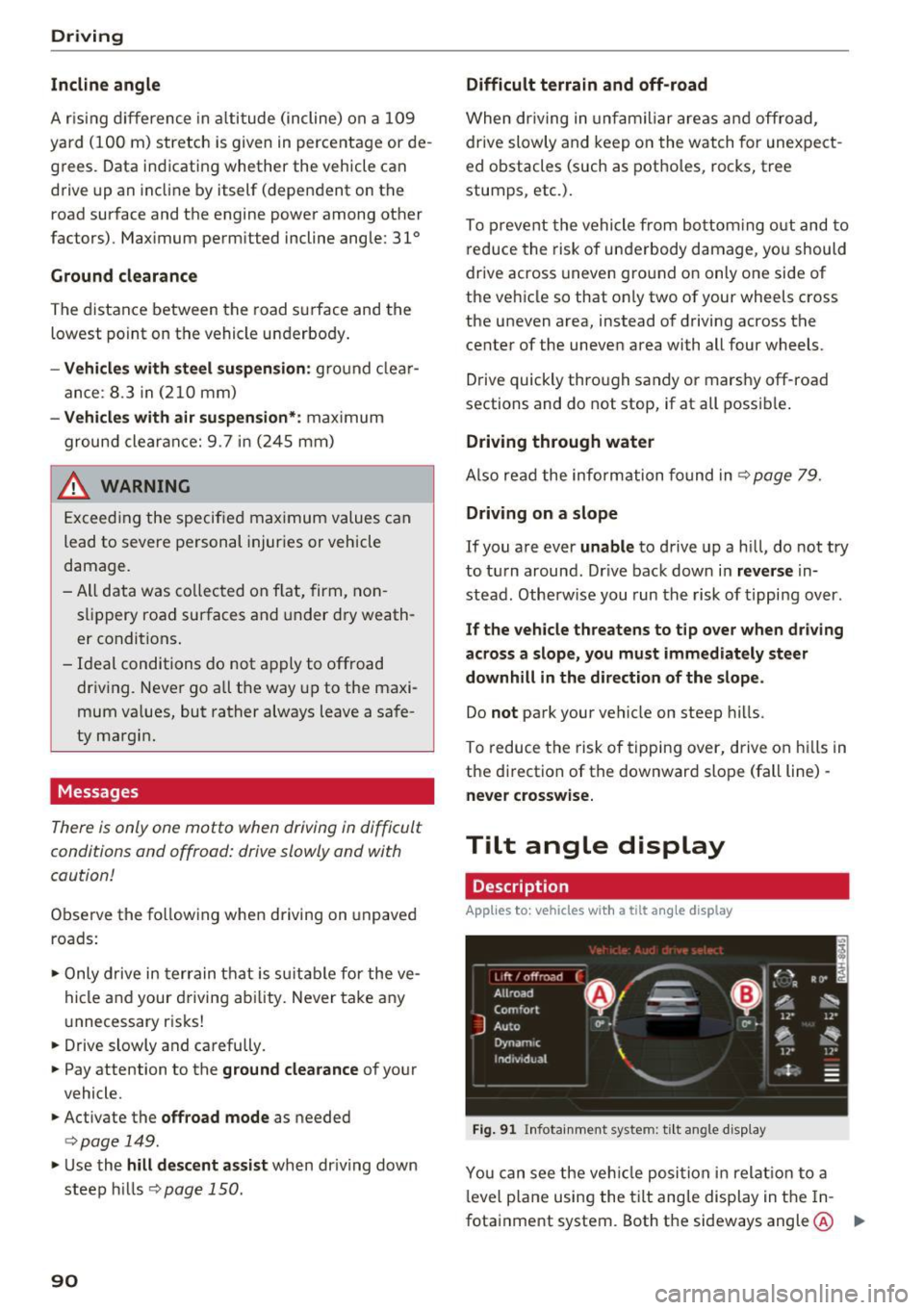
You can see the ve hicle position in relat io n to a
l evel p lane using the t ilt ang le display in the In
fotainment system . Both the sideways angle @ .,.
Page 93 of 402
u (0 ...... N r--. N ...... 0
0
:E
disp layed. The accuracy depends on the driv ing
situation and is normally around 1
°. T he side
ways angle of your vehicle should not exceed the
yellow range in the gauge. If it reaches the red range, there is a risk that the vehicle might tip
c::, A .
Dis playing the til t angle di splay
.. Select in the Infotainment system: IMENUI but-
ton
>V ehicle > Lift / Offro ad or Allro ad *.
Showing the additional display
To change the contents shown in the rig ht area of
the screen, select in the Infota inment system:
right control button
> Additiona l d isplay.
Angle :
this displays the c urren t steering wheel
angle and the maxim um angle that was reached
during a drive . These values are reset when the
ignition is switched off .
Posit ion : disp lays the height, direction and geo
coordinates of the current vehicle pos ition.
Off : only the air suspension display remains o n.
& WARNING
- Do no t exceed the yellow range in the
gauge . Your vehicle can tip, which i ncreases
the risk of an acc ident.
- Under some circumsta nces, the vehicle can
tip over or til t sideways even if the sideways
angle is low . The angle display does not re
place the driver's attention. To reduce the
risk of an accident, make sure the vehicle
does not t ip , especia lly when you are driving
at h igh speeds.
Automatic transmission
Introduction
The automat ic transmission is controlle d elec
tronica lly . Power is transfe rred using a torque
converte r.
When a
m oderate driving styl e is used , the
transmission selects the most economical driving mode. The t ransmission upshifts at a lower RPM
D rivi ng
and downs hifts at a higher RPM to improve fue l
efficiency.
T he tra nsmission switches to a sporty mode after
a kick-down or when the driver uses a
s porty
dri ving style
characterized by quick acce lerator
peda l movements, heavy acceleration, frequent
changes in speed and t raveling at the maximum
speed .
If desired, the driver can also se lect the gears
manually ( tiptronic mode ) c::, page 94.
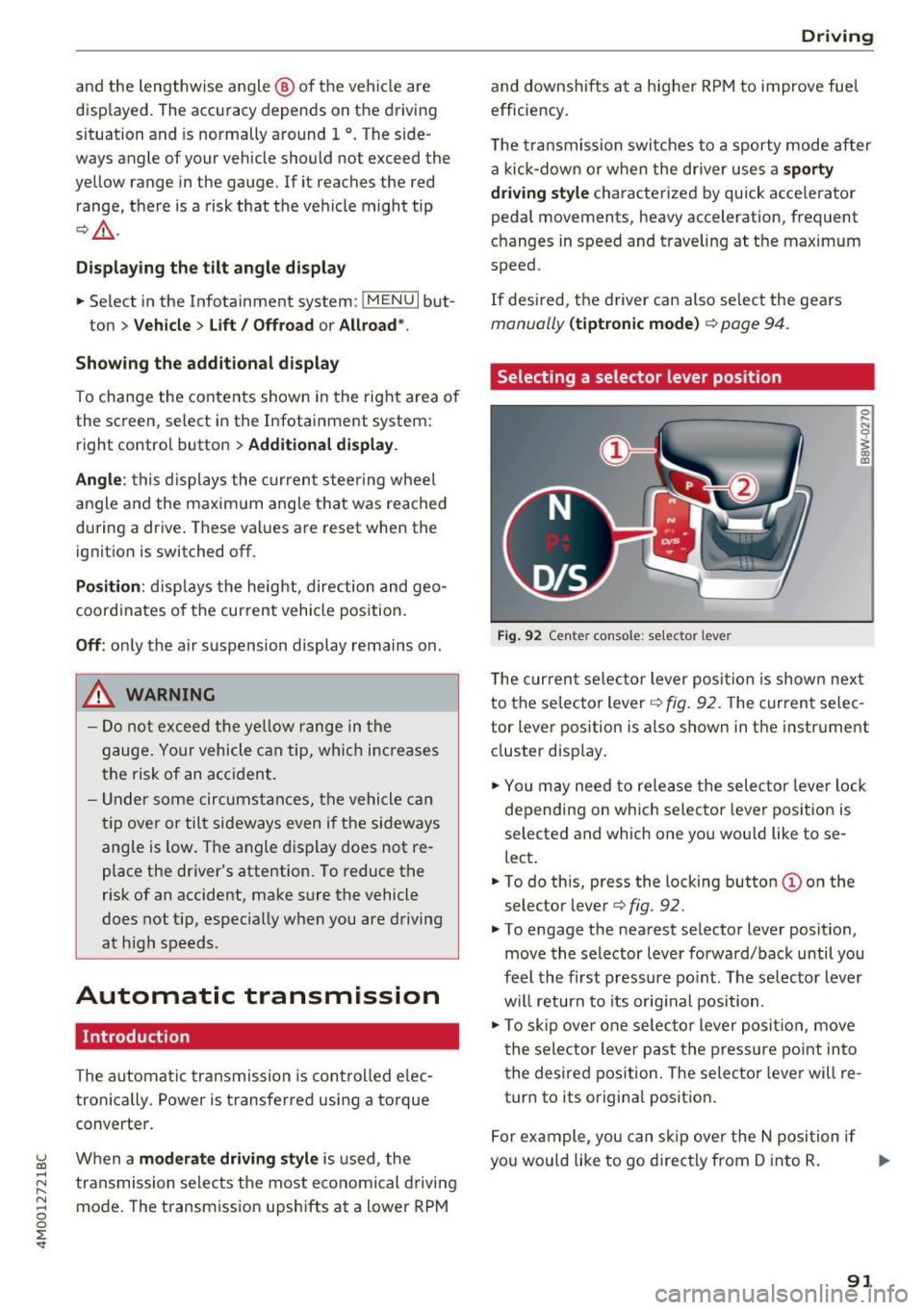
Selecting a selector lever position
Fig . 92 Cen te r conso le: se lecto r lever
0 ,.._ N 0
~ a, m
T he curren t se lector lever posi tion is show n next
to the se lector lever
c::, fig. 92. The curren t se lec
tor lever position is a lso shown in t he instrument
cluster disp lay.
.. You may need to release the selector lever lock
depending on wh ich selecto r lever pos it ion is
selected and which one you wou ld like to se
lect .
.. To do th is, press the locking button(!) on the
selector lever
<=> fig . 92.
.. To engage the nearest selector lever position,
move the selector lever forward/back until you
fee l the first pressure po int. The selec to r lever
w ill return to its orig inal position .
.. To skip over one selec tor lever posit io n, move
the selector lever past the pressure point into
the desired position. The selector lever will re
turn to its origina l position .
F or ex ample , you can s kip over the N position if
yo u wou ld like to go d irectly from D into R . ..,.
91
Page 95 of 402
A WARNING ,~
Read and follow all WARNINGS.
- The vehicle can roll even if the ignition is switched off.
- Power is st ill transmitted to the wheels
when the engine is running at idle. To pre
vent the veh icle from "creeping", you must
keep your foot on the brake in all selector
lever positions (except P and N) when the
engine is running.
- Before opening the hood, select the P selec tor lever position and set the parking brake.
T his reduces the risk of an accident. Always
read and follow the applicable warnings
¢ page 322, Working in the engine com
partment.
@ Tips
If you accidentally se lect N while d riving, take
your foot off the acce le rator pedal and wa it
for the engine to slow down to idle before se
lect ing Dor S.
Driving tips
Starting the engine
.. Th e P or N position must be selected.
Starting from a stop
.. Press and hold the brake pedal.
.. Start the engine
c:> page 82.
.. Press the lock ing button @on the selector lev
er and select the D, E, Sor R position
¢page 91.
.. Wait a moment until the transmission shifts.
You wi ll notice a slight movement when the
gear engages .
.. Release the brake pedal and press the accelera-
tor pedal ¢
&-
Various convenience functions are avai lab le for
starting on hills
c:> page 88.
Stopping temporarily
~ .. Press the brake pedal to stop the vehicle, for
~ example at a traffic light. Do not press the ac-
~ celerator peda l when doing this. 0
0
:E: '
.. To prevent the vehicle from ro ll ing when you
start driving, set the parking brake when stop
ping on steep hills¢
A-
.. The parking brake will release automatically
and the vehicle will start moving once you press
the accelerator pedal.
Stopping/parking
If the selector lever is not in the P position when
you open the driver's door, the vehicle could roll.
.. Press and hold the brake pedal
c:> A-
.. Set the parking brake.
.. To select the P se lector lever position, press the
P button
@ on the selector lever c:> page 91 ,
fig. 92.
Under certain conditions, such as driving in the
mountains or when towing a trailer, it may be
helpful to switch to manua l mode temporarily
and shift
manually to adapt to the driving condi
tions
c:> page 94.
On hills, activate the parking brake first and then
shift into the P position
c:> page 87. This prevents
too much stress from being p laced on the lock ing
mechanism .
A WARNING
--The vehicle can roll even when the eng ine is
sw itched off.
- Unintended vehicle movement can lead to
serious injuries .
- To reduce the r isk of an accident, do not
press the accelerator pedal when changing
the selector lever position while the vehicle
is stationa ry and the engine is running .
- To reduce the r isk of an accident, never se
lect the R or P positions while dr iv ing.
- Do not inadvertently press the accelerator pedal when the vehicle is stationary . Other
wise the r is k of an accident increases be
cause the vehicle will start to move immedi
ately, even if the parking brake is set.
(D Tips
Fo r safety reasons, the park ing brake only re
leases automatically when the drive r's door is
closed.
93
Page 96 of 402
Driving
Hill descent control
The hill descent control system assists the driver
when driving down hills .
Hill descent control activates when the transmis
sion is in the Dor S position and you press the
brake pedal. The transmiss ion automatically se
lects a gear that is suitable for the hill . H ill de·
scent contro l tries to mainta in the speed ach
ieved at the time of braking, within phys ica l and
technical limita tions.
If may sti ll be nece ssary to
adjust the speed with the brake pedal.
Hi ll descen t co ntro l switches off o nce the hill lev
els out o r yo u press the ac celerator peda l.
W hen operating the c ruise contro l system*
~page 102, hill descent cont rol is also act ivated
when the speed is set.
,&. WARNING
H ill des cen t c ontrol cannot over come physi ca l
lim itation s, so it may no t be able to maint ain
a constant speed under all condit ions . Always
be ready to apply the brakes .
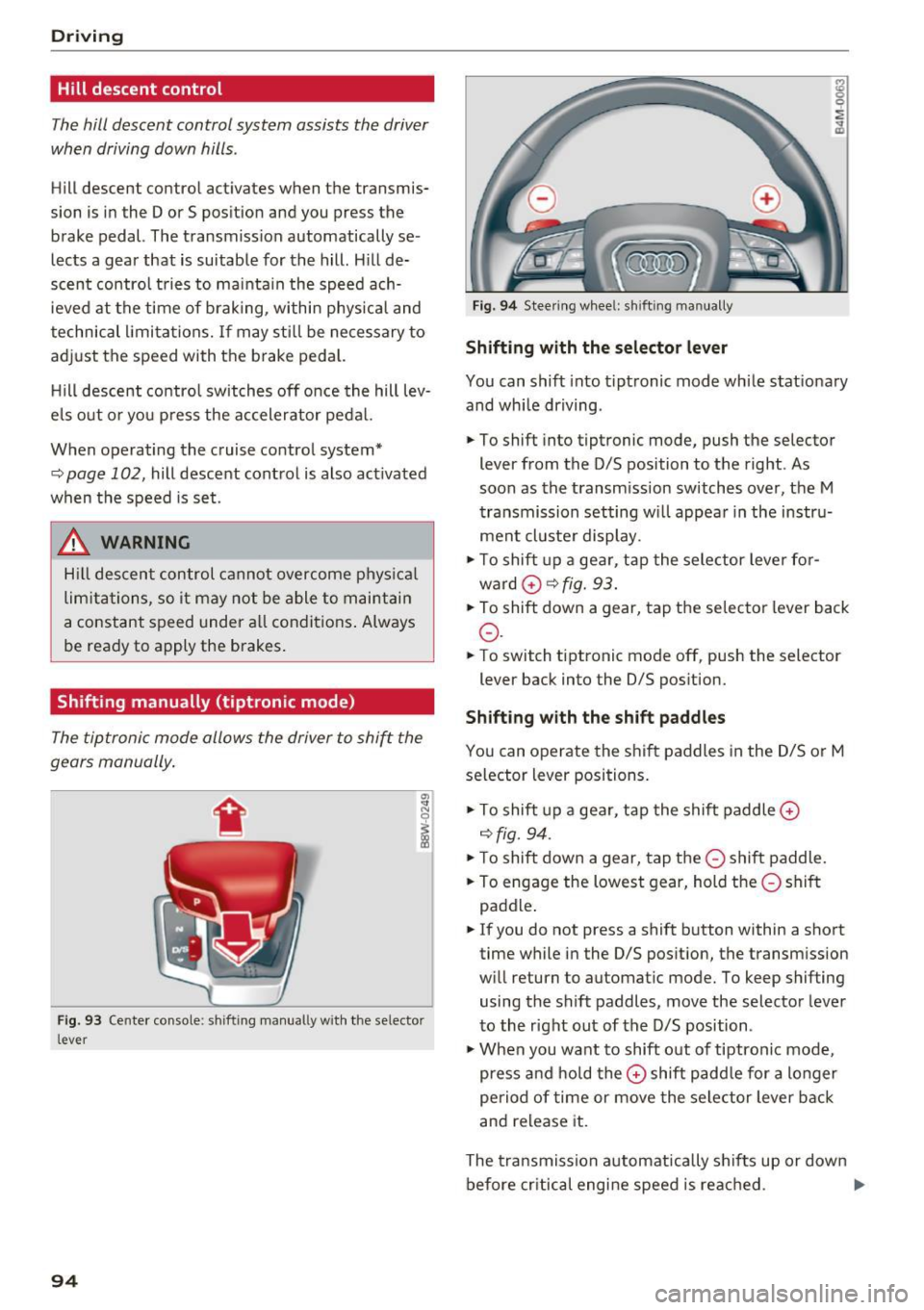
Shifting manually (tiptronic mode)
The tiptronic mode allows the driver to shif t the
gears manually .
Fig . 93 Cente r console: shifting manually w it h the se lector
lever
94
F ig . 94 Stee ring whee l: shifting manually
Shifting with the selector lever
You can shift into t iptronic mode while stat ionary
and wh ile dr iving .
.. To shift into tiptronic mode, push the selecto r
lever from the D/S position to the right . As
soon as the transm iss ion switches
over, the M
t ra nsmission setting w ill appea r in the instru
ment cl uste r display .
.,. To shift up a ge ar, tap the sele ctor lever fo r
ward
0 ~ fig. 93.
.,. To shift down a gear, tap the se lec tor lever back
0 .
.,. To switch tiptronic mode off, pus h the selector
lever back into the 0/S pos ition.
Shifting with the shift paddles
You can operate the shi ft paddles in the D/S or M
selector lever positions .
.,. To shift up a ge ar, tap the shift paddle
0
~fig. 94 .
.,. To shift down a gear, tap the 0 shift paddle .
.,. To engage the lowes t gear, hold t he
0 shift
padd le .
.,. If you do not press a shift button within a sho rt
time while in the D/S pos it ion, the transmission
w ill return to automat ic mode. To keep shifting
using the shift paddles, move the selector leve r
to the r ight out of the D/S position .
.,. When you want to shift o ut of tiptron ic mode,
press a nd ho ld the
0 shift padd le for a longer
pe riod of time or move the sele ctor lever back
and release it.
The tra nsmission automat ica lly shi fts up or down
before cr itical engi ne speed is reac hed . .,.
Page 97 of 402
u co ...... N r-... N ...... 0
0
:E: '
when the engine speed is wit hin the permitted
range .
(D Tips
-If you s hift to the next lowest gear, the
transm ission w ill only shift if the en gine w ill
not be over-rewed.
- With kick-down , th e tran smission shifts to a
l ower gear, dep end ing on vehicle s peed and
engine speed .
- tiptronic does not wo rk if the t ransmiss ion
i s r unning in eme rge ncy mo de.
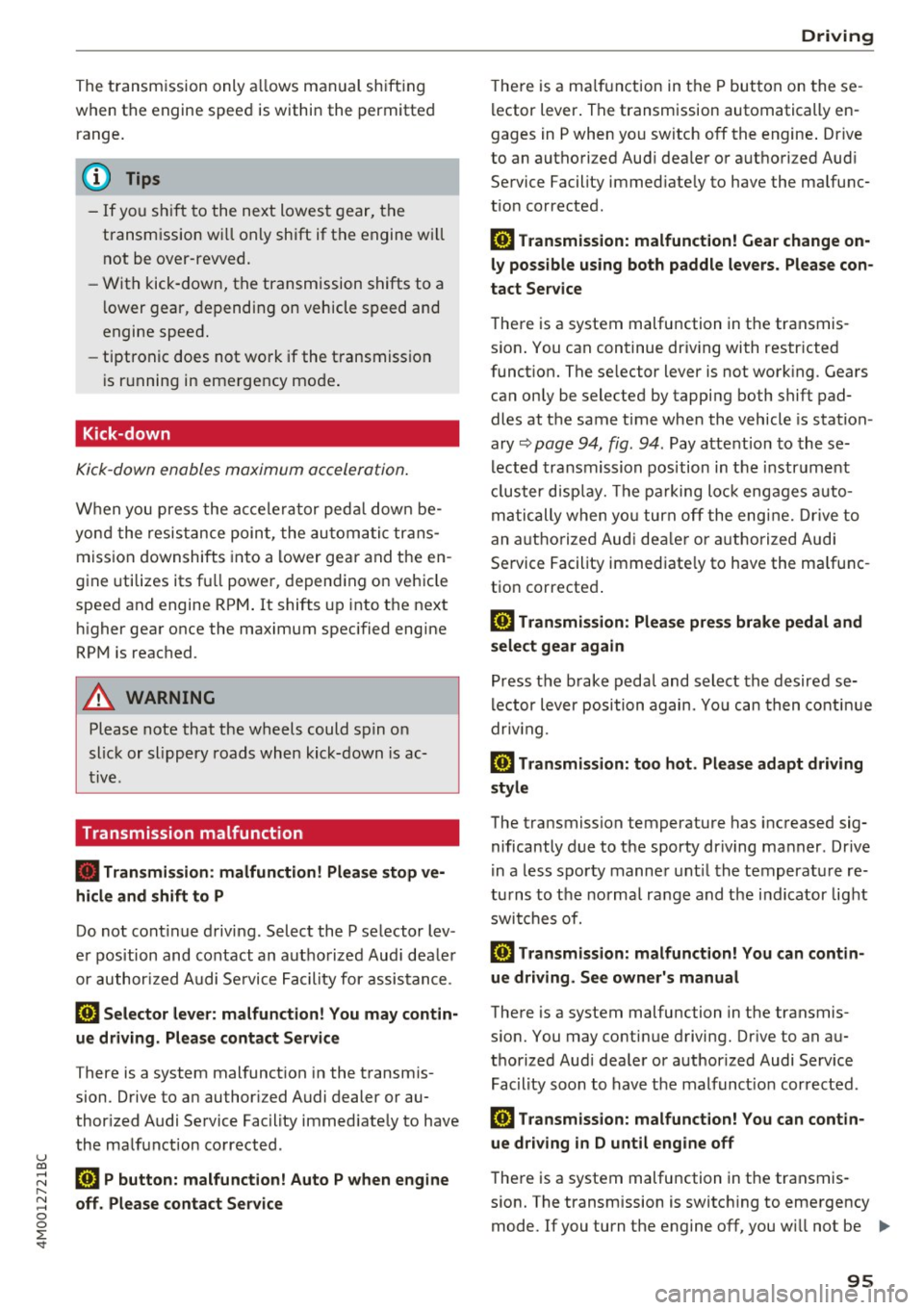
Kick-down
Kick -down enables maximum acceler ation .
When you press the a ccele rator ped al down be
yon d the resis tance poin t, the au tom atic trans
miss ion downshifts into a lower gear and t he en
g ine utilizes its fu ll power, depend ing on veh icle
speed and engine RPM . It shifts up into t he next
h igher gea r once the maximum spec ified engine
RP M is reached .
A WARNING
Please note that the wheels could s pin o n
slic k or slippery roads when kick-down is ac
ti ve .
Transmission malfunction
-
• Transmission : malfunction! Please stop ve
hicle and shift to P
Do not cont inue driv ing. Select the P se lector lev
e r p osition and contact an autho rized Aud i dea le r
or author ized A udi Se rvice Fac ility for assistance .
rm Selector lever: malfunction! You may contin
ue driving. Please contact Service
There is a system malfunct ion in the t ransmis
sion. D rive to a n author ized Audi dealer or au
thor ized Audi Se rvice Fac ility immed iate ly to have
the ma lf u nction co rrected.
rm P button: malfunction! Auto P when engine
off. Please contact Service D
riving
T he re is a ma lf u n ct ion in the P but ton on these
l ector lever . The transmission automatically en
gages in P when yo u sw itch off the engine . Dr ive
to an autho rized Aud i dea le r or authori zed Aud i
Se rvice Facility immed iate ly to have the ma lfunc
t ion corrected .
rm Transmission: malfunction! Gear change on
ly possible using both paddle levers. Please con
tact Service
T he re is a system malfunction in the transmis
s io n. You can continue dr iv ing with restr icted
funct ion. The se lector lever is not work ing . Gea rs
can on ly be selected by tapping both shift pad
dles at t he same time whe n the vehicle is stat ion
ary ~
page 94, fig . 94. Pay atte ntion to these
l ected transmission position in t he i nstr um ent
cl uster d isp lay. The pa rking lo ck eng ages auto
m ati cally when yo u turn off the eng ine. Drive to
an a uth orize d Au di dealer o r auth orized Aud i
Se rvice Facility immed iate ly to have the ma lfunc
t ion corrected .
rm Transmission: Please pre ss brake pedal and
select gear again
Pr ess t he b rak e peda l and select the desired se
l ector lever position again. Yo u ca n then co nt inu e
dr iv ing.
rm Transmission: too hot . Please adapt driving
style
The transmission temperature has i ncreased sig
nificantly due to t he sporty dr iv ing ma nner . Drive
i n a less s port y m anne r unt il the tempera tu re re
tu rns to t he norma l ra nge and t he i ndi cator lig ht
swi tches of.
rm Transmission: malfunction! You can contin
ue driving. See owner's manual
There is a system malfunction in the transmis
s io n. You may contin ue d riving. Dr ive to an a u
t h orized Au di dea ler or a uthorized Audi Service
Fac ility soon to have the mal func tion corrected .
rm Transmission: malfunction! You can contin
ue driving in
D until engine off
T he re is a system malfu nction in the transmis -
s ion. The transmission is switc hing to eme rgency
mode. If you turn the engine off, you w ill not be ..,.
95
Page 99 of 402
u co ...... N r-... N ...... 0
0
:E: '
sible. Please apply parking brake
also appears.
A WARNING
- Only activate the emergency release while
on a level surface or a slight slope.
- The parking tock may only be released using
the emergency release if the parking brake
is set. If it is not functioning, secure the ve
hicle from rolling using the brake pedal or
other suitable means, such as blocking a
front and a rear wheel. An unsecured vehicle
may roll away, which increases the risk of an
accident.
- To reduce the risk of an accident, you must
not drive when the emergency release is ac
tivated.
(D Note
- Read and follow the important instructions
about towing
c::;, page 3 74.
- The risk of damage increases if you do not
remove the socket wrench carefully when
resetting the parking lock.
Driving
97
Page 100 of 402
Trailer towing
Trailer towing
Driving with a trailer
General information
Your Audi was designed primarily for passenger
transportation.
If you plan to tow a trailer, please remember that
the additional load will affect durability, economy and performance.
Trailer towing not on ly places more stress on the
ve hicle, it also ca lls for more concentration from
the dr iver.
F or this reason, always follow the operating and
driving instructions provided and use common
sense.
@ Note
If you are going to tow a trailer, you must ac
tivate the tra ile r operation mode
¢page 100.
Technical requirements
Traile r hitch
Use a weight-carrying hitch conforming to the
gross trai ler weight. The hitch must be suitab le
for your ve hicle and tra iler and must be mounted
securely on the vehicle 's chassis at a
technically
sound
locat ion . Use on ly a trailer hitch with a re
movable ba ll mount . Always chec k w it h t he t rail
er hitch man ufactur er to make s ure t hat you a re
using the co rrect hi tc h.
Do not use a bumper hitch.
The hitch m ust be installed i n such a way that it
does not interfere with the impact -absorbing
bumper sys tem . N o mod ificat ions should be
made to the vehicle exhaust and b rake systems .
Fr om t ime to t ime, che ck t hat all hitch mo unti ng
bol ts rem ain securely faste ned.
W hen you are not tow ing a tra iler, remove the
tra ile r hitc h ba ll mount . This prevents the hitch
from ca using damage shou ld your veh icle be
s truck from behind¢ &..
98
Trailer brakes
If your trailer is equipped wi th a bra king sys tem,
c h ec k t o be sure that it con forms to all regu la
tions.
The trailer hydrau lic br ake system mus t not be
directly connecte d to the vehicle's hydr auli c
brake system ¢&. .
Safety chains
Always use safety chains between your vehicle
and t he tra ile r.
Trailer lights
Trailer lights must meet all regulations. Be sure
to check w ith your author ized Audi dealer for cor
r ect wir ing , sw itches and relays .
Mirrors
If you are unab le to see the traffic behind you us
i ng the regular outs ide mirrors, then you
must in
stall extended mirro rs. It is important that you
always have clear vision to the rear.
A WARNING
-
- After remov ing the tra iler hitch, do not
sto re it in your vehicle . In case of sud den
braking , th e hitch co uld fl y forwar d and i n
jure you o r yo ur passenge rs.
- I f a tra ile r has e lectr ica l brakes p lease no te
t h at the se brakes are not ac tivated by the
fact ory-fi tted contro l uni t - r isk of accident!
- N ever i nst all a "we igh t distribut ing" or
"lo ad equ alizing" trailer hi tch o n yo ur veh i
cle. The vehicle was not desig ned fo r these
kinds of trailer hitches. The hitch attach
ment can fai l, ca us ing the tra iler to tear
loose from the vehicle .
- The Gross Veh icle Weight Rating for your
veh icle, found on the safety compliance la
be l on the driver's s ide B -pillar, m ust never
be exceeded under any circumstances. Ex
ceed ing the Gross Vehicle Weight Rati ng of
your veh icle is likely to damage yo ur vehicle,
and such damage will not be covered by
your Limi te d N ew Vehicle War ranty. Exceed
ing the G ros s Ve hicl e W eight Ratin g will al-
so ch ange the pe rform ance and ha ndling .,._
Page 102 of 402
Trailer towing
- Changes in temperature or load can affect
the height of the vehicle .
- Always se lect
Auto or Comfort mode. Ot h
erwise, the tongue load specified for your
vehicle will no longer be applicable.
Messages
Driving with a trailer requires extra caution .
Weight distribution
Towing a loaded trailer with an empty car res ults
i n a hig hly unstable dist ribution of weight. If this
cannot be avo ided, drive at ve ry low speeds o nly
to avoid the risk of lo sing s teeri ng con trol.
A "balanced" rig is eas ie r to operate and cont rol.
T his means that the tow veh icle should be loaded
to the exte nt poss ible a nd permiss ible , while
keep ing the tra ile r as lig ht as possib le unde r th e
circumstances . Whenever possible, transfer
some cargo to the l uggage compa rtment of the
tow vehicle whi le observ ing tongue load req uire
ments and ve hicle loading considerat ions.
Speed
T he higher the spee d, the more d ifficult i t be
comes for the drive r to co ntro l the rig. Do not
drive at the maximum permissible speed. Reduce
your speed even more if load, weather or w ind
conditions a re unfavorable -part icularly when
going downhill.
Re du ce veh icle spee d
immediately if the trai le r
shows the s lightest sign o f swaying.
Do not try
to stop the sway ing by accele rating .
Observe speed lim its. In some areas, speeds for
ve hicles towing trai lers are lower than for reg ular
veh icles.
A lways app ly b rakes early. When dr iv ing down
hi ll, shift into a lower gear to use the engine
braking effect to slow the veh icle. Use of the
brakes a lone can cause them to ove rheat and fail.
Air suspension*
If you are connecting a trailer to a fa cto ry -ins tal
led trai ler hitch, trai ler mode a utomat ic all y
switches on in the ai r suspensio n. This will limit
the reg ulation by the a ir s usp ension whi le dr iv -
100
ing . If you want to swi tch off tra iler mode wh ile
driving, for example when using a bicycle rack system, se lect in the Infota inment system :
IM ENUI button> Vehicle > left control button>
Vehicle settings > Air suspension: trailer .
If the vehicle has a retrofitte d tra iler hitc h, the
trailer mo de might not switch on automatically .
In this case, switch the tra iler mode on before
hitc hing the tra iler and switch it off after un
hitc hing the tra ile r.
Coolant tempe rature
The coo lant tempe rat ure gauge c:::> page 11 m ust
be obse rved caref ully. The coolant temperature
can increase if you drive o n long inclines in a low
gear at high eng ine speeds. Reduce your speed
i mmediately if the LEDs in the top part of the d is
play turn on .
Fo r more information about indicator lights, re
fer to.
c:;, page 26.
A WARNING
Anyone not prope rly res trained in a moving
v e hicle is a t a much greater risk in an acci
d ent. Never l et anyon e ride in your car who is
n ot prope rly we aring the rest rain ts provide d
by Au di.
Trailer towing
information
' Important to know
-
You r vehicle handles d ifferently when towing a
t railer becau se o f th e ad dit iona l we igh t and dif
f erent we igh t d istribu tion. S afety, per forman ce
and eco nomy will g reatly depend on how caref ul
l y you load your trai ler and operate yo ur rig .
B efo re yo u ac tually tow yo ur trailer, pra ct ice
tu rning, s to p ping and b acking up in an are a away
from traffic. Keep pra ct icing u nti l yo u h ave be
come comp lete ly familiar w ith the way yo ur vehi
cle-tra ile r combination behaves and responds .
Bac king up is diff icul t and requ ires pra ctice.
Backing up w ith a trailer genera lly req uires steer
ing action opposite to that when backing up your
vehicle witho ut a t railer .
Page 104 of 402
Ass is tance sy stems
Assistance systems
Electronic speed Limiter
Your v ehicle may be factory equipped with tires
that are rated for a maximum speed of 130 mph (210 km/h). This is less than the maximum sp eed
of your vehicle . To reduce the risk of sudden tire
failure and loss of control if the vehicle is operat ed at excessive speeds, your vehicle also has an
electronic speed limiter . The electronic speed
lim iter prevents your vehicle from going faster
than the t ire speed rating. For mo re information
<=> page 333.
If the engine control unit receives faulty vehicle
road speed s ignals , the Malfunction Indicator
L amp (MIL)
¢..ffi will illumina te . If this occurs,
con tact the nearest au thorized A ud i dealer for
assistance.
_& WARNING
Always observe the posted speed limits and
adjust you r speed to suit prevailing road, traf
fic and weather conditions. Never drive your
vehicle faster than the maximum speed rating
of the tires installed .
Speed warning system
Introduction
Applies to: vehicles with speed warning system
The speed warning system helps you to stay be
low a specified maximum speed that can be set,
changed or deleted in the Infotainment system.
-
The speed warning system warns you if you are
exceeding the maximum speed that you have set .
A wa rning tone will sound as soon as you r speed
ex ceeds the s tored v alue s light ly. Th e indicato r
light also turns on in the instrument cluster dis
p lay
ct] (USA models)/ [SJ (Canada models) and
a message . The indicator light
(CJ / [SJ and the
message turn off if the speed falls back be low
the stored maximum speed.
Se tting a threshold is recommended if you would
like to be reminded when yo u reach a certain
maximum speed. Situations where you may want
to do so include driving in a country with a gene r-
102
al speed limit or if there is a spec ified maximum
speed for winter tires.
Setting the warning threshold
Se lect in the Infotainment system: I M EN U I but
ton
> Vehicle > left co ntro l bu tton > Driver as sis
tance
> Speed warning > Manu al.
(D Tips
Regardless of the speed warning sys tem, you
shou ld alw ays mo nitor your speed using the
speedometer and make sure yo u are fo llow ing
the lega l speed limit.
Cruise control system
Switching on
Applies to: vehicles with cruise control system
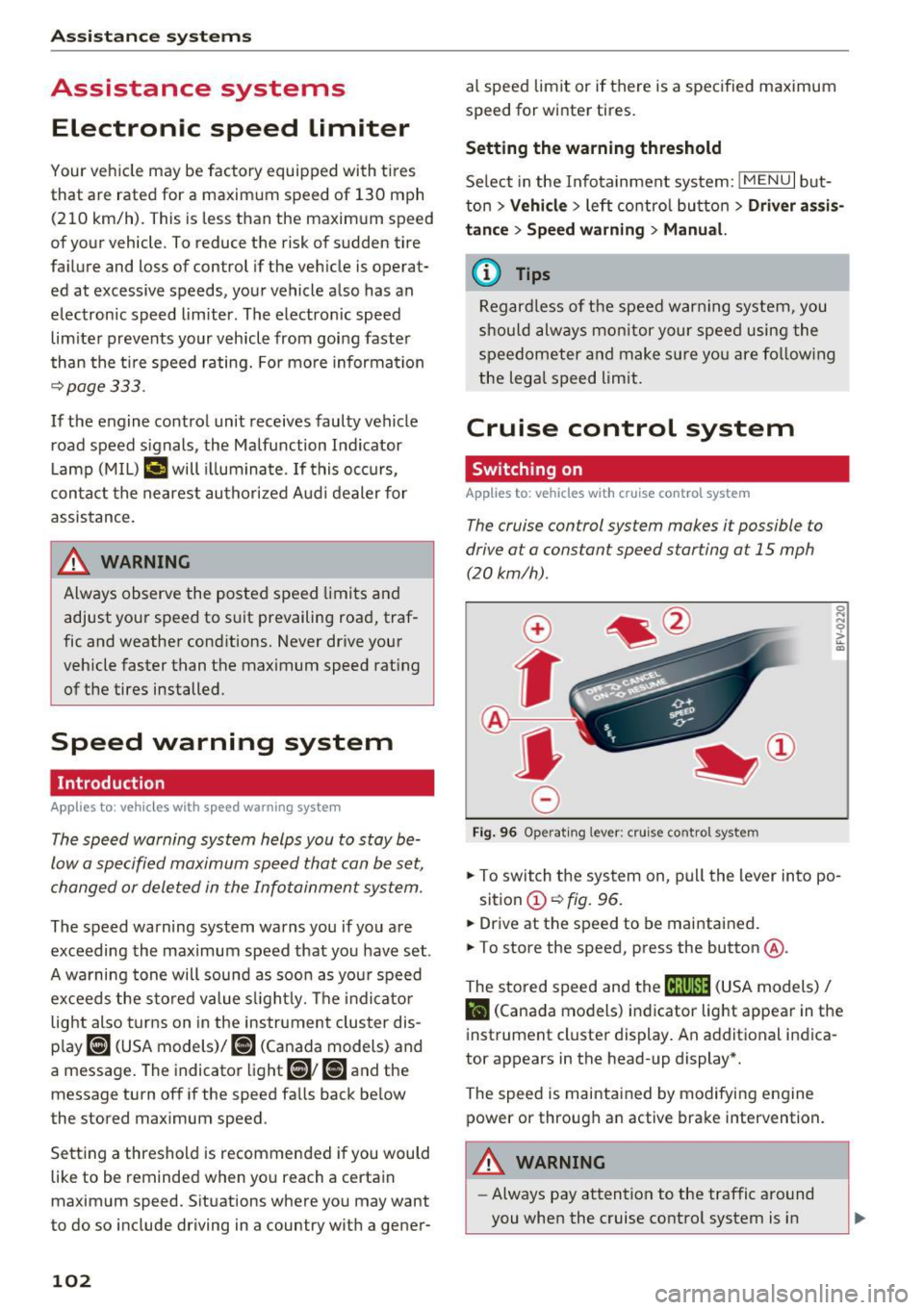
The cruise control sys tem makes it possible to
drive at a constant speed starting at
15 mph
(20kmlh) .
0
f
~
0
Fig. 9 6 Operat ing lever : cru ise co ntro l sys te m
.,. To switch the system on , pu ll the lever into po -
sition
(D <=> fig. 96 .
.. Drive at the speed to be mai ntained.
.. To store the speed, press the button @.
The stored speed and the
ftji(l)~14 (USA models) I
l'I (Cana da models) indicator light appear in the
instrument cluster display. An additional indica
tor appears in the head-up display *.
The speed is maintained by modifying engine power or through an active brake intervention.
A WARNING
- Always pay attention to the traffic around
you when the cruise control system is in
-