lock AUDI Q7 2017 Owner´s Manual
[x] Cancel search | Manufacturer: AUDI, Model Year: 2017, Model line: Q7, Model: AUDI Q7 2017Pages: 402, PDF Size: 100.39 MB
Page 358 of 402
Care and cleaning
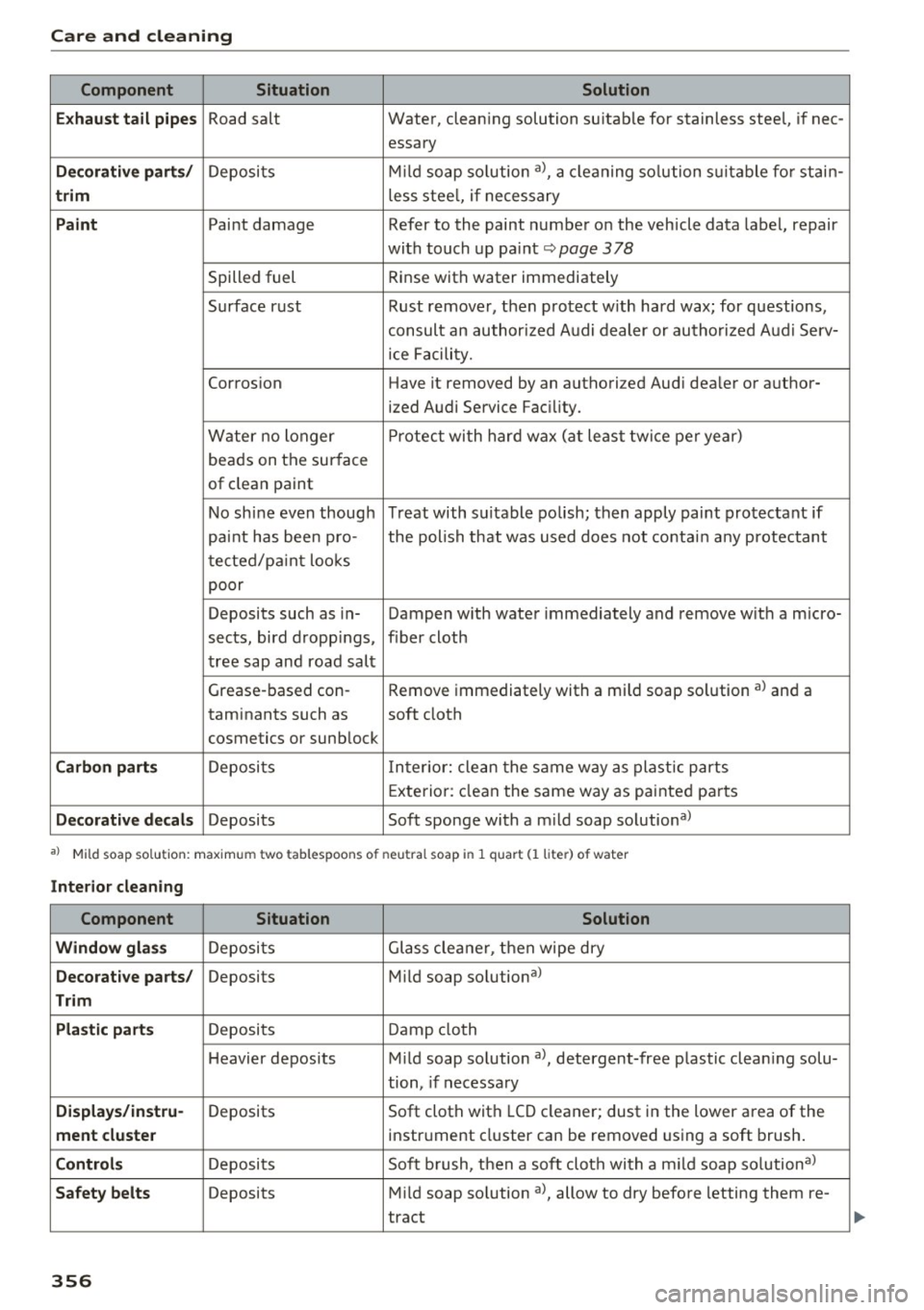
Component Situation Solution
E x haust tail p ipe s
Road salt Water, cleaning solution suitab le for stainless steel, if nee-
essary
D eco ra tiv e part s/ Deposits M
ild soap so lution a), a cleaning so lution s uitable fo r stain-
trim less stee l, if necessary
Paint Paint damage Refer to t he paint number on the vehicle data label, repair
with touch up paint ~
page 378
Spilled fuel Rinse with water
immediately
Surface rust Rust remover, then protect w ith hard wax; for questions,
consult an author ized A udi dealer or authorized Aud i Serv-
ice Facility.
Corros ion Have it removed by an authorized Audi dea ler or author-
ized Audi Service Facil ity.
Water no longer P
rotect wi th hard wax (at least tw ice per year)
beads on the sur face
of clean paint
No shine even though Treat wit h su itable polish; then apply paint protectant if
paint has been pro- the polish that was used does not conta in any protectant
tected/pa int looks
poor
Deposits such as in- Dampen w ith water immediately and remove w it h a micro-
sects, bird dropp ings, f iber cloth
tree sap and road salt
Grease-based con- Remove immediately with a mi ld soap so lution a) and a
taminants such as soft cloth
cosmetics or sunblock
Carbon parts Deposi ts Inter ior: clean the same way as plastic parts
E xterior : clean the same way as painted pa rts
Decorat iv e decal s Deposits Soft sponge with a mild soap solutiona l
a) Mi ld soap solution: maximum two tablespoons of neutral soap in 1 quar t Cl liter) of water
Interior cle aning
Component Situation Solution
Window gla ss
Deposits Glass cleaner, then wipe dry
Decorative parts / Deposits Mild soap solutiona>
Trim
Pla sti c parts
Deposits Damp cloth
Heavier deposits M ild soap solution al, detergent-free p lastic clean ing solu-
tion, if necessary
Di splay s/instru-Deposits Soft cloth with
LCD cleaner; dust in the lower area of the
ment cluste r instrument cluster can be removed using a soft brush .
Controls Deposits Soft brush, then a soft cloth with a m ild soap solutiona >
Safety belts Deposits Mild soap solution al, allow to dry before letting them re-
tract
356
Page 364 of 402
Emergency assistance
-If a tire pressure of 29 psi (200 kPA) cannot
reached after inflating for 6 minutes, then
the tire is too severely damaged. Do not
continue driving.
- If the tire cannot be repaired with the tire
sealant, see an authorized Audi dealer or au
thorized Audi Service Facility for ass istance.
(D} Tips
Do not operate the compressor for more than
six minutes continuously, or it can overheat.
Once the compressor has cooled, you can con
tinue to use it .
Completing
"' Adhere the sticke r that says "max . SO mph
(max. 80 km/h)" that is provided w ith the tir e
mobility kit within the driver's fie ld of vision.
"'S top the vehicle after driving for about 10 mi
nutes and check the tire pressure .
"' If the tire pressure is lower than 19 psi (130
kPA), then the tire is too severely damaged. Do
not continue driving.
A WARNING
Pay attention to the following after repairing
the tire :
- Do not drive faster than SO mph (80 km/h).
- Avoid hard acceleration, braking sharply, and fast cornering.
- The vehicle may become more difficult to
control.
- If the tire is too severely damaged, see an
authorized Audi dealer or authorized Aud i
Service Facility for assistance .
@ For the sake of the environment
You can give the used tire sealant bottle to an
authorized Audi dealer or authorized Audi
Service Facility for disposal.
@ Tips
Remember to obtain a new bottle of sealant
from an authorized Audi dea ler or authorized
Audi Service Facility after repairing a tire.
362
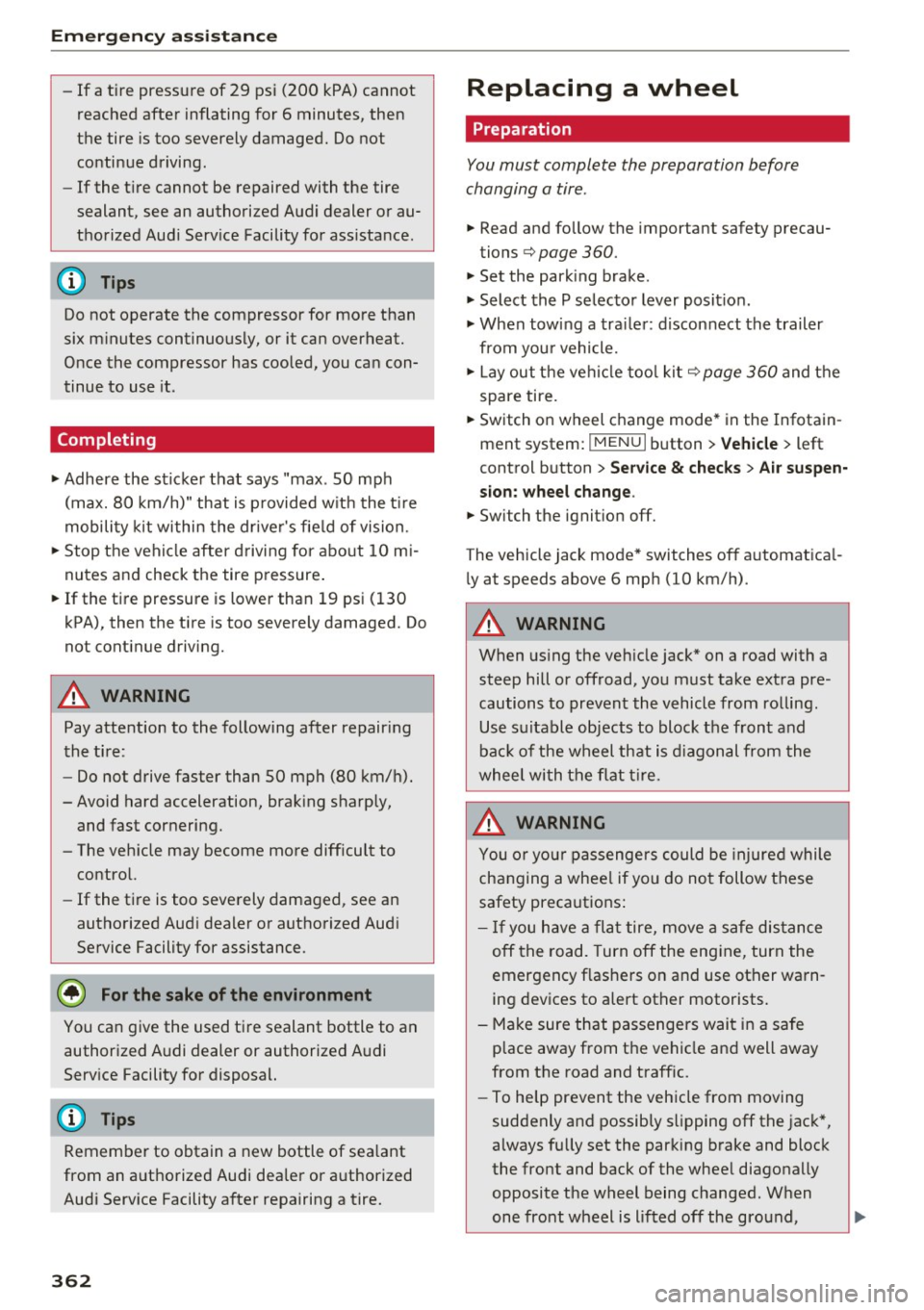
Replacing a wheel
' Preparation
You must complete the preparation before
changing a tire .
"'Read and follow the important safety precau-
tions¢
page 360.
"' Set the park ing brake.
"' Select the P selector lever posit ion.
"' When towing a trailer: disconnect the trailer
from your vehicle.
"' Lay out the vehicle tool kit¢
page 360 and the
spare tire.
"' Switch on wheel change mode* in the Infotain
ment system:
! MENUI button> Vehicle> left
control button >
Service & checks > Air suspen
sion: wheel change.
"'Switch the ignition off.
The vehicle jack mode* switches off automatical ly at speeds above 6 mph (10 km/h).
A WARNING
When using the ve hicle jack* on a road with a
steep hill or offroad, you must take extra pre
cautions to prevent the vehicle from rolling. Use suitable objects to block the front and
back of the wheel that is diagonal from the
wheel with the flat tire.
A WARNING
You or your passengers could be injured while
changing a whee l if you do not follow these
safety precautions:
- If you have a flat tire, move a safe distance
off the road. Turn off the engine, turn the
emergency f lashers on and use other warn
ing devices to alert other motorists.
- Make sure that passengers wait in a safe
place away from the vehicle and well away
from the road and traffic.
- To help prevent the vehicle from moving
suddenly and possibly slipping off the jack*,
always fully set the parking brake and block
the front and back of the wheel diagonally opposite the wheel being changed. When
one front wheel is lifted off the ground,
~
Page 366 of 402

Emerg ency assis ta nce
• Using the hex socket wrench © (from the vehi
cle tool kit), turn the vehicle jack* under the
li ft ing point on the side sill unt il it is high
enough that the arm@¢
fig. 283 is under the
designated plastic mount.
• Al ign the vehicle jack* so the arm @engages in
the des ignated lift ing po int i n the door s ill and
the base @ lies f lat on the ground . The base @
mus t be d irectly unde r the lifting point @.
• To lift the vehicle , place the ratchet @(from
the vehicle too l kit) with the correct side on the
hex socket wrench ©-
• Move the ratchet @clockwise back and forth
unt il the wheel lifts up slightly from the
ground.
A WARNING
- Make sure the vehicle jack* is stable. There
is a risk of injury when the ground is slick or
soft, because the vehicle jack* could slide or
sink.
- Only raise your vehicle with the vehicle jack*
provided by the facto ry .
If you use a vehicle
jack des igned for ano ther veh icle, yo ur vehi
cle can slide and cause in jury.
- Position the vehicle jack* on ly at the desig
nated mounting points on the s ide s ill and
align the jac k. O therwise, the veh icle jack *
could slip and ca use an in jury if it does not
have sufficient hold on the vehicle.
- Vehicles with a ir suspension*: changes in
temperature or load can affect the height of
the stopped vehicle.
- To reduce the risk of an accident, never start
the engine when the vehicle is raised.
- T o reduce the risk of injury, support the ve
hicle securely with suitab le stands if work is
to be performed underneath the vehicle.
- To help prevent injury to you rself and yo ur
passenge rs :
- Do not ra ise the vehicle unt il you are sure
the jack* is securely engaged.
- Passengers must not remain in the vehicle
when it is jacked up .
- Make sure that passengers wait in a safe
place away from the vehicle and well away
from the road and traff ic .
364
- Make sure jack position is correct, adjust
as necessary and then continue to ra ise
the jack*.
- If work has to be done under the vehicle,
ensure that it is safely supported on suita
ble stands -risk of injury!
- Never start the engine when the vehicle is
on the jack* -risk of accident!
(D Note
Do not lift the vehicle by the si ll. Position the
vehicle jack* only at the designated mounting po ints on the side sill. Otherw ise, your vehicle
will be damaged.
@ Tips
The vehicle jack mode* switches off automati
cally at speeds above 6 mph (10 km/h).
Removing and installing a wheel
Fig . 28 4 Whee l: in terna l hex socke t to t urn th e whee l
bo lts
Fig . 285 Whee l: alignme nt pin in t he top ho le
Remo ving a wheel
• Remove the top wheel bolt completely using
the hex socket in the screwdriver handle (in the .,,_
Page 372 of 402
Fuses and bulbs
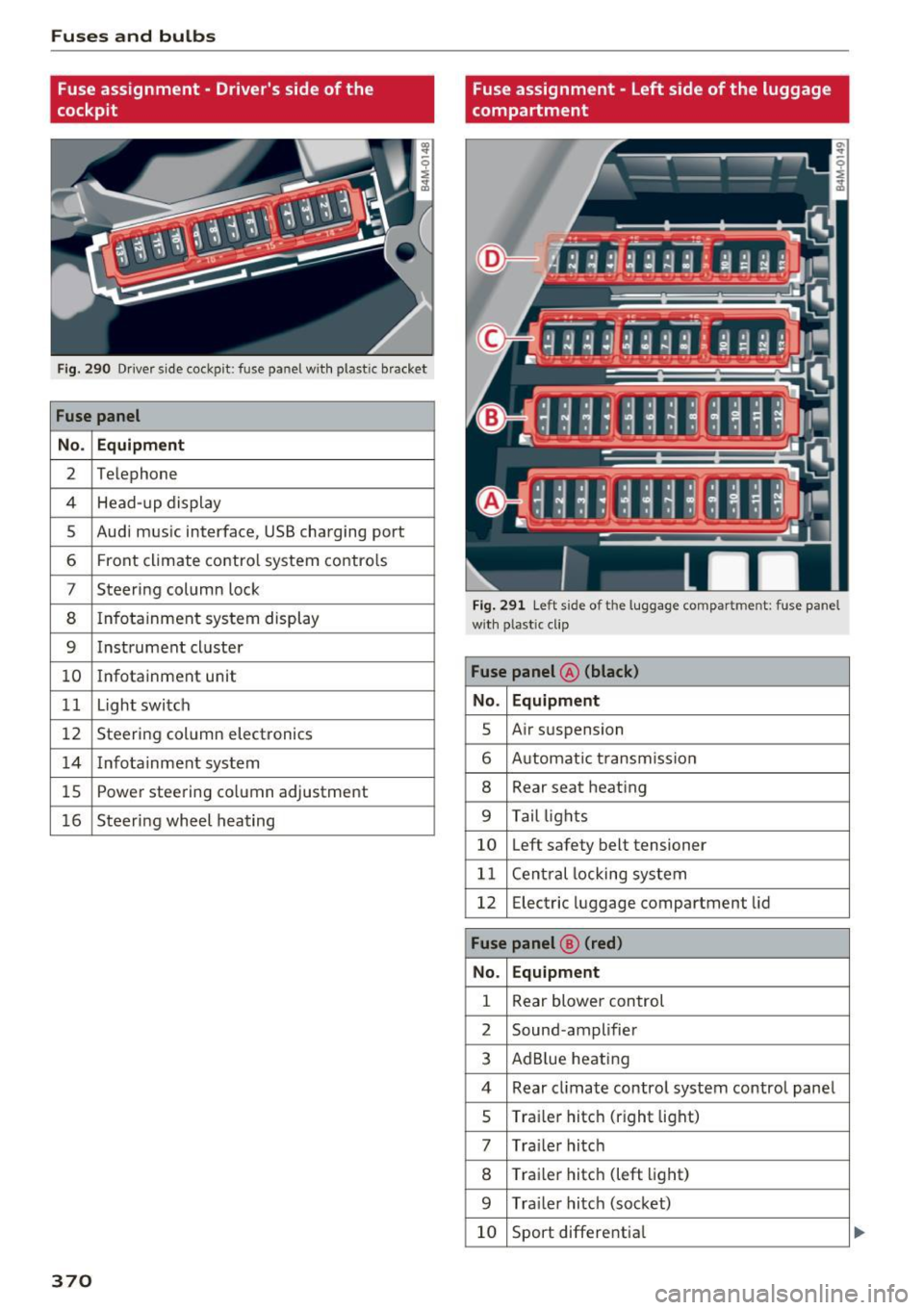
Fuse assignment - Driver's side of the
cockpit
Fig . 290 D river side cockpit: fuse panel wit h plastic bracket
Fuse panel
No . Equipment
2 Te lep hone
4 Head-up display
5 Audi mus ic interface, USB charging port
6 Front climate contro l system contro ls
7 Steering column lock
8 Infotainment system display
9 Instrument cl uster
10 Infotainment unit
11 Light switch
12 Steer ing column electronics
14 Infotainment system
lS Powe
r steering co lumn adjustme nt
1 6 Steer ing wheel heating
370
Fuse assignment - Left side of the luggage
compartment
Fig. 291 L eft side of the lu ggage compartment: fuse panel
wi th plastic cl ip
Fuse panel @ (black)
No. Equipment
5 Air suspension
6 Automat ic t ransmiss ion
8 Rear seat heating
9 Tail lights
10 Left safety belt tensioner
11 Central locking system
12 Electric luggage compartment lid
Fuse panel@ (red)
No . Equipment
1 Rear blower control
2 Sound-amplifier
3 AdBlue heating
4 Rear cl imate contro l system control panel
5 Traile r hitch (right light)
7 Tra iler hitch
8 Trai le r hitch (left light)
9 Trailer hitch (socket)
10 Sport differential
Page 376 of 402
Emergency situations
-When connecting jumper cables, make sure
that they cannot get caught in any moving
parts in the engine compartment.
- Do not bend over the batteries -danger of
chemical burns!
- The battery cell locking screws must be
tightened securely.
- Before you check anything in the engine
compartment, always read and heed all
WARNINGS
i=> page 322.
(D Note
Improper hook-up of jumper cables can ruin
the generator.
- Always connect POSITIVE(+) to POSITIVE
(+), and NEGATIVE(-) to NEGATIVE(-)
ground post of the battery manager control
unit.
- Check that all screw p lugs on the battery
cells are screwed in firmly. If not, tighten
plugs prior to connect ing clamp on negative
battery terminal.
- Please note that the procedure for connect
i ng a jumper cable as described above ap
plies specifically to the case of your vehicle
being jump started . When you are giving a
ju mp start to another vehicle, do
not con
nect the negative (-) cable to the negative
(-) terminal on the discharged batte ry @
c> fig. 293. Instead, securely connect the
negative( -) cab le to either a solid metal
component that is firm ly bolted to the en
gine block or to the engine block itself. If
the battery that is being charged does not
vent to the outside, escap ing battery gas
could ignite and explode!
Towing with a tow truck
General hints
Your Audi requires special handling for towing.
The following information is to be used by com
mercial tow truck operators who know how to op
erate the ir equipment safely.
-Never tow your Audi, towing will cause dam
age to the engine and transmission.
374
-Never wrap the safety chains or winch cables
around the brake lines .
- To prevent unnecessary damage, your Audi
must be transported with a flat bed truck .
- To load the vehicle on to the flat bed, use the
towing loop found in the vehicle tools and at
tach to the front or rear anchorage
i=>page 374 and i=>page 375.
A WARNING
A vehicle being towed is not safe for passen
gers. Never allow anyone to ride in a vehicle
being towed, for any reason.
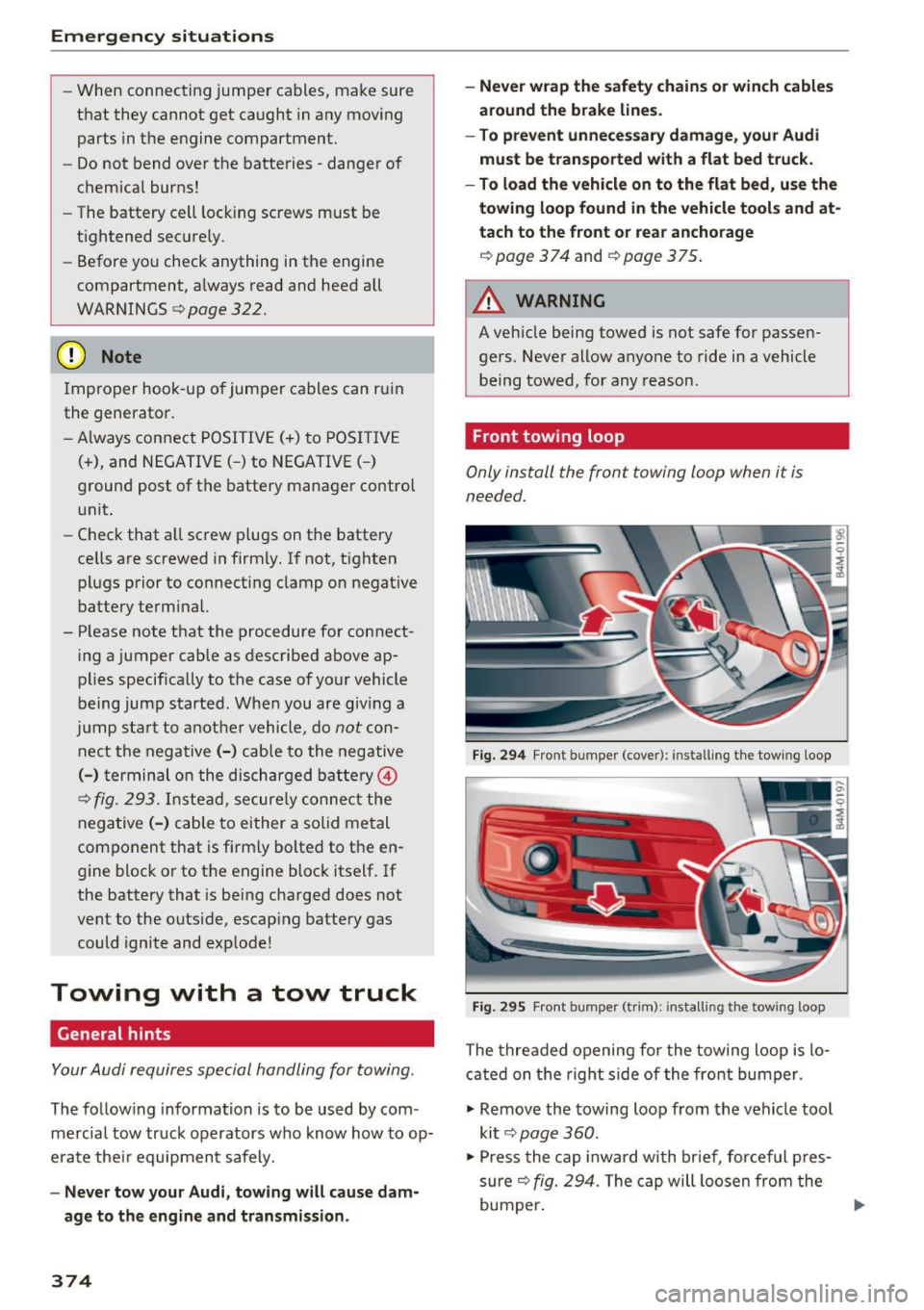
Front towing loop
Only install the front towing loop when it is
needed.
Fig. 294 Front bumper (cover): installing t he tow ing loop
Fig. 29S Front bumper (trim): install ing t he towing loo p
The threaded opening for the towing loop is lo
cated on the right side of the front bumper.
"' Remove the towing loop from the vehicle tool
kit
i=> page 360.
"'Press the cap inward with brief, forceful pres
sure
c> fig. 294. The cap will loosen from the
bumper. ""
Page 378 of 402

Emergency situations
@ Tips
Check carefully to make sure the hook-up is
secure before moving the car up the flatbed
truck ramp.
Raising the vehicle
Lifting with workshop hoist and with floor
jack
The vehicle may only be li~ed at the lifting
poin ts illus trated .
Fig . 298 Front lift ing point
Fig . 299 Rear lifti ng po int
• Read and heed WARNING c::> .&_ .
• Locate lifting po ints c::> fig . 298 and ¢ fig. 299.
• Adjus t lifting arms of workshop ho ist o r floo r
ja ck to match veh icle lif ting poin ts.
• Inse rt a rubber pa d between t he f loor jack/
w ork shop hoist and the lifting poin ts.
If you must lift your vehicle with a floor jack to
work underneath , be sure the vehicle is safely
s upported on stands intended for this purpo se.
Front lifting point
The lift ing po int is located on the floor pan re in
forcement about at the same level as the jack
376
moun ting poin t c::> fig. 298 . Do not lift the vehi
cle at the ve rtical sill reinfo rcement.
Rear lifting point
The lifting poin t is lo cated on t he ve rti cal rein
fo rcemen t of t he lower s ill for the onboard j ack
¢fig. 2 99 .
Lifting with vehicle jack
Refer to c::> page 363.
A WARNING
-To r educe th e risk of s erious inju ry an d vehi
cle damage.
- Always lift the vehicle o nly at the special
workshop hoist and f loor jack lift points i l
l ustrated
c::> fig. 298 and c::> fig. 299.
- Failure to lift the ve hicle a t these points
could ca use the vehicle to tilt o r fall from
a lift if there is a change in ve hicle weight
dist ribution and balance . This might hap
pen, fo r example, whe n heavy compo
nen ts su ch as the eng in e b lock o r trans
mi ssion are removed.
- Whe n removing heavy co mponen ts lik e
these, anchor vehicle to hois t or ad d c orre
s p ondin g weights to maintai n the ce nt er of
g ra vity. Oth erw ise, the vehicle mig ht tilt or
slip off the hoist, ca using serio us persona l
in jur y.
(D Note
-Be aw are of the fo ll ow ing poi nts bef ore lift
ing the vehicle:
- The vehicle should never be lifted or
jacked up from underneath the engine oil pan, the transmission hous ing, the front
or rear axle or the body side members.
This could lead to serious damage .
- To avoid damage to the underbody or
chassis frame, a rubber pad must be in
serted between the floor jack and the lift
points.
- Before driving over a workshop hoist,
check that the vehicle weight does not
exceed the permissible lifting capacity of
the hoist. ..,.
Page 384 of 402
Consumer Info rmation
today's a utomo biles, have steadily reduced the
scope of maintenance and repairs which can be
carried out by veh icle owners.
Also , sa fet y and
en vironmental
concerns place very strict limits
on the nature of repairs and adjustmen ts to en
g ine and transmission parts wh ich an owner can
perform .
Maintenance, adjustments and repairs usually re
qu ire special tools, testing devices and other
equ ipment available to specially trained work
shop personnel in order to assure proper per
forma nce, re liability and safety of the veh icle and
its many systems .
Improper maintenance, adjustments and repairs
can impair the operation and reliab ility of your
ve hicle and eve n void your vehicle warranty .
Therefo re, proof of se rvicing in a ccordance w ith
the m aintenance sched ule may be a condition for
up ho ld ing a possible wa rranty claim made within
the wa rranty pe riod.
Above all , ope rational safety can be adversely af
fected, cre ating unne cessa ry risks fo r you and
your passengers.
I f in doubt about any servicing, have it done by
your author ized Audi dealer or any other properly
eq uipped and qualified workshop . We strongly
urge you to g ive your author ized Audi dealer the
opportunity to perform a ll scheduled mainte
nance and necessa ry repairs. Your dealer has the
facilities, origina l parts and tra ined specialists to
keep your veh icle runn ing prope rly.
Performing limited maintenance yourself
The fo llow ing pages describe a limited number of
procedures whic h can be performed on your vehi
cle with ordinary tools, should the need arise and
tra ined personnel be unava ilable. Before per
forming any of these procedures, always thor
ough ly read all of the app licab le text and carefu l
ly follow the instructions g iven . A lways rigorously
observe the
WARNINGS prov ided .
Befo re yo u check anything in the engine com
partment, always read and heed all WARNINGS
c::> & and c::> & in Working in the engine compart
ment on page 322 .
382
A WARNING
-
-Ser ious personal in jury may occur as a result
of imp roperly performed maintenance, ad
justments or repairs .
- Always be extreme ly careful when work ing
on the vehicle . Always follow commonly ac
cepted safety practices and general com mon sense. Never r is k personal in jury.
- Do not attempt any of the mainte nance,
checks or repairs described on the following pages if you are no t fu lly fam iliar with these
or other proce dures with respect to the ve
hicle, o r are uncert ain how to p ro ceed.
- Do not do any work wi thout the prope r tools
a nd equi pmen t. H ave the necess ary wo rk
done by your authorized Au di dealer or an
other properly equipped and qualified work
shop.
- The engine compartment of any motor veh i
cle is a potentially hazardous area . Never
reach into the a rea around or touch the radi
ator fan. It is temperature controlled and
can switch on suddenly - even when the en
gine is off and the ignition key has been re
moved. The rad iator fan switches on auto
mat ica lly when the coolant reaches a certain
temperature and will con tinue to ru n until
the coolant temperat ure drops.
- Always remove the igni tion key before any
one gets u nder the vehicle.
- Always support your vehicle with safety
stands if it is necessary to work underneath
the vehicle. The ja ck* s upplied w ith the vehi
cle is no t ad equate fo r thi s pu rpose and
could collapse causing se rious personal in
jury .
- If you must wor k underne ath the vehicle
with the wheels on t he ground, always make
sure the vehicle is on level ground, that the
wheels a re always sec urely blocked and that
the engine cannot be started.
- Always make sure the transmission se lector
lever (automatic t ransm iss ion) is in P (Park
position) and the park b rake is applied.
Page 387 of 402

u co ...... N r-... N ...... 0
0
:E: '
A/C MAX (button)
A/C (button) ... ........ ..... ... ... . 72, 76
72, 75
ABS .. .. ... . .. .. ............. .. .. .. . 14 8
Accesso ries 66 ,383
Active lane ass ist
C leaning the camera area ......... ... .
also refer to Aud i active lane ass ist .. .. .
Adapt ive a ir suspension
refer to Air suspension ...... .. .. .... .
Adapt ive cr uise control ..... ... .. .. .... .
C leaning the sensor . ..... ... .. .. .... .
Distance indicator and distance warning .
Messages .. .. ............. .. .. .... .
Predictive contro l
............... .....
Traff ic jam ass ist ............. .. .... .
Ad B lue
. . .. .. .. .. .. .. .... ... .. .. .... .
355
123
134
10 7
355 1 16
116 113
114
3 18
Messages . ... .... .. .... ... .. .. .... . 318
Add it io nal accesso ries . . . . . . . . . . . . . . . . . 383
Ad justing a ir distribution (automat ic climate
control) . . . . . . . . . . . . . . . . . . . . . . . . . . .
73, 76
Ad justing the rear seats . . . . . . . . . . . . . . . . . 60
Ad justing the so und . . . . . . . . . . . . . . . . . . . 253
Ad justing the tempe rature (automatic climate
control) . . . . . . . . . . . . . . . . . . . . . . . . . . .
73, 76
Ad justing the vol ume . . . . . . . . . . . . . . . . . . . 14
Advanced key
refer to Conven ience key . . . . . . . . . . . . . . . 8 2
Airbag . . . . . . . . . . . . . . . . . . . . . . . . . . . . . . 273
Ai rbag system . .. .. .. ..... ... .. .. . 2 73,29 1
Advanced Airbag System components . . . 280
Care . . . . . . . . . . . . . . . . . . . . . . . . . . . . . . 288
Chi ldren . . . . . . . . . . . . . . . . . . . . . . . . . . . 297
Chi ld restraints 297
Components (front a irbags) . . . . . . . . . . . 280
Da nger of fitt ing a child safety seat on t he
front passenger seat . . . . . . . . . . . . . . . . . 2 7 4
D . l 1sposa . . . . . . . . . . . . . . . . . . . . . . . . . . . 288
Fron t air bags . . . . . . . . . . . . . . . . . . . . . . . 278
H ow do the fro nt airbags work? . . . . . . . . 283
How many airbags does my vehi cle have? 280
How the Advanced Airbag System compo-
nents work together . . . . . . . . . . . . . . . . .
282
Indicator light . . . . . . . . . . . . . . . . . . . . . . 285
Mon itoring . . . . . . . . . . . . . . . . . . . . . . . . . 285
PASSENGER AIR BAG light . . . . . . . . . . . . 285
Index
Repairs
Safety instr uctions . ..... . ..... ... .. . .
When m ust t he system be inspected? .. . 288
287
285
Air pressu re
T ires
..... .... .. .. ............... .. 343
Air suspension . . . . . . . . . . . . . . . . . . . . . . . 134
T ra iler mode . . . . . . . . . . . . . . . . . . . . . . . . 100
Alignment pin (changing the wheel) . . . . . . 360
All -wheel stee ring . . . . . . . . . . . . . . . . 134, 152
All season tires . . . . . . . . . . . . . . . . . . . . . . . 348
All weat her lights . . . . . . . . . . . . . . . . . . . . . . 48
All wheel d rive
refer to q uattro
AMI 152
refer to Aud i music interface . . . . . . . 234, 235
Android Auto
refer to Audi smartphone interface 247
An ti-free ze
Windsh ield washer sys tem . . . . . . . . . . . .
331
An ti-lock b raking system
refer to A BS . . . . . . . . . . . . . . . . . . . . . . . . 148
Anti-Slip Regu lation
refer to ASR . . . . . . . . . . . . . . . . . . . . . . . . 148
Apple Car Play
refer to Audi smartphone interface . . . . . 247
Asht ray . . . . . . . . . . . . . . . . . . . . . . . . . . . . . . 65
ASR · · · · · · · .... .. .. ............... .. 148
Audi active lane assist . . . . . . . . . . . . . . . . . 1 23
Messages . . . . . . . . . . . . . . . . . . . . . . . . . . 124
Audi con nect eme rgency call a nd service . . 203
Online roads ide ass istance . . . . . . . . . . . . 2 04
Audi connect vehicle contro l . . . . . . . . . . . . 199
Parki ng locat ion . . . . . . . . . . . . . . . . . . . . . 200
Remote locking and unlock ing . . . . . . . . . 200
Vehicle status report . . . . . . . . . . . . . . . . . 200
Audi connect (Infotainment) . . . . . . . . 189, 196
Data protection . . . . . . . . . . . . . . . . . . . . . 197
Se rvices ove rview . .. .... ...... ... .. ..
Start ing ..... ... .. ................ .
Audi drive select
. .. .. .... . ..... ... .. ..
Audi Ente rtainment mob ile ........... ..
Audi music interface . . ............... ..
Audi music stream
refer to W i-F i . ... .. ... .. ..... ... .. . .
190
190
134
2 36
234
232
Audio files . . . . . . . . . . . . . . . . . . . . . . . . . . . 23 7
385
Page 388 of 402
Index
Audio player
Bluetooth audio player . . . . . . . . . . . . . . . 231
W i-Fi aud io player . . . . . . . . . . . . . . . . . . . 232
Aud io track . . . . . . . . . . . . . . . . . . . . . . . . . . 24 0
Aud i pre sense . . . . . . . . . . . . . . . . . . . . . . . 117
Messages . . . . . . . . . . . . . . . . . . . . . . . . . . 122
Se ttings . . . . . . . . . . . . . . . . . . . . . . . . . . . 122
Aud i Serv ice Repair Man uals and Literature 381
Aud i side assis t . . . . . . . . . . . . . . . . . . . . . . . 126
Aud i smartphone interface ......... 247, 251
Audi virtua l cockpit
refer to Instr ument cluster . . . . . . . . . . . . . 10
AUTO Autom atic headlig hts . . . . . . . . . . . . . . . . . 48
Auto Lock (central locki ng system) . . . . . . . . 34
Automatic belt ret ractor . . . . . . . . . . . . . . . 268
Automatic climate control . . . . . . . . . . . . . . . 7 1
O per ation . . . . . . . . . . . . . . . . . . . . . . . . 72, 75
Automatic climate control system Aud i drive select . . . . . . . . . . . . . . . . . . . . . 134
Setup . . . . . . . . . . . . . . . . . . . . . . . . . . . 74, 77
Automatic transm ission . . . . . . . . . . . . . . . . . 91
Eme rgency program . . . . . . . . . . . . . . . . . . 95
H ill descent control . . . . . . . . . . . . . . . . . . . 94
Kick-down . . . . . . . . . . . . . . . . . . . . . . . . . . . 95
M anual sh ift ing . . . . . . . . . . . . . . . . . . . . . . 94
P a rking lock emergency re lease . . . . . . . . . 96
Selecto r leve r pos itions . . . . . . . . . . . . . . . . 9 1
Automatic wipe/wash system . . . . . . . . . . . . 55
Auto Safety Hotline . . . . . . . . . . . . . . . . . . . 263
AUTO (button) Autom atic clima te control. . . . . . . . . . . 73, 76
Auxiliary heater (automatic climate
control) . . . . . . . . . . . . . . . . . . . . . . . . . . . 7 4, 77
AUX inp ut . . . . . . . . . . . . . . . . . . . . . . . . . . . 235
Ave rage cons umption . . . . . . . . . . . . . . . . . . . 15
Average speed . . . . . . . . . . . . . . . . . . . . . . . . 15
B
BAC K button 156
B alance (sound) . . . . . . . . . . . . . . . . . . . . . . 253
Bass (sound) . . . . . . . . . . . . . . . . . . . . . . . . . 253
Battery Ju mp starting . . . . . . . . . . . . . . . . . . . . . . . 372
also refer to Veh icle battery . . . . . . . . . . . 330
Before driving 256
386
Be lt tens ioners . . . . . . . . . . . . . . . . . . . . . . . 271
B lended gasol ine . . . . . . . . . . . . . . . . . . . . . 314
B lower (automat ic climate contro l) . . . . . 73, 76
Bl uetoot h
Audio player . . . . . . . . . . . . . . . . . . . . . . . . 231
Connect ing a cell phone . . . . . . . . . . . . . . 176
Settings . . . . . . . . . . . . . . . . . . . . . . . . . . . 251
Boos te r seats . . . . . . . . . . . . . . . . . . . . . . . . 305
Brake flu id
Checking the brake fluid level . . . . . . . . . . 329
Brakes . . . . . . . . . . . . . . . . . . . . . . . . . . . . . . 150
B rake ass ist . . . . . . . . . . . . . . . . . . . . . . . . 148
Brake fl uid . . . . . . . . . . . . . . . . . . . . . . . . . 329
E lectromechanical parking brake . . . . . . . . 87
Emergency braking function . . . . . . . . . . . . 87
New brake pads . . . . . . . . . . . . . . . . . . . . . 150
Wo rn brake pads . . . . . . . . . . . . . . . . . . . . . 29
Breaking in New brake pads . . . . . . . . . . . . . . . . . . . . . 150
New engine . . . . . . . . . . . . . . . . . . . . . . . . . 79
New tires . . . . . . . . . . . . . . . . . . . . . . . . . . 340
Browser
refer to Media center . . . . . . . . . . . . . . . . . 238
Bu lbs . . . . . . . . . . . . . . . . . . . . . . . . . . . . . . . 371
Buttons Cont rol panel (M MI) . . . . . . . . . . . . . . . . . 156
Mult ifunct ion s teer ing whee l 12
C
Cable (USB adapter/AUX connector cable) 234
California Proposition 65 Warning . . . . . . . 322
Battery specif ic . . . . . . . . . . . . . . . . . . . . . 330
Call list . . . . . . . . . . . . . . . . . . . . . . . . . . . . . 179
Call options . . . . . . . . . . . . . . . . . . . . . . . . . . 186
Capacities AdBl ue ... .. .. .. .. .. ... . .. .... ... .. 318
Fuel tank...... .. .. .. ............. .. 379
Washer fluid reservoir . . . . . . . . . . . . . . . . 379
Care . . . . . . . . . . . . . . . . . . . . . . . . . . . . . . . . 354
Cargo area
refer to L oading the l uggage compa rt-
ment ..... .. .. .. .. .. ............. .. 261
Cargo floor . . . . . . . . . . . . . . . . . . . . . . . . . . . 69
Cata lytic converter . . . . . . . . . . . . . . . . . . . . 321
CD d rive (med ia d rives) . . . . . . . . . . . . . . . . 230
Page 389 of 402

Cell phone
refer to Telephone . . . . . . . . . . . . . . . . . . . 176
Center armrest . . . . . . . . . . . . . . . . . . . . . . . . 60
Central locking . . . . . . . . . . . . . . . . . . . . . . . . 34
Central locking switch . . . . . . . . . . . . . . . . . 38
Convenience key. ................ ... .. 37
Emergency locking . . . . . . . . . . . . . . . . . . . . 39
Power windows . . . . . . . . . . . . . . . . . . . . . . 44
Remote control key . . . . . . . . . . . . . . . . . . . 37
Setting . . . . . . . . . . . . . . . . . . . . . . . . . . . . . 39
Certificat ion . . . . . . . . . . . . . . . . . . . . . . . . . 384
Changing engine oi l . . . . . . . . . . . . . . . . . . . 327
Changing the scale . . . . . . . . . . . . . . . . . . . . . 13
Ch arging the ba ttery (mobile devices) . . . . 235
Child restraints
Danger of using child restraints in the front
seat.. ..... .. ............... .. .... .
274
Where can I get additional information
about child restraints and their u se? . . . .
313
Child restraint system anchors . . . . . . . . . . 309
Chi ld safety . . . . . . . . . . . . . . . . . . . . . . . . . . 295
Important safety instructions for using chi ld
safety seats . . . . . . . . . . . . . . . . . . . . . . . .
299
Install ing a child restraint using the LATCH
system . . . . . . . . . . . . . . . . . . . . . . . . . . . .
311
Mounting and releasing the anchorage
hook . ... .. .. ................ ..... .
311
Tether ancho rs . . . . . . . . . . . . . . . . . . . . . . 312
Te ther straps . .. ......... .. .. .. .. .. . 312
Child safety lock
Power windows . . . . . . . . . . . . . . . . . . . . . .
43
Rear doors . . . . . . . . . . . . . . . . . . . . . . . . . . 43
Ch ild safety seats . . . . . . . . . . . . . . . . . . . . . 301
Booster seats . . . . . . . . . . . . . . . . . . . . . . . 305
Convertible child seats . . . . . . . . . . . . . . . 303
Danger of using child restraints in the front
seat ... .. .. .. ................. .... .
274
How do I prope rly install a child safety seat
in my vehicle? . . . . . . . . . . . . . . . . . . . . . . .
299
Infant seats . . . . . . . . . . . . . . . . . . . . . . . . 301
LA TCH system . . . . . . . . . . . . . . . . . . . . . . 311
Safety instructions . . . . . . . . . . . . . . . . . . . 299
Securing . . . . . . . . . . . . . . . . . . . . . . . . . . . 306
Unused safety belts on the rear seat 301
~ Child seats ...... N ~ Lower anchorages . . . . . . . . . . . . . . . . . . . 310
......
g C lassic view . . . . . . . . . . . . . . . . . . . . . . . . . . . 14
:E: '
Cleaning . . . . . . . . . . . . . . . . . . . . . . . . . . . . 354
Cleaning Alcantara . . . . . . . . . . . . . . . . . . . . 357
Cleaning a rtificial leather. . . . . . . . . . . . . . . 35 7
Cleaning carbon parts . . . . . . . . . . . . . 356, 357
Cleaning decorative parts/trim . . . . . . . . . . 356
Cleaning decorative parts and trim . . . . . . . 356
Cleaning exhaust tail pipes . . . . . . . . . . . . . 356
Cleaning plastic parts . . . . . . . . . . . . . . . . . . 356
Cleaning textiles . . . . . . . . . . . . . . . . . . . . . . 357
Climate control system
refer to Automatic climate control . . . . . . . 71
Clock . . . . . . . . . . . . . . . . . . . . . . . . . . . . 15, 249
Closing aid (doors) . . . . . . . . . . . . . . . . . . . . . 34
Cockp it (overview) . . . . . . . . . . . . . . . . . . . . . . 8
Command (voice recognition syst em) . . . . .
169
Compartments . . . . . . . . . . . . . . . . . . . . . . . . 66
Compass in the mirror . . . . . . . . . . . . . . . . . . 57
Compliance . . . . . . . . . . . . . . . . . . . . . . . . . . 384
Connect ion manager . . . . . . . . . . . . . . . . . . 250
Connections
refer to Med ia . . . . . . . . . . . . . . . . . . 228, 237
Consumer Information . . . . . . . . . . . . . 263, 381
Consumption (fuel) . . . . . . . . . . . . . . . . . . . . 15
Contacting NHTSA . . . . . . . . . . . . . . . . . . . .
263
Contacts . . . . . . . . . . . . . . . . . . . . . . . . . . . . 184
Additional directory . . . . . . . . . . . . . . . . . . 251
Importing/exporting . . . . . . . . . . . . . . . . . 186
Memory capacity . . . . . . . . . . . . . . . . . . . . 187
Storing as destination . . . . . . . . . . . . . . . . 213
Control buttons (operating the MMI) . . . . . 159
Control knob wi th joys tick funct ion (MMI op
eration) . . . . . . . . . . . . . . . . . . . . . . . . . . . . .
162
Conv enience key
Switching the ignition on . . . . . . . . . . . . . .
82
Unlocking/lo cking . . . . . . . . . . . . . . . . . . . . 37
Convenience opening/closing . . . . . . . . . . . . 44
Convertible child safety seats . . . . . . . . . . . 303
Conv ertib le locking r etractor
A ctivating . . . . . . . . . . . . . . . . . . . . . . . . . .
308
Deac tivating . . . . . . . . . . . . . . . . . . . . . . . . 309
Using to secure a child safety seat . . . . . . 308
Coo led g love compartment . . . . . . . . . . . . . . 67
Cooling mode (automatic climate
control) . . . . . . . . . . . . . . . . . . . . . . . .
72 , 75 , 76
387