service AUDI Q7 2018 Owner´s Manual
[x] Cancel search | Manufacturer: AUDI, Model Year: 2018, Model line: Q7, Model: AUDI Q7 2018Pages: 398, PDF Size: 185.58 MB
Page 357 of 398
Cl a:, ...... N
" N ...... 0
0
::r '
one direction and not back and forth.
- N ever remove snow or ice from door win
dows and mirrors using warm or hot water
because this could cause cracks to form .
- To avoid damage to the rear w indow de
fogger, do not apply any stickers on the
heating wires on the inside of the window .
-Deco rati ve parts /trim
- Never use chrome care or cleaning prod-
ucts.
- Paint
-To red uce the risk of scratches, the vehicle
must be free of dirt and dus t before pol
ishing or waxing .
- To preven t pa int damage, do not pol ish or
wax the ve hicle in direct sunlight.
- To red uce the risk of pa int damage, do not
polish away rust spots.
- Remove cosmetics and sunscreen immedi
a tely- these could damage the pa int.
- Displa ys/ instrument cluster
- Make sure that the instrument cluster is
switched off and has cooled off before
cleaning it.
- Displays, the instrument cluster and the
trim surrounding it must not be cleaned
w ith dry clean ing methods because they
cou ld become scratched.
- Make sure no fluids enter the spaces be
tween the instrument cluster and the
trim, because that could cause damage.
- Controls
- Make sure that no fluids enter the con-
trols, because this could cause damage.
- Safety belt s
-Do not remove the safety belts to clean
them .
- N ever clean safety belts or their compo
nents chemically or with corrosive fl uids
or so lvents and never allow sharp objects
to come into contact with the safety belts.
Th is could cause damage to the belt web
bing.
- If there is damage to the webbing, the
connect ions, the retractors or the buckles,
Care and cleaning
have them replaced by an authorized Aud i
dealer or authorized Audi Service Facility .
-Te xtile s/artificial leather / Alcantara
- Never treat art ificial leather/A lcantara
with leather care products, solvents, floor
polish, shoe polish, spot remove or s imilar
p roducts.
- Have a spec ialist remove stubborn stains
to prevent damage .
- Never use steam cleaners, brushes, hard
sponges, etc. when cleaning.
- Do not turn on the seat heating" to dry the
seat .
- Objects w ith sharp edges, such as zippers
or rivets on clothing or be lts, can cause
damage to the surface .
- Open hook and loop fasteners, for exam
ple on clothing, can damage seat covers .
Make sure hook and loop fasteners are
closed .
-Natural l eath er
- Neve r trea t leathe r wi th solvents, floor
polish, shoe polish, spot remover or sim i
lar products .
- Obje cts w ith sharp edges, such as zippe rs
or rivets on clothing or be lts, can cause
damage to the surface .
- Neve r use steam cleaners, brushes, hard
sponges, etc. when cleaning .
- Do not turn on the seat heating" to dry the
seat.
- To he lp prevent the leather from fad ing,
do not leave the vehicle in direct sunlight
for long periods of time . If leaving the ve
hicle parked for long periods of time, you
should cover the leather to protect it from
d irect sunlight.
(D Tips
- Insects are easier to remove from paint that
has been freshly waxed.
- Regular waxing can prevent rust spots from
forming.
355
Page 358 of 398
Care and cl eaning
Placing your vehicle out
of service
If you would like to take your vehicle out of serv
ice for a longer period of time, contact an author
ized Aud i dealer or authorized Aud i Serv ice Fac ili
ty . They wi ll advise you of important measures,
such as corros io n protection, se rvice and storage
p roced ures. Also follow t he i nfo rmat ion abou t
t he vehicle ba tte ry <=?
page 32 6.
356
Page 360 of 398
Emergency assistance
See an authorized Audi dealer or authorized Audi
Service Facility for assistance in these situations.
A WARNING
-Please note that the tire mob ility kit cannot
be used in all situations, and that it may on
ly be used temporarily.
- The tire sealant must not come in contact with skin, eyes, or clothes.
- If tire sealant gets in your eyes or on your
skin, thoroughly rinse the affected area im
mediately with clean water.
- Do not inhale the fumes .
- If you swallow any of the tire sealant, thor-
oughly rinse your mouth immediately and
drink a lot of water. Do not induce vomiting .
Seek medical attention immediately.
- Change your clothes immediately if they get
tire sealant on them.
- If an allergic reaction occurs, seek immedi
ate medical attention .
- Keep the tire sealant away from children .
(D Tips
-If sealant leaks, allow it to dry in place. You
can then peel it
off like a sticker.
- Note the expiration date on the sealant bot
tle . Replace the tire sealant at an author
iz ed Audi dealer or authorized Audi Service
Facility.
- Radio reception can be interrupted when
operating the compressor.
- Obey all laws.
Repairing tires
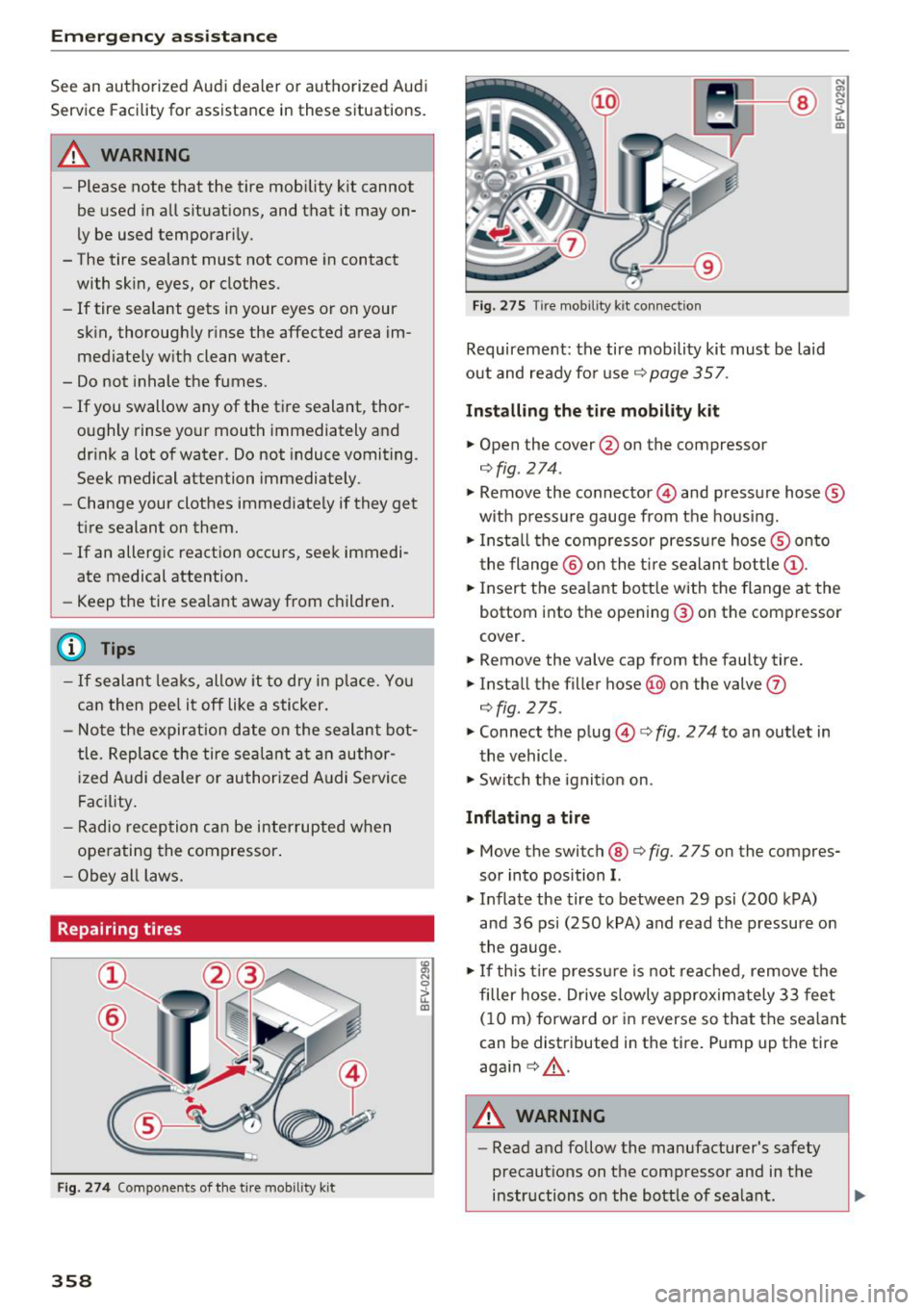
Fig. 274 Components of the tire mobility kit
358
~
"' 0
> u.
m
Fig. 275 Tire mobil ity kit connection
Requirement: the tire mobility kit must be laid
out and ready for use¢
page 357.
Installing the tire mobility kit
"" Open the cover @on the compressor
¢fig. 274 .
"' a, N 0
> u. m
""Remove the connector © and pressure hose®
with pressure gauge from the housing.
""Install the compressor pressure hose® onto
the flange @ on the tir e sealant bottle@.
"" Insert the sealant bottle with the flange at the
bottom into the opening @ on the compressor
cover.
"" Remove the valve cap from the faulty tire.
"" Install the filler hose@on the valve
(J)
¢fig. 275 .
"" Connect the plug©¢ fig. 2 74 to an outlet in
the vehicle .
"" Switch the ignition on.
Inflating a tire
""Move the switch @ ¢fig . 275 on the compres
sor into position
I.
"" Inflate the tire to between 29 psi (200 kPA)
and 36 psi (250 kPA) and read the pressure on
the gauge.
"" If this tire pressure is not reached, remove the
filler hose . Drive slowly approximately 33 feet
( 1 0 m) forward or in reverse so that the sealant
can be distributed in the tire. Pump up the tire
aga in ¢ .&, .
A WARNING
-Read and follow the manufacturer's safety
precautions on the compressor and in the
instructions on the bottle of sealant.
Page 361 of 398
Cl a:, ...... N
" N ,-1 0
0
::r '
reached after inflating for 6 minutes, then
the tire is too severely damaged. Do not
continue driving .
- If the t ire cannot be repaired with the tire
sealant, see an authorized Audi dealer or au
thorized Aud i Serv ice Facility for ass istance .
(D Tips
Do not operate the compressor for more than
six m inutes continuously, or it can overheat.
Once the compressor has cooled, you ca n con
tinue to use it .
Completing
"'Adhere the sticker that says "max . SO mph
(max. 80 km/h)" that is p rovided w it h the t ire
mobility kit within the dr ive r's fie ld of vision.
"' Stop the vehicle afte r driving for about 10 m i
nutes and check the tire pressure .
"' If the tire pressure is lower than 19 psi ( 130
kPA), then the tire is too severely damaged. Do
not cont inue driving.
A WARNING
Pay attent ion to the following after repair ing
the t ire :
- Do not drive faster than SO mph (80 km/h).
- Avoid hard acceleration, brak ing sharply,
and fast cornering.
- The vehicle may become more difficu lt to
contro l.
- If the tire is too severely damaged, see an
authorized Audi dealer or authorized Audi
Service Facility for assistance.
@ For the sake of the environment
You can give the used tire sealant bottle to an
authorized Audi dealer or authorized Audi
Service Facility for disposal.
(D Tips
Remember to obtain a new bottle of sea lant
from an authorized Audi dea ler or authorized
Audi Service Facility after repairing a tire.
Em ergenc y ass is tanc e
Replacing a wheel
Preparation
You must complete the preparation before
changing a tire .
"'Read and follow the impor tant safe ty precau-
tions
¢ page 357.
"'Set the park ing brake .
"' Select the "P" selector lever position .
"' When towing a tra iler : disconnect the trailer
from you r vehicle.
"' Lay out t he vehicle too l kit ¢
page 357 and the
spare tire.
"' Switch on wheel change mode* in the Infotain
ment syst em:
!MENUI button> V ehicle > left
control button >
S erv ic e & ch ecks > Air s uspen
s io n: w heel chang e.
"'Switch the ignit ion off.
The vehicle jack mod e* switches off automatica l
ly at speeds above 6 mph ( 10 km/h).
A WARNING "---
When us ing the ve hicle jack" on a road with a
steep hill or offroad, you must take extra pre
cautions to prevent the vehicle from rolling .
Use su itable objects to block the front and
back of t he wheel t hat is diagonal from the
whee l with the flat t ire.
A WARNING
You o r yo ur passenge rs could be injured while
changing a whee l if you do no t follow these
safety precautions :
- I f yo u have a flat tire, move a safe dis tance
off the road. Turn off the eng ine, turn the
emergency flashers on and use other warn
ing devices to a lert other motorists.
- Make sure that passengers wait in a safe place away from the vehicle and well away
from the road and traff ic.
- To he lp prevent the vehicle from moving
suddenly and possib ly slipping off the jack*,
a lways f ully set the park ing brake and block
the front and back of the wheel diagonally
opposite the wheel being changed. When
one front wheel is lifted off the ground,
~
359
Page 367 of 398
a co ...... N r--. N ...... 0
0
:E '
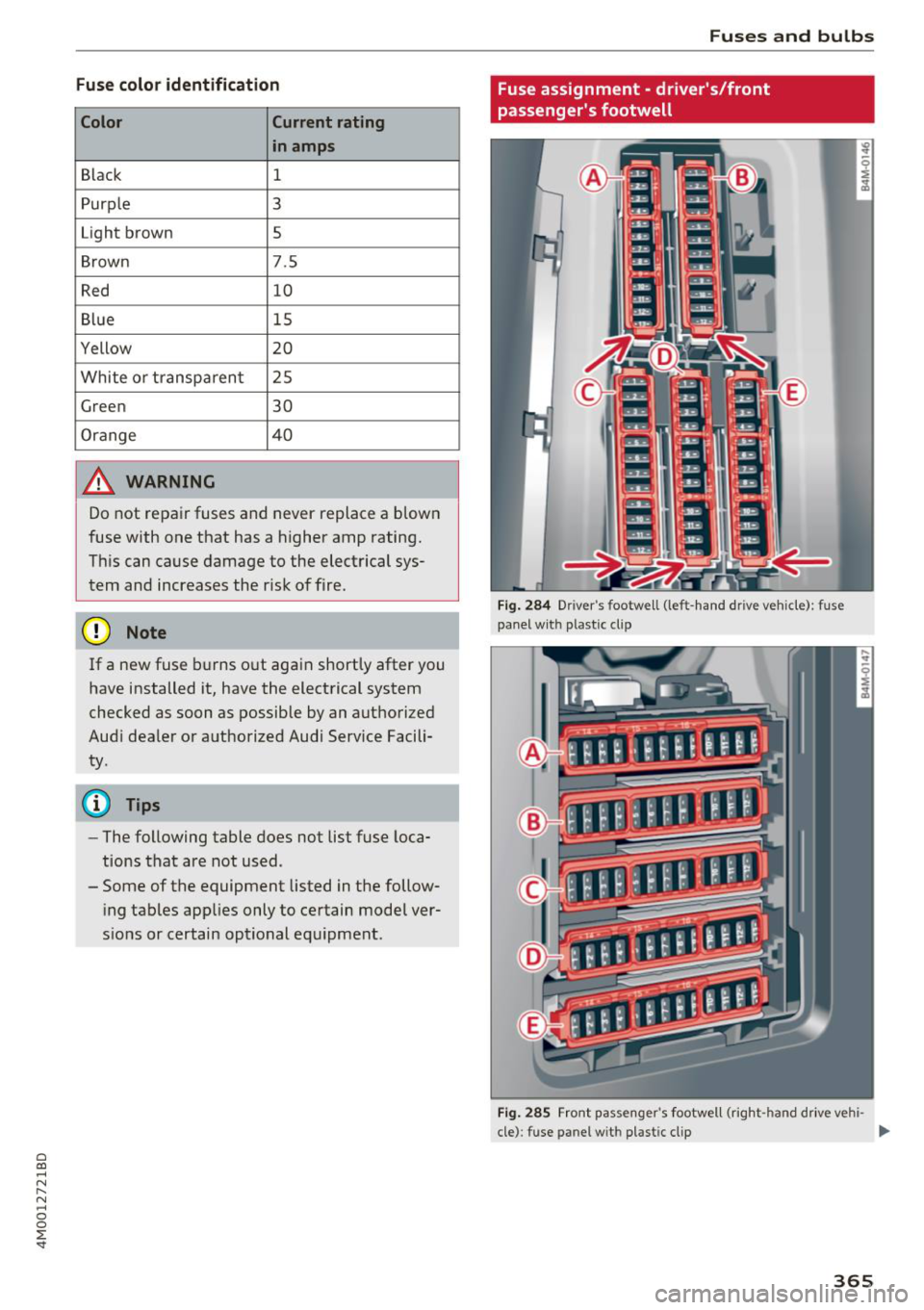
Color Current rating
in amps
Black 1
Purple 3
Light brown 5
Brown 7.5
Red 10
Blue 15
Yellow 20
White or transparent 25
Green 30
Orange 40
A WARNING
Do not repair fuses and never replace a blown
fuse with one that has a higher amp rating.
This can cause damage to the electrical sys
tem and increases the risk of fire.
(D Note
If a new fuse burns out again shortly after you
have installed it, have the electrical system
checked as soon as possible by an authorized
Audi dealer or authorized Audi Service Facili ty.
(D Tips
- The following table does not list fuse loca
tions that are not used.
- Some of the equipment listed in the follow
ing tables applies only to certain model ver
sions or certain optional equipment.
Fuses and bulbs
Fuse assignment - driver's/front
passenger's footwell
Fig. 284 Drive r's footwell (left -hand dr ive vehicle): fuse
panel with plastic clip
Fig. 285 Front passenger's footwell (right -hand drive vehi -
cle): fuse panel wit h plastic clip
II>-
365
Page 371 of 398
Cl a:, ...... N
" N ...... 0
0
::r '
General
This chapter is intended for trained emergency
crews and working personnel who have the nec
essary tools and equipment to perform these
operations.
Starting by pushing or
towing
~ Note
Vehicles with an automatic transmission
cannot be started by pushing or towing.
Starting with jumper
cables
If necessary , the engine can be started by con
necting it to the battery of another vehicle.
If the engine should fail to start because of a dis
charged or weak battery, the battery can be con
nected to the battery of
another vehicle, using a
pair of jumper cables to start the engine.
Jumper cables
Use only jumper cables of sufficiently large cross
section
to carry the starter current safely. Refer
to the manufacturer's specifications.
Use only jumper cables with
insulated terminal
clamps which are distinctly marked :
plus(+) cable in most cases colored red
minus(-) cable
in most cases colored black.
A WARNING -
Batteries contain electricity, acid, and gas.
Any of these can cause very serious or fatal in
jury. Follow the instructions below for safe
handling of your vehicle's battery.
-Always shield your eyes and avoid leaning
over the battery whenever possible.
- A dead battery can freeze at temperatures
around 32 °F (0 °C) . If the vehicle battery is
frozen, you must thaw it before connecting
the jump start cables. If you do not, this in-
Emergency situations
creases the risk of an explosion and chemi
cal burns. After jump starting the vehicle,
drive to an authorized Audi dealer or author
ized Audi Service Facility immediately to
have the vehicle battery checked.
- Do not allow battery acid to contact eyes or
skin . Flush any contacted area with water
immediately.
- Improper use of a booster battery to start a
vehicle may cause an explosion .
- Vehicle batteries generate explosive gases .
Keep sparks, flame and lighted cigarettes
away from batteries.
- Do not try to jump start any vehicle with a
low acid level in the battery .
- The voltage of the booster battery must also
have a 12-Volt rating . The capacity (Ah) of
the booster battery should not be lower
than that of the discharged battery. Use of
batteries of different voltage or substantial
ly different "Ah " rating may cause an explo
sion and personal injury.
- Never charge a frozen battery. Gas trapped
in the ice may cause an explosion.
- Never charge or use a battery that has been
frozen. The battery case may have be weak
ened.
- Use of batteries of different voltage or sub
stantially different capacity (Ah) rating may
cause an explosion and injury. The capacity
(Ah) of the booster battery should not be
lower than that of the discharged battery.
- Before you check anything in the engine
compartment, always read and heed all
WARNINGS
c>page 319.
@ Note
-Applying a higher voltage booster battery
will cause expensive damage to sensitive
electronic components, such as control
units, relays, radio, etc.
- There must be no electrical contact between
the vehicles as otherwise current could al
ready start to flow as soon as the positive
( + ) terminals are connected.
369
Page 372 of 398
Emergency situations
@ Tips
The discharged battery must be properly con
nected to the vehicle's electrical system .
When jump starting or charging the battery,
never connect the negative ground cable to
the battery negative post because the battery
manager system must be able to detect the
battery's state of charge. Always connect the
negat ive g round cable to the negative ground
post of the battery manager control unit.
Using the jump start
cable
Both jump start cables must be connected in the
correct order!
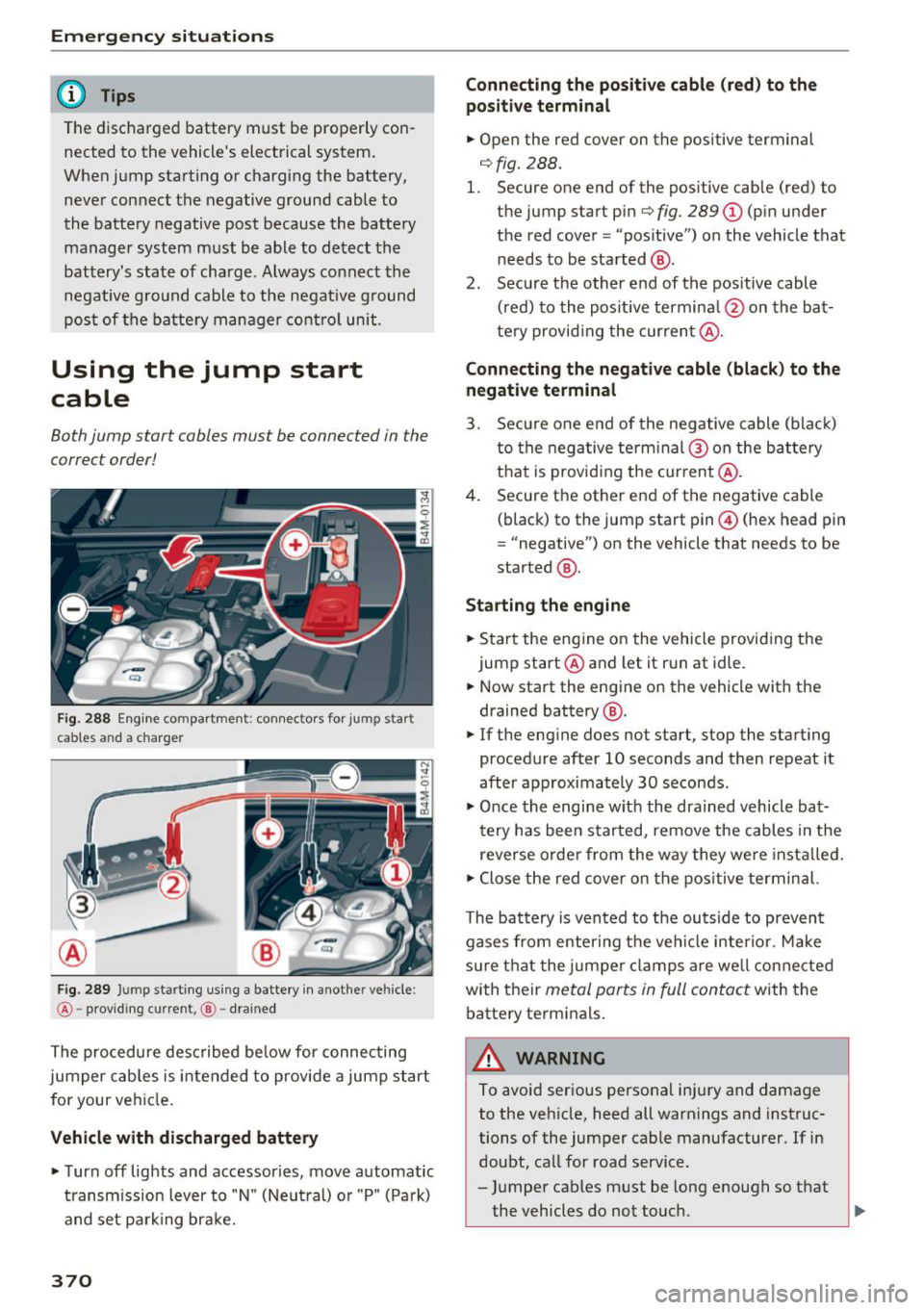
Fig. 288 E ngin e compartme nt: co nn ectors for jump start
cables and a charger
Fig. 289 Jump starting using a battery in anot her vehicle:
@-pro vidi ng current, @-dra ined
The procedure described below for connecting
jumper cables is intended to provide a jump start
for your vehicle.
Vehicle with discharged battery
... Turn off lights and accessories, move automatic
transm ission lever to "N" (Neutral) or "P" (Pa rk)
and set parking bra ke.
370
Connecting the positive cable (red) to the
positive terminal
... Open the red cover on the positive terminal
c:::>fig. 288.
1. Secure one end of the pos itive cable (red) to
the jump start pin
c:::> fig. 289 (J) (pin under
the red cover = "pos itive") on the veh icle that
needs to be started @.
2. Secure the other end of the positive cable
(red) to the posit ive terminal @on the bat
tery provid ing the cur rent @.
Connecting the negative cable (black) to the
negative terminal
3. Secure one end of the negative cable (black)
to the negative terminal @ on the battery
that is providing the current @.
4. Secure the other end of the negative cable
(black) to the jump start pin@ (hex head pin
= "negative") on the vehicle that needs to be
started @.
Starting the engine
... Sta rt the eng ine on the vehicle providing the
jump start @and let it run at idle .
... Now start the engine on the vehicle with the
drained battery @.
... If the engine does not start, stop the starting
procedure after 10 seconds and then repeat it
after approx imately 30 seconds.
"' Once the engine w it h the drained vehicle bat
tery has been started, remove the cables in the
reverse order from the way they were install ed.
"' Close the red cover on the positive terminal.
The battery is vented to the outside to prevent
gases from enter ing the vehicle inter ior. Make
sure th at the j umper clamps are well connected
with their
metal ports in full contact with the
battery terminals .
A WARNING
-To avoid serious personal injury and damage
to the vehicle, heed all warnings and instruc
tions of the jumper cable manufacturer. If in
doubt, call for road service .
- Jumper cables must be long enough so that
the vehicles do not touch. ..,.
Page 379 of 398
Cl a:, ...... N
" N ...... 0
0
::r '
Warranty coverages
Your Audi i s co vered by the following warran
tie s:
- New Vehicle Limited Warranty
- Limited Warranty Against Corrosion Perfora-
tion
- Emissions Control System Warranty
- Emissions Performance Warranty
- California Emissions Control Warranty (USA
vehicles only)
- California Emissions Performance Warranty
(USA vehicles only)
Detailed information regarding your warranties
can be found in your
Warranty & Maintenance
booklet .
Operating your vehicle
outside the U.S.A. or
Canada
Government regulati ons in the United States and
Canada require that automobiles meet specific
emission regulations and safety standards.
Therefore, vehicles built for the U.S.A. and Cana
da differ from vehicles sold in other countries.
If you p lan to take you r vehicle outside the conti
nenta l limits of the United States or Canada,
there is the possibility that:
- un leaded fue ls for vehicles with catalytic con
verter may not be available;
- fuel may have a conside rably lower octane rat
ing . Improper fuel may cause engine damage;
- service may be inadequate due to lack of proper
service facilities, tools or testing eq uipment;
- r eplacement parts may not be readily available.
- Navigation systems for veh icles built for the
U.S .A . and Canada w ill not necessarily work in
Eur ope, and may not wo rk in other countries
outside of North America.
Consumer Information
@ Note
Audi cannot be responsib le for mechanical
damage that could resu lt from inadequate
fuel, service or parts ava ilability.
Audi Service Repair
Manuals and Literature
Audi Official Factory Service Manuals and Litera
ture are published as soon as poss ible after mod
el introduction. Se rvice Ma nuals and literature
are available to order from the Audi Tec hni cal Lit
erature Orde ring Center at :
www.audi.techliterature.com
Maintenance
General
Your vehicle has been designed to help keep
maintenance requirements to a minimum. How
ever, a certain amount of regular maintenance is
still necessary to assure your vehicle's safety,
economy and reliab ility . For detailed vehicle
maintenance consult your Warranty & Mainte
nance booklet .
Under difficult operating conditions, for exam
ple at extremely low outside temperatures, in
very dusty regions, when tow ing a trailer very fre
quently, etc., some service wo rk shou ld be per
formed between the intervals specified. This ap
plies particularly to:
- oil changes, and
- cleaning or replac ing the a ir filter .
® For the sake of the environment
By regularly maintain ing your vehicle, you
help make sure that emiss io n standards are
maintained, thus min imiz ing adverse effects
on the environment .
Important considerations for you and your
vehicle
The increasing use of electronics, sophisticated
fuel injection and emission control systems, and
the genera lly increasing technica l complexity of .,.
377
Page 381 of 398
Cl a:, ...... N
" N ,-1 0
0
::r '
-Changing the engine settings wi ll adversely
affect emission leve ls. Th is is detrimental to
the env ironment and increases fuel con
sumption.
- A lways observe environmenta l regu lations
when disposing of old engine o il, used brake
flu id, d irty engine coolant, spent batteries
or worn out tires.
- Undeployed airbag modules and pretension
ers might be classified as Perchlorate Mate
rial -spec ial handl ing may apply, see
www .dtsc.ca .gov/hazardouswaste/perch lo
r ate. When the vehicle or pa rts of t he re
stra int system includi ng a irbag mod ules
s af ety be lts with pretens ioners a re scrap
ped, a ll applicab le laws and regulations
must be observed. Your a uthorized Audi
dealer is fam iliar with these requirements
and we recommend that you have your dea l
er perform this service for you.
Accessories and
technical changes
Additional accessories and parts replacement
Always consult on authorized Audi dealer before
purchasing accessories.
Audi ve hicles that are constructed with advanced
materials like Steel/Aluminum (Hybrid construc
tion), Aluminum (Aud i Space Frame), and/or Alu
minum/Carbon Fiber (Ultra Advanced Light
We ight Materials) are as unique as the ir dr ivers .
Therefo re, the ava ilability of certain parts needed
for repa ir , restorat ion, or reconstruction w ill be
rest ricted , or pa rts will be unava ilable, if the ve
hicl e is not repa ired at an a uthorized Aud i co lli
sion repair facility . This includes but is not limi t
ed to structura l parts which require specia lized
training and equipment to restore their crash
worthiness back to the original NHTSA and IIHS performance.
Your vehicle incorporates the latest safety design
features ensuring a high standard of active and passive safety.
Con sum er In form ation
This safety could be compromised by non -ap
proved changes to the vehicle. For t his reason, if
parts have to be rep laced, p lease observe the fol
lowing points when install ing additional accesso
ries:
Approved Audi accessories and genuine Audi parts are avai lab le from authorized Aud i dea lers.
T hese dea le rs a lso have t he necessa ry fa cilit ies,
tools and trained specialists to install the pa rts
and accessories proper ly .
A WARNING
--
Using the wrong spare parts or using non -ap
p roved accessories can cause damage to the
vehicle and serious personal injury.
- Use on ly accessories expressly approved by
Aud i and genuine Audi spare parts
- These parts and accessor ies have been spe
cially designed to be used on your vehicle.
- Do not use license p late brac kets in the
front area that are d ifferent from the one
installed at the factory, or add additional
li
cense plate brackets.
- Never install accessor ies such as telephone
cradles or beverage holders on airbag covers
or w ith in the airbag deployment zones. Do
ing so will increase the risk of injury if a ir
bags a re tr iggered in an accident!
- Before you check anyth ing in the eng ine
compa rtment, always read and heed all
WARN INGS
~page 319.
@ Note
-If items other than genu ine Audi spare
parts, add-on equipment and accessory
items are used or if repa ir work is not per
form ed according to specified methods, th is
c an result in seve re damage to you r vehi
cle's eng ine and body (s uch as cor rosion)
and adve rsely affec t your ve hicle's warranty.
- If emergency repa irs m ust be pe rformed
elsew here, have the vehicle ex am ined by an
authorized A udi dealer as soon as possib le .
- Th e manufac ture r ca nnot be he ld liable fo r
damage wh ic h occur s d ue to fail ure to com
ply with these stipulations.
379
Page 383 of 398
Cl a:, ...... N
" N ...... 0
0
::r '
A/C MAX (button) .................. .
A/C (button)
. .. ................ ... .
67, 71
67, 70
ABS
.. .. .. .. .. ............... .. .. .. . 142
Accessories 60,379
Active lane assist
Cleaning the camera area . . . . . . . . . . . . . 352
also refer to Audi active lane assist . . . . . 117
Adaptive air suspension
refer to Air suspension ........ .. .. .. .
Adaptive cruise control ................ .
C leaning the sensor ................. .
Messages .... ................ ..... .
Predictive control
............. .. .. .. .
Ad Blue .. .. .. .. ............. .. .. .. .. . 128
102
352 110
100
314
Messages .... ................ ..... . 314
Additional accessories . . . . . . . . . . . . . . . . . 3 79
Adjusting air distribution (automatic climate
control) . . . . . . . . . . . . . . . . . . . . . . . . . . . 68, 71
Adjusting the additional display . . . . . . . . . . 14
Adjusting the rear seats . . . . . . . . . . . . . . . . . 55
Adjusting the sound . . . . . . . . . . . . . . . . . . . 249
Adjusting the temperature (automatic climate
control) . . . . . . . . . . . . . . . . . . . . . . . . . . . 68 71
,
Adjusting the volume . . . . . . . . . . . . . . . . . . . 15
Advanced key
refer to Convenience key . . . . . . . . . . . . . . . 77
Airbag . . . . . . . . . . . . . . . . . . . . . . . . . . . . . . 269
Airbag system . . . . . . . . . . . . . . . . . . . . 269, 287
Advanced Airbag System components . . . 276
Care . . . . . . . . . . . . . . . . . . . . . . . . . . . . . . 284
Children · · · · · · · · · · · · · · ...... .. .. .. . 293
Ch ild restraints
............ .. .. .. .. .
Components (front airbags) ...... .. .. .
Danger of fitting a child safety seat on the
front passenger seat ................ .
Disposal ..... ................ ..... .
Front airbags ................ .. .. .. .
How do the front airbags work? . .. .. .. .
How many airbags does my vehicle have?
How the Advanced Airbag System compo -
nents work together ........... ... .. .
Indicator light ............... .. .. .. .
Monitoring . .. ............. .. .. .. .. .
PASSENGER AIR BAG light ....... .. .. .
Repairs .... .. ................ ..... . 293
276
270
284
274
279
276
278
281
281
281
284
Index
Safety instructions . . . . . . . . . . . . . . . . . . . 283
When must the system be inspected? . . . 281
Air suspension . . . . . . . . . . . . . . . . . . . . . . . 128
Alarm system
refer to Anti-theft alarm system . . . . . . . . . 35
Alignment pin (changing the wheel) . . . . . . 357
All-weather lights . . . . . . . . . . . . . . . . . . . . . . 43
All-wheel steering . . . . . . . . . . . . . . . . 128, 146
All season tires
All wheel drive
refer to quattro
AM I 34S
146
refer to Audi music interface . . . . . . . 231, 232
Android Auto
refer to Audi smartphone interface
Anti-freeze 243
Windshield washer system . . . . . . . . . . . . 328
Anti-lock braking system
refer to ABS . . . . . . . . . . . . . . . . . . . . . . . . 142
Anti-Slip Regulation
refer to ASR . . . . . . . . . . . . . . . . . . . . . . . . 142
Anti-theft alarm system . . . . . . . . . . . . . . . . . 35
Apple CarPlay
refer to Audi smartphone interface . . . . . 243
Ashtray . . . . . . . . . . . . . . . . . . . . . . . . . . . . . . 60
ASR · · ... .. .. .. .. .. ............. .. .. 142
Audi active lane assist . . . . . . . . . . . . . . . . . 117
Messages
119
Audi adaptive cruise control
Distance display, distance warning . . . . . . 110
Traffic jam assist . . . . . . . . . . . . . . . . . . . . 109
Audi connect emergency call and service . . 201
Online roadside assistance . . . . . . . . . . . . 202
Audi connect vehicle control . . . . . . . . . . . . 197
Parking location . . . . . . . . . . . . . . . . . . . . . 198
Remote locking and unlock ing . . . . . . . . . 198
Vehicle status report . . . . . . . . . . . . . . . . . 198
Audi connect (Infotainment) ........ 187, 194
Data protection . . . . . . . . . . . . . . . . . . . . . 195
Services overview
. .. ... .. ..... ... .. ..
Start ing .. .. .. .. .. ............. .. . .
Audi drive select .
.. .. ............... ..
Audi Entertainment mobile 188
188
128
233
Audi music interface . . . . . . . . . . . . . . . . . . . 231
Audi music stream
refer to Wi-Fi . . . . . . . . . . . . . . . . . . . . . . . 229
381