seats AUDI Q7 2018 Owner´s Manual
[x] Cancel search | Manufacturer: AUDI, Model Year: 2018, Model line: Q7, Model: AUDI Q7 2018Pages: 398, PDF Size: 185.58 MB
Page 4 of 398
Table of contents
About this Owner's Manual. . . . . .
6
Cockpit . . . . . . . . . . . . . . . . . . . . . . . . . . . 8
Cockpit overview . . . . . . . . . . . . . . . . . 8
Controls at a glance . . . . . . . . . . . . . . . . . . 8
Instrument cluster . . . . . . . . . . . . . . . . . . . 1 0
M ultif unction steering wheel . . . . . . . . . . 12
Veh icle functions . . . . . . . . . . . . . . . . . . . . 15
H ead-up display . . . . . . . . . . . . . . . . . . . . . 17
Indicator l ights . . . . . . . . . . . . . . . . . . . . . 18
Starting and driving . . . . . . . . . . . . . 29
Opening and closing . . . . . . . . . . . . . 29
Cent ral lock ing . . . . . . . . . . . . . . . . . . . . . . 29
L uggage compartment lid . . . . . . . . . . . . . 35
C hil d safety loc k . . . . . . . . . . . . . . . . . . . . . 38
P owe r w indows . . . . . . . . . . . . . . . . . . . . . 38
P ano rama g lass roo f . . . . . . . . . . . . . . . . . 4 0
Garage door opener (Homelink) . . . . . . . . 41
Lights and Vision . . . . . . . . . . . . . . . . . 43
E xterio r lighting . . . . . . . . . . . . . . . . . . . . . 4 3
Interior lighting . . . . . . . . . . . . . . . . . . . . . 46
V1s1on . . . . . . . . . . . . . . . . . . . . . . . . . . . . . 47
W indshield wipers . . . . . . . . . . . . . . . . . . . 50
Dig ita l compass . . . . . . . . . . . . . . . . . . . . . 52
Seats and storage ............. .. .
General information .......... .... .. . 54
54
Front seats . . . . . . . . . . . . . . . . . . . . . . . . . 54
Rea r seats . . . . . . . . . . . . . . . . . . . . . . . . . . 55
H ead restra ints . . . . . . . . . . . . . . . . . . . . . 58
M emory fu nction . . . . . . . . . . . . . . . . . . . . 59
Ashtray . . . . . . . . . . . . . . . . . . . . . . . . . . . . 60
Ciga ret te lighte r . . . . . . . . . . . . . . . . . . . . 60
P ower so urces . . . . . . . . . . . . . . . . . . . . . . 60
Storage . . . . . . . . . . . . . . . . . . . . . . . . . . . . 61
Luggage compartment . . . . . . . . . . . . . . . 62
Roof rack . . . . . . . . . . . . . . . . . . . . . . . . . . 64
Warm and cold . . . . . . . . . . . . . . . . . . . 66
Climate control system . . . . . . . . . . . . . . . 66
3 zone deluxe automatic clim ate control . 67
4-zone deluxe automatic climate control . 70
Steer ing whee l heating . . . . . . . . . . . . . . . 72
2
Driving ... .. .. .... .. ... .. ..... ... . .
Genera l information . .... .. ..... ... . .
Steering . ... .. .... .. ... .. ..... ... . .
Start ing and stopping the eng ine ..... . .
Start/Stop system .. .. ............. . .
E lectromechanical parking brake ...... .
Start ing to drive .. .. .. .............. .
Offroad d riving ... .. .. .............. .
T ilt angle d isp lay . .. .. ............. . .
A utomat ic tra nsmission
Trailer towing ... .. ............. . .
D rivi ng with a tra ile r 74
74
7
6
77
79
81
83
83
85
85
9 2
92
Driver assi stance . . . . . . . . . . . . . . . . . 9S
Assistance systems . . . . . . . . . . . . . . 95
Speed warning system . . . . . . . . . . . . . . . . 95
Cruise cont ro l sys tem . . . . . . . . . . . . . . . . 95
Camera -based traffic sign recognition . . . 97
Lap timer . . . . . . . . . . . . . . . . . . . . . . . . . . 98
Pred ictive eff ic iency assist . . . . . . . . . . . . . 99
Audi adaptive c ruise contro l . . . . . . . . . . . 102
Audi pre sense . . . . . . . . . . . . . . . . . . . . . . 112
Audi active lane assist . . . . . . . . . . . . . . . . 117
Audi s ide ass ist . . . . . . . . . . . . . . . . . . . . . 120
N ight vision assist . . . . . . . . . . . . . . . . . . . 1 25
A udi drive selec t . . . . . . . . . . . . . . . . . . . . . 128
Parking systems 132
Genera l infor mation . . . . . . . . . . . . . . . . . 132
Rear p arking system . . . . . . . . . . . . . . . . . 133
Parking sys tem plus . . . . . . . . . . . . . . . . . . 133
Rearview camera . . . . . . . . . . . . . . . . . . . . 134
Periphera l cameras . . . . . . . . . . . . . . . . . . 137
Adjusting the parking aid . . . . . . . . . . . . . 140
Error messages . . . . . . . . . . . . . . . . . . . . . 140
Trailer hitch . . . . . . . . . . . . . . . . . . . . . . . . 141
Intelligent Technology . . . . . . . . . . 142
E lec tronic stabili zation con trol (ESC) . . . . 142
Brakes . . . . . . . . . . . . . . . . . . . . . . . . . . . . . 144
E lectromechanical steering, all-whee l
stee ring . . . . . . . . . . . . . . . . . . . . . . . . . . . 146
A ll-wheel d rive (quattro) . . . . . . . . . . . . . . 146
E ne rgy managemen t . . . . . . . . . . . . . . . . . 14 7
Notice abo ut data recorded by the Event
Data Recorder and vehicle contro l
modules . . . . . . . . . . . . . . . . . . . . . . . . . . . 147
Page 6 of 398
Table of contents
On line media and In ternet radio . . . . . . . . 230
Mul timedia connections .... ... .. .. ... 231
P lay ing media . . . . . . . . . . . . . . . . . . . . . . . 234
Addit ional se ttings ........... .... .. . 237
Supported media and fi le formats . . . . . . 240
Troubleshoot ing . . . . . . . . . . . . . . . . . . . . . 241
Audi smartphone interface . . . . . . 243
Setup . .. .. .. .. ... .. ..... ... .. .. .. . 243
Operating . . . . . . . . . . . . . . . . . . . . . . . . . . 243
T roubleshoot ing . . . . . . . . . . . . . . . . . . . . . 24 4
System settings . . . . . . . . . . . . . . . . . . 245
Sett ing t he date and time . . . . . . . . . . . . . 245
M MI sett ings . . . . . . . . . . . . . . . . . . . . . . . 245
Con nection ma nager . . . . . . . . . . . . . . . . . 246
Sys tem update . . . . . . . . . . . . . . . . . . . . . . 248
So und setti ngs . . . . . . . . . . . . . . . . . . . . . . 24 9
Volume settings . . . . . . . . . . . . . . . . . . . . . 249
Restarting the M MI . . . . . . . . . . . . . . . . . . 250
Software license information 251
Safety first . . . . . . . . . . . . . . . . . . . . . . . 252
Driving safety . . . . . . . . . . . . . . . . . . . . 252
Basics . . . . . . . . . . . . . . . . . . . . . . . . . . . . . 252
Correct passenger seating positions . . . . . 253
Pedal area . . . . . . . . . . . . . . . . . . . . . . . . . . 256
Storing cargo co rrectly . . . . . . . . . . . . . . . 257
Repo rt ing Safety Defects . . . . . . . . . . . . . . 259
Safety belts . . . . . . . . . . . . . . . . . . . . . . 26 1
Gene ral information . . . . . . . . . . . . . . . . . 26 1
W hy use safety belts? . . . . . . . . . . . . . . . . 262
Safety bel ts . . . . . . . . . . . . . . . . . . . . . . . . 264
B el t tensione rs . . . . . . . . . . . . . . . . . . . . . . 267
Airbag system . . . . . . . . . . . . . . . . . . . . 269
I mpo rtant info rm ation . . . . . . . . . . . . . . . 269
Fr ont airbags . . . . . . . . . . . . . . . . . . . . . . . 273
M onitoring the Advanced Airbag System . 28 1
Side airbags . . . . . . . . . . . . . . . . . . . . . . . . 285
Side curtain airbags . . . . . . . . . . . . . . . . . . 288
Child safety . . . . . . . . . . . . . . . . . . . . . . 29 1
Important information . . . . . . . . . . . . . . . 291
Ch ild safety seats . . . . . . . . . . . . . . . . . . . . 297
Secur ing ch ild safety seats . . . . . . . . . . . . 302
4
LATCH sys tem (lower anchorages and
tethers for c hild ren) . . . . . . . . . . . . . . . . . 305
Additional in format ion . . . . . . . . . . . . . . . 309
Maintenance and Care . . . . . . . . . . . 310
Checking and Filling . . . . . . . . . . . . . 310
Fuel...... .. .. .. .. .. ............. .. 310
Refueling . . . . . . . . . . . . . . . . . . . . . . . . . . 312
Se lective catalytic reduction (AdBlue/
DEF) . . . . . . . . . . . . . . . . . . . . . . . . . . . . . . 314
Emiss ions control systems . . . . . . . . . . . . 317
On Boa rd D iagnost ic System (OBD) . . . . . 318
En gine compartment .. ............. .. 319
En gine o il . . . . . . . . . . . . . . . . . . . . . . . . . . 32 1
Cooli ng system . . . . . . . . . . . . . . . . . . . . . . 3 24
Brake fluid . . . . . . . . . . . . . . . . . . . . . . . . . 326
Battery . . . . . . . . . . . . . . . . . . . . . . . . . . . . 326
Windshie ld washer system . . . . . . . . . . . . 328
Service interva l display
328
Wheels .... .. .. .. .. ............. .. 330
Wheels and Tires . . . . . . . . . . . . . . . . . . . . 330
Tire pressure mo nitor ing system . . . . . . . 347
Run -flat tires . . . . . . . . . . . . . . . . . . . . . . . 349
Care and cleaning . . . . . . . . . . . . . . . . 351
General information . . . . . . . . . . . . . . . . . 351
Car washes . . . . . . . . . . . . . . . . . . . . . . . . . 351
Cleaning and care info rmation . . . . . . . . . 352
P lac ing you r vehicle ou t of serv ice 356
Troubleshooting . . . . . . . . . . . . . . . . . 357
Emergency assistance . . . . . . . . . . . 3 57
Gener al info rmation . . . . . . . . . . . . . . . . . 357
Eq uipment . . . . . . . . . . . . . . . . . . . . . . . . . 3 57
T ire mobility kit . . . . . . . . . . . . . . . . . . . . . 3 57
Replacing a whee l . . . . . . . . . . . . . . . . . . . 359
Fuses and bulbs . . . . . . . . . . . . . . . . . . 3 64
Fuses.. ... .. .. .... .. ... .. ..... ... .. 364
Bu lbs. . . . . . . . . . . . . . . . . . . . . . . . . . . . . . 368
Emergency situations . . . . . . . . . . . . 3 69
Genera l . . . . . . . . . . . . . . . . . . . . . . . . . . . . 369
Start ing by push ing or tow ing . . . . . . . . . . 369
Start ing with jumper cables . . . . . . . . . . . 369
Usingthejumpstartcable . ...... ... .. 370
Page 48 of 398
Lights and Vision
The emergency flashers also work when the igni
t ion is turn ed off .
(D Tips
You s hou ld sw itch the emergency flashers on
if:
- you are the last car in a traff ic jam so that
a ll other vehicles approaching from behind
can see your vehicle
- your ve hicle has bro ke n down or you are
having an eme rgency
- you r vehicle i s being towed or if yo u are tow
ing another vehicle
Interior lighting
Front interior lighting
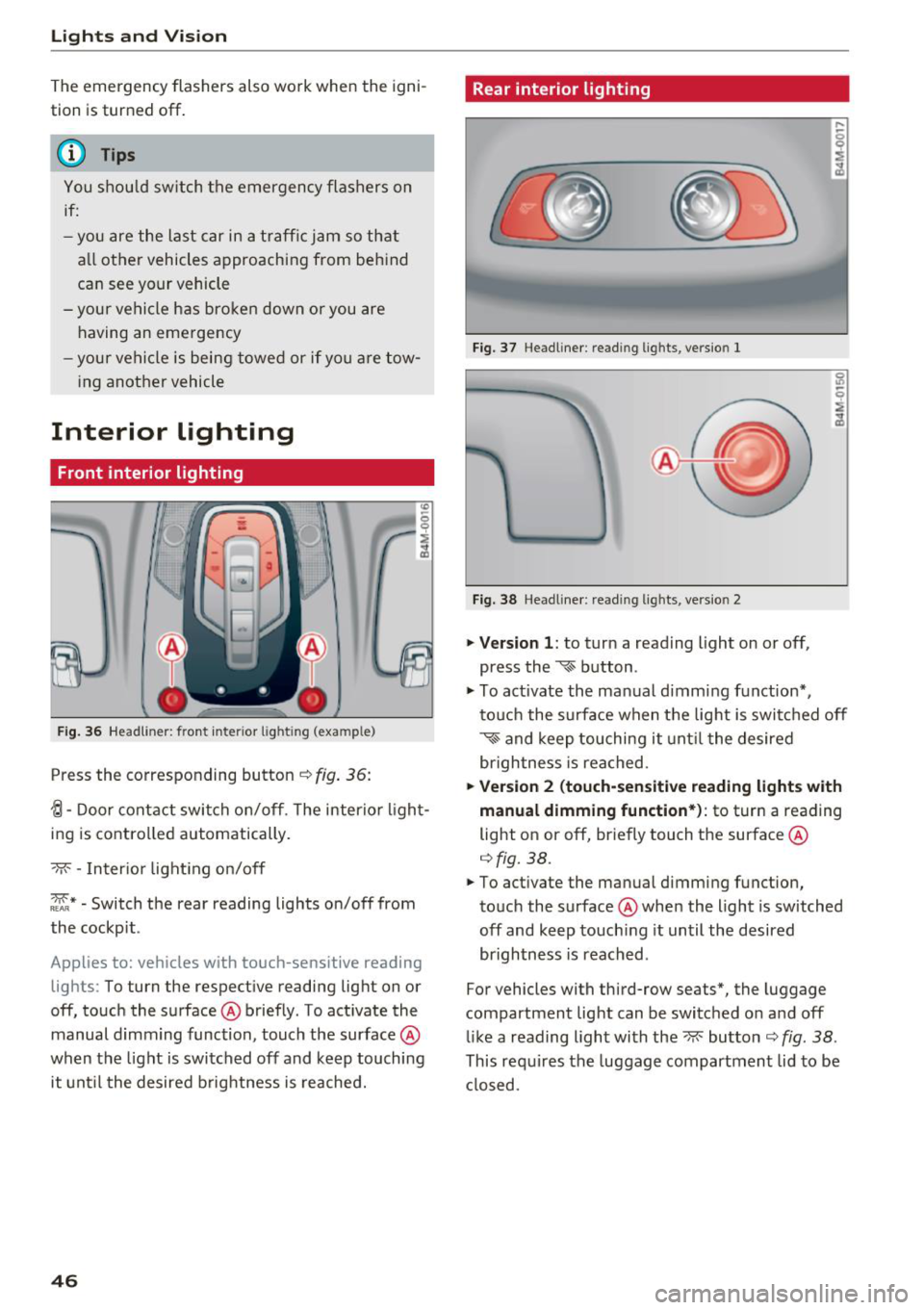
F ig. 36 Headlin er: fr ont in te ri or l ig htin g (exa mple)
Press the co rresponding button ¢ fig. 36:
{l-Door contac t swi tch on/off . T he interior ligh t
ing is controlled automatically.
- M- -In ter ior light ing o n/off
~ * -Switch the rear reading lights on/off from
the cockpit .
App lies to: ve hicles w ith to uch-se nsiti ve reading
lig hts: To turn the respect ive reading light on or
off, touch the surface @ briefly . To act ivate the
manual d imm ing function , touch the surface @
when the light is switched off and keep touching
it unt il t he desired b rightness is reached.
46
Rear interior lighting
Fi g. 3 7 Headline r: re ad in g light s, ve rs io n l
Fi g. 38 Headline r: re ad in g l igh ts , vers io n 2
.. Version 1 : to turn a read ing l ight on or off,
press the
~ b utton .
.. To ac tivate the ma nual dimming f unct ion* ,
t o uch the s urface when the lig ht is swi tc h ed off
~ and keep touching it unt il t he de sired
brigh tness is reached.
.. Ver sion 2 (touch-sensiti ve reading light s with
manual dimming function* ):
to turn a reading
light on or off, br iefly touch the surface @
¢fig. 38 .
.. To activate the manual dimming function,
to uch the surface @whe n the light is switched
off and keep touch ing it until the desired
brightness is reached .
For vehicles with third-row seats*, the luggage
compartment lig ht can be switc hed o n and off
li ke a reading light with the~ button ¢
fig. 38 .
This re quires the luggage compartment lid to be
cl osed.
Page 56 of 398
Seats and stor age
Seats and storage
General information
A WARNING
See c> page 252, Driving safety for important
information, tips, suggestions and warnings
that you should read and follow for your own
safety and the safety of yo ur passengers .
Front seats
Power seat adjustment
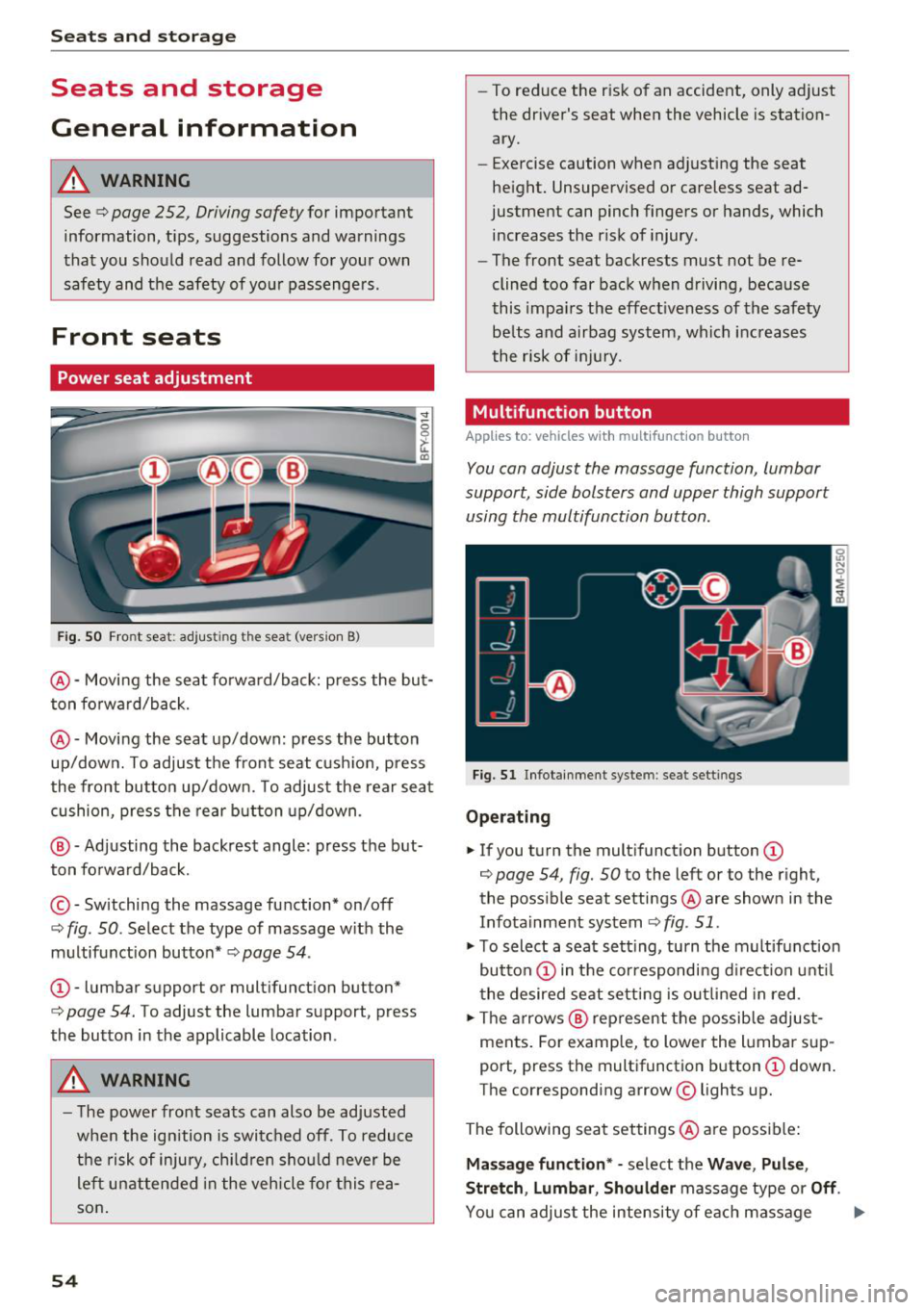
Fig. SO Front seat : adjust ing the seat (vers ion 8)
@ -Moving the seat fo rward/back: press the but
ton fo rward/back.
@ -Moving the seat up/down: press the button
up/down. To adjust the front seat cush ion, press
the front button up/down. To adjust the rear seat
cushion, press the rear button up/down .
@ -Adjusting the backrest angle: press the but
ton fo rwa rd/back.
© - Switching the massage function* on/off
¢ fig. 50. Select the type of massage w ith the
m ultifunction button*
c> page 54 .
CD-lumbar support or mult ifunction button*
¢ page 54. To adjust the lumbar support, press
the button in the applicable location .
A WARNING
-The power front seats can also be adjusted
when the ign ition is switched off. To reduce
the risk of injury, chi ld ren should never be
le ft unattended in the vehicle for this rea
son .
54
-To reduce the risk of an accident, only adjust
the dr iver's seat when the vehicle is station
ary.
- Exercise caution when adjusting the seat
he ight. Unsupervised or careless seat ad
justment can pinch fingers or hands, which
increases the risk of injury.
- The front seat backrests must not be re
clined too far back when driving, because
this impa irs the effect iveness of the safety
be lts and airbag system, which increases
the risk of inj ury.
Multifunction button
App lies to : vehicles wi th mu lt ifunct ion b utto n
You can adjust the massage function, lumbar
support, side bolsters and upper thigh support
using the multifunction button.
Fig. 51 Infotainment syste m: seat settings
Ope rating
.,. If you turn the mult ifunct ion b utton CD
¢ page 54, fig. 50 to the left or to the r ight,
the poss ible seat settings @are shown in the
Infota inment system
c> fig . 51 .
.,. To select a seat sett ing, turn the multifunction
button
CD in the cor respondi ng d irection unti l
the desired seat setting is outlined in red .
.,. The arrows @ rep resent the possib le adjust
ments. For example, to lower the lumba r sup
port, press the multifunction button
CD down .
The corresponding arrow © lights up.
The following seat settings @are poss ible:
Ma ssa ge fun ction * -se lect the Wave , Pul se ,
Stretch , Lumbar , Shoulder
massage type or Off.
You can adjus t the intensity of each massage
Page 57 of 398
a co ...... N r--. N ...... 0
0
:E '
fig. 51 .
Lumbar support -yo u can adjust the lumbar sup
port up/down and to be stronger/weaker.
Side bol ster s* -you can increase/decrease the
lateral support in the seat using the s ide bo lsters
on the seat surface and the backrest.
Upp er thigh support * -you can increase/de
crease the upper th igh support.
(D Tips
-The massage function switches off auto
matically after approximately 10 minutes.
- The air in the side bolsters* is released as
soon as the driver's door opens. This makes
i s possible to enter and exit the vehicle
more comfortab ly. As soon as you start driv
ing the veh icle, the s ide bo lsters fill.
Center armrest
There is a storage compartment under the arm
rest.
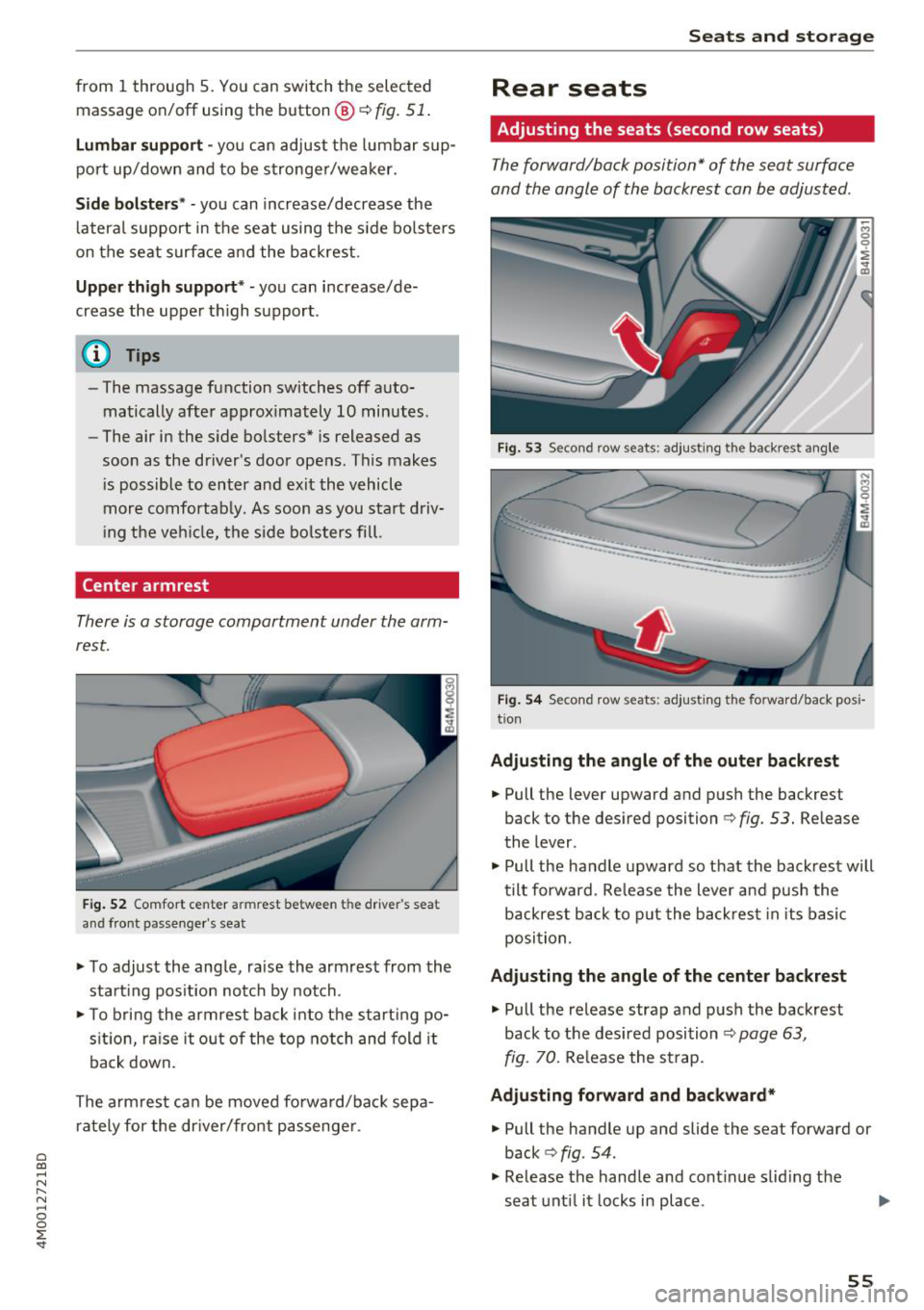
F ig . 52 Comfort center armrest between the driver 's sea t
and front passenge r's seat
'" To adjust the angle, raise the armrest from the
sta rt ing pos ition notch by notch.
'"T o bri ng the armrest back into the starting po
s it ion, ra ise it out of the top notch and fold it
back down.
The armrest can be moved forwa rd/back sepa
rately for the dr iver/front passenge r.
S eats and storag e
Rear seats
Adjusting the seats (second row seats)
The forward/back position" of the seat surface
and the angle of the backrest can be adjusted .
Fig . 53 Second row seats: adjusting the backrest ang le
...... _ .. _ __ ---::.._ ..
·-·-----
~ M 0
0
~ ., m
Fig . 54 Second row seats: adjusting the forward/back pos i
tion
Ad ju sting the angle of th e outer back rest
'" Pull the lever upward and push the backrest
back to the desired position ¢
fig. 53. Release
the lever .
'" Pull the handle upward so that the backrest will
tilt forward. Re lease the lever and push the
backrest back to p ut the back rest in its basic
position.
Ad justin g the angle of the cent er bac krest
'" Pull the release strap and push the backrest
back to the des ired position
¢ page 63,
fig. 70.
Release the st rap.
Ad ju sting fo rward and backward*
'" Pull the handle up and slide the seat forward or
back ¢
fig. 54 .
'" Release the handle and cont inue slid ing the
seat unt il it locks in place.
55
Page 58 of 398
Seats and storage
A WARNING
-To reduce the risk of an accident, the seat
can only be adjusted when the vehicle is sta
tionary.
- Be careful when adjusting the seat. Adjust
ing the seat without paying attention can
pinch fingers or limbs, which increases the
risk of injury.
- Always pull forward on the backrest to make
sure it is check if it is correctly locked in
place.
Entry/exit assistance (second row seats)
Applies to: ve hicles with entry ass istance
Entry/exit assistance creates easier access to the
third-row seating*.
•
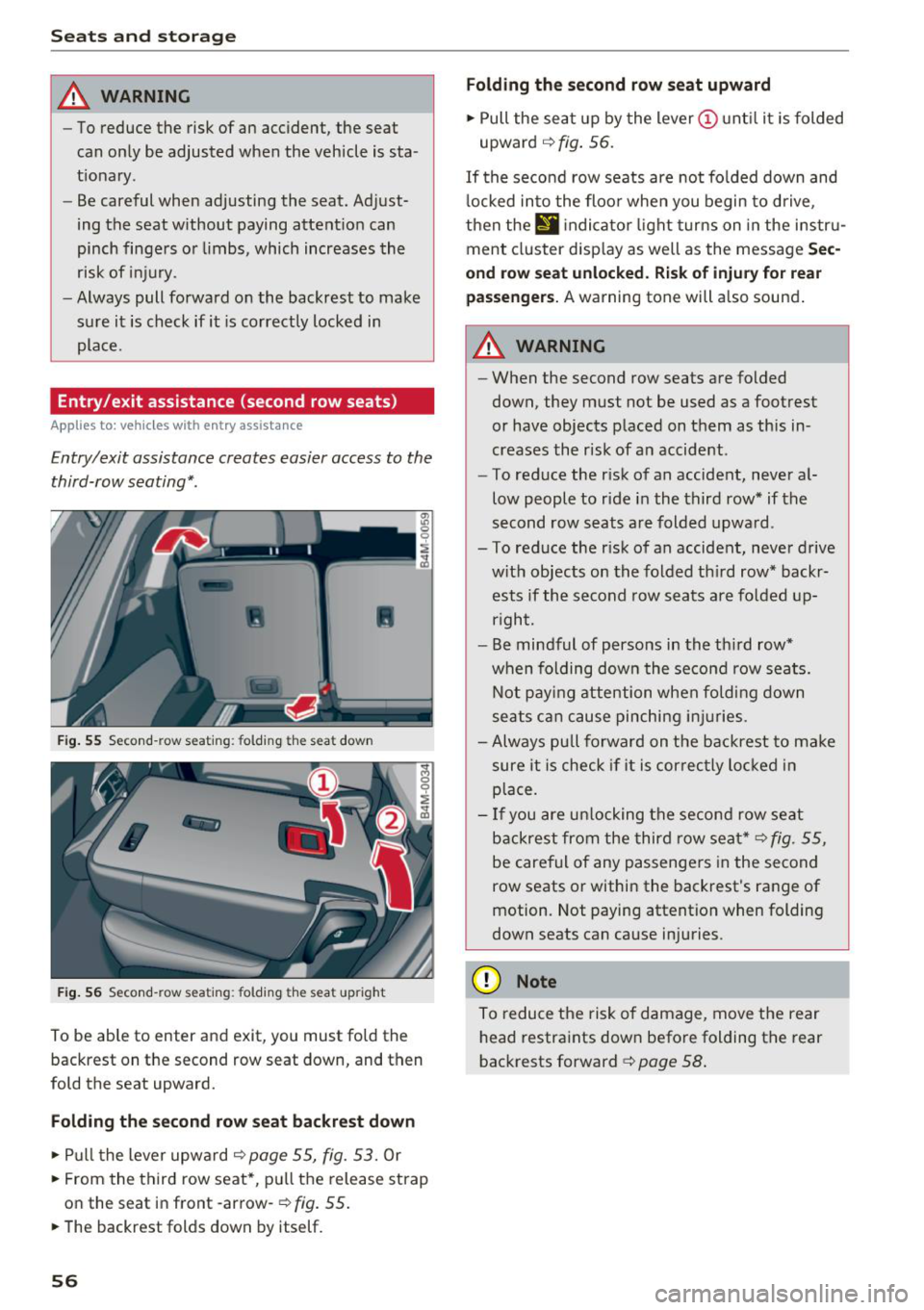
Fig. 55 Second-row seating: folding th e seat down
Fig. 56 Second-row seating: folding th e seat upright
To be able to enter and exit, you must fold the
backrest on the second row seat down, and then
fold the seat upward.
Folding the second row seat backrest down
.,. Pull the lever upward ~ page 55, fig. 53. Or
.,. From the third row seat*, pull the release strap
on the seat in front -arrow-
r:=;, fig. 55 .
.,. The backrest folds down by itself.
56
Folding the second row seat upward
.,. Pull the seat up by the lever (I) until it is folded
upward
~ fig. 56.
If the second row seats are not folded down and
locked into the floor when you begin to drive,
then thE'
d indicator light turns on in the instru
ment cluster display as well as the message
Sec
ond row seat unlocked. Risk of injury for rear
passengers.
A warning tone will also sound.
A WARNING
- When the second row seats are folded
down, they must not be used as a footrest
or have objects placed on them as this in
creases the risk of an accident .
- To reduce the risk of an accident, never al
low people to ride in the third row* if the
second row seats are folded upward.
- To reduce the risk of an accident, never drive w ith objects on the folded th ird row* backr
ests if the second row seats are folded up
rig ht.
- Be mindful of persons in the third row*
when folding down the second row seats.
Not paying attention when folding down
seats can cause pinching injuries.
- Always pull forward on the backrest to make
sure it is check if it is correctly locked in
place.
- If you are unlocking the second row seat
backrest from the third row seat*
r:=;, fig. 55,
be careful of any passengers in the second
row seats or within the backrest's range of
motion. Not paying attention when folding
down seats can cause injuries.
(D Note
To reduce the risk of damage, move the rear
head restraints down before folding the rear
backrests forward
r:=;, page 58.
Page 59 of 398
Folding the backrest down/up (third row
seats)
Ap plies to vehicles w it h th ird row seats
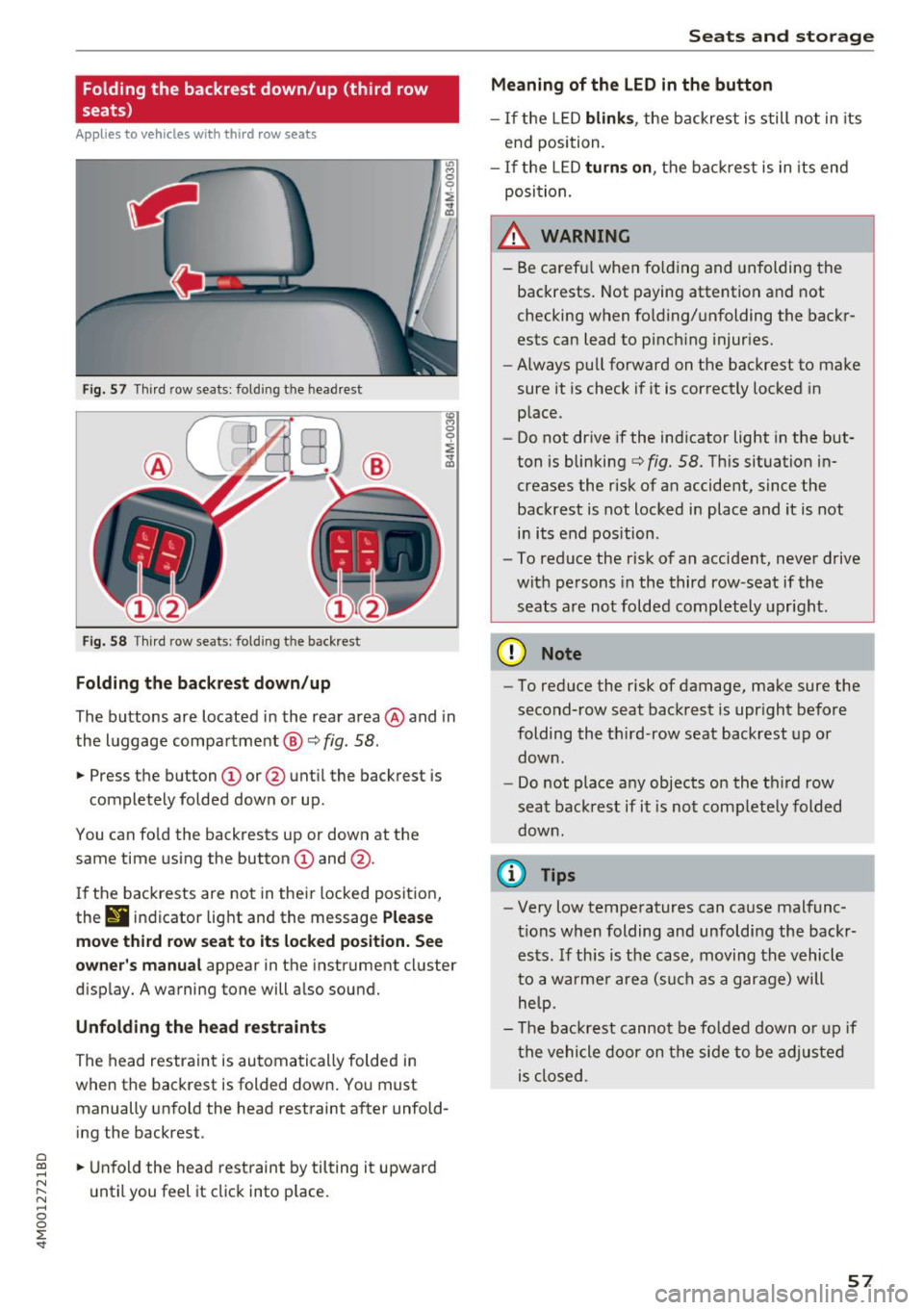
F ig . 57 Thir d row seats : fol ding the headrest
Fig. 58 Th ird row seat s: fol ding t he backrest
Folding the backrest down /up
The buttons are located in the rear area @and in
the luggage compa rtment @
c::> fig. 58.
... Press the button CD or @ unt il the backrest is
completely folded down or up .
You can fo ld the backrests up or down at th e
same time using the button
CD and @.
I f the backrests are not in their locked position,
the
9 indicator light and the message Ple ase
mo ve third ro w s eat to it s locked po siti on . See
owner 's manual
appear in the instrument cluster
d isplay. A warning tone will a lso sound.
Unfold ing the head r estraints
The head restraint is automatically folded in
when the backrest is folded down. You must manually unfold the head restraint after unfold
ing the backrest .
a
~ ... Unfold the head rest raint by tilting it upward
N ~ u ntil you feel it click into p lace.
~ 0
0
:E '
Meaning of the LED in the button
- If the LED blink s, the backrest is still not in its
end position.
- I f the L ED
turn s on , the bac krest is in its end
posi tion.
A WARNING
- Be carefu l when fo lding and unfolding the
backrests. Not paying attention and not
checking when fo lding/unfolding the backr
ests can lead to pinch ing injur ies.
- Always pull forward on the backrest to make
sure it is check if it is correctly locked in place.
- Do not drive if the indicator light in the but
ton is blinking
c::> fig. 58. Th is situation in
creases the risk of an accident, since the
backrest is not locked in place and it is not
in its end position .
- To reduce the r isk of an accident, never drive
with pe rsons in the third row -seat if the
seats are not folded completely upright .
(D Note
-To reduce the risk of damage, make sure the
second-row seat backrest is upr ight before
folding the th ird -row seat backrest up or
down .
- Do not place any objects on the third row
seat backrest if it is not comp letely folded
down .
(D Tips
-Very low temperatures can cause malfunc
tions when folding and unfoldi ng the backr
ests. If th is is the case, moving the vehicle
to a warmer a rea (s uch as a garage) will
help.
- The backrest canno t be fo lded down o r up if
the vehicle door on the side to be adjusted is closed .
57
Page 60 of 398
Seats and storage
Head restraints
Front head restraints
Applies to: vehicles with adjustable head restraints
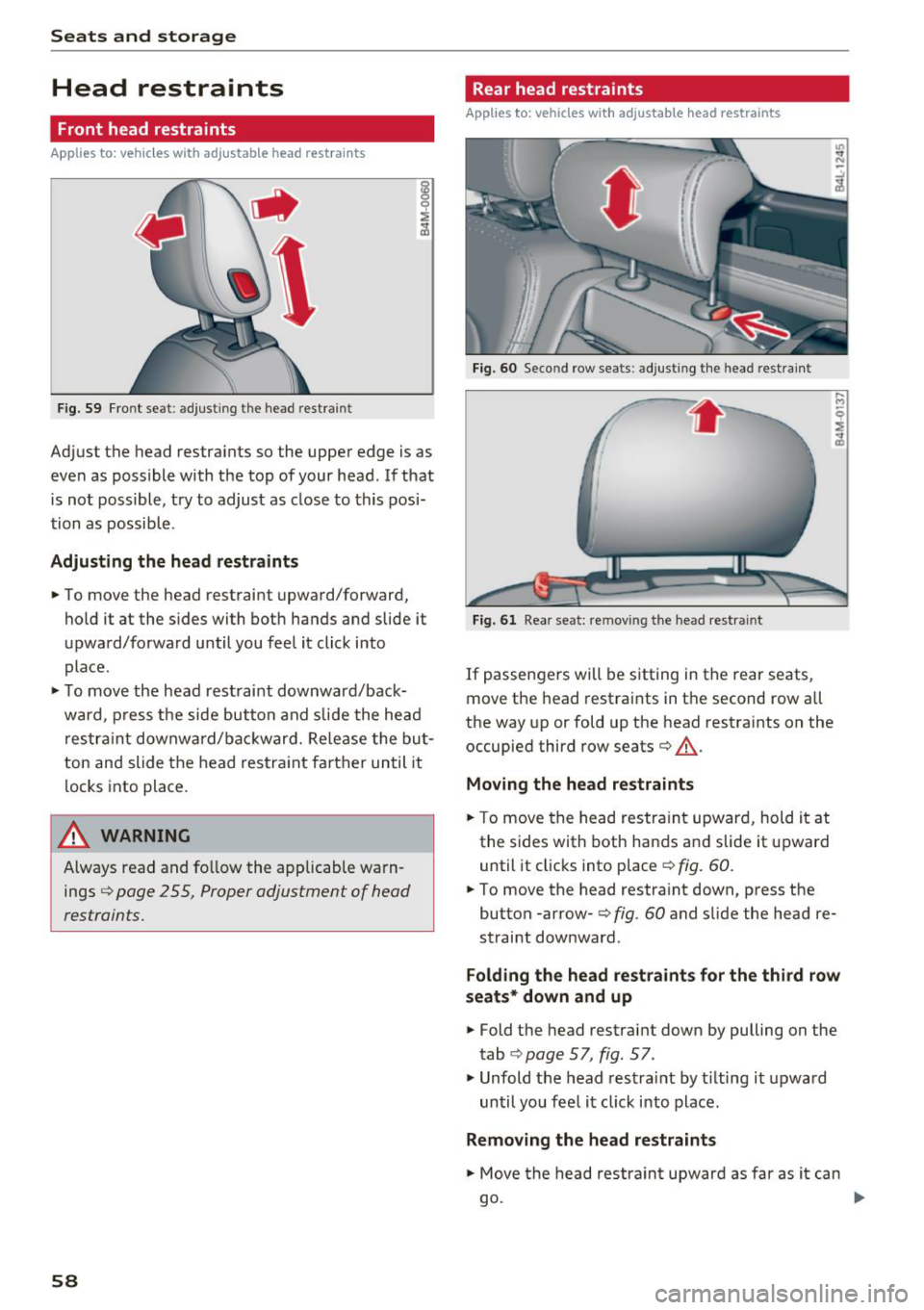
Fig. 59 Front seat: adjust in g the head restrain t
Adjust the head restraints so the upper edge is as
even as possible with the top of your head . If that
is not possible, try to adjust as close to this posi
tion as possible .
Adjusting the head rest raints
.. To move the head restraint upward/forward,
hold it at the s ides with both hands and slide it
upward/forward until you feel it click into
place .
.. To move the head restraint downward/back
ward , press the side button and slide the head
restraint downward/bac kward. Release the but
ton and slide the head restraint farther until it
locks into place.
_& WARNING
Always read and fo llow the applicable warn
ings
¢ page 2 55, Proper adjustment of head
restraints.
58
Rear head restraints
Applies to: vehicles with adjustable head restraints
Fig. 60 Second row sea ts : adjus ting the head restr ain t
Fig. 61 Rear seat : rem ovin g the head re str ain t
If passengers will be sitting in the rear seats,
move the head restraints in the second row all
the way up or fold up the head restraints on the
occupied third row seats¢_&.
Moving the head restraints
.. To move the head restraint upward, hold it at
the sides with both hands and slide it upward
until it clicks into place
¢ fig . 60.
.. To move the head restraint down, press the
button -arrow-
c> fig . 60 and slide the head re
straint downward .
Folding the head restraints for the third row
seats* down and up
.. Fold the head restraint down by pulling on the
tab
¢ page 57, fig. 57 .
., Unfold the head restrai nt by t ilting it upward
until you feel it click into place.
Removing the head restraints
.. Move the head restraint upward as far as it can
go . ..,
Page 61 of 398
• Press the release point c::> fig . 61 using the me
chanical key
c::> page 30, Key set and press the
button -arrow-
c::> fig . 60 . Pull the head restraint
out of the backrest at the same time
c::> ,&. .
In stall ing th e head rest raints
• Slide the posts on the head restraint dow n into
the guides until the posts click into place.
• Press the b utton -arrow-
c::> fig. 60 and slide the
head restraint all the way down. You should not
be able to remove the head restraint from the
backrest without pressing the button .
A WARNING
-Always read and follow the applicable warn
ings
c::> page 255 , Proper adjustment of
head restraints.
- Only remove the head restraints fo r the sec
ond row seats when it is necessary for in
sta lling a child safety seat
c::> page 291,
Child safety.
Install the head restraint agai n
immediately once the child safety seat is re
moved. Driving with the head restraints re
moved or not in the upr ight position in
creases the risk of serious injury.
Memory function
Description
Applies to: vehicles with memory function
Using the memo ry function, you can qu ick ly and
eas ily store a pe rsonal seat profile for the driver
and recall the settings later. The memory func
tion is controlled by the remote control key and
the memory buttons in the driver's door.
The drive r's seat profile is stored again and as
signed to the remote contro l key each time the
vehicle is locked. When you open the door, the
seat profi le is automat ica lly reca lled . If two peo
p le use the vehicle, it is recommended that each
person always uses their "own" remote control
key.
Two seat profiles can be stored each us ing the
~ memory buttons. Once they are stored, these
...... N seat prof iles can be se lected at any time. r--. N ...... g The fo llowing settings are stored :
:E '
Remote con- Memory but-
trol key ton
Driver Drive r
Seat X X
Steering
X X wheel*
Both exterior
mirrors*
X X
Remote control key
Applies to : vehicles with memory function
The driver's seat profile con be assigned to the
remote control key when the vehicle is locked.
• Select in the Infotainment system: I MENU ! but
ton
> Vehicle > l eft control button > Vehicle
s etting s
> Seats > Driver 's seat > Store set
ting s on r emote cont rol ke y.
(D Tips
If you do not wish to have the seat profi le for
another driver assigned to the remote control key, sw itch the memory f unction off in the In
fotainment system.
Memory buttons
Applies to : vehicles with memory function
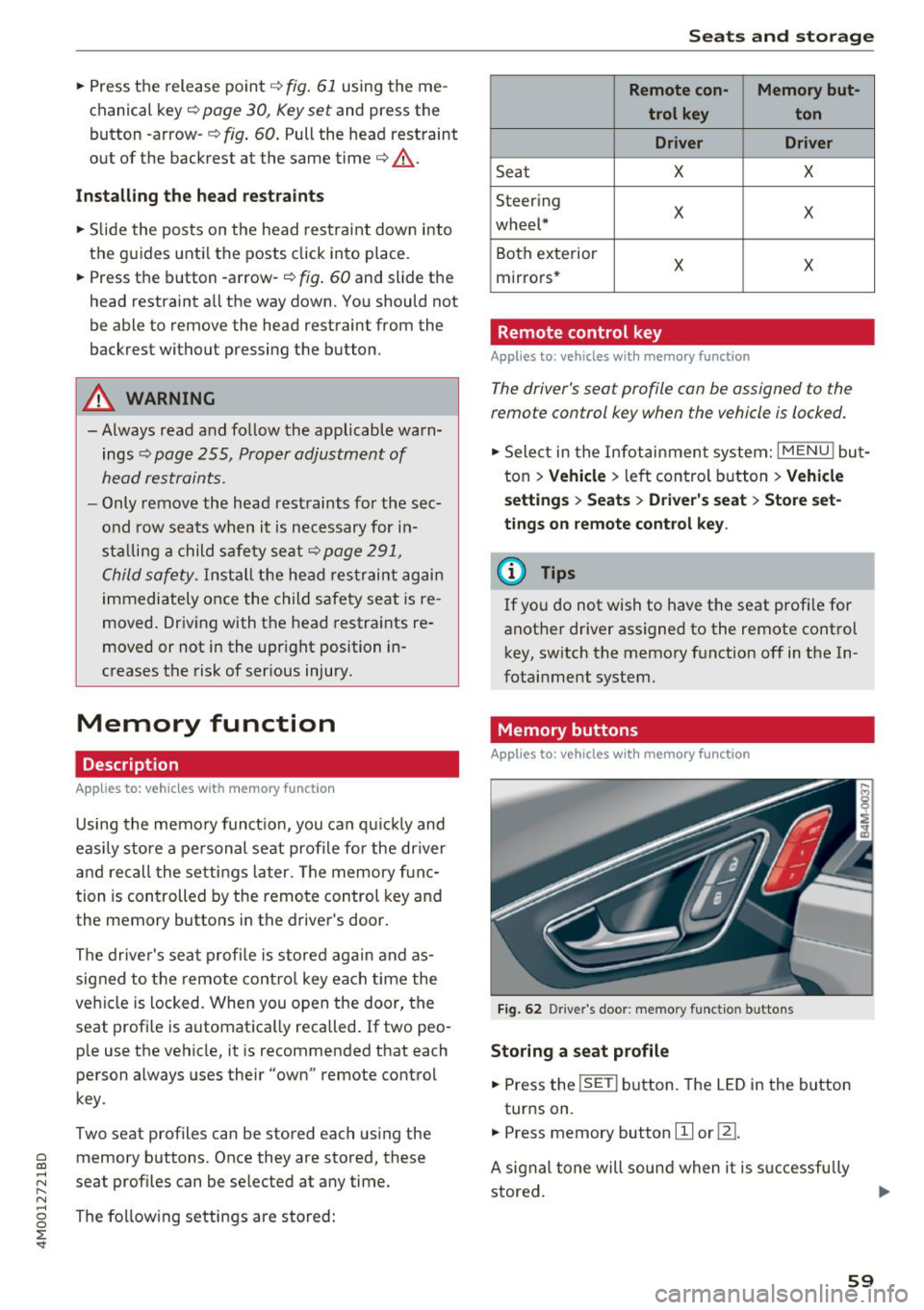
F ig . 62 Driver 's door : memo ry f unc tion buttons
Storing a seat p rofil e
• Press the !SET I button. The LED in the button
turns on.
• Press memory button
[II or ill.
A signal tone will sound when it is s uccessfu lly
stored.
59
Page 62 of 398
Seats and stor age
Acc essing a seat profile
• If the driver's door is open and the ignit ion is
switched off, press the memory button.
• If the driver's door is closed or the ignition is
switched on, press and hold the memory but
ton until the seat adjustment is complete.
A WARNING
- For safety reasons, the seat setting can only
be recalled when the vehicle is stationary to
reduce the risk of an accident.
- In an emergency, seat adjustment operation
can be stopped by pressing the
!SETI button
or the buttons @or@
c::> page 54, fig. 50 .
Ashtray
App lies to: ve hicles w ith ashtray
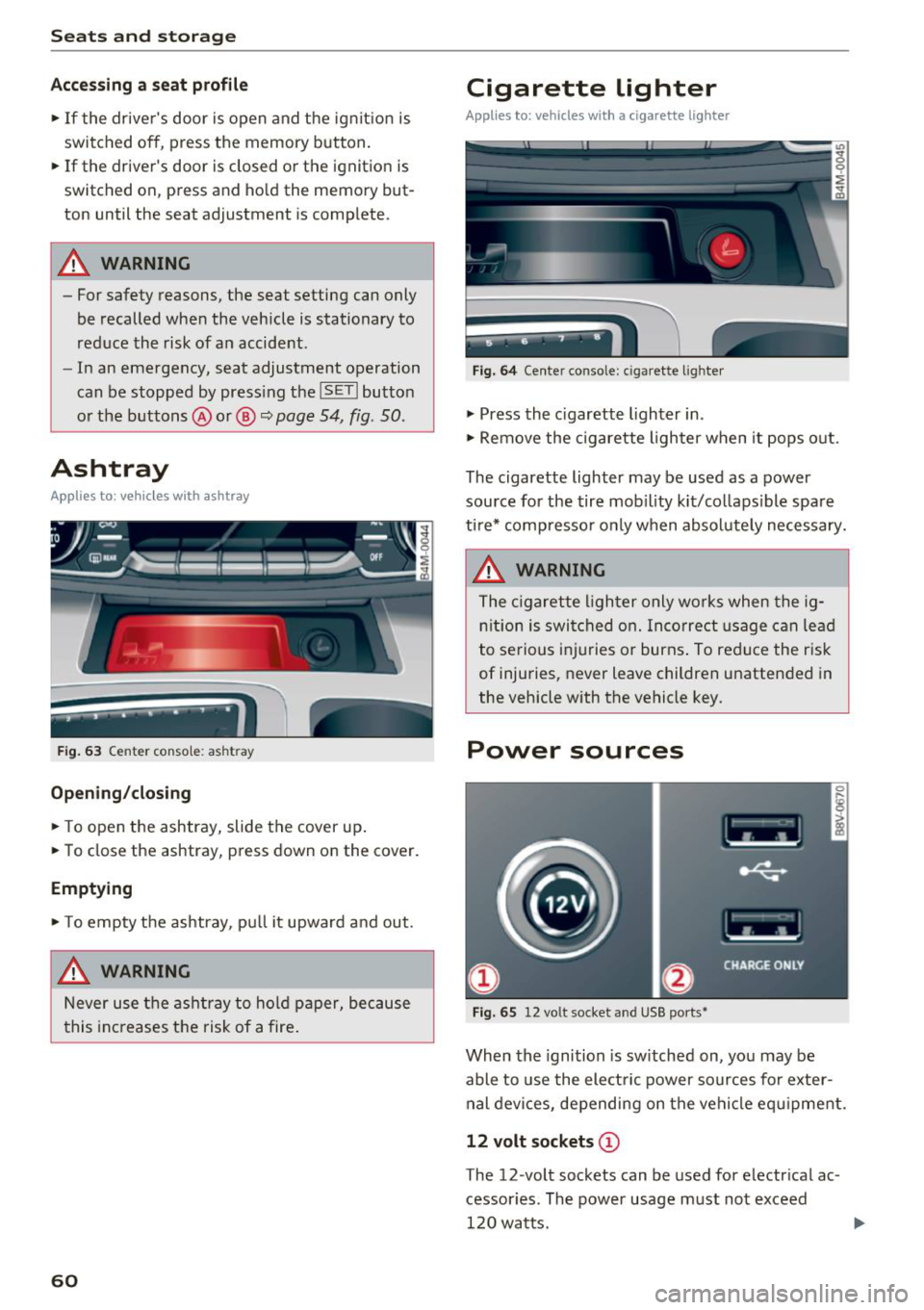
Fig. 63 Center conso le: ashtr ay
Open ing /closing
• To open the ashtray, slide the cover up .
• To close the ashtray, press down on the cover.
Empt ying
• To empty the ashtray, pu ll it upward and out.
A WARNING
Never use the asht ray to hold paper, because
t his increases the risk of a fire .
60
Cigarette lighter
Applies to: vehicles with a cigarette lighter
Fig. 64 Center conso le : cigarette ligh ter
• Press the c igarette lighter in .
• Remove the cigarette lighter when it pops o ut.
The cigarette lighter may be used as a power source for the tire mob ility kit/collaps ible spare
ti re* compresso r o nly when absolute ly necessary.
A WARNING
The c igarette lighter only works when the ig
n ition is switched on. Incorrect usage can lead
to serious i njuries or burns . To reduce the risk
of injuries, never leave children unattended in
the vehicle with the vehicle key.
Power sources
Fig. 65 12 vo lt socket and USB ports•
When the ignition is sw itched on, you may be
able to use the elect ric power sources for exter
nal devices, depending on the vehicle eq uipment.
12 volt sockets (D
The 12-volt sockets can be used for electr ical ac
cessor ies. The power usage m ust not exceed
120 watts.