USB AUDI Q7 2018 Owner´s Manual
[x] Cancel search | Manufacturer: AUDI, Model Year: 2018, Model line: Q7, Model: AUDI Q7 2018Pages: 398, PDF Size: 185.58 MB
Page 237 of 398
a
Media center
Various categories for selecting audio/video*
files are available in the media center .
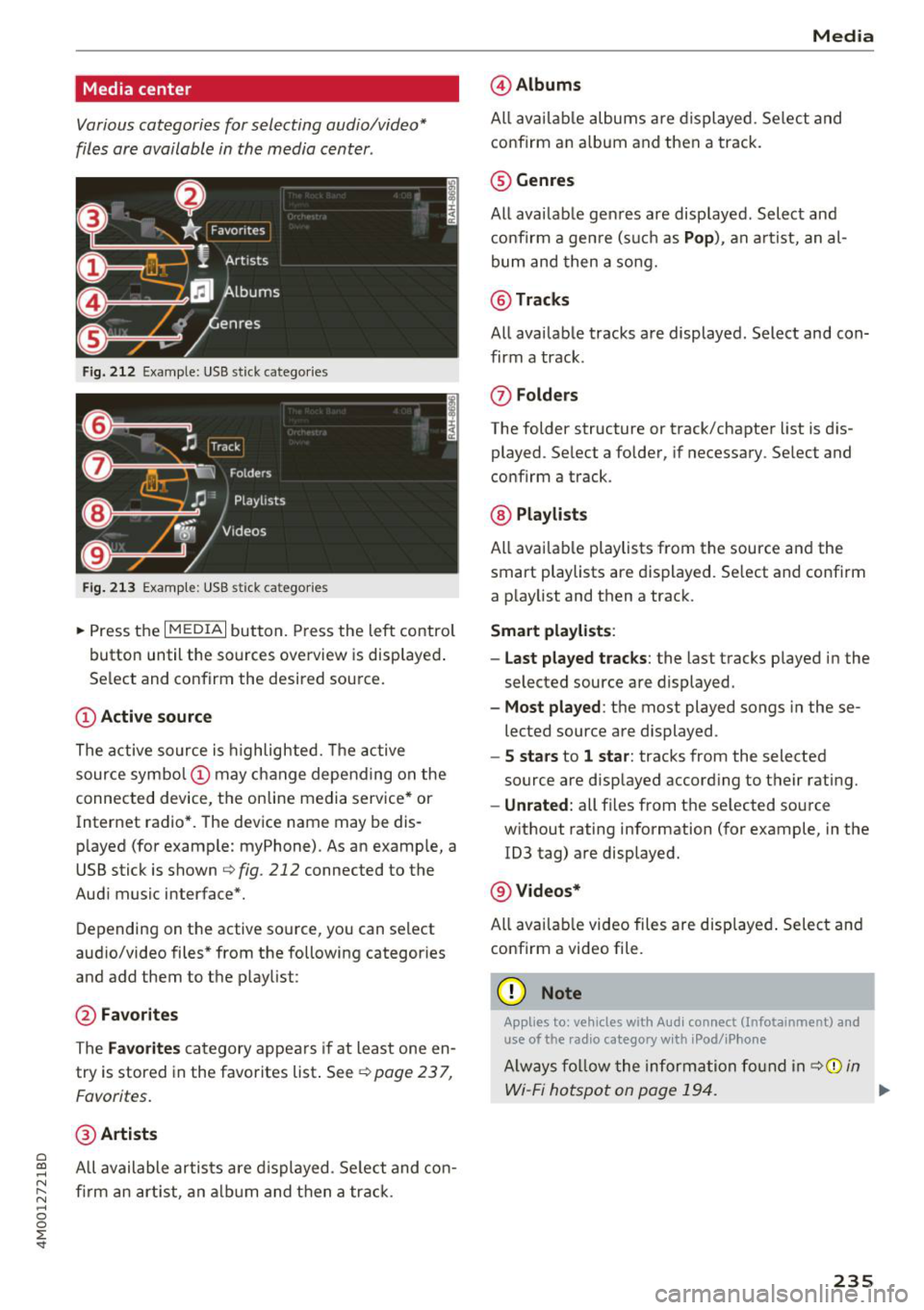
Fig. 212 Example: USB stick catego ries
Fig . 213 Examp le: USB stick categories
~ Press the I MEDIAi button. Press the left control
button until the sources overview is displayed .
Se lect and confirm the desired source.
(!) Active source
The active source is highlighted. The active
source symbol @ may change depending on the
connected device, the online media service* or
Internet radio*. The device name may be dis
p layed (for example: myPhone). As an examp le, a
USB stick is shown
c:> fig . 212 connected to the
Audi music interface*.
Depending on the active source , you can select
audio/video files* from the following categor ies
and add them to the p laylist :
@Favorites
The Favorites category appears if at least one en
try is stored in the favorites list . See
¢ page 23 7,
Favorites.
@ Artists
~ All available artists a re displayed . Se lect and con-
N ~ firm an artist, an album and then a track.
~ 0
0
:E -
@ Albums
All available albums are displayed . Select and
confirm an album and then a track .
® Genres
All available genres are displayed . Select and
confirm a genre (s uch as
Pop), an artist, an al
bum and then a song.
@ Tracks
All available tracks are displayed . Select and con
firm a track .
(J) Folders
The folder structure or track/chapter list is dis
played . Select a folder, if necessary . Select and
confirm a track .
@ Playlists
All available playlists from the source and the
smart playlists are displayed. Se lect and confirm
a playlist and then a track.
Smart playlists :
- Last played tracks :
the last tracks played in the
selec ted source are displayed .
-Most played : the most played songs in these
lected source are displayed .
-5 stars to 1 star: tracks from the selected
source are displayed accord ing to their r ating.
- Unrated: all files from t he se lected source
w ithout rating information (for example, in the
1D3 tag) are displayed.
@ Videos*
All avai lable video files are displayed. Select and
confirm a video file.
(D Note
Applies to: vehicles with Aud i connect (Infotainment) and
use of the radio category w ith iPocl/iPhone
Always follow the information found in ¢(j) in
Wi-Fi hotspot on page 194. ..,_
235
Page 239 of 398
Playlist
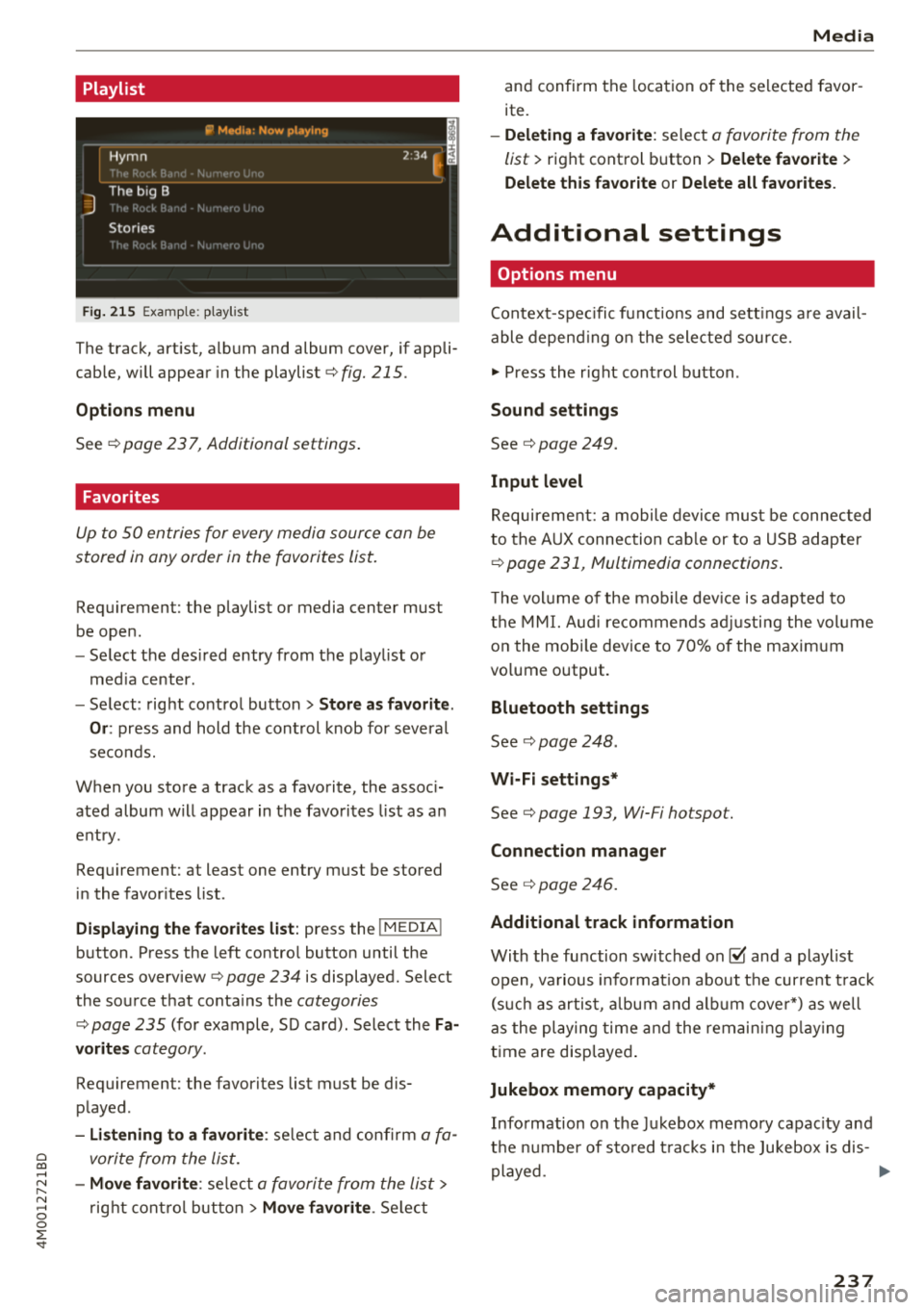
Fig. 215 Example: p lay list
The track, art ist, album and album cover, if appli
cable, will appear in the playlist ¢
fig. 215.
Options m enu
See ¢ page 23 7, Additional settings .
Favorites
Up to SO entries for every media source can be
stored in any order in the favorites list.
Requirement: the p laylist or media center must
be open .
-Select the des ired entry from the p lay list o r
med ia center.
- Select: right control button >
Store a s favorite.
Or :
press and hold the cont rol knob for several
seco nds.
When you store a track as a favorite, the assoc i
ated album w ill appear in the favorites list as an
entry .
Requirement: at least one entry must be stored
i n the favor ites list.
Displaying the favorites list : press the I MEDIA!
button. Press the left contro l button until the
sources overview ¢
page 234 is displayed. Select
the so urce that conta ins the
categories
¢ page 235 (for example, SD card) . Select the Fa
vorit es
category .
Requirement: the favorites list must be dis
played .
-Listening to a favorite : selec t and confi rm a fa -
~ vorite from the list.
......
~ -Move favorite : selec t a favori te from the lis t>
8 rig ht cont ro l but ton > Move favorite . Se lect
0 ::r -
and confirm the loca tion of the selected favor
ite.
- Deleting a f avorite : select a favorite from the
list>
right control b utton> Delete favorite >
Delete this favorite or Delete all favorites .
Additional settings
Options menu
Context-specifi c fu nct ions and sett ings a re avail
able depen ding o n the sele cte d source.
"" Press the r ight cont rol button .
Sound settings
See¢ page 249.
Input level
Requirement: a mobile device mus t be connec ted
to the A UX connec tion cab le or to a USB adapter
¢ page 231, Multimedia connections.
T he vol ume of the mob ile dev ice is adapted to
t h e M MI. Aud i recom mend s ad ju sti ng the vol ume
o n the mob ile dev ice to 70% of the maxim um
vo lume output.
Bluetooth settings
See ¢ page 248 .
Wi-Fi settings*
See¢ page 193, Wi-Fi hotspot.
Connection manager
See¢ page 246.
Additional track information
With the fu nction switched on@' and a playlist
open , va rious in format ion about t he cur re nt t rack
(s uch as artis t, a lbum and a lb um c over*) as well
as the playing time an d the remain ing p laying
t ime are disp laye d.
Jukebox memory capacity*
Info rmation on the Jukebox memo ry capac ity and
t h e nu mbe r of sto red t racks i n the Jukebox is dis-
played . ..,.
237
Page 242 of 398
Media
Supported media and file formats
Overview
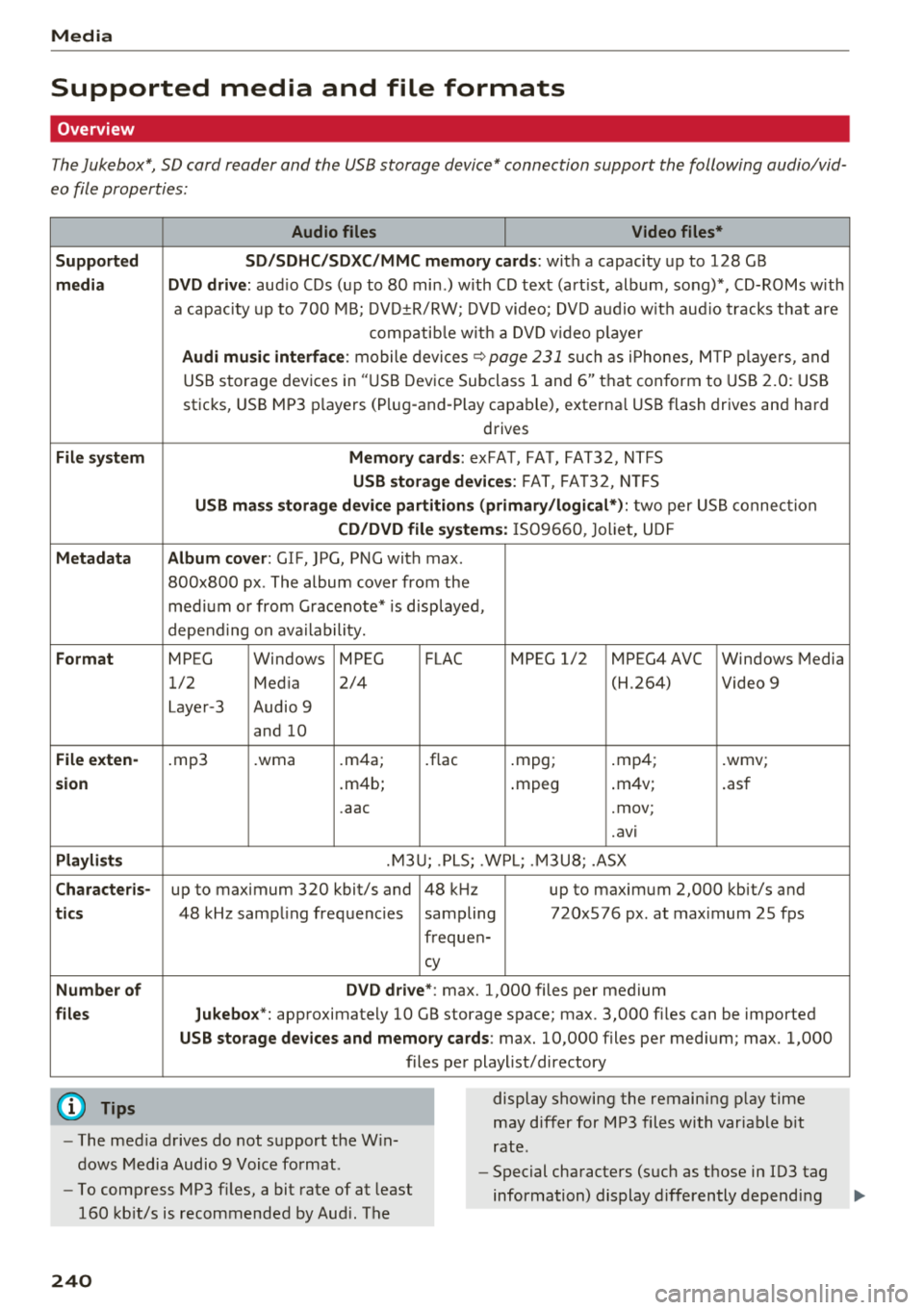
The Jukebox*, SD card reader and the USB storage device* connection support the following audio/vid
eo file properties:
Audio files Video files*
Supp orted SD/SDHC/SDXC/ MMC memo ry ca rds:
with a capacity up to 128 GB
medi a DVD d rive: aud io CDs (up to 80 min.) with CD text (art ist, album, song)*, CD-ROMs with
a capacity up to 700 MB; DVD±R/RW; DVD video; DVD audio w ith aud io tracks that are
compatib le w ith a DVD v ideo p laye r
Audi m usic interface: mobile devices~ page 231 such as i Phones, MTP p layers, and
USB storage devices in "USB Device Subclass 1 and 6" that conform to USB 2 .0: USB
sticks, USB MP3 p layers (Plug-and-P lay capable), external USB flash drives and hard
drives
Fil e syst em Mem ory c ards : exFAT, FAT, FAT32, NTFS
USB sto rage devices: FAT, FA T32, N TFS
U SB m ass sto rage device partiti ons ( prim ary/ lo gic al*): two per USB connection
CD /D V D file systems: IS09660, Joliet, UDF
M etada ta Album cover: GIF, ]PG, PNG with max.
800x800 px . The album cover from the
med ium or from Gracenote* is disp layed,
depend ing on ava ilability.
F orm at MPEG Windows MPEG FLAC MPEG 1/2 MPEG4 AVC Windows Media
1/2 Med ia 2/4 (H.264) Video 9
Layer-3 Audio 9 and 10
File e xten-.mp3 .wma .m4a; .flac .mpg; .mp4; .wmv;
s ion .m4b; .mpeg .
m4v;
.asf
.aac .mov;
.avi
Playlist s .M3U; .PLS; .WPL; .M3U8; .ASX
Cha rac teris-up to maximum 320 kbit/s and 48 kHz up to maximum 2,000 kbit/s and
tics 48 kHz sampling frequencies sampling 720x576 px. at max imum 25 fps
frequen-
cy
Numb er of DVD d riv e *: max. 1,000 files per medium
files Jukebox*: approximately 10 GB storage space; max. 3,000 fil es can be imported
USB st orage d evices a nd mem ory cards : max. 10,000 files per medium; max. 1,000
files pe r playlist/directory
@ Tips
- The med ia drives do not support the W in
dows Media Audio 9 Voice format. display showing
the remaining p lay time
may differ for MP3 files with variable b it
rate.
- Special characters (such as those in ID3 tag
information) display differently depending
-
To compress MP3 files, a bit rate of at least
160 kbit/s is recommended by Aud i. The
240
Page 243 of 398
Cl a:, ...... N
" N ...... 0
0
::r '
on the system lan guage and canno t always
b e g uaranteed . -
Some M TP p laye r fu nct ions are not s upport
ed , su ch as rating music tracks and video
playback.
- The m anufactur er of the stor age device c an
p rovide info rmation about its "USB Device
Subclass" .
CD drive
Applies to: veh icles wit h a CD drive
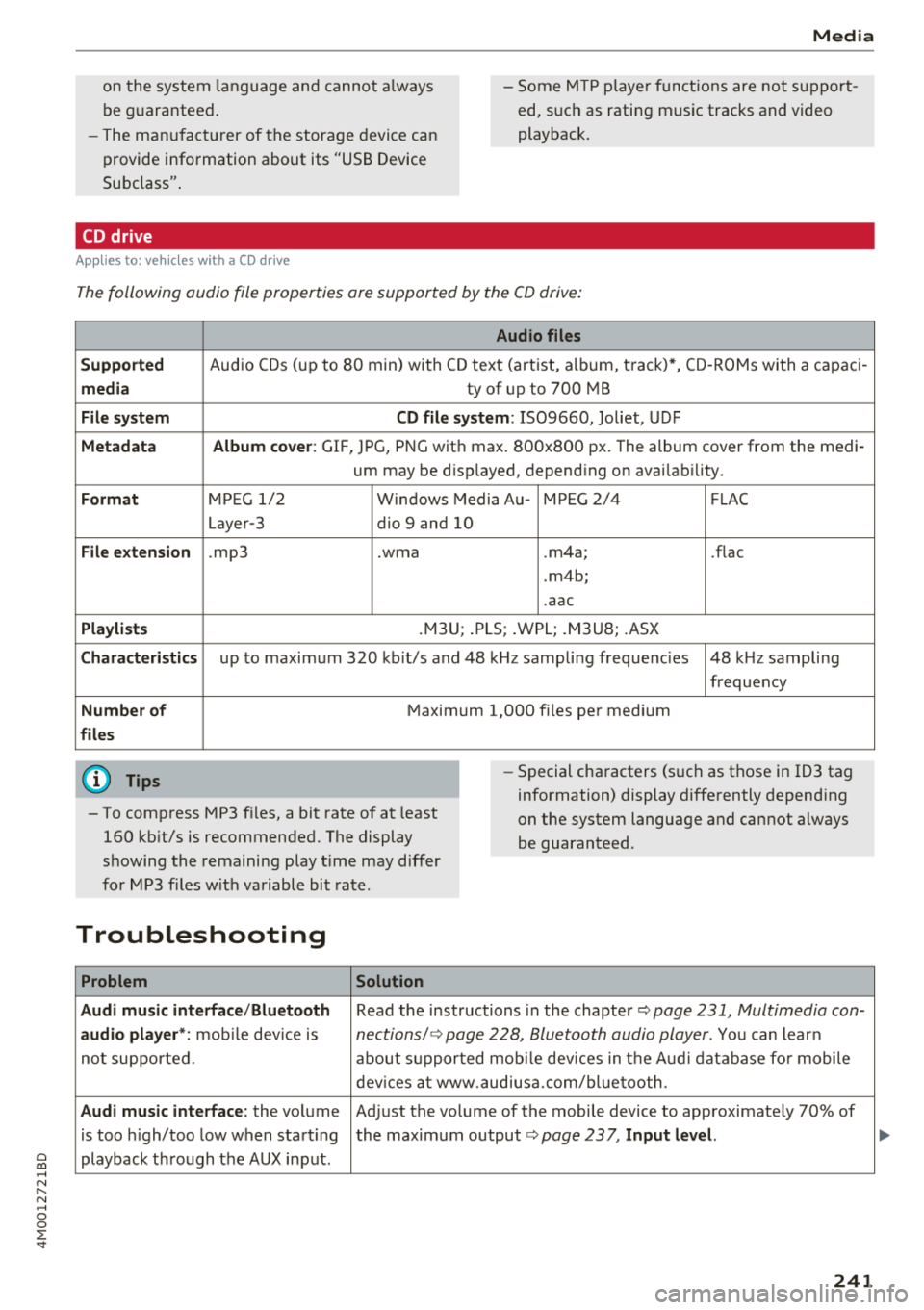
The following audio file properties are supported by the CD drive:
Audio files
Supported
Audio CDs (up to 8 0 min) with CD text (artist, a lb um, t rack)*, CD -ROMs with a c apac i-
media ty of up to 700 MB
File system CD file system : IS09660, Joliet, UDF
Metadata Album cover : GIF, JPG, PNG wit h max. 800x800 px. The album cover from the medi -
um may be d isp layed, depend ing on avai lab ility.
Format M PE G 1/ 2 Windows Media A u- M PEG 2/4 FLAC
Layer -3 dio 9 and 10
File e xtension .mp3 .wma .m4a; .flac
. m4b ;
. aac
Playlists .M3U; .PLS; .WPL; . M3U8; .ASX
Characteri stics up to maximum 320 kb it/s and 48 k Hz sampli ng freque ncies 48 k Hz sampling
frequency
Number of M aximum 1,000 files pe r medi um
files
(D Tips
- To comp ress MP3 f iles, a bit rate of at least
160 kb it/s is recommended. The display
s howing the remaining p lay t ime may d iffer
fo r MP3 f iles w it h variable bit rate. -
Special cha racters (s uch as t hose in ID3 tag
information) display diffe rently depend ing
on the system language and cannot always
be guaranteed .
Troubleshooting
Problem Solution
Audi music interface /Bluetooth
Read the instructions in the chapter~ page 231, Multimedia con-
audio player *: mobile dev ice is nectionsl ~ page 228, Bluetooth audio player . You can lear n
not supported. about s upported mob ile dev ices in the A udi database fo r mobile
dev ices at www.au diusa.com/blue toot h.
Audi music interface : the volume Adjust the vo lume of the mobile device to approximate ly 70% of
is too high/too low when star ting the maximum output
¢ page 237, Input level.
playback t hrough the AUX in put.
241
...
Page 244 of 398
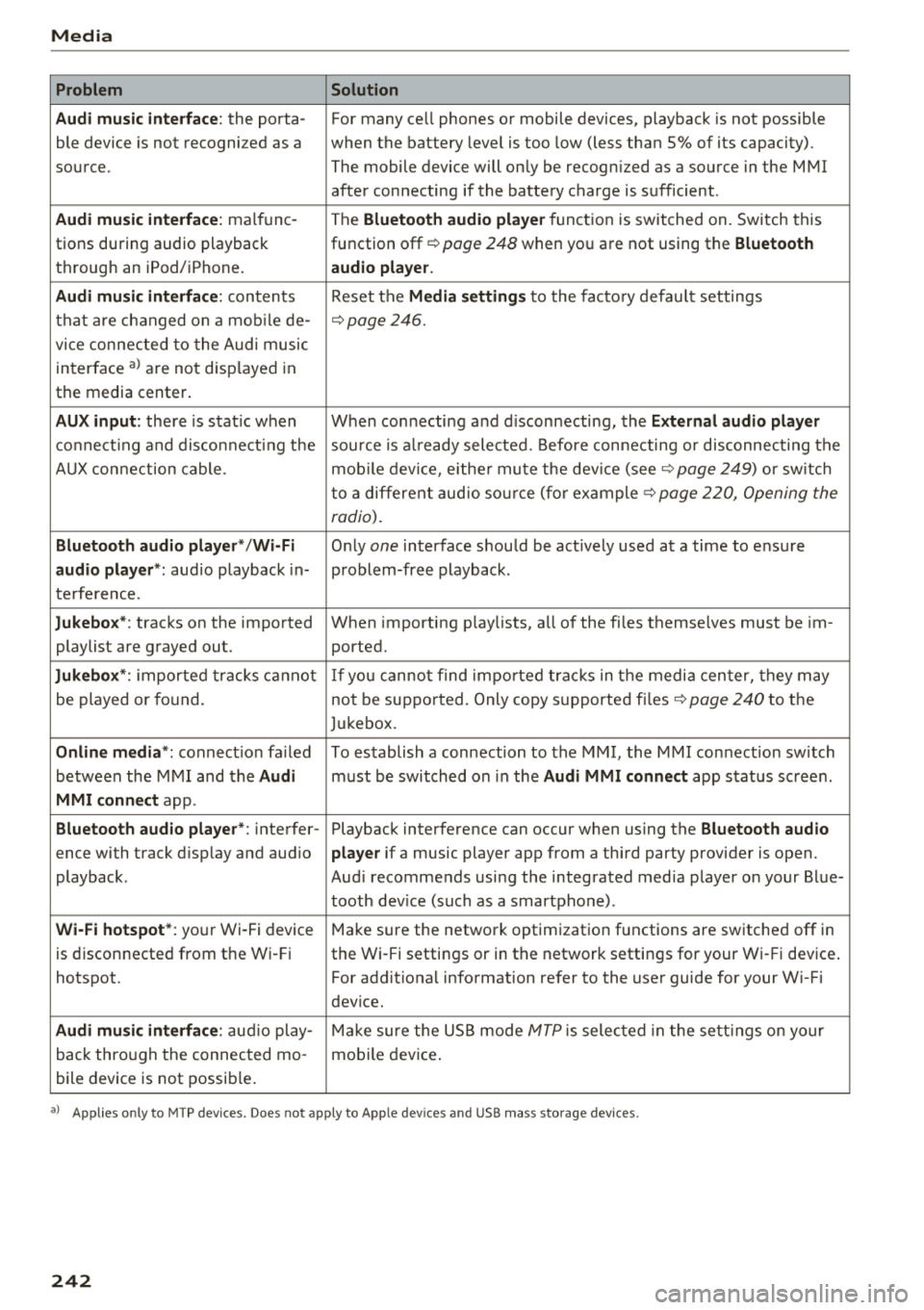
Media
Problem Solution
Audi music interface :
the porta-For many ce ll phones or mobile devices, playback is not possible
ble device is not recogni zed as a when the battery level is too low (less than 5% of its capacity).
source. The mobile device will only be recogn ized as a source in the MMI
after connecting if the battery charge is sufficient .
Audi music interface: malfunc-
The Bluetooth audio player function is switched on. Switch this
tions during audio playback function off¢
page 248 when you are not using the Bluetooth
through an iPod/ iPhone. audio player.
Audi music interface:
contents Reset the Media settings to the factory default settings
that are changed on a mobile de -
¢page 246.
vice connected to the Audi music
interface al are not disp layed in
the media center .
AUX input: there is stat ic when When connecting a nd disconnecting, the External audio player
connecting and disconnect ing the source is already selected. Before connecting or disconnecting the
AUX connection cable. mobile device, either mute the device (see ¢
page 249) or sw itch
to a different audio source (for example ¢
page 220, Opening the
radio).
Bluetooth audio player* /Wi-Fi
Only one interface should be act ively used at a time to ensure
audio player*: audio playback in- problem-free playback.
terference.
Jukebox* : tracks on the imported When importing playlists, a ll of the files themselves must be im-
playlist are grayed out. ported.
Jukebox*: imported tracks cannot If you cannot find imported tracks in the media center, they may
be played or found. not be supported. Only copy supported files"*
page 240 to the
Jukebox.
Online media *: connection fa iled To establish a connection to the MMI, the MMI connection switch
between the MMI and the
Audi must be switched on in the Audi MMI connect app status sc ree n.
MMI connect app.
Bluetooth audio player *: interfer- Playback interference can occur when using the Bluetooth audio
ence with track d isp lay and aud io player if a music player app from a third party provider is open.
playback . Audi recommends using the integrated media player on your Blue-
tooth device (such as a smartphone) .
Wi-Fi hotspot*: your Wi-Fi device
Make sure the network optimization functions are switched off in
is disconnected from the Wi -Fi the Wi-Fi settings or in the network settings for your Wi -Fi device .
hotspot . For additional information refer to the user guide for your Wi-Fi
dev ice.
Audi music interface: audio play-Make sure the USB mode MTP is selected in the settings on your
back through the connected mo- mobile device.
bile device is not possible.
al Applie s onl y to MTP dev ice s. Does not apply to App le dev ices and USB mass s torage dev ice s.
242
Page 245 of 398
Cl a:, ...... N
" N ...... 0
0
::r '
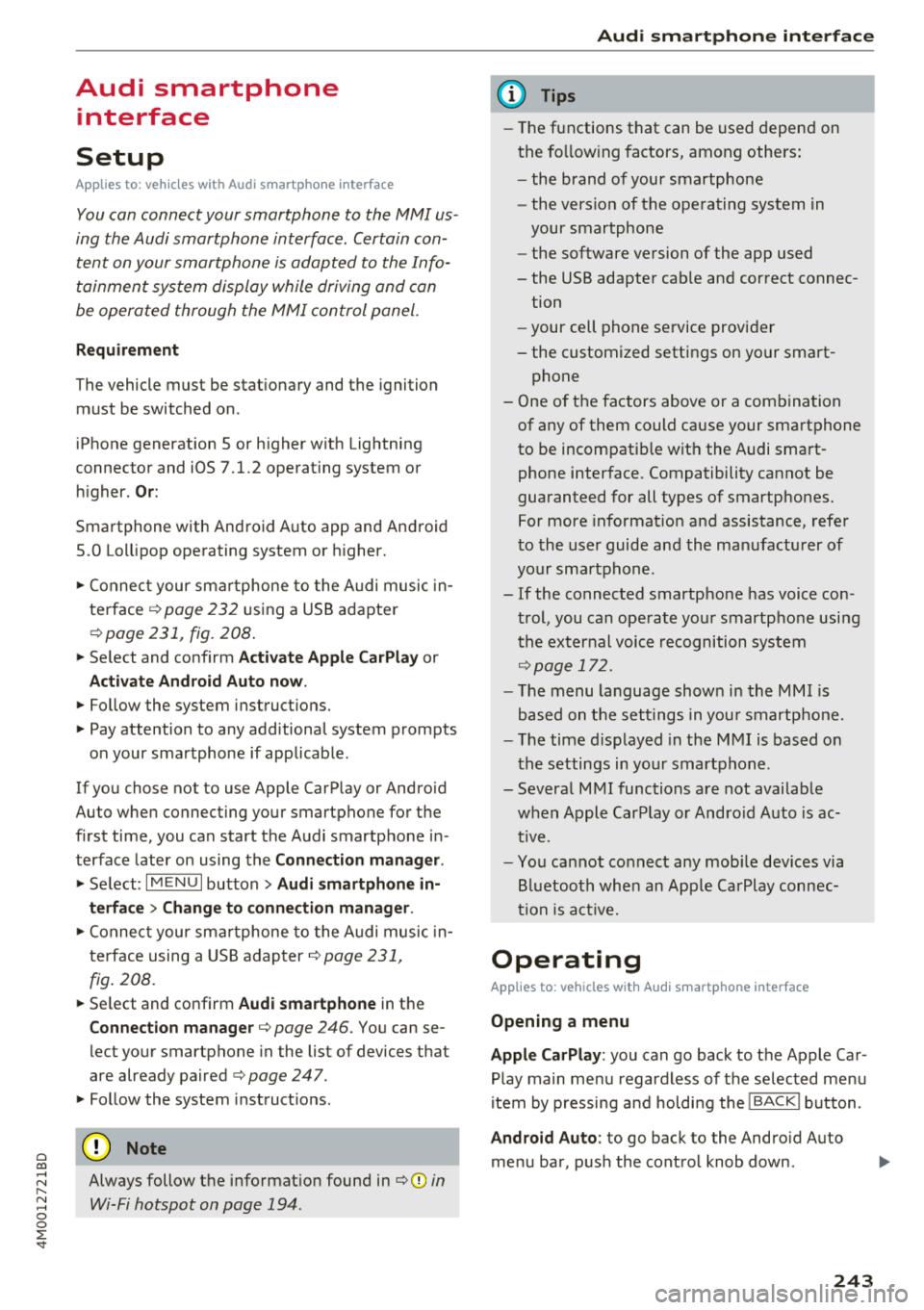
Setup
Applies to: vehicles with Audi smartphone interface
You con connect your smortphone to the MMI us
ing the Audi smortphon e int erfac e. Certain con
t e n t on you r sm ortphone is ado pted to th e Info
tainme nt system d is p lay while driving and con
be operated through the MMI control panel .
Requirement
The vehicle must be stat ionary and the ignition
must be switched on .
iPhone generation 5 or h igher w ith Lightning
connector and iOS 7 .1.2 operating system or h igher.
Or:
Smartphone with Android Auto app and Android
5 .0 Loll ipop operating system or higher.
.,. Connec t your sma rtphone to the Audi music in
terface ¢
page 232 using a USB adapte r
¢page 231, fig. 208 .
.. Se lect and confirm A ctivate Apple CarPlay or
Acti vate And roid Auto now .
.. Follow the system instruct ions.
.. Pay attention to any additiona l system prompts
on your smartphone if applicable .
If yo u chose not to use Apple CarP lay or Android
Auto when connecting your smartphone for the
first time, you can start the Audi smartphone in
terface later on using the
Connection manager.
.,. Se lect : I MENU I button > Audi smartphone in-
terfa ce
> Change to connection manager .
.. Connec t your sma rtphone to the A udi music in
terface using a USB ad apter ¢
page 231,
fig . 208.
.. Se lect and confirm Audi smartphone in t he
Connection manager¢ page 246. You can se
l ect your smartphone in the list of devices that
are already paired¢
page 247.
.,. Follow the system instruct ions .
@ Note
Always follow the i nformat ion found in¢@) in
Wi-Fi hotspot on page 194 .
Audi smartph one interfac e
(D Tips
-The functions that can be used depen d on
the fo llow ing factors, among others:
- the brand of your smartphone
- the vers io n of the ope rating system in
your smartphone
- the software ve rsion of the app used
- the USB adapter cab le and correct connec-
tion
- your cell phone se rvice provide r
- the customized settings on yo ur sma rt -
phone
- One of the factors above o r a com bina tion
of any of them could cause your sma rtphone
to be incompatib le wit h the Audi smart
phone inter face. Compatibility cannot be
guaranteed for all types of smartp hones.
For more informat io n and assistance, refer
t o the user guide and the man ufactu rer of
yo ur sma rtphone .
- If the connected smartphone has voice con
trol, you can ope rate yo ur smartp hon e usi ng
the ex ter nal voic e recognition system
¢page 172.
- The menu language show n in t he MMI is
based on t he sett ings in you r smartp ho ne .
- Th e time d is p layed in the M MI is based o n
the settings in yo ur sma rtphone .
- Severa l M MI functions a re not avai lab le
when Apple Car Play o r Andro id A uto is ac
t ive.
- Yo u ca nnot co nnect any mob ile dev ices via
B lu etooth whe n an App le CarPlay connec
tion is a ctive .
Operating
Applies to: vehicles with Audi smartphone interface
Opening a menu
Apple CarPlay :
you can go back to t he Apple Car
Play main me nu regardless of the se lected me nu
i tem by p ressing and holdi ng the
I B ACKI button .
Android Auto : to go back to the Andro id Auto
me nu bar, push the control knob down .
243
Page 246 of 398
Audi smartphone interface
Opening a menu item
Select and confirm a menu item using the MMI
control panel.
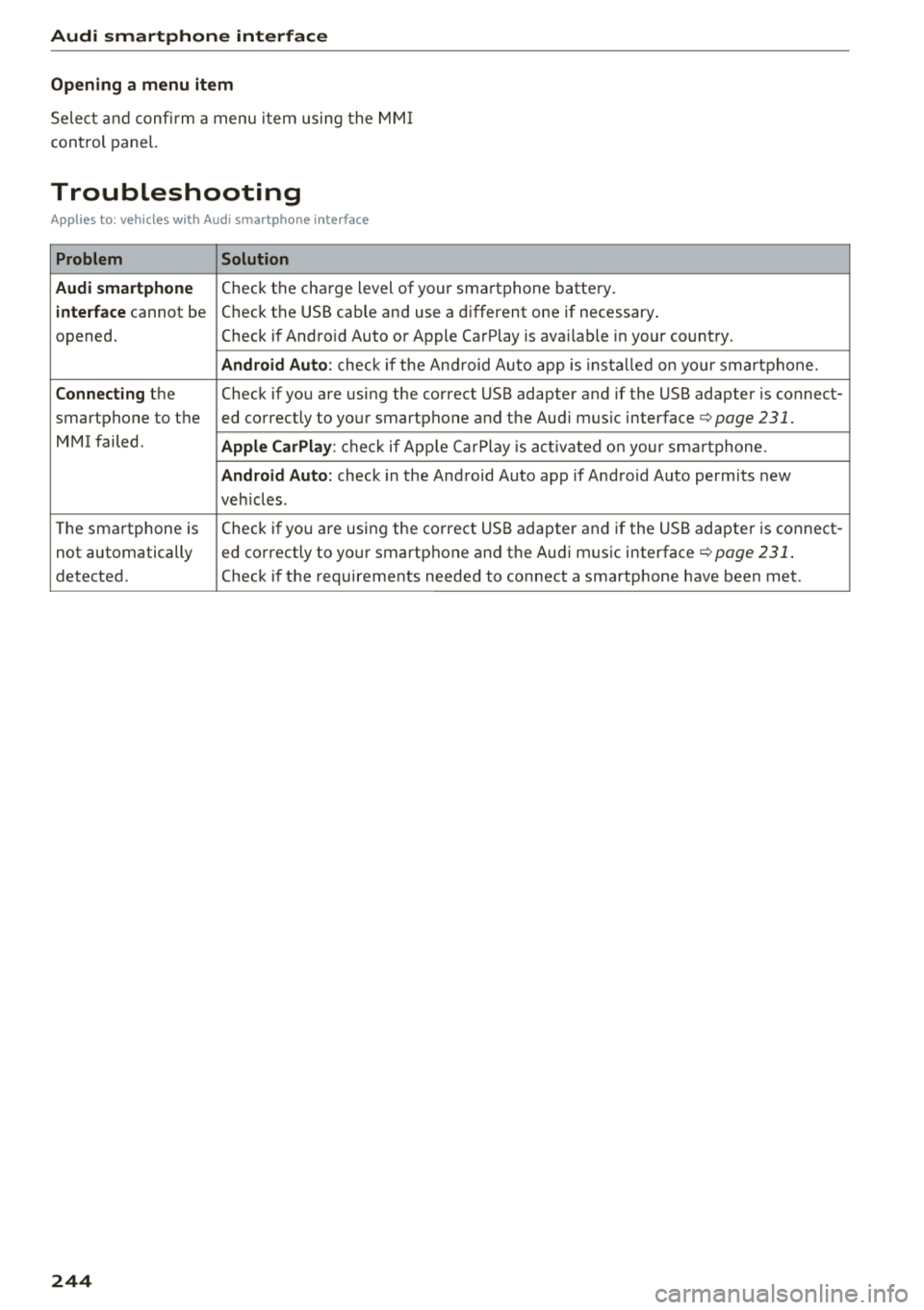
Troubleshooting
Applies to: vehicles with Audi smartphone interface
Problem Solution
Audi smartphone
Check the charge level of your smartphone battery.
interface cannot be Check the USB cable and use a different one if necessary
.
opened. Check if Android Auto or Apple CarPlay is available in your country.
Android Auto : check if the Android Auto app is installed on you r smartphone .
Connecting the Check if you are using the correct USB adapter and if the USB adapter is connect-
smartphone to the ed correctly to your smartphone and the Aud i mus ic interface ¢
page 231.
MMI failed . Apple CarPlay: check if App le CarPlay is activated on your sma rtphone .
Android Auto: check in the And raid Auto app if Android Auto permits new
veh icles .
T he smartphone is Check if you are using the correct USB adapter and
if the USB adapter is connect -
not automatically ed correctly to your smartphone and the Audi music
interface¢
page 231.
detected. Check if the requirements needed to connect a smartphone have been met.
244
Page 249 of 398
Cl a:, .... N
" N .... 0
0
::r '
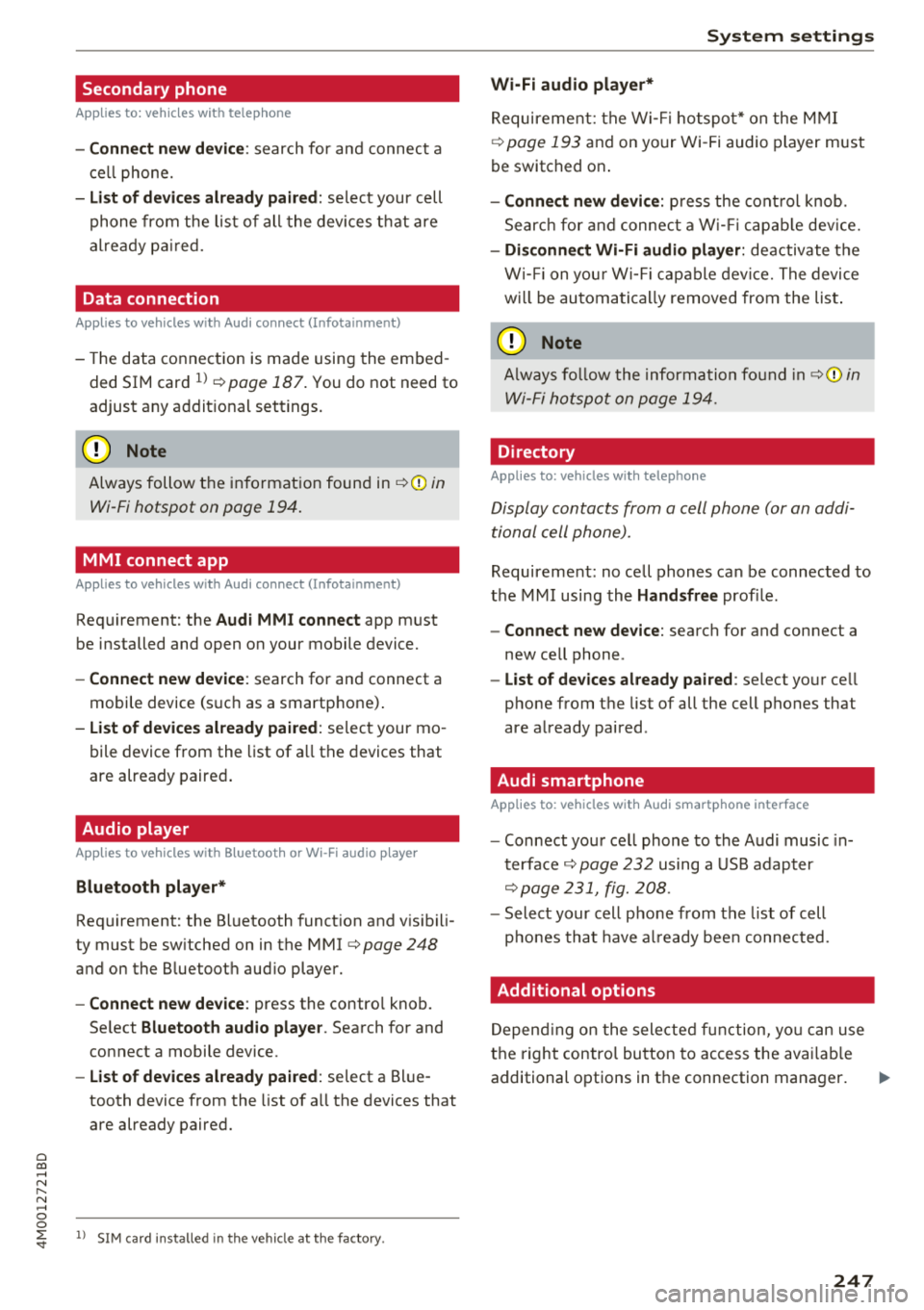
Applies to: vehicles with telephone
-Connect new device : search for and connec t a
c e ll phone.
- List of devices already paired : selec t your cell
p hone fro m the lis t of all the devices t hat are
al re ad y p aired.
Data connection
Applies to vehicles with Audi connect (Infotainment)
- T he data conne ct ion is made using the em bed
ded SIM car d
ll i=>page 187. You do not need to
adjust a ny a ddit io n al sett ings.
{Ll) Note
Always follow t he inf ormat ion foun d in i=> @ in
W i-Fi hotspot on page 19 4.
MMI connect app
Applies to vehicles with Audi connect (Infotainment)
Requirement: the Audi MMI connect app m ust
be installed and open on your mobile device.
- Connect new device : search for and connect a
mobile device (s uch as a smartp hone) .
-List of devices already paired : selec t your mo
bile device from the list of a ll the devices that
are already paire d.
Audio player
Applies to vehicles with Bluetooth or Wi-Fi audio player
Bluetooth player*
Requirement: the Bluetooth funct ion and v is ibili
ty must be sw itched on in the MMI
i=> page 248
and on the B luetoot h aud io player.
- Connect new device : press the control knob.
Se lect
Bluetooth audio player . Search fo r and
connect a mobile device .
-List of devices already paired : select a Bl ue
tooth device from the list of a ll the devices that
are already paire d.
ll SIM card inst alle d in t he v eh icle at the fa ctory.
System settings
Wi-Fi audio player*
R eq uiremen t: th e W i-Fi h otspo t* on the M MI
i=> page 193 an d on yo ur Wi -Fi audio playe r must
be switched o n.
-Connect new device: press the co ntrol knob.
Se arch for and conne ct a W i-Fi ca pabl e dev ice.
- Disconnect Wi-Fi audio player: de activate t he
W i-Fi on you r W i-Fi capa ble dev ice. The devi ce
w ill be au tom atic a lly removed from the lis t.
@ Note
Alway s follo w the inf ormat ion foun d in i=> @ in
W i-F i h ots pot on p age 194.
Directory
Applies to: vehicles with telephone
Display contacts from a cell phone (or an addi
tiona l cell phone).
Requirement: no ce ll phones can be connec ted to
the MMI using the
Handsfree pro file.
- Connect new device: search for and connect a
new ce ll phone .
-List of devices already paired : select yo ur cell
phone from t he list of all the cell phones that
are a lready paired .
Audi smartphone
Applies to: vehicles with Audi smartphone interface
-Connect yo ur cell phone to the A udi music in
t erface
i=> page 232 using a USB adap ter
i=> page 231, fig. 2 08 .
- Sel ect your cell p ho ne from t he list of cell
p ho nes th at h ave already bee n con nec ted.
Additional options
D epen ding on the sele cted fun ct ion, yo u ca n use
t h e righ t contro l bu tton to access the ava ila bl e
additional options in t he connection mana ger . .,.
247
Page 250 of 398
System settings
Delete Bluetooth device*
The se lecte d cell p ho ne/mo bile dev ice is dis con
nected from t he M MI and is removed from the
list of all devices that are alrea dy paire d.
Show Bluetooth profiles*
You can Connect or Disconnect the Handsfree ,
Me ssages *, Dire ctory /contacts
an d Bluetooth
audio player
pro files sep arately.
Bluetooth settings*
- Bluetooth :
select and confirm a set ting for the
B luetoot h connec tion v is ibility . Select
Visible
fo r th e MM I to be vis ib le to o ther dev ices. Se
l ec t
Invisible fo r th e M MI to not be v is ible t o
othe r devi ce s. H oweve r, it is still possib le to es
tab lish a Bl uetoo th con nection with pai red de
vices when the v is ibi lity is switched off. Se lect
Off to t urn visibi lity off . Then a B luetooth con
nect ion is not possible .
-Bluetooth audio player : when this function is
switc hed on~' the Bluetooth audio player is
available as a so urce in t he
Media menu .
-Bluetooth name : the MMI B luetooth name (for
example "AUDI MMI") is d isp layed and ca n be
c h anged.
Online settings*
- Data usage counter :
the amount of data pack
ets that a re sent a nd received throug h the MMI
is d isp layed. You can reset the data usage infor
mation to zero using the
Reset data counter
option.
- Network status : the mobile netwo rk p rovider
fo r data se rvice as well as the netwo rk status
are disp layed .
Wi-Fi settings*
See ¢ page 193, Wi -Fi hotspot.
Storing as a default telephone
Applies to: vehicles with telephone
Requir emen t: a cell phone must be connected to
t he MM I
¢page 174.
As soon as t he cell phone is i n range and the
B lue tooth func tion on the ce ll phone and in the
MM I is swi tched o n, this ce ll phone is g iven pr io r
ity ove r th e ot her Blue tooth devices and is c on-
248
necte d dir ectly to the M MI. The connec ted ce ll
p hone is d is pl ayed first in t he dev ice li st .
Network settings*
- Login :
you can chose an automatic log in to
your cell p ho ne servi ce pro vider 's ne twor k, or
you can ch oose a
manual log in from t he list of
avai la bl e netwo rks .
-Network selection : availabl e netwo rks in t he
presen t loca tion can be sele cte d unde r network
select io n. This f unction is on ly avai la bl e for the
Manual log in setting.
Apple CarPlay sound settings/ Android Auto
sound settings
Applies to: vehicles with Audi smartphone interface
See q page 249.
About Apple CarPlay/ About Android Auto
Applies to: vehicles with Audi smartphone interface
Here you w ill find l ega l informa tion regarding
t h e use o f A pple Car Play o r And ro id Aut o and in
fo rmat ion a bout device -s p eci fic d ata exch ange.
Delete Apple CarPlay device/Delete Android
Auto device
Applies to: vehicles with Audi smartphone interface
Require ment: yo ur cell phone must not be con
n ect ed to the Au di music interf ace wi th a USB
adap ter.
Se lec t:
Audi smartphone > a dev ice from t he lis t
> r igh t con trol b utto n.
To remove your cell p ho ne from the list, se lect
and co nfirm
Delete Apple CarPlay device or De
lete Android Auto device .
System update
"'Select : !ME NUI bu tton> Settings > left control
bu tton >
System maintenance.
- System update :
slide the storage device with
t he update da ta into the a pprop ria te drive
¢ page 2 26 . Se lec t and conf irm the dr ive>
Start update . The length of the p rocess de
pe nds on the s ize of the upd ate.
- Reset driver installation: the selected media
dr iver p ackage is rese t to t he se ttings a t the
t im e of delivery .
Page 369 of 398
a co ...... N r--. N ...... 0
0
:E '
cockpit
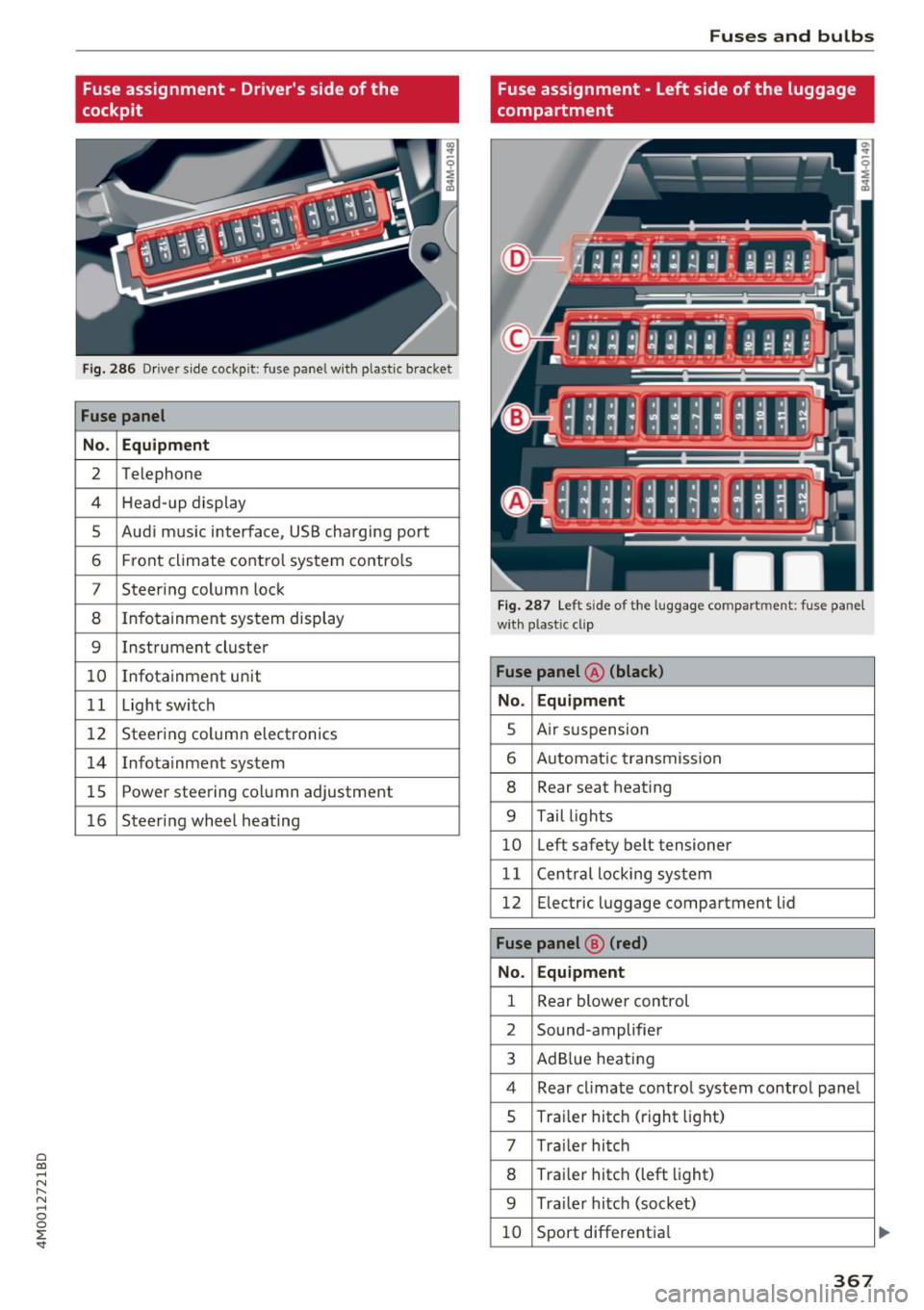
Fig . 28 6 Driver s ide cockp it : fuse panel wit h plastic bracket
Fuse panel
No . Equipment
2 Telephone
4 Head- up display
5 Aud i m usic interface, USB charging port
6 Front climate co ntro l system contro ls
7 Steer ing column lock
8 Infotainment sys tem display
9 Instrument cluste r
10 Infotainment unit
1 1 Light switch
12 Steerin g column electronics
14 Infotainmen t sys tem
1 5 Powe r steering co lumn adjustment
16 Steeri ng whee l heating
Fuses and bulbs
Fuse assignment - Left side of the luggage
compartment
F ig. 28 7 Le ft s ide of the l uggage co mpart ment : fuse pa nel
wi th plastic cl ip
Fuse panel @ (black)
No . Equipment
s Air s usp ension
6 A utomat ic t ransmiss io n
8 Rear seat heat ing
9 T ail ligh ts
10 Left safety belt tensioner
11 C en tral locki ng sys tem
12 Electric luggage compartment lid
Fuse panel @ (red)
No. Equipment
1 Rear blower control
2 Sound -amplifier
3 Ad Blue heat ing
4 Rear cl imate co ntro l system contro l pane l
s Traile r hitc h (right lig ht)
7 Tra ile r hi tc h
8 Tra ile r hitc h (left light)
9 Tra ile r hitc h (soc ket)
10 Sport different ia l
367
...