mirror AUDI Q7 2018 Owner´s Manual
[x] Cancel search | Manufacturer: AUDI, Model Year: 2018, Model line: Q7, Model: AUDI Q7 2018Pages: 398, PDF Size: 185.58 MB
Page 123 of 398

a co ...... N r--. N ...... 0
0
:E '
Applies to: ve hicles with Audi side assist
@
®
©
Fig . 11 4 Driving situatio ns
Fi g. 11 5 Rear of the vehicle: position of the sensors
Side assis t fun ctions at speeds above app roxi
mate ly 9 mph ( 15 km/h) .
® Vehicles that are approaching
N
0
0
:i; ..
"'
In certain cases, a vehicle will be classified as
cr itica l for a lane change even if it is still some
what far away. The faste r a ve hicle app roaches,
the soo ner the display in the exterio r mirror w ill
turn on.
@ Vehicles traveling with you
Ve hicles traveli ng w ith you are ind icated i n the
exte rior m irro r if they are classified as critical for
a lane change. All vehi cles detec ted by side assist
A ssi st a nce systems
are indicated by the time they enter your "blind
spot", at the latest.
© Vehicles you are passing
If you s low ly pass a vehi cle that s ide assist has
de tected (the difference in speed between t he
vehicle and you r vehicle is less than app roximate
ly 9 mph ( 15 km/h)), the disp lay in the exterior
mirror turns on as soon as the vehicle enters you r
blind spot.
T he disp lay w ill not turn on if you quickly pass a
vehicle that side assist has detected (the differ ence in speed is greater than approximate ly 9
mph (15 km/h)) .
Functional limitat ions
T he radar sensors are des igned to de tec t t he lef t
and right adjacent lanes when the road lanes are
the normal width . In some situations, the display
in the exte rior mirror may turn on even though
there is no veh icle located in the area that is criti
ca l for a lane change. For example :
- If the lanes are narrow or if you are dr iving on
the edge of your lane. If t his is the case, the
system may have detected a vehicle in another
lane that is
not adjacent to your current lane .
- If you are d riving through a curve . Side assist
may react to a vehicle that is in the same lane
or one lane over from the adjacent lane .
- If side assist reacts to other objects (such as
roads ide str uctures like guard rails).
- In poor weather conditions. The side assist
functions are limited.
Do not cover the radar sensors
c;, fig. 115 wit h
stickers, deposits, bicycle wheels or other ob
jects, because t his w ill impair the funct io n. Do
not use s ide ass ist when towing a trai ler. For in
format ion on cleaning, see
c;, page 351 .
A WARNING
--Always pay attention to traffic and to the
area around your vehicle. S ide assist cannot
replace a driver's atte ntion. The driver alone
i s always re spon sible for lane changes and
-
sim ila r dr iv ing mane uve rs. ~
121
Page 124 of 398

Ass is tanc e system s
-In some situations, the system may not
function or its funct ion may be limited. For
example:
- I f vehicles a re approac hing o r be ing left
beh ind very quickly. The display may not
turn on in time .
- I n poor weather conditions s uch as heavy
rain, s now o r heavy mis t.
- On very wide lanes, in tight curves, o r if
there is a rise in the road s urface. Vehicles
in the adjacent lane may not be detec ted
because they are outside of the sensor
range.
(Ud) Note
The se nso rs can be displaced by impacts o r
damage to the bumper, whee l housing and
underbody. This can impair the system . Have
an authorized A udi dealer or authorized A udi
Serv ice Facility check their function.
(D Tips
- If the window g lass in the driver's door or
front passenger's door has been tinted, the
display in the exterior mirror may be incor
rect.
- For an explanation on conformity with t he
FCC regulations in the United States and the
Industry Canada regu lations, see
c:> page380.
Switching on/off
Applies to: ve hicles w ith Audi side assist
The system can be switched on/off in the Info
tainment system.
.. Se lect in the Infotainment system: IMENU I but
ton
> V ehicle > left contro l button > Driver a s·
sistance
> Audi side ass ist . O ff switches the
system off.
If the system is activated, the displays in the ex
ter ior mirrors will turn on briefly when the ign i
tion is sw itched on.
122
(D Tips
When yo u switch side assist on or off, the exit
warn ing system activates o r deact ivates
c:> page 123.
Setting the display brightness
App lies to : vehicles wit h Audi side ass ist
The display brightness can be adjusted in the In
fotainment system.
.. Select in the Infotainment system : IMENU! but
ton
> Vehicle > l eft control button > Dri ver as
sistance
> Audi side a ssist.
The disp lay br igh tness adjusts automatically to
the brightness of the surroundings, both in the
information and in the warning stage. I n very
dark or very bright surround ings, the automatic
adjustment will set the display to the minimum or max imum level. In such cases, you may notice
no change when ad justing the br ightness, or the
change may only be noticeable once the sur
r ound ings change.
Adjust the br ightness to a leve l where the display
i n the information stage will not disrupt your
v iew ahead. If you change the br ightness, the dis
play in the exterio r mirror w ill br iefly show the
br ightness leve l in t he i nfo rmat ion stage . The
br ightness of the warn ing st age is linked to the
brightness in the information stage and is adjust
ed a long with the information stage .
(D Tips
- The side assis t fu nct ions are no t active dur
ing the adjus tment process.
- Th e exit war ning indica to rs turn o n du ring
the adjustment process.
- Yo ur sett ings a re a utomat ic all y stored and
assigned to the remo te con trol key be ing
used .
Page 125 of 398
a co ...... N r--. N ...... 0
0
:E '
Applies to: ve hicles with exit warning system
Fig . 116 Example dis play
Fig. 117 Door: warning str ip
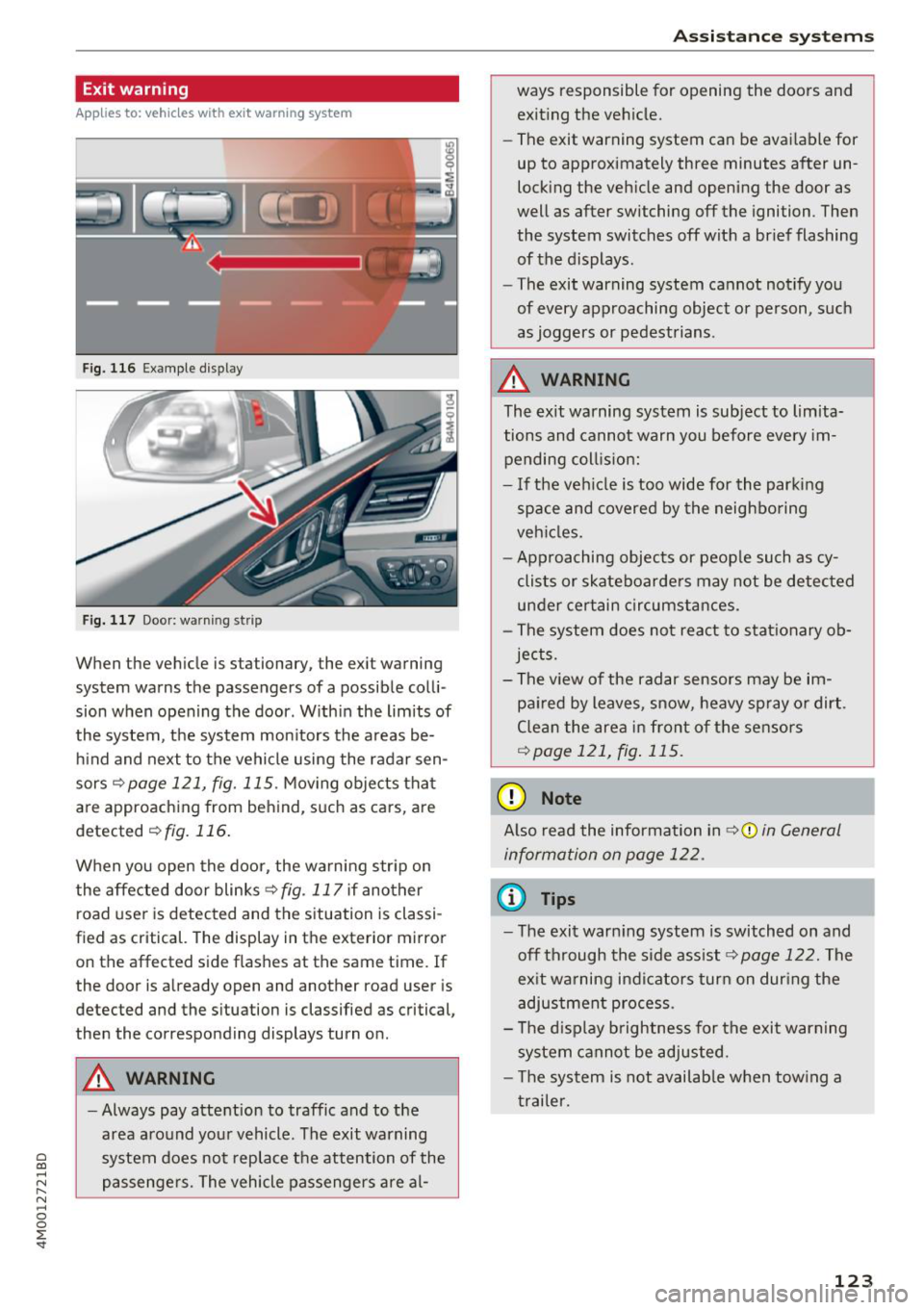
When the vehicle is stationary, the exit warning
system warns the passengers of a possible colli
sion when opening the door . Within the limits of
the system, the system monitors the areas be
hind and next to the vehicle using the radar sen
sors
c::¢> page 121, fig. 115 . Moving objects that
are approaching from behind, such as cars, are
detected
c::¢> fig. 116.
When you open the door, the warning str ip on
the affected door blinks ¢
fig. 117 if another
r oad user is detected and the situation is classi
f ied as critical. The display in the exterior mirror
on the affected side flashes at the same time . If
the door is already open and another road user is
detected and the situation is classified as critical,
then the corresponding displays turn on .
A WARNING
-Always pay attention to traffic and to the
area around your vehicle. The exit warning
system does not replace the attention of the
passengers. The vehicle passengers are al-
Assistance systems
ways responsible for opening the doors and
exiting the vehic le.
- The exit warning system can be available for
up to approximately three minutes after un
locking the vehicle and opening the door as
well as after switching off the ignition . Then
the system switches off with a brief flashing
of the displays.
- The exit warning system cannot notify you
of every approaching object or person, such
as joggers or pedestrians .
A WARNING
The exit warning system is subject to limita
tions and cannot warn you before every im
pending coll is ion:
- If the veh icle is too wide for the parking
space and covered by the neighboring
veh icles.
- Approaching objects or peop le such as cy
clists or skateboarders may not be detected
under certain circumstances.
- The system does not react to stat ionary ob
jects.
- The view of the radar sensors may be im
paired by leaves, snow, heavy spray or dirt .
Clean the area in front of the sensors
c::¢> page 121, fig. 115.
(D Note
Also read the information in c::¢,(D in General
information on page 122 .
(D Tips
-The exit warning system is switched on and
off through the side ass ist
c::¢> page 122. The
ex it warning indicators turn on dur ing the
adjustment process.
- The display brightness for the exit warning
system cannot be adjusted.
- T he system is not availab le when tow ing a
trailer.
-
123
Page 134 of 398
Parking syste m s
Parking systems
General information
A pplies to: ve hicles w ith a rea r parking sys te m /parking sys
tem p lus/rearv iew camera/peripheral cameras
Depending on your vehicle 's equipment , various
parking aids will help you when parking and ma
ne uvering.
The
rea r pa rki ng sys te m is an aud ible parking a id
that warns you of obstacles
behind the vehicle
¢ page 133.
The parki ng sys te m plu s assists you when park
ing by aud ibly and visually indicating objects de
tected
in front of and behind the veh icle
¢ page 133.
The rea rv iew ca mera shows the area behind the
veh icle in the Infotainment system d isplay . The
lines in the rearv iew camera image he lp you to
pa rk or maneuve r
¢page 134.
The pe riph eral ca meras give various views to
help you when parking or maneuvering
¢ page 137 . The parking system plus functions
are also available ¢
page 133.
_& WARNING
-Always look for t raff ic and check the area
around your vehicle by looking at it direct ly
as well. The parking system cannot replace
the driver's attention . The driver is always
responsib le when entering or leaving a park
ing space and during similar maneuvers.
- Please note that some surfaces, such as
clothing, are not detected by the system.
-
-Sensors and cameras have blind spots in
which people and objects cannot be detect
ed . Be especially caut ious of small children
and animals.
- Always keep your eyes on the vehicle 's sur
round ings, using the rearview mirror as
well.
- The sensors can be displaced by impacts or
damage to the radiator gr ille, bumper,
wheel housing and the underbody . The park
ing system may be impa ired as a result .
Have a n author ized Audi dealer or author-
132
ized Audi Service Facility check their func
tion .
@ Note
-Some objects are not detected or disp layed
by the system under certain circumstances:
- objects such as barrier chains, trailer draw
bars, vertical poles or fences
- objects above the sensors such as wall ex
tensions
- objects with certain surfaces or structures
such as cha in link fences or powder snow
- If you continue driving closer to a low ob
ject, it may disappear from the sensor range . Note that you will no longer be
warned about th is obstacle .
- Keep enough distance from the curb to re
duce the risk of damage to the rims .
(D Tips
-The system may provide a warning even
though there are no obstacles in the cover
age area in some situations, such as :
- certa in road s urfaces or whe n the re is tall
grass
- externa l ult rasonic sources such as from
cleaning vehicles
- in heavy rain, snow, or th ick vehicle ex
ha ust
- We recommend that you practice par king in
a traffic -free location o r parking lot to be
come familiar with the system . When doing
this, there shou ld be good light and weath
er conditions.
- You can change the vo lume of the signa ls
and the display ¢
page 140.
-Please refer to the instructions for towing a
trai ler located in
¢ page 141.
-What appea rs in the infotainment d isplay is
somewhat time -de layed.
- T he sensors m ust be kept clean and free of
snow and ice for the parking aid to operate .
Page 137 of 398
a co ...... N r--. N ...... 0
0
:E '
ver using the orientation lines .
General information
Applies to: vehicles with rearview camera
Fig. 132 Area covered (!) and area no t covered @ by the
r earview c amera.
AU D .L
Fig. 133 Luggage co mpar tment lid : lo ca ti on of the rear
view ca mera
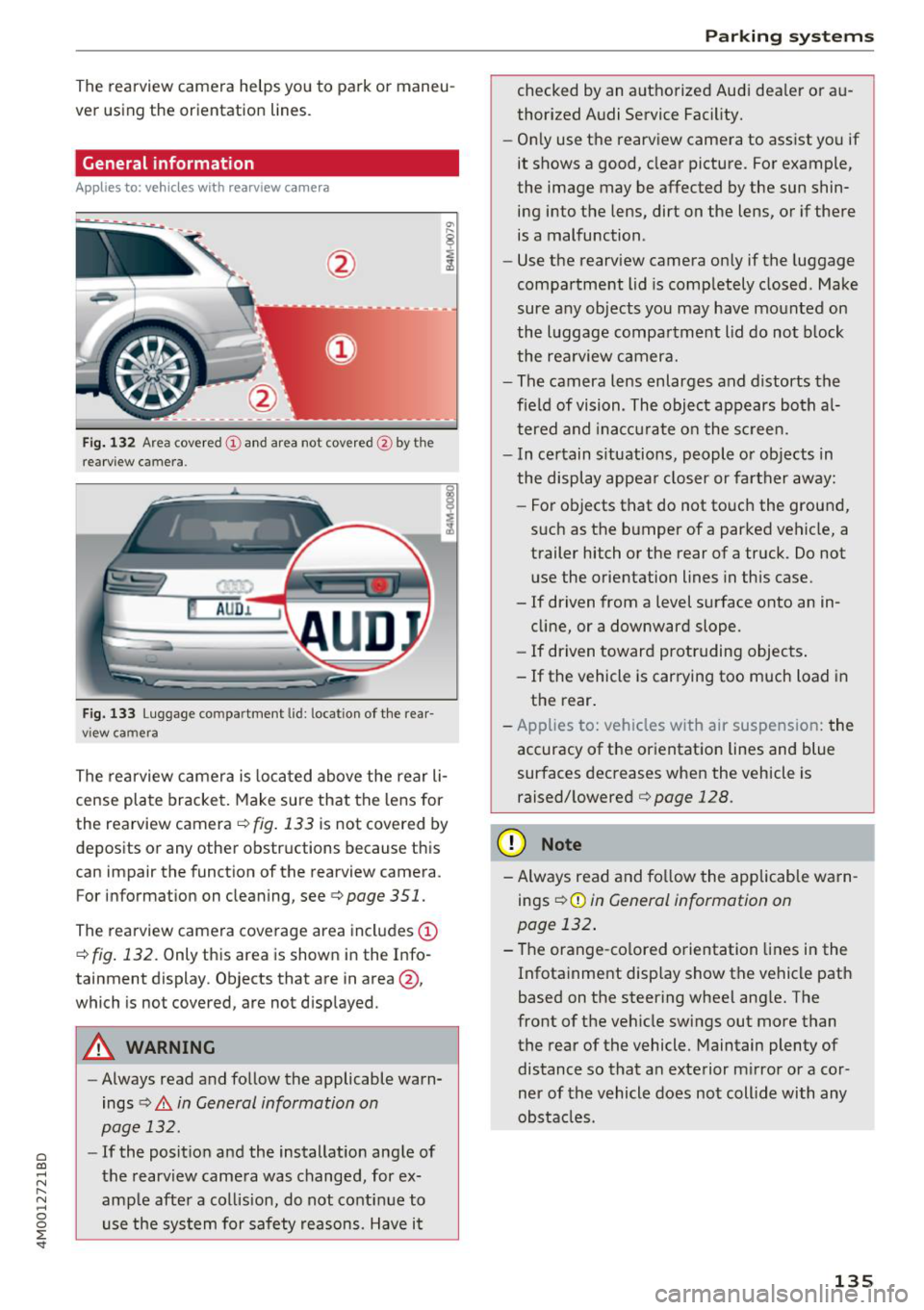
The rearview camera is located above the rear li
cense plate bracket. Make sure that the lens for
the rearview camera .=;,
fig. 133 is not covered by
deposits or any other obstructions because this
can impair the function of the rearview camera .
For information on cleaning , see .=;,
page 351.
The rearview camera coverage area includes (D
.=;, fig. 132 . Only this area is shown in the Info
ta inment display . Objects that are in area @,
which is no t covered, are not displayed .
A WARNING
- Always read and follow the applicable warn
ings
.=;, A in General information on
page 132.
- If the position and the installation angle of
the rearview camera was changed , for ex
ample after a collision, do not continue to use the system for safety reasons. Have it
Parking systems
checked by an authorized Audi dealer or au
thorized Audi Service Facility.
- Only use the rearview camera to assist you if
it shows a good, clear picture. For example,
the image may be affected by the sun shin ing into the lens, dirt on the lens, or if there
is a malfunction .
- Use the rearview camera only if the luggage
compartment lid is completely closed . Make
sure any objects you may have mounted on
the luggage compartment lid do not block
the rearview camera.
- The camera lens enlarges and distorts the
field of vision . The object appears both al
tered and inaccurate on the screen.
- In certain situations, people or objects in
the display appear closer or farther away:
- For objects that do not touch the ground,
such as the bumper of a parked vehicle, a trailer hitch or the rear of a truck . Do not
use the orientation lines in this case.
- If driven from a level surface onto an in
cline, or a downward slope.
- If driven toward protruding objects.
- If the vehicle is carrying too much load in the rear.
- Applies to: vehicles with air suspension: the
accuracy of the orientation lines and blue
surfaces decreases when the vehicle is raised/lowered
.=;, page 128.
(D Note
- Always read and follow the applicable warn
i ngs
i=;, (D in General information on
page 132.
- The orange-colored orientation lines in the
Infotainment display show the vehicle path
based on the steering wheel angle. The
front of the vehicle swings out more than
the rear of the vehicle. Maintain plenty of
distance so that an exterior mirror or a cor
ner of the vehicle does not collide with any
obstacles .
135
Page 139 of 398
a co ...... N r--. N ...... 0
0
:E '
Introduction
Applies to: vehicles with peripheral cameras
With this equipment, the park ing system p lus*
¢
page 133 is supplemented w ith various pe riph
e ral cameras. The four cameras give you the fol
l owing views: area around the vehicle, front cor
ner view and rear corner view, view in front of the
vehicle and behind the vehicle .
General information
Applies to: vehicles with peripheral cameras
Fig. 137 Location of periphera l cameras
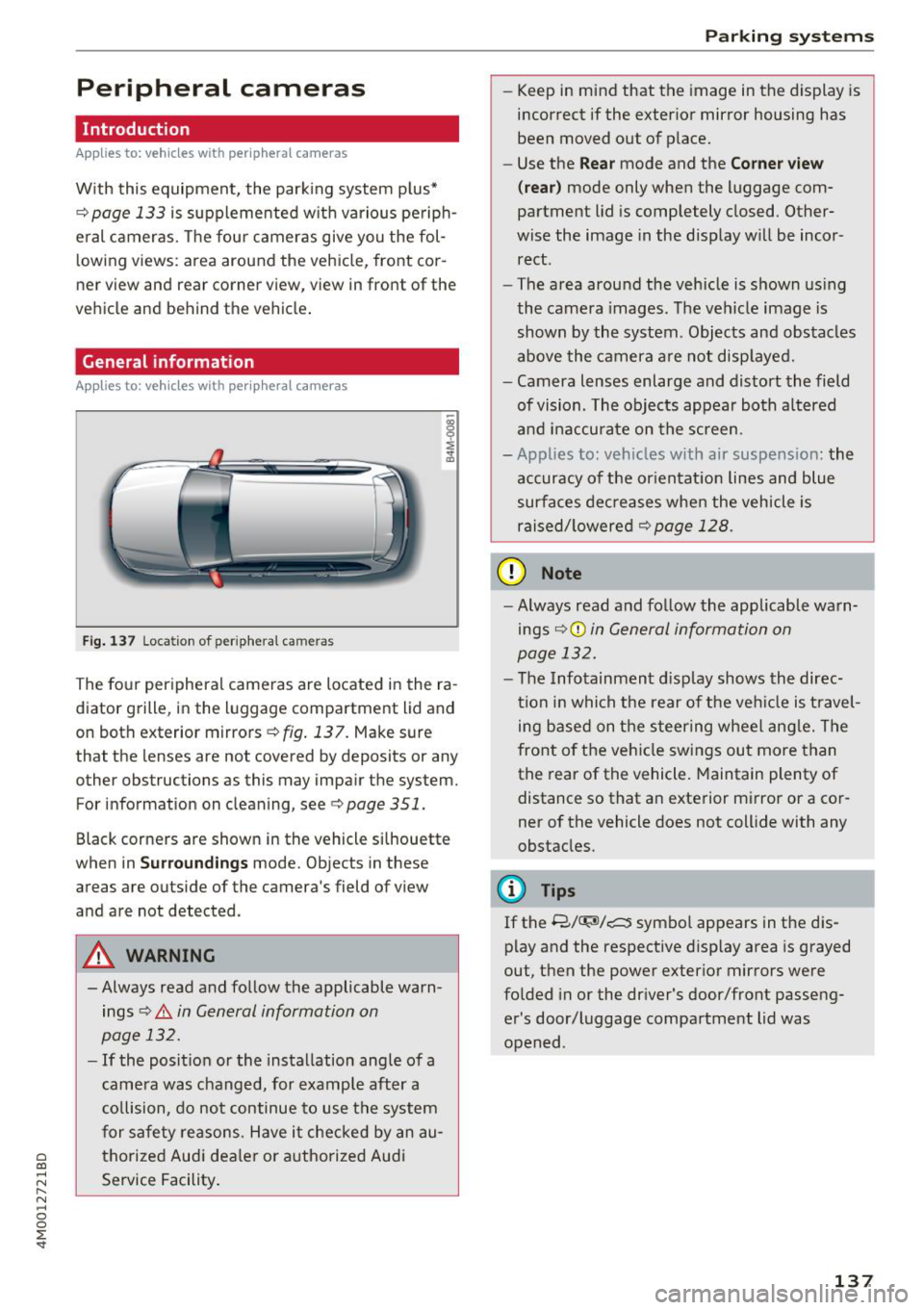
The four peripheral cameras are located in the ra
diator grille, in the luggage compartment lid and
on both exterior mirrors
¢ fig. 137. Make sure
that the lenses are not covered by deposits or any
other obstructions as this may impair the system. For information on cleaning, see¢
page 351.
Black corners are shown in the vehicle si lhouette
when in
S u rro und ing s mode. Objects in these
areas are outside of the camera's field of view
and are not detected.
A WARNING
-Always read and follow the applicable warn ings
¢.&. in General information on
page 132.
- If the position or the installation angle of a
came ra was changed, for example after a
co llision, do not continue to use the system
for safety reasons. Have it checked by an au
thorized Audi dea le r or authorized Audi
Service Facility .
Parking systems
- Keep in mind that the image in the display is
incorrect if the exterior mirror housing has
been moved out of p lace.
- Use the
Re ar mode and the Co rner view
(r ea r)
mode only when the luggage com
partment lid is completely closed. Other
wise the image in the display will be incor
rect.
- The area around the vehicle is shown using
the camera images. The vehicle image is
shown by the system . Objects and obstacles
above the camera a re not disp layed.
- Camera lenses enlarge and distort the field
of vision. The objects appear both a ltered
and ina ccurate on the screen.
- Applies to: vehicles with air suspension: the
accuracy of the or ientat ion lines and blue
surfaces dec reases whe n the veh icle is
raised/ lowered¢
page 128.
(D Note
- Always read and fo llow the applicable wa rn
ings ¢Ci)
in General information on
page 132.
- The Infotainment d isplay shows the direc
tion in which the rear of the veh icle is travel
ing based on the steering wheel ang le. The
front of the vehicle swings out more than
the rear of the vehicle. Maintain plenty of distance so that an exterior mirror or a cor
ner of the vehicle does not collide with any
obstacles.
(l) Tips
If the 8/~/c::; symbol appears in the dis
play and the respective disp lay area is grayed
out, then the power exterior mirrors were
fo lded in or the dr iver's door/front passeng
er's door/luggage compartment lid was
opened .
137
Page 254 of 398
Drivin g saf ety
Driving safety
Basics
Safe driving habits
Please remember -safety first!
The individua l safety features of your vehicle can
work together as a system to help protect you
and your passengers in a wide range of accidents.
These features cannot work as a system if they
are not always correctly adjusted and correctly
used .
This chapter contains important informat ion,
tips, instruct ions and warn ings that you need to
read and observe for your own safety, the safety
of you r passengers and others . We have summar
ized here w hat you need to know about safety
be lts, a irbags, child restra ints as well as child
safety. Yo ur safety is for us priority number 1. Al
ways observe the information and warnings in
this section -for your own safety as we ll as that
of your passengers.
The information in this section applies to all
model versions of your vehicle . Some of the fea
tures described in this sections may be standard
equipment on some models, or may be optional
equ ipment on others. If you are not sure, ask
your author ized Audi dealer.
A WARNING
- Always make sure that you follow the in
structions and heed the WARNINGS in th is
manual.
It is in your inte rest and in the in
te rest of your passengers .
-
-Always keep all of the Owner's L iterature
manuals in yo ur Audi when you lend o r sell
yo ur vehicle so that this import ant informa
t ion w ill alw ays be availab le to the dr iver
and passengers.
- Always keep the Owner 's Lite ra ture han dy
so that you can find it easi ly if yo u have
questions .
252
Important things to do before driving
Safety is everybody's job! Vehicle and occupant
safety always depends on the informed and care
ful driver.
For your safety and the safety of your passen
gers,
bef ore dri ving alw ays:
.. Make sure that a ll lights and signals are operat
ing correctly .
.. Make sure that the tire pressure is correct.
.. Make sure that all windows are clean and afford
good vis ibility to the outs ide .
.. Sec ure all luggage and othe r items ca refully
¢ page
257 .
.. Make sure tha t noth ing ca n interfere wi th the
peda ls .
.. Adjust front seat, head restraint and mirrors
correctly for your height.
.. Instruct passengers to adjust the head re
straints according to their he ight.
.. Make sure to use the right child restraint cor
rectly to protect children¢ page 291, Child
safety .
• Sit proper ly in yo ur seat a nd make sure t hat
your passenge rs do the same ¢ page 54, Front
seats .
.. Fasten your sa fety belt and wear it p roperly . Al
so instruct your passengers to fasten their safe
ty be lts properly ¢ page 261 .
What impairs driving safety?
Safe driving is directly related to the condition of
the vehicle, the driver as well as the driver's abili
ty to concentrate on the rood without being dis
tracted.
The driver is responsib le for the safety of the ve
hicle and a ll of its occupants. If your ability to
drive is impa ired, safety risks for everybody in the
vehicle increase and you a lso become a hazard to
everyone else on the road ¢
_&.. Therefore:
.. Do not let yourse lf be distracted by passenge rs
or by using a cellular telephone .
.. NEVER drive when your driving ability is im
paired (by med ications, alcohol, drugs, etc .) .
.. Observe all traffic laws, rules of the road and
speed lim its and plain common sense . .,.
Page 354 of 398
Care and cl eaning
wash operator to reduce the risk of acci
dents.
- To reduce the risk of cuts, protect yourself
from sharp metal components when was h
ing the underbody or the inside of the wheel
housings .
- After washing the vehicle, the braking effect may be delayed due to mo isture on the
brake rotors or ice in the winter . This in
creases the risk of an acc ident . The brakes
must be d ried first w it h a few careful b rake
applications.
@ Note
- If you wash the ve hicle in an automatic car
wash, you must fold the exterior m irrors in
to reduce the risk of damage to the mirrors .
P ower folding exte rior m irrors* must o nly
be fo lded in and out using the powe r folding
f u nct io n.
- To reduce t he risk of damage to the rims
and t ires , compare the width be tween the
whee ls on your ve hicl e w it h t he distance be
tween the g uide rai ls in the car wash .
- To reduce t he risk of damage, compare the
height and width o f you r vehicle with the heig
ht and w idth of the inside o f the car
was h.
- T o red uce the risk of pa in t damage, do not
was h the vehicle in direct sun light .
- T o red uce the risk of d amage to the s urf ace,
do not use insect removing sponges, k itchen
sponges or similar items .
- Matte finish painted vehicle components:
- To reduce the r isk of damage to the sur-
face, do not use polis hing agents or hard
wax .
- Never use protective wax. It can destroy
the matte finish effect .
- Do not place any stickers or magnet ic
signs on vehicle parts painted with matte
finish paint . The paint cou ld be damaged
when the stickers or magnets are re
moved .
@ For the sake of the environment
Only wash the ve hicle in facilities spec ia lly de
s igned for that pu rpose . This will reduce the
r isk of dirty wate r contaminated with o il from
ente ring the sewe r system.
Cleaning and care information
W hen clea ning and ca ring for ind ividua l vehicle
components, refer to the fo llowing tables . The
information contained there is simply recom
m endations. Fo r qu estions or for compon ents t
h at are not listed, cons ult an autho rized Aud i
dealer or authorized A udi Service Fac ility. Also
fo llow the information fo und inc:>.&. .
Ext erior cleaning
Component Situation Solution
Windshield wiper
Deposits soft cloth with glass cleane r, c:> page 51
blades
Headlights /
Deposits Soft sponge with
a m ild soap solution a)
tail light s
S ensors /
Deposits Sensors: soft cloth with solvent -free cleaning solut ion
camera lenses Camera lenses: soft cloth w it h alcohol-free cleaning solu-
tion
Snow/ic e Hand brush/solv ent-free de -icing spray
Wheels Road salt Water
Brake dust Acid-free special cleaning solution
352
Page 356 of 398
Care and cl eaning
Component Situation Solution
Tex tile s
Deposits adhering to Vacuum cleaner
art ifici al l eat her, the surface
A lca ntara Water -based deposits Absorbent cloth and mild soap
solutiona>
such as coffee, tea, blood, etc.
O il-based deposits Apply a m ild soap solution a), blot away the dissolved oil or
such as oil , make-up, dye, treat afterward with water, if necessary
etc.
Special deposits such Special stain remover, blot with absorbent material, treat
as ink, na il polish, la- afterward with mild soap solution, if necessary a)
tex paint, shoe pol-
ish, etc.
Natural leathe r Fresh stains Cotton cloth
with a mild soap solutiona >
Water-based deposits Fresh stairns : absorbent cloth
such as coffee, tea, dried stains: stain remover suitable for leather
blood, etc.
Oil -based deposits Fresh stairns : absorbent cloth and stain remover suitable
such as oil, make-up, for leather
etc. dried stains: oil cleaning spray
Special deposits such Spot remover suitab le for leather
as ink, nai l polish, la -
tex paint, shoe pol-
ish, etc.
Care Regula rly apply cond it ion ing cream that p rotects from
lig ht and penetrates into the material. Use specia lly-co l-
ored conditioning cream, if necessary .
Carbon part s Deposits clean the same way as plastic parts
al Mild soap solution: maximum two tablespoons of neutral soap in 1 quart (1 liter) of water
_& WARNING
The windsh ie ld may not be treated wi th wa
ter-repelling windshield coating agents. Un
favorable conditions such as wetness, dark
ness, or low sun can result in increased glare.
Wiper blade chatter is also possible.
@ Note
-Headlight s/tail light s
-Never clean headlights or tail lights with a
dry cloth or sponge.
- Do not use any cleaning product that con
tains alcohol, because they could cause
cracks to form .
-Wheel s
354
-
- Never use any paint polish or other abra
sive materials.
- Damage to the protect ive layer on the
rims such as stone chips or scratches must
be repaired immediately.
- Cam era lens es
- Neve r use wa rm or hot water to remove
snow or ice from the came ra lens . This
could cause the lens to crack .
- Neve r use ab rasive cleaning m aterials or
a lcohol to clean the camera lens . This
could cause scratches and cracks .
-Door wind ow s
- Remove snow and ice on windows and ex-
terior mirrors with a plast ic scraper. To
Page 357 of 398
Cl a:, ...... N
" N ...... 0
0
::r '
one direction and not back and forth.
- N ever remove snow or ice from door win
dows and mirrors using warm or hot water
because this could cause cracks to form .
- To avoid damage to the rear w indow de
fogger, do not apply any stickers on the
heating wires on the inside of the window .
-Deco rati ve parts /trim
- Never use chrome care or cleaning prod-
ucts.
- Paint
-To red uce the risk of scratches, the vehicle
must be free of dirt and dus t before pol
ishing or waxing .
- To preven t pa int damage, do not pol ish or
wax the ve hicle in direct sunlight.
- To red uce the risk of pa int damage, do not
polish away rust spots.
- Remove cosmetics and sunscreen immedi
a tely- these could damage the pa int.
- Displa ys/ instrument cluster
- Make sure that the instrument cluster is
switched off and has cooled off before
cleaning it.
- Displays, the instrument cluster and the
trim surrounding it must not be cleaned
w ith dry clean ing methods because they
cou ld become scratched.
- Make sure no fluids enter the spaces be
tween the instrument cluster and the
trim, because that could cause damage.
- Controls
- Make sure that no fluids enter the con-
trols, because this could cause damage.
- Safety belt s
-Do not remove the safety belts to clean
them .
- N ever clean safety belts or their compo
nents chemically or with corrosive fl uids
or so lvents and never allow sharp objects
to come into contact with the safety belts.
Th is could cause damage to the belt web
bing.
- If there is damage to the webbing, the
connect ions, the retractors or the buckles,
Care and cleaning
have them replaced by an authorized Aud i
dealer or authorized Audi Service Facility .
-Te xtile s/artificial leather / Alcantara
- Never treat art ificial leather/A lcantara
with leather care products, solvents, floor
polish, shoe polish, spot remove or s imilar
p roducts.
- Have a spec ialist remove stubborn stains
to prevent damage .
- Never use steam cleaners, brushes, hard
sponges, etc. when cleaning.
- Do not turn on the seat heating" to dry the
seat .
- Objects w ith sharp edges, such as zippers
or rivets on clothing or be lts, can cause
damage to the surface .
- Open hook and loop fasteners, for exam
ple on clothing, can damage seat covers .
Make sure hook and loop fasteners are
closed .
-Natural l eath er
- Neve r trea t leathe r wi th solvents, floor
polish, shoe polish, spot remover or sim i
lar products .
- Obje cts w ith sharp edges, such as zippe rs
or rivets on clothing or be lts, can cause
damage to the surface .
- Neve r use steam cleaners, brushes, hard
sponges, etc. when cleaning .
- Do not turn on the seat heating" to dry the
seat.
- To he lp prevent the leather from fad ing,
do not leave the vehicle in direct sunlight
for long periods of time . If leaving the ve
hicle parked for long periods of time, you
should cover the leather to protect it from
d irect sunlight.
(D Tips
- Insects are easier to remove from paint that
has been freshly waxed.
- Regular waxing can prevent rust spots from
forming.
355