mirror AUDI Q7 2018 Owner´s Manual
[x] Cancel search | Manufacturer: AUDI, Model Year: 2018, Model line: Q7, Model: AUDI Q7 2018Pages: 398, PDF Size: 185.58 MB
Page 36 of 398
Opening and closing
@ Tips
Your vehicle locks automat ica lly when it
reac hes a spee d of 9 m ph (15 km/ h) (Aut o
Loc k)
¢ page 29. You can unlock the vehicle
aga in us ing the
63 button i n the central lock-
ing sw itch.
Setting the central locking system
You can set which functions are controlled by the
central locking system .
.,. Se lect in the Infotainment sys tem: IMEN UI but
ton
> Vehicle > left contro l button > Vehicle
settings
> Central locking .
Door unlocking -
you can decide if All doors or
only the
Driver's door should unlock . The lug
gage compartment lid also un locks w hen
All is
selected . If yo u se lect D river's door* in a vehicle
w ith a
convenience key , onl y the dr iver's door
w ill unloc k w hen you grab t he d river 's doo r han
d le. If you gra b anothe r door handle, t he e ntir e
ve hicl e w ill be unl ock ed.
If you select
Driver's door , all the doors and l ug
gage com part men t lid w ill u nlock if yo u press th e
m bu tton on the remote co ntrol key tw ice.
Applies to: vehicles w ith convenience key:
Open
with convenience key -
you ca n deactivate t he
f u nction for unloc king v ia the sensor . T he f unc
tion fo r locking via the se nso r will s till be e nabled
¢ page 32.
Disable rear lid handle -if you select On , the lug
gage com part men t lid ha ndl e is locked . In t his
case, t he lugg age co mpartme nt lid c an be
ope ned wi th the
cs button on the rem ote c on
t rol key or w ith the unlo ck butto n in th e drive r's
door. In ve hicles wit h a co nvenience key *, yo u can
still ope n the l uggage compa rtme nt lid usin g the
handle if a n author ized remote cont rol key is
nea r the p rox imity se nsor *.
Fold mirrors * -if yo u selec t On, th e exterio r re ar
view mir rors fold in automat ically whe n you press
the ~ button on the remo te control key or to uch
the sensor * in the han dle.
ll Thi s fun ctio n is not ava ilab le in all c oun tries.
34
Tone when locking1
) -if yo u se lec t On , a tone
will sound w hen yo u loc k the vehicle.
Mechanically locking/unlocking the doors
If the central locking fails, y ou must unlock/lock
the doors separately .
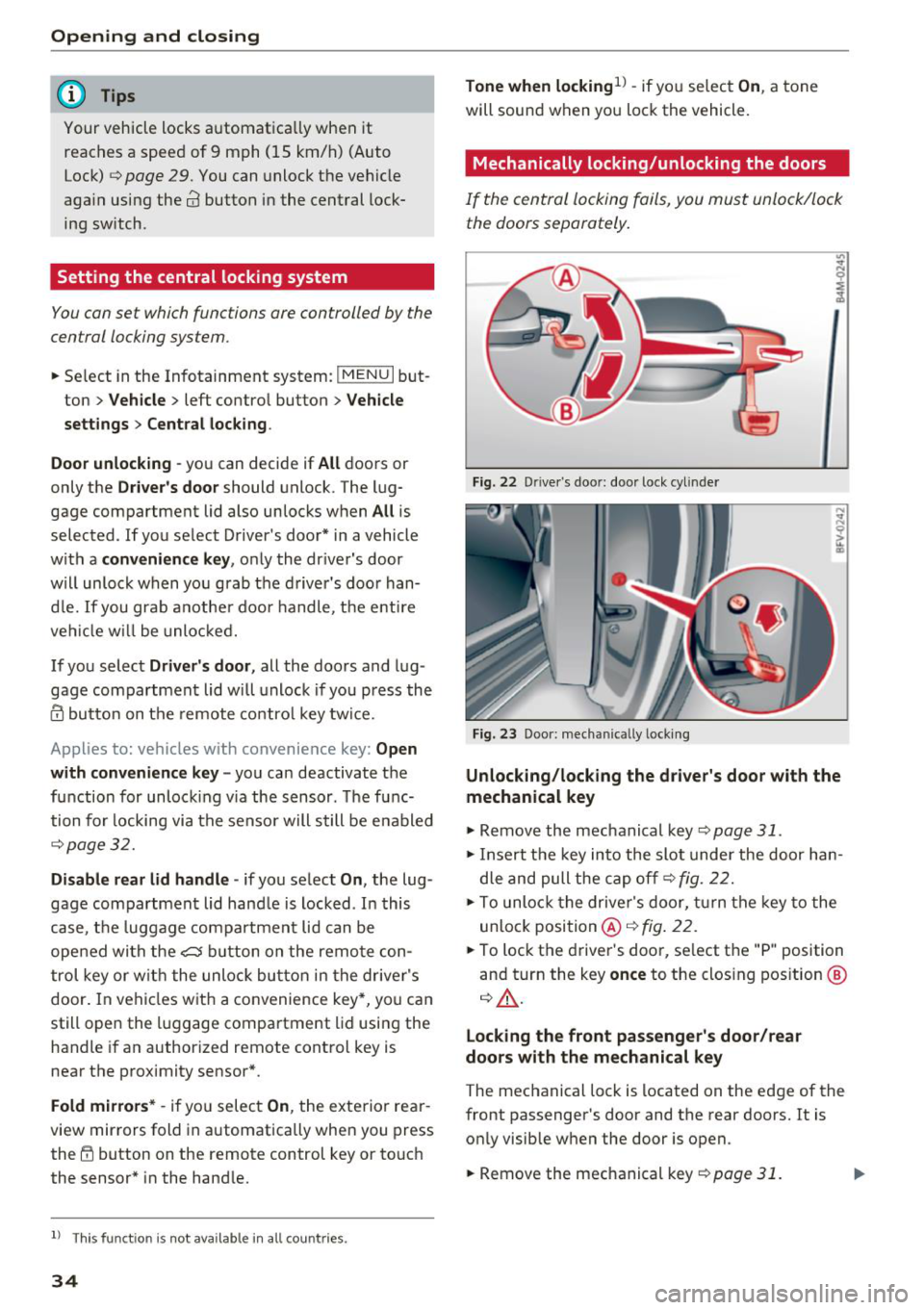
Fig. 22 D rive r's doo r: doo r lock cy li nder
Fig. 23 Door: mech anically lock ing
Unlocking/locking the driver's door with the
mechanical key
.,. Rem ove the mec hanical key ¢ page 31.
.,. In ser t th e key in to the slot unde r the door han
d le and pull the cap off ¢
fig. 22.
.,. To unlo ck the drive r's door, turn th e key to t he
unlo ck posi tio n@ ¢
fig. 22 .
.,. To loc k the driver 's doo r, se lect t he "P" position
an d turn the key
once to the clos ing pos ition @
q &.
Locking the front passenger's door/rear
doors with the mechanical key
The mec hanical lock is located on the edge of the
front passenger 's doo r and the rear doors. It is
o nl y visib le w hen the door is o pen .
.,. Remove the mec hanical key
q page 31.
Page 46 of 398
Lights and Vi sion
Turn signal and high beam lever
The lever operates the turn signals, the high
beams and the headlight flasher .
®
,
I
@
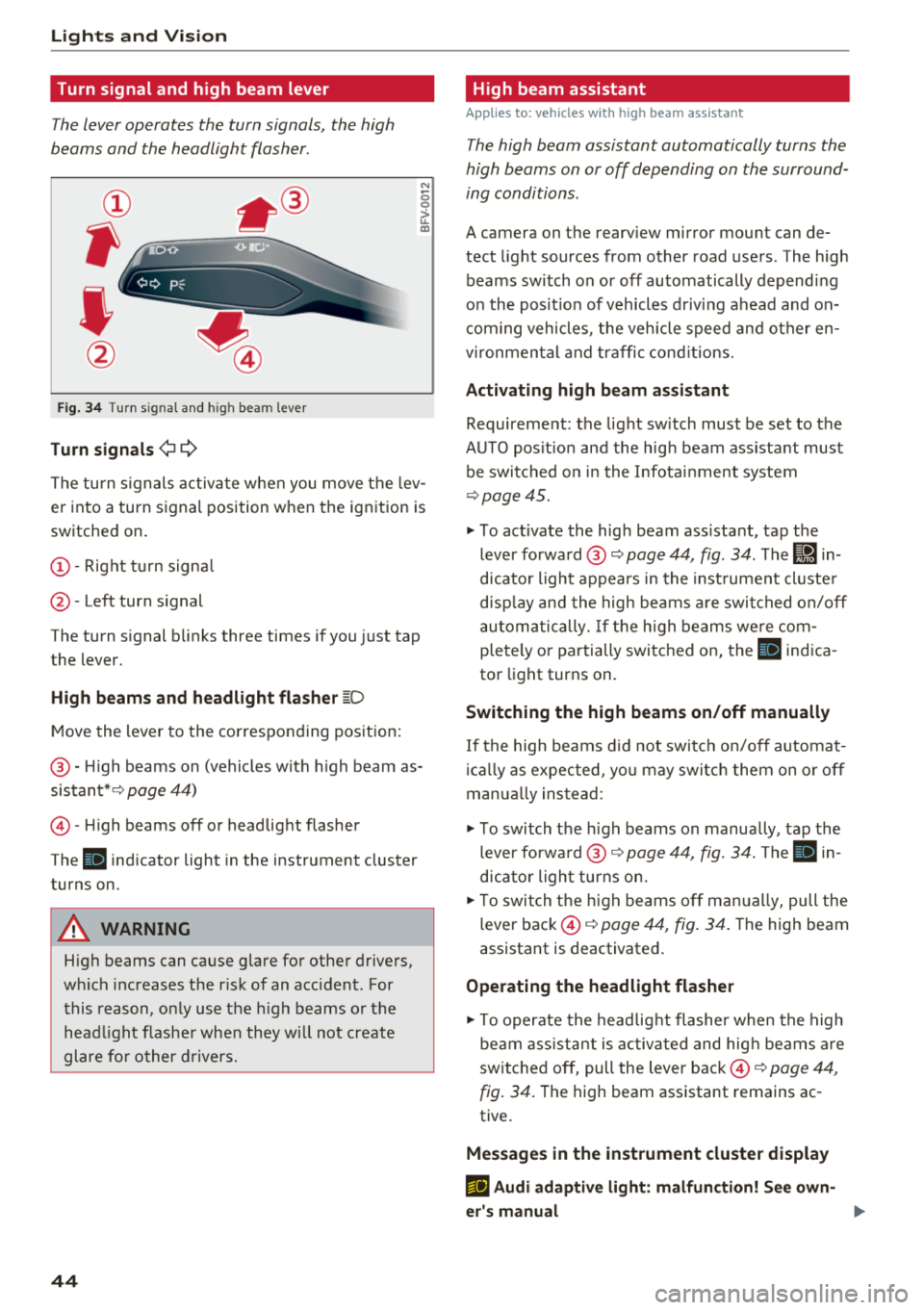
Fig . 34 Turn s ig nal and hig h bea m le ver
Tu rn signal s ¢i Q
N
0 0
> u. a,
The turn s ignals activa te when you move the lev
er into a turn signal position w hen the ignition is
switched on.
(D -Right tu rn signa l
@-Left turn signal
The turn signal b links three times if you just tap
the lever.
High b eams and h eadlight flash er ~D
Move the lever to the corresponding position:
@ -H igh beams on (vehicles with h igh beam as
sistant* ¢
page 44)
©-H igh beams off or headlight flasher
The
ii indicator light in the instrument cluster
turns on .
A WARNING
High beams can cause glare for other drivers,
wh ich increases the risk of an accident . For
this reason, only use the h igh beams or the
head light flasher when they w ill not create
glare fo r other d rivers.
44
High beam assistant
App lies to : vehicles wit h high bea m ass istant
The high beam assistant automatically turns the
high beams on or off depending on the surround
ing conditions .
A camera on the rearv iew mirror mou nt can de
tect light sources from other road users . The high
beams switch on or off automatically depend ing
on the pos it ion of vehicles d riving ahead and on
com ing vehicles , the veh icle speed and other en
v ironmental and traffic cond it ions.
Activ ating high b eam ass istant
Requirement: the light sw itch must be set to the
AUTO pos it ion and the high beam ass istant must
be switched o n in the Infota inment system
¢page 45.
"'To act ivate the high beam ass istant, tap the
lever forward @~
page 44, fig . 34 . The Iii in
dicator light appears in the inst rument cluste r
disp lay and the high beams a re swit ched on/off
automa tically. If t he h igh beams we re com
pletely or pa rtially switched on, the
IIJ indica
tor light turns on.
Switching the high beams on /off manually
If the high beams d id not switch on/off automat
i ca lly as expected, yo u may switch them on or off
manua lly ins tead :
"' To switch the h igh beams on manually, tap the
lever forward @~
page 44, fig. 34. The ii in
dicator light turns on.
"'T o switch the h igh beams off man ua lly, pull the
lever back ©¢
page 44, fig. 34 . The high beam
assistant is deactivat ed.
Operating the headlight flasher
"' To operate the headlig ht flasher when the high
beam ass istant is activated and hig h beams are
switched off, pull the lever back ©¢
page 44,
fig. 34 .
The high beam assistant remains ac
tive.
Messag es in the instrument cluster display
m;J Audi adaptiv e light : malfun ction! Se e own
e r's manual
Page 49 of 398
a co ...... N r--. N ...... 0
0
:E '
Applies to: vehicles with inter ior lighting
.. Se lec t in the Info tainmen t system: !M ENUI but
ton
> Vehi cle> left contro l button > Vehicle
s ettings > Int erior lighting.
The interior lighting turns on when you switch
the head ligh ts on whi le the igni tion is on .
T he storage compartment in the doo r is i llum i
nated when yo u reach your hand in to the storage
compartment .
Version 1
To adjust the b rightness of individua l zones, se
l ect
Front brightness *, Door br ightness or Foot
well brightness .
Turn the control knob to the left
or to the r ight . Press the co ntro l knob to conf irm
the br ightness .
Version 2
Select and confirm one of the displayed profiles
by pressing the con trol knob.
Individual : you can customize the br ightness and
colo r of individual zones. Press the right control
button. P ress the cont rol knob again to confirm
the settings.
Audi drive select: the interior and contour light
ing color changes depending on the driving mode
selected in drive select*¢ page 128.
{!) Tips
The setting is a utomat ica lly stored and as
signed to the remote contro l key that is be ing
used.
Lights and V ision
Instrument illumination
T he brightness of the illumination for the instru
ments, display and head-up display* can be ad
justed .
"' t==~====:::::::::'.=== ===:::::=:::::::===- -!
i
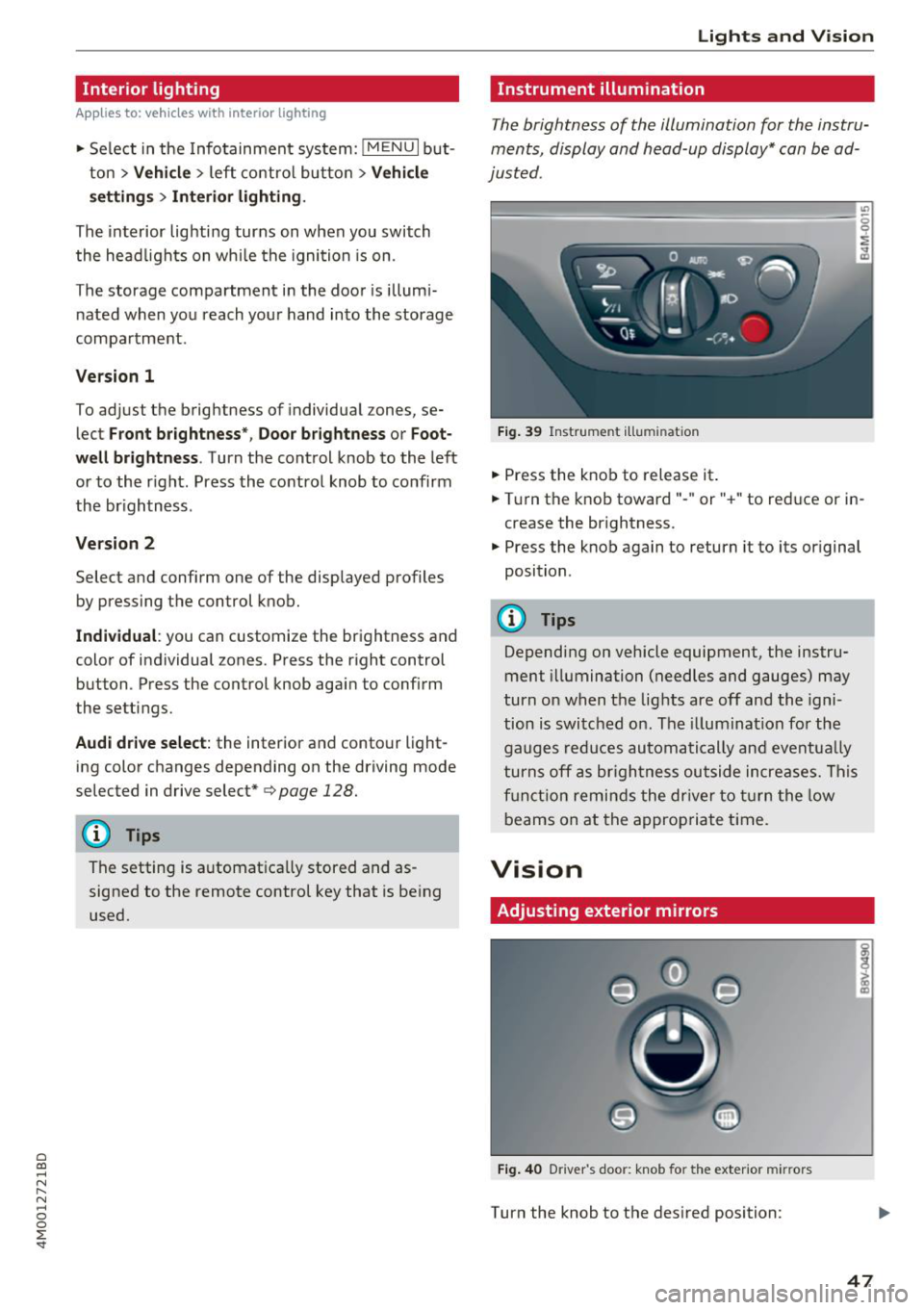
Fig. 39 Instrume nt illumin ation
.. Press the knob to release it .
.. Tur n the knob toward" -" or" +" to reduce or in
crease the br ightness.
.. Press the knob again to return it to its or iginal
position .
(D Tips
Depending on vehicle equipment, the instru
ment illumination (needles and gauges ) may
turn on w hen t he lig hts are off and the igni
tion is swi tched on. The illuminat ion fo r the
gaug es reduc es au toma tically and eventua lly
t urns off as br igh tness ou tside in crea se s. Th is
f u ncti on re mind s the dr iver t o turn the low
beams on at the appropriate ti me.
Vision
Adjusting exterior mirrors
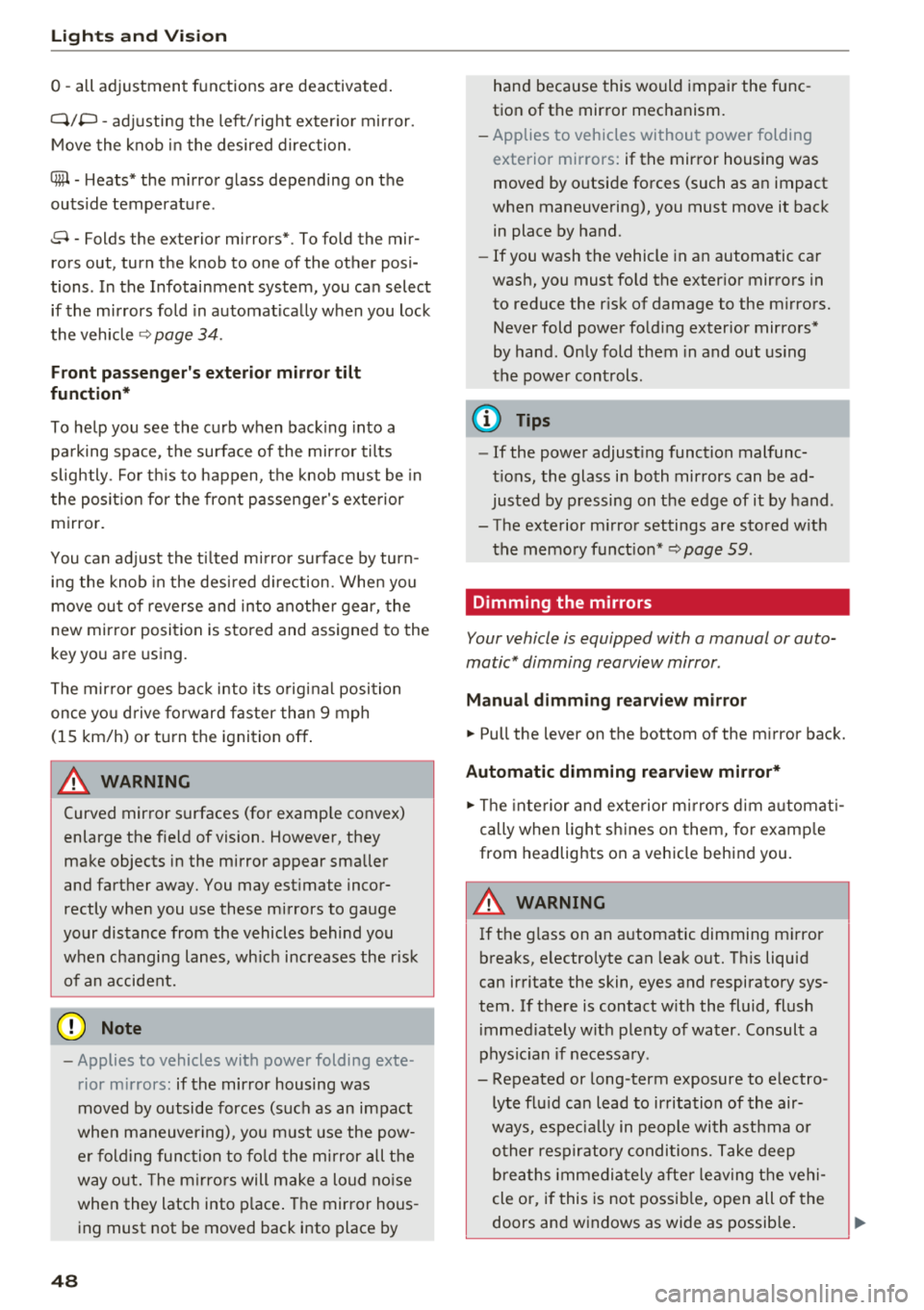
Fig. 4 0 Driver 's doo r: knob fo r the exter io r mir rors
Turn the knob to the des ired position:
i CD
47
Page 50 of 398
Lights and Vi sion
0 -all adjustment functions are deactivated .
Q/P -adjusting the left/right exter io r mir ror.
Move the knob in the desired direction .
4iil -Heats * the m irror glass depending on the
outside temperature .
8 - Folds the exterior mirrors*. To fold the mir
rors out, turn the knob to one of the other posi
tions . In the Infotainment system, you can select
if the mirrors fold in automat ica lly when you lock
the vehicle
~ page 34.
F ront pas senger 's e xterior mirror tilt
function*
To help you see the curb when back ing into a
pa rking space, t he surface of the mir ror tilts
slightly . Fo r thi s to happen, t he knob must be in
t he pos it io n for the front passenger's exterior
mirror.
You can adjust the t ilted m irror surface by turn
i n g the knob in the des ired direction. Whe n you
move ou t of reverse and in to anothe r gear, the
new mirror position is stored and assigned to the
key yo u are using.
The mir ror goes back into its o rig inal posi tion
once yo u drive forward faster than 9 mph
(15 km/h) or tu rn the ignition
off .
A WARNING
Curved mir ror surfaces (for examp le convex)
enlarge t he f ie ld of vision . Howeve r, they
make objects i n the mirror appear sma ller
and farther away. You may est imate inco r
rectly when you use these mirrors to ga uge
your distance from the vehicles behind you
when c hanging lanes, wh ic h increases the r is k
of an a ccident.
@ Note
- Applies to vehicles with power folding exte
rior m irrors : if the mirror housing was
moved by outside forces (such as an impact
whe n m aneuver ing), you m ust use the pow
e r fold ing func tion to fo ld the m irror all t he
way o ut. The m irro rs will make a loud no ise
when they latch into p lace . The mirror hous
ing must not be moved back i nto place by
48
hand because this would impair the func
tion of the mirror mechanism.
- Applies to vehicles wi thou t power folding
exterior mirrors : if the mirror housing was
moved by outside forces (such as a n impact
when maneuvering), you must move it back
in place by hand.
- If you wash the vehicle in a n automatic ca r
wash, you must fold the exter ior mirrors in
to reduce the r isk of damage to the m irrors.
Never fold power fo ld ing exterior mirrors*
by hand. On ly fold them in and out using
the power cont rols.
(D Tips
- If the power adjust ing function malfunc
t ions, the glass in both mir rors can be ad
justed by p ressing on t he edge of it by hand .
- The exterior m irror settings are sto red w ith
the memory fu nct io n* ~
page 59.
Dimming the mirrors
Your vehicle is equipped with a manual or auto
matic* dimming rearview mirror .
Manual dimming rear view mirror
.,. Pull the lever on the bottom of the m irror back.
Automatic dimming rearvi ew mirror*
.,. The inte rior and exte rior m irrors d im a utomat i
cally when ligh t shi nes on them, for examp le
from headlig hts on a vehicle behind you.
A WARNING
If th e g lass on an a utomatic dimming m irror
b reaks, e lectrolyte can lea k out. T his liquid
can irritate the skin, eyes and respiratory sys
tem . If there is contact w it h the fluid, flush
i mmediately with p lenty of water. Consult a
phys ic ian if necessa ry .
- Repeated or long-term exposure to e lectro
ly te fl uid ca n lead to ir ritation of the air
ways, espec ia lly in people with ast hma o r
o ther resp iratory condi tions. Take deep
b re at hs immedia tely afte r leav ing t he veh i
cle or, if this is no t possib le, open all of the
doors and windows as wide as possib le .
Page 51 of 398
a co ...... N r--. N ...... 0
0
:E '
them thoroughly with a large amount of
clean water for at least 15 minutes and then
seek medical attention .
- If electrolyte flu id comes into contact with
the skin, flush the affected area with clean
water for at least 15 minutes and then clean
with soap and water and seek medical at
tention. Clean affected clothing and shoes
thoroughly before wearing again .
- If the fluid was swallowed and the person is
conscious, flush the mouth with water for at
least 15 minutes. Do not induce vomiting
unless this is recommended by medical pro
fessionals. Seek medical attention immedi
ately.
(D Note
If the glass on an automatic dimming mirror
breaks, electrolyte can leak out. This liquid
damages plastic surfaces and paint. Clean
this liquid as quickly as possible, for example
with a wet sponge.
(D Tips
- If the light reaching the rearview mirror is
obstructed, the automatic dimming mirror
will not function correctly,
- The automatic dimming mirrors do not dim
when the interior lighting is turned on or
the reverse gear is selected .
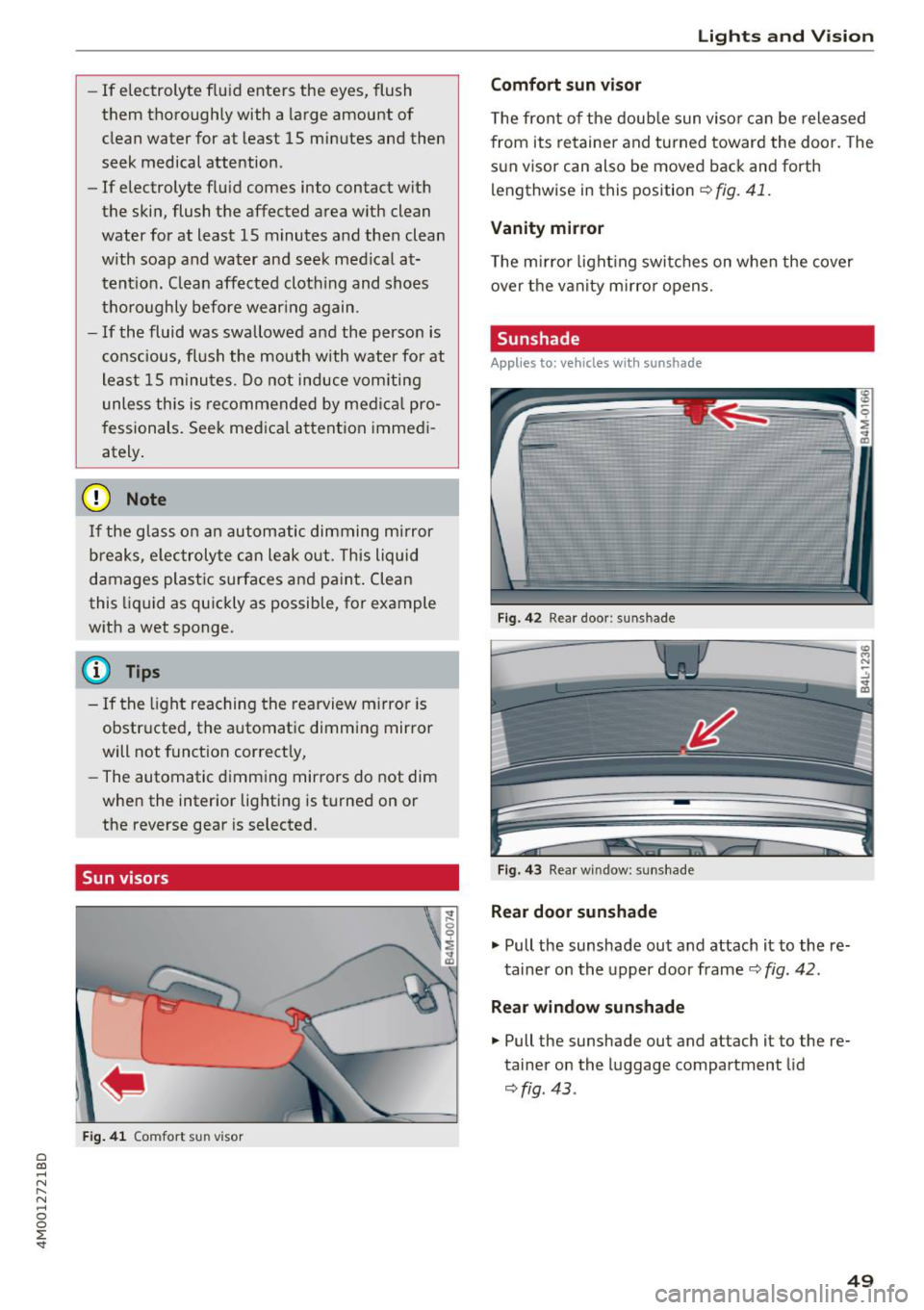
Sun visors
Fig. 41 Comfort s un visor
Lights and Vision
Comfort sun visor
The front of the double sun visor can be released
from its retainer and turned toward the door . The
sun visor can also be moved back and forth
lengthwise in this position
~ fig. 41.
Vanity mirror
The mirror lighting switches on when the cover
over the vanity mirror opens.
Sunshade
Applies to: vehicles with sunshade
Fig. 42 R ear door: sun shade
Fig. 43 Rear w indow : sunshade
Rear door sunshade
.,. Pull the sunshade out and attach it to the re
tainer on the upper door frame
~ fig. 42.
Rear window sunshade
.,. Pull the sunshade out and attach it to the re
tainer on the luggage compartment lid
~fig . 43 .
49
Page 54 of 398
Lights and Vision
A WARNING
For safety reasons, the windshield wiper
blades should be replaced once or twice each
year.
@ Note
- Only fold the windshield wipers away when they are in the service position. Otherwise,
you risk damaging the paint on the hood or
the windshield w iper motor .
- You should not move your vehicle or operate
the w indshield wiper lever when the wiper
arms are folded away from the windshield.
The windshield wipe rs would move back in
to their original position and could damage
the hood and windshield.
- To reduce the risk of damage to the wiper
system, always loosen blades which are fro
zen to the windshield before operating the
wipers.
- To reduce the risk of damage to the wiper
blades, do not use gasoline, kerosene, paint
thinner, or other so lvents on or near the
wiper blades.
- To reduce the risk of damage to the wiper
arms or other components, do not attempt
to move the wipers by hand.
(D Tips
- You can also use the service position, for ex
ample, if you want to protect the windshield
from icing by using a cover.
- You cannot activate the service position
when the hood is open.
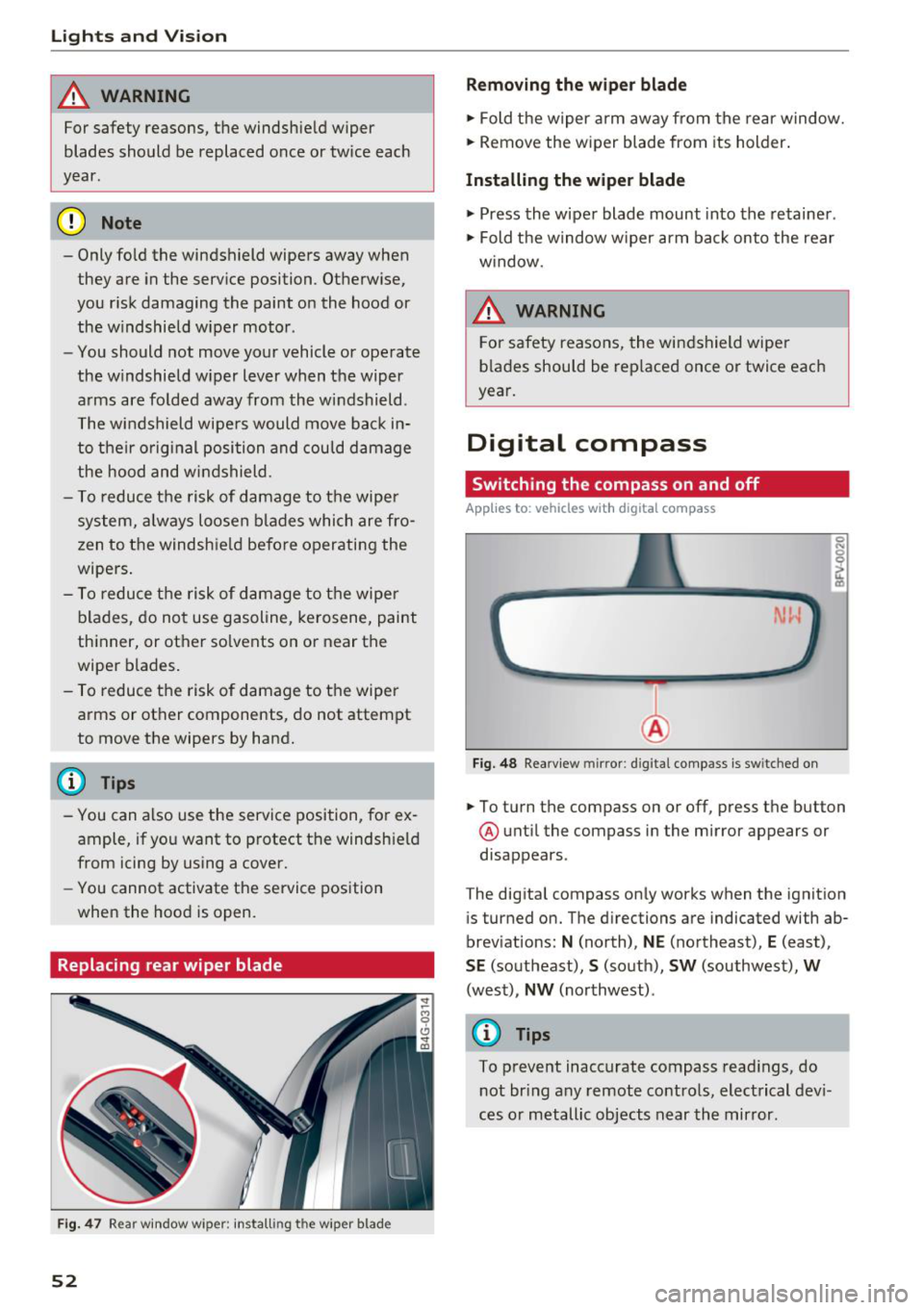
Replacing rear wiper blade
F ig. 47 Rear window w iper : install ing t he wiper blad e
52
Removing the wiper blade
.,. Fold the wiper arm away from the rear window.
.,. Remove the wiper blade from its holder .
Installing the wiper blade
.,. Press the wiper blade mount into the retainer .
.,. Fold the window w iper arm back onto the rear
w indow.
6 WARNING
For safety reasons , the windshield wiper
blades should be replaced once or twice each
year.
Digital compass
Switching the compass on and off
App lies to: vehicles with digital compass
Fig. 48 Rearview mirror: d ig ital compass is sw itched on
.,. To turn the compass on or off, press the button
@ until the compass in the mirror appears or
disappears.
The digital compass only works when the ignition is turned on. The directions are indicated with ab
breviations:
N (north), NE (northeast), E (east),
SE (southeast), S (south), SW (southwest), W
(west), NW (northwest) .
(0 Tips
To prevent inaccurate compass readings, do
not bring any remote controls, electrical devi
ces or metallic objects near the mirror .
Page 55 of 398
a co ...... N r--. N ...... 0
0
:E '
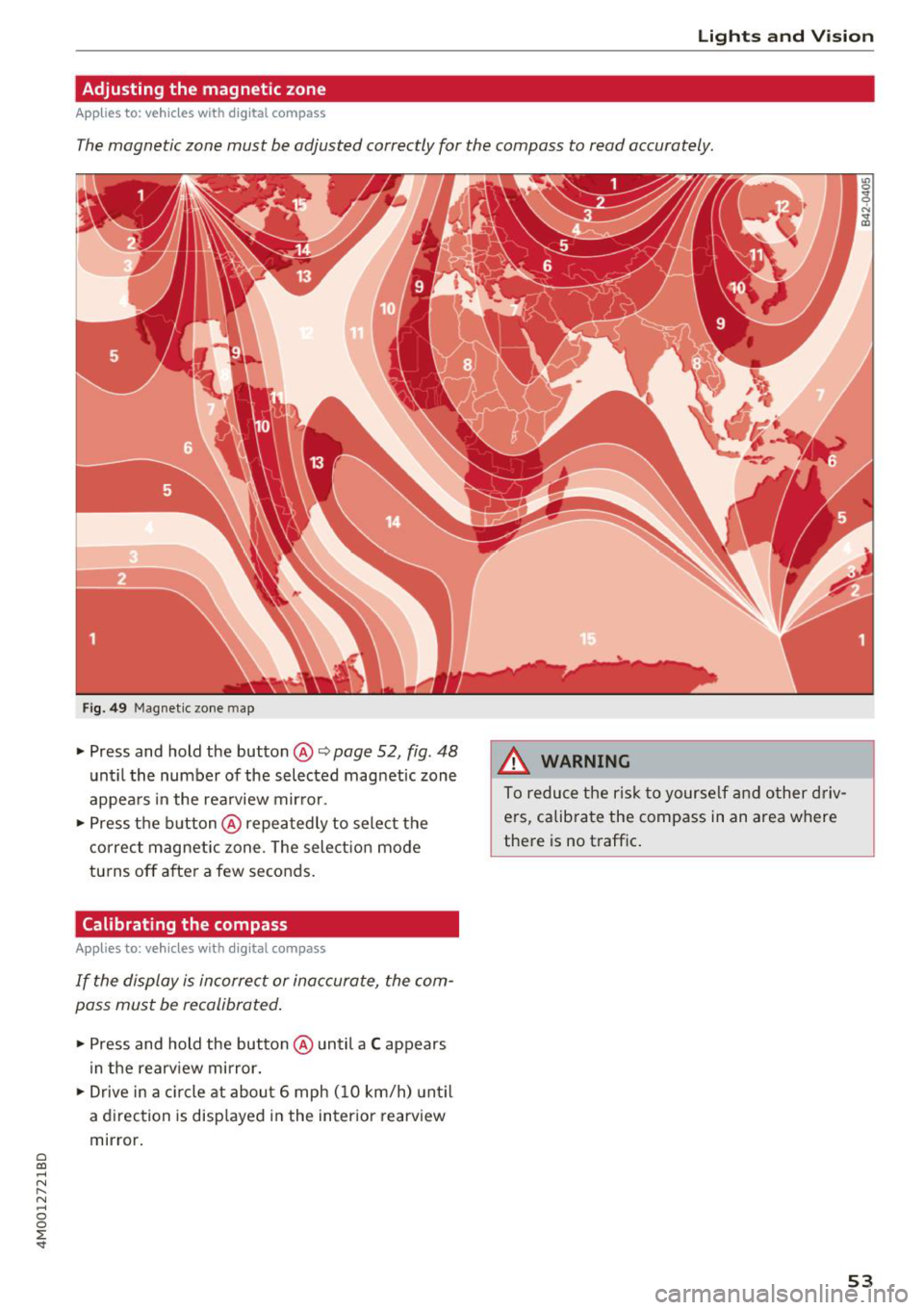
Adjusting the magnetic zone
A pplies to: ve hicles with d ig ital compass
The magnetic zone must be adjusted correctly for the compass to read accurately.
Fig . 49 Magnetic zone map
• Press and hold the button @ Q page 52, fig. 48
unt il the number of the selected magnetic zone
appea rs in the rearview mir ror .
• Press t he b utton @repeatedly to sele ct the
correc t magnetic zone . The sele ct ion mode
tu rns off after a few seconds .
Calibrating the compass
Appl ies to: ve hicles w ith d ig ital compass
I f the display is in corre ct or inaccurate, the com
pass mus t be recalibrated .
• Press and hold the button @ until a C appears
in the rearv iew mirror.
• Drive in a c ircle at about 6 mph ( 10 km/h) unti l
a d irec tion is disp laye d in the in ter ior rearview
mir ror.
A WARNING
To reduce the risk to yourse lf a nd o ther driv
ers, calib ra te the compass in an area where
the re is no t raffic .
.
53
Page 61 of 398
• Press the release point c::> fig . 61 using the me
chanical key
c::> page 30, Key set and press the
button -arrow-
c::> fig . 60 . Pull the head restraint
out of the backrest at the same time
c::> ,&. .
In stall ing th e head rest raints
• Slide the posts on the head restraint dow n into
the guides until the posts click into place.
• Press the b utton -arrow-
c::> fig. 60 and slide the
head restraint all the way down. You should not
be able to remove the head restraint from the
backrest without pressing the button .
A WARNING
-Always read and follow the applicable warn
ings
c::> page 255 , Proper adjustment of
head restraints.
- Only remove the head restraints fo r the sec
ond row seats when it is necessary for in
sta lling a child safety seat
c::> page 291,
Child safety.
Install the head restraint agai n
immediately once the child safety seat is re
moved. Driving with the head restraints re
moved or not in the upr ight position in
creases the risk of serious injury.
Memory function
Description
Applies to: vehicles with memory function
Using the memo ry function, you can qu ick ly and
eas ily store a pe rsonal seat profile for the driver
and recall the settings later. The memory func
tion is controlled by the remote control key and
the memory buttons in the driver's door.
The drive r's seat profile is stored again and as
signed to the remote contro l key each time the
vehicle is locked. When you open the door, the
seat profi le is automat ica lly reca lled . If two peo
p le use the vehicle, it is recommended that each
person always uses their "own" remote control
key.
Two seat profiles can be stored each us ing the
~ memory buttons. Once they are stored, these
...... N seat prof iles can be se lected at any time. r--. N ...... g The fo llowing settings are stored :
:E '
Remote con- Memory but-
trol key ton
Driver Drive r
Seat X X
Steering
X X wheel*
Both exterior
mirrors*
X X
Remote control key
Applies to : vehicles with memory function
The driver's seat profile con be assigned to the
remote control key when the vehicle is locked.
• Select in the Infotainment system: I MENU ! but
ton
> Vehicle > l eft control button > Vehicle
s etting s
> Seats > Driver 's seat > Store set
ting s on r emote cont rol ke y.
(D Tips
If you do not wish to have the seat profi le for
another driver assigned to the remote control key, sw itch the memory f unction off in the In
fotainment system.
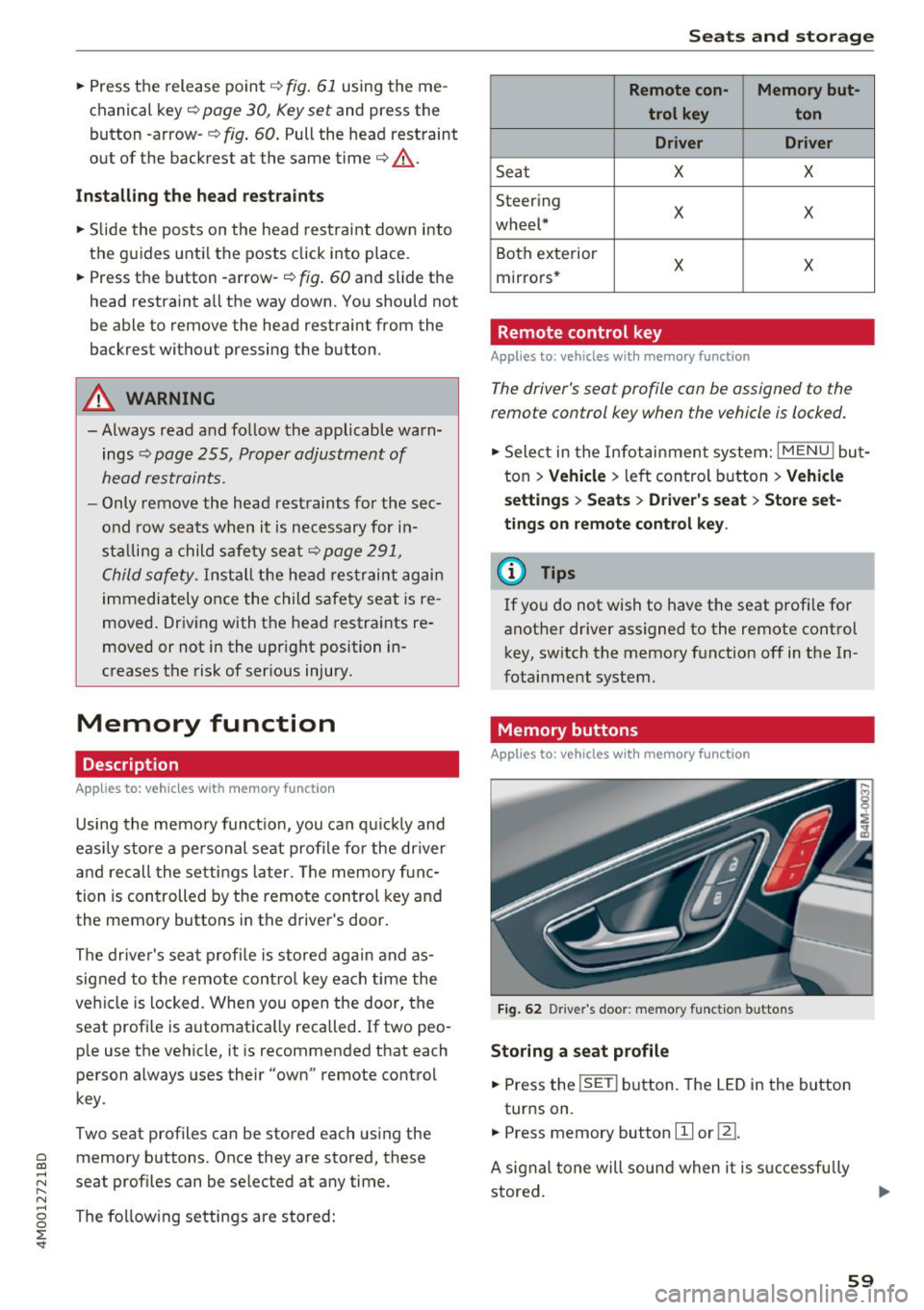
Memory buttons
Applies to : vehicles with memory function
F ig . 62 Driver 's door : memo ry f unc tion buttons
Storing a seat p rofil e
• Press the !SET I button. The LED in the button
turns on.
• Press memory button
[II or ill.
A signal tone will sound when it is s uccessfu lly
stored.
59
Page 95 of 398
Cl a:, ...... N
" N ...... 0
0
::r '
The maximum permitt ed tongue weight of the
trailer drawbar on the trailer hitch ball head may
not be exceeded .
If the tongue we ight is too low, this affects the
trailer's handling . For driv in g safety, we recom
mend to always utilize the maximum permitted
tongue weight, but not exceed it. You can reach
it, for example , by distributing the cargo in the
trailer correctly.
You can determine the tongue weight, for exam
ple, with a bathroom scale or a public weigh sta
tion .
The permitted tongue weight of your veh icle can
be found in the vehicle documentation or in
¢page 376.
Load distribution
Poor cargo load and distribution can negatively
i mpact ve hicle handl ing.
- Store objects preferably in the vehicle luggage
compartment . The vehicle shou ld always carry
the heaviest possible load and the trailer
shou ld have the lightest possible load.
- Distribute the load in the tra iler so that the
heavy objects are as close to the axle as possi
ble.
- Secure objects from slid ing out of p lace.
- Utilize the maximum permitted tongue weight
if possible .
Tires
Set the tire pressure on your vehicle for a "full
load"; see the t ire pressure sticker¢
page 340.
If necessary, also adjust the tire pressure on the
trailer according to the manufacturer's recom
mendation .
The tire pressure must be increased an addi tional
3 PS I (0 .2 bar) for towing loads over 6,600 lbs
(3,000 kg) .
W inter tires shou ld be mounted on the vehicle
and on the trailer during winter temperatures .
Trailer towing
Outside mirrors
If you cannot see the traffic behind the trailer
with the standard exterior mirrors, then you
must attach additional exterior mirrors. Adjust
them so you have a sufficient visibility behind
you.
Exterior lighting
Follow the legal regu lations rega rding the light
ing equipment on your trailer. Contact an author
ized Audi dea ler or authorized Audi Service Facili
ty for more information.
Before starting to drive , check all lighting eq uip
ment on the hitched trailer.
T he headl ight range cont rol adj usts automat ica l
ly to the light range of the headlights .
Safety chains
Make sure the safety chains are correctly applied
when pulling a trailer . The cha ins should hang
enough so that the trailer can drive around
curves . Howeve r, they must not touch the
ground.
Air suspension
Applies to: vehicles with air suspension
The air suspens ion must be at the standard vehi
cle he ight before you set the tongue weight on
the tra iler and hitch the trailer¢@ ,
¢page 130,
Raising/lowering the vehicle.
For vehicles with a factory-installed trailer hitch,
the a ir suspension trailer mode w ill automatically
switch on if you connect the trailer cable to the
socket.
For vehicles with a retrofitted trailer hitch, you
must sw itch on the a ir suspension trailer mode
manua lly . Select in the Infotainment system:
IMENU I button> Vehicle > left control button>
Vehicle settings > Air suspension: trailer. Switch
it off again after towing a trailer.
You can also sw itch off trailer mode manually
wh ile dr iving, for example, whe n using a bicycle
rack system. ..,.
93
Page 122 of 398

Assistance systems
Late: in this setting, the system provides correc
tive steering just before a wheel goes over a de
tected lane marker line.
Vibration warning
You can switch the additional vibration warning
in the steering wheel on or off.
&_ WARNING
With the vibration warning switched off,
there will also be no visual warning in the in
strument cluster display when crossing a lane
marker line.
(D Tips
In certain markets: you r settings are stored
automatically and assigned to the remote
control key in use.
Audi side assist
Description
Applies to: vehicles with Aud i side ass ist
Fig . 112 Senso r de tection range
Fig. 113 D isplay on the exte rior mirror
Side assist (lane change assist) helps you monitor
your blind spot and traffic behind your vehicle.
Within the limits of the system, it warns you
120
about vehicles that are coming closer or that are
traveling with you within sensor range
(D
¢ fig. 112 . If a lane change is classif ied as cr iti
ca l, the display @in the exterior mirror turns on
¢fig. 113.
The display in the left exterior mirror provides as
s istance when making a lane change to the left,
while the display in the right exterior m irror pro
vides assistance when making a lane change to
the right.
Information stage
As long as you do not activate the turn signal,
s ide assist
informs you about vehicles that are
detected and classified as critical. The display in
the mirror turns on, but is dim.
The display remains dim in the information stage
so that your view toward the front is not distur
bed.
Warning stage
If the display in a mirror blinks brightly when you
activate a turn signal, side assist is
warning you
about detected vehicles that it has classified as
critica l. If this happens, check traffic by glancing
in the exterior m irrors and over your shoulder
¢ .& in General information on page 121 .
Applies to: vehicles with active lane assist: the
display in the m irror can a lso b link if you have not
activated a turn signal: if you are approaching a
detected lane marker line and it appears you will be leaving the lane, side assist will warn you
about detected vehicles that it has classified as
critical.
@ Tips
You can adjust the brightness on of the dis
play on the rearview mirror¢
page 122.