seats AUDI Q7 2018 Owner´s Manual
[x] Cancel search | Manufacturer: AUDI, Model Year: 2018, Model line: Q7, Model: AUDI Q7 2018Pages: 398, PDF Size: 185.58 MB
Page 64 of 398
Seats and stor age
If the heat ing is sw itched on, switching the glove
compartment cooling mode off is recommended.
Additional storage compartments
You will find a variety of storage compartments
and holders at various locations in the vehicle.
- Glove compartment: the glove compartment
can be locked using the mechanical key
q page 30, Key set.
-In the door trim pane ls
- Safety vest compartment in the doo r trim pan-
els on the driver 's side and front passenger's
s ide
- Storage compartment* in the center conso le
- Storage compartment unde r the fron t center
armrest
- Ga rment hooks above the rea r doo rs
- Nets on the backrests of the front seats
- Net on the left luggage compartment trim pan-
el
.&, WARNING
-
- Always keep t he g love compartment lid
cl osed while d riving to reduce the risk of in
jury.
- Only use the storage compartments in the
doo r trim pane ls to sto re small objects that
will not st ick o ut of the compartment and
impair the range of the side airbags.
- Make s ure tha t the view to the rear is not
obstructed by hanging garments.
- Hang only lightwe ight cloth ing and be sure
that there a re no heavy or sha rp-edged ob
jects in the pockets.
- Do not use coat h angers to ha ng the cloth
ing because t his could impair the effective
ness of the s ide cu rtain airbags .
Luggage compartment
General information
.&, WARNING
-
Read and follow the important sa fety precau
tions in
q page 257, Storing cargo correctly.
62
Luggage compartment cover
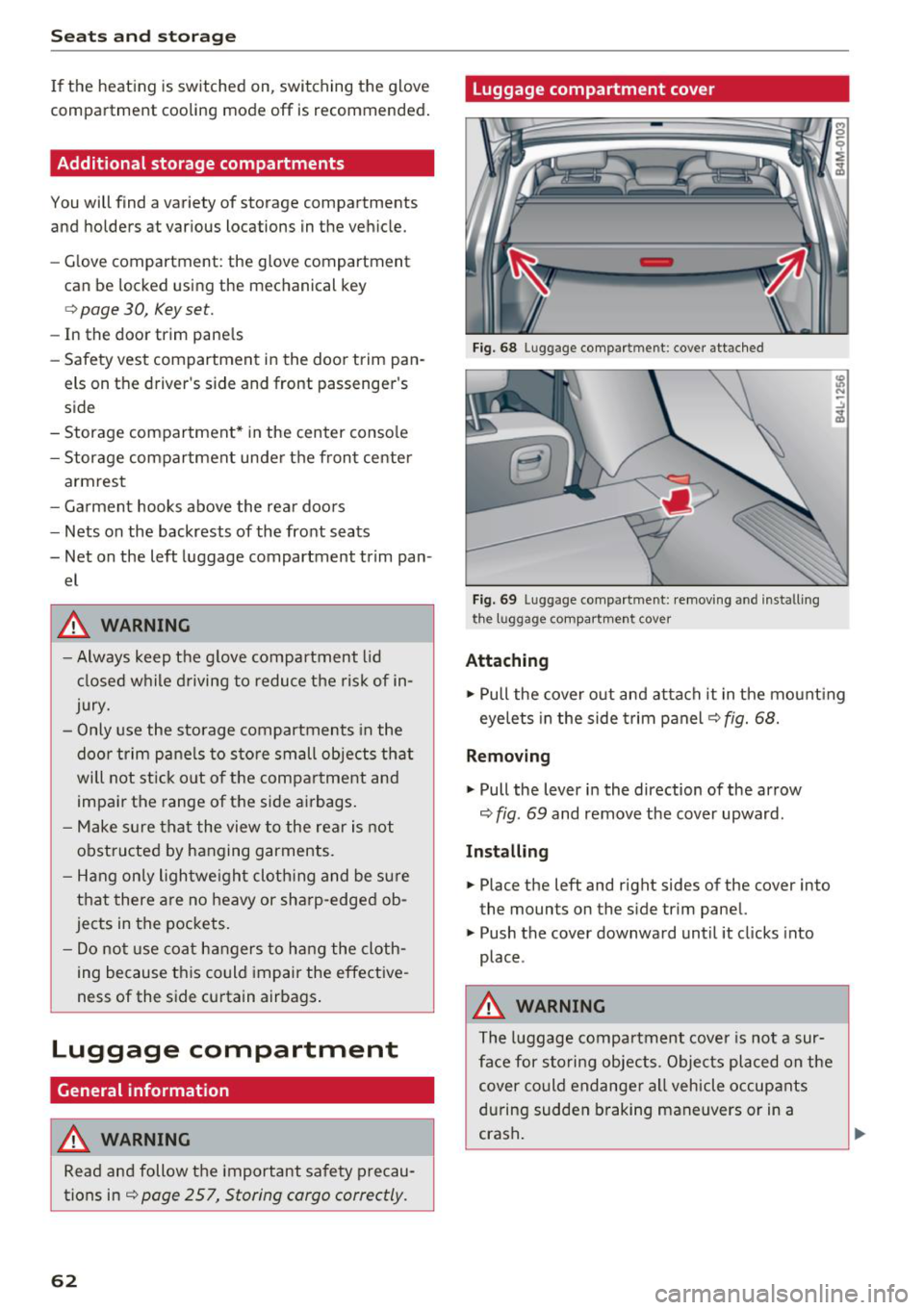
Fig. 68 Luggage compartment: cover attached
Fi g. 69 Luggage compa rtment: removi ng and install ing
the l1,1ggage compart ment cover
Attaching
.,. Pull the cover o ut and attach it in the mount ing
eyelets in the side t rim panel
q fig. 68.
Removing
.,. Pull the lever in the direction of the arrow
q fig. 69 and remove the cover upward.
Installing
.,. Place the left and right sides of the cover into
the mounts on the side trim panel.
.,. Push the cover downward until it clicks into
place .
.&, WARNING
The luggage compartment cove r is no t a sur
face for storing objects. Objects placed on the cover could endange r a ll vehicle occupants
during sudden braking maneuvers or in a
crash .
Page 65 of 398
a co ...... N r--. N ...... 0
0
:E -
-Let the luggage compartment cover ro ll up
s low ly to reduce the r isk of damage.
- Also read and fo llow the applicable warn
ings
c;> 0 in Folding the backrest down/up
(third row seats) on page 57.
Increasing the size of the luggage
compartment
The backrests can be folded down individually*
or together.
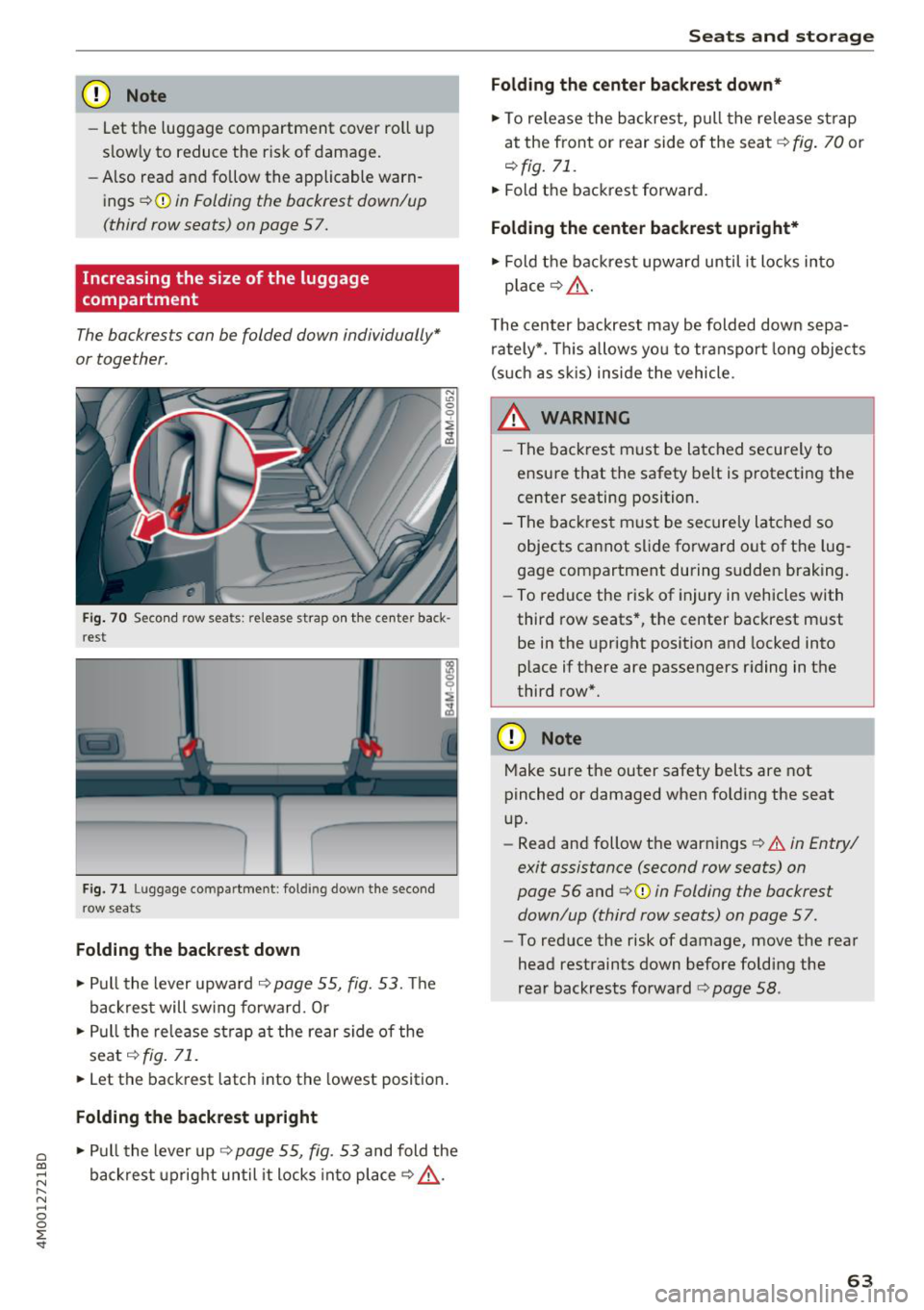
F ig. 70 Seco nd row seats: release strap o n th e center back
r est
F ig. 71 Luggage compartment : fold ing dow n the second
row seats
Folding the backrest down
.. Pull the lever upward c;> page 55, fig. 53. Th e
backrest will sw ing fo rward. Or
.. Pull the release strap at the rear side of the
seat
c;> fig . 71 .
.. Let the backrest latch into the lowest position .
Folding the backrest upright
.. Pull the lever up c;> page 55, fig. 53 and fold the
backrest upright until it locks into place
c;> ,.&. .
Seats and storag e
Folding the center b ackrest down *
.. To re lease the backrest, p ull the release st rap
at the front or rear side of the seat
c;> fig. 70 or
r::!> fig. 71.
.. Fold the backrest forward.
Folding the center backrest upr ight*
.. Fold t he backrest upward until it locks into
place
c;> .&, .
The center backrest may be folded down sepa
rately*. This allows yo u to transport long objects
(s uch as s kis) inside the vehicle.
A WARNING
-- The backrest must be latched securely to
ensure that the safety belt is protecting the
center seating position.
- The backrest must be securely latched so objects cannot slide forward out of the lug
gage compartment during sudden braking.
- To reduce the risk of injury in vehicles with
third row seats*, the center backrest must
be in the upright position and locked into
p lace if there are passengers riding in the
third row*.
CD Note
Make su re the outer safety belts are not
pinched or damaged when folding the seat
up.
- Read and follow the warnings
c;> .&. in Entry/
exit assistance (second row seats) on
page 56
and ¢ 0 in Folding the backrest
down/up (third row seats) on page 57.
- To reduce the risk of damage, move the rear
head restraints down before folding the
rear backrests fo rwa rd
r::!> page 58 .
63
Page 66 of 398
Seats and stor age
Luggage compartment net
App lies to: vehicles with luggage compartment net
The cargo net prevents small objects from slid
ing .
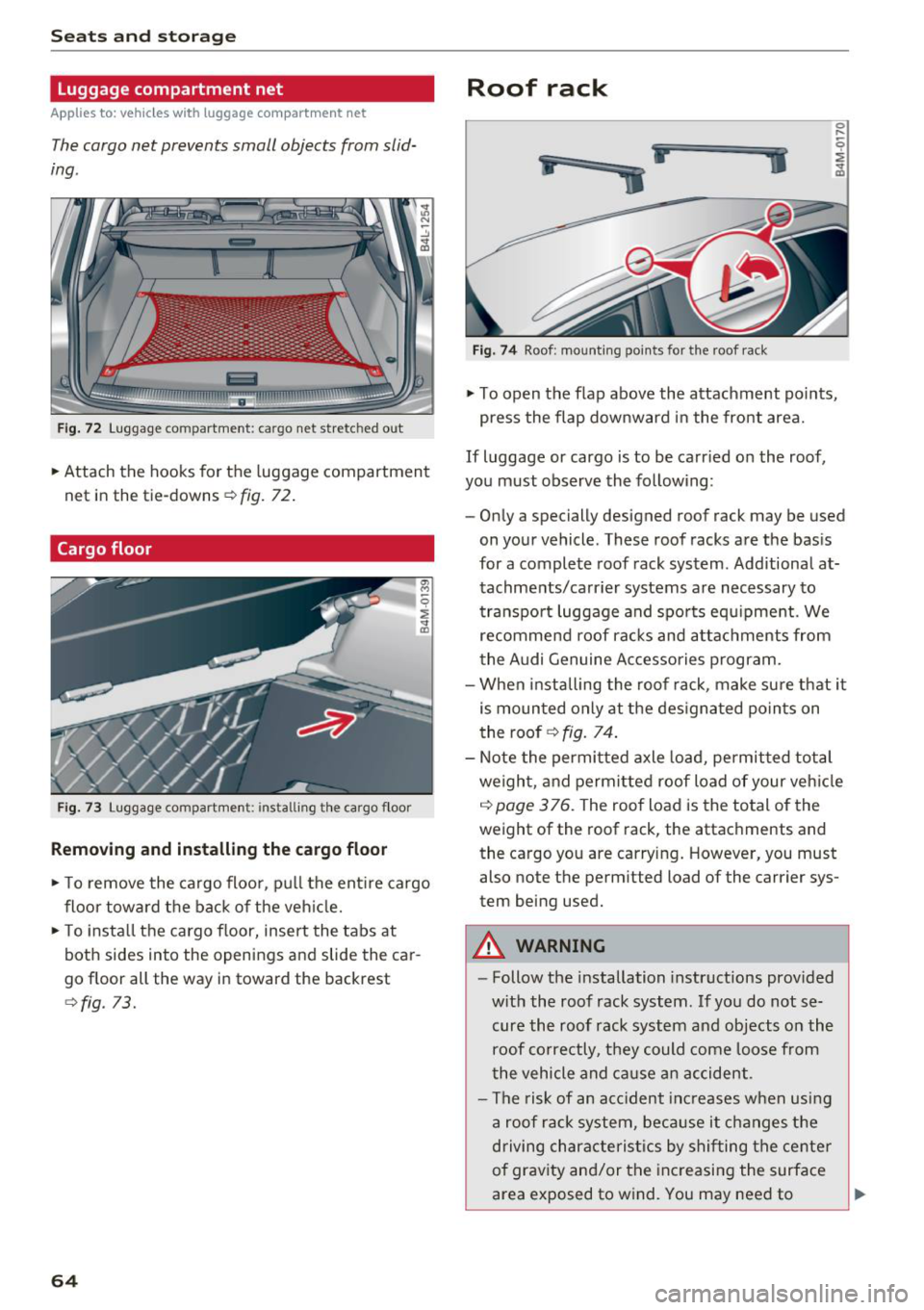
Fig. 72 L uggage compartment: cargo net stretched out
.. Attach the hooks for the luggage compartmen t
net in the tie-downs
r::!> fig. 72 .
Cargo floor
Fig . 73 Luggage compartme nt: insta ll ing th e ca rgo f loor
Removing and installing the cargo floor
.. To remove the ca rgo floor, p ull the ent ire cargo
floor towa rd the back of the veh icle .
.. To insta ll the cargo floor, insert the tabs at
both sides into the openings and slide the car
go floor all the way in toward the backrest
<::!>fig. 73.
64
Roof rack
i
ii
.. j
Fig. 7 4 Roof: mount ing points for the roof rack
.. To open the flap above the attachment po ints,
press the flap downward in the front area.
If Luggage or cargo is to be carr ied on the roof,
you must observe the follow ing:
- Only a specially designed roof rack may be used
on your vehicle . These roof racks a re the bas is
for a complete roof rack system . Additional at
tachme nts/carr ier systems are necessary to
transpo rt luggage and spo rts equ ipment. We
recommend roof rac ks and a ttac hments from
the Audi Genuine Ac cessories program.
- When installing the roof rack, make su re that it
is mounted only at the des ignated po ints on
the roof
r::!> fig. 74.
- Note the permitted axle load, permitted total
weigh t, and permitted roof Load of your veh icle
c::> page 3 76. The roof Load is the total of the
weight of the roof rack, the attachments and
the cargo you are carry ing. However, you must
also note the perm itted Load of the carrier sys
tem being used.
A WARNING
- Follow the installation instructions prov ided
w ith the roof rack system . If yo u do not se
cure the roof rack system and objects on the
roof co rrectly, they could come Loose from
the vehicle and ca use a n accident.
- The risk of an acc ident inc reases w hen usi ng
a roof rack system, bec ause it changes the
driving characte ris tics by shi fting the center
of grav ity and/or the inc reasing the surface
area exposed to w ind. You may need to
~
Page 71 of 398
Cl a:, .... N
" N .... 0
0
::r '
zation switches off if the settings are changed on
the front passenger's side or in the rear .
Vents
You can open or close the center and rear vents in
the cockpit and the vents in the rear center con
sole and door pi llars using the ridged thumb
wheels. The levers adjust the direction of th e air
f low from the vents.
Re sidu al heat
You can activate the residua l heat f unct ion when
the ignition is switched off by pressing the knob
@ Cleft side) . The residua l heat from the coolant
is used to heat the vehicle interior. The residual
heat function switches
off automatically after
about 15 minutes.
A WARNING
- You should not use the recirculation mode
for an extended per iod of t ime, because no
fresh a ir is draw n in and the w indows ca n
fog whe n coo ling mode is sw itched off. Th is
increases the risk of a n accide nt.
- Individua ls with reduced sensitivity to pain
o r temperat ure co ul d deve lop burns when
Warm and c old
using the seat heating function . To red uce
the risk of in jury, these individua ls sho uld
not use seat heating.
@ Note
To avoid damage to the heating elements in
the seats, do not knee l on the seats o r place
heavy loads on a small area of the seat.
Setup
Applies to : vehicles with 3-zone deluxe automat ic climate
control
The climate control system basic settings are ac
cessed in the Infotainment system.
.,. Select in the Infotainment system: I M ENU ! but
ton
> Vehicle > left cont rol b utton > Air condi
tioning
Seat heating /seat ventilation*
You can adjust the seat heat ing/vent ilat ion bal
ance fo r the d river a nd front passenger .
Automatic auxili ary heater *
The auxiliary heater he lps to warm the vehicle in
terior more quickly.
69
Page 74 of 398
Warm and cold
SYNC Syn chr oniz ation
Use t he rocker sw itc h CD to select the f unct ion.
When synchronization is switched on, the set
tings for the driver's side are applied to the front
passenger's side and the rear (except for seat
heating/venti lation*). When the settings on the
front passenger's side or in the rear are changed,
the synchron izat ion is automatically switched off
and
4- zone appears in the display .
SET REAR function
Use the rocker switch CD to select the function .
When the function is switched on, you can adjust
all settings for the rear us ing the climate control
system controls in the cockpit . The rear climate
control system controls cannot be operated at
the same time . T his function switches off auto
mat ica lly after a ce rtain per iod of t ime or after
leav ing the menu.
Vents
You can open or close the center and rear vents in
the cockpit and the vents in the rear center con
sole and door p illars using the r idged thumb
wheels. The levers adjust the d irect io n of the a ir
flow from the vents. The w ide vent is opened and
closed using the~ button ~
page 8, fig. 2@ .
Residual heat
You can activate the residual heat function when
the ignition is switched off by pressing the knob
© (left side). The residual heat from the coolant
is used to heat the ve hicle in ter io r. The res id ual
heat function switches off automatically after
about 15 minutes.
A WARNING
- You should not use the recirculation mode
for an extended period of time, because no
fresh air is drawn in and the windows can
fog when cooling mode is sw itched off . This
i ncreases the risk of an accident .
- Individuals with reduced sensitivity to pain
or temperature could develop burns when
us ing the seat heating function . To reduce
the risk of injury, these ind iv iduals should
not use seat heat ing.
72
@ Note
To avoid damage to the heating elements in
the seats, do not knee l on the seats or p lace
heavy loads on a small area of the seat.
(D Tips
It is not possib le to operate the rear climate
control system controls when the power chi ld
safety lock is switched on. W ith the SET REAR
funct ion, you can apply all settings to the rear
using the climate control system controls in
the cockp it~
page 38 .
Setup
Applies to: vehicles with 4 -zone de luxe automat ic climate
contro l
The climate control system basic settings are ac
cessed in the Infotainment system.
.. Select in the Infotainment system : IMENU! but
ton
> V eh icle > left control button > Air condi
t ioning
Seat heating /seat ventilation *
You can adjus t the seat heat ing/vent ilat io n ba l
an ce for t he d river, front passenger and rear pas
sengers .
Footwell temperature
You can adjust the footwell temperature so that
i t is cooler or wa rme r.
Auto recir culat ion
When switched on, automat ic recirculation con
trols the recirculation mode automatically . You
must press the®
MAX button if fog forms on
the w indows .
Automat ic au xili ary heater *
The aux iliary heater he lps to warm the vehicle in
terior more qu ickly.
Steering wheel heating
App lies to: vehicles wit h stee ring w heel heat ing
The steering wheel rim can be heated .
.. Press the button on the multifunction steering
wheel to switch the steering wheel heating on .,..
Page 79 of 398
a co .... N r--. N .... 0
0
:E '
Applies to: vehicles with power steering wheel adjustment
The steering wheel position con be adjusted elec
trically up and down and forward and bock.
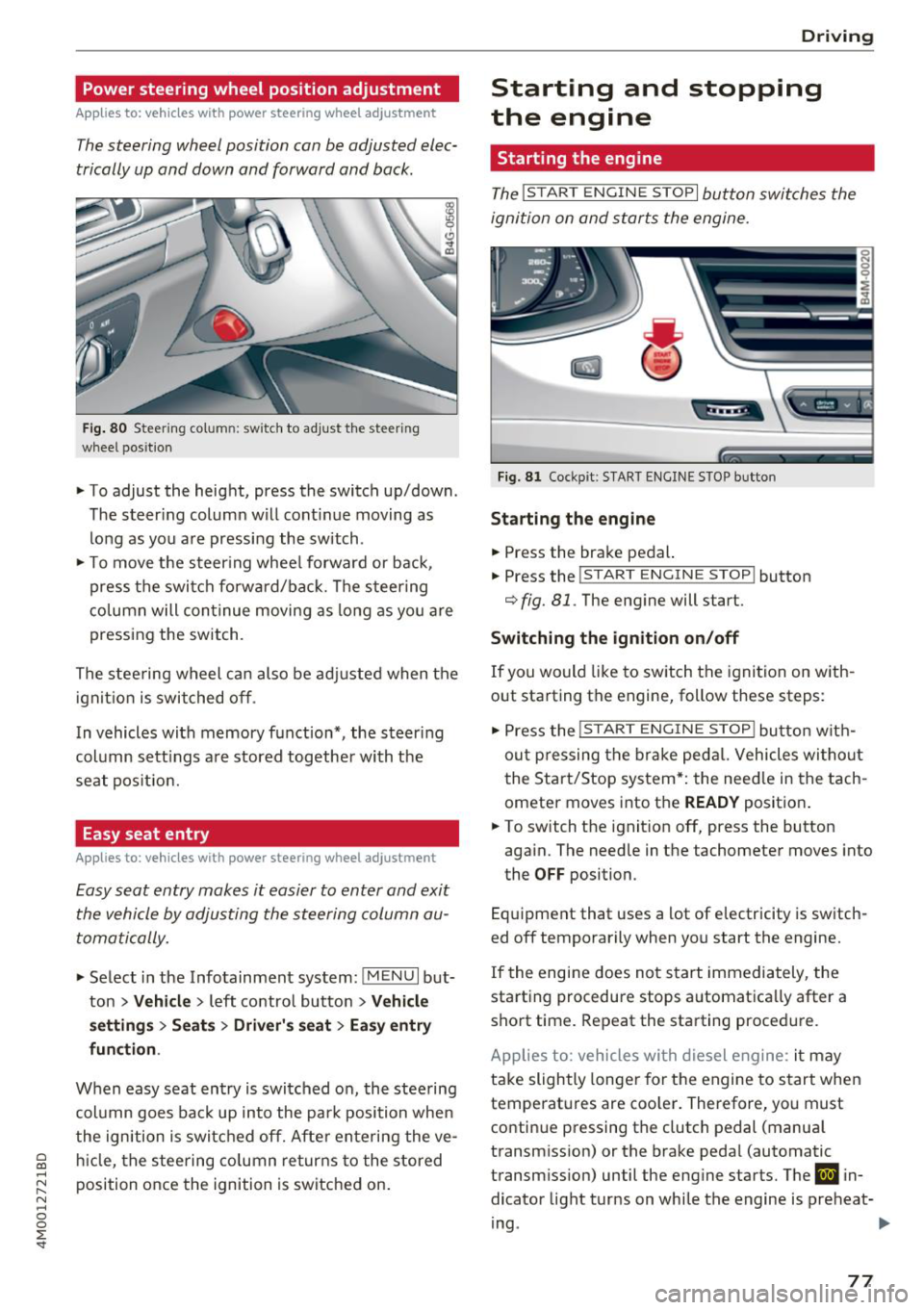
Fig. 80 Steerin g co lu m n: sw itch to adjust th e steeri ng
whee l pos ition
.. To adjust the height, press the switch up/down .
The steer ing column will cont inue moving as
long as you are pressing the switch .
.. To move the steering wheel forward or back,
press the switch forward/back. The steering
column will continue moving as long as you are
pressing the switch.
The steering wheel can also be adjusted when the
ignition is switched off .
In vehicles with memory function*, the steer ing
column sett ings are stored together with the
seat position.
Easy seat entry
Applies to: vehicles with power steering wheel adjustment
Easy seat entry makes it easier to enter and exit
the vehicle by adjusting the steering column au
tomatically.
.. Select in the Infotainment system: !MENUI but
ton
> Vehicle > left contro l button > Vehicle
settings> Seats> Driver's seat> Easy entry
function .
When easy seat entry is switched on, the steering
column goes back up into the park position when
the ignition is switched off. After entering the ve
hicle, the steering column returns to the stored
position once the ignition is switched on.
Driving
Starting and stopping
the engine
Starting the engine
The ! STAR T ENGINE ST OPI button switches the
ignition on and starts the engine.
Fig. 81 Cockpit : S TART ENGINE STOP butto n
Starting the engine
.. Press the brake pedal.
.. Press the
!START ENGINE STOP ! button
c;, fig. 81. The engine will start.
Switching the ignition on/off
If you would like to switch the ignition on with
out starting the engine, follow these steps:
"' Press the
!S T AR T ENGINE S T OP I button with
out pressing the brake pedal. Vehicles without
the Start/Stop system*: the need le in the tach
ometer moves into the
READY position .
.. To switch the ignition off, press the button
again. The needle in the tachometer moves into
the
OFF position.
Equipment that uses a lot of electricity is switch
ed off temporarily when you start the engine.
If the engine does not start immediately, the
starting procedure stops automatica lly after a
short time. Repeat the starting procedure.
Applies to: vehicles with diesel engine: it may
take slightly longer for the engine to start when
temperatures are coo ler. Therefore, you must
continue pressing the clutch pedal (manual
transmission) or the brake pedal (automatic
transmission) until the engine starts. The
IJ in
dicator light turns on while the engine is preheat-
ing .
IJJI>
77
Page 193 of 398
Cl a:, ...... N
" N ...... 0
0
::r '
r=> page 187 .
.,. Se lect Twi tter > left co ntrol button > desired
function
(for example, T rend s).
The fo llow ing categories can be selected in the
Twitt er menu:
- My tw eets: News Feed and the Tweets you have
posted are l isted.
- Home: the Tweets for everyone you follow are
displayed .
-Trend s: topics on Twitter that are currently
popular w ith in a country .
Different functions are availab le depending on
the Twitter category you have selected:
- New tweet : you can post a new tweet using
pre -made templates or using myAudi tem
plates that you have created yourse lf.
- Refre sh : the selected Twitter function is re
freshed.
- Fa vo rite : mark a Tweet as favorite to show you
liked it.
- Retwee t: you can quote a Tweet to share it with
others.
(D Tips
- Other se tt in gs such as accoun t, la ng uage,
Tweet security and location settings
cannot
be changed in the MMI. These c hanges must
be made on the Twitter website .
- You can on ly connect
one Twitter account
with your myAudi acco unt .
- Audi con nect (Infotainment) makes i t possi
b le to access Twitter . Permanent avai lability
ca nnot be guaranteed, because t hat de
pends on Twitter.
Travel (travel guide)
Applies to: vehicles with Travel (travel guide)
You can use the Audi MMI connect opp to store
points of interest on your mobile device (such as a smartphone) and then use them for route
guidance in the MMI.
Requirement:
Audi connect (Inf otainment )
The Audi MMI connect app must be insta lled and
open on your mobi le device .
Yo u m ust be logged into your myA udi account in
the
Audi MMI conne ct app and you must have se
l ected your vehicle.
T he Wi-Fi function on your mob ile dev ice and on
t h e M MI m ust be switched on.
T he MMI must be connected to the network .
.,. Select:
!MENUI button> Audi connect > left
control button >
Information category> Tra v
el.
After opening the trave l guide, trave l tips in your
area w ill be displayed including current ratings as
well as the corresponding category .
.,. Press the left control button to change the cat
egory (such as bars nearby) .
A WARNING
-
-It is o nly safe to use tablets, laptops, mo
b ile dev ices and other sim ila r devi ces when
t he vehicle is s ta ti onary bec ause, li ke a ll
loose objec ts, they co uld be thrown around
the inside of the ve hicle in a crash and cause
serio us inj uries . Store these types of devices
securely while driving.
- Do not use any wireless devices on the front
seats within range of the airbags whi le dr iv
ing. Also read the warnings in the chapte r
r::> page 2 73, Front airbags.
@ Note
Always fo llow the information fo und in ¢ @ in
Wi -Fi hotspot on page 194.
(D Tips
Units o f measurement, language settings and
time are shown in the Infotainment system
display based on how they were set in the
M MI system sett ings
r::> page 245.
Audi connect (Infotainment) in navigation
Applies to: vehicles with a navigation system and Audi con
nec t (Infotainment)
.,. Select: !MENUI button> Audi connect > left
control button >
Na vigation .
191
Page 195 of 398
Cl a:, ...... N
" N ...... 0
0
::r '
The validity and expirat io n date of yo ur licenses
are displayed. When the function is switched on
10, the message Warning befo re sub scription
e x pire s
will display to warn you that your license
is about to expire.
R efr es h
The content of the selected A udi connect Info
tainment service o r the entire A udi connect (Info
tainment) list is updated .
Data privacy
Requirement: the ign it ion must be switched on.
Location and personal data are transmitted when
using Aud i connect services . If you do not want
this information to be transm itted, act ivate data
privacy .
-Acti vate pri vacy: the data conn ection is limit ed
or deactivated. Some Audi connect services will
not be available. In veh icles w ith Audi connect
emergency call and service¢
page 201, loca
t ion and veh icle data will be transmitted via the
emergency call in cases of eme rgency . For on
line roadside assistance*, only the voice call is
made a nd no data is transmitted.
- Deacti vate data priv acy : if the data connect ion
is limited or deactivated, you ca n sw itch on the
data connection for the use of all Aud i connect
services . Se lect and confirm
A ctiv ate dat a con
nection .
(D Tips
Applies to: vehicles with emergency call function
In vehicles with Audi connect emergency ca ll
and service, a data connection is requi red. It
cannot be deact ivated. Location data is only
transmitted together with vehicle data when
emergency calls are made .
Audi connect (Inf otainment )
Wi-Fi hotspot
Applies to: veh icles w ith Wi-Fi hotspot
You can us e the fvlfv/I as a W i-Fi hotspot to con
nec t up to eigh t Wi-Fi devices to the Interne t.
While driving, res tricted use of unsecured , ligh t,
small wireless devices is only possible from the
rear of the vehicle .
Requirement: the ignition must be sw itched on .
.. Select:
IMENU I button> Telephone > right con-
trol button >
Wi-Fi setting s.
The following sett ings can be selected:
Wi -Fi
The MMI Wi-Fi hotspot is deactivated at the fac
tory. Sw itch the W i- Fi hotspot to
Hots pot before
establ ish ing a con nection between your ve hicle
and yo ur Wi-Fi device.
-On: the MMI Wi-Fi hotspot is act ive and v is ible
to other dev ices. You can connect your W i- Fi
dev ice to the MMI and use the Inte rnet co nnec
t ion if necess ary.
- Off : the M MI Wi-Fi hotspot is deactivated. An
I nte rnet co nnect ion for W i-Fi devices is not
possible .
A WARNING
= -
- To reduce the risk o f an accident, use t he
Audi connect Infotainment services with a
W i-Fi hotspot only in the rear seat when the
veh icle is in mot ion, or only when the vehi
cle is stat ionary.
- It is only safe to use tablets, laptops, mo bile dev ices and other simi lar devices when
the vehicle is stationary because, like all loose objects, they could be thrown around
the inside of the vehicle in a c rash and cause
ser io us inj uries . Store these types of dev ices
secure ly while drivi ng.
- D o not use any wireless dev ices on the front
seats within ra nge of the airbags whi le dr iv
i n g. A lso read the warnings in t he chapte r
¢ page 2 73, Front airbags .
-As the d river, do not allow usage of the W i
F i ho tspot to d is tra ct yo u from dr iv ing, as
this cou ld increase the r isk o f an accident .
193
Page 196 of 398
Audi conn ect (Infotainment)
@ Note
- Under some conditions, certain mobile devi
ces and operat ing systems may a utomati
cally switch from your vehicle's Wi-Fi hot
spot to the device's mobile data connection.
In that event, standard text and data usage
rates would apply while t he dev ice's mob ile
data connection is in use . P lease refer to
documentat ion p rovided by yo ur mobi le de
v ice 's man ufac tur e and yo ur d ata ca rr ie r for
d eta ils, re lated terms and privacy state
ment.
- You are responsible fo r all p re caut io ns tak
en fo r data p rotection, an ti- v irus pro tec tion
and protection against loss of data on mo
bile devices that are used to access the In
ternet thro ugh the W i-F i hotspot.
(D Tips
- In vehicles without Audi connect ( Infotain
ment)*, the use of the Wi -Fi hotspot is only
possib le for the Wi-Fi audio p layer*. A data
connection to the Internet cannot be estab
li shed.
- For additional informat ion about the Aud i
connect Infotai nment services, visit
www .audiusa .com/myaud i.
Configuring the data
connection
Applies to vehicles with Audi connect (Infotainment)
The data connection for Audi connect Infotain
ment servic es is pr e-configured at the factory.
However, if o configuration should be n ecessary,
you con adjust the following settings .
"Se lect: I M ENUI button> right control b utton>
Connection manager.
" Se lect : rig ht contro l button > Online settings >
Data connection settings .
Using the Data connection settings menu, you
can set when an Internet connection shou ld be
made. The Int ernet conn ection disconnects auto
mat ica lly once the requested Audi connect Info
tainment service no longer requires any d ata.
The fo llowing settings can be selected:
194
Audi connect (MMI)
With the Audi conne ct (MMI) func tion, you can
Allow or Den y the use of Audi connect Info tain
ment services if the connection is set to
No re
que st or With request.
Wi-Fi devices*
U sing the Wi -Fi d evice s function, yo u can Allow
or Deny a co n ne cti on t o the Inte rnet .
& WARNING
- As t he driver, do not a llow usage o f the Wi
F i hotspot to distract yo u from driving, as
this could increase the r is k of an accide nt.
- It is on ly safe to use tablets, laptops, mo
bi le devices and other simi lar devices when
the vehicle is stat ionary because, like a ll
loose objects, they co uld be thrown around
the inside of the ve hicle in a crash and cause
serious injuries . Store these types of devices
securely wh ile d riving .
- Do not use any wireless devices on the front
seats within range of the airbags while dr iv
ing . Also read the warnings in t he chapter
r:!) page 2 73, Front airbags .
@ Note
Always fo llow the information found in ¢ (!) in
Wi-Fi hotspot on page 194 .
Audi connect
(Infotainment) general
information
Audi connect Infotainment services
Applies to vehicles with Audi connect (Infotainment)
(D Tips
-Yo u ca n only use serv ices suppo rte d b y Aud i
connect (In fotainment) if yo u have the op
tional MMI Navigation plus eq uipment with
M MI touch* and A udi connect (Infotain
ment).
- Use of the L TE* mobile network standard is
not ava ilab le in every country. Contact an
authorized Audi dealer o r autho rized Aud i
Page 231 of 398
Cl a:, ...... N
" N ...... 0
0
::r '
mobile device or the MMI, depending on the de
vice being used.
(D Tips
- Check for any connection requests on your
Bluetooth device.
- Multiple Bluetooth audio players can be
connected to the
MMI, but only one mobile
device can be active.
- Bluetooth protocols AVRCP (1.0/1.3/1.4)
and A2DP are supported.
- Note the volume setting on your Bluetooth
device. Audi recommends setting your mo
bile device to the maximum volume when
using it as a Bluetooth audio player.
- The supported media functions (such as
shuffle) depend on the Bluetooth device be
ing used.
- For more information on the supported de
vices, visit www.audiusa.com/bluetooth or
contact an authorized Audi dealer or author
ized Audi Service Facility.
Wi-Fi audio player
Appl ies to: ve hicles with Wi-F i audio playe r
Using the Wi -Fi audio player media source on the
MMI, you can connect and operate your Wi-Fi-ca
pable media player (such as a smartphone) to
wirelessly play music from your media player
li
brary. The media player is connected through the
vehicle's Wi-Fi hotspot. A UPnP Server opp or an
integrated UPnPIDLNA server on your media
player is required to access your media player
li
brary.
Requirement: the Wi-Fi function on your media
player must be switched on. The
Audi MMI con
nect
app or a UPnP server app must be installed
on your media player .
Or: you must be using a
media player with an integrated UPnP/DLNA
server.
- Connecting a media player: press the I MEDIA !
button. Press the left control button until the
sources overview
c::;, page 234 is displayed. Se
lect and confirm
Wi-Fi audio player 0
c::;, page 234, fig . 211 .
Media
- If necessary, select and confirm Wi-Fi off>
Turn on Wi-Fi
to activate Wi-Fi in the MMI. Se
lect
Wi-Fi settings, if necessary. Select the
same settings on the wireless media player
that are used for the Wi-Fi hotspot.
- Starting the Wi-Fi audio player: start the Audi
MMI connect
app or a UPnP server app, or set
media permissions on your media player.
Operating the media player: the media player is
operated through the MMI.
- Press the left control button repeatedly until
the
Folders menu item appears. Select and con
firm
Folders.
- Playing music from the media player:
select
and confirm
Media center .
Web radio:
see c::;, page 230.
A WARNING
-
-As the driver, do not allow usage of the Wi
Fi hotspot to distract you from driving, as
this could increase the risk of an accident.
- It is only safe to use tablets, laptops, mo
bile devices and other similar devices when
the vehicle is stationary because, like all
loose objects, they could be thrown around
the inside of the vehicle in a crash and cause
serious injuries. Store these types of devices
securely while driving.
- Do not use any wireless devices on the front
seats within range of the airbags while driv
ing. Also read and follow the warnings in
c::;, page 2 73, Front airbags.
@ Note
Always follow the information found in ¢@ in
Wi-Fi hotspot on page 194.
(D Tips
- Always read the chapter c::;, page 194, Audi
connect (Infotainment) general informa
tion.
- Please note that a Wi-Fi connection does
not automatically make it possible to use
the Internet. For additional information,
see
c::;, page 187.
229