service indicator AUDI Q7 2018 Owner´s Manual
[x] Cancel search | Manufacturer: AUDI, Model Year: 2018, Model line: Q7, Model: AUDI Q7 2018Pages: 398, PDF Size: 185.58 MB
Page 121 of 398
a
Display in the instrument cluster
Applies to: ve hicles with Audi active lane assist
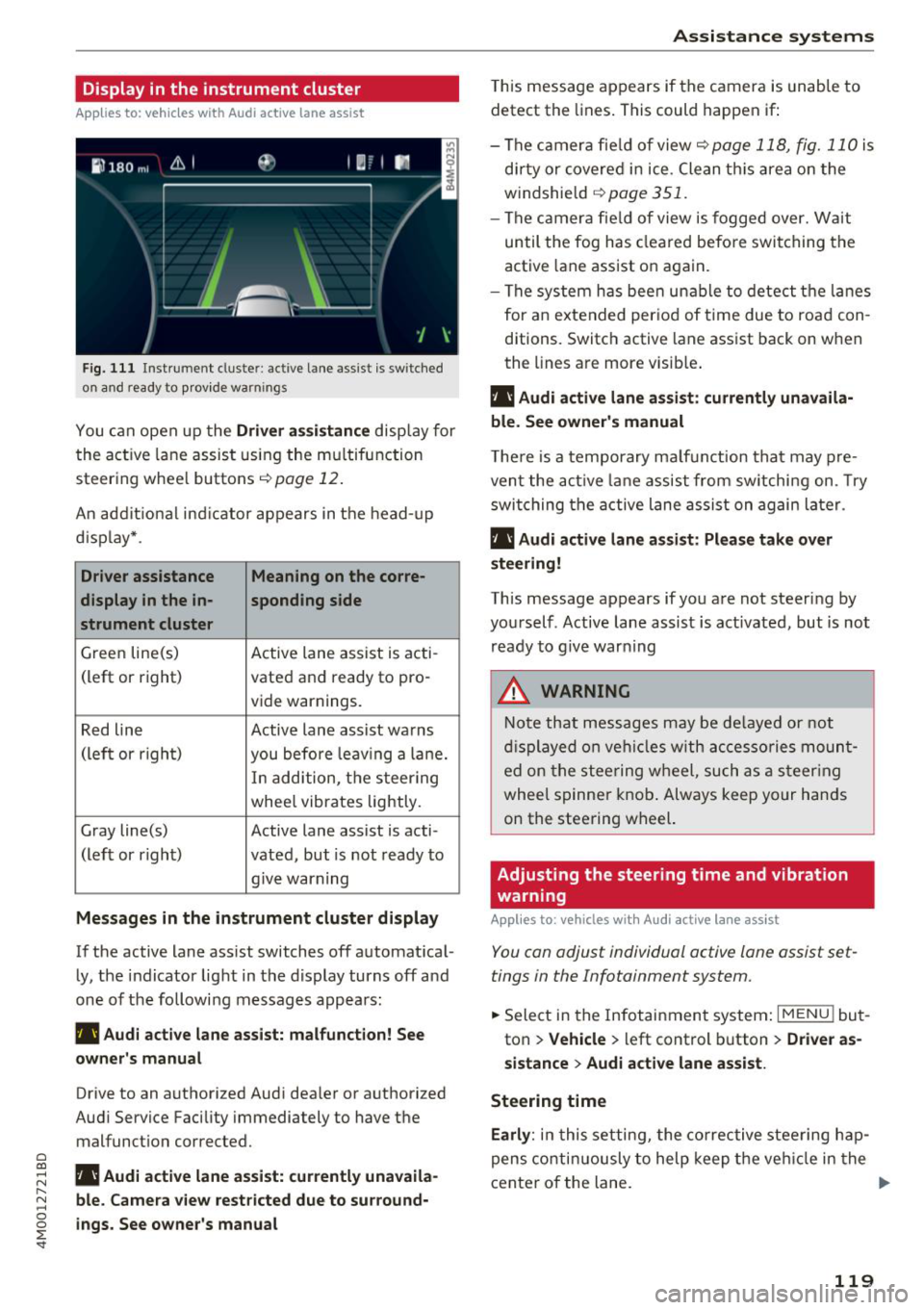
Fig. 1 11 Instrument cluster: active lane ass ist is switched
on a nd ready to provid e warn ings
You can open up the Driver a ssis tanc e display for
the act ive lane assist us ing the mu ltifunction
steer ing whee l buttons
c;,page 12 .
An addit ional ind icator appears in the head-up
d isp lay* .
Driver assistance Meaning on the corre-
display in the in -sponding side
s t rument cluster
Green line(s) Active lane assist is acti-
(left or right) vated and ready to pro-
vide warnings.
Red line Active lane assist warns
(left or righ t)
you before leav ing a la ne.
In add ition, t he steering
whee l vibrates lightly.
Gray line(s) Active lane assist is acti-
(left or r ight) vated, but is not ready to
. . give warning
Messages in the instrument cluster display
If the active lane ass ist switches off automat ical
ly, the indicator light in the display turns off and
one of the followi ng messages appears :
rl1 Audi acti ve lane assist: m alfunction! See
owner 's manual
Drive to an authorized Aud i dea ler or authorized
Aud i Service Facility immediately to have the
malfunct ion corrected.
~ rl1 Aud i a ctive lane assist: currently unavaila
r---N ble. Came ra vie w restricted due to su rround-~ 0 ~ ings. See owne r's manual
'
T his message appears if the camera is unable to
detect the lines . This could happen if:
- The camera fie ld of view
c;, page 118, fig. 110 is
di rty or covered in ice . Clean th is area on the
windshield
c;, page 351.
- The c amera fie ld of view is fogged over. Wait
until the fog has cleared befo re switching the
active lane assist on again.
- The system has bee n unable to detect t he la nes
for an e xtended per iod of time due to road con
ditions. Switch active lane assist back on when
the lines are more visib le .
rl1 Audi active lane a ssist : currently unavaila
ble. See owner's manual
T he re is a temporary ma lf u nction tha t may p re
vent the act ive lane assist from sw itchi ng on. Try
swi tching the active lane assist on again later.
rl1 Audi active lane a ssist : Pl ease take over
steering!
This message appears if you are not steering by
you rself . Active lane assist is activated, but is not
ready to g ive warning
A WARNING
N ote that messages may be de layed or not
d isplayed o n ve hicl es w ith ac cessories moun t
ed on the stee ring w heel, such as a steer ing
wheel spinne r knob . Always keep your hands
on the steering wheel.
Adjusting the steering time and vibration
warning
App lies to : vehicles with Audi active la ne ass ist
You can adjust individual active lane assist set
tings in the Infotainment system.
-
.. Select in the Infotainment system: I MENU ! but
ton
> Vehicle > left control b utton > Dri ver as
si stance
> Audi a ctive l ane assist.
Steering time Earl y:
in t his setting, the corrective stee ring hap
pens contin uously to help keep the veh icle in the
center of the lane. ..,_
119
Page 148 of 398
Intellig ent T echn olo gy
{QJ Note
- Never let the brakes "rub" by pressing the
pedal light ly when braking is not actually
necessary. This causes the brakes to over
heat and increases braking d istance and
causes wear .
- Before driv ing downhill a long distance on a
steep hill, decrease your speed and select a
lower gear. This makes use of the engine
braking effect and rel ieves the brakes. If
you need to b rake additionally, b rake in in
te rvals a nd not conti nuously.
@ Tips
-If the brake booster is not wo rking, you
must press the brake pedal with much more
fo rce than no rma l.
- If you ret rofit your vehicle with a front spoil
e r, whee l cove rs o r similar items, ma ke sure
th at the a ir flow to the front whee ls is not
i nterr upted. Ot herw ise the bra ke sys tem
can become too hot.
Electromechanical
steering, all-wheel
steering
The electromechanical steering supports the
driver's steering movements.
Power steering adapts electronically based on
the vehicle speed.
Indicator lights and me ssa ges
• Steering: malfuncti on! Plea se st o p vehicle
If this indicator light turns on and stays on and
this message appears, the power steering may
have failed.
Stop the vehicle in a safe location as soon as pos
sib le. Do
not continue driving. See an authorized
Audi dea ler or authorized Audi Service Facility for
assistance .
• Stee ring: malfunction! Plea se stop vehicle.
Pa y attention t o di sta nce at sid e
If t his ind icator light tu rns o n and stays o n and
this message appears, t he a ll-wheel steer ing*
146
may have fai led . The side of the vehicle may need
more space on the road .
Reduce you r speed and stop the vehicle in a safe
l oca tion with eno ugh space on the s ides as soon
as possible. Do
n ot continue driving. See an au
thorized Audi dea ler or authorized Audi Service
Facility for assistance.
'I-ij S te e ring : m alfun cti on! You can c ontinue
dri ving
If the indicato r light turns on and the message
appears, the steeri ng wheel may be more d iffi
cu lt to move or more sensitive than usu al. The
steering wheel may a lso be at an ang le when
driving straight.
D rive slowly to an a uth orized Audi dea ler or au
t h orized Aud i Serv ice Facili ty to have t he mal
f unction corrected .
l:r-ij Stee ring : malfun ction! Adapt driving sty le .
Lar ger turnin g radiu s
If the indicator l ight turns on and this message
appears, the all-whee l stee ring* may have fa iled .
Please note that the vehicle has a larger t urning
r ad ius and the st abil ity w hen turning a corner is
lik e tha t of a vehicle wi thout a ll -wheel s teer ing.
The steering whee l may also be at an angle when
driving straight.
D rive slowly to an a uth o rized Audi dea ler or au
t h orized Aud i Serv ice Facili ty to have t he mal
function corrected .
(D Tips
-If the . or l;rfl indi cato r light only stays on
for a sho rt time, you may cont inue driv ing.
- For add itiona l information o n all-wheel
steeri ng*, see
r=.>page 128.
ALL-wheel drive (quattro)
General information
In all whee l dr ive, the dr iv ing power is distr ibut
ed between all fou r whee ls when needed. This
happe ns automatically depend ing on your dr iving
behav ior as we ll as the curren t road cond it ions.
A lso see
r=.> page 142, Electronic stabilization
control (ESC). ..,.
Page 204 of 398
Emergency call
(D Tips
If the emergency call is canceled due to a
poor connect io n, then the system a utomat i
cally tr ies to connect again.
Messages
Applies to: vehicles with emergency call function
II Emergency call function: malfunct ion! Re
stricted functionality . Plea se conta ct Service
If the indicator lig ht t urns on and the message
appears, yo u can only make an emergency ca ll
with restricted funct ion. For examp le , you can not
call the emergency call ce nter, but data may st ill
be transmi tted under certa in circumstances/
D rive to an a uth o rize d Au di dea le r or a uth o riz ed
Au di S ervice Fa cility immedia tely to have t he
mal fun ction cor re cte d.
Ill Emergency call function : malfunction! Func
tion unavailable . Please contact Service
If the indicator lig ht tu rns on and the message
appears , yo u cannot make an eme rge ncy call.
Dr ive to an a utho rized Au di dea le r or a uth orized
Au di Serv ice Facility immedia tely to have t he
malfunc tion co rrected.
Online roadside
assistance
Description
Applies to: vehicles with online roadside assistance
An online roa dsid e ass istance call 1) is a co mbina
tion of d ata tr ansm ission and a p ho ne c all. The
da ta tra nsmission from yo ur ve hicle fo rwa rds im
portant information to the A udi service cente r,
such as the vehicle and posit io n data .
1
> Th e av ail ab ili ty of t he serv ices o ffere d de pen ds on t he
c ountry a nd may c han ge ove r tim e.
202
Calling online roadside assistance
Applies to: vehicles with on line roadside ass istance
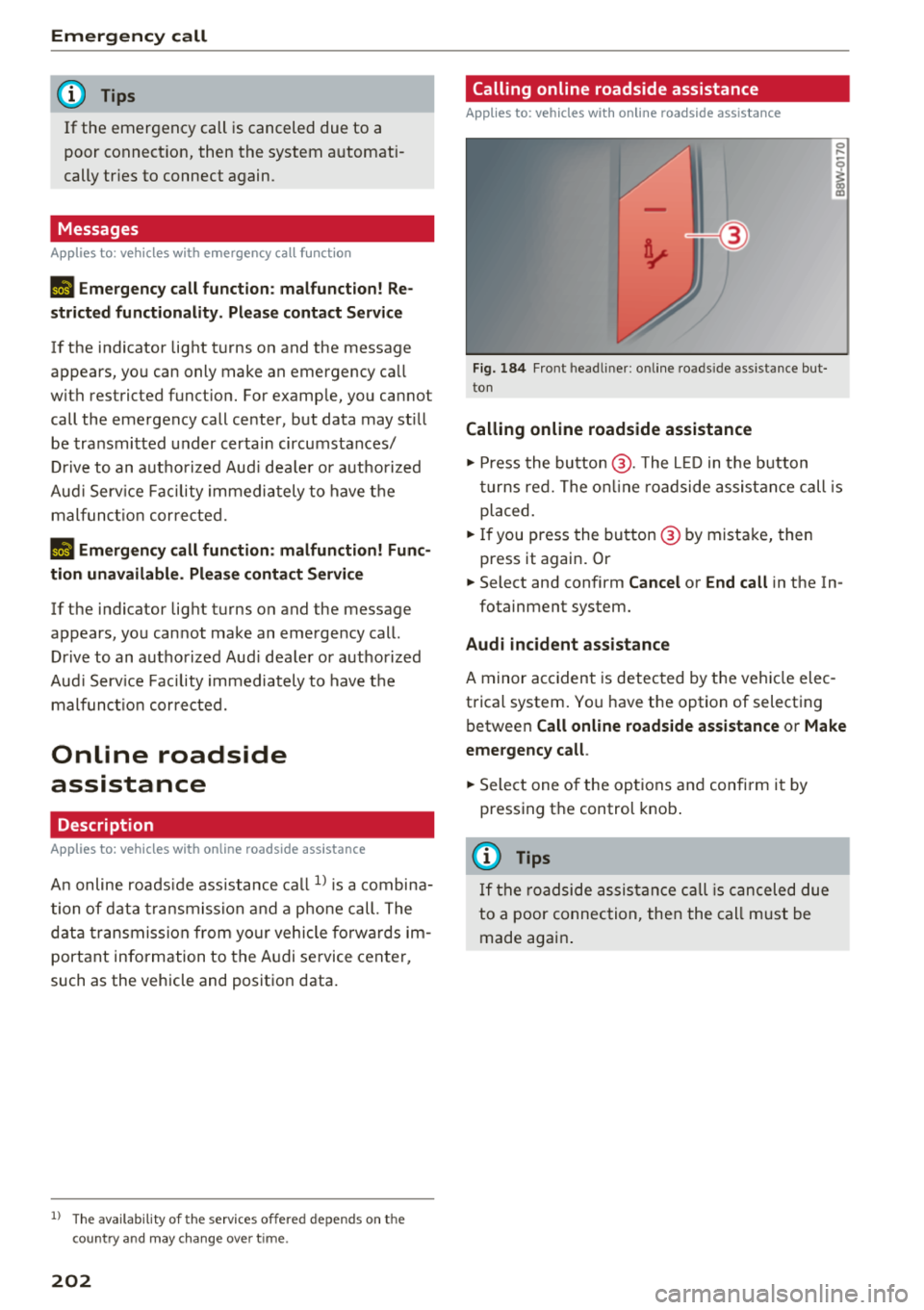
Fig. 184 Fron t head liner: o n line ro ad side assistance bu t
to n
Calling online roadside assistance
0 ...
I
.,. Press the button @. The L ED in t he b utton
tu rns re d. The o n line roadside assi stanc e call is
placed .
.,. If you press the bu tton @ by mista ke, then
press it again . Or
.,. Select and confirm
Cancel or End call in t he In -
fotainment system.
Audi incident assistance
A minor ac ciden t is detec ted by t he ve hicle elec
trical system . Yo u h ave the option of select ing
b etwee n
Call online roadside assistance or Make
emergency call .
.,. Sele ct one o f the op tions an d confi rm i t by
pressing the control knob .
(D Tips
If th e ro adside assis tanc e call i s ca nc ele d d ue
to a poor connec tio n, the n the ca ll m ust b e
made aga in.
Page 320 of 398

Checking and Filling
If the indicator light does not turn off, drive im
mediately to an authorized Audi dea ler or author
ized Audi Service Fac ility to have the malfunction
corrected.
A WARNING
The temperature of the exhaust system is
high, both whe n driving and after stopping
the engine .
- Never touch the exhaust ta il pipes once they
have become hot. This could result in burns .
- Do not park you r vehicle over flammable
materials such as g rass or leaves because
the h igh temperat ure of the emiss ions con
t rol sys tem cou ld start a f ire.
- Do not apply underbody p rotectant in the
exha ust system a rea, because this increases
the risk of fire.
- Applies to: vehicles wi th diesel particulate
filte r: always adjus t your speed to the
weathe r, road, te rra in and traffic con ditio ns
dur ing diesel partic ulate fi lter regene ration.
Yo u should never disobey tra ffic laws in or
der to fo llow dr iv ing recommendations.
(D Tips
Applies to: ve hicles with diesel particulate filter
- Due to the high temperatures that occur
d uring diesel pa rticu late filter regenerat ion,
the radiator fan may continue runn ing after
the engine stops, even if the engine did not reach its operat ing temperatu re.
- Noises, odors and increased speeds may oc
cur d uring the regeneration.
- Always use the co rrect engine oil and fuel to
ens ure that the serv ice life of the d iesel par
ticulate filter is not reduced.
318
On Board Diagnostic
System (OBD)
The On-Board Diagnostic System monitors the
engine and transmission components that influ
ence emissions.
Fig. 260 Footwe ll on left s ide of t he ve hicle : con necti on
port fo r the O n-Boa rd D iagnostic Sys tem (OBD)
On -Board Diagnostic System
Engine data can be read out a t the On-Board Di
agnost ic System connection port using a specia l
testing device
c::> fig. 260 .
Indicator light
If thP ¢'4 ind icator light blink s or turns on , the re
i s a ma lfunction that is causing poor emissions
quality a nd that cou ld damage the catalytic con
verter .
D rive slowly to an authorized Audi dealer or au
thorized Audi Serv ice Facility to have the mal
funct ion corrected .
The ind icator light can a lso turn on if the fuel fill
er cap is not closed correctly
c::> page 312 .
A WARNING
Incorrect use of the co nnect ion port for the
On-Board D iagnost ic System can cause mal
f u nct ions, wh ich can t hen resul t in accidents
and se rious inj uries.
- Only allow an a utho rized Aud i dea le r or au
thorized A udi Se rvice Fa cility to read out the
e ngine da ta.
-
Page 330 of 398
Checking and Filling
& WARNING
- A highly explosive mixture of gases can form
when charging batter ies . Only charge the
vehicle battery in well-vent ilated areas .
- A drained vehicle battery can freeze at tem
peratures a round 32 QF (0 QC) . A frozen or
thawed veh icle battery must not be charged
and must not be used anymore. If ice fo rms,
the battery housing ca n crack and ba tte ry
electrolyte can lea k out, which increases the
risk of an explosion and chemi cal bu rns.
Contact an authorized Au di dea le r o r au
tho rized Audi Serv ice Facility fo r more info r
mation.
- Do not connect o r disconnect the ch arging
cable while charg ing because this increases
t h e risk of an exp losion.
(D Tips
- Only charge the vehicle battery through the
con nections in the engine compartment .
- Read a ll of t he manufacture r's ins tructions
for the charger befo re charg ing the vehicle
battery.
Windshield washer system
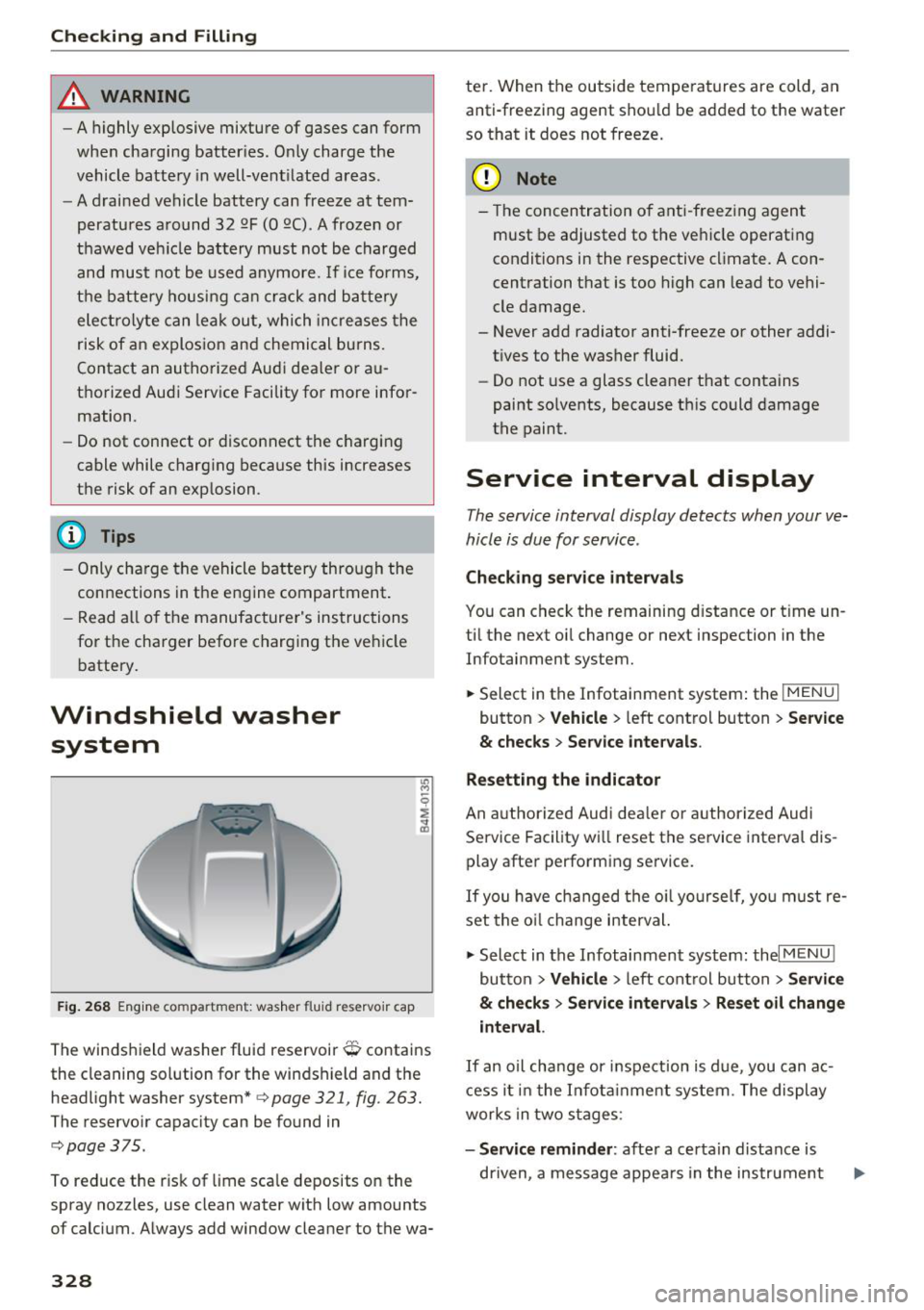
F ig. 26 8 Eng ine co mpa rtment: was her fluid reservo ir cap
The winds hield washer fluid reservoir O contains
the cleaning solution for the windshield and the
headlight washer system*
c> page 321, fig . 263.
The reservo ir capacity can be found in
c:;, page 375.
To reduce the r isk of lime sca le deposits o n the
spray nozzles, use clean water with low amounts
of calcium . Always add window cleane r to the wa-
328
te r. When the outside tempe ratures are cold, an
anti-freezing agent shou ld be added to the water
so that it does not freeze.
(D Note
- The concentration o f anti -freezing agent
must be adjusted to the ve hicle operating
conditions in the respective cl imate. A con
centration that is too high can lead to vehi
cle damage.
- Never add radiator anti-freeze or other addi tives to the washer fluid.
- Do not use a glass cleaner t hat contains
paint so lvents, because t his could damage
the paint.
Service interval display
The service interval display detects when your ve
hicle is due for service .
Checking service intervals
You can check the remaining d istance or t ime un
ti l the next oi l change or next inspection in the
Infotainment system.
.,. Select in the Infotainment system : the
I MENU I
button > Veh icle > left cont rol button > Se rvi ce
& checks > Service inter vals .
Resetting the indicator
An a utho rized Audi deal er or author ized Audi
Se rvice Facility wi ll reset the service interval dis
play after performing se rvice .
If you have changed the o il yourself, yo u must re
set the o il change interval.
.,. Select in the Infotainment system: thel
MENU !
button > Vehicle > left cont rol button > S ervice
& checks > Service intervals > Reset oil change
interval.
I f an o il cha nge or inspection is due, you can ac
cess i t in the I nfot ainment system . T he display
works in two s tages :
-Service reminder : after a certa in distance is
dr iven, a message appea rs in the instrument
Page 331 of 398
Cl a:, ...... N
" N ...... 0
0
::r '
ed on . The remaining distance and time is
displayed br iefly.
- Service due : if your vehicle has reached a serv
ice interval, a message appears briefly after
switching the ignition on.
({;D) Note
-Only reset the oil change indicator if the oil
was changed .
- Following the service intervals is critical to
maintaining t he service life and va lue of
your vehicle, especia lly the engine . Even if
the mileage on the vehicle is low, do not ex
ceed the time for the next service.
Checking and Filling
329
Page 341 of 398
0
a:,
.... N
equipped with them at the
factory
r=> page 349.
-If you install wheel covers on
the vehicle, make sure they al low enough air circulation to
cool the brake system. If they
do not, this could increase the risk of an accident.
Tire wear/damage
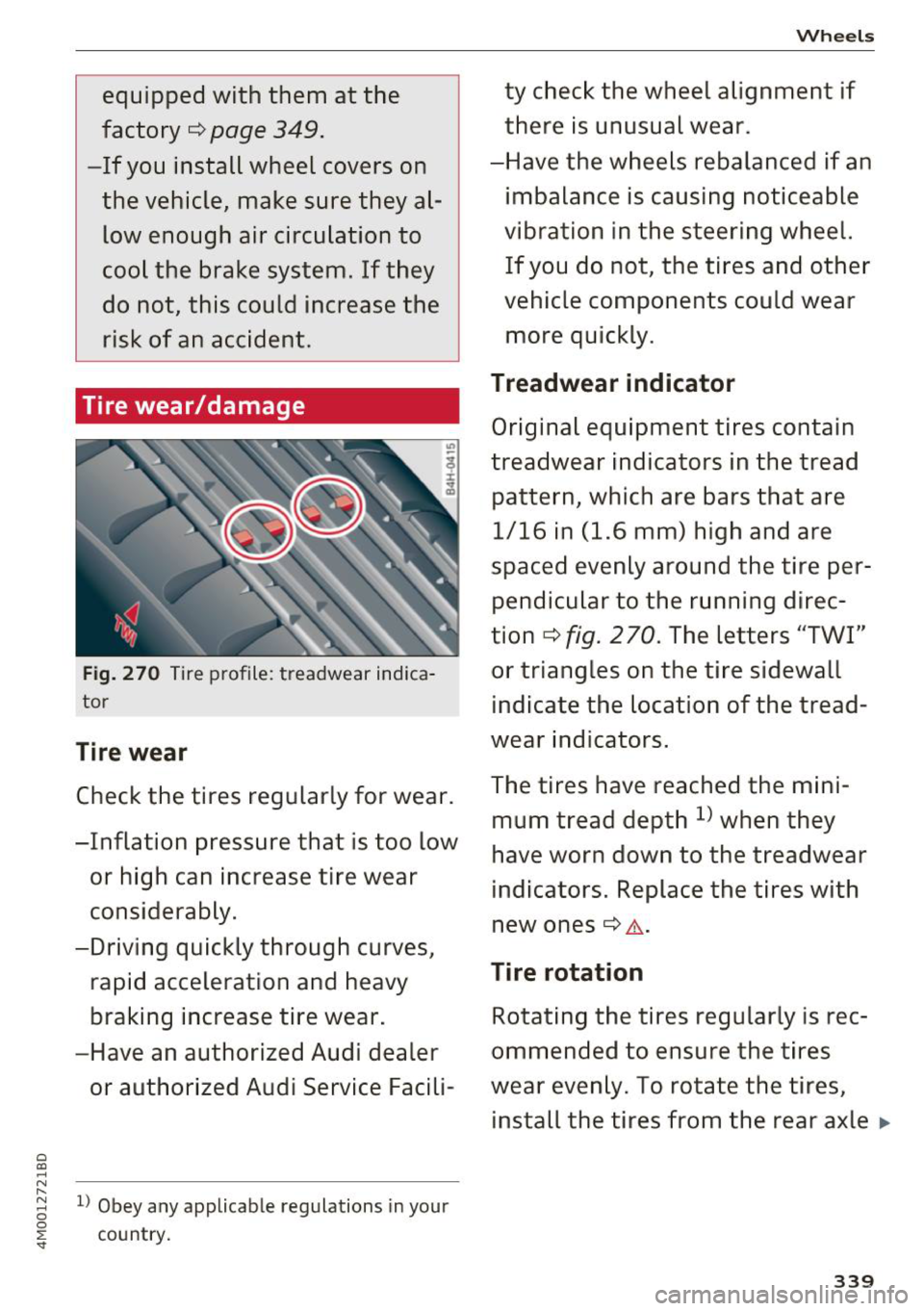
Fig. 270 Tire profile : treadwear indica
tor
Tire wear
Check the tires regularly for wear.
-Inflation pressure that is too low or high can increase tire wear
considerably.
-Driving quickly through curves, rapid acceleration and heavy
braking increase tire wear.
-Have an authorized Audi dealer or authorized Audi Service Facili-
"
8 l) Obey any applicable regulations in your
0 ~ country.
Wheels
ty check the wheel alignment if
there is unusual wear.
-Have the wheels rebalanced if an imbalance is causing noticeable
vibration in the steering wheel. If you do not, the tires and other
vehicle components could wear more quickly.
Treadwear indicator
Original equipment tires contain
treadwear indicators in the tread
pattern, which are bars that are 1/16 in (1.6 mm) high and are
spaced evenly around the tire per pendicular to the running direc
tion ¢
fig. 2 70. The letters "TWI"
or triangles on the tire sidewall indicate the location of the tread
wear indicators.
The tires have reached the mini mum tread depth
l) when they
have worn down to the treadwear
indicators. Replace the tires with
new ones¢ &.-
Tire rotation
Rotating the tires regularly is rec
ommended to ensure the tires
wear evenly. To rotate the tires, install the tires from the rear axle ..,.
339
Page 350 of 398
Wheels
Please note that the TPMS is not a substitute for
proper tire maintenance, and it is the driver's re
sponsibility to maintain correct tire pressure,
even if under-inflation has not reached the level
to trigger illumination of the TPMS low tire pres
sure telltale.
Your vehicle has also been equipped with a TPMS
malfunction indicator to indicate when the sys
tem is not operating properly. The TPMS mal
function indicator is combined with the low tire pressure telltale. When the system detects a
malfunction, the telltale will flash for approxi
mately one minute and then remain continuously
illuminated. This sequence will continue upon
subsequent vehicle start-ups as long as the mal
function exists.
When the malfunction indicator is illuminated,
the system may not be able to detect or signal
low tire pressure as intended. TPMS malfunctions
may occur for a variety of reasons, including the
installation of replacement or alternate tires or
wheels on the vehicle that prevent the TPMS
from functioning properly . Always check the
TPMS malfunction telltale after replacing one or
more tires or wheels on your vehicle to ensure
that the replacement or alternate tires and
wheels allow the TPMS to continue to function
properly.
If the tire pressure monitoring indicator
appears
Applies to: vehicles with Tire Pressure Monitoring System in
dic ato r
The tire pressure indicator in the instrument
cluster informs you if the tire pressure is too low
or if there is a system malfunction.
Using the ABS sensors, the tire pressure monitor
ing system compares the tire tread circumfer
ence and vibration characteristics of the individu
al tires . If the pressure changes in one or more
tires, this is indicated in the instrument cluster
display with an indicator light
RI] and a message.
If only one tire is affected , the location of that
tire will be indicated.
The tire pressures must be stored in the Infotain
ment system again each time the pressures
348
change (switching between partial and full load
pressure) or after changing or replacing a tire on
your vehicle ~
page 349. The tire pressure moni
toring system only monitors the tire pressure you have stored. Refer to the tire pressure label for
the recommended tire pressure for your vehicle
~ page 340, fig . 272.
Tire tread circumference and vibration character
istics can change and cause a tire pressure warn
ing if:
- the tire pressure in one or more tires is too low
- the tires have structural damage
- the tire was replaced or the tire pressure was
changed and it was not stored
~ page 349
- tires that are only partially used are replaced
with new tires
Indicator lights
RI] -loss of pressure in at least one tire~,& .
Check the tires and replace or repair if necessary.
Check/correct the pressures of all four tires and
store the pressure again in the Infotainment sys
tem
~ page 349.
m (Tire Pressure Monitoring System) Tire
pressure: malfunction! See owner's manual.
If
m appears after switching the ignition on or
while driving and the
RI] indicator light in the in
strument cluster blinks for approximately one
minute and then stays on, there is system mal
function. Try to store the correct tire pressures
~ page 349. In some cases, you must drive for
several minutes after storing the pressures until
the indicator light turns off . If the indicator light
does turn off or turns on again after a short peri
od of time, drive to an authorized Audi dealer or
authorized Audi Service Facility immediately to
have the malfunction corrected.
& WARNING
- If the tire pressure indicator appears in the
display, reduce your speed immediately and
avoid any hard steering or braking maneu
vers. Stop as soon as possible and check the
tires and their pressure.
Page 351 of 398
-The driver is responsib le for maintaining the
correct tire pressure. You must c heck the
t ire pressure regu larly.
- Under certa in conditions (s uch as a sporty
dr iv ing style, winter cond itions o r unpaved
roads), the tire p ressure monitoring system
indicator may be de layed .
(D Tips
-The t ire press ure monitoring system can al
so stop work ing when there is an ESC mal
funct ion.
- Using snow chains may result in a system
malfunction.
- The t ire press ure monitoring system in your
A udi was calib rated with "A udi Orig inal
Tires"
<=)page 337. Using these t ires is rec
omme nded .
Storing tire pressures
Applies to: vehicles with Tire Pressure Monitoring System in
dicator
If the tire pressure changes or a tire is replaced,
it must be confirmed in the Infotainment sys
tem.
~ Make s ure before storing that the tire pressures
of a ll fou r tires meet the specified values and
are adapted to the load
Q page 340 .
~ Switch the ign ition on.
~ Se lect in the Infotainment system: ! MENUI but
ton
> Vehicle > Service & checks > Tire pres
sure monitoring > Store tire pressur e> Yes,
store now .
(D Tips
Do not store the tire press ures if snow chains
are insta lled.
Run-flat ti res
Applies to: vehicles with run-flat tires
A run-flat tire helps to maintain vehicle mobility
when there is a loss of pressure .
Cl ~ Run-flat t ires have re inforced sidewalls that pro-
~ tect the t i re if there is a loss of press ure. N ,-1 0
0
::r '
If the t ire pressure monitoring system indicates a
l oss of pressure in one or severa l tires, yo u can
contin ue driving on run -flat tires fo r at least 20
miles (30 km). Drive to an authorized Audi dealer
or authorized Aud i Serv ice Facility immediately to
have the problem corrected .
Continuing to drive on run-flat tires is n o
longer possible if
- there is visible damage to the tires, such as
cracks in the sidewalls .
- strong vibrat ions are felt w hile driving, or the
tire beg ins to smoke due to a strong build-up of
heat .
- the t ire was heavi ly damaged, for example in an
accident There is a r isk that parts of the tire
tread will detach and damage important ve hi
cle components .
- the E lectron ic Stab ilizat ion Control (ESC) is not
work ing or is cont inuously r unning .
- the t ire pressure monitoring system is not
work ing .
If it is no longer poss ible to continue driving de
spite hav ing run-flat tires, see an author ized Audi
dealer or author ized Audi Service Fac ility for as
s istance.
A WARNING
-
R un-f lat t ires may only be used on vehicles
that we re equipped with them at the fa ctory.
- The vehicle must have suspens ion designed
for run-flat tires and a facto ry-installed tire
p ress ure mo nitor ing syste m.
- I nco rrect use of r un-f lat t ires can lead to ve
h icl e damage o r accidents. Contact an au
thor ized A udi dealer or au thori zed A udi
Serv ice Facili ty to lear n if r un-f la t tir es may
be used on you r vehicle an d if so, which
ones.
- If r un-fla t ti re s are used, they m ust be in
stalled on all fo ur whee ls. Mix ing ti re types
is not permitted.
- If yo u have to drive when the tire press ure is
too low or there is no tire press ure, note the
following : .,..
349
Page 383 of 398
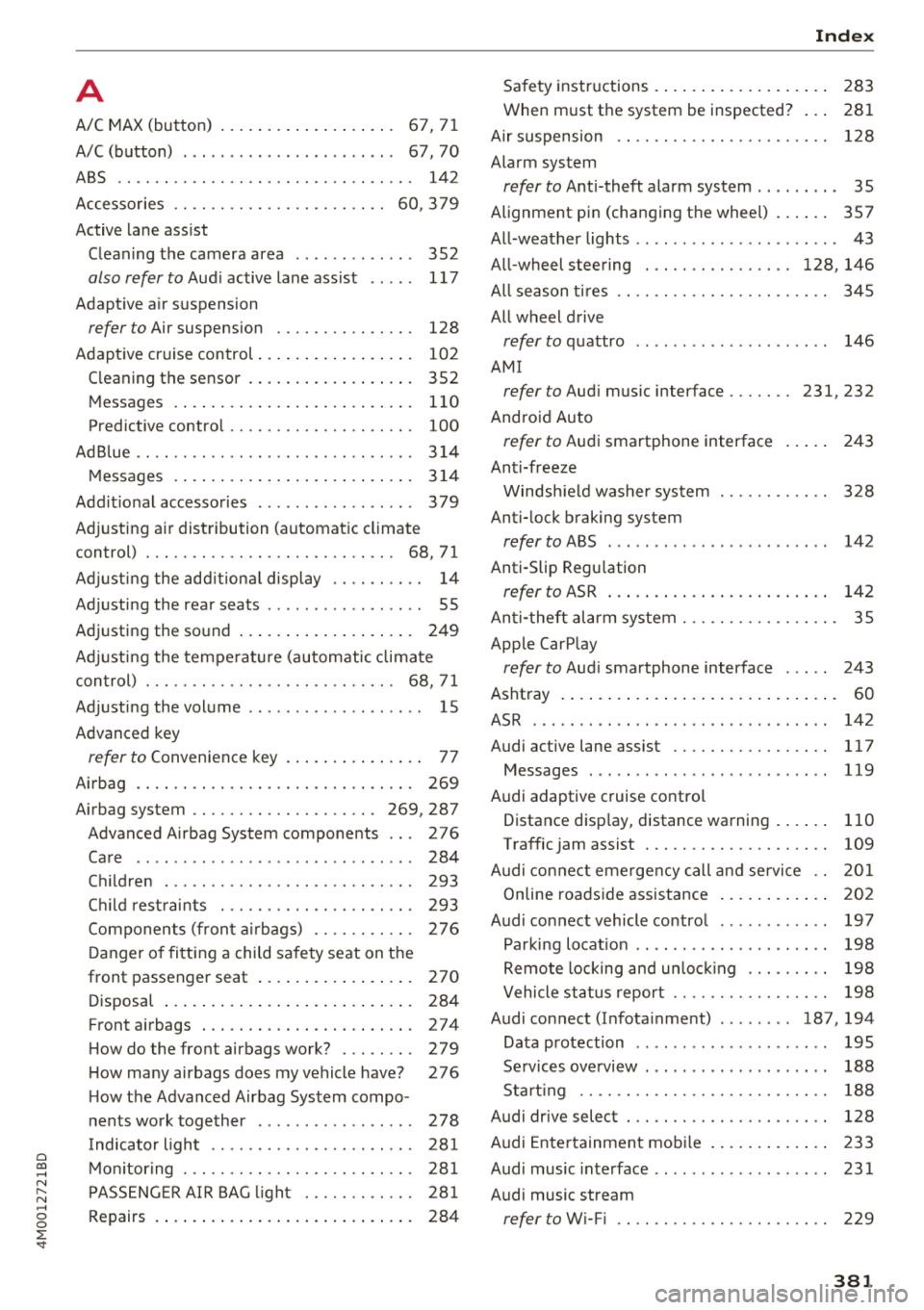
Cl a:, ...... N
" N ...... 0
0
::r '
A/C MAX (button) .................. .
A/C (button)
. .. ................ ... .
67, 71
67, 70
ABS
.. .. .. .. .. ............... .. .. .. . 142
Accessories 60,379
Active lane assist
Cleaning the camera area . . . . . . . . . . . . . 352
also refer to Audi active lane assist . . . . . 117
Adaptive air suspension
refer to Air suspension ........ .. .. .. .
Adaptive cruise control ................ .
C leaning the sensor ................. .
Messages .... ................ ..... .
Predictive control
............. .. .. .. .
Ad Blue .. .. .. .. ............. .. .. .. .. . 128
102
352 110
100
314
Messages .... ................ ..... . 314
Additional accessories . . . . . . . . . . . . . . . . . 3 79
Adjusting air distribution (automatic climate
control) . . . . . . . . . . . . . . . . . . . . . . . . . . . 68, 71
Adjusting the additional display . . . . . . . . . . 14
Adjusting the rear seats . . . . . . . . . . . . . . . . . 55
Adjusting the sound . . . . . . . . . . . . . . . . . . . 249
Adjusting the temperature (automatic climate
control) . . . . . . . . . . . . . . . . . . . . . . . . . . . 68 71
,
Adjusting the volume . . . . . . . . . . . . . . . . . . . 15
Advanced key
refer to Convenience key . . . . . . . . . . . . . . . 77
Airbag . . . . . . . . . . . . . . . . . . . . . . . . . . . . . . 269
Airbag system . . . . . . . . . . . . . . . . . . . . 269, 287
Advanced Airbag System components . . . 276
Care . . . . . . . . . . . . . . . . . . . . . . . . . . . . . . 284
Children · · · · · · · · · · · · · · ...... .. .. .. . 293
Ch ild restraints
............ .. .. .. .. .
Components (front airbags) ...... .. .. .
Danger of fitting a child safety seat on the
front passenger seat ................ .
Disposal ..... ................ ..... .
Front airbags ................ .. .. .. .
How do the front airbags work? . .. .. .. .
How many airbags does my vehicle have?
How the Advanced Airbag System compo -
nents work together ........... ... .. .
Indicator light ............... .. .. .. .
Monitoring . .. ............. .. .. .. .. .
PASSENGER AIR BAG light ....... .. .. .
Repairs .... .. ................ ..... . 293
276
270
284
274
279
276
278
281
281
281
284
Index
Safety instructions . . . . . . . . . . . . . . . . . . . 283
When must the system be inspected? . . . 281
Air suspension . . . . . . . . . . . . . . . . . . . . . . . 128
Alarm system
refer to Anti-theft alarm system . . . . . . . . . 35
Alignment pin (changing the wheel) . . . . . . 357
All-weather lights . . . . . . . . . . . . . . . . . . . . . . 43
All-wheel steering . . . . . . . . . . . . . . . . 128, 146
All season tires
All wheel drive
refer to quattro
AM I 34S
146
refer to Audi music interface . . . . . . . 231, 232
Android Auto
refer to Audi smartphone interface
Anti-freeze 243
Windshield washer system . . . . . . . . . . . . 328
Anti-lock braking system
refer to ABS . . . . . . . . . . . . . . . . . . . . . . . . 142
Anti-Slip Regulation
refer to ASR . . . . . . . . . . . . . . . . . . . . . . . . 142
Anti-theft alarm system . . . . . . . . . . . . . . . . . 35
Apple CarPlay
refer to Audi smartphone interface . . . . . 243
Ashtray . . . . . . . . . . . . . . . . . . . . . . . . . . . . . . 60
ASR · · ... .. .. .. .. .. ............. .. .. 142
Audi active lane assist . . . . . . . . . . . . . . . . . 117
Messages
119
Audi adaptive cruise control
Distance display, distance warning . . . . . . 110
Traffic jam assist . . . . . . . . . . . . . . . . . . . . 109
Audi connect emergency call and service . . 201
Online roadside assistance . . . . . . . . . . . . 202
Audi connect vehicle control . . . . . . . . . . . . 197
Parking location . . . . . . . . . . . . . . . . . . . . . 198
Remote locking and unlock ing . . . . . . . . . 198
Vehicle status report . . . . . . . . . . . . . . . . . 198
Audi connect (Infotainment) ........ 187, 194
Data protection . . . . . . . . . . . . . . . . . . . . . 195
Services overview
. .. ... .. ..... ... .. ..
Start ing .. .. .. .. .. ............. .. . .
Audi drive select .
.. .. ............... ..
Audi Entertainment mobile 188
188
128
233
Audi music interface . . . . . . . . . . . . . . . . . . . 231
Audi music stream
refer to Wi-Fi . . . . . . . . . . . . . . . . . . . . . . . 229
381