Seat AUDI Q7 2018 Owner´s Manual
[x] Cancel search | Manufacturer: AUDI, Model Year: 2018, Model line: Q7, Model: AUDI Q7 2018Pages: 398, PDF Size: 185.58 MB
Page 73 of 398
~ Cooling mode*
The max imum coo ling mode can be sw itched on
and off using the~ button. The air is not cooled
and h umidity is not removed when cooling mode
is switched off. This can cause fog on the win
dows. Cooling mode switches off automatica lly
when the outside temperature is below zero.
When the coo ling mode is sw itched on,~ the
veh icle interior is cooled and dehum id ified as
qu ickly as possib le .
cE:> Recirculation mode
In recircu lation mode, the a ir inside the vehicle is
ci rcu lated and fi ltered. This prevents the unfil
tered air outside the vehicle from entering the
veh icle inter ior . Switch ing recirculation mode on
when dr iv ing t hrough a tunnel or when s itti ng i n
traffic is recommended
~ ,& .
Using the button, recirculation mode is switched
on and off us ing the
ol;) button . You can also
sw itch the recircu lation mode off by pressi ng the
knob @) or the off us ing th e ~ button.
AUTO Autom atic mode
Automatic mode ma inta ins a constant tempera
ture ins ide the veh icle . Air temperature, airflow
a n d a ir distribution are controlled automatica lly .
You can switc h automatic mode on or off by
p ressing the knob @.
Temperature
You can adjust the temperature be tween 60° F
( + 16°C) and 84°F (+28°() by tur ning the knob
@ . If outs ide of this range,
LO or HI will appea r
in the cl imate contro l system display. At bot h of
these se tt in gs, the cl imate contro l system runs
con tinuously at ma ximum coo ling o r hea ting
power. There is no temperature regula tion .
86'~ Blower
You can adjust the volume of a ir generated by the
b lowe r to yo ur preference using the rocker
sw itches @. T he blower should always ru n at a
l ow se tt ing to preven t the wi ndows from fogg ing
~ an d to ens ure a continuous exchange of ai r ins ide
...... "' the vehicle . To have the b lowe r reg ulated auto-
" ~ mat ica lly, press the knob @. 0
0
::r '
Air distribution
Yo u can use the rocker sw itches @to adjus t the
ven ts where the air wi ll flow o ut o f. Press t he
roc ker switches @repeatedly unti l the desired
air distrib ution setting is disp layed in the climate
contro l system contro ls . To have the air distribu
t ion regulated automat ically, press the knob @.
J ~ Seat heating /ventilation*
P ressing the JI~ but ton switches the sea t
heating/ventilation on at the highest setting
( lev el 3). The LEDs indicate the temperatur e lev
el. To reduce the tempe rature, press the button
again. To swi tch the seat heating/ventilat ion off,
press the b utton repeatedly unti l the L ED turns
off .
@ MAX Defogging
The w indshield and side windows are defrosted
o r cleared of condensat ion as quick ly as poss ible.
The maximum amount of air flows mainly from
the vents below the windsh ield . Recirculation
mode switches off . The temperat ure should be
set at +72°F (+22°C) or highe r. T he tempe rature
i s con trolled automat ica lly.
Defrost is sw itched on and off®
MAX button.
You can also sw itch the f unct io n off by press ing
t h e knob @.
Applies to vehicles with windshield defogger: the
windshield defogger switches on automatically
when ou tside tempera tures are low . If you would
li ke to sw itch the windsh ield defroster on ma n
u ally, press the ~ button. The L ED in the button
blinks.
[ffi) REAR Rear window defogger
Press the button ~ to switch the rear window de
fogger on .
It only operates when the engine is
r un ning . It switc hes off automatically afte r 10 to
2 0 m inutes, depe nding on the ou ts ide tempera
tu re .
T o keep the rear w indow defogge r o n con tinuous
ly, press a nd ho ld the
Qul R EAR butto n longe r
t h an th ree seco nds. This is sto red un til the ign i-
t ion is swi tched o ff. ..,.
71
Page 74 of 398
Warm and cold
SYNC Syn chr oniz ation
Use t he rocker sw itc h CD to select the f unct ion.
When synchronization is switched on, the set
tings for the driver's side are applied to the front
passenger's side and the rear (except for seat
heating/venti lation*). When the settings on the
front passenger's side or in the rear are changed,
the synchron izat ion is automatically switched off
and
4- zone appears in the display .
SET REAR function
Use the rocker switch CD to select the function .
When the function is switched on, you can adjust
all settings for the rear us ing the climate control
system controls in the cockpit . The rear climate
control system controls cannot be operated at
the same time . T his function switches off auto
mat ica lly after a ce rtain per iod of t ime or after
leav ing the menu.
Vents
You can open or close the center and rear vents in
the cockpit and the vents in the rear center con
sole and door p illars using the r idged thumb
wheels. The levers adjust the d irect io n of the a ir
flow from the vents. The w ide vent is opened and
closed using the~ button ~
page 8, fig. 2@ .
Residual heat
You can activate the residual heat function when
the ignition is switched off by pressing the knob
© (left side). The residual heat from the coolant
is used to heat the ve hicle in ter io r. The res id ual
heat function switches off automatically after
about 15 minutes.
A WARNING
- You should not use the recirculation mode
for an extended period of time, because no
fresh air is drawn in and the windows can
fog when cooling mode is sw itched off . This
i ncreases the risk of an accident .
- Individuals with reduced sensitivity to pain
or temperature could develop burns when
us ing the seat heating function . To reduce
the risk of injury, these ind iv iduals should
not use seat heat ing.
72
@ Note
To avoid damage to the heating elements in
the seats, do not knee l on the seats or p lace
heavy loads on a small area of the seat.
(D Tips
It is not possib le to operate the rear climate
control system controls when the power chi ld
safety lock is switched on. W ith the SET REAR
funct ion, you can apply all settings to the rear
using the climate control system controls in
the cockp it~
page 38 .
Setup
Applies to: vehicles with 4 -zone de luxe automat ic climate
contro l
The climate control system basic settings are ac
cessed in the Infotainment system.
.. Select in the Infotainment system : IMENU! but
ton
> V eh icle > left control button > Air condi
t ioning
Seat heating /seat ventilation *
You can adjus t the seat heat ing/vent ilat io n ba l
an ce for t he d river, front passenger and rear pas
sengers .
Footwell temperature
You can adjust the footwell temperature so that
i t is cooler or wa rme r.
Auto recir culat ion
When switched on, automat ic recirculation con
trols the recirculation mode automatically . You
must press the®
MAX button if fog forms on
the w indows .
Automat ic au xili ary heater *
The aux iliary heater he lps to warm the vehicle in
terior more qu ickly.
Steering wheel heating
App lies to: vehicles wit h stee ring w heel heat ing
The steering wheel rim can be heated .
.. Press the button on the multifunction steering
wheel to switch the steering wheel heating on .,..
Page 77 of 398

Cl a:, ...... N
" N ...... 0
0
::r '
next traffic light is red . This produces an engine
b raking effect, wh ich he lps to protect the brakes
and tires and reduces the emissions and f uel con
sumpt ion to zero (fuel shut-off dur ing decelera
tion) .
Shift efficientl y
Upshifting earlier is an effective way to save fue l.
Staying in a gear too long uses fue l unnecessari
ly .
Press down on the acce lerator peda l slowly and
avoid "kick -down".
Avoid full acceleration
You sho uld rare ly t rave l at the maxim um vehicle
speed. High speeds cause a d isp roportiona tely
hi gh increase in fuel consump tion, emissions and
traffic noise . Driving more slowly saves f uel.
Reduce idling time
The Start/Stop system* he lps to reduce the id ling
time automatically. In vehicles wi thout the Sta rt/
Stop system*, it is efficient to switch the engine
off when stopped at ra ilroad crossings and long
red lights . Stopping the engine for
30 -40 sec
onds already saves more fuel than the amount of
extra fuel needed to restart the eng ine.
I t takes a very long time in idle to wa rm the en
gine up to operating temperature . Wear and
emissions are especially high in the warm -up
phase. Therefore, you should begin driving im
mediately after starting the engine. Avoid high
RPMs while do ing th is .
Have maintenance perf ormed regularly
By having maintenance performed regu larly on
your ve hicle, you can he lp to reduce fuel con
sumpt ion before you even start to drive. The
maintenance condition of your vehicle not only
affects traffic safety and long-term value but a l
so impacts fuel consumption . A poorly main
tained engine can lead to fuel consumpt ion that
i s
1 0% hi gher tha n normal.
Driving
Avoid short trips
T he eng ine and exh aust cleaning system mus t
r each their optima l operat ing temperatu re to ef
fectively reduce consumption and emissions.
A cold engine uses a d isp roportionately high
amoun t of fue l. The engine re ac h es operat ing
temperat ure and cons umption norma lizes on ly
after approximate ly 2.5 mi les (4 km) .
Check the tire pressure
To save fuel, ma ke sure the t ires are always i n
flated to t he correct pressure~
page 340. The
fuel consumpt io n can increase by
5% if the pres
s u re is on ly
0 .5 bar too low. Due to the increased
rolling resistance, low tire pressures wi ll also
l ead to greater tire wear and will affect driving
behavior.
Do not drive on winter tires year -round, as this
will consume up to
10% more fuel.
Eliminate unnecessary weight
S ince eve ry po und of ext ra weight increases f uel
co nsump tion , a quick inspect io n of the luggage
compartment may be worth it to avoid unneces
sary weight .
When not be ing used , a roof rac k sho uld be re
moved to decrease the w ind resis tance of the ve
hicle . This will save you approximately
12% fu el
at speeds from
62 -75 mph (100 -120 km/h) .
Save energy
The eng ine d rives the generator, which generates
electric ity; the fuel consumpt io n also increases
wi th the dema nd for e lec tric ity . T he refore, sw itch
electrical eq uipment off when you no longer
need it . Examples of eq uipment that uses a lot of
energy are air blowers at a high setting, the rear
window defogger and seat heating* .
@ Note
Do not leave engine idling unattended after
starting. If warning lights sho uld come on to
i ndicate improper operation, they would go
unheeded. Extended idling also produces
heat, which could resu lt in overheating or
other damage to the veh icle or other proper
ty .
75
Page 78 of 398
Driving
(D Note
-Have your vehicle maintained properly and
in accordance with the service recommenda ·
tions in your Warranty & Maintenance book
let . La.ck of proper maintenance as well as
improper use of the vehicle will impair the
function of the emission control system and
could lead to damage.
- Do not alter or remove any component of the Emission Control System unless ap·
proved by the manufacturer .
- Do not alter or remove any device, such as
heat shields, switches, ignition wires,
valves, which are designed to protect your
vehicle's Emission Control System and other
important vehicle components.
(0 Tips
The consumption estimates as published by
ENVIRONMENTAL PROTECTION AGENCY
(EPA) and Transport Canada may not corre
spond to your actual consumption on the
road, which will vary depending upon vehicle
load and speed, road and weather conditions,
trip length, etc.
Steering
Manual steering wheel position adjustment
Applies to: vehicles with manual steering wheel adjustment
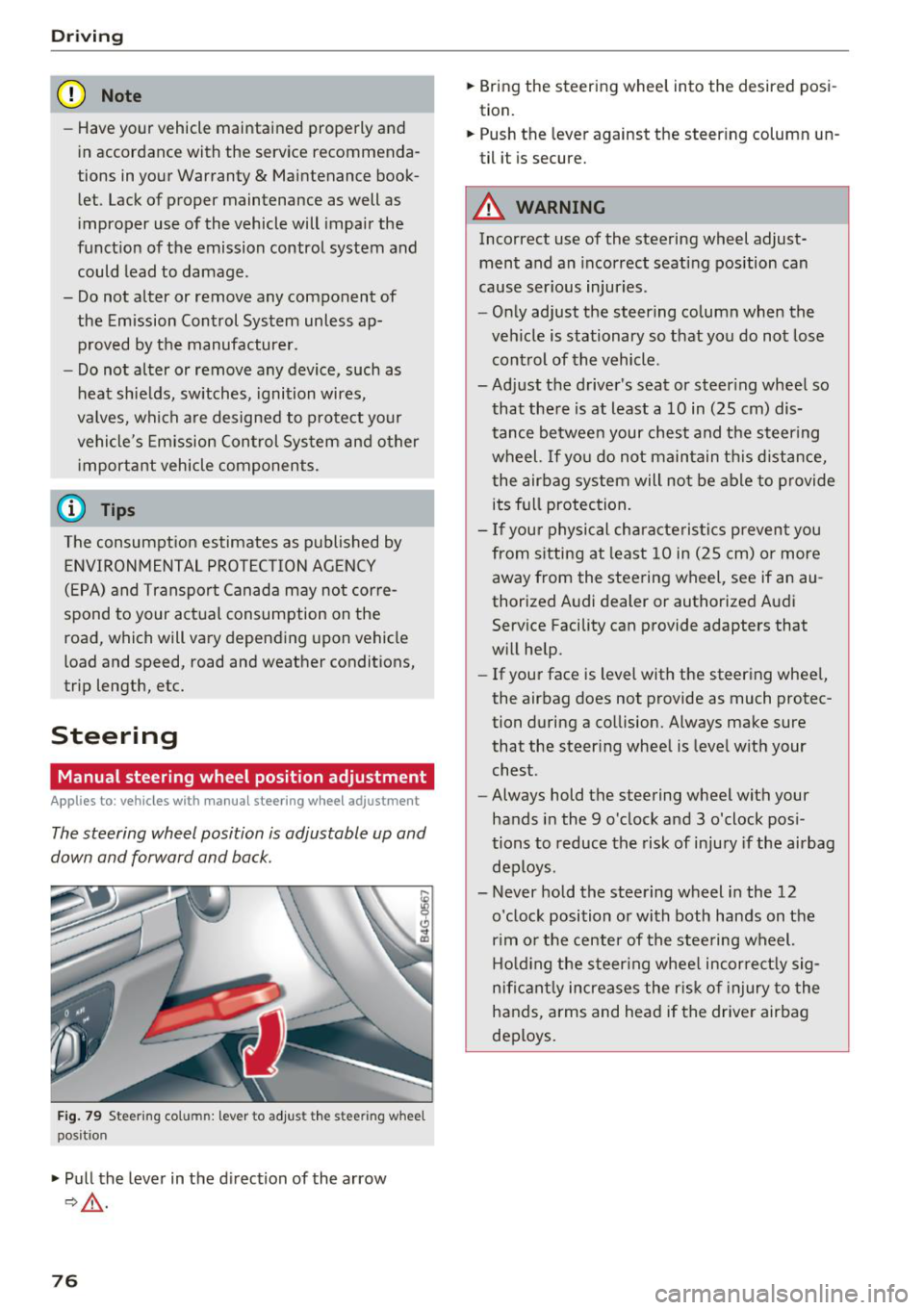
The steering wheel position is adjustable up and
down and forward and back.
Fig. 79 Ste eri ng col umn : lev er to adjus t the stee rin g whe el
p os it ion
.,. Pull the lever in the direction of the arrow
9,&. .
76
.,. Bring the steering wheel into the desired posi
tion.
.,. Push the lever against the steering column un
til it is secure.
A WARNING
Incorrect use of the steering wheel adjust ment and an incorrect seating position can
cause serious injuries.
- Only adjust the steering column when the
vehicle is stationary so that you do not lose control of the vehicle .
-
-Adjust the driver's seat or steering wheel so
that there is at least a 10 in (25 cm) dis
tance between your chest and the steering wheel. If you do not maintain this distance
I
the airbag system will not be able to provide
its full protection.
- If your physical characteristics prevent you
from sitting at least 10 in (25 cm) or more
away from the steering wheel, see if an au
thorized Audi dealer or authorized Audi
Service Facility can provide adapters that
will help.
- If your face is level with the steering wheel,
the airbag does not provide as much protec
tion during a collision. Always make sure
that the steering wheel is level with your
chest .
- Always hold the steering wheel with your
hands in the 9 o'clock and 3 o'clock posi
tions to reduce the risk of injury if the airbag
deploys .
- Never hold the steering wheel in the 12 o'clock position or with both hands on the
rim or the center of the steering wheel.
Holding the steering wheel incorrectly sig
nificantly increases the risk of injury to the
hands, arms and head if the driver airbag
deploys.
Page 79 of 398
a co .... N r--. N .... 0
0
:E '
Applies to: vehicles with power steering wheel adjustment
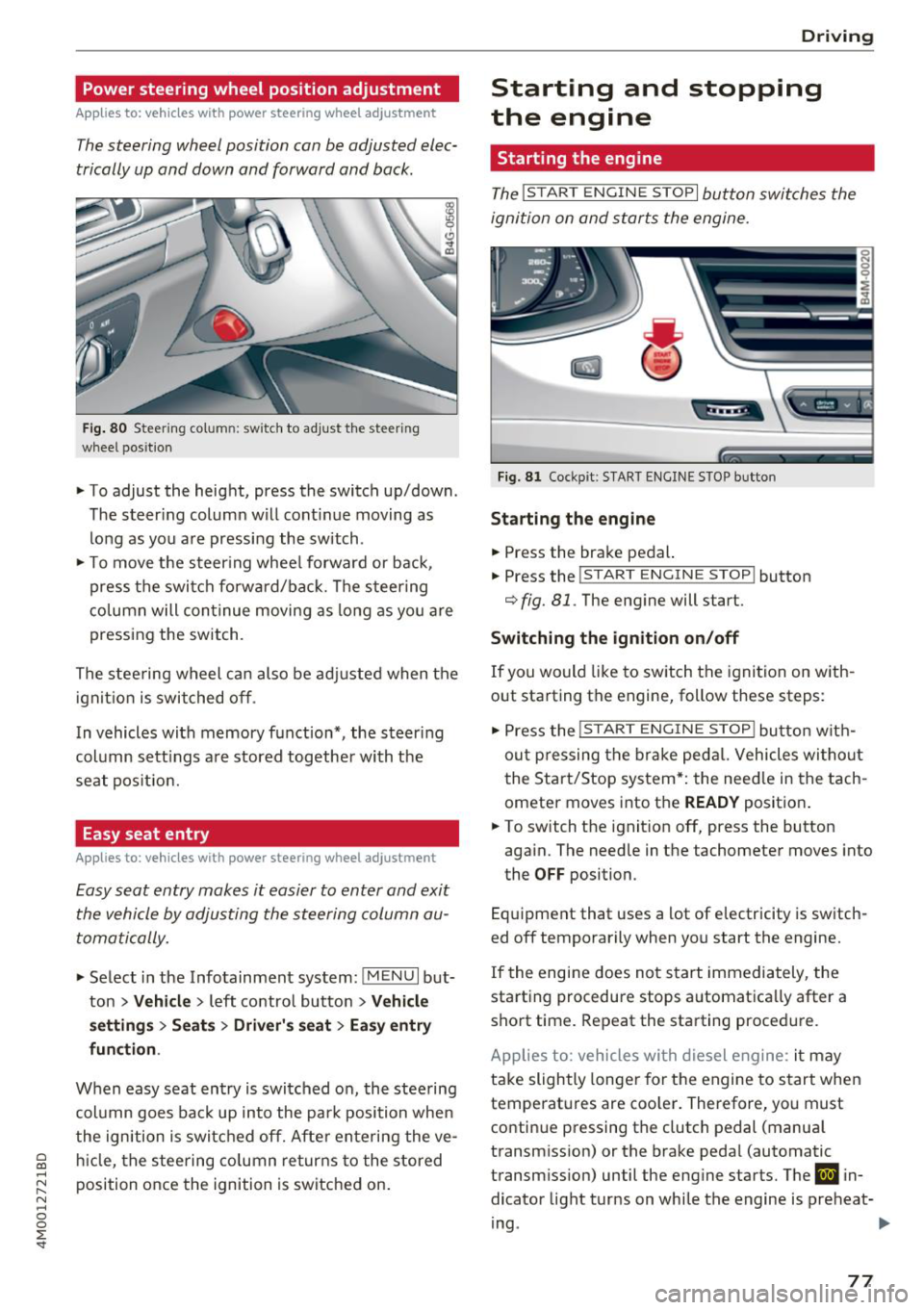
The steering wheel position con be adjusted elec
trically up and down and forward and bock.
Fig. 80 Steerin g co lu m n: sw itch to adjust th e steeri ng
whee l pos ition
.. To adjust the height, press the switch up/down .
The steer ing column will cont inue moving as
long as you are pressing the switch .
.. To move the steering wheel forward or back,
press the switch forward/back. The steering
column will continue moving as long as you are
pressing the switch.
The steering wheel can also be adjusted when the
ignition is switched off .
In vehicles with memory function*, the steer ing
column sett ings are stored together with the
seat position.
Easy seat entry
Applies to: vehicles with power steering wheel adjustment
Easy seat entry makes it easier to enter and exit
the vehicle by adjusting the steering column au
tomatically.
.. Select in the Infotainment system: !MENUI but
ton
> Vehicle > left contro l button > Vehicle
settings> Seats> Driver's seat> Easy entry
function .
When easy seat entry is switched on, the steering
column goes back up into the park position when
the ignition is switched off. After entering the ve
hicle, the steering column returns to the stored
position once the ignition is switched on.
Driving
Starting and stopping
the engine
Starting the engine
The ! STAR T ENGINE ST OPI button switches the
ignition on and starts the engine.
Fig. 81 Cockpit : S TART ENGINE STOP butto n
Starting the engine
.. Press the brake pedal.
.. Press the
!START ENGINE STOP ! button
c;, fig. 81. The engine will start.
Switching the ignition on/off
If you would like to switch the ignition on with
out starting the engine, follow these steps:
"' Press the
!S T AR T ENGINE S T OP I button with
out pressing the brake pedal. Vehicles without
the Start/Stop system*: the need le in the tach
ometer moves into the
READY position .
.. To switch the ignition off, press the button
again. The needle in the tachometer moves into
the
OFF position.
Equipment that uses a lot of electricity is switch
ed off temporarily when you start the engine.
If the engine does not start immediately, the
starting procedure stops automatica lly after a
short time. Repeat the starting procedure.
Applies to: vehicles with diesel engine: it may
take slightly longer for the engine to start when
temperatures are coo ler. Therefore, you must
continue pressing the clutch pedal (manual
transmission) or the brake pedal (automatic
transmission) until the engine starts. The
IJ in
dicator light turns on while the engine is preheat-
ing .
IJJI>
77
Page 114 of 398
Ass is tanc e system s
ACC: Please fa sten seat belt
The system is not comp letely available if t he d riv
er 's seat be lt is unfas tened .
Station ary obje ct ahead
This message appears if you would like to switch
the system on and there is a stationary object di
rectly in front of your veh icle .
Doo r open
The system is not ava ilable when the door is
open .
Audi pre sense
Introduction
Applies to: ve hicles w ith Audi p re se nse
W ith in the limits of the system, the pre sense
functions can in it iate measures in particularly
dangerous s ituat ions to protect the ve hicle pas
sengers and ot her r oad users.
- Due to the interl ink ing of various vehicle sys
tems , crit ica l dr iv ing s ituat ions can be detected
by
pr e s ense basic and measu res fo r preventa
t ive occ upan t protect ion are can be initiated.
- T he
pre sen se front system uses the data from
t h e adapt ive cr uise control* radar sensors and
t h e camera to calc ulate the probab ility of a col
lision . Within the limits of the system, an im
pending collision with vehicles can be detected
in both urban and rural speed ranges. In this
case, the system warns the driver visually,
acoustically and with a jerk on the brakes if nec
essary . If needed, it can initiate a partial or fu ll
deceleration to reduce the collision speed or to
avo id the co llision unde r ce rtain c ircumstances .
In conjunct ion with p re sense basi c/rear, the
front safety belts are also revers ibly tensioned
whe n needed. The pre sense front is also act ive
when adaptive cruise control* is switched o ff.
- Pr e se nse rear con tains pre sense basic func
tions. It uses the data from the side assist* ra
dar sensors and calc ulates within the limits of
the system the probability of a rear end colli
sion with the vehicle behind you . Pre sense rear
is also active when s ide assist* is switched off .
112
-Within the limits of the system, pre sen se cit y
uses the camera data and can detect an im
pending collision with vehicles and pedestrians .
In this case, the system warns the driver visual ly, acoustical ly and w it h a jerk on the brakes if
necessary . If needed, it ca n initiate a full dece l
erat ion to reduce t he coll is ion speed or to avoid
the collision under certa in circumstances . In
conjunction with p re sense basi c/rear, the front
safety belts are a lso reve rsibly te nsioned whe n
needed.
& WARNING
Read the genera l information inc::>.&. in Gen
eral information on page 103,
~ .&. in Gener
al information on page 121.
(D Tips
- C erta in p re sense funct io ns sw itch off when
driving in reve rse.
- Th e pre sense f unct io ns m ay no t be ava ila
ble i f th ere is a ma lfunct ion in the ESC sys
tem or t he airbag control module .
-Note that the reve rsib le belt tens ione r o n
the front passenger 's side deactivates when
the front passenger's airbag is deactivated.
- Switch the pre sense off when yo u are not
using public streets or when loading the ve
hicle onto a vehicle carrier, train, ship or
other type of transportat ion. This can pre
vent an undesired intervention from the pre
sense system.
Audi pre sense basic
App lies to: vehicles wit h Audi pre sense basic
The pre se nse bas ic functions are activated at a
speed of approx imately 20 mp h (30 km/h) o r
highe r.
The following functions ca n be triggered u nder
certain co nd it io ns w it hi n the lim its of the sys
tem:
- Tensioning of the safety belts (for examp le,
during heavy brak ing) : the front safety belts
have reversible belt te nsioners . If a collision
does not occur , the safety belts loosen slig htly
and are ready to tr igger aga in.
...
Page 115 of 398
Cl a:, ...... N
" N ...... 0
0
::r '
- Activ ati ng the eme rgency fl ashe rs
l ).
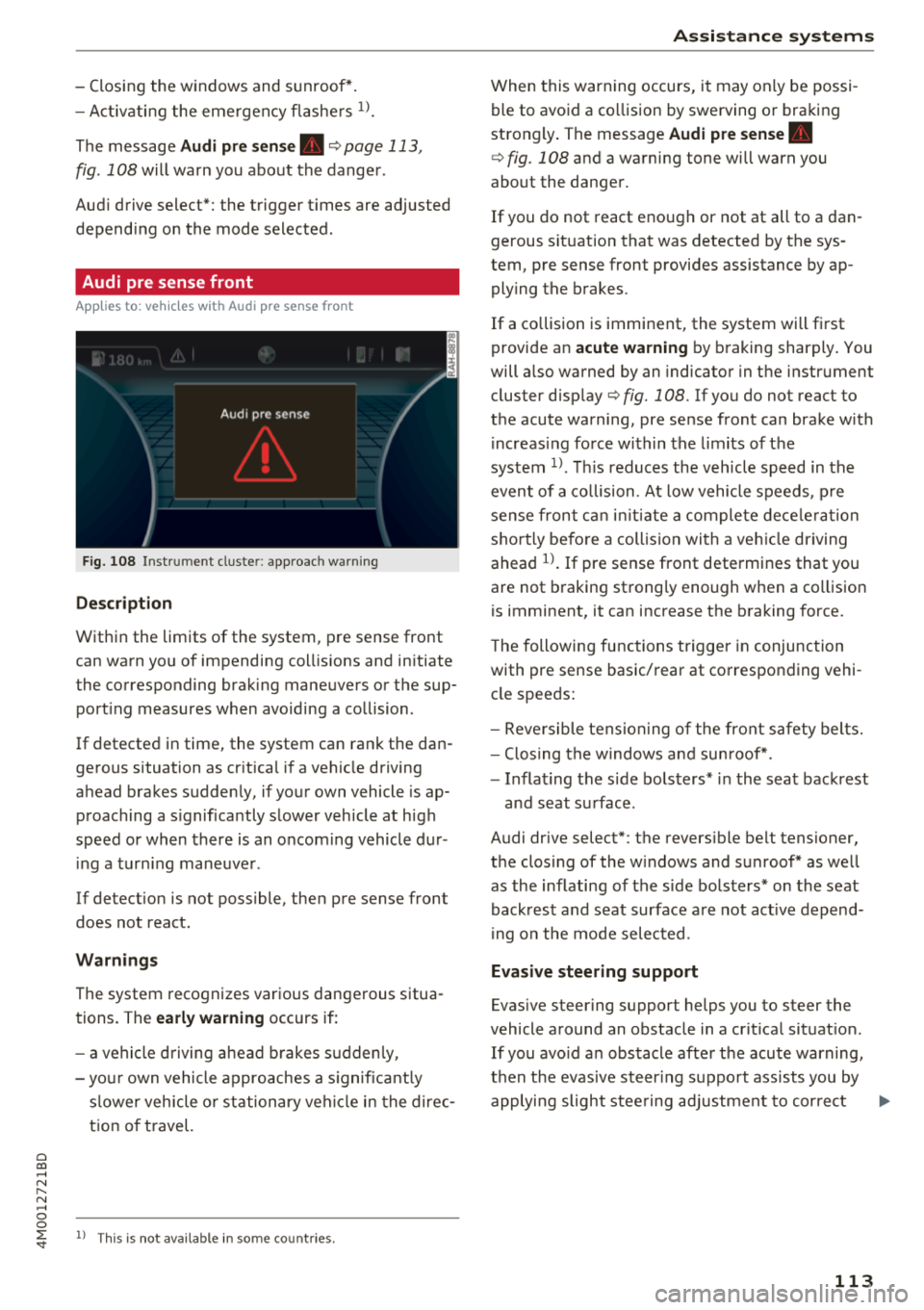
The message Audi pre sen se. ¢ page 113,
fig . 108 will warn you about the dange r.
Aud i drive select*: the trigger t imes are adjusted
depend ing on the mode selected .
Audi pre sense front
Applies to: vehicles with Audi pre sense front
Fig . 108 In strumen t clu ste r: approac h warn ing
Descr iption
Within the limits of the system, pre sense front
can warn yo u of impending coll is ions and in itiate
the corresponding brak ing maneuvers or the sup
port ing measures when avoiding a co llision .
If detected in time, the system can rank the dan
gerous situation as cr itica l if a vehicle driving
ahead brakes sudden ly, if you r own vehicle is ap
proaching a s ignificantly s lower vehicle at h igh
speed or when there is an oncom ing vehicle dur
i ng a tur ning maneuve r.
If detection is not poss ible, then pre sense front
does not react.
Warnings
The system recognizes various dange rous situa
tions. The
early warning occurs if:
- a vehicle d riving ahe ad brakes s udden ly,
- yo ur own vehicle approaches a s ignificant ly
s lower veh icle o r st ation ary veh icle in the dire c
t ion of t ravel.
ll This is not availa ble in so m e co untrie s.
A ss istance systems
When this warning occurs, it may on ly be possi
ble to avoid a co llision by swerving o r braking
strongly . The message
Audi pre sense.
¢ fig . 108 and a wa rning tone will warn you
about the danger .
If you do not react enough or not at all to a dan
gerous sit uat ion that was detected by the sys
tem, p re sense front provides assistance by ap
ply ing the b rakes .
If a collision is imminent, the system will first
provide a n
acute warning by braking sharply . You
will a lso warned by an indicato r in the instr ument
cluster display¢
fig. 108 . If you do not react to
the acute warning, pre sense front can brake w ith
i ncreas ing fo rce wi thin the limits of the
system
1> . Thi s reduces the veh icle speed in the
even t of a co llision . At low vehicle speeds, p re
sense fron t can ini tia te a complete dece le ra tion
shor tly be fore a collision wi th a ve hicle dr iving
ahead
l)_ If pre sense front determi nes that you
are not braking strong ly enough when a co llision
is imminent, it can increase t he b raking force.
T he following fu nctions t rigge r in conjunction
with pre sense basic/rea r at co rresponding vehi
cle speeds:
- Reve rsible tens ion ing of the front safety bel ts.
- Clos ing the windows and sun roof* .
- Infla ting the s ide bo lsters* in the sea t backrest
and seat s urface .
Audi drive select*: the revers ible belt tensioner,
the clos ing of the w indows and s unroof * as we ll
as the inflating of the s ide bols ters* on the seat
back res t and seat surface are not act ive depen d
i ng on the mode selected .
Evasive steering support
Evasive s teer ing s upport helps you to steer the
vehicle a round an obstacle in a cr it ica l sit uat io n.
If you avo id an obs tacle afte r th e acute warning,
t h en the evasive steer ing s uppo rt ass ists you by
applying slight stee ring adjust men t t o correct ..,
113
Page 116 of 398

Ass is tanc e system s
your steering whee l ang le as long as you are ac
tively steering . Evasive steering support is availa
b le at speeds between approximate ly 20 mph
(30 km/h) and 90 mph (150 km/h).
Tu rn as sist
When start ing to drive and up to speeds of maxi
mum
6 mph (10 km/h), the turn assist uses a
braking intervention to prevent your vehicle from
colliding with an oncoming vehicle when turning
left or right (available in certain countries). The
braking in tervent ion causes your vehicle to stay
in its lane .
A WARNING
-Pre sense front cannot overcome the laws of
physics. It is a system des igned to assist a nd
i t cannot prevent a collision in every c ircum
sta nce. The d rive r must a lways i nte rvene.
T he driver is always responsib le for b raking
at the correct time. Do not let the increased
safety provided tempt you into taking risks .
This cou ld increase your risk of a collision.
- The system can deploy incorrectly due to
system -specific limits .
- Please note that the sensors and the camera
do not always detect all objects or lane
markings. This increases the risk of an acci
dent.
- Pre sense front does not react to people, an
ima ls or ob jects that are crossing the veh i
cle's path or that are diff icu lt to detect¢
&
in General information on page 103.
-Reflective objects suc h as guard rails or the
entrance to a tunnel, heavy rain and ice can
affect the function of the radar sensors and
the system's ability to detect a coll is ion risk.
@ Note
The sensors can be displaced by impacts or
damage to the bumper, whee l housing and
underbody . Pre sense fro nt can be impa ired
by this. Have an autho rized Aud i dea le r or a u
thorized A ud i Service Fac ility check the ir func
tion.
l) Th is is not available in so m e co un tri es.
114
(D Tips
- You can cancel the braking with increasing
force that is initiated by t he system by brak
ing yourself, by acce lerating not iceably or
by swerving.
- Keep in mind that pre sense front can brake unexpectedly. Always secure any cargo or
objects that you are transporting to reduce
the risk of damage or injury .
- Specific pre sense front functions switch
off
when the ESC is restricted or sw itched off
¢ page 143 or the hi ll hold assist is switch
ed on
¢ page 144.
Audi pre sense rear
App lies to : vehicles wi th Audi side ass ist
If the risk of a co llision with a vehicle ahead is de
tec ted, the fo llow ing f unct ions can be t rigge red:
- Reversible tens ion ing of the front safety belts
at the corresponding speeds.
- Clos ing the windows and sunroof* .
- Inflating the side bo lsters* i n the seat backrest
and seat surface .
- Activat ing the emergency flashers with in-
creased frequency
ll .
The message Audi pre sense. ¢ page 113,
fig. 108
will warn you about the danger.
Audi drive select* : the function is not act ive de
pending on the mode selected .
A WARNING
-To reduce the risk of an accident, please
note that the s ide assist* radar sensors do
not a lways detect every object.
-
- Pre sense rear does not react to people, ani
mals or objects that a re c ross ing t he vehi
cle's path or that are d ifficult to detect.
- Reflective objects such as guard ra ils, heavy
rain and ice can impair the function of the
radar sensors and the ability to detect a col-
lision risk .
~
Page 117 of 398
Cl a:, ...... N
" N ...... 0
0
::r '
The radar sensors can be displaced by impacts
or damage to the bumper, wheel housing and
underbody. Pre sense rear can be impaired by
this. Have an authorized Audi dealer or au
thorized Audi Service Facility check their func
tion.
(D Tips
- The pre sense rear functions switch off
when towing a trailer.
- The pre sense rear functions may also
switch off if there is a malfunction in the
side assist* system.
Audi pre sense city
Applies to: vehicles with Audi pre sense city
Description
Within the limits of the system, pre sense city
can warn you of impending collisions with
vehicles and pedestrians and initiate the applica
ble braking maneuver if needed. Pre sense city is
active at speeds of approximately 6 mph (10 km/
h) and higher.
A pedestrian warning can occur at speeds up to
SO mph (85 km/h), and vehicle warnings can oc
cur at speeds up to 155 mph (250 km/h). A pre
sense city braking maneuver is possible at speeds up to SO mph (85 km/h).
Warnings
The system recognizes various dangerous situa
tions. The
early warning occurs if:
- a vehicle driving ahead brakes suddenly,
- your own vehicle approaches a significantly
slower vehicle or stationary vehicle in the direc
tion of travel.
- a pedestrian is standing in the lane or is moving
into the lane .
When this warning occurs, it may only be possi ble to avoid a collision by swerving or braking
strongly. The message
Audi pre sense.
r:=;, page 113, fig. 108 and a warning tone will
warn you about the danger .
Assistance systems
Additionally, a jerk on the brakes may occur as an
acute warning when there is an impending colli
sion. If you do not react to the acute warning, pre
sense city can brake to the point of complete de
celeration within the limits of the system. This
reduces the vehicle speed in the event of a colli
sion. The message
Audi pre sense. also ap
pears.
The following functions are triggered in conjunc
tion with pre sense basic/rear:
- Reversible tensioning of the front safety belts.
- Closing the windows and sunroof*.
- Inflating the side bolsters* in the seat backrest
and seat surface.
Audi drive select*: the function is not active de pending on the mode selected.
_&. WARNING
- Pre sense city cannot overcome the laws of
physics.
It is a system designed to assist and
it cannot prevent a collision in every circum
stance. The driver must always intervene.
The driver is always responsible for braking
at the correct time. Do not let the increased
safety provided tempt you into taking risks .
This could increase your risk of a collision.
- The system can deploy incorrectly due to
system-specific limits .
- To reduce the risk of an accident, please
note that the camera does not always detect
every object.
- Pre sense city does not react to animals,
crossing or oncoming vehicles, objects such
as bars, railings or railcars, and objects that
are difficult to detect
r:=;, _& in General infor
mation on page 103.
- In trailer mode, the braking behavior of the
trailer can be different than usual during au
tomatic braking.
_&. WARNING
Pre sense city may be restricted or not availa
ble in the following example situations:
- in heavy fog, rain, spray or snow
- when there are visual obstructions, such as
glare, reflections or variations in light
115
Page 118 of 398

Ass is tanc e system s
-when it is dark
- if the camera window or the windshie ld is
dirty, iced over, damaged or covered
- when driving on snow, ice or loose gro und
- i n cu rves
- if t he ESC was restr icted o r switched off
- when tow ing a tra ile r
- when the driver's seat belt is unfastened
- up to ten seconds after sw itching on the ig-
nition
@ Note
Impacts or damage to the camera mount on
the windshield can disp lace the sensor . Pre
sense city can be impa ired by this. Have an au
thorized Audi dealer or authorized Aud i Serv
ice Facility check the ir funct ion.
(D Tips
- You can cancel the system braking interven
tion if you accelerate considerably or swerve
away .
- Keep in m ind that pre sense city can brake
unexpected ly. Always secure any cargo or
objects that you are transport ing to reduce
the r isk of damage or injur y.
- Specific pre sense city funct ions sw itch off
when the ESC is limited o r switched off
~ page 143 or the hill desce nt assist is
switched on
~ page 144 .
-When there is a malfunct ion in the camera,
the pre sense city funct ions also sw itc h off.
Settings in the Infotainment system
Applies to: vehicles with Aud i pre sense
.,. Se lect in the Infota inment system: IMENU I but
t on
> Vehicle > left contro l bu tton > Driv er a s
si stance
> Audi pre s ense .
Turn on/ off Audi pre s ense -
the pre sense fu nc
tions c an be t urned o n and off.
If t he system is switched off, it switches o n aga in
automatically once the ignition is sw itched on
again.
116
Prewarning -the early warning can be sw itched
off or the pre sense city/front warning point can
be set
( Early /Medium /Late) .
Set the warn ing t ime for the early wa rning to
Earl y at first . If this causes undesi red ear ly warn
ings to appear, then set the warning time to
Me
dium .
The Late warning time should on ly be set
i n spec ial circumstances, for examp le, when driv
i ng with a very dynamic style.
(D Tips
Your settings are automatically stored and as
signed to the remote contro l key being used.
Messages
Applies to: vehicles with Audi pre sense
IIJ Audi pre se n se: mal function! Pl ease con tac t
Service
This message appears when the pre sense func
tion is affected . For example, th is cou ld be
caused by a faulty sensor. Drive to an authorized
Audi dealer or author ized Audi Service Fac il ity im
med iate ly to have the ma lfu nction corrected .
II] Audi pre sense: currently limited . Sensor
v iew lim ited due to surroundings. See owner 's
manual
This message appears if the radar sensor and camera view is obstructed, for example by leaves,
snow, heavy spray or dirt . If necessary, clean the
sensors and the area around the camera
~ page 103, fig . 95 or ~page 121, fig . 115 .
II] Audi pre sense: currently limited . Trailer
towing mod e
For vehicles with a trai ler hitch installed at the
factory, the pre sense rear functions switc h off
when the electrical connector at the socket is
plugged in . There is no guarantee the functions
will switc h off when us ing a retrofitted trailer
hitc h.
II] Audi pre sense: currently restricted
This message appears if the ESC is restricted or
switched off, for example. .,,.