Seat AUDI Q7 2018 Owner´s Manual
[x] Cancel search | Manufacturer: AUDI, Model Year: 2018, Model line: Q7, Model: AUDI Q7 2018Pages: 398, PDF Size: 185.58 MB
Page 169 of 398
Cl a:, ...... N
" N ...... 0
0
::r '
Applies to: vehicles with voice recognitio n system
You con operate many Infotainment functions
conveniently by speaking.
Requirement: the ignition and the MM I must be
switched on ¢
page 149, there must not be any
phone call in progress and the park ing system
must not be active .
~ Switching on: briefly press th e ~ button @
¢page 15, fig. 11 on the m ultifunction steer
ing whee l and say the desired command after
the
Beep .
~ Switching off : press and hold the~ button.
Or: press the [2] butto n.
~ Pausing : say the command Pause . To resume,
press the~ button .
~ Correcting : say the com mand Correction . Or :
simp ly say a new command du ring an an
no uncement
¢ page 245.
Input assistance
The system gu ides you throug h the input with
v isua l and audio feedbac k.
- Visual input assistance : after switching on
vo ice recogn it ion, a display w ith a selection of
poss ible commands appea rs . This command
display can be sw itched on o r off . Se lect:
IMENU I button> Se ttings > left cont rol button
> MMI settings > Speech dialog system .
- Audio input a ssis tance :
to have the poss ible
comma nds read, tu rn t he voice recogn ition sys
tem o n an d say
Help.
For the system to understand you:
Speak clearly and dis tinct ly at a normal vo lume .
Speak lo uder when d riving faste r.
Emphasize the words in the commands even ly
a n d do not leave long pauses .
C lose the doors, the windows and the sunroof* to
reduce background noise . Make su re that passen
gers are not speaking when you are giving a voice
command .
Voice recognition system
Do not d irect the vents towa rd the hands -free mi
c ro p hone, which is in the roof head liner nea r the
front interior lig hts.
Only use the system from the dr ive r's seat be
ca use the hands -free microphone is di rected to
ward that seat .
Additional settings
See¢ page 245, Spee ch dialog system .
_&. WARNING
- Dir e ct y our full atte nti on to dr iv ing. As the
d river, you have com plete re sponsibility fo r
safety in traff ic . O nly use the functions in
such a way t hat you a lways maintai n com
p lete contro l over your vehicle in all traffic
situations.
- Do not use t he voice recognition system in
emergencies beca use your voice may change
in stressfu l situations. It may take longe r to
d ia l the number o r th e system may not be
ab le to d ia l it at all. Dia l the emergency
number manually.
(D Tips
-The d ialog pauses w hen the re is a n incom
ing phone call a nd will cont inue if yo u ig
nore the call. The d ia log ends if yo u answer
t he ca ll.
- Yo u can select an item in the list us ing ei
t her the vo ice recogn it io n sys tem o r the
cont ro l knob .
Command overview
information
Applies to: vehicles with voice recognition system
T he following overv iews des cribe the comm ands
t h at can be used to ope rate the MMI using the
vo ice recognit ion system.
Alte rnative comm ands ar e separate d using a"/",
f o r ex ample say:
Telephone / (or) Navigation /
(or) Radio.
Sequences of commands used to perfo rm an ac
t io n a re iden tified w it h a "> ", fo r ex am ple s ay:
Enter address > ( then) Enter country/state . ..,
167
Page 193 of 398
Cl a:, ...... N
" N ...... 0
0
::r '
r=> page 187 .
.,. Se lect Twi tter > left co ntrol button > desired
function
(for example, T rend s).
The fo llow ing categories can be selected in the
Twitt er menu:
- My tw eets: News Feed and the Tweets you have
posted are l isted.
- Home: the Tweets for everyone you follow are
displayed .
-Trend s: topics on Twitter that are currently
popular w ith in a country .
Different functions are availab le depending on
the Twitter category you have selected:
- New tweet : you can post a new tweet using
pre -made templates or using myAudi tem
plates that you have created yourse lf.
- Refre sh : the selected Twitter function is re
freshed.
- Fa vo rite : mark a Tweet as favorite to show you
liked it.
- Retwee t: you can quote a Tweet to share it with
others.
(D Tips
- Other se tt in gs such as accoun t, la ng uage,
Tweet security and location settings
cannot
be changed in the MMI. These c hanges must
be made on the Twitter website .
- You can on ly connect
one Twitter account
with your myAudi acco unt .
- Audi con nect (Infotainment) makes i t possi
b le to access Twitter . Permanent avai lability
ca nnot be guaranteed, because t hat de
pends on Twitter.
Travel (travel guide)
Applies to: vehicles with Travel (travel guide)
You can use the Audi MMI connect opp to store
points of interest on your mobile device (such as a smartphone) and then use them for route
guidance in the MMI.
Requirement:
Audi connect (Inf otainment )
The Audi MMI connect app must be insta lled and
open on your mobi le device .
Yo u m ust be logged into your myA udi account in
the
Audi MMI conne ct app and you must have se
l ected your vehicle.
T he Wi-Fi function on your mob ile dev ice and on
t h e M MI m ust be switched on.
T he MMI must be connected to the network .
.,. Select:
!MENUI button> Audi connect > left
control button >
Information category> Tra v
el.
After opening the trave l guide, trave l tips in your
area w ill be displayed including current ratings as
well as the corresponding category .
.,. Press the left control button to change the cat
egory (such as bars nearby) .
A WARNING
-
-It is o nly safe to use tablets, laptops, mo
b ile dev ices and other sim ila r devi ces when
t he vehicle is s ta ti onary bec ause, li ke a ll
loose objec ts, they co uld be thrown around
the inside of the ve hicle in a crash and cause
serio us inj uries . Store these types of devices
securely while driving.
- Do not use any wireless devices on the front
seats within range of the airbags whi le dr iv
ing. Also read the warnings in the chapte r
r::> page 2 73, Front airbags.
@ Note
Always fo llow the information fo und in ¢ @ in
Wi -Fi hotspot on page 194.
(D Tips
Units o f measurement, language settings and
time are shown in the Infotainment system
display based on how they were set in the
M MI system sett ings
r::> page 245.
Audi connect (Infotainment) in navigation
Applies to: vehicles with a navigation system and Audi con
nec t (Infotainment)
.,. Select: !MENUI button> Audi connect > left
control button >
Na vigation .
191
Page 195 of 398
Cl a:, ...... N
" N ...... 0
0
::r '
The validity and expirat io n date of yo ur licenses
are displayed. When the function is switched on
10, the message Warning befo re sub scription
e x pire s
will display to warn you that your license
is about to expire.
R efr es h
The content of the selected A udi connect Info
tainment service o r the entire A udi connect (Info
tainment) list is updated .
Data privacy
Requirement: the ign it ion must be switched on.
Location and personal data are transmitted when
using Aud i connect services . If you do not want
this information to be transm itted, act ivate data
privacy .
-Acti vate pri vacy: the data conn ection is limit ed
or deactivated. Some Audi connect services will
not be available. In veh icles w ith Audi connect
emergency call and service¢
page 201, loca
t ion and veh icle data will be transmitted via the
emergency call in cases of eme rgency . For on
line roadside assistance*, only the voice call is
made a nd no data is transmitted.
- Deacti vate data priv acy : if the data connect ion
is limited or deactivated, you ca n sw itch on the
data connection for the use of all Aud i connect
services . Se lect and confirm
A ctiv ate dat a con
nection .
(D Tips
Applies to: vehicles with emergency call function
In vehicles with Audi connect emergency ca ll
and service, a data connection is requi red. It
cannot be deact ivated. Location data is only
transmitted together with vehicle data when
emergency calls are made .
Audi connect (Inf otainment )
Wi-Fi hotspot
Applies to: veh icles w ith Wi-Fi hotspot
You can us e the fvlfv/I as a W i-Fi hotspot to con
nec t up to eigh t Wi-Fi devices to the Interne t.
While driving, res tricted use of unsecured , ligh t,
small wireless devices is only possible from the
rear of the vehicle .
Requirement: the ignition must be sw itched on .
.. Select:
IMENU I button> Telephone > right con-
trol button >
Wi-Fi setting s.
The following sett ings can be selected:
Wi -Fi
The MMI Wi-Fi hotspot is deactivated at the fac
tory. Sw itch the W i- Fi hotspot to
Hots pot before
establ ish ing a con nection between your ve hicle
and yo ur Wi-Fi device.
-On: the MMI Wi-Fi hotspot is act ive and v is ible
to other dev ices. You can connect your W i- Fi
dev ice to the MMI and use the Inte rnet co nnec
t ion if necess ary.
- Off : the M MI Wi-Fi hotspot is deactivated. An
I nte rnet co nnect ion for W i-Fi devices is not
possible .
A WARNING
= -
- To reduce the risk o f an accident, use t he
Audi connect Infotainment services with a
W i-Fi hotspot only in the rear seat when the
veh icle is in mot ion, or only when the vehi
cle is stat ionary.
- It is only safe to use tablets, laptops, mo bile dev ices and other simi lar devices when
the vehicle is stationary because, like all loose objects, they could be thrown around
the inside of the vehicle in a c rash and cause
ser io us inj uries . Store these types of dev ices
secure ly while drivi ng.
- D o not use any wireless dev ices on the front
seats within ra nge of the airbags whi le dr iv
i n g. A lso read the warnings in t he chapte r
¢ page 2 73, Front airbags .
-As the d river, do not allow usage of the W i
F i ho tspot to d is tra ct yo u from dr iv ing, as
this cou ld increase the r isk o f an accident .
193
Page 196 of 398
Audi conn ect (Infotainment)
@ Note
- Under some conditions, certain mobile devi
ces and operat ing systems may a utomati
cally switch from your vehicle's Wi-Fi hot
spot to the device's mobile data connection.
In that event, standard text and data usage
rates would apply while t he dev ice's mob ile
data connection is in use . P lease refer to
documentat ion p rovided by yo ur mobi le de
v ice 's man ufac tur e and yo ur d ata ca rr ie r for
d eta ils, re lated terms and privacy state
ment.
- You are responsible fo r all p re caut io ns tak
en fo r data p rotection, an ti- v irus pro tec tion
and protection against loss of data on mo
bile devices that are used to access the In
ternet thro ugh the W i-F i hotspot.
(D Tips
- In vehicles without Audi connect ( Infotain
ment)*, the use of the Wi -Fi hotspot is only
possib le for the Wi-Fi audio p layer*. A data
connection to the Internet cannot be estab
li shed.
- For additional informat ion about the Aud i
connect Infotai nment services, visit
www .audiusa .com/myaud i.
Configuring the data
connection
Applies to vehicles with Audi connect (Infotainment)
The data connection for Audi connect Infotain
ment servic es is pr e-configured at the factory.
However, if o configuration should be n ecessary,
you con adjust the following settings .
"Se lect: I M ENUI button> right control b utton>
Connection manager.
" Se lect : rig ht contro l button > Online settings >
Data connection settings .
Using the Data connection settings menu, you
can set when an Internet connection shou ld be
made. The Int ernet conn ection disconnects auto
mat ica lly once the requested Audi connect Info
tainment service no longer requires any d ata.
The fo llowing settings can be selected:
194
Audi connect (MMI)
With the Audi conne ct (MMI) func tion, you can
Allow or Den y the use of Audi connect Info tain
ment services if the connection is set to
No re
que st or With request.
Wi-Fi devices*
U sing the Wi -Fi d evice s function, yo u can Allow
or Deny a co n ne cti on t o the Inte rnet .
& WARNING
- As t he driver, do not a llow usage o f the Wi
F i hotspot to distract yo u from driving, as
this could increase the r is k of an accide nt.
- It is on ly safe to use tablets, laptops, mo
bi le devices and other simi lar devices when
the vehicle is stat ionary because, like a ll
loose objects, they co uld be thrown around
the inside of the ve hicle in a crash and cause
serious injuries . Store these types of devices
securely wh ile d riving .
- Do not use any wireless devices on the front
seats within range of the airbags while dr iv
ing . Also read the warnings in t he chapter
r:!) page 2 73, Front airbags .
@ Note
Always fo llow the information found in ¢ (!) in
Wi-Fi hotspot on page 194 .
Audi connect
(Infotainment) general
information
Audi connect Infotainment services
Applies to vehicles with Audi connect (Infotainment)
(D Tips
-Yo u ca n only use serv ices suppo rte d b y Aud i
connect (In fotainment) if yo u have the op
tional MMI Navigation plus eq uipment with
M MI touch* and A udi connect (Infotain
ment).
- Use of the L TE* mobile network standard is
not ava ilab le in every country. Contact an
authorized Audi dealer o r autho rized Aud i
Page 231 of 398
Cl a:, ...... N
" N ...... 0
0
::r '
mobile device or the MMI, depending on the de
vice being used.
(D Tips
- Check for any connection requests on your
Bluetooth device.
- Multiple Bluetooth audio players can be
connected to the
MMI, but only one mobile
device can be active.
- Bluetooth protocols AVRCP (1.0/1.3/1.4)
and A2DP are supported.
- Note the volume setting on your Bluetooth
device. Audi recommends setting your mo
bile device to the maximum volume when
using it as a Bluetooth audio player.
- The supported media functions (such as
shuffle) depend on the Bluetooth device be
ing used.
- For more information on the supported de
vices, visit www.audiusa.com/bluetooth or
contact an authorized Audi dealer or author
ized Audi Service Facility.
Wi-Fi audio player
Appl ies to: ve hicles with Wi-F i audio playe r
Using the Wi -Fi audio player media source on the
MMI, you can connect and operate your Wi-Fi-ca
pable media player (such as a smartphone) to
wirelessly play music from your media player
li
brary. The media player is connected through the
vehicle's Wi-Fi hotspot. A UPnP Server opp or an
integrated UPnPIDLNA server on your media
player is required to access your media player
li
brary.
Requirement: the Wi-Fi function on your media
player must be switched on. The
Audi MMI con
nect
app or a UPnP server app must be installed
on your media player .
Or: you must be using a
media player with an integrated UPnP/DLNA
server.
- Connecting a media player: press the I MEDIA !
button. Press the left control button until the
sources overview
c::;, page 234 is displayed. Se
lect and confirm
Wi-Fi audio player 0
c::;, page 234, fig . 211 .
Media
- If necessary, select and confirm Wi-Fi off>
Turn on Wi-Fi
to activate Wi-Fi in the MMI. Se
lect
Wi-Fi settings, if necessary. Select the
same settings on the wireless media player
that are used for the Wi-Fi hotspot.
- Starting the Wi-Fi audio player: start the Audi
MMI connect
app or a UPnP server app, or set
media permissions on your media player.
Operating the media player: the media player is
operated through the MMI.
- Press the left control button repeatedly until
the
Folders menu item appears. Select and con
firm
Folders.
- Playing music from the media player:
select
and confirm
Media center .
Web radio:
see c::;, page 230.
A WARNING
-
-As the driver, do not allow usage of the Wi
Fi hotspot to distract you from driving, as
this could increase the risk of an accident.
- It is only safe to use tablets, laptops, mo
bile devices and other similar devices when
the vehicle is stationary because, like all
loose objects, they could be thrown around
the inside of the vehicle in a crash and cause
serious injuries. Store these types of devices
securely while driving.
- Do not use any wireless devices on the front
seats within range of the airbags while driv
ing. Also read and follow the warnings in
c::;, page 2 73, Front airbags.
@ Note
Always follow the information found in ¢@ in
Wi-Fi hotspot on page 194.
(D Tips
- Always read the chapter c::;, page 194, Audi
connect (Infotainment) general informa
tion.
- Please note that a Wi-Fi connection does
not automatically make it possible to use
the Internet. For additional information,
see
c::;, page 187.
229
Page 233 of 398
a co ...... N r--. N ...... 0
0
:E '
serious injuries. Store these types of devices
securely while driving.
- Do not use any wireless devices on the front
seats within range of the airbags while driv
ing. Also read and follow the warnings in
c::> page 2 73 , Front airbags .
CD Note
-Always follow the information found inc:>@
in Wi-Fi hotspot on page 194 .
-Please note that there generally are addi
tional costs when using an online media
service account, especially when it is used internationally .
(D Tips
-Depending on the Internet connection and
network traffic, a connection loss can occur
during playback of on line media services .
-Online media and Internet radio usage de
pends on the service availability of the third
party provider .
- Audi AG simply makes the access to online
media services possible through the MMI
and does not take any respons ibility for the
contents of the online media services .
- Always read the chapter
c::> page 194, Audi
connect (Infotainment) general informa
tion .
- Depending on the mobile device used, there
may be interruptions during media playback
and when using the
Audi MMI connect app.
To avoid interruptions when using a mobile
device , do not lock the screen on your mo
bile device and keep the
Audi MMI connect
app in the foreground .
- Contact an authorized Audi dealer or au
thorized Audi Service Facility for additional
information about online media .
Media
Multimedia connections
USB adapter for Audi music interface o r
USB charging port
Depending on the vehicle equipment, you can
connect your mobile devices (such as a smart
phone or MP3 player) to the Audi music interface
or a
USB charging port using a special USB
adapter.
@-
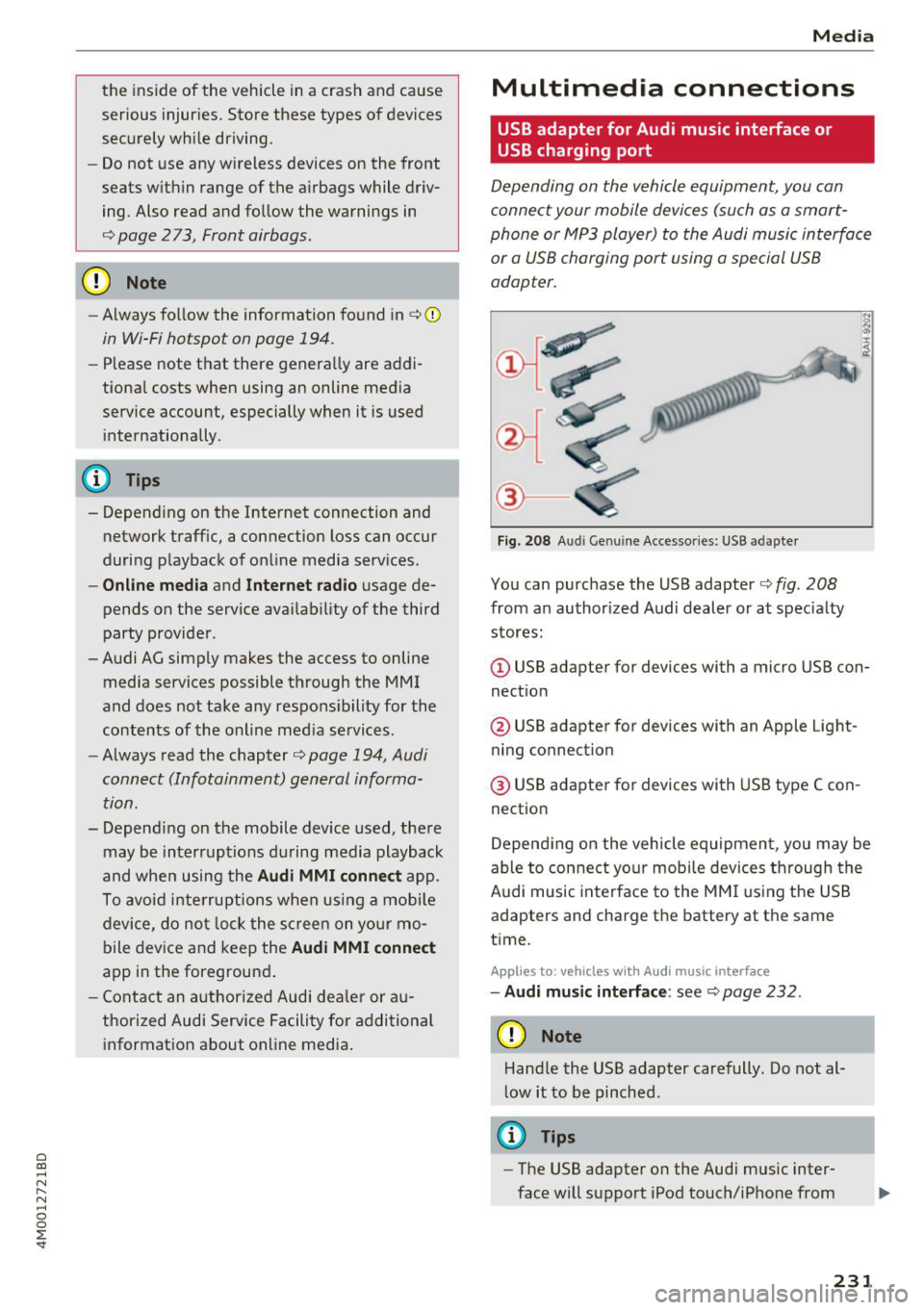
Fig. 208 A udi Genuin e Acce ssories: USB a dapter
You can purchase the USB adapter c::> fig. 208
from an authorized Audi dealer or at specialty
stores:
I
(D USB adapter for devices with a micro USB con
nection
@ USB adapter for devices with an Apple Light
ning connection
@ USB adapter for devices with USB type C con
nection
Depending on the vehicle equipment, you may be
able to connect your mobile devices through the
Audi music interface to the MMI using the USB
adapters and charge the battery at th e same
time .
Applies to : vehicles wit h Aud i music interface
-Audi music interface : see c::> page 232.
CD Note
Handle the USB adapter carefully. Do not al
low it to be pinched.
@ Tips
-The USB adapter on the Audi music inter
face will support iPod touch/iPhone from
231
Page 235 of 398
Cl a:, ...... N
" N ...... 0
0
::r '
from an authorized Audi dealer or at spe
cialty stores.
- Audi recommends setting the volume of a
mobile device connected to the AUX input to
approximately 70% of the maximum vol
ume.
- Functionality is not guaranteed for mobile
devices that do not conform to the USB 2.0
specification.
- USB hubs are not supported.
- Some versions of the iPod such as the iPod
shuffle cannot be connected to the USB
adapter for devices with Apple Dock connec
tor. Connect these devices using a AUX con nector cable .
- Changed content on a mobile device
l) that
is connected to the Audi music interface
may not be displayed in the media center .
In this case, reset the
Media settings back
to
Factory settings ~ page 246.
-Video playback through the Audi music in
terface is only supported if the connected
device is recognized as a USB storage device
(for example a USB stick). Apple devices and
MTP devices (such as smartphones) are not
recognized as USB storage devices.
- iPod/iPhone malfunctions also affect the
operation of the MMI. Reset your iPod/
iPhone if this happens.
- Audi recommends updating the iPod/iPhone
software to the latest version. For impor
tant information on operating your iPod/
iPhone, refer to the user guide for the de
vice.
- The USB adapter on the Audi music inter
face will support iPod touch/iPhone from
the 5th generation or later with the light
ning connector.
- For more information about the Audi music
interface and supported devices, check the
Audi database for mobile devices at
www .audiusa .com/mp3 or contact an au
thorized Audi dealer or authorized Audi Service Facility.
l) A ppli es o nly t o MTP devic e s. Doe s not a ppl y to Ap ple dev i
ces and U SB mass s to ra g e devi ces.
Media
Rear Seat Entertainment preparation
App lies to : vehicles wit h Rear Seat Enterta inme nt preparat ion
T he Rear Seat Entertainment preparation in
cludes cables and a mount for Audi Entertain
ment mobile in the driver's and front passenger's
seat backrests.
The suitable Audi Entertainment mobile Rear
Seat Entertainment package is available through
Audi Genuine Accessories .
Using Audi Genuine Accessories is recommended.
Audi has established their reliability, safety and
suitability .
We cannot ev alu at e or endorse other p rodu cts in
this way, even if the p roduct is approved by acer
tified testing agency or government agency .
@ Note
Only use devices that are approved for the
Rear Seat Entertainment preparation. Unap
proved devices may cause damage to the vehi
cle electronics .
(D Tips
-Contact an authorized Audi dealer or au
thorized Audi Service Facility for additional
information about
Audi Entertainment mo
bile .
-Always read the chapter~ page 3 77.
- The
Rear Seat Entertainment preparation is
not intended to charge external electronic
devices .
233
Page 254 of 398
Drivin g saf ety
Driving safety
Basics
Safe driving habits
Please remember -safety first!
The individua l safety features of your vehicle can
work together as a system to help protect you
and your passengers in a wide range of accidents.
These features cannot work as a system if they
are not always correctly adjusted and correctly
used .
This chapter contains important informat ion,
tips, instruct ions and warn ings that you need to
read and observe for your own safety, the safety
of you r passengers and others . We have summar
ized here w hat you need to know about safety
be lts, a irbags, child restra ints as well as child
safety. Yo ur safety is for us priority number 1. Al
ways observe the information and warnings in
this section -for your own safety as we ll as that
of your passengers.
The information in this section applies to all
model versions of your vehicle . Some of the fea
tures described in this sections may be standard
equipment on some models, or may be optional
equ ipment on others. If you are not sure, ask
your author ized Audi dealer.
A WARNING
- Always make sure that you follow the in
structions and heed the WARNINGS in th is
manual.
It is in your inte rest and in the in
te rest of your passengers .
-
-Always keep all of the Owner's L iterature
manuals in yo ur Audi when you lend o r sell
yo ur vehicle so that this import ant informa
t ion w ill alw ays be availab le to the dr iver
and passengers.
- Always keep the Owner 's Lite ra ture han dy
so that you can find it easi ly if yo u have
questions .
252
Important things to do before driving
Safety is everybody's job! Vehicle and occupant
safety always depends on the informed and care
ful driver.
For your safety and the safety of your passen
gers,
bef ore dri ving alw ays:
.. Make sure that a ll lights and signals are operat
ing correctly .
.. Make sure that the tire pressure is correct.
.. Make sure that all windows are clean and afford
good vis ibility to the outs ide .
.. Sec ure all luggage and othe r items ca refully
¢ page
257 .
.. Make sure tha t noth ing ca n interfere wi th the
peda ls .
.. Adjust front seat, head restraint and mirrors
correctly for your height.
.. Instruct passengers to adjust the head re
straints according to their he ight.
.. Make sure to use the right child restraint cor
rectly to protect children¢ page 291, Child
safety .
• Sit proper ly in yo ur seat a nd make sure t hat
your passenge rs do the same ¢ page 54, Front
seats .
.. Fasten your sa fety belt and wear it p roperly . Al
so instruct your passengers to fasten their safe
ty be lts properly ¢ page 261 .
What impairs driving safety?
Safe driving is directly related to the condition of
the vehicle, the driver as well as the driver's abili
ty to concentrate on the rood without being dis
tracted.
The driver is responsib le for the safety of the ve
hicle and a ll of its occupants. If your ability to
drive is impa ired, safety risks for everybody in the
vehicle increase and you a lso become a hazard to
everyone else on the road ¢
_&.. Therefore:
.. Do not let yourse lf be distracted by passenge rs
or by using a cellular telephone .
.. NEVER drive when your driving ability is im
paired (by med ications, alcohol, drugs, etc .) .
.. Observe all traffic laws, rules of the road and
speed lim its and plain common sense . .,.
Page 255 of 398
a co ...... N r--. N ...... 0
0
:E '
weather conditions.
~ Take frequent breaks on long trips. Do not drive
for more than two hours at a stretch.
~ Do NOT drive when you are tired, under pres
sure or when you are stressed .
A WARNING
Impaired driv ing safety increases the risk of
ser ious personal inju ry and death whenever a
vehicle is being used .
Correct passenger
seating positions
Proper seating position for the driver
The proper driver seating position is important
for safe, relaxed driving .
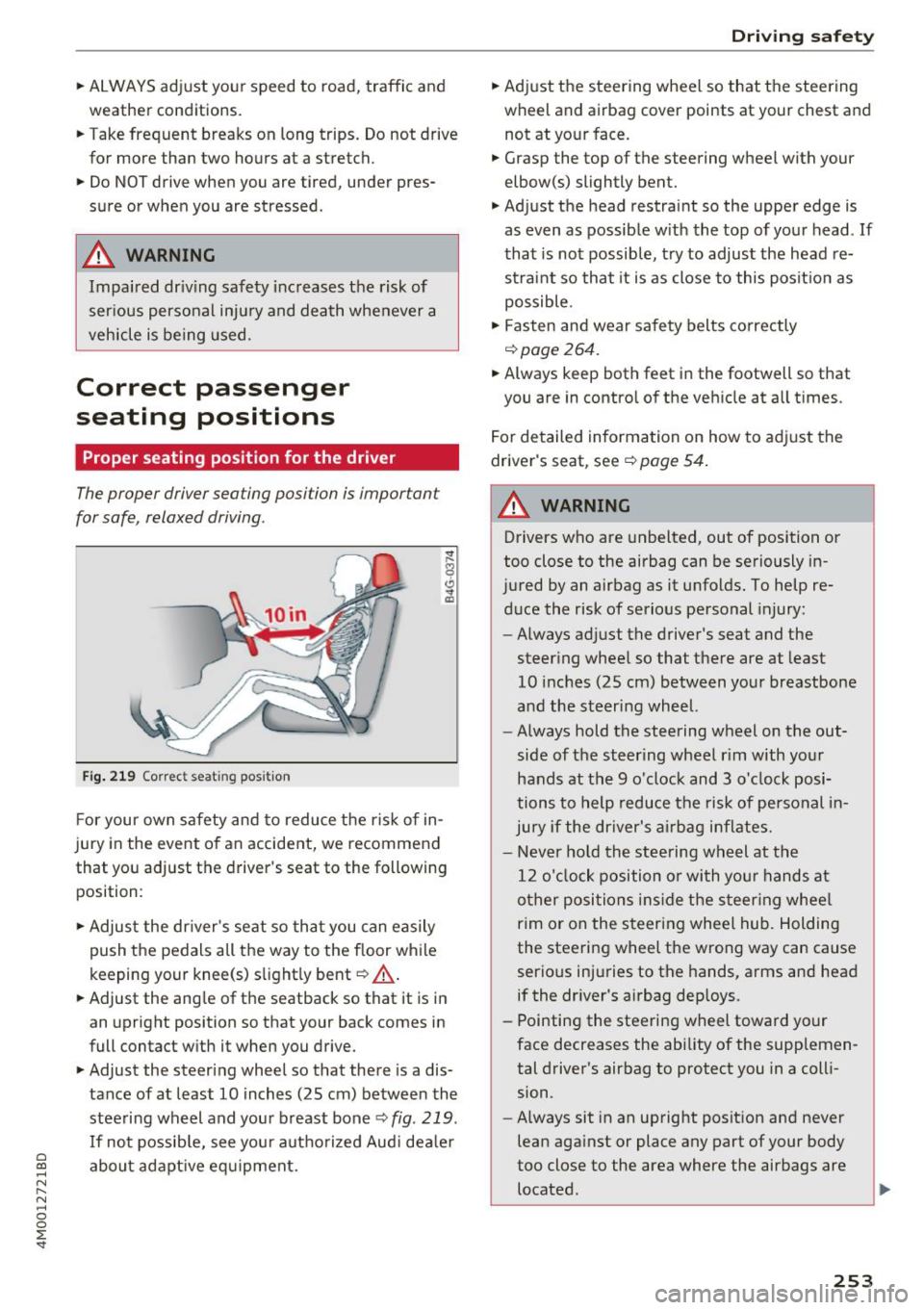
Fig. 219 Correc t seating pos ition
F or your own s afety and to reduce the risk of in
jury in the event of an accident, we recommend
that you adjust the driver 's seat to the following
position:
~ Adjust the dr iver's seat so tha t you can easily
push the pedals all the way to the f loor wh ile
keeping your knee(s) s light ly bent
c::> _& .
~ Adjust the ang le of the seatback so that it is in
an upright position so that your back comes in
full contact w ith it when you drive.
~ Adjust the steering wheel so that there is a dis
tance of at least 10 inches (25 cm) between the
stee ring wheel and you r breast bone
c::> fig. 219.
If no t possib le, see you r autho riz ed Aud i dea le r
abo ut adapt ive eq uipment.
Dri ving safety
~ Adjust the steering wheel so that the steering
wheel and airbag
cover points at your chest and
not at yo ur face.
~ Grasp the top of the steering wheel with your
elbow(s) slightly bent.
~ Adjust the head restra int so the upper edge is
as
even as possible w ith the top of your head . If
that is not possib le, t ry to adjust the head re
straint so that it is as close to this posit ion as
possible .
~ Fasten and wear safety belts correctly
c::>page 264.
~ Always keep both feet in the footwell so that
you are in contro l of the ve hicle at a ll times.
F or detailed information on how to adj ust the
drive r's seat, see
c::> page 54 .
A WARNING
-
Drivers who are unbelted, out of position or
too close to the airbag can be seriously in
jured by an airbag as it unfolds. To help re d uce the risk of serious personal injury:
- Always ad just the driver's seat and the
steer ing whee l so that there are at least
10 inc hes (25 cm) between you r breastbone
and the steering wheel.
- Always hold the steering wheel on the out
side of the steering wheel r im with your
hands at the 9 o'clock and 3 o' clock posi
tions to help reduce the risk of personal in
ju ry if the driver's airbag inflates.
- Never hold the stee ring wheel at the
12 o' clock position o r with you r hands at
o ther posi tions ins ide the s teer ing whee l
rim or on the steering wheel hub. Holding
the steering wheel the wrong way can cause
serio us injuries to the hands, arms and head
if the dr iver's airbag dep loys.
- Pointing the steering wheel toward your
face decreases the ability of the supplemen tal driver's airbag to protect you in a coll i
sion.
- Always sit in an upright position and never
lean aga inst or place any part of your body
too close to the area where the airbags are located .
253
Page 256 of 398
Driving safety
-Before driving, always adjust the front seats
and head restraints properly and make sure
that all passengers are properly restrained.
- Never adjust the seats while the vehicle is
moving. Your seat may move unexpectedly
and you could lose control of the vehicle.
- Never drive with the backrest reclined or tilted far back! The farther the backrests are
tilted back, the greater the risk of injury due
to incorrect positioning of the safety belt and improper seating position .
- Children must always ride in child safety seats¢
page 291 . Special precautions ap
ply when installing a child safety seat on the
front passenger seat
c:> page 269.
Proper seating position for the front
passenger
The proper front passenger seating position is
important for safe, relaxed driving.
For your own safety and to reduce the risk of in
jury in the event of an accident, we recommend
that you adjust the seat for the front passenger
to the following position:
.,. Adjust the angle of the seatback so that it is in
an upright position and your back comes in full
contact with it whenever the vehicle is moving .
... Adjust the head restraint so the upper edge is
as even as possible with the top of your head. If
that is not possible, try to adjust the head re straint so that it is as close to this position as
possible¢
page 58.
... Keep both feet flat on the floor in front of the
front passenger seat .
.,. Fasten and wear safety belts correct
ly¢
page 264.
For detailed information on how to adjust the
front passenger's seat, see ¢
page 54.
A WARNING
Front seat passengers who are unbelted, out
of position or too close to the airbag can be
seriously injured or killed by the airbag as it
unfolds. To help reduce the risk of serious
personal injury:
254
- Passengers must always sit in an upright po
sition and never lean against or place any
part of their body too close to the area
where the airbags are located.
- Passengers who are unbelted, out of posi
tion or too close to the airbag can be seri
ously injured by an airbag as it unfolds with
great force in the blink of an eye.
- Always make sure that there are at least
10 inches (25 cm) between the front pas
senger's breastbone and the instrument
panel.
- Each passenger must always sit on a seat of
their own and properly fasten and wear the
safety belt belonging to that seat.
- Before driving, always adjust the front pas
senger seat and head restraint properly.
- Always keep your feet on the floor in front
of the seat. Never rest them on the seat, in
strument panel, out of the window, etc. The
airbag system and safety belt will not be
able to protect you properly and can even in
crease the risk of injury in a crash.
- Never drive with the backrest reclined or
tilted far back! The farther the backrests are
tilted back, the greater the risk of injury due
to incorrect positioning of the safety belt
and improper seating position.
- Children must always ride in child safety
seats ¢
page 291. Special precautions ap
ply when installing a child safety seat on the
front passenger seat
c::> page 269.
Proper seating positions for passengers in
rear seats
Rear seat passengers must sit upright with both
feet on the floor consistent with their physical
size and be properly restrained whenever the ve
hicle is in use.
To reduce the risk of injury caused by an incorrect
seating position in the event of a sudden braking
maneuver or an accident, your passengers on the
rear bench seat must always observe the follow
ing :
... If there are passengers on the outer rear seats,
adjust the head restraints so the upper edge is .,.