door lock AUDI Q7 2018 Owner´s Manual
[x] Cancel search | Manufacturer: AUDI, Model Year: 2018, Model line: Q7, Model: AUDI Q7 2018Pages: 398, PDF Size: 185.58 MB
Page 64 of 398
Seats and stor age
If the heat ing is sw itched on, switching the glove
compartment cooling mode off is recommended.
Additional storage compartments
You will find a variety of storage compartments
and holders at various locations in the vehicle.
- Glove compartment: the glove compartment
can be locked using the mechanical key
q page 30, Key set.
-In the door trim pane ls
- Safety vest compartment in the doo r trim pan-
els on the driver 's side and front passenger's
s ide
- Storage compartment* in the center conso le
- Storage compartment unde r the fron t center
armrest
- Ga rment hooks above the rea r doo rs
- Nets on the backrests of the front seats
- Net on the left luggage compartment trim pan-
el
.&, WARNING
-
- Always keep t he g love compartment lid
cl osed while d riving to reduce the risk of in
jury.
- Only use the storage compartments in the
doo r trim pane ls to sto re small objects that
will not st ick o ut of the compartment and
impair the range of the side airbags.
- Make s ure tha t the view to the rear is not
obstructed by hanging garments.
- Hang only lightwe ight cloth ing and be sure
that there a re no heavy or sha rp-edged ob
jects in the pockets.
- Do not use coat h angers to ha ng the cloth
ing because t his could impair the effective
ness of the s ide cu rtain airbags .
Luggage compartment
General information
.&, WARNING
-
Read and follow the important sa fety precau
tions in
q page 257, Storing cargo correctly.
62
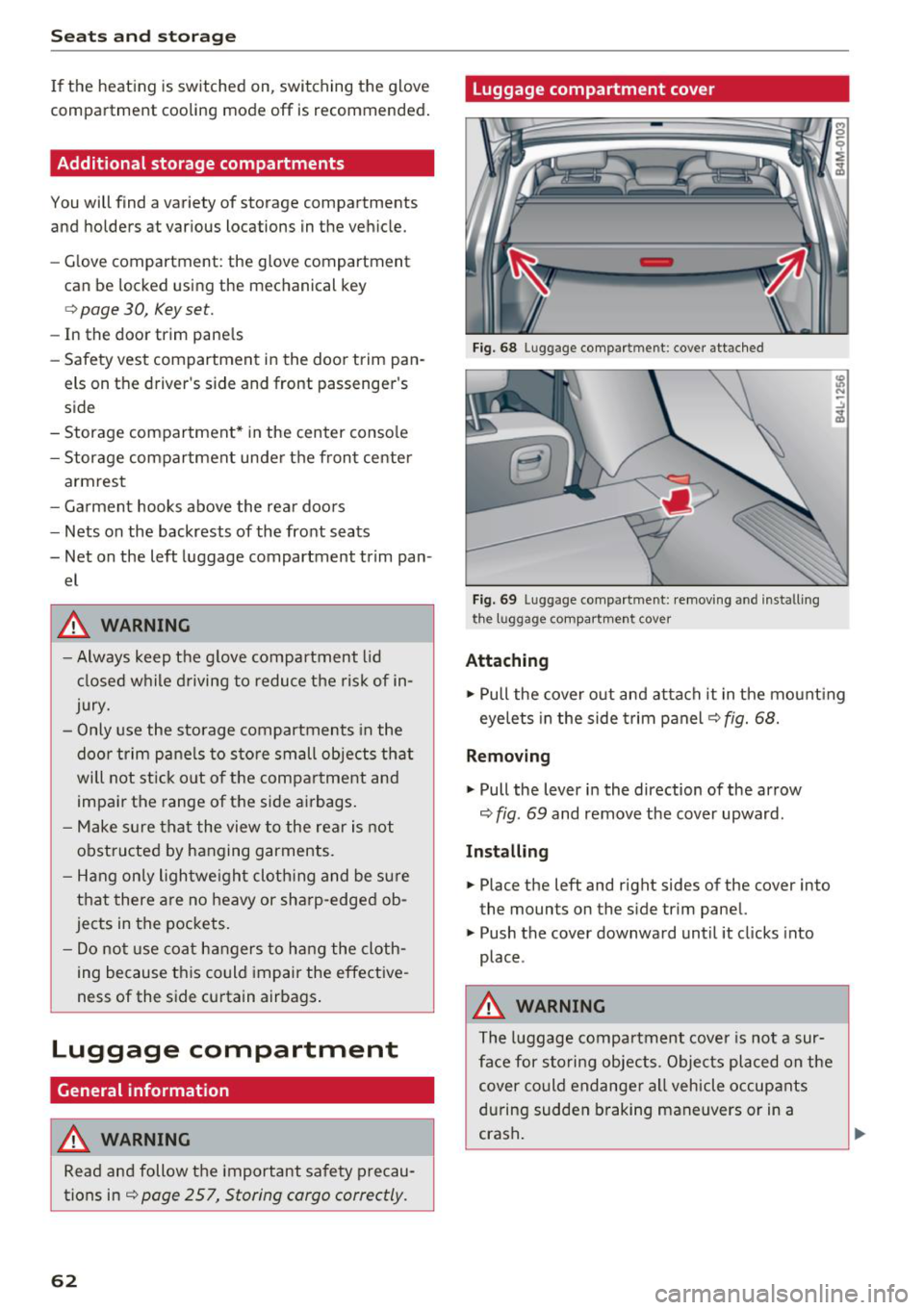
Luggage compartment cover
Fig. 68 Luggage compartment: cover attached
Fi g. 69 Luggage compa rtment: removi ng and install ing
the l1,1ggage compart ment cover
Attaching
.,. Pull the cover o ut and attach it in the mount ing
eyelets in the side t rim panel
q fig. 68.
Removing
.,. Pull the lever in the direction of the arrow
q fig. 69 and remove the cover upward.
Installing
.,. Place the left and right sides of the cover into
the mounts on the side trim panel.
.,. Push the cover downward until it clicks into
place .
.&, WARNING
The luggage compartment cove r is no t a sur
face for storing objects. Objects placed on the cover could endange r a ll vehicle occupants
during sudden braking maneuvers or in a
crash .
Page 74 of 398
Warm and cold
SYNC Syn chr oniz ation
Use t he rocker sw itc h CD to select the f unct ion.
When synchronization is switched on, the set
tings for the driver's side are applied to the front
passenger's side and the rear (except for seat
heating/venti lation*). When the settings on the
front passenger's side or in the rear are changed,
the synchron izat ion is automatically switched off
and
4- zone appears in the display .
SET REAR function
Use the rocker switch CD to select the function .
When the function is switched on, you can adjust
all settings for the rear us ing the climate control
system controls in the cockpit . The rear climate
control system controls cannot be operated at
the same time . T his function switches off auto
mat ica lly after a ce rtain per iod of t ime or after
leav ing the menu.
Vents
You can open or close the center and rear vents in
the cockpit and the vents in the rear center con
sole and door p illars using the r idged thumb
wheels. The levers adjust the d irect io n of the a ir
flow from the vents. The w ide vent is opened and
closed using the~ button ~
page 8, fig. 2@ .
Residual heat
You can activate the residual heat function when
the ignition is switched off by pressing the knob
© (left side). The residual heat from the coolant
is used to heat the ve hicle in ter io r. The res id ual
heat function switches off automatically after
about 15 minutes.
A WARNING
- You should not use the recirculation mode
for an extended period of time, because no
fresh air is drawn in and the windows can
fog when cooling mode is sw itched off . This
i ncreases the risk of an accident .
- Individuals with reduced sensitivity to pain
or temperature could develop burns when
us ing the seat heating function . To reduce
the risk of injury, these ind iv iduals should
not use seat heat ing.
72
@ Note
To avoid damage to the heating elements in
the seats, do not knee l on the seats or p lace
heavy loads on a small area of the seat.
(D Tips
It is not possib le to operate the rear climate
control system controls when the power chi ld
safety lock is switched on. W ith the SET REAR
funct ion, you can apply all settings to the rear
using the climate control system controls in
the cockp it~
page 38 .
Setup
Applies to: vehicles with 4 -zone de luxe automat ic climate
contro l
The climate control system basic settings are ac
cessed in the Infotainment system.
.. Select in the Infotainment system : IMENU! but
ton
> V eh icle > left control button > Air condi
t ioning
Seat heating /seat ventilation *
You can adjus t the seat heat ing/vent ilat io n ba l
an ce for t he d river, front passenger and rear pas
sengers .
Footwell temperature
You can adjust the footwell temperature so that
i t is cooler or wa rme r.
Auto recir culat ion
When switched on, automat ic recirculation con
trols the recirculation mode automatically . You
must press the®
MAX button if fog forms on
the w indows .
Automat ic au xili ary heater *
The aux iliary heater he lps to warm the vehicle in
terior more qu ickly.
Steering wheel heating
App lies to: vehicles wit h stee ring w heel heat ing
The steering wheel rim can be heated .
.. Press the button on the multifunction steering
wheel to switch the steering wheel heating on .,..
Page 81 of 398
a co ...... N r--. N ...... 0
0
:E '
if you open the d river's doo r when the engine is
running .
Please press the brake pedal
This message appea rs if you do no t press the
b ra ke pedal whe n star tin g the eng ine.
Ill Remote control key : key not detected. Is the
key still in the vehicle?
This indicato r light turns on and t his message ap
pears if the ignit ion key was removed from the
ve hicle when the e ngine was ru nning. If the ign i
tion key is no longe r in the ve hicle, yo u ca nn ot
sw itch on t he ign it ion or s tart the e ngine once
you s top i t. You also canno t lock the vehicle from
the outs id e.
Shift to P, otherwise vehicle can roll away.
Doors do not lock if gearshift is not in P
This message appea rs for safety reasons if the
selecto r lever is in the "N" pos ition w hen you
sw itch the ign ition off. Move the selector leve r to
the "P " pos it io n. Otherwise the vehicle is no t pro
tec ted fro m rol ling an d it ca nnot be lo cke d.
II Remote control key : hold back of key
against the designated area . See owner's man
ual
If t he indicator lig ht turns on and th is message
appears , th ere is a mal function
c:> page 79 .
Shift to P before leaving vehicle , otherwise vehi
cle can roll away
This message appears if the driver's door is
opened while t he ignitio n is switched on and t he
transmission has not been shifted to the "P" pos i
tion. Sh ift the transmiss ion i nto the "P" position
and turn off the ignition if you are leav ing t he ve
h icle. Otherwise t he ve hicle could ro ll. Also see
c:> page 80 .
Driving
Starting the engine when there is a malfunction
It may not be possibl e to sta rt the e ngine under
ce rta in circ um stance s, for exam ple if the bat te ry
in the vehicle key is dr ained, if in terfere nce is af
fected the key or if there is a system malfunc
tion.
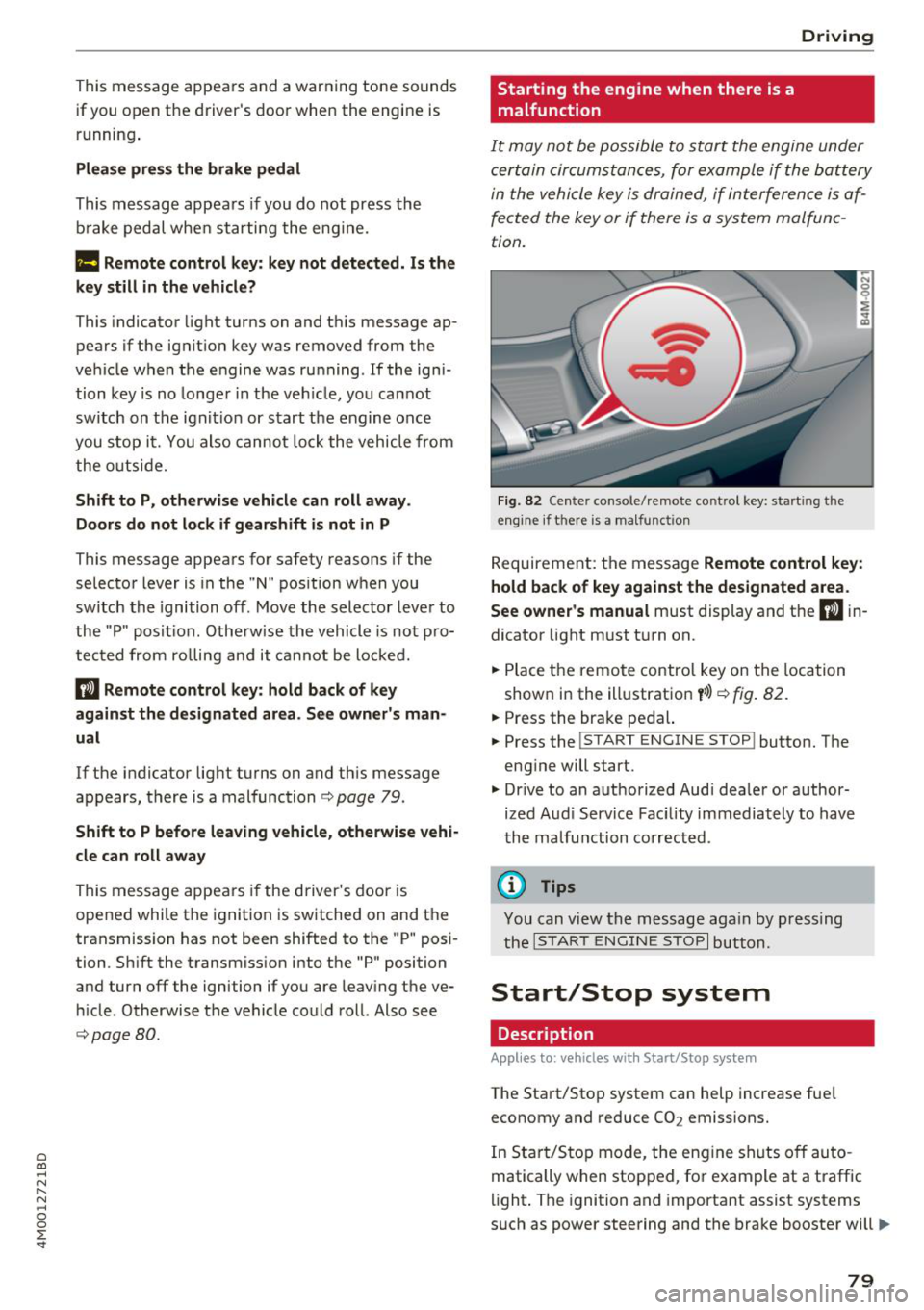
Fig . 82 Ce nter console/ re m ote contro l key: starting the
e n g in e if there is a ma lfunction
R eq uirement: the message Remote control key :
hold back of key against the designated area .
See owner's manual
must display and the II i n
dicator light m ust t urn on.
.. Place t he remote contro l key on the loc ation
show n in the illustrat ion
y >l) c:> fig . 82.
.. Press the bra ke pe dal.
.. Press the
!S TART ENGINE STOP ! button. T he
eng ine will start.
.,. Dr ive to an a uth orized Audi dea ler or a uthor
ized Aud i Serv ice Fac ility immediately to have
t he ma lfu nction corrected.
(D Tips
You can view the message aga in by pr essing
th e
I S TA RT ENGI NE ST OP I button.
Start/Stop system
Description
Applies to: vehicles wi th Start/Stop syste m
The Start/Stop system can help increase fue l
economy and reduce CO
2 emissions.
In Sta rt/S to p mode, the eng ine shuts o ff au to
matically when stop ped, fo r example at a t raff ic
li ght . The ignition and importa nt assist systems
s uch as power steering and the brake booste r will
IJI,,,
79
Page 83 of 398
Cl a:, ...... N
" N ...... 0
0
::r '
will switch on instead . The par king lig hts wi ll
sw itch
off after app rox imately 30 minutes or
when yo u lock the vehicle.
The ignition also switches
off when you lock the
ve hicle from the outside during a stop phase.
I f t he St art/Stop system has not turned
off th e
e n gine o r if you have sw itched the St art/Stop sys
tem
off man ually, the ignition wi ll not be au to
matica lly switched
off and the engine wi ll contin
ue to r un.
A WARNING
To red uce the risk of poisoning, never allow
the engine to run in confined spaces .
(D Tips
If you leave the vehicle with the "D/S" or "R "
selecto r lever pos it ion engaged, the parking
brake is automatically set.
Manually switching the Start/Stop system
off/on
Applies to: vehicles with Start/Stop system
The (A_) Ofr button is located in the center conso le.
.. Press
(A_) Ofr to switch on or off. The LED in the
button turns on when the funct ion is switched
off .
(D Tips
If you switch the system off dur ing a stop
phase, the engine will s tart again au tomati
cally.
Messages
Applies to: vehicles with Start/Stop system
Start/stop system: deactivated . Please start
engine manually
-
This message appea rs when specific condi tions
are not met dur ing a stop phase. The Sta rt/Stop
system wi ll not be ab le to restart the engine . The
engine must be started with the
I S TAR T ENGINE STOPI button.
Driving
Start /stop system: malfunction! Function
unavailable. Pl eas e co ntact S erv ice
T here is a ma lfunction in the Start/Stop system.
Drive the vehicle to an a uthorized Audi dea ler or
authorized Serv ice Facility as soon as possible to
have the malfunction corrected.
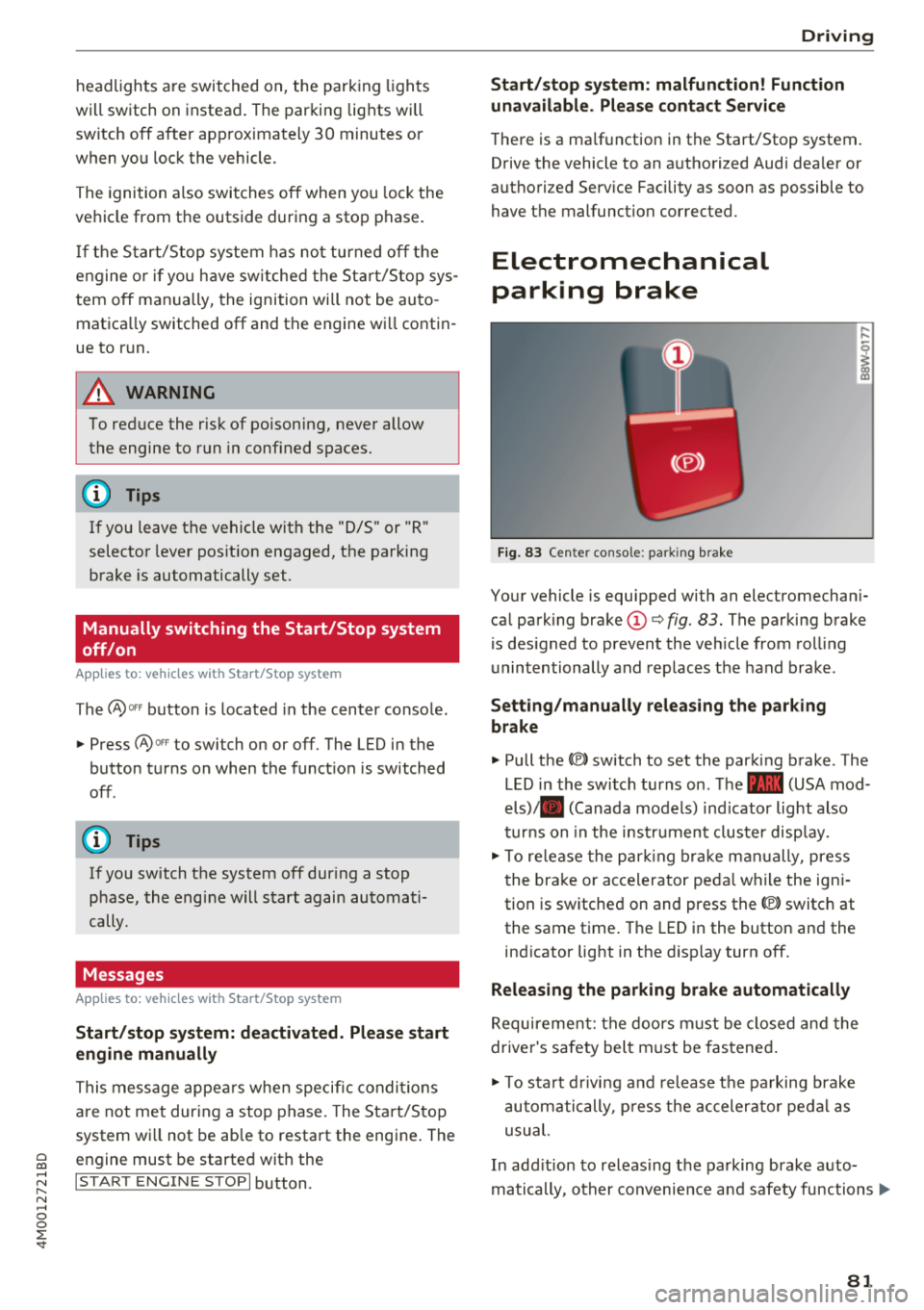
Electromechanical
parking brake
Fig . 83 Cente r console : par king brake
Your vehicle is equipped with an electromechan i
ca l park ing brake
(D ¢ fig. 83. The parking brake
is des igned to prevent the veh icle from roll ing
u nintentionally and replaces the hand brake .
Setting/m anually releasing the p arking
brake
'" Pull the(®) switch to set the parking brake . The
LED in the switch turns on . T he - (USA mod
els)/ . (Canada models) ind icator light also
t u rn s on in the instr ument cluster disp lay.
'" To release the par king b rake m anually, press
the bra ke or acceler ator peda l while the ign i
tion is switched on and press the<® switch at
the same time. The LED in the button and the
ind icator light in the d isp lay turn
off.
Releasing the parking brake automatically
Requirement: the doors m ust be closed and the
driver's safety bel t must be fastened .
'" To sta rt d rivin g and release the pa rking brake
automatically, p ress the ac celerator peda l as
usu al.
In add ition to releas ing the parking brake a uto
matically, other convenience a nd safety functions .,.
81
Page 84 of 398
Drivin g
are available when you start driving r=:> poge 83,
Starting to drive .
Preventing th e automatic parking brake
r e leas e
The vehicle could begin rolling unintentiona lly,
depending on the hill or if towing a trailer .
.,. To preve nt the parking b rake from releasing au
tomat ica lly, pull and hold the© switch and
press the acce lerator pedal. The parking brake
remains set and prevents the vehicle from ro ll
ing backward.
.,. You can release the(®) switch again once you
are sure that you are g iv ing enough dr iv ing
force to the wheels by pressing the accelerator
pedal.
Emer gency br aking fun ction
You can use the emergency braking function in an
emergency situation, or if the standard brake op
eration malfunctions or is disabled.
.,. Pu ll and hold the(®) switch.
.,. As soon as you release the © switch or acceler -
ate, the braking stops .
Pulling and holding the<®> switch while driving
the vehicle activates the emergency braking func
tion . The vehicle is braked at all four wheels by
activating the hydraulic brake system. The brak ing effect is s imilar to heavy braking
r=:> ,&. .
To reduce the risk of activating the emergency
braking by mistake, a warning tone (buzzer)
sounds when the(®) switch is pulled. Emergency
braking stops as soon as the(®) switch is released
or the accelerator pedal is pressed .
Parking
.,. Press the brake peda l to stop the vehicle.
.,. Pu ll the(®) switch to set the parking brake.
.,. Se lect the "P" selector lever pos it ion.
.,. Turn the eng ine off
r=:> ,&. .
.,. Turn the steering wheel when parking on in
clines so that the wheels will roll into the curb
i f the veh icle sta rts mov ing .
82
A WARNING
-Do not press the accelerator pedal inadver
tently if a gear is selected when the vehicle
is stationary and the eng ine is runni ng . Oth
erwise, the vehicle will start to move imme
d iate ly and this could result in an accident.
- Eme rgency brak ing shou ld only be used in
a n emergency, when the no rma l bra ke pedal
h as fa iled or the bra ke peda l is obstr ucted.
Dur ing eme rgency brak ing, you r vehicle w ill
brake s imilar to heavy b raking. ESC and the
associated components (ABS, ASR, EDL)
cannot overcome the laws of physics.
Around curves and when road or weather
conditions are bad, a full brake applicat ion
can cause the veh icle to skid or the rear end
to swerve, wh ich increases the risk of an ac
cident .
- If the power supply fails, you cannot set the parking brake if it is released . In this case,
pa rk the veh icle on leve l ground and secure
it by p lac ing the sele ctor l eve r in the "P " po
si tion. See an au thor ized A udi dealer o r au
thorized A udi Se rvice Fac ility for assis tance.
- Always set the pa rking brake when leaving
your veh icle, even if for a sho rt period of
time . Otherwise the vehicle could roll away,
increasing the risk of an accident.
- If you leave the vehi cle, sw itch the ignition
off and take the ve hicle key with you . This
applies partic ularly when children remain in
the vehicle. Otherwise, chi ldren co uld start
the engine, release the parking brake or op
erate e lectr ica l equipment such as power
w indows, wh ich increases the r isk of an acci
dent.
- No one, especially ch ildren, should remain
in the vehicle when it is locked . Locked
doors make it more diff icu lt for eme rgency
wo rkers to get into the vehicle, which puts
lives at r is k .
0) Tips
When stopp ing at a traff ic signa l or stopp ing
i n city traffic, you can set the park ing brake
manua lly . The veh icle does not have to be
h eld wi th the b rake pedal. The par king b rake
Page 85 of 398

Cl a:, ...... N
" N ...... 0
0
::r '
lector lever position is engaged . As soon as
you press the accelerator pedal, the park ing
brake releases automat ica lly and your vehicle
starts to move
r=> page 83.
(D Tips
- Occas iona l noises when the par king b ra ke is
set and re leased a re normal and a re not a
ca use for concer n.
- The park ing bra ke goes th rough a se lf-test
cycle at regular intervals when the vehicle is
stopped. Any noises associated w it h this are
normal.
- If there is a power fa ilure, the parking brake
will not set if it is re leased, and it will not
r elease if it is set
r=> ..&, . See a n author ized
A udi dealer or autho riz ed A ud i Service Fa
cil ity fo r ass is tan ce.
Starting to drive
Various conven ience and safety functions may be
ava ilable when t he vehicle begins dr iv ing, de
pending on vehicle eq uipment.
Starting on hills with the parking brake set
Requirement: the doors must be closed and the
driver's safety belt must be fastened .
~ To start driving comfortably when on a hill, set
the parking brake and begin dr iving as usual.
The braking force of the parking brake does not
release automatically u ntil the wheels build up
enough dr iv ing fo rce .
St arting on hills with hill hold a ssist
Hill hold ass ist makes it eas ier to start on hills.
Requirement: the driver's door must be closed
and the engine must be r unning .
~ To activate hill hold assist, press a nd hold the
brake peda l for seve ral seconds. The ve hicle
must be in an up hill direction of travel.
Afte r releasing the bra ke pedal, the bra king pow
e r i s ma inta ined for a br ief moment
r=> & t o p re
ve nt the vehicle from rolling back when starting .
During this time, you can easi ly begin to move
your ve hicle .
Driving
A WARNING
--
-If you do not beg in driving immed iate ly or
the engine stalls afte r releasing the brake
pedal, your veh icle may beg in to roll back
ward. Press the brake pedal or set the park
i n g br ake immedia tely.
- The intelligent technology of h ill hold assist
can not ove rcome the limitat io ns imposed by
n atural physical laws. The increased comfort
offe red by hill ho ld assist should not cause
you to ta ke safety risks .
- Hi ll hold ass ist canno t hold the vehi cle in
p lace on all hills (for examp le, if the ground
is s lippery or icy).
- T o re duce the r is k of an accident, alw ays
make su re the ve hicle is situated safe ly
while stationary .
Offroad driving
General information
The electronic stab il izat io n control (ESC) func
tions were enhanced for driving offroad . Offroad
mode can be activated when driv ing in situa tions
whe re s lippage o r a d iffe ren tial lock f unct ion is
ne cessary
r:=>page 143. The hill desce nt assist is
also availab le, w hic h automatically brakes the ve
hicle and maintains a constant speed as a res ult
r:=> page 144. In addition, your A udi provides con
t inuous all wheel dr ive.
However, yo ur Audi is not a purely offroad vehi
cle . Yo ur vehicle was not designed to drive under
extreme operating conditions s uch as driv ing in
an expedit ion style.
Onl y drive in terrain that is su itable fo r the vehi
cle and you r dri ving ability. Never take any un
ne cessa ry risks!
Befor e driving offroad
-Check the engine o il leve l, the tire p ressure, the
coo lant level and t he fluid leve l in t he washer
fluid reservoir .
- Sto re pieces of luggage and other objects in the
luggage compartment and secure them from
sliding out of place. .,.
83
Page 90 of 398
Drivin g
~ To prevent the vehicle from rolling when you
start driving, set the parking brake when stop
ping on steep hills¢
/A.
~ The parking brake will release automatically
and your vehicle will begin to move when the
doors are closed, the driver's safety belt is fas
tened, and you accelerate as usual.
Stopp ing /p a rki ng
If the selector lever is not in the "P" position
when you open the dr iver's door, the veh icle
could roll.
~ Press and hold the brake pedal¢ /A.
~ Set the parking brake.
~ To select the "P" selector lever pos it ion, press
the "P" button @on the selector lever
¢ page 86, fig . 85 .
Under certain condit ions, such as driving in the
mounta ins or when towing a trailer, it may be
helpful to switch to manual mode temporarily
and sh ift
manually to adapt to the driving condi
tions
¢ page 89.
On hills, set the parking brake first and then s hift
into the "P" position¢
page 81. This prevents too
much stress from being placed on the locking
mechanism .
.8, WARNING
- The veh icle can roll eve n when the engine is
swit ched off.
- Unintended ve hicle movement can lead to
serious injur ies.
- T o reduce the risk of an acc ident, do not
press the acce le rato r pedal whe n cha ng ing
the se lecto r lever posit ion while the ve hicle
is s ta tionary and the eng ine is ru nning.
- T o reduce the risk of an ac cident, never se
lect the "R" or "P" positions while dr iv ing .
- Do not inadvertent ly press the acce le rato r
peda l w hen the veh icle is sta tionary. Othe r
wise the risk of an acc ident in cr eases be
ca use the vehicle will start to move immed i
ate ly, even if the parking brake is set .
88
Hill descent control
The hill descent control system assists the driver
when driving down hills .
Hill descent control activates when the transm is
s ion is in the "D" or "S" pos ition and you press the
brake pedal. The transmission automat ically se
lects a gear that is suitable for the hill. Hill de
sce nt cont rol tr ies to maintain the speed ach
i eved at the t ime of braking, w it hi n phys ical and
tec hnical lim itations . If may still be necessary to
adjust the speed wit h the brake peda l.
Hill descent cont rol sw itches off once the h ill lev
els out or you press the accelerator pedal.
When operating the cru ise control system*
¢
page 95 , hill descent control is also activated
whe n the speed is set.
.8, WARNING
Hill desce nt co ntro l cannot ove rcome physical
lim itat ions, so it may not be ab le to m ainta in
a constant speed under all conditions. A lways
be ready to app ly the brakes.
Page 125 of 398
a co ...... N r--. N ...... 0
0
:E '
Applies to: ve hicles with exit warning system
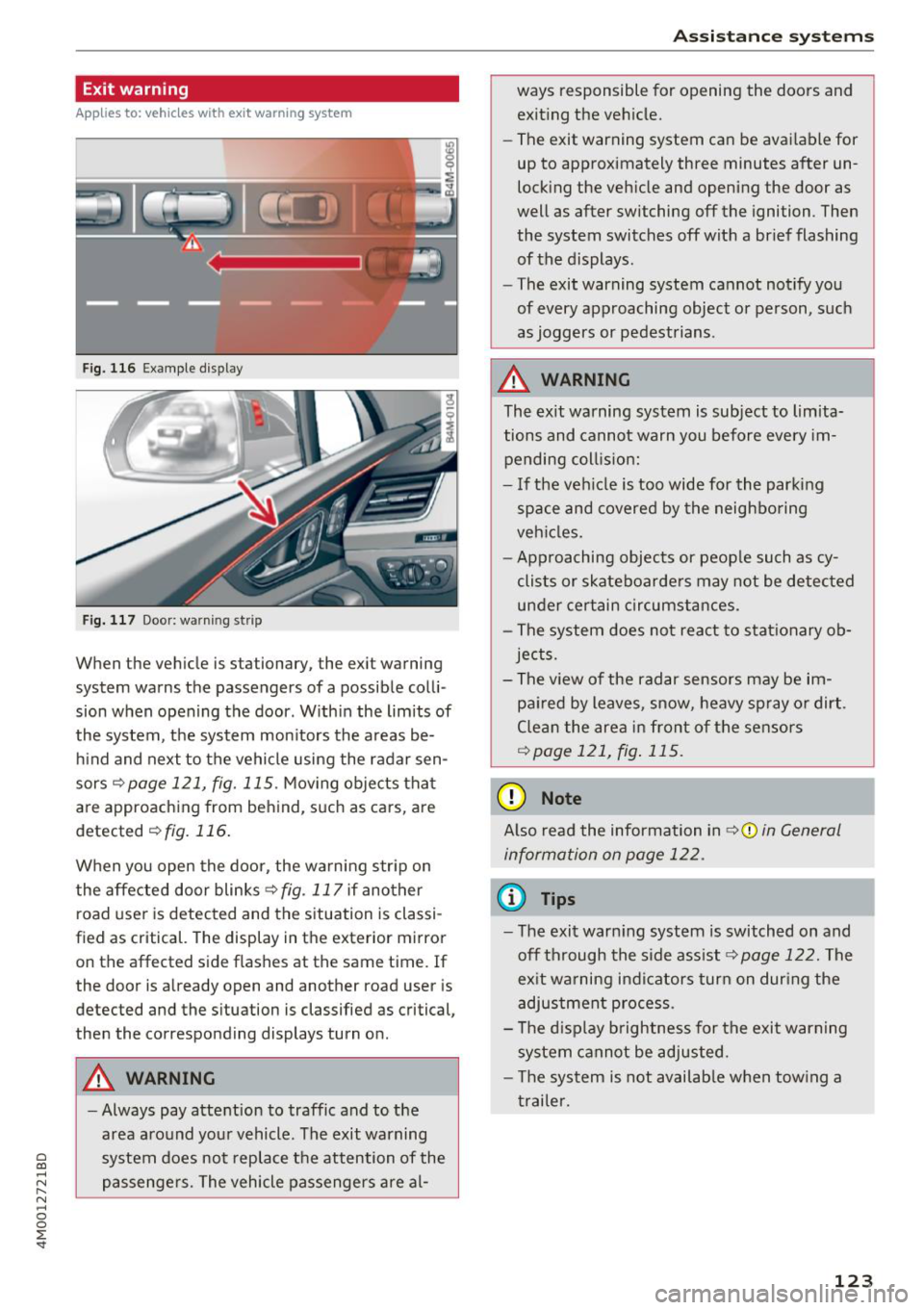
Fig . 116 Example dis play
Fig. 117 Door: warning str ip
When the vehicle is stationary, the exit warning
system warns the passengers of a possible colli
sion when opening the door . Within the limits of
the system, the system monitors the areas be
hind and next to the vehicle using the radar sen
sors
c::¢> page 121, fig. 115 . Moving objects that
are approaching from behind, such as cars, are
detected
c::¢> fig. 116.
When you open the door, the warning str ip on
the affected door blinks ¢
fig. 117 if another
r oad user is detected and the situation is classi
f ied as critical. The display in the exterior mirror
on the affected side flashes at the same time . If
the door is already open and another road user is
detected and the situation is classified as critical,
then the corresponding displays turn on .
A WARNING
-Always pay attention to traffic and to the
area around your vehicle. The exit warning
system does not replace the attention of the
passengers. The vehicle passengers are al-
Assistance systems
ways responsible for opening the doors and
exiting the vehic le.
- The exit warning system can be available for
up to approximately three minutes after un
locking the vehicle and opening the door as
well as after switching off the ignition . Then
the system switches off with a brief flashing
of the displays.
- The exit warning system cannot notify you
of every approaching object or person, such
as joggers or pedestrians .
A WARNING
The exit warning system is subject to limita
tions and cannot warn you before every im
pending coll is ion:
- If the veh icle is too wide for the parking
space and covered by the neighboring
veh icles.
- Approaching objects or peop le such as cy
clists or skateboarders may not be detected
under certain circumstances.
- The system does not react to stat ionary ob
jects.
- The view of the radar sensors may be im
paired by leaves, snow, heavy spray or dirt .
Clean the area in front of the sensors
c::¢> page 121, fig. 115.
(D Note
Also read the information in c::¢,(D in General
information on page 122 .
(D Tips
-The exit warning system is switched on and
off through the side ass ist
c::¢> page 122. The
ex it warning indicators turn on dur ing the
adjustment process.
- The display brightness for the exit warning
system cannot be adjusted.
- T he system is not availab le when tow ing a
trailer.
-
123
Page 200 of 398
Audi connect vehicle control
-Pay attention to upper-and lower -case let
ters when entering the vehicle code.
- If you do not have the 10-digit vehicl e code,
contact an authorized Audi dealer or author
ized Audi Service Facility .
Additional options
Applies to vehicles with Audi co nnect vehicle control
License subscription
The validity and expirat ion date of you r subscrip
tions are displayed. When
Warning before sub
scription expires
is activated, a message wi ll be
disp layed warning you that your license is about
to expire.
Select :
!MENU ! button> Audi connect > Display
available functions >
right control button> Li
cense subscription.
Resetting the primary user
F or examp le, you ca n reset the key user when
selling your vehicle in order to deactivate these
services .
Requirement: the ignition must be switched o n.
Select :
!M ENU ! button> Audi connect > right
control button
> Audi connect user management
> Key user > Reset key user .
Warning levels
Requirement: the primary user must have set one
or more warning levels. Secondary users can only
see if a warning level is active or not .
Select:
! MENU ! button> Audi connect > right
control button
> Alerts.
Remote locking and
unlocking
Applies to veh icles with Audi connect vehicle control
You can lock and unlock your veh icle using this
service .
Requirement
-This requires the 4-dig it PIN that you specified
during the verification on www.audiusa.com/
myaud i.
- The vehicle must be stationary.
198
-The ignition must be switched off.
Vehicle status report
Applies to vehicles w ith Aud i connect ve hicle control
The Dr iver Informat ion System collects data un
der certain conditions and sends it to a server.
When data is sto red, you can access va lues such
as these using the service :
- Remaining range,
- Fue l tank level,
- Oil level,
- If the vehicle doors are open/closed or locked/
un locked,
- mi leage,
- Next oil change
- Next service,
- Warning messages,
- If the parking lights are on/off .
A WARNING
Do not ignore messages and warning or ind i
cator lights that turn on in the vehicle be
cause of the info rmation in the status report.
This could lead to break downs in on the road ,
accidents and serious injuries.
Parking location
Applies to vehicles w it h Aud i connect ve hicle co ntrol
The vehicle collects data unde r ce rta in cond it ions
and sends it to a server .
When data is stored, you can access values such
as these using the service :
- Vehicle location display,
- Display of one's own location,
- Route to your vehicle .
If your mob ile dev ice also has a navigation func
tion, you can nav igate to your last known parking
l ocation.
Deactivating and activating parking position
- Select: !MENU!> Audi connect> Car Finder
parking position .
If you do not set./, no location information will
be sent to the server.
Page 260 of 398
Driving safety
A WARNING
Heavy loads will influence the way your vehi
cle handles . To help reduce the risk of a loss
of control leading to serious personal injury:
- Always keep in mind when transporting
heavy objects, that a change in the center of
gravity can also cause changes in vehicle
handling:
- Always distribute the load as evenly as
possible.
- Place heavy objects as far forward in the
luggage compartment as possible.
- Never exceed the Gross Axle Weight Rating
or the Gross Vehicle Weight Rating specified
on the safety compliance sticker on th e driv
er's side B-pillar. Exceeding permissible
weight standards can cause the vehicle to
slide and handle differently .
- Please observe information on safe driving
<=) page 252.
A WARNING
To help prevent poisonous exhaust gas from
being drawn into the vehicle, always keep the
rear lid closed while driving .
- Never transport objects larger than those
fitting completely into the luggage area be cause the rear lid cannot be fully closed .
- If you absolutely must drive with the rear lid
open, observe the following notes to reduce
the risk of poisoning:
- Close all windows,
- Close the sunroof*,
- Open all air outlets in the instrument pan-
el,
- Switch off the air recirculation,
- Set the fresh air fan to the highest speed .
A WARNING
Always make sure that the doors, all win
dows, the sunroof* and the rear lid are se
curely closed and locked to reduce the risk of
injury when the vehicle is not being used .
- After closing the rear lid , always make sure
that it is properly closed and locked.
258
-Never leave your vehicle unattended espe
cially with the rear lid left open. A child
could crawl into the vehicle through the lug
gage compartment and close the rear lid be
coming trapped and unable to get out . Be
ing trapped in a vehicle can lead to serious
personal injury.
- Never let children play in or around the vehi
cle .
- Never let passengers ride in the luggage
compartment . Vehicle occupants must al
ways be properly restrained in one of the
ve
hicle 's seating positions.
@ Note
If you are transporting large items with the
backrest folded down*, you should remove
the Rear Seat Entertainment (RSE)* and its
holder* to avoid damage.
© Tips
-Air circulation helps to reduce window fog
ging. Stale air escapes to the outside
through vents in the trim panel. Be sure to
keep these slots free and open .
- The tire pressure must correspond to the
load. The tire pressure label lists the recom
mended cold tire inflation pressures for the
vehicle at its maximum capacity weight and
the tires that were on your vehicle at the
time it was manufactured. For recommend ed tire pressures for normal load condi
tions, please see chapter
Q page 341 .
Tie-downs
The luggage compartmen t is equipped with four
t ie-downs to secure luggage and o ther i tems.
Use the tie-downs to secure your cargo properly
Qpage 257, L oading the luggage compartment.
In a collision , the laws of physics mean that even
smaller items that are loose in the vehicle will
become heavy missiles that can cause serious in
jury. Items in the vehicle possess ene rgy which
vary with vehicle speed and the weight of the
item . Vehicle speed is the mos t significant fac tor . ..,.