ad blue AUDI Q7 2018 Owner´s Manual
[x] Cancel search | Manufacturer: AUDI, Model Year: 2018, Model line: Q7, Model: AUDI Q7 2018Pages: 398, PDF Size: 185.58 MB
Page 317 of 398
a co ...... N r--. N ...... 0
0
:E '
DEF at the next refueling. Range x mi (km)
This message appears when there is only enough
Ad Blue left to drive the distance indicated in the
instr ument cluster. Fill the Ad Blue.
U Refill with at least x qt (I) Ad Blue/DEF. No
engine start in x mi (km). See owner's manual
This message appears when there is only enough
Ad Blue left to drive the distance indicated in the
instrument cluster. Fill the Ad Blue. Otherwise
the engine will not start again if you stop i t once
the distance indicated has been driven.
• Refill with at least x qt (I) Ad Blue/DEF. Un
able to start engine. See owner's manual
This message appears when the AdBlue tank is
empty. Fill the AdBlue. Otherwise you will not be
ab le to start the engine again once yo u stop it .
The Ad Blue must be refilled when the amount in
the tank has reached the minimum level
c::, page 315, Preparation.
Incorrect filling/system malfunction
A message appears if the Ad Blue tank was filled
with a fluid other than AdBlue and the system
has detected that the tank was filled incorrectly,
or if there is a system malfunction .
II AdBlue/DEF: malfunction! No engine start
in x mi (km). See owner's manual
This message appears when it is only possible to
drive the distance indicated in the instrument
cluster . Drive to the nearest authorized Audi
dealer or authori zed Audi Service Facility to have
the ma lfunction corrected. Otherwise the engine
will not start again if you stop it once the dis
tance indicated has been driven .
• AdBlue/DEF: malfunction! Unable to start
engine. See owner's manual
This message appears if the system has detected
that the tank was filled incorrectly or that there is a malfunction . Drive immediately to the near
est authori zed Aud i dealer or authori zed Audi
Service Facility to have the malfunction correct
ed . Othe rwise you will not be able to start the en
g ine again once you stop it.
Checking and Filling
Preparation
Applies to: veh icles w ith selective catalytic reduction
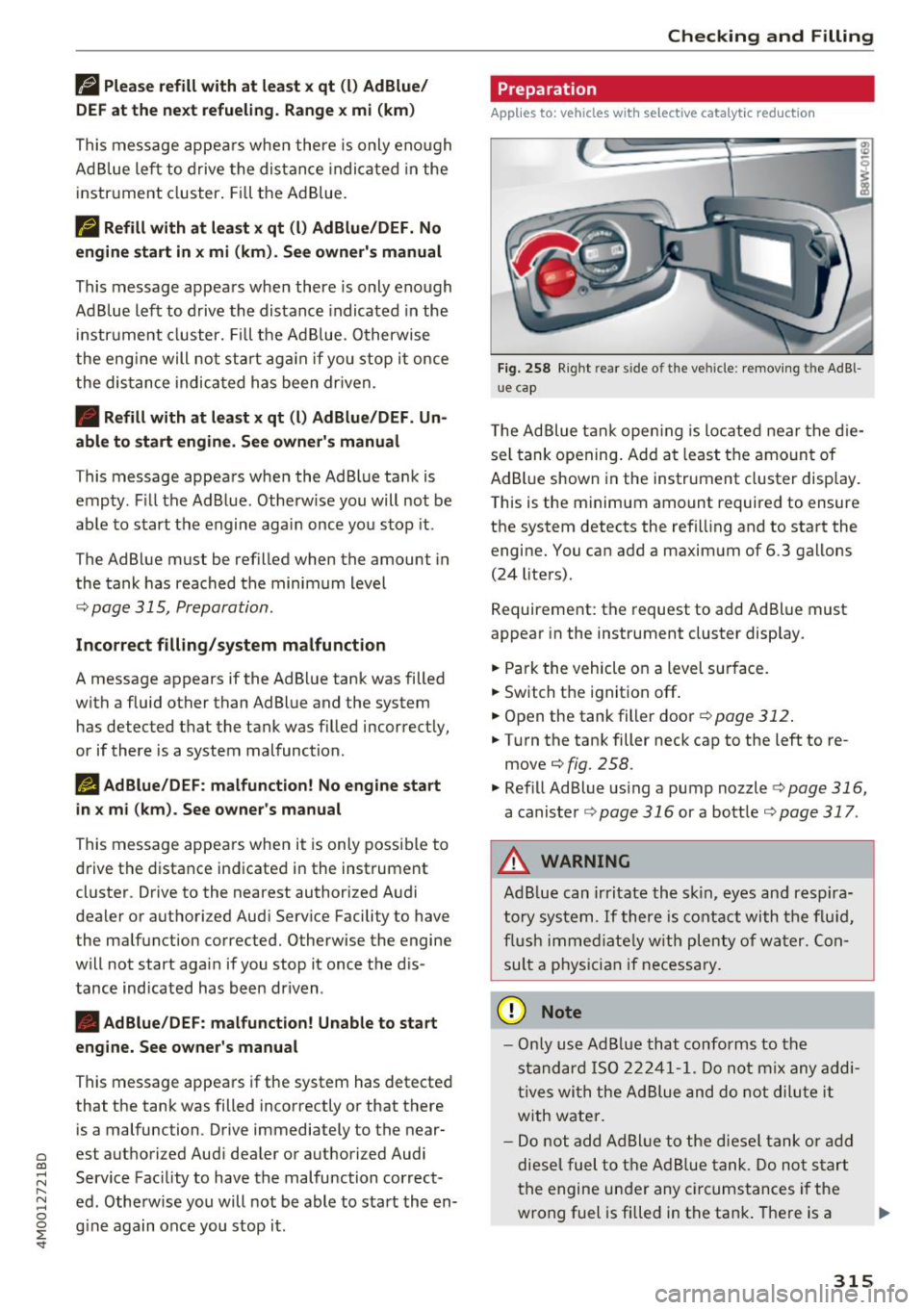
Fig . 258 Right rear s ide o f th e ve hicle: removing th e Ad B l
u e cap
T he Ad Blue tank opening is located near the die
sel tank opening. Add at least the amount of
AdBlue shown in the instrument cluster display.
This is the minimum amount required to ensure
the system detects the refilling and to start the engine. You can add a maximum of 6.3 gallons
(24 liters) .
Requirement: the request to add Ad Blue must
appear in the instrument cluster display.
.. Park the vehicle on a level surface.
.. Switch the ignit ion
off .
.. Open the tank filler door c::>poge 312.
.. Turn the tank filler neck cap to the left to re
move
¢fig. 258.
.. Refill Ad Blue using a pump nozzle c::;, page 316,
a canister c;,page 316 or a bottle c;,page 317 .
A WARNING
f-
AdBlue can irritate the skin, eyes and respira-
tory system .
If there is contact with the fluid,
flush immed iately with plenty of water. Con
sult a physician if necessary.
(D Note
-Only use Ad Blue that conforms to the
standard ISO 22241-1. Do not mix any addi
ti ves with the Ad Blue and do not dilute it
w ith water.
- Do not add Ad Blue to the diesel tank or add
diesel fuel to the Ad Blue tank . Do not start
the engine under any circumstances if the
wrong fuel is filled in the ta nk. There is a
315
Page 318 of 398
Check ing and F illing
risk of damaging the fuel tank system and
the engine. See an authorized Audi dealer or
a uthorized Audi Serv ice Facility for ass is
tance.
- AdB lue attacks surfaces such as painted ve
hicle components, plast ic and carpet. Re
move the fluid as quickly as poss ible with a
damp cloth and plenty of cold water. If the
Ad Blue has already crysta llized, use warm
water and a sponge . AdBl ue residue that is
not removed will crysta llize a nd can damage
the affe cted surface.
- Do not sto re refi ll bott les o r caniste rs per
mane ntly in the ve hicle. If the con ta iner
l e ak s, the escap ing Ad B lue could damage
the ve hicle in ter io r.
- Do not allow Ad Blue to come into co ntact
wi th clothing. If the re is contac t w ith the
f lui d, flus h immed iate ly w ith plenty o f wa
te r.
(D Tips
Follow t he Ad Blue m anufact urer's ins truc
t ions for use and s torage .
Refilling AdBlue using a pump
Applies to: vehicles with selective catalytic reduction
... Open the tank fi ller door ¢ page 312 , fig . 254.
... Turn the tank filler neck cap to the left to re
move
r=:> page 315, fig . 258 .
... Refill Ad B lue until the pump nozzle switches
off for the first time
r=:> 0 .
.,. Close the filler tube¢ page 317, Completing
AdBlue refill
(Qj) Note
- The pump nozzle handle must be pointing downwa rd w hen fill ing . Ot herwise the
p ump noz zle w ill not sw itch off a utomat i
ca lly¢ @)
in Preparation on page 315.
-Do not cont inue fill ing once the pump no z
zl e automatically switc hes off for the first
time. The AdBl ue tan k system could be
ove rfilled and leak A d Blue ¢(@ in
Prepara
tion on page 315 .
316
Refilling AdBlue using a canister
Applies to: vehicles with selective catalytic reduction
®
+®
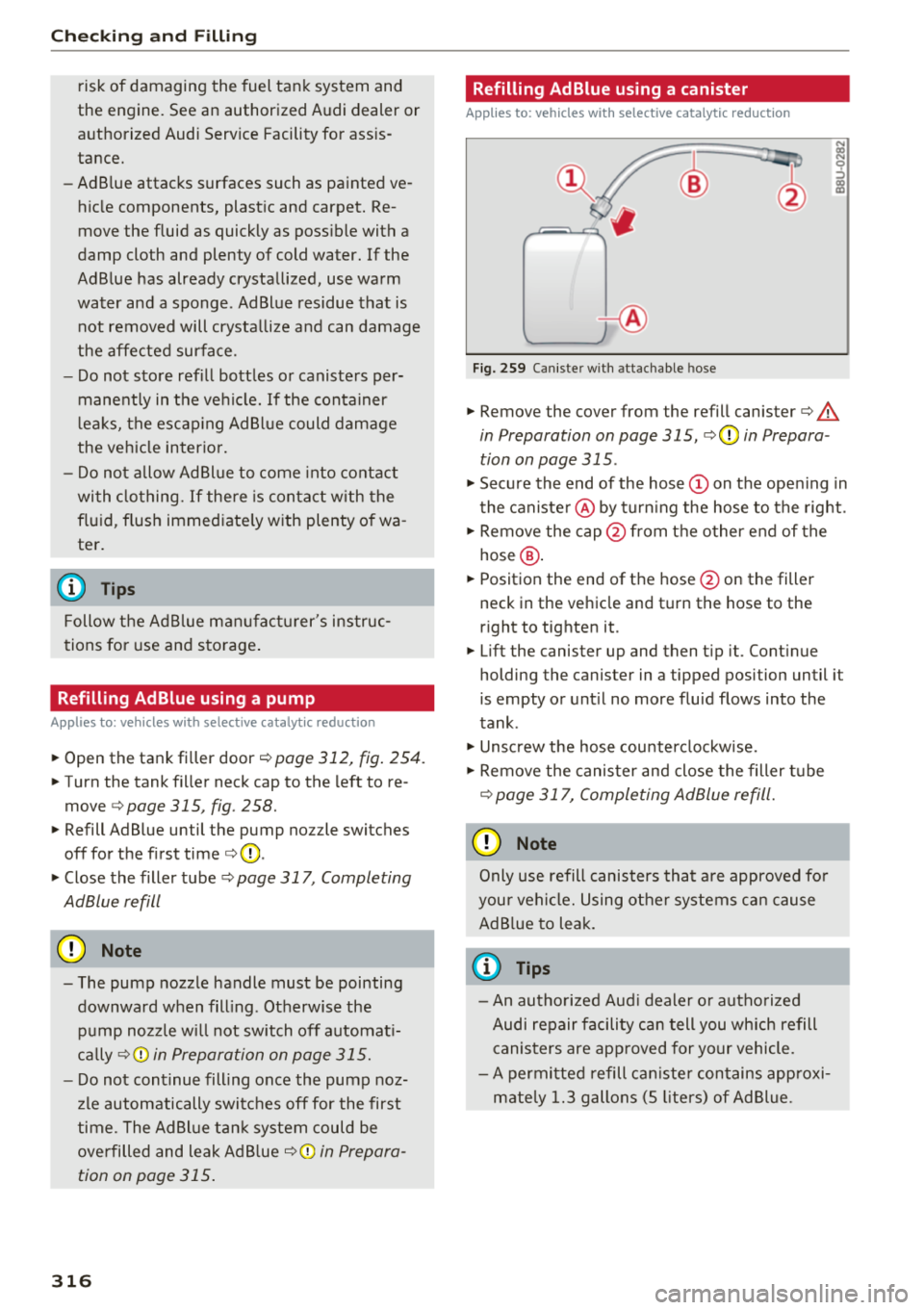
Fig. 2 59 Caniste r w ith attac hable hose
... Remove the cover from the refill canister¢.&.
in Preparation on page 315, r=:>0 in Prepara
tion on page 315 .
... Secu re the end of the hose (Don the ope ning in
the caniste r@ by tu rn ing the hose to the right .
.,. Remove the cap @from the other end of the
hose @ .
... Position the end of the hose @on the filler
neck in the ve hicle and turn the hose to the
r ight to tighten it .
... Lift the canister up and then tip it. Cont inue
holding the canister in a tipped position until it
is empty or unt il no more fluid flows into the
tank .
.,. Unsc rew the hose cou nterclockw ise .
.,. Remove the canister and close the filler t ube
r=:> page 317, Completing AdBlue refill.
{[» Note
Only use refill canisters that a re approved fo r
you r veh icle. Using o ther s ystems ca n cause
AdB lue to lea k.
© Tips
- An autho riz ed Aud i dea le r or aut ho rized
Audi repair f acili ty c an t ell you wh ich refill
c anis ters are app roved for yo ur vehicle .
- A per mitted refill ca niste r contains app roxi
m ate ly 1. 3 g allons (S lite rs) of Ad Blu e.
Page 319 of 398

Cl a:, ...... N
" N ...... 0
0
::r '
Applies to: vehicles with selective catalytic reduction
.,. Remove the cap from the refill bottle ¢&, in
Preparation on page 315,
¢ @ in Preparation
on page 315.
.,. Position the bottle on the filler tube and turn
the bottle clockwise unti l it stops turning .
.,. Press lightly against the bottom of the bottle
to empty it. Continue pressing the bottom of
the bottle until it is empty or until fluid stops
flowing into the tank .
.,. Turn the bottle to the left without press ing on
the bottom .
.,. Remove the bottle and seal the filler neck
¢ page 317, Completing AdBlue refill .
({D Note
Onl y use refi ll bottles t hat are approved for
your veh icle. Using othe r systems can ca use
Ad Blue to leak.
(j) Tips
- You can obta in refi ll bottles from an autho r
iz ed Audi dealer or author ized Audi Se rvice
Fac ility.
- A pe rm itted refill bott le conta ins approx i
ma tely O.S gallons ( 1.9 lite rs) of Ad B lue.
Completing AdBlue refill
Applies to: vehicles with selective catalytic reduction
Closing th e fill er n eck
.,. Turn the Ad Blue cap to t he r igh t on the filler
tube unti l the cap clic ks into p lace ¢
A in
Preparation on page 315,
¢ @ in Pr eparation
on page 315 .
.,. Close the fuel filler door and then press on the
left side until it lat ches.
After filling
The vehicle must be driven so that the system
r e cognizes that the Ad Blue was refilled. This can
take sev era l minutes .
.,. If there was no Ad Blue left in the t ank and a
range of O mi (0 km) was shown in the display,
switch the ignition on for about 30 seconds be
fore starting the engine .
Check ing and F illing
(D Tips
Ad B lue in the tank can freeze at very low tem
peratures . If thi s happens, the system will
not detect that the Ad Blue was refilled and it
will continue to inform you of the low Ad B lue
l evel. The message turns off as soon as the
ta nk thaws out aga in .
Emissions control
systems
Catalytic converter
Applies to: vehicles with gasoline engines
T he veh icle may only be d riven w ith un leaded
gasol ine , otherwise the cata lyti c converte r will be
dest royed.
Never dr ive u ntil the ta nk is completely empty .
T he ir regu lar supply of fuel that resu lts from that
can cause eng ine misfires. Uncomb usted fue l will
en ter the exha ust system , which can cause over
heating and damage to the cata lytic converter.
Di esel particulate filt er
Applies to: vehicles with diesel particulate filter
T he diesel part iculate filte r filte rs nearly all of
the soot pa rt icles out of the exhaus t. The filter
cleans itself a utomat ica lly unde r no rma l dr iving
cond it io ns. If the fi lter canno t be cleaned auto
matically, for examp le if only s ho rt distances are
u su a lly driven, t he fi lter will become clogged
with soot.
Indicator light (diesel particulate filter )
Applies to: vehicles with diesel particulate filter
II Particulate filter: cl ean by driving . See own
er 's manual
The diesel part icu late filter requ ires regenera
t ion. To support the filter's self-cleaning func
t ion:
Drive for approximately 15 minutes at 37 mph
(60 km/h) or above in the "S" selecto r leve r pos i
t ion. Keep the engine speed at a minim um of
2,000 RPM . The temperat ure increase that will
r esul t from this ca n bu rn off the soot in the filter.
T he ind icator light will turn off when the cleaning
has completed successfully . .,.
317
Page 367 of 398
a co ...... N r--. N ...... 0
0
:E '
Color Current rating
in amps
Black 1
Purple 3
Light brown 5
Brown 7.5
Red 10
Blue 15
Yellow 20
White or transparent 25
Green 30
Orange 40
A WARNING
Do not repair fuses and never replace a blown
fuse with one that has a higher amp rating.
This can cause damage to the electrical sys
tem and increases the risk of fire.
(D Note
If a new fuse burns out again shortly after you
have installed it, have the electrical system
checked as soon as possible by an authorized
Audi dealer or authorized Audi Service Facili ty.
(D Tips
- The following table does not list fuse loca
tions that are not used.
- Some of the equipment listed in the follow
ing tables applies only to certain model ver
sions or certain optional equipment.
Fuses and bulbs
Fuse assignment - driver's/front
passenger's footwell
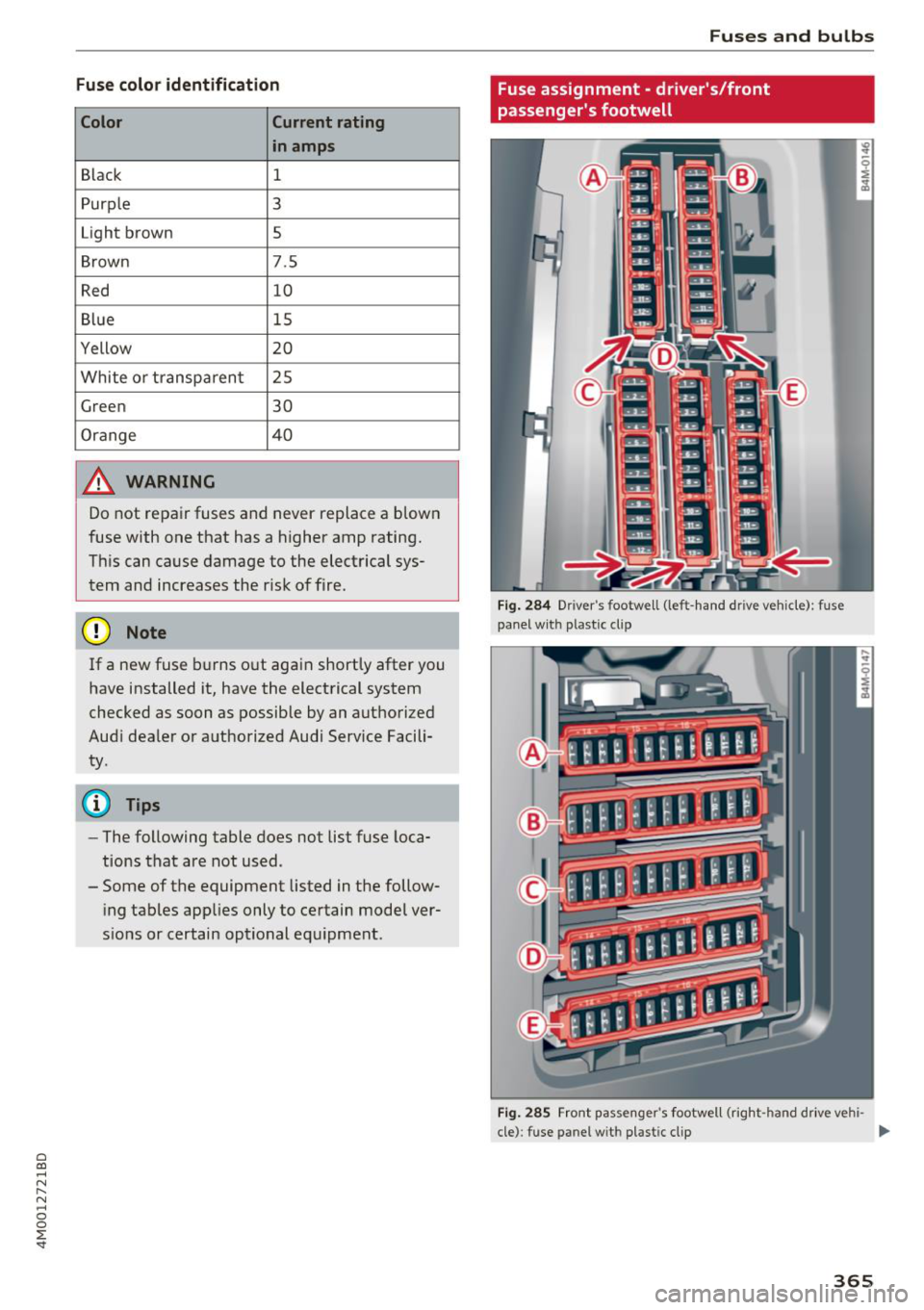
Fig. 284 Drive r's footwell (left -hand dr ive vehicle): fuse
panel with plastic clip
Fig. 285 Front passenger's footwell (right -hand drive vehi -
cle): fuse panel wit h plastic clip
II>-
365
Page 369 of 398
a co ...... N r--. N ...... 0
0
:E '
cockpit
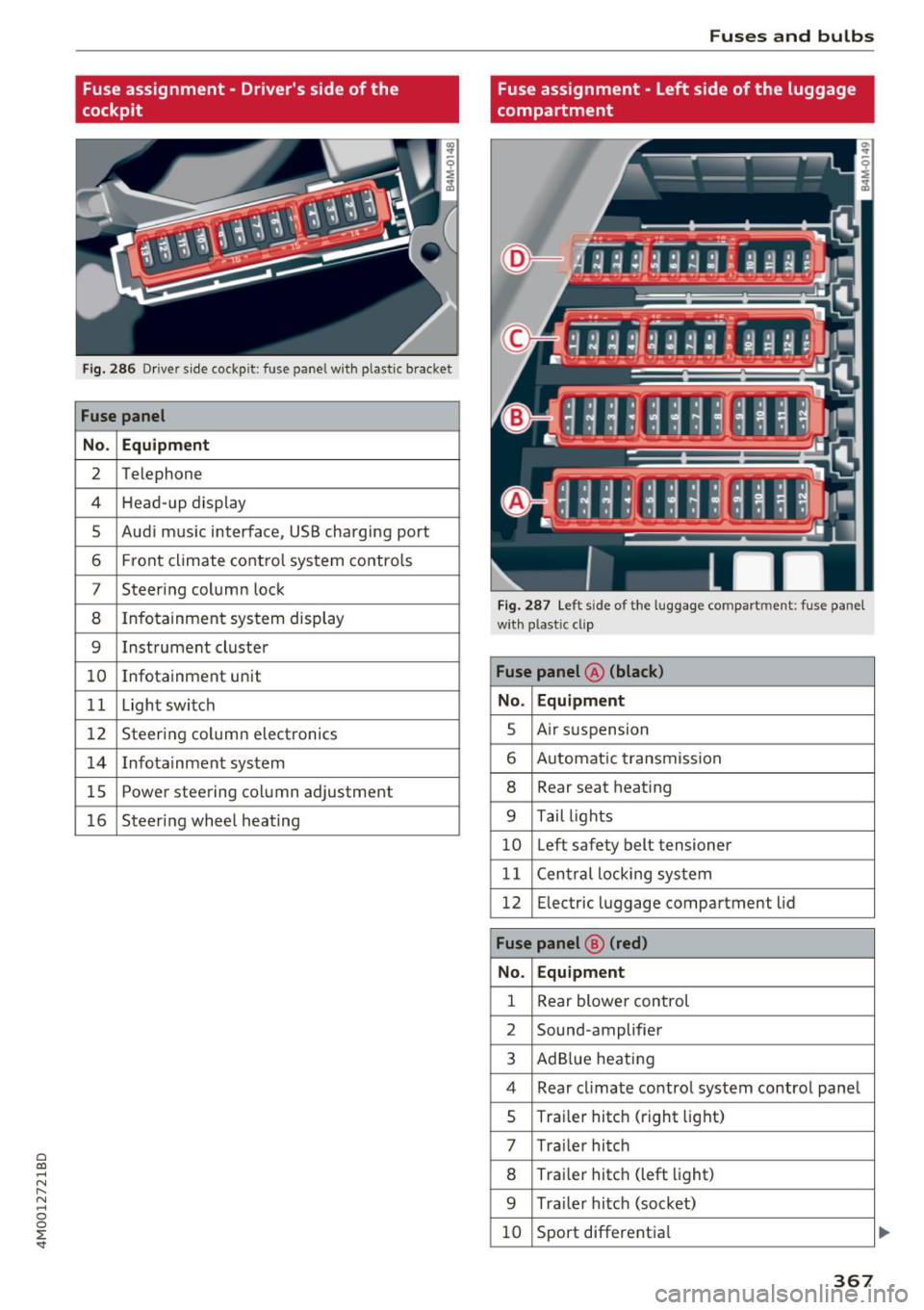
Fig . 28 6 Driver s ide cockp it : fuse panel wit h plastic bracket
Fuse panel
No . Equipment
2 Telephone
4 Head- up display
5 Aud i m usic interface, USB charging port
6 Front climate co ntro l system contro ls
7 Steer ing column lock
8 Infotainment sys tem display
9 Instrument cluste r
10 Infotainment unit
1 1 Light switch
12 Steerin g column electronics
14 Infotainmen t sys tem
1 5 Powe r steering co lumn adjustment
16 Steeri ng whee l heating
Fuses and bulbs
Fuse assignment - Left side of the luggage
compartment
F ig. 28 7 Le ft s ide of the l uggage co mpart ment : fuse pa nel
wi th plastic cl ip
Fuse panel @ (black)
No . Equipment
s Air s usp ension
6 A utomat ic t ransmiss io n
8 Rear seat heat ing
9 T ail ligh ts
10 Left safety belt tensioner
11 C en tral locki ng sys tem
12 Electric luggage compartment lid
Fuse panel @ (red)
No. Equipment
1 Rear blower control
2 Sound -amplifier
3 Ad Blue heat ing
4 Rear cl imate co ntro l system contro l pane l
s Traile r hitc h (right lig ht)
7 Tra ile r hi tc h
8 Tra ile r hitc h (left light)
9 Tra ile r hitc h (soc ket)
10 Sport different ia l
367
...
Page 370 of 398
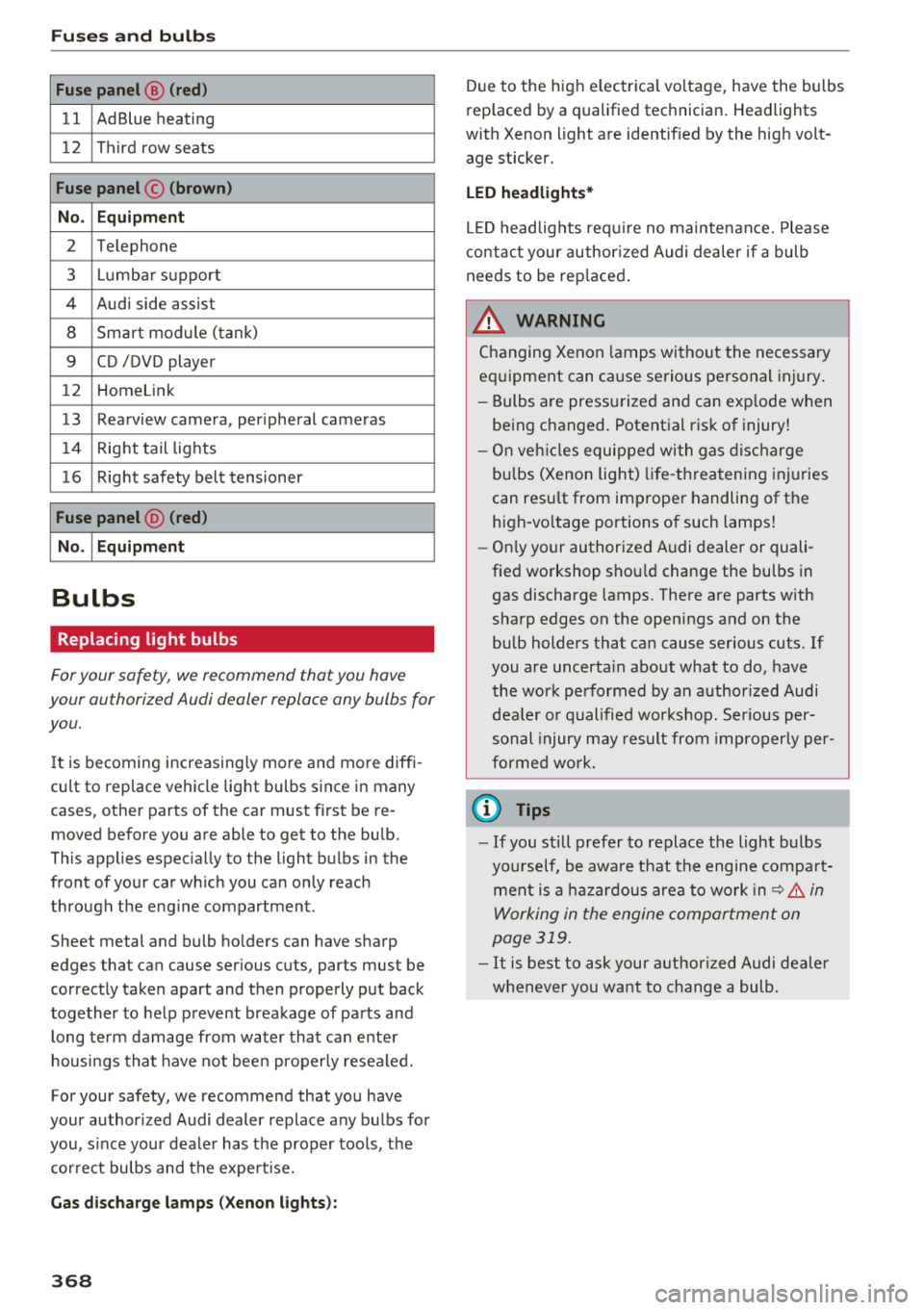
Fuses and bulb s
Fuse panel@ (red )
11 AdBlue heating
12 Third row seats
Fus e panel © (brown)
N o. Equip ment
2 Telephone
3 Lumba r suppo rt
4 Audi side assist
8 Sma rt mod ule (tank)
9 CD /DVD player
12 Homelink
13 Rearview camera, per
ipheral cameras
14 Right tail lights
16 Right safety belt tensioner
Fu se panel @ (red )
N o.
I Equipment
Bulbs
Replacing light bulbs
For your safety, we recommend that you have
your authorized Audi dealer replace any bulbs for
you.
I t is becoming increasing ly more and more diffi
cult to replace vehicle light bulbs since in many
cases, other parts of the car must first be re moved before you are able to get to the bulb.
This applies espec ially to the light bulbs in the
front of your car wh ich you can only reach
through the eng ine compartment.
Sheet metal and bulb ho lders can have sharp
edges that can cause ser ious cuts, parts must be
correctly taken apart and then properly put back
together to help prevent breakage of parts and long term damage from water that can enter
housings that have not been proper ly resea led.
For your safety, we recommend that you have
your author ized Audi dealer replace any bulbs for
you, s ince your dealer has the proper tools, the
correct bulbs and the expert ise.
G as disc harg e la m ps (Xe non light s):
368
Due to the high e lectrica l voltage, have the bulbs
rep laced by a qualified technician. Headlights
with Xenon light are identif ied by the high volt
age sticker.
LED h eadlights*
LE D headlights requ ire no maintenance. Please
contact your author ized Audi dealer if a bulb
needs to be rep laced.
& WARNING
Changing Xenon lamps without the necessary
equipment can cause serious personal injury.
- Bulbs are pressurized and can exp lode when
being changed. Potential risk of injury!
- On veh icles equipped with gas discharge
bulbs (Xenon light) life -threatening injuries
can result from improper handling of the high-vo ltage portions of such lamps!
- On ly your authorized A udi dealer or quali
fied workshop shou ld change the bulbs in
gas discharge lamps. There are parts with
sharp edges on the openings and on the bulb holders that can cause serious cuts . If
you are uncerta in about what to do, have
the work performed by an authorized Audi
dea le r o r qualified workshop. Ser ious per
sonal injury may result from improperly per
formed work.
© Tips
- If you still prefer to replace the light bulbs
yourself, be awa re that the engine compa rt
ment is a hazardous area to work in ~ .&.
in
Working in the engine compartment on
page 319 .
-It is best to ask your authorized Audi dealer
whenever you want to change a bulb .
Page 383 of 398
Cl a:, ...... N
" N ...... 0
0
::r '
A/C MAX (button) .................. .
A/C (button)
. .. ................ ... .
67, 71
67, 70
ABS
.. .. .. .. .. ............... .. .. .. . 142
Accessories 60,379
Active lane assist
Cleaning the camera area . . . . . . . . . . . . . 352
also refer to Audi active lane assist . . . . . 117
Adaptive air suspension
refer to Air suspension ........ .. .. .. .
Adaptive cruise control ................ .
C leaning the sensor ................. .
Messages .... ................ ..... .
Predictive control
............. .. .. .. .
Ad Blue .. .. .. .. ............. .. .. .. .. . 128
102
352 110
100
314
Messages .... ................ ..... . 314
Additional accessories . . . . . . . . . . . . . . . . . 3 79
Adjusting air distribution (automatic climate
control) . . . . . . . . . . . . . . . . . . . . . . . . . . . 68, 71
Adjusting the additional display . . . . . . . . . . 14
Adjusting the rear seats . . . . . . . . . . . . . . . . . 55
Adjusting the sound . . . . . . . . . . . . . . . . . . . 249
Adjusting the temperature (automatic climate
control) . . . . . . . . . . . . . . . . . . . . . . . . . . . 68 71
,
Adjusting the volume . . . . . . . . . . . . . . . . . . . 15
Advanced key
refer to Convenience key . . . . . . . . . . . . . . . 77
Airbag . . . . . . . . . . . . . . . . . . . . . . . . . . . . . . 269
Airbag system . . . . . . . . . . . . . . . . . . . . 269, 287
Advanced Airbag System components . . . 276
Care . . . . . . . . . . . . . . . . . . . . . . . . . . . . . . 284
Children · · · · · · · · · · · · · · ...... .. .. .. . 293
Ch ild restraints
............ .. .. .. .. .
Components (front airbags) ...... .. .. .
Danger of fitting a child safety seat on the
front passenger seat ................ .
Disposal ..... ................ ..... .
Front airbags ................ .. .. .. .
How do the front airbags work? . .. .. .. .
How many airbags does my vehicle have?
How the Advanced Airbag System compo -
nents work together ........... ... .. .
Indicator light ............... .. .. .. .
Monitoring . .. ............. .. .. .. .. .
PASSENGER AIR BAG light ....... .. .. .
Repairs .... .. ................ ..... . 293
276
270
284
274
279
276
278
281
281
281
284
Index
Safety instructions . . . . . . . . . . . . . . . . . . . 283
When must the system be inspected? . . . 281
Air suspension . . . . . . . . . . . . . . . . . . . . . . . 128
Alarm system
refer to Anti-theft alarm system . . . . . . . . . 35
Alignment pin (changing the wheel) . . . . . . 357
All-weather lights . . . . . . . . . . . . . . . . . . . . . . 43
All-wheel steering . . . . . . . . . . . . . . . . 128, 146
All season tires
All wheel drive
refer to quattro
AM I 34S
146
refer to Audi music interface . . . . . . . 231, 232
Android Auto
refer to Audi smartphone interface
Anti-freeze 243
Windshield washer system . . . . . . . . . . . . 328
Anti-lock braking system
refer to ABS . . . . . . . . . . . . . . . . . . . . . . . . 142
Anti-Slip Regulation
refer to ASR . . . . . . . . . . . . . . . . . . . . . . . . 142
Anti-theft alarm system . . . . . . . . . . . . . . . . . 35
Apple CarPlay
refer to Audi smartphone interface . . . . . 243
Ashtray . . . . . . . . . . . . . . . . . . . . . . . . . . . . . . 60
ASR · · ... .. .. .. .. .. ............. .. .. 142
Audi active lane assist . . . . . . . . . . . . . . . . . 117
Messages
119
Audi adaptive cruise control
Distance display, distance warning . . . . . . 110
Traffic jam assist . . . . . . . . . . . . . . . . . . . . 109
Audi connect emergency call and service . . 201
Online roadside assistance . . . . . . . . . . . . 202
Audi connect vehicle control . . . . . . . . . . . . 197
Parking location . . . . . . . . . . . . . . . . . . . . . 198
Remote locking and unlock ing . . . . . . . . . 198
Vehicle status report . . . . . . . . . . . . . . . . . 198
Audi connect (Infotainment) ........ 187, 194
Data protection . . . . . . . . . . . . . . . . . . . . . 195
Services overview
. .. ... .. ..... ... .. ..
Start ing .. .. .. .. .. ............. .. . .
Audi drive select .
.. .. ............... ..
Audi Entertainment mobile 188
188
128
233
Audi music interface . . . . . . . . . . . . . . . . . . . 231
Audi music stream
refer to Wi-Fi . . . . . . . . . . . . . . . . . . . . . . . 229
381
Page 385 of 398

Cl a:, ...... N
" N ...... 0
0
::r '
314
Fueltank ..... ................ ..... . 375
Washer fluid reservoir ......... .. .. .. . 375
Cargo area
refer
to Loading the luggage compart-
ment. ..... .. ................ ..... .
257
Cargo floor . . . . . . . . . . . . . . . . . . . . . . . . . . . 64
Catalytic converter ............. .. .. .. .
317
CD drive (media drives) . . . . . . . . . . . . . . . . 227
Cell phone
refer to Telephone ............. ... .. . 174
Center armrest . . . . . . . . . . . . . . . . . . . . . . . . 55
Cent ral locking . . . . . . . . . . . . . . . . . . . . . . . . 29
Convenience key . . . . . . . . . . . . . . . . . . . . . . 32
Mechanically locking . . . . . . . . . . . . . . . . . . 34
Power windows . . . . . . . . . . . . . . . . . . . . . . 39
Remote control key . . . . . . . . . . . . . . . . . . . 32
Setting . . . . . . . . . . . . . . . . . . . . . . . . . . . . . 34
Central locking switch . . . . . . . . . . . . . . . . . . 33
Ceramic brakes . . . . . . . . . . . . . . . . . . . . . . . 145
Certification . . . . . . . . . . . . . . . . . . . . . . . . . 380
Changing engine o il . . . . . . . . . . . . . . . . . . . 323
Changing the scale . . . . . . . . . . . . . . . . . . . . . 13
Charging
refer to Power sources . . . . . . . . . . . . . . . . . 60
Charging the battery (mob ile dev ices) . . . . 232
Child restraints
Danger of using child restraints in the front
seat ..... .. .. ................ ... .. .
270
Where can I get additional information
about child restraints and their use? . . . .
309
Child restraint system anchors . . . . . . . . . . 305
Child safety .... ................ ..... . 291
Important safety instructions for using child
safety seats . . . . . . . . . . . . . . . . . . . . . . . .
295
Installing a child restraint using the LATCH
system .. .. .. ............... .. .. .. .
307
Mounting and releasing the anchorage
hook . . . . . . . . . . . . . . . . . . . . . . . . . . . . . .
307
Tether anchors . . . . . . . . . . . . . . . . . . . . . . 308
Tether straps . . . . . . . . . . . . . . . . . . . . . . . 308
Child safety lock
Power windows . . . . . . . . . . . . . . . . . . . . . .
38
Rear doors . . . . . . . . . . . . . . . . . . . . . . . . . . 38
Ind ex
Child safety seats . . . . . . . . . . . . . . . . . . . . . 297
Booster seats . . . . . . . . . . . . . . . . . . . . . . . 301
Convertible child seats . . . . . . . . . . . . . . . 299
Danger of using child restraints in the front
seat . . . . . . . . . . . . . . . . . . . . . . . . . . . . . . .
270
How do I properly install a child safety seat
. h. l 7 295 in my ve 1c e ..... .. ................ .
Infant seats . . . . . . . . . . . . . . . . . . . . . . . .
297
LATCH system . . . . . . . . . . . . . . . . . . . . . . 307
Safety instructions . . . . . . . . . . . . . . . . . . . 295
Securing . . . . . . . . . . . . . . . . . . . . . . . . . . . 302
Unused safety belts on the rear seat 297
Child seats
Lower anchorages . . . . . . . . . . . . . . . . . . .
306
Cigarette ligh ter . . . . . . . . . . . . . . . . . . . . . . . 60
Classic view . . . . . . . . . . . . . . . . . . . . . . . . . . . 14
Cleaning . . . . . . . . . . . . . . . . . . . . . . . . . . . . 351
Cleaning Alcantara . . . . . . . . . . . . . . . . . . . . 354
Cleaning art ific ial leather . . . . . . . . . . . . . . . 354
Cleaning carbon parts . . . . . . . . . . . . . 353, 354
Cleaning controls . . . . . . . . . . . . . . . . . . . . . 353
Cleaning decorative parts/trim . . . . . . . . . . 353
Cleaning decorative parts and trim . . . . . . . 353
Cleaning exhaust tail pipes . . . . . . . . . . . . . 353
Cleaning plastic parts . . . . . . . . . . . . . . . . . . 353
Cleaning textiles . . . . . . . . . . . . . . . . . . . . . . 354
Cl imate control system
refer to Automatic climate control . . . . . . . 66
Clock . . . . . . . . . . . . . . . . . . . . . . . . . . . .
16, 245
Closing
Hood ..... .. .. .. .. ............... ..
320
Closing a id (doors) . . . . . . . . . . . . . . . . . . . . . 29
Cockpit (overview) . . . . . . . . . . . . . . . . . . . . . . 8
Command (voice recognition system) . . . . .
167
Compartments . . . . . . . . . . . . . . . . . . . . . . . . 61
Compass in the mirror . . . . . . . . . . . . . . . . . . 52
Compliance . . . . . . . . . . . . . . . . . . . . . . . . . . 380
Connection manager . . . . . . . . . . . . . . . . . . 246
Connections
refer to Media . . . . . . . . . . . . . . . . . . 225, 234
Connect (vehicle control) . . . . . . . . . . . . . . . 197
Consumer Information . . . . . . . . . . . . . 259, 377
Consumption (fuel) . . . . . . . . . . . . . . . . . . . . 16
Contacting NHTSA . . . . . . . . . . . . . . . . . . . . 259
383
Page 386 of 398
Index
Contacts . . . . . . . . . . . . . . . . . . . . . . . . . . . . 183
Additional directory . . . . . . . . . . . . . . . . . . 247
Importing/exporting . . . . . . . . . . . . . . . . . 184
Memory capacity . . . . . . . . . . . . . . . . . . . . 185
Storing as destination . . . . . . . . . . . . . . . . 211
Control buttons (operating the MMI) . . . . . 152
Control knob with joystick function (MMI op
eration) . . . . . . . . . . . . . . . . . . . . . . . . . . . . . 155
Convenience key Switching the ignition on . . . . . . . . . . . . . . 77
Unlocking/locking . . . . . . . . . . . . . . . . . . . . 32
Convenience opening/closing . . . . . . . . . . . . 39
Convertible child safety seats . . . . . . . . . . . 299
Convertible locking retractor
Activating . . . . . . . . . . . . . . . . . . . . . . . . . . 304
Deactivating . . . . . . . . . . . . . . . . . . . . . . . . 305
Using to secure a child safety seat . . . . . . 304
Cooled glove compartment . . . . . . . . . . . . . . 61
Cooling mode (automatic climate
control) ........................ 67, 70, 71
Cooling system Adding coolant . . . . . . . . . . . . . . . . . . . . . . 325
Coolant . . . . . . . . . . . . . . . . . . . . . . . . . . . . 324
Coolant level checking . . . . . . . . . . . . . . . . 325
Coolant temperature indicator . . . . . . . . . . 11
Crosshairs . . . . . . . . . . . . . . . . . . . . . . . . . . . 205
Cruise control system . . . . . . . . . . . . . . . . . . . 95
Cup holders . . . . . . . . . . . . . . . . . . . . . . . . . . . 61
Current consumption 16
D
Data connection . . . . . . . . . . . . . . . . . . . . . . 194
Data protection . . . . . . . . . . . . . . . . . . . . . . . 195
Data recorder . . . . . . . . . . . . . . . . . . . . . . . . 14 7
Date . . . . . . . . . . . . . . . . . . . . . . . . . . . . . 16, 245
Date display . . . . . . . . . . . . . . . . . . . . . . . . . 245
Daytime running lights . . . . . . . . . . . . . . . . . 43
Declaration of compliance . . . . . . . . . . . . . . 380
DEF
refer to Ad Blue . . . . . . . . . . . . . . . . . . . . . . 314
Defrosting (windows) . . . . . . . . . . . . . . . . 68, 71
DEF (instrument cluster) . . . . . . . . . . . . . . . . 12
Demo mode
refer to Presentation mode . . . . . . . . . . . . 21 1
Destination on the map . . . . . . . . . . . . . . . . 205
Determining correct load limit 344
384
Diesel
Diesel particulate filter
Diesel Exhaust Fluid (DEF) 317
refertoAdBlue ... .. .. ............. .. 314
Diesel fuel . . . . . . . . . . . . . . . . . . . . . . . . . . . 311
Digital compass . . . . . . . . . . . . . . . . . . . . . . . 52
Digital Rights Management . . . . . . . . . . . . . 225
Dimensions . . . . . . . . . . . . . . . . . . . . . . . . . . 375
Dimming the exterior mirrors . . . . . . . . . . . . 48
Dimming the rearview mirror . . . . . . . . . . . . 48
Directory
refer to Contacts . . . . . . . . . . . . . . . . . . . . 183
Display . . . . . . . . . . . . . . . . . . . . . . . . . . . . . . 12
Cleaning . . . . . . . . . . . . . . . . . . . . . . . . . . . 353
Infotainment system display . . . . . . 150, 246
Multifunction steering wheel . . . . . . . . . . . 12
Versions (MMI) . . . . . . . . . . . . . . . . . . . . . . 150
Distance . . . . . . . . . . . . . . . . . . . . . . . . . . . . . 16
Doors Closing aid . . . . . . . . . . . . . . . . . . . . . . . . . . 29
Mechanically locking . . . . . . . . . . . . . . . . . . 34
Driver information system
Changing views . . . . . . . . . . . . . . . . . . . . . . 12
Energy consumers . . . . . . . . . . . . . . . . . . . . 16
On-board computer . . . . . . . . . . . . . . . . . . . 16
Outside temperature display . . . . . . . . . . . . 10
Service interval display . . . . . . . . . . . . . . . 328
V iew . . . . . . . . . . . . . . . . . . . . . . . . . . . . . . . 14
Driver seat
refer to Seating position 253
Drives
refer to Media . . . . . . . . . . . . . . . . . . 225, 234
Drive select
refer to Audi drive select . . . . . . . . . . . . . . 128
Driving economically . . . . . . . . . . . . . . . . . . . 74
Driving offroad . . . . . . . . . . . . . . . . . . . . . . . . 83
Driving on hills . . . . . . . . . . . . . . . . . . . . . . . . 84
Driving safely . . . . . . . . . . . . . . . . . . . . . . . . 252
Driving through water . . . . . . . . . . . . . . . . . . 74
Driving time . . . . . . . . . . . . . . . . . . . . . . . . . . 16
DVD drive (media drives) . . . . . . . . . . . . . . . 226
Dynamic volume
refer to System volume . . . . . . . . . . . . . . . 250
E
E-mail
181
Page 390 of 398
Index
Mechanical key . . . . . . . . . . . . . . . . . . . . . 30, 31
Mechanically locking the front passenger's
door.. .... .. .. .. ............. .... .. ..
34
Media · · · · · . . . . . . . . . . . . . . . . . . . . . 225, 234
Drives . . . . . . . . . . . . . . . . . . . . . . . . . . . . . 226
Supported formats . . . . . . . . . . . . . . . . . . 240
Media center ..................... .... 235
Memory buttons
refer to Shortcut keys . . . . . . . . . . . . 149, 156
Memory capacity
Directory . . . . . . . . . . . . . . . . . . . . . . . . . . .
184
Jukebox . . . . . . . . . . . . . . . . . . . . . . . . . . . . 227
Memory card
SD card reader (MMI) . . . . . . . . . . . . . . . . .
226
Supported types/formats . . . . . . . . . . . . . 240
Memory function . . . . . . . . . . . . . . . . . . . . . . 59
MENU button .. .. ............. .... .. .
Menu language
refer to Setting the language ... .... .. .
Menu paths (Owner's Manua l) ....... ... .
Menus/symbols
Messages
Mirrors
149
245 152
159
180
Adjusting exterior mirrors . . . . . . . . . . . . . . 47
Compass ....... ................ ..... 52
D . . 1mming ....... ................ ..... 48
Vanity mirror . . . . . . . . . . . . . . . . . . . . . . . . 49
MMI
refer to Multi Media Interface . . . . . . . . . . 149
MMI search
refer to Free text search . . . . . . . . . . 158 , 236
MMI touch . . . . . . . . . . . . . . . . . . . . . . . . . . . 153
Monitoring the Advanced Airbag System 281
MP3
refer to Jukebox 227
Multifunction steering wheel . . . . . . . . . . . . 161
Button · · · · · · .. ............. .... .. .. 15
Map zoom .. .. .. ... .. ..... ... .. .. .. .. 13
Operating . . . . . . . . . . . . . . . . . . . . . . . . . . . 12
Speech dialog system . . . . . . . . . . . . . . . . . 15
Switching tabs .. ............. .... .. . .
Multi Media Interface
........... .... .. .
Music collection
12
149
refer to Jukebox . . . . . . . . . . . . . . . . . . . . . 227
Mute . . . . . . . . . . . . . . . . . . . . . . . . . . . . . . . . 15
also refer to Muting . . . . . . . . . . . . . . . . . . 249
388
Muting . . . . . . . . . . . . . . . . . . . . . . . . . . . 15, 249
myAudi .......... .. .. ........... 187,207
Logg ing in in the vehicle . . . . . . . . . . . . . . 187
PIN · · · ... .. .. .. .. .. ............. .. 187
N
Natural leather care/cleaning .......... .
NAV /MAP button
. . .. .. ............. ..
354
203
Nav igating (instrument cluster) . . . . . 163, 164
Navigation . . . . . . . . . . . . . . . . . . . . . . . . . . . 203
Announcements . . . . . . . . . . . . . . . . . . . . . 212
Better route . . . . . . . . . . . . . . . . . . . . . . . . 218
also refer to Map ... .. ............. .. 213
Navigation (instrument cluster) . . . . . . . . . 163
Net · · · · ............................. 62
Network connection (Wi-Fi) . . . . . . . . . . . . . 193
NHTSA
Contacting
259
Night vision assist . . . . . . . . . . . . . . . . . . . . 125
Cleaning the camera . . . . . . . . . . . . . . . . . 352
Nitrogen oxide (NOx) catalytic converter
refer to Ad Blue. .. .. .. ............. .. 314
Number of seats . . . . . . . . . . . . . . . . . . . . . . 261
0
Occupant protection . . . . . . . . . . . . . . . . . . . 112
Occupant seating positions . . . . . . . . . . . . . 253
Octane rating (gasoline) ................ 310
Odometer · · · ·........................ 12
Offroad driving . . . . . . . . . . . . . . . . . . . . . . . . 83
Offroad mode . . . . . . . . . . . . . . . . . . . . . . . . 143
OFF (button) . . . . . . . . . . . . . . . . . . . . . . . 67, 70
Oil
refer to Engine oil 321
On-board computer . . . . . . . . . . . . . . . . . . . . 16
On-Board Diagnostic System (OBD) . . . . . . . 318
On/Off knob (MMI) . . . . . . . . . . . . . . . . . . . . 149
Online destinations
refer to Point of interest search . . . . . . . . 207
Online map . . . . . . . . . . . . . . . . . . . . . . . . . . 215
Online map update ... .. ............... 216
Online media ... ..... .. ............... 230
Online roadside assistance
Audi connect emergency call and service .
202