lock AUDI Q7 2018 Owner´s Manual
[x] Cancel search | Manufacturer: AUDI, Model Year: 2018, Model line: Q7, Model: AUDI Q7 2018Pages: 398, PDF Size: 185.58 MB
Page 88 of 398
Driving
and downshifts at a higher RPM to improve fuel
efficiency.
The transm ission switches to a spo rty mode afte r
a ki ck-down or when the drive r uses a
sp o rty
driving sty le
character ized by quick accelerator
pedal movements, heavy acce leration, frequent
changes in speed and traveling at the maximum
speed.
I f desired, the driver can a lso select the gears
manually ( tiptronic mode)¢ page 89.
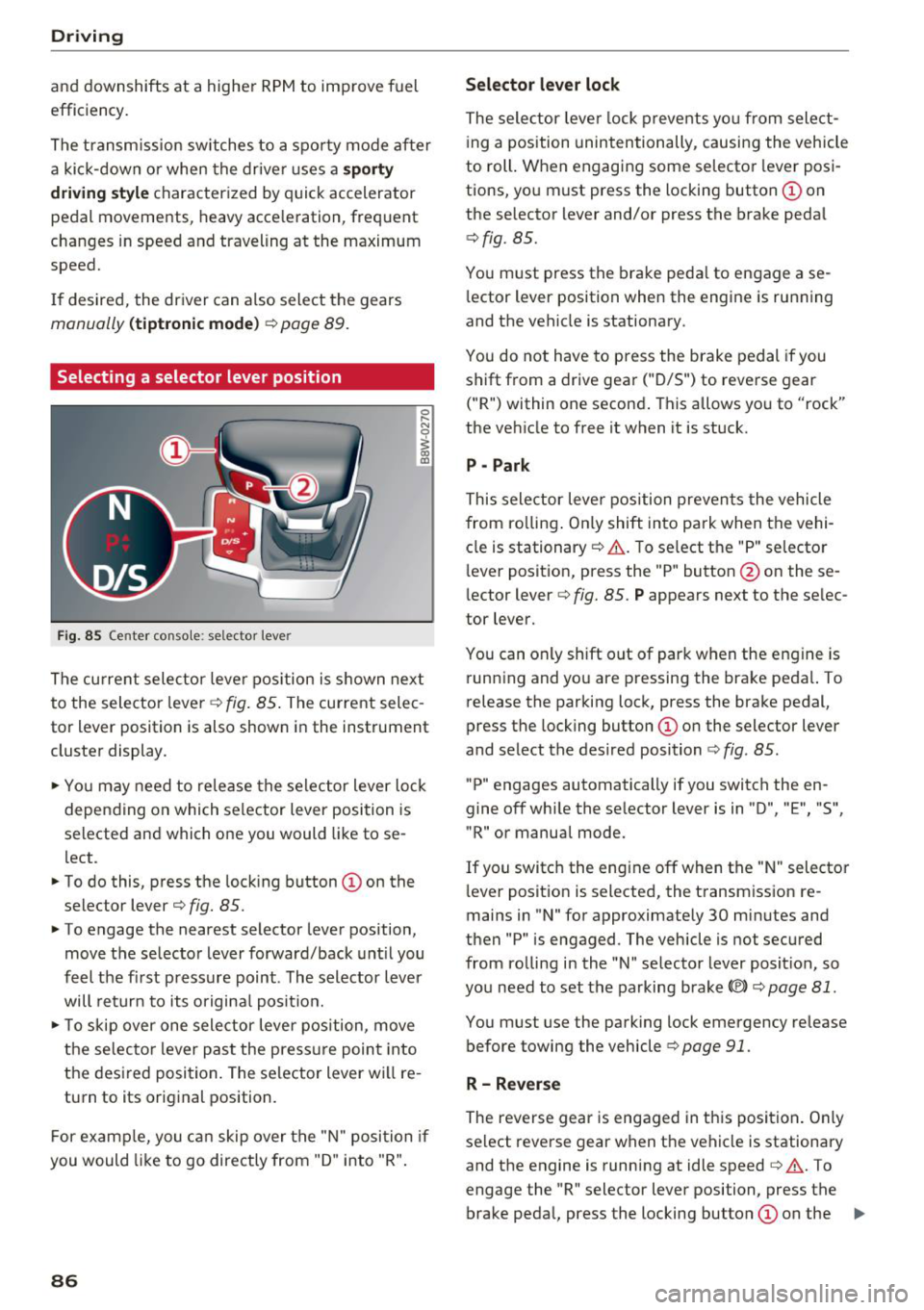
Selecting a selector lever position
Fig. 85 Center conso le : se lec tor lever
The cu rrent selecto r leve r pos ition is s hown nex t
to the selector lever ~
fig. 85 . The current selec
tor lever position is also shown in the instrument
cluste r display .
.. Yo u may need to re lease the selec tor lever lo ck
depen ding on which selector lever position is
selected and which one you would like to se
lect.
.. To do this, press the lock ing button
(I) on the
selector lever¢
fig. 85.
.. To engage the nearest selector lever position,
move the se lector lever forward/back unt il you
feel t he fi rst press ure point. The selector lever
will ret urn to its origina l posit ion.
.. To skip over one sele ctor lever pos ition, move
the selecto r lever past the press ure point into
the des ired posi tion . The se lector lever will re
turn to its original position.
F or examp le, you c an skip over t he "N" position if
you would like to go directly from "D " into "R".
86
Selector lever lock
The selector leve r lock prevents yo u from select
i ng a position unintentionally , causing the vehicle
to roll. When engag ing some selecto r lever pos i
tions, you must press the locking button @on
the selector lever and/or press the brake peda l
¢fig. 85.
You m ust press the brake peda l to engage a se
l ector lever position when the engine is running
and the vehicle is stationary .
You do not have to press the brake pedal if you
shift from a drive gear
(" D/S") to reverse gear
("R") within one second . This allows yo u to "rock"
the veh icle to free it when it is stuck.
P - Park
This selector leve r position preven ts the vehicle
from ro lling . On ly shift into park when the vehi
cle is stationary ¢&. . T o se lect the "P" selecto r
l ever posit ion, press the "P " button @on these
lector lever¢
fig. 85. P appears next to the se lec
tor lever.
You can only shift out of park when the engine is run ning and you are pressing the brake peda l. To
release the parking lock, press the brake pedal,
press the locking button @on the selector lever
and select the des ired position ¢
fig. 85.
"P" engages automatically if you switch the en
gine off whi le the se lector lever is in "D ", "E", "S",
"R" or manual mode.
If you switc h the eng ine off when the " N" selecto r
l ever posit ion is selected, the t ransm iss ion re
mains in "N " for approximately 30 min utes and
then "P" is engaged. The vehicle is not secured
from ro lling in the "N " selector lever posit ion, so
yo u need to set the parking brake®)¢
page 81.
You must use the park ing lock emergency release
before towing the vehicle¢
page 91.
R- Reverse
The reverse gear is engaged in th is posi tion . On ly
select reverse gear when the vehicle is stationary and the engine is running at idle speed¢&. . T o
engage the "R" selector lever position, press the brake peda l, press the locking button
(I) on the ..,.
Page 89 of 398
Cl a:, ...... N
" N ...... 0
0
::r '
¢ fig . 85.
A confirmation tone w ill sound when the reve rse
gear is engaged.
N · N eutral (idle )
The transm iss ion is in idle in this pos ition. To en
gage the "N" selector lever position, press the l o cki ng button (!) on the se lector lever a nd sh ift
in to t he "N " posit ion¢
fig. 85.
If you sw itch the engine off w hen the "N" selector
l ever pos ition is se lected, the transmission re
mains in "N" for app rox ima tely 30 minutes and
then "P " is engaged.
You cannot select the "N" pos ition w hen the ign i
tion is sw itched off . W hen d riving through an au
tomatic ca r wash, first select the "N" posi tion and
then tur n t he eng ine off.
For safety reasons, the vehicle ca nnot be locked
when the transm ission is in the
"N" pos it ion.
D IS -Dri ving forward
When the transmission is in the "D/S" posit ion, it
can be operated either in the normal "D" mode or
in the "S " sport mode . Move the selector lever
back to engage the "S" spo rt mode . You can only
se lect the "S" selector lever position when the "D"
or "E " posit ion is selected. To select the "D" or " E"
posi tion again w hen "S " is engaged , move the se
l ector lever back ¢& . T o shift from "N" to "D"
when traveling at speeds below 1 mph (2 km/h), press the brake pedal and s hift into the "D" posi
tion
c> & .
I n t he
no rmal mode "D ", t he transmission a uto
matica lly selects the suitab le gear ratio .
It de
pends on engine load, vehicle speed and driving
style.
Selec t the
spo rt mode "S" for spo rty driving . The
ve hicle makes full use of the engine's power .
Shifting may become noticeab le when acce lerat
ing.
The "S" selector lever posit ion engages a utomat i
cally when you se lect
Dynamic mode in drive se
l ect*.
Driving
A WARNING
-Read and follow all WARNINGS.
-The vehicle can roll even if the ignit ion is
sw itched off.
- Power is still transmitted to t he whee ls
when the engine is runn ing at idle. To pre
vent the vehicle from "creeping", you must keep your foot on the brake in all selector
lever pos itions (except "P" and "N") when
the eng ine is ru nning .
- Before ope ning the hood, select the "P" se
lecto r lever posit ion and set the pa rking
b rake. This red uces the risk of an acc ident.
A lways read and follow the app licab le wa rn
i n gs¢
page 319, Working in the engine
compartment .
(D Tips
If you accidenta lly select "N" whi le dr iv ing,
t a ke yo ur foot off the acce le rato r pedal and
w ait fo r th e e ngine to slow down to idle be
f o re selecting "D" or "S".
Driving tips
Starting th e engine
.. The "P" or "N " posit ion must be selected .
Starting from a stop
.. Press and hold the b rake peda l.
.. Sta rt the engine ¢
page 77.
.. Press the locking button (Don the selecto r lev
er and se lect the "D " "E " "S " or "R " posit io n
' '
i=:> page86.
.. Wait a moment until the transmission shifts.
You will notice a slight movement when the gear engages.
.. Re lease the brake pedal and press the accelera-
tor pedal
c> ,& .
Various convenience functions are available for
start ing on h ills
c> page 83.
Stopping t emporarily
.. Press the brake pedal to sto p the veh icle, for
examp le at a traffic light . Do not press the ac-
celerator pedal when doing this . .,._
87
Page 90 of 398
Drivin g
~ To prevent the vehicle from rolling when you
start driving, set the parking brake when stop
ping on steep hills¢
/A.
~ The parking brake will release automatically
and your vehicle will begin to move when the
doors are closed, the driver's safety belt is fas
tened, and you accelerate as usual.
Stopp ing /p a rki ng
If the selector lever is not in the "P" position
when you open the dr iver's door, the veh icle
could roll.
~ Press and hold the brake pedal¢ /A.
~ Set the parking brake.
~ To select the "P" selector lever pos it ion, press
the "P" button @on the selector lever
¢ page 86, fig . 85 .
Under certain condit ions, such as driving in the
mounta ins or when towing a trailer, it may be
helpful to switch to manual mode temporarily
and sh ift
manually to adapt to the driving condi
tions
¢ page 89.
On hills, set the parking brake first and then s hift
into the "P" position¢
page 81. This prevents too
much stress from being placed on the locking
mechanism .
.8, WARNING
- The veh icle can roll eve n when the engine is
swit ched off.
- Unintended ve hicle movement can lead to
serious injur ies.
- T o reduce the risk of an acc ident, do not
press the acce le rato r pedal whe n cha ng ing
the se lecto r lever posit ion while the ve hicle
is s ta tionary and the eng ine is ru nning.
- T o reduce the risk of an ac cident, never se
lect the "R" or "P" positions while dr iv ing .
- Do not inadvertent ly press the acce le rato r
peda l w hen the veh icle is sta tionary. Othe r
wise the risk of an acc ident in cr eases be
ca use the vehicle will start to move immed i
ate ly, even if the parking brake is set .
88
Hill descent control
The hill descent control system assists the driver
when driving down hills .
Hill descent control activates when the transm is
s ion is in the "D" or "S" pos ition and you press the
brake pedal. The transmission automat ically se
lects a gear that is suitable for the hill. Hill de
sce nt cont rol tr ies to maintain the speed ach
i eved at the t ime of braking, w it hi n phys ical and
tec hnical lim itations . If may still be necessary to
adjust the speed wit h the brake peda l.
Hill descent cont rol sw itches off once the h ill lev
els out or you press the accelerator pedal.
When operating the cru ise control system*
¢
page 95 , hill descent control is also activated
whe n the speed is set.
.8, WARNING
Hill desce nt co ntro l cannot ove rcome physical
lim itat ions, so it may not be ab le to m ainta in
a constant speed under all conditions. A lways
be ready to app ly the brakes.
Page 92 of 398
Driving Transmission malfunction
• Transmi ssion: malfunction! Please stop ve
hicle and shift to P
Do not cont inue d rivi ng. Selec t the "P" selector
lever position and co ntact an authorized Au di
de aler or auth o riz e d Aud i Serv ice Facili ty fo r as
si st ance.
[O] Selector lever: malfunction! You can contin
ue driving . Please contact Service
There is a system malfunct io n in the t ransm is
sion . Drive to an author ized A udi dealer or au
thor ized A udi Se rvice Fac il ity immed iate ly to have
t he ma lfunction co rrecte d.
[O] P button: malfunction! Auto P when engine
off . Please contact Service
There is a malfunction in the "P " button on t he
selecto r leve r. The transmission a utomat ically
e ngages "P" when you switch off the eng ine.
Dr ive to an a utho rized Aud i dea le r or a uthorized
Aud i Serv ice Facility immedia tely to have t he
malfunc tion corrected.
[O] Selector lever: malfunction! Gear change on
ly possible using both paddle levers. Please con
tact Service
There is a system malfunct io n in the t ransm is
sion. You can conti nue d riving w ith rest ricted
f un ction . The selecto r leve r is not working . Gears
can only be se lec ted by tapping bo th sh ift pad
d les a t the sam e time w hen t he v ehicl e is station
a ry ~
page 8 9, fig . 87. Pa y a tten tio n t o th ese
lec ted t rans mi ssion positio n in t he ins tru ment
cluste r display. The par king lock eng ages au to
mat ica lly w hen you t urn off the engine . Drive to
an author ized A udi dealer or authorized A udi
Serv ice Facility immediately to have the mal func
tion cor rected.
[O] Transmission: Please press brake pedal and
select gear again
Pr es s t he bra ke peda l and se lec t the des ired se
lec to r l eve r pos it io n ag ain. Y ou ca n then con tinue
d riving .
[O] Transmis sion: too hot. Please adapt driving
style
90
T he transmission tem peratu re has inc reased sig
nificantly . Drive very cautio usly o r ta ke a break
from driving until the temperature ret urns to t he
no rma l range and t he indicato r light turns off.
[O] Transmission: malfunction! You can contin
ue driving. See owner's manual
T he re is a s ystem malfunc tion in the tran smi s
s io n. You m ay con tinu e dr ivin g. Drive to an au
t h ori ze d Aud i dea le r o r a uthorized Audi Se rvice
Fac ility soon to have the malf unct io n correcte d.
[il Transmission : malfunction! You can contin
ue driving in D until engine is off
There is a syst em malfunc tion in th e transmis
s io n. The trans missio n is swi tching to eme rge ncy
mo de.
If yo u tu rn th e e ngine off, you w ill not be
a ble to se le ct any o the r se le ct or lever posi tio ns
a ft er sta rting t he engine aga in . D rive to an a u
t h orized Audi dea le r or a uthorized Audi Se rvice
Facility immed iate ly to have the ma lfunction cor
r ected .
[O] Transmission: malfunction! You can contin
ue driving with limited function. Please contact
Service
T he re is a sys tem m alf unc tion in the tran smis
s io n. The transmission is switc hing to eme rgency
mode. This mode only s hifts into ce rtain gears or
will no longer shift at a ll. The eng ine may sta ll.
D rive to an author ized A udi dealer or autho rized
Audi Se rvice Facility immed iate ly to have the
malfunction corrected .
[O] Transmission: malfunction! You can contin
ue driving w ith limited function. No reverse
gear
There is a system malfunction in the tra nsmis
s io n. The transmission is switc hing to eme rge ncy
mode. Th is mode only s hifts int o ce rtain gears or
will no longer sh ift at a ll. The eng ine may sta ll.
Yo u cannot engage the reve rse gear. Dr ive to a n
a uth orize d Aud i dea le r o r auth orized Aud i Serv ice
Fac il ity i mmed iat ely to hav e the ma lfunction cor
r ec ted .
[O] Danger of rolling away! P not possible.
Please apply parking brake
Page 93 of 398

-The parking lock was released using the emer
gency release
¢ page 91. Or
- The parking lock can no longer be engaged.
Drive to an authorized Audi dealer or author
ized Audi Service Facility immediately to have
the malfunction corrected .
[il Move selector lever to automatic position
There is a malfunction in the tiptronic mode . End
tiptron ic mode by pushing the selector lever to
the left into the "D/S" position.
Parking lock emergency release
The parking lock must be released with the
emergency release when driving through moun tains/maneuvering.
Fig. 88 Drive r's side footwell : releas ing th e parking lock
us ing the eme rgency re lease
The emergency release is located under the floor
mat on the driver 's side .
Releasing the parking lock using the
emergency release
"'To prevent the vehicle from rolling unintent ion
ally, set the parking brake(®)¢
page Bl or
press the brake pedal.
"' There are two slits on the cover. Position the
screwdriver from the vehicle tool kit in one of
the slits on the cover and pry the cover off.
"' Insert the socket wrench (from the vehicle tool
k it) into the opening
c:> fig . 88.
"'T urn the socket wrench all the way clockw ise @
and press it downward @unti l it locks into
place.
~ "'L eave the socket wrench inserted c:> .&_ . ...... N r--.
~ Resetting the parking lock
0
0
~ "'Press the brake pedal and start the engine .
Driving
"' Keep the brake pedal pressed and engage the
following selector lever positions one after the
other: "N" , "D" and back to "N".
"' Turn the engine off again.
"' Grasp the socket wrench with both hands and
pull it up and out carefully to remove
c:>(D .
"'Install the cover .
When the parking lock emergency release is
used, the
[il indicator light and the "N " selector
lever posit ion turn on in the instrument cluster.
The message
Danger of rolling away! P not pos
sible. Please apply parking brake
also appears.
_& WARNING
-Only activate the emergency release while
on a level surface or a slight slope.
- The parking lock may only be released using
the eme rgency release if the parking brake
is set . If it is not functioning, secure the ve
hicle from rolling using the brake pedal or
other suitable means, such as blocking a
front and a rear wheel. An unsecured vehicle
may roll away, which increases the risk of an
accident.
- To reduce the r isk of an accident, you must
not drive when the emergency release is ac
tivated .
@ Note
-Read and follow the important instructions
about tow ing
<=> page 371.
-The risk of damage increases if you do not
remove the socket wrench carefully when
resetting the parking lock.
91
Page 96 of 398
Trail er to wing
If you have to drive th rough diffic ult road condi
tions, you can raise the vehicle again after hitch
ing the trai ler or after adjust ing the tongue
weight .
{QJ Note
Applies to: vehicles with air suspension
-Changes in temperature or load can affect
the he ight of the vehicle.
- Set the a ir suspension to the standard vehi
cle heig ht, otherwise the applicab le tongue
weig ht no longer applies to your vehicle .
(D Tips
-Use chocks when parking on incl ines if the
trailer is loaded.
- We recommend also having the vehicle in spected between the inspection intervals if
you are towing a trai ler frequently.
- Avo id driving wit h a trailer du ring the vehi
cle break-i n period .
Driving with a trailer
Driving with a trailer requires extra caution.
Speed
Adhere to the legal speed l imi ts. Follow t he lega l
regulations specif ic to the country.
As the speed inc reases, the d riving stability of
the t railer dec reases . The refore you sho uld not
exceed t he max imum legal speed limit when
there are unfavorable road, weather and/or wind
conditions. This especially applies when driving
downhill.
You must a lways reduce yo ur speed as soon as
you not ice even the s lightest swinging motion of
the trailer . Never try to "straighten out" the trail
er by accelerating.
The weig ht dis trib ution is very poo r if t he ve hicle
is empty and the trailer is loaded. However if you
must drive under these circumstances, t hen drive
especia lly slowly.
94
Brak es
Brake in a time ly manner. Downs hift be fo re dr iv
i ng down hill so that the engine can assist with
braking ~&, .
When using a t railer w it h over run bra kes, fi rst
brake ge ntly t hen q uickl y. This red uces the r isk o f
jerking while braking if the trailer wheels lock up .
Engine coolant temperatur e
Pay attention specifically to the coolant tempera
ture display when there a re high outs ide temper
at ures , and whe n driving on long i nclines
~ page 11. Shift to a highe r gear in a t imely man
ner .
A WARNING
Constant braking causes the b rakes to over
h eat and substantially reduces bra king per
formance, increases b raking distance o r caus
es complete failure of the brake system.
-
Page 125 of 398
a co ...... N r--. N ...... 0
0
:E '
Applies to: ve hicles with exit warning system
Fig . 116 Example dis play
Fig. 117 Door: warning str ip
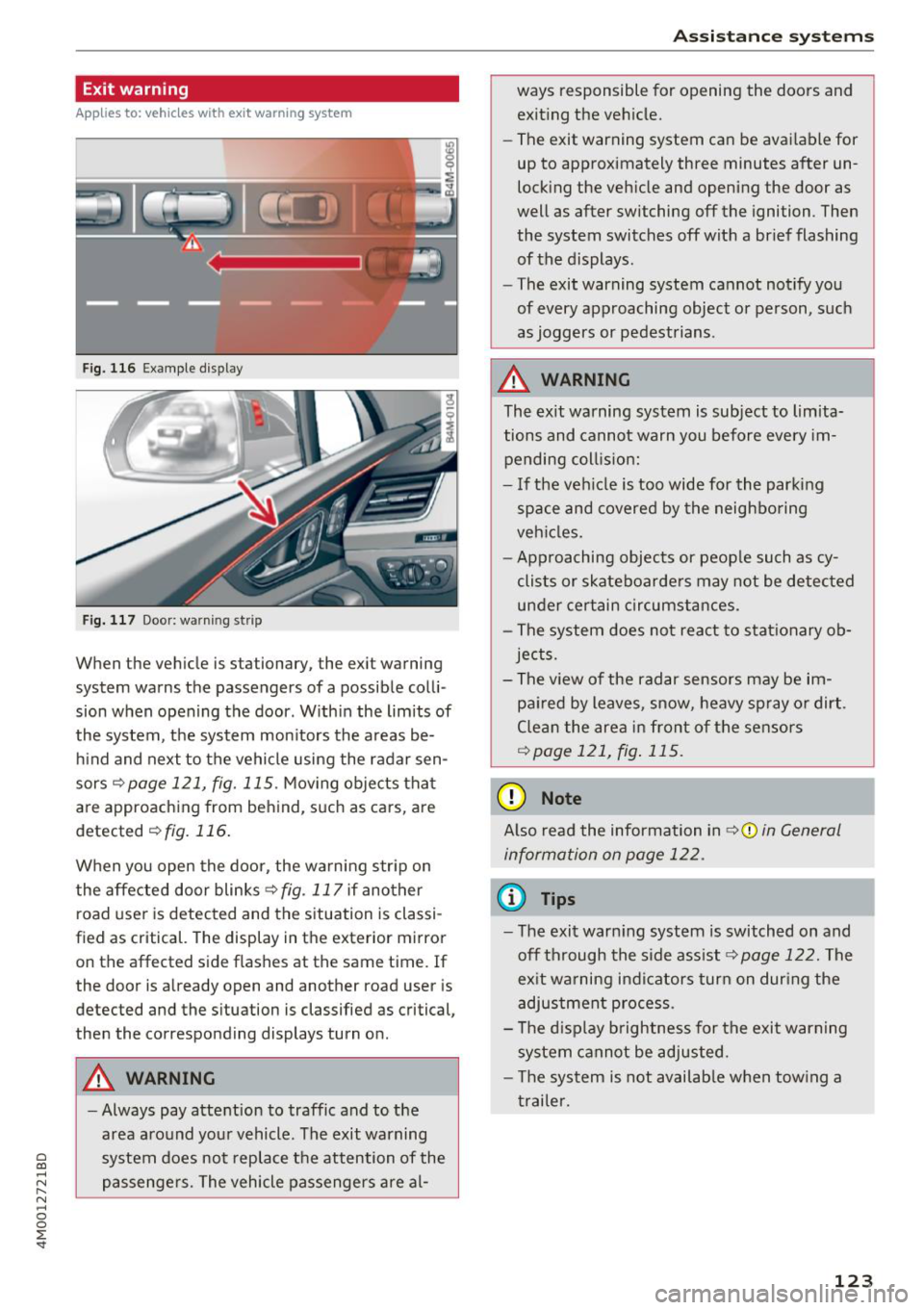
When the vehicle is stationary, the exit warning
system warns the passengers of a possible colli
sion when opening the door . Within the limits of
the system, the system monitors the areas be
hind and next to the vehicle using the radar sen
sors
c::¢> page 121, fig. 115 . Moving objects that
are approaching from behind, such as cars, are
detected
c::¢> fig. 116.
When you open the door, the warning str ip on
the affected door blinks ¢
fig. 117 if another
r oad user is detected and the situation is classi
f ied as critical. The display in the exterior mirror
on the affected side flashes at the same time . If
the door is already open and another road user is
detected and the situation is classified as critical,
then the corresponding displays turn on .
A WARNING
-Always pay attention to traffic and to the
area around your vehicle. The exit warning
system does not replace the attention of the
passengers. The vehicle passengers are al-
Assistance systems
ways responsible for opening the doors and
exiting the vehic le.
- The exit warning system can be available for
up to approximately three minutes after un
locking the vehicle and opening the door as
well as after switching off the ignition . Then
the system switches off with a brief flashing
of the displays.
- The exit warning system cannot notify you
of every approaching object or person, such
as joggers or pedestrians .
A WARNING
The exit warning system is subject to limita
tions and cannot warn you before every im
pending coll is ion:
- If the veh icle is too wide for the parking
space and covered by the neighboring
veh icles.
- Approaching objects or peop le such as cy
clists or skateboarders may not be detected
under certain circumstances.
- The system does not react to stat ionary ob
jects.
- The view of the radar sensors may be im
paired by leaves, snow, heavy spray or dirt .
Clean the area in front of the sensors
c::¢> page 121, fig. 115.
(D Note
Also read the information in c::¢,(D in General
information on page 122 .
(D Tips
-The exit warning system is switched on and
off through the side ass ist
c::¢> page 122. The
ex it warning indicators turn on dur ing the
adjustment process.
- The display brightness for the exit warning
system cannot be adjusted.
- T he system is not availab le when tow ing a
trailer.
-
123
Page 137 of 398
a co ...... N r--. N ...... 0
0
:E '
ver using the orientation lines .
General information
Applies to: vehicles with rearview camera
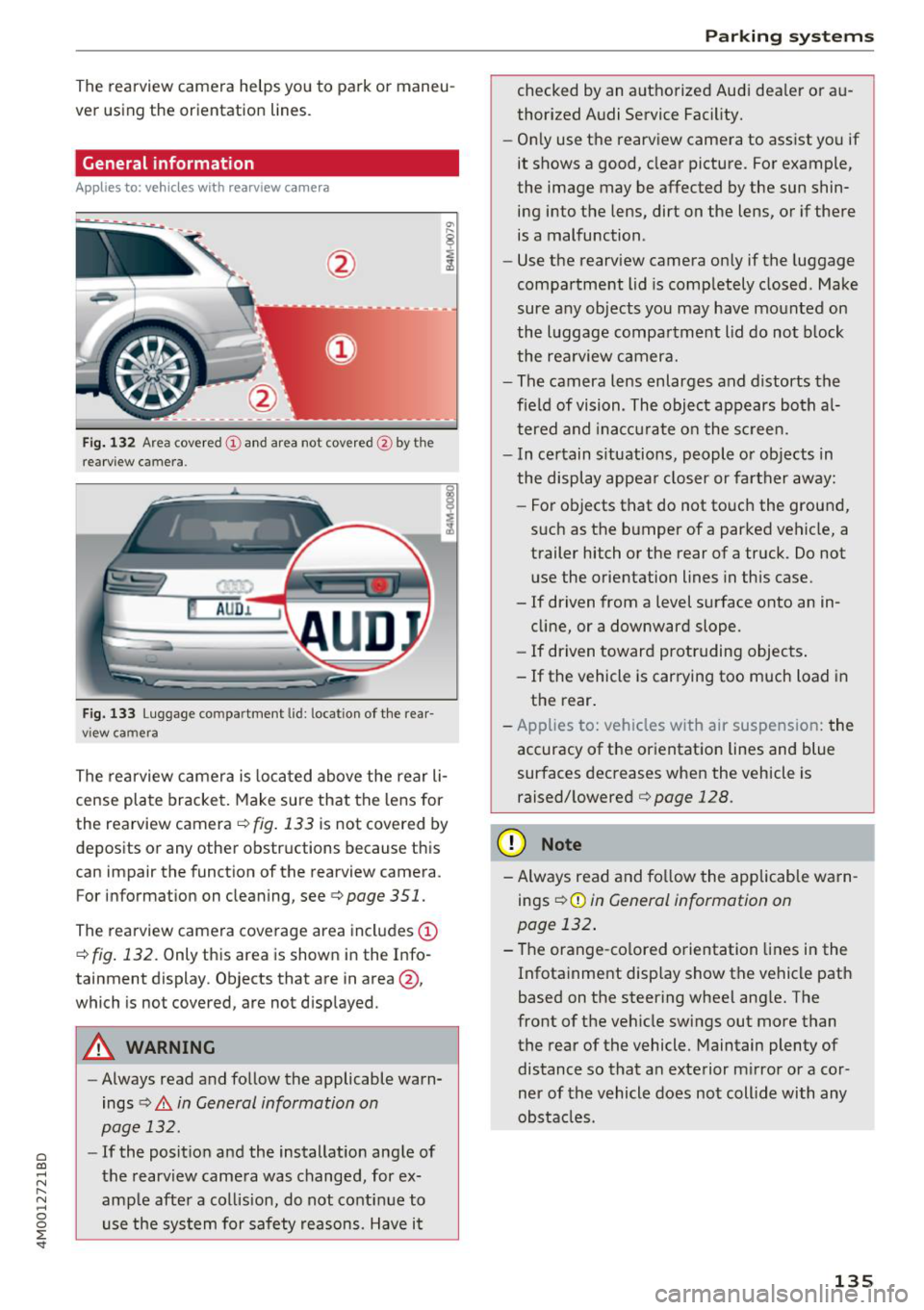
Fig. 132 Area covered (!) and area no t covered @ by the
r earview c amera.
AU D .L
Fig. 133 Luggage co mpar tment lid : lo ca ti on of the rear
view ca mera
The rearview camera is located above the rear li
cense plate bracket. Make sure that the lens for
the rearview camera .=;,
fig. 133 is not covered by
deposits or any other obstructions because this
can impair the function of the rearview camera .
For information on cleaning , see .=;,
page 351.
The rearview camera coverage area includes (D
.=;, fig. 132 . Only this area is shown in the Info
ta inment display . Objects that are in area @,
which is no t covered, are not displayed .
A WARNING
- Always read and follow the applicable warn
ings
.=;, A in General information on
page 132.
- If the position and the installation angle of
the rearview camera was changed , for ex
ample after a collision, do not continue to use the system for safety reasons. Have it
Parking systems
checked by an authorized Audi dealer or au
thorized Audi Service Facility.
- Only use the rearview camera to assist you if
it shows a good, clear picture. For example,
the image may be affected by the sun shin ing into the lens, dirt on the lens, or if there
is a malfunction .
- Use the rearview camera only if the luggage
compartment lid is completely closed . Make
sure any objects you may have mounted on
the luggage compartment lid do not block
the rearview camera.
- The camera lens enlarges and distorts the
field of vision . The object appears both al
tered and inaccurate on the screen.
- In certain situations, people or objects in
the display appear closer or farther away:
- For objects that do not touch the ground,
such as the bumper of a parked vehicle, a trailer hitch or the rear of a truck . Do not
use the orientation lines in this case.
- If driven from a level surface onto an in
cline, or a downward slope.
- If driven toward protruding objects.
- If the vehicle is carrying too much load in the rear.
- Applies to: vehicles with air suspension: the
accuracy of the orientation lines and blue
surfaces decreases when the vehicle is raised/lowered
.=;, page 128.
(D Note
- Always read and follow the applicable warn
i ngs
i=;, (D in General information on
page 132.
- The orange-colored orientation lines in the
Infotainment display show the vehicle path
based on the steering wheel angle. The
front of the vehicle swings out more than
the rear of the vehicle. Maintain plenty of
distance so that an exterior mirror or a cor
ner of the vehicle does not collide with any
obstacles .
135
Page 144 of 398
Intelligent Technology
Intelligent Technology Electronic stabilization
control (ESC)
Description
Elect ronic stabili zation control ( ESC) suppo rts
driver safety. It red uces the risk of slipping and
improves dr iving stabi lity. ESC detects crit ica l sit
uations such as when the vehicle is overstee ring
and understeer ing or the wheels a re spinning.
The vehicle is stabilized by applying the brakes or
reducing eng ine torq ue. When t he ESC engages,
the
D.1 ind icator lig ht blinks in the ins trument
cluste r.
The fo llow ing systems are in tegrated in the ESC:
Anti-lock braking system (ABS)
ABS p reve nts the whee ls from lock ing whe n brak
ing. The vehicle can st ill be steered even d uring
hard brak ing. Apply steady press ure to the bra ke
pedal. Do not pump the pedal. A puls ing in t he
b rake pedal indicates that the system is act ing to
s tabili ze the vehicle .
Brake assist system
The brake assist system can decrease brak ing dis
tance. It inc reases brak ing power when the d river
presses the brake pedal q uick ly in eme rgency sit
uations . You must press and hold t he b rake pedal
until the dangerous si tuatio n is ove r. In veh icles
w ith adapt ive c ruise con trol*, the bra ke assist
sys te m is more sensitive if t he di stan ce detec ted
t o the veh icle dr iv ing a head is too small.
O n ve hicl es w ith ac tiva ted and funct io ni ng night
vision assist*, the b rake ass ist system ca n re
spon d mo re sens it ively if there is a w arn ing.
Anti-Slip Regulation (ASR)
ASR red uces eng ine power when the drive wheels
beg in sp inning a nd adap ts the force to the road
conditions . This makes it easie r to start, acceler
ate and dr ive u p hill s.
Electronic differential lock (EDL)
EDL applies the brakes to a wheel that sta rts
sp inning and transfers the drive power to t he
142
othe r driving whee ls. This func tion is no t ava ila
ble at higher s peeds .
I n extre me cases , EDL au tomat ic al ly swi tches off
to keep t he b rake o n the br aked whee l from ove r
h eating. The ve hicle is still wo rking co rrect ly. EDL
will switc h on agai n automatically when condi
tions have returned to normal.
Power steering
The ES C ca n also support veh icle st ability
t hr ough stee ring .
Selective wheel torque control
Selective w heel to rque con trol is used when d riv
i ng on curves. Bra king is targeted towa rd t he
whee ls on the ins ide of the cu rve as needed . T his
a llows mo re pre cise dr iv ing in curves .
Automatic post -collision braking system
The "automat ic post -coll is io n braking system"
can hel p t o reduce the risk of sl iding and of addi
tiona l co llisions after an acc iden t. If th e a irbag
c ontro l modu le de tects a collision, t he ve hicle is
bra ked by th e ESC.
The veh icle does not brake automatically if :
- the drive r presses t he acce lerator pedal, or
- the ESC, the brake system or the ve hicle elect ri-
cal system are not functioning.
A WARNING
- The ESC and its integ rated systems can not
overcom e the lim its impos ed by natura l
p hys ica l laws . Thi s is es pec ially impo rtan t
on s lippery or w et roa ds. If th e sys tems be
g in a cting to s tabili ze y our v ehicle, you
s hould immedi ately alter your speed to
mat ch the ro ad and traffic condition s. D o
not let the i ncreased safety provide d tem pt
you into taking risks . This could increase
your r is k of a coll is io n.
- Please note the r is k of a col lision increases
w hen dr iv in g fast, especia lly t hrough c urves
a nd on s lippery or wet roa ds, an d when dr iv
ing too close to objects ahead. The ESC and
its integrated sys tems ca nnot always pre
v en t co llisions -there is st ill a risk of acc i
dents!
Page 146 of 398
Intelligent Technology
A WARNING
You should only switch offroad mode on or switch ESC/ ASR off if your driving abilities
and the traff ic conditions perm it. There is a
r isk of slid ing.
- The stabilization function is limited when
offroad mode is switched on. The dr iving
wheels co uld spin and the vehicle could
swerve, especially on slick or slippery road
surfaces.
- T here is no vehicle stab ilizat ion when ESC/
ASR are switched off.
Hill descent assist
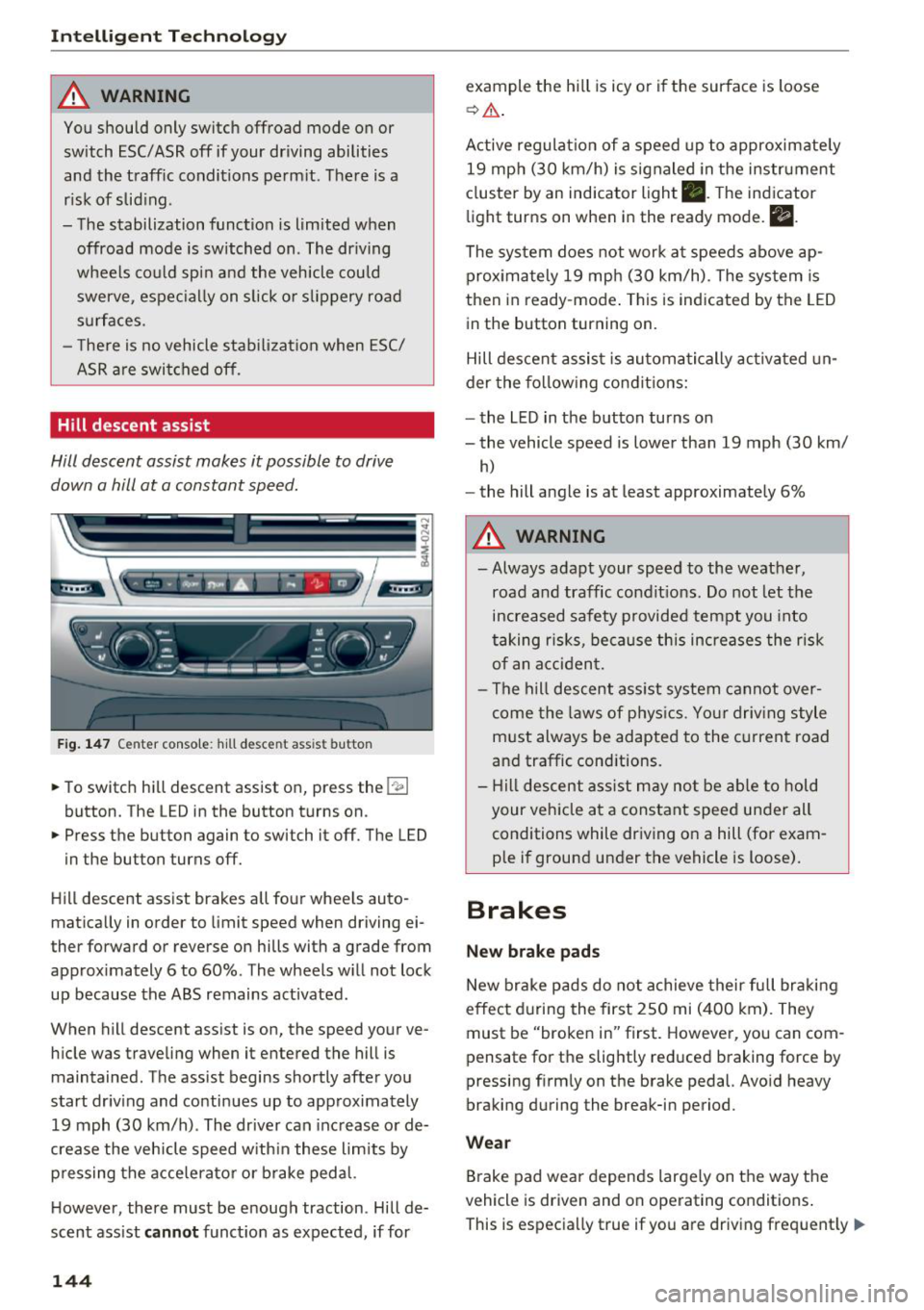
Hill descent assist makes it possible to drive
down a hill at a constant speed.
Fig. 147 Center console: hill desce nt ass ist button
.. To switch hill descent assist on, press the !~ I
button. The LED in the button turns on.
.. Press the button again to switch it off. The LED
in the button turns off.
Hill descent assist brakes all four wheels auto
matically in order to limit speed when driving ei
ther forward or reverse on hills with a grade from
approximately 6 to 60%. The wheels w ill not lock
up because the ABS remains activated.
When hill descent assist is on, the speed your ve
hicle was traveling when it entered the hill is maintained. The assist begins shortly after you
start driv ing and continues up to approximately
19 mph (30 km/h) . The driver can increase or de
crease the vehicle speed w ith in these limits by
pressing the accelerator or brake pedal.
However, there must be enough traction . Hill de
scent assist
cannot function as expected, if for
144
example the hill is icy or if the surface is loose
~ .&. .
Active regulat ion of a speed up to approximately
19 mph (30 km/h) is signaled in the instrument
cluster by an indicator light •. T he indicator
light turns on when in the ready mode.
II.
The system does not work at speeds above ap
prox imately 19 mph (30 km/h) . The system is
then in ready-mode . This is indicated by the LED
in the button turning on.
Hill descent assist is automatically activated un
der the following conditions:
- the LED in the button turns on
- the vehicle speed is lower than 19 mph (30 km/
h)
-the hill angle is at least approximately 6%
A WARNING
-
- Always adapt your speed to the weather,
road and traffic conditions. Do not let the
increased safety provided tempt you into
taking risks, because this increases the risk
of an accident.
- The hill descent assist system cannot over
come the laws of phys ics. Your driving style
must always be adapted to the current road
and traffic cond itions .
- Hill descent assist may not be able to hold
your veh icle at a constant speed under all
conditions while driving on a hill (for exam
ple if ground under the vehicle is loose).
Brakes
New brake pads
New brake pads do not achieve their full braking
effect during the first 250 mi (400 km). They
must be "broken in" first. However, you can com
pensate for the slightly reduced braking force by
pressing f irmly on the brake pedal. Avo id heavy
braking during the break-in period.
Wear
Brake pad wear depends largely on the way the
vehicle is driven and on operating conditions .
This is especially true if you are driving frequently .,.