lock AUDI Q7 2018 Owner´s Manual
[x] Cancel search | Manufacturer: AUDI, Model Year: 2018, Model line: Q7, Model: AUDI Q7 2018Pages: 398, PDF Size: 185.58 MB
Page 168 of 398
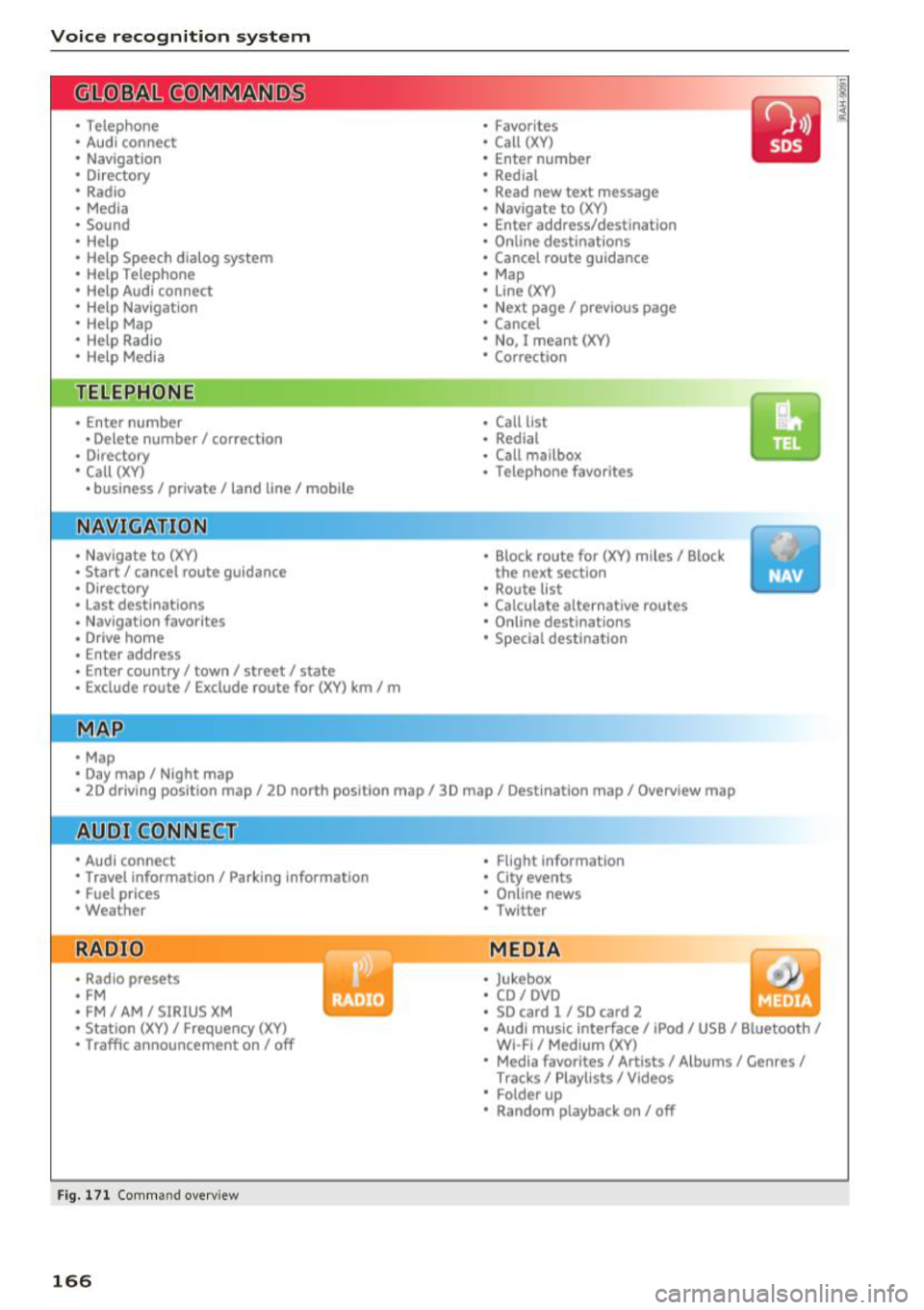
Voice recognition system
• Telephone
• Audi connect •
Favorites
• Call (XV)
• Navigation
• Directory
• Radio
• Media
• Enter number
• Redial
• Read new text message
• Nav igate to
(XY)
• Sound • Enter address/destination
• Help • Online destinations
• Help Speech dialog system
• Help Telephone •
Cancel route guidance
• Map
• Help Aud i connect •
Line
(XY)
• Help Navigation
• Help
Map
• Help Radio •
Next page/ previous page
• Cancel
• No. I meant (XV)
• Help Media • Correction
TE ~EPflON ~
• Enter number • Call list
• Delete number/ correction
• Redial
• Directory
• Call
(XV)
• Call mailbox
• Telephone favorites
• business
I private/ land tine I mobile
N~~It ~JION
• Nav igate to (XY)
• Start/ cancel route guidance
• Directory
• Last destinations • Block
route for
(XV) miles I Block
the next section
• Route list
• Calculate alternative routes
• Nav igation favorites
• Drive home
• Enter address •
Online destinations
• Special destination
• Enter country
I town I street I state
• Exclude route/ Exclude route for
(XV) km/ m
• Map
• Day map/ Night map
• 2D driving position map/ 2D north position map/ 3D map/ Destination map
I Overview map
~l!IDI CONNECT
• Audi connect
• Travel Information/ Parking Information
• Fuel prices
• Weather
RADIO
• Radio presets
• FM
• FM /AM/ SIRIUS XM
• Station (XV) / Frequency (XV)
• Traffic announcement on/ off
Fig. 171 Comm and overv iew
166
• Flight Informa tion
• City events
• Online news
• Twitter
MEDIA
• Jukebox
• CD
I DVD
• SD card
l / SD card 2
• Audi music Interface/ I Pod/ USB / Bluetooth
I
WI -Fl I Med ium (XV)
• Media favorites
I Artists/ Albums/ Genres I
Tracks I Playll sts / Videos
• Folder up
• Random playback on / off
Page 173 of 398
Cl a:, ...... N
" N ...... 0
0
::r '
Function
Say:
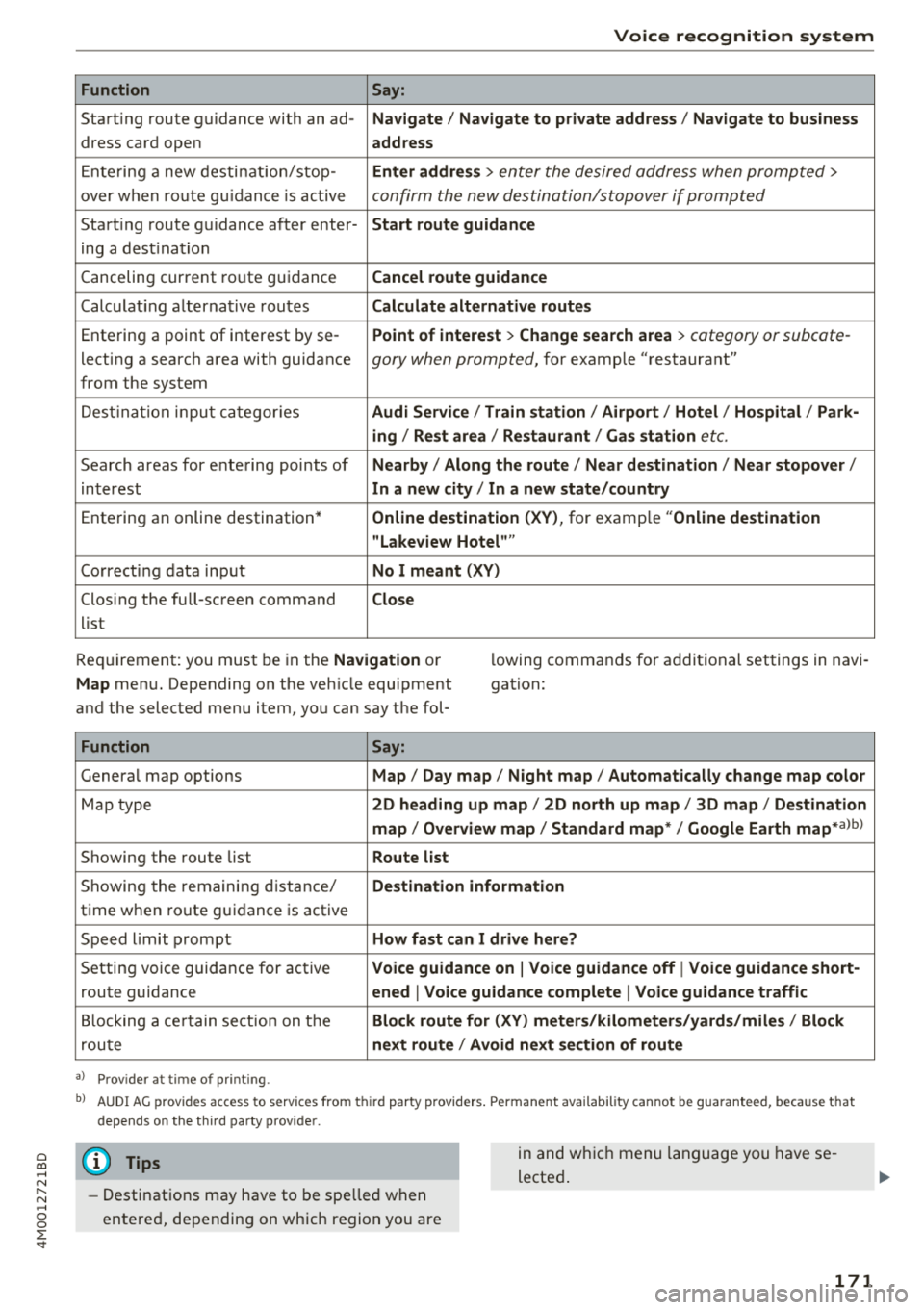
Start ing route g uidance with an ad- Navigate/ Navigate to p riv ate addre ss/ Navig ate to business
dress card open address
E nte ring a new desti nat ion/stop -Enter addr ess
> enter the desired address when prompted>
over w hen ro ut e gu idance is ac tive confirm the new destination/stopover if prompted
Start ing route guidance after enter- Start route guidance
ing a dest ination
Canceling current ro ute g uidance Cancel route guidance
Calc ulat ing a lternat ive routes Calculate alternative route s
Ente ring a point of interest by se -Point of intere
st
> Change sea rch a rea > category or subcote-
lecting a search area with guidance gory when prompted, for example "restaurant"
from the system
Dest ina tion input ca tegor ies Audi Service / Train station /Airport / Hot el / Ho spital / Park-
ing / Re st area / Restaurant / Gas station
etc.
Search areas for entering points of Nearby/ Along the route / Near destination / Near stopover /
interest In a new
city/ In a new stat e/country
Entering an online destination* Online dest
ination (XV), for examp le "Online de stination
" Lakeview Hotel" "
Correct ing data input No I meant (XV)
Clos ing the full -screen command
Close
list
Requirement: you must be in the Navigation or
Map menu. Depending on the veh icle equipment
and the selected menu item, you can say t he fol- l
owing commands for additional settings in navi
gation:
Function Say:
Genera l map options Map/ Day map / Night map / Automat ically change map color
Map type 2D heading up map/ 2D north up map / 3D map / De stination
map / Overview map / Standard map */ Google Earth map*albl
Showing the route list Route list
Showing the remaini ng d istance/ Destination information
time w hen route guidance is active
Speed limit prompt How fast can I drive here?
Setting voice guidance for active Voice guidance on
I Voice guidance off I Voice guidance short-
route guidance ened
I Voice guidance complete I Voi ce guidance traffic
B locking a ce rtain sect ion on t he Block route for (XV) meter s/kilometers /yards /miles / Block
rou te next route / Avoid n ext se ction of route
a ) Pro vid er at tim e of pr inting .
bl AU DI AG provi des acc ess to s ervi ce s fro m thir d par ty prov id ers. P ermane nt a vailabi lity canno t be guarant eed, beca use tha t
de pen ds on the th ird party p ro vid er.
(D Tips
- Destinations may have to be spelled when
entered, depending on which region you are in and wh
ich menu language you have se
lected .
171
Page 199 of 398
Cl a:, ...... N
" N ...... 0
0
::r '
Introduction
Applies to vehicles with Audi connect vehicle control
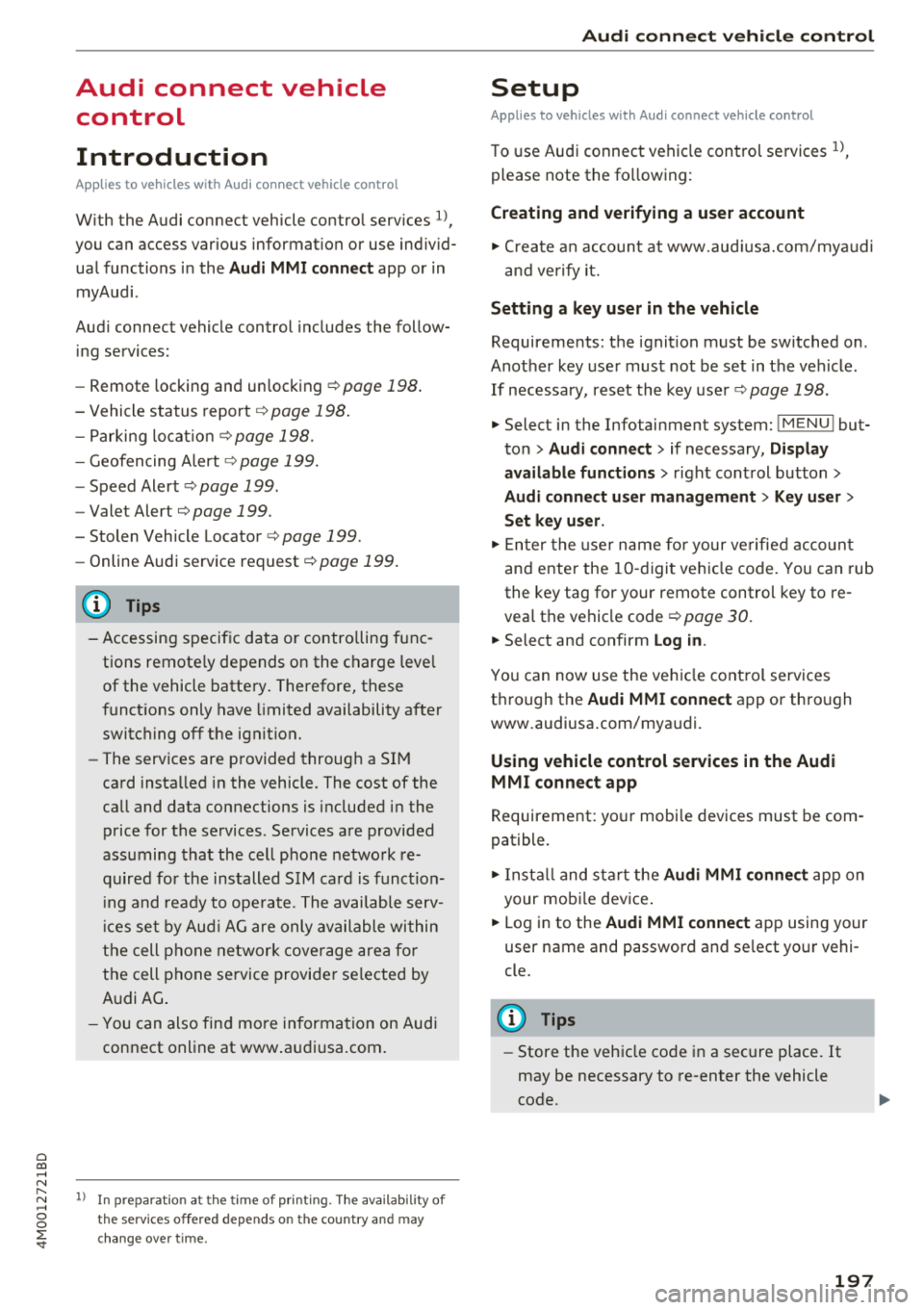
With the Audi connect vehicle control services l) ,
you can access various information or use individ
ual functions in the
Audi MMI connect app or in
myAudi .
Audi connect vehicle control includes the follow
ing services:
- Remote locking and unlocking ¢
page 198.
-Vehicle status report¢ page 198.
-Parking location ¢ page 198 .
-Geofencing Alert ¢ page 199.
-Speed Alert ¢ page 199.
-Valet Alert ¢ page 199.
- Stolen Vehicle Locator ¢ page 199.
-Online Audi service request ¢page 199.
(D Tips
-Accessing specific data or controlling func
tions remote ly depends on the charge leve l
of the vehicle battery. Therefore, these
functions only have limited availability after
switching off the ignit ion.
- The services are provided through a SIM
card installed in the vehicle. The cost of the
call and data connections is included in the
price for the services. Services are provided
assuming that the cell phone network re
quired for the installed S IM card is function
in g and ready to operate. The available serv
ic es set by Audi AG are only available within
the cell phone network coverage area for
the cell phone service provider selected by
Audi AG .
- You can also find more information on Audi
connect on line at www.audiusa.com.
l) In pre parat io n at t he time of p rinting. T he a vailab ilit y o f
the services o ffered depends o n the co untry and may
c hang e over tim e.
Audi connect vehicle control
Setup
Applies to vehicles with Audi connect vehicle control
To use Audi connect vehicle control services 1>,
please note the fo llowing :
Creating and verifying a user account
"'Create an account at www.aud iusa.com/myaudi
and verify it.
Setting a key user in the vehicle
Requirements: the ignition must be switched on .
Another key user must not be set in the veh icle .
If necessary, reset the key user ¢
page 198.
.. Select in the Infotainment system: I M ENU ! but
ton
> Audi connect > if necessary, Display
available functions >
right control button >
Audi connect user management > Key user >
Set key user .
"' Enter the user name for your ve rified account
and enter the IO-digit vehicle code. You can rub
the key tag for your remote control key to re
veal the vehicle code ¢
page 30.
.. Select and confirm Log in.
You can now use the vehicle control services
through the
Audi MMI connect app or through
www .audiusa.com/myaudi.
Using vehicle control services in the Audi
MMI connect app
Requirement: your mobile devices must be com
patible.
.. Install and start the
Audi MMI connect app on
your mobi le device .
.. Log in to the
Audi MMI connect app using your
user name and password and se lect your vehi
cle.
(D Tips
- Store the vehicle code in a secure place . It
may be necessary to re-enter the vehicle
code.
197
Page 200 of 398
Audi connect vehicle control
-Pay attention to upper-and lower -case let
ters when entering the vehicle code.
- If you do not have the 10-digit vehicl e code,
contact an authorized Audi dealer or author
ized Audi Service Facility .
Additional options
Applies to vehicles with Audi co nnect vehicle control
License subscription
The validity and expirat ion date of you r subscrip
tions are displayed. When
Warning before sub
scription expires
is activated, a message wi ll be
disp layed warning you that your license is about
to expire.
Select :
!MENU ! button> Audi connect > Display
available functions >
right control button> Li
cense subscription.
Resetting the primary user
F or examp le, you ca n reset the key user when
selling your vehicle in order to deactivate these
services .
Requirement: the ignition must be switched o n.
Select :
!M ENU ! button> Audi connect > right
control button
> Audi connect user management
> Key user > Reset key user .
Warning levels
Requirement: the primary user must have set one
or more warning levels. Secondary users can only
see if a warning level is active or not .
Select:
! MENU ! button> Audi connect > right
control button
> Alerts.
Remote locking and
unlocking
Applies to veh icles with Audi connect vehicle control
You can lock and unlock your veh icle using this
service .
Requirement
-This requires the 4-dig it PIN that you specified
during the verification on www.audiusa.com/
myaud i.
- The vehicle must be stationary.
198
-The ignition must be switched off.
Vehicle status report
Applies to vehicles w ith Aud i connect ve hicle control
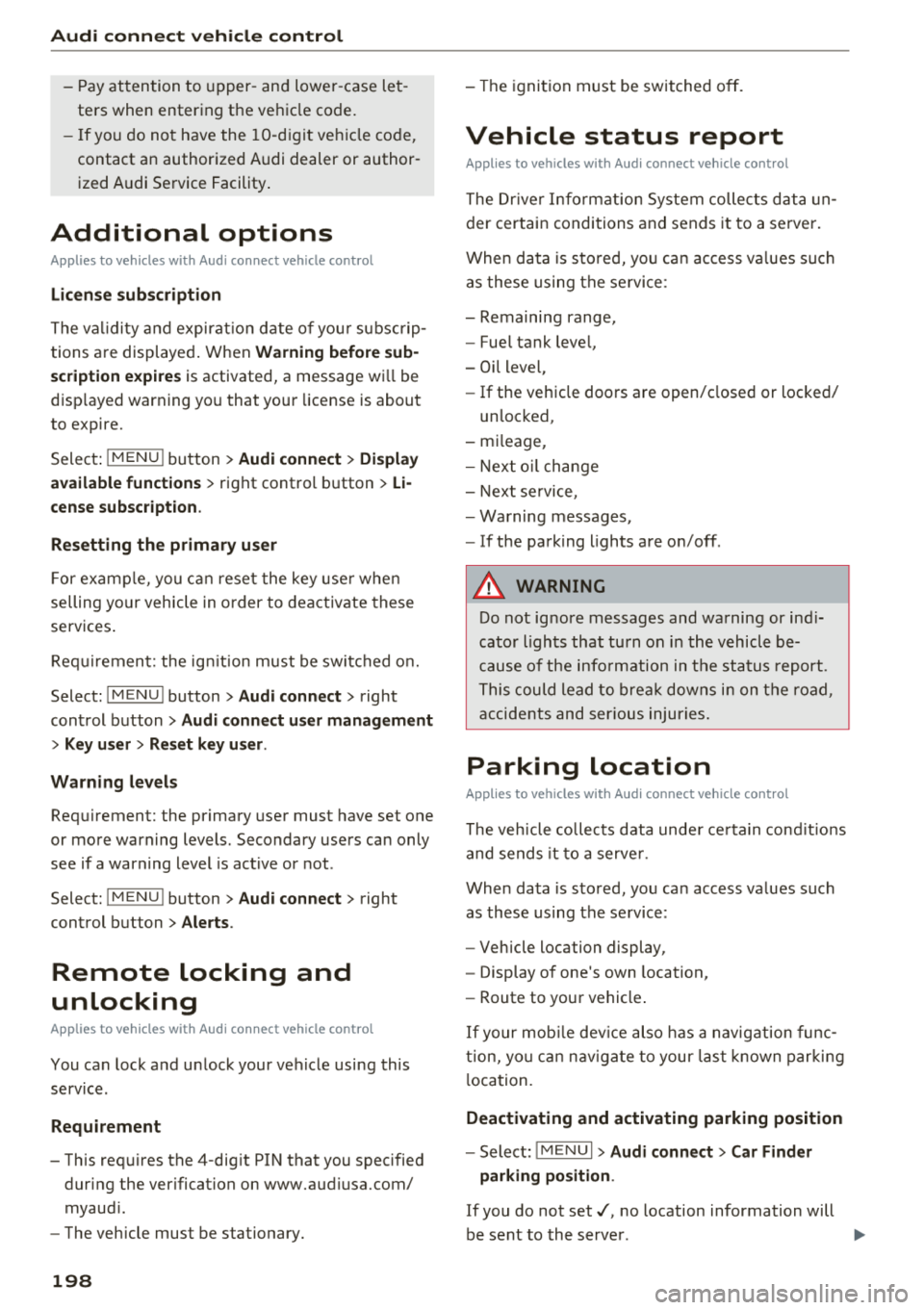
The Dr iver Informat ion System collects data un
der certain conditions and sends it to a server.
When data is sto red, you can access va lues such
as these using the service :
- Remaining range,
- Fue l tank level,
- Oil level,
- If the vehicle doors are open/closed or locked/
un locked,
- mi leage,
- Next oil change
- Next service,
- Warning messages,
- If the parking lights are on/off .
A WARNING
Do not ignore messages and warning or ind i
cator lights that turn on in the vehicle be
cause of the info rmation in the status report.
This could lead to break downs in on the road ,
accidents and serious injuries.
Parking location
Applies to vehicles w it h Aud i connect ve hicle co ntrol
The vehicle collects data unde r ce rta in cond it ions
and sends it to a server .
When data is stored, you can access values such
as these using the service :
- Vehicle location display,
- Display of one's own location,
- Route to your vehicle .
If your mob ile dev ice also has a navigation func
tion, you can nav igate to your last known parking
l ocation.
Deactivating and activating parking position
- Select: !MENU!> Audi connect> Car Finder
parking position .
If you do not set./, no location information will
be sent to the server.
Page 233 of 398
a co ...... N r--. N ...... 0
0
:E '
serious injuries. Store these types of devices
securely while driving.
- Do not use any wireless devices on the front
seats within range of the airbags while driv
ing. Also read and follow the warnings in
c::> page 2 73 , Front airbags .
CD Note
-Always follow the information found inc:>@
in Wi-Fi hotspot on page 194 .
-Please note that there generally are addi
tional costs when using an online media
service account, especially when it is used internationally .
(D Tips
-Depending on the Internet connection and
network traffic, a connection loss can occur
during playback of on line media services .
-Online media and Internet radio usage de
pends on the service availability of the third
party provider .
- Audi AG simply makes the access to online
media services possible through the MMI
and does not take any respons ibility for the
contents of the online media services .
- Always read the chapter
c::> page 194, Audi
connect (Infotainment) general informa
tion .
- Depending on the mobile device used, there
may be interruptions during media playback
and when using the
Audi MMI connect app.
To avoid interruptions when using a mobile
device , do not lock the screen on your mo
bile device and keep the
Audi MMI connect
app in the foreground .
- Contact an authorized Audi dealer or au
thorized Audi Service Facility for additional
information about online media .
Media
Multimedia connections
USB adapter for Audi music interface o r
USB charging port
Depending on the vehicle equipment, you can
connect your mobile devices (such as a smart
phone or MP3 player) to the Audi music interface
or a
USB charging port using a special USB
adapter.
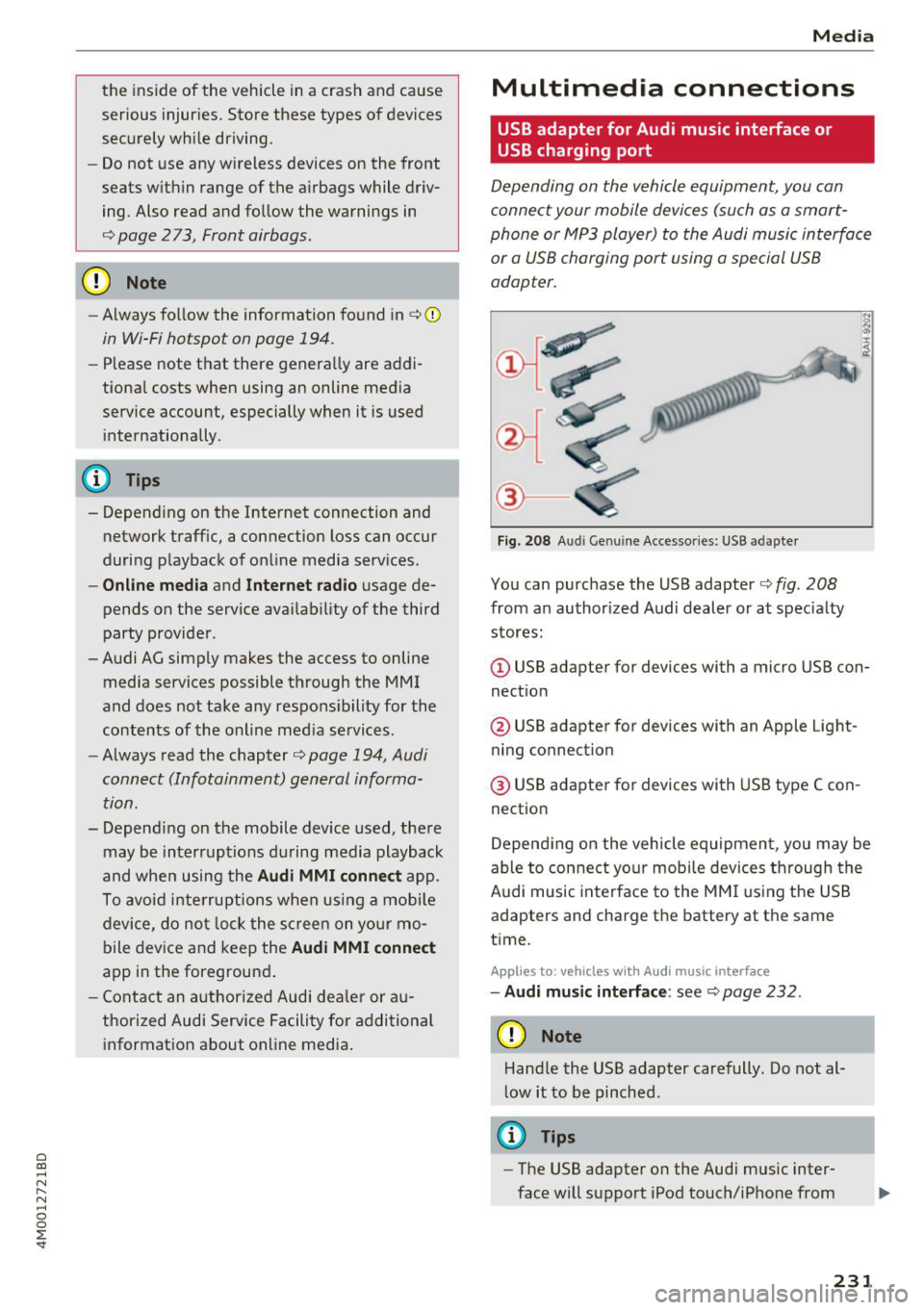
@-
Fig. 208 A udi Genuin e Acce ssories: USB a dapter
You can purchase the USB adapter c::> fig. 208
from an authorized Audi dealer or at specialty
stores:
I
(D USB adapter for devices with a micro USB con
nection
@ USB adapter for devices with an Apple Light
ning connection
@ USB adapter for devices with USB type C con
nection
Depending on the vehicle equipment, you may be
able to connect your mobile devices through the
Audi music interface to the MMI using the USB
adapters and charge the battery at th e same
time .
Applies to : vehicles wit h Aud i music interface
-Audi music interface : see c::> page 232.
CD Note
Handle the USB adapter carefully. Do not al
low it to be pinched.
@ Tips
-The USB adapter on the Audi music inter
face will support iPod touch/iPhone from
231
Page 241 of 398
Cl a:, ...... N
" N ...... 0
0
::r '
The DVD ma in menu opens in the Infotainment
system disp lay.
- Sele ctin g a m enu it em : select and confirm a
men u item.
Or: move your finger on the M MI
touch co ntro l pad* and press the control knob.
Audio track1
)
You can manually set the audio track (language
and audio format). The language and aud io for
mat options depend on the v ideo DVD.
Subtitle s I>
You can set subt it les for playback manually. The
languages available depend on the DVD.
A sp ect
Audi recommends the Automatic setting for the
picture format. You can set the pict ure format
depending on the active file or source (for exam
ple video file*, DVD*).
Picture for- Description
mat
A utom atic
The MMI detects the picture for-
mat of the source and d isplays the
i mage in the optimum ratio . Black
ba rs may appea r on the sides of
the disp lay, depending on the
source forma t and t he Infotain -
ment system disp lay that is instal -
l ed .
Zoom The image is enlarged to fill the
ent ire Infota inment system d is-
p lay. Sw itch t he function off if t he
i mage is distorted.
l ) Depe ndi ng o n th e DVD, th is may not be poss ib le dur ing
playback.
Media
Picture for- Description
mat
Cinem a-
Use this setting for f ilms in cinema
scope format 21:9. Black bars w ill appear
on the upper/lower edge in the In-
fota inment system display .
Original T he image is disp layed in the ratio
of the source format . Select this
opt ion if the image is distorted or a
section of the image is cut off
when
Auto is selected .
4:3 The image is fixed in the 4:3 pie -
ture format . Black bars are shown
on the sides of the Infotainment
system display.
1 6: 9 The image is fixed in the 16:9 p ie-
tu re forma t. Blac k bars are shown
in t he upper and lower edges of the
Infotainment system display.
(D Tips
- Not all video DVDs have parenta l contro l.
- Th e protection levels fo r the
Parental con-
trol
are based on the US s tandards from the
Motion Picture Association of Ame rica
(MPAA) . Note that the age levels for video
DVDs in European countr ies may differ.
- Password entry for
Parental control will be
locked for approx imately one m inute if you
enter the incorrect password three t imes in
a row. The password can o nly be reset by an
authorized Audi dealer.
239
Page 247 of 398

Cl a:, ...... N
" N ...... 0
0
::r '
Setting the date and
time
You can set the clock time manually or using the
CPS* .
.. Se lect : IMENU I button> Settings > left co ntro l
button >
MMI settings > Date & time.
.. Or :
select : IMENU I button> Vehicle > left con-
t ro l button >
Vehicle settings > Date & time .
Automatic setting
When t his function is sw itched on g, the time
and date are a utomat ically set.
Time
R eq uirement: the Automatic setting must be
sw itched
off .
Press the cont ro l kn ob. Yo u ca n se t the Time
manually by turn ing and press ing the con trol
k nob.
Date
R eq uirement: the Automati c setting must be
sw itched
off.
Press the cont rol knob . Yo u can set the Date
manually by turn ing and press ing the cont rol
knob.
Time zone
When se lecting the approp riate t ime zone, a
sampling of countr ies in this zone will be listed .
Automatic time zone*
When t his function is sw itched on g , the time
will automatically ad just to the corresponding
time zone.
Automatic daylight saving time*
When t his function is sw itche d on g , the time
w ill automatically switc h to day light saving time .
Time format
If yo u select 24h , the clock will d isp lay, for ex
a m ple,
13 :00 . If yo u se lec t AM /PM , the clock
w ill d isp lay, for examp le,
1 :00 PM .
System settings
Date format
If you select DD .MM .YYYY , the date displ ay will
show, for example ,
31.08.2018. If you select
MM /DD/YYYY , the date disp lay w ill show, for ex
amp le,
08/31/2018. If you select YYYY-MM
DD ,
the date display will show, fo r example,
2018 -08 -31 .
MMI settings
.. Select: !ME NUI button> Settings > left control
button >
MMI settings .
Language
Yo u can c hange the display language as well as
the lang uage fo r the voice guidance * and voice
r ecognition system *.
T he num ber of langu ages av ailab le depends on
t h e ma rket.
Measurement units
The following meas urement u nits can be set de
pend ing on ava ilab ility:
Speed , Distance , Tem
perature , Fuel consumption , Volume , Pressure .
Tool tips
When this f unct ion is switched on g, yo ur MMI
shows you tips fo r inpu t. The freq uency of how
often it displays dec reases w ith time .
Speech dialog system
App lies to : vehicles wit h voice recog nitio n system
Depend ing on veh icle equipment, the following
funct ions may be ava ilable:
Command display : when this function is sw itch
ed on
g , th e M MI w ill show yo u the poss ible
commands for voice input in the respective
menu.
Short dialog : when this function is sw itche d on
g, a shorter form of the prompts is used .
Command during voice output*: thi s fu nction i s
swi tched on at the factory . W hen this func tion is
switched on
g , yo u can say new commands dur-
i ng announcements. You do not need to wa it for
the signal tone (beep) dur ing an announcement.
When the funct io n is swi tched off
0, you need to Iii>
245
Page 255 of 398
a co ...... N r--. N ...... 0
0
:E '
weather conditions.
~ Take frequent breaks on long trips. Do not drive
for more than two hours at a stretch.
~ Do NOT drive when you are tired, under pres
sure or when you are stressed .
A WARNING
Impaired driv ing safety increases the risk of
ser ious personal inju ry and death whenever a
vehicle is being used .
Correct passenger
seating positions
Proper seating position for the driver
The proper driver seating position is important
for safe, relaxed driving .
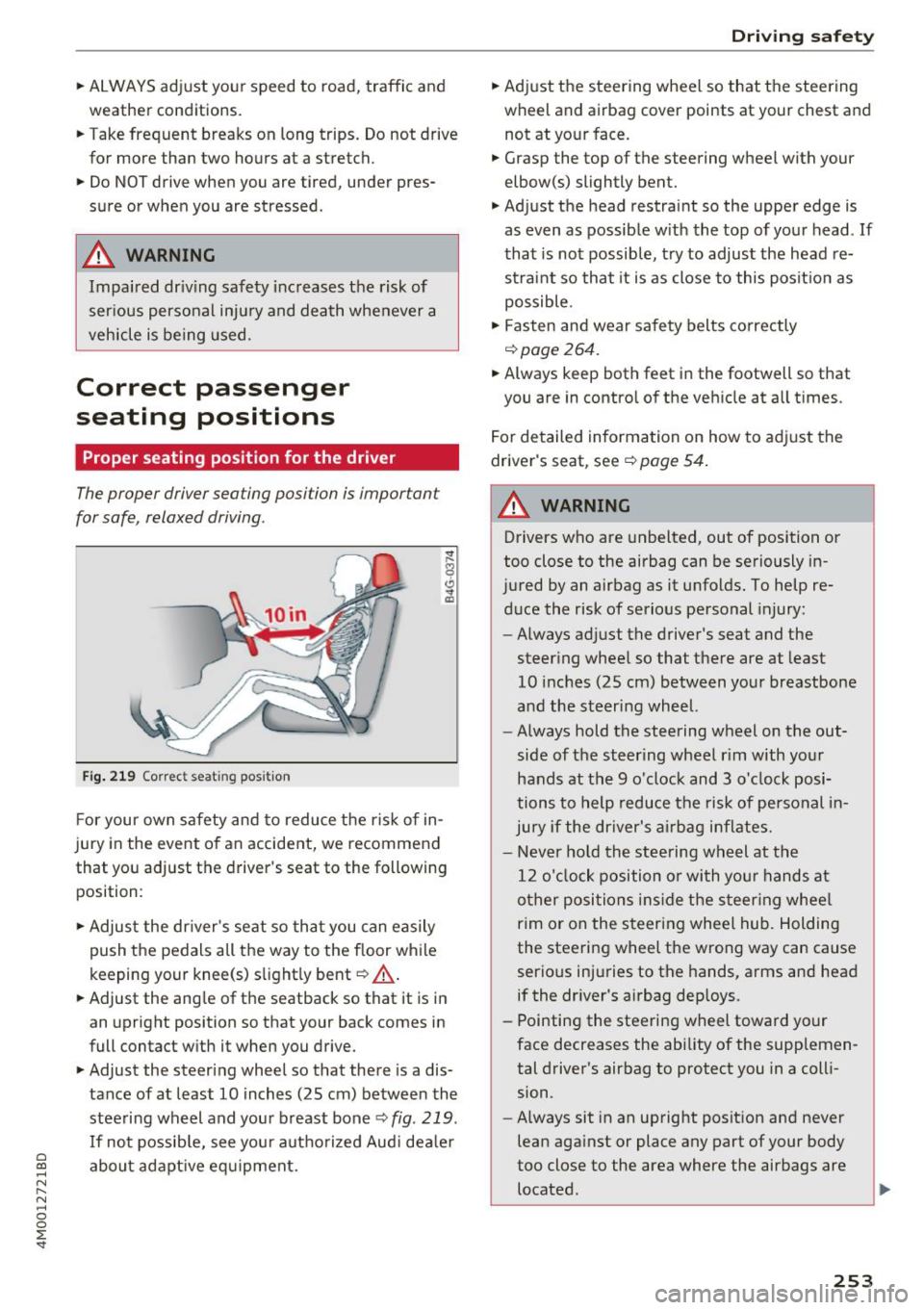
Fig. 219 Correc t seating pos ition
F or your own s afety and to reduce the risk of in
jury in the event of an accident, we recommend
that you adjust the driver 's seat to the following
position:
~ Adjust the dr iver's seat so tha t you can easily
push the pedals all the way to the f loor wh ile
keeping your knee(s) s light ly bent
c::> _& .
~ Adjust the ang le of the seatback so that it is in
an upright position so that your back comes in
full contact w ith it when you drive.
~ Adjust the steering wheel so that there is a dis
tance of at least 10 inches (25 cm) between the
stee ring wheel and you r breast bone
c::> fig. 219.
If no t possib le, see you r autho riz ed Aud i dea le r
abo ut adapt ive eq uipment.
Dri ving safety
~ Adjust the steering wheel so that the steering
wheel and airbag
cover points at your chest and
not at yo ur face.
~ Grasp the top of the steering wheel with your
elbow(s) slightly bent.
~ Adjust the head restra int so the upper edge is
as
even as possible w ith the top of your head . If
that is not possib le, t ry to adjust the head re
straint so that it is as close to this posit ion as
possible .
~ Fasten and wear safety belts correctly
c::>page 264.
~ Always keep both feet in the footwell so that
you are in contro l of the ve hicle at a ll times.
F or detailed information on how to adj ust the
drive r's seat, see
c::> page 54 .
A WARNING
-
Drivers who are unbelted, out of position or
too close to the airbag can be seriously in
jured by an airbag as it unfolds. To help re d uce the risk of serious personal injury:
- Always ad just the driver's seat and the
steer ing whee l so that there are at least
10 inc hes (25 cm) between you r breastbone
and the steering wheel.
- Always hold the steering wheel on the out
side of the steering wheel r im with your
hands at the 9 o'clock and 3 o' clock posi
tions to help reduce the risk of personal in
ju ry if the driver's airbag inflates.
- Never hold the stee ring wheel at the
12 o' clock position o r with you r hands at
o ther posi tions ins ide the s teer ing whee l
rim or on the steering wheel hub. Holding
the steering wheel the wrong way can cause
serio us injuries to the hands, arms and head
if the dr iver's airbag dep loys.
- Pointing the steering wheel toward your
face decreases the ability of the supplemen tal driver's airbag to protect you in a coll i
sion.
- Always sit in an upright position and never
lean aga inst or place any part of your body
too close to the area where the airbags are located .
253
Page 260 of 398
Driving safety
A WARNING
Heavy loads will influence the way your vehi
cle handles . To help reduce the risk of a loss
of control leading to serious personal injury:
- Always keep in mind when transporting
heavy objects, that a change in the center of
gravity can also cause changes in vehicle
handling:
- Always distribute the load as evenly as
possible.
- Place heavy objects as far forward in the
luggage compartment as possible.
- Never exceed the Gross Axle Weight Rating
or the Gross Vehicle Weight Rating specified
on the safety compliance sticker on th e driv
er's side B-pillar. Exceeding permissible
weight standards can cause the vehicle to
slide and handle differently .
- Please observe information on safe driving
<=) page 252.
A WARNING
To help prevent poisonous exhaust gas from
being drawn into the vehicle, always keep the
rear lid closed while driving .
- Never transport objects larger than those
fitting completely into the luggage area be cause the rear lid cannot be fully closed .
- If you absolutely must drive with the rear lid
open, observe the following notes to reduce
the risk of poisoning:
- Close all windows,
- Close the sunroof*,
- Open all air outlets in the instrument pan-
el,
- Switch off the air recirculation,
- Set the fresh air fan to the highest speed .
A WARNING
Always make sure that the doors, all win
dows, the sunroof* and the rear lid are se
curely closed and locked to reduce the risk of
injury when the vehicle is not being used .
- After closing the rear lid , always make sure
that it is properly closed and locked.
258
-Never leave your vehicle unattended espe
cially with the rear lid left open. A child
could crawl into the vehicle through the lug
gage compartment and close the rear lid be
coming trapped and unable to get out . Be
ing trapped in a vehicle can lead to serious
personal injury.
- Never let children play in or around the vehi
cle .
- Never let passengers ride in the luggage
compartment . Vehicle occupants must al
ways be properly restrained in one of the
ve
hicle 's seating positions.
@ Note
If you are transporting large items with the
backrest folded down*, you should remove
the Rear Seat Entertainment (RSE)* and its
holder* to avoid damage.
© Tips
-Air circulation helps to reduce window fog
ging. Stale air escapes to the outside
through vents in the trim panel. Be sure to
keep these slots free and open .
- The tire pressure must correspond to the
load. The tire pressure label lists the recom
mended cold tire inflation pressures for the
vehicle at its maximum capacity weight and
the tires that were on your vehicle at the
time it was manufactured. For recommend ed tire pressures for normal load condi
tions, please see chapter
Q page 341 .
Tie-downs
The luggage compartmen t is equipped with four
t ie-downs to secure luggage and o ther i tems.
Use the tie-downs to secure your cargo properly
Qpage 257, L oading the luggage compartment.
In a collision , the laws of physics mean that even
smaller items that are loose in the vehicle will
become heavy missiles that can cause serious in
jury. Items in the vehicle possess ene rgy which
vary with vehicle speed and the weight of the
item . Vehicle speed is the mos t significant fac tor . ..,.
Page 267 of 398
a co ...... N r--. N ...... 0
0
:E '
is in an upright position and secure ly latched in
place before using the belt¢.&_ .
• Pull the safety belt evenly across the chest and
pelvis ¢
fig. 228, ¢ .&_ .
• Insert the tongue into the correct buckle of
your seat until you hear it latch securely.
• Pullon the belt to make sure that it is securely
latched in the buck le.
Automatic safety belt retractors
Every safety belt is equ ipped with an automatic
belt retractor on the shoulder belt. Th is feature
locks the belt when the belt is pu lled out fast,
during hard braking and in an accident . T he belt
may a lso lock when you drive up or down a steep
hill or thr ough a s harp curve. Dur ing normal dr iv
ing the bel t lets you move freely.
Safet y belt pretensioners
Safety belts wit h pretensioners he lp to tighte n
the safety belt and remove s lack when the pre
tensione rs a re activate d¢
page 267 . T he fu nc
t ion of the pretensioner is moni to red by a warn
ing light
q page 25.
Convertible locking retractor
E very safety belt except the one on the driver
seat is eq uipped w ith a co nvertible locking ret rac
tor that
must be used when the safety bel t is
used to attach a child safe ty seat. Be sure to read
the impo rtant i nfo rmat ion about this feature
¢ page 302.
.&._ WARNING
Improperly posit ioned safety be lts can cause
ser ious injury in an accident
q page 265,
Safety belt position .
- Safety belts offer optimum protection only
when the seatback is upright and belts are
properly positioned on the body.
-Always ma ke sure that the rear seat bac k
rest to wh ich the center rear safety be lt is
attached is secure ly latched whenever the
rear cente r safety belt is being used .
If the
backrest is not securely latched, the passen
ger will move forward with the backrest dur-
Safet y bel ts
ing sudden braking, in a s udden ma neuver
and espec ia lly in a crash.
- Never attach the safety belt to the buckle
for another seat. Attach ing the be lt to the
wrong buckle will reduce safety be lt effec
tiveness and can cause serio us personal i n
jury .
- A passenger who is not properly rest rai ned
can be seriously injured by the safety belt it
self when it moves from the st ronge r parts
of the body into c ritical areas like the abdo
men .
- Always loc k the convertible locking retractor
when yo u are s ecu ring a c hild safety seat in
the vehicle
q page 304.
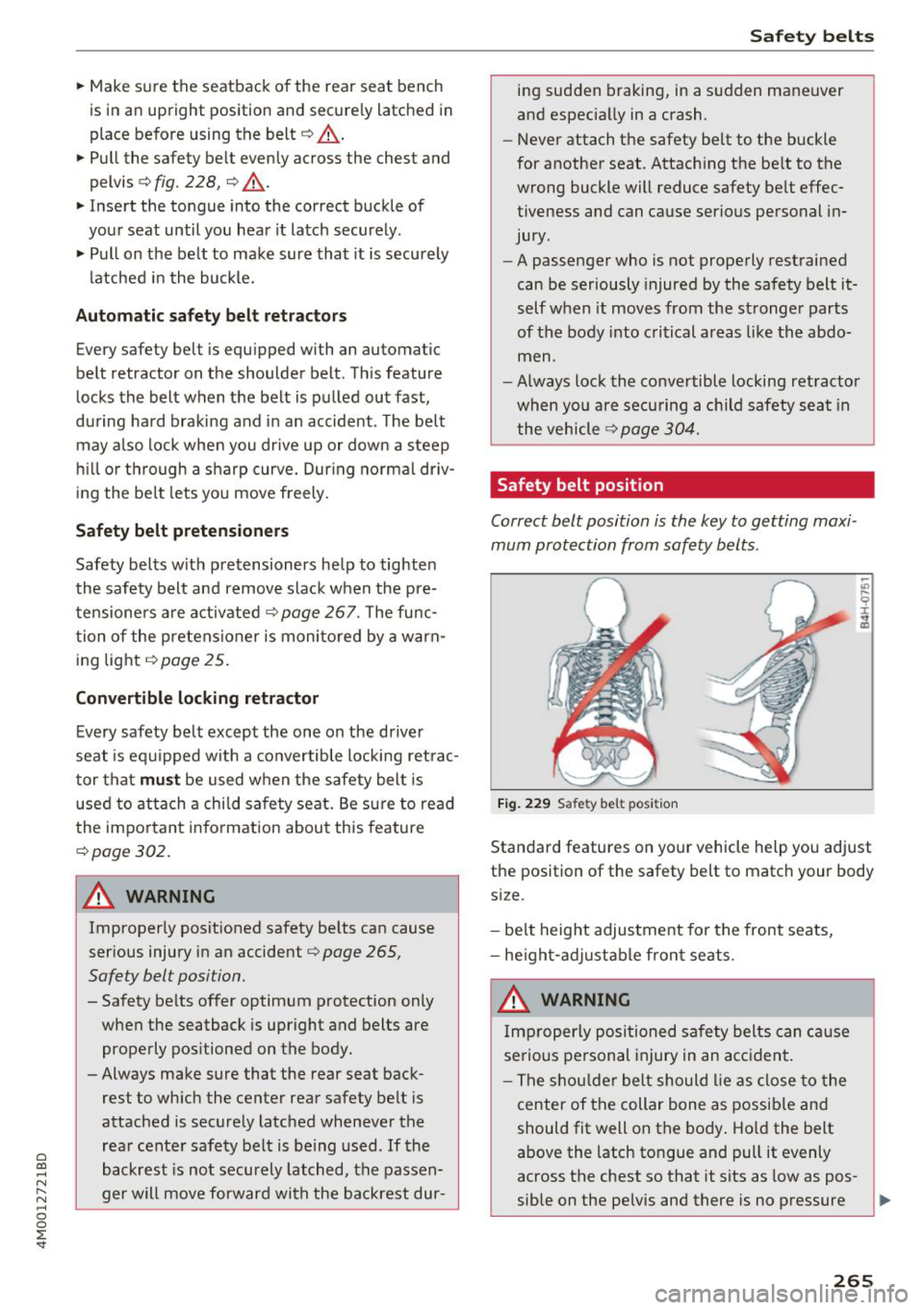
Safety belt position
Correct belt position is the key to getting maxi
mum protection from safety belts .
Fig. 22 9 Safet y belt pos it ion
Standard features on your vehicle help you adjust
the position of the safety belt to matc h your body
s ize .
- be lt height adjus tment for the front seats,
- he igh t-a djust able fro nt seat s.
.&_ WARNING
Im properly posi tioned sa fe ty belts can ca use
se rious pe rsonal injury in an acc ident .
- Th e shou lde r belt should lie as close to the
center of t he collar bone as possib le and
should fit well on the body . Ho ld the belt
above the latch tongue and pull it evenly
across the chest so that it sits as low as pos-
sible on the pe lvis and there is no pressure ..,.
265