ECU AUDI Q7 2018 Owner´s Manual
[x] Cancel search | Manufacturer: AUDI, Model Year: 2018, Model line: Q7, Model: AUDI Q7 2018Pages: 398, PDF Size: 185.58 MB
Page 6 of 398
Table of contents
On line media and In ternet radio . . . . . . . . 230
Mul timedia connections .... ... .. .. ... 231
P lay ing media . . . . . . . . . . . . . . . . . . . . . . . 234
Addit ional se ttings ........... .... .. . 237
Supported media and fi le formats . . . . . . 240
Troubleshoot ing . . . . . . . . . . . . . . . . . . . . . 241
Audi smartphone interface . . . . . . 243
Setup . .. .. .. .. ... .. ..... ... .. .. .. . 243
Operating . . . . . . . . . . . . . . . . . . . . . . . . . . 243
T roubleshoot ing . . . . . . . . . . . . . . . . . . . . . 24 4
System settings . . . . . . . . . . . . . . . . . . 245
Sett ing t he date and time . . . . . . . . . . . . . 245
M MI sett ings . . . . . . . . . . . . . . . . . . . . . . . 245
Con nection ma nager . . . . . . . . . . . . . . . . . 246
Sys tem update . . . . . . . . . . . . . . . . . . . . . . 248
So und setti ngs . . . . . . . . . . . . . . . . . . . . . . 24 9
Volume settings . . . . . . . . . . . . . . . . . . . . . 249
Restarting the M MI . . . . . . . . . . . . . . . . . . 250
Software license information 251
Safety first . . . . . . . . . . . . . . . . . . . . . . . 252
Driving safety . . . . . . . . . . . . . . . . . . . . 252
Basics . . . . . . . . . . . . . . . . . . . . . . . . . . . . . 252
Correct passenger seating positions . . . . . 253
Pedal area . . . . . . . . . . . . . . . . . . . . . . . . . . 256
Storing cargo co rrectly . . . . . . . . . . . . . . . 257
Repo rt ing Safety Defects . . . . . . . . . . . . . . 259
Safety belts . . . . . . . . . . . . . . . . . . . . . . 26 1
Gene ral information . . . . . . . . . . . . . . . . . 26 1
W hy use safety belts? . . . . . . . . . . . . . . . . 262
Safety bel ts . . . . . . . . . . . . . . . . . . . . . . . . 264
B el t tensione rs . . . . . . . . . . . . . . . . . . . . . . 267
Airbag system . . . . . . . . . . . . . . . . . . . . 269
I mpo rtant info rm ation . . . . . . . . . . . . . . . 269
Fr ont airbags . . . . . . . . . . . . . . . . . . . . . . . 273
M onitoring the Advanced Airbag System . 28 1
Side airbags . . . . . . . . . . . . . . . . . . . . . . . . 285
Side curtain airbags . . . . . . . . . . . . . . . . . . 288
Child safety . . . . . . . . . . . . . . . . . . . . . . 29 1
Important information . . . . . . . . . . . . . . . 291
Ch ild safety seats . . . . . . . . . . . . . . . . . . . . 297
Secur ing ch ild safety seats . . . . . . . . . . . . 302
4
LATCH sys tem (lower anchorages and
tethers for c hild ren) . . . . . . . . . . . . . . . . . 305
Additional in format ion . . . . . . . . . . . . . . . 309
Maintenance and Care . . . . . . . . . . . 310
Checking and Filling . . . . . . . . . . . . . 310
Fuel...... .. .. .. .. .. ............. .. 310
Refueling . . . . . . . . . . . . . . . . . . . . . . . . . . 312
Se lective catalytic reduction (AdBlue/
DEF) . . . . . . . . . . . . . . . . . . . . . . . . . . . . . . 314
Emiss ions control systems . . . . . . . . . . . . 317
On Boa rd D iagnost ic System (OBD) . . . . . 318
En gine compartment .. ............. .. 319
En gine o il . . . . . . . . . . . . . . . . . . . . . . . . . . 32 1
Cooli ng system . . . . . . . . . . . . . . . . . . . . . . 3 24
Brake fluid . . . . . . . . . . . . . . . . . . . . . . . . . 326
Battery . . . . . . . . . . . . . . . . . . . . . . . . . . . . 326
Windshie ld washer system . . . . . . . . . . . . 328
Service interva l display
328
Wheels .... .. .. .. .. ............. .. 330
Wheels and Tires . . . . . . . . . . . . . . . . . . . . 330
Tire pressure mo nitor ing system . . . . . . . 347
Run -flat tires . . . . . . . . . . . . . . . . . . . . . . . 349
Care and cleaning . . . . . . . . . . . . . . . . 351
General information . . . . . . . . . . . . . . . . . 351
Car washes . . . . . . . . . . . . . . . . . . . . . . . . . 351
Cleaning and care info rmation . . . . . . . . . 352
P lac ing you r vehicle ou t of serv ice 356
Troubleshooting . . . . . . . . . . . . . . . . . 357
Emergency assistance . . . . . . . . . . . 3 57
Gener al info rmation . . . . . . . . . . . . . . . . . 357
Eq uipment . . . . . . . . . . . . . . . . . . . . . . . . . 3 57
T ire mobility kit . . . . . . . . . . . . . . . . . . . . . 3 57
Replacing a whee l . . . . . . . . . . . . . . . . . . . 359
Fuses and bulbs . . . . . . . . . . . . . . . . . . 3 64
Fuses.. ... .. .. .... .. ... .. ..... ... .. 364
Bu lbs. . . . . . . . . . . . . . . . . . . . . . . . . . . . . . 368
Emergency situations . . . . . . . . . . . . 3 69
Genera l . . . . . . . . . . . . . . . . . . . . . . . . . . . . 369
Start ing by push ing or tow ing . . . . . . . . . . 369
Start ing with jumper cables . . . . . . . . . . . 369
Usingthejumpstartcable . ...... ... .. 370
Page 18 of 398
Cockpit overview
On-board computer
F ig. 12 Instrument cluste r: fuel cons umptio n display
Resetting values to zero
Requirement: the Fuel consumption , Short-term
memory or Long-term memory
display must be
selected .
.. To reset the values in the respect ive memory to
z ero, press and hold the left thumbwheel on
the multifunction steering wheel for one sec
ond . Or
.. On the multifunction steer ing whee l, select :
the right control button
> Reset values.
In the tr ip computer, you can call up the follow
ing d isplays one after the other by turning the
left thumbwheel on the multifunction steering
wheel.
- Time and date¢
page 245
- Digital speedometer*
-Average consumption
-AdBl ue range*
¢ page 314
-Short-term memory overview
- Long-term memo ry ove rview
- Energy consumers*
¢page 16
-Driver assistance* c::> page 102
- Traffic s ign recognition* ¢ page 97
The short -term memory collects driving informa
tion from the t ime the ignition is sw itched on un
til it is switched off . If you continue driving with
in two hours after switching the ignition off, the
new values are included when calculating the cur
rent tr ip informat io n.
Unlike the short-t erm memory, the long -term
memory is not erased automat ica lly . You can se
lect the time period for evaluating trip informa
tion you rself .
16
Fuel consumption
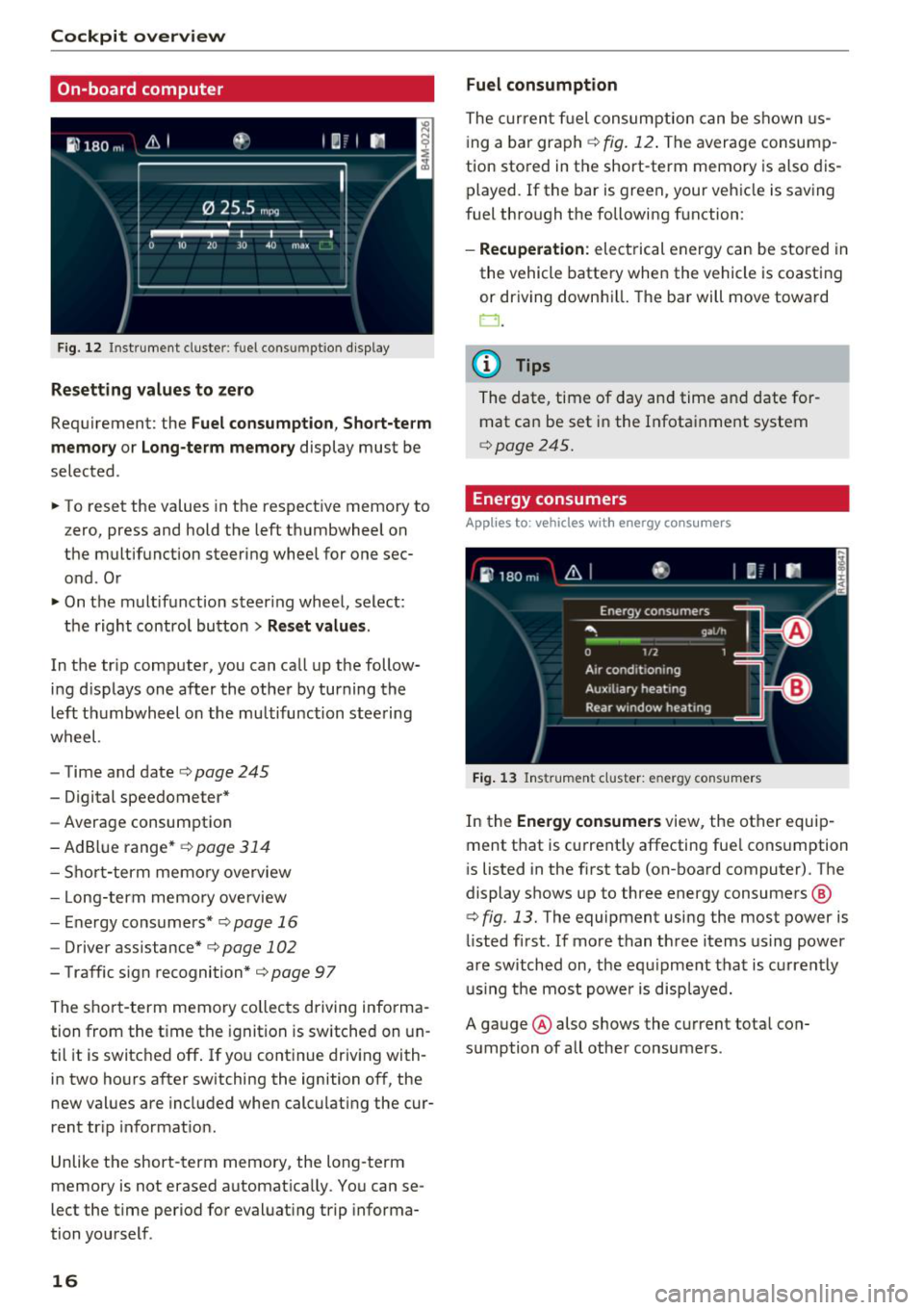
The current fuel consumption can be shown us
i ng a bar graph ¢
fig. 12. The average consump
tion stored in the short-term memory is also dis
played. If the bar is green, your vehicle is saving
fuel through the following function:
- Recuperation : electrical energy can be stored i n
the vehicle battery when the vehicle is coasting
or driving down hill. The bar will move toward
0.
@ Tips
The date, time of day and time and date for
mat can be set in the Infota inment system
¢page 245.
Energy consumers
App lies to : vehicles wit h energy co nsum ers
Fig. 13 Ins trumen t cluster: en ergy cons umers
In the Energy consumers view, the other equip
ment that is current ly affecting fue l consumption
i s listed in the first tab (on-board computer). The
display shows up to three energy consumers @
¢ fig. 13. The equipment using the most power is
li sted first . If mo re than three items using power
are switched on, the equipment that is currently
u sin g the most power is displayed.
A gauge @ also shows the current total con
sumption of all othe r consumers .
Page 24 of 398

Cockpit overv ie w
- If the indicator light and message appear while
dri ving ,
the hi ll start assist or emergency brak
ing function may be malfunctioning. It may not
be possib le to set the parking b rake or release
it once it has been set. Do not park your veh icle
on h ills . See an author ized Audi dealer or au
thorized Aud i Serv ice Facility for ass istance .
Brake booste r: limited funct ionality. You can
cont inue dri ving. Please contact Se rvice
There is a malfunction in the brake booster. The
brake booster is available, but its effectiveness is
reduced . Braking behav ior may be diffe rent from
how it normally functions and the brake pedal
may v ibrate .
Drive to an a uthorized Aud i dea le r or a uth orized
Aud i Serv ice Facility immediately to have the
malfunct io n corrected.
A WARNING
- Read and follow the warn ings in
~ page 319, Working in the engine com
partment
before open ing the hood and
che ck ing the b rake fl uid level.
- If the brake system indicator light does not
tu rn off o r it t urns on while driv ing, the
br ak e fluid level in the reservoir is too low,
and this inc reases the risk of an acc iden t.
Stop the vehicle and do no t continue dr iv
ing. See an authorized Audi dealer or au
tho rized Audi Service Facility for assistance .
- If the bra ke sys tem indicator light turns on
together with the ABS and ESC indicator
lights, the ABS/ESC regulating function may
be malfunctioning. Functions that stabilize
the vehicle are no longer ava ilable. This
could cause the veh icle to swe rve, wh ich in
creases the risk that the vehicle w ill slide .
Do not continue driving . See an author ized
Audi dealer or author ized Audi Se rvice Facil i
ty for assis tance .
PARK/{®)! ~ Electromechanical parking
brake
If the -(USA models) I. (Canada mod els)
indicator light t urns on, the park ing brake was
set .
22
If the -(U SA mode ls) . (Canada models) in
dicator light is blinking, the braking force has not
built up enough or it has decreased. Se lect t he
"P" se lector lever position to secure the ve hicle.
Make sure the indicator light is off before you
start driving .
rlJ Parking brake: malfunction! Please contact
Ser vice
There is a ma lf u nction in the parking brake. Drive
to an authorized Audi dea ler or a uthorized Audi
Se rvice Fac ility immed iate ly to have the ma lfunc
tion corrected.
Ill ( USA models )/¢@) (Canada model s) Parking
brake: warning! Vehicle pa rked too steep
There is not eno ugh braki ng for ce to ho ld the ve
hicle in p lace . T he brakes have ove rhea ted. The
vehicle could roll away even on a sma ll inc line.
Ill (USA model s)/ (C@) (Canada model s) Parking
brake : appli ed
If this message appears, press the brake pedal
first and then release the parking brake if neces
sa ry .
II (USA models )/¢@) (Canada models) Parking
brake: emergency braking
The emergency braking function was triggered .
Please relea se parking b rake
Release t he pa rking bra ke if this message ap
pears.
Plea se pre ss the brak e pedal to release the park
ing brake
To release the parking brake, press the brake
pedal and press the~ button at t he same time,
or start driving with hill start assist~
page 83,
Starting to drive .
(D Tips
For additional informat ion on the parking
brake, see~
page 81.
-L Cooling system
• Turn off engine and check coolant level. See
owner' s manual
...
Page 29 of 398

Cl a:, ......
Audi Service Faci lity immediately to have the
malfunction corrected.
f Engine warm-up request
n Plea se drive to warm up eng in e
Fu el has en tered the eng ine oi l, ei ther from low
outside temperat ures or freq uent short drives.
Drive unti l the engine is warm so that t he fue l in
the eng ine oi l will evaporate. Avoid high engine
speeds, fu ll acce lerating and heavy eng ine loads
when doing this.
Bu Tank system
11D Plea se r efuel
If the indicator lig ht turns on for the first time
and the message appea rs, there are about 2.6
gallons (10 liters) of fue l left in the tank .
liJl Please refuel immediately
If t he in dicator lig ht tu rns on the message ap
pears, t he f ue l tank is almost empty. Re fuel t he
veh icle immediate ly.
11D Tank sy ste m : malfun ction! Please conta ct
Service
There is a malfunction in the fue l tank system .
Drive to an authori zed Aud i de aler or aut hori zed
Aud i Service Faci lity immediately to have the
malfunct ion corrected .
(D Tips
For more information on fueling, see
¢page 312.
~ Washer fluid level
1:2 Plea se add washer fluid
F ill the washer f luid for the w indshield washer
system and the headlight washer system* when
the ign ition is switched off¢
page 328 .
,s;::>, Windshield wipers
~ f·-P Windshield wipers: malfunc tion! Please con -,.....
g tact Service
::r '
The re is a ma lfunction w ith the windshield wip
ers.
Dr ive to an author ized A udi dealer or au tho riz ed
A udi Se rvice Faci lity immed iate ly to have the
malfunction corrected.
d Driver 's door
II Dri ver 's door : malfunction! Shift to P before
leaving vehicle. See owner's manual
T he re is a ma lfunction in the driver 's doo r. Se lect
the "P " selector lever pos ition to secure the vehi
cle.
Drive to an au thor ized A udi dealer or au tho riz ed
A udi Service Facility immed iate ly to have the
malfunction corrected.
· ;<;X · Bulb failure indicator
If the II ind icator light turns on, a bulb has
failed. The message indicates the location of the
bulb. Replace the bulb immediately .
Vehicle lights: malfunction! Please contact
Service
The re is a m alfu nct ion in the headlights o r the
li ght sw itch . Drive to an authorized Audi dealer or
a uthorized Audi Service Facility immediately to
have the malfunction corrected.
A WARNING "---
- Light bulbs a re under p ressure and can ex
p lode when bulbs are replaced, wh ich in
creases the risk of injury .
- W ith HID headlights (xenon headlights), the
h igh-vo ltage component must be handled
correct ly . Otherwise, there is a risk of fatal
in ju ry .
§.0 Dynamic headlight range control
II Headlight range control : malfunction! S ee
owner' s manual
There is a ma lfunction in the headlight range
contro l system, which may cause glare for other
drive rs . .,.
27
Page 37 of 398
a co ...... N r--. N ...... 0
0
:E '
... Insert the key in the inside slot and turn it all
the way to the right (right door) or left (left
door).
A WARNING
Read and following all WARNINGS¢.& in De
scription on page 29.
Anti-theft alarm system
If the anti-theft alarm system detects a veh icle
break-in, audio and visua l warning signals are
triggered. The anti-theft alarm system is sw itch
ed on or off when locking/unlocking yo ur vehicle .
If the alarm is triggered, it will shut off automat
ically after a certain amount of time .
Switching the alarm off manually
""To switch the alarm off, press the crl button on
the remote control key or switch the ignition
on.
Break-in security feature
The alarm will sound if there is a break-in at the
doors, hood, and/or luggage compartment lid.
Luggage compartment
Lid
Automatic luggage compartment lid
The luggage compartment lid can be opened and
closed electrically.
Fig. 24 Driver's door; opening th e luggage compartment
lid
Opening and closing
---
' c:::s lil
--
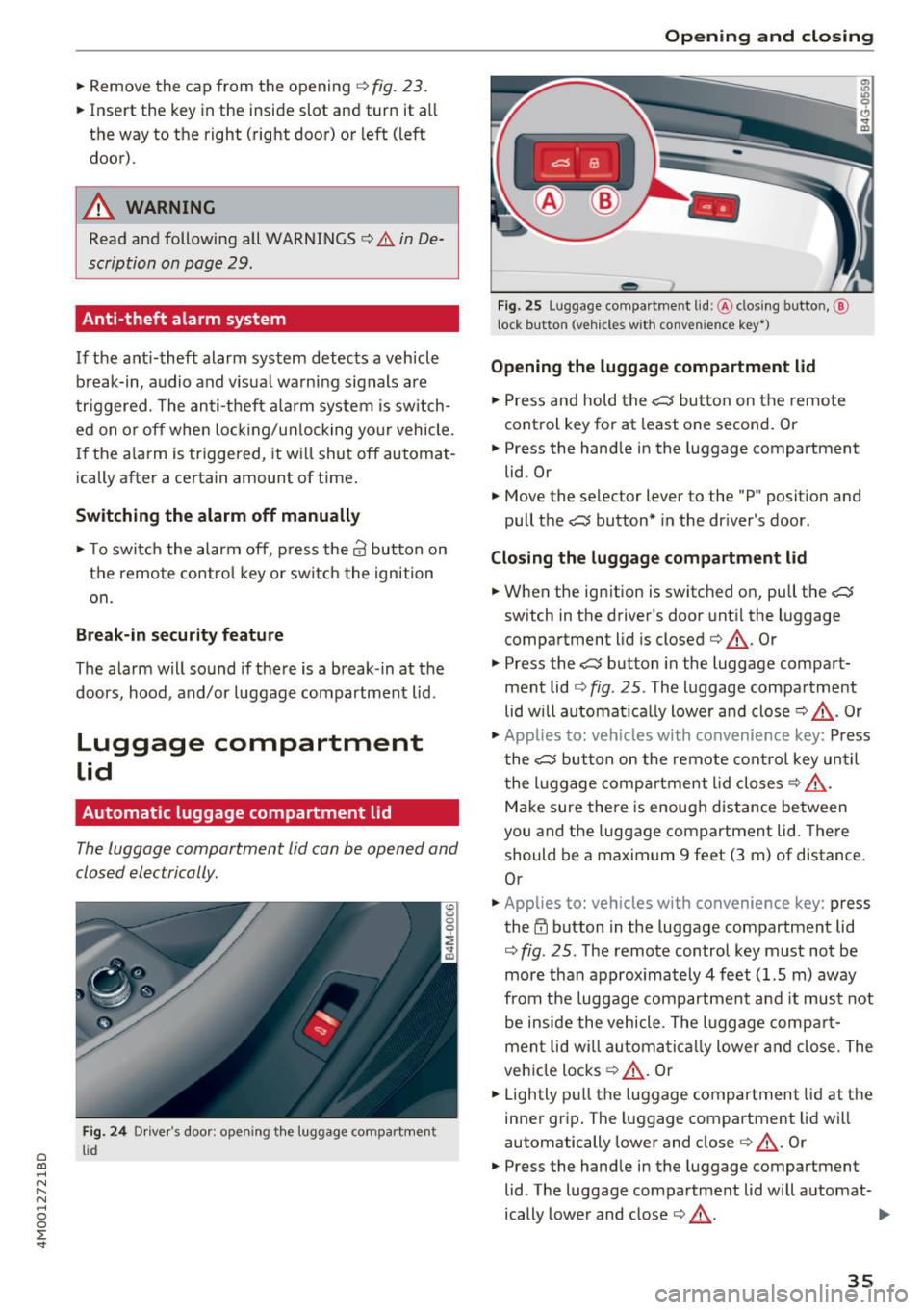
Fig. 25 Luggage compartment lid: @clos ing button, @
t ock button (vehicles with convenience key•)
Opening the luggage compartment lid
"" Press and hold the .c:::5 button on the remote
control key for at least one second. Or
"" Press the hand le in the luggage compartment
lid. Or
"" Move the selector lever to the "P" position and
pull the
.c:::5 button* in the driver's door.
Closing the luggage compartment lid
... When the ignition is switched on, pull the c::;;
switch in the driver's door until the luggage
compartment lid is closed ¢ &_ . Or
"" Press the
c::;; button in the luggage compart
ment lid¢
fig. 25. The luggage compartment
lid will automat ica lly lower and close¢&_. Or
"" Applies to: vehicles with convenience key: Press
the
.c:::5 button on the remote control key until
the luggage compartment lid closes¢&_.
Make sure there is enough distance between
you and the luggage compartment lid. There
should be a maximum 9 feet (3 m) of distance.
Or
"" Applies to: vehicles with convenience key : press
the~ button in the luggage compartment lid
¢
fig . 25. The remote control key must not be
more than approx imately 4 feet (1.5 m) away
from the luggage compartment and it must not
be inside the vehicle . The luggage compar t
ment lid wi ll automatically lower and close. The
vehicle locks¢&_ . Or
... Lightly pull the luggage compartment lid at the
inner grip. The luggage compartment lid will
automatically lower and close
c> &_ . Or
"" Press the handle in the luggage compartment
lid . The luggage compartment lid will automat-
ically lower and close
c> &_. .,.
35
Page 41 of 398
Cl a:, ...... N
" N ...... 0
0
::r '
switch is pressed/pu lled again.
• To se lect a position in between opened and
closed, press/pull the sw itch to the first level
until the desired window position is reached.
Po we r w indow switch es
(D Left front door
@ R ight front door
@ L eft rea r door
@ Right r ear door
A WARNING
- If you leave the veh icle, switch the ignit ion
off and take the vehicle key with you . This
applies particularly when children remain in
the vehicle . Otherwise children could start
the engine or operate elect rical equipment
(s uc h as powe r windows), whi ch in cr eases
the risk of an a ccident. The power windows
contin ue to f unct ion until the driver's door
or front passenge r's door has been opened .
- Pay c areful a ttent ion when closing the win
dows. Pinching co uld cause serious injur ies .
- When lo cking the veh icle from outside, the
vehicle mus t be unoc cupied since the win
dows can no longer be opened in an emer
gency.
(D Tips
You c an still open an d close the w indows for
app roxima tely 10 minutes after tu rning the
ign it ion off. The power windows do no t switch
off until the driver's door or front passenger's
door has been opened .
Convenience opening/closing
Applies to: vehicles wit h convenience key
All of the windows and the roof* can be opened/
closed at the same time.
Convenience opening feature
• Press and hold the III button on t he remote con
t ro l key until a ll of the w indows reach the de
s ir ed position and the roof* is tilted open .
Opening and cl osing
Convenience closing feature
• Press the 0 b utton on the remo te con trol key
until the roof* is closed
q .&, , or
• Touch the sensor * on the door handle unti l all
of the windows and the roof* are closed. Do not
place your hand in the door handle when doing
this .
Sett ing convenience op ening in the
Infotainment system
• Select in the Infotainment system: I MENU ! but
ton
> Vehicle > left control button > Vehicle
setting s
> Central locking > Long press to
open windows .
A WARNING
-
-Never close the w indows o r the roof* ca re
lessly or in an uncontrolled manner, be
c a use this increases the risk of injury.
- For secur ity reasons, the windows and the
roof* c an only be opened and close d wit h
the remote con trol key a t a maxim um dis
tance of approx imately 6.5 feet (2 m) away
from the vehicle . Always pay attention when
using the
0 button to close the windows
and the roof* so that no one is pinched. The
clos ing process will stop immediately when
the 6j button is released .
(D Tips
Applies to: vehicles with panorama glass roof:
the power sunshade also opens/closes when
opening/closing the roof .
Correcting power window malfunctions
You can reactivate the one-touch up/down func
tion if it ma/func tion s.
• Pull the powe r window switch up until the win
dow is compl ete ly raised.
• Release the switch and pu ll it up aga in for at
least one second .
39
Page 43 of 398
a co ...... N r--. N ...... 0
0
:E '
Description
Applies to: vehicles with garage door opener (Homelink)
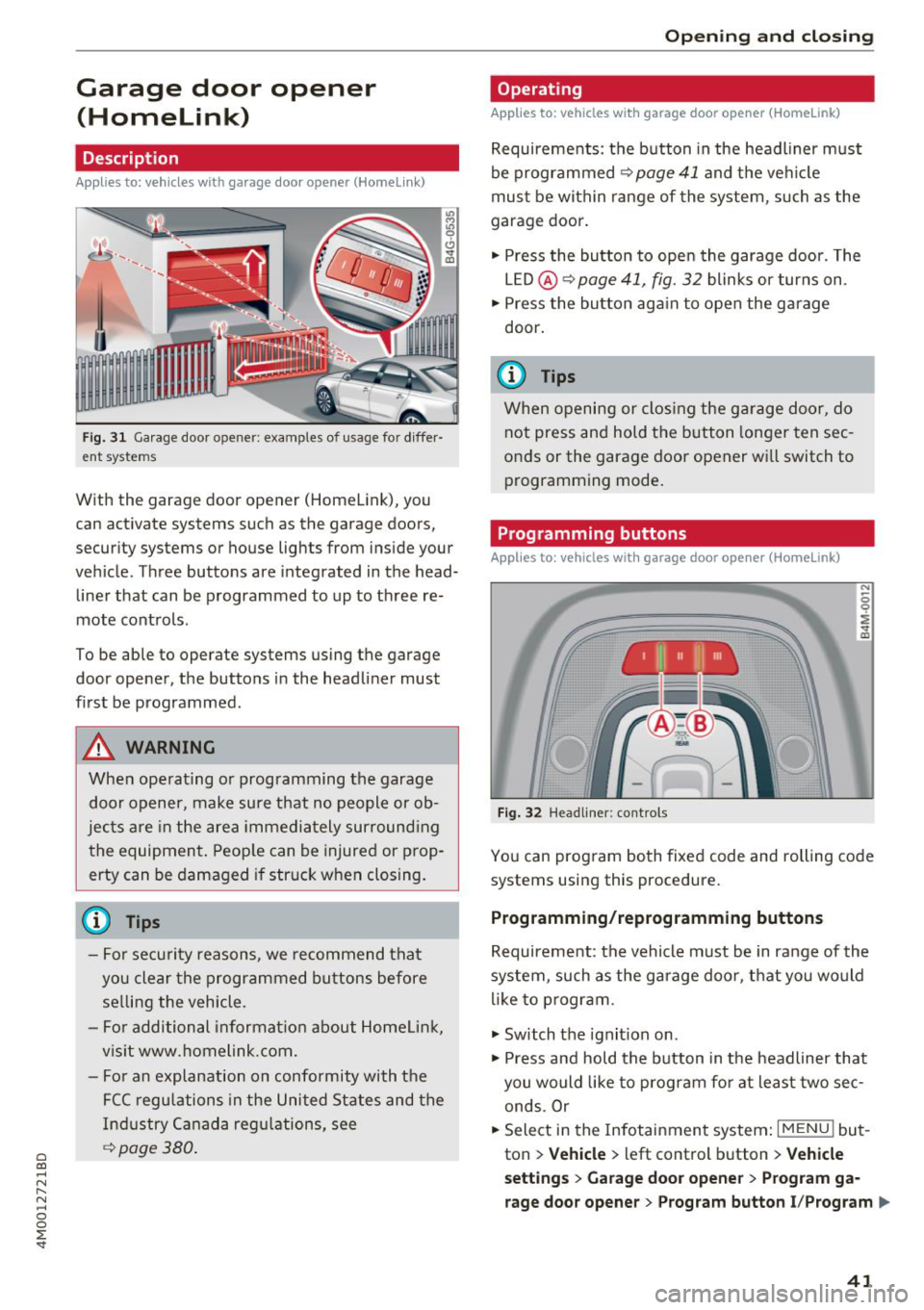
Fig. 31 Garage door opener: examples of usage for diffe r·
ent systems
With the garag e door opener (Homelink), you
can activate systems such as the garage doors,
security systems or house lights from inside your
vehicle. Three buttons are integrated in the head·
liner that can be programmed to up to three re
mote controls .
To be able to operate systems using the garage
door opener, the buttons in the headliner must
first be programmed .
A WARNING
When operating or programming the garage
door opener, make sure that no people or ob·
jects are in the area immediately surround ing
the equipment. Peop le can be injured or prop
erty can be damaged if struck when closing.
- For security reasons, we recommend that you clear the programmed buttons before selling the vehicle.
- For additional informat ion about Homelink,
visit www.homelink.com.
- Fo r an explanation on conformity with the
FCC regulations in the United States and the
Industry Canada regu lations, see
¢ page 380 .
Openi ng and clos ing
Operating
Applies to: vehicles with garage door opener (Home link)
Requirements : the button in the headl iner must
be programmed
<>page 41 and the veh icle
must be within range of the system, such as the
garage door .
., Press the button to open the garage door. The
LED @<>
page 41, fig. 32 blinks or turns on .
.. Press the button aga in to open the garage
door.
@ Tips
When opening or closing the garage door, do not press and hold the button longer ten sec
onds or the garage door opener wi ll switch to
programming mode.
Programming buttons
Applies to: vehicles with garage door opener (Home Link)
Fig . 32 H eadlin er: controls
You can prog ram both fixed code and rolling code
systems using this procedure.
Programming /reprogramming buttons
Requirement: the vehicle must be in range of the
system , such as the garage door, that you would
li ke to p rogram.
., Switch the ignit ion on .
., Press and hold the button in the headliner that
you would like to program fo r at least two sec·
ends .Or
.. Select in the Infotainment system:
I MENU ! but
ton
> Ve hicle > left control button > V ehi cle
s et tin g s
> G arage doo r opener > Pro gra m g a
rage do or opener
> Program butto n I/Prog ram ll>
41
Page 65 of 398
a co ...... N r--. N ...... 0
0
:E -
-Let the luggage compartment cover ro ll up
s low ly to reduce the r isk of damage.
- Also read and fo llow the applicable warn
ings
c;> 0 in Folding the backrest down/up
(third row seats) on page 57.
Increasing the size of the luggage
compartment
The backrests can be folded down individually*
or together.
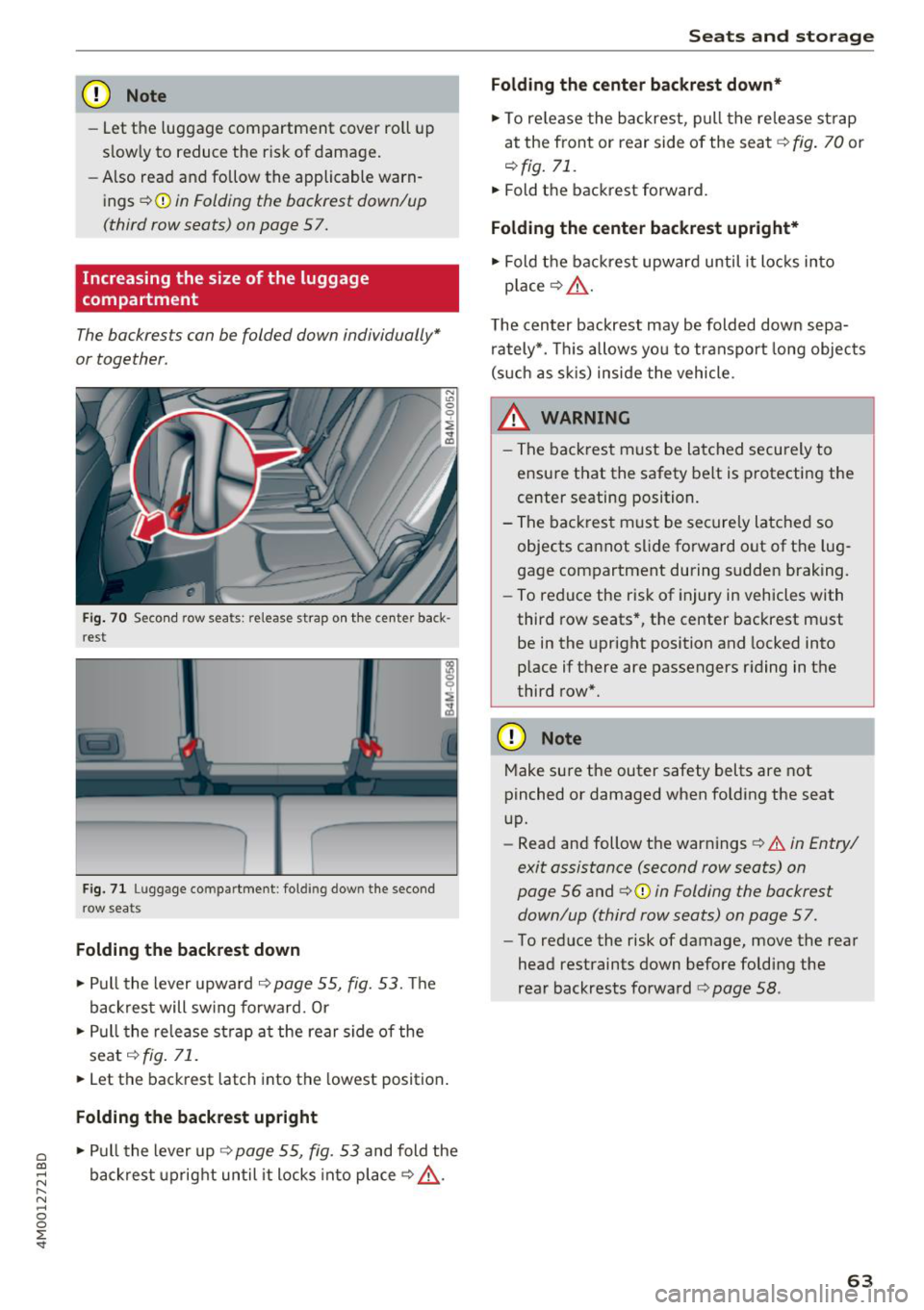
F ig. 70 Seco nd row seats: release strap o n th e center back
r est
F ig. 71 Luggage compartment : fold ing dow n the second
row seats
Folding the backrest down
.. Pull the lever upward c;> page 55, fig. 53. Th e
backrest will sw ing fo rward. Or
.. Pull the release strap at the rear side of the
seat
c;> fig . 71 .
.. Let the backrest latch into the lowest position .
Folding the backrest upright
.. Pull the lever up c;> page 55, fig. 53 and fold the
backrest upright until it locks into place
c;> ,.&. .
Seats and storag e
Folding the center b ackrest down *
.. To re lease the backrest, p ull the release st rap
at the front or rear side of the seat
c;> fig. 70 or
r::!> fig. 71.
.. Fold the backrest forward.
Folding the center backrest upr ight*
.. Fold t he backrest upward until it locks into
place
c;> .&, .
The center backrest may be folded down sepa
rately*. This allows yo u to transport long objects
(s uch as s kis) inside the vehicle.
A WARNING
-- The backrest must be latched securely to
ensure that the safety belt is protecting the
center seating position.
- The backrest must be securely latched so objects cannot slide forward out of the lug
gage compartment during sudden braking.
- To reduce the risk of injury in vehicles with
third row seats*, the center backrest must
be in the upright position and locked into
p lace if there are passengers riding in the
third row*.
CD Note
Make su re the outer safety belts are not
pinched or damaged when folding the seat
up.
- Read and follow the warnings
c;> .&. in Entry/
exit assistance (second row seats) on
page 56
and ¢ 0 in Folding the backrest
down/up (third row seats) on page 57.
- To reduce the risk of damage, move the rear
head restraints down before folding the
rear backrests fo rwa rd
r::!> page 58 .
63
Page 78 of 398
Driving
(D Note
-Have your vehicle maintained properly and
in accordance with the service recommenda ·
tions in your Warranty & Maintenance book
let . La.ck of proper maintenance as well as
improper use of the vehicle will impair the
function of the emission control system and
could lead to damage.
- Do not alter or remove any component of the Emission Control System unless ap·
proved by the manufacturer .
- Do not alter or remove any device, such as
heat shields, switches, ignition wires,
valves, which are designed to protect your
vehicle's Emission Control System and other
important vehicle components.
(0 Tips
The consumption estimates as published by
ENVIRONMENTAL PROTECTION AGENCY
(EPA) and Transport Canada may not corre
spond to your actual consumption on the
road, which will vary depending upon vehicle
load and speed, road and weather conditions,
trip length, etc.
Steering
Manual steering wheel position adjustment
Applies to: vehicles with manual steering wheel adjustment
The steering wheel position is adjustable up and
down and forward and back.
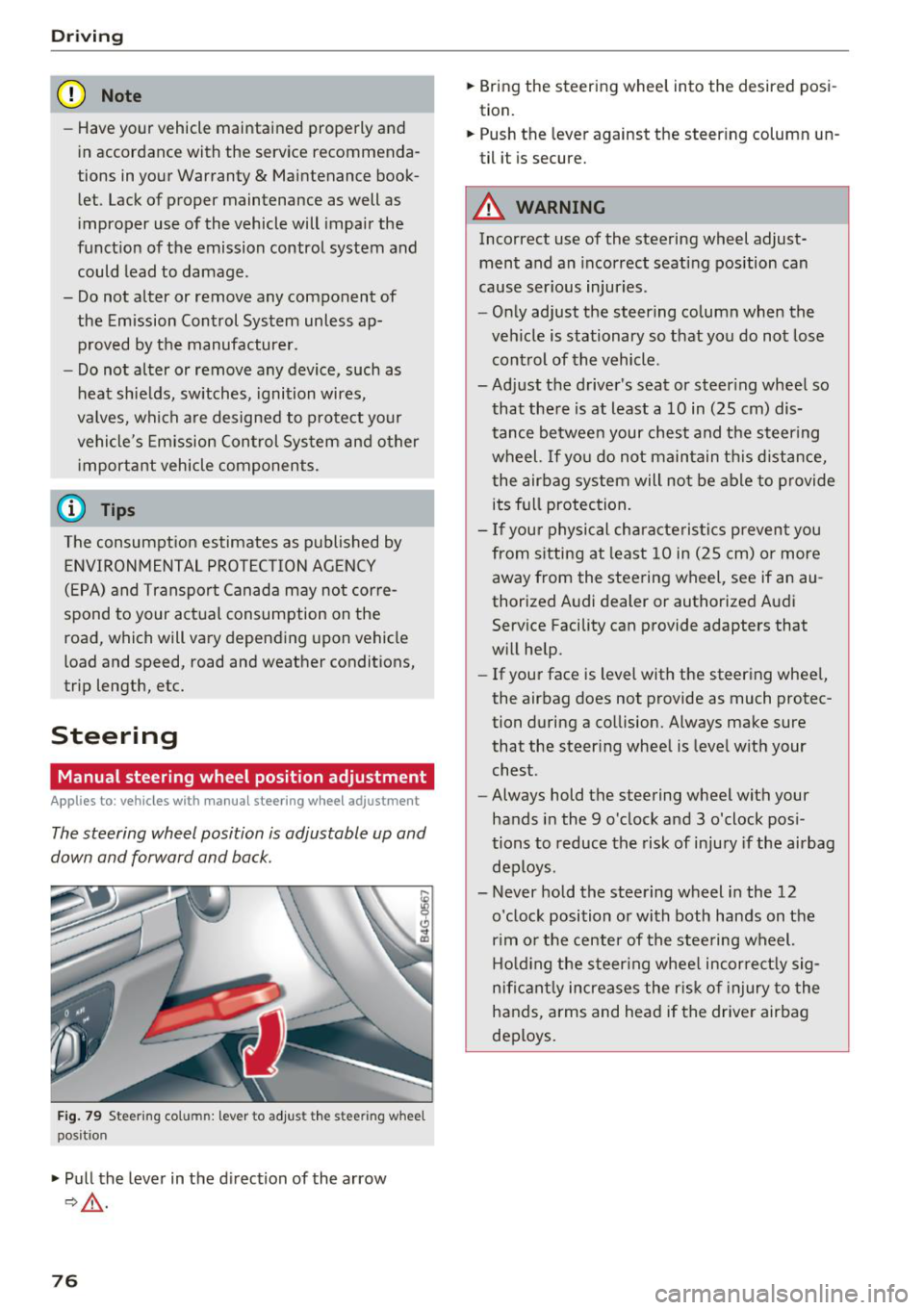
Fig. 79 Ste eri ng col umn : lev er to adjus t the stee rin g whe el
p os it ion
.,. Pull the lever in the direction of the arrow
9,&. .
76
.,. Bring the steering wheel into the desired posi
tion.
.,. Push the lever against the steering column un
til it is secure.
A WARNING
Incorrect use of the steering wheel adjust ment and an incorrect seating position can
cause serious injuries.
- Only adjust the steering column when the
vehicle is stationary so that you do not lose control of the vehicle .
-
-Adjust the driver's seat or steering wheel so
that there is at least a 10 in (25 cm) dis
tance between your chest and the steering wheel. If you do not maintain this distance
I
the airbag system will not be able to provide
its full protection.
- If your physical characteristics prevent you
from sitting at least 10 in (25 cm) or more
away from the steering wheel, see if an au
thorized Audi dealer or authorized Audi
Service Facility can provide adapters that
will help.
- If your face is level with the steering wheel,
the airbag does not provide as much protec
tion during a collision. Always make sure
that the steering wheel is level with your
chest .
- Always hold the steering wheel with your
hands in the 9 o'clock and 3 o'clock posi
tions to reduce the risk of injury if the airbag
deploys .
- Never hold the steering wheel in the 12 o'clock position or with both hands on the
rim or the center of the steering wheel.
Holding the steering wheel incorrectly sig
nificantly increases the risk of injury to the
hands, arms and head if the driver airbag
deploys.
Page 84 of 398
Drivin g
are available when you start driving r=:> poge 83,
Starting to drive .
Preventing th e automatic parking brake
r e leas e
The vehicle could begin rolling unintentiona lly,
depending on the hill or if towing a trailer .
.,. To preve nt the parking b rake from releasing au
tomat ica lly, pull and hold the© switch and
press the acce lerator pedal. The parking brake
remains set and prevents the vehicle from ro ll
ing backward.
.,. You can release the(®) switch again once you
are sure that you are g iv ing enough dr iv ing
force to the wheels by pressing the accelerator
pedal.
Emer gency br aking fun ction
You can use the emergency braking function in an
emergency situation, or if the standard brake op
eration malfunctions or is disabled.
.,. Pu ll and hold the(®) switch.
.,. As soon as you release the © switch or acceler -
ate, the braking stops .
Pulling and holding the<®> switch while driving
the vehicle activates the emergency braking func
tion . The vehicle is braked at all four wheels by
activating the hydraulic brake system. The brak ing effect is s imilar to heavy braking
r=:> ,&. .
To reduce the risk of activating the emergency
braking by mistake, a warning tone (buzzer)
sounds when the(®) switch is pulled. Emergency
braking stops as soon as the(®) switch is released
or the accelerator pedal is pressed .
Parking
.,. Press the brake peda l to stop the vehicle.
.,. Pu ll the(®) switch to set the parking brake.
.,. Se lect the "P" selector lever pos it ion.
.,. Turn the eng ine off
r=:> ,&. .
.,. Turn the steering wheel when parking on in
clines so that the wheels will roll into the curb
i f the veh icle sta rts mov ing .
82
A WARNING
-Do not press the accelerator pedal inadver
tently if a gear is selected when the vehicle
is stationary and the eng ine is runni ng . Oth
erwise, the vehicle will start to move imme
d iate ly and this could result in an accident.
- Eme rgency brak ing shou ld only be used in
a n emergency, when the no rma l bra ke pedal
h as fa iled or the bra ke peda l is obstr ucted.
Dur ing eme rgency brak ing, you r vehicle w ill
brake s imilar to heavy b raking. ESC and the
associated components (ABS, ASR, EDL)
cannot overcome the laws of physics.
Around curves and when road or weather
conditions are bad, a full brake applicat ion
can cause the veh icle to skid or the rear end
to swerve, wh ich increases the risk of an ac
cident .
- If the power supply fails, you cannot set the parking brake if it is released . In this case,
pa rk the veh icle on leve l ground and secure
it by p lac ing the sele ctor l eve r in the "P " po
si tion. See an au thor ized A udi dealer o r au
thorized A udi Se rvice Fac ility for assis tance.
- Always set the pa rking brake when leaving
your veh icle, even if for a sho rt period of
time . Otherwise the vehicle could roll away,
increasing the risk of an accident.
- If you leave the vehi cle, sw itch the ignition
off and take the ve hicle key with you . This
applies partic ularly when children remain in
the vehicle. Otherwise, chi ldren co uld start
the engine, release the parking brake or op
erate e lectr ica l equipment such as power
w indows, wh ich increases the r isk of an acci
dent.
- No one, especially ch ildren, should remain
in the vehicle when it is locked . Locked
doors make it more diff icu lt for eme rgency
wo rkers to get into the vehicle, which puts
lives at r is k .
0) Tips
When stopp ing at a traff ic signa l or stopp ing
i n city traffic, you can set the park ing brake
manua lly . The veh icle does not have to be
h eld wi th the b rake pedal. The par king b rake