button AUDI Q7 2019 Owner´s Manual
[x] Cancel search | Manufacturer: AUDI, Model Year: 2019, Model line: Q7, Model: AUDI Q7 2019Pages: 394, PDF Size: 105.97 MB
Page 168 of 394
Multifunctionsteeringwheel
Telephone
Appliesto:vehicleswith multifunctionsteeringwheeland
telephone
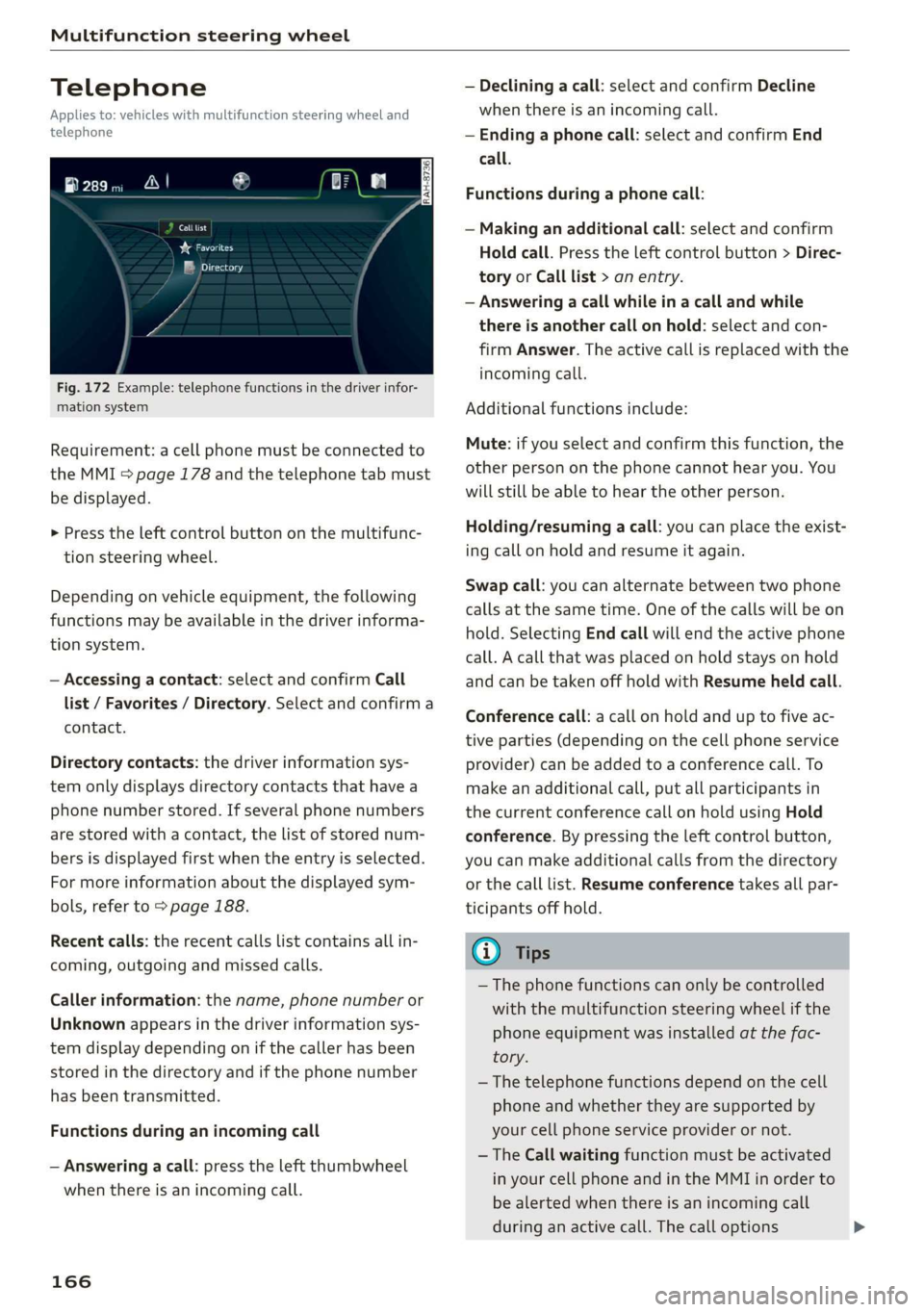
Calllist
re
eMysetey
Fig.172Example:telephonefunctionsinthedriverinfor-
mationsystem
Requirement:acellphonemustbeconnectedto
theMMI>page178andthetelephonetabmust
bedisplayed.
>Presstheleftcontrolbuttononthemultifunc-
tionsteeringwheel.
Dependingonvehicleequipment,thefollowing
functionsmaybeavailableinthedriverinforma-
tionsystem.
—Accessingacontact:selectandconfirmCall
list/Favorites/Directory.Selectandconfirma
contact.
Directorycontacts:thedriverinformationsys-
temonlydisplaysdirectorycontactsthathavea
phonenumberstored.Ifseveralphonenumbers
arestoredwitha contact,thelistofstorednum-
bersisdisplayedfirstwhentheentryisselected.
Formoreinformationaboutthedisplayedsym-
bols,referto>page188.
Recentcalls:therecentcallslistcontainsallin-
coming,outgoingandmissedcalls.
Callerinformation:thename, phonenumberor
Unknownappearsinthedriverinformationsys-
temdisplaydependingonifthecallerhasbeen
storedinthedirectoryandifthephonenumber
hasbeentransmitted.
Functionsduringan incomingcall
—Answeringacall:presstheleftthumbwheel
whenthereisanincomingcall.
166
—Decliningacall:selectandconfirmDecline
whenthereisanincomingcall.
—Endinga phonecall:selectandconfirmEnd
call.
Functionsduringa phonecall:
—Makinganadditionalcall:selectandconfirm
Holdcall.Presstheleftcontrolbutton>Direc-
toryorCalllist>anentry.
—Answeringacallwhileinacallandwhile
thereisanothercall onhold:selectandcon-
firmAnswer.Theactivecallisreplacedwiththe
incomingcall.
Additionalfunctionsinclude:
Mute:ifyouselectandconfirmthisfunction,the
otherpersononthephonecannothearyou.You
willstillbeabletoheartheotherperson.
Holding/resumingacall:youcanplacetheexist-
ingcallonholdandresumeitagain.
Swapcall:youcanalternatebetweentwophone
callsatthesametime.Oneofthecallswillbeon
hold.SelectingEndcallwillendtheactivephone
call.Acallthatwasplacedonholdstaysonhold
andcan betakenoffholdwithResumeheldcall.
Conferencecall:acallonholdanduptofiveac-
tiveparties(dependingonthecellphoneservice
provider)canbeaddedtoaconferencecall.To
makeanadditionalcall,putallparticipantsin
thecurrentconferencecallonholdusingHold
conference.Bypressingtheleftcontrolbutton,
youcanmakeadditionalcallsfromthedirectory
orthecalllist.Resumeconferencetakesallpar-
ticipantsoffhold.
G)Tips
— Thephonefunctionscanonlybecontrolled
withthemultifunctionsteeringwheelifthe
phoneequipmentwasinstalledatthefac-
tory.
—Thetelephonefunctionsdependonthecell
phoneandwhethertheyaresupportedby
yourcellphoneserviceproviderornot.
— TheCallwaitingfunctionmustbeactivated
inyourcellphoneandintheMMIinorderto
bealerted whenthereisanincomingcall
duringanactivecall.Thecalloptions
Page 169 of 394
4M0012721BG
Multifunctionsteeringwheel
dependonthecellphoneandservicepro-
vider.Youcanobtainmoreinformationfrom
yourcellphoneserviceprovider.
Navigation
(oyetaeMMMelmceleaarteetT)
Appliesto:vehicleswith multifunctionsteeringwheeland
navigationsystem
Requirement:adestinationmustbeentered
=page205,routeguidancemustbestartedand
thenavigationtabmustbedisplayed.
>Presstheleftcontrolbuttononthemultifunc-
tionsteeringwheel>page17.
Dependingonvehicleequipment,thefollowing
functionsmaybeavailableinthedriverinforma-
tionsystem.
—Displayingnavigationduringactiveroute
guidance:selectandconfirmMaporStreet
view*(analoginstrumentcluster).
— Showingthemapwhenrouteguidanceisnot
active:selectandconfirmMap.
—Accessinglastdestinations:selectandconfirm
Lastdestinations>thedesireddestination.
—Accessingfavorites:selectandconfirmFavor-
ites>thedesireddestination.
—Startingrouteguidancetothestoredhome
address:selectandconfirmCancelrouteguid-
anceifnecessaryandthenHomeaddress.
Ifyouhave notstartedrouteguidance,acom-
pass(intheanaloginstrumentcluster)oramap
(Audivirtualcockpit)*willbedisplayed.
—Cancelingactiverouteguidance:onthemulti-
functionsteeringwheel,select:rightcontrol
button>Cancelrouteguidance.
Additionalsettings
—Select:rightcontrolbutton>desiredentry.
Dependingonthefunctionselected,thefollow-
ingadditionalsettingsmaybepossible:
—Mapdisplay>page216
—Mapcolors>page216
—Maporientation>page216
—Automaticzoom>page217
Navigationviewwithrouteguidance
started
Appliesto:vehicleswithnavigationsystem andAudivirtual
cockpit
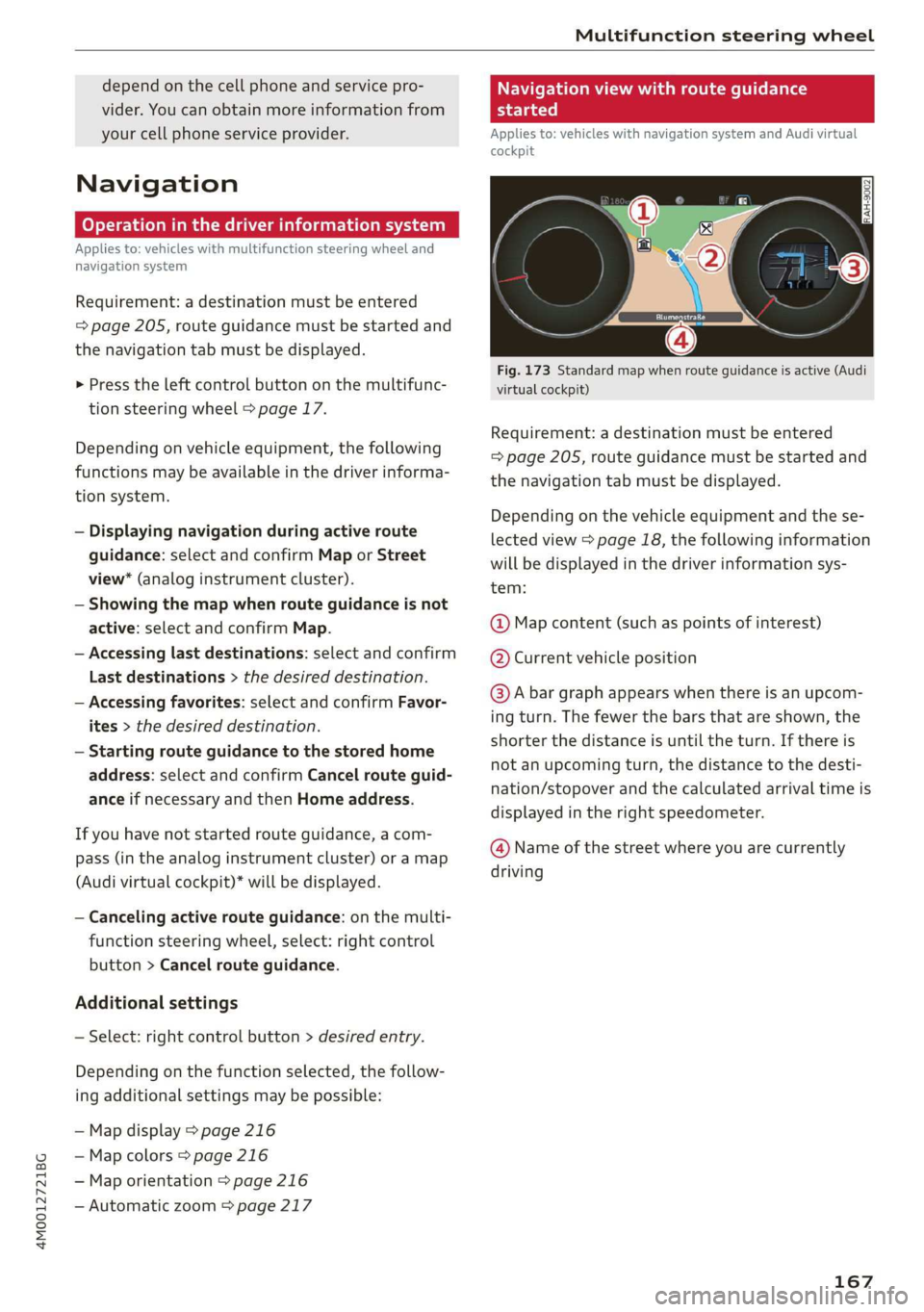
Fig.173Standardmapwhenrouteguidanceisactive(Audi
virtualcockpit)
Requirement:adestinationmustbeentered
=page205,routeguidancemustbestartedand
thenavigationtabmustbedisplayed.
Depending onthevehicleequipmentandthese-
lectedview>page18,thefollowinginformation
willbedisplayedinthedriverinformationsys-
tem:
@Mapcontent(suchaspointsofinterest)
@Currentvehicleposition
@Abargraphappearswhenthereisanupcom-
ingturn.Thefewerthebarsthatareshown,the
shorterthedistanceisuntiltheturn.Ifthereis
notanupcomingturn,thedistancetothedesti-
nation/stopoverandthecalculatedarrivaltimeis
displayedintherightspeedometer.
@Nameofthestreetwhereyouarecurrently
driving
167
Page 173 of 394
4M0012721BG
Voicerecognitionsystem
Voicerecognitionsystem
Operating
Appliesto:vehicleswithvoicerecognitionsystem
YoucanoperatemanyInfotainmentfunctions
convenientlybyspeaking.
Requirement:theignitionandtheMMImustbe
switched
on>page153.Asystemlanguagesup-
portedbythevoicerecognitionsystemmustbe
set.Theremustbenophonecallsinprogressand
theparkingaidmustnotbeactive.
>Switchingon:brieflypressthe[2]button@)
=>page18,fig.11onthemultifunctionsteer-
ing
wheelandsaythedesiredcommandafter
theBeep.
>Switchingoff:pressandholdthe|]button.
Or:pressthe|S]button.
>Pausing:saythecommandPause.Toresume,
pressthe|]button.
>Correcting:saythecommandCorrection.Or:
simplysayanewcommandduringanan-
nouncement>page248.
Inputassistance
Thesystemguidesyouthroughtheinputwith
visualandaudiofeedback.
—Visualinputassistance:afterswitchingon
voicerecognition,adisplaywithaselectionof
possiblecommandsappears.Thiscommand
displaycanbe switchedonoroff.Select:
MENU]button>Settings>leftcontrolbutton
>MMIsettings>Speechdialogsystem.
—Audioinputassistance: tohavethepossible
commandsread,turnthevoicerecognitionsys-
temonandsayHelp.
Forthesystemtounderstandyou:
Speakclearlyanddistinctly atanormalvolume.
Speaklouderwhendrivingfaster.
Emphasizethewordsinthecommandsevenly
anddonotleavelongpauses.
Closethedoors,thewindows,andthesunroof*
toreducebackgroundnoise.Makesurethatpas-
sengersarenotspeakingwhenyouaregivinga
voicecommand.
Donotdirecttheventstowardthehands-freemi-
crophone,whichisintheroofheadlinernearthe
frontinteriorlights.
Onlyusethesystemfromthedriver'sseatbe-
causethehands-freemicrophoneisdirectedto-
wardthatseat.
Additionalsettings
See>page248,Speechdialogsystem.
ZAWARNING
—Directyourfullattentiontodriving.Asthe
driver,youhavecompleteresponsibilityfor
safetyintraffic.Only usethefunctionsin
suchawaythatyoualwaysmaintaincom-
pletecontroloveryourvehicleinalltraffic
situations.
—Donotuse thevoicerecognitionsystemin
emergenciesbecauseyourvoicemaychange
instressfulsituations.Thesystemmaytake
longertodialthenumberormaynot be
abletodialitatall.Dialtheemergency
numbermanually.
G)Tips
—Thedialogpauseswhenthereisanincom-
ingphonecallandwillcontinueifyouig-
norethecall.Thedialogendsifyouanswer
thecall.
—Youcanselectan iteminthelistusingei-
therthevoicerecognitionsystemorthe
controlknob.
Commandoverview
information
Appliesto:vehicleswithvoicerecognitionsystem
Thefollowingoverviewsdescribethecommands
thatcan beusedtooperatetheMMIusingthe
voicerecognitionsystem.
Alternativecommandsareseparatedusinga“/”,
forexamplesay:Telephone/(or)Navigation/
(or)Radio.
Sequencesofcommandsusedtoperformanac-
tionareidentifiedwitha“>”,forexamplesay:
Enteraddress>(then)Entercountry/state.
171
Page 179 of 394
4M0012721BG
Voicerecognitionsystem
TheparkingaidaswellastheAudivoicerecogni-
tionsystemmustnotbeactive.
AcellphonemustbeconnectedtotheMMIwith
theHandsfreeprofile>page178.
Themobiledevicebeingconnectedmusthave
voicecontrolthatcanbecontrolledexternally.
>»Switchingon:pressandholdthe||buttonon
themultifunctionsteeringwheel* andsaythe
desiredcommandaftertheexternalspeechdia-
logbegins.
>Continuing/resumingthedialog:thesystem
remainsreadytouseforashorttimeafterend-
ingthedialog.Youcanstartanewexternaldia-
logduringthistime. Pressthe[2]buttonif
needed,andsayanewcommand.Or:select
andconfirmResumeontheMMIcontrolpanel.
>Switchingoff:pressandholdthe|™]button.
Or:selectandconfirmCancelontheMMIcon-
trolpanel.
G)Tips
—Therearenovoiceguidance*promptswhen
adialogisactive.
—Thisfunctiondependsonthecellphone
used.Youcanobtainmoreinformationfrom
yourmobiledeviceserviceproviderorfrom
yourmobiledeviceuserguide.
—AUDIAGsimplyprovidesaccesstocontrol
yourmobiledevicewithvoiceoperationand
doesnotassumeanyresponsibilityforthe
contentandcommandswithintheexternal
voicecontrol.
177
Page 181 of 394
![AUDI Q7 2019 Owner´s Manual 4M0012721BG
Telephone
Themobiledevicethatwillbeconnectedmust
notbeconnectedtoanyotherBluetoothdevice.
TheMMImustnotbeconnectedtoamobilede-
vice.
Connectingamobiledevice
>Select:[MENU]button>Tele](/img/6/40283/w960_40283-180.png "AUDI Q7 2019 Owner´s Manual 4M0012721BG
Telephone
Themobiledevicethatwillbeconnectedmust
notbeconnectedtoanyotherBluetoothdevice.
TheMMImustnotbeconnectedtoamobilede-
vice.
Connectingamobiledevice
>Select:[MENU]button>Tele")
4M0012721BG
Telephone
Themobiledevicethatwillbeconnectedmust
notbeconnectedtoanyotherBluetoothdevice.
TheMMImustnotbeconnectedtoamobilede-
vice.
Connectingamobiledevice
>Select:[MENU]button>Telephone>Connect
mobiledevice>Findnewdevices>Next.The
availableBluetoothdevicesareshownintheIn-
fotainmentsystemdisplay.Orselect:[MENU
button>Settings>leftcontrolbutton>MMI
settings>Connectionmanager©page248.
>Selectandconfirmthedesiredcellphonefrom
thelistofdisplayedBluetoothdevices.
>TheMMIgeneratesaPINforthe connection
setup
>fig.177.
>SelectandconfirmYes.
>»EnterthePINforconnectingonyourcell
phone.Or:whenthePINisdisplayedonyour
cellphone,confirmthePINonyourcellphone
andintheMMI.Thetimeallowedforentering
thePINislimitedtoapproximately30seconds.
>Payattentiontoanyadditionalsystemprompts
displayedonyourcellphone,forexampleifthe
systemshouldconnectautomaticallyinthefu-
ture.Dependingonthecellphone,youmay
havetoconfirmdownloadingthedirectorysep-
arately.
Afterconnectingsuccessfully
Afterconnectingsuccessfully,informationabout
theconnectedprofileswillappear.Youcanalso
changetheprofileslater.Select:[MENU]button>
Settings> leftcontrolbutton>MMIsettings>
Connectionmanager>page248.
Inaddition,thecellphonecontactsareautomat-
icallyloadedintheMMIdirectory.Thisprocess
cantakeseveralminutes,dependingonthenum-
berofcontacts.
Youcanalsomakeyourconnectedcellphonethe
defaultphonebyselectingSetasdefaulttele-
phoneintheConnectionmanager=page250.
@)Note
Alwaysfollow theinformationfoundin>@in
Wi-Fisettingsonpage200.
@Tips
—MakingphonecallsthroughtheMMIisonly
possibleusingtheHandsfreeBluetoothpro-
file.
—Youcanapplyadditionalsettingstocon-
nectedmobiledevicesusingtheConnection
manager>page248.
—YoucanalsosearchfortheMMIonyourmo-
biledeviceusingtheBluetoothdevice
search.
—Youonlyhavetopairyourdeviceonetime.
Bluetoothdevicesthatarealreadypaired
automaticallyconnecttotheMMIwhenthe
Bluetoothfunctionisswitchedon,when
theyarewithinrange,andwhentheignition
isswitchedon.Thelastconnectedmobile
deviceisgivenfirstpriority.
—AuthorizingtheMMIconnectiononyour
mobiledevicewillmakeitpossibletocon-
nectautomatically.
—Payattentiontoanysystempromptsdis-
playedonyourcellphone,forexampleif
thesystemshouldconnectautomaticallyin
thefuture.Dependingonthecellphone,
youmayalsoneedtodownloadthedirecto-
ryandconfirmaccesstoyourtextmessages
separately.
—Whenleavingthevehicle,theBluetooth
connectiontothemobiledevicewillauto
maticallydisconnect.Depending onyour
mobiledevice,phonecallsinprogressmay
beautomaticallyredirectedfromtheMM
toyourmobiledevicesothatyoucan con
tinuethecallon yourphone.
I
—Youcanobtainmoreinformationfromyour
mobiledeviceserviceproviderorfromyo!ur
mobiledeviceuserguide. Forinformation
onusingthetelephone,visitwww.audiusa.
com/bluetoothorcontactanauthorizedAu-
didealerorauthorizedAudiServiceFacili
—Appliesto:vehicleswithoutsecondary
phone:Severalcellphonescanbepaired
ity.
to
theMMI,butonlyonecellphonecanbeac-
tivelyconnectedtotheMMI.
179
Page 182 of 394
Telephone
—Appliesto:vehicleswithoutsecondary
phone:IfaBluetoothdeviceisalreadycon-
nectedtotheMMI,itwillbedisconnected
whenanotherdeviceconnectstotheMMI.
Operatingtwomobiledevicesthroughthe
MMI
YoucanconnecttwocellphonestotheMMI,for
exampleyourbusinesscellphoneastheprimary
phoneandyourprivatecellphoneasthesecon-
daryphone.You canbereachedinyourvehicle
throughbothcellphones.
Thefirstconnectedcellphoneisdisplayedasthe
primaryphoneintheMMI.Thesecondcellphone
isconnectedasthesecondaryphone.
Thedirectoryfromtheconnectedprimaryphone
willalwaysbedisplayed.Ifyouwouldliketouse
thedirectoryfromthesecondary phone, you
mustswitchtheprimaryandsecondaryphone
=>page180.
Connectingacellphoneastheprimary
phone
ConnectyourcellphonetotheMMIviaBlue-
tooth.
Thefirstconnectedcellphoneisdisplayed
asthePrimaryphoneintheMMI.
See>page178,Connectingacellphoneusing
Bluetooth.
Connectingacellphoneasthesecondary
phone
Requirement:acellphonemustbeconnectedto
theMMIastheprimaryphone.
Select:[MENU]button>Telephone>rightcon-
trolbutton>Connectsecondarytelephone.
See>page178,Connectingacellphoneusing
Bluetooth.
Example:youhaveconnectedyourbusinesscell
phonetotheMMIastheprimaryphoneandyour
privatecellphoneasthesecondaryphone.To be
abletocallcontactsfromyourprivatecellphone
directory,youmustswitchtheprimaryandsec-
ondaryphone,sincethedirectoryfromthepri-
maryphoneisalwaysdisplayed.
180
Switchingtheprimaryandsecondaryphone
Requirement:aprimaryphoneandasecondary
phonemustbe connected.
Switchprimaryandsecond.phone:select:
MENU]button>Telephone>rightcontrolbut-
ton>Switchprimaryandsecond.phone.
G)Tips
—Pleasenotethatonlythedirectoryfromthe
primaryphoneisalwaysdisplayed.
—Youcanseeifacellphoneisconnectedas
theprimaryphoneorsecondaryphonein
theConnectionmanager>page248.Or:
thedevicenameoftheconnectedprimary
phoneisshownintheTelephonemenu
(suchasmyPhone).
—Iftheprimaryphonedoesnotconnectauto-
matically totheMMIwhentheignitionis
switchedon, forexamplebecauseitisout
ofthevehiclerangeortheBluetoothfunc-
tionisswitchedoff,thenapreviously paired
secondaryphoneisautomaticallyconnected
astheprimaryphone.
—Youcansendandreceivemessagesonyour
primaryphoneaswellasonyoursecondary
phone>page182,fig. 179.You donot
needtoswitchyourprimaryphoneandsec-
ondaryphoneforthis.
—Youcanalsomakeyourconnectedcell
phonethedefaultphonebyselectingSetas
defaulttelephoneintheConnectionman-
ager>page250.
Page 184 of 394
Telephone
@)Note
ApplicabletoCanada
InCanada,operationofaZoneEnhancer,
suchasan AudiPhoneBox,issubjecttothe
followingrequirementsoftheInnovation,
ScienceandEconomicDevelopmentCanada
(ISED):
—ThisisaCONSUMERdevice.
—BEFOREUSE,youMUSTmeetallrequire-
mentssetoutinCPC-2-1-05.
—YouMUSToperatethisdevicewithapproved
antennas
andcablesasspecifiedbythe
manufacturer.AntennasMUSTNOTbein-
stalledwithin20cmofanyperson.
—YouMUSTceaseoperatingthisdeviceim-
mediatelyifrequestedbyISEDoralicensed
wirelessserviceprovider.
—WARNING:£911locationinformationmay
notbeprovidedormaybeinaccuratefor
callsservedbyusingthisdevice.
G)Tips
— TheAudiphoneboxisnotavailableinall
countries.Foradditionalinformation,con-
tactanauthorizedAudidealership.
—Placingthemobiledeviceinabagorprotec-
tivesleeveinsidetheAudiphoneboxcanin-
terferewiththeconnectiontotheexternal
antenna”*.
—Metallicobjectsinthe Audiphoneboxblock
thewirelesschargingofyourmobiledevice
andcallsmadeusingtheexteriorantenna”*.
— Thechargingtimeandtemperaturewillvary
dependingonthemobiledevicebeingused.
—Yourmobiledevicecanonlybechargedin
theAudiphoneboxwhentheignitionis
switchedon.
—Toreducetheriskofmalfunctions,make
surethemobiledeviceispositionedcorrect-
lyintheAudiphonebox.
— Themaximumchargingoutputis5watts.
—Strongtransmissionqualitycannotbeguar-
anteedifmorethanonemobiledeviceisin
thebox.*
—Onlyonemobiledeviceatatimecanbe
chargedwirelesslyintheAudiphonebox.
182
—AudirecommendsusingAudiGenuineAc-
cessories.Audihasverifiedtheirreliability,
safety,andsuitability.
—YoucanpurchaseaUSBadapterfromanau-
thorizedAudidealerorauthorizedAudi
ServiceFacility,oratspecialtystores.
Usingthetelephone
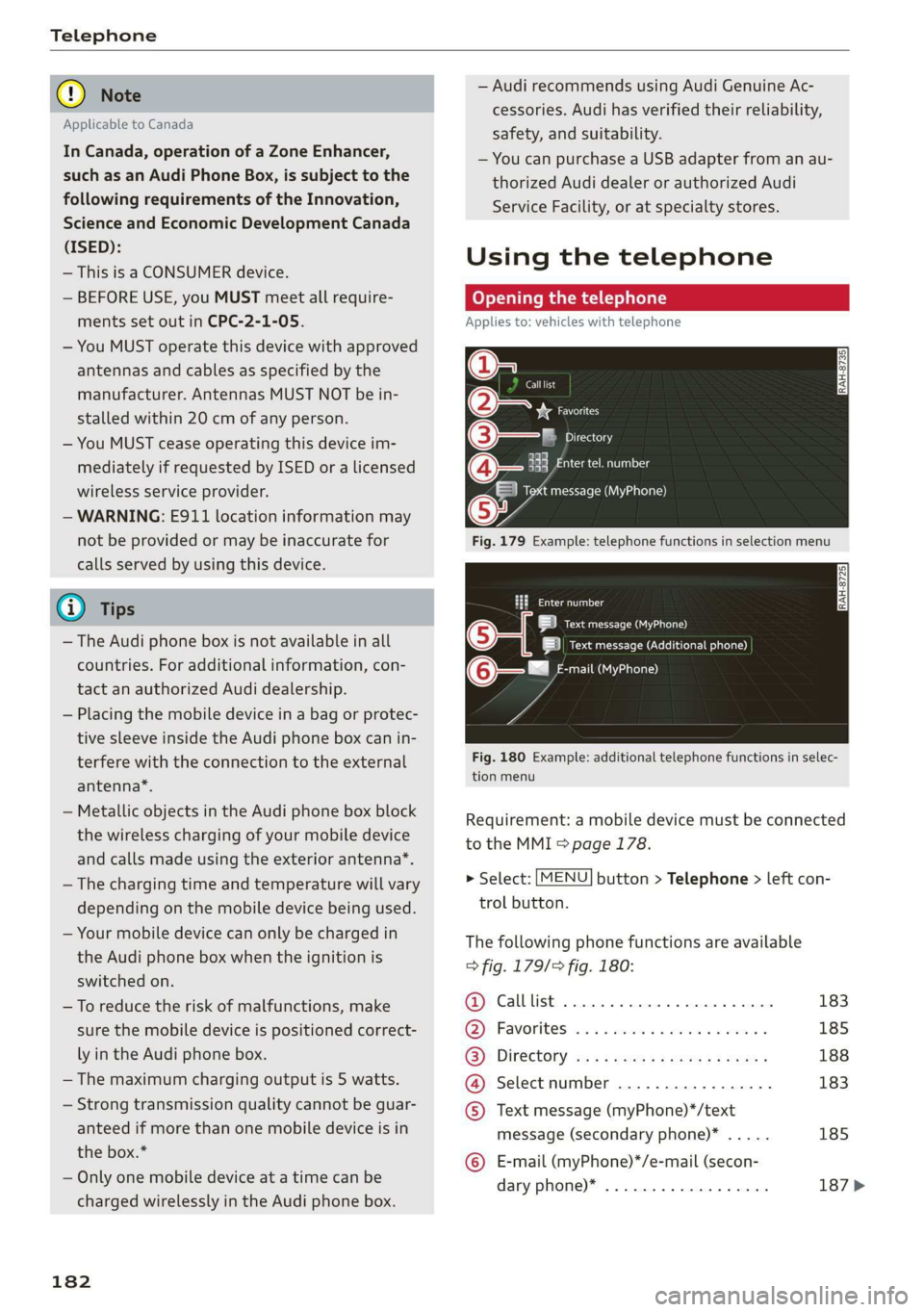
Openingthetelephone
Appliesto:vehicleswithtelephone
Calllist
@-=aia
RAH-8735|
BeFaeming
Tamessage(MyPhone)
Fig.179Example:telephonefunctionsinselectionmenu
omatl)
LRoteOa)
|ieeesecurenen)
(6eemail(MyPhone)
Fig.180Example:additionaltelephonefunctionsinselec-
tionmenu
Requirement:amobiledevicemustbeconnected
totheMMI>page178.
>Select:[MENU]button>Telephone>leftcon-
trolbutton.
Thefollowingphonefunctionsareavailable
>fig.179/fig.180:
@Calllist00.0...ee183
@)Favoriteswes+sense«omen«xoem»185
GB):Directoryasssweesszrowsgoes188
@®Selectnumber............-..-.183
©Textmessage(myPhone)*/text
message(secondaryphone)*.....185
©E-mail(myPhone)*/e-mail(secon-
daryphone)*..................187>
Page 185 of 394
4M0012721BG
Telephone
Thedevicenameforyourcellphoneisdisplayed
intheTelephonemenu,forexampletextmes-
sage(myPhone)©fig.180.
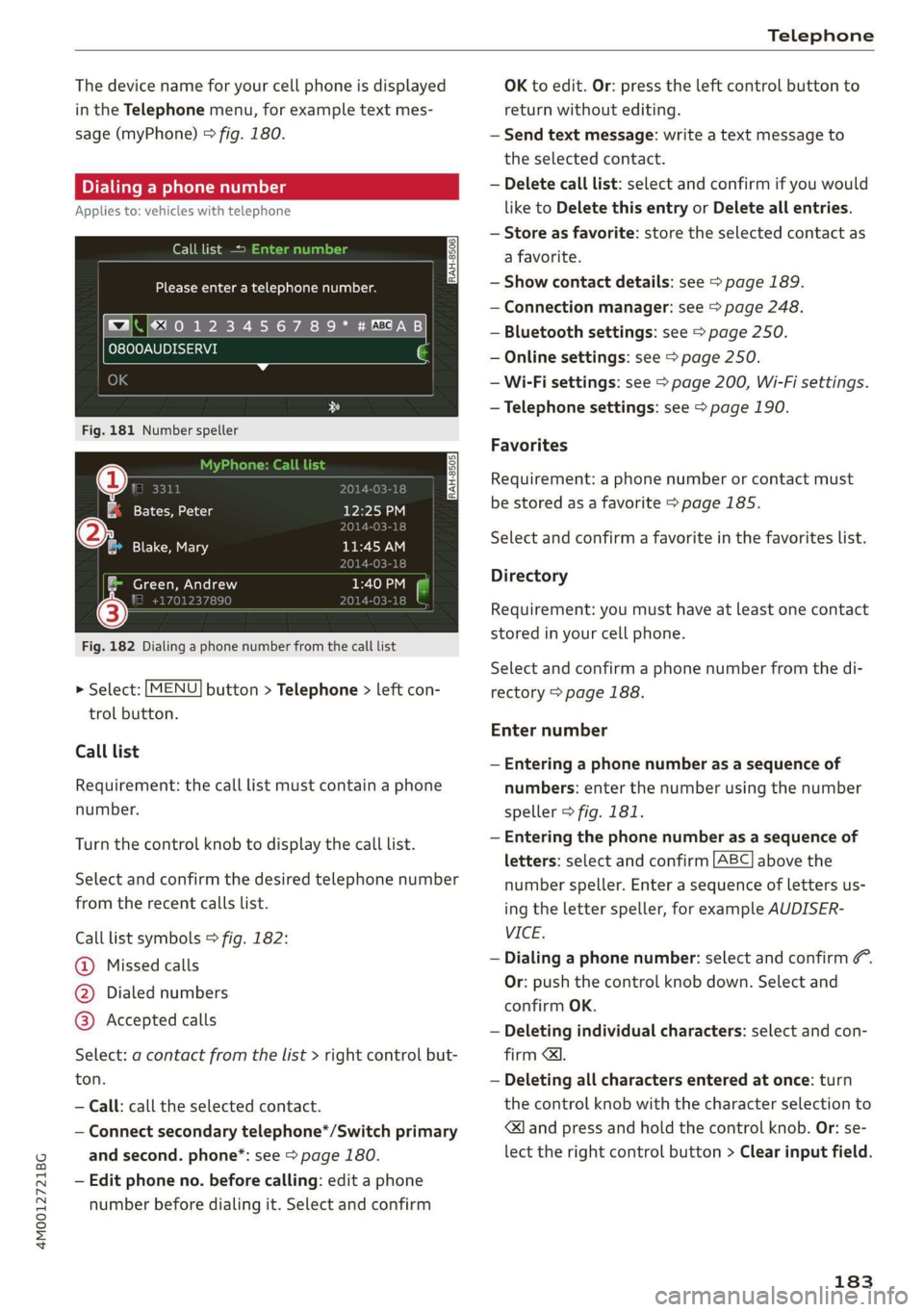
Dialingaphonenumber
Appliesto:vehicleswithtelephone
Calllist>
Pleaseenteratelephonenumber.
BA)‘|e4
O800AUDISERVI
Fig.181Numberspeller
a[Fatal12:25P
)118
®@Blake,Mary11:45AM
Green,Andrew
Fig.182Dialingaphonenumberfromthecalllist
>Select:[MENU]button>Telephone>leftcon-
trolbutton.
Calllist
Requirement:thecalllistmustcontainaphone
number.
Turnthecontrolknobtodisplaythecalllist.
Selectandconfirm thedesiredtelephonenumber
fromtherecentcallslist.
Calllistsymbols>fig.182:
@Missedcalls
@Dialednumbers
@®Acceptedcalls
Select:acontactfromthelist>rightcontrolbut-
ton.
—Call:calltheselectedcontact.
—Connectsecondarytelephone*/Switchprimary
andsecond.phone”:see>page180.
—Edit phoneno.beforecalling:editaphone
numberbeforedialingit.Selectandconfirm
OKtoedit.Or:presstheleftcontrolbuttonto
return
withoutediting.
—Sendtextmessage:writeatextmessageto
theselectedcontact.
—Deletecalllist:selectandconfirmifyouwould
liketoDeletethisentryorDeleteallentries.
—Storeasfavorite:storetheselectedcontactas
a favorite.
—Showcontactdetails:see>page189.
—Connectionmanager:see>page248.
—Bluetoothsettings:see>page250.
—Onlinesettings:see>page250.
—Wi-Fisettings:see>page200,Wi-Fisettings.
—Telephonesettings:see>page190.
Favorites
Requirement:aphonenumberorcontactmust
bestoredasafavorite>page185.
Selectandconfirmafavoriteinthefavoriteslist.
Directory
Requirement:youmusthaveatleastonecontact
storedinyourcellphone.
Selectandconfirmaphonenumberfromthedi-
rectory>page188.
Enternumber
—Enteringaphonenumberasasequenceof
numbers:enterthenumberusingthenumber
speller>fig.181.
—Enteringthephonenumberasasequenceof
letters:selectandconfirm|ABC|abovethe
numberspeller.Enterasequenceoflettersus-
ing
theletterspeller,forexampleAUDISER-
VICE.
—Dialingaphonenumber:selectandconfirm&.
Or:pushthecontrolknobdown.Selectand
confirmOK.
—Deletingindividualcharacters:selectandcon-
firm
&l.
—Deletingallcharactersenteredatonce:turn
thecontrolknobwiththecharacterselectionto
<]andpressandholdthecontrolknob.Or: se-
lecttherightcontrolbutton>Clearinputfield.
183
Page 186 of 394
Telephone
Acceptingorendingacall
Appliesto:vehicleswithtelephone
—Acceptingacall:selectandconfirmAnswer.
—Decliningacall:selectandconfirmDecline.
—Mutinganactivecall:selectandconfirmMute.
—Endinga phonecall/canceldialing:selectand
confirmEndcall.
Callerinformation:thename, phonenumberor
UnknownappearsintheInfotainmentsystem
displaydependingonifthecallerhasbeenstored
inthedirectoryandifthephonenumberhas
beentransmitted.Apicturemayalsobedis-
played,dependingonwhetheryouhaveassigned
apicturetoacontactinyourdirectoryandifit
wastransferredtoyourMMI.Youcanfindoutif
yourmobiledevicesupportsthisfunctionfrom
yourmobiledevicenetworkprovider,yourmobile
deviceowner'smanual,or atwww.audiusa.com/
bluetooth.
@Tips
—Theradioormediaplaybackismutedduring
aphonecall.
—Missedcallsaredisplayedwithasymbolin
thestatuslineoftheInfotainmentsystem
display@)>page163,fig.171.
Duringaphonecall
Appliesto:vehicleswithtelephone
Requirement:
theremustbeacallinprogress.
>
Endcall:youcanendaphonecall.
»Sendtonesequence:youcanentertonese-
quences(DTMF)directlyusingthenumber
spellerandsendtotheotherpersononthe
call.
>Othercalloptions:presstherightcontrolbut-
ton.
Thefollowingoptionsmaybepossibleduringa
calldependingonthemobiledevicebeingused
andthetypeofconnection:
—Answeringanadditionalcall:ifthereisanin-
comingcallwhileanothercallisactive,youcan
selectAnswertoput theexistingcallonhold
andanswertheincomingcall.IfyouselectDe-
cline,theincomingcallwillbedeclined.
184
—Acceptinganincomingcallwhenthereisanac-
tivecallandacallonhold:selectReplace.The
activecallisreplacedwiththeincomingcall.
—Mutingtheincomingcall:selectandconfirm
Mute.
—Additionalcall:select:Findcontact>Calllist/
Directory/Favorites>anentryfromthelist.
Mute:ifyouselectandconfirmthisfunction,the
otherpersononthephonecannothearyou.You
willstillbeabletoheartheotherperson.Toturn
themicrophonebackon,selectandconfirmUn-
mute.
Holdcall/Resumeheldcall:youcanplacetheex-
istingcallonholdandresumeitagain.Toresume
thecall,selectandconfirm thecallyouwould
liketoresume.
Transfercalltomobiledevice*:selectandcon-
firm
Transfercalltomobiledevicetotransfer
theexistingcallfromtheMMItoyourcellphone.
Switchtohands-freemode*:Requirement:you
musthaveaphonecallinprogressonyourcell
phone.SelectandconfirmSwitchtohands-free
modetotransferthecallfromyourcellphone
backtotheMMI.
Swapcall:alternatebetweentwophonecalls
whileoneofthecallsisonhold.SelectingEnd
call willendtheactivephonecall.Aphonecall
onholdcanberesumedusingtherightcontrol
button>Resume.
Connectionmanager:see>page248.
Telephonesettings:see>page190.
G)Tips
—To benotifiedofanincomingcallduringa
phonecall,thecallwaitingfunctioninyour
cellphonemustbeswitchedonwhenusing
theHandsfreeprofile.
—Youcanobtainmoreinformationfromyour
mobiledeviceserviceproviderorfromyour
mobiledeviceuserguide.
—Whenleavingthevehicle,theBluetooth
connectiontothemobiledevicewillauto-
maticallydisconnect.Depending onyour
mobiledevice,phonecallsinprogressmay
beautomaticallyredirectedfromtheMMI>
Page 187 of 394
4M0012721BG
Telephone
toyourmobiledevicesothatyoucancon-
tinuethecallonyourphone.
— Thedisplayofan incomingphonecallinthe
Infotainmentsystemdisplaymaystillbe
visibleforafewsecondsafteracallisan-
sweredorignoreddependingonthecell
phoneinuse.
Makinganemergencycall
Appliesto:vehicleswithtelephone
>Select:[MENU]button>Telephone>leftcon-
trolbutton>Dialnumber>Enteremergency
callnumber(forexample,911)>OK.
ZAWARNING
—Becauseyourphoneworkswithradiosig-
nals,aconnectioncannotbeguaranteedun-
derallcircumstances.Donotrelyononly
yourphonewhenitcomestoessentialcom-
munication(suchasamedicalemergency).
—Alwaysfollowtheinstructionsgivenbythe
emergencypersonnelduringanemergency
callandonlyendthecallwhentheyinstruct
youtodoso.
@Tips
Emergencynumbersarenot thesameevery-
where.Findoutwhichemergencynumberis
usedinyourcurrentlocation.
Favorites
Appliesto:vehicleswithtelephone
Upto50contacts,inadditiontothe voicemail
number,canbestoredinanyorderinthefavor-
iteslist.
>Select:[MENU]button>Telephone>leftcon-
trolbutton.
Storinganexistingphonenumberasa
favorite:
—SelectandconfirmCalllist/Directory.
—Selectacontactorphonenumberfromthelist.
—Select:rightcontrolbutton>Storeasfavorite.
—Enteranameforthefavoriteorselectasug-
gestion.
—SelectandconfirmSave.
Renamingstoredfavorites
—Select:Favorites>afavoritefromthelist.
—Selecttherightcontrolbutton>Renamefavor-
ite.
Movingstoredfavorites
—Select:Favorites>afavoritefromthelist.
—Selecttherightcontrolbutton>Movefavorite.
—Selectandconfirmthelocationoftheselected
favorite.
Deletingastoredfavorite
—Select:Favorites>afavoritefromthelist.
—Select:rightcontrolbutton>Deletefavorite>
DeletethisentryorDeleteallentries.
Messages
Textmessages
Appliesto: cellphoneswithBluetoothMessageAccessProfile
(MAP)
Dependingonthemobiledevicebeingusedand
themobilenetworkcontract,youmaybeableto
receiveandsendtextmessagesusingtheMMI.
Requirement
AcellphonemustbeconnectedtotheMMIvia
BluetoothMAP(MessageAccessProfile)
=>page178.
>Select:[MENU]button>Telephone>Leftcon-
trolbutton>textmessage(myPhone)/text
message(secondaryphone)*.
Writenewtextmessage
SelectandconfirmWritenewtextmessage.
—Usingatemplate:selectandconfirmthede-
siredtemplatefromthelist.
—Writingyourowntext”:selectandconfirmDo
not usetemplate.EntertextusingtheMMI
touchcontrolpad*ortheletterspeller.
—Enteroneormorerecipients.
—SelectandconfirmSend.
Inbox
Displaysallreceivedtextmessages.
185