button AUDI Q7 2019 Owner´s Manual
[x] Cancel search | Manufacturer: AUDI, Model Year: 2019, Model line: Q7, Model: AUDI Q7 2019Pages: 394, PDF Size: 105.97 MB
Page 156 of 394
MultiMediaInterface
—Switchingoffmanually:pressandholdthe
On/Offknob@)>fig.155untiltheMMI
switchesoff.IftheMMIhasbeenswitchedoff
manually,itdoesnotswitchonagainautomati-
callythenexttimetheignitionisswitchedon.
Additionalfunctions:
—Adjustingthevolume:turntheOn/Offknob@
>fig.155.
—Muting:presstheOn/Offknob@°fig.155
briefly.
—Selectingtheprevious/nextfunction(forex-
ample,aradiostation/track):presstheOn/Off
knob@®fig.155brieflytowardtheleftKdor
rightDo.
—Fastforwarding/rewinding(forexample
songs):pressandholdtheOn/Offknob@)
=>fig.155towardtheleftKdorrightPel.
ZAWARNING
Adjustthevolumeoftheaudiosystemsothat
signalsfromoutsidethevehicle,suchas po-
liceandfiresirens,canbeheardeasilyatall
times.
G@)Tips
TheMMIswitchesoffautomaticallyiftheen-
gineisnotrunningandthevehiclebatteryis
low.
Infotainmentsystem
display
Switchingon/off
TheInfotainmentsystemdisplayautomatically
extendsandretractswhenyouswitchtheigni-
tiononandoff.
>Whenitisextended,presstheLo]buttonto
switchtheInfotainmentsystemdisplayonor
off.
WhentheMMIisswitchedonandthedisplayis
switchedoff,youcanoperatecertainfunctions
usingtheOn/OffknobwiththeMMIjoystick
function>page153.
154
G)Tips
Theremaybedelayswhenswitchingonthe
display.
celmurlClmelmelevee(rs
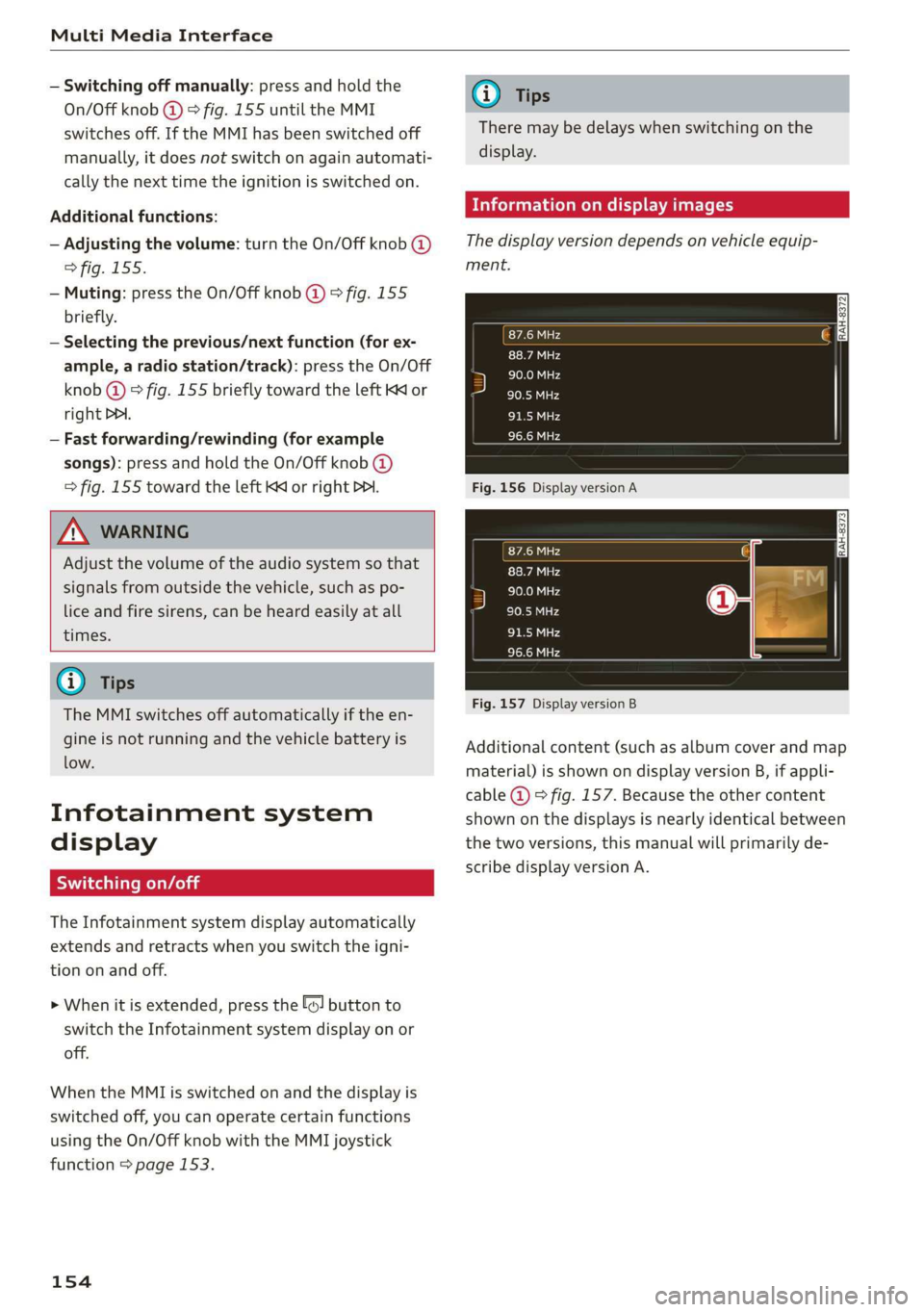
Thedisplayversiondependsonvehicleequip-
ment.
Fig.156DisplayversionA
Fig.157DisplayversionB
Additionalcontent(suchasalbumcoverandmap
material)isshownondisplayversionB,ifappli-
cable@)©fig.157.Becausetheothercontent
shownonthedisplaysisnearlyidenticalbetween
thetwoversions,thismanualwillprimarilyde-
scribedisplayversionA.
Page 157 of 394
4M0012721BG
MultiMediaInterface
MMIoperation
Selectingandconfirmingafunction
8= x
fa
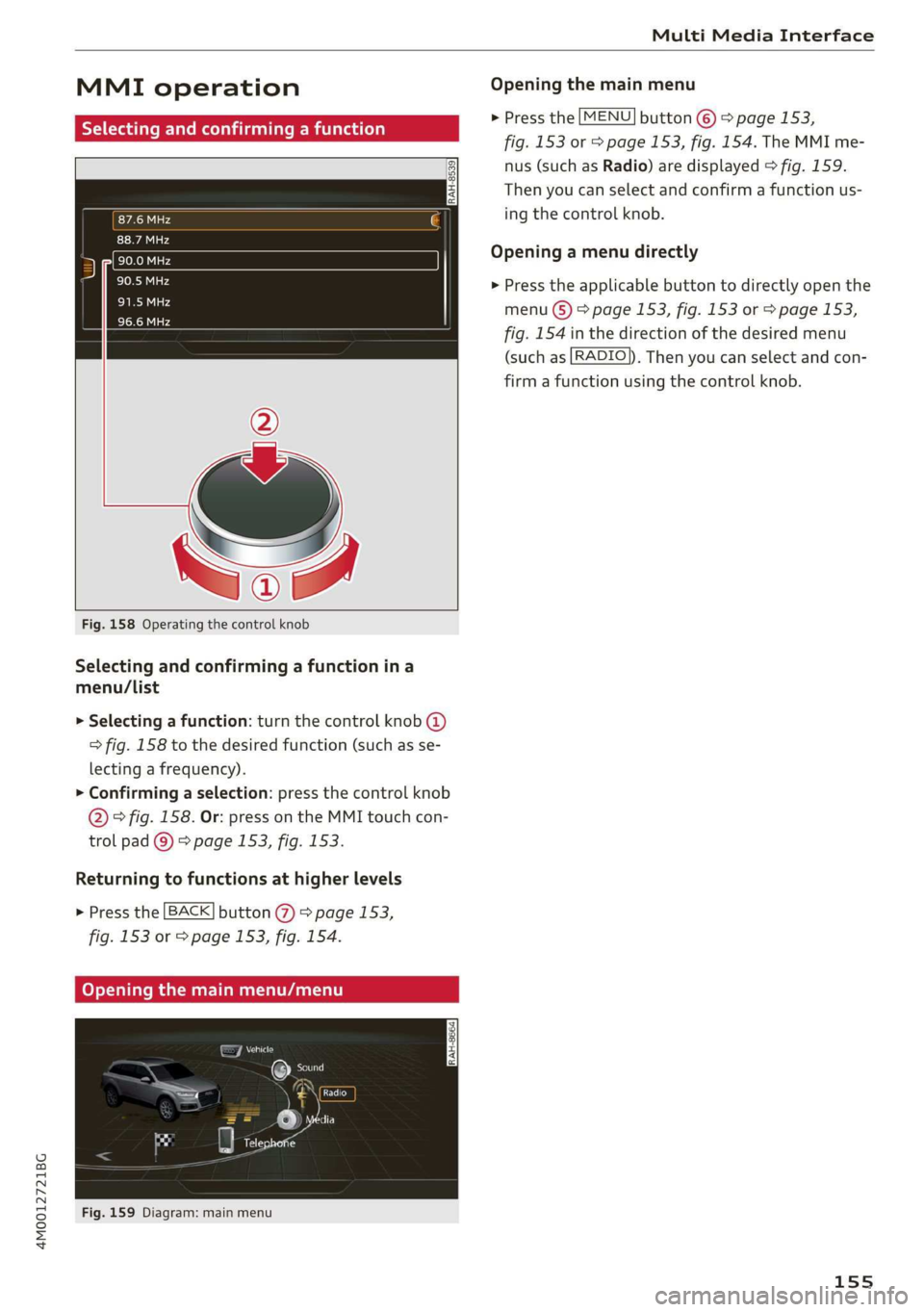
Fig.158Operatingthecontrolknob
Selectingandconfirmingafunctionina
menu/List
>Selectingafunction:turnthecontrolknob@)
>fig.158tothedesiredfunction(suchasse-
lectingafrequency).
>Confirmingaselection:pressthecontrolknob
@°fig.158.Or:pressontheMMItouchcon-
trolpad@)>page153,fig.153.
Returningtofunctionsathigherlevels
»Pressthe[BACK]button@)>page153,
fig.153or>page153,fig.154.
CoveymaaAnaale)
feyAa
Fig.159Diagram:mainmenu
Openingthemainmenu
>Pressthe[MENU]button©>page153,
fig.153or>page153,fig.154.TheMMIme-
nus(suchasRadio)aredisplayed>fig.159.
Thenyoucanselectandconfirmafunctionus-
ing
thecontrolknob.
Openingamenudirectly
>Presstheapplicablebuttontodirectlyopenthe
menu()>page153,fig.153or>page153,
fig.154inthedirectionofthedesiredmenu
(suchas[RADIO]).Thenyoucanselectandcon-
firmafunctionusingthecontrolknob.
155
Page 158 of 394
MultiMediaInterface
Openingtheselectionmenu/optionsmenu
thecontrolbuttons
= z
||zrxG3
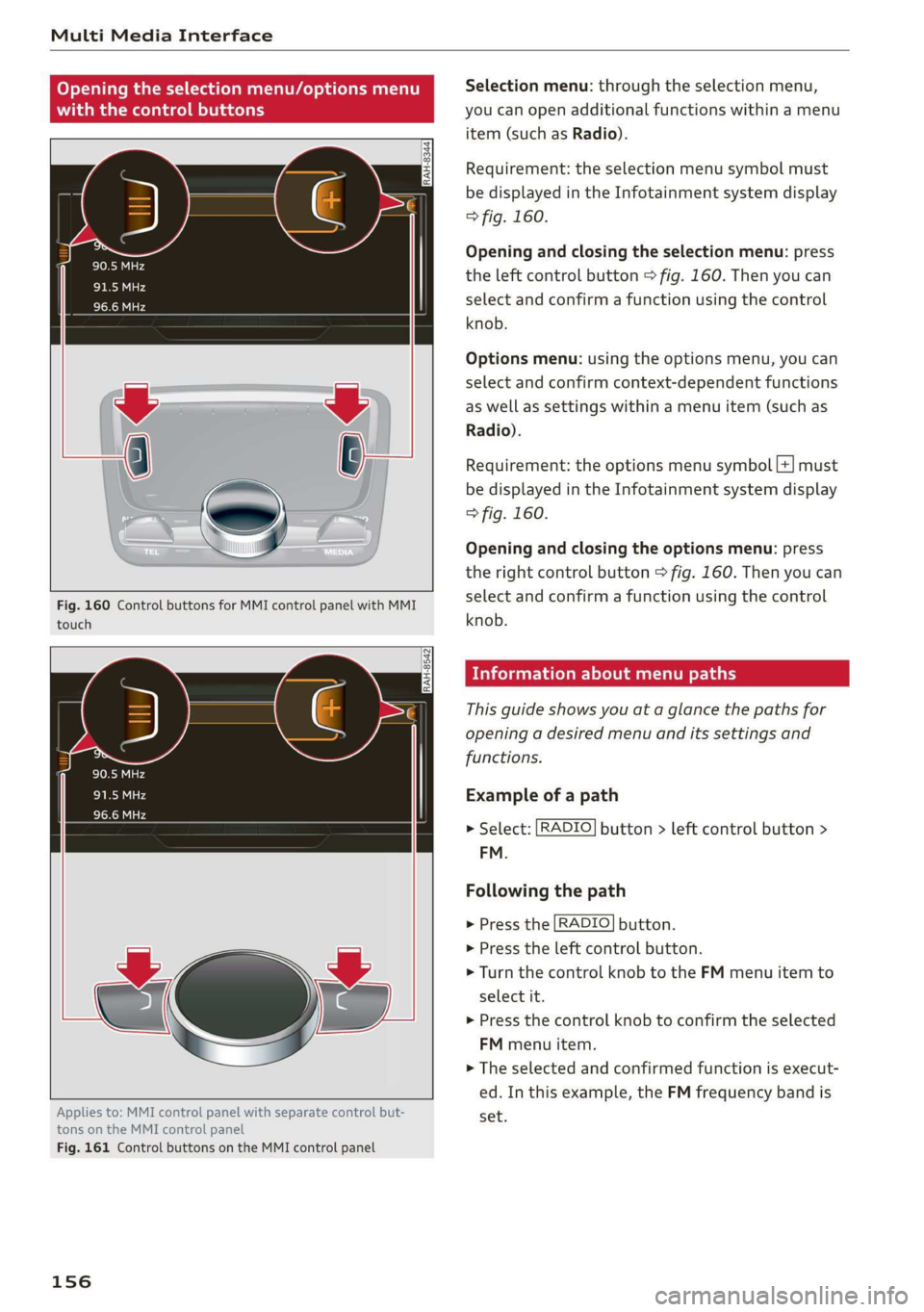
Fig.160ControlbuttonsforMMIcontrolpanelwithMMI
touch
RAH-8542
Appliesto:MMIcontrolpanelwithseparatecontrolbut-
tonsontheMMIcontrolpanel
Fig.161ControlbuttonsontheMMIcontrolpanel
156
Selectionmenu:throughtheselectionmenu,
youcanopenadditionalfunctionswithinamenu
item(suchasRadio).
Requirement:theselectionmenusymbolmust
bedisplayedintheInfotainmentsystemdisplay
>fig.160.
Openingandclosingtheselectionmenu:press
theleftcontrolbutton>fig.160.Thenyoucan
selectandconfirmafunctionusingthecontrol
knob.
Optionsmenu:usingtheoptionsmenu,youcan
selectandconfirmcontext-dependentfunctions
aswellassettingswithinamenuitem(suchas
Radio).
Requirement:theoptionsmenusymbol[+]must
bedisplayedintheInfotainmentsystemdisplay
>fig.160.
Openingandclosingtheoptionsmenu:press
therightcontrolbutton>fig.160.Thenyoucan
selectandconfirmafunctionusingthecontrol
knob.
Meleeelak)Celieeerary
Thisguideshowsyouat aglancethepathsfor
openingadesiredmenuand itssettingsand
functions.
Exampleofapath
>Select:[RADIO]button>leftcontrolbutton>
FM.
Followingthepath
>Pressthe[RADIO]button.
>Presstheleftcontrolbutton.
>Turn thecontrolknobtotheFMmenuitemto
selectit.
>Pressthecontrolknobtoconfirmtheselected
FMmenuitem.
>Theselectedandconfirmedfunctionisexecut-
ed.In thisexample,theFMfrequencybandis
set.
Page 159 of 394
4M0012721BG
MultiMediaInterface
MMItouch
MMItouchcontrolpad
Appliesto:vehicleswithMMItouch
Youcanenterdatausinghandwritingrecogni-
tionontheMMItouchcontrolpad.
ie
®©-co=~Angeles,CA
:aly
5)trDowntown,LosAngeles,CA
cree
YT
\
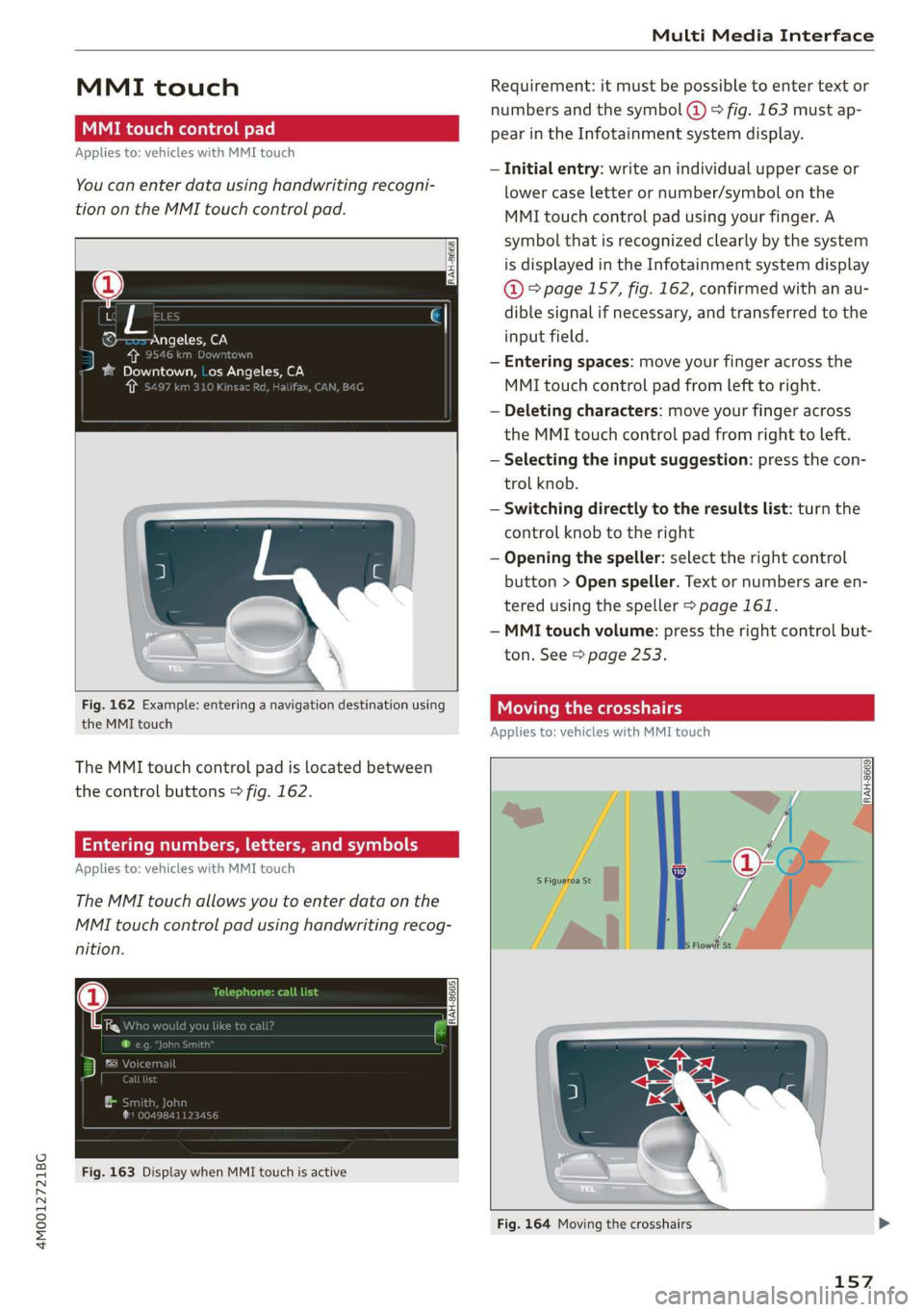
Fig.162Example:enteringanavigationdestinationusing
theMMItouch
TheMMItouchcontrolpadislocatedbetween
thecontrolbuttons>fig.162.
Enteringnumbers,letters,andsymbols
Appliesto:vehicleswithMMItouch
TheMMItouchallowsyoutoenterdataonthe
MMItouchcontrolpadusinghandwritingrecog-
nition.
Fig.163DisplaywhenMMItouchisactive
Requirement:itmustbepossible toentertext or
numbersandthesymbol(@>fig.163 mustap-
pearintheInfotainmentsystemdisplay.
—Initialentry:writeanindividualuppercaseor
lowercaseletterornumber/symbolonthe
MMItouchcontrolpadusingyourfinger.A
symbolthatisrecognizedclearlyby thesystem
isdisplayedintheInfotainmentsystemdisplay
@°page157,fig.162,confirmedwithanau-
diblesignalifnecessary,andtransferredtothe
inputfield.
—Enteringspaces:moveyourfingeracrossthe
MMItouchcontrolpadfromlefttoright.
—Deletingcharacters:moveyourfingeracross
theMMItouchcontrolpadfromrighttoleft.
—Selectingtheinputsuggestion:pressthecon-
trolknob.
—Switchingdirectlytotheresultslist:turnthe
controlknobtotheright
—Openingthespeller:selecttherightcontrol
button>Openspeller.Textornumbersare en-
tered usingthespeller>page161.
—MMItouchvolume:presstherightcontrolbut-
ton.See>page253.
Movingthecrosshairs
Appliesto:vehicleswithMMItouch
a
RAH-8669|
Fig.164Movingthecrosshairs
157
Page 160 of 394
MultiMediaInterface
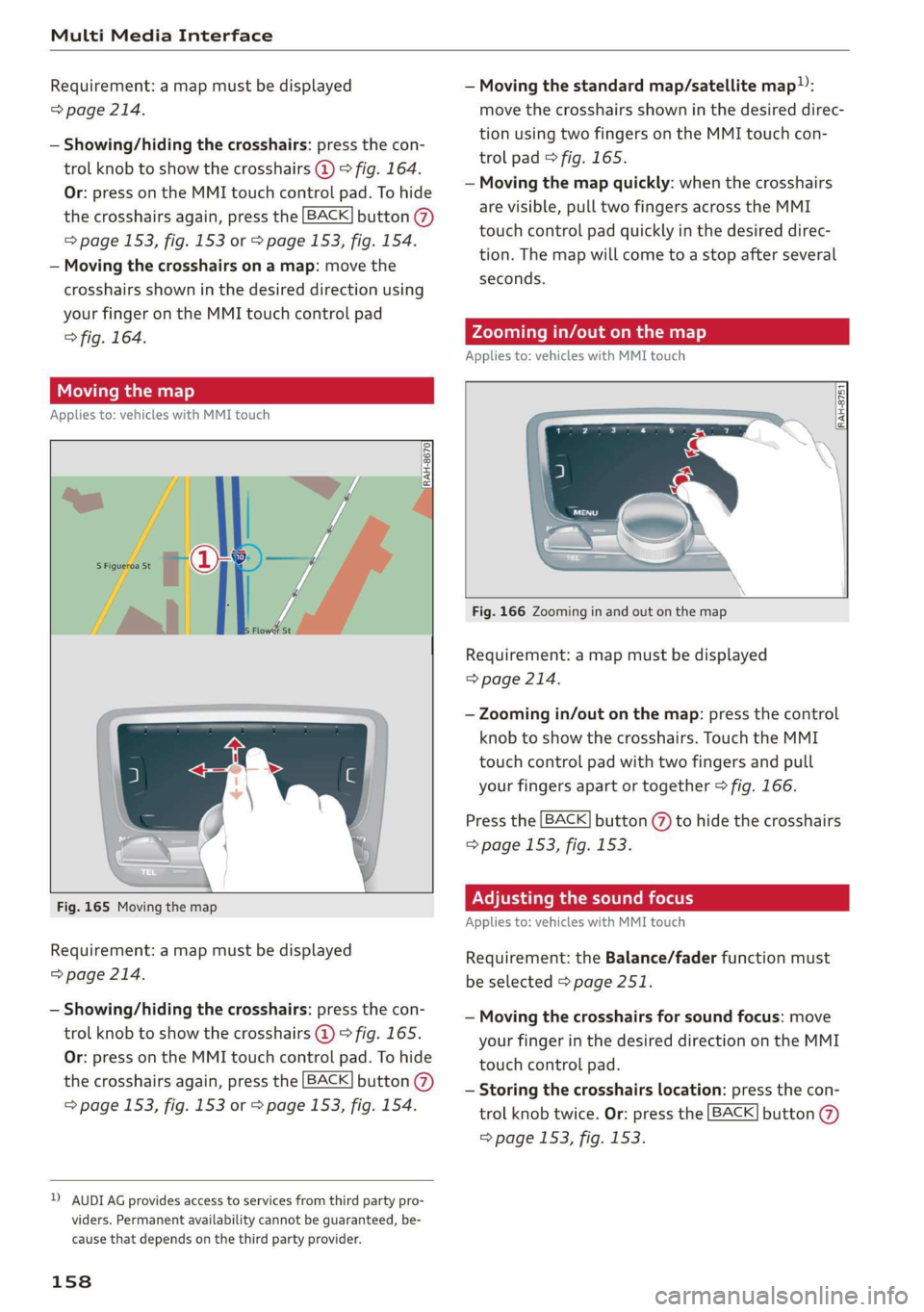
Requirement:amapmustbedisplayed—Movingthestandardmap/satellitemap):
>page214.movethecrosshairsshowninthedesireddirec-
tionusingtwofingersontheMMItouchcon-
trolpad©fig.165.
—Movingthemapquickly:whenthecrosshairs
arevisible,pulltwofingersacrosstheMMI
touchcontrolpadquicklyinthedesireddirec-
tion.Themapwill cometoastopafterseveral
seconds.
—Showing/hidingthecrosshairs:pressthecon-
trolknobtoshowthecrosshairs@)>fig.164.
Or:pressontheMMItouchcontrolpad.Tohide
thecrosshairsagain,pressthe[BACK]button@
=>page153,fig.153or>page153,fig.154.
—Movingthecrosshairsonamap:movethe
crosshairsshowninthedesireddirectionusing
yourfingerontheMMItouchcontrolpad
>fig.164.Zoomingin/outonthemap
Appliesto:vehicleswithMMItouch
Movingthemap
Appliesto:vehicleswithMMItouch
RAH-8751
S| S|
|=iz=
Fig.166Zoominginandoutonthemap
Requirement:amapmustbedisplayed
=>page214.
—Zoomingin/outonthemap:pressthecontrol
knobtoshowthecrosshairs.TouchtheMMI
touchcontrolpadwithtwofingersandpull
yourfingersapartortogether>fig.166.
Pressthe[BACK]button(%)tohidethecrosshairs
=>page153,fig.153.
Fig.165MovingthemapPNTema eelLaemcolder
Appliesto:vehicleswithMMItouch
Requirement:amapmustbedisplayed
=>page214.
Requirement:theBalance/faderfunctionmust
beselected>page251.
—Showing/hidingthecrosshairs:pressthecon-
trolknobtoshowthecrosshairs@)©fig.165.
Or:pressontheMMItouchcontrolpad.Tohide
thecrosshairsagain,pressthe[BACK]button@)
=>page153,fig.153or>page153,fig.154.
—Movingthecrosshairsforsoundfocus:move
yourfingerinthedesireddirectionontheMMI
touchcontrolpad.
—Storingthecrosshairslocation:pressthecon-
trolknobtwice.Or:pressthe[BACK]button
=>page153,fig.153.
DAUDIAGprovidesaccesstoservicesfromthirdpartypro-
viders.Permanentavailabilitycannotbeguaranteed,be-
causethatdependsonthethirdpartyprovider.
158
Page 161 of 394
4M0012721BG
MultiMediaInterface
UsingtheDVDmainmenu
Appliesto:vehicleswithMMItouch
Requirement:aDVDmustbeplaying
=>page235.TheDVDmainmenuisshown.
—Selectingamenuitem:moveyourfingerup/
downorleft/rightontheMMItouchcontrol
pad.
—Confirmingaselection:pressthecontrolknob.
Or:pressontheMMItouchcontrolpad.
Gi)Tips
Thevolumeofthevoiceguidancepromptsfor
theMMItouch*canbeadjustedseparately
=>page253.
Controlknobwith
joystickfunction
Operation
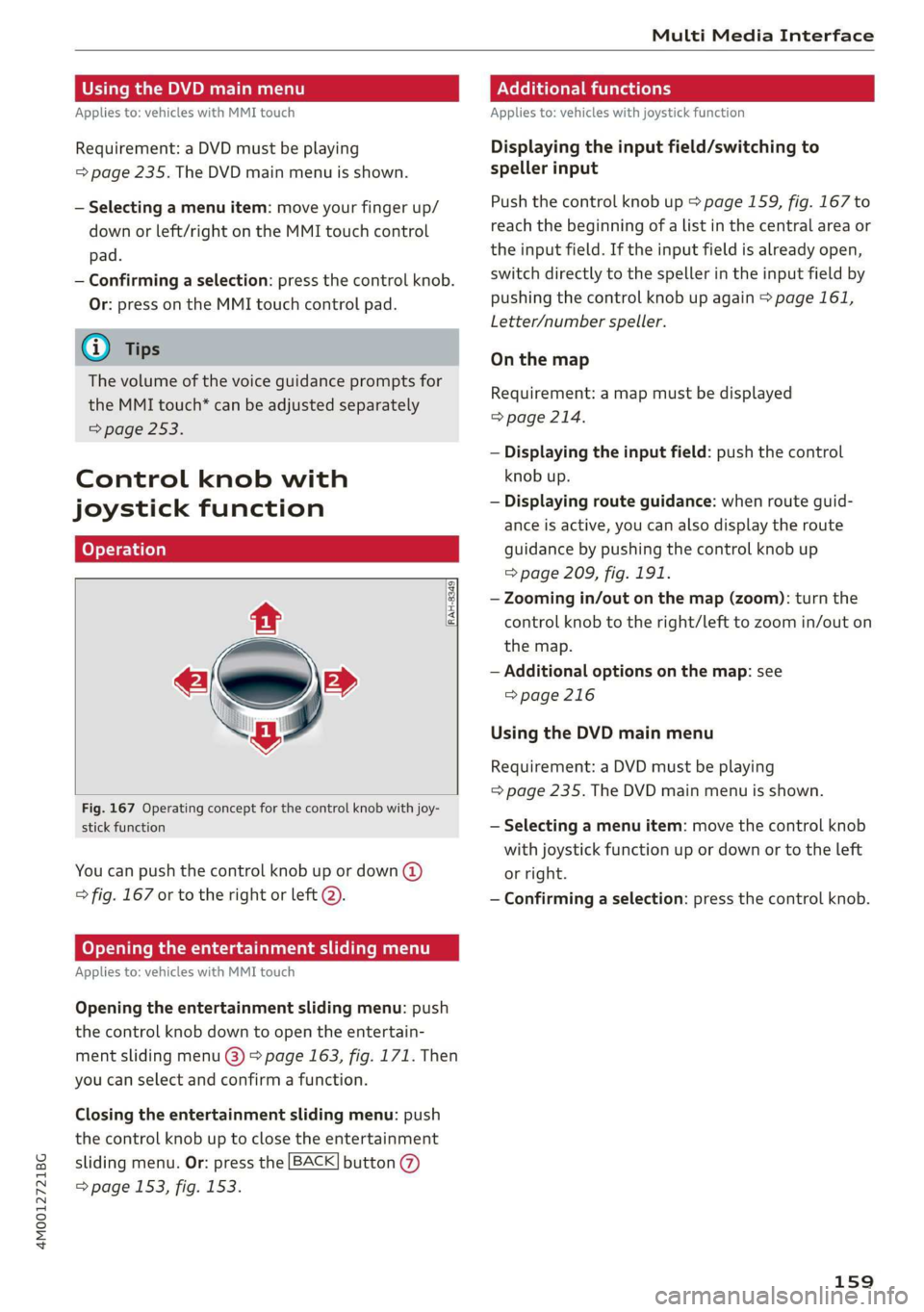
[RAH-8349
Fig.167Operatingconceptforthecontrolknobwithjoy-
stickfunction
Youcanpushthecontrolknobupordown(@)
>fig.167ortotherightorleft2).
Openingtheentertainmentslidingmenu
Appliesto:vehicleswithMMItouch
Openingtheentertainmentslidingmenu:push
thecontrolknobdowntoopentheentertain-
mentslidingmenu@)>page163,fig.171.Then
youcanselectandconfirmafunction.
Closingtheentertainmentslidingmenu:push
thecontrolknobuptoclosetheentertainment
slidingmenu.Or:pressthe[BACK]button(7)
=>page153,fig.153.
Additionalfunctions
Appliesto:vehicleswithjoystickfunction
Displayingtheinputfield/switchingto
spellerinput
Pushthecontrolknobup=page159,fig.167to
reachthe beginningofalistinthecentralareaor
theinputfield.Iftheinputfieldisalreadyopen,
switchdirectlytothespellerintheinputfieldby
pushingthecontrolknob upagain>page161,
Letter/numberspeller.
Onthemap
Requirement:amapmustbedisplayed
=>page214.
—Displayingtheinputfield:pushthecontrol
knobup.
—Displayingrouteguidance:whenrouteguid-
anceisactive,youcanalsodisplaytheroute
guidancebypushingthecontrolknob up
=>page209,fig.191.
—Zoomingin/outonthemap(zoom):turnthe
controlknobtotheright/lefttozoomin/outon
themap.
—Additionaloptionsonthemap:see
=>page216
UsingtheDVDmainmenu
Requirement:aDVDmustbeplaying
=>page235.TheDVDmainmenuisshown.
—Selectingamenuitem:movethecontrolknob
withjoystickfunctionupordownortotheleft
orright.
—Confirmingaselection:pressthecontrolknob.
159
Page 162 of 394
![AUDI Q7 2019 Owner´s Manual MultiMediaInterface
Openingtheselection/optionsmenuwith
thecontrolknob
Appliesto:vehicleswithjoystickfunction
ry 3]
3|eSxG3
Fig.168Openingtheselection/optionsmenuwiththe
controlknob
Requirement](/img/6/40283/w960_40283-161.png "AUDI Q7 2019 Owner´s Manual MultiMediaInterface
Openingtheselection/optionsmenuwith
thecontrolknob
Appliesto:vehicleswithjoystickfunction
ry 3]
3|eSxG3
Fig.168Openingtheselection/optionsmenuwiththe
controlknob
Requirement")
MultiMediaInterface
Openingtheselection/optionsmenuwith
thecontrolknob
Appliesto:vehicleswithjoystickfunction
ry 3]
3|eSxG3
Fig.168Openingtheselection/optionsmenuwiththe
controlknob
Requirement:theselectionmenusymbol3must
bedisplayedintheInfotainmentsystemdisplay
>fig.168.
Openingandclosingtheselectionmenu:push
thecontrolknobtotheleft>fig.168toopen
theselectionmenu.Thenyoucanselectandcon-
firm
afunctionusingthecontrolknob.
Pressthe[BACK]button(%)>page153,fig.153
toreturntothefunctiononelevelup.
Requirement:theoptionsmenusymbol[+]must
bedisplayedintheInfotainmentsystemdisplay
>fig.168.
160
Openingandclosingtheoptionsmenu:push
thecontrolknobtotheright>fig.168toopen
theoptionsmenu.Thenyoucanselectandcon-
firm
afunctionusingthecontrolknob.
Pressthe[BACK]button(7)>page153,fig.153
to returntothefunctiononelevelup.
Shortcutkeys
Frequentlyusedradiostationscanbestoredon
theshortcutkeys.
TheshortcutkeysareontheMMIcontrolpanel
>page153,fig.153or>page153,fig. 154.
Storingradiostations:turnthecontrolknobto
thedesiredradiostationinalist(forexample,a
radiostationintheFMstationlist).Pressand
holdthedesiredshortcutkeyforseveralseconds.
Theactiveradiostationwillbestoredonthe
shortcutkey.
Accessingaradiostation:presstheshortcutkey.
Displayingaradiostation:swipeyourfingerover
theshortcutkeys.
Deletingastoredradiostation:resetthe Short-
cut
keystothefactorydefaultsetting
=>page248.
(i)Tips
Itisnotpossibletoenternumbersusingthe
shortcutkeys.Usethenumberspeller
=page161orMMItouch*>page157to en-
ternumbers.
Page 163 of 394
4M0012721BG
MultiMediaInterface
Letter/numberspeller
Angeles,CA
4f
ftCreekGolfClub
ts,an
RAH-8666
597
=°
Creer)4
CTCEL
CTTaarte
Se)
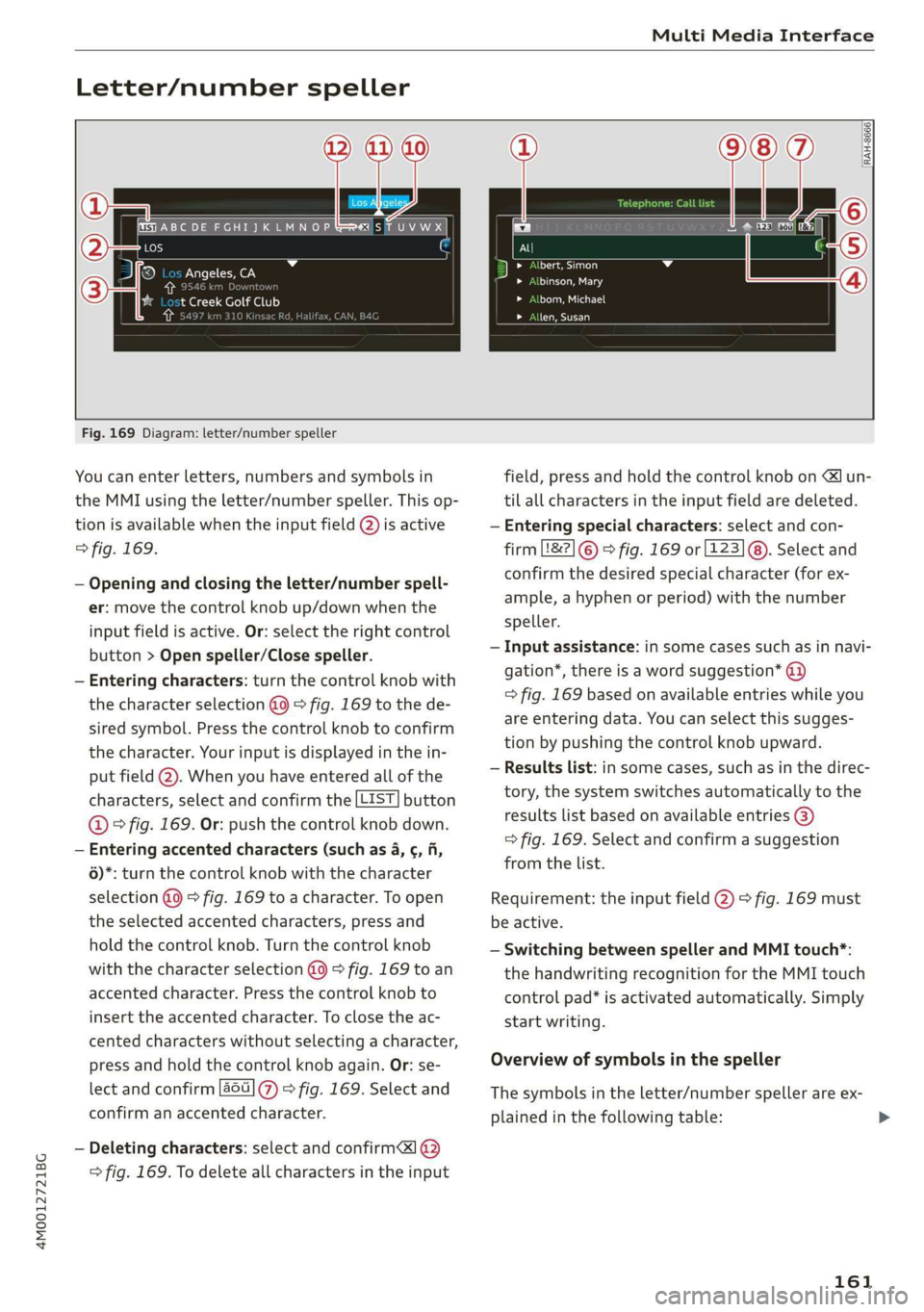
Fig.169Diagram:letter/numberspeller
Youcanenterletters,numbersandsymbolsin
theMMIusingtheletter/numberspeller.Thisop-
tionisavailablewhentheinputfield@)isactive
>fig.169.
—Openingandclosingtheletter/numberspell-
er:movethecontrolknobup/downwhenthe
inputfieldisactive.Or:selecttherightcontrol
button>Openspeller/Closespeller.
—Enteringcharacters:turnthecontrolknobwith
thecharacterselection@0>fig.169tothede-
siredsymbol.Pressthecontrolknobtoconfirm
the
character.Yourinputisdisplayedinthein-
putfield@).Whenyouhaveenteredallofthe
characters,selectandconfirmthe[LIST]button
@©fig.169.Or:pushthecontrolknobdown.
—Enteringaccentedcharacters(suchas4,¢,fi,
6)*:turnthecontrolknobwiththecharacter
selection@0>fig.169toacharacter.Toopen
theselectedaccentedcharacters,pressand
holdthecontrolknob.Turnthecontrolknob
withthecharacterselection@9>fig.169toan
accentedcharacter.Pressthecontrolknobto
inserttheaccentedcharacter.Toclosetheac-
centedcharacterswithoutselectingacharacter,
pressandholdthecontrolknobagain.Or:se-
lectandconfirm[a6](7%)>fig.169.Selectand
confirm anaccentedcharacter.
—Deletingcharacters:selectandconfirma]@
>fig.169.Todeleteallcharactersintheinput
field,pressandholdthecontrolknobon
—Enteringspecial characters:selectandcon-
firmL8&2]©©fig.169or[123]@). Selectand
confirmthedesiredspecialcharacter(forex-
ample,ahyphenorperiod)withthenumber
speller.
—Inputassistance:insomecasessuchasinnavi-
gation*,thereisawordsuggestion*@)
=>fig.169basedonavailableentrieswhileyou
areenteringdata.Youcanselectthissugges-
tionbypushingthecontrolknobupward.
—Resultslist:insomecases,suchasinthedirec-
tory,thesystemswitchesautomaticallytothe
resultslistbasedonavailableentries@)
>fig.169.Selectandconfirmasuggestion
fromthelist.
Requirement:theinputfield@)>fig.169must
beactive.
—SwitchingbetweenspellerandMMItouch*:
thehandwritingrecognitionfortheMMItouch
controlpad*isactivatedautomatically.Simply
startwriting.
Overviewofsymbolsinthespeller
Thesymbolsintheletter/numberspellerareex-
plainedinthefollowingtable:
161
>
Page 164 of 394
![AUDI Q7 2019 Owner´s Manual MultiMediaInterface
Symbol/DescriptionDescription
@LIST]or[xSwitchestotheresultslist.
@InputfieldDisplaysthecurrentinput.
Displistwithihl-®Resultslist](/img/6/40283/w960_40283-163.png "AUDI Q7 2019 Owner´s Manual MultiMediaInterface
Symbol/DescriptionDescription
@LIST]or[xSwitchestotheresultslist.
@InputfieldDisplaysthecurrentinput.
Displistwithihl-®Resultslist")
MultiMediaInterface
Symbol/DescriptionDescription
@LIST]or[xSwitchestotheresultslist.
@InputfieldDisplaysthecurrentinput.
Displistwithihl-®Resultslistisplaysalistwithsuggestionsbasedonthelettersalreadyen
tered.
@Switchesfromlowercasetouppercaselettersorfromuppercaseto
tlowercaseletters.
©Opensadditionalspelleroptions,forexampleClosespellerand
GClearinputfield
©18?Charactersetsandspecialcharacters
@aotDisplaysaccentedcharacters(suchas4,¢,ff,6).
TSS)ABESwitchesfromlettertonumberinputorfromnumbertoletterin-
put.
Addsaspaceintheinputfield.
—
CharacterselectionHighlightstheselectedcharacter.
®
|
©
|O|
©
AInsertsthesuggestedword*whenyoupushthecontrolknobup.
>Select:[MENU]button>desiredmenuitem
(suchasTelephone).
>Keepturningthecontrolknobtotheleftuntil
thefreetextsearchinputfield@>fig.170
appears.Or:pushthecontrolknob uptoopen
theinputfield@.
Accentedcharactersarenotavailableforev-
eryletter.
Freetextsearch
Appliesto:vehicleswithfree textsearch
Usingthefreetextsearch,youcanselecttheor-
derthatthesearchtermsareenteredinthein-
putfield.
ThehandwritingrecognitionfortheMMItouch
controlpad*isautomaticallyactivated.Simply
startwriting.
aFreetextsearchforanentry
Na
;>Enteroneormoresearchtermsinanyorderin-Laat)eels);; ._.
PREMVEtGtotheinputfield.Theindividualsearchterms
PMMAmustbeseparatedby spaceswhenentering.
SeeT)
Aninputsuggestiontocompletetheentry*@)
=>fig.170isshowndependingontheinput.Ad-
ditionalentriesthatcontaintheenteredsearch
termsarelistedIntheresultslist@)>fig.170.
ea
Fig.170Example:freetextsearchontelephone
FreetextsearchisavailableintheVehicle*,Ra-
dio*,Media*,Telephone*,Navigation*andAudi
connect*menus.
Ifthedesiredtermisstillnotdisplayed,enter
additionallettersuntilitisdisplayed.
Itisoftenenoughjusttoenterthefirstlettersof
thesearchterminorderforittodisplayinthe>
162
Page 167 of 394
4M0012721BG
Multifunctionsteeringwheel
Multifunctionsteering
wheel
Introduction
Appliesto:vehicleswith multifunctionsteeringwheel
Inthedriverinformationsystemdisplay,youcan
controlnumerousInfotainmentsystemfunctions
usingthemultifunctionsteeringwheel*
=>page16.
Youcancontrol additionalInfotainmentfunc-
tionsusingtheMMIcontrolpanel>page153in
theInfotainmentsystemdisplay.
Z\WARNING
Directyourfullattentiontodriving.Asthe
driver,youhavecompleteresponsibilityfor
safetyintraffic.Only usethefunctionsinsuch
awaythatyoualwaysmaintaincompletecon-
troloveryourvehicleinalltrafficsituations.
Radio
Appliesto:vehicleswith multifunctionsteeringwheelandra-
dio
>Pressthe[<>]buttononthemultifunction
steeringwheelrepeatedlyuntiltheRadio/
Mediatabisdisplayed.
>Presstheleftcontrolbutton>page17.
Dependingonvehicleequipment,thefollowing
functions
maybeavailableinthedriverinforma-
tionsystem.
—Selectingthefrequencyband:selectandcon-
firmafrequencyband.
—Selectingastationfromthestationlist:select
andconfirmaradiostation.
—Selectingastationfromthepresetslist:select
andconfirmPresetsandthenaradiostation.
—Openingamediasource:selectandconfirmTo
media.
Additionalsettings
—Select:rightcontrolbutton>desiredentry.
See>page225.
@Tips
PayattentiontotheInfotainmentsystemdis-
playifnecessary.Dependingontheselected
function,itmaybenecessarytouse theMMI
controlpanel.
Media
Appliesto:vehicleswithmultifunctionsteeringwheeland
media
Requirement:amediadrivemustcontainaudio/
videofiles>page228andtheradio/mediatab
mustbedisplayed.
>Presstheleftcontrolbuttononthemultifunc-
tionsteeringwheel>page17.
Depending onvehicleequipment,thefollowing
functionsmaybeavailableinthedriverinforma-
tionsystem.
—Selectingamediasource:selectandconfirma
sourcesuchastheSDcard.
—Switchingtotheradio:selectandconfirm
Switchtoradio.
—Playinganaudio/videofile:selectandconfirm
afile.
—Pausing/resumingplayback:presstheright
thumbwheel@)>page18,fig.11.Toresume
playback,presstherightthumbwheelagain.
—Openingadditionaltrackinformation:select:
rightcontrolbutton>Show"NowPlaying"
screen.
Foradditionalinformation,see>page239.
@Tips
—Alwaysfollowtheinformationfoundin
>page227.
—Pleasenotethatwithinamediasourcein
thedriverinformationsystem,onlyplaylists
thatwereselectedthroughtheMMIcontrol
panelcanbeplayed=page236.
—PayattentiontotheInfotainmentsystem
displayifnecessary.Dependingonthese-
lectedfunction,itmaybenecessarytouse
the
MMIcontrolpanel.
165