button AUDI Q7 2019 Owner´s Manual
[x] Cancel search | Manufacturer: AUDI, Model Year: 2019, Model line: Q7, Model: AUDI Q7 2019Pages: 394, PDF Size: 105.97 MB
Page 111 of 394

4M0012721BG
Assistsystems
Distancedisplayanddistancewarning
Appliesto:vehicleswithAudiadaptivecruisecontrol
Thisfunctionmeasuresthetimebetweentheve-
hicle
drivingaheadandshowsthisintheinstru-
mentclusterdisplay.
Fig.108Instrumentcluster:distanceindicator/warning
Description
Atspeedsaboveapproximately40mph(65
km/h),thisfunctionmeasuresthedistancetothe
vehicleaheadastime.
>Switchtheadaptivecruisecontroldisplayonin
theinstrumentclusterdisplay>page16.
TheBaindicatorlightturnsonifyoufallbelow
thesetdistance.
Settingthewarningthreshold
Youcanset,changeordeletethewarningthresh-
oldintheInfotainmentsystem.
MENU >IntheInfotainmentsystem,select:
button>Vehicle>leftcontrolbutton>Driver
assistance>Distancewarning.
ZA\WARNING
—Readandfollowthewarningson>Ain
Generalinformationonpage102.
—Thedriverisalwaysresponsibleforadhering
totheregulationsapplicableinthe country
wherethevehicleisbeingoperated.
@)Tips
Youmayfallbelowhewarningthreshold
brieflywhenpassingorwhenquicklyap-
proachingaslowvehicle.Thereisnowarning
inthisscenario.Awarningisgivenonlyifyou
fallbelowthewarningthresholdforanex-
tendedperiodoftime.
Appliesto:vehicleswith Audiadaptivecruisecontrol
ACCwithtrafficjamassist:unavailable.See
owner'smanual
Thesystemcannotguaranteethatitwilldetect
vehiclescorrectlyandithasswitchedoff.Thera-
darsensorshaveshiftedor arefaulty.Drivetoan
authorizedAudidealerorauthorizedAudiService
Facilityimmediatelytohave themalfunctioncor-
rected.
ACCwithtrafficjamassist:currentlyun-
available.Seeowner'smanual
Thismessageappearsiftheadaptivecruisecon-
trolcannotbeactivated,forexampleifthehood
isopen.
ACCw.trafficjamassist:currentlyunavaila-
ble.Sensorvisionrestrictedduetosurround-
ings.Seeowner'smanual
Thismessageappearsiftheradarsensorviewis
obstructed,forexamplebyleaves,snow,heavy
sprayordirt.Cleanthesensors>page102,
fig.96.
ACCwithtrafficjamassist:currentlyun-
available.Gradetoosteep
Theroadexceedsthemaximumpossiblegrade
forsafeoperation.Thesystemscannotbeswitch-
edon.
ACCwithtrafficjamassist:onlyavailablein
D,SorM
Selectthe"D/S"or"M" selectorleverposition.
ACCwithtrafficjamassist:currentlyun-
available.Parkingbrakeapplied
Thesystemsswitchoffifyousettheparking
brake.Thesystemsareavailableagainafteryou
releasetheparkingbrake.
ACCwithtrafficjamassist:currentlyun-
available.Stabilizationcontrol(ESC)input
109
>
Page 117 of 394
4M0012721BG
Assistsystems
@)Tips
—Youcancancelthesystembrakinginterven-
tionifyouaccelerateconsiderablyorswerve
away.
— Keepinmindthatpresensecitycanbrake
unexpectedly.Alwayssecureanycargoor
objects
thatyouaretransportingtoreduce
theriskofdamageorinjury.
—Specificpresensecityfunctionsswitchoff
whentheESCislimitedorswitchedoff
=page147orthehilldescentassistis
switchedon>page148.
—Whenthereisamalfunctioninthecamera,
thepresensecityfunctionsalsoswitchoff.
SettingsintheInfotainmentsystem
Appliesto:vehicleswithAudipresense
MENU >SelectintheInfotainmentsystem:but-
ton>Vehicle> leftcontrolbutton>Driveras-
sistance>Audipre sense.
Turnon/offAudipresense-thepresensefunc-
tionscanbe turnedonandoff.
Ifthesystemisswitchedoff,itswitchesonagain
automaticallyoncetheignitionisswitchedon
again.
Prewarning-theearlywarningcan be switched
offorthepresensecity/frontwarningpointcan
beset(Early/Medium/Late).
Setthewarningtimefortheearlywarningto
Earlyatfirst.Ifthiscausesundesiredearlywarn-
ingstoappear,thensetthewarningtimetoMe-
dium. TheLatewarningtimeshouldonlybeset
inspecialcircumstances.
@)Tips
Yoursettings areautomaticallystoredandas-
signedtothevehiclekeybeingused.
Appliesto:vehicleswithAudipresense
Biaudipresense:malfunction!Pleasecontact
Service
Thismessageappearswhenthepresensefunc-
tionisaffected.Forexample,thiscouldbe
causedbyafaultysensor.Drivetoanauthorized
AudidealerorauthorizedAudiServiceFacilityim-
mediatelytohavethemalfunctioncorrected.
Audipresense:currentlylimited.Sensor
viewlimitedduetosurroundings.Seeowner's
manual
Thismessageappearsiftheradarsensorand
cameraviewisobstructed,forexamplebyleaves,
snow,heavysprayordirt.Ifnecessary, cleanthe
sensorsandtheareaaroundthecamera
=page102,fig.96or>page120,fig.116.
Audipresense:currentlylimited.Trailer
towingmode
Forvehicleswithatrailerhitchinstalledatthe
factory,thepresenserearfunctionsswitchoff
whentheelectricalconnectoratthesocketis
pluggedin.Thereisnoguaranteethefunctions
willswitchoffwhenusingaretrofittedtrailer
hitch.
Audipresense:currentlyrestricted
ThismessageappearsiftheESCisrestrictedor
switchedoff,forexample.
Audipresense:currentlylimited.Seeown-
er'smanual
Thismessageappearswhenthereisatemporary
failureinasubsystem,suchastheESC.Ifthis
messageappearsrepeatedly,drivetoanauthor-
izedAudidealerorauthorizedAudiServiceFacili-
tytohave themalfunctioncorrected.
Audipresense:emergencybrakingsystem
off
Thismessageappearsifthepresensefunctions
areswitchedoffthroughtheInfotainmentsys-
temorifthesystemisnotready.
Audiactivelaneassist
Appliesto:vehicleswithAudiactivelaneassist
Activelaneassist(lanedeparturewarning)de-
tectslane markerlineswithinthelimitsofthe
systemusingacamerainthewindshield.Ifyou
areapproachingadetectedlanemarkerlineand
itappearslikelythatyouwillleavethelane,the
115
>
Page 119 of 394
4M0012721BG
Assistsystems
Switchingonandoff
Appliesto:vehicleswithAudiactivelaneassist
B8V-0692
Fig.110Turnsignallever:buttonforactivelaneassist
a
B4M-0090
Fig.111Windshield:camerawindowforactivelaneassist
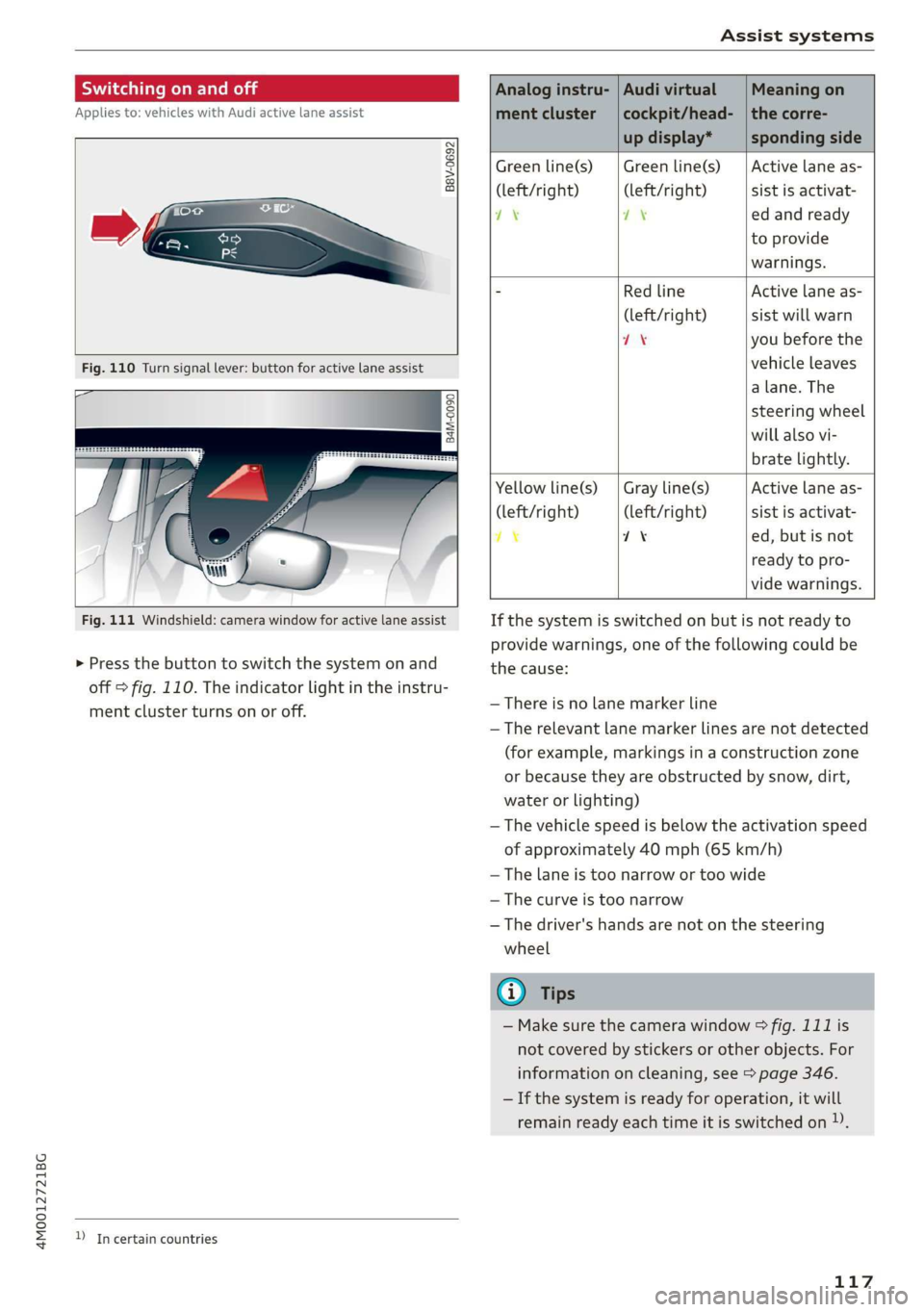
>Pressthebuttontoswitchthesystemonand
off=fig.110.Theindicatorlightintheinstru-
mentclusterturnsonoroff.
DIncertaincountries
Analoginstru-|AudivirtualMeaningon
mentcluster|cockpit/head-|thecorre-
updisplay*spondingside
Greenline(s)|Greenline(s)|Activelaneas-
(left/right) (left/right)sistisactivat-
7\oyedandready
toprovide
warnings.
-RedlineActivelaneas-
(left/right)sistwillwarn
if8youbeforethe
vehicleleaves
a lane.The
steeringwheel
willalsovi-
bratelightly.
Yellowline(s)
(left/right)
7%
Grayline(s)
(left/right)
1%
Activelaneas-
sistisactivat-
ed,butisnot
readytopro-
videwarnings.
Ifthesystemisswitchedonbutisnotreadyto
providewarnings,oneofthefollowingcouldbe
thecause:
—Thereisnolane markerline
—Therelevantlanemarkerlinesarenotdetected
(forexample,markingsinaconstructionzone
orbecausetheyareobstructedbysnow,dirt,
waterorlighting)
—Thevehiclespeedisbelowtheactivationspeed
ofapproximately40mph(65km/h)
—Thelaneistoonarrowortoowide
—Thecurveistoonarrow
—Thedriver'shandsarenotonthesteering
wheel
@)Tips
— Makesurethecamerawindow°&fig.111is
notcoveredbystickersorotherobjects.For
informationoncleaning,see>page346.
—Ifthesystemisreadyforoperation,itwill
remainreadyeachtimeitisswitchedon)).
117
Page 120 of 394
Assistsystems
Displayintheinstrumentcluster
Appliesto:vehicleswithAudiactivelaneassist
Pee
wmaq 9
=+a
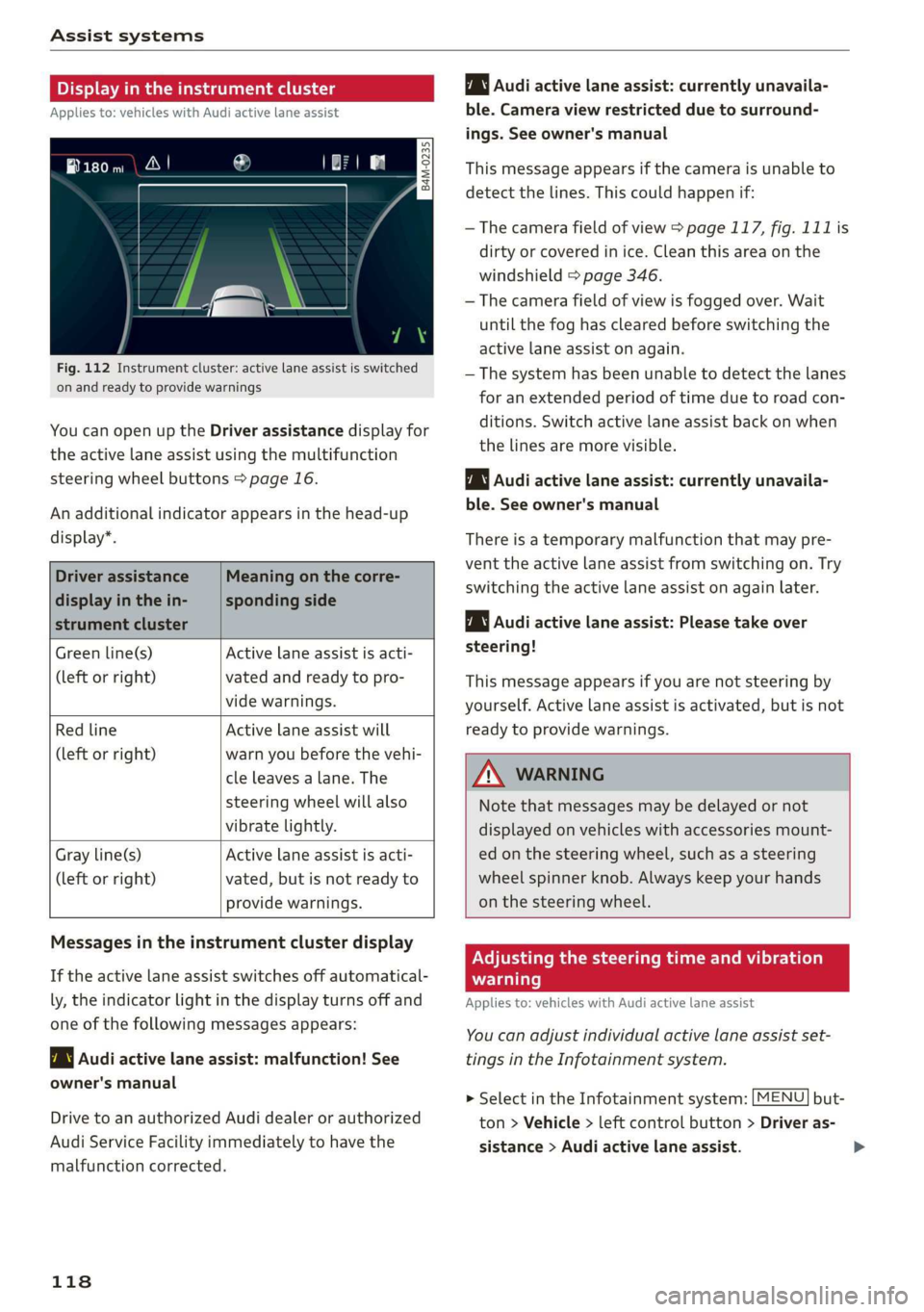
Fig.112Instrumentcluster:activelaneassistisswitched
onandreadytoprovidewarnings
YoucanopenuptheDriverassistancedisplayfor
theactivelaneassistusingthemultifunction
steeringwheelbuttons>page16.
Anadditionalindicatorappearsinthehead-up
display”.
Driverassistance
displayinthein-
strumentcluster
Meaningonthecorre-
spondingside
Greenline(s)Activelaneassistisacti-
(leftorright)vatedandreadytopro-
videwarnings.
RedlineActivelaneassistwill
(leftorright)warnyoubeforethevehi-
cleleavesa lane.The
steeringwheelwillalso
vibratelightly.
Activelaneassistisacti-
vated,butisnotreadyto
providewarnings.
Grayline(s)
(leftorright)
Audiactivelaneassist:currentlyunavaila-
ble.Cameraviewrestrictedduetosurround-
ings.Seeowner'smanual
Thismessageappearsifthecameraisunableto
detectthelines.Thiscouldhappenif:
—Thecamerafieldofview>page117,fig.111is
dirtyorcoveredinice.Cleanthisareaonthe
windshield>page346.
—Thecamerafieldofviewisfoggedover.Wait
untilthe foghasclearedbeforeswitchingthe
activelaneassistonagain.
—Thesystemhasbeenunabletodetectthelanes
foranextendedperiodoftimeduetoroad con-
ditions.Switchactivelaneassistbackonwhen
thelinesaremorevisible.
Audiactivelaneassist:currentlyunavaila-
ble.Seeowner'smanual
Thereisatemporarymalfunctionthatmaypre-
vent theactivelaneassistfromswitchingon. Try
switchingtheactivelaneassistonagainlater.
Audiactivelaneassist:Pleasetake over
steering!
Thismessageappearsifyouarenotsteeringby
yourself.Activelaneassistisactivated,butisnot
readytoprovidewarnings.
ZAWARNING
Notethatmessagesmaybedelayedornot
displayedonvehicleswithaccessoriesmount-
edonthesteeringwheel,suchasasteering
wheelspinnerknob.Alwayskeep yourhands
onthesteeringwheel.
Messagesintheinstrumentclusterdisplay
Iftheactivelaneassistswitchesoffautomatical-
ly,theindicatorlightinthedisplayturnsoffand
oneofthefollowingmessagesappears:
7\|Audiactivelaneassist:malfunction!See
owner'smanual
DrivetoanauthorizedAudidealerorauthorized
AudiServiceFacilityimmediatelytohavethe
malfunctioncorrected.
118
Adjustingthesteeringtimeandvibration
warning
Appliesto:vehicleswithAudiactivelaneassist
Youcanadjustindividualactivelaneassistset-
tingsintheInfotainmentsystem.
MENU]but- >SelectintheInfotainmentsystem:
ton>Vehicle> leftcontrolbutton>Driveras-
sistance>Audiactivelaneassist.
Page 123 of 394
Assistsystems
AWARNINGSwitchingonandoff
Appliesto:vehicleswithAudisideassist
—Alwayspayattentiontotrafficandtothe
areaaroundyourvehicle.SideassistcannotThesystemcanbe switchedon/offintheInfo-
replaceadriver'sattention.Thedriveralonetainmentsystem.
isalwaysresponsibleforlanechangesand
similardrivingmaneuvers.
>SelectintheInfotainmentsystem:[MENU]but-
ton>Vehicle>leftcontrolbutton>Driveras-
sistance>Audisideassist.Offswitchesthe
—Insomesituations,thesystemmaynot
functionoritsfunctionmaybelimited.Forsystemoff.
example:
—IfvehiclesareapproachingorbeingleftIfthesystemisactivated,thedisplaysintheex-
behindveryquickly.Thedisplaymaynotteriormirrorswillturnonbrieflywhentheigni-
turnonintime.tionisswitchedon.
—Inpoorweatherconditionssuchasheavy)
rain,snoworheavymist.@Tips
—Onverywidelanes,intightcurves,orifWhenyouswitchsideassistonoroff,theexit
thereisariseintheroadsurface.Vehicleswarningsystemactivatesordeactivates
intheadjacentlanemaynot be detected=>page122.
becausetheyareoutsideofthesensor
range.Settingthedisplaybrightness
4M0012721BG
Appliesto:vehicleswith Audisideassist
@)Note
ThedisplaybrightnesscanbeadjustedintheIn-
Thesensorscanbedisplacedbyimpactsorfotainmentsystem.
damagetothebumper,wheelhousingand
underbody.Thiscanimpair thesystem.Have»SelectintheInfotainmentsystem:[MENU]but-
anauthorizedAudidealerorauthorizedAuditon>Vehicle>leftcontrolbutton>Driveras-
ServiceFacilitychecktheirfunction.sistance>Audisideassist.
@)TipsThedisplaybrightnessadjustsautomaticallyto
thebrightness ofthesurroundings,bothinthe
informationandinthewarningstage.Invery
darkorverybrightsurroundings,theautomatic
adjustmentwillsetthedisplay totheminimum
ormaximumlevel.Insuchcases,youmaynotice
nochangewhenadjustingthebrightness, orthe
changemayonlybenoticeableoncethesur-
roundingschange.
—Thesesystemsarenotavailableintrailer
towingmode.Thereisnoguaranteethesys-
temswillswitchoffwhenusingaretrofitted
trailerhitch.Donot use thesefunctions
whentowingatrailer.
—Ifthewindowglassinthedriver'sdooror
front
passenger'sdoorhasbeentinted,the
displayintheexteriormirrormaybeincor-
aes.Adjustthebrightnesstoalevelwherethedisplay
—Foranexplanationonconformitywiththeintheinformationstagewillnotdisruptyour
FCCregulationsintheUnitedStatesandtheviewahead.Ifyouchangethebrightness,thedis-
IndustryCanadaregulations,seeplayintheexteriormirrorwillbrieflyshowthe
>page373.brightnesslevelintheinformationstage.The
brightnessofthewarningstageislinkedtothe
brightnessintheinformationstageandisadjust-
edalongwiththeinformationstage.>
121
Page 127 of 394
4M0012721BG
Assistsystems
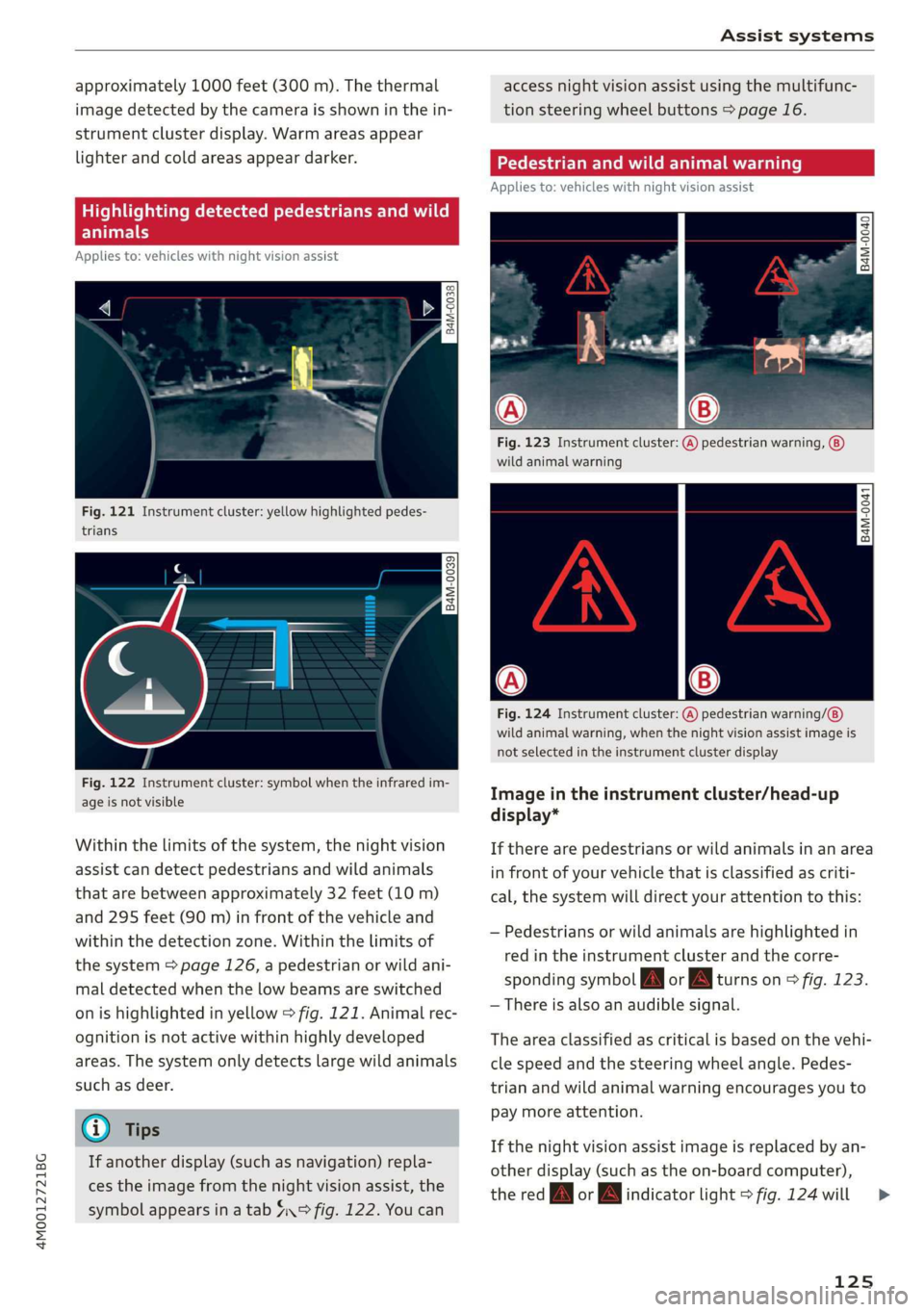
approximately1000feet(300m).Thethermal
imagedetectedbythecameraisshowninthein-
strumentclusterdisplay.Warmareasappear
lighterandcoldareasappeardarker.
Appliesto:vehicleswithnightvision assist
Fig.121Instrumentcluster:yellowhighlightedpedes-
trians
B4M-0039
Fig.122Instrumentcluster:symbolwhentheinfraredim-
ageisnotvisible
Withinthelimitsofthesystem,thenightvision
assistcandetectpedestriansandwildanimals
thatarebetweenapproximately32feet(10m)
and295feet(90m)infront ofthevehicleand
withinthedetectionzone.Withinthelimitsof
thesystem=>page126,apedestrianorwildani-
maldetectedwhenthelowbeamsareswitched
onishighlightedinyellow>fig.121.Animalrec-
ognitionisnotactivewithinhighlydeveloped
areas.Thesystemonlydetectslargewildanimals
suchasdeer.
@)Tips
Ifanotherdisplay(suchasnavigation)repla-
cestheimagefromthenightvisionassist,the
symbolappearsinatab4°fig.122.Youcan
accessnightvision assistusingthemultifunc-
tionsteeringwheelbuttons>page16.
Appliesto:vehicleswithnightvision assist
Fig.123Instrumentcluster:(A)pedestrianwarning,
wildanimalwarning
B4M-0041
Fig.124Instrumentcluster:
wildanimalwarning,whenthenightvisionassistimageis
notselectedintheinstrumentclusterdisplay
pedestrianwarning/
Imageintheinstrumentcluster/head-up
display*
Iftherearepedestriansorwildanimalsinanarea
infront ofyourvehiclethatisclassifiedascriti-
cal,thesystemwilldirectyourattentiontothis:
—Pedestriansor wildanimalsarehighlightedin
redintheinstrumentclusterandthecorre-
spondingsymbolJMorBMturnson>fig.123.
—Thereisalsoanaudiblesignal.
Theareaclassifiedascriticalisbasedonthevehi-
clespeedandthesteeringwheelangle.Pedes-
trianandwildanimalwarningencouragesyouto
paymoreattention.
Ifthenightvision assistimageisreplacedbyan-
otherdisplay(suchastheon-boardcomputer),
theredfayorindicatorlight>fig.124will
125
>
Page 129 of 394
4M0012721BG
Assistsystems
Switchingonandoff
Appliesto:vehicleswithnightvision assist
io+
Ss
2
=¥a
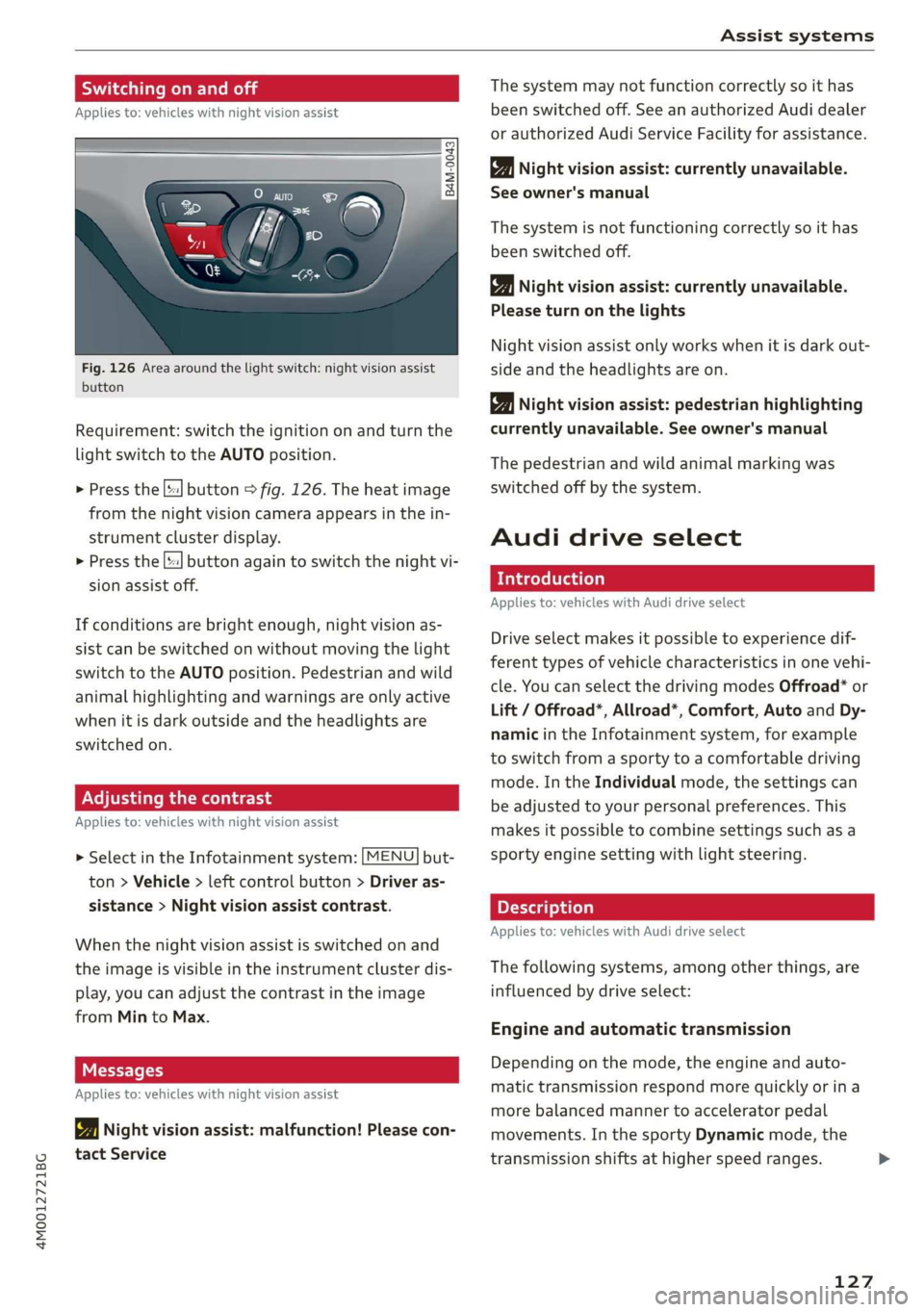
Fig.126Areaaroundthelightswitch:nightvision assist
button
Requirement:switchtheignitiononandturnthe
lightswitchtotheAUTOposition.
>Pressthe[|button>fig.126.Theheatimage
fromthenightvisioncameraappearsinthein-
strumentclusterdisplay.
>
Pressthe||buttonagaintoswitchthenightvi-
sionassistoff.
Ifconditionsare brightenough,nightvisionas-
sistcanbe switchedonwithoutmovingthelight
switchtotheAUTOposition.Pedestrianandwild
animalhighlightingandwarningsareonlyactive
whenitisdarkoutsideandtheheadlightsare
switchedon.
ONCmae9
Appliesto:vehicleswithnightvisionassist
>SelectintheInfotainmentsystem:[MENU]but-
ton>Vehicle> leftcontrolbutton>Driveras-
sistance>Nightvisionassistcontrast.
Whenthenightvisionassistisswitchedon and
theimageisvisibleintheinstrumentclusterdis-
play,youcanadjustthecontrastintheimage
fromMintoMax.
Messages
Appliesto:vehicleswithnightvisionassist
1Nightvisionassist:malfunction!Pleasecon-
tactService
Thesystemmaynotfunctioncorrectlysoithas
beenswitchedoff.SeeanauthorizedAudidealer
orauthorizedAudiServiceFacilityforassistance.
Nightvisionassist:currentlyunavailable.
Seeowner'smanual
Thesystemisnotfunctioningcorrectlysoithas
beenswitchedoff.
Nightvisionassist:currentlyunavailable.
Pleaseturnonthelights
Nightvision assistonlyworkswhenitisdarkout-
sideandtheheadlightsare on.
Nightvisionassist:pedestrianhighlighting
currentlyunavailable.Seeowner'smanual
Thepedestrianandwildanimalmarkingwas
switchedoffbythesystem.
Audidriveselect
Introduction
Appliesto:vehicleswithAudidriveselect
Driveselectmakesitpossibletoexperiencedif-
ferenttypesofvehiclecharacteristicsinonevehi-
cle.YoucanselectthedrivingmodesOffroad*or
Lift/Offroad*,Allroad*,Comfort,AutoandDy-
namicintheInfotainmentsystem,forexample
toswitchfromasportytoacomfortabledriving
mode.IntheIndividualmode,thesettingscan
beadjustedtoyourpersonalpreferences.This
makesitpossibletocombinesettingssuchasa
sportyenginesettingwithlightsteering.
Appliesto:vehicleswith Audidriveselect
Thefollowingsystems,amongotherthings,are
influencedbydriveselect:
Engineandautomatictransmission
Depending onthemode,theengineandauto-
matictransmissionrespondmorequicklyorina
morebalancedmannertoacceleratorpedal
movements.Inthe sportyDynamicmode,the
transmissionshiftsathigherspeedranges.
127
Page 131 of 394
4M0012721BG
Assistsystems
Youcanchangethedrivingmodewhenthevehi-
cleisstationaryorwhiledriving.Iftrafficper-
mits, afterchangingmodes, brieflyremoveyour
footfromtheacceleratorpedalsothatthere-
centlyselectedmodeisalsoactivatedfortheen-
gine.
Offroad*orLift/Offroad*-activatesoffroad
functionstosupportdrivingonroughterrain.The
engine,transmissionandsteeringadjustandthe
Start/Stopsystem*switchesoff.Appliestoair
suspension*:thevehiclealsoliftsforpassing
overobstaclestomaintainmaximumground
clearance.
Allroad*-onlyforairsuspension*:thevehicle
liftstomaintainhighergroundclearancefordif-
ficultstretchesofroad.
Comfort-providesacomfort-orientedvehicle
setupandissuitedforlongdrivesonhighways.
Auto-providesanoverallcomfortableyetdy-
namicdrivingfeelandissuitedforeverydayuse.
Dynamic-givesthedriverasportydrivingfeel
andissuited toasportydrivingstyle.
Individual->page129.
AdjustingtheIndividualmode
Appliesto:vehicleswithAudidriveselect
Youcanadjustthevehiclesettingstoyourpersonalpreferences.
>SelectintheInfotainmentsystem:[MENU]but-
ton>Vehicle>Audidrive select>Individual>
rightcontrolbutton.
Afteryouhaveclosedthesettings,youwillauto-
maticallydriveintheIndividualmode.
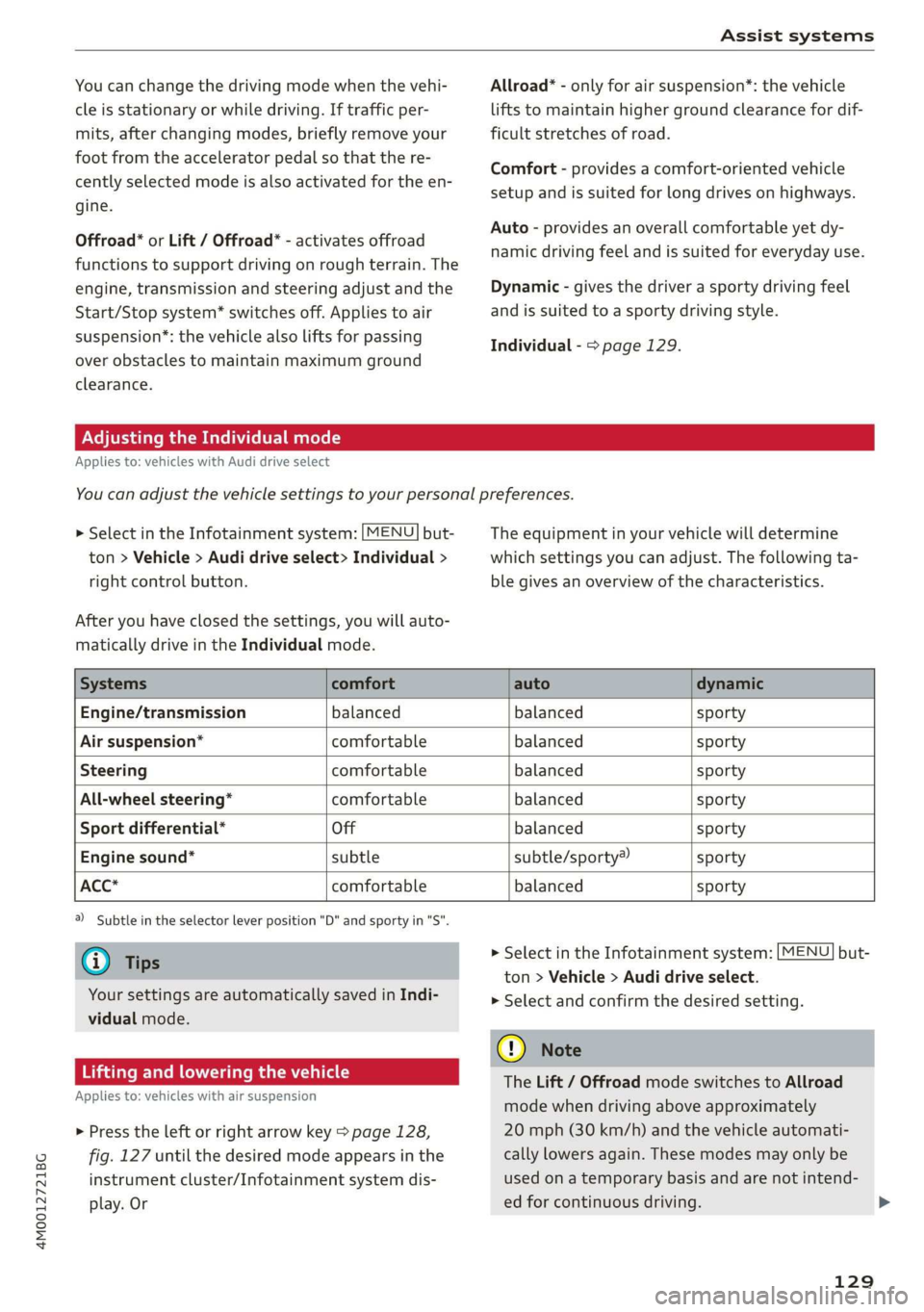
Theequipmentinyourvehiclewilldetermine
whichsettingsyoucanadjust.Thefollowingta-
blegivesanoverviewofthecharacteristics.
Systemscomfortautodynamic
Engine/transmissionbalancedbalancedsporty
Airsuspension*comfortablebalancedsporty
Steeringcomfortablebalancedsporty
All-wheelsteering*comfortablebalancedsporty
Sportdifferential*Offbalancedsporty
Enginesound*subtlesubtle/sporty®sporty
ACC*comfortablebalancedsporty
)Subtleintheselectorleverposition"D"andsportyin"S".
@Tips
Yoursettings areautomaticallysavedinIndi-
vidualmode.
Liftingandloweringthevehicle
Appliesto:vehicleswithairsuspension
>Presstheleftorrightarrowkey>page128,
fig.127untilthedesiredmodeappearsinthe
instrumentcluster/Infotainmentsystemdis-
play.Or
>SelectintheInfotainmentsystem:[MENU]but-
ton>Vehicle>Audidriveselect.
>
Selectandconfirmthedesiredsetting.
C)Note
TheLift/OffroadmodeswitchestoAllroad
modewhendrivingaboveapproximately
20mph(30km/h)andthevehicleautomati-
callylowersagain.Thesemodesmayonlybe
usedonatemporarybasisandarenotintend-
edforcontinuousdriving.
129
Page 135 of 394

4M0012721BG
Parkingaid
Audiosignals
Thecloseryourvehiclegetstoadetectedobsta-
cle,theshorterthetimebetweentheaudiblesig-
nals.Acontinuoustonesoundswhenanobstacle
islessthanapproximately1foot(0.30m) away
fromthefrontorrearofthevehicle.Acontinu-
oustonesoundswhenanobstacleislessthan
approximately0.7feet(0.20m)awayfromthe
sides*ofthevehicle.Donotcontinuedrivingfor-
wardorinreverse>A\inGeneralinformationon
page131,>@inGeneralinformationon
page131.
Visualwarnings
ThevisualwarningsintheInfotainmentsystem
displayhelpyoutodetectthecriticalvehiclearea
andtoestimatethedistancetoanobstacle
>fig.129.
Redsegmentsshowidentifiedobstaclesthatare
inyourvehicle'spath.Theredlinesmarktheex-
pecteddirectionoftravelaccordingtothesteer-
ingangle.Awhitesegmentindicatesanidenti-
fiedobstaclethatisoutsideofthevehicle'spath.
Asyourvehiclecomesclosertotheobstacle,the
segmentsmoveclosertothevehicle.Thecolli-
sionareahasbeenreachedwhenthenexttolast
segmentisdisplayed.Obstaclesinthecollision
area,includingthoseoutsideofthevehicle's
path,areshowninred.Donotcontinuedriving
forwardorinreverse>A\inGeneralinformation
onpage131,>@inGeneralinformationon
page131!
G)Tips
— Thesegmentsinthesidearea*aredetected
andanalyzedwhenpassing.Ifyouswitch
theignitionoffandonagainoropenthe
door,orifthevehicleisstationaryforaperi-
odoftime,thesurroundingareamayhave
changedinthemeantime.In thisscenario,
thesidearea*willappearblackuntilthe
areahasbeendetectedandevaluated.
—Ifthedistancetoanobstacleremainscon-
stant,thevolumeofthedistancewarning
graduallylowersafterafewsecondsuntilit
ismuted(thisdoesnotapplytothecontinu-
oustone).Iftheobstaclecomescloserthan
itwasbeforethesoundwasmuted,the
tonewillsoundagain.Iftheobstaclebe-
comesfartherawaythanitwasbeforethe
soundwasmuted,notonewillsound. Pay
attentiontothevehicle'ssurroundings
whenyoustarttodrive.
—Thereisnodistancewarningfortherear
andthesides*whentrailertowingmodeis
detected.Thefrontsensorsremainactivat-
ed.Thevisualdisplayswitchestotrailer
mode.Thereisnoguaranteethefunctions
willswitchoffwhenusingaretrofittedtrail-
erhitch.
SYieaiaremilieKeli
Appliesto:vehicleswithparkingsystemplus/parkassist
Fig.130Centerconsole:parkingaidbutton
Switchingonandoff
Requirement:thevehiclespeedmustbeunder
approximately6mph(10km/h).
>PressthePtbuttoninthecenterconsole.A
shortconfirmationtonesoundsandtheLEDin
thebuttonturnson.
Switchingonautomatically
The
systemswitchesonautomaticallywhenre-
versegearisengagedwhiletheengineisrun-
ning.Abrieftonewillsound.
IfActivateautomaticallyisswitchedoninthe
Infotainmentsystemandifthevehicleap-
proachesanobstacleatspeedsunderapproxi-
mately6mph(10km/h),theparkingaidwill
switchonautomatically.Audiblesignalswill
soundoncetheobstacleiswithinthesensorde-
tectionarea.
133
>
Page 136 of 394
Parkingaid
Switchingoffautomatically
Thedistanceindicatorfortheparkingsystem
plusswitchesoffautomaticallywhendrivingfor-
wardfasterthan6mph(10km/h).
G)Tips
IfyoupresstheP“buttontoswitchthepark-
ingaidoff,itcanonlybereactivatedautomat-
icallywhenoneofthefollowingconditionsis
met:
— Thevehiclespeedexceeds6mph(10km/h)
—Theignitionisswitchedoffandbackon
again
— Theparkingbrakeissetandthenreleased
—The"P"selectorleverpositionisengaged
andreleasedagain
Rearviewcamera
Introduction
Appliesto:vehicleswith rearviewcamera
B8V-0629
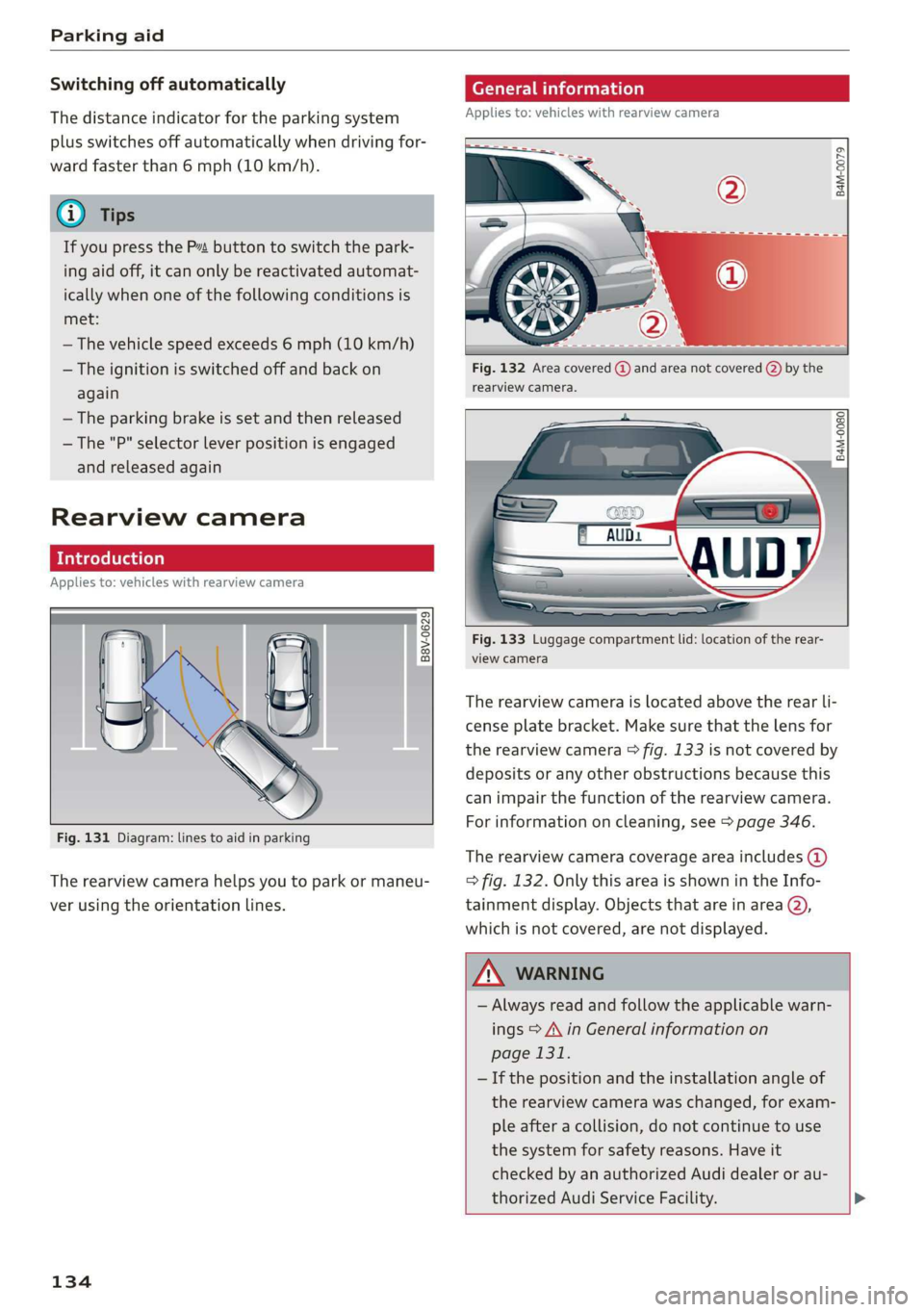
Fig.131Diagram:linestoaidinparking
Therearviewcamerahelpsyoutoparkormaneu-
verusingtheorientationlines.
134
eTelaLely
Appliesto:vehicleswithrearviewcamera
agz
g
==a
Fig.132Areacovered@)andareanotcovered()bythe
rearviewcamera.
B4M-0080|
:
Fig.133Luggagecompartmentlid:locationoftherear-
viewcamera
Therearviewcameraislocatedabovetherearli-
censeplatebracket.Makesurethatthelensfor
therearviewcamera>fig.133isnotcoveredby
depositsoranyotherobstructionsbecausethis
can impairthefunctionoftherearviewcamera.
Forinformationoncleaning,see>page346.
Therearviewcameracoverageareaincludes()
=>fig.132. OnlythisareaisshownintheInfo-
tainmentdisplay.Objectsthatareinarea@),
whichisnotcovered,arenotdisplayed.
ZA\WARNING
—Alwaysreadandfollow theapplicablewarn-
ings>A\inGeneralinformationon
page131.
—Ifthepositionandtheinstallation angleof
therearviewcamerawaschanged,forexam-
pleafteracollision,donotcontinuetouse
the
systemforsafetyreasons.Haveit
checkedby anauthorizedAudidealeror au-
thorizedAudiServiceFacility.>