tow AUDI Q7 2019 Owner´s Manual
[x] Cancel search | Manufacturer: AUDI, Model Year: 2019, Model line: Q7, Model: AUDI Q7 2019Pages: 394, PDF Size: 105.97 MB
Page 88 of 394
Driving
>Todothis,pressthereleasebutton@onthe
selectorlever>fig.86.
>Toengagethenearestselectorleverposition,
movetheselectorleverforwardorbackuntil
youfeelthefirstpressurepoint.Theselector
leverwillreturntoitsoriginalposition.
>Toshiftbeyondthenearestselectorleverposi-
tion,movetheselectorleverpastthepressure
pointintothedesiredposition.Theselectorlev-
erwillreturntoitsoriginalposition.
Forexample,youcanskipoverthe"N"positionif
youwouldliketogodirectlyfrom"D"into"R".
Selectorleverlock
Theselectorleverlockreducestheriskofselect-
ingapositionunintentionally,whichcan cause
thevehicletoroll.Whenengagingsomeselector
lever positions,youmustpressthereleasebut-
ton@ontheselectorleverand/orpressthe
brakepedal>fig.86.
Youmustpressthebrakepedaltoengagease-
lectorleverpositionwhentheengineisrunning
andthevehicleisstationary.
Youdonothavetopressthebrakepedalifyou
shiftfromadrivegear("D/S")to reversegear
("R")withinonesecond.Thisallowsyouto“rock”
thevehicletofreeitwhenitisstuck.
P-Park
Thisselectorleverpositionpreventsthevehicle
fromrolling.Onlyshiftintoparkwhenthevehicle
isstationary>A\.Toselectthe"P"selectorlever
position,pressthe"P"button()ontheselector
lever>fig.86.Pappearsnexttotheselectorlev-
er.
Youcanonlyshiftoutofparkwhentheengineis
runningandyouarepressingthebrakepedal.To
releasetheparkinglock,pressthebrakepedal,
pressthereleasebutton(@ontheselector lever,
andselectthedesiredposition>fig.86.
“P"engagesautomaticallyifyouswitchtheen-
gineoffwhiletheselectorleverisin"D","E", "S",
"R",ormanualmode.
Ifyouswitchtheengineoffwhenthe"N"selector
leverpositionisselected,thetransmissionre-
mainsin"N"forapproximately30minutesand
86
then"P"isengaged.Thevehicleisnotsecured
fromrollinginthe"N"selectorleverposition,so
youneedtosettheparkingbrake©)>page81.
Youmustusetheparkinglockemergencyrelease
beforetowingthevehicle>page90.
R-Reverse
Thereversegearisengagedinthisposition.Only
selectreversegearwhenthevehicleisstationary
andtheengineisrunningatidlespeed>A.To
engagethe"R"selectorleverposition,pressthe
brakepedal,pressthereleasebutton(@onthe
selectorlever,andselectthe"R"position
>fig.86.
Atonewillsoundwhenthereversegearisengag-
ed.
N-Neutral(idle)
Thetransmissionisinidleinthisposition.Toen-
gagethe"N"selectorleverposition,pressthere-
leasebutton@ontheselectorleverandshiftin-
tothe"N"position>fig.86.
Ifyouswitchtheengineoffwhenthe"N"selector
leverpositionisselected,thetransmissionre-
mainsin"N"forapproximately30minutesand
then"P"isengaged.
Youcannotselectthe"N"positionwhentheigni-
tionisswitchedoff.Whendrivingthroughanau-
tomaticcarwash,firstselectthe"N"positionand
thenturntheengineoff.
For safetyreasons,thevehiclecannotbelocked
whenthetransmissionisinthe"N"position.
D/S-Drivingforward
Whenthetransmissionisinthe"D/S"position,it
canbeoperatedeitherinthenormal"D"modeor
inthe"S"sportmode.Movetheselectorlever
backtoengagethe"S"sportmode.Youcanonly
selectthe"S"selectorleverpositionwhenthe"D"
or"E"positionisselected.Toselectthe"D"or"E"
positionagainwhen"S"isengaged,movethese-
lectorleverback>A\.Toshiftfrom"N"to"D"
when
travelingatspeedsbelow1mph(2km/h),
pressthebrakepedalandshiftintothe"D"posi-
tion>A.
Page 92 of 394
Driving
Thetransmissiontemperaturehasincreasedsig-
nificantly.Driveverycautiouslyortakeabreak
fromdrivinguntilthetemperaturereturnstothe
normalrangeandtheindicatorlightturnsoff.
fs}Transmission:malfunction!Youcancontin-
uedriving.Seeowner'smanual
Thereisasystemmalfunctioninthetransmis-
sion.Youmaycontinuedriving.Drivetoanau-
thorizedAudidealerorauthorizedAudiService
Facilitysoontohavethemalfunctioncorrected.
fs}Transmission:malfunction!Youcancontin-
uedrivinginDuntilengineisoff
Thereisasystemmalfunctioninthetransmis-
sion.Thetransmissionisswitchingtoemergency
mode.Ifyouturntheengineoff,youwillnotbe
abletoselectanyotherselectorleverpositions
afterstartingtheengineagain.Drivetoanau-
thorizedAudidealerorauthorizedAudiService
Facilityimmediatelytohavethe malfunctioncor-
rected.
is}Transmission:malfunction!Youcancontin-
uedrivingwithlimitedfunction.Pleasecontact
Service
Thereisasystemmalfunctioninthetransmis-
sion.Thetransmissionisswitchingtoemergency
mode.Thismodeonlyshiftsintocertaingearsor
maynolongershiftatall.Theenginemaystall.
DrivetoanauthorizedAudidealerorauthorized
AudiServiceFacilityimmediatelytohavethe
malfunctioncorrected.
fs}Transmission:malfunction!Youcancontin-
uedrivingwithlimitedfunction.Noreverse
gear
Thereisasystemmalfunctioninthetransmis-
sion.Thetransmissionisswitchingtoemergency
mode.Thismodeonlyshiftsintocertaingearsor
maynolongershiftatall.Theenginemaystall.
Youcannotengagethereversegear.Drivetoan
authorizedAudidealerorauthorizedAudiService
Facilityimmediatelytohavethe malfunctioncor-
rected.
fs}Dangerofrollingaway!Pnotpossible.
Pleaseapplyparkingbrake
90
—Theparkinglockwasreleasedusingtheemer-
gencyrelease>page90.Or
—Theparkinglockcannolongerbeengaged.
DrivetoanauthorizedAudidealerorauthor-
izedAudiServiceFacilityimmediatelytohave
themalfunctioncorrected.
Moveselectorlevertoautomaticposition
Thereisamalfunctioninthetiptronicmode.End
tiptronicmodebypushingtheselectorleverto
theleftintothe"D/S"position.
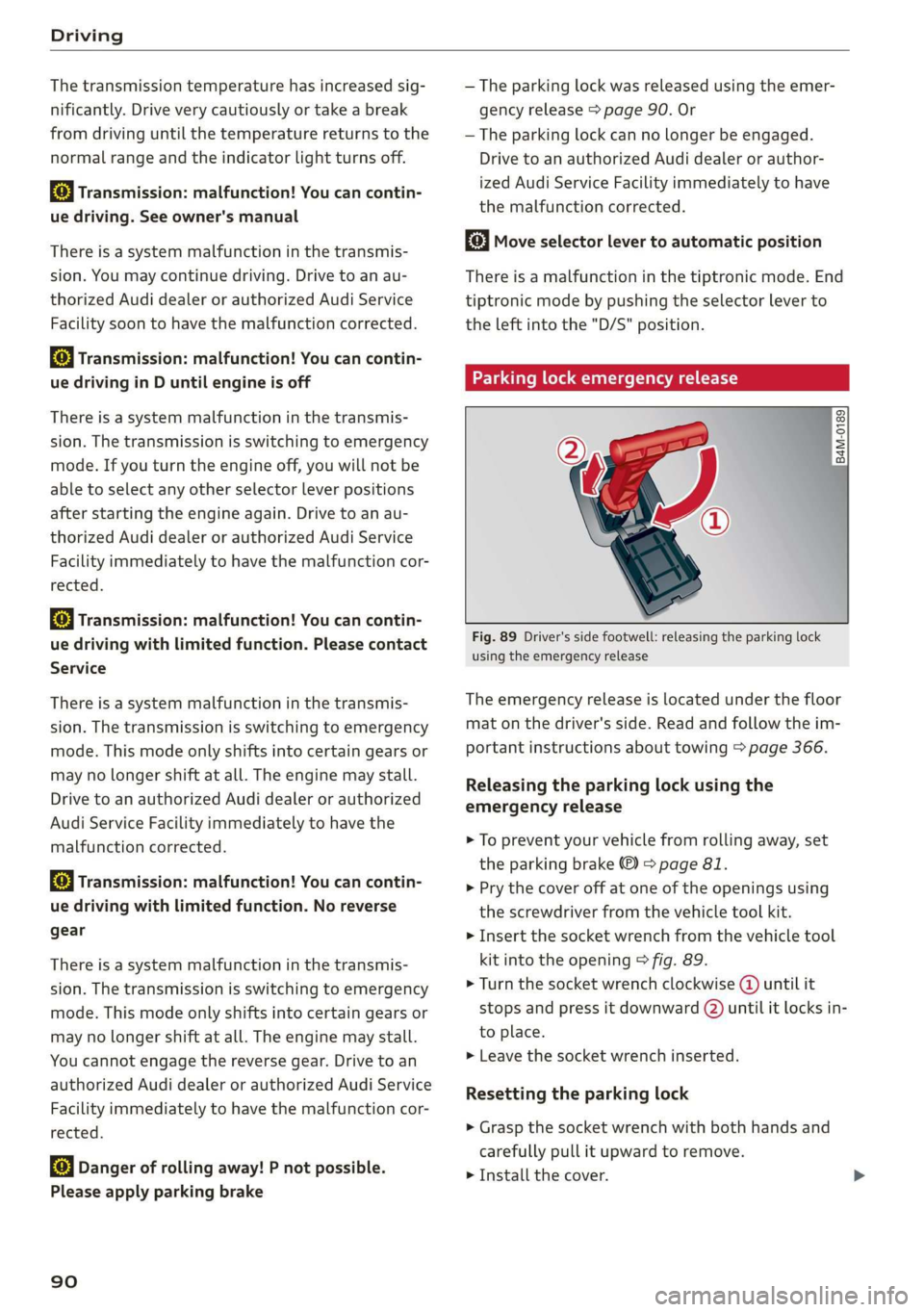
Parkinglockemergencyrelease
@
B4M-0189
®
Fig.89Driver'ssidefootwell:releasingtheparkinglock
usingtheemergencyrelease
Theemergencyreleaseislocatedunderthefloor
matonthedriver'sside.Readandfollowtheim-
portantinstructionsabouttowing>page366.
Releasingthe parkinglockusingthe
emergencyrelease
>Topreventyourvehiclefromrollingaway,set
theparkingbrake©)>page81.
>Prythecoveroffatoneoftheopeningsusing
thescrewdriverfromthevehicletoolkit.
>Insertthe socketwrenchfromthevehicletool
kitintotheopening>fig.89.
»Turn thesocketwrenchclockwise(4)untilit
stopsandpressitdownward()untilitlocksin-
toplace.
>Leavethesocketwrenchinserted.
Resettingtheparkinglock
>Graspthe socketwrenchwithbothhandsand
carefullypullitupwardtoremove.
>Installthecover.
Page 93 of 394
4M0012721BG
Driving
Iftheparkinglockisreleasedwiththeemergen-
cyrelease,thefa}indicatorlightturnsoninthe
instrumentclusterand“N”isengaged.Themes-
sageDangerofrollingaway!Pnotpossible.
Pleaseapplyparkingbrakealsoappears.
ZXWARNING
— Theparkinglockmustonlybereleasedus-
ingtheemergencyreleasebeforetowingthe
vehicle.
—Theparkinglockmayonlybereleasedusing
theemergencyreleaseiftheparkingbrake
isset.Ifitisnotworking,securethevehicle
fromrollingusingthebrake pedalorother
suitablemeans,suchasblockingafrontand
arearwheel.Anunsecuredvehiclemayroll
away,whichincreasestheriskofanacci-
dent.
—Onlyactivatetheemergencyreleasewhile
onalevelsurfaceoraslightslope.
—Toreducetheriskofanaccident,youmust
notdrivewhentheemergencyreleaseisac-
tivated.
91
Page 94 of 394

Trailertowing
Trailertowing
Drivingwithatrailer
eTreeeleurltela}
Yourvehicleisprimarilyintendedfortransport-
ingpeopleandluggage.However,ifyoudrive
withatrailer,followthetechnicalrequirements,
the operationanddrivingtips,andthelegalreg-
ulations.
Drivingwithatraileraffectsthevehicle'sfuel
consumption,performanceandwear.Italsore-
quireshigherconcentrationfromthedriver.
ZAWARNING
Donottransportanypeopleinatrailerdueto
theriskoffatalinjury.
Technicalrequirements
Certainrequirementsmustbemetwhentowing
atrailer.
Trailerhitch
Onlyuseatrailerhitchwitharemovableball
hitchmountandballhitch.Thetrailerhitchmust
bepermittedforthevehicle,thetrailerandthe
permittedtotalweightofthetrailerbeing
pulled.Aboveall,itmustbesecurelyandsafely
attachedtothevehicletrailer.
Nevermountatrailerhitchonthebumper.The
trailerhitchmustbemountedinawaythatdoes
notimpair thefunctionofthebumper.Donot
makeanychangestotheexhaustsystemandthe
brakesystem.
Checkregularlyifthetrailerhitchissecurely
mounted.Alwaysfollowtheinstructionsgivenby
thetrailerhitchmanufacturer.
Trailerbrakes
Ifthetrailerhasitsownbrakesystem,thenfol-
lowthemanufacturerspecifications.However,
thebrakesystemonthetrailermustneverbe
connectedtothevehiclebrakesystem.
92
Enginecoolingsystem
Drivingwithatrailermeansahigherloadonthe
engineandthecoolingsystem.Thecoolingsys-
temmustbedesignedforadditionalloadand
containenoughcoolant>©.
ZAWARNING
—Nevermounta"weight-distributing"or
"load-balancing"trailercouplerasthetrailer
hitch.Thevehiclewasnotdesignedfor
thesetypesoftrailerhitches.Thetrailer
hitchcanmalfunctionandthetrailercan
breakofffromthevehicle.
—Ifthetrailerisequippedwithelectronic
brakes,thesebrakescannotbeactivatedby
afactory-installedcontrolsystem,whichin-
creasestheriskofanaccident.
—Toreducetheriskofinjury,alwaysremove
theballhitchmountifnotrailerismount-
ed
@)Note
Longerinclinescannotbedrivenwithouta
suitablecoolingsystem,especiallyiftheout-
sidetemperaturesarehigh.Otherwise,this
increasestheriskofenginedamage.
Operatinginstructions
Severalthingsmustbe notedwhentowinga
trailer.
Towingcapacity
Thepermittedtowingcapacitymustnot beex-
ceededunderanycircumstances>page376.
Youcandriveuplargerinclinesifyouarenotus-
ingthemaximumtowingcapacity.
Thetowingcapacitiesgivenonlyapplytoeleva-
tionsupto3,200ft(1,000m)abovesealevel.As
theelevationincreases,theenginepowerde-
creasesduetothedecreasingairpressure.This
reducesthehillclimbingabilityandtowingca-
pacity.Foreveryadditional3,200ft(1,000m),
themaximumpermittedtowingweightmustbe
reducedbyapproximately10%.Thepermitted
towingweightisthecombinedweightofthe
(loaded)vehicleandthe(loaded)trailer.
Page 95 of 394
4M0012721BG
Trailertowing
Tongueweight
Themaximumpermittedtongueweightofthe
trailerdrawbaronthetrailerhitchballheadmust
notbeexceeded.
Havingthetongueweighttoolowaffectstheve-
hicle'shandling.Fordrivingsafety,alwaysusing
themaximumpermittedtongueweightisrecom-
mended,butnotexceedit.Distributingthecargo
inthetrailercorrectlywillhelptoachievethis
weight.
Youcandeterminethetongueweightusinga
bathroomscaleorapublicweighstation,forex-
ample.
Thepermittedtongueweightofyourvehiclecan
befoundinthevehicledocumentationorin
=>page376.
Loaddistribution
Poorcargoloadanddistributioncannegatively
impactvehiclehandling.Loadthetrailerbased
onthefollowingcriteriaasmuchaspossible:
—Storeobjectsinthevehicleluggagecompart-
ment,ifpossible.Thevehicleshould always
carrytheheaviestpossibleloadandthetrailer
shouldhavethelightestpossibleload.
—Distributetheloadinthetrailersothatthe
heavyobjectsareasclosetotheaxleaspossi-
ble.
—Secureobjectssothattheydonotslide.
—Utilizethemaximumpermittedtongueweight
ifpossible.
Tires
Set thetirepressureonyourvehiclefora“full
load”;seethetirepressuresticker>page336.If
necessary,alsoadjustthetirepressureonthe
traileraccordingtothemanufacturer'sspecifica-
tions.
Thetirepressuremustbeincreasedanadditional
3PSI(0.2bar)fortowingloadsover6,600lbs
(3,000kg).
Thetrailerandthevehicleshould beequipped
withwintertireswhendrivinginwintertempera-
tures.
Outsidemirrors
Ifyoucannotseethetrafficbehindthetrailer
withthestandardexterior mirrors,thenyou
mustattachadditionalexterior mirrors.Adjust
themsoyouhavea sufficientvisibilitybehind
you.
Exterior lighting
Followthelegalregulationsregardingthelight-
ingequipmentonyourtrailer.Contact anauthor-
izedAudidealerorauthorizedAudiServiceFacili-
tyformoreinformation.
Beforeyoustartdriving,checkalllightingequip-
mentonthetrailerwhileitishitchedtothevehi-
cle.
Theheadlightrangecontrolautomaticallyad-
juststhelightrangeoftheheadlights.
Safety chains
Makesurethesafetychainsarecorrectlyapplied
whenpullingatrailer.Thechainsshouldhang
enoughsothatthetrailercandrivearound
curves.However,theymustnottouchthe
ground.
Airsuspension
Appliesto:vehicleswithairsuspension
The
airsuspensionmustbeatthestandardvehi-
cleheightbeforeyouadjustthetongueweight
onthetrailerandhitchthetrailer>,
=>page129,Liftingandloweringthevehicle.
Forvehicleswithafactory-installedtrailerhitch,
theairsuspensiontrailermodewillautomatically
switchonifyouconnectthetrailercabletothe
socket.
Forvehicleswitharetrofittedtrailerhitch,you
mustswitchontheairsuspensiontrailermode
manually.SelectintheInfotainmentsystem:
MENU}button>Vehicle>leftcontrolbutton>
Vehiclesettings>Airsuspension:trailer.Switch
itoffagainwhenyouarenolongertowingatrail-
er.
Youcanalsoswitchofftrailermodemanually
whiledriving,forexample,whenusingabicycle
racksystem.>
93
Page 96 of 394
Trailertowing
Ifyouhavetodrivethroughdifficultroadcondi-
tions,youcanraisethevehicleagainafterhitch-
ingthetrailerorafteradjustingthetongue
weight.
@)Note
Appliesto:vehicleswithairsuspension
—Changesintemperatureorloadcanaffect
the heightofthevehicle.
—Ifthestandardvehicleheightisnotused,
thetongueweightspecificationisnolonger
applicable.
@)Note
Attachmentsretrofittedonthevehiclemay
causedamage,especiallyonthetrailerhitch
ballhead.Incasesofdamage,havethefunc-
tioncheckedby anauthorizedAudidealeror
authorizedAudiServiceFacility.
G)Tips
—Blockthewheelswithchockswhenparking
oninclinesifthetrailerisloaded.
—Havingthevehicleinspectedbetweenthe
inspectionintervalsisrecommendedifyou
towatrailerfrequently.
—Avoiddrivingwithatrailerduringthevehi-
clebreak-inperiod.
Drivingwithatrailer
Drivingwithatrailerrequiresextracaution.
Speed
Adheretothelegalspeedlimits.Followthelegal
regulationsspecifictothecountry.
Asthespeedincreases,thedrivingstabilityof
thetrailerdecreases.Thereforeyoushouldnot
exceedthemaximumlegalspeedlimitwhen
thereareunfavorableroad,weather,and/orwind
conditions.Thisespeciallyapplieswhendriving
downhill.
Hill
Whenyoustartdrivinguphillordownhill,trailers
maytiltorswaysoonerthanwhendrivingona
levelsurface.Ifsmallswayingmovementshave
alreadyoccurred,youcanstabilizethetrailerby
94
firmlybrakingimmediately.Nevertryto
“straightenout”thetrailerbyaccelerating.
Downshiftbeforedrivingonhillstoutilizetheen-
ginebrakingeffect>A\.
Brakes
Whenusingatrailerwithoverrunbrakes,first
brakegentlythenquickly.Thisreducestheriskof
jerkingwhilebrakingifthetrailerwheelslockup.
Enginecoolanttemperature
Payattentionspecificallytothecoolanttempera-
ture displaywhentherearehighoutsidetemper-
atures,andwhendrivingonlonginclines
=>page15.Shifttoahighergearinatimelyman-
ner.
Z\WARNING
Constantbrakingcausesthebrakestoover-
heatandcansubstantiallyreducebrakingper-
formance,increasebrakingdistance,orcause
completefailureofthebrakesystem.
Page 98 of 394
Assistsystems
—Switchthecruisecontrolofftemporarily
whendrivinginturninglanes,highwayexits,
orinconstructionzones.
—Pleasenotethatunconsciously“resting”
yourfootontheacceleratorpedalprevents
thecruisecontrolfrombraking.Thisisbe-
causepressingtheacceleratorpedalover-
ridesthecruisecontrolsystem.
—Ifabrakesystemmalfunctionsuchasover-
heatingoccurswhenthecruisecontrolsys-
temisswitchedon,thebrakingfunctionin
thesystemmaybeswitchedoff.Therestof
thecruisecontrolsystemfunctionsremain
activeaslongastheGg(USAmodels)/
ES)(Canadamodels)indicatorlightison.
@)Note
Beforedrivingdownhillalongdistanceona
steephill, decreaseyourspeedandselecta
lowergear.Thismakesuseoftheenginebrak-
ingeffectandreducestheloadplacedonthe
brakes.
G)Tips
Thebrakelightsturnonwhenthebrakesare
appliedautomatically.
Changingthespeed
Appliesto:vehicleswithcruisecontrolsystem
>Toincrease/decreasethespeedin1mph(1
km/h)increments,brieflytapthelevertoward
@/O°page95,fig.90tothefirstlevel.
>Toincrease/decreasethespeedin5mph(10
km/h)increments,brieflytapthelevertoward
@/Otothesecondlevel.
>Toincrease ordecrease thespeedquickly,hold
thelevertowardG)or©)tothefirstorsecond
level untilthedesiredspeedisreached.
Overridingthespeed
Appliesto:vehicleswithcruisecontrolsystem
Youcanpresstheacceleratorpedaltoincrease
yourspeed,forexampleifyouwanttopass
someone.Thespeedyousetearlierwillresume
onceyoureleasetheacceleratorpedal.
96
However,ifyouareexceedingthestoredspeedby
aconsiderableamountforalongtime,thecruise
controlsystemwilltemporarilyswitchoff.The
Gk(USAmodels)/(Canada models)indica-
torlightintheinstrumentclusterturnsoffand
thestoredspeedismaintained.
Preselectingaspeed
Appliesto:vehicleswithcruisecontrolsystem
Youcanpreselectyourdesiredspeedwhenthe
vehicleisstationary.
>Switchtheignitionon.
> Pulltheleverintoposition@>page95,
fig.90.
>Toincrease ordecrease thespeed,tapthelever
toward@)or ©).
Thisfunctiontostorethespeedyouwouldliketo
maintainonahighwaybeforeyoubegindriving,
forexample.Onceyouareonthehighway,acti-
vatethecruisecontrolsystembypullingthelev-
er intoposition@.
Switchingoff
Appliesto:vehicleswithcruisecontrolsystem
Deactivatingtemporarily
>Pressthebrakepedal,or
>Pressthelevertoward(2)(notlockedinto
place)>page95,fig.90.
Switchingoffcompletely
>Presstheleverintoposition2)(lockedinto
place),or
>Switchtheignitionoff.
Thespeedyoustoredwillbemaintainedifthe
cruisecontrolhasbeenswitchedofftemporarily.
Toresumethestoredspeed,releasethebrake
pedalandpullthelevertoposition@.
Switchingtheignitionoffwillerasethestored
speed.
ZXWARNING
Youshouldonlyresumethestoredspeedifit
isnot toohighforexistingtrafficconditions.|>
Page 106 of 394
Assistsystems
Youcansetanyspeedbetween20mphand95
mph(30km/hand150km/h).
Indicatorlightsandmessagesintheinstrument
clusterdisplayinformyouaboutthecurrentsit-
uationandsetting.
Anadditionalindicatorappearsinthehead-up
display”.
Switchingadaptivecruisecontrolon
>Pullthelevertowardyouintoposition@
>fig.99.
Storingthespeedandactivatingregulation
>Tostorethecurrentspeed,pressthe[SET]but-
ton>fig.99.Thestoredspeedisshowninthe
speedometerintheLEDline(@)andappears
brieflyinthestatusline©)>fig.100.
>Toactivatecontrolwhenstationary,thebrake
pedalmustalsobepressed.
Switchingadaptivecruisecontroloff
>Pushtheleverawayfromyouintoposition©)
untilitclicksintoplace.ThemessageACC:off
appears.
Indicatorlights
B-Adaptivecruisecontrolisswitchedon.No
vehiclesaredetectedahead.Thestoredspeedis
maintained.
B-Avehicledrivingaheadwasdetected.The
adaptivecruisecontrolsystemregulatesthe
speedanddistancetothevehicledrivingahead
andaccelerates/brakesautomatically.
A-Adaptivecruisecontrolisswitchedon.Ave-
hiclewasdetectedahead.Yourvehicleisstation-
aryandwillnotstartdrivingautomatically.
EB-Adaptivecruisecontrolisswitchedon.No
vehiclesweredetectedahead.Yourvehicleissta-
tionaryandwillnotstartdrivingautomatically.
B-Theautomaticbrakingisnotenoughto
maintainasufficientdistancetoavehicledriving
ahead.Youmustintervene>page107,Driverin-
terventionrequest.
104
©Instrumentclusterdisplay
IftheDriverassistancedisplayisnotshownin
theinstrumentclusterdisplay,youcanopenit
usingthemultifunctionsteeringwheelbuttons
=>page16.
Basedonthegraphicdisplay,youcandetermine
ifthesystemismaintainingadistancetotheve-
hicledrivingaheadandwhatthatdistanceis.
Novehicle-novehiclewasdetecteddriving
ahead.
Silvervehicle-avehiclewasdetecteddriving
ahead.
Redvehicle-requestfordriverintervention
=>page107.
Thefivedistance barsonthegauge(©represent
the
setdistance(see>page105forinformation
onhowtochangethedistance).Ifyoufallbelow
theselecteddistance,thedistancebarsbecome
redfromthebottomupward.
ZXWARNING
Ifyoupressthe[SET]buttonwhendrivingat
speedsbelow20mph(30km/h),thevehicle
acceleratesautomaticallyupto20mph(30
km/h),whichistheminimumspeedthatcan
beset.
(i)Tips
—Ifyouswitchtheignitionortheadaptive
cruisecontrolsystemoff,thesetspeedis
erasedforsafetyreasons.
— TheElectronicStabilizationControl(ESC)
andtheAnti-Slip-Regulation(ASR)areauto-
maticallyswitchedonwhentheadaptive
cruisecontrolisswitchedon.
Page 107 of 394
4M0012721BG
Assistsystems
Changingthespeed
Appliesto:vehicleswithAudiadaptivecruisecontrol
B4M-0232
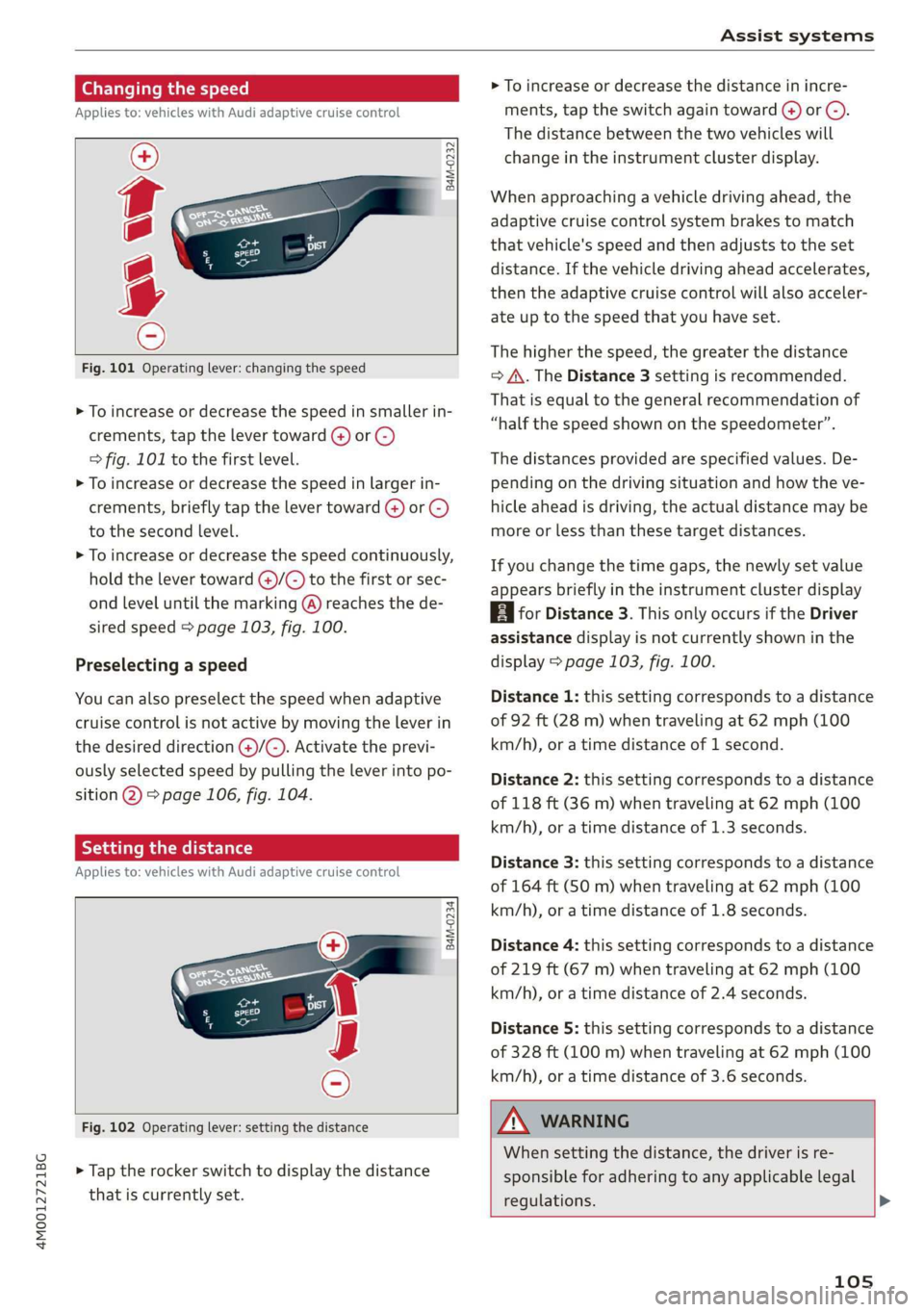
Fig.101Operatinglever:changingthespeed
>Toincrease ordecrease thespeedinsmallerin-
crements,tap thelevertoward(4)or©)
=>fig.101tothefirst level.
>Toincrease ordecrease thespeedinlargerin-
crements,briefly tapthelevertoward@)or©)
tothesecondlevel.
>Toincrease ordecrease thespeedcontinuously,
holdthelevertoward@)/G)tothefirstorsec-
ondleveluntilthemarking(@)reachesthede-
siredspeed>page103,fig.100.
Preselectingaspeed
Youcanalsopreselectthespeedwhenadaptive
cruisecontrolisnotactivebymovingtheleverin
thedesireddirection@)/©).Activatetheprevi-
ouslyselectedspeedbypullingtheleverintopo-
sition@)>page106,fig.104.
Settingthedistance
Appliesto:vehicleswithAudiadaptivecruisecontrol
B4M-0234
Fig.102Operatinglever:settingthedistance
>Taptherockerswitchtodisplaythedistance
thatiscurrentlyset.
>Toincrease ordecreasethedistanceinincre-
ments,tap theswitchagaintoward@)or ©).
Thedistancebetweenthetwovehicleswill
changeintheinstrumentclusterdisplay.
Whenapproachingavehicledrivingahead,the
adaptivecruisecontrolsystembrakestomatch
thatvehicle'sspeedandthenadjuststotheset
distance.Ifthevehicledrivingaheadaccelerates,
thentheadaptivecruisecontrolwillalsoacceler-
ateuptothespeedthatyouhaveset.
Thehigherthespeed, thegreaterthedistance
=>A\.TheDistance3settingisrecommended.
Thatisequaltothegeneralrecommendationof
“halfthespeedshownonthespeedometer”.
Thedistancesprovidedare specifiedvalues.De-
pendingonthedrivingsituationandhowtheve-
hicleaheadisdriving,theactualdistancemaybe
moreorlessthanthesetargetdistances.
Ifyouchangethetimegaps,thenewlysetvalue
appearsbrieflyintheinstrumentclusterdisplay
BiforDistance3.ThisonlyoccursiftheDriver
assistancedisplayisnotcurrentlyshowninthe
display>page103,fig.100.
Distance1:thissettingcorrespondstoadistance
of92ft(28m)whentravelingat62mph(100
km/h),oratimedistanceof1second.
Distance2:thissettingcorrespondstoadistance
of118ft(36m)whentravelingat62mph(100
km/h),oratimedistanceof1.3seconds.
Distance3: thissettingcorrespondstoadistance
of164ft(SOm)whentravelingat62mph(100
km/h),oratimedistanceof1.8seconds.
Distance4:thissettingcorrespondstoadistance
of219ft(67m)whentravelingat62mph(100
km/h),oratimedistanceof2.4seconds.
Distance5: thissettingcorrespondstoadistance
of328ft(100m)whentravelingat62mph(100
km/h),oratimedistanceof3.6seconds.
Z\WARNING
Whensettingthedistance,thedriverisre-
sponsibleforadheringtoanyapplicablelegal
regulations.>
105
Page 108 of 394
Assistsystems
@Tips
Dependingontheselecteddrivingmodein
driveselect*andthesetdistance,thedriving
behaviorwillvaryfromdynamictocomforta-
blewhenaccelerating>page128.
Drivinginstop-and-gotraffic
Appliesto:vehicleswithAudiadaptivecruisecontrol
Fig.103Instrumentcluster:safestartmonitor
Theadaptivecruisecontrolsystemalsoassists
youinstop-and-gotraffic.If avehicledriving
aheadstops,yourvehiclewillbrakeandstayata
stopwithinthelimitsofthesystem.
Startingtodrivewithadaptivecruise
control!)
AslongasthemessageACC:automaticgoisdis-
played,yourvehiclewillbegindrivingwhenthe
vehicledrivingaheadstartstomove>A\.
Ifyouarestoppedforseveralseconds,yourvehi-
clewillnolongerdriveautonomouslyforsafety
reasons,andthemessagewillturnoff.
>ToreactivateACC: automaticgotemporarily,
pullthelevertoposition(2)>page106,
fig.104.
>Toresumemanualcontrolofthevehicle,tap
theacceleratorpedal.
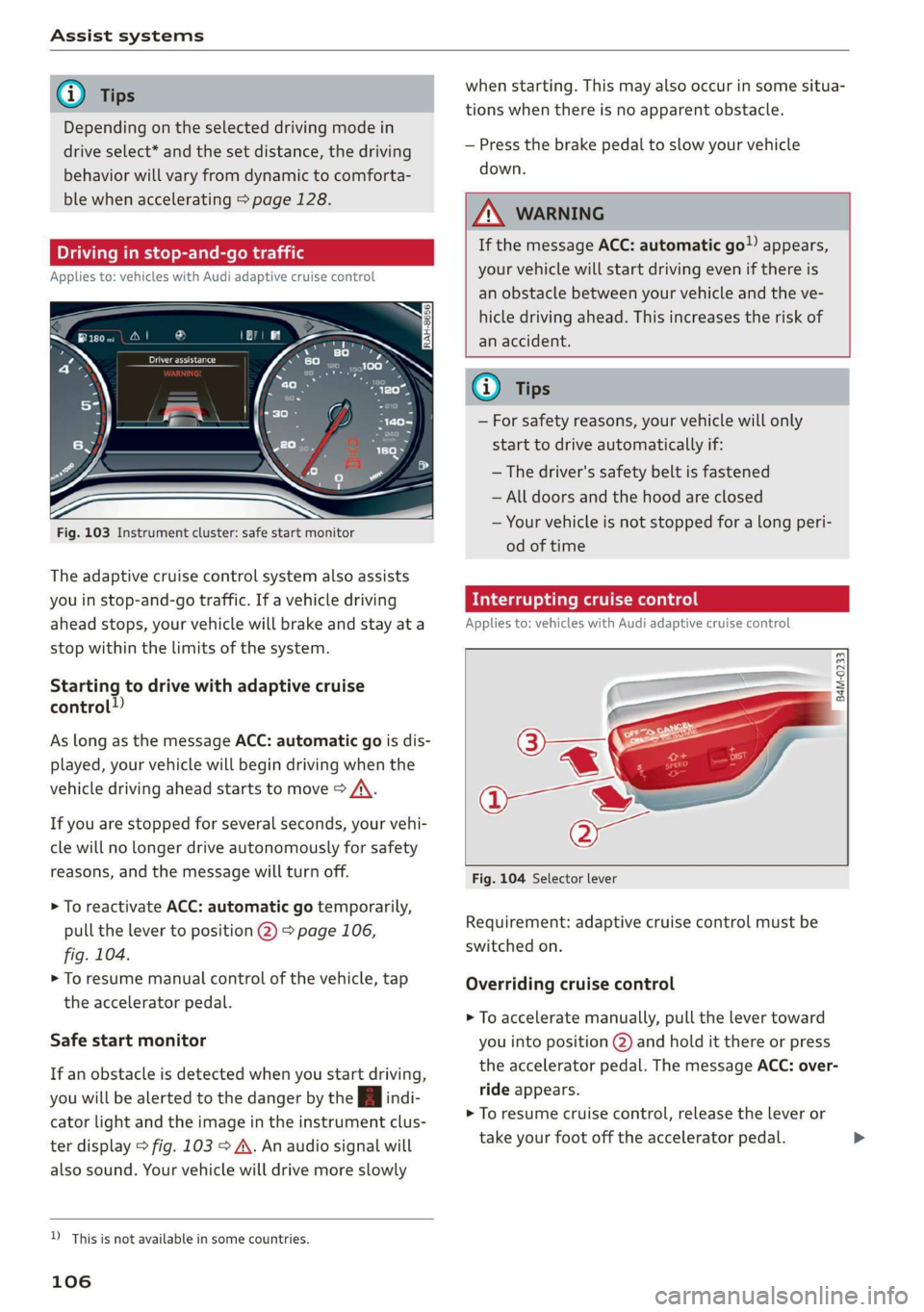
Safestartmonitor
Ifanobstacleisdetectedwhenyoustartdriving,
youwillbealerted tothedangerbytheAindi-
catorlightandtheimageintheinstrumentclus-
terdisplay>fig.103>A\.Anaudiosignalwill
alsosound.Yourvehiclewilldrivemoreslowly
D_Thisisnotavailableinsomecountries.
106
whenstarting.Thismayalsooccurinsomesitua-
tionswhenthereisnoapparentobstacle.
—Pressthebrakepedaltoslowyourvehicle
down.
AWARNING
IfthemessageACC: automaticgoappears,
yourvehiclewillstartdrivingevenifthereis
anobstaclebetweenyourvehicleandtheve-
hicledrivingahead.Thisincreasestheriskof
anaccident.
@)Tips
—Forsafetyreasons,yourvehiclewillonly
starttodriveautomaticallyif:
—Thedriver'ssafetybeltisfastened
—Alldoorsandthehoodareclosed
—Yourvehicleisnotstoppedforalongperi-
odoftime
Interruptingcruisecontrol
Appliesto:vehicleswithAudi adaptivecruisecontrol
B4M-0233
Fig.104Selectorlever
Requirement:adaptivecruisecontrolmustbe
switched
on.
Overridingcruisecontrol
>Toacceleratemanually,pullthelevertoward
youintoposition@)andholditthereorpress
theacceleratorpedal.ThemessageACC:over-
rideappears.
>Toresumecruisecontrol,releasetheleveror
takeyourfootofftheacceleratorpedal.>