tow AUDI Q7 2019 Owner´s Manual
[x] Cancel search | Manufacturer: AUDI, Model Year: 2019, Model line: Q7, Model: AUDI Q7 2019Pages: 394, PDF Size: 105.97 MB
Page 156 of 394
MultiMediaInterface
—Switchingoffmanually:pressandholdthe
On/Offknob@)>fig.155untiltheMMI
switchesoff.IftheMMIhasbeenswitchedoff
manually,itdoesnotswitchonagainautomati-
callythenexttimetheignitionisswitchedon.
Additionalfunctions:
—Adjustingthevolume:turntheOn/Offknob@
>fig.155.
—Muting:presstheOn/Offknob@°fig.155
briefly.
—Selectingtheprevious/nextfunction(forex-
ample,aradiostation/track):presstheOn/Off
knob@®fig.155brieflytowardtheleftKdor
rightDo.
—Fastforwarding/rewinding(forexample
songs):pressandholdtheOn/Offknob@)
=>fig.155towardtheleftKdorrightPel.
ZAWARNING
Adjustthevolumeoftheaudiosystemsothat
signalsfromoutsidethevehicle,suchas po-
liceandfiresirens,canbeheardeasilyatall
times.
G@)Tips
TheMMIswitchesoffautomaticallyiftheen-
gineisnotrunningandthevehiclebatteryis
low.
Infotainmentsystem
display
Switchingon/off
TheInfotainmentsystemdisplayautomatically
extendsandretractswhenyouswitchtheigni-
tiononandoff.
>Whenitisextended,presstheLo]buttonto
switchtheInfotainmentsystemdisplayonor
off.
WhentheMMIisswitchedonandthedisplayis
switchedoff,youcanoperatecertainfunctions
usingtheOn/OffknobwiththeMMIjoystick
function>page153.
154
G)Tips
Theremaybedelayswhenswitchingonthe
display.
celmurlClmelmelevee(rs
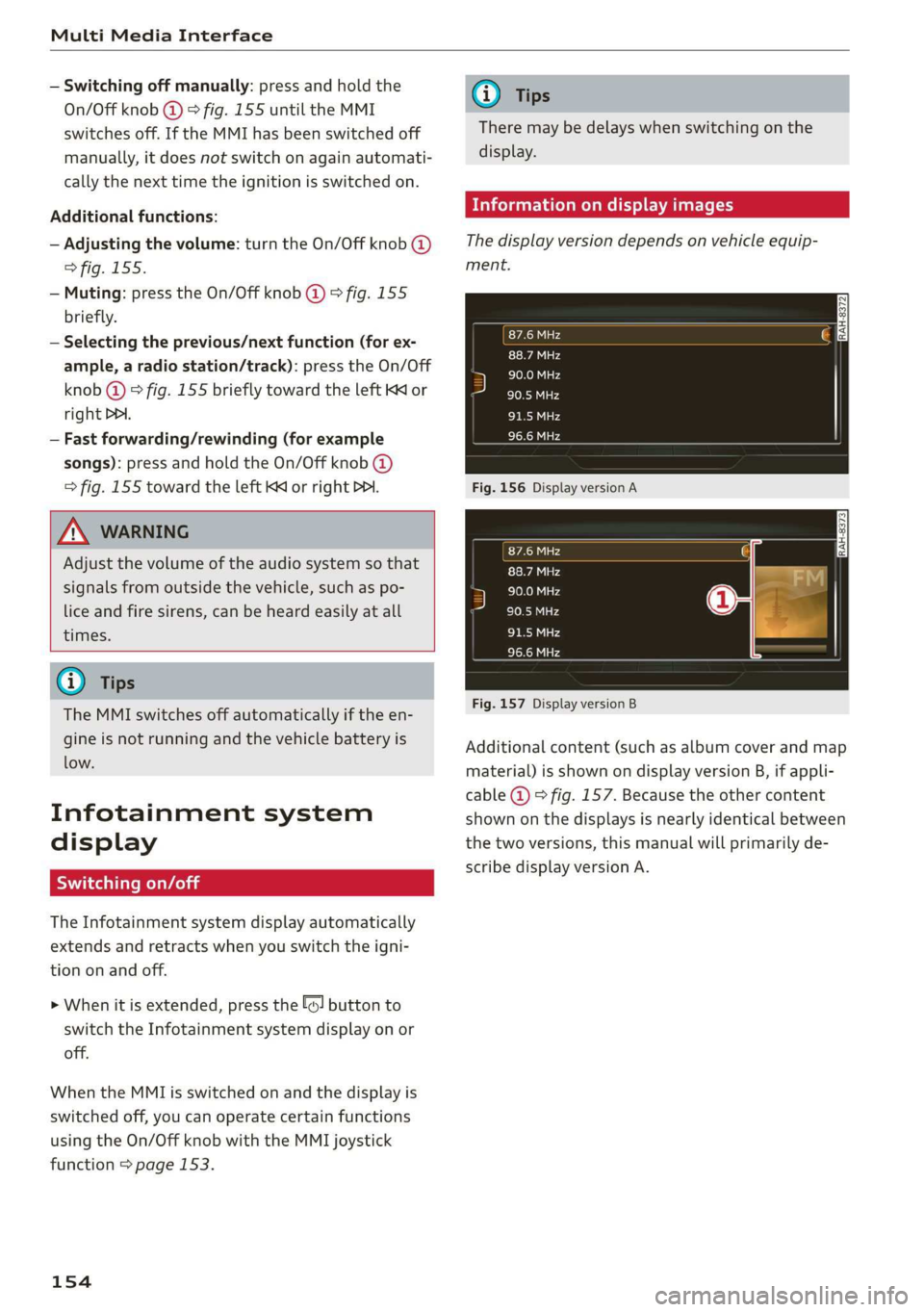
Thedisplayversiondependsonvehicleequip-
ment.
Fig.156DisplayversionA
Fig.157DisplayversionB
Additionalcontent(suchasalbumcoverandmap
material)isshownondisplayversionB,ifappli-
cable@)©fig.157.Becausetheothercontent
shownonthedisplaysisnearlyidenticalbetween
thetwoversions,thismanualwillprimarilyde-
scribedisplayversionA.
Page 159 of 394
4M0012721BG
MultiMediaInterface
MMItouch
MMItouchcontrolpad
Appliesto:vehicleswithMMItouch
Youcanenterdatausinghandwritingrecogni-
tionontheMMItouchcontrolpad.
ie
®©-co=~Angeles,CA
:aly
5)trDowntown,LosAngeles,CA
cree
YT
\
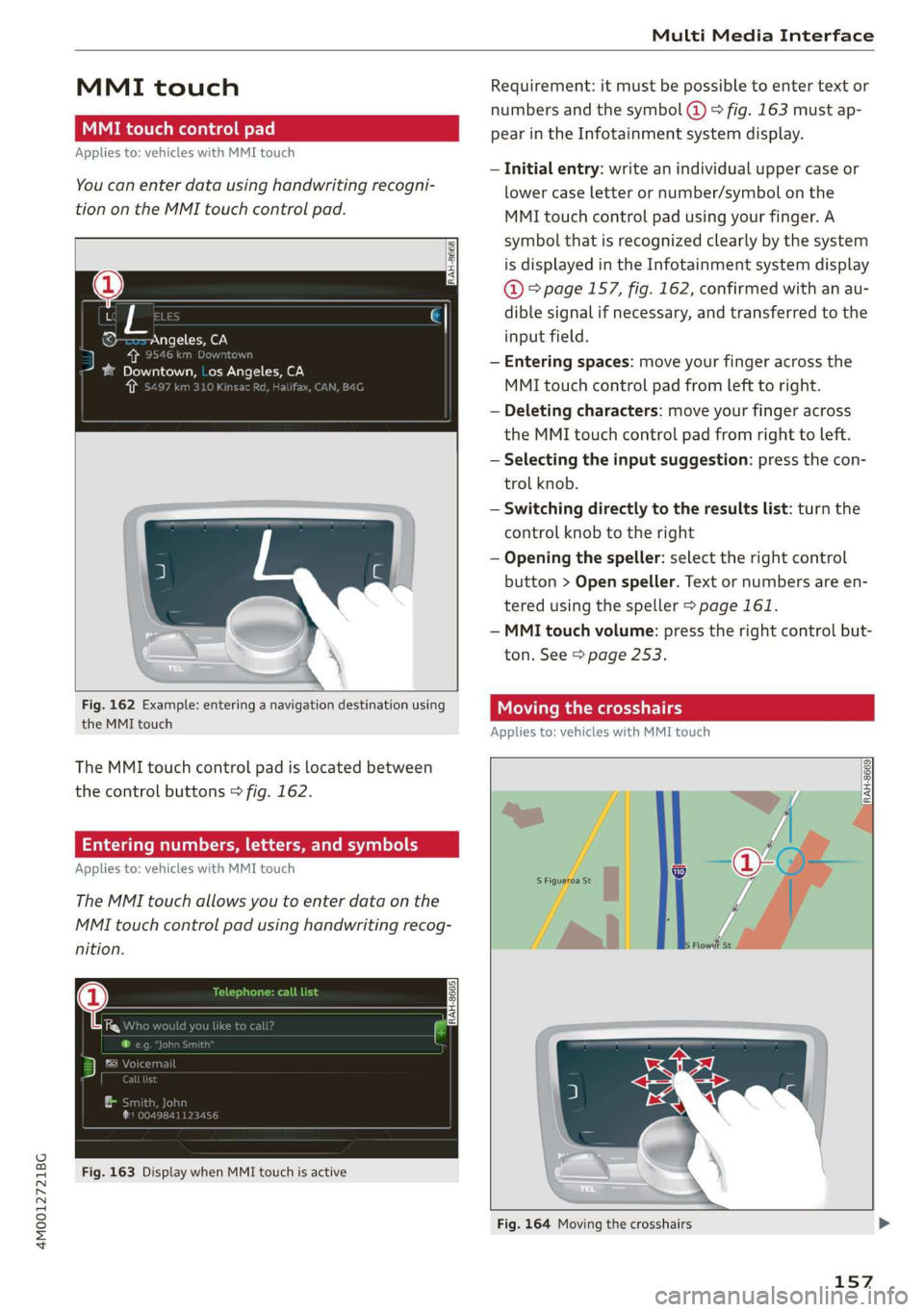
Fig.162Example:enteringanavigationdestinationusing
theMMItouch
TheMMItouchcontrolpadislocatedbetween
thecontrolbuttons>fig.162.
Enteringnumbers,letters,andsymbols
Appliesto:vehicleswithMMItouch
TheMMItouchallowsyoutoenterdataonthe
MMItouchcontrolpadusinghandwritingrecog-
nition.
Fig.163DisplaywhenMMItouchisactive
Requirement:itmustbepossible toentertext or
numbersandthesymbol(@>fig.163 mustap-
pearintheInfotainmentsystemdisplay.
—Initialentry:writeanindividualuppercaseor
lowercaseletterornumber/symbolonthe
MMItouchcontrolpadusingyourfinger.A
symbolthatisrecognizedclearlyby thesystem
isdisplayedintheInfotainmentsystemdisplay
@°page157,fig.162,confirmedwithanau-
diblesignalifnecessary,andtransferredtothe
inputfield.
—Enteringspaces:moveyourfingeracrossthe
MMItouchcontrolpadfromlefttoright.
—Deletingcharacters:moveyourfingeracross
theMMItouchcontrolpadfromrighttoleft.
—Selectingtheinputsuggestion:pressthecon-
trolknob.
—Switchingdirectlytotheresultslist:turnthe
controlknobtotheright
—Openingthespeller:selecttherightcontrol
button>Openspeller.Textornumbersare en-
tered usingthespeller>page161.
—MMItouchvolume:presstherightcontrolbut-
ton.See>page253.
Movingthecrosshairs
Appliesto:vehicleswithMMItouch
a
RAH-8669|
Fig.164Movingthecrosshairs
157
Page 171 of 394
4M0012721BG
Multifunctionsteeringwheel
Distancetothenextmaneuver
Displayoftheexpressway,highwayormain
roadontowhichyouwillbeturning
Directionarrowfortheupcomingmaneuver
©8
©
Abargraphappearswhenadirectionarrowis
displayed.Thefewerthebarsthatareshown,
theshorterthedistanceisuntiltheturn.
Currentvehicleposition@
@Additionalinformation(on-boardcomputer)
Thefollowingfunctionsarealsoavailablewhen
routeguidanceisactive:
—Adjustingthevoiceguidancevolume:turnthe
rightthumbwheelupordownwhileavoice
guidancemessageisplaying.
Z\WARNING
Theroutecalculatedbythenavigationsystem
isarecommendationforreachingyourdesti-
nation.Obeytrafficlights,stoppingrestric-
tions,one-waystreets,lanechangerestric-
tions,etc.
G)Tips
—Alsosee thechapter>page8,Cockpitover-
view.
—Anexclamationpoint“!”infront ofthe
streetnameindicatesthattheinformation
aboutthisstreetorthissectionoftheroute
isnotcompleteinthenavigationdatacon-
tainedintheMMI.Obeytrafficlawsinone-
waystreetsandpedestrianzones.
169
Page 172 of 394
Voicerecognitionsystem
GLOEVALCOMMANDS
+Telephone
*Audiconnect
*Navigation
*Directory
*Radio
+Media
+Sound
*Help
*HelpSpeechdialogsystem
*HelpTelephone
*HelpAudiconnect
*HelpNavigation
*HelpMap
*HelpRadio
*HelpMedia
TELEPHONE
+Enternumber
+Deletenumber/correction
+Directory
*Call(XY)
«business/private/landline/mobile
NAVIGATION
+Navigateto(XY)
+Start/cancelrouteguidance
+Directory
+Lastdestinations
+Navigationfavorites
+Drivehome
+Enteraddress
+Entercountry/town/street/state
+Excluderoute/Excluderoutefor(XY)km/m
MAP.
+Map
*Daymap/Nightmap
AUDICONNECT
*Audiconnect
*Travelinformation/Parkinginformation
*Fuelprices
*Weather
+Radiopresets
-FM
*FM/AM/SIRIUSXM
+Station(XY)/Frequency(XY)
*Trafficannouncementon/off
+Favorites
*Call(XY)
*Enternumber
*Redial
*Readnewtextmessage
+Navigateto(XY)
+Enteraddress/destination
*Onlinedestinations
*Cancelrouteguidance
*Map
+Line(XY)
*Next page/previouspage
*Cancel
*No,Imeant(XY)
*Correction
Calllist
Redial
Callmailboxba
Telephonefavorites
+Block routefor(XY)miles/Block
thenextsection
*Routelist
*Calculatealternativeroutes
*Onlinedestinations
*Specialdestination
*2Ddrivingpositionmap/2Dnorthpositionmap/3Dmap/Destinationmap/Overviewmap
Flightinformation
*Cityevents
*Onlinenews
*Twitter
Jukebox6}
CD/DVDPay
SDcard1/SDcard2
Audimusicinterface/iPod/USB/Bluetooth/
Wi-Fi/Medium(XY)
Mediafavorites/Artists/Albums/Genres/
Tracks/Playlists/Videos
Folderup
Randomplaybackon/off
RAH-9091
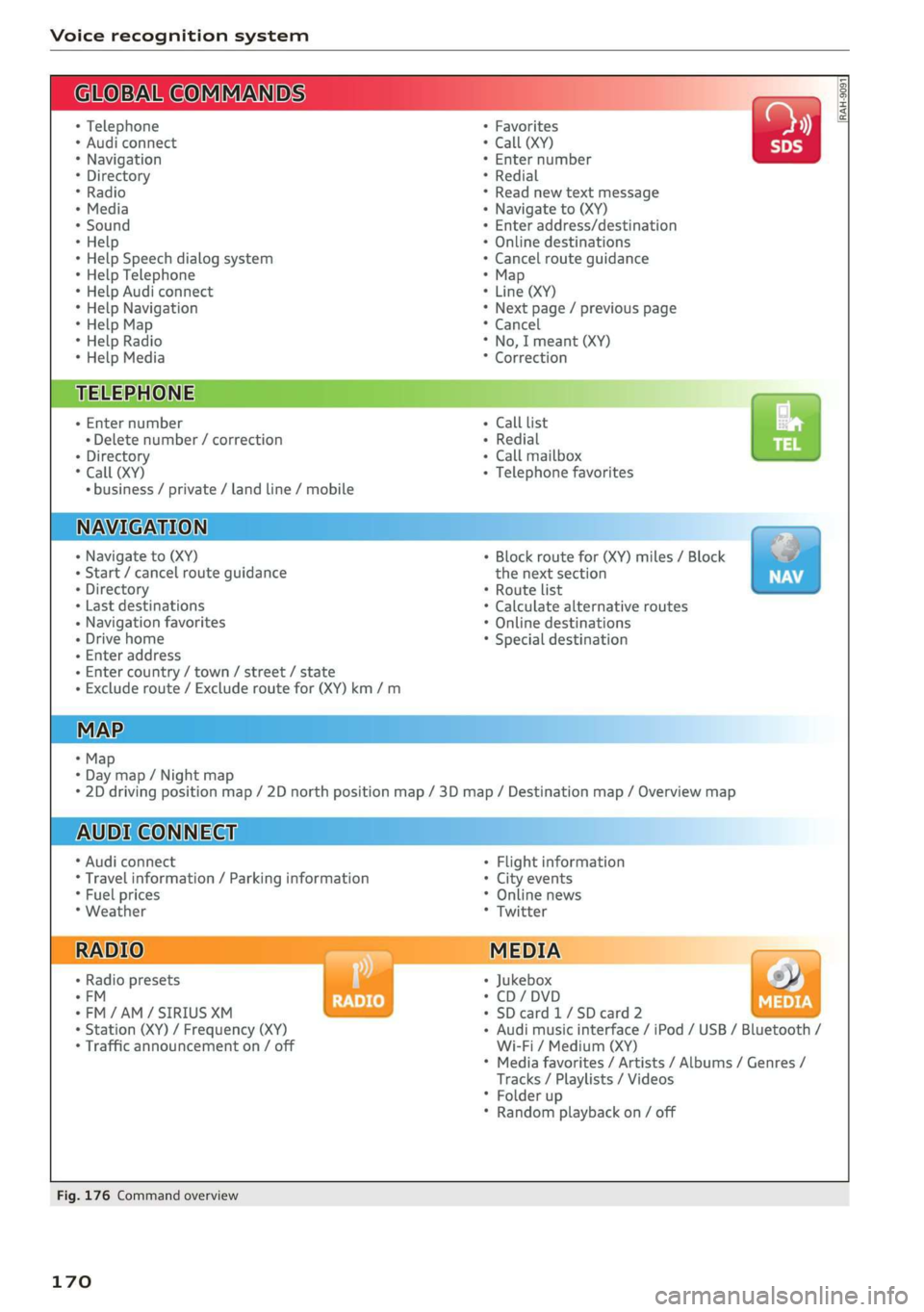
Fig.176Commandoverview
170
Page 173 of 394
4M0012721BG
Voicerecognitionsystem
Voicerecognitionsystem
Operating
Appliesto:vehicleswithvoicerecognitionsystem
YoucanoperatemanyInfotainmentfunctions
convenientlybyspeaking.
Requirement:theignitionandtheMMImustbe
switched
on>page153.Asystemlanguagesup-
portedbythevoicerecognitionsystemmustbe
set.Theremustbenophonecallsinprogressand
theparkingaidmustnotbeactive.
>Switchingon:brieflypressthe[2]button@)
=>page18,fig.11onthemultifunctionsteer-
ing
wheelandsaythedesiredcommandafter
theBeep.
>Switchingoff:pressandholdthe|]button.
Or:pressthe|S]button.
>Pausing:saythecommandPause.Toresume,
pressthe|]button.
>Correcting:saythecommandCorrection.Or:
simplysayanewcommandduringanan-
nouncement>page248.
Inputassistance
Thesystemguidesyouthroughtheinputwith
visualandaudiofeedback.
—Visualinputassistance:afterswitchingon
voicerecognition,adisplaywithaselectionof
possiblecommandsappears.Thiscommand
displaycanbe switchedonoroff.Select:
MENU]button>Settings>leftcontrolbutton
>MMIsettings>Speechdialogsystem.
—Audioinputassistance: tohavethepossible
commandsread,turnthevoicerecognitionsys-
temonandsayHelp.
Forthesystemtounderstandyou:
Speakclearlyanddistinctly atanormalvolume.
Speaklouderwhendrivingfaster.
Emphasizethewordsinthecommandsevenly
anddonotleavelongpauses.
Closethedoors,thewindows,andthesunroof*
toreducebackgroundnoise.Makesurethatpas-
sengersarenotspeakingwhenyouaregivinga
voicecommand.
Donotdirecttheventstowardthehands-freemi-
crophone,whichisintheroofheadlinernearthe
frontinteriorlights.
Onlyusethesystemfromthedriver'sseatbe-
causethehands-freemicrophoneisdirectedto-
wardthatseat.
Additionalsettings
See>page248,Speechdialogsystem.
ZAWARNING
—Directyourfullattentiontodriving.Asthe
driver,youhavecompleteresponsibilityfor
safetyintraffic.Only usethefunctionsin
suchawaythatyoualwaysmaintaincom-
pletecontroloveryourvehicleinalltraffic
situations.
—Donotuse thevoicerecognitionsystemin
emergenciesbecauseyourvoicemaychange
instressfulsituations.Thesystemmaytake
longertodialthenumberormaynot be
abletodialitatall.Dialtheemergency
numbermanually.
G)Tips
—Thedialogpauseswhenthereisanincom-
ingphonecallandwillcontinueifyouig-
norethecall.Thedialogendsifyouanswer
thecall.
—Youcanselectan iteminthelistusingei-
therthevoicerecognitionsystemorthe
controlknob.
Commandoverview
information
Appliesto:vehicleswithvoicerecognitionsystem
Thefollowingoverviewsdescribethecommands
thatcan beusedtooperatetheMMIusingthe
voicerecognitionsystem.
Alternativecommandsareseparatedusinga“/”,
forexamplesay:Telephone/(or)Navigation/
(or)Radio.
Sequencesofcommandsusedtoperformanac-
tionareidentifiedwitha“>”,forexamplesay:
Enteraddress>(then)Entercountry/state.
171
Page 201 of 394
4M0012721BG
Audiconnect
Vehiclestatusreport
Thisservicetransfersdriverinformationsystem
datatoaserver.Dependingonthevehicleequip-
ment,certaindatamaybeaccessed,suchasthe
remainingrangeormileage.Thevaluesmaydif-
ferfromthevaluesdisplayedinthevehicle.
CarFinder
Thisservicetransmitstheparkinglocationtoa
serverwhentheignitionisswitchedoff.Thevehi-
clelocation,yourlocation,ortheroutetoyour
vehiclecanbedisplayed.Thenewparkingloca-
tioncannotbedeterminedwiththisserviceifthe
vehicleismovedaftershuttingthevehicleoff
andwithoutswitchingtheignitiononandoff
again,forexampleifthevehicleistowedorsto-
len.
—Deactivatingandactivatingtheparkingposi-
tion:Select:[MENU]>Audiconnect>Carfind-
er.
OnlineAudiservicerequest
Requirement:theservicemustbeactivatedon-
lineatwww.audiusa.com/myaudiandanauthor-
izedAudidealerorauthorizedAudiservicefacili-
tymustbeselected.
Thisservicetransmitsservice-relevantdatato
yourselectedauthorizedAudidealerorauthor-
izedAudiservicefacility.Theywillcontactyou
beforeyournextserviceappointment.
StolenVehicleLocator
Thisserviceassistsyouinlocatingyourvehicleif
itisstolen.
—Contactthepolice.YoureceiveaCaseID.
—CalltheservicehotlineandgiveyourCaseID.
Theservicehotlinewillforwardtheestablished
datatothepolice.YoureceivetheAudiService
hotlinenumberwhenyoupurchaseyourvehicle.
GeofencingAlert
Requirement:akeyusermustbesetinthevehi-
cle>page198.
Thisserviceallowsyoutosetpermittedandfor-
biddenzonesforyourvehicleaswellassettime
limitsforthesezones.Ifyourvehicleleavesa
permittedzoneorentersaforbiddenzone,you
willbenotifiedwithapushnotificationand/oran
e-mail.
SpeedAlert
Requirement:akeyusermustbesetinthevehi-
cle>page198.
Youcansetuptotwospeedlimitsforyourvehi-
cleusingthis service.Ifyourvehicleexceedsaset
speedlimit,youwillbenotifiedwithapushnoti-
ficationand/ore-mail.
ValetAlert
Requirement:akeyusermustbesetinthevehi-
cle>page198.
Ifyougiveyourvehicletoaparkingservice,you
cansetazoneandaspeedlimitusingthemyAu-
diapp.Ifthevehicleleavesthezoneorexceeds
thespeedlimit,youwillbenotifiedwithapush
notificationand/ore-mail.
Z\WARNING
Donotignoremessagesandwarningorindi-
catorlightsthatturnoninthevehiclebe-
causeoftheinformationinthevehiclestatus
report.Thiscouldlead tobreakdownsinon
theroad,accidentsandseriousinjuries.
@)Tips
Forsomeservices,youcanselectifyouwould
liketobenotifiedwithapushnotification
and/orane-mail.
Settings
ce)atelatMariano)4
>Select:[MENU]button>rightcontrolbutton>
Connectionmanager.
>Select:rightcontrolbutton>Onlinesettings>
Dataconnectionsettings.
Depending onthecountry,vehicleequipment,
andconnectiontype,thefollowingfunctionsmay
beavailable:
199
Page 208 of 394
Navigation
>Pushthecontrolknobup.Theinputfieldisdis-
played@)&page205,fig. 189.
—Enteroneormoresearchtermsintotheinput
field.
—Ifavailable,confirmtheinputsuggestion*to
completetheentryorawordsuggestion*.See
=page161,Letter/numberspeller.
—Turn thecontrolknobtotherighttochangethe
resultslist.
—Selectandconfirmadestinationfromthere-
sultslist.
Theroutedisplaysasanoverviewinthemap.
Routeguidanceisalreadyactive.
Narrowingthesearcharea
Allcountries/statesareselectedatthefactory
forthefreetextsearch.
—Select:therightcontrolbutton>Country/state
selectionintheinputfield@>page205,
fig.189.
—Selectthecountryorstate(@)thatshould be
searchedforinthefreetextsearchinorderto
narrowthenumberofresultsandincreasethe
searchspeed.Theselectedentryinthecoun-
try/stateselectionisstored.Or:SelectAll
countries/states.
@Tips
— TheMMIinputsuggestionsdependonthe
lastnavigateddestinations.
—Upto50entriescanbestoredinthelast
destinationslist.
—Additionalinformationonfreetextsearches
canbefoundunder>page162.
Loadingpreviousdestinations
Appliesto:vehicleswithnavigationsystem
Yourlastdestinationsareautomaticallystored
andcanbeloadeddirectlyas adestination.
Requirement:adestinationwasalreadynavigat-
edto.
>Pressthe [NAV/MAP]buttonrepeatedlyuntil
the Enterdestinationmenuisdisplayed
=>page205,fig. 189.
206
YourlastdestinationislisteddirectlyintheEnter
destinationmenuunderthehomeaddressand
identifiedwiththesymbol@)>page205,
fig.189.
—Selectandconfirmoneofthelastdestinations
fromthelist.
Deletingpreviousdestinations
—Selectoneofthelastdestinationsfromthelist.
—Select:rightcontrolbutton>Deletedestina-
tion>DeletethislastdestinationorDeleteall
lastdestinations.
Theselecteddestinationoralllastdestinations
is/aredeletedandnolongerdisplayedintheEn-
terdestinationmenu.
Enteringanaddress
Appliesto:vehicleswithnavigationsystem
As analternativetofreetextsearch,youcanal-
so enteranaddressinstages.
>Pressthe [NAV/MAP]buttonrepeatedlyuntil
theEnterdestinationmenuisdisplayed
=>page205,fig. 189.
>Select:leftcontrolbutton>Enteraddress.
—Enteringadestinationusingacountry/state:
selectandconfirmCountry/state.Selectand
confirmacountryorstatedirectlyfromthelist.
Or:searchforacountryorstateusingtheinput
field.
—EnteringadestinationusingtheCityorZIP
code:selectandconfirmCity/ZIPcode.Entera
cityoraZIPcode.Or:selectandconfirmacity
fromthelist.
—Selectandconfirmadditionaldetailsaboutthe
destinationsuchasStreet,Housenumberor
Downtown.
—Destinationentry usinga streetintersection*:
Requirement:youmustenterastreet.Select
andconfirmIntersection.Selectandconfirma
streetdirectlyfromthelist.Or:searchfora
streetusingtheinputfield.
—SelectandconfirmStartrouteguidance.
Page 213 of 394
4M0012721BG
Navigation
Personalroute
assistance
Appliesto:vehicleswithnavigationsystemandpersonal
routeassistance
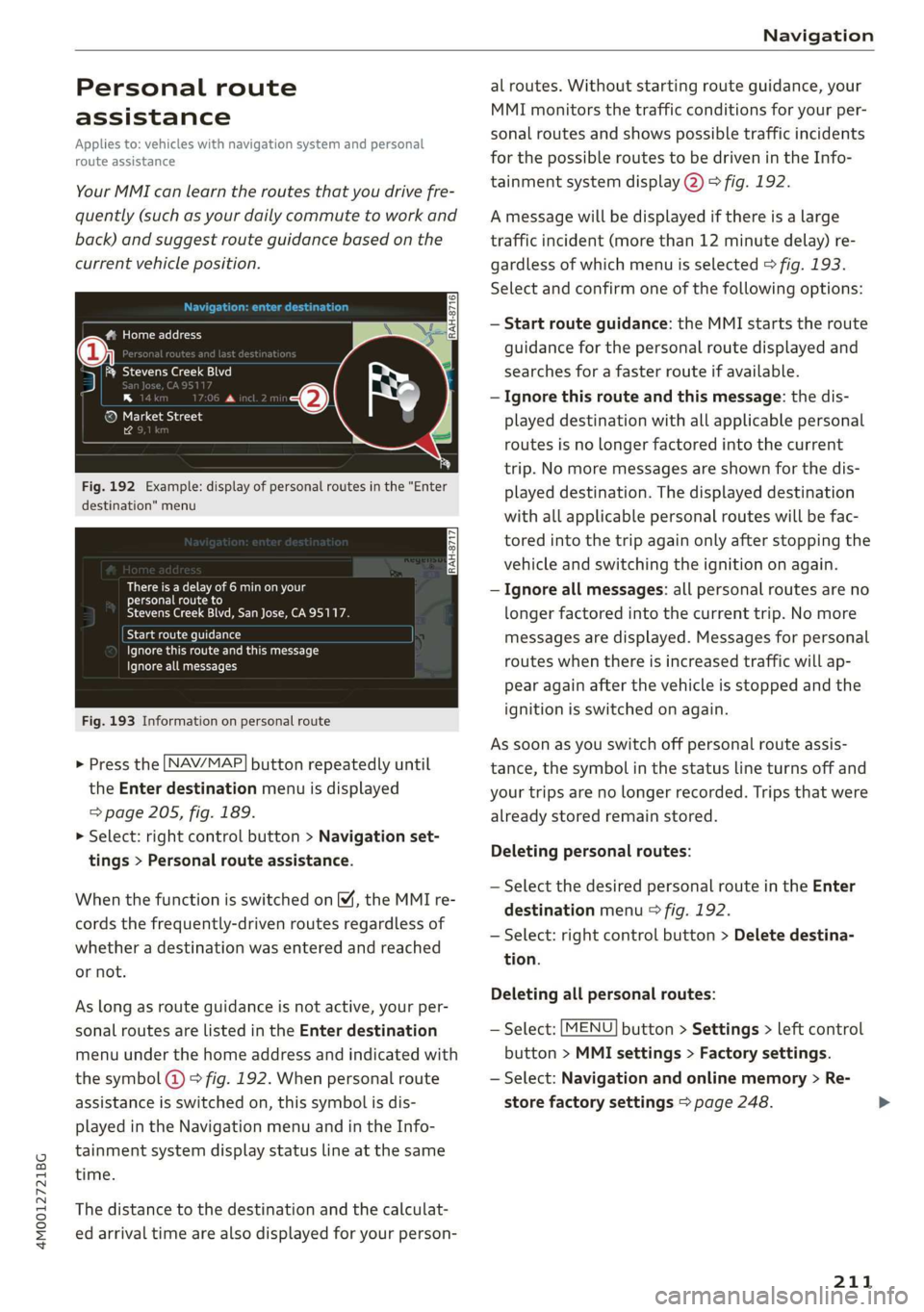
YourMMIcanlearntheroutesthatyoudrivefre-
quently(suchasyourdailycommutetoworkand
back)andsuggestrouteguidancebasedonthe
currentvehicleposition.
#Homeaddress
5iRk]Ae
na
®MarketStreet
14
Fig.192Example:displayofpersonalroutesinthe"Enter
destination"menu
Thereisadelayof6minonyour
personalrouteto
StevensCreekBlvd,SanJose,CA95117.
Byelamceleiemeeee)
Paescruheiuccsc
Ignoreallmessages
Fig.193Informationonpersonalroute
>Pressthe [NAV/MAP]buttonrepeatedlyuntil
the Enterdestinationmenuisdisplayed
=>page205,fig. 189.
>Select:rightcontrolbutton>Navigationset-
tings>Personalrouteassistance.
WhenthefunctionisswitchedonM,theMMIre-
cordsthefrequently-drivenroutesregardlessof
whetheradestinationwasenteredandreached
ornot.
Aslongasrouteguidanceisnotactive,yourper-
sonalroutesarelistedinthe Enterdestination
menuunderthehomeaddressandindicatedwith
thesymbol(@©fig.192.Whenpersonalroute
assistanceisswitchedon,thissymbolisdis-
playedintheNavigationmenuandintheInfo-
tainmentsystemdisplaystatuslineatthesame
time.
Thedistancetothedestinationandthecalculat-
edarrivaltimearealsodisplayedforyourperson-
alroutes.Withoutstartingrouteguidance,your
MMImonitorsthetrafficconditionsforyourper-
sonalroutesandshowspossibletrafficincidents
forthepossibleroutestobedrivenintheInfo-
tainmentsystemdisplay@)>fig.192.
Amessagewillbedisplayedifthereisalarge
trafficincident(morethan12minutedelay)re-
gardlessofwhichmenuisselected>fig.193.
Selectandconfirmoneofthefollowingoptions:
—Startrouteguidance:theMMIstartstheroute
guidanceforthepersonalroutedisplayedand
searchesfora fasterrouteifavailable.
—Ignorethisrouteandthismessage:thedis-
playeddestinationwithallapplicablepersonal
routesisnoLongerfactoredintothecurrent
trip.Nomoremessagesareshownforthedis-
playeddestination.Thedisplayeddestination
withallapplicablepersonalrouteswillbefac-
toredintothetripagainonlyafterstoppingthe
vehicleandswitchingtheignitiononagain.
—Ignoreallmessages:allpersonalroutesareno
longerfactoredintothecurrenttrip.No more
messagesaredisplayed.Messagesforpersonal
routeswhenthereisincreasedtrafficwillap-
pearagainafterthevehicleisstoppedandthe
ignitionisswitchedonagain.
Assoonasyouswitchoffpersonalrouteassis-
tance,thesymbolinthestatuslineturnsoffand
yourtripsarenolongerrecorded.Tripsthatwere
alreadystoredremainstored.
Deletingpersonalroutes:
—SelectthedesiredpersonalrouteintheEnter
destinationmenu°fig.192.
—Select:rightcontrolbutton>Deletedestina-
tion.
Deletingallpersonalroutes:
—Select:[MENU]button>Settings>leftcontrol
button>MMIsettings>Factorysettings.
—Select:Navigationandonlinememory>Re-
storefactorysettings>page248.
211
Page 230 of 394
Media
(CO)6/VDE0837.Thevarioustypesofaudio
equipmentinstalledconformtosafetyclass1.
The
laserusessolittlepowerorisshieldedso
thereisnodangerwhenitisusedcorrectly.
Mediadrives
SDcardreader
TheSDcardreaderislocatedintheglovecom-
partment.
—InsertingtheSDcard:Theangledcornerofthe
SDcardmustpointtowardtherightfrontside.
SlidetheSDcardintothecardreaderslotuntil
theSDcardclicksintoplace.
—Automaticplayback:playbackwillstartauto-
maticallyiftheinsertedSDcardcontainssup-
portedaudio/videofiles*>page241.
—RemovingtheSDcard: pressbrieflyontheSD
card.
TheSDcardreaderisaccessedandoperated
throughtheMMI@)>page235,fig.212.
@)Note
Onlyuseone-pieceSDcards.Ifadaptercards
(SDcardswithmorethanonepiece)areused,
thecardcouldfalloutoftheadapterwhen
drivingbecauseofvibrations.Individual
piecescouldthenbecomestuckinthedrive
andimpairthefunctionality.
@Tips
TheSIMcardreaderthendoesnotfunction.
DVDdrive
Appliesto:vehicleswithaDVDdrive
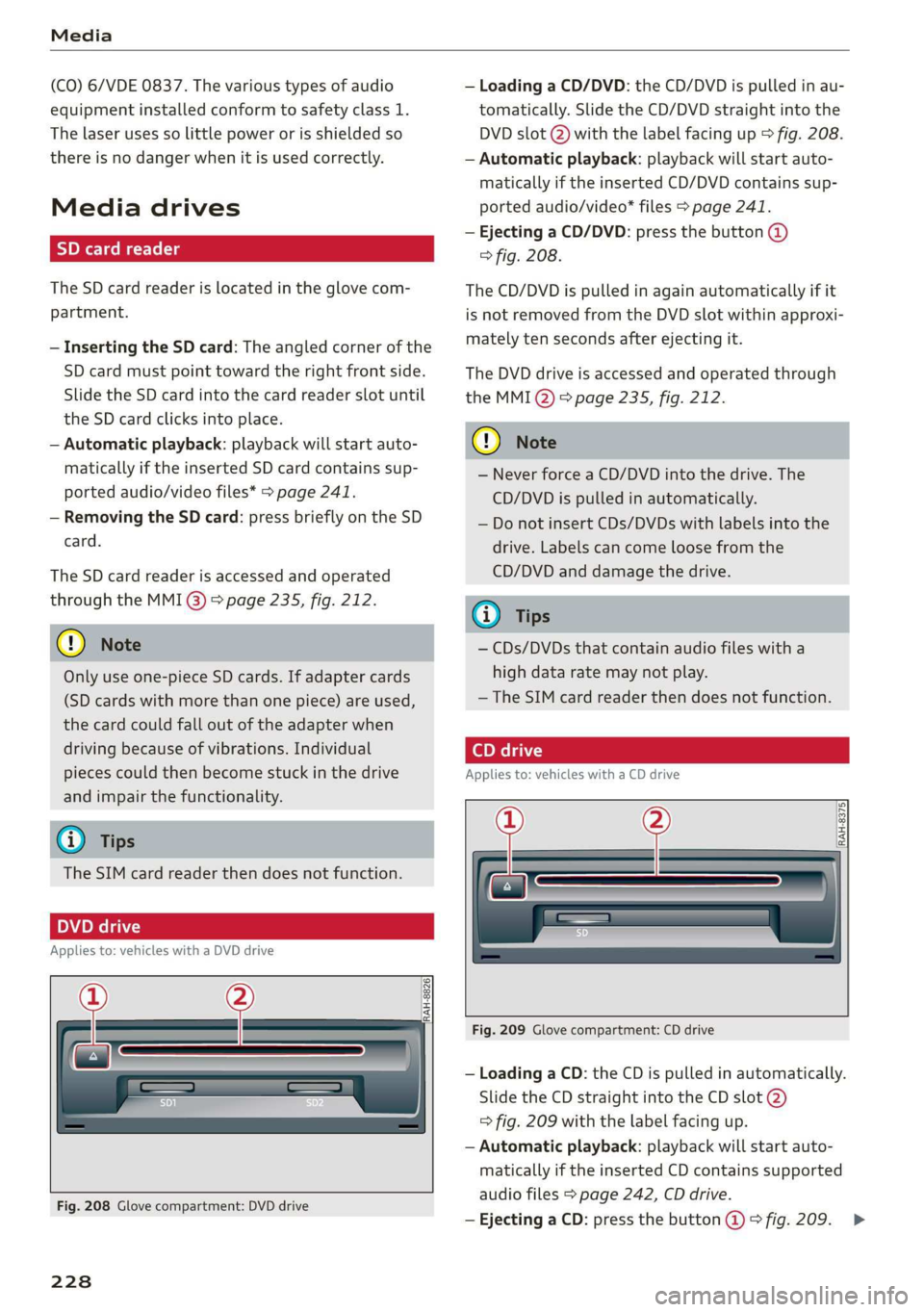
a
RAH-8826|
Fig.208Glovecompartment:DVDdrive
228
—LoadingaCD/DVD:theCD/DVDispulledinau-
tomatically.SlidetheCD/DVDstraightintothe
DVDslot@)withthelabelfacingup>fig.208.
—Automaticplayback:playbackwillstartauto-
maticallyiftheinsertedCD/DVDcontains sup-
portedaudio/video*files>page241.
—EjectingaCD/DVD:pressthebutton@
>fig.208.
TheCD/DVDispulledinagainautomaticallyifit
isnotremovedfromtheDVDslotwithinapproxi-
matelytensecondsafterejectingit.
TheDVDdriveisaccessedandoperatedthrough
theMMIQ)>page235,fig.212.
@)Note
—NeverforceaCD/DVDintothedrive.The
CD/DVDispulledinautomatically.
—DonotinsertCDs/DVDswithlabelsintothe
drive.Labelscancomeloosefromthe
CD/DVDanddamagethedrive.
@Tips
—CDs/DVDsthatcontainaudiofileswitha
highdataratemaynotplay.
— TheSIMcardreaderthendoesnotfunction.
Appliesto:vehicleswithaCDdrive
——
RAH-8375|
Fig.209Glovecompartment:CDdrive
—LoadingaCD:theCDispulledinautomatically.
SlidetheCDstraightintotheCDslot@)
=>fig.209withthelabelfacingup.
—Automaticplayback:playbackwillstartauto-
maticallyiftheinsertedCDcontainssupported
audiofiles>page242,CDdrive.
—EjectingaCD:pressthebutton@>fig.209.>
Page 247 of 394
4M0012721BG
Audismartphoneinterface
Audismartphone
interface
Setup
Appliesto:vehicleswithAudismartphoneinterface
YoucanconnectyoursmartphonetotheMMIus-
ingtheAudismartphoneinterface.Certaincon-
tenton yoursmartphoneisadaptedtotheInfo-
tainmentsystemdisplaywhiledrivingandcan
beoperatedthroughtheMMIcontrolpanel.
Requirement
Thevehiclemustbestationaryandtheignition
mustbe switchedon.
iPhonegeneration5orhigher withLightning
connectorandiOS7.1.2operatingsystemor
higher.Or:
AsmartphonewiththeAndroidAutoapp andAn-
droid5.0Lollipopoperatingsystemorhigheris
required.
>Connectyour smartphonetotheAudimusicin-
terface>page233usingtheapplicableUSB
adapter>page233,fig.211.
> SelectandconfirmActivateAppleCarPlayor
ActivateAndroidAutonow.
>Follow thesysteminstructions.
>Payattentiontoanyadditionalsystemprompts
onyoursmartphone,ifapplicable.
IfyouchosenottouseAppleCarPlayorAndroid
Autowhenconnectingyoursmartphoneforthe
firsttime,youcanstarttheAudismartphonein-
terfacelateronusingtheConnectionmanager.
>Select:[MENU]button>Audismartphonein-
terface>Changetoconnectionmanager.
>Connectyour smartphonetotheAudimusicin-
terfaceusingtheappropriateUSBadapter
=>page233,fig.211.
>»SelectandconfirmAudismartphoneinthe
Connectionmanager>page248.Youcanse-
lectyoursmartphoneinthelistofdevicesthat
arealreadypaired>page250.
>Follow thesysteminstructions.
sponsibilityforsafetyintraffic.Neveroperate
mobiledeviceswhiledriving,becausethisin-
creasestheriskofanaccident.
ZAWARNING
Drivingrequiresyourcompleteandundivided
attention.Asthedriver,youhavecompletere-
@)Note
Alwaysfollowtheinformationfoundin>@in
Wi-Fisettingsonpage200.
G)Tips
—Thefunctionsthatcan beuseddependon
thefollowingfactors,amongothers:
—Thebrandofyoursmartphone
—Theversionoftheoperatingsystemin
yoursmartphone
—Thesoftwareversionoftheappused
—TheUSBadaptercableandcorrectconnec-
tion
—Yourcellphoneserviceprovider
—Thecustomizedsettingson yoursmart-
phone
— Oneofthefactorsaboveoracombination
ofanyofthemcouldcauseyoursmart-
phonetobe incompatiblewiththeAudi
smartphoneinterface.Compatibilitycannot
beguaranteedforalltypesofsmartphones.
Formoreinformationandassistance,refer
totheuserguideandthemanufacturerof
yoursmartphone.
—Iftheconnectedsmartphonehasvoicecon-
trol,youcan operateyoursmartphoneusing
theexternalvoicerecognitionsystem
=>page176.
—ThemenulanguageshownintheMMIis
basedonthesettingsinyoursmartphone.
—ThetimedisplayedintheMMIisbasedon
thesettingsinyoursmartphone.
—SomeMMIfunctionsarenotavailablewhen
AppleCarPlayorAndroidAutoisactive.
—Youcannotconnectanymobiledevicesvia
BluetoothwhenanAppleCarPlayconnec-
tionisactive.
245