display AUDI Q7 2019 Owner´s Manual
[x] Cancel search | Manufacturer: AUDI, Model Year: 2019, Model line: Q7, Model: AUDI Q7 2019Pages: 394, PDF Size: 105.97 MB
Page 126 of 394

Assistsystems
parkedorifyourvehicleispulledtoofarin-
totheparkingspacesothatitishiddenby
adjacentvehicles.
G@)Note
Alsoreadtheinformationin>@©inGeneral
informationonpage121.
@)Tips
—Youcancanceltheautomaticbrakeactiva-
tionwithincreasingbrakingforceifyouap-
plythe brakesyourselforaccelerateconsid-
erably.
—Insomesituations,rearcross-trafficassist
maywarnyouevenifthereisnocrosstraffic
ina criticalarea,forexamplewhenbacking
intoaparkingspaceormaneuvering.
—Therearcross-trafficassistalsoswitchesoff
whenyouswitchofftheESC.
— Thesystemisnotavailablewhentowinga
trailer.
—Foranexplanationonconformitywiththe
FCCregulationsinthe UnitedStatesandthe
IndustryCanadaregulations,see
=>page373.
Messages
Appliesto:vehicleswithAudisideassist
Amessageappearsintheinstrumentclusterdis-
playifthesideassistswitchesoffautomatically.
B]Audisideassist:malfunction!Pleasecontact
Service
eB]Audisideassistandexitwarning: malfunc-
tion!PleasecontactService
Thesystemcannotguaranteethatitwilldetect
vehiclescorrectlyandithasswitchedoff.The
sensorshavebeenmovedorarefaulty.Havethe
systemcheckedbyanauthorizedAudidealeror
authorizedAudiServiceFacilitysoon.
geAudisideassist:currentlyunavailable.Sen-
sorvisionrestrictedduetosurroundings.See
owner'smanual
Audisideassistandexitwarning:currently
unavailable.Sensorvisionrestrictedduetosur-
roundings
124
Theradarsensorvisionisimpaired.Theareain
frontofthesensorsmustnotbecoveredbybike
racks,stickers,leaves,snoworanyotherobjects.
Cleantheareacoveringthesensors,ifnecessary
=page120,fig.116.
Audi sideassist:currently unavailable.See
owner'smanual
Audisideassistandexitwarning:currently
unavailable.Seeowner'smanual
Sideassistcannotbe switchedonatthistimebe-
causethereisamalfunction(forexample,the
batterychargelevelmaybetoolow).
&Audisideassist:unavailableintowingmode
Audisideassistandexitwarning:currently
unavailable.Towingmode
Sideassistswitchesoffautomaticallywhenthe
electricalconnectorinthefactory-installedtrail-
erhitchisconnected.Thereisnoguaranteethe
systemwillswitchoffwhenusingaretrofitted
trailerhitch.Donotusesideassistandtheexit
warningwhentowingatrailer.
Rearparkingaid:obstacledetectionrestrict-
ed
Therearcross-trafficassistisnotavailable.Ei-
thertheESCisswitchedoff,ortheradarsensors
maybecoveredbyabikerack,stickers,leaves,
snoworotherobjects.SwitchtheESCon,or
cleantheareainfront ofthesensorsifnecessary
=>page120,fig. 116.Ifthismessagecontinues
tobedisplayed,driveimmediatelytoanauthor-
izedAudidealerorauthorizedAudiServiceFacili-
tytohave themalfunctionrepaired.
Nightvisionassist
Appliesto:vehicleswithnightvision assist
Thenightvisionassistcandetect,highlightand,
ifnecessary,warnaboutpedestriansandlarge
wildanimals.
Nightvision assisthelpsyouwhenitisdark by
usinganinfraredcamerato monitortheareain
front ofyourvehicle,withinthelimitsofthesys-
tem.Itcandisplayobjectsuptoadistanceof>
Page 127 of 394
4M0012721BG
Assistsystems
approximately1000feet(300m).Thethermal
imagedetectedbythecameraisshowninthein-
strumentclusterdisplay.Warmareasappear
lighterandcoldareasappeardarker.
Appliesto:vehicleswithnightvision assist
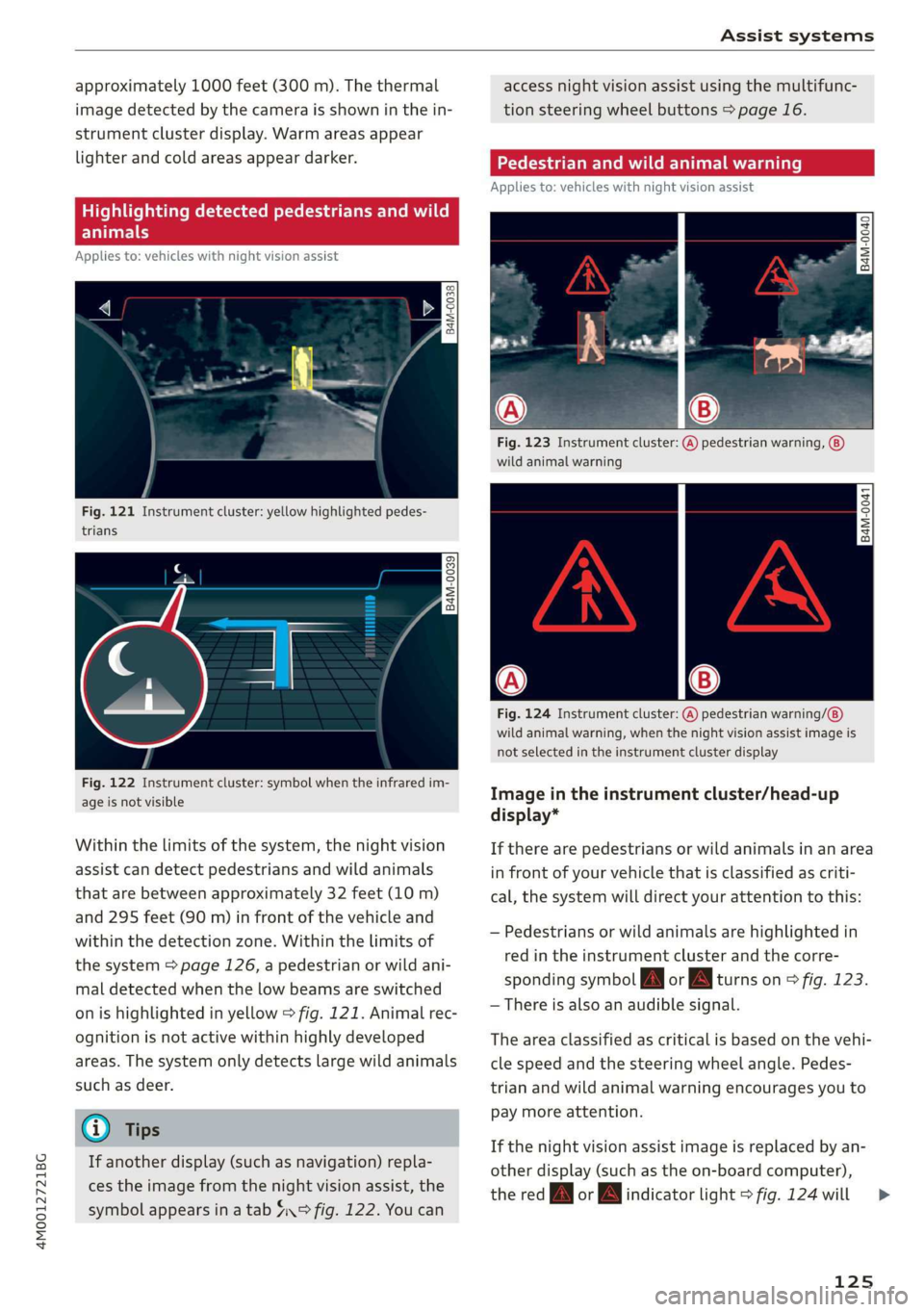
Fig.121Instrumentcluster:yellowhighlightedpedes-
trians
B4M-0039
Fig.122Instrumentcluster:symbolwhentheinfraredim-
ageisnotvisible
Withinthelimitsofthesystem,thenightvision
assistcandetectpedestriansandwildanimals
thatarebetweenapproximately32feet(10m)
and295feet(90m)infront ofthevehicleand
withinthedetectionzone.Withinthelimitsof
thesystem=>page126,apedestrianorwildani-
maldetectedwhenthelowbeamsareswitched
onishighlightedinyellow>fig.121.Animalrec-
ognitionisnotactivewithinhighlydeveloped
areas.Thesystemonlydetectslargewildanimals
suchasdeer.
@)Tips
Ifanotherdisplay(suchasnavigation)repla-
cestheimagefromthenightvisionassist,the
symbolappearsinatab4°fig.122.Youcan
accessnightvision assistusingthemultifunc-
tionsteeringwheelbuttons>page16.
Appliesto:vehicleswithnightvision assist
Fig.123Instrumentcluster:(A)pedestrianwarning,
wildanimalwarning
B4M-0041
Fig.124Instrumentcluster:
wildanimalwarning,whenthenightvisionassistimageis
notselectedintheinstrumentclusterdisplay
pedestrianwarning/
Imageintheinstrumentcluster/head-up
display*
Iftherearepedestriansorwildanimalsinanarea
infront ofyourvehiclethatisclassifiedascriti-
cal,thesystemwilldirectyourattentiontothis:
—Pedestriansor wildanimalsarehighlightedin
redintheinstrumentclusterandthecorre-
spondingsymbolJMorBMturnson>fig.123.
—Thereisalsoanaudiblesignal.
Theareaclassifiedascriticalisbasedonthevehi-
clespeedandthesteeringwheelangle.Pedes-
trianandwildanimalwarningencouragesyouto
paymoreattention.
Ifthenightvision assistimageisreplacedbyan-
otherdisplay(suchastheon-boardcomputer),
theredfayorindicatorlight>fig.124will
125
>
Page 128 of 394
Assistsystems
appearifthereisapedestrianorwildanimal
warning.
Ifthehead-updisplay*isswitchedonandthe
nightvisionassistcontentisactivated,/\|orA
willappearinthehead-updisplay”.
Markinglight*
Todirectthedriver'sattentiontoapedestrian,
theheadlightscanflashonthepedestrianthree
timesinarowwhenthereisapedestrianwarn-
ing.
Thisoccursatspeedsaboveapproximately
35mph(60km/h)ifyouareoutsideofilluminat-
edareasandnodetectedvehiclesareshown.The
highbeamassistant*controlsthemarking
light*>page43.
Themarkinglightisnotusedforwildanimals.
Generalinformation
Appliesto:vehicleswithnightvisionassist
y t3 2
= +
a
a
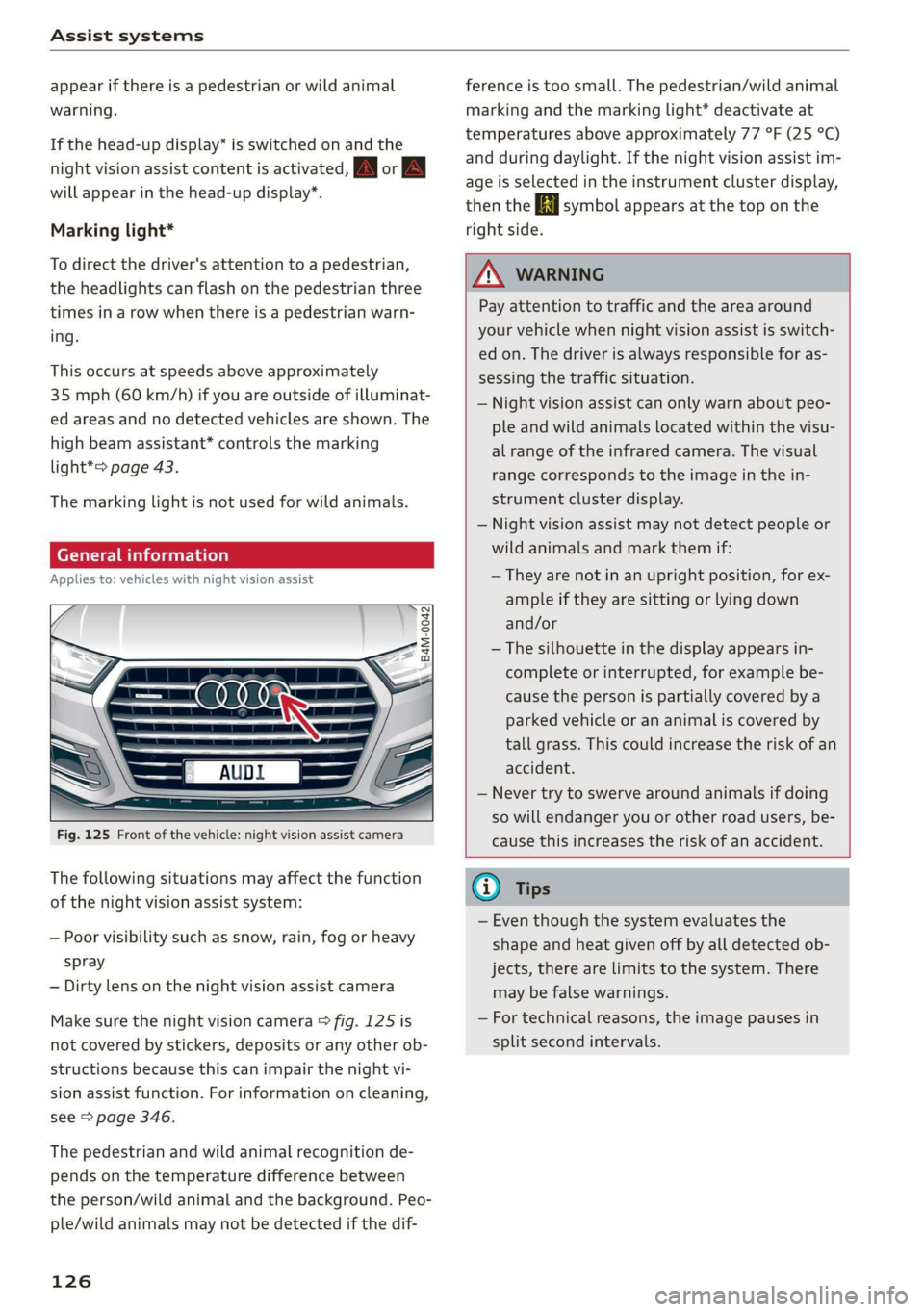
Fig.125Frontofthevehicle:nightvision assistcamera
Thefollowingsituationsmayaffectthefunction
ofthenightvisionassistsystem:
—Poorvisibilitysuchassnow,rain,fogorheavy
spray
—Dirtylensonthenightvisionassistcamera
Makesurethenightvisioncamera>fig.125is
notcoveredbystickers,depositsoranyotherob-
structionsbecausethiscanimpair thenightvi-
sionassistfunction.Forinformationoncleaning,
see>page346.
Thepedestrianandwildanimalrecognitionde-
pendsonthetemperaturedifferencebetween
theperson/wildanimalandthebackground.Peo-
ple/wildanimalsmaynotbedetectedifthedif-
126
ferenceistoosmall.Thepedestrian/wildanimal
markingandthemarkinglight*deactivateat
temperaturesaboveapproximately77°F(25°C)
andduringdaylight.Ifthenightvision assistim-
ageisselectedintheinstrumentclusterdisplay,
thentheBisymbolappearsatthetoponthe
rightside.
ZA\WARNING
Payattentiontotrafficandtheareaaround
yourvehiclewhennightvisionassistisswitch-
edon.Thedriverisalwaysresponsibleforas-
sessingthetrafficsituation.
—Nightvision assistcanonlywarnaboutpeo-
pleandwildanimalslocatedwithinthevisu-
alrangeoftheinfraredcamera.Thevisual
rangecorrespondstotheimageinthein-
strumentclusterdisplay.
—Nightvision assistmaynotdetectpeopleor
wildanimalsandmarkthemif:
—Theyarenotinanuprightposition,forex-
ampleiftheyaresittingorlyingdown
and/or
—Thesilhouetteinthedisplayappearsin-
completeorinterrupted,forexamplebe-
causethepersonispartiallycoveredbya
parkedvehicleorananimaliscoveredby
tallgrass.Thiscouldincreasetheriskofan
accident.
—Nevertrytoswerve aroundanimalsifdoing
sowillendangeryouorotherroadusers,be-
causethisincreasestheriskofanaccident.
(i)Tips
—Eventhoughthesystemevaluatesthe
shapeandheatgivenoffbyalldetectedob-
jects,therearelimitstothesystem.There
maybefalsewarnings.
—Fortechnicalreasons,theimagepausesin
splitsecondintervals.
Page 129 of 394
4M0012721BG
Assistsystems
Switchingonandoff
Appliesto:vehicleswithnightvision assist
io+
Ss
2
=¥a
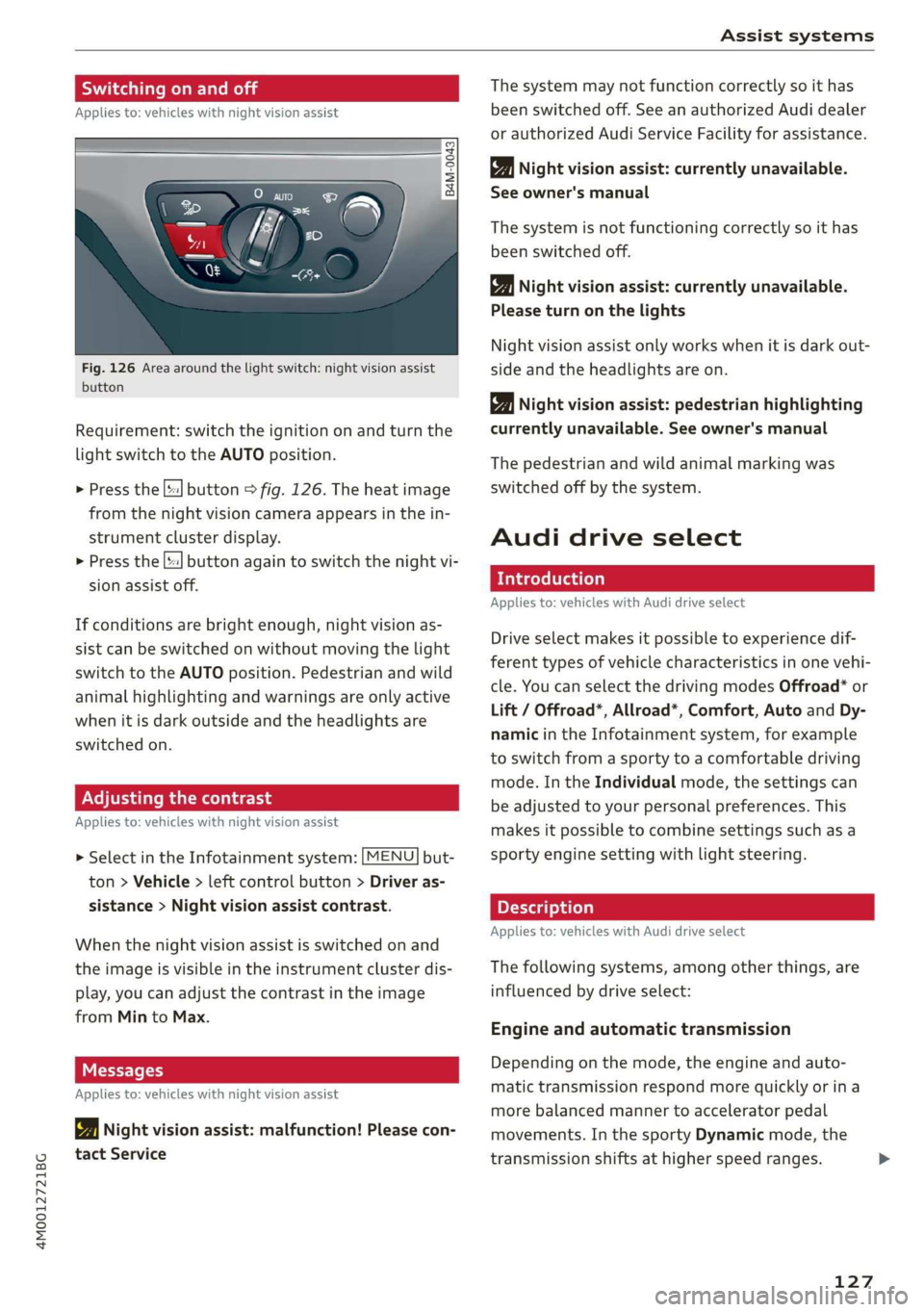
Fig.126Areaaroundthelightswitch:nightvision assist
button
Requirement:switchtheignitiononandturnthe
lightswitchtotheAUTOposition.
>Pressthe[|button>fig.126.Theheatimage
fromthenightvisioncameraappearsinthein-
strumentclusterdisplay.
>
Pressthe||buttonagaintoswitchthenightvi-
sionassistoff.
Ifconditionsare brightenough,nightvisionas-
sistcanbe switchedonwithoutmovingthelight
switchtotheAUTOposition.Pedestrianandwild
animalhighlightingandwarningsareonlyactive
whenitisdarkoutsideandtheheadlightsare
switchedon.
ONCmae9
Appliesto:vehicleswithnightvisionassist
>SelectintheInfotainmentsystem:[MENU]but-
ton>Vehicle> leftcontrolbutton>Driveras-
sistance>Nightvisionassistcontrast.
Whenthenightvisionassistisswitchedon and
theimageisvisibleintheinstrumentclusterdis-
play,youcanadjustthecontrastintheimage
fromMintoMax.
Messages
Appliesto:vehicleswithnightvisionassist
1Nightvisionassist:malfunction!Pleasecon-
tactService
Thesystemmaynotfunctioncorrectlysoithas
beenswitchedoff.SeeanauthorizedAudidealer
orauthorizedAudiServiceFacilityforassistance.
Nightvisionassist:currentlyunavailable.
Seeowner'smanual
Thesystemisnotfunctioningcorrectlysoithas
beenswitchedoff.
Nightvisionassist:currentlyunavailable.
Pleaseturnonthelights
Nightvision assistonlyworkswhenitisdarkout-
sideandtheheadlightsare on.
Nightvisionassist:pedestrianhighlighting
currentlyunavailable.Seeowner'smanual
Thepedestrianandwildanimalmarkingwas
switchedoffbythesystem.
Audidriveselect
Introduction
Appliesto:vehicleswithAudidriveselect
Driveselectmakesitpossibletoexperiencedif-
ferenttypesofvehiclecharacteristicsinonevehi-
cle.YoucanselectthedrivingmodesOffroad*or
Lift/Offroad*,Allroad*,Comfort,AutoandDy-
namicintheInfotainmentsystem,forexample
toswitchfromasportytoacomfortabledriving
mode.IntheIndividualmode,thesettingscan
beadjustedtoyourpersonalpreferences.This
makesitpossibletocombinesettingssuchasa
sportyenginesettingwithlightsteering.
Appliesto:vehicleswith Audidriveselect
Thefollowingsystems,amongotherthings,are
influencedbydriveselect:
Engineandautomatictransmission
Depending onthemode,theengineandauto-
matictransmissionrespondmorequicklyorina
morebalancedmannertoacceleratorpedal
movements.Inthe sportyDynamicmode,the
transmissionshiftsathigherspeedranges.
127
Page 130 of 394
Assistsystems
Airsuspension
Appliesto:vehicleswithairsuspension
The
airsuspensionisanelectronically-controlled
suspensionandlevelingsystem.Thefirmnessof
thesuspensionwilladapttothedrivingcondi-
tionsandthedrivingsituation.Thesystembalan-
cesoutchangesinload.Thevehiclelevelwillalso
adaptgraduallytothevehiclespeedinorderto
reduce thewindresistanceathighspeedsandin-
creasethegroundclearanceatlowspeeds.The
settingsdependontheselectedAudidrivese-
lect*mode.
Steering
Thepowersteeringadapts.Indirectsteeringthat
moveseasilyasinComfortmodeisespecially
suitedtolongdrivesonhighways.TheDynamic
modeprovidessporty,directsteering.
All-wheelsteering*
All-wheelsteeringincreasesdrivingcomfortby
providingadditionalsteeringabilityattherear
axle.Steeringintheoppositedirectionatlow
speedsdecreasestheturningradius.Steeringin
thesamedirectionathighspeeds improvesthe
responsetimewhileincreasingdrivingstabilityat
thesametime.
Sportdifferential*
Asacomponentoftheallwheeldrivesystem
(quattro)>page151,thesportdifferentialdis-
tributesthedrivingpowertotherearaxlede-
pendingonthesituation.Thedistributionof
powervariesdependingontheselectedmode
frommoderate(Comfort)tosporty(Dynamic).
Thegoalisahighlevelofagilityandabilitytoac-
celerateoncurves.Thevehicleisveryresponsive
tosteering.
Adaptivecruisecontrol(ACC)*
Thebehaviorwhenacceleratingcanbeadjusted
fromcomfortabletosporty,dependingonthe
driveselectmode.Adaptivecruisecontrolalso
respondstothedrivingbehaviorofthevehicle
aheadinamoreconservativeorsportymanner.
128
Enginesound*
Theenginesoundadaptstothecurrentmode
andcan besubtletosporty.
C@)Note
Appliesto:vehicleswithairsuspension
—
Makesurethereisenoughclearanceabove
andbelowthevehiclewhenparking.The
heightofthevehicle(groundclearance)can
changeonceitisparkedduetotemperature
fluctuations,changestotheload condi-
tions,andchangestothedrivingmodes.
—
Whentransportingthevehicleonacarcar-
rier,train,ship,orbyothermeans,onlyse-
curethevehicleattheoutercircumference
ofthetires(thetreadsurface).Securingthe
vehicleattheaxlecomponents,suspension
struts,ortowingeyesisnotpermittedbe-
causethepressureintheairsuspension
strutscanchangeduringtransport.Theve-
hiclemightnot besecuredsufficientlyifthis
happens.
@Tips
The"S"selectorleverpositionautomatically
engageswhentheDynamicmodeisselected.
Selectingthedrivingmode
Appliesto:vehicleswithAudidriveselect
B4M-0240
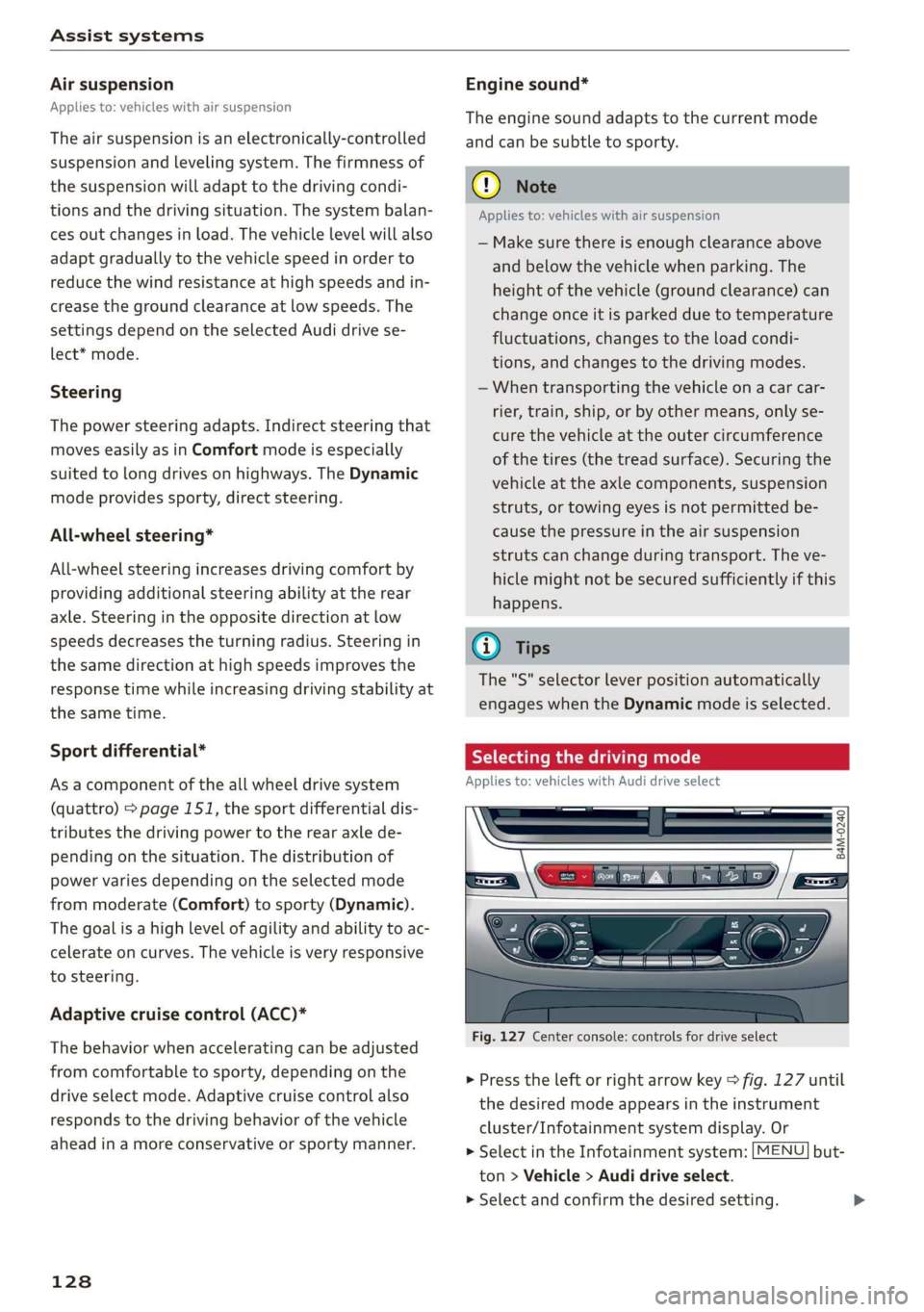
Fig.127Centerconsole:controlsfordriveselect
>Presstheleftorrightarrowkey>fig.127until
thedesiredmodeappearsintheinstrument
cluster/Infotainmentsystemdisplay.Or
>SelectintheInfotainmentsystem:[MENU]but-
ton>Vehicle>Audidriveselect.
>Selectandconfirmthedesiredsetting.
Page 133 of 394

4M0012721BG
Parkingaid
Parkingaid
Generalinformation
Appliesto:vehicleswitharearparkingsystem/parkingsys-
templus/rearviewcamera/peripheralcameras/parkassist.
Dependingonyourvehicle'sequipment,various
parkingaidswillhelpyouwhenparkingandma-
neuvering.
Therearparkingsystemisanaudible parkingaid
thatwarnsyouofobstaclesbehindthevehicle
=>page132.
Theparkingsystemplusassistsyouwhilepark-
ingusingaudioandvisualsignalstowarnyou
aboutobjectsdetectedinfrontof,behind,andat
thesides*ofthevehicle>page132.
Therearviewcamerashowstheareabehindthe
vehicleintheInfotainmentsystemdisplay.The
linesintherearviewcameraimagehelpyouto
parkormaneuver>page134.
Theperipheralcamerasgivevariousviewsto
helpyouwhenparkingormaneuvering
=page136.Theparkingsystemplusfunctions
arealsoavailable>page132.
Parkassisthelpsyoutolocatesuitableparking
spaceswhenparallelorperpendicularparking,
andalsohelpswhenleavingaparallelparking
space>page139.
ingsystemmaybe impairedasaresult.
HaveanauthorizedAudidealerorauthor-
izedAudiServiceFacilitychecktheirfunc-
tion.
ZA\WARNING
—Alwayslookfortrafficandcheckthearea
aroundyourvehiclebylookingatitdirectly
aswell.Theparkingsystemcannotreplace
thedriver'sattention.Thedriverisalways
responsiblewhenenteringorexitingapark-
ingspaceandduringsimilarmaneuvers.
—Pleasenotethatsomesurfaces,suchas
clothing,arenotdetectedbythesystem.
—Sensorsandcamerashaveblindspotsin
whichpeopleandobjectscannotbedetect-
ed.Beespeciallycautiousofsmallchildren
andanimals.
—Alwayskeepyoureyesonthevehicle'ssur-
roundings,usingtherearviewmirroraswell.
— Thesensorscanbedisplacedbyimpactsor
damagetotheradiatorgrille,bumper,
wheelhousingandtheunderbody.Thepark-
@)Note
—Someobjectsarenotdetectedordisplayed
bythesystemundercertaincircumstances:
—objectssuchasbarrierchains,trailerdraw
bars,verticalpolesorfences
—objectsabovethesensorssuchaswallex-
tensions
—objectswithcertainsurfacesorstructures
suchaschainlinkfencesorpowdersnow
—Ifyoucontinuedrivingclosertoalowob-
ject,itmaydisappearfromthe sensor
range.NotethatyouwillnoLongerbe
warnedaboutthisobstacle.
—Maintainenoughdistancefromthecurbto
reducetheriskofdamagetotherims.
@)Tips
—Thesystemmayprovideawarningeven
thoughtherearenoobstaclesinthecover-
ageareainsomesituations,suchas:
—certainroadsurfacesor whenthereistall
grass
—externalultrasonicsourcessuchasfrom
cleaningvehicles
—inheavyrain,snow,orthickvehicleex-
haust
—Werecommendthatyoupracticeparkingin
atraffic-freelocationorparkinglottobe-
comefamiliarwiththesystem.Practice
parkingingoodlightand weathercondi-
tions.
—Youcanchangethevolumeofthesignals
andthedisplay>page144.
—Whatappearsintheinfotainmentdisplayis
somewhattime-delayed.
—Thesensorsmustbekeptcleanandfreeof
snowandicefortheparkingaidtooperate.
131
Page 134 of 394

Parkingaid
Rearparkingsystem
Appliesto:vehicleswithrearparkingaid
Therearparkingsystemisanaudibleparking
aid.
Description
Thereisasensorintherearbumpercover.If
thesedetectanobstacle,audiblesignalswarn
you.
Makesurethesensorsarenotcoveredbystick-
ers,depositsoranyotherobstructionsasitmay
impairthefunctionofthesystem.Forinforma-
tiononcleaning,see>page346.
Therangeatwhichthesensorsbegintomeasure
isapproximately:
Side
Center
3ft(0.90m)
5.2ft(1.60m)
Rear
Thecloseryougettotheobstacle,theshorter
theintervalbetweentheaudiblesignals.Acon-
tinuoustonesoundswhentheobstacleisless
thanapproximately1foot(0.30meters)away.
Donotcontinuebackingup>A\inGeneralinfor-
mationonpage131,>@inGeneralinformation
onpage131!
Ifthedistancetoanobstacleremainsconstant,
thevolumeofthedistancewarninggradually
lowersafterafewsecondsuntilitismuted(this
doesnotapplytothecontinuoustone).Iftheob-
staclebecomescloserthanitwasbeforethe
soundwasmuted,thetonewillsoundagain.If
theobstaclebecomesfartherawaythanitwas
before thesoundwasmuted,notonewillsound.
Payattentiontothevehicle'ssurroundingswhen
youstarttodrive.
Switchingonautomatically
The
systemswitchesonautomaticallywhenre-
versegearisengagedwhiletheengineisrun-
ning.Abrieftonewillsound.
@)Tips
Thereisnodistancewarningwhentrailertow-
ingmodeisdetected.Thereisnoguarantee
132
thefunctionswillswitchoffwhenusingaret-
rofittedtrailerhitch.
Parkingsystemplus
Description
Appliesto:vehicleswithparkingsystemplus/parkassist
[RAZ-0210]
XI
eet
Fig.129Infotainmentsystem:visualdistancedisplay
Theparkingsystemplususesaudioandvisual
warningstohelpyouavoidobstacleswhenpark-
ing.
Sensorsarelocatedinthefrontandrearbump-
ers. Ifthesedetectanobstacle,audibleandvisu-
alsignalswarnyou.
Makesurethesensorsarenotcoveredbystick-
ers,depositsoranyotherobstructionsasitmay
impairthefunctionofthesystem.Forinforma-
tiononcleaning,see>page346.
Thedisplayfieldbeginsapproximatelyat:
@4ft(1.20m)
()3ft(0.90m)
®5.2ft(1.60m)
@3ft(0.90m)
@*3ft(0.90m)?
)Appliestovehicleswithparkassist
Page 135 of 394

4M0012721BG
Parkingaid
Audiosignals
Thecloseryourvehiclegetstoadetectedobsta-
cle,theshorterthetimebetweentheaudiblesig-
nals.Acontinuoustonesoundswhenanobstacle
islessthanapproximately1foot(0.30m) away
fromthefrontorrearofthevehicle.Acontinu-
oustonesoundswhenanobstacleislessthan
approximately0.7feet(0.20m)awayfromthe
sides*ofthevehicle.Donotcontinuedrivingfor-
wardorinreverse>A\inGeneralinformationon
page131,>@inGeneralinformationon
page131.
Visualwarnings
ThevisualwarningsintheInfotainmentsystem
displayhelpyoutodetectthecriticalvehiclearea
andtoestimatethedistancetoanobstacle
>fig.129.
Redsegmentsshowidentifiedobstaclesthatare
inyourvehicle'spath.Theredlinesmarktheex-
pecteddirectionoftravelaccordingtothesteer-
ingangle.Awhitesegmentindicatesanidenti-
fiedobstaclethatisoutsideofthevehicle'spath.
Asyourvehiclecomesclosertotheobstacle,the
segmentsmoveclosertothevehicle.Thecolli-
sionareahasbeenreachedwhenthenexttolast
segmentisdisplayed.Obstaclesinthecollision
area,includingthoseoutsideofthevehicle's
path,areshowninred.Donotcontinuedriving
forwardorinreverse>A\inGeneralinformation
onpage131,>@inGeneralinformationon
page131!
G)Tips
— Thesegmentsinthesidearea*aredetected
andanalyzedwhenpassing.Ifyouswitch
theignitionoffandonagainoropenthe
door,orifthevehicleisstationaryforaperi-
odoftime,thesurroundingareamayhave
changedinthemeantime.In thisscenario,
thesidearea*willappearblackuntilthe
areahasbeendetectedandevaluated.
—Ifthedistancetoanobstacleremainscon-
stant,thevolumeofthedistancewarning
graduallylowersafterafewsecondsuntilit
ismuted(thisdoesnotapplytothecontinu-
oustone).Iftheobstaclecomescloserthan
itwasbeforethesoundwasmuted,the
tonewillsoundagain.Iftheobstaclebe-
comesfartherawaythanitwasbeforethe
soundwasmuted,notonewillsound. Pay
attentiontothevehicle'ssurroundings
whenyoustarttodrive.
—Thereisnodistancewarningfortherear
andthesides*whentrailertowingmodeis
detected.Thefrontsensorsremainactivat-
ed.Thevisualdisplayswitchestotrailer
mode.Thereisnoguaranteethefunctions
willswitchoffwhenusingaretrofittedtrail-
erhitch.
SYieaiaremilieKeli
Appliesto:vehicleswithparkingsystemplus/parkassist
Fig.130Centerconsole:parkingaidbutton
Switchingonandoff
Requirement:thevehiclespeedmustbeunder
approximately6mph(10km/h).
>PressthePtbuttoninthecenterconsole.A
shortconfirmationtonesoundsandtheLEDin
thebuttonturnson.
Switchingonautomatically
The
systemswitchesonautomaticallywhenre-
versegearisengagedwhiletheengineisrun-
ning.Abrieftonewillsound.
IfActivateautomaticallyisswitchedoninthe
Infotainmentsystemandifthevehicleap-
proachesanobstacleatspeedsunderapproxi-
mately6mph(10km/h),theparkingaidwill
switchonautomatically.Audiblesignalswill
soundoncetheobstacleiswithinthesensorde-
tectionarea.
133
>
Page 136 of 394
Parkingaid
Switchingoffautomatically
Thedistanceindicatorfortheparkingsystem
plusswitchesoffautomaticallywhendrivingfor-
wardfasterthan6mph(10km/h).
G)Tips
IfyoupresstheP“buttontoswitchthepark-
ingaidoff,itcanonlybereactivatedautomat-
icallywhenoneofthefollowingconditionsis
met:
— Thevehiclespeedexceeds6mph(10km/h)
—Theignitionisswitchedoffandbackon
again
— Theparkingbrakeissetandthenreleased
—The"P"selectorleverpositionisengaged
andreleasedagain
Rearviewcamera
Introduction
Appliesto:vehicleswith rearviewcamera
B8V-0629
Fig.131Diagram:linestoaidinparking
Therearviewcamerahelpsyoutoparkormaneu-
verusingtheorientationlines.
134
eTelaLely
Appliesto:vehicleswithrearviewcamera
agz
g
==a
Fig.132Areacovered@)andareanotcovered()bythe
rearviewcamera.
B4M-0080|
:
Fig.133Luggagecompartmentlid:locationoftherear-
viewcamera
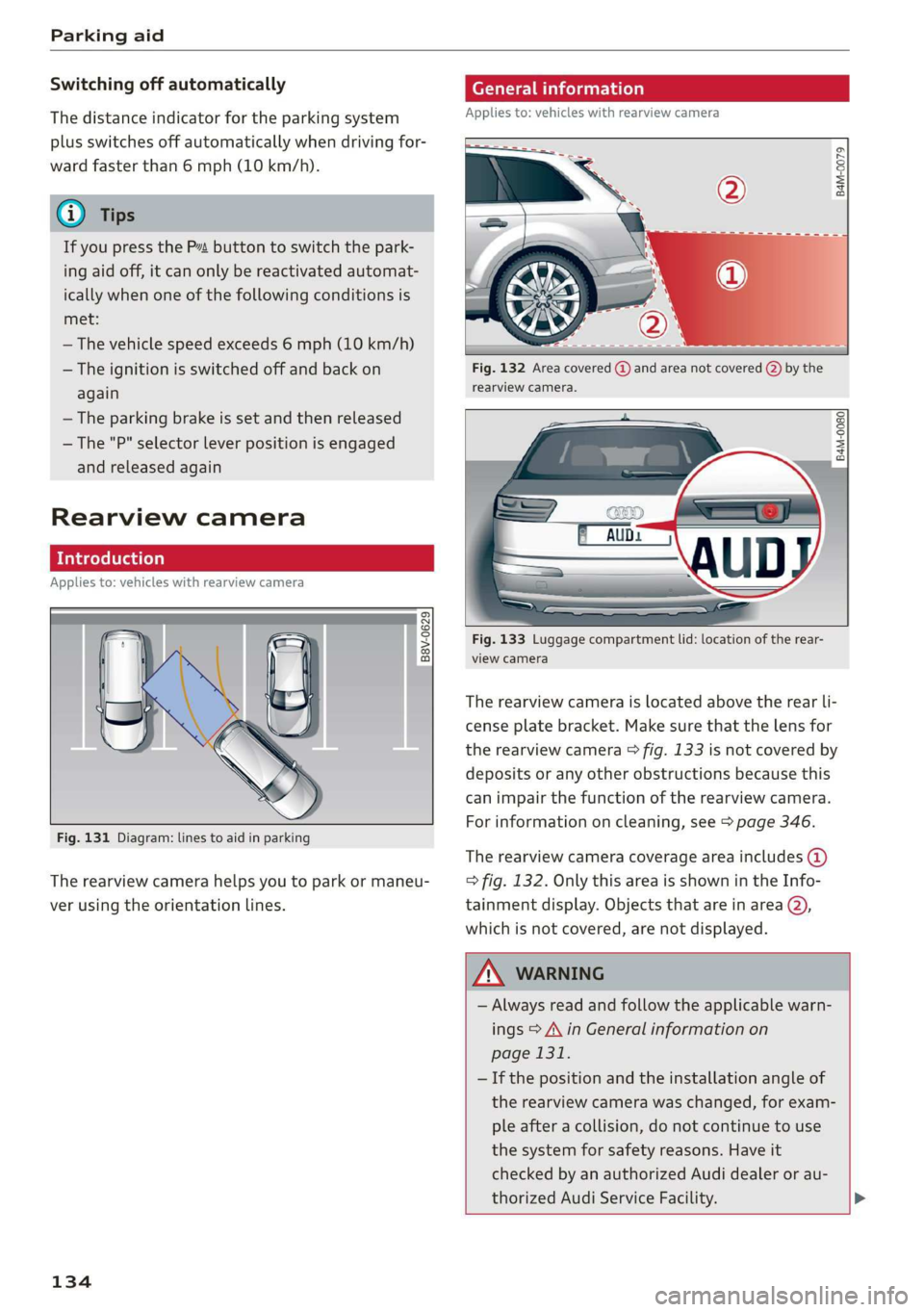
Therearviewcameraislocatedabovetherearli-
censeplatebracket.Makesurethatthelensfor
therearviewcamera>fig.133isnotcoveredby
depositsoranyotherobstructionsbecausethis
can impairthefunctionoftherearviewcamera.
Forinformationoncleaning,see>page346.
Therearviewcameracoverageareaincludes()
=>fig.132. OnlythisareaisshownintheInfo-
tainmentdisplay.Objectsthatareinarea@),
whichisnotcovered,arenotdisplayed.
ZA\WARNING
—Alwaysreadandfollow theapplicablewarn-
ings>A\inGeneralinformationon
page131.
—Ifthepositionandtheinstallation angleof
therearviewcamerawaschanged,forexam-
pleafteracollision,donotcontinuetouse
the
systemforsafetyreasons.Haveit
checkedby anauthorizedAudidealeror au-
thorizedAudiServiceFacility.>
Page 137 of 394

4M0012721BG
Parkingaid
—Onlyuse therearviewcameratoassistyouif
itshowsagood,clearpicture.Forexample,
theimagemaybeaffectedbythesunshin-
ingintothelens,dirtonthelens,orifthere
isamalfunction.
—Usetherearviewcameraonlyiftheluggage
compartmentlidiscompletelyclosed.Make
sureanyobjectsyoumayhavemountedon
theluggagecompartmentliddonotblock
therearviewcamera.
— Thecameralensenlargesanddistortsthe
fieldofvision.Theobjectappearsbothal-
teredandinaccurateonthescreen.
—Incertainsituations,peopleorobjectsin
thedisplayappearcloserorfartheraway:
—Forobjectsthatdonottouchtheground,
suchasthebumperofaparkedvehicle,a
trailerhitchortherearofatruck.Donot
use the
orientationlinesinthiscase.
—Ifdrivenfromalevelsurfaceontoanin-
cline,oradownwardslope.
—Ifdriventowardprotrudingobjects.
—Ifthevehicleiscarryingtoomuchloadin
therear.
—Appliesto:vehicleswithairsuspension:the
accuracyoftheorientationlinesandblue
surfacesdecreaseswhenthevehicleis
raised/lowered>page127.
@)Note
—Alwaysreadandfollowtheapplicablewarn-
ings>@inGeneralinformationon
page131.
— Theorange-coloredorientationlinesinthe
Infotainmentdisplayshowthevehiclepath
basedonthesteeringwheelangle.The
front ofthevehicleswingsoutmorethan
therearofthevehicle.Maintainplentyof
distanceso thatanexteriormirrororacor-
nerofthevehicledoesnotcollidewithany
obstacles.
@)Tips
Thereisnodistancewarningfortherearand
thesides*whentrailertowingmodeisdetect-
ed.Thefrontsensorsremainactivated.The
visualdisplayswitchestotrailermode.The
rearviewcameraimagewillnotshowtheori-
entationlinesandthebluesurfaces.Thereis
noguaranteethefunctionswillswitchoff
whenusingaretrofittedtrailerhitch.
SicaReRol
Appliesto:vehicleswithrearviewcamera
Switchingonandoff
Requirement:thevehiclespeedmustbeunder
approximately6mph(10km/h).
>PressthePvbuttoninthecenterconsole
=>page133,fig.130.Ashortconfirmation
tonesoundsandtheLEDinthebuttonturns
on.
Switchingonautomatically
Thesystemswitchesonautomaticallywhenre-
versegearisengagedwhiletheengineisrun-
ning.Abrieftonewillsound.
Switchingoffautomatically
Thesystemswitchesoffautomaticallywhendriv-
ingforwardfasterthan6mph(10km/h).
Perpendicularparking
Applies
to:vehicleswithrearviewcamera
Thisviewmaybeusedwhenparkinginagarage
orinaparkingspace.
Fig.135Infotainmentsystem:aligningthevehicle
135