infotainment AUDI Q7 2019 Owner´s Manual
[x] Cancel search | Manufacturer: AUDI, Model Year: 2019, Model line: Q7, Model: AUDI Q7 2019Pages: 394, PDF Size: 105.97 MB
Page 141 of 394
4M0012721BG
Parkingaid
j
Appliesto:vehicleswithperipheralcameras
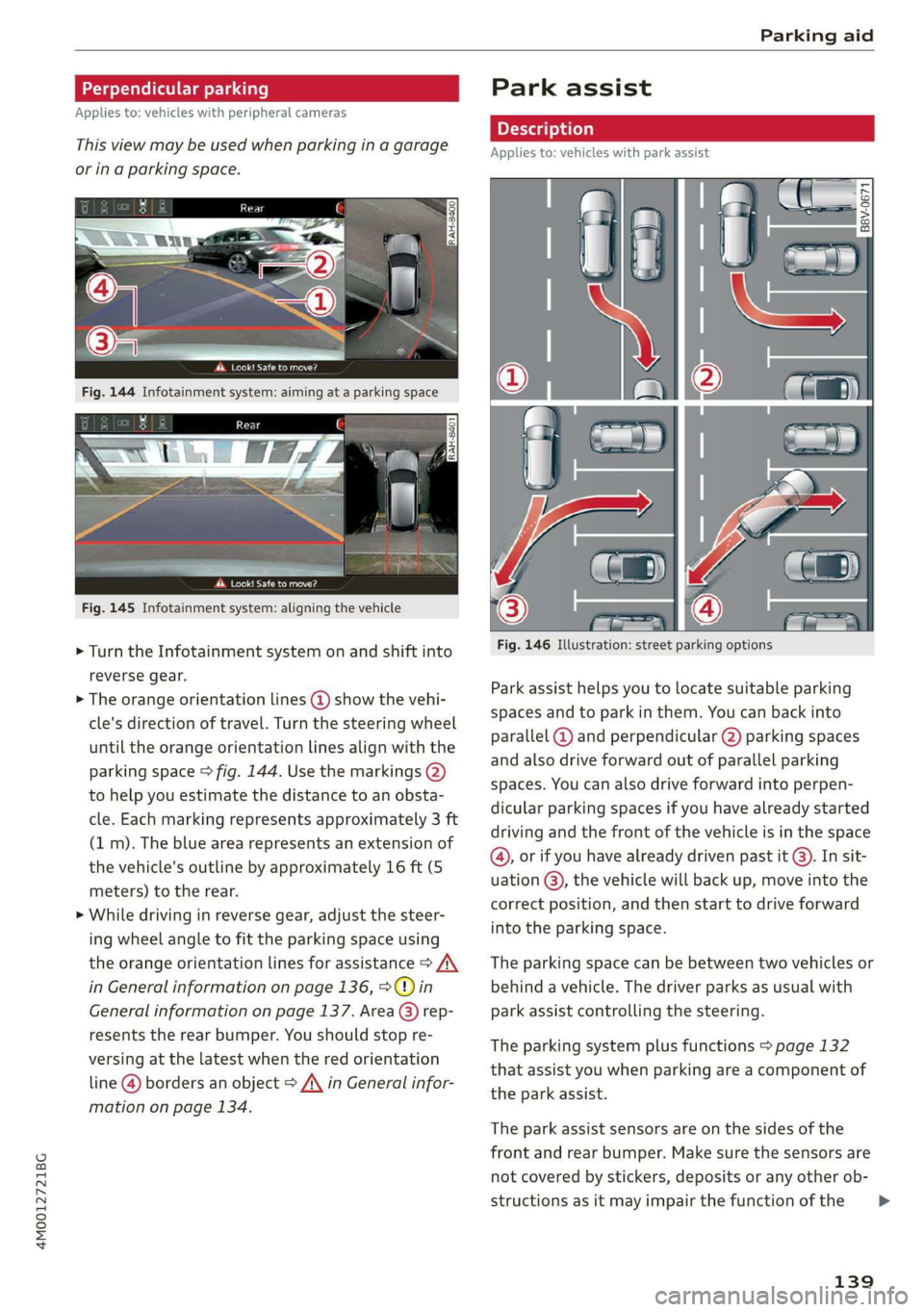
Thisviewmaybe usedwhenparkinginagarage
orinaparkingspace.
Fig.145Infotainmentsystem:aligningthevehicle
>Turn theInfotainmentsystem onandshiftinto
reversegear.
>Theorangeorientationlines@showthevehi-
cle'sdirectionoftravel.Turn thesteeringwheel
untiltheorangeorientationlinesalignwiththe
parkingspace>fig.144.Usethemarkings@)
tohelpyouestimatethedistancetoanobsta-
cle.Eachmarkingrepresentsapproximately3ft
(1m).Thebluearearepresentsanextensionof
thevehicle'soutlinebyapproximately16ft(5
meters)totherear.
>Whiledrivinginreversegear,adjustthesteer-
ing
wheelangletofittheparkingspaceusing
theorangeorientationlinesforassistance>A\
inGeneralinformationonpage136,>@)in
Generalinformationonpage137.Area@)rep-
resentstherearbumper.Youshouldstopre-
versingatthelatestwhentheredorientation
line@bordersanobject>A\inGeneralinfor-
mationonpage134.
Parkassist
Fig.146Illustration:streetparking options
Parkassisthelpsyoutolocatesuitableparking
spacesandtoparkinthem.Youcanbackinto
parallel@)andperpendicular(2)parkingspaces
andalsodriveforwardoutofparallelparking
spaces.Youcanalsodriveforwardintoperpen-
dicularparkingspacesifyouhavealreadystarted
drivingandthefrontofthevehicleisinthespace
@,orifyouhavealreadydrivenpastit@).Insit-
uation@),thevehiclewillbackup,moveintothe
correctposition,andthenstarttodriveforward
intotheparkingspace.
Theparkingspacecanbebetweentwovehiclesor
behindavehicle.Thedriverparksasusualwith
park
assistcontrollingthesteering.
Theparkingsystemplusfunctions>page132
thatassistyouwhenparkingareacomponentof
theparkassist.
Theparkassistsensorsareonthesidesofthe
frontandrearbumper.Makesurethesensorsare
notcoveredbystickers,depositsoranyotherob-
structionsasitmayimpairthefunctionofthe
139
>
Page 142 of 394
Parkingaid
system.Forinformationoncleaning,see
=>page346.
Whenparkingspacesaresmall,theparkingsys-
temsignalsacontinuoustonewhenanobstacle
islessthanapproximately0.7feet(0.20m)
away.Donotcontinuedrivingfarther.
ZAWARNING
—Alwaysreadandfollowtheapplicablewarn-
ings>A\inGeneralinformationon
page131.
—Pleasenotethat parkassistonlycontrols
thesteering.Thedriverisalwaysresponsi-
bleforbrakingandaccelerating.
— Thedrivermustdecideiftheparkingspace
displayedissuitableforthevehicle.
—Thevehiclewillchangepositionwhenpark-
ing.Makesureyoudonotendangeranyoth-
erdrivers.
—Whenusingparkassisttodriveintoorout
ofaparkingspace,thesteeringwheelturns
quicklyonitsown.Reachingintothesteer-
ing
wheelspokeswhilethisishappeningcan
resultininjury.
—Youcannotparkwith parkassistwhenyou
aretowingatrailerorhavetheconnectorin-
sertedinthetrailersocket.
Sleemela
Appliesto:vehicleswithparkassist
B4M-0084
@)Note
—Alwaysreadandfollowtheapplicablewarn-
ings>@inGeneralinformationon
page131.
—Parkassistguidesthevehicleeitheraway
fromcurbsorontothemifothervehicles
areparkedonthecurb.Makesurethatyour
vehicle'stiresandrimsarenotdamaged.
Takeoversteeringattherighttime.
—Certainconditionsaroundtheparkingspace
mayresultinthevehiclenotbeingparked
asexpected.
—Objectssuchaspillarsorposts.
—Groundcoveringsuchasgravel,snowor
ice
G)Tips
— TheElectronicStabilizationControl(ESC)
mustnotbe switchedoffduringtheparking
process>page147.
—Parkingintightcurveswith parkassistis
notpossible.
140
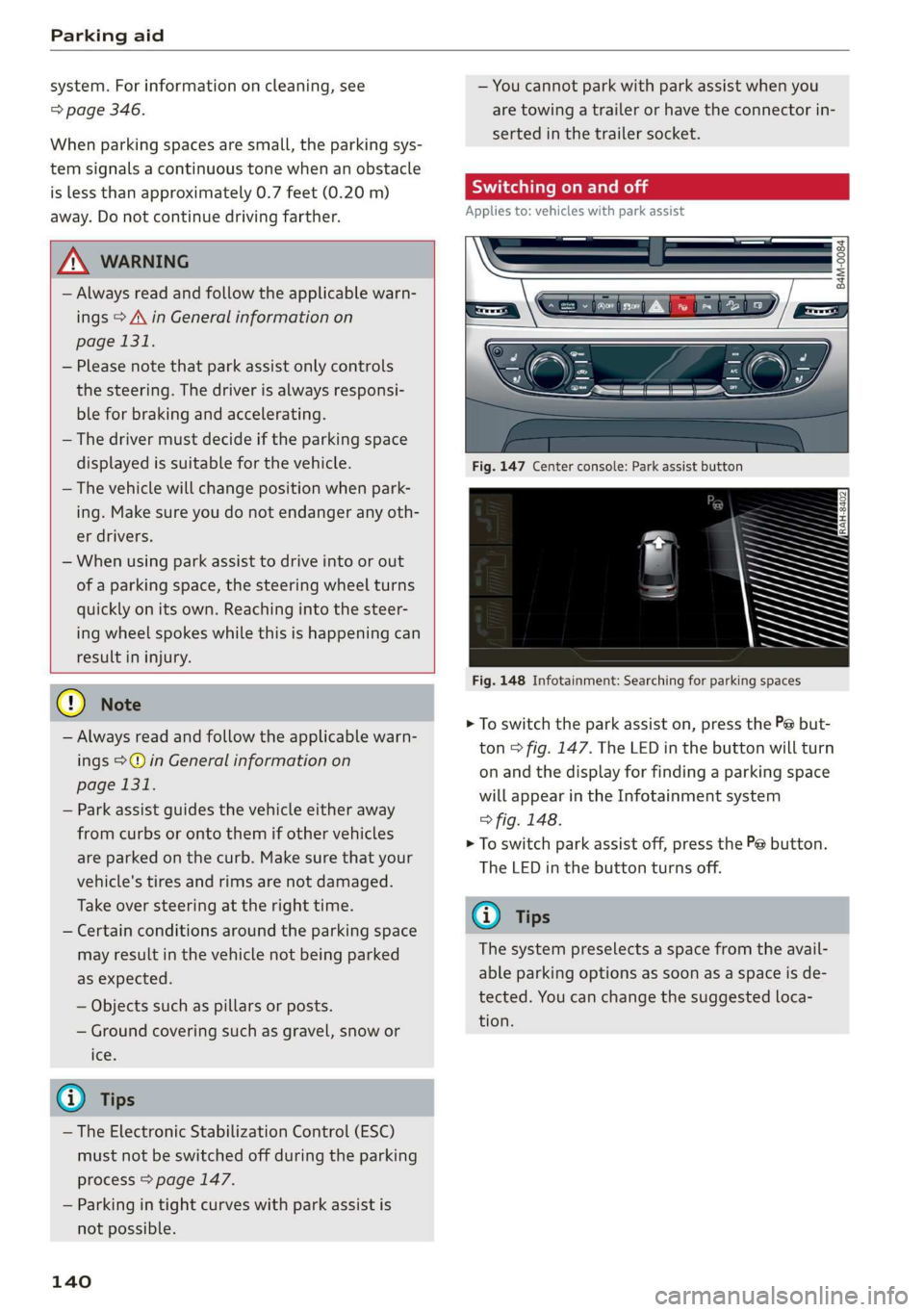
Fig.147Centerconsole:Parkassistbutton
Fig.148Infotainment:Searchingforparkingspaces
>Toswitchtheparkassiston,pressthePebut-
ton>fig.147.The LEDinthebuttonwillturn
onandthedisplayforfindingaparkingspace
willappearintheInfotainmentsystem
>fig.148.
>Toswitchparkassistoff,pressthePebutton.
TheLEDinthebuttonturnsoff.
G)Tips
Thesystempreselectsaspacefromtheavail-
ableparkingoptionsassoonasaspaceisde-
tected.Youcanchangethesuggestedloca-
tion.
Page 143 of 394
4M0012721BG
Parkingaid
Parkingspacesearch
Appliesto:vehicleswithparkassist
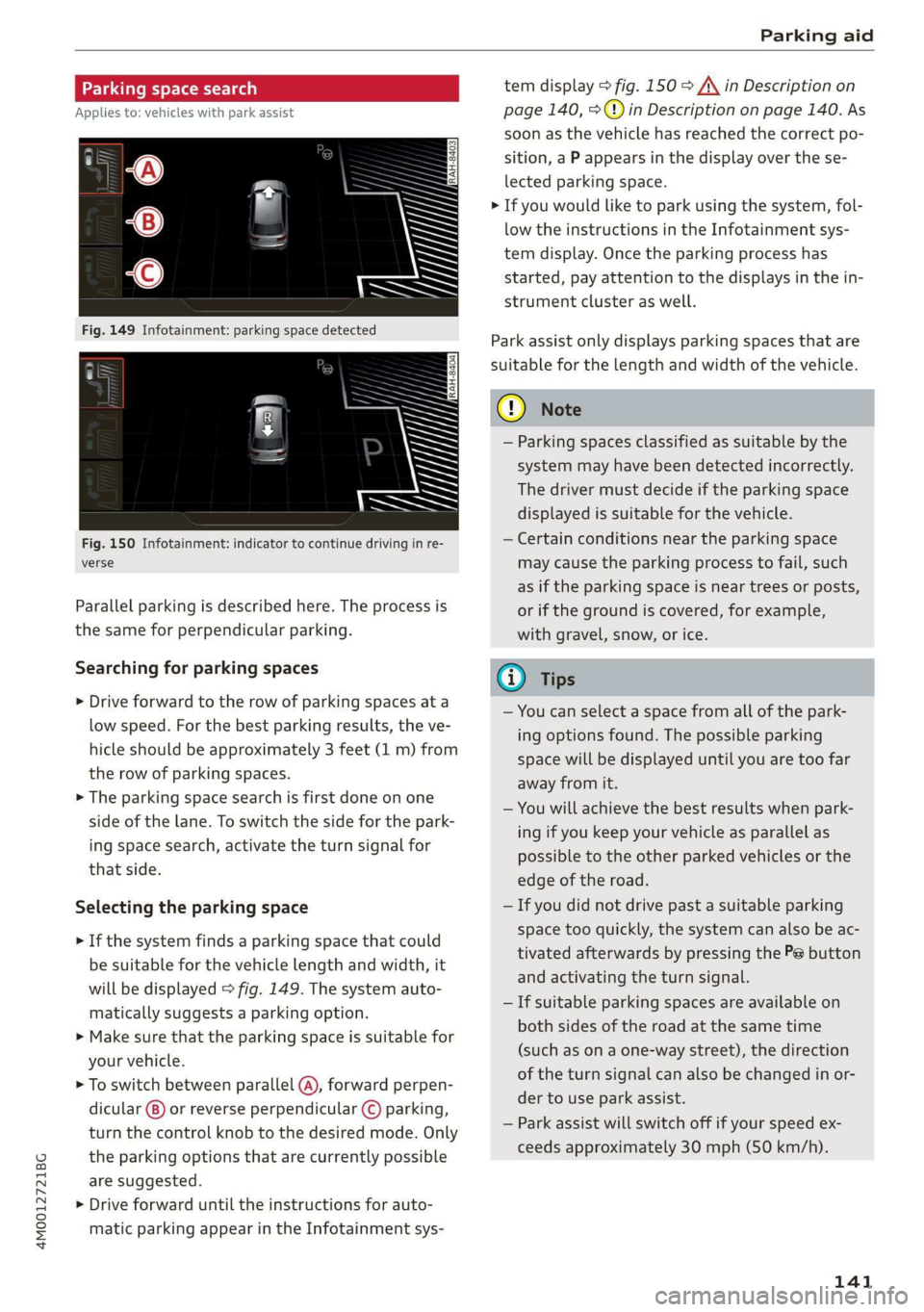
Fig.150Infotainment:indicatortocontinuedrivinginre-
verse
Parallelparkingisdescribedhere.Theprocessis
thesameforperpendicularparking.
Searchingforparkingspaces
>Driveforwardtotherowofparkingspacesata
lowspeed.Forthebestparkingresults,theve-
hicleshould beapproximately3feet(1m)from
therowofparkingspaces.
>Theparkingspacesearchisfirstdoneonone
sideofthelane.Toswitchthesideforthepark-
ingspacesearch,activatetheturnsignalfor
thatside.
Selectingtheparkingspace
>Ifthesystemfindsaparkingspacethatcould
besuitableforthevehiclelengthandwidth,it
willbedisplayed>fig.149.Thesystemauto-
maticallysuggestsaparkingoption.
>Makesurethattheparkingspaceissuitablefor
yourvehicle.
>Toswitchbetweenparallel(@),forwardperpen-
dicular()or reverseperpendicular©parking,
turnthecontrolknobtothedesiredmode.Only
theparkingoptionsthatarecurrentlypossible
aresuggested.
>Driveforwarduntiltheinstructionsforauto-
maticparkingappearintheInfotainmentsys-
temdisplay>fig.150>A\inDescriptionon
page140,>@)inDescriptiononpage140.As
soonasthevehiclehas reachedthecorrectpo-
sition,aPappearsinthedisplayoverthese-
lectedparkingspace.
>Ifyouwouldliketoparkusingthesystem,fol-
lowtheinstructionsintheInfotainmentsys-
temdisplay.Oncetheparkingprocesshas
started,payattentiontothedisplaysinthein-
strumentclusteraswell.
Parkassistonlydisplaysparkingspacesthatare
suitableforthelengthandwidthofthevehicle.
@)Note
—Parkingspacesclassifiedassuitablebythe
systemmayhavebeendetectedincorrectly.
Thedrivermustdecideiftheparkingspace
displayedissuitableforthevehicle.
—Certainconditionsnear theparkingspace
maycausetheparkingprocesstofail, such
asiftheparkingspaceisneartreesorposts,
orifthegroundiscovered,forexample,
withgravel,snow,orice.
@)Tips
—Youcanselectaspacefromallofthepark-
ingoptionsfound.Thepossibleparking
spacewillbedisplayeduntilyouaretoofar
awayfromit.
—Youwillachievethebestresultswhenpark-
ingifyoukeepyourvehicleasparallelas
possibletotheotherparkedvehiclesorthe
edgeoftheroad.
—Ifyoudidnotdrivepastasuitableparking
space tooquickly,thesystemcanalsobeac-
tivatedafterwardsbypressingthePebutton
andactivatingtheturnsignal.
—Ifsuitableparkingspacesareavailableon
bothsidesoftheroadatthesametime
(such asonaone-waystreet),thedirection
oftheturnsignalcanalsobechangedinor-
dertouseparkassist.
—Parkassistwillswitchoffifyourspeedex-
ceedsapproximately30mph(50km/h).
141
Page 144 of 394
Parkingaid
Startingthe parkingprocess
Appliesto:vehicleswithparkassist
Theresponsibilityiswiththedriverwhenpark-
ing.
Requirement:asuitableparkingspacemustbe
foundandselected>page141.Thevehiclemust
initiallybestationary.
> Selectthereversegearafterstoppingbriefly.
>Removeyourhandsfromthesteeringwheel.
>Payattentiontothepathofthevehicle.When
thetrafficsituationallows,presstheaccelera-
torpedalaccordingly>A\inDescriptionon
page140,2@)inDescriptiononpage140.
>FollowthevisualinstructionsintheInfotain-
mentsystemdisplayandinstrumentcluster
alongwiththewarningtonesuntiltheparking
processhasended.Thearrowsonthevehicle
indicatethenecessarydirectionoftravel.
Parkassistautomaticallysteersthevehicleinto
theparkingspacewhilethedriverpressesthe
pedals.Themaximumparkingspeedis4mph
(7km/h).
Interruptingtheparkassist
Ifthespeedistoohighand youtakeoversteer-
ing,parkassistswitchesoff.Tocontinueparking,
[email protected]
willappearagainontheInfotainmentsystem
displayandtheinstrumentcluster.
G)Tips
Youcanalsocancelthedirectionoftravel
specifiedbythesystembyswitchingbetween
forwardandreversegears.Basedontheposi-
tionofthevehicle,thesystemthencalculates
theadditionalsteeringanddrivingdirections
formaneuvering.
Leavingaparallelparkingspace
Appliesto:vehicleswith parkassist
Theresponsibilityiswiththedriverwhenleaving
aparkingspace.
Ifyouparkedthevehicleinaparallelparking
space,parkassistcanhelpyoudriveoutofit.
142
>Starttheengine.
>PressthePebutton>page140,fig. 147.
>Waituntilamessageappearsthatrequeststhe
directiontotravelinforexitingtheparking
space.
>Activatetheappropriateturnsignal.Themes-
sageStartautomaticunparkingprocedureap-
pears.
>Removeyourhandsfromthesteeringwheel.
>Pressthecontrolknobtostarttheprocedure
forexitingtheparkingspace.
>Payattentiontothepathofthevehicle.When
thetrafficsituationallows,presstheaccelera-
torpedalaccordingly> A\inDescriptionon
page140,>@)inDescriptiononpage140.
>Followthevisualinstructions>page142and
thewarningtoneuntilthevehiclehasfinished
exitingtheparkingspace.
>Driveinthedirectionindicatedbythearrowson
thevehicle.
>Theprocedurehasendedwhenadditionalcor-
rectivemovementsarenolongernecessary.
Takeoverthesteering.
Parkassistautomaticallysteersthevehicleoutof
theparkingspacewhilethedriverpressesthe
pedals.Themaximumspeedforexitingaparking
spaceis3mph(5km/h).
Interruptingthe parkassist
Ifthespeedistoohighand youtakeoversteer-
ing,parkassistswitchesoff.Tocontinueexiting
theparkingspace,switchtheengineoffandon.
ThenpressthePebuttonagain.Otherwise,leave
theparkingspacewithoutusingparkassist.
Appliesto:vehicleswithparkassist
roo"Parkassist:canceled.Steeringinputbydriv-
er.Pleasetakeoversteering!
Parkassistwascanceledbecausethedrivertook
oversteering.Tocontinueparking, pressthePe
buttonagain.
Parkassist:timelimitexceeded
aor]Parkassist:canceled.Timelimitexceeded.
Pleasetakeoversteering!
Page 146 of 394
Parkingaid
Adjustingtheparkingaid
Appliesto:vehicleswitharearparkingsystem/parkingsys-
templus/rearviewcamera/peripheralcameras/parkassist.
ThefunctionsareadjustedintheInfotainment
system.
> SelectintheInfotainmentsystem:[MENU]but-
ton>Vehicle> leftcontrolbutton>Driveras-
sistance>Parkingaid.Or
>Whentheparkingaidisactive,selectintheIn-
fotainmentsystem:rightcontrolbutton*.
Endsystem*-stoptheparkingaid
Activateautomatically*-switchautomaticacti-
vationon/off
Frontvolume*-volumeforthefrontandside*
area
Rearvolume-volumeforthereararea
Entertainmentfader-thevolumeoftheaudio/
videosourceisLoweredwhentheparkingsystem
isturnedon.
Thenewvalueisgivenbrieflyduringtheadjust-
ment.
View*-switchbetweenanopticaldisplay
(Graphic)andcameraimage(Camera)onthe
sideofthedisplay.
Trailerview*-showtrailerview
*Auto.front/rearcamerachange*-theviewbe-
hindthevehicle(Rearmode)isdisplayedauto-
maticallywhenyoushiftintoreversegear.The
viewinfront ofthevehicle(Frontmode)isdis-
playedautomaticallywhenyoushiftintothefor-
wardgears.Whenfirstactivatinginaforward
gearwiththeP”button,thefrontsideviewis
displayed(Cornerview(front)mode).
IfyoudonotsettheV,theviewbehindthevehi-
cle(Rearmode)isalwaysdisplayedanditdoes
notswitchtothe Frontmodewhenaforward
gearisselected.
@)Tips
—Severalmenuscanbeaccessedwiththe
rightcontrolbuttononlywhentheparking
aidisactive.
144
— Thesettingsforvolumeandautomaticacti-
vation*areautomaticallystoredandas-
signedtothevehiclekeybeingused.
Errormessages
Appliesto:vehicleswitharearparkingsystem/parkingsys-
templus/rearviewcamera/peripheralcameras/parkassist.
wwRearparkingaid:malfunction!Obstacles
cannotbedetected
wwFront parkingaid:malfunction!Obstacles
cannotbedetected
wmParkingaid:malfunction!Obstaclescannot
bedetected
Whenoneofthesemessagesappears,thereisa
systemmalfunction.The LEDintheP”buttonal-
soblinkswhenswitchingiton.Therelevantmes-
sageonlyappearsagainwhenyoumanuallyacti-
vatetheparkingaidwiththebutton.
Rearparkingaid:obstacledetectionrestrict-
ed
Therearcross-trafficassist*>page123,Rear
cross-trafficassistisnotavailable.EithertheESC
isswitchedoff,ortheradarsensorsmaybecov-
ered byabikerack,stickers,leaves,snoworother
objects.SwitchtheESCon,orcleantheareain
frontofthesensorsifnecessary>page120,
fig.116.Ifthismessagecontinuestobedis-
played,driveimmediatelytoanauthorizedAudi
dealerorauthorizedAudiServiceFacilitytohave
themalfunctionrepaired.
Parkingsystemplus*/Parkassist*
If asensororspeakerisfaulty,theP4symbol
willappearinfrontof/behindthevehicleinthe
Infotainmentsystemdisplay.If arearsensoris
faulty,onlyobstaclesthatareinareas(@)and
areshown>page132,fig. 128.Ifafrontsensor
isfaulty,onlyobstaclesthatareinareas©and
©areshown.
Peripheralcameras*
Thereisasystemmalfunctionifthe#«symbol
appearsandthecorrespondingareaofthedis-
playisshowninblack.Thecameraisnotworking
inthisarea.
Page 155 of 394
4M0012721BG
MultiMediaInterface
MultiMediaInterface
Trafficsafety
information
AudirecommendsperformingcertainInfotain-
mentsystemfunctions,suchasenteringa desti-
nation,onlywhenthevehicleisstationary.Al-
waysbepreparedtostopoperating theInfotain-
mentsystemintheinterestofyoursafetyand
thesafety ofotherroadusers.
Z\WARNING
Onlyuse theInfotainmentsystemwhentraf-
ficconditionspermitandalwaysinawaythat
allows
youtomaintaincompletecontrolover
yourvehicle.
G)Tips
Certainfunctionsarenotavailablewhiledriv-
ing.
Introduction
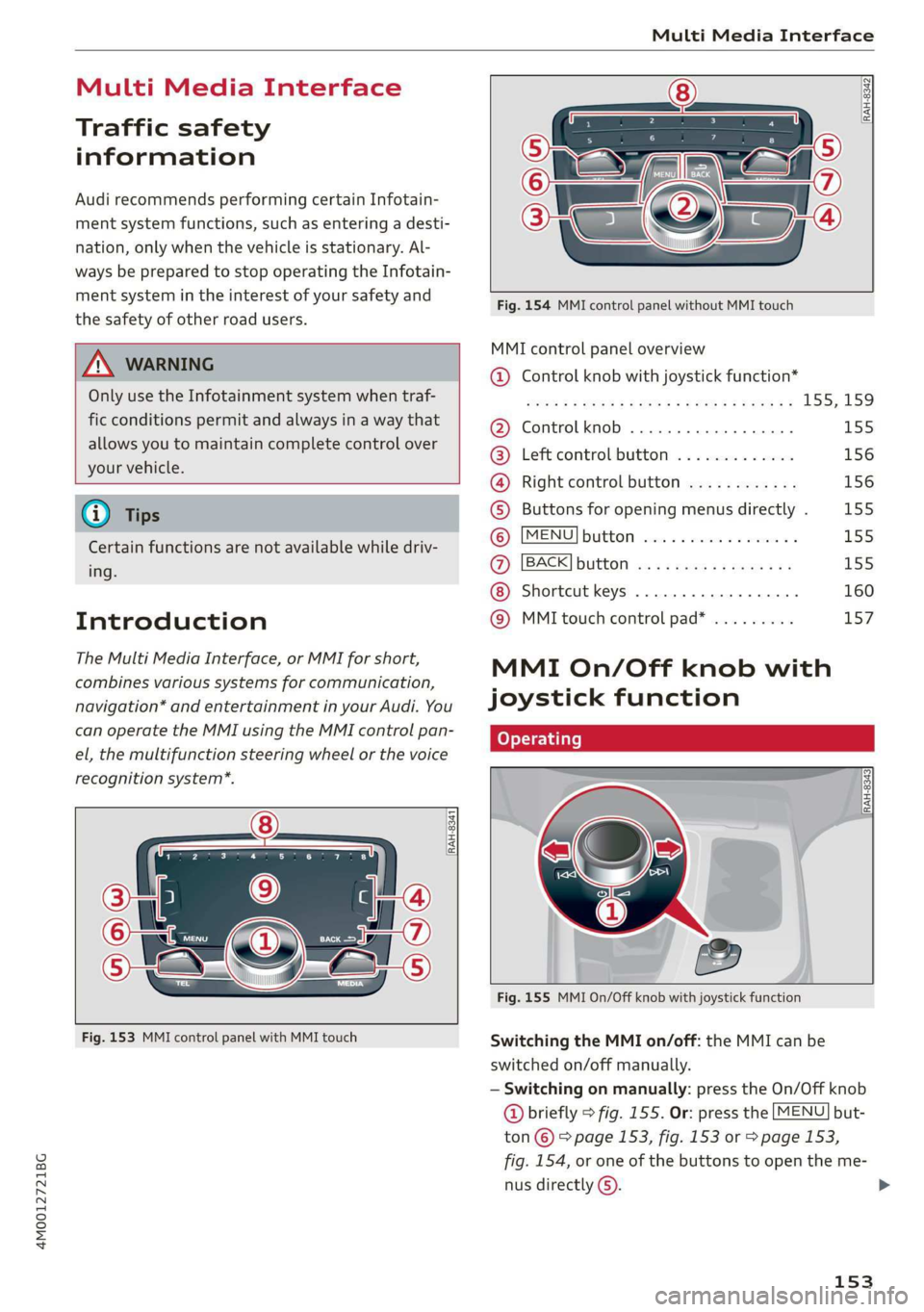
TheMultiMediaInterface,orMMIforshort,
combinesvarioussystemsforcommunication,
navigation*andentertainmentinyourAudi.You
canoperatetheMMIusingtheMMIcontrolpan-
el,themultifunctionsteeringwheelorthevoice
recognitionsystem*.
[RAH-8341
Fig.153MMIcontrolpanelwithMMItouch
RAH-8342]
Fig.154MMIcontrolpanelwithoutMMItouch
MMIcontrolpaneloverview
@®Controlknobwithjoystickfunction*
S008FBAROSEFMOG¥EERFCSORaE155;159
@Controlknob.............0000-155
@®Leftcontrolbutton.............156
@®Rightcontrolbutton............156
©Buttonsforopeningmenusdirectly.155
©MENUBUttONsaccce2 xencase= oanaes2 ¥L55
@)[BACK]buttonos:+causssmewsvas155
Shortcutkeys.........2000000160
@®MMItouchcontrolpad*.........157
MMIOn/Offknobwith
joystickfunction
Operating
Fig.155MMIOn/Offknobwithjoystickfunction
SwitchingtheMMIon/off:theMMIcanbe
switched
on/offmanually.
—Switchingonmanually:presstheOn/Offknob
@briefly>fig.155.Or:pressthe[MENU]but-
ton©©page153,fig.153or>page153,
fig.154,oroneofthebuttonstoopentheme-
nusdirectlyG).
153
>
Page 156 of 394
MultiMediaInterface
—Switchingoffmanually:pressandholdthe
On/Offknob@)>fig.155untiltheMMI
switchesoff.IftheMMIhasbeenswitchedoff
manually,itdoesnotswitchonagainautomati-
callythenexttimetheignitionisswitchedon.
Additionalfunctions:
—Adjustingthevolume:turntheOn/Offknob@
>fig.155.
—Muting:presstheOn/Offknob@°fig.155
briefly.
—Selectingtheprevious/nextfunction(forex-
ample,aradiostation/track):presstheOn/Off
knob@®fig.155brieflytowardtheleftKdor
rightDo.
—Fastforwarding/rewinding(forexample
songs):pressandholdtheOn/Offknob@)
=>fig.155towardtheleftKdorrightPel.
ZAWARNING
Adjustthevolumeoftheaudiosystemsothat
signalsfromoutsidethevehicle,suchas po-
liceandfiresirens,canbeheardeasilyatall
times.
G@)Tips
TheMMIswitchesoffautomaticallyiftheen-
gineisnotrunningandthevehiclebatteryis
low.
Infotainmentsystem
display
Switchingon/off
TheInfotainmentsystemdisplayautomatically
extendsandretractswhenyouswitchtheigni-
tiononandoff.
>Whenitisextended,presstheLo]buttonto
switchtheInfotainmentsystemdisplayonor
off.
WhentheMMIisswitchedonandthedisplayis
switchedoff,youcanoperatecertainfunctions
usingtheOn/OffknobwiththeMMIjoystick
function>page153.
154
G)Tips
Theremaybedelayswhenswitchingonthe
display.
celmurlClmelmelevee(rs
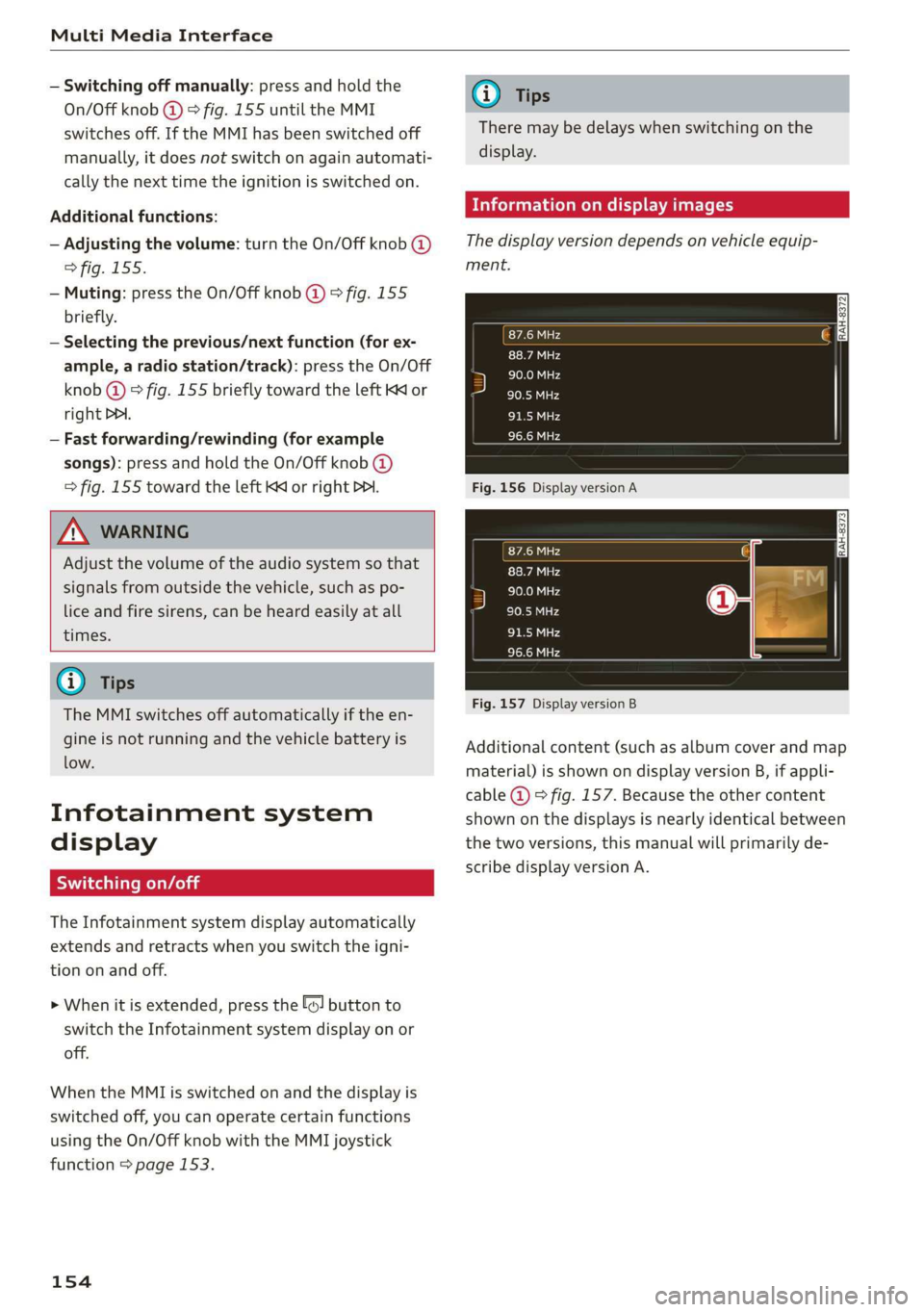
Thedisplayversiondependsonvehicleequip-
ment.
Fig.156DisplayversionA
Fig.157DisplayversionB
Additionalcontent(suchasalbumcoverandmap
material)isshownondisplayversionB,ifappli-
cable@)©fig.157.Becausetheothercontent
shownonthedisplaysisnearlyidenticalbetween
thetwoversions,thismanualwillprimarilyde-
scribedisplayversionA.
Page 158 of 394
MultiMediaInterface
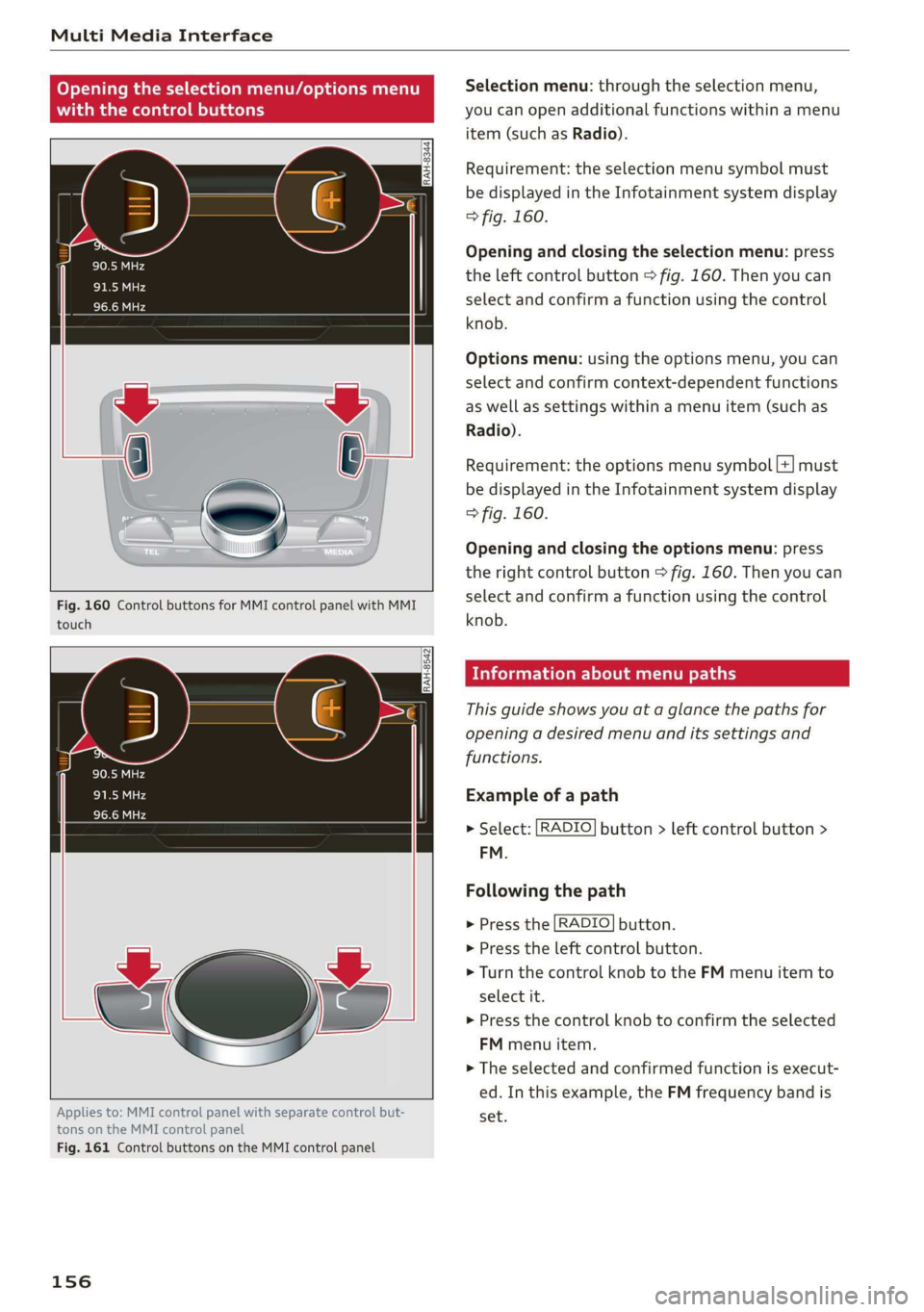
Openingtheselectionmenu/optionsmenu
thecontrolbuttons
= z
||zrxG3
Fig.160ControlbuttonsforMMIcontrolpanelwithMMI
touch
RAH-8542
Appliesto:MMIcontrolpanelwithseparatecontrolbut-
tonsontheMMIcontrolpanel
Fig.161ControlbuttonsontheMMIcontrolpanel
156
Selectionmenu:throughtheselectionmenu,
youcanopenadditionalfunctionswithinamenu
item(suchasRadio).
Requirement:theselectionmenusymbolmust
bedisplayedintheInfotainmentsystemdisplay
>fig.160.
Openingandclosingtheselectionmenu:press
theleftcontrolbutton>fig.160.Thenyoucan
selectandconfirmafunctionusingthecontrol
knob.
Optionsmenu:usingtheoptionsmenu,youcan
selectandconfirmcontext-dependentfunctions
aswellassettingswithinamenuitem(suchas
Radio).
Requirement:theoptionsmenusymbol[+]must
bedisplayedintheInfotainmentsystemdisplay
>fig.160.
Openingandclosingtheoptionsmenu:press
therightcontrolbutton>fig.160.Thenyoucan
selectandconfirmafunctionusingthecontrol
knob.
Meleeelak)Celieeerary
Thisguideshowsyouat aglancethepathsfor
openingadesiredmenuand itssettingsand
functions.
Exampleofapath
>Select:[RADIO]button>leftcontrolbutton>
FM.
Followingthepath
>Pressthe[RADIO]button.
>Presstheleftcontrolbutton.
>Turn thecontrolknobtotheFMmenuitemto
selectit.
>Pressthecontrolknobtoconfirmtheselected
FMmenuitem.
>Theselectedandconfirmedfunctionisexecut-
ed.In thisexample,theFMfrequencybandis
set.
Page 159 of 394
4M0012721BG
MultiMediaInterface
MMItouch
MMItouchcontrolpad
Appliesto:vehicleswithMMItouch
Youcanenterdatausinghandwritingrecogni-
tionontheMMItouchcontrolpad.
ie
®©-co=~Angeles,CA
:aly
5)trDowntown,LosAngeles,CA
cree
YT
\
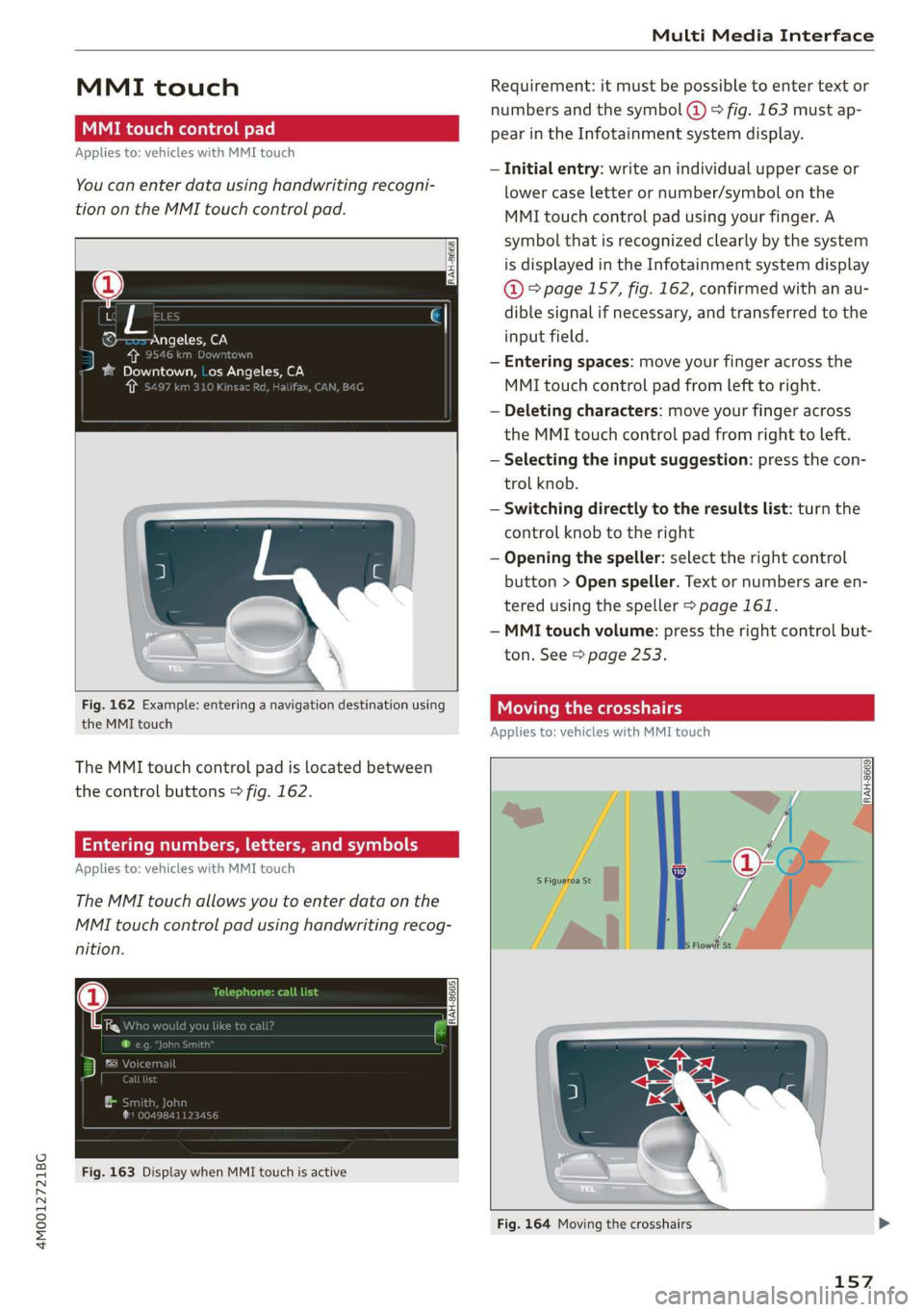
Fig.162Example:enteringanavigationdestinationusing
theMMItouch
TheMMItouchcontrolpadislocatedbetween
thecontrolbuttons>fig.162.
Enteringnumbers,letters,andsymbols
Appliesto:vehicleswithMMItouch
TheMMItouchallowsyoutoenterdataonthe
MMItouchcontrolpadusinghandwritingrecog-
nition.
Fig.163DisplaywhenMMItouchisactive
Requirement:itmustbepossible toentertext or
numbersandthesymbol(@>fig.163 mustap-
pearintheInfotainmentsystemdisplay.
—Initialentry:writeanindividualuppercaseor
lowercaseletterornumber/symbolonthe
MMItouchcontrolpadusingyourfinger.A
symbolthatisrecognizedclearlyby thesystem
isdisplayedintheInfotainmentsystemdisplay
@°page157,fig.162,confirmedwithanau-
diblesignalifnecessary,andtransferredtothe
inputfield.
—Enteringspaces:moveyourfingeracrossthe
MMItouchcontrolpadfromlefttoright.
—Deletingcharacters:moveyourfingeracross
theMMItouchcontrolpadfromrighttoleft.
—Selectingtheinputsuggestion:pressthecon-
trolknob.
—Switchingdirectlytotheresultslist:turnthe
controlknobtotheright
—Openingthespeller:selecttherightcontrol
button>Openspeller.Textornumbersare en-
tered usingthespeller>page161.
—MMItouchvolume:presstherightcontrolbut-
ton.See>page253.
Movingthecrosshairs
Appliesto:vehicleswithMMItouch
a
RAH-8669|
Fig.164Movingthecrosshairs
157
Page 162 of 394
![AUDI Q7 2019 Owner´s Manual MultiMediaInterface
Openingtheselection/optionsmenuwith
thecontrolknob
Appliesto:vehicleswithjoystickfunction
ry 3]
3|eSxG3
Fig.168Openingtheselection/optionsmenuwiththe
controlknob
Requirement](/img/6/40283/w960_40283-161.png "AUDI Q7 2019 Owner´s Manual MultiMediaInterface
Openingtheselection/optionsmenuwith
thecontrolknob
Appliesto:vehicleswithjoystickfunction
ry 3]
3|eSxG3
Fig.168Openingtheselection/optionsmenuwiththe
controlknob
Requirement")
MultiMediaInterface
Openingtheselection/optionsmenuwith
thecontrolknob
Appliesto:vehicleswithjoystickfunction
ry 3]
3|eSxG3
Fig.168Openingtheselection/optionsmenuwiththe
controlknob
Requirement:theselectionmenusymbol3must
bedisplayedintheInfotainmentsystemdisplay
>fig.168.
Openingandclosingtheselectionmenu:push
thecontrolknobtotheleft>fig.168toopen
theselectionmenu.Thenyoucanselectandcon-
firm
afunctionusingthecontrolknob.
Pressthe[BACK]button(%)>page153,fig.153
toreturntothefunctiononelevelup.
Requirement:theoptionsmenusymbol[+]must
bedisplayedintheInfotainmentsystemdisplay
>fig.168.
160
Openingandclosingtheoptionsmenu:push
thecontrolknobtotheright>fig.168toopen
theoptionsmenu.Thenyoucanselectandcon-
firm
afunctionusingthecontrolknob.
Pressthe[BACK]button(7)>page153,fig.153
to returntothefunctiononelevelup.
Shortcutkeys
Frequentlyusedradiostationscanbestoredon
theshortcutkeys.
TheshortcutkeysareontheMMIcontrolpanel
>page153,fig.153or>page153,fig. 154.
Storingradiostations:turnthecontrolknobto
thedesiredradiostationinalist(forexample,a
radiostationintheFMstationlist).Pressand
holdthedesiredshortcutkeyforseveralseconds.
Theactiveradiostationwillbestoredonthe
shortcutkey.
Accessingaradiostation:presstheshortcutkey.
Displayingaradiostation:swipeyourfingerover
theshortcutkeys.
Deletingastoredradiostation:resetthe Short-
cut
keystothefactorydefaultsetting
=>page248.
(i)Tips
Itisnotpossibletoenternumbersusingthe
shortcutkeys.Usethenumberspeller
=page161orMMItouch*>page157to en-
ternumbers.