ECU AUDI Q7 2019 Owner´s Manual
[x] Cancel search | Manufacturer: AUDI, Model Year: 2019, Model line: Q7, Model: AUDI Q7 2019Pages: 394, PDF Size: 105.97 MB
Page 222 of 394
![AUDI Q7 2019 Owner´s Manual Navigation
>Pressthe LNAV/MAP]buttonrepeatedlyuntil
themapisdisplayed.
>Select:leftcontrolbutton>Trafficmessages.
Anoverviewofallthetrafficmessagesisdis-
playedintheInfotainmentsystem.
—Open](/img/6/40283/w960_40283-221.png "AUDI Q7 2019 Owner´s Manual Navigation
>Pressthe LNAV/MAP]buttonrepeatedlyuntil
themapisdisplayed.
>Select:leftcontrolbutton>Trafficmessages.
Anoverviewofallthetrafficmessagesisdis-
playedintheInfotainmentsystem.
—Open")
Navigation
>Pressthe LNAV/MAP]buttonrepeatedlyuntil
themapisdisplayed.
>Select:leftcontrolbutton>Trafficmessages.
Anoverviewofallthetrafficmessagesisdis-
playedintheInfotainmentsystem.
—Openingadetailedviewoftrafficinformation:
selectandconfirmthetrafficinformationfrom
thelist.
G)Tips
—TMCtrafficreportsarenotavailableinCan-
ada.Formoreinformation,pleasecontact
SiriusCanada.
—Criticaltrafficinformation,suchaswarnings
aboutwrong-waydrivers,isautomatically
displayed.Tohidethetrafficinformation,
pressthe[BACK] buttonorthecontrolknob.
1X1tacoA)
Appliesto:vehicleswithnavigationsystem andbetterroute
ByreceivingtrafficinformationthroughTMC,
yourMMIcalculatesabetterrouteifavailable
andthepossibletimesavedcomparedtothe
currentroute.Youcandecidewhichrouteyou
wouldliketouse.
>Pressthe LNAV/MAP|buttonrepeatedlyuntil
themapisdisplayed.
Requirement:routeguidancemustbeactive.
IfyourMMIhascalculatedabetterroutethan
thecurrentrouteguidance,themessageAbetter
routeisavailable.appearsforseveralseconds
alongwiththetimethatmaybesaved.Abetter
routeisindicatedinthemapviewbythesymbol
"©page214,fig.197.
Amessagewillalsoappearinthetrafficinforma-
tionoverview@)>page219,fig.201.
Applybetterroute
—Presstherightcontrolbutton.
2)AUDIAGprovidesaccesstoservicesfromthirdpartypro-
viders.Permanentavailabilitycannotbeguaranteed,be-
causethatdependsonthethirdpartyprovider.
220
—Selectandconfirmthebetterroute.Or:Select
andconfirmDetails todisplaydetailsaboutthe
betterroute.Youcanzoominoroutonthe
mapusingtheMMItouchcontrolpad.Require-
ment:theremustbemorethanoneoptimized
routecalculated.Pressthecontrolknobto
switchtothenextrouteinthedetailedview.
Closingthedetailedview:pressthe[BACK
button.
—Afteryouhaveselectedabetterroute,the
routewillberecalculated.
OnlinetraTeemulcd)
Appliesto:vehicleswithnavigationsystem andAudiconnect
Infotainment
TheMMIcanreceivereal-timeonlinetrafficin-
formationaboutcongestion,accidents,road
construction,andotherincidents.
Requirement:TherequirementsforAudiconnect
Infotainmentmustbemet>page193.
>Switchingonlinetrafficinformationonand
off:select[NAV/MAP]button>rightcontrol
button>Onlinetrafficdataon()oroff(
>Pressthe [NAV/MAP]buttonrepeatedlyuntil
themapisdisplayed.
>Select:leftcontrolbutton>Trafficmessages.
Theonlinetrafficinformationwillalsobedis-
playedonthesatellitemap)>page217oron
thestandardmap>page214,fig. 196.
If[ONLINE]trafficinformationcannotbere-
ceived,thentrafficinformationwillautomatically
bereceivedthrough[TMC]>page219.
@Tips
—Onlinetrafficinformationisnotavailablein
Canada.
—Alwaysreadthechapter>page193,Audi
connect.
—HavingtheOnlinetrafficdatafunction
switchedonprovidesthemostaccuratere-
portsoftrafficsituationsaswellastraffic
forecasting.Yourvehicletransmitsand
Page 223 of 394
4M0012721BG
Navigation
processesitsanonymous,encryptedposi-—Theonlinetrafficinformationnetworkis
tioninformationatregularintervalstothecurrentlynotavailableinallcountries,and
trafficdataprovider.Ifyoudonotwanttothecoverageisnotnationwide.Foraddi-
usethis,youcanswitchofftheonlinetraf-tionalinformation,visitwww.audiusa.com.
ficinformationfunctionatanytime.
Troubleshooting
Appliesto:vehicleswithnavigationsystem
ProblemSolution
Freetextsearch:thedesireddes-
tinationcannotbefound.
Thedestinationmightnotbeenteredinthenavigationdatabase.
Or:checkthespellingofthetermthatwassearched.Checkifthe
desiredcountry/statewasselectedforthefreetextsearchusing
theCountry/stateselection>page206orthe optionAllcoun-
tries/states.
221
Page 226 of 394
Radio
SiriusXMalerts
Appliesto:vehicleswithSiriusXM
Youcandisplayanoverviewofyourfavoritear-
tistsortracksthatarecurrentlybeingplayedon
aSiriusXMchannel.
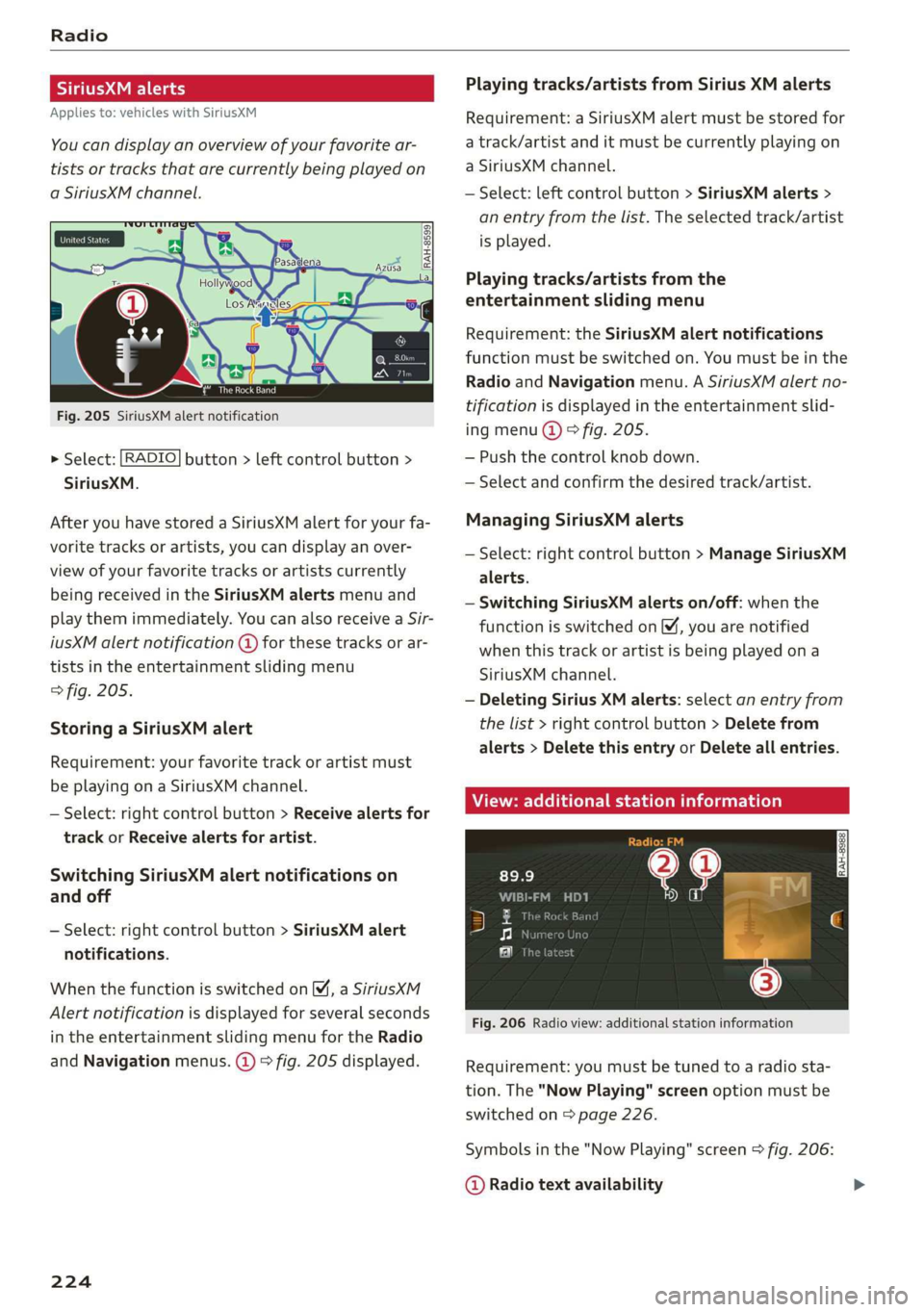
Vale
Tee)
Fig.205SiriusXMalertnotification
>Select:[RADIO]button>leftcontrolbutton>
SiriusXM.
AfteryouhavestoredaSiriusXMalertforyourfa-
voritetracksorartists,youcandisplayanover-
viewofyourfavoritetracksorartistscurrently
beingreceivedintheSiriusXMalertsmenuand
playthemimmediately.YoucanalsoreceiveaSir-
iusXMalertnotification@forthesetracksorar-
tistsintheentertainmentslidingmenu
>fig.205.
StoringaSiriusXMalert
Requirement:yourfavoritetrackorartistmust
beplayingonaSiriusXMchannel.
—Select:rightcontrolbutton>Receivealertsfor
trackorReceivealertsforartist.
SwitchingSiriusXMalertnotificationson
andoff
—Select:rightcontrolbutton>SiriusXMalert
notifications.
WhenthefunctionisswitchedonM,aSiriusXM
Alertnotificationisdisplayedforseveralseconds
intheentertainmentslidingmenufortheRadio
andNavigationmenus.@)>fig.205displayed.
224
Playingtracks/artistsfromSiriusXMalerts
Requirement:aSiriusXMalertmustbestoredfor
atrack/artistanditmustbecurrentlyplayingon
aSiriusXMchannel.
—Select:leftcontrolbutton>SiriusXMalerts>
anentryfromthelist.Theselectedtrack/artist
isplayed.
Playingtracks/artistsfromthe
entertainmentslidingmenu
Requirement:theSiriusXMalertnotifications
functionmustbe switchedon.Youmustbeinthe
RadioandNavigationmenu.ASiriusXMalertno-
tificationisdisplayedintheentertainmentslid-
ingmenu@)©fig.205.
—Pushthecontrolknob down.
—Selectandconfirmthedesiredtrack/artist.
ManagingSiriusXMalerts
—Select:rightcontrolbutton>ManageSiriusXM
alerts.
—SwitchingSiriusXMalertson/off:whenthe
functionisswitchedon,youarenotified
whenthistrackorartistisbeingplayedona
SiriusXMchannel.
—DeletingSiriusXMalerts:selectanentryfrom
thelist>rightcontrolbutton>Deletefrom
alerts>DeletethisentryorDeleteallentries.
View:additionalstationinformation
Fig.206Radioview:additionalstationinformation
Requirement:youmustbetunedtoaradiosta-
tion.The"NowPlaying"screenoptionmustbe
switched
on>page226.
Symbolsinthe"NowPlaying"screen>fig.206:
@Radiotextavailability
Page 228 of 394
Radio
Thefollowingsettingscan beselected,depend-
ingonthebandthatisselected:
Stationnames(FM)
Variable:scrollingtexttransmittedbytheFM
stationsisshownintheInfotainmentsystemdis-
play.
Fixed:scrollingtexttransmittedby theFMsta-
tionsisnotshownintheInfotainmentsystem
display.Onlythecurrentsectionofthescrolling
textisdisplayed.
FM/AMHDRadio*
YoucanswitchHDRadioreceptiononoroff.
Channelsorting(SiriusXM*)
YoucansetthechannelsortingforSiriusXMsta-
tionlists*by:
—Channelnumber:thechannelsaresortedinas-
cendingorderaccordingtotheirchannelnum-
ber.
—Channelname:thechannelsarelistedinalpha-
beticalorder.
—Firstcategory,thenchannelnumber:thechan-
nelsaresorted bytheircategoryandthenby
theirchannelnumbers.
—Firstcategory,thenchannelname:thechan-
nelsaresorted bytheircategoryandthenby
theirchannelnames.
Categoryfilter(SiriusXM*)
Thestationsshowninthestationlistcanbefil-
teredby yourpersonalpreferencesandbypro-
gramtype.Theprogramcategoriesthatyoucan
selectdependonwhatisofferedbyyourprovid-
er.SelecttheAllcategoriesoptiontodeactivate
allfilteroptionsanddisplayallavailablestations
inthesatellitestationlist.
Troubleshooting
Show"NowPlaying"screen
Whenthefunctionisswitchedon¥andthesta-
tionsorpresetslistisopen, thedisplaywill
switchtothe"NowPlaying"screenviewafterap-
proximatelyfiveseconds>page224.Depending
onavailability,informationaboutthesetstation
(such asstationname,artistandstationlogo)
maybedisplayedinthisview.
Preferredpictureview*
Youcansetyourpreferredscreenviewforthe
"NowPlaying"screen>page224.
—Stationlogo:thestationlogoisdisplayed,de-
pendingonavailability.
—Coverart:thealbumcoverisdisplayedifavaila-
ble.
Gracenoteonlinedatabase*
Requirement:theMMImustbeconnectedtothe
Internet.TheCoverartoptionmustbeselected
=page226,Preferredpictureview*.
Whenthefunctionisswitchedon(¥,thealbum
coverorgenrecoverforthesongthatisplayingis
loadedfromtheGracenoteonlinedatabase,de-
pendingonavailability.
Subscriptionstatus(SiriusXM)*
Thisoptionisavailablewhenyoursubscriptionis
abouttoexpireorhasalreadyexpired.Theexpi-
rationdateforyourlicenseisdisplayed.
CalltoSiriusXM”*:thecontactinformationfor
yoursatelliteradioproviderisdisplayed.Tocall
yoursatelliteradioproviderusingtheMMI,press
CalltoSiriusXM”*.
ProblemSolution
Astationwithpoorreceptionisnolonger
displayedinthestationlistonceyou
switchtoadifferentstation.
Storethestationasapresetinadvance.Accessthepre-
setsusingthepresetslist>page225.
226
Page 229 of 394
4M0012721BG
Media
Media
Introduction
Therearevariousmediadrivesandconnections
availableintheMMI.Forexample,youcanplay
audio/video*filesfromtheJukebox*orconnect
yourmobiledevicetotheAudimusicinterface*
andoperateitthroughtheMMI.
Notes
Mediaandformatrestrictions:theMMI(includ-
ingtheSDcardreaderandtheUSBstoragede-
viceconnection*)wastestedwithavarietyof
productsandmediaavailableinthemarket.
However,theremaybecaseswhereindividualde-
vicesormediaandaudio/video*filesmaynot be
recognized,mayplayonlywithrestrictionsor
maynotplayatall.
DigitalRightsManagement:pleasenotethat
theaudio/video*filesaresubjecttocopyright
protection.
Themediadrivesdonotplayfilesthatarepro-
tectedbyDRMandthatareidentifiedwiththe
symbolfi.
Datasecurity:neverstoreimportantdataonSD
cards,theJukebox*,CDs/DVDsormobiledevices.
AudiAGisnotresponsiblefordamagedorlost
filesandmedia.
Loadingtimes:themorefiles/folders/playlists
thatareonastoragemedium,thelongeritwill
taketo loadtheaudio/video*files.Audirecom-
mendsusingstoragemediathatonlycontainau-
dio/videofiles*.To decreasethetimeittakesto
loadaudio/videofiles*,createsubfolders(forex-
ample,fortheartistoralbum).Theloadingtime
willalsoincreasewhenimportingfiles.
Additionalinformation:whenplaying,audio
filesareautomaticallydisplayedwithanyaddi-
tionalinformationthatisstored(suchasthear-
tist,trackandalbumcover).Ifthisinformationis
notavailableonthestoragemedium,theMMI
willchecktheGracenotemetadatadatabase.
However,insomecases,theadditionalinforma-
tionmaynotbedisplayed.
Restrictedfunctionality:resettheMediaset-
tingstothefactorydefaultsettingsiffunctional-
ityisrestricted>page248.
Iffunctionalityisrestricted,resettheJukebox*
tothefactorydefaultsettings>page248.
Forinformationaboutthepropertiesofsupport-
edmediaandfileformats,see>page241.
CG)Note
Alwaysfollowtheinformationfoundin>@in
Wi-Fisettingsonpage200.
CD/DVDoperation
CD/DVDandformatrestrictions:thefunctionali-
tyofindividualstoragemediamaybelimiteddue
tothevarietyofblankCDs/DVDsavailable and
thevariouscapacities.AudioCDsorvideoDVDs
withcopyprotection,CDs/DVDsthatdonotcon-
formtothestandard,andmultisessionCDsmay
havelimitedplaybackormaynotplayatall.Audi
recommendsfinalizingtherecordingprocess
whencreatingmultisession CDs.Multisession
DVDsarenotsupported.
UsingCDs/DVDs,theCDdrive ortheDVDdrive:
toensurecorrect,high-qualityplaybackandto
preventdamagetothedriveordiscreadinger-
rors,alwaysstoreCDs/DVDsinaprotective
sleeveanddonotexposethemtodirectsunlight.
Donotuse:
—Damaged,dirtyorscratchedCDs/DVDs
—
SingleCDs/DVDswith3in(8cm)diameter
—CD/DVDsthatarenotround
—CDs/DVDswithlabels
—Protectiverings
—CleaningCDs
Thermalprotectionswitch:CD/DVDplayback
maybetemporarilyunavailableifoutsidetem-
peraturesareextremelyhotorcold.Athermal
protectionswitchisinstalledtoprotectthe
CD/DVDandthelaser.
Laserdevices:laserdevicesare dividedintosafe-
tyclasses1to4inaccordancewithDINIEC76
227
>
Page 241 of 394
4M0012721BG
Media
Bluetoothsettings
See>page250.
Wi-Fisettings*
See>page200,Wi-Fisettings.
Connectionmanager
See>page248.
Show"NowPlaying"screen
Withthefunctionswitchedon¥andaplaylist
open,variousinformationaboutthecurrenttrack
(suchasartist,albumandalbumcover*)aswell
astheplayingtimeandtheremainingplaying
timearedisplayed.
Jukeboxmemorycapacity*
InformationontheJukeboxmemorycapacityand
thenumberofstoredtracksintheJukeboxisdis-
played.
Rewind/Fastforward
Turnthecontrolknobtotheleftorright.Or:
moveyourfingerontheMMItouchcontrolpad*
fromthelefttotheright.
Shuffle)
Withthefunctionswitchedon,allfilesinthe
playlistareplayedandshowninrandomorder.
Repeattrack!)
Whenthefunctionisswitchedon M,thecurrent
trackrepeats.
Repeat*
Requirement:aniPod/iPhone*mustbeselected
asthemediasourceintheAudimusicinterface
=>page235,Accessingmedia.
—Track:thecurrenttrackwillberepeated.
—Folder:thetracksinthecurrentfolderare
playedcontinuouslyinaloop.
—Off:thefunctionisswitchedoff.
)Thefunctionautomaticallyswitchesoffwhenthesourceis
changed.
2)Thisfunctionisnotavailableforallcellphones.
Backto'Playback'
Theoptionsmenuisclosed.Thetrackcurrently
playingappearsintheplaylist.
Playsimilarmusic*
Thetrackcurrentlyplayingisquicklyanalyzedfor
featuressuchasartist,genres,mood,andbeat,
andasmartplaylistwithsimilartrackswillbe
shown.
Playmore...
Asmartplaylistisshownbasedonthetrackcur-
rentlyplaying.Youcanselectbetweenaplaylist
withmoretracksbythisartist,fromthisalbum
orofthisgenre.
Copytojukebox*
See>page229,AddingfilestotheJukebox.
Setasringtone*2)
Requirement:amobiledevicemustbeconnected
totheMMI.Thetrackcurrentlyplayingmustbe
intheJukebox*>page229.
Theselectedtrackwillbeusedastheringtone
forincomingcalls.
Gracenoteonlinedatabase*
Requirement:theMMImustbeconnectedtothe
Internet.
Dependingonavailability,variousinformation
willloadaboutthetrackcurrentlyplayingwhen
thisfunctionisswitchedon.
Favorites
See>page238.
Additionaloptions
Requirement:thevehiclemustbestationaryand
avideofile*oraDVD*mustbeplaying.
Parentalcontrol*
PlaybackofvideoDVDscanberestrictedusing
parentalcontrol.
239
Page 242 of 394
Media
Enterthepasswordforparentalcontrol.Pass-
wordsetatthefactory:1234.Youhavethefol-
lowingoptions:
—Protectionlevel:selectandconfirmtheprotec-
tionlevel(forexample,Level5).Eightdifferent
protectionlevelscan beset forparentalcon-
trol.Ifyousettheparentalcontrollevelat Lev-
el5,allDVDsfromlevels1-5canbeplayed.
VideoDVDswithahigherlevelwillnotplay.Se-
lectUnrestrictedtoremovealloftherestric-
tions.
—Changepassword:editthecurrentpassword.
Switchtofullscreen
Thevideoimageisdisplayed.Turnthecontrol
knobtodisplaytheplaylist.Or:pressthe[BACK
button.
Replayvideo!)
Whenthisfunctionisswitchedon @,thecurrent
videowillreplay.
Show DVDmenu
TheDVDmainmenuopensintheInfotainment
systemdisplay.
—Selectingamenuitem:selectandconfirma
menuitem.Or:moveyourfingerontheMMI
touchcontrolpad*andpressthecontrolknob.
Audiotrack2)
Youcanmanuallysettheaudiotrack(language
andaudioformat).Thelanguageandaudiofor-
matoptionsdependonthevideoDVD.
Subtitles)
Youcanmanuallyselectsubtitlesforplayback.
ThelanguagesavailabledependontheDVD.
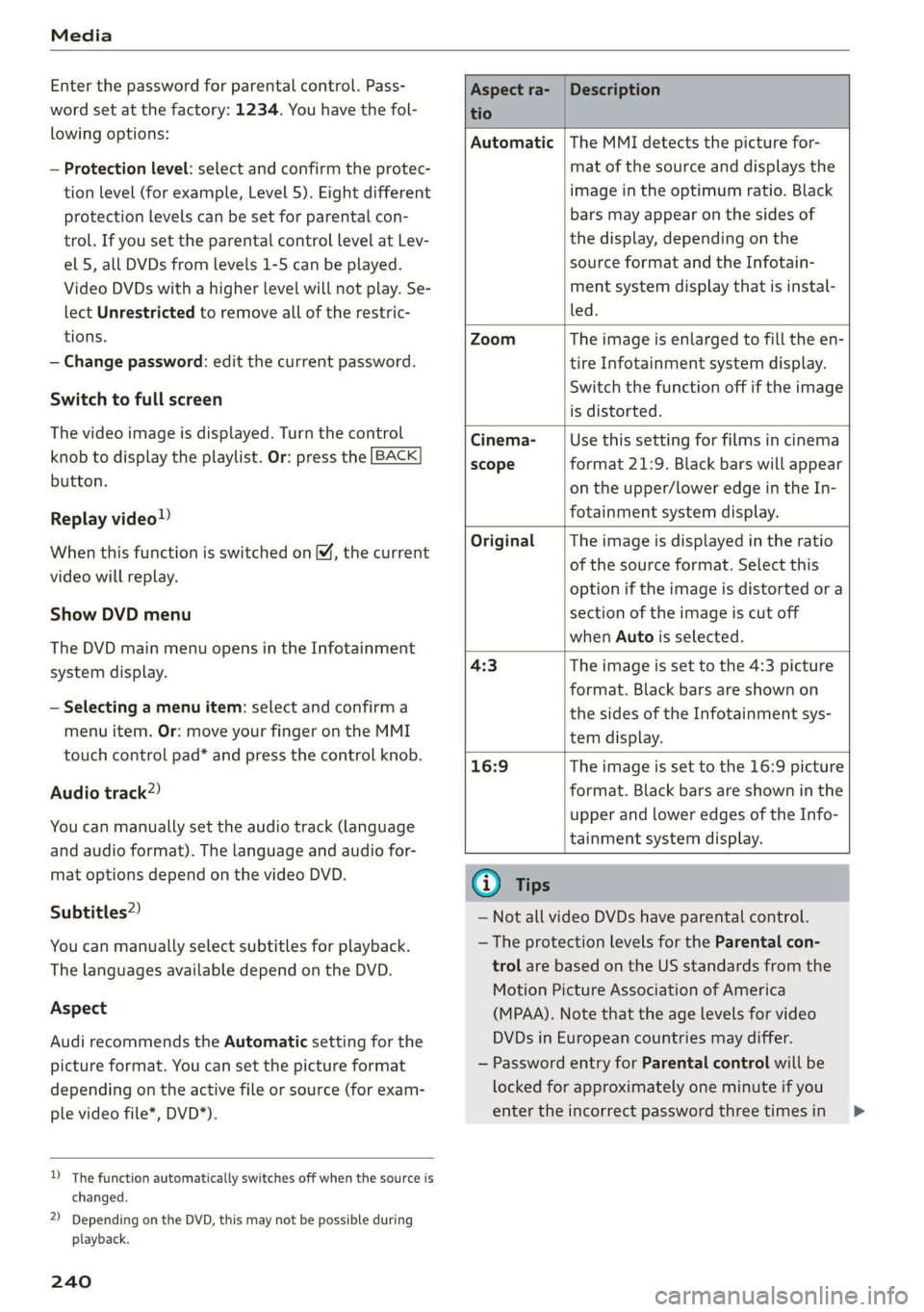
Aspect
AudirecommendstheAutomaticsettingforthe
pictureformat.Youcansetthepictureformat
dependingontheactivefileorsource(forexam-
plevideofile*,DVD*).
)Thefunctionautomaticallyswitchesoffwhenthesourceis
changed.
2)DependingontheDVD,thismaynotbepossibleduring
playback.
240
Aspectra-
tio
Description
Automatic|TheMMIdetectsthepicturefor-
matofthe sourceanddisplaysthe
imageintheoptimumratio.Black
barsmayappearonthesidesof
thedisplay,dependingonthe
sourceformatandtheInfotain-
mentsystemdisplaythatisinstal-
led.
ZoomTheimageisenlargedtofilltheen-
tireInfotainmentsystemdisplay.
Switchthefunctionoffiftheimage
isdistorted.
Cinema-
scope
Usethissettingforfilmsincinema
format21:9. Blackbarswillappear
ontheupper/loweredgeintheIn-
fotainmentsystemdisplay.
OriginalTheimageisdisplayedintheratio
ofthesourceformat.Selectthis
optioniftheimageisdistorted ora
sectionoftheimageiscutoff
whenAutoisselected.
4:3Theimageissettothe 4:3picture
format.Blackbarsareshownon
thesidesoftheInfotainmentsys-
temdisplay.
16:9 Theimageissettothe16:9picture
format.Blackbarsareshowninthe
upperandloweredgesoftheInfo-
tainmentsystemdisplay.
(i)Tips
— NotallvideoDVDshaveparentalcontrol.
— TheprotectionlevelsfortheParental con-
trolarebasedontheUSstandardsfromthe
MotionPictureAssociationofAmerica
(MPAA).Notethattheagelevelsforvideo
DVDsinEuropeancountriesmaydiffer.
—PasswordentryforParentalcontrolwillbe
lockedforapproximatelyoneminuteifyou
entertheincorrectpasswordthreetimesin
Page 247 of 394
4M0012721BG
Audismartphoneinterface
Audismartphone
interface
Setup
Appliesto:vehicleswithAudismartphoneinterface
YoucanconnectyoursmartphonetotheMMIus-
ingtheAudismartphoneinterface.Certaincon-
tenton yoursmartphoneisadaptedtotheInfo-
tainmentsystemdisplaywhiledrivingandcan
beoperatedthroughtheMMIcontrolpanel.
Requirement
Thevehiclemustbestationaryandtheignition
mustbe switchedon.
iPhonegeneration5orhigher withLightning
connectorandiOS7.1.2operatingsystemor
higher.Or:
AsmartphonewiththeAndroidAutoapp andAn-
droid5.0Lollipopoperatingsystemorhigheris
required.
>Connectyour smartphonetotheAudimusicin-
terface>page233usingtheapplicableUSB
adapter>page233,fig.211.
> SelectandconfirmActivateAppleCarPlayor
ActivateAndroidAutonow.
>Follow thesysteminstructions.
>Payattentiontoanyadditionalsystemprompts
onyoursmartphone,ifapplicable.
IfyouchosenottouseAppleCarPlayorAndroid
Autowhenconnectingyoursmartphoneforthe
firsttime,youcanstarttheAudismartphonein-
terfacelateronusingtheConnectionmanager.
>Select:[MENU]button>Audismartphonein-
terface>Changetoconnectionmanager.
>Connectyour smartphonetotheAudimusicin-
terfaceusingtheappropriateUSBadapter
=>page233,fig.211.
>»SelectandconfirmAudismartphoneinthe
Connectionmanager>page248.Youcanse-
lectyoursmartphoneinthelistofdevicesthat
arealreadypaired>page250.
>Follow thesysteminstructions.
sponsibilityforsafetyintraffic.Neveroperate
mobiledeviceswhiledriving,becausethisin-
creasestheriskofanaccident.
ZAWARNING
Drivingrequiresyourcompleteandundivided
attention.Asthedriver,youhavecompletere-
@)Note
Alwaysfollowtheinformationfoundin>@in
Wi-Fisettingsonpage200.
G)Tips
—Thefunctionsthatcan beuseddependon
thefollowingfactors,amongothers:
—Thebrandofyoursmartphone
—Theversionoftheoperatingsystemin
yoursmartphone
—Thesoftwareversionoftheappused
—TheUSBadaptercableandcorrectconnec-
tion
—Yourcellphoneserviceprovider
—Thecustomizedsettingson yoursmart-
phone
— Oneofthefactorsaboveoracombination
ofanyofthemcouldcauseyoursmart-
phonetobe incompatiblewiththeAudi
smartphoneinterface.Compatibilitycannot
beguaranteedforalltypesofsmartphones.
Formoreinformationandassistance,refer
totheuserguideandthemanufacturerof
yoursmartphone.
—Iftheconnectedsmartphonehasvoicecon-
trol,youcan operateyoursmartphoneusing
theexternalvoicerecognitionsystem
=>page176.
—ThemenulanguageshownintheMMIis
basedonthesettingsinyoursmartphone.
—ThetimedisplayedintheMMIisbasedon
thesettingsinyoursmartphone.
—SomeMMIfunctionsarenotavailablewhen
AppleCarPlayorAndroidAutoisactive.
—Youcannotconnectanymobiledevicesvia
BluetoothwhenanAppleCarPlayconnec-
tionisactive.
245
Page 256 of 394

Drivingsafety
Drivingsafety
Basics
Safedrivinghabits
Pleaseremember-safetyfirst!
Theindividualsafetyfeaturesofyourvehiclecan
worktogetherasasystemtohelpprotectyou
and
yourpassengersinawiderangeofaccidents.
Thesefeaturescannotworkasasystemifthey
arenot alwayscorrectlyadjustedandcorrectly
used.
Thischaptercontainsimportantinformation,
tips,instructionsandwarningsthatyouneedto
readandobserveforyourownsafety,thesafety
of
yourpassengersandothers.Wehavesummar-
izedherewhatyouneedtoknowaboutsafety
belts,airbags,childrestraintsaswellaschild
safety.Yoursafetyisforusprioritynumber1.Al-
waysobservetheinformationandwarningsin
thissection-foryourownsafetyaswellasthat
ofyourpassengers.
Theinformationinthissectionapplies toall
modelversionsofyourvehicle.Someofthefea-
turesdescribedinthissectionsmaybe standard
equipmentonsomemodels,ormaybeoptional
equipmentonothers.Ifyouarenotsure,ask
yourauthorizedAudidealer.
ZXWARNING
—Alwaysmakesurethatyoufollowthe in-
structionsandheedtheWARNINGSinthis
manual.Itisinyourinterestandinthein-
terestofyourpassengers.
—AlwayskeepalloftheOwner'sLiterature
manualsinyourAudiwhenyoulendorsell
yourvehiclesothatthisimportantinforma-
tionwillalwaysbeavailabletothedriver
andpassengers.
—AlwayskeeptheOwner'sLiteraturehandyso
thatyoucanfinditeasilyifyouhaveques-
tions.
254
Importantthingstodobeforedriving
Safetyiseverybody'sjob!Vehicleandoccupant
safetyalwaysdependsontheinformedandcare-
fuldriver.
Foryoursafetyandthesafety ofyourpassen-
gers,beforedrivingalways:
>Makesurethatalllightsandsignalsareoperat-
ingcorrectly.
> Makesurethatthetirepressureiscorrect.
>
Makesurethatallwindowsarecleanandafford
goodvisibility totheoutside.
>Secureallluggageandotheritemscarefully
=>page62.
>Makesurethatnothingcaninterferewiththe
pedals.
>Adjustfrontseat,headrestraintandmirrors
correctlyforyourheight.
>Instructpassengerstoadjusttheheadre-
straintsaccordingtotheirheight.
> Makesuretousetherightchildrestraintcor-
rectlytoprotectchildren>page290,Child
safety.
>Sitproperlyinyourseatandmakesurethat
yourpassengersdothesame>page53,Front
seats.
>Fastenyoursafetybeltandwearitproperly.Al-
soinstructyourpassengerstofastentheirsafe-
tybeltsproperly>page260.
Whatimpairsdrivingsafety?
Safedrivingisdirectlyrelatedtotheconditionof
thevehicle,thedriveraswellasthedriver’sabili-
tytoconcentrateontheroadwithoutbeingdis-
tracted.
Thedriverisresponsibleforthesafetyoftheve-
hicleandallofitsoccupants.If yourabilityto
driveisimpaired,safetyrisksforeverybodyinthe
vehicleincreaseand youalsobecomeahazardto
everyoneelseontheroad>/\.Therefore:
>Donotletyourselfbedistractedbypassengers
orbyusingacellulartelephone.
>NEVERdrivewhenyourdrivingabilityisim-
paired(bymedications,alcohol,drugs,etc.).
>Observealltrafficlaws,rulesoftheroadand
speedlimitsandplaincommonsense.
Page 259 of 394

4M0012721BG
Drivingsafety
asevenaspossiblewiththe topofyourhead.If
thatisnotpossible,trytoadjusttheheadre-
straintso thatit isasclosetothispositionas
possible.Ifthereisapassengerinthecenter
rearseat,slidetheheadrestraintupward
=>page57.
>Makesurethattheseatbackissecurelylatched
intheuprightposition>page64.
>Keepbothfeetflatinthefootwellinfrontof
therearseat.
>Fastenandwearsafetybeltsproperly
=>page263.
>Makesurethatchildrenarealwaysproperlyre-
strainedinachildrestraintthatisappropriate
fortheirsizeandage>page290.
Properadjustmentofheadrestraints
Correctlyadjustedheadrestraintsareanimpor-
tantpartofyourvehicle'soccupantrestraintsys-
tem andcanhelptoreducetheriskofinjuriesin
accidentsituations.
B4G-0454
ZAWARNING
Passengerswhoareimproperly seatedonthe
rearseatcanbeseriouslyinjuredinacrash.
—Eachpassengermustalwayssitonaseatof
theirownandproperlyfastenandwearthe
safetybeltbelongingtothatseat.
—Safetybeltsonlyoffermaximumprotection
whentheseatbackissecurelylatchedinthe
uprightpositionandthesafetybeltsare
properlypositionedonthebody.Bynotsit-
tingupright,arearseatpassengerincreases
theriskofpersonalinjuryfromimproperly
positionedsafetybelts!
—Alwaysadjusttheheadrestraintproperlyso
Fig.222Headrestraint:viewedfromthefront
Theheadrestraintsmustbecorrectlyadjustedto
achievethebestprotection.
>Adjust theheadrestraintssotheupperedgeis
asevenas possiblewiththetopofyourhead.If
thatisnotpossible,trytoadjusttheheadre-
straintso thatitisasclosetothispositionas
possible.Position*theheadrestraintasclose
aspossibletothe backofyourhead.
>Iftherearepassengersinrearseat,foldthe
headrestraintsup ontheoccupiedseats.
Adjustingheadrestraints>page57.
thatitcangivemaximumprotection.
Z\WARNING
Allseatsareequippedwithheadrestraints.
Drivingwithoutheadrestraintsorwithhead
restraintsthatarenotproperlyadjustedin-
creasestheriskof serious orfatalneckinjury
dramatically.Tohelpreducetheriskofinjury:
—Alwaysdrivewiththeheadrestraintsin
placeandproperlyadjusted.
—Everypersoninthevehiclemusthavea
properlyadjustedheadrestraint.
—Alwaysmakesureeachpersoninthevehicle
properlyadjuststheirheadrestraint.Adjust
theheadrestraintssotheupperedgeisas
evenaspossiblewiththe topofyourhead.
Ifthatisnotpossible,trytoadjustthehead
restraintsothatitisasclosetothisposition
aspossible.
257