air AUDI Q7 2019 Owner´s Manual
[x] Cancel search | Manufacturer: AUDI, Model Year: 2019, Model line: Q7, Model: AUDI Q7 2019Pages: 394, PDF Size: 105.97 MB
Page 153 of 394
4M0012721BG
IntelligentTechnology
Allwheeldrive(quattro)
Theall-wheeldrivesystemdistributesthedriving
powervariablytothefrontandrearaxletoim-
provethedrivingcharacteristics.Itworkstogeth-
erwithselectivewheeltorquecontrol,whichcan
activatewhendrivingthroughcurves
=>page146.
Theallwheeldriveconceptisdesignedforhigh
enginepower.Yourvehicleisexceptionallypow-
erfulandhasexcellentdrivingcharacteristics
bothundernormaldrivingconditionsandon
snowandice.Alwaysreadandfollowsafetypre-
cautions>A\.
Z\WARNING
—Eveninvehicleswithallwheeldrive,you
shouldadaptyourdrivingstyletothecur-
rentroadandtrafficconditionstoreduce
theriskofanaccident.
— Thebrakingabilityofyourvehicleislimited
tothetractionofthewheels.In thisway,it
isnotdifferentfromatwowheeldrivevehi-
cle.Donotdrivetoofastbecausethisin-
creasestheriskofanaccident.
—Notethatonwetstreets,thefrontwheels
can“hydroplane’”ifdrivingatspeedsthat
aretoohigh.Unlikefrontwheeldrivevehi-
cles,theengineRPMdoesnotincreasesud-
denlywhenthevehiclebeginshydroplaning.
Adaptyourspeedtotheroadconditionsto
reducetheriskofanaccident.
Sykemetals
Appliesto:Vehicleswith sportdifferential
Thesportdifferentialdistributesthedrivepower
totherearaxlebasedonthesituation.Thegoal
isahighlevelofagilityandabilitytoaccelerate
oncurves.Thevehicleisvery responsivetosteer-
ing.ThesettingsdependontheselectedAudi
driveselect*mode.
Energymanagement
Yourvehicleisequippedwithanintelligentener-
gymanagementsystemfordistributingelectrici-
ty.Thissignificantlyimprovesthestartingability
andincreasesthevehiclebatterylife.
@)Tips
—Ifyoudriveshortdistancesfrequently,the
vehiclebatterymaynotchargeenough
whiledriving.Asaresult,conveniencefunc-
tionsforelectricalequipmentmaybetem-
porarilyunavailable.
—Thevehiclebatterywillgraduallydrainif
thevehicleisnotdrivenforlongperiodsof
time,orifelectricalequipmentisused
whentheengineisnotrunning.Toensure
thatthevehiclecanstillbestarted,the
electricalequipmentwillbelimitedor
switchedoff.
Noticeaboutdata
recordedbytheEvent
DataRecorderand
vehiclecontrolmodules
EventDataRecorder
Thisvehicleisequippedwithan Event DataRe-
corder(EDR).ThemainpurposeofanEDRisto
record,incertaincrashornearcrash-likesitua-
tions,
suchasanairbagdeploymentorhittinga
roadobstacle,datathatwillassistinunderstand-
inghowavehicle'ssystemsperformed.TheEDR
isdesignedto recorddatarelatedtovehicledy-
namics andsafetysystemsforashortperiodof
time,typically30secondsorless.TheEDRinthis
vehicleisdesignedtorecordsuchdataas:
—Howvarioussystemsinyourvehiclewereoper-
ating;
—Whetherornot thedriverandpassengersafety
beltswerebuckled/fastened;
—Howfar(ifatall)thedriverwasdepressingthe
acceleratorand/orbrakepedal;and,
—Howfastthevehiclewastraveling.
Thesedatacanhelpprovideabetterunderstand-
ingofthecircumstancesinwhichcrashesandin-
juriesoccur.NOTE:EDRdataarerecordedbyyour
vehicleonlyifanon-trivialcrashsituationoccurs;
nodataarerecordedbytheEDRundernormal
drivingconditionsandnopersonaldata(e.g.,
151
>
Page 154 of 394
IntelligentTechnology
name,gender,age,andcrashlocation)arere-
corded.However,otherparties,suchaslawen-
forcement,couldcombinetheEDRdatawiththe
typeofpersonallyidentifyingdataroutinelyac-
quiredduringacrashinvestigation.
Toreaddata recordedbyanEDR,specialequip-
mentisrequired,andaccesstothevehicleorthe
EDRisneeded.Inadditiontothevehiclemanu-
facturer,otherparties,suchaslawenforcement,
thathavethespecialequipment,canreadthein-
formationifthey haveaccesstothevehicleorthe
EDR.
Somestatelawsrestricttheretrievalordown-
loadingofdatastoredbyEDRsinstalledinavehi-
clefortheexpresspurposeofretrievingdataaf-
teranaccidentorcrasheventwithouttheown-
er'sconsent.
AudiwillnotaccesstheEDRand/orsimilardata
or giveittoothers-
—unlessthevehicleowner(orlesseeifthevehi-
clehasbeenleased)agrees; or
—upontheofficialrequestbythepolice;or
—upontheorderofacourtoflaworagovern-
mentagency;or
—forthedefenseofalawsuitthroughthejudicial
discoveryprocess.
—Audimayalsouse thedataforresearchabout
vehicleoperationandsafetyperformanceor
providethedatatoathirdpartyforresearch
purposeswithoutidentifyingthespecificvehi-
cleorinformationabouttheidentityofitsown-
er orlesseeandonlyaftertherecordedvehicle
datahasbeenaccessed.
Vehicle controlmodules
Yourvehicleisalsoequippedwithanumberof
electroniccontrolmodulesforvariousvehicle
systems,suchasenginemanagement,emission
control,airbags,andsafetybelts.
Theseelectroniccontrolmodulesrecorddata
during normalvehicleoperationthatmaybe
neededbytrainedtechniciansfordiagnosticand
repairpurposes.Therecordingcapabilityofthese
modulesislimitedtodata(nosoundisrecorded).
Onlyasmallamountofdataisactuallyrecorded
overaverylimitedperiodoftime,orstoredwhen
152
asystemfaultisdetectedbyacontrolmodule.
Someofthedatastoredmayrelatetovehicle
speed,direction,orbraking,aswellasrestraint
systemuseandperformanceintheeventofa
crash.Storeddatacanalsoonlybereadand
downloadedwithspecialequipmentthatisdi-
rectlyconnectedtothevehicle.
@)Tips
YourvehiclemaybeequippedwithAudicon-
nect.YouruseofcertainAudiconnectfea-
turesrequireswirelessservicesthatarepro-
videdbyathirdpartywirelesstelecommuni-
cationsprovider.Fordetailsregardinghowin-
formationobtainedthroughAudiconnectis
collected,processed,transmitted,used,and
shared,pleaseseeyourcontractwiththe
wirelesstelecommunicationsprovider.
Page 159 of 394
4M0012721BG
MultiMediaInterface
MMItouch
MMItouchcontrolpad
Appliesto:vehicleswithMMItouch
Youcanenterdatausinghandwritingrecogni-
tionontheMMItouchcontrolpad.
ie
®©-co=~Angeles,CA
:aly
5)trDowntown,LosAngeles,CA
cree
YT
\
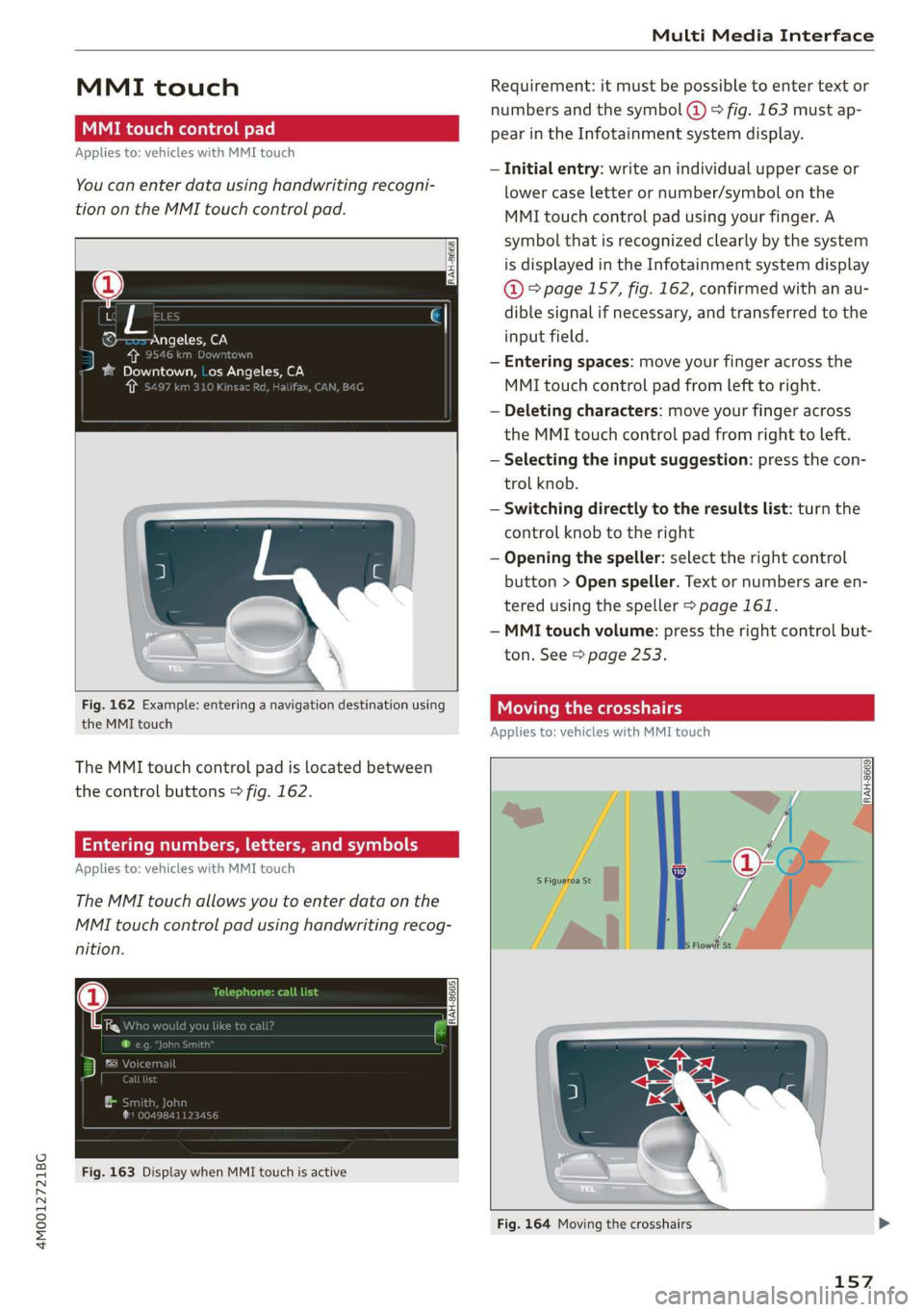
Fig.162Example:enteringanavigationdestinationusing
theMMItouch
TheMMItouchcontrolpadislocatedbetween
thecontrolbuttons>fig.162.
Enteringnumbers,letters,andsymbols
Appliesto:vehicleswithMMItouch
TheMMItouchallowsyoutoenterdataonthe
MMItouchcontrolpadusinghandwritingrecog-
nition.
Fig.163DisplaywhenMMItouchisactive
Requirement:itmustbepossible toentertext or
numbersandthesymbol(@>fig.163 mustap-
pearintheInfotainmentsystemdisplay.
—Initialentry:writeanindividualuppercaseor
lowercaseletterornumber/symbolonthe
MMItouchcontrolpadusingyourfinger.A
symbolthatisrecognizedclearlyby thesystem
isdisplayedintheInfotainmentsystemdisplay
@°page157,fig.162,confirmedwithanau-
diblesignalifnecessary,andtransferredtothe
inputfield.
—Enteringspaces:moveyourfingeracrossthe
MMItouchcontrolpadfromlefttoright.
—Deletingcharacters:moveyourfingeracross
theMMItouchcontrolpadfromrighttoleft.
—Selectingtheinputsuggestion:pressthecon-
trolknob.
—Switchingdirectlytotheresultslist:turnthe
controlknobtotheright
—Openingthespeller:selecttherightcontrol
button>Openspeller.Textornumbersare en-
tered usingthespeller>page161.
—MMItouchvolume:presstherightcontrolbut-
ton.See>page253.
Movingthecrosshairs
Appliesto:vehicleswithMMItouch
a
RAH-8669|
Fig.164Movingthecrosshairs
157
Page 160 of 394
MultiMediaInterface
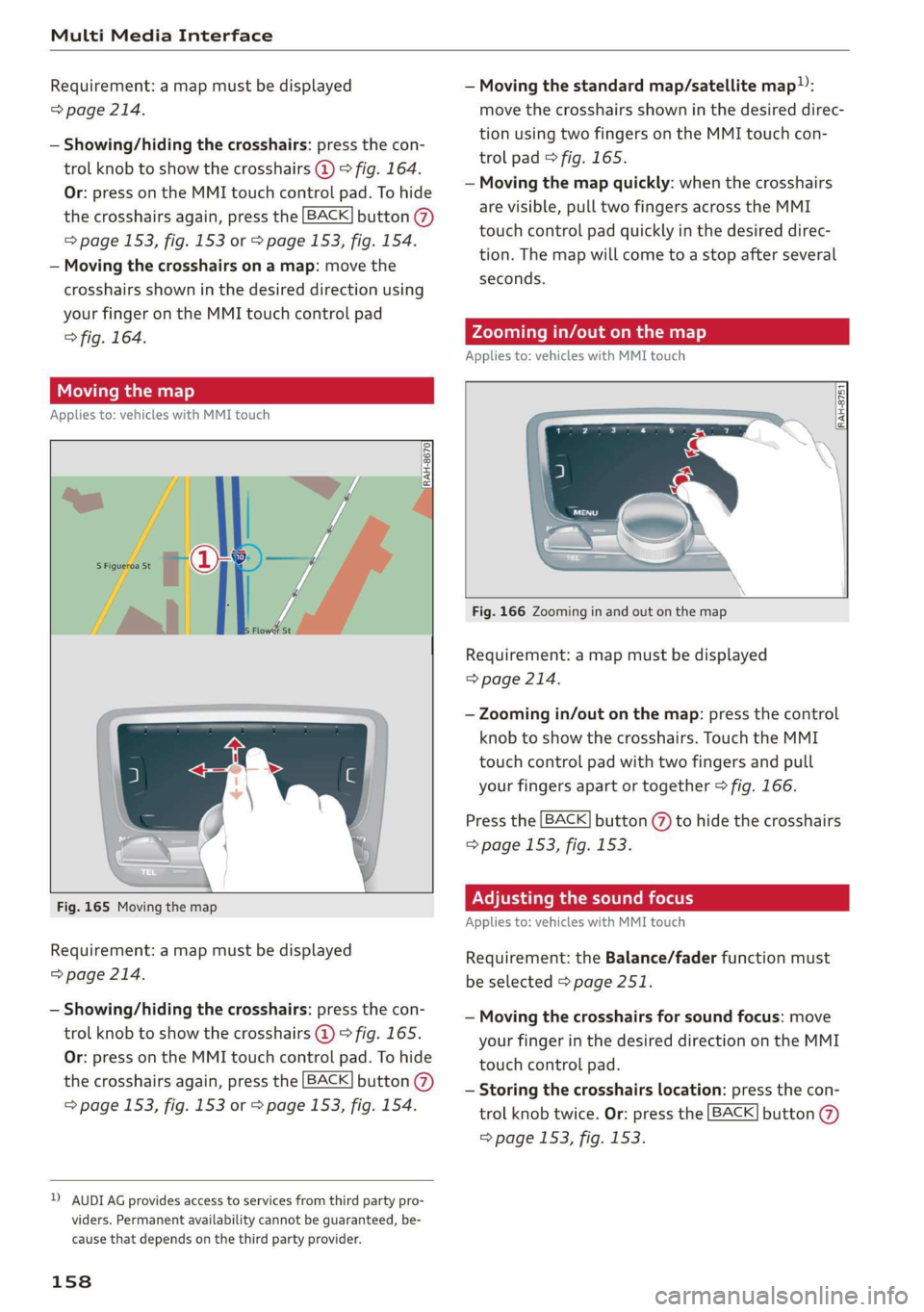
Requirement:amapmustbedisplayed—Movingthestandardmap/satellitemap):
>page214.movethecrosshairsshowninthedesireddirec-
tionusingtwofingersontheMMItouchcon-
trolpad©fig.165.
—Movingthemapquickly:whenthecrosshairs
arevisible,pulltwofingersacrosstheMMI
touchcontrolpadquicklyinthedesireddirec-
tion.Themapwill cometoastopafterseveral
seconds.
—Showing/hidingthecrosshairs:pressthecon-
trolknobtoshowthecrosshairs@)>fig.164.
Or:pressontheMMItouchcontrolpad.Tohide
thecrosshairsagain,pressthe[BACK]button@
=>page153,fig.153or>page153,fig.154.
—Movingthecrosshairsonamap:movethe
crosshairsshowninthedesireddirectionusing
yourfingerontheMMItouchcontrolpad
>fig.164.Zoomingin/outonthemap
Appliesto:vehicleswithMMItouch
Movingthemap
Appliesto:vehicleswithMMItouch
RAH-8751
S| S|
|=iz=
Fig.166Zoominginandoutonthemap
Requirement:amapmustbedisplayed
=>page214.
—Zoomingin/outonthemap:pressthecontrol
knobtoshowthecrosshairs.TouchtheMMI
touchcontrolpadwithtwofingersandpull
yourfingersapartortogether>fig.166.
Pressthe[BACK]button(%)tohidethecrosshairs
=>page153,fig.153.
Fig.165MovingthemapPNTema eelLaemcolder
Appliesto:vehicleswithMMItouch
Requirement:amapmustbedisplayed
=>page214.
Requirement:theBalance/faderfunctionmust
beselected>page251.
—Showing/hidingthecrosshairs:pressthecon-
trolknobtoshowthecrosshairs@)©fig.165.
Or:pressontheMMItouchcontrolpad.Tohide
thecrosshairsagain,pressthe[BACK]button@)
=>page153,fig.153or>page153,fig.154.
—Movingthecrosshairsforsoundfocus:move
yourfingerinthedesireddirectionontheMMI
touchcontrolpad.
—Storingthecrosshairslocation:pressthecon-
trolknobtwice.Or:pressthe[BACK]button
=>page153,fig.153.
DAUDIAGprovidesaccesstoservicesfromthirdpartypro-
viders.Permanentavailabilitycannotbeguaranteed,be-
causethatdependsonthethirdpartyprovider.
158
Page 177 of 394
4M0012721BG
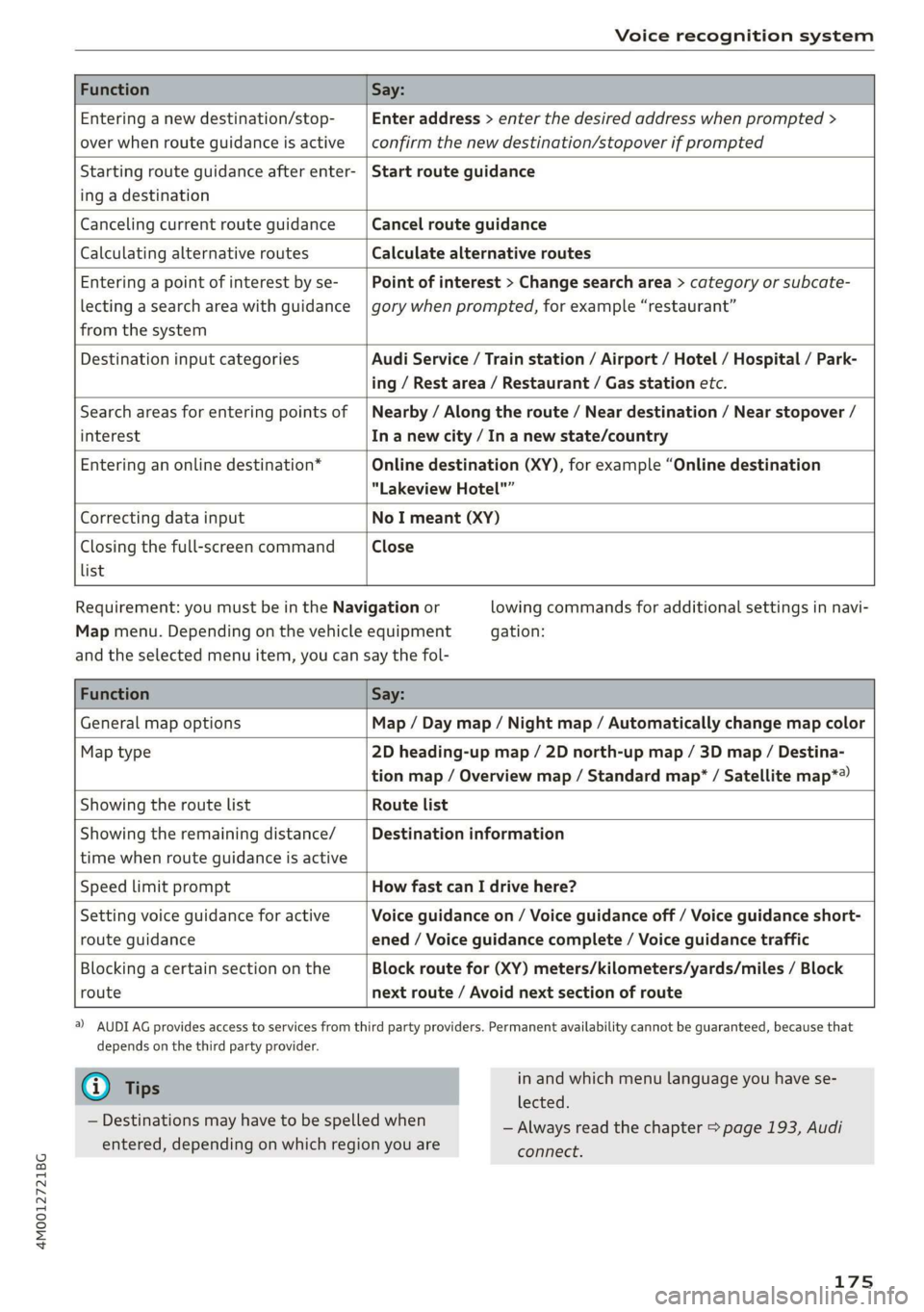
Voicerecognitionsystem
FunctionSay:
Enteringanewdestination/stop-
overwhenrouteguidanceisactive
Enteraddress>enterthedesiredaddresswhenprompted>
confirmthenewdestination/stopoverifprompted
Startingrouteguidanceafterenter-
ingadestination
Startrouteguidance
CancelingcurrentrouteguidanceCancelrouteguidance
CalculatingalternativeroutesCalculatealternativeroutes
Enteringapointofinterestbyse-
lectingasearchareawithguidance
fromthesystem
Pointofinterest>Changesearcharea>categoryorsubcate-
gorywhenprompted,forexample“restaurant”
DestinationinputcategoriesAudiService/Trainstation/Airport/Hotel/Hospital/Park-
ing/Restarea/Restaurant/Gasstationetc.
Searchareasforenteringpointsof
interest
Nearby/Alongtheroute/Neardestination/Nearstopover/
Inanewcity/In anewstate/country
Enteringanonlinedestination*Onlinedestination(XY),forexample“Onlinedestination
"LakeviewHotel"”
CorrectingdatainputNoImeant(XY)
Closingthefull-screencommand
list
Close
Requirement:youmustbeintheNavigationor
Mapmenu.Dependingonthevehicleequipment
lowingcommandsforadditionalsettingsinnavi-
gation:
andtheselectedmenuitem,youcansaythefol-
FunctionSay:
GeneralmapoptionsMap/Daymap/Nightmap/Automaticallychangemapcolor
Maptype2Dheading-upmap/2Dnorth-upmap/3Dmap/Destina-
tionmap/Overviewmap/Standardmap*/Satellitemap*®
Showingtheroute listRoutelist
Showingtheremainingdistance/
timewhenrouteguidanceisactive
Destinationinformation
SpeedlimitpromptHowfastcanIdrivehere?
Settingvoiceguidanceforactive
routeguidance
Voiceguidanceon/Voiceguidanceoff/Voiceguidanceshort-
ened/Voiceguidancecomplete/Voiceguidancetraffic
Blockingacertainsectiononthe
route
Blockroutefor(XY)meters/kilometers/yards/miles/Block
nextroute/Avoidnextsectionofroute
)AUDIAGprovidesaccesstoservicesfromthirdpartyproviders.Permanentavailabilitycannotbeguaranteed,becausethat
dependsonthethirdpartyprovider.
@Tips
—Destinationsmayhavetobespelledwhen
entered,dependingonwhichregionyouare
inandwhichmenulanguageyouhavese-
lected.
—Alwaysreadthechapter>page193,Audi
connect.
175
Page 180 of 394

Telephone
Telephone
Introduction
Appliesto:vehicleswithtelephone
Tomakephonecallsinyourvehicleusingthe
MMI,connectyourcellphonetotheMMIvia
Bluetooth.
Handsfree
Afteryouhaveconnectedyourmobiledevice to
theMMIviaBluetooth,youcan use thehandsfree
systemandoperatetelephonefunctionsthrough
yourMMI.Youcanmakecallsusingtheantenna
onyourmobiledevice.
Withthe Audiphonebox’,callsaremadeusing
theexteriorantennaonthevehicle.Usingtheex-
ternalantennahelpswhenthereisalowsignal
andalsoprovidesbetterreceptionquality
=>page181.
ZA\WARNING
—Medicalexpertswarnthatmobiledevices
caninterferewiththefunctionofpacemak-
ers.Alwaysmaintainaminimumdistanceof
about8inches(20cm)betweenthecell
phoneantennaandthepacemaker.
—Donotcarrythemobiledeviceinapocket
directlyoverthepacemakerwhenthe
phoneisswitchedon.
—Switchthemobiledeviceoffimmediately
ifyoususpectitmaybeinterferingwith
thepacemaker.
—Donotuse thevoicerecognitionsystem*
=page171inemergenciesbecauseyour
voicemaychangeinstressfulsituations.The
systemmaytakelongertodialthenumber
ormaynotbeabletodialitatall.Dialthe
emergencynumbermanually.
—Switchyourmobiledeviceoffinareaswhere
thereisariskofanexplosion.Theseloca-
tionsarenotalwaysclearlymarked.This
mayincludegasstations,fuelandchemical
storagefacilitiesortransportvehicles,orlo-
cationswherefuelvapors(such aspropane
orgasolinevaporinvehiclesorbuildings),
chemicalsorlargequantitiesofdustparti-
cles(suchasflour,sawdustormetal)may
178
bepresentintheair.Thisalsoappliestoall
otherlocationswhereyouwouldnormally
turnyourvehicleengineoff.
— Thedemandsoftrafficrequireyourfullat-
tention.Alwaysreadthechapter
=>page153,Trafficsafetyinformation.
@)Note
Alwaysfollowtheinformationfoundin>@in
Wi-Fisettingsonpage200.
G)Tips
— TheBluetooth connectionrangeislimited
toinsidethevehicle.Itcanalsobeaffected
bylocalconditionsandinterferencewith
otherdevices.
—TolearnwhichBluetoothconnectionsand
whichofthefunctionsinyourmobiledevice
aresupported,checkwithyourmobilede-
viceserviceproviderorthedatabaseformo-
biledevicesatwww.audiusa.com/
bluetooth.
Setup
ConnectingacellphoneusingBluetooth
Appliesto:vehicleswithtelephone
MyPhone
DoesthisPINmatchtheoneon your
Bluetoothdevice?PIN:967536
Fig.177DisplayingthePINforenteringinthecellphone
Requirement
Thevehiclemustbestationaryandtheignition
mustbeswitchedon.
TheBluetoothsettingsmustbeopenonyour
mobiledeviceduringtheconnectionsetup.
TheBluetoothfunctionandvisibilityoftheMMI
=page250andmobiledevicemustbeswitched
on.
Page 181 of 394
![AUDI Q7 2019 Owner´s Manual 4M0012721BG
Telephone
Themobiledevicethatwillbeconnectedmust
notbeconnectedtoanyotherBluetoothdevice.
TheMMImustnotbeconnectedtoamobilede-
vice.
Connectingamobiledevice
>Select:[MENU]button>Tele](/img/6/40283/w960_40283-180.png "AUDI Q7 2019 Owner´s Manual 4M0012721BG
Telephone
Themobiledevicethatwillbeconnectedmust
notbeconnectedtoanyotherBluetoothdevice.
TheMMImustnotbeconnectedtoamobilede-
vice.
Connectingamobiledevice
>Select:[MENU]button>Tele")
4M0012721BG
Telephone
Themobiledevicethatwillbeconnectedmust
notbeconnectedtoanyotherBluetoothdevice.
TheMMImustnotbeconnectedtoamobilede-
vice.
Connectingamobiledevice
>Select:[MENU]button>Telephone>Connect
mobiledevice>Findnewdevices>Next.The
availableBluetoothdevicesareshownintheIn-
fotainmentsystemdisplay.Orselect:[MENU
button>Settings>leftcontrolbutton>MMI
settings>Connectionmanager©page248.
>Selectandconfirmthedesiredcellphonefrom
thelistofdisplayedBluetoothdevices.
>TheMMIgeneratesaPINforthe connection
setup
>fig.177.
>SelectandconfirmYes.
>»EnterthePINforconnectingonyourcell
phone.Or:whenthePINisdisplayedonyour
cellphone,confirmthePINonyourcellphone
andintheMMI.Thetimeallowedforentering
thePINislimitedtoapproximately30seconds.
>Payattentiontoanyadditionalsystemprompts
displayedonyourcellphone,forexampleifthe
systemshouldconnectautomaticallyinthefu-
ture.Dependingonthecellphone,youmay
havetoconfirmdownloadingthedirectorysep-
arately.
Afterconnectingsuccessfully
Afterconnectingsuccessfully,informationabout
theconnectedprofileswillappear.Youcanalso
changetheprofileslater.Select:[MENU]button>
Settings> leftcontrolbutton>MMIsettings>
Connectionmanager>page248.
Inaddition,thecellphonecontactsareautomat-
icallyloadedintheMMIdirectory.Thisprocess
cantakeseveralminutes,dependingonthenum-
berofcontacts.
Youcanalsomakeyourconnectedcellphonethe
defaultphonebyselectingSetasdefaulttele-
phoneintheConnectionmanager=page250.
@)Note
Alwaysfollow theinformationfoundin>@in
Wi-Fisettingsonpage200.
@Tips
—MakingphonecallsthroughtheMMIisonly
possibleusingtheHandsfreeBluetoothpro-
file.
—Youcanapplyadditionalsettingstocon-
nectedmobiledevicesusingtheConnection
manager>page248.
—YoucanalsosearchfortheMMIonyourmo-
biledeviceusingtheBluetoothdevice
search.
—Youonlyhavetopairyourdeviceonetime.
Bluetoothdevicesthatarealreadypaired
automaticallyconnecttotheMMIwhenthe
Bluetoothfunctionisswitchedon,when
theyarewithinrange,andwhentheignition
isswitchedon.Thelastconnectedmobile
deviceisgivenfirstpriority.
—AuthorizingtheMMIconnectiononyour
mobiledevicewillmakeitpossibletocon-
nectautomatically.
—Payattentiontoanysystempromptsdis-
playedonyourcellphone,forexampleif
thesystemshouldconnectautomaticallyin
thefuture.Dependingonthecellphone,
youmayalsoneedtodownloadthedirecto-
ryandconfirmaccesstoyourtextmessages
separately.
—Whenleavingthevehicle,theBluetooth
connectiontothemobiledevicewillauto
maticallydisconnect.Depending onyour
mobiledevice,phonecallsinprogressmay
beautomaticallyredirectedfromtheMM
toyourmobiledevicesothatyoucan con
tinuethecallon yourphone.
I
—Youcanobtainmoreinformationfromyour
mobiledeviceserviceproviderorfromyo!ur
mobiledeviceuserguide. Forinformation
onusingthetelephone,visitwww.audiusa.
com/bluetoothorcontactanauthorizedAu-
didealerorauthorizedAudiServiceFacili
—Appliesto:vehicleswithoutsecondary
phone:Severalcellphonescanbepaired
ity.
to
theMMI,butonlyonecellphonecanbeac-
tivelyconnectedtotheMMI.
179
Page 182 of 394
Telephone
—Appliesto:vehicleswithoutsecondary
phone:IfaBluetoothdeviceisalreadycon-
nectedtotheMMI,itwillbedisconnected
whenanotherdeviceconnectstotheMMI.
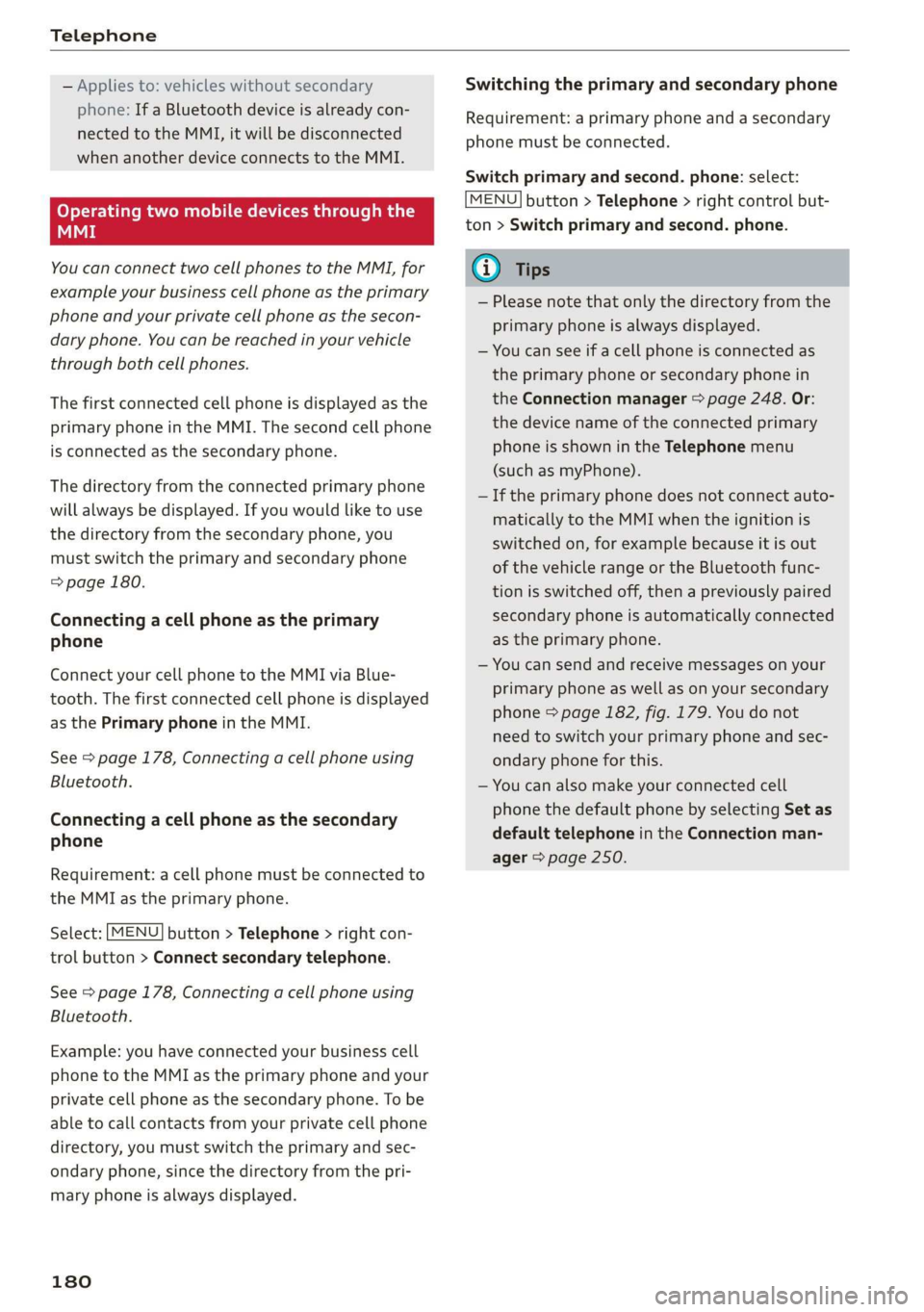
Operatingtwomobiledevicesthroughthe
MMI
YoucanconnecttwocellphonestotheMMI,for
exampleyourbusinesscellphoneastheprimary
phoneandyourprivatecellphoneasthesecon-
daryphone.You canbereachedinyourvehicle
throughbothcellphones.
Thefirstconnectedcellphoneisdisplayedasthe
primaryphoneintheMMI.Thesecondcellphone
isconnectedasthesecondaryphone.
Thedirectoryfromtheconnectedprimaryphone
willalwaysbedisplayed.Ifyouwouldliketouse
thedirectoryfromthesecondary phone, you
mustswitchtheprimaryandsecondaryphone
=>page180.
Connectingacellphoneastheprimary
phone
ConnectyourcellphonetotheMMIviaBlue-
tooth.
Thefirstconnectedcellphoneisdisplayed
asthePrimaryphoneintheMMI.
See>page178,Connectingacellphoneusing
Bluetooth.
Connectingacellphoneasthesecondary
phone
Requirement:acellphonemustbeconnectedto
theMMIastheprimaryphone.
Select:[MENU]button>Telephone>rightcon-
trolbutton>Connectsecondarytelephone.
See>page178,Connectingacellphoneusing
Bluetooth.
Example:youhaveconnectedyourbusinesscell
phonetotheMMIastheprimaryphoneandyour
privatecellphoneasthesecondaryphone.To be
abletocallcontactsfromyourprivatecellphone
directory,youmustswitchtheprimaryandsec-
ondaryphone,sincethedirectoryfromthepri-
maryphoneisalwaysdisplayed.
180
Switchingtheprimaryandsecondaryphone
Requirement:aprimaryphoneandasecondary
phonemustbe connected.
Switchprimaryandsecond.phone:select:
MENU]button>Telephone>rightcontrolbut-
ton>Switchprimaryandsecond.phone.
G)Tips
—Pleasenotethatonlythedirectoryfromthe
primaryphoneisalwaysdisplayed.
—Youcanseeifacellphoneisconnectedas
theprimaryphoneorsecondaryphonein
theConnectionmanager>page248.Or:
thedevicenameoftheconnectedprimary
phoneisshownintheTelephonemenu
(suchasmyPhone).
—Iftheprimaryphonedoesnotconnectauto-
matically totheMMIwhentheignitionis
switchedon, forexamplebecauseitisout
ofthevehiclerangeortheBluetoothfunc-
tionisswitchedoff,thenapreviously paired
secondaryphoneisautomaticallyconnected
astheprimaryphone.
—Youcansendandreceivemessagesonyour
primaryphoneaswellasonyoursecondary
phone>page182,fig. 179.You donot
needtoswitchyourprimaryphoneandsec-
ondaryphoneforthis.
—Youcanalsomakeyourconnectedcell
phonethedefaultphonebyselectingSetas
defaulttelephoneintheConnectionman-
ager>page250.
Page 193 of 394
4M0012721BG
Telephone
Microphoneinputlevelcan beadjustedduringa
phonecallusingthecontrolknob.
i)Tips
—Severalmobiledevicescan bepairedwith
theMMI,butonlytwo*mobiledevicescan
be
activelyconnected.
—TodeleteallpairedBluetoothdevices,the
Bluetoothfunctioncanberesettothefac-
torydefaultsettings>page248.
Additionaloptions
>Select:[MENU]button>Telephone>rightcon-
trolbutton.
Connectionmanager
See>page248.
Bluetoothsettings*
See>page250.
Onlinesettings*
See>page250.
Wi-Fisettings*
See>page200,Wi-Fisettings.
Directorysettings
Appliesto:vehicleswithtelephone
>Select:[MENU]button>Telephone>leftcon-
trolbutton>Directory>rightcontrolbutton>
Contactsettings.
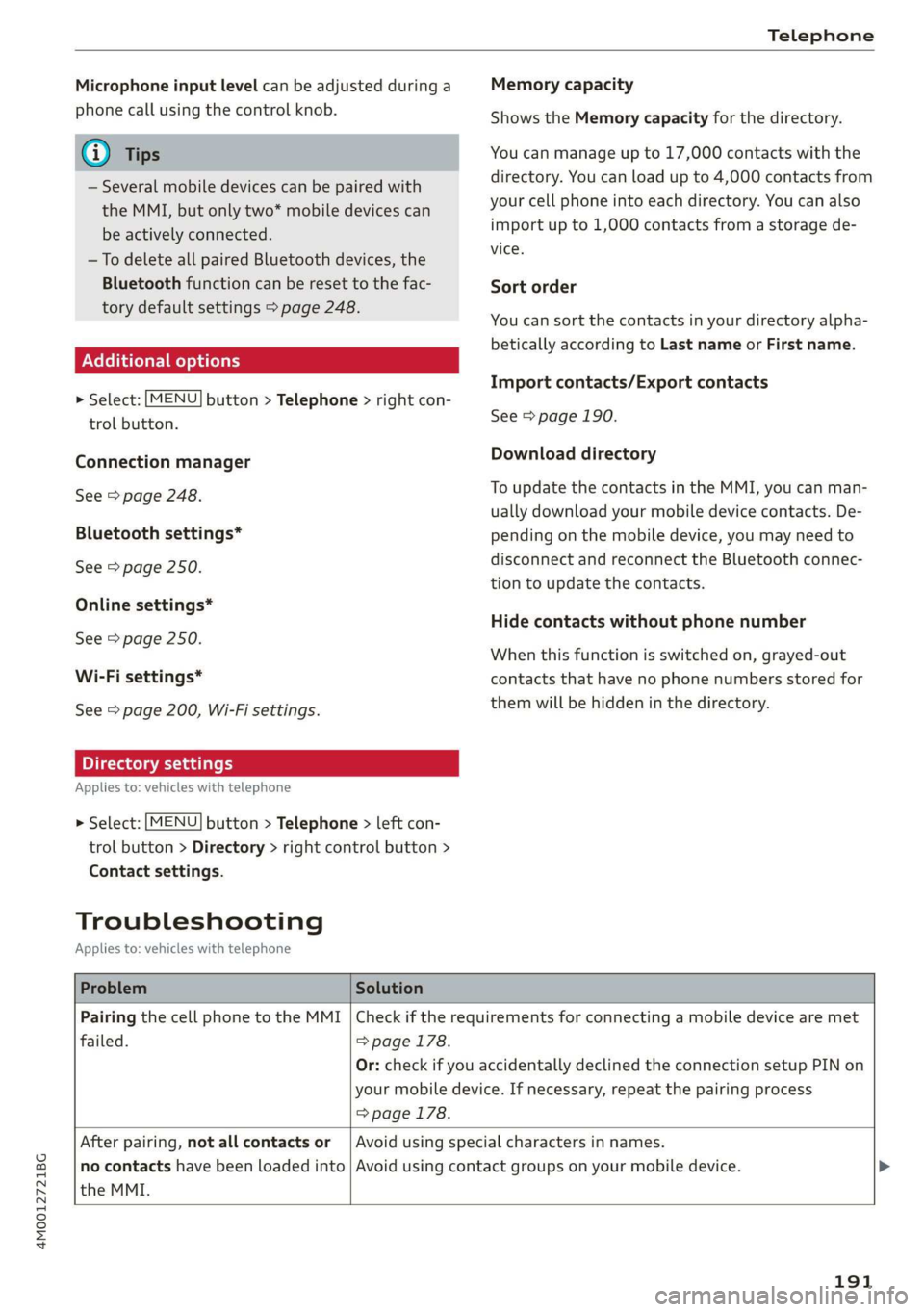
Memorycapacity
ShowstheMemorycapacityforthedirectory.
Youcanmanageupto17,000contactswiththe
directory.Youcanloadupto4,000contactsfrom
yourcellphoneintoeachdirectory.Youcanalso
importupto1,000contactsfromastoragede-
vice.
Sortorder
Youcansortthecontactsinyourdirectoryalpha-
beticallyaccordingtoLastnameorFirstname.
Importcontacts/Exportcontacts
See>page190.
Downloaddirectory
ToupdatethecontactsintheMMI,youcanman-
uallydownloadyourmobiledevicecontacts.De-
pendingonthemobiledevice,youmayneedto
disconnectandreconnecttheBluetooth connec-
tiontoupdatethecontacts.
Hidecontactswithoutphonenumber
Whenthisfunctionisswitchedon,grayed-out
contactsthathavenophonenumbersstoredfor
themwillbehiddeninthedirectory.
Troubleshooting
Appliesto:vehicleswithtelephone
ProblemSolution
PairingthecellphonetotheMMI|Checkiftherequirementsforconnectingamobiledevicearemet
failed.=>page178.
=>page178.
Or:checkifyouaccidentallydeclinedthe connection setupPINon
yourmobiledevice.Ifnecessary,repeat thepairingprocess
Afterpairing,notallcontactsor
theMMI.
Avoidusingspecialcharactersinnames.
nocontactshavebeenloadedinto|Avoidusingcontactgroups onyourmobiledevice.
191
Page 197 of 394
4M0012721BG
Audiconnect
Changesearcharea
Thesetsearchareacanbechangedatanytime.
Additionalinformationonsearchareascan be
foundunder>page208.
ClosingAudiconnectInfotainmentservices
Regardlessofthefunctionselected,youcan
closean AudiconnectInfotainmentserviceat
anytimeandreturn tothehomescreen.
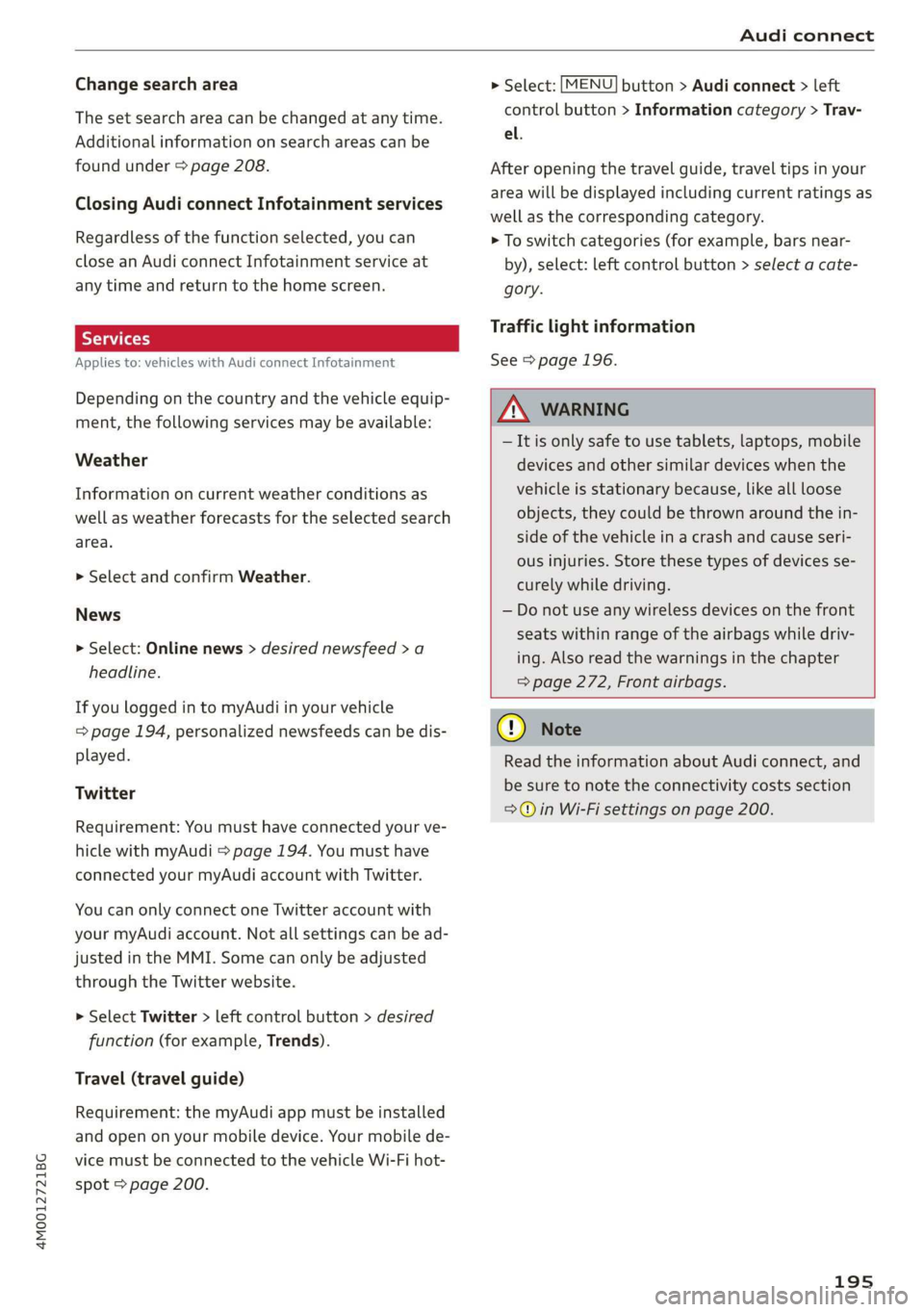
Services
Appliesto:vehicleswithAudiconnectInfotainment
Dependingonthecountryandthevehicleequip-
ment,thefollowingservicesmaybeavailable:
Weather
Informationoncurrentweatherconditionsas
wellasweatherforecastsfortheselectedsearch
area.
> SelectandconfirmWeather.
News
>Select:Onlinenews>desirednewsfeed>a
headline.
IfyouloggedintomyAudiinyourvehicle
=page194,personalizednewsfeedscanbedis-
played.
Twitter
Requirement:Youmusthaveconnectedyourve-
hiclewithmyAudi>page194.Youmusthave
connectedyourmyAudiaccountwithTwitter.
YoucanonlyconnectoneTwitteraccountwith
yourmyAudiaccount.Notallsettingscanbead-
justedintheMMI.Somecanonlybeadjusted
throughtheTwitterwebsite.
> SelectTwitter>leftcontrolbutton>desired
function(forexample,Trends).
Travel(travelguide)
Requirement:themyAudiappmustbeinstalled
andopenonyourmobiledevice.Yourmobilede-
vicemustbeconnectedtothevehicleWi-Fihot-
spot>page200.
>Select:[MENU]button>Audiconnect>left
controlbutton>Informationcategory>Trav-
el.
Afteropeningthetravelguide,traveltipsinyour
areawillbedisplayedincludingcurrentratingsas
wellasthecorrespondingcategory.
>Toswitchcategories(forexample,barsnear-
by),select:leftcontrolbutton>selectacate-
gory.
Trafficlightinformation
See>page196.
ZAWARNING
—Itisonlysafe tousetablets,laptops,mobile
devicesandothersimilardeviceswhenthe
vehicleisstationarybecause,likeallloose
objects,theycouldbethrownaroundthein-
sideofthevehicleinacrashandcauseseri-
ousinjuries.Storethesetypesofdevicesse-
curelywhiledriving.
—Donotuseanywirelessdevicesonthefront
seatswithinrangeoftheairbagswhiledriv-
ing.Also readthewarningsinthechapter
=>page272,Frontairbags.
@)Note
ReadtheinformationaboutAudiconnect,and
besuretonotetheconnectivitycostssection
=>)inWi-Fisettingsonpage200.
195