air AUDI Q7 2019 Owner´s Manual
[x] Cancel search | Manufacturer: AUDI, Model Year: 2019, Model line: Q7, Model: AUDI Q7 2019Pages: 394, PDF Size: 105.97 MB
Page 133 of 394

4M0012721BG
Parkingaid
Parkingaid
Generalinformation
Appliesto:vehicleswitharearparkingsystem/parkingsys-
templus/rearviewcamera/peripheralcameras/parkassist.
Dependingonyourvehicle'sequipment,various
parkingaidswillhelpyouwhenparkingandma-
neuvering.
Therearparkingsystemisanaudible parkingaid
thatwarnsyouofobstaclesbehindthevehicle
=>page132.
Theparkingsystemplusassistsyouwhilepark-
ingusingaudioandvisualsignalstowarnyou
aboutobjectsdetectedinfrontof,behind,andat
thesides*ofthevehicle>page132.
Therearviewcamerashowstheareabehindthe
vehicleintheInfotainmentsystemdisplay.The
linesintherearviewcameraimagehelpyouto
parkormaneuver>page134.
Theperipheralcamerasgivevariousviewsto
helpyouwhenparkingormaneuvering
=page136.Theparkingsystemplusfunctions
arealsoavailable>page132.
Parkassisthelpsyoutolocatesuitableparking
spaceswhenparallelorperpendicularparking,
andalsohelpswhenleavingaparallelparking
space>page139.
ingsystemmaybe impairedasaresult.
HaveanauthorizedAudidealerorauthor-
izedAudiServiceFacilitychecktheirfunc-
tion.
ZA\WARNING
—Alwayslookfortrafficandcheckthearea
aroundyourvehiclebylookingatitdirectly
aswell.Theparkingsystemcannotreplace
thedriver'sattention.Thedriverisalways
responsiblewhenenteringorexitingapark-
ingspaceandduringsimilarmaneuvers.
—Pleasenotethatsomesurfaces,suchas
clothing,arenotdetectedbythesystem.
—Sensorsandcamerashaveblindspotsin
whichpeopleandobjectscannotbedetect-
ed.Beespeciallycautiousofsmallchildren
andanimals.
—Alwayskeepyoureyesonthevehicle'ssur-
roundings,usingtherearviewmirroraswell.
— Thesensorscanbedisplacedbyimpactsor
damagetotheradiatorgrille,bumper,
wheelhousingandtheunderbody.Thepark-
@)Note
—Someobjectsarenotdetectedordisplayed
bythesystemundercertaincircumstances:
—objectssuchasbarrierchains,trailerdraw
bars,verticalpolesorfences
—objectsabovethesensorssuchaswallex-
tensions
—objectswithcertainsurfacesorstructures
suchaschainlinkfencesorpowdersnow
—Ifyoucontinuedrivingclosertoalowob-
ject,itmaydisappearfromthe sensor
range.NotethatyouwillnoLongerbe
warnedaboutthisobstacle.
—Maintainenoughdistancefromthecurbto
reducetheriskofdamagetotherims.
@)Tips
—Thesystemmayprovideawarningeven
thoughtherearenoobstaclesinthecover-
ageareainsomesituations,suchas:
—certainroadsurfacesor whenthereistall
grass
—externalultrasonicsourcessuchasfrom
cleaningvehicles
—inheavyrain,snow,orthickvehicleex-
haust
—Werecommendthatyoupracticeparkingin
atraffic-freelocationorparkinglottobe-
comefamiliarwiththesystem.Practice
parkingingoodlightand weathercondi-
tions.
—Youcanchangethevolumeofthesignals
andthedisplay>page144.
—Whatappearsintheinfotainmentdisplayis
somewhattime-delayed.
—Thesensorsmustbekeptcleanandfreeof
snowandicefortheparkingaidtooperate.
131
Page 134 of 394

Parkingaid
Rearparkingsystem
Appliesto:vehicleswithrearparkingaid
Therearparkingsystemisanaudibleparking
aid.
Description
Thereisasensorintherearbumpercover.If
thesedetectanobstacle,audiblesignalswarn
you.
Makesurethesensorsarenotcoveredbystick-
ers,depositsoranyotherobstructionsasitmay
impairthefunctionofthesystem.Forinforma-
tiononcleaning,see>page346.
Therangeatwhichthesensorsbegintomeasure
isapproximately:
Side
Center
3ft(0.90m)
5.2ft(1.60m)
Rear
Thecloseryougettotheobstacle,theshorter
theintervalbetweentheaudiblesignals.Acon-
tinuoustonesoundswhentheobstacleisless
thanapproximately1foot(0.30meters)away.
Donotcontinuebackingup>A\inGeneralinfor-
mationonpage131,>@inGeneralinformation
onpage131!
Ifthedistancetoanobstacleremainsconstant,
thevolumeofthedistancewarninggradually
lowersafterafewsecondsuntilitismuted(this
doesnotapplytothecontinuoustone).Iftheob-
staclebecomescloserthanitwasbeforethe
soundwasmuted,thetonewillsoundagain.If
theobstaclebecomesfartherawaythanitwas
before thesoundwasmuted,notonewillsound.
Payattentiontothevehicle'ssurroundingswhen
youstarttodrive.
Switchingonautomatically
The
systemswitchesonautomaticallywhenre-
versegearisengagedwhiletheengineisrun-
ning.Abrieftonewillsound.
@)Tips
Thereisnodistancewarningwhentrailertow-
ingmodeisdetected.Thereisnoguarantee
132
thefunctionswillswitchoffwhenusingaret-
rofittedtrailerhitch.
Parkingsystemplus
Description
Appliesto:vehicleswithparkingsystemplus/parkassist
[RAZ-0210]
XI
eet
Fig.129Infotainmentsystem:visualdistancedisplay
Theparkingsystemplususesaudioandvisual
warningstohelpyouavoidobstacleswhenpark-
ing.
Sensorsarelocatedinthefrontandrearbump-
ers. Ifthesedetectanobstacle,audibleandvisu-
alsignalswarnyou.
Makesurethesensorsarenotcoveredbystick-
ers,depositsoranyotherobstructionsasitmay
impairthefunctionofthesystem.Forinforma-
tiononcleaning,see>page346.
Thedisplayfieldbeginsapproximatelyat:
@4ft(1.20m)
()3ft(0.90m)
®5.2ft(1.60m)
@3ft(0.90m)
@*3ft(0.90m)?
)Appliestovehicleswithparkassist
Page 136 of 394
Parkingaid
Switchingoffautomatically
Thedistanceindicatorfortheparkingsystem
plusswitchesoffautomaticallywhendrivingfor-
wardfasterthan6mph(10km/h).
G)Tips
IfyoupresstheP“buttontoswitchthepark-
ingaidoff,itcanonlybereactivatedautomat-
icallywhenoneofthefollowingconditionsis
met:
— Thevehiclespeedexceeds6mph(10km/h)
—Theignitionisswitchedoffandbackon
again
— Theparkingbrakeissetandthenreleased
—The"P"selectorleverpositionisengaged
andreleasedagain
Rearviewcamera
Introduction
Appliesto:vehicleswith rearviewcamera
B8V-0629
Fig.131Diagram:linestoaidinparking
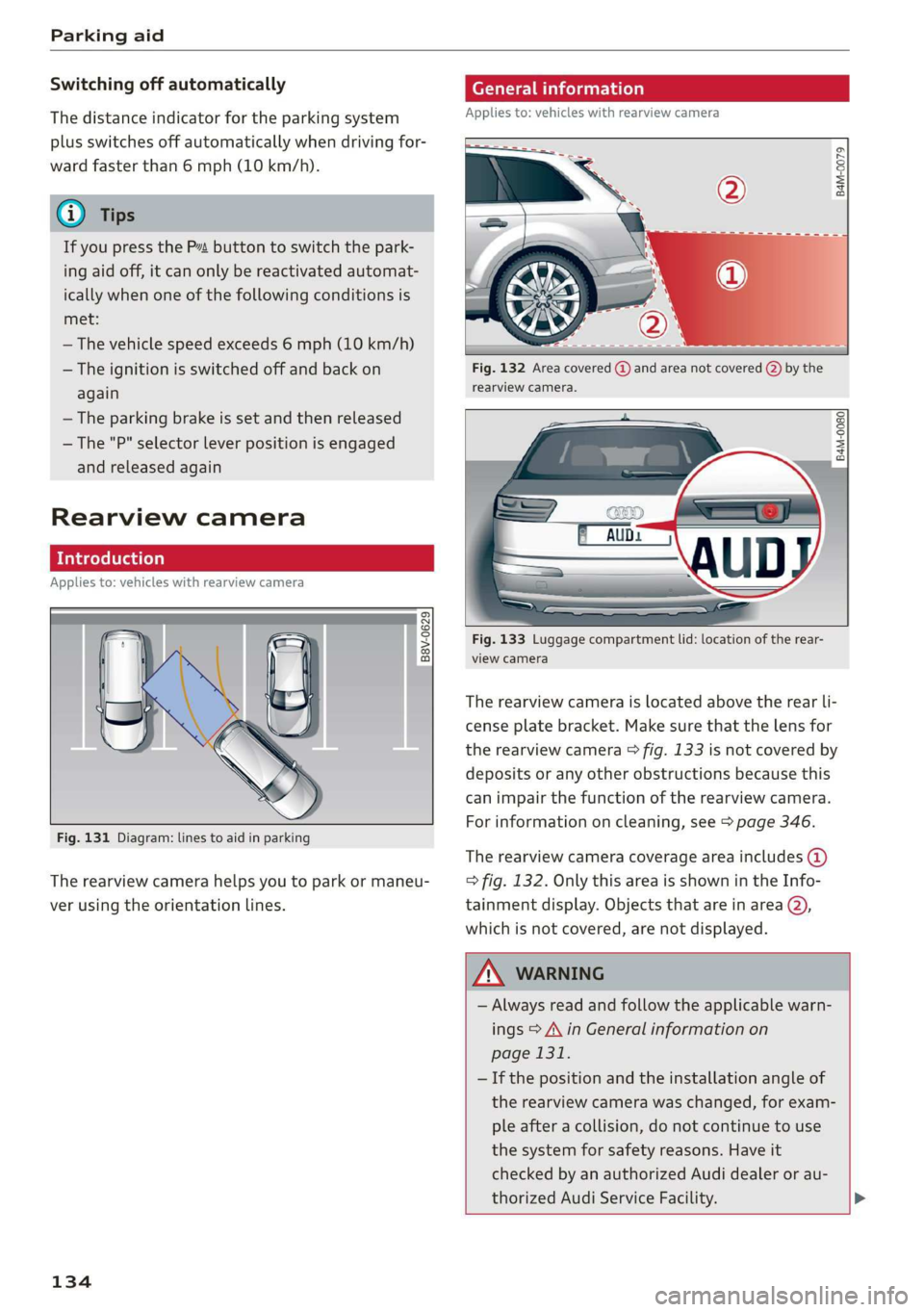
Therearviewcamerahelpsyoutoparkormaneu-
verusingtheorientationlines.
134
eTelaLely
Appliesto:vehicleswithrearviewcamera
agz
g
==a
Fig.132Areacovered@)andareanotcovered()bythe
rearviewcamera.
B4M-0080|
:
Fig.133Luggagecompartmentlid:locationoftherear-
viewcamera
Therearviewcameraislocatedabovetherearli-
censeplatebracket.Makesurethatthelensfor
therearviewcamera>fig.133isnotcoveredby
depositsoranyotherobstructionsbecausethis
can impairthefunctionoftherearviewcamera.
Forinformationoncleaning,see>page346.
Therearviewcameracoverageareaincludes()
=>fig.132. OnlythisareaisshownintheInfo-
tainmentdisplay.Objectsthatareinarea@),
whichisnotcovered,arenotdisplayed.
ZA\WARNING
—Alwaysreadandfollow theapplicablewarn-
ings>A\inGeneralinformationon
page131.
—Ifthepositionandtheinstallation angleof
therearviewcamerawaschanged,forexam-
pleafteracollision,donotcontinuetouse
the
systemforsafetyreasons.Haveit
checkedby anauthorizedAudidealeror au-
thorizedAudiServiceFacility.>
Page 137 of 394

4M0012721BG
Parkingaid
—Onlyuse therearviewcameratoassistyouif
itshowsagood,clearpicture.Forexample,
theimagemaybeaffectedbythesunshin-
ingintothelens,dirtonthelens,orifthere
isamalfunction.
—Usetherearviewcameraonlyiftheluggage
compartmentlidiscompletelyclosed.Make
sureanyobjectsyoumayhavemountedon
theluggagecompartmentliddonotblock
therearviewcamera.
— Thecameralensenlargesanddistortsthe
fieldofvision.Theobjectappearsbothal-
teredandinaccurateonthescreen.
—Incertainsituations,peopleorobjectsin
thedisplayappearcloserorfartheraway:
—Forobjectsthatdonottouchtheground,
suchasthebumperofaparkedvehicle,a
trailerhitchortherearofatruck.Donot
use the
orientationlinesinthiscase.
—Ifdrivenfromalevelsurfaceontoanin-
cline,oradownwardslope.
—Ifdriventowardprotrudingobjects.
—Ifthevehicleiscarryingtoomuchloadin
therear.
—Appliesto:vehicleswithairsuspension:the
accuracyoftheorientationlinesandblue
surfacesdecreaseswhenthevehicleis
raised/lowered>page127.
@)Note
—Alwaysreadandfollowtheapplicablewarn-
ings>@inGeneralinformationon
page131.
— Theorange-coloredorientationlinesinthe
Infotainmentdisplayshowthevehiclepath
basedonthesteeringwheelangle.The
front ofthevehicleswingsoutmorethan
therearofthevehicle.Maintainplentyof
distanceso thatanexteriormirrororacor-
nerofthevehicledoesnotcollidewithany
obstacles.
@)Tips
Thereisnodistancewarningfortherearand
thesides*whentrailertowingmodeisdetect-
ed.Thefrontsensorsremainactivated.The
visualdisplayswitchestotrailermode.The
rearviewcameraimagewillnotshowtheori-
entationlinesandthebluesurfaces.Thereis
noguaranteethefunctionswillswitchoff
whenusingaretrofittedtrailerhitch.
SicaReRol
Appliesto:vehicleswithrearviewcamera
Switchingonandoff
Requirement:thevehiclespeedmustbeunder
approximately6mph(10km/h).
>PressthePvbuttoninthecenterconsole
=>page133,fig.130.Ashortconfirmation
tonesoundsandtheLEDinthebuttonturns
on.
Switchingonautomatically
Thesystemswitchesonautomaticallywhenre-
versegearisengagedwhiletheengineisrun-
ning.Abrieftonewillsound.
Switchingoffautomatically
Thesystemswitchesoffautomaticallywhendriv-
ingforwardfasterthan6mph(10km/h).
Perpendicularparking
Applies
to:vehicleswithrearviewcamera
Thisviewmaybeusedwhenparkinginagarage
orinaparkingspace.
Fig.135Infotainmentsystem:aligningthevehicle
135
Page 138 of 394
Parkingaid
>Turn theInfotainmentsystemonandshiftinto
reversegear.
>Theorangeorientationlines@showthevehi-
cle'sdirectionoftravel.Turn thesteeringwheel
untiltheorangeorientationlinesalignwiththe
parkingspace>fig.134.Usethemarkings@)
tohelpyouestimatethedistancetoanobsta-
cle.Eachmarkingrepresentsapproximately3ft
(1m).Thebluearearepresentsanextensionof
thevehicle'soutlinebyapproximately16ft(5
meters)totherear.
>Whiledrivinginreversegear,adjustthesteer-
ingwheelangletofittheparkingspaceusing
theorangeorientationlinesforassistance>A\
inGeneralinformationonpage134,>@)in
Generalinformationonpage135.Area@)rep-
resentstherearbumper.Attheverylatest,
stopthevehiclewhentheredorientationline
@bordersanobject.
NirliCimUCW
Appliesto:vehicleswith rearviewcamera/peripheralcameras
andtrailerhitch
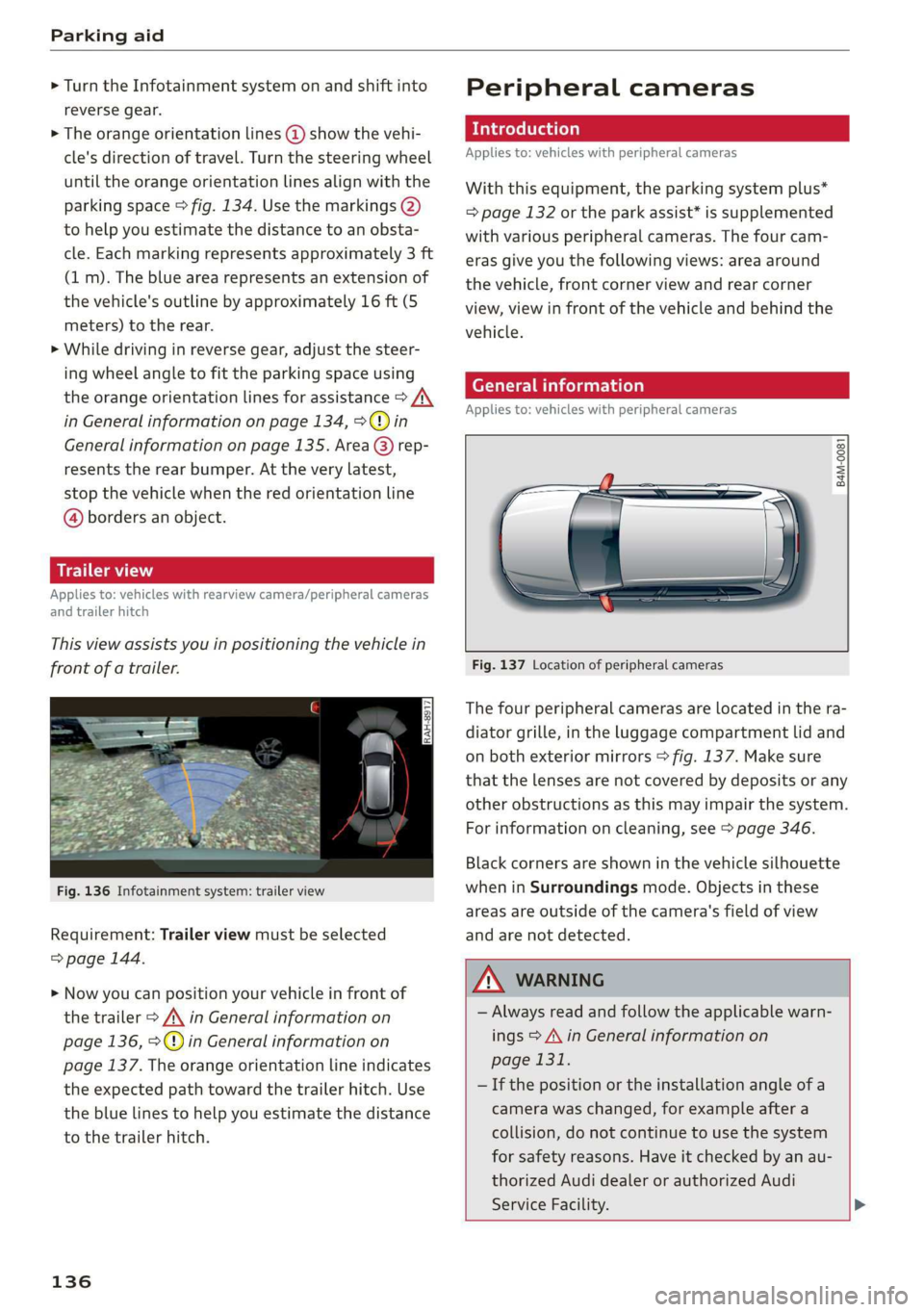
Thisviewassistsyouinpositioningthevehiclein
frontofatrailer.
Fig.136Infotainmentsystem:trailerview
Requirement:Trailerviewmustbeselected
=>page144.
>Nowyoucanpositionyourvehicleinfrontof
thetrailer>/\inGeneralinformationon
page136,>@)inGeneralinformationon
page137.Theorangeorientationlineindicates
theexpectedpathtowardthetrailerhitch.Use
thebluelinestohelpyouestimatethedistance
tothetrailerhitch.
136
Peripheralcameras
Introduction
Appliesto:vehicleswithperipheralcameras
Withthisequipment,theparkingsystemplus*
=page132ortheparkassist*issupplemented
withvariousperipheralcameras.Thefourcam-
erasgiveyouthefollowingviews:areaaround
thevehicle,frontcornerviewandrearcorner
view,viewinfrontofthevehicleandbehindthe
vehicle.
Generalinformation
Appliesto:vehicleswithperipheralcameras
B4M-0081
Fig.137Locationofperipheralcameras
Thefourperipheralcamerasarelocatedinthera-
diatorgrille,intheluggagecompartmentlidand
onbothexteriormirrors>fig.137.Makesure
thatthelensesarenotcoveredbydepositsorany
otherobstructionsasthismayimpairthesystem.
Forinformationoncleaning,see>page346.
Blackcornersareshowninthevehiclesilhouette
wheninSurroundingsmode.Objectsinthese
areasareoutsideofthecamera'sfieldofview
andarenotdetected.
Z\WARNING
—Alwaysreadandfollowtheapplicablewarn-
ings>A\inGeneralinformationon
page131.
—Ifthepositionortheinstallationangleofa
camerawaschanged,forexampleaftera
collision,donotcontinuetouse thesystem
forsafety reasons.Haveitcheckedby anau-
thorizedAudidealerorauthorizedAudi
ServiceFacility.>
Page 139 of 394
4M0012721BG
Parkingaid
—Keepinmindthattheimageinthedisplayis
incorrectiftheexteriormirrorhousinghas
beenmovedoutofplace.
—Onlyuse theimagesprovidedby thecamera
ontherearofthevehiclewhentheluggage
compartmentlidiscompletelyclosed.Make
sureanyobjectsyoumayhavemountedon
theluggagecompartmentliddonotblock
therearviewcamera.
— Theareaaroundthevehicleisshownusing
thecameraimages.Thevehicleimageis
shownbythesystem.Objectsandobstacles
abovethecameraarenotdisplayed.
—Cameralensesenlargeanddistortthefield
ofvision.Theobjectsappearbothaltered
andinaccurateonthescreen.
—Appliesto:vehicleswithairsuspension:the
accuracyoftheorientationlinesandblue
surfacesdecreaseswhenthevehicleis
raised/lowered>page127.
@)Note
—Alwaysreadandfollowtheapplicablewarn-
ings>@inGeneralinformationon
page131.
— TheInfotainmentdisplayshowsthedirec-
tioninwhichtherearofthevehicleistravel-
ingbasedonthesteeringwheelangle.The
frontofthevehicleswings outmorethan
therearofthevehicle.Maintainplentyof
distanceso thatanexteriormirrororacor-
nerofthevehicledoesnotcollidewithany
obstacles.
G)Tips
—Ifthe2/&8/
grayedout,thenthepowerexteriormirrors
werefoldedinorthedriver'sdoor/front
passenger'sdoor/luggagecompartmentlid
wasopened.
—Thereisnodistancewarningfortherear
andthesides*whentrailertowingmodeis
detected.Thefrontsensorsremainactivat-
ed.Thevisualdisplayswitchestotrailer
mode.Therearviewcameraimagewillnot
showtheorientationlinesandthebluesur-
faces.Thereisnoguaranteethefunctions
willswitchoffwhenusingaretrofittedtrail-
erhitch.
ice
Appliesto:vehicleswithperipheralcameras
Fig.138Infotainmentsystem:selectthemode
Switchingonandoff
Requirement:thevehiclespeedmustbeunder
approximately6mph(10km/h).
>PressthePsbuttoninthecenterconsole
=>page133,fig.130.Ashortconfirmation
tonesoundsandtheLEDinthebuttonturns
on.
Switchingonautomatically
Thesystemswitchesonautomaticallywhenre-
versegearisengagedwhiletheengineisrun-
ning.Abrieftonewillsound.
Switchingoffautomatically
Thesystemswitchesoffautomaticallywhendriv-
ingforwardfasterthan6mph(10km/h).
Selectingthemode
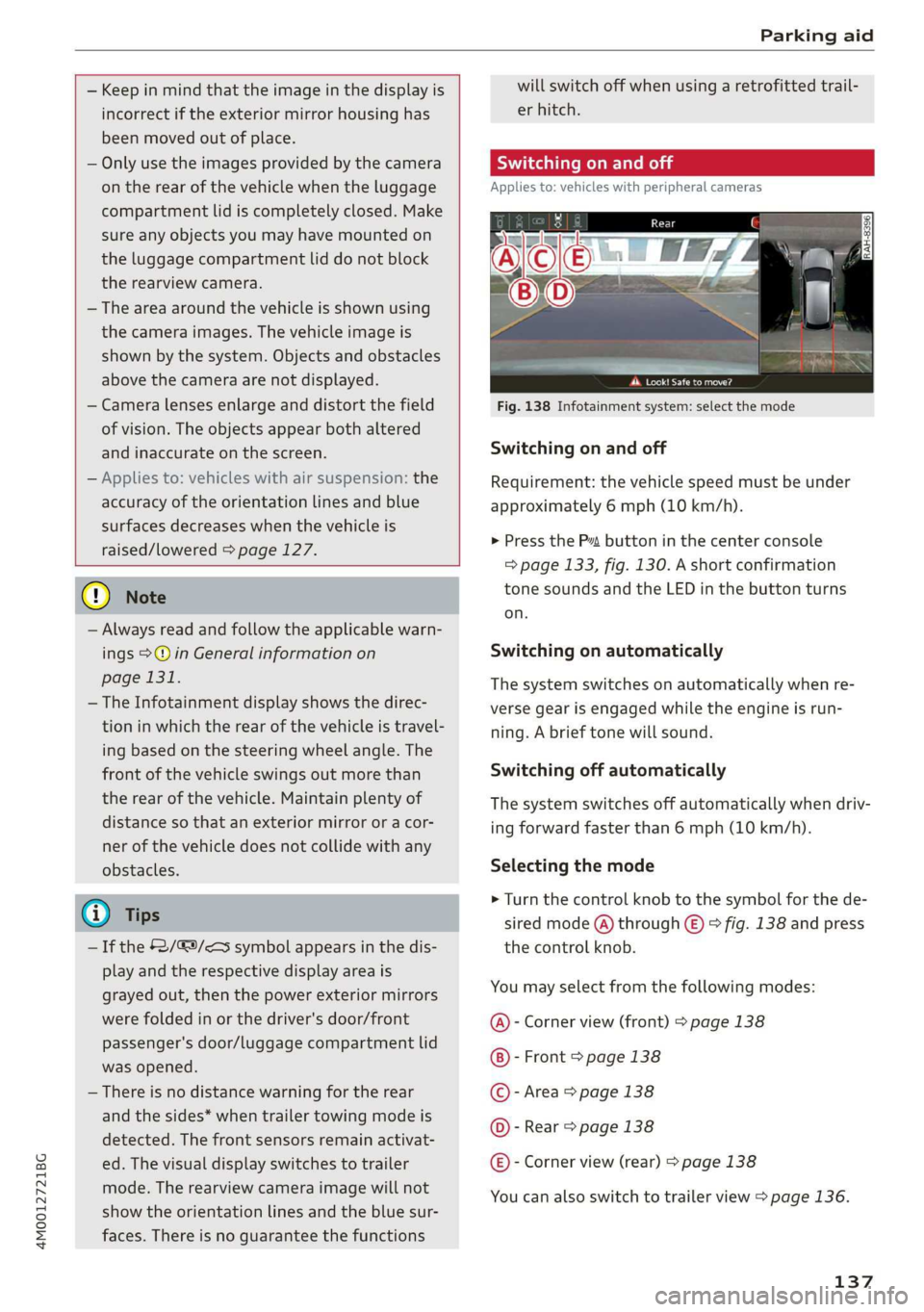
>Turn thecontrolknobtothesymbolforthede-
siredmode(A)through©)>fig.138andpress
thecontrolknob.
Youmayselectfromthefollowingmodes:
@-Cornerview(front)>page138
-Front>page138
©-Area>page138
@©-Rear>page138
@®-Cornerview(rear)>page138
Youcanalsoswitchtotrailerview>page136.
137
Page 141 of 394
4M0012721BG
Parkingaid
j
Appliesto:vehicleswithperipheralcameras
Thisviewmaybe usedwhenparkinginagarage
orinaparkingspace.
Fig.145Infotainmentsystem:aligningthevehicle
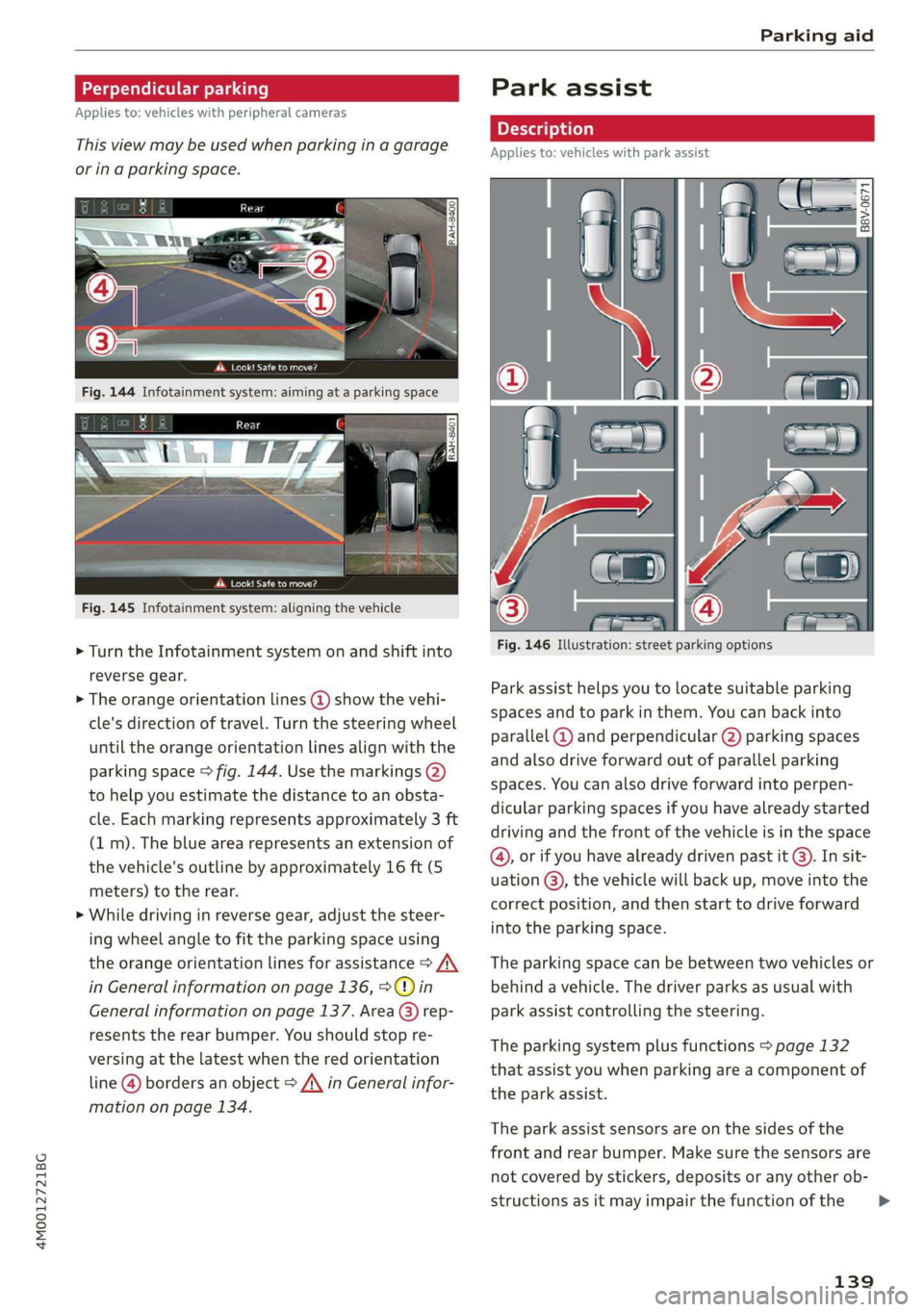
>Turn theInfotainmentsystem onandshiftinto
reversegear.
>Theorangeorientationlines@showthevehi-
cle'sdirectionoftravel.Turn thesteeringwheel
untiltheorangeorientationlinesalignwiththe
parkingspace>fig.144.Usethemarkings@)
tohelpyouestimatethedistancetoanobsta-
cle.Eachmarkingrepresentsapproximately3ft
(1m).Thebluearearepresentsanextensionof
thevehicle'soutlinebyapproximately16ft(5
meters)totherear.
>Whiledrivinginreversegear,adjustthesteer-
ing
wheelangletofittheparkingspaceusing
theorangeorientationlinesforassistance>A\
inGeneralinformationonpage136,>@)in
Generalinformationonpage137.Area@)rep-
resentstherearbumper.Youshouldstopre-
versingatthelatestwhentheredorientation
line@bordersanobject>A\inGeneralinfor-
mationonpage134.
Parkassist
Fig.146Illustration:streetparking options
Parkassisthelpsyoutolocatesuitableparking
spacesandtoparkinthem.Youcanbackinto
parallel@)andperpendicular(2)parkingspaces
andalsodriveforwardoutofparallelparking
spaces.Youcanalsodriveforwardintoperpen-
dicularparkingspacesifyouhavealreadystarted
drivingandthefrontofthevehicleisinthespace
@,orifyouhavealreadydrivenpastit@).Insit-
uation@),thevehiclewillbackup,moveintothe
correctposition,andthenstarttodriveforward
intotheparkingspace.
Theparkingspacecanbebetweentwovehiclesor
behindavehicle.Thedriverparksasusualwith
park
assistcontrollingthesteering.
Theparkingsystemplusfunctions>page132
thatassistyouwhenparkingareacomponentof
theparkassist.
Theparkassistsensorsareonthesidesofthe
frontandrearbumper.Makesurethesensorsare
notcoveredbystickers,depositsoranyotherob-
structionsasitmayimpairthefunctionofthe
139
>
Page 146 of 394
Parkingaid
Adjustingtheparkingaid
Appliesto:vehicleswitharearparkingsystem/parkingsys-
templus/rearviewcamera/peripheralcameras/parkassist.
ThefunctionsareadjustedintheInfotainment
system.
> SelectintheInfotainmentsystem:[MENU]but-
ton>Vehicle> leftcontrolbutton>Driveras-
sistance>Parkingaid.Or
>Whentheparkingaidisactive,selectintheIn-
fotainmentsystem:rightcontrolbutton*.
Endsystem*-stoptheparkingaid
Activateautomatically*-switchautomaticacti-
vationon/off
Frontvolume*-volumeforthefrontandside*
area
Rearvolume-volumeforthereararea
Entertainmentfader-thevolumeoftheaudio/
videosourceisLoweredwhentheparkingsystem
isturnedon.
Thenewvalueisgivenbrieflyduringtheadjust-
ment.
View*-switchbetweenanopticaldisplay
(Graphic)andcameraimage(Camera)onthe
sideofthedisplay.
Trailerview*-showtrailerview
*Auto.front/rearcamerachange*-theviewbe-
hindthevehicle(Rearmode)isdisplayedauto-
maticallywhenyoushiftintoreversegear.The
viewinfront ofthevehicle(Frontmode)isdis-
playedautomaticallywhenyoushiftintothefor-
wardgears.Whenfirstactivatinginaforward
gearwiththeP”button,thefrontsideviewis
displayed(Cornerview(front)mode).
IfyoudonotsettheV,theviewbehindthevehi-
cle(Rearmode)isalwaysdisplayedanditdoes
notswitchtothe Frontmodewhenaforward
gearisselected.
@)Tips
—Severalmenuscanbeaccessedwiththe
rightcontrolbuttononlywhentheparking
aidisactive.
144
— Thesettingsforvolumeandautomaticacti-
vation*areautomaticallystoredandas-
signedtothevehiclekeybeingused.
Errormessages
Appliesto:vehicleswitharearparkingsystem/parkingsys-
templus/rearviewcamera/peripheralcameras/parkassist.
wwRearparkingaid:malfunction!Obstacles
cannotbedetected
wwFront parkingaid:malfunction!Obstacles
cannotbedetected
wmParkingaid:malfunction!Obstaclescannot
bedetected
Whenoneofthesemessagesappears,thereisa
systemmalfunction.The LEDintheP”buttonal-
soblinkswhenswitchingiton.Therelevantmes-
sageonlyappearsagainwhenyoumanuallyacti-
vatetheparkingaidwiththebutton.
Rearparkingaid:obstacledetectionrestrict-
ed
Therearcross-trafficassist*>page123,Rear
cross-trafficassistisnotavailable.EithertheESC
isswitchedoff,ortheradarsensorsmaybecov-
ered byabikerack,stickers,leaves,snoworother
objects.SwitchtheESCon,orcleantheareain
frontofthesensorsifnecessary>page120,
fig.116.Ifthismessagecontinuestobedis-
played,driveimmediatelytoanauthorizedAudi
dealerorauthorizedAudiServiceFacilitytohave
themalfunctionrepaired.
Parkingsystemplus*/Parkassist*
If asensororspeakerisfaulty,theP4symbol
willappearinfrontof/behindthevehicleinthe
Infotainmentsystemdisplay.If arearsensoris
faulty,onlyobstaclesthatareinareas(@)and
areshown>page132,fig. 128.Ifafrontsensor
isfaulty,onlyobstaclesthatareinareas©and
©areshown.
Peripheralcameras*
Thereisasystemmalfunctionifthe#«symbol
appearsandthecorrespondingareaofthedis-
playisshowninblack.Thecameraisnotworking
inthisarea.
Page 148 of 394
IntelligentTechnology
IntelligentTechnology
ElectronicStabilization
Control(ESC)
ElectronicStabilizationControl(ESC)supports
driversafety.Itreducestheriskofslippingand
improvesdrivingstability.ESCdetectscriticalsit-
uations,suchasifthevehicleisoversteeringor
understeering,orifthewheelsare spinning.The
brakesareappliedortheenginetorqueisre-
ducedinordertostabilizethevehicle.Whenthe
ESCengages,theBindicatorlightblinksinthe
instrumentcluster.
ThefollowingsystemsareintegratedintheESC:
Anti-lockbrakingsystem(ABS)
ABSpreventsthewheelsfromlockingwhenbrak-
ing.Thevehiclecanstillbesteeredevenduring
hardbraking.Applysteadypressuretothebrake
pedal.Donotpumpthepedal.Apulsinginthe
brakepedalindicatesthatthesystemisacting to
stabilizethevehicle.
Brakeassistsystem
Thebrakeassistsystemcandecreasebrakingdis-
tance.Itincreasesbrakingpowerwhenthe driver
pressesthebrakepedalquicklyinemergencysit-
uations.Youmustpressandholdthebrakepedal
untilthedangeroussituationisover.Invehicles
withadaptivecruisecontrol*,thebrakeassist
systemismoresensitiveifthedistancedetected
tothevehicledrivingaheadistoosmall.
Onvehicleswithactivatedandfunctioningnight
visionassist*,thebrakeassistsystemcanre-
spondmoresensitivelyifthereisawarning.
Anti-SlipRegulation(ASR)
ASRreducesenginepowerwhenthedrivewheels
beginspinningandadaptstheforcetotheroad
conditions.Thismakesiteasiertostart,acceler-
ateanddriveuphills.
ElectronicDifferentialLock(EDL)
TheEDLappliesthebrakestowheelsthatare
slippingandtransfersthedrivepowertotheoth-
146
erwheels.Thisfunctionisnotavailableathigher
speeds.
Inextremecases,EDLautomaticallyswitchesoff
tokeepthebrakeonthebrakedwheelfromover-
heating.Thevehicleisstillfunctioningcorrectly.
EDLwillswitchonagainautomaticallywhencon-
ditionshavereturnedtonormal.
Powersteering
The ESCcanalsosupportvehiclestability
throughsteering.
Selectivewheeltorquecontrol
Selectivewheeltorquecontrolisusedwhendriv-
ingoncurves.Brakingistargetedtowardthe
wheelsontheinsideofthecurveasneeded.This
allowsmoreprecisedrivingincurves.
Automaticpost-collisionbrakingsystem
The“automaticpost-collisionbrakingsystem”
canhelptoreducetheriskofslidingandofaddi-
tionalcollisionsafteranaccident.Iftheairbag
controlmoduledetectsacollision,thevehicleis
brakedbytheESC.
Thevehicledoesnotbrakeautomaticallyifoneof
thefollowingoccurs:
—Thedriverpressestheacceleratorpedal,
—TheESC,thebrakesystem,orthevehicleelec-
tricalsystemisnotfunctioning
ZAWARNING
— The ESCanditsintegratedsystemscannot
overcomethe limitsimposedbynatural
physicallaws.Thisisespeciallyimportanton
slipperyorwetroads.Ifthesystemsbegin
actingtostabilizeyourvehicle,youshould
immediatelyalteryourspeedtomatchthe
roadandtrafficconditions.Donotletthein-
creasedsafetyprovidedtemptyouintotak-
ingrisks.Thiscouldincreaseyourriskofa
collision.
—Pleasenotetheriskofacollisionincreases
when
drivingfast,especiallythroughcurves
andonslipperyorwetroads,andwhendriv-
ingtooclosetoobjectsahead.The ESC and
Page 152 of 394
IntelligentTechnology
ServiceFacilityworkonthebrakesystem.
Incorrectrepairscouldimpair thefunction.
—Neverletthevehiclerollwhiletheengineis
stoppedbecausethisincreasestheriskofan
accident.
C)Note
—Neverletthebrakes“rub”bypressingthe
pedallightlywhenbrakingisnotactually
necessary.Thiscausesthebrakestoover-
heatandincreasesbrakingdistanceand
causeswear.
—Beforedrivingdownhillalongdistanceona
steephill, decreaseyourspeedandselecta
lowergear.Thismakesuseoftheengine
brakingeffectandreducestheloadplaced
onthebrakes.Ifyouneedtobrakeaddition-
ally,brakeinintervalsandnotcontinuously.
G)Tips
—Ifthebrakeboosterisnotworking,you
mustpressthebrake pedalwithmuchmore
forcethannormal.
—Ifyouretrofityourvehiclewithafrontspoil-
er,wheelcoversorsimilaritems,makesure
thattheairflowtothefrontwheelsisnot
obstructed.Otherwisethebrakesystemcan
overheat.
Electromechanical
steering,all-wheel
steering
Theelectromechanicalsteeringsupportsthe
driver'ssteeringmovements.
Powersteeringadaptselectronicallybasedon
thevehiclespeed.
Indicatorlightsandmessages
aSteering:malfunction!Pleasestopvehicle
Ifthisindicatorlightturnsonandstaysonand
thismessageappears,thepowersteeringmay
havefailed.
Stopthevehicleinasafelocationassoonaspos-
sible.Donotcontinuedriving.Seeanauthorized
150
AudidealerorauthorizedAudiServiceFacilityfor
assistance.
aSteering:malfunction!Pleasestopvehicle.
Payattentiontodistanceatside
Ifthisindicatorlightturnson andstaysonand
thismessageappears,theall-wheel steering*
mayhavefailed.Morespaceontheroadmaybe
neededatthesideofthevehicle.
Reduceyourspeedandstopthevehicleinasafe
locationwithenoughspaceonthesidesassoon
aspossible.Donotcontinuedriving.Seeanau-
thorizedAudidealerorauthorizedAudiService
Facilityforassistance.
aSteering:malfunction!Youcancontinue
driving
Iftheindicatorlightturnsonandthismessage
appears,thesteeringwheelmaybemoredifficult
tomoveormoresensitivethanusual.Thesteer-
ingwheelmayalsobeturnedtothesidewhen
drivingstraight.
DriveslowlytoanauthorizedAudidealerorau-
thorizedAudiServiceFacilitytohavethe mal-
functioncorrected.
aSteering:malfunction!Adaptdrivingstyle.
Largerturningradius
Iftheindicatorlightturnsonandthismessage
appears,theall-wheelsteering*mayhavefailed.
Pleasenotethatthevehiclewillhavealarger
turningradiusandthestabilitywhenturninga
cornerwillbelikethat ofavehiclewithoutall-
wheelsteering.Thesteeringwheelmayalsobe
turnedtothesidewhendrivingstraight.
DriveslowlytoanauthorizedAudidealerorau-
thorizedAudiServiceFacilitytohavethe mal-
functioncorrected.
G)Tips
—IftheaorElindicatorlightonlystayson
forashorttime,youmaycontinuedriving.
—Foradditionalinformationonall-wheel
steering*,see>page127.