light AUDI Q7 2020 Owner´s Manual
[x] Cancel search | Manufacturer: AUDI, Model Year: 2020, Model line: Q7, Model: AUDI Q7 2020Pages: 316, PDF Size: 113.87 MB
Page 274 of 316
Care and cleaning
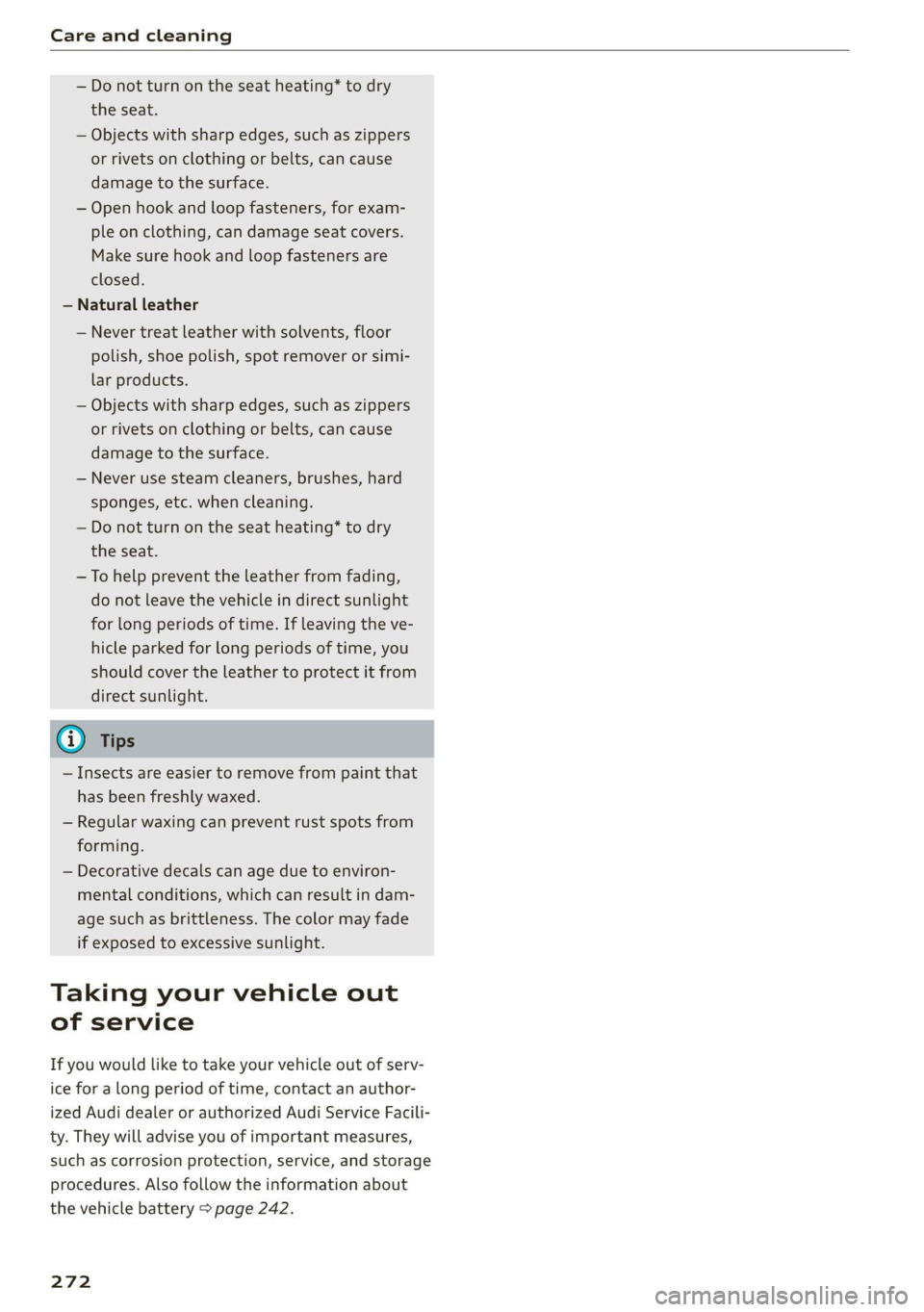
— Do not turn on the seat heating* to dry
the seat.
— Objects with sharp edges, such as zippers
or rivets on clothing or belts, can cause
damage to the surface.
— Open hook and loop fasteners, for exam-
ple on clothing, can damage seat covers.
Make sure hook and loop fasteners are
closed.
— Natural leather
— Never treat leather with solvents, floor
polish, shoe polish, spot remover or simi-
lar products.
— Objects with sharp edges, such as zippers
or rivets on clothing or belts, can cause
damage to the surface.
— Never use steam cleaners, brushes, hard
sponges, etc. when cleaning.
— Do not turn on the seat heating” to dry
the seat.
—To help prevent the leather from fading,
do not leave the vehicle in direct sunlight
for long periods of time. If leaving the ve-
hicle parked for long periods of time, you
should cover the leather to protect it from
direct sunlight.
@ Tips
— Insects are easier to remove from paint that
has been freshly waxed.
— Regular waxing can prevent rust spots from
forming.
— Decorative decals can age due to environ-
mental conditions, which can result in dam-
age such as brittleness. The color may fade
if exposed to excessive sunlight.
Taking your vehicle out
of service
If you would like to take your vehicle out of serv-
ice for a long period of time, contact an author-
ized Audi dealer or authorized Audi Service Facili-
ty. They will advise you of important measures,
such as corrosion protection, service, and storage
procedures. Also follow the information about
the vehicle battery > page 242.
272
Page 279 of 316

4M1012721BA
Emergency assistance
> Find the marking on the sill that is closest to
the tire that will be changed > fig. 183. Behind
the marking, there is a lifting point on the side
sill for the vehicle jack.
>» Using the hex socket wrench (3) from the vehi-
cle tool kit, turn the vehicle jack under the lift-
ing point on the side sill until it is high enough
that the arm @) 9 fig. 184 is under the desig-
nated plastic mount.
> Align the vehicle jack so the arm @ engages in
the designated Lifting point in the door sill and
the base (2) lies flat on the ground. The base @)
must be directly under the mounting point ().
> To lift the vehicle, position the ratchet @ from
the vehicle tool kit with the correct side on the
hex socket wrench @).
> Move the ratchet (@) clockwise back and forth
until the wheel lifts up slightly from the
ground.
Z\ WARNING
—To reduce the risk of injury, make sure no
one is in the vehicle before raising it.
— Make sure the vehicle jack is stable. The risk
of injury is increased when the ground is
slippery or soft, because the vehicle jack
could slide or sink.
— Only raise your vehicle with the vehicle jack
provided by the factory. If you use a vehicle
jack designed for another vehicle, your vehi-
cle could slip and cause injury.
— Position the vehicle jack only at the desig-
nated mounting points on the side sill and
align the jack. Otherwise, the vehicle jack
could slip and cause an injury if it does not
have sufficient hold on the vehicle.
—To reduce the risk of injury, do not raise any
other vehicles or other loads using the vehi-
cle jack provided by the factory.
— Applies to: vehicles with air suspension:
Changes in temperature or load can affect
the height of the stopped vehicle.
D Applies to: vehicles with ceramic brake rotors*: Use a sec-
ond alignment pin* from the vehicle tool kit for the lowest
hole according to the steps described for the first align-
ment pin.
—To reduce the risk of an accident, never start
the engine when the vehicle is raised.
—To reduce the risk of injury, no work should
be performed under the vehicle while it is
raised.
C) Note
Do not lift the vehicle by the sill. Position the
vehicle jack only at the designated mounting
points on the side sill. Otherwise, your vehicle
could be damaged.
Removing and installing a wheel
~
B8K-1479
Fig. 186 Wheel: alignment pin in the top hole
Removing a wheel
» Remove the top wheel bolt completely using
the hex socket in the screwdriver handle from
the vehicle tool kit > fig. 185 and place it ona
clean surface.
> Then install the alignment pin from the vehicle
tool kit by hand in the empty wheel bolt hole
> fig. 186).
277
Page 281 of 316

4M1012721BA
Emergency assistance
ZA\ WARNING
— A drained battery can freeze at tempera-
tures around 32 °F (0 °C). If the vehicle bat-
tery is frozen, it must be thawed before con-
necting the jump start cables. If it is not,
the risk of an explosion and chemical burns
increases. After jump starting the vehicle,
drive to an authorized Audi dealer or author-
ized Audi Service Facility immediately to
have the vehicle battery checked.
— Read the warnings when working in the en-
gine compartment > page 233.
— Handling the jump start cables incorrectly
may cause the vehicle battery to explode
and lead to serious injuries.
() Note
Jump start cables can cause considerable
damage to the vehicle electrical system if
they are connected incorrectly.
@ Tips
— There must be no contact between the
vehicles, or else voltage could flow when
connecting the positive terminal and drain
the vehicle battery of the vehicle providing
the jump start.
— The drained vehicle battery must be con-
nected correctly to the electrical system.
— Switch off electrical equipment that is not
needed.
Jump starting
Both jump start cables must be connected in the
correct order.
Fig. 187 Engine compartment: connectors for jump start
cables or a charger
Fig. 188 Connecting the jump start cables
The jump start cable connections are located in
the engine compartment.
Follow the information about the vehicle battery
=> page 242.
Connecting the positive cable (red) to the
positive terminal
> Open the red cover on the positive terminal
> fig. 187.
1. Attach one end of the positive cable (red) to
the jump-start pin @ © fig. 188 on your vehi-
cle.
2. Attach the other end of the positive cable
(red) to the positive terminal (2) on the pow-
er source.
Connecting the negative cable (black) to the
negative terminal
3. Attach one end of the negative cable (black)
to the negative terminal @) on the power
source.
4. Attach the other end of the negative cable
(black) to the jump-start pin @ on the vehi-
cle.
Starting the engine
> Start the engine in the vehicle giving the charge
and let it run at idle.
> Now start the engine in your vehicle, which has
the drained battery.
> If the engine does not start, stop the starting
procedure after 10 seconds and then repeat it
after approximately 30 seconds.
> Turn on the rear window defogger in your vehi-
cle in order to reduce any voltage peaks that
may occur when disconnecting the jump start
cables. The headlights must be switched off.
279
>
Page 285 of 316

4M1012721BA
Fuses and bulbs
Fig. 193 Driver's side cockpit: cover ©, left side of luggage
compartment: cover (©)
A fuse that has blown will have metal strips that
have burned through.
The fuses are located in the left footwell under
the foot rest (left-hand drive vehicle or be-
hind the cover (right-hand drive vehicle) Addi-
tional fuses are located on the front side of the
cockpit (driver's side) (© and under the left cover
in the luggage compartment (0).
> Switch the ignition and all electrical equipment
off.
> Check the table that follows to see which fuse
belongs to the equipment.
> Remove the screwdriver and the reversible Torx
bit from the vehicle tool kit > page 273.
> Remove the footrest or the corresponding cov-
er.
> Remove the colored plastic clip from the fuse
panel, if necessary.
> Remove the clip from the rear side of the cover
> Remove the fuse using the clip.
> Replace the blown fuse only with a fuse that
has the same amp rating.
> Reinstall the plastic bracket.
> Reattach the footrest or the cover.
Fuse color identification
Color Current rating
in amps
Black 1
Gray 2
Purple 3
Pink 4
Light brown 5
Brown ASD
Red 10
Light blue 15
Yellow 20
White ortransparent |25
Light green 30
Teal 35
Orange 40
283
Page 286 of 316

Fuses and bulbs
ZA WARNING
Do not repair fuses and never replace a blown
fuse with one that has a higher amp rating.
This can cause damage to the electrical sys-
tem and increases the risk of fire.
() Note
If a new fuse burns out again shortly after you
have installed it, have the electrical system
checked as soon as possible by an authorized
Audi dealer or authorized Audi Service Facili-
ty.
@) Tips
— The following table does not list fuse loca-
tions that are not used.
— Some of the equipment listed in the follow-
ing tables applies only to certain model ver-
sions or certain optional equipment.
Fuse assiqnment - driver’s/front
panel with plastic clip
284
Fig. 195 Front passenger's footwell (right-hand drive vehi-
cle): fuse panel with plastic clip
(brown) nn <¢ uw o v7 ov Ss ©
Zz ° . | Equipment
Engine components
Engine components
Engine components
Brake light sensor
Engine components
Engine components
Engine components
WOlOIN/
DA)
Mm]
A]WIN
Engine components
BR Oo Oil pressure sensor, oil temperature sensor
B B Engine components
Bb N Engine components
BR Ww Engine cooling
Ss
KR Engine control module
BR uw Engine sensors
BR a Fuel pump
Fuse
No. | Equipment
1 | Ignition coils
3 | High-voltage heating
4 |Compressor
Page 287 of 316
4M1012721BA
Fuses and bulbs
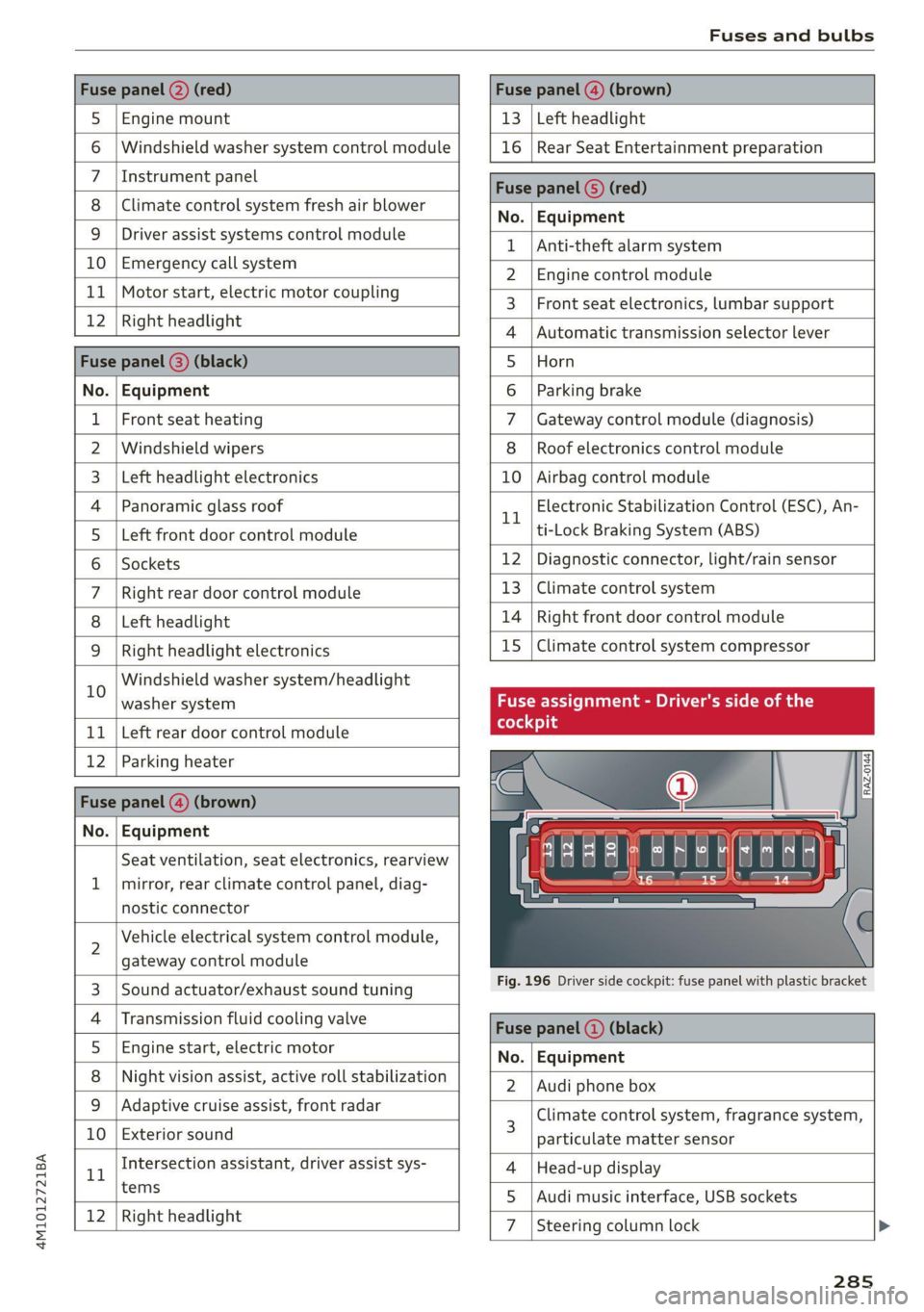
Fuse panel @) (red) Fuse panel (@) (brown)
5 |Engine mount 13 |Left headlight
6 | Windshield washer system control module 16 | Rear Seat Entertainment preparation
7 \Instrument panel Fuse panel ©) (red)
8 |Climate control system fresh air blower No. EGiiRirnictit
9 | Driver assist systems control module { |Anti-thelealanmaystem
UO | Eivietgendy call gystem 2 | Engine control module
+. | Wokonstart, clsetnte moter coupling 3 | Front seat electronics, lumbar support
12 |Right headlight 4 |Automatic transmission selector lever
Fuse panel (@) (black) 5 |Horn
No. | Equipment 6 | Parking brake
1 |Front seat heating 7 | Gateway control module (diagnosis)
2 |Windshield wipers 8 | Roof electronics control module
3 | Left headlight electronics 10 | Airbag control module
4 |Panoramic glass roof rl Electronic Stabilization Control (ESC), An-
5 | Left front door control module ti-Lock Braking System (ABS)
6 |Sockets 12 | Diagnostic connector, light/rain sensor
7 | Right rear door control module 13 | Climate control system
8 | Left headlight 14 | Right front door control module
9 | Right headlight electronics 15 | Climate control system compressor
10 Windshield washer system/headlight . . .
washer system Fuse assignment - Driver's side of the
11 | Left rear door control module
12 | Parking heater s
Fuse panel (4) (brown) . =
No. | Equipment awe
Seat ventilation, seat electronics, rearview 4 EET L
1 | mirror, rear climate control panel, diag- to 15
nostic connector
2 Vehicle electrical system control module,
gateway control module
3. [Sound actuatorexhaust sound tuning Fig. 196 Driver side cockpit: fuse panel with plastic bracket
4 |Transmission fluid cooling valve Face panel @) (black)
5 |Engine start, electric motor No. Equipment
8 | Night vision assist, active roll stabilization 2 | Audi phone box
9_| Adaptive cruise-assist, front radar Climate control system, fragrance system,
10 | Exterior sound 3 particulate matter sensor
1 Intersection assistant, driver assist sys- 4 |Head-up display
tems 5 |Audi music interface, USB sockets
12 [Right headlight 7 |Steering column lock
285
Page 288 of 316
Fuses and bulbs
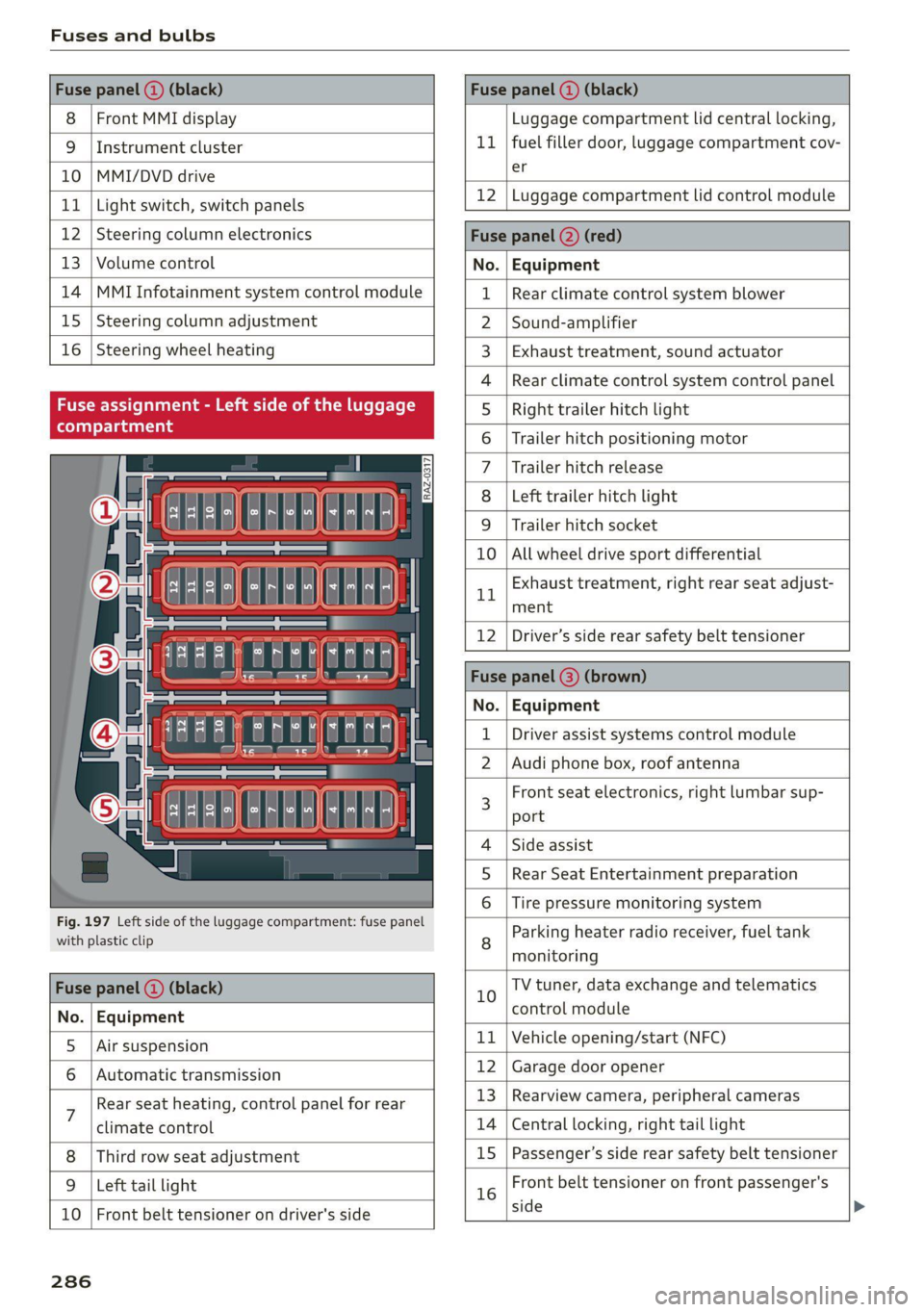
Fuse panel () (black) Fuse panel (2) (black)
8 | Front MMI display Luggage compartment lid central locking,
9 | Instrument cluster 11 | fuel filler door, luggage compartment cov-
10 |MMI/DVD drive er
11 | Light switch, switch panels 12 |Luggage compartment lid control module
12 | Steering column electronics Fuse panel (2) (red)
13 | Volume control No. Equipment
14 | MMI Infotainment system control module 1 | Rear climate control system blower
15 | Steering column adjustment 2 |Sound-amplifier
16 | Steering wheel heating 3 | Exhaust treatment, sound actuator
4 |Rear climate control system control panel
Fuse assignment - Left side of the luggage 5 | Right trailer hitch light
6 |Trailer hitch positioning motor
7 |Trailer hitch release
8 | Left trailer hitch light
9 | Trailer hitch socket
ele
a
i] a rE ia) °
U i)
TCE |
Fig. 197 Left side of the luggage compartment: fuse panel
with plastic clip
BR oO All wheel drive sport differential
Bh BR
Exhaust treatment, right rear seat adjust-
ment
Fuse panel (@) (black)
No. | Equipment
5 |Air suspension
6 |Automatic transmission
7 Rear seat heating, control panel for rear
climate control
Third row seat adjustment
9 | Left tail light
10 | Front belt tensioner on driver's side
12 | Driver’s side rear safety belt tensioner
Fuse | (3) (
No. | Equipment
Driver assist systems control module
2 |Audi phone box, roof antenna
3 Front seat electronics, right lumbar sup-
port
4 |Side assist
5 | Rear Seat Entertainment preparation
Tire pressure monitoring system
8 Parking heater radio receiver, fuel tank
monitoring
10 TV tuner, data exchange and telematics
control module
11 | Vehicle opening/start (NFC)
12 | Garage door opener
13 | Rearview camera, peripheral cameras
14 | Central locking, right tail light
15
|Passenger’s side rear safety belt tensioner
16 Front belt tensioner on front passenger's
side
286
Page 289 of 316

4M1012721BA
Fuses and bulbs
No. | Equipment
1 |Active roll stabilization
6 | Voltage converter
9 |Auxiliary battery control module
15 | Thermomanagement control module
No. | Equipment
Front seat heating
Exhaust treatment
Rear seat heating, control panel for rear
10 |.
climate control
12 | Exhaust treatment
Bulbs
Replacing bulbs
Having a bulb replaced by an authorized Audi
dealer or authorized Audi Service Facility in cases
of doubt is recommended. These facilities have
the correct tools and replacement parts as well
as the required technical knowledge.
LED lights*
Your vehicle is equipped with maintenance-free
headlights and tail lights. However, if a light bulb
needs to be replaced, please contact an author-
ized Audi dealer or authorized Audi Service Facili-
ty.
If you still would like to try replacing the
bulbs in your vehicle yourself, read the warn-
ings regarding working in the engine compart-
ment > A\ in General information on
page 233.
Make sure the covers are fitted correctly on
the headlight and tail light so that no water
will leak in from the outside and the light
function will not be impaired.
287
Page 299 of 316

4M1012721BA
Technical data
Technical data
Identification data
Vehicle data label
XXXXX XX =X = XXXX XXX XX
(Daa aa xxxxxxxx XX x XXXXXXXK
RAZ-0668
| pein AK
Q5 a Beh XX
(B)--we gs. XXX XK YXK
GBR YNYX YN YX XK
M. - AUSST. / OPTIONS
EOA 7D5 4UB 6XM 5SG 5RW
2EH JOZ 1LB 1AS_ 1BA
3FC SMU 7X1
: FOA 9G3 0G7 OYH OJF
SG TL6 3KA 8EH U1A X9B QZ7
1XW 8Q3 9Q8 8Z4 D2D
716 CV7 7KO 4X3 2K2
3L4 AKC 3Y0 413 5D2
1SA 7GB Q1A 4GQ
Fig. 199 Vehicle identification label
The vehicle identification label = fig. 199 is locat-
ed in the luggage compartment under the cargo
floor cover.
The vehicle identification label information can
also be found in the Warranty & Maintenance
booklet.
Vehicle data
The sticker contains the following vehicle data:
@® Vehicle Identification Number (VIN)
@ Vehicle type, engine output, transmission
@® Engine and transmission codes
@) Paint and interior codes
© Optional equipment numbers
Vehicle identification number (VIN)
The VIN is located in the following areas:
— Applies to MMI: Select on the home screen: VE-
HICLE > Settings & Service > Vehicle informa-
tion.
— On the vehicle identification label
— At the front behind the windshield
— Inthe motor compartment on the right side
Notes about technical data
The values may vary based on special equipment
as well as market-specific equipment and meas-
uring methods.
Please note that the specifications listed in the
vehicle documentation always take precedence.
Any technical data that is missing was not
available at the time of printing.
Q7 199.3 (5,063) 77.6 (1,970)
87.1 (2,212) 68.5 (1,740)
Fuel tank 22.5 gal (85 liters)
Windshield and headlight washer system*
6.3 qt (6.0 liters)
297
Page 301 of 316
4M1012721BA
A
A/C cooling mode............. ee eee eee ee 90
Accelerator pedal.............--00000005 98
also refer to Accelerator pedal........... 98
ACCeSSOFICS . 6... eee 294
Active lane assist
refer to Lane departure warning......... 144
refer to Lane guidance................ 144
Adaptive cruise assist..............-000. 134
Cleaning the sensors...........00 ee eee 268
Predictive control.................... 133
Adaptive dampers...........--0000-00- 109
Adaptive speed assist
refer to Adaptive cruise assist........... 134
Adjusting the air distribution............. 90
Adjusting the brightness................. 51
Adjusting the rear seats.................. 62
Adjusting the sound..............-.0005 225
Adjusting the temperature............... 90
Adjusting the vents .......... 00 cece sees 92
Adjusting the volume..............00-005 27
Adjusting the volume (announcements).... 225
Adjusting the welcome sound............ 225
Airbag system... 2... 2. eee eee 70
Air suspension..............00.00-0008 109
Alarm system
refer to Anti-theft alarm system.......... 33
Alignment pin (changing the wheel)....... 273
All-weather lights...............-.00000. 45
All-wheel steering.............--000005 110
ALSeaSOMtineSien. is 5: suse 6 samme «0 imevsnee ow we 261
All wheel drive
refer to quattro... . 2... cece eee eee 111
Amazon Alexa integration
Media playback............. eee veee 213
QPeration » wee 2 + ane = + case o vere & 8 eae 26
AMI
refer to Audi music interface........... 213
Android Auto
refer to Audi smartphone interface...... 223
Anti-freeze
Windshield washer system............. 244
Anti-lock braking system.............0-- 112
Anti-Slip Regulation.................0.. 112
Anti-theft alarm system ...........-..00-- 33
Anti-theft wheel bolts...............0..5 276
Apple CarPlay
refer to Audi smartphone interface...... 223
Aspect ratio (video) ..............0. 217,219
ASR
refer to Anti-Slip Regulation............ 112
Audi adaptive light...............-.00005 45
Audi connect
refer to connect..........0e cece eee 178
Audi connect Remote & Control
refer to Vehicle control services......... 180
Audi drive select....................005 108
Audi entertainment mobile.............. 214
Audi entertainment mobile device
REMOVING < : wage x 2 een g 5 ees 5s eee gs: 215
SQCULING’s « « onan 2 2 wes 2 ere = een a @ aHe 215
Audi music interface..............00005 213
AUdiO TINGS ese: = & eaups 3 & eaogs & & Hees 3 t RES 2 215
AUdi phone BOX: wows yz wenn ¢ 2 wees © cree F 167
Audi presense...........0-.. cee eee eee 146
MeSSAQES cui 5 ¢ ais + ¥ caer ¥ o pew 8 e eee 149
Audi pre sense front......... 0c eee eens 147
Audi side assist
refer to Side assist. «noi... 2 seen ee eee ee 150
Audi smartphone interface.............. 223
Legalinfonmation:s. « svscon 0 seon oo ae © 2 227
Audi virtual cockpit
refer to Instrument cluster.............. 11
AUTO
Automatic headlights.................. 4S
Climate control system..............0-5 90
Auto Lock (central locking) ..............- 30
Automatic climate control system
refer to Climate control system.......... 89
Automatic luggage compartment lid.... 38,39
Automatic transmission...............005 96
Parking lock emergency release.......... 98
Automatic wipe/wash system............. 53
Average CONSUMPTION ws ccioes s neem os weer 14
Average speed i «i sins seer ws ee nates oo eee 14
B
Bag hOOks:. = sews =z wens 2 ¢ sees ex oes be ee 82
299