towing AUDI Q7 2020 Owner´s Manual
[x] Cancel search | Manufacturer: AUDI, Model Year: 2020, Model line: Q7, Model: AUDI Q7 2020Pages: 316, PDF Size: 113.87 MB
Page 151 of 316

4M1012721BA
Driver assistance
@) Tips
— System functions may not be available if the
ESC is limited or switched off, or if there is a
malfunction.
— An indicator in the instrument cluster will
inform you when there is an intervention.
ae
Applies to: vehicles with turn assist
When your vehicle is turning
The turn assist can assist you with a braking in-
tervention when starting to drive or when driving
slowly, to reduce the risk of your vehicle colliding
with an oncoming vehicle when you are making a
left turn. The braking intervention causes your
vehicle to stay in its lane. The function is only
available when the turn signal is turned on and at
speeds up to maximum of 6 mph (10 km/h).
Z\ WARNING
— Follow the safety precautions and note the
limits of the assist systems, sensors, and
cameras > page 118.
— The turn assist does not react to pedes-
trians, animals, crossing objects, and ob-
jects not detected as vehicles.
@) Tips
— System functions may not be available if the
ESC is limited or switched off, or if there is a
malfunction.
—An indicator in the instrument cluster will
inform you when there is an intervention.
Adjusting Audi pre sense
Applies to: vehicles with Audi pre sense
The system can be switched on and off in the
MMI > page 121.
You can adjust the Audi pre sense functions to
your preferences. The settings depend on the ve-
hicle equipment.
D_ In certain countries
> Applies to MMI: Select on the home screen: VE-
HICLE > Driver assistance > (@}) > Audi pre
sense.
Possible settings:
— Turn assist
— Swerve assist
Prewarning!) - The prewarning can be switched
off or the Audi pre sense warning time can be set
(Early/Medium/Late).
Set the warning time for the early warning to
Early at first. If you feel that the prewarnings ap-
pear too early, then set the warning time to Me-
dium. The Late warning time should only be set
in special circumstances.
@) Tips
— Switch Audi pre sense off when you are not
using public streets, when loading the vehi-
cle onto a vehicle carrier, train, ship, or oth-
er type of transportation, or when towing
the vehicle. This can help to prevent an un-
desired intervention from the Audi pre
sense system.
— If the system is switched off, it switches on
again automatically once the ignition is
switched on again).
— Certain settings are stored automatically in
the active personal profile.
Messages
Applies to: vehicles with Audi pre sense
re or s displayed when there is a malfunc-
tion, the Audi pre sense functions may be un-
available or may be limited.
A message that indicates the cause and possible
solution may appear with some displays. The
weather conditions may be too poor or a sensor
may be covered. Clean the area in front of the
sensors > page 120 and try to turn on the sys-
tems again later.
If the malfunction remains, drive to an author-
ized Audi dealer or authorized Audi Service
149
Page 153 of 316

4M1012721BA
Driver assistance
located in the area that is critical for a lane
change. For example:
— If the lanes are narrow or if you are driving on
the edge of your lane. If this is the case, the
system may have detected a vehicle in another
lane that is not adjacent to your current lane.
— If you are driving through a curve. Side assist
may react to a vehicle that is in the same lane
or one lane over from the adjacent lane.
— If side assist reacts to other objects (such as
roadside structures like guard rails).
ZA WARNING
— Follow the safety precautions and note the
limits of the assist systems, sensors, and
cameras > page 118.
— The display may not appear on time when
vehicles are approaching or being passed
very quickly.
G) Tips
— If the window glass in the driver's door or
front passenger's door has been tinted, the
display in the exterior mirror may be incor-
rect.
— These systems are not available in trailer
towing mode. There is no guarantee the sys-
tems will switch off when using a retrofitted
trailer hitch. Do not use these functions
when towing a trailer.
— For an explanation on conformity with the
FCC regulations in the United States and the
Industry Canada regulations, see
=> page 295.
Oe Ree
Applies to: vehicles with side assist
The system can be switched on and off in the
MMI > page 121. If the system is activated, the
displays will turn on briefly when the ignition is
switched on.
Adjusting the brightness
You can adjust the brightness of the display in
the exterior mirror. The settings depend on the
vehicle equipment.
> Applies to: MMI: Select on the home screen:
VEHICLE > Driver assistance > (€}) > Side as-
sist > Brightness.
The display brightness is automatically adapted
to the ambient light. If the automatic adaptation
has already reached the upper or lower limit, no
change will be apparent when the setting is
changed, or it will only become visible when the
ambient light changes. Adjust the brightness to a
level where the display in the information stage
will not disrupt your view ahead. If you change
the brightness, the display will briefly show the
brightness level in the information stage.
Messages
Applies to: vehicles with side assist
iff or Eg is displayed when there is a malfunc-
tion, the side assist and exit warning system
functions may be unavailable or may be limited.
A message that indicates the cause and possible
solution may appear with some displays. The
weather conditions may be too poor or a sensor
may be covered. Clean the sensor area in the ve-
hicle rear and try to turn the systems on again
later.
If the malfunction remains, drive to an author-
ized Audi dealer or authorized Audi Service Facili-
ty immediately to have the malfunction correct-
ed.
151
Page 154 of 316

Driver assistance
Exit warning Switching the exit warning on and off
rr — The system can be switched on and off in the
ple Ted |) at Cela)
MMI & page 121.
Applies to: vehicles with exit warning system
A WARNING
— Follow the safety precautions and note the
limits of the assist systems, sensors, and
cameras > page 118.
— Always pay attention to traffic and to the
area around your vehicle. The exit warning
system does not replace the attention of the
vehicle occupants. The vehicle occupants are
always responsible for opening the doors
and exiting the vehicle.
— The exit warning system does not respond
to people and cannot warn you about every
type of approaching objects, such as cyclists.
Always monitor the traffic as well as the ve-
hicle's surroundings with direct eye contact.
— The display may not appear in time when
vehicles are approaching very quickly.
— The exit warning system does not react to
stationary objects or pedestrians.
Fig. 125 Front door: warning strip (diagram) — The exit warning system will not provide
alerts if your vehicle is pulled too far into
General information the parking space so that it is hidden by ad-
jacent vehicles.
Within system limits, the exit warning system
can detect traffic approaching from behind such 6) »
as vehicles, and provide assistance based on this VJ Tips
information when you are exiting the vehicle — The exit warning system can be available for
=> fig. 124. The system uses the data from the ra- up to approximately three minutes after un-
dar sensors at the rear corners of the vehicle. locking the vehicle and opening the door as
well as after switching off the ignition. Then
Displays and warnings the displays flash briefly and the system
If you pull a door handle while the vehicle is sta- switches off.
tionary and an object classified as critical is ap- — The system is not available when towing a
proaching, the warning strip @ and the display trailer. There is no guarantee the system
on the exterior mirror (2) will light up on the cor- will switch off when using a retrofitted trail-
responding side of the vehicle. er hitch. Do not use these functions when
towing a trailer.
— For an explanation on conformity with the
FCC regulations in the United States and the
Industry Canada regulations, see
=> page 295.
If the door is opened, the displays on that side
will flash. If another road user that is classified
as critical is approaching while a door is already
open, the displays on that door will turn on.
The same messages apply for the exit warning
system and side assist > page 151.
152
Page 166 of 316
Parking and maneuvering
your vehicle is pulled too far into the park-
ing space so that it is hidden by adjacent
vehicles.
Gi) Tips
— Certain settings are stored automatically in
the active personal profile.
— Once an automatic brake activation occurs,
the system cannot initiate another activa-
tion for several seconds.
— System functions may not be available if the
ESC is limited or switched off, or if there is a
malfunction.
— If there is an acoustic warning signal from
the rear cross-traffic assist, then the park-
ing aid may not warn you of detected obsta-
cles under certain circumstances.
— The system is not available when the vehicle
detects that you are towing a trailer. There
is no guarantee the functions will be deacti-
vated when using a retrofitted trailer hitch.
Do not use these functions when towing a
trailer.
— For an explanation on conformity with the
FCC regulations in the United States and the
Industry Canada regulations, see
=> page 295.
— The coverage areas of the sensors > fig. 135
are diagrams and do not represent a true-
to-scale image of the sensor ranges.
164
Page 262 of 316

Wheels
Determining correct load
limit
Use the example below to calcu-
late the total weight of the pas-
sengers and luggage or other
things that you plan to transport
so that you can make sure that
your vehicle will not be overload-
ed.
Steps for Determining Correct
Load Limit
1. Locate the statement “THE
COMBINED WEIGHT OF OCCU-
PANTS AND CARGO SHOULD
NEVER EXCEED XXX KG OR XXX
LBS” on your vehicle’s placard
(tire inflation pressure label)
=> page 256, fig. 175.
2. Determine the combined
weight of the driver and pas-
sengers that will be riding in
your vehicle.
3. Subtract the combined weight
of the driver and passengers
from “XXX” kilograms or “XXX”
pounds shown on the sticker
=> page 256, fig. 175.
4. The resulting figure equals the
available amount of cargo and
luggage load capacity. For ex-
ample, if the “XXX” amount
equals 1400 lbs. and there will
260
be five 150 lbs. passengers in
your vehicle, the amount of
available cargo and luggage
oad capacity is 650 lbs.
(1400-750 (5 x 150) = 650
bs.)
5. Determine the combined
weight of luggage and cargo
being loaded on the vehicle.
That weight may not safely ex-
ceed the available cargo and
uggage load capacity calculat-
ed in Step 4.
6. If your vehicle will be towing a
trailer, load from your trailer
will be transferred to your vehi-
cle. Consult this manual to de-
termine how this reduces the
available cargo and luggage
load capacity of your vehicle.
>Check the tire sidewall
(=> page 247, fig. 172) to deter-
mine the designated load rating
for a specific tire.
Wheel bolts and rims
Wheel bolts
Wheel bolts must be clean and loosen/tighten
easily.
Rims
Rims with a bolted rim ring* or with bolted wheel
covers* consist of multiple pieces. These compo-
nents were bolted together using special bolts
and a special procedure. You must not repair or
disassemble them > A\.
Page 277 of 316
4M1012721BA
Emergency assistance
ZA\ WARNING
— Read and follow the manufacturer's safety
precautions on the compressor and in the in-
structions on the bottle of sealant.
— Ifa tire pressure of 29 psi (200 kPA) cannot
reached after inflating for 6 minutes, then
the tire is too severely damaged. Do not con-
tinue driving.
— If the tire cannot be repaired with the tire
sealant, see an authorized Audi dealer or au-
thorized Audi Service Facility for assistance.
G) Tips
Do not operate the compressor for more than
six minutes continuously, or it can overheat.
Once the compressor has cooled, you can con-
tinue to use it.
Completing
Applies to: vehicles with tire mobility kit
> Affix the sticker that says "max. 50 mph (max.
80 km/h)" that is provided with the tire mobili-
ty kit within the driver's field of vision.
> Stop the vehicle after driving for about 10 mi-
nutes and check the tire pressure.
> If the tire pressure is lower than 19 psi (130
kPA), then the tire is too severely damaged. Do
not continue driving.
ZA\ WARNING
Pay attention to the following after repairing
the tire:
— Do not drive faster than 50 mph (80 km/h).
— Avoid hard acceleration or braking and driv-
ing fast around curves.
— The vehicle may become more difficult to
control.
— If the tire is too severely damaged, see an
authorized Audi dealer or authorized Audi
Service Facility for assistance.
@ For the sake of the environment
You can give the used tire sealant bottle to an
authorized Audi dealer or authorized Audi
Service Facility for disposal.
@) Tips
Remember to obtain a new bottle of sealant
from an authorized Audi dealer or authorized
Audi Service Facility after repairing a tire.
Replacing wheels
You must complete the preparation before
changing a tire.
> Read and follow the important safety precau-
tions > page 273.
> Set the parking brake.
> Select the “P” position.
» When towing a trailer: disconnect the trailer
from your vehicle.
> Lay out the vehicle tool kit > page 273 and the
spare tire.
> Applies to: vehicles with air suspension: Select
on the home screen: VEHICLE > Settings &
Service > Air suspension: wheel change.
> Switch the ignition off.
ZA\ WARNING
The vehicle must also be secured to prevent it
from rolling when using the vehicle jack*. Use
suitable objects to block the front and back of
the wheel that is diagonal from the wheel
with the flat tire.
i
Fig. 180 Wheel: wheel bolts with caps
@
Oo-q
th.
is y
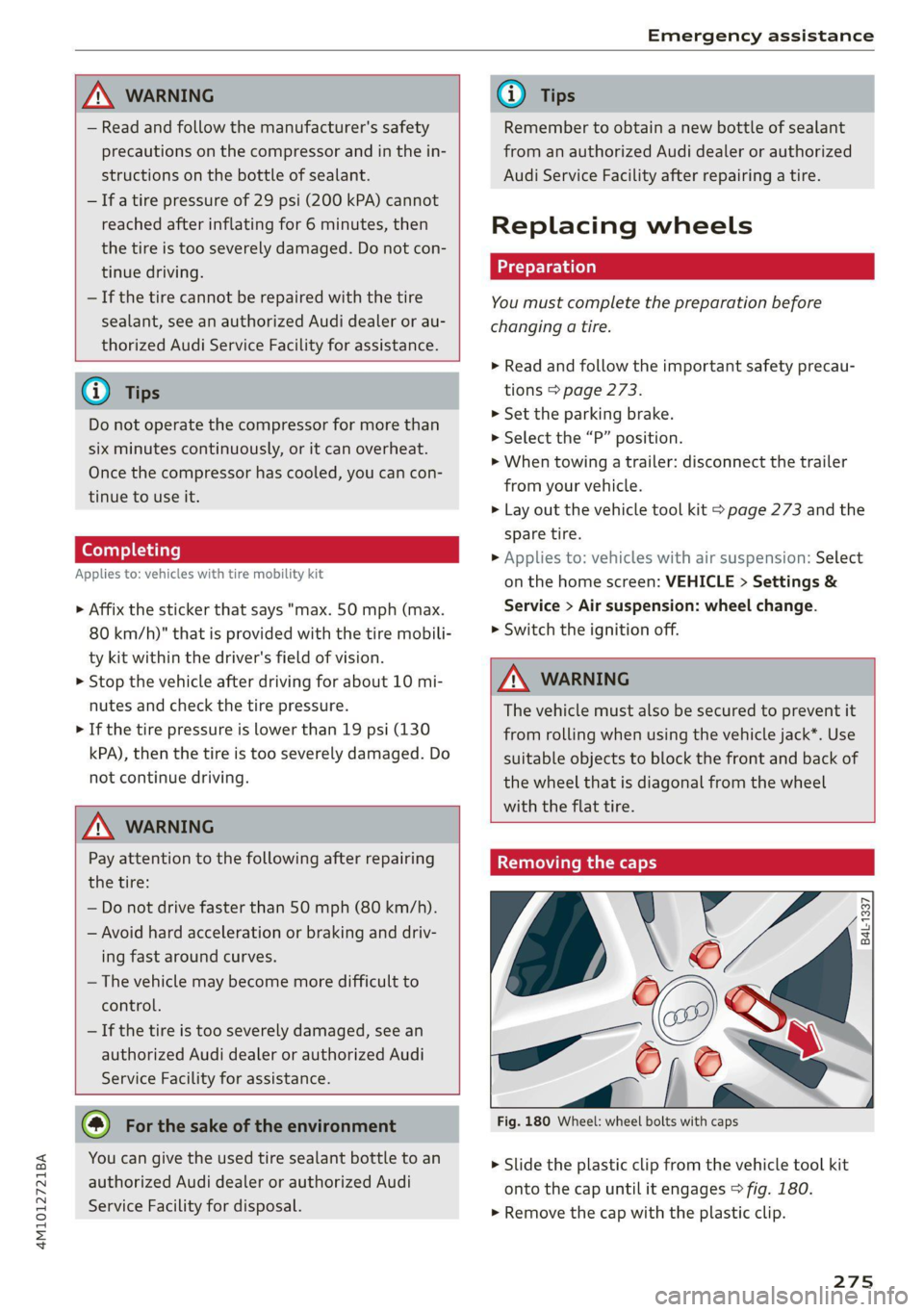
> Slide the plastic clip from the vehicle tool kit
onto the cap until it engages > fig. 180.
> Remove the cap with the plastic clip.
275
Page 282 of 316

Emergency assistance
> With the engines running, remove the cables in
reverse order of the way they were installed.
> Close the red cover on the positive terminal.
ZA WARNING
— Never connect the jump start cable directly
to your vehicle battery. Only use the connec-
tions in the engine compartment.
— Do not touch the non-insulated parts of the
terminal clamps. The cable must also not
come into contact with vehicle components
that conduct electricity when it is connected
to the positive vehicle battery terminal. This
can cause a short circuit.
— The plugs on the battery cells must not be
opened.
— Keep ignition sources (such as open flames,
burning cigarettes, etc.) away from the vehi-
cle batteries to reduce the risk of an explo-
sion.
— Route the jump start cables so they cannot
get caught in the moving parts in the other
vehicle's engine compartment.
@) Note
Please note that the connecting process previ-
ously described for the jump start cables is in-
tended for when your vehicle is being jump
started.
G) Tips
Make sure that the connected jump start ca-
bles have sufficient contact with metal.
Towing
General information
You should only perform the steps that follow if
you have the necessary tools and technical ex-
pertise.
Towing requires a certain amount of practice.
Audi recommends contacting a towing company
to have the vehicle transported.
You should only have your vehicle towed by an-
other vehicle when disabled in exceptional cir-
280
cumstances. Inexperienced drivers should not
tow.
Notes on towing
When the engine is stopped, the transmission
will not be sufficiently lubricated if traveling at
high speeds and long distances:
— The maximum permitted towing speed is 30
mph (50 km/h).
—The maximum permitted towing distance is 30
miles (50 km).
Additional information on towing with a tow
truck
The vehicle may only be towed with the front axle
raised. Do not wrap any chains or cables around
the brake lines.
Tow bar and towing cable
The vehicle can be towed with a tow bar or tow-
ing cable. Both drivers should be familiar with
the special considerations when towing, especial-
ly when using a towing cable.
Always make sure the traction force does not ex-
ceed the permitted level and there are no shock
loading conditions. There is always the risk of the
coupling becoming overloaded when driving off-
road.
For the most safety and security, drive with a tow
bar. You should use a towing cable only if a tow
bar is not available. Use a towing cable made of
synthetic elastic cable similar elastic material.
ZA WARNING
— Towing highly increases the risk of an acci-
dent, for example from colliding with the
towing vehicle.
— To reduce the risk of an accident, do not al-
low anyone to remain inside the vehicle
when it is being transported by a tow truck
or a special transporter.
() Note
— If normal towing is not possible, for exam-
ple if the transmission is faulty or if the
towing distance is greater than 30 miles
Page 283 of 316

4M1012721BA
Emergency assistance
(50 km), then transport the vehicle on a
special carrier.
— If the vehicle is towed by a tow truck at the
axle that is not permitted, this can cause se-
vere damage to the transmission.
— The vehicle must not be tow started for
technical reasons.
G) Tips
— If the power supply is interrupted, then it
will not be possible to move the selector
lever out of the "P" position. The parking
lock must be released using the emergency
release before towing the vehicle
=> page 98.
— Switch Audi pre sense* off > page 149 when
loading the vehicle onto a vehicle carrier,
train, ship, or other type of transportation,
or when towing the vehicle. This can prevent
an undesired intervention from the pre
sense* system.
— Follow the local legal regulations for tow-
ing.
Read and follow the important information under
=> page 280.
Preparations
> Only secure the towing cable or tow bar at the
designated towing loops > page 281,
=> page 282.
> Make sure the towing cable is not twisted. Oth-
erwise it could disconnect from the towing loop
while towing.
> Switch the emergency flashers on in both
vehicles > page 49. However, do not do this if it
prohibited by law.
Towing vehicle (front)
> Only start to drive when the towing cable is
taut.
> Press the brake pedal very carefully.
> Avoid sudden braking or driving maneuvers.
Vehicle being towed (rear)
> Make sure the ignition is switched on so that
the steering wheel is not locked and so that you
can use the turn signals, the horn, and the
windshield wipers if needed > A\.
> Switching it off before the vehicle has stopped
may
impair the function of the brake booster
and power steering. You would then need to
use more force to steer and brake the vehicle.
> Release the parking brake > page 104.
> Select the “N” selector lever position.
> Make sure the towing cable is always taut.
ZA\ WARNING
Never tow a vehicle using a tow bar or towing
cable if the vehicle does not have electrical
power.
Front towing loop
Fig. 190 Front bumper: installing the towing loop (version
2)
The threaded opening for the towing loop is lo-
cated on the right side of the front bumper.
> Remove the towing loop from the vehicle tool
kit > page 273.
281
>
Page 284 of 316

Emergency assistance
> Press the cap inward with brief, strong pressure
> fig. 189 or > fig. 190. The cap will loosen
from the bumper.
> Tighten the towing loop in the threaded open-
ing until it stops and then tighten it with a
wheel wrench.
> After using, place the towing loop back in the
vehicle tool kit.
Z\ WARNING
If the towing loop is not tightened until it
stops when installing, the threads may be
pulled out when towing the vehicle and result
Vehicles with a trailer hitch*
>» Attach the tow bar or the towing cable to the
trailer hitch.
Vehicles with a factory-installed trailer hitch* are
not equipped with towing loop threads at the
rear.
ZX WARNING
If the towing loop is not tightened until it
stops when installing, the threads may be
pulled out when towing the vehicle and result
in an accident.
in an accident.
@) Tips
Depending on the model, the shape of the
cover can vary.
Rear towing loop
Fig. 191 Rear bumper: installing the towing loop
Vehicles with a towing loop
On vehicles without a factory-installed trailer
hitch*, the towing loop threads are located on
the right rear side of the bumper.
> Remove the towing loop from the vehicle tool
kit > page 273.
> Press the cap inward with brief, strong pressure
> fig. 191. The cap will loosen from the bump-
er.
> Tighten the towing loop in the threaded open-
ing until it stops and then tighten it with a
wheel wrench.
>» After using, place the towing loop back in the
vehicle tool kit.
282
C) Note
To reduce the risk of damaging the trailer
hitch*, only use suitable tow bars that are
compatible with it. If a tow bar is not availa-
ble, you can use a towing cable.
G) Tips
Depending on the model, the shape of the
cover can vary.
Page 312 of 316
Index
Top tether anchor (securing the child safety
SQat) occ ccc ce eee eee eee nee 79
Touch display
Adjusting feedback..............-.0005 18
QPeratinG's » vse 2 2 cise « 2 arses sa won 6 eo 16
TOWINGies ¢ 2 wegs s secu ¢ s peeem © = eres § 2 oe 280
Towing lOOp = sem: <2 wees =e ease seen 281, 282
Towing protection monitoring............. 33
TPMS
Tire pressure monitoring system........ 264
Trafficinformation = sey « : weer: x 2 eos sa 198
Traffic light information................ 125
Traffic sign recognition...............4. 123
Traffic SIGNS... kk eee eee 126
Thaker loa isis © + senss2e « « aneseue a o ameuene 4 aanwis 298
Trailer mode
Airsuspension............-.0-.0-0005 115
Trailer mode (navigation) .............. 200
TrailePtOwiiG'ss « = see <= seem = 2 noe ee eos 115
Tongue Weight: « s sws se ewes 4 e ores oo ov 115
Trailer load... 2... eee eee eee eee 115
Traile review, scones ss meres ao moans oo anamin © eames 160
TUPMASSISE scsi «5 csecare © 3 weaves oe come ao eee 149
TUrnsignalls wise s 2 sass a ¥ momen oo eet so Ee 46
U
Uniform tire quality grading............. 263
Unlocking and locking. ...............605 30
By remote:control... « cio. se cwwa se ome vee 35
Using the lock cylinder 33
With the central locking switch.......... 32
With the convenience key............... 35
Updater(Software). wie cs ose 2 a anu © a ave 226
Updating stations (radio)................ 202
USB
Adapter’s « « sso wane 2 3 wesc a 6 aisnene @ 6 aw 167
USB charging Ports. « secu ox wsse oo snomne w oven 81
USB stick
refer to Audi music interface........... 213
Using residual.heatiessss se ses 6 5 wae oo arn o 91
Vv
Vanity MirtOties: 2 2 sss 2 3 mes © x mene © x ome 53
310
Vehicle
Angle... cece cece eee 106
Care/cleaninig « sews ss ween + x wee + a wees = 267
DIMENSIONS «saves os sane © cae ao meme a oy 297
Identification data................00. 297
QUt-OF SERVICE ¢ sex « = semen ss pees se Sees 272
Raising’ « «wie vo mein 3 w sae ¥ 0 eee ¥ we 276
Starting... 02... 00... eee eee eee 94
TRANSPOFt siscsu s = weeny = ¥ So0R% 5 F DORs FE 109
Vehicle care... 2. eee eee ee 267
Vehicle control services..........-...--- 180
Vehicle data label.............0.....000. 297
Vehicle identification number............ 297
Vehiclejacks. «2 essceie xs comece ve assem ve meee vs 273
Lifting points .......... 0.0... e eee 276
Tire change mode.............---.00+ 275
Vehicle key. 2s isas cs tease oven ad bres 30, 34
Vehicle start systeM.............00 eee 102
Vehicle tool kit... 6... cece cece eee 273
Ventilation. . 2.0... 2. eee eee eee 89
VIEW button... ... 2. eee eee eee 12
Voicemail . o cace oo mance ve meee vo ernie os 171.
Voice recognition system................. 25
External... .... ccc eee cee eee eee 26
Operating.............. 0.2.00. ee eee 25
Ww
Warning lights
refer to Indicator lights.................. Z
Washing matte finish paint.............. 267
Weights ........ 2... 0 cece eee eee eee 298
Wheel bolts....... 0.0... e cece ee eee ee 260
ANtI-theft occ: ss que 5 ¥ gee ee Ree ee eS 276
Tightening specification............... 278
Whieelsts «sss so save sw snscaws wa arava © anweone 246
Cleaning.......... 0. eee eee eee eee 269
Glossary of tire and loading terminology... 249
Loose wheel warning 261
REPILEGIG « visene + susonae » 0 anexane nH anetatie © & wt 275
Tire pressure monitoring system........ 264
Tires and vehicle load limits............ 258
Wheel Wench: « + ser s 2 meme sv eee ee ree 273
Wi-Fi
HotspotisettingSiins so sass 9 & mane so wears 182
Online media...............00000000. 212
Using a hOtspOt's esas se eos ss ees 5 8 aes 179