turn signal AUDI Q7 2020 Owner´s Manual
[x] Cancel search | Manufacturer: AUDI, Model Year: 2020, Model line: Q7, Model: AUDI Q7 2020Pages: 316, PDF Size: 113.87 MB
Page 158 of 316
Parking and maneuvering
Parking and
maneuvering
Introduction
Depending on the vehicle equipment, various
parking aids will help you when parking and ma-
neuvering.
Parking aid
The parking system plus assists you while park-
ing by audibly and visually warning you of objects
detected in front of and behind the vehicle
=> page 156.
The rearview camera shows the area behind the
vehicle in the MMI display. The lines in the rear-
view camera image help you to park and maneu-
ver > page 158.
The peripheral cameras are an addition to the
rearview camera and help you to see various
areas around the vehicle while parking and ma-
neuvering > page 158.
The rear cross-traffic assist can warn you of ap-
proaching cross traffic when driving in reverse or
exiting a parking space > page 163.
Settings options
You can adjust parking aid functions individually.
The adjustment options depend on the vehicle
equipment.
— Activating automatically > page 156
— Front and rear volume > page 157
— Entertainment fader > page 157
— Clean rearview camera > page 159
— Trailer view > page 160
—View > page 161
— Rear cross-traffic assist > page 163
ZA WARNING
Follow the safety precautions and note the
limits of the assist systems, sensors, and
cameras > page 118.
@ Tips
Practicing parking in a traffic-free location or
parking lot to become familiar with the sys-
156
tems is recommended. Practice parking in
good light and weather conditions.
Parking aid plus
Activating/deactivat
Applies to: vehicles with parking system plus
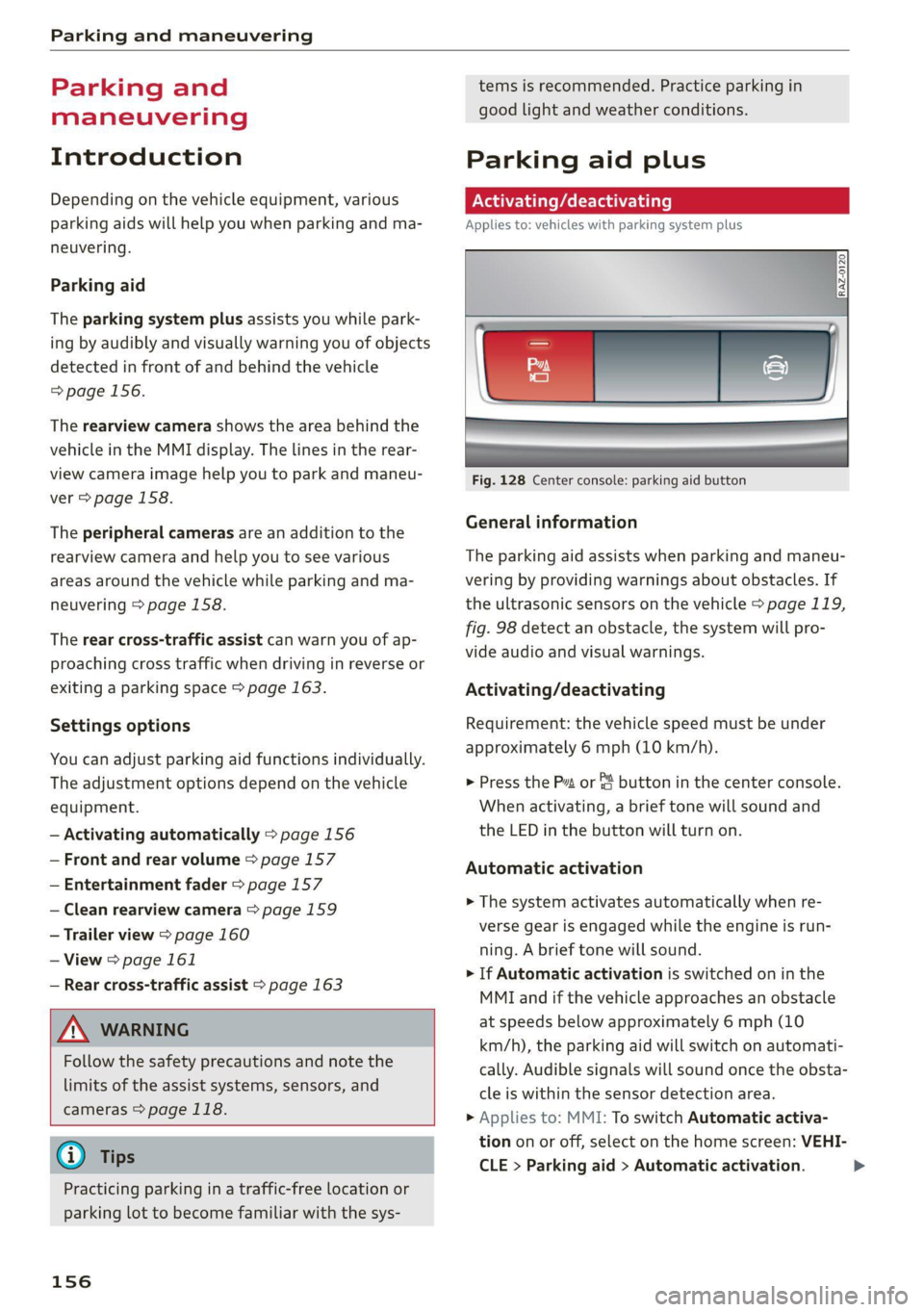
Fig. 128 Center console: parking aid button
General information
The parking aid assists when parking and maneu-
vering by providing warnings about obstacles. If
the ultrasonic sensors on the vehicle > page 119,
fig. 98 detect an obstacle, the system will pro-
vide audio and visual warnings.
Activating/deactivating
Requirement: the vehicle speed must be under
approximately 6 mph (10 km/h).
> Press the Pt or {4 button in the center console.
When activating, a brief tone will sound and
the LED in the button will turn on.
Automatic activation
> The system activates automatically when re-
verse gear is engaged while the engine is run-
ning. A brief tone will sound.
> If Automatic activation is switched on in the
MMI and if the vehicle approaches an obstacle
at speeds below approximately 6 mph (10
km/h), the parking aid will switch on automati-
cally. Audible signals will sound once the obsta-
cle is within the sensor detection area.
> Applies to: MMI: To switch Automatic activa-
tion on or off, select on the home screen: VEHI-
CLE > Parking aid > Automatic activation. >
Page 165 of 316
4M1012721BA
Parking and maneuvering
Rear cross-traffic assist
Applies to: vehicles with rear cross-traffic assist
3 s
&
= st a
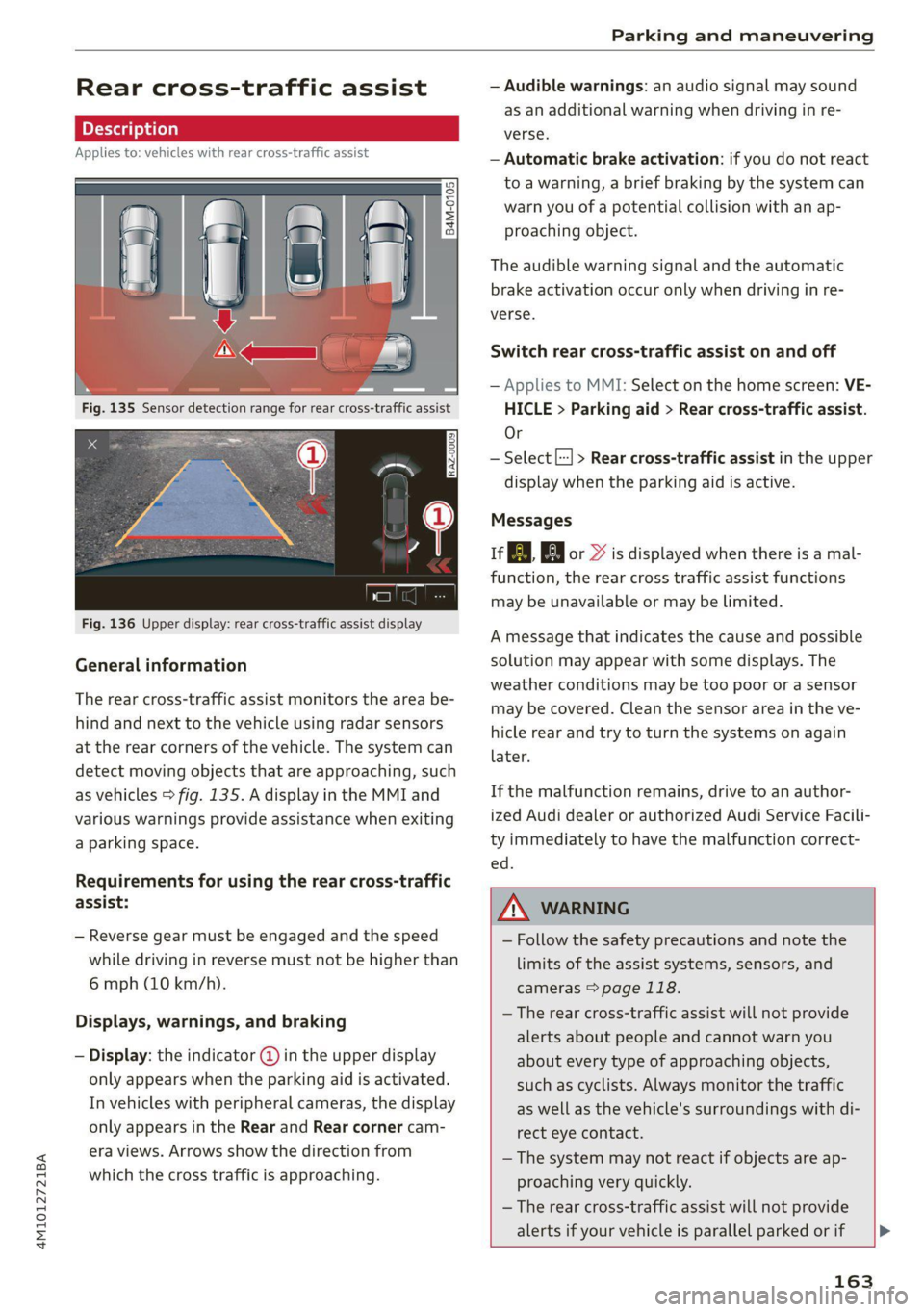
Fig. 136 Upper display: rear cross-traffic assist display
General information
The rear cross-traffic assist monitors the area be-
hind and next to the vehicle using radar sensors
at the rear corners of the vehicle. The system can
detect moving objects that are approaching, such
as vehicles > fig. 135. A display in the MMI and
various warnings provide assistance when exiting
a parking space.
Requirements for using the rear cross-traffic
assist:
— Reverse gear must be engaged and the speed
while driving in reverse must not be higher than
6 mph (10 km/h).
Displays, warnings, and braking
— Display: the indicator @ in the upper display
only appears when the parking aid is activated.
In vehicles with peripheral cameras, the display
only appears in the Rear and Rear corner cam-
era views. Arrows show the direction from
which the cross traffic is approaching.
— Audible warnings: an audio signal may sound
as an additional warning when driving in re-
verse.
— Automatic brake activation: if you do not react
to a warning, a brief braking by the system can
warn you of a potential collision with an ap-
proaching object.
The audible warning signal and the automatic
brake activation occur only when driving in re-
verse.
Switch rear cross-traffic assist on and off
— Applies to MMI: Select on the home screen: VE-
HICLE > Parking aid > Rear cross-traffic assist.
Or
— Select |--| > Rear cross-traffic assist in the upper
display when the parking aid is active.
Messages
re or >% is displayed when there is a mal-
function, the rear cross traffic assist functions
may be unavailable or may be limited.
A message that indicates the cause and possible
solution may appear with some displays. The
weather conditions may be too poor or a sensor
may be covered. Clean the sensor area in the ve-
hicle rear and try to turn the systems on again
later.
If the malfunction remains, drive to an author-
ized Audi dealer or authorized Audi Service Facili-
ty immediately to have the malfunction correct-
— Follow the safety precautions and note the
limits of the assist systems, sensors, and
cameras > page 118.
— The rear cross-traffic assist will not provide
alerts about people and cannot warn you
about every type of approaching objects,
such as cyclists. Always monitor the traffic
as well as the vehicle's surroundings with di-
rect eye contact.
— The system may not react if objects are ap-
proaching very quickly.
— The rear cross-traffic assist will not provide
alerts if your vehicle is parallel parked or if
163
Page 266 of 316

Wheels
As an added safety feature, your vehicle has been
equipped with a tire pressure monitoring system
(TPMS) that illuminates a low tire pressure tell-
tale when one or more of your tires is significant-
ly under-inflated. Accordingly, when the low tire
pressure telltale illuminates, you should stop and
check your tires as soon as possible, and inflate
them to the proper pressure. Driving ona signifi-
cantly under-inflated tire causes the tire to over-
heat and can lead to tire failure. Under-inflation
also reduces fuel efficiency and tire tread life,
and may affect the vehicle's handling and stop-
ping
ability.
Please note that the TPMS is not a substitute for
proper tire maintenance, and it is the driver's re-
sponsibility to maintain correct tire pressure,
even if under-inflation has not reached the level
to trigger illumination of the TPMS low tire pres-
sure telltale.
Your vehicle has also been equipped with a TPMS
malfunction indicator to indicate when the sys-
tem is not operating properly. The TPMS mal-
function indicator is combined with the low tire
pressure telltale. When the system detects a
malfunction, the telltale will flash for approxi-
mately one minute and then remain continuously
illuminated. This sequence will continue upon
subsequent vehicle start-ups as long as the mal-
function exists.
When the malfunction indicator is illuminated,
the system may not be able to detect or signal
low tire pressure as intended. TPMS malfunctions
may occur for a variety of reasons, including the
installation of replacement or alternate tires or
wheels on the vehicle that prevent the TPMS
from functioning properly. Always check the
TPMS malfunction telltale after replacing one or
more tires or wheels on your vehicle to ensure
that the replacement or alternate tires and
wheels allow the TPMS to continue to function
properly.
264
If the tire pressure monito
appears
Applies to: vehicles with Tire Pressure Monitoring System in-
dicator
g indicator
The tire pressure indicator in the instrument
cluster informs you if the tire pressure is too low
or if there is a system malfunction.
Using the ABS sensors, the tire pressure monitor-
ing system compares the tire tread circumference
and vibration characteristics of the individual
tires. If the pressure changes in one or more
tires, this is indicated in the instrument cluster
display with an indicator light @ and a message.
If only one tire is affected, the location of that
tire will be indicated.
The tire pressures must be stored again each
time you change the pressures (switching be-
tween partial and full load pressure) or after
changing or replacing a tire on your vehicle
= page 265. The tire pressure monitoring system
only monitors the tire pressure you have stored.
Refer to the tire pressure label for the recom-
mended tire pressure for your vehicle
=> page 256, fig. 175.
Tire tread circumference and vibration character-
istics can change and cause a tire pressure warn-
ing if:
— The tire pressure in one or more tires is too low
— The tires have structural damage
— The tire was replaced or the tire pressure was
changed and it was not stored > page 265
— Tires that are only partially used are replaced
with new tires
Indicator lights
If the @ indicator light turns on, there is a loss
of pressure in at least one tire .> A\ Check the
tires and replace or repair if necessary. Check and
correct the pressures of all four tires and store
the pressure again > page 265.
ITPMS| Tire pressure: malfunction! See owner's
manual
fo appears after switching the ignition on or
while driving and the indicator light in the in-
strument cluster blinks for approximately one >
Page 283 of 316

4M1012721BA
Emergency assistance
(50 km), then transport the vehicle on a
special carrier.
— If the vehicle is towed by a tow truck at the
axle that is not permitted, this can cause se-
vere damage to the transmission.
— The vehicle must not be tow started for
technical reasons.
G) Tips
— If the power supply is interrupted, then it
will not be possible to move the selector
lever out of the "P" position. The parking
lock must be released using the emergency
release before towing the vehicle
=> page 98.
— Switch Audi pre sense* off > page 149 when
loading the vehicle onto a vehicle carrier,
train, ship, or other type of transportation,
or when towing the vehicle. This can prevent
an undesired intervention from the pre
sense* system.
— Follow the local legal regulations for tow-
ing.
Read and follow the important information under
=> page 280.
Preparations
> Only secure the towing cable or tow bar at the
designated towing loops > page 281,
=> page 282.
> Make sure the towing cable is not twisted. Oth-
erwise it could disconnect from the towing loop
while towing.
> Switch the emergency flashers on in both
vehicles > page 49. However, do not do this if it
prohibited by law.
Towing vehicle (front)
> Only start to drive when the towing cable is
taut.
> Press the brake pedal very carefully.
> Avoid sudden braking or driving maneuvers.
Vehicle being towed (rear)
> Make sure the ignition is switched on so that
the steering wheel is not locked and so that you
can use the turn signals, the horn, and the
windshield wipers if needed > A\.
> Switching it off before the vehicle has stopped
may
impair the function of the brake booster
and power steering. You would then need to
use more force to steer and brake the vehicle.
> Release the parking brake > page 104.
> Select the “N” selector lever position.
> Make sure the towing cable is always taut.
ZA\ WARNING
Never tow a vehicle using a tow bar or towing
cable if the vehicle does not have electrical
power.
Front towing loop
Fig. 190 Front bumper: installing the towing loop (version
2)
The threaded opening for the towing loop is lo-
cated on the right side of the front bumper.
> Remove the towing loop from the vehicle tool
kit > page 273.
281
>
Page 295 of 316

4M1012721BA
Accessories and technical changes
Usually maintenance and repair work requires
special tools, measuring devices, and other
equipment that is available to trained vehicle
technicians in order to help ensure that your vehi-
cle and all of its systems operate correctly, relia-
bly, and safely. Performing work on the vehicle
incorrectly can impair the operation and reliabili-
ty of your vehicle and may void one or more of
your vehicle's warranties.
Technical Modifications
Interference with electronic components, their
software, the wiring, and data transfer may cause
malfunctions. Because of the way electronic com-
ponents are interconnected, such malfunctions
can also impair systems that are not directly in-
volved. This means that you risk both a substan-
tial reduction in the operational safety of your ve-
hicle and increased wear of vehicle components.
Some convenience functions, such as the conven-
ience turn signal function, individual door open-
ing function, and displays, can be reprogrammed
using special workshop equipment. If functions
are reprogrammed, the information and descrip-
tions about these functions in this Owner's Man-
ual may no longer apply to the changed func-
tions. Audi recommends that an authorized Audi
dealer or authorized Audi Service Facility perform
and verify any reprogramming procedures.
carry out the job and have the correct tech-
nical information and the correct tools.
— If you are uncertain about what to do, have
the work performed by an authorized Audi
dealer, an authorized Audi Service Facility,
or another qualified workshop. Serious per-
sonal injury may result from improperly per-
formed work.
ZA WARNING
Maintenance procedures, repairs, or technical
modifications that are performed incorrectly
increase the risk of an accident and can lead
to serious injuries.
ZA WARNING
The engine compartment of any motor vehicle
is a potentially dangerous area and can cause
serious personal injury.
— Always use extreme caution when doing any
work in the engine compartment. Always
follow commonly accepted safety practices
and use common sense. Never risk personal
injury.
— Never perform any work in the engine com-
partment unless you know exactly how to
@) Note
— Maintenance procedures, repairs or techni-
cal modifications that are performed incor-
rectly can cause damage to the vehicle, such
as corrosion.
— If emergency repairs must be performed,
take your vehicle to an authorized Audi deal-
er or authorized Audi Service Facility as soon
as possible.
— Audi is not liable for damage to the vehicle
resulting from failure to comply with these
guidelines.
@) For the sake of the environment
— Regular maintenance can help protect the
environment.
— Technical modifications to the vehicle can
have a negative impact on fuel consumption
and vehicle emissions.
(@) For the sake of the environment
Certain components in your vehicle such as
undeployed airbag modules, pretensioners
and remote control batteries may contain Per-
chlorate Material - special handling may ap-
ply, See www.dtsc.ca.gov/hazardouswaste/
perchlorate. When the vehicle or parts of the
restraint system including airbag modules
and safety belts with pretensioners are scrap-
ped, all applicable laws and regulations must
be observed. Your authorized Audi dealer is
familiar with these requirements and we rec-
ommend that you have your dealer perform
this service for you.
(i) Tips
Because of your vehicle's aluminum body de-
sign, all service and repair procedures
293
Page 312 of 316
Index
Top tether anchor (securing the child safety
SQat) occ ccc ce eee eee eee nee 79
Touch display
Adjusting feedback..............-.0005 18
QPeratinG's » vse 2 2 cise « 2 arses sa won 6 eo 16
TOWINGies ¢ 2 wegs s secu ¢ s peeem © = eres § 2 oe 280
Towing lOOp = sem: <2 wees =e ease seen 281, 282
Towing protection monitoring............. 33
TPMS
Tire pressure monitoring system........ 264
Trafficinformation = sey « : weer: x 2 eos sa 198
Traffic light information................ 125
Traffic sign recognition...............4. 123
Traffic SIGNS... kk eee eee 126
Thaker loa isis © + senss2e « « aneseue a o ameuene 4 aanwis 298
Trailer mode
Airsuspension............-.0-.0-0005 115
Trailer mode (navigation) .............. 200
TrailePtOwiiG'ss « = see <= seem = 2 noe ee eos 115
Tongue Weight: « s sws se ewes 4 e ores oo ov 115
Trailer load... 2... eee eee eee eee 115
Traile review, scones ss meres ao moans oo anamin © eames 160
TUPMASSISE scsi «5 csecare © 3 weaves oe come ao eee 149
TUrnsignalls wise s 2 sass a ¥ momen oo eet so Ee 46
U
Uniform tire quality grading............. 263
Unlocking and locking. ...............605 30
By remote:control... « cio. se cwwa se ome vee 35
Using the lock cylinder 33
With the central locking switch.......... 32
With the convenience key............... 35
Updater(Software). wie cs ose 2 a anu © a ave 226
Updating stations (radio)................ 202
USB
Adapter’s « « sso wane 2 3 wesc a 6 aisnene @ 6 aw 167
USB charging Ports. « secu ox wsse oo snomne w oven 81
USB stick
refer to Audi music interface........... 213
Using residual.heatiessss se ses 6 5 wae oo arn o 91
Vv
Vanity MirtOties: 2 2 sss 2 3 mes © x mene © x ome 53
310
Vehicle
Angle... cece cece eee 106
Care/cleaninig « sews ss ween + x wee + a wees = 267
DIMENSIONS «saves os sane © cae ao meme a oy 297
Identification data................00. 297
QUt-OF SERVICE ¢ sex « = semen ss pees se Sees 272
Raising’ « «wie vo mein 3 w sae ¥ 0 eee ¥ we 276
Starting... 02... 00... eee eee eee 94
TRANSPOFt siscsu s = weeny = ¥ So0R% 5 F DORs FE 109
Vehicle care... 2. eee eee ee 267
Vehicle control services..........-...--- 180
Vehicle data label.............0.....000. 297
Vehicle identification number............ 297
Vehiclejacks. «2 essceie xs comece ve assem ve meee vs 273
Lifting points .......... 0.0... e eee 276
Tire change mode.............---.00+ 275
Vehicle key. 2s isas cs tease oven ad bres 30, 34
Vehicle start systeM.............00 eee 102
Vehicle tool kit... 6... cece cece eee 273
Ventilation. . 2.0... 2. eee eee eee 89
VIEW button... ... 2. eee eee eee 12
Voicemail . o cace oo mance ve meee vo ernie os 171.
Voice recognition system................. 25
External... .... ccc eee cee eee eee 26
Operating.............. 0.2.00. ee eee 25
Ww
Warning lights
refer to Indicator lights.................. Z
Washing matte finish paint.............. 267
Weights ........ 2... 0 cece eee eee eee 298
Wheel bolts....... 0.0... e cece ee eee ee 260
ANtI-theft occ: ss que 5 ¥ gee ee Ree ee eS 276
Tightening specification............... 278
Whieelsts «sss so save sw snscaws wa arava © anweone 246
Cleaning.......... 0. eee eee eee eee 269
Glossary of tire and loading terminology... 249
Loose wheel warning 261
REPILEGIG « visene + susonae » 0 anexane nH anetatie © & wt 275
Tire pressure monitoring system........ 264
Tires and vehicle load limits............ 258
Wheel Wench: « + ser s 2 meme sv eee ee ree 273
Wi-Fi
HotspotisettingSiins so sass 9 & mane so wears 182
Online media...............00000000. 212
Using a hOtspOt's esas se eos ss ees 5 8 aes 179