brake AUDI Q7 2020 Owner´s Manual
[x] Cancel search | Manufacturer: AUDI, Model Year: 2020, Model line: Q7, Model: AUDI Q7 2020Pages: 316, PDF Size: 113.87 MB
Page 279 of 316

4M1012721BA
Emergency assistance
> Find the marking on the sill that is closest to
the tire that will be changed > fig. 183. Behind
the marking, there is a lifting point on the side
sill for the vehicle jack.
>» Using the hex socket wrench (3) from the vehi-
cle tool kit, turn the vehicle jack under the lift-
ing point on the side sill until it is high enough
that the arm @) 9 fig. 184 is under the desig-
nated plastic mount.
> Align the vehicle jack so the arm @ engages in
the designated Lifting point in the door sill and
the base (2) lies flat on the ground. The base @)
must be directly under the mounting point ().
> To lift the vehicle, position the ratchet @ from
the vehicle tool kit with the correct side on the
hex socket wrench @).
> Move the ratchet (@) clockwise back and forth
until the wheel lifts up slightly from the
ground.
Z\ WARNING
—To reduce the risk of injury, make sure no
one is in the vehicle before raising it.
— Make sure the vehicle jack is stable. The risk
of injury is increased when the ground is
slippery or soft, because the vehicle jack
could slide or sink.
— Only raise your vehicle with the vehicle jack
provided by the factory. If you use a vehicle
jack designed for another vehicle, your vehi-
cle could slip and cause injury.
— Position the vehicle jack only at the desig-
nated mounting points on the side sill and
align the jack. Otherwise, the vehicle jack
could slip and cause an injury if it does not
have sufficient hold on the vehicle.
—To reduce the risk of injury, do not raise any
other vehicles or other loads using the vehi-
cle jack provided by the factory.
— Applies to: vehicles with air suspension:
Changes in temperature or load can affect
the height of the stopped vehicle.
D Applies to: vehicles with ceramic brake rotors*: Use a sec-
ond alignment pin* from the vehicle tool kit for the lowest
hole according to the steps described for the first align-
ment pin.
—To reduce the risk of an accident, never start
the engine when the vehicle is raised.
—To reduce the risk of injury, no work should
be performed under the vehicle while it is
raised.
C) Note
Do not lift the vehicle by the sill. Position the
vehicle jack only at the designated mounting
points on the side sill. Otherwise, your vehicle
could be damaged.
Removing and installing a wheel
~
B8K-1479
Fig. 186 Wheel: alignment pin in the top hole
Removing a wheel
» Remove the top wheel bolt completely using
the hex socket in the screwdriver handle from
the vehicle tool kit > fig. 185 and place it ona
clean surface.
> Then install the alignment pin from the vehicle
tool kit by hand in the empty wheel bolt hole
> fig. 186).
277
Page 280 of 316

Emergency assistance
> Remove the rest of the wheel bolts.
> Remove the wheel >(). The alignment pin re-
mains in the hole while doing this.
Installing a wheel
Read the directions on > page 278 when instal-
ling unidirectional tires.
> Slide the wheel on over the alignment pin >@.
> Install the wheel bolts and tighten them gently
using the hex socket.
> Remove the alignment pin and tighten the re-
maining wheel bolt.
> Carefully lower the vehicle using the vehicle
jack*.
> Tighten the wheel bolts in a diagonal pattern
using the wheel wrench.
The wheel bolts must be clean and loosen and
tighten easily. Check the contact surfaces for the
wheel and hub. Contaminants on these surfaces
must be removed before installing the wheel.
ZA\ WARNING
— Read and follow the important information
and notes under > page 253.
— Never use the hex socket in the screwdriver
handle to tighten the wheel bolts. Using the
hex socket will not achieve the required
tightening torque, which increases the risk
of an accident.
©) Note
When removing or installing the wheel, the
rim
could hit the brake rotor and damage the
rotor. Work carefully and have a second per-
son help you.
Unidirectional tires
A unidirectional tire profile is identified by arrows
on the tire sidewall that point in the running di-
rection. You must always maintain the specified
running direction. This is necessary to ensure the
tire's optimal performance in regard to adhesion,
running noise, and friction, and to reduce the risk
of
hydroplaning.
To benefit fully from the advantages of the uni-
directional tire design, you should replace faulty
278
tires as soon as possible and restore the correct
running direction on all of the tires.
> Reinstall the caps on the wheel bolts if necessa-
ry.
> Store the vehicle tool kit in its designated
place.
> Store the replaced tire securely in the luggage
compartment > page 82.
» Check the tire pressure on the installed wheel
as soon as possible.
> Correct the tire pressure and store it in the MMI
=> page 265.
> The wheel bolt tightening specification must be
120 ft lbs (160 Nm). Have it checked as soon as
possible with a torque wrench. Drive carefully
until then.
> Have the faulty wheel replaced as quickly as
possible.
Jump starting
You should only perform the steps that follow if
you have the necessary tools and technical ex-
pertise.
If the engine does not start because the vehicle
battery is drained, you can jump start your vehi-
cle using another vehicle. Jump start cables are
needed to do this.
Both vehicle batteries must have 12 V nominal
voltage. The voltage capacity (Ah) of the vehicle
battery that is giving power must not be less
than the capacity of the drained vehicle battery.
Jump start cable
Only use a jump start cable with a large enough
diameter. Note the manufacturer's specifica-
tions.
Only use a jump start cable with insulated termi-
nal clamps.
Positive cable - usually red.
Negative cable - usually black.
Page 282 of 316

Emergency assistance
> With the engines running, remove the cables in
reverse order of the way they were installed.
> Close the red cover on the positive terminal.
ZA WARNING
— Never connect the jump start cable directly
to your vehicle battery. Only use the connec-
tions in the engine compartment.
— Do not touch the non-insulated parts of the
terminal clamps. The cable must also not
come into contact with vehicle components
that conduct electricity when it is connected
to the positive vehicle battery terminal. This
can cause a short circuit.
— The plugs on the battery cells must not be
opened.
— Keep ignition sources (such as open flames,
burning cigarettes, etc.) away from the vehi-
cle batteries to reduce the risk of an explo-
sion.
— Route the jump start cables so they cannot
get caught in the moving parts in the other
vehicle's engine compartment.
@) Note
Please note that the connecting process previ-
ously described for the jump start cables is in-
tended for when your vehicle is being jump
started.
G) Tips
Make sure that the connected jump start ca-
bles have sufficient contact with metal.
Towing
General information
You should only perform the steps that follow if
you have the necessary tools and technical ex-
pertise.
Towing requires a certain amount of practice.
Audi recommends contacting a towing company
to have the vehicle transported.
You should only have your vehicle towed by an-
other vehicle when disabled in exceptional cir-
280
cumstances. Inexperienced drivers should not
tow.
Notes on towing
When the engine is stopped, the transmission
will not be sufficiently lubricated if traveling at
high speeds and long distances:
— The maximum permitted towing speed is 30
mph (50 km/h).
—The maximum permitted towing distance is 30
miles (50 km).
Additional information on towing with a tow
truck
The vehicle may only be towed with the front axle
raised. Do not wrap any chains or cables around
the brake lines.
Tow bar and towing cable
The vehicle can be towed with a tow bar or tow-
ing cable. Both drivers should be familiar with
the special considerations when towing, especial-
ly when using a towing cable.
Always make sure the traction force does not ex-
ceed the permitted level and there are no shock
loading conditions. There is always the risk of the
coupling becoming overloaded when driving off-
road.
For the most safety and security, drive with a tow
bar. You should use a towing cable only if a tow
bar is not available. Use a towing cable made of
synthetic elastic cable similar elastic material.
ZA WARNING
— Towing highly increases the risk of an acci-
dent, for example from colliding with the
towing vehicle.
— To reduce the risk of an accident, do not al-
low anyone to remain inside the vehicle
when it is being transported by a tow truck
or a special transporter.
() Note
— If normal towing is not possible, for exam-
ple if the transmission is faulty or if the
towing distance is greater than 30 miles
Page 283 of 316

4M1012721BA
Emergency assistance
(50 km), then transport the vehicle on a
special carrier.
— If the vehicle is towed by a tow truck at the
axle that is not permitted, this can cause se-
vere damage to the transmission.
— The vehicle must not be tow started for
technical reasons.
G) Tips
— If the power supply is interrupted, then it
will not be possible to move the selector
lever out of the "P" position. The parking
lock must be released using the emergency
release before towing the vehicle
=> page 98.
— Switch Audi pre sense* off > page 149 when
loading the vehicle onto a vehicle carrier,
train, ship, or other type of transportation,
or when towing the vehicle. This can prevent
an undesired intervention from the pre
sense* system.
— Follow the local legal regulations for tow-
ing.
Read and follow the important information under
=> page 280.
Preparations
> Only secure the towing cable or tow bar at the
designated towing loops > page 281,
=> page 282.
> Make sure the towing cable is not twisted. Oth-
erwise it could disconnect from the towing loop
while towing.
> Switch the emergency flashers on in both
vehicles > page 49. However, do not do this if it
prohibited by law.
Towing vehicle (front)
> Only start to drive when the towing cable is
taut.
> Press the brake pedal very carefully.
> Avoid sudden braking or driving maneuvers.
Vehicle being towed (rear)
> Make sure the ignition is switched on so that
the steering wheel is not locked and so that you
can use the turn signals, the horn, and the
windshield wipers if needed > A\.
> Switching it off before the vehicle has stopped
may
impair the function of the brake booster
and power steering. You would then need to
use more force to steer and brake the vehicle.
> Release the parking brake > page 104.
> Select the “N” selector lever position.
> Make sure the towing cable is always taut.
ZA\ WARNING
Never tow a vehicle using a tow bar or towing
cable if the vehicle does not have electrical
power.
Front towing loop
Fig. 190 Front bumper: installing the towing loop (version
2)
The threaded opening for the towing loop is lo-
cated on the right side of the front bumper.
> Remove the towing loop from the vehicle tool
kit > page 273.
281
>
Page 286 of 316

Fuses and bulbs
ZA WARNING
Do not repair fuses and never replace a blown
fuse with one that has a higher amp rating.
This can cause damage to the electrical sys-
tem and increases the risk of fire.
() Note
If a new fuse burns out again shortly after you
have installed it, have the electrical system
checked as soon as possible by an authorized
Audi dealer or authorized Audi Service Facili-
ty.
@) Tips
— The following table does not list fuse loca-
tions that are not used.
— Some of the equipment listed in the follow-
ing tables applies only to certain model ver-
sions or certain optional equipment.
Fuse assiqnment - driver’s/front
panel with plastic clip
284
Fig. 195 Front passenger's footwell (right-hand drive vehi-
cle): fuse panel with plastic clip
(brown) nn <¢ uw o v7 ov Ss ©
Zz ° . | Equipment
Engine components
Engine components
Engine components
Brake light sensor
Engine components
Engine components
Engine components
WOlOIN/
DA)
Mm]
A]WIN
Engine components
BR Oo Oil pressure sensor, oil temperature sensor
B B Engine components
Bb N Engine components
BR Ww Engine cooling
Ss
KR Engine control module
BR uw Engine sensors
BR a Fuel pump
Fuse
No. | Equipment
1 | Ignition coils
3 | High-voltage heating
4 |Compressor
Page 287 of 316
4M1012721BA
Fuses and bulbs
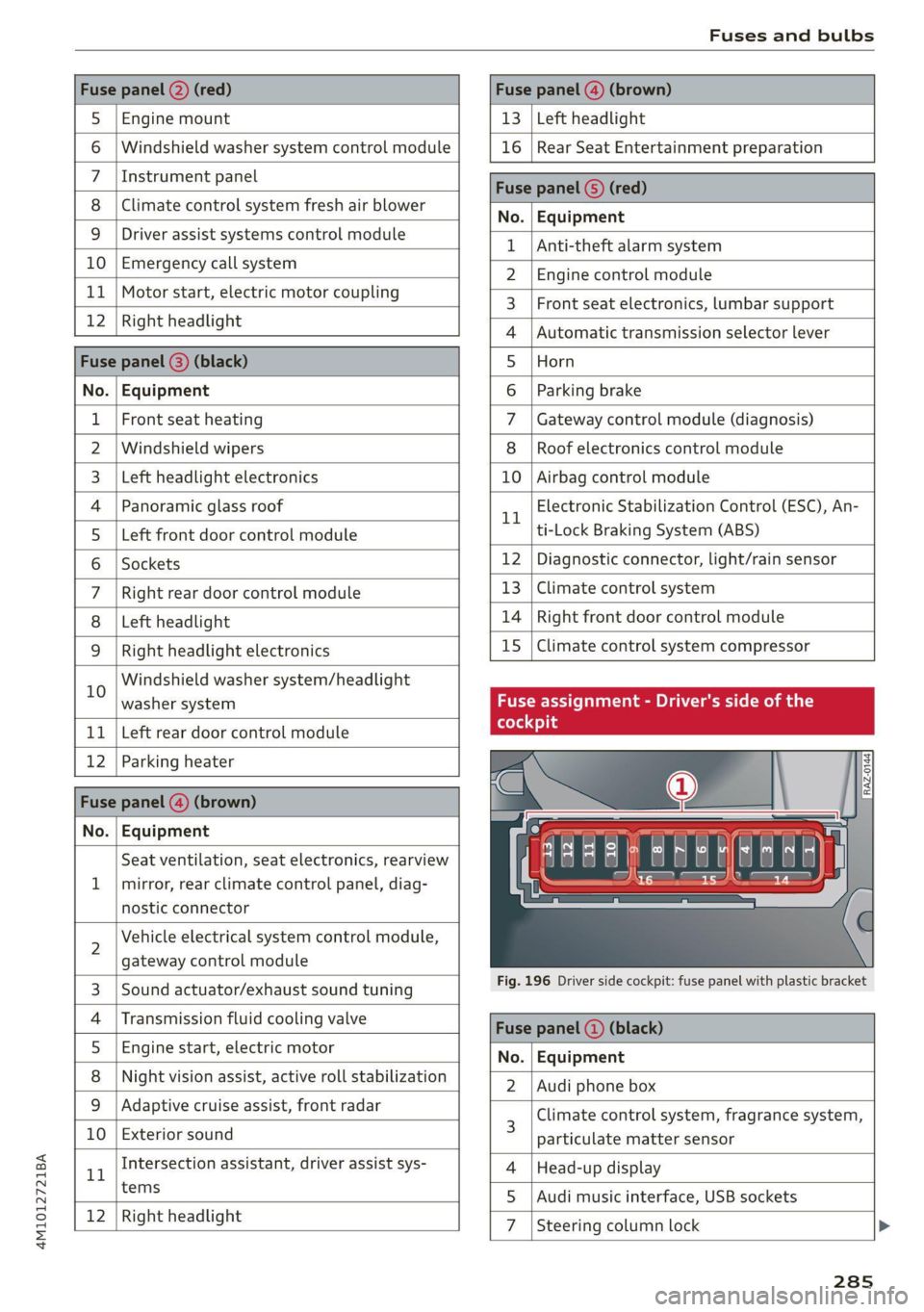
Fuse panel @) (red) Fuse panel (@) (brown)
5 |Engine mount 13 |Left headlight
6 | Windshield washer system control module 16 | Rear Seat Entertainment preparation
7 \Instrument panel Fuse panel ©) (red)
8 |Climate control system fresh air blower No. EGiiRirnictit
9 | Driver assist systems control module { |Anti-thelealanmaystem
UO | Eivietgendy call gystem 2 | Engine control module
+. | Wokonstart, clsetnte moter coupling 3 | Front seat electronics, lumbar support
12 |Right headlight 4 |Automatic transmission selector lever
Fuse panel (@) (black) 5 |Horn
No. | Equipment 6 | Parking brake
1 |Front seat heating 7 | Gateway control module (diagnosis)
2 |Windshield wipers 8 | Roof electronics control module
3 | Left headlight electronics 10 | Airbag control module
4 |Panoramic glass roof rl Electronic Stabilization Control (ESC), An-
5 | Left front door control module ti-Lock Braking System (ABS)
6 |Sockets 12 | Diagnostic connector, light/rain sensor
7 | Right rear door control module 13 | Climate control system
8 | Left headlight 14 | Right front door control module
9 | Right headlight electronics 15 | Climate control system compressor
10 Windshield washer system/headlight . . .
washer system Fuse assignment - Driver's side of the
11 | Left rear door control module
12 | Parking heater s
Fuse panel (4) (brown) . =
No. | Equipment awe
Seat ventilation, seat electronics, rearview 4 EET L
1 | mirror, rear climate control panel, diag- to 15
nostic connector
2 Vehicle electrical system control module,
gateway control module
3. [Sound actuatorexhaust sound tuning Fig. 196 Driver side cockpit: fuse panel with plastic bracket
4 |Transmission fluid cooling valve Face panel @) (black)
5 |Engine start, electric motor No. Equipment
8 | Night vision assist, active roll stabilization 2 | Audi phone box
9_| Adaptive cruise-assist, front radar Climate control system, fragrance system,
10 | Exterior sound 3 particulate matter sensor
1 Intersection assistant, driver assist sys- 4 |Head-up display
tems 5 |Audi music interface, USB sockets
12 [Right headlight 7 |Steering column lock
285
Page 290 of 316

Data privacy
Data privacy
Image recording
Surrounding area monitoring
Applies to: vehicles with surrounding area monitoring
Some vehicle functions require the vehicle’s path
to be detected and evaluated. This is done by
cameras installed permanently on the vehicle
that detect objects in the vehicle's surroundings
(such as obstacles or guard rails). The live images
from the cameras are transmitted to the applica-
ble control module.
The camera images are transferred to the respon-
sible control module for processing and may be
stored, depending on vehicle equipment. The
control
module analyzes the current camera im-
age using image evaluation software. This image
evaluation software detects anonymized techni-
cal measurements, such as distances to objects.
The control module evaluates these technical
measurements and makes it possible for the as-
sist systems to control the vehicle, if necessary.
Data memories
rt 1 oO g|
= +
a
Fig. 198 Driver's side footwell: connection port for the On
Board Diagnostic System (OBD)
Your vehicle is equipped with electronic control
modules for various vehicle systems such as the
airbags. These vehicle control modules store data
while driving normally that is required by an au-
thorized Audi dealer or authorized Audi Service
Facility for diagnosis and repair purposes. Only
certain types of data are recorded for a very short
period of time if a control module has detected a
288
system event. No noises, conversations, or im-
ages will be recorded in the vehicle.
The data may include information such as the ve-
hicle speed, the direction of travel, and informa-
tion about the brake system, or also the behavior
of the restraint system in the event of an acci-
dent. The stored data can be exported and down-
loaded with special devices, which must be con-
nected directly to the vehicle.
On Board Diagnostic System (OBD)
There is a diagnostic connector socket in the driv-
er's side footwell to read out the various control
modules and the event data recorder. Data re-
garding the function and condition of the elec-
tronic control modules is stored in the event
memory. Only have an authorized Audi dealer or
authorized Audi Service Facility read out and de-
lete the event memory.
Z\ WARNING
— Incorrect use of the connection port for the
On Board Diagnostic System can cause mal-
functions, which can then result in accidents
and serious injuries.
— Only allow an authorized Audi dealer or au-
thorized Audi Service Facility to read out the
engine data.
(er) ata recorder
Event Data Recorder
This vehicle is equipped with an Event Data Re-
corder (EDR). The main purpose of an EDR is to
record, in certain crash or near crash-like situa-
tions,
such as an airbag deployment or hitting a
road obstacle, data that will assist in understand-
ing how a vehicle's system performed. The EDR is
designed to record data related to vehicle dynam-
ics and safety systems for a short period of time,
typically 30 seconds or less. The EDR in this vehi-
cle is designed to record such data as:
— How various systems in your vehicle were oper-
ating;
— Whether or not the driver and passenger safety
belts were buckled/fastened;
Page 291 of 316
4M1012721BA
Data privacy
— How far (if at all) the driver was depressing the
accelerator and/or brake pedal; and,
— How fast the vehicle was traveling.
These data can help provide a better understand-
ing of the circumstances in which crashes and in-
juries occur. NOTE: EDR data are recorded by your
vehicle only if a non-trivial crash situation occurs;
no data are recorded by the EDR under normal
driving conditions and no personal data (e.g.
name, gender, age, and crash location) are re-
corded. However, other parties, such as law en-
forcement, could combine the EDR data with the
type of personally identifying data routinely ac-
quired during a crash investigation.
To read data recorded by an EDR, special equip-
ment is required, and access to the vehicle or the
EDR is needed. In addition to the vehicle manu-
facturer, other parties, such as law enforcement,
that have the special equipment, can read the in-
formation if they have access to the vehicle or the
EDR.
Assist system monitor
This vehicle is equipped with an Assist System
Monitor (ASM). The ASM collects data that is not
stored by the EDR in the event of an accident. The
main task of the ASM is to make it possible to un-
derstand the role and the behavior of the assist
systems in these accident situations. In addition
to the data that the EDR stores, the ASM records
data related to the assist systems starting sever-
al seconds before the accident or near-accident.
The data collected by ASM depends on the equip-
ment and may include the following information:
status information of the assist systems (for ex-
ample, if they are switched on or off, system
events, etc.), control interventions (for example,
by ESC, ABS, Audi pre sense”, etc.), and assist
systems settings (such as speed settings).
Special devices and access to the vehicle or to the
ASM are necessary in order to read the data from
the ASM memory. In addition to the vehicle man-
ufacturer, third parties such as law enforcement
authorities can also read and analyze the stored
data if they have access to the vehicle or to the
ASM.
Data usage
Audi can read out the information stored in the
data memories or similar data, or give this infor-
mation to third parties, especially in the follow-
ing situations:
— If the vehicle owner or lessee agrees
—If there is an official request from the police
— Ifa court or authorities request it
If legally permitted, Audi can also use the data
for analysis of vehicle operation and safety per-
formance or provide this data to third parties for
research purposes.
Transmitted information
Privacy settings
Applies to: vehicles with Audi connect
>» Applies to MMI: Select on the home screen:
SETTINGS > Privacy settings.
Data is transmitted from the vehicle when using
Audi connect services.
> To display additional information about the pri-
vacy settings and the associated symbols in the
status bar, press @ in the MMI.
Requirement: the ignition must be switched on.
Setting the maximum privacy settings
When the Activate privacy mode function is
switched on, the data connection is deactivated
or sending of data is restricted, but all safety-re-
lated, legal, or contractually required Audi con-
nect
services remain activated. The majority of
the Audi connect services are deactivated.
When the function is switched off, the data con-
nection will be available in order to use Audi con-
nect services.
Adjusting individual privacy settings
In the MMI, you can adjust individually which da-
ta should be transmitted from the vehicle. If you
switch on a data category, the data will be trans-
mitted.
289
>
Page 302 of 316

Index
Battery
Charging (12 Volt vehicle battery)....... 244
Vehicle battery (12 Volt)............... 242
Winter operation (12 Volt vehicle battery) . 242
Blinds
refer to Panoramic glass roof............ 41
Block TOUtC scan + « cesanin & meson © wanes a > ennaKes 194
Blowel’s « cscws 6 o snare a o aeons & H scaeens @ o tawens © « 90
Bluetooth
Audio player. .... 0.0.2.0... eee eee eee 211
Connecting acellphone............... 165
Deleting a device ...... 0.6. sec eeee eee 227
Device overview « ciccie « + cccvwse «6 ssesue «+ sere 226
Disconnecting adevice................ 227
Displaying profiles.................... 227
Searching fora device................. 227
Selecting adevice.................04. 227
Specifying’a favorite aes se css ye owes ae 227
Brake fluid
Checking the brake fluid level........... 241
Brake@Sicone 2 y sauoe « 2 aaeay g 2 aaeee oe marae 4 2 eee 102
Brrakerassist®. cvs « x saree « a sacnave a « amavens = « 112
Brake fluid... 2. eee eee eee 241
Emergency braking function............ 105
AO Besesos x 2 cnsoams oo sacaings wo wmmmitss os aims @ a1 sen 106
New brake pads............0 02.0 eee ee 103
Break-in security feature..............0-- 33
Breaking in
New brake pads..............---000-- 103
N@W tINGS's « & sreiae & & seen & 2 saver x weirs 8 253
Browser
refer to Mediacenter...............04. 216
Business. addressiis. «vias. won a & manna a io 195
Cc
California Proposition 65 Warning........ 234
Battery specific........... 0... e eee 243
CALLLISE,. success ot ewes os: ciara oo mean ea 169,171
CAMP ASiisie se wawis ow enn oH reMaSE Ww oweneRs a 8 119
Locations .......... 0... cece eee eee ee 120
Capacities
Fueltank...... 0.0.0... eee ee eee eee ee 297
Washer fluid reservoir..............005 297
CarGO:TlOOP x: « x eawn sz weme + o were oe eee ge 87
Cargo (Tatis = sciss < 2 sevon ¢ ¥ Sases ¢ Hae TE Be 87
Cargo net... cece eee cece eee eee 86
300
Car KO Yciie 2 veers eueenes eo eteneoe © 8 aeevnue ov ema 34
Car phone
Serial number (IMEI) .................. 175
SWItCHING OM sc, ¢ eee ss Geen se Ewes Be 175
Carwash... i.e cece eee eee 267
Catalytic converter.................000. 232
Cell phone
refer to Telephone.............0ee0ee- 165
Cell phone compartment
refer to Audi phone box............... 167
Central locking: < 2 ses s ewes se een sv es
NUTO:LOCKS 2 sac 2 wane 2 omom 0 3 eam x & eae
Convenience key
Convenience opening and closing......... Al
Luggage compartment lid............... 37
Mechanically unlocking and locking....... 33
MBSSA0ES < seus 2 5 aes 4 FOS oA aeOR 8 5 EE 32
Remote control key.............--00005 35
Setting... 2... cece cece eee eee
Vehicle key . .
Central locking switch..............20--. 32
Ceramic brakes................0000000 103
COEF CATO cn ws. setae oo annem 0 a aconeee 0 © ampere 295
Charging
refer to Power sourceS.........---.0000- 81
Charging the battery (mobile devices). 167, 213
Child safety lock
Climate control system controls inthe rear. 40
PoWer Wind OWSiies « ¢ awwa x 4 awe va aaron oe 40
REAR OOS a a 6 cnerevs 2 wrens o aamene wo © vee wo 40
Child safety:seats:. «2 cccee so ese ve eee 6 wane 75
Securing to the top tether anchor........ 79
Securing with a safety belt.............. 78
Securing with LATCH: ss ssi av sewers ¢ & anaes 77
Cleaning s savas « 2 cause @ s ears 5 2 oom 4 RoE 267
Cleaning Alcantara.............. eee eee 270
Cleaning artificial leather............... 270
Cleaning carbon components........ 269, 270
Cleaning controls...............002000. 270
Cleaning decorative parts/trim........... 269
Cleaning exhaust tail pipes.............. 269
Cleaning plastic parts................4.. 269
Cleaning textiles... coc. cries evens ee 270
Climate control system...............005 89
Climate control system controls in the rear
Child safety lock « wsccsss sass 6 eevee 2 wesees « 40
Page 304 of 316

Index
Drive select
refer to Audi drive select.............0. 108
Drive system. ......... 00000000002 100, 102
Audi drive select . ccna icas as eean cain 108
Driving down hills... ... 0... cee eee eee 106
Driving program............002 022s 97,142
Driving through water..............-06% 107
Driving thimes. «ose
Driving tips
Driving through water.............000- 107
Efficient driving exe: + ¢ eens x x eee 5 o ews 100
Offroad Griving ccs < wen a 2 wean 2 2 wens 106
Uphilland downhill................... 106
Drivinguphills............ 0.0.0... 106
DVD drive (media drives) ws... 6 ccs ee caren 211
E
E-mail
Message options.................0005 174
S@ttingS «an < : seas « ¢ sows & wens st eS 174
EDL
refer to Electronic Differential Lock...... 112
EDR
Event Data Recorder sveccs = s sovi s waver ess 288
Efficiency assistess « < ssve «one 2 a esas soo 131
Electrical system . 1... 00. eee eee eee ee 242
Electromechanical parking brake......... 104
Electronic Differential Lock.............. 112
Electronic immobilizer................00. 34
Electronic Stabilization Control........... 112
Embedded SIM card............---.00005 179
EMergency2assist creces oo verse © suetecs 9 were « 154
Emergency assistance ..... 0.2... 00.000 273
Emergency braking function............. 105
Emergency call.............000005 171, 184
Emergency flashers. .........e0eeeeeeeee 49
Emergency mode ......:.cseeececesevtes 99
Emergency operation
DOGS «
Luggage compartment lid............... 39
Panorartiic glass oO f aus » + aes noes ee 42
Emissions control system............... 232
Energy consumers...............02.0005 15
Energy management................... 101
302
Engine
Breakingin.......... 0... e eee eee eee 100
GOOlaNE 2 snow 4 < meay ¢ e meme 2 x ewe e RaE 2 239
Emiengeney tpt 3 seas vx wns o siemens a ¥ a 94
Jump starting. ............ cee eee eee 278
Start/Stop system............-000000- 101
Starting/Stopping wc « «esse se enews wees 94
Engine compartment
Opening and closing the hood.......... 234
Overview... ... 0... eee eee eee 235
Safety precautions............-.0.eeee 233
Engine oil
AGING o coweses oo eeeirece wn evens @ w onesies vw HrSoes
Changing
Checking oil level... 2 cn ss peen ee reuse: 236
CONSUMPTION bss ¢ & saves & o reams @ 8 ere @ 0 236
Indicator light..............0..-000 0 236
Replacement interval................. 245
Temperature display................... 14
Engine sound
Audi drive select.............002-.00. 109
Enginestartisystem cscs ¢ wees so wwsaes oe vow 95
Engine stop
refer to Start/Stop system............. 101
Entry Zexit Lig htingpes «+ cassee » x wnowse » susnass a « 48
Entry assistance: « «sco «2 sass vv wom os orn 61
Rear seats
also refer to Exit assistance............. 61
Environment
Unleaded gasoline................200. 229
eSIM
refer to Embedded SIM card............ 179
Event Data Recorder (EDR) « v.as os cows sw 288
EXitaSsiStanee « sae « 2 auee x o naw 2 x gown 2 61
EXIGWantliNGicves = sau ¢ 2 eases ¢ & Geen F BES 152
EXtenion lightinGias: s z semy sy saws 4 § seme Fee 45
Exterior mirrors... . 02... eee eee eee eee 51
Folding:settingS sss s < ena es yewn as eeu ae 31
External voice operation..............005 26
F
Factory default settings
Multi Media Interface . ..0... 000. es ove 226
Fast forwarding and rewinding (media file). 215
Fast forwarding (media files)............ 215
FaSthOutGs 2 goes 2 ones ¢ 2 eeu be eee i Fa 187