ignition AUDI Q7 2021 Owner´s Manual
[x] Cancel search | Manufacturer: AUDI, Model Year: 2021, Model line: Q7, Model: AUDI Q7 2021Pages: 332, PDF Size: 117.99 MB
Page 299 of 332
4M1012721BC
Fuses and bulbs
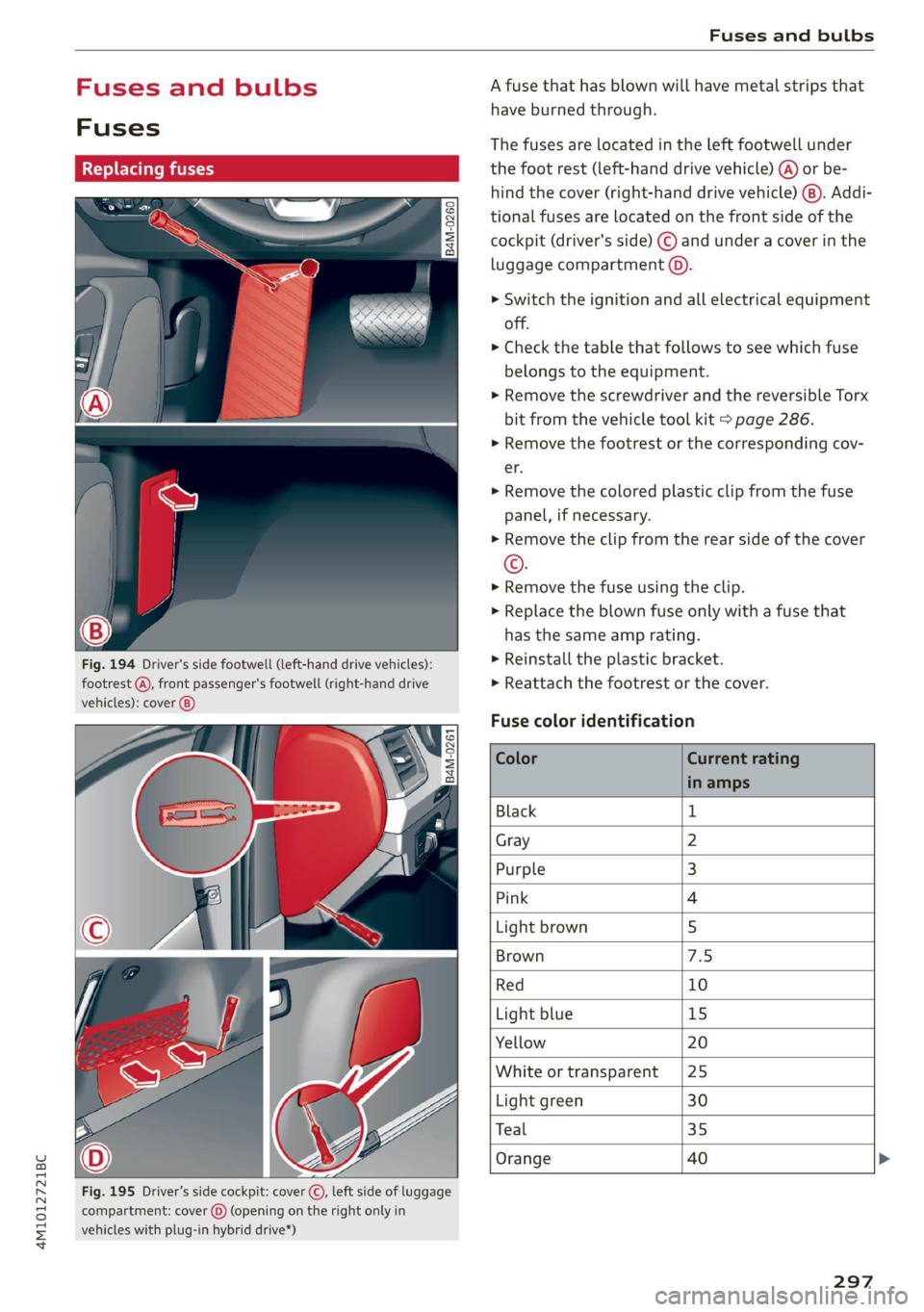
Fig. 195 Driver’s side cockpit: cover ©, left side of luggage
compartment: cover (©) (opening on the right only in
vehicles with plug-in hybrid drive*)
A fuse that has blown will have metal strips that
have burned through.
The fuses are located in the left footwell under
the foot rest (left-hand drive vehicle or be-
hind the cover (right-hand drive vehicle) Addi-
tional fuses are located on the front side of the
cockpit (driver's side) (© and under a cover in the
luggage compartment (0).
> Switch the ignition and all electrical equipment
off.
> Check the table that follows to see which fuse
belongs to the equipment.
> Remove the screwdriver and the reversible Torx
bit from the vehicle tool kit > page 286.
> Remove the footrest or the corresponding cov-
er.
> Remove the colored plastic clip from the fuse
panel, if necessary.
> Remove the clip from the rear side of the cover
» Remove the fuse using the clip.
> Replace the blown fuse only with a fuse that
has the same amp rating.
> Reinstall the plastic bracket.
>» Reattach the footrest or the cover.
Fuse color identification
Color Current rating
in amps
Black 1
Gray 2
Purple 3
Pink 4
Light brown 5
Brown AS
Red 10
Light blue 15
Yellow 20
White ortransparent |25
Light green 30
Teal 35
Orange 40
297
Page 300 of 332

Fuses and bulbs
ZA\ WARNING
Do not repair fuses and never replace a blown
fuse with one that has a higher amp rating.
This can cause damage to the electrical sys-
tem and increases the risk of fire.
@) Note
If a new fuse burns out again shortly after you
have installed it, have the electrical system
checked as soon as possible by an authorized
Audi dealer or authorized Audi Service Facili-
ty.
@) Tips
— The following table does not list fuse loca-
tions that are not used.
— Some of the equipment listed in the follow-
ing tables applies only to certain model ver-
sions or certain optional equipment.
Fig. 197 Front passenger's footwell (right-hand drive vehi-
cle): fuse panel with plastic clip
(brown) nT <7 wo @ 7 oo 3 o
Zz ° . | Equipment
Catalytic converter heating
Engine components
Engine components
Engine components
Brake light sensor
Engine components
Engine components
Engine components
WOlLOlINI
AD)
M|ASWIN/
PR
Engine components
B o Oil pressure sensor, oil temperature sensor
Bb BR Engine components
BR N Engine components
b Ww Engine cooling
BE R Engine control module
B wn Engine sensors
Bb a Fuel pump
panel with plastic clip Fuse
No. | Equipment
1 {Ignition coils
3 | High-voltage heating
298
Page 306 of 332

Data privacy
typically 30 seconds or less. The EDR in this vehi-
cle is designed to record such data as:
— How various systems in your vehicle were oper-
ating;
— Whether or not the driver and passenger safety
belts were buckled/fastened;
— How far (if at all) the driver was depressing the
accelerator and/or brake pedal; and,
— How fast the vehicle was traveling.
These data can help provide a better understand-
ing of the circumstances in which crashes and in-
juries occur. NOTE: EDR data are recorded by your
vehicle only if a non-trivial crash situation occurs;
no data are recorded by the EDR under normal
driving conditions and no personal data (e.g.
name, gender, age, and crash location) are re-
corded. However, other parties, such as law en-
forcement, could combine the EDR data with the
type of personally identifying data routinely ac-
quired during a crash investigation.
To read data recorded by an EDR, special equip-
ment is required, and access to the vehicle or the
EDR is needed. In addition to the vehicle manu-
facturer, other parties, such as law enforcement,
that have the special equipment, can read the in-
formation if they have access to the vehicle or the
EDR.
Assist system monitor
This vehicle is equipped with an Assist System
Monitor (ASM). The ASM collects data that is not
stored by the EDR in the event of an accident. The
main task of the ASM is to make it possible to un-
derstand the role and the behavior of the assist
systems in these accident situations. In addition
to the data that the EDR stores, the ASM records
data related to the assist systems starting sever-
al seconds before the accident or near-accident.
The data collected by ASM depends on the equip-
ment and may include the following information:
status information of the assist systems (for ex-
ample, if they are switched on or off, system
events, etc.), control interventions (for example,
D_ System availability may be limited depending on the mar-
ket.
2) In preparation at the time of printing.
304
by ESC, ABS, Audi pre sense’, etc.), and assist
systems settings (such as speed settings).
Special devices and access to the vehicle or to the
ASM are necessary in order to read the data from
the ASM memory. In addition to the vehicle man-
ufacturer, third parties such as law enforcement
authorities can also read and analyze the stored
data if they have access to the vehicle or to the
ASM.
Data usage
Audi can read out the information stored in the
data memories or similar data, or give this infor-
mation to third parties, especially in the follow-
ing situations:
— If the vehicle owner or lessee agrees
— If there is an official request from the police
— Ifa court or authorities request it
If legally permitted, Audi can also use the data
for analysis of vehicle operation and safety per-
formance or provide this data to third parties for
research purposes.
Data memory for autonomous driving!)
Applies to: vehicles with data memory for autonomous driv-
ing
When park assist plus is active > page 172, data
is stored in a memory in the vehicle. This data is
continuously overwritten by more current data
after a few seconds. The data is erased when the
ignition is switched off.
In certain situations, such as if an airbag has
been triggered or a parking process was ended,
the corresponding technical data may be stored
in the data memory for autonomous driving. The
data memory for autonomous driving is a read-
only memory that has a limited amount of stor-
age space. If the storage space is full, the oldest
data will be overwritten with the newest data. >
Page 307 of 332

4M1012721BC
Data privacy
Exporting data
You can read out the data memory for autono-
mous driving and export this data to a USB stick.
The settings depend on the vehicle equipment.
Requirement: the vehicle must be stationary, the
automated systems must not be active, and the
ignition must be switched on. A USB stick must
be connected to the USB input.
» Applies to: MMI: Select on the home screen:
SETTINGS > Data management > Statistics.
> Follow the instructions in the MMI.
The export will be canceled if you switch menus,
for example.
Recorded data
— Driver interactions (such as the driver pressing
the brake pedal)
— Vehicle dynamics (such as speed)
— Status of automated systems
— Control requests
— Relevant measurements from monitoring the
surroundings
— Image data from monitoring the surroundings
— System status, timestamp, and vehicle location
when deactivating/activating park assist plus
You can find additional information in the MMI:
— Applies to: MMI: Select on the home screen:
SETTINGS > General > Legal notes > About the
data memory.
@) Tips
— The data is processed and stored locally in
the vehicle. It is not automatically transmit-
ted to Audi or other third parties, for exam-
ple through the cloud. The owner or driver is
responsible for the data. Audi does not have
access to it.
— For additional information and the evalua-
tion of data, please contact Audi Customer
Care.
Transmitted information
Data collection
Applies to: vehicles with data collection
Depending on the country, Audi may collect data
for the following purposes, for example: offer
and product optimization, public safety, provision
of Audi connect remote vehicle services, and
adaptation to customer expectations. For exam-
ple, various technical function data, environmen-
tal data, driving data, and usage data will be col-
lected for a specific purpose and forwarded to
Audi. The data will be sent from the vehicle at
the time the data was collected.
Applies to: MMI: You can find additional informa-
tion about data collection in the MMI. Select on
the home screen: SETTINGS > General > Legal
notes > About Audi connect.
If you would like to deny data transmission to
Audi, contact an authorized Audi dealer or au-
thorized Audi Service Facility for more informa-
tion. You also have the option to deactivate data
transmission within the privacy settings.
Privacy settings
Applies to: vehicles with Audi connect
> Applies to MMI: Select on the home screen:
SETTINGS > Privacy settings.
When using Audi connect services or during data
collection, data will be transmitted from the ve-
hicle.
> To display additional information about the pri-
vacy settings and the associated symbols in the
status bar, press @ in the MMI.
Requirement: the ignition must be switched on.
Setting the maximum privacy settings
When the Activate privacy mode function is
switched on, the data connection is deactivated
or sending of data is restricted, but all safety-re-
lated, legal, or contractually required Audi con-
nect
services remain activated. The majority of
the Audi connect services are deactivated.
305
Page 322 of 332
Index
HFP
refer to Hands Free Profile............. 183
High beams
High beam assistant................... 51
Highway lights ..... 0.0... sce e eee eee 50
Hill descent assist..............02-000. 111
Hill descent control.............0 0000 ee 110
Hill hold assist... 0.2.0.0... 00.0022 eae 100
Home
refer to Home address............0008 208
Home address.............00 2.00 ee eee 208
HomeLink
refer to Garage door opener............. 47
Home screen... .... cece eee eee ee eee 18
HOM... eee eee 6
Hotspot
refer to Wi-Fi...........0. 00sec eee eee 197
I
Ignition
Switching on and off...............0-.- 98
Imbalance (wheels) ...............--05. 268
Immobilizer
refer to Electronic immobilizer........... 38
Inclinometérs < = sees =» wees sg wees sy eee 110
Indicator lights....... 0.0... eee eee eee 7
Inspection interval...............20-00. 257
Instrument cluster..............--000005 12
Adjusting the layout................00. 13
Cleaning ’s 2 a sina 5 6 wens oo were 2 6 wonem @ ere 283
Engine code.............-. eee eee eee 239
Pailit@s < anaes = eae & 3 Baws § & Rae 2 FS 12
On-board computer..............2-.00. 15
Operating ........ cece eee eee ee eee 13
Service interval display................ 257
Software information..............004 239
Switching
tabs.................000000. 13
Switching the view.................0005 13
Vehicle functions « cs. se cere sc cee ee cae 15
Version information.................. 239
Instrument illumination................. 55
Integrated assistance................0-. 19
Integrated Toll Module................. 134
Intelligent search
Navigationicn « = ses 2 x mews = wanes a 2 cae a 203
Interior lighting « « ses 2s cess ewes eee 54,55
320
Interior MONItOriING’s « s ccs so wou 2 ¥ vesvee o 37:
Intermittent mode (windshield wipers) ..... 58
International travel...............20005 198
Internet
PEPE TOXCONNCCE is. = veseer ee seem ev ateeee eos 194
Internet radio
refer to Online radio.............. 218, 219
Intersection:assistant ccc. 26 case so mse © 158
TOMZOP oe. oa cxanwes < w omawees vv ema a x ee wo coe 95
iPhone
refer to Audi music interface........... 224
J
JUMAPESEAMERNG) revise © sreeees wo © euersay wo © vette «8 Boe 292
K
Rey's « cwensne oo ccenaua a 0 sean @ arene we sro a 4 34, 38
Convenience opening and closing......... 46
Key'replacemenit:.: ss sees se eean ee eee es 38
Mechanical-key’s wssenc a « case ao saw ve ee ¥ 38
Not recognized ........ cece cee eee 99
PANIG Button » ses < = sacs ¢ = seen ¢ = sees ye 38
Replacing the battery.................. 40
Unlocking and locking................-- 39
VEHICLE COdG « secs s ¢ seme = 2 ee yo ee Fe 38
Key User... eee eee 32
Kick-down .... 2... eee eee eee 102
L
Lane assist
refer to Lane departure warning......... 149
refer to Lane guidance..............0. 149
Lane departure warning..............05- 149
Cleaning the camera area.............. 281
Lame Quidaneeiens 5 « cscsce oo ae vw accuse ¥ oem 142
LapitlIMe rs. « & soesons « awesese + sameness cream 2 Oo 131
Laser lightingiss + + sss 6s eeu sy pew ae ees 52
FaSer Scanners « « aay a eegu 4 x ees x ROE 124
Gleaming wor = 2 ween o anne 2 peewee oe ween oo x 282
LATCH (securing child safety seats)......... 82
Leather care and cleaning............... 283
Legal information
License subscriptions................. 239
Software information................. 239