ignition AUDI Q7 2021 Owner´s Manual
[x] Cancel search | Manufacturer: AUDI, Model Year: 2021, Model line: Q7, Model: AUDI Q7 2021Pages: 332, PDF Size: 117.99 MB
Page 139 of 332
4M1012721BC
Driver assistance
An additional indicator will appear in the head-up
display*.
Changing the cruise control speed
Applies to: vehicles with cruise control system
Requirement: the system must be switched on.
> To increase or decrease the cruise control speed
in small increments, tap the lever up to the
first level toward @)/G) > page 136, fig. 101.
> To increase or decrease the cruise control speed
in larger increments, tap the lever up to the
second level toward ()/C).
> To increase or decrease the cruise control speed
continuously, tap and hold the lever at the first
or second level toward @)/G).
Overriding or deactivating the cruise
control speed
Applies to: vehicles with cruise control system
You can override or deactivate the cruise control
system. When you deactivate the system, your
cruise control speed will be stored and you can
resume that speed.
Requirement: the system must be switched on
and the regulated speed must be activated.
Overriding
> To temporarily override the cruise control
speed, press the accelerator pedal.
> To resume the stored regulated speed, remove
your foot from the accelerator pedal.
If you override the cruise control system for a
long period of time, the cruise control system
will be deactivated. The (Usd or [RM indicator
light will be displayed and the cruise control
speed will be saved.
Deactivating
> To deactivate the cruise control speed, press
the lever toward (2) (not locked into place)
=> page 136, fig. 101, or
> Press the brake pedal.
ZX WARNING
Resting your foot on the accelerator pedal
could override the cruise control. This will pre-
vent braking interventions by the system.
Seem NLU ai
Applies to: vehicles with cruise control system
When you switch the system off, the cruise con-
trol speed will be erased.
Requirement: the system must be switched on.
> To switch the system off, press the lever toward
@ (locked into place) > page 136, fig. 101, or
>» Switch the ignition off.
Applies to: vehicles with cruise control system
Gs / 3) Speed control system: currently un-
available. See owner's manual
If the indicator light turns on and this message
appears, the cruise control system has been deac-
tivated. There is a temporary malfunction, for ex-
ample the brakes are overheating. Switch the
cruise control system on again later.
Efficiency assist
Applies to: vehicles with efficiency assist
Efficiency assist can assist the driver with predic-
tive information in order to reduce fuel consump-
tion. Depending on vehicle equipment, the sys-
tem may access data from the navigation system,
the camera behind the windshield, and the radar
sensors.
Adjusting the efficiency assist
You can adjust efficiency assist functions individ-
ually. The settings depend on the vehicle equip-
ment.
— Predictive messages > page 138.
— Predictive control > page 147, Adjusting the
adaptive cruise assist.
137
Page 144 of 332

Driver assistance
> Push the lever away from you into position ©)
until it clicks into place.
The indicator light and the set speed will turn off.
Z\ WARNING
— Observe the safety precautions and note the
limits of the assist systems, sensors, and
cameras © page 123.
— The adaptive cruise assist is only an assist
system, and the driver is still responsible for
controlling the vehicle. The driver is espe-
cially responsible for braking, steering,
starting to drive, and controlling the speed
and the distance from other vehicles.
— Turn on the adaptive cruise assist only if the
surrounding conditions permit it. Always
adapt your driving style to the current visu-
al, weather, road, and traffic conditions.
— Switch the adaptive cruise assist off tempo-
rarily when driving in turning lanes or high-
way exits. This prevents the vehicle from ac-
celerating to the stored speed when in these
situations.
— If you press the [SET] button @) when driv-
ing at speeds below 15 mph (20 km/h), the
minimum possible speed that the system
can maintain will be set. If no vehicle is de-
tected ahead of you, the vehicle will acceler-
ate up to that speed.
@ Tips
— Always keep your hands on the steering
wheel so you can be ready to steer at any
time. The driver is always responsible for
adhering to the regulations applicable in
the country where the vehicle is being oper-
ated.
— If you switch the ignition or the adaptive
cruise assist off, the stored speed is erased
for safety reasons.
— When the adaptive cruise assist is switched
on, the ESC and the ASR are switched on au-
tomatically.
D_Incertain countries.
142
— The system cannot be switched off or it may
be interrupted if the road exceeds the maxi-
mum possible grade for safe operation.
Switching lane guidance on and off
Applies to: vehicles with adaptive cruise assist and lane guid-
ance
B8V-0692
Fig. 107 Turn signal lever: button for lane guidance and
lane departure warning
Within the limits of the system, lane guidance
provides corrective steering to assist the driver
with keeping the vehicle in the center of the lane
as much as possible. This feature can be deacti-
vated.
Ina traffic jam, lane guidance also helps with
leaving a space for emergency vehicles ») by
steering your vehicle as close to the edge of your
lane as possible.
Switching lane guidance on and off
Requirement: lane guidance must be preselected
in the MMI > page 147.
> To activate or deactivate the availability of the
lane guidance, press the button on the turn sig-
nal lever > fig. 107.
The system will assist the driver by providing cor-
rective steering only when adaptive cruise assist
is actively regulating and availability is switched
on.
Overview of displays and lane guidance
limitations
The availability of lane guidance is shown with in-
dicator lights and with arrows @i) > page 140,
fig. 104 in the Driver assistance display.
Page 145 of 332

4M1012721BC
Driver assistance
@ - Lane guidance is active.
> 4 - This indicator light turns on if the limits of
the system have been reached (for example, the
system’s steering force is not sufficient to handle
tight curves). Take over steering.
ri turns white, lane guidance is switched on
but is not active. This may occur due to the fol-
lowing system limits or situations:
— The necessary lane marker lines have not been
detected (for example, in a construction zone
or because the lines are obstructed by snow,
dirt, water, or lighting)
— The lane is too narrow or too wide
—The curve is too narrow
— Visibility is obstructed by a rise or dip.
— The driver's hands are not on the steering
wheel
— The turn signal was activated.
Steering intervention request
If no steering activity is detected or the limits of
the system are reached, the driver steering inter-
vention request will alert the driver using audio
and visual signals, such as a} or &. Take over
the
steering and keep your hands on the steering
wheel so that you will be ready to steer at any
time. The system will become inactive after a
short time and will only be active again later.
If the driver does not take over steering, adaptive
cruise assist will be canceled. If the vehicle is
equipped with emergency assist and it is ready to
function, it will be activated if possible
=> page 159.
ZA\ WARNING
Observe the safety precautions and note the
limits of the assist systems, sensors, and
cameras > page 123.
@ Tips
— Always keep your hands on the steering
wheel so you can be ready to steer at any
time. The driver is always responsible for
adhering to the regulations applicable in
the country where the vehicle is being oper-
ated.
— Audi recommends only switching on lane
guidance on well-constructed roads.
The & fig. 107 button switches lane guid-
ance availability and the lane departure
warning on or off simultaneously, if lane
guidance is preset in the adaptive cruise as-
sist settings.
Predictive control
Applies to: vehicles with adaptive cruise assist and efficiency
assist
Fig. 108 Instrument cluster: speedometer: predictive con-
trol display
With predictive control, efficiency assist adapts
the set speed in adaptive cruise control @ based
on detected speed limits and the upcoming
route. Once the system no longer detects any in-
cidents, adaptive cruise control will accelerate
back up to the last speed that the driver set. Af-
ter switching on the ignition, the availability of
predictive control is indicated by a message when
the adaptive cruise assist is first activated.
Incident symbols indicate the situation to which
predictive control is reacting > page 138, Situa-
tion symbols.
Requirements
— Predictive control is switched on in the MMI
=> page 147.
— The adaptive cruise assist must be actively reg-
ulating > page 141.
— The system can only react to speed limits that
are 15 mph (20 km/h) or higher.
Display in the speedometer
The display depends on vehicle equipment and is
not available in all layouts*. >
143
Page 146 of 332
Driver assistance
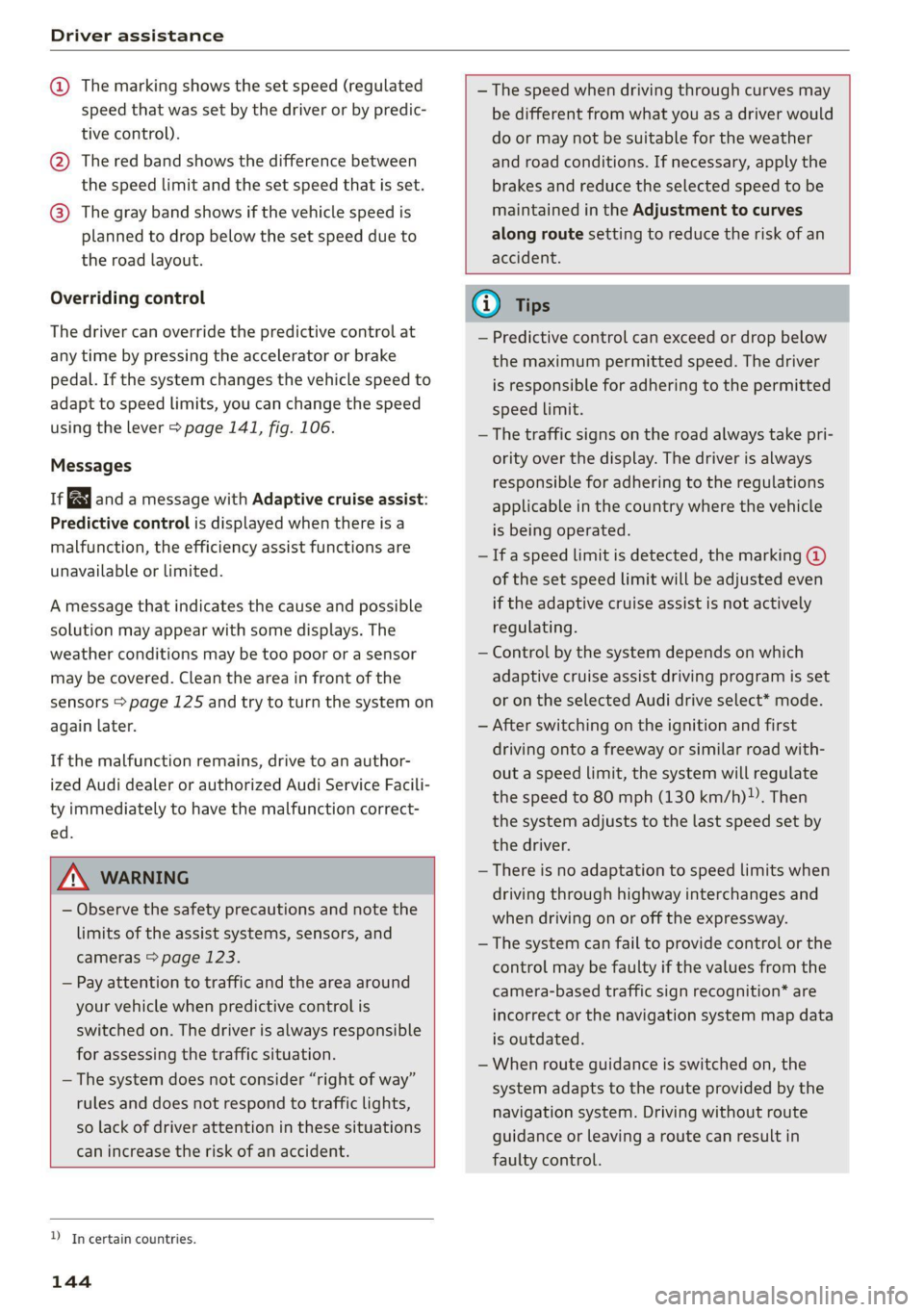
@ The marking shows the set speed (regulated
speed that was set by the driver or by predic-
tive control).
@ The red band shows the difference between
the speed limit and the set speed that is set.
@ The gray band shows if the vehicle speed is
planned to drop below the set speed due to
the road layout.
Overriding control
The driver can override the predictive control at
any time by pressing the accelerator or brake
pedal. If the system changes the vehicle speed to
adapt to speed limits, you can change the speed
using the lever > page 141, fig. 106.
Messages
If and a message with Adaptive cruise assist:
Predictive control is displayed when there is a
malfunction, the efficiency assist functions are
unavailable or limited.
A message that indicates the cause and possible
solution may appear with some displays. The
weather conditions may be too poor or a sensor
may be covered. Clean the area in front of the
sensors > page 125 and try to turn the system on
again later.
If the malfunction remains, drive to an author-
ized Audi dealer or authorized Audi Service Facili-
ty immediately to have the malfunction correct-
ed.
— The speed when driving through curves may
be different from what you as a driver would
do or may not be suitable for the weather
and road conditions. If necessary, apply the
brakes and reduce the selected speed to be
maintained in the Adjustment to curves
along route setting to reduce the risk of an
accident.
ZA\ WARNING
— Observe the safety precautions and note the
limits of the assist systems, sensors, and
cameras > page 123.
— Pay attention to traffic and the area around
your vehicle when predictive control is
switched on. The driver is always responsible
for assessing the traffic situation.
— The system does not consider “right of way”
rules and does not respond to traffic lights,
so lack of driver attention in these situations
can increase the risk of an accident.
D_Incertain countries.
144
@) Tips
— Predictive control can exceed or drop below
the maximum permitted speed. The driver
is responsible for adhering to the permitted
speed limit.
— The traffic signs on the road always take pri-
ority over the display. The driver is always
responsible for adhering to the regulations
applicable in the country where the vehicle
is being operated.
— Ifa speed limit is detected, the marking @
of the set speed limit will be adjusted even
if the adaptive cruise assist is not actively
regulating.
— Control by the system depends on which
adaptive cruise assist driving program is set
or on the selected Audi drive select* mode.
— After switching on the ignition and first
driving onto a freeway or similar road with-
out a speed limit, the system will regulate
the speed to 80 mph (130 km/h). Then
the system adjusts to the last speed set by
the driver.
— There is no adaptation to speed limits when
driving through highway interchanges and
when driving on or off the expressway.
— The system can fail to provide control or the
control may be faulty if the values from the
camera-based traffic sign recognition* are
incorrect or the navigation system map data
is outdated.
— When route guidance is switched on, the
system adapts to the route provided by the
navigation system. Driving without route
guidance or leaving a route can result in
faulty control.
Page 150 of 332

Driver assistance
handling will be adjusted from Sport to Moder-
ate and the lane guidance haptic feedback will be
adjusted.
Store last distance - The last distance that was
set will be stored after the ignition is switched
off. If the distance is not stored, distance [fz
(time distance of approximately 1.8 seconds) is
automatically preset every time the ignition is
switched on.
Predictive control > Set speed limit - adaptation
to speed limits can be switched On or Off. Regu-
lation With tolerance can also be selected, if de-
sired.
In this scenario, you may fall below or ex-
ceed the set speed in favor of increased efficien-
cy.
Predictive control > Adjustment to curves along
route - regulation based on the road ahead can
be switched Off or set individually from Slow to
Fast. The setting influences vehicle handling with
predictive control, for example the speed for
driving through curves.
Messages
Applies to: vehicles with adaptive cruise assist
If or Bal is displayed when there is a malfunc-
tion, the adaptive cruise assist functions may be
unavailable or limited.
A message that indicates the cause and possible
solution may appear with some displays. The
weather conditions may be too poor or a sensor
may be covered. Clean the area in front of the
sensors > page 125 and try to turn on the sys-
tems again later.
If the malfunction remains, drive to an author-
ized Audi dealer or authorized Audi Service Facili-
ty immediately to have the malfunction correct-
ed.
Applies to: vehicles with narrowed road assist
Narrow area
Depending on vehicle equipment, this message
appears in the Driver assistance display if the
adaptive cruise assist is adjusting the speed ina
narrow area, for example a construction zone.
148
Adaptive cruise assist: Please take over!
Adaptive cruise assist was ended, for example be-
cause the vehicle rolled backwards when starting
on a slight incline even though the system was
active. You must take over further control of the
vehicle.
Applies to: vehicles with laser scanner
Adaptive cruise assist: limited availability.
See owner's manual
This message appears when the sensor view is
limited, for example, when weather conditions
are too poor or a sensor is covered. You can
switch on the adaptive cruise assist, but certain
functions such as assistance in narrow areas will
not be available. Under certain circumstances,
some objects may be detected late or may not be
detected at all. Be especially careful. Cleaning
the area in front of the sensors > page 125 may
correct the malfunction.
Distance warning
Applies to: vehicles with distance warning
PRAz-0401]
Applies to: vehicles with adaptive cruise assist
Fig. 113 Instrument cluster: display of the current dis-
tance
RAZ-0400
Applies to: vehicles with adaptive cruise assist:
Fig. 114 Instrument cluster: distance warning
Page 154 of 332

Driver assistance
Audi pre sense preemptive safety measures
Applies to: vehicles with Audi pre sense
Depending on the vehicle speed and the vehicle
equipment, the following functions may be initi-
ated in certain situations:
— Visual and audio warnings
— Reversible tensioning of safety belts
— Closing the windows and panoramic glass roof
— Adjusting the seats
— Other preemptive safety measures by individual
systems
ZA WARNING
Observe the safety precautions and note the
limits of the assist systems, sensors, and
cameras > page 123.
@ Tips
— Depending on the risk situation that is de-
tected and the selected Audi drive select*
mode, not all preemptive safety measures
may be initiated under certain circumstan-
ces. Certain functions can be adjusted or
skipped if necessary.
— Audi pre sense may be restricted or unavail-
able under certain circumstances, for exam-
ple if:
— There are passengers with unfastened
safety belts
— After turning on the ignition, as long as
the 8 indicator light is on.
— When driving in reverse.
— There is an airbag control module mal-
function
— System functions may not be available if
the ESC is limited or switched off, or if
there is a malfunction.
Audi pre sense basic
Applies to: vehicles with Audi pre sense basic
Audi pre sense basic is automatically active at
speeds of approximately 20 mph (30 km/h) and
higher. Audi pre sense basic can trigger preemp-
tive safety measures during emergency braking
and dangerous braking maneuvers as well as in
unstable driving situations, such as oversteering
152
or understeering > page 152, Audi pre sense pre-
emptive safety measures.
The message Audi pre sense © will warn you
about the danger.
A WARNING
Observe the safety precautions and note the
limits of the assist systems, sensors, and
cameras > page 123.
Audi pre sense front
Applies to: vehicles with Audi pre sense front
Within the limits of the system, Audi pre sense
front can warn about an impending front end col-
lision and brake the vehicle strongly, if necessary.
The system uses the camera behind the wind-
shield and is available at speeds above approxi-
mately 6 mph (10 km/h).
Driving situations
The situations to which the system reacts de-
pends on the vehicle speed.
Up to speeds of approximately 50 mph
(85 km/h), the system may react to the following
situations:
— Pedestrians and cyclists in your lane
Up to speeds of approximately 155 mph
(250 km/h), the system may react to the follow-
ing situations:
—Avehicle driving ahead clearly applies the
brakes
— When approaching a vehicle ahead that is clear-
ly traveling more slowly
— When approaching a stationary vehicle
Prewarning
To warn about detected dangers, Audi pre
sense [@ will appear in the instrument cluster
and an audio signal will sound.
A brief application of the brakes
If a collision is imminent, there may be an acute
warning using a brief application of the brakes.
You
will also be warned about the danger by an
indicator in the instrument cluster display. You >
Page 157 of 332
4M1012721BC
Driver assistance
@ Tips
— If the system is switched off, it switches on
again automatically once the ignition is
switched on again.
— Switch Audi pre sense off when you are not
using public streets, when loading the vehi-
cle onto a vehicle carrier, train, ship, or oth-
er type of transportation, or when towing
the vehicle. This can help to prevent an un-
desired intervention from the Audi pre
sense system.
Messages
Applies to: vehicles with Audi pre sense
If BJ is displayed when there is a malfunction,
the Audi pre sense functions may be unavailable
or may be limited.
A message that indicates the cause and possible
solution may appear with some displays. The
weather conditions may be too poor or a sensor
may be covered. Bring the vehicle to a full stop,
switch the ignition off, and clean the area in front
of the sensors > page 125.
If the message still appears after switching the
ignition on again, have an authorized repair facili-
ty correct the malfunction as soon as possible.
D In certain countries.
Side assist
petted aCoy a)
Applies to: vehicles with side assist
al 3 a z
e|
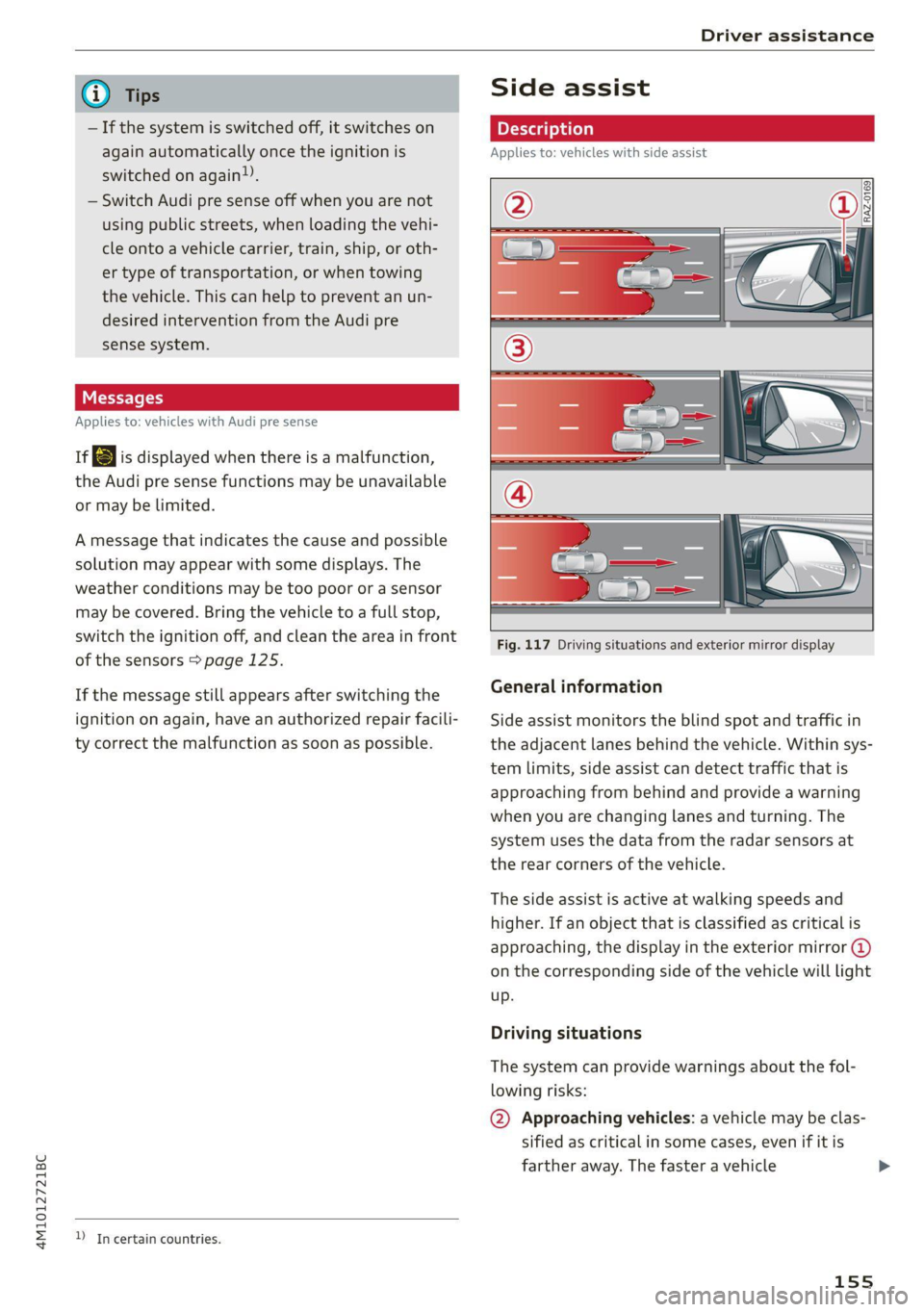
Fig. 117 Driving situations and exterior mirror display
General information
Side assist monitors the blind spot and traffic in
the adjacent lanes behind the vehicle. Within sys-
tem limits, side assist can detect traffic that is
approaching from behind and provide a warning
when you are changing lanes and turning. The
system uses the data from the radar sensors at
the rear corners of the vehicle.
The side assist is active at walking speeds and
higher. If an object that is classified as critical is
approaching, the display in the exterior mirror @)
on the corresponding side of the vehicle will light
up.
Driving situations
The system can provide warnings about the fol-
lowing risks:
@ Approaching vehicles: a vehicle may be clas-
sified as critical in some cases, even if it is
farther away. The faster a vehicle
155
Page 158 of 332

Driver assistance
approaches, the sooner the display will turn
on.
@ Vehicles traveling in the same direction: the
display will turn on if vehicles traveling in the
same direction as your vehicle are classified
as critical. The side assist warns you of all de-
tected vehicles when they are in the “blind
spot” or before they reach that point.
@ Vehicles you are passing: the display only
turns on if you slowly pass a detected vehicle
(difference in speed between the two vehicles
is less than 9 mph (15 km/h)). There is no
display if you pass a vehicle more quickly.
Information stage
At the information level, the side assist informs
you of detected objects that are classified as criti-
cal. This is even possible when your vehicle is sta-
tionary and the turn signal is turned on, so that
the system can also assist you when turning.
From speeds of approximately 6 mph (10 km/h)
and higher, the system will warn you of detected
objects that are classified as critical, even if the
turn signal is not turned on.
The display remains dim in the information stage
so that you are not distracted while looking for-
ward.
Warning stage
If you activate a turn signal and the display flash-
es, side assist is warning about objects that have
been classified as critical.
Depending on the vehicle equipment and other
driver assistance systems, the display may also
flash if you have not activated a turn signal. If
you are approaching a detected lane marker line
and it appears you will be leaving the lane, the
display will warn you about detected vehicles
that are classified as critical. You can also be
warned with corrective steering > page 149,
Lane departure warning.
Detection range
The radar sensors are designed to detect the left
and right adjacent lanes when the road lanes are
the normal width. In some situations, the display
may turn on even though there is no vehicle lo-
156
cated in the area that is critical for a lane change.
For example:
— If the lanes are narrow or if you are driving on
the edge of your lane. If this is the case, the
system may have detected a vehicle in another
lane that is not adjacent to your current lane.
—If you are driving through a curve. Side assist
may react to a vehicle that is in the same lane
or one lane over from the adjacent lane.
— If side assist reacts to other objects (such as
roadside structures like guard rails).
ZA WARNING
— Observe the safety precautions and note the
limits of the assist systems, sensors, and
cameras > page 123.
— The display may not appear on time when
vehicles are approaching or being passed
very quickly.
G) Tips
— If the window glass in the driver's door or
front passenger's door has been tinted, the
display in the exterior mirror may be incor-
rect.
— These systems are not available in trailer
towing mode. There is no guarantee the sys-
tems will switch off when using a retrofitted
trailer hitch. Do not use these functions
when towing a trailer.
— The coverage areas of the sensors > fig. 117
are diagrams and do not represent a true-
to-scale image of the sensor ranges.
— The system complies with United States FCC
regulations and ISED regulations
=> page 311.
Peet
Applies to: vehicles with side assist
The system can be switched on and off in the
MMI & page 126. If the system is activated, the
displays will turn on briefly when the ignition is
switched on.
Page 160 of 332

Driver assistance
Switching the exit warning on and off
— The system can be switched on and off in the
MMI & page 126.
ZA\ WARNING
— Observe the safety precautions and note the
limits of the assist systems, sensors, and
cameras > page 123.
— Always pay attention to traffic and to the
area around your vehicle. The exit warning
system does not replace the attention of the
vehicle occupants. The vehicle occupants are
always responsible for opening the doors
and exiting the vehicle.
— The exit warning system does not respond
to people and cannot warn you about every
type of approaching objects, such as cyclists.
Always monitor the traffic as well as the ve-
hicle's surroundings with direct eye contact.
— The display may not appear in time when
vehicles are approaching very quickly.
— The exit warning system does not react to
stationary objects or pedestrians.
— The exit warning system will not provide
alerts if your vehicle is pulled too far into
the parking space so that it is hidden by ad-
jacent vehicles.
G) Tips
— The exit warning system can be available for
up to approximately three minutes after un-
locking the vehicle and opening the door as
well as after switching off the ignition. Then
the displays flash briefly and the system
switches off.
— The system is not available when towing a
trailer. There is no guarantee the system
will switch off when using a retrofitted trail-
er hitch. Do not use these functions when
towing a trailer.
— The coverage areas of the sensors > fig. 118
are diagrams and do not represent a true-
to-scale image of the sensor ranges.
— The system complies with United States FCC
regulations and ISED regulations
=> page 311.
158
Intersection assistant
Applies to: vehicles with intersection assistant
S S| 1? =| | a
Fig. 121 Instrument cluster: directional display from the
intersection assistant
General information
The intersection assistant can warn the driver of
approaching cross traffic in complex intersections
> fig. 120.
The system monitors intersections and exit
ramps using the sensors installed in the vehicle
that detect the front and side areas around the
vehicle. Moving objects that are approaching
from behind, such as cars, are detected within
the limits of the system > A\. The system can al-
so warn the driver of a potential collision with de-
tected approaching cross traffic in intersections
and exit ramps with poor visibility.
Requirements for using the intersection
assistant:
— The speed must not be higher than approxi-
mately 18 mph (30 km/h).
—The “D” gear is selected.
Page 164 of 332
Parking and maneuvering
General information
The parking aid assists when parking and maneu-
vering by providing warnings about obstacles. If
the ultrasonic sensors on the vehicle > page 124,
fig. 93 detect an obstacle, the system will pro-
vide audio and visual warnings.
Activating and deactivating
Requirement: the vehicle speed must be under
approximately 6 mph (10 km/h).
> Press the Put or & button @ in the center con-
sole. When activating, a brief tone will sound
and the LED in the button will turn on.
Automatic activation
> The system activates automatically when re-
verse gear is engaged while the engine is run-
ning. A brief tone will sound.
> If Automatic activation is switched on in the
MMI and if the vehicle approaches an obstacle
at speeds below approximately 6 mph (10
km/h), the parking aid will switch on automati-
cally. Audible signals will sound once the obsta-
cle is within the sensor detection area.
» Applies to: MMI: To switch Automatic activa-
tion on or off, select on the home screen: VEHI-
CLE > Parking aid > Automatic activation.
Automatic deactivation
The distance indicator for the parking aid plus
will deactivate automatically when driving for-
ward faster than 6 mph (10 km/h).
ZA\ WARNING
Observe the safety precautions and note the
limits of the assist systems, sensors, and
cameras > page 123.
@) Note
Keep enough distance from the curb to avoid
damage to the rims.
G) Tips
— If the parking aid is deactivated, it can only
be reactivated automatically when one of
the following conditions is met:
162
— The vehicle speed exceeds 6 mph
(10 km/h)
— The ignition is switched off and back on
again
— The parking brake is set and then released
— The “P” gear is engaged and released
again
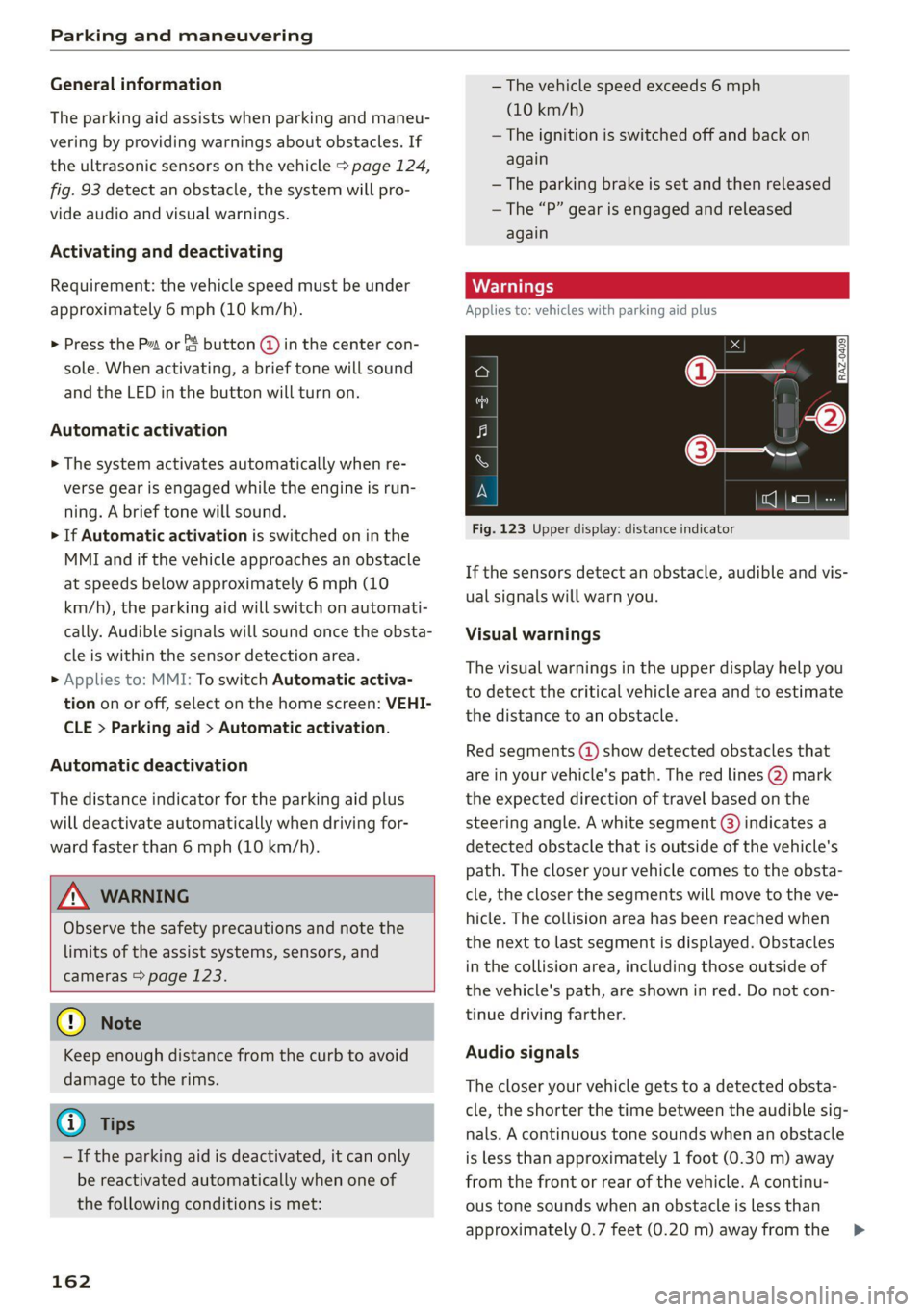
Applies to: vehicles with parking aid plus
Fig. 123 Upper display: distance indicator
If the sensors detect an obstacle, audible and vis-
ual signals will warn you.
Visual warnings
The visual warnings in the upper display help you
to detect the critical vehicle area and to estimate
the distance to an obstacle.
Red segments (2) show detected obstacles that
are in your vehicle's path. The red lines @) mark
the expected direction of travel based on the
steering angle. A white segment (8) indicates a
detected obstacle that is outside of the vehicle's
path. The closer your vehicle comes to the obsta-
cle, the closer the segments will move to the ve-
hicle. The collision area has been reached when
the next to last segment is displayed. Obstacles
in the collision area, including those outside of
the vehicle's path, are shown in red. Do not con-
tinue driving farther.
Audio signals
The closer your vehicle gets to a detected obsta-
cle, the shorter the time between the audible sig-
nals. A continuous tone sounds when an obstacle
is less than approximately 1 foot (0.30 m) away
from the front or rear of the vehicle. A continu-
ous tone sounds when an obstacle is less than
approximately 0.7 feet (0.20 m) away from the >