wheel AUDI Q7 2021 Owner´s Manual
[x] Cancel search | Manufacturer: AUDI, Model Year: 2021, Model line: Q7, Model: AUDI Q7 2021Pages: 332, PDF Size: 117.99 MB
Page 291 of 332
4M1012721BC
Emergency assistance
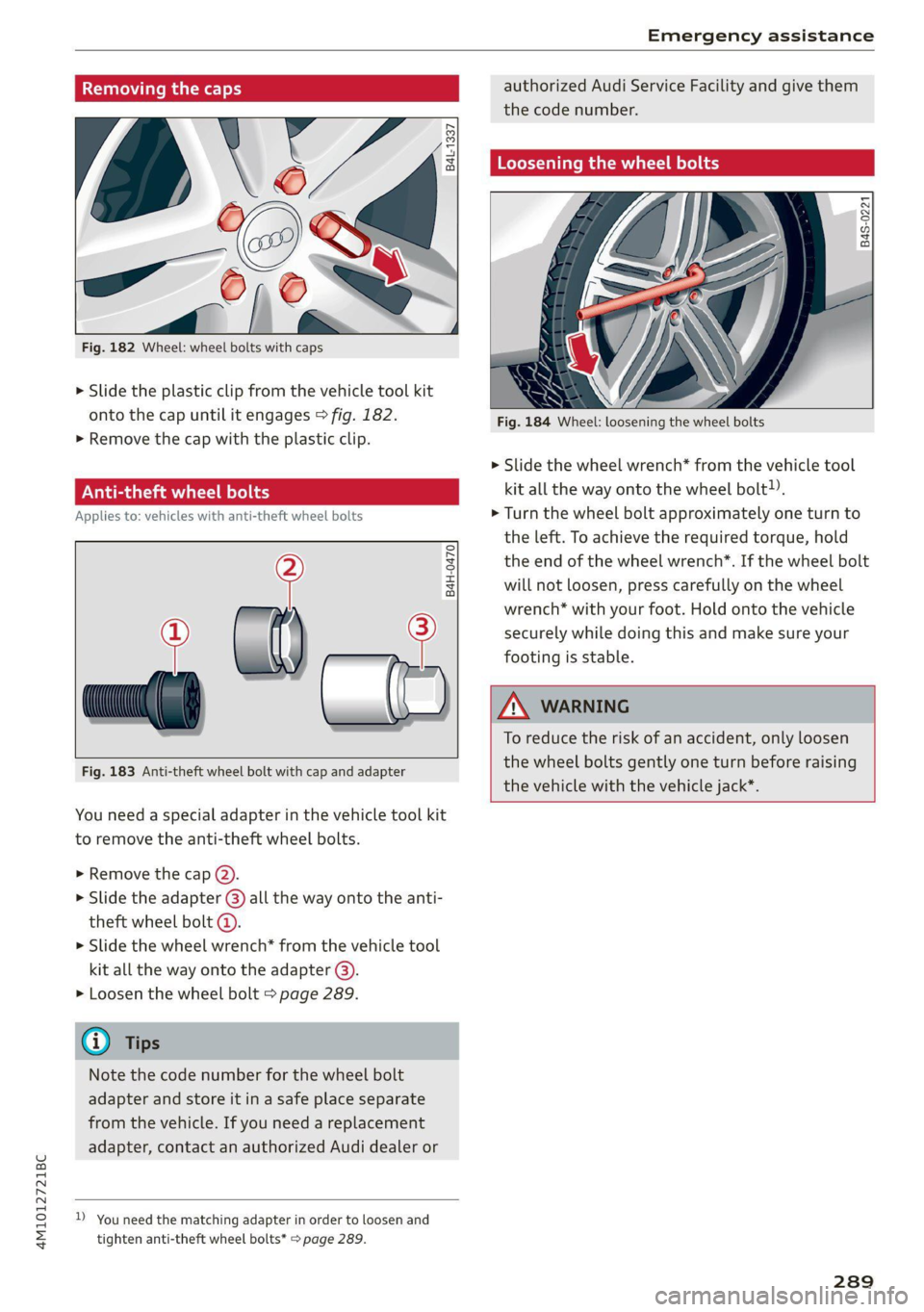
Removing the caps
N3
‘o
at Ao
Fig. 182 Wheel: wheel bolts with caps
6 3 0
a +
a
SS)
> Slide the plastic clip from the vehicle tool kit
onto the cap until it engages > fig. 182.
>» Remove the cap with the plastic clip.
Anti-theft wheel bolts
Applies to: vehicles with anti-theft wheel bolts
,
> al) —?
Fig. 183 Anti-theft wheel bolt with cap and adapter
B4H-0470
You need a special adapter in the vehicle tool kit
to remove the anti-theft wheel bolts.
>» Remove the cap (2).
> Slide the adapter @) all the way onto the anti-
theft wheel bolt @.
>» Slide the wheel wrench* from the vehicle tool
kit all the way onto the adapter @).
> Loosen the wheel bolt > page 289.
G) Tips
Note the code number for the wheel bolt
adapter and store it in a safe place separate
from the vehicle. If you need a replacement
adapter, contact an authorized Audi dealer or
D_ You need the matching adapter in order to loosen and
tighten anti-theft wheel bolts* > page 289.
authorized Audi Service Facility and give them
the code number.
Loosening the wheel bolts
B4S-0221
Fig. 184 Wheel: loosening the wheel bolts
> Slide the wheel wrench* from the vehicle tool
kit all the way onto the wheel bolt).
> Turn the wheel bolt approximately one turn to
the left. To achieve the required torque, hold
the
end of the wheel wrench”. If the wheel bolt
will not loosen, press carefully on the wheel
wrench* with your foot. Hold onto the vehicle
securely while doing this and make sure your
footing is stable.
ZA WARNING
To reduce the risk of an accident, only loosen
the wheel bolts gently one turn before raising
the
vehicle with the vehicle jack*.
289
Page 292 of 332

Emergency assistance
Raising the vehicle
Applies to: vehicles with vehicle jack
B4M-0178
Fig. 185 Sill panels: markings
ft. +.
ig
B
a ES
Fig. 186 Sill: positioning the vehicle jack
> Place the vehicle jack from the vehicle tool kit
ona firm surface. Use a flat, stable support if
necessary. On a slippery surface such as tile,
you should use a non-slip pad such as a rubber
mat > /\.
> Find the marking on the sill that is closest to
the tire that will be changed > fig. 185. Behind
the marking, there is a lifting point on the side
sill for the vehicle jack.
> Using the hex socket wrench (3) from the vehi-
cle tool kit, turn the vehicle jack under the lift-
ing point on the side sill until it is high enough
that the arm @ 9 fig. 186 is under the desig-
nated plastic mount.
> Align the vehicle jack so the arm @ engages in
the designated Lifting point in the door sill and
the base (2) lies flat on the ground. The base 2)
must be directly under the mounting point (@).
> To lift the vehicle, position the ratchet @) from
the vehicle tool kit with the correct side on the
hex socket wrench @).
> Move the ratchet (@) clockwise back and forth
until the wheel lifts up slightly from the
ground.
290
AN WARNING
—To reduce the risk of injury, make sure no
one is in the vehicle before raising it.
— Make sure the vehicle jack is stable. The risk
of injury is increased when the ground is
slippery or soft, because the vehicle jack
could slide or sink.
— Only raise your vehicle with the vehicle jack
provided by the factory. If you use a vehicle
jack designed for another vehicle, your vehi-
cle could slip and cause injury.
— Position the vehicle jack only at the desig-
nated mounting points on the side sill and
align the jack. Otherwise, the vehicle jack
could slip and cause an injury if it does not
have sufficient hold on the vehicle.
—To reduce the risk of injury, do not raise any
other vehicles or other loads using the vehi-
cle jack provided by the factory.
— Applies to: vehicles with air suspension:
Changes in temperature or load can affect
the height of the stopped vehicle.
—To reduce the risk of an accident, never start
the engine when the vehicle is raised.
—To reduce the risk of injury, no work should
be performed under the vehicle while it is
raised.
@) Note
Do not lift the vehicle by the sill. Position the
vehicle jack only at the designated mounting
points on the side sill. Otherwise, your vehicle
could be damaged.
Page 293 of 332
4M1012721BC
Emergency assistance
Removing and installing a wheel
@ Rg Tt
“ 0 oO
B8K-1477
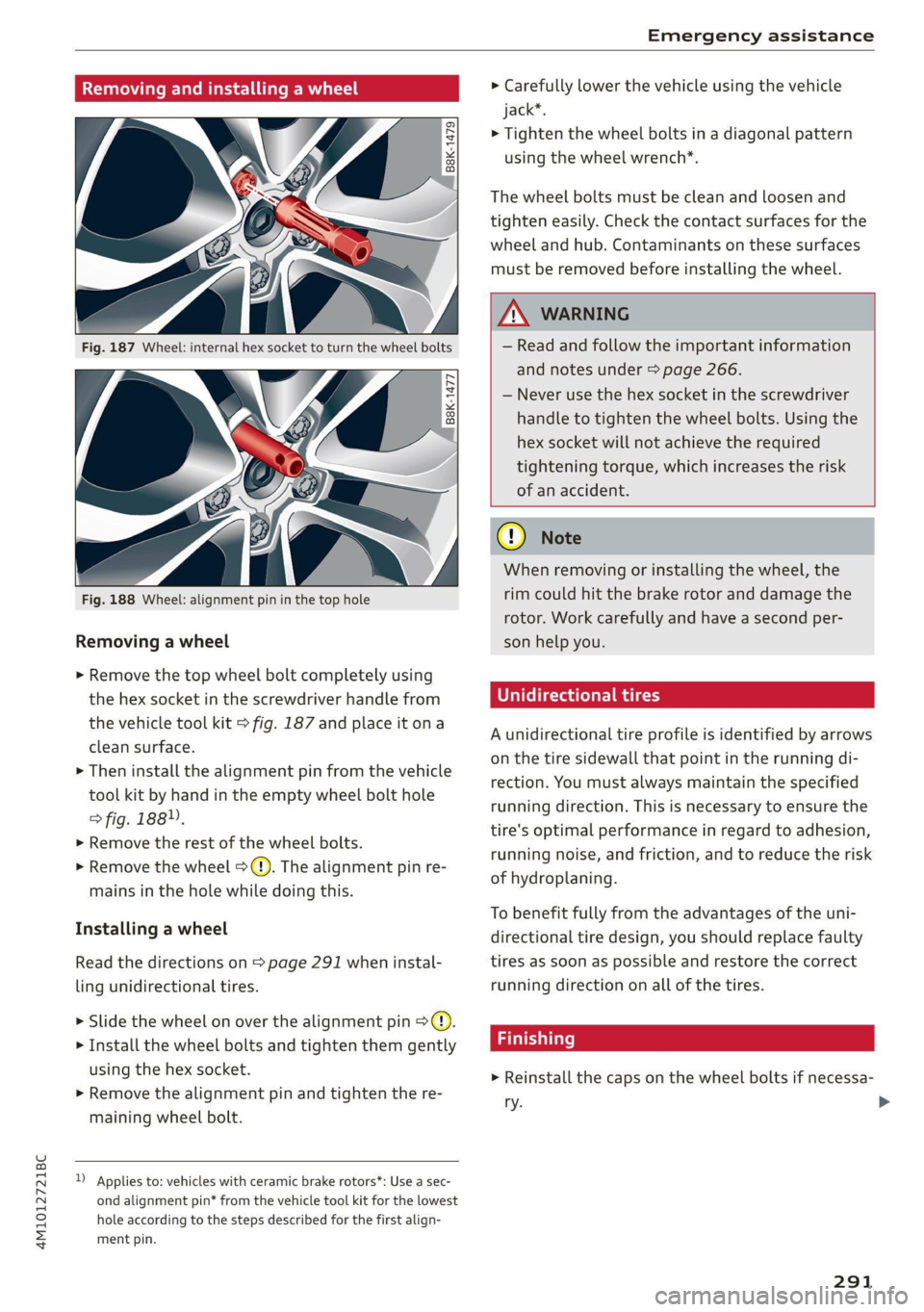
Removing a wheel
> Remove the top wheel bolt completely using
the hex socket in the screwdriver handle from
the vehicle tool kit > fig. 187 and place it ona
clean surface.
> Then install the alignment pin from the vehicle
tool kit by hand in the empty wheel bolt hole
> fig. 188”.
> Remove the rest of the wheel bolts.
> Remove the wheel >(). The alignment pin re-
mains in the hole while doing this.
Installing a wheel
Read the directions on > page 291 when instal-
ling unidirectional tires.
> Slide the wheel on over the alignment pin >@.
> Install the wheel bolts and tighten them gently
using the hex socket.
> Remove the alignment pin and tighten the re-
maining wheel bolt.
D Applies to: vehicles with ceramic brake rotors*: Use a sec-
ond alignment pin* from the vehicle tool kit for the lowest
hole according to the steps described for the first align-
ment pin.
> Carefully lower the vehicle using the vehicle
jack*.
> Tighten the wheel bolts in a diagonal pattern
using the wheel wrench*.
The wheel bolts must be clean and loosen and
tighten easily. Check the contact surfaces for the
wheel and hub. Contaminants on these surfaces
must be removed before installing the wheel.
ZX WARNING
— Read and follow the important information
and notes under > page 266.
— Never use the hex socket in the screwdriver
handle to tighten the wheel bolts. Using the
hex
socket will not achieve the required
tightening torque, which increases the risk
of an accident.
() Note
When removing or installing the wheel, the
rim could hit the brake rotor and damage the
rotor. Work carefully and have a second per-
son help you.
Unidirectional tires
A unidirectional tire profile is identified by arrows
on the tire sidewall that point in the running di-
rection. You must always maintain the specified
running direction. This is necessary to ensure the
tire's optimal performance in regard to adhesion,
running noise, and friction, and to reduce the risk
of
hydroplaning.
To benefit fully from the advantages of the uni-
directional tire design, you should replace faulty
tires as soon as possible and restore the correct
running direction on all of the tires.
> Reinstall the caps on the wheel bolts if necessa-
ry.
291
>
Page 294 of 332
Emergency assistance
> Store the vehicle tool kit in its designated
place.
> Store the replaced tire securely in the luggage
compartment > page 87.
> Check the tire pressure on the installed wheel
as soon as possible.
> Correct the tire pressure and store it in the MMI
=> page 278.
> The wheel bolt tightening specification must be
120 ft lbs (160 Nm). Have it checked as soon as
possible with a torque wrench. Drive carefully
until then.
> Have the faulty wheel replaced as quickly as
possible.
Jump starting
You should only perform the steps that follow if
you have the necessary tools and technical ex-
pertise.
If the engine does not start because the vehicle
battery is drained, you can jump start your vehi-
cle using another vehicle. Jump start cables are
needed to do this.
Both vehicle batteries must have 12 V nominal
voltage. The voltage capacity (Ah) of the vehicle
battery that is giving power must not be less
than the capacity of the drained vehicle battery.
Jump start cable
Only use a jump start cable with a large enough
diameter. Note the manufacturer's specifica-
tions.
Only use a jump start cable with insulated termi-
nal clamps.
Positive cable - usually red.
Negative cable - usually black.
ZA WARNING
— A drained battery can freeze at tempera-
tures around 32 °F (0 °C). If the vehicle bat-
tery is frozen, it must be thawed before con-
necting the jump start cables. If it is not,
the risk of an explosion and chemical burns
292
increases. After jump starting the vehicle,
drive to an authorized Audi dealer or author-
ized Audi Service Facility immediately to
have the vehicle battery checked.
— Read the warnings when working in the en-
gine compartment > page 245.
— Handling the jump start cables incorrectly
may cause the vehicle battery to explode
and lead to serious injuries.
@) Note
Jump start cables can cause considerable
damage to the vehicle electrical system if
they are connected incorrectly.
Gi) Tips
— There must be no contact between the
vehicles, or else voltage could flow when
connecting the positive terminal and drain
the vehicle battery of the vehicle providing
the jump start.
— The drained vehicle battery must be con-
nected correctly to the electrical system.
— Switch off electrical equipment that is not
needed.
Page 297 of 332
4M1012721BC
Emergency assistance
Preparations
> Only secure the towing cable or tow bar at the
designated towing loops > page 295,
=> page 296.
> Make sure the towing cable is not twisted. Oth-
erwise it could disconnect from the towing loop
while towing.
> Switch the emergency flashers on in both
vehicles > page 53. However, do not do this if it
prohibited by law.
Towing vehicle (front)
> Only start to drive when the towing cable is
taut.
> Press the brake pedal very carefully.
> Avoid sudden braking or driving maneuvers.
Vehicle being towed (rear)
> Make sure the ignition is switched on so that
the steering wheel is not locked and so that you
can use the turn signals, the horn, and the
windshield wipers if needed > A\.
> Switching it off before the vehicle has stopped
may impair the function of the brake booster
and power steering. You would then need to
use more force to steer and brake the vehicle.
> Release the parking brake > page 108.
> Select the “N” selector lever position.
> Make sure the towing cable is always taut.
ZA WARNING
— Never tow a vehicle using a tow bar or tow-
ing cable if the vehicle does not have electri-
cal power.
— If the vehicle runs out of power while it is
being towed, stop towing the vehicle imme-
diately and consult an authorized Audi deal-
er or qualified repair facility.
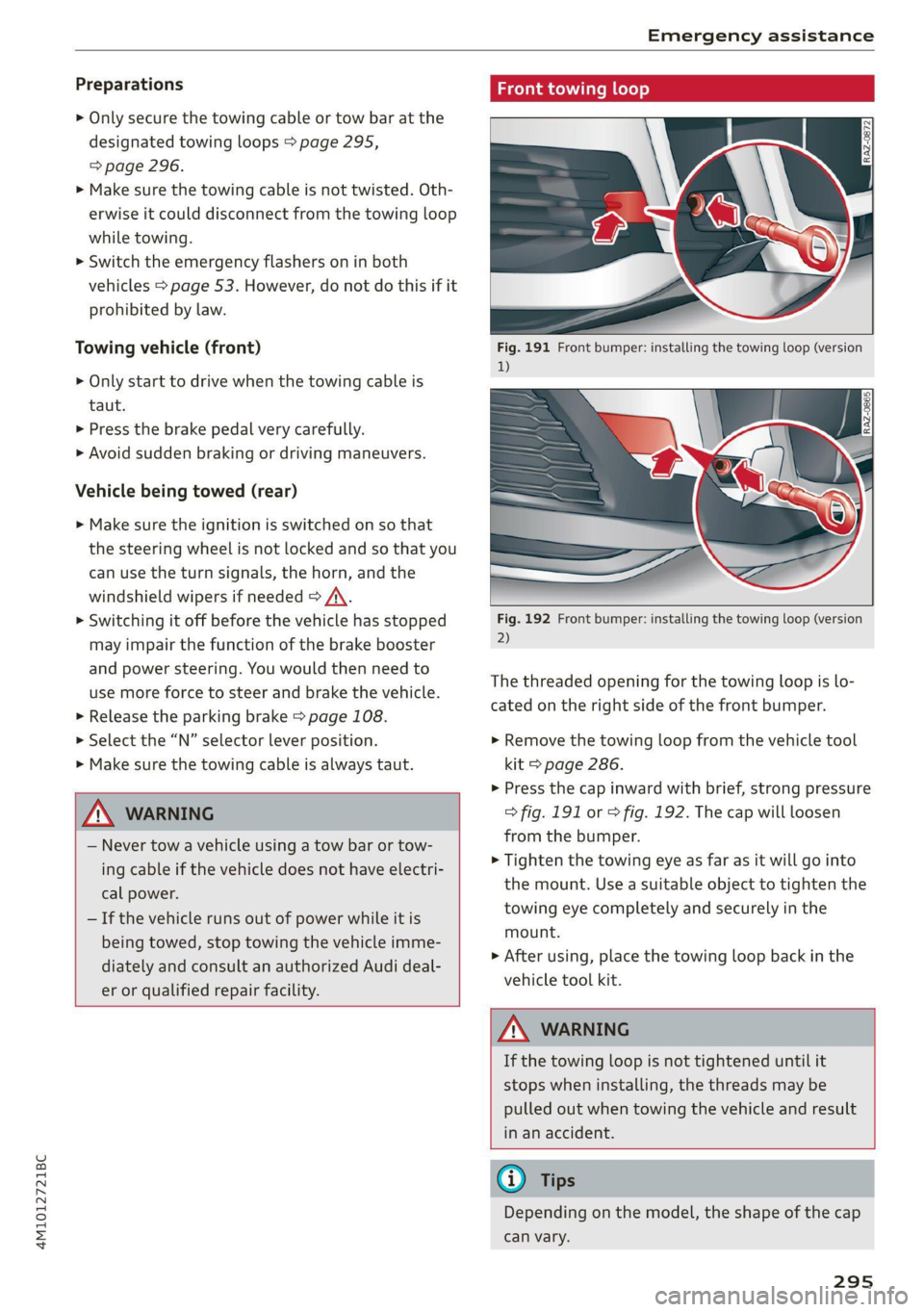
ing loop
Fig. 192 Front bumper: installing the towing loop (version
2)
The threaded opening for the towing loop is lo-
cated on the right side of the front bumper.
> Remove the towing loop from the vehicle tool
kit > page 286.
>» Press the cap inward with brief, strong pressure
> fig. 191 or > fig. 192. The cap will loosen
from the bumper.
> Tighten the towing eye as far as it will go into
the mount. Use a suitable object to tighten the
towing eye completely and securely in the
mount.
> After using, place the towing loop back in the
vehicle tool kit.
Z\ WARNING
If the towing loop is not tightened until it
stops when installing, the threads may be
pulled out when towing the vehicle and result
in an accident.
G) Tips
Depending on the model, the shape of the cap
can vary.
295
Page 301 of 332
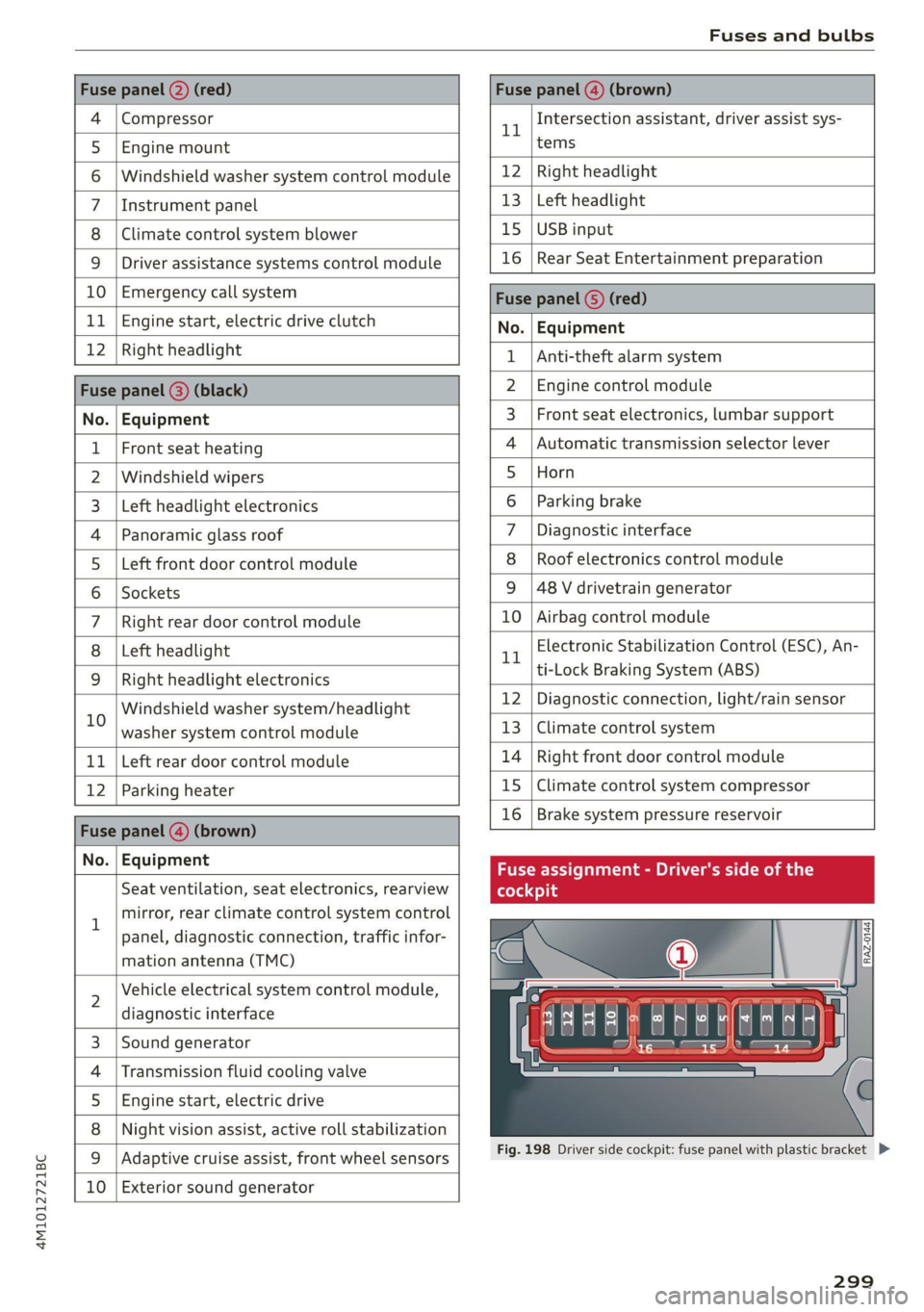
4M1012721BC
Fuses and bulbs
Fuse panel @) (red) Fuse panel (4) (brown)
4 |Compressor 1 Intersection assistant, driver assist sys-
5 |Engine mount tems
6 |Windshield washer system control module 12 | Right headlight
7 |Instrument panel 13 | Left headlight
8 | Climate control system blower 15 | USB input
9 | Driver assistance systems control module 16 | Rear Seat Entertainment preparation
10 | Emergency call system Fuca panel G) (DD)
11 | Engine start, electric drive clutch No. | Equipment
12 | Right Headlight 1 |Anti-theft alarm system
Fuse panel (8) (black) 2 |Engine control module
No. | Equipment 3 | Front seat electronics, lumbar support
1 | Front seat heating 4 |Automatic transmission selector lever
2 |Windshield wipers 5 |Horn
3 | Left headlight electronics 6 |Parking brake
4 |Panoramic glass roof 7 | Diagnostic interface
5 |Left front door control module 8 | Roof electronics control module
6 |Sockets 9 |48 V drivetrain generator
7 |Right rear door control module 10 | Airbag control module
8 | Left headlight 1 Electronic Stabilization Control (ESC), An-
9 |Right headlight electronics trtock Braking System cine
in Windshield washer systemn/headlight 12 Diagnostic connection, light/rain sensor
washer system control module 13 | Climate control system
11 | Left rear door control module 14 | Right front door control module
12 | Parking heater 15 |Climate control system compressor
Fase panel @ (brown) 16 | Brake system pressure reservoir
Nou) Faipmsns Fuse assignment - Driver's side of the
Seat ventilation, seat electronics, rearview (oleae
1 mirror, rear climate control system control
panel, diagnostic connection, traffic infor-
mation antenna (TMC)
N
Vehicle electrical system control module,
diagnostic interface
Sound generator
Transmission fluid cooling valve
Engine start, electric drive
Night vision assist, active roll stabilization
wW}oa;m|
&|w
Adaptive cruise assist, front wheel sensors
10 Exterior sound generator
LE EEEL|
Fig. 198 Driver side cockpit: fuse panel with plastic bracket D>
299
Page 302 of 332

Fuses and bulbs
Fuse panel (d) (black)
No. | Equipment
Audi phone box
Climate control system, fragrance system
Head-up display
Audi music interface, USB input
Steering column lock
Upper/Lower display
W}OlN|/
Mm)
BR]
WIN
Instrument cluster
10 | DVD drive
11 | Light switch, switch panels
12 | Steering column electronics
13 | Volume control
14 | MMI Infotainment system control module
15 | Steering column adjustment
16 | Steering wheel heating
with plastic clip
Fig. 200 Left side of the luggage compartment: fuse panel
with plastic clip (plug-in hybrid drive*)
y 1 High-voltage heating, thermomanage-
ment
Air suspension/suspension control
6 |Automatic transmission control module
7 Rear seat heating, rear climate control sys-
tem controls
Third row seat adjustment
9 | Left tail light
10 | Front belt tensioner on driver's side
Luggage compartment lid central locking,
11 | fuel filler door, luggage compartment cov-
er
12 |Luggage compartment lid control module
Fuse panel @)
No. | Equipment
Fig. 199 Left side of the luggage compartment: fuse panel 1 | Rear climate control system blower
2 |Sound-amplifier
3 | Exhaust treatment, sound actuator
4 |Rear climate control system control panel
5 |Right trailer hitch light
300
Page 317 of 332
4M1012721BC
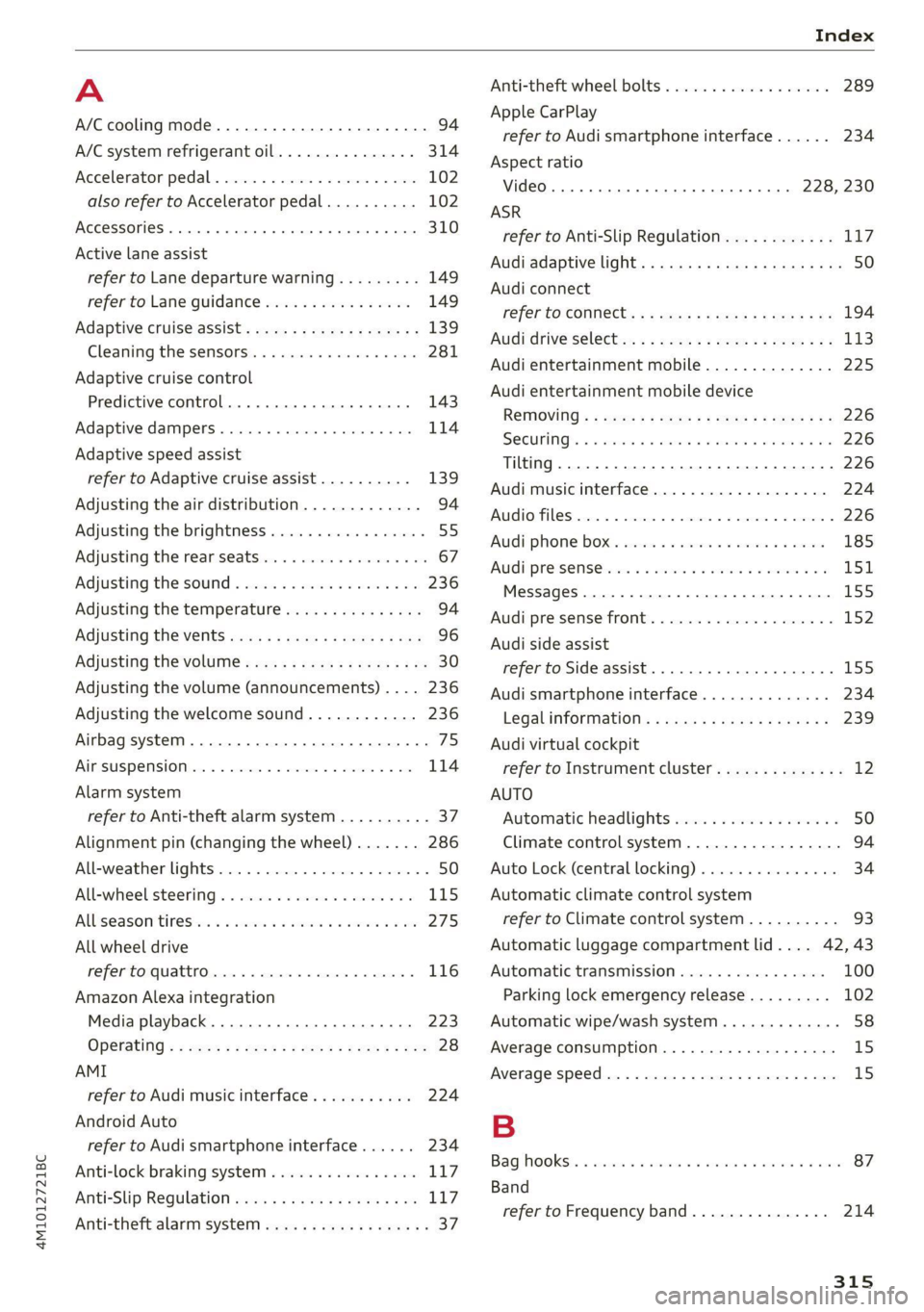
A
A/C cooling mode..........-. eee eee eee ee 94
A/C system refrigerant oil............... 314
Accelerator pedal.............2--00000- 102
also refer to Accelerator pedal.......... 102
ACCESSOFICS 2. eee 310
Active lane assist
refer to Lane departure warning......... 149
refer to Lane guidance................ 149
Adaptive cruise assist................04. 139
Cleaning the sensors..............0055 281
Adaptive cruise control
Predictive control................0005 143
Adaptive dampers ........... 000000 eee 114
Adaptive speed assist
refer to Adaptive cruise assist.......... 139
Adjusting the air distribution............. 94
Adjusting the brightness................. 55
Adjusting the rear seats.................. 67
Adjusting the sound................0005 236
Adjusting the temperature............... 94
Adjusting the vents ccs <= csws + © sews +o oer 96
Adjusting the volume.............e eee eee 30
Adjusting the volume (announcements) .... 236
Adjusting the welcome sound............ 236
Airbag system... 2.2... eee eee 75
AIPSUSPENSION ix. o © aoewes « 2 menses + meme» 5, v0 114
Alarm system
refer to Anti-theft alarm system.......... 37
Alignment pin (changing the wheel)....... 286
All-weather lights...............-..00005 50
All-wheel steering.............---00005 115
ALUS@aSOntineSies. « 3 ssasess «x aimee a & iwesane sw a8 275
All wheel drive
refer to quattro.............0 0. eee 116
Amazon Alexa integration
Media playback................00000. 223
Operating « « seen s » ewes se eee G s FeeE Ys BOS 28
AMI
refer to Audi music interface........... 224
Android Auto
refer to Audi smartphone interface...... 234
Anti-lock braking system................ 117
AnitisSlip REQUlation ws a & sos se weae 9 oe 117
Anti-theft alarm system...............05. 37
Anti-theft wheel bolts...............0... 289
Apple CarPlay
refer to Audi smartphone interface...... 234
Aspect ratio
VIdCO eee eee eee eee eee 228, 230
ASR
refer to Anti-Slip Regulation............ 117
Audi adaptive light...............-.0000- 50
Audi connect
refer to CONnNect ; «= = sass ss sees ss eee ee ae 194
Audidrive'selecticy, « + scum oz scum « x pewe yoo 113
Audi entertainment mobile.............. 225
Audi entertainment mobile device
Removing « « sees « sews gs sees xe ees cee 226
SOGUMING's « « ssessie © ccerave 2 6 sesnew « araneos w @ are 226
Tilting... 2... eee eee eee 226
Audi music interface................00- 224
AUGIOFLES xo: 5, coc: i « commons ow cme = at sammie = 226
Audi phone Bx: « sccvise so eaves so emane oe meses 185
Audi pre sense .........0 seve cece ee eee 151
Messages ........... 0.00.0 eee eee 155
Audi pre sense front.............-...0-- 152
Audi side assist
refer to Side assist............-0000005 155
Audi smartphone interface.............. 234
Legalinformation..................0. 239
Audi virtual cockpit
refer to Instrument cluster.............. 12
AUTO
Automatic headlights .................. 50
Climate control system..............0-- 94
Auto Lock (central locking) ............... 34
Automatic climate control system
refer to Climate control system.......... 93
Automatic luggage compartment lid.... 42, 43
Automatic transmission................ 100
Parking lock emergency release......... 102
Automatic wipe/wash system............. 58
Average consumption................... 15
Average speed... 2.2... cee eee eee eee 15
B
Bagshooks3. « swiss o anewivs © ¥ arene 6 6 oman © oes 87
Band
refer to Frequency band............... 214
315
Page 321 of 332
4M1012721BC
Index
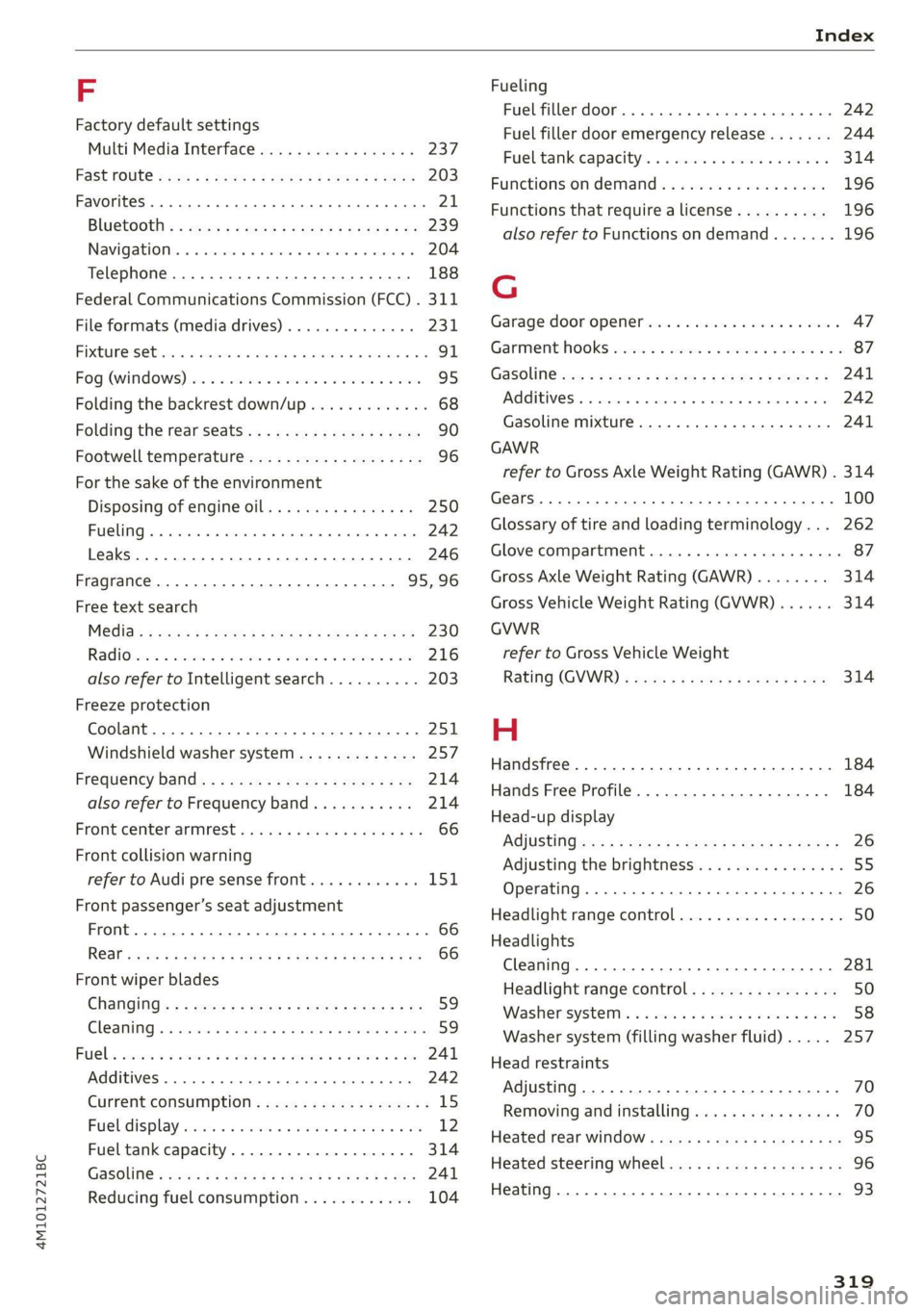
F
Factory default settings
Multi Media Interface................. 237
Fast mOUté sacs = & wanes = & Sees = 4 ew Fa 203
Favorites... 0... eee eee eee ee 21
Bluetooth = « sec : s gows es ees e Sewn ee we 239
Navigation. . « ccmes s + sximene «0 onmem = 6 meen « 204
Telephone .......... 0... e eee eee eee 188
Federal Communications Commission (FCC) . 311
File formats (media drives)...........005 231
FIXGURE'SC bisa 5 + sso a o cence 3 x canaems ov aunewas oo 91
Fog QWINKOWS) ace ee wesw wo armans a ¥ semen 6 ¥ coe 95
Folding the backrest down/up............. 68
Folding the rearseats.............-.000. 90
Footwell temperature................-4. 96
For the sake of the environment
Disposing of engine oil................ 250
Fueling... 02... cee cece eee eee 242
Leaks... 2... eee eee eee eee 246
Fragrance.......... 0.0... eee eee 95,96
Free text search
M@dia:: : seme ¢ 3 azn x 5 eG £ Eee TE 230
RadiOtes. x = meses oe acses vo nome ooo eH 216
also refer to Intelligent search.......... 203
Freeze protection
Coolant...... 2... eee eee eee eee 251
Windshield washer system............. 257
Fréqueticy batids « s sccs = s sees ss wees se ea 214
also refer to Frequency band........... 214
Front center arinrest « score « & mea 4s news a vo 66
Front collision warning
refer to Audi pre sense front............ 151
Front passenger’s seat adjustment
Front... 0.2.0... eee eee eee 66
ROaf seas ¢ s seas ¢ o ees Fe ees Ys ees 66
Front wiper blades
Changing s = = eees = 2 mews = stews e Sees coe 59
ClEATIIAG » x. seasios + swiesss ae a sumaes wo omoaas i 6 eens 59
ee ee 241
Additives ...... 0.00... cee cece eee 242
CUMFENt CONSUMPTION = csux « = wows «2 ems se 15
Fuel:display esses. + sue so enue ov eee ¥ os 12
Fuel tank capacity.................00-. 314
Gasoline : acs + ¢ ees +o aaa + 2 sates Fe ees 241
Reducing fuel consumption............ 104
Fueling
Fuel filler door..... 0... . cece eee eee ee 242
Fuel filler door emergency release....... 244
Fueltankcapacity'. « 5 soca es cence ao cman « 314
Functions on demand.................. 196
Functions that require a license.......... 196
also refer to Functions on demand....... 196
G
Garage door opener............--0e ee eee 47
GarMenthOOks eves sv severe oo snes o a wes oo 2 87
GaSOlIMG coy « x were g 2 emp = 2 eee 5 ¢ see & 241
Additives ...... 0... cece eee eee eee 242
Gasoline mixture.................0005 241
GAWR
refer to Gross Axle Weight Rating (GAWR) . 314
Gears... eee 100
Glossary of tire and loading terminology... 262
Glove compartment..............000 eee 87
Gross Axle Weight Rating (GAWR)........ 314
Gross Vehicle Weight Rating (GVWR)...... 314
GVWR
refer to Gross Vehicle Weight
Rating (GVWR) « sce se mee = 4 metas & 2 ee 314
H
Handsfree................-..0.0 00s ee 184
Hands Free Profile..................... 184
Head-up display
ACiUStiNGizes: 5 = :zexes 5 « eee ss ween § v eee 26
Adjusting the brightness................ 55
Operating...................0.00.0000. 26
Headlight range control................0. 50
Headlights
Cleaning ....... 6.06 281
Headlight range control................ 50
Washer'systems « ¢ wesa es mera. oemre + eas 58
Washer system (filling washer fluid) .... . 257
Head restraints
Adjusting... 2.0.02... . 0. c eee eee eee 70
Removing and installing............0065 70
Heated rear window............-. 000s eee 95
Heated steering wheel................0.. 96
Heating....... 0.0.0... eee eee eee eee 93
319
Page 322 of 332
Index
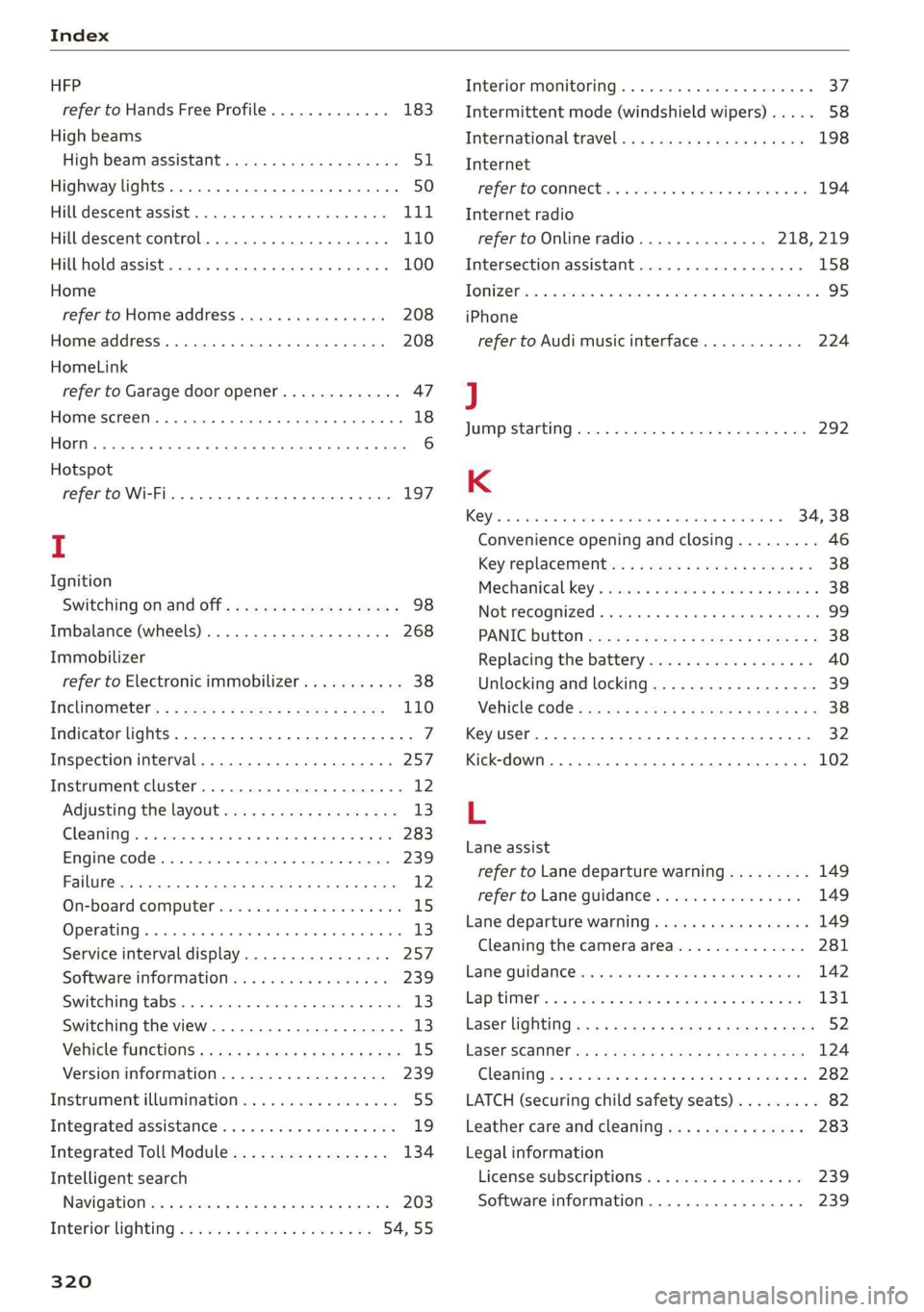
HFP
refer to Hands Free Profile............. 183
High beams
High beam assistant................... 51
Highway lights ..... 0.0... sce e eee eee 50
Hill descent assist..............02-000. 111
Hill descent control.............0 0000 ee 110
Hill hold assist... 0.2.0.0... 00.0022 eae 100
Home
refer to Home address............0008 208
Home address.............00 2.00 ee eee 208
HomeLink
refer to Garage door opener............. 47
Home screen... .... cece eee eee ee eee 18
HOM... eee eee 6
Hotspot
refer to Wi-Fi...........0. 00sec eee eee 197
I
Ignition
Switching on and off...............0-.- 98
Imbalance (wheels) ...............--05. 268
Immobilizer
refer to Electronic immobilizer........... 38
Inclinometérs < = sees =» wees sg wees sy eee 110
Indicator lights....... 0.0... eee eee eee 7
Inspection interval...............20-00. 257
Instrument cluster..............--000005 12
Adjusting the layout................00. 13
Cleaning ’s 2 a sina 5 6 wens oo were 2 6 wonem @ ere 283
Engine code.............-. eee eee eee 239
Pailit@s < anaes = eae & 3 Baws § & Rae 2 FS 12
On-board computer..............2-.00. 15
Operating ........ cece eee eee ee eee 13
Service interval display................ 257
Software information..............004 239
Switching
tabs.................000000. 13
Switching the view.................0005 13
Vehicle functions « cs. se cere sc cee ee cae 15
Version information.................. 239
Instrument illumination................. 55
Integrated assistance................0-. 19
Integrated Toll Module................. 134
Intelligent search
Navigationicn « = ses 2 x mews = wanes a 2 cae a 203
Interior lighting « « ses 2s cess ewes eee 54,55
320
Interior MONItOriING’s « s ccs so wou 2 ¥ vesvee o 37:
Intermittent mode (windshield wipers) ..... 58
International travel...............20005 198
Internet
PEPE TOXCONNCCE is. = veseer ee seem ev ateeee eos 194
Internet radio
refer to Online radio.............. 218, 219
Intersection:assistant ccc. 26 case so mse © 158
TOMZOP oe. oa cxanwes < w omawees vv ema a x ee wo coe 95
iPhone
refer to Audi music interface........... 224
J
JUMAPESEAMERNG) revise © sreeees wo © euersay wo © vette «8 Boe 292
K
Rey's « cwensne oo ccenaua a 0 sean @ arene we sro a 4 34, 38
Convenience opening and closing......... 46
Key'replacemenit:.: ss sees se eean ee eee es 38
Mechanical-key’s wssenc a « case ao saw ve ee ¥ 38
Not recognized ........ cece cee eee 99
PANIG Button » ses < = sacs ¢ = seen ¢ = sees ye 38
Replacing the battery.................. 40
Unlocking and locking................-- 39
VEHICLE COdG « secs s ¢ seme = 2 ee yo ee Fe 38
Key User... eee eee 32
Kick-down .... 2... eee eee eee 102
L
Lane assist
refer to Lane departure warning......... 149
refer to Lane guidance..............0. 149
Lane departure warning..............05- 149
Cleaning the camera area.............. 281
Lame Quidaneeiens 5 « cscsce oo ae vw accuse ¥ oem 142
LapitlIMe rs. « & soesons « awesese + sameness cream 2 Oo 131
Laser lightingiss + + sss 6s eeu sy pew ae ees 52
FaSer Scanners « « aay a eegu 4 x ees x ROE 124
Gleaming wor = 2 ween o anne 2 peewee oe ween oo x 282
LATCH (securing child safety seats)......... 82
Leather care and cleaning............... 283
Legal information
License subscriptions................. 239
Software information................. 239