Electronic AUDI Q7 2021 Owner´s Manual
[x] Cancel search | Manufacturer: AUDI, Model Year: 2021, Model line: Q7, Model: AUDI Q7 2021Pages: 332, PDF Size: 117.99 MB
Page 119 of 332
4M1012721BC
Driving dynamic
ZA WARNING
— Even in vehicles with all wheel drive, you
should adapt your driving style to the cur-
rent road and traffic conditions to reduce
the risk of an accident.
— The braking ability of your vehicle is limited
to the traction of the wheels. In this way, it
is not different from a two wheel drive vehi-
cle. Do not drive too fast because this in-
creases the risk of an accident.
— Note that on wet streets, the front wheels
can “hydroplane’” if driving at speeds that
are too high. Unlike front wheel drive
vehicles, the engine RPM does not increase
suddenly when the vehicle begins hydro-
planing. Adapt your speed to the road condi-
tions to reduce the risk of an accident.
Sy olea me tarelatl |
Applies to: vehicles with sport differential
The sport differential distributes the drive power
to the rear axle based on the situation. The goal
is a high level of agility and ability to accelerate
on curves. The vehicle is very responsive to steer-
ing. The settings depend on the selected Audi
drive select* mode.
Messages
iT-3| Sport differential: malfunction! Please con-
tact Service
Drive immediately to an authorized Audi dealer
or authorized Audi Service Facility to have the
malfunction repaired.
T-3| Sport differential: temperature too high.
Please adapt driving style
The transmission temperature has increased sig-
nificantly due to the sporty driving manner. Drive
in a less sporty manner until the temperature re-
turns to the normal range and the indicator light
switches of.
Z\ WARNING
Contact an authorized Audi dealer or author-
ized Audi Service Facility if the sport differen-
tial is faulty or malfunctioning. The repair
must be performed by trained personnel us-
ing the correct oil in order to ensure safety.
Electronic Stabilization
Control
Electronic Stabilization Control (ESC) supports
driver safety. It reduces the risk of slipping and
improves driving stability. ESC detects critical sit-
uations, such oversteering and understeering of
the vehicle, the drive wheels spinning, or the risk
of the vehicle tipping.
The brakes are applied or the engine torque is re-
duced in order to stabilize the vehicle.
The following stabilization functions are integrat-
ed into the ESC, among others:
Anti-lock braking system (ABS)
ABS prevents the wheels from locking when brak-
ing. The vehicle can still be steered even during
hard braking. Apply steady pressure to the brake
pedal. Do not pump the pedal.
A pulsing in the brake pedal indicates that the
system is acting to stabilize the vehicle.
Anti-Slip Regulation (ASR)
ASR reduces drive power when the wheels begin
spinning and adapts the power to the road condi-
tions. This will increase the driving stability.
Electronic Differential Lock (EDL)
The EDL applies the brakes to wheels that are
slipping and transfers the drive power to the oth-
er wheels. This function is not available at higher
speeds.
In extreme cases, EDL automatically switches off
to keep the brake on the braked wheel from over-
heating. The vehicle is still functioning correctly.
EDL will switch on again automatically when con-
ditions have returned to normal.
Selective wheel torque control
Selective wheel torque control is used when driv-
ing on curves. Braking is targeted toward the
117
>
Page 122 of 332
Trailer towing
Trailer towing
Driving with a trailer
er else)
Your vehicle is primarily intended for transport-
ing people and luggage. However, if you drive
with a trailer, follow the technical requirements,
the operation and driving tips, and the legal reg-
ulations.
Driving with a trailer affects the vehicle's energy
usage, performance, and wear. It also requires
higher concentration from the driver.
ZA\ WARNING
Do not transport any people in a trailer due to
the risk of fatal injury.
Technical requirements
Trailer hitch
Only use a trailer hitch with a removable ball
hitch mount and ball hitch. The trailer hitch must
be permitted for the vehicle, the trailer and the
permitted total weight of the trailer being
pulled. Above all, it must be securely and safely
attached to the vehicle trailer.
Never mount a trailer hitch on the bumper. The
trailer hitch must be mounted in a way that does
not impair the function of the bumper. Do not
make any changes to the exhaust system and the
brake system.
Check regularly if the trailer hitch is securely
mounted. Always follow the instructions given by
the trailer hitch manufacturer.
Trailer brakes
If the trailer has its own brake system, then fol-
low the manufacturer specifications. However,
the brake system on the trailer must never be
connected to the vehicle brake system.
Engine cooling system
Driving with a trailer means a higher load on the
engine and the cooling system. The cooling sys-
tem must be designed for additional load and
contain enough coolant > @.
120
ZA\ WARNING
— Never mount a "weight-distributing" or
"load-balancing" trailer coupler as the trailer
hitch. The vehicle was not designed for
these types of trailer hitches. The trailer
hitch can malfunction and the trailer can
break off from the vehicle.
— If the trailer is equipped with electronic
brakes, these brakes cannot be activated by
a factory-installed control system, which in-
creases the risk of an accident.
—To reduce the risk of injury, always remove
the ball hitch mount if no trailer is mount-
ed
@) Note
Longer inclines cannot be driven without a
suitable cooling system, especially if the out-
side temperatures are high. Otherwise, this
increases the risk of engine damage.
ey emia aCe
Towing capacity
The permitted towing capacity must not be ex-
ceeded under any circumstances > page 314.
You can drive up larger inclines if you are not us-
ing the maximum towing capacity.
The specified towing weights only apply at eleva-
tions up to 3,200 feet (1,000 m) above sea level.
As the elevation increases, the engine power de-
creases due to the decreasing air pressure. This
reduces the hill climbing ability and towing ca-
pacity. For every additional 3,200 feet (1,000 m),
the maximum permitted towing weight must be
reduced by approximately 10%. The permitted
towing weight is the combined weight of the
(loaded) vehicle and the (loaded) trailer.
Tongue weight
The maximum permitted tongue weight of the
trailer drawbar on the trailer hitch ball head must
not be exceeded.
For driving safety, Audi recommends always us-
ing
the maximum permitted tongue weight, but
do not exceed this weight. Distributing the cargo >
Page 131 of 332
4M1012721BC
Driving information
— If traffic signs do not conform to the standard
format
— If traffic signs are damaged or bent
— If traffic signs are displayed on sign holders
with electronic signs
— If the traffic signs or the roadways have
changed, and the navigation data is no longer
up-to-date
ZA WARNING
— Observe the safety precautions and note the
limits of the assist systems, sensors, and
cameras > page 123.
— Under some circumstances, traffic sign rec-
ognition may not detect traffic signs correct-
ly or detect them at all. As a result, the sys-
tem may not display the correct speed limit
or any speed limit.
@ Tips
— Traffic sign recognition does not adapt your
vehicle's speed to match the speed Limit.
— The display in the instrument cluster is
based on the units of measurement used for
speed in the country where the vehicle is be-
ing operated. As a result, a display of 50 in
the instrument cluster can mean either mph
or km/h, depending on the country.
Applies to: vehicles with camera-based traffic sign recognition
Accessing traffic sign recognition
> Select in the instrument cluster: vehicle func-
tions tab > Traffic signs.
Setting a traffic sign based speed warning
> Applies to MMI: Select on the home screen: VE-
HICLE > Driver assistance > (<3) > Speed warn-
ing.
You can select a warning threshold. If you exceed
this, then the current detected speed limit will be
shown in the display with an exclamation point
for the duration that it is exceeded and it will
blink for a short time.
Messages
Applies to: vehicles with camera-based traffic sign recognition
Traffic sign recognition: currently unavaila-
ble. Camera view limited due to surroundings
The camera’s visual field is covered. Clean the
windshield.
Traffic sign recognition: currently limited.
See owner's manual
This message appears if navigation system data
is not available, for example on newly-construct-
ed roads. The speed limit display will be tempo-
rarily limited, which increases the risk of an incor-
rect display. If this message continues to appear,
drive immediately to an authorized Audi dealer or
authorized Audi Service Facility to have the mal-
function repaired.
No traffic sign information available
Depending on the area, there is no valid naviga-
tion data and no speed limits were detected. This
may also appear if there is a recommended
speed, but no speed limit (for example when
driving on and off the expressway).
Malfunction! See owner's manual
The system may not function correctly so it has
been switched off. See an authorized Audi dealer
or authorized Audi Service Facility for assistance.
Function currently unavailable. See owner's
manual
If this message appears on vehicles without cam-
era-based traffic sign recognition, then the traffic
light
information function is currently unavaila-
ble. See > page 131.
129
Page 136 of 332

Driving information
The Sli symbol will appear when pedestrian and
wild animal detection is not available.
Marking light*
To direct the driver's attention to a pedestrian,
the headlights can flash on the pedestrian when
there is a pedestrian warning.
This occurs at speeds above approximately
35 mph (60 km/h) if you are outside of illuminat-
ed areas and no detected vehicles are shown. The
marking light is not used for wild animals. The
high beam assistant* controls the marking
light*> page 51.
Adjusting the contrast
Applies to: vehicles with night vision assist
Requirement: the night vision assist must be
switched on and the % tab must be displayed.
» Applies to MMI: Select on the home screen: VE-
HICLE > Driver assistance > (£23) > Night vision
assist.
> To set the desired contrast, move the slider.
Messages
Applies to: vehicles with night vision assist
Night vision assist: currently unavailable.
See owner's manual
The system is not functioning correctly at the
time, so it has been switched off. If the malfunc-
tion persists, drive immediately to an authorized
Audi dealer or authorized Audi Service Facility to
have the malfunction repaired.
Integrated Toll Module
Applies to: vehicles with Integrated Toll Module
Depending on the region, you can pay toll fees in
certain countries using the Integrated Toll Mod-
ule (ITM). It replaces a separate transponder for
detecting toll fees. The system electronics are in-
tegrated in the rearview mirror housing.
To use the ITM in toll zones, you must register
and activate it.
134
Registration
> Applies to MMI: Select on the home screen: VE-
HICLE > Settings & Service > Vehicle informa-
tion Toll module.
> Note the Integrated Toll Module ID.
> To register the ITM, go to the displayed web ad-
dress and follow the instructions.
Activation
> To activate the ITM, press CD in the MMI.
Entering the number of passengers
Depending on the number of passengers and the
region, a lower toll fee may be charged. You must
either enter the number of passengers or deacti-
vate the ITM based on the laws applicable in the
area where you are driving.
> To enter the number of passengers, select the
appropriate button in the MMI.
> To deactivate the ITM, press @ in the MMI.
(i) Tips
— The driver is responsible for specifying the
correct number of passengers and activat-
ing or deactivating the ITM.
— Malfunctions can occur when detecting tolls
if both the ITM and transponder are activat-
ed. Deactivate the system not being used or
remove it as necessary.
—Ifa rearview mirror is replaced, you must
register the new ITM and remove the old
ITM from the account.
— The system complies with United States FCC
regulations and ISED regulations
> page 311.
Display
Applies to: vehicles with Integrated Toll Module
The selected number of passengers is displayed
in the MMI status bar > page 22.
The i symbol in the status bar and a notifica-
tion in the MMI will indicate if there is a faulty
connection between the ITM and the MMI or if
the ITM is faulty. If the connection interference
continues or the ITM is faulty, drive immediately >
Page 174 of 332
Parking and maneuvering
@) Tips
— If you did not drive past a suitable parking
space too quickly, the system can also be ac-
tivated afterward by pressing Pe.
— The Electronic Stabilization Control (ESC)
must not be switched off during the parking
process. If the ESC intervenes, the parking
process will be canceled.
— You can also drive into a perpendicular park-
ing space yourself and then activate the sys-
tem. If this is the case, the front of the vehi-
cle should already be in the space (4)
=> page 170, fig. 131 so that the sensors
can measure the space.
— You cannot park with the parking assist sys-
tems when you are towing a trailer or have
the connector inserted in the trailer socket.
— The system is not available when certain as-
sist systems are switched on.
— If there are suitable parking spaces on both
sides of the street, for example, on a one-
way street, you can change the side where
the system is searching for parking spaces
by activating the turn signal for the other
side or by pressing on that side in the upper
display.
— The park systems do not provide support for
assisted parking on tight curves.
Park assist plus!)2)
General information
Applies to: vehicles with park assist plus
Park assist plus parks the vehicle after the park-
ing space search and also exits the parking space.
While the driver presses and holds the [>>P] but-
ton and monitors the vehicle's surroundings, park
assist plus controls the steering, gear selection,
acceleration, and braking.
)_ system availability may be limited depending on the mar-
ket.
2) In preparation at the time of printing.
172
ZA WARNING
— Observe the safety precautions and note the
limits of the assist systems, sensors, and
cameras > page 123.
— The driver is always responsible when enter-
ing or exiting a parking space and during
similar maneuvers.
— Do not use this function if the vehicle cannot
move freely, for example when on a vehicle
jack.
— Sensors and cameras have spots in which
the surrounding area cannot be detected.
Objects, animals, and people may only be
detected with limitations may not be detect-
ed at all. Always monitor the traffic and the
vehicle's surroundings directly and do not
become distracted.
@) Note
— Do not use park assist plus when transport-
ing cargo that extends outside of the vehicle
or when snow chains are mounted.
— Park assist plus and remote controlled park-
ing guides the vehicle either away from
curbs or onto them if other vehicles are
parked on the curb. Make sure that your ve-
hicle's tires and rims are not damaged. Re-
sume control of the vehicle in time or stop
the parking process if needed to prevent
damage.
— In parking spaces without curbs, maintain a
distance of at least 19 inches (50 cm) from
walls and buildings in order to reduce the
risk of vehicle damage.
G) Tips
Follow the legal regulations in the country
where you are operating the vehicle when us-
ing park assist plus. Park assist plus may be
prohibited in some countries. The system may
be unavailable in countries where it has been
deactivated in order to comply with legal reg-
ulations. Data will not be transmitted to Audi. >
Page 227 of 332
4M1012721BC
Media
Never leave mobile devices in the vehicle in
extremely high or low temperatures.
@ Tips
— Always follow the information found in
=> page 86.
— When you switch the ignition off, the USB
ports are still supplied with power until the
energy management intervenes.
— Do not use an additional adapter cable or
USB extension cable to connect mobile devi-
ces to the Audi music interface that already
have a cable or that must be connected with
a USB adapter cable (> page 224, fig. 156).
Using an additional adapter or US extension
cable may impair functionality.
— Functionality is not guaranteed for mobile
devices that do not conform to the USB 2.0
specification.
— USB hubs are not supported.
— Video playback through the Audi music in-
terface is not supported on Apple devices
and MTP devices (such as smartphones).
— iPod touch or iPhone malfunctions also af-
fect the operation of the MMI. Reset your
mobile device in these situations.
— Audi recommends updating the iPod touch
or iPhone software to the latest version. Re-
fer to your mobile device owner's manual
for more information.
— The USB adapter on the Audi music inter-
face will support iPod touch or iPhone devi-
ces from the 5th generation or newer with
the lightning connector.
—Aselection of supported devices can be
found in the database for tested mobile de-
vices at www.audi.com/mp3.
Rear Seat Entertainment
preparation
(err eee lela)
Applies to: vehicles with Rear Seat Entertainment preparation
The Rear Seat Entertainment preparation in-
cludes cables and a mount for Audi entertain-
ment mobile device in the driver's and front pas-
senger's seat backrests.
The suitable Audi entertainment mobile package
can be obtained from the Audi Genuine Accesso-
ries program.
Z\ WARNING
If you are transporting a child in a rear-facing
child safety seat in the rear of the vehicle, re-
move the Audi entertainment mobile device
from the backrest on the front seat to reduce
the risk of injury.
() Note
Only use devices that are approved for the
Rear Seat Entertainment preparation. Unap-
proved equipment can cause damage to the
vehicle electrical system.
G) Tips
— Always read the chapter > page 308.
— The Rear Seat Entertainment preparation is
not intended to charge other electronic de-
vices.
225
Page 247 of 332

4M1012721BC
Checking and Filling
or authorized Audi Service Facility to have the
malfunction corrected.
The indicator light can also turn on if the fuel fill-
er cap is not closed correctly > page 2421).
Engine compartment
ere MUL ety
Special care is required if you are working in the
engine compartment
For work in the engine compartment, such as
checking and filling fluids, there is a risk of in-
jury, scalding, accidents, and burns. For this
reason, follow all the warnings and general
safety precautions provided in the following in-
formation. The engine compartment is a dan-
gerous area in the vehicle. > A.
Explanation of warnings (sticker in the engine
compartment):
Hot engine components!
@ Rotating parts!
The radiator fan can switch on at any
[2 time!
High voltage! Switch off the engine be-
fore coming into contact with any igni-
tion system components!
The catalytic converter can be damaged
"271i the oil level is too high!
Always follow the instructions in the op-
oy erating manual.
Z\ WARNING
— Turn the engine off.
— Switch the ignition off.
— Set the parking brake.
— Select the “P” (Park) selector lever position.
— Allow the engine to cool.
— Keep children away from the engine com-
partment.
— Never spill fluids on a hot engine. These flu-
ids (such as the freeze protection contained
— Avoid short circuits in the electrical system.
— Never reach into the radiator fan. The fan is
temperature-controlled and can turn on
suddenly, even when the ignition is switched
off.
— Never open the hood when there is steam or
coolant escaping from the engine compart-
ment, because there is a risk that you could
be burned. Wait until no steam or coolant is
escaping.
—The cap on the coolant expansion tank must
never be opened when the coolant is hot.
The cooling system is under pressure. There
is a risk of burns
—To protect your face, hands, and arms from
hot steam or coolant, cover the cap with a
thick cloth when opening.
— Do not remove the engine cover under any
circumstances. This increases the risk of
burns.
— Due to the risk of electric shock, never touch
the ignition cable or other components in
the electronic high-voltage ignition system
when the engine is running or is starting.
— Ifa gear is engaged while the vehicle is sta-
tionary and the engine is running, do not
press the accelerator pedal inadvertently.
Pressing the accelerator pedal will cause the
vehicle to move, and this could result in an
accident.
— If inspections or repairs must be performed
while the engine is running, moving compo-
nents (such as the ribbed belt, generator,
and radiator fan) pose an additional risk.
— Set the parking brake first and select the
“P” (Park) selector lever position.
— Always make sure that no parts of the
body, jewelry, ties, loose clothing, and
long hair can be caught in moving engine
components. Before any work, always re-
move any jewelry and/or ties, tie back long
hair, and make sure all clothing fits close
to the body to reduce the risk of anything
becoming caught in engine components.
in the coolant) can catch fire.
1) Depending on the engine and country
245
Page 281 of 332

4M1012721BC
Wheels
Continuing to drive on run-flat tires is no
longer possible if:
— There is visible damage to the tires, such as
cracks in the sidewalls
— Strong vibrations are felt while driving, or the
tire begins to smoke due to a strong build-up of
heat
— The tire has been heavily damaged, for example
in an accident. There is a risk that parts of the
tire tread will detach and damage important
vehicle components.
—The Electronic Stabilization Control (ESC) is not
working or is continuously running
— The tire pressure monitoring system is not
working
If it is no longer possible to continue driving de-
spite having run-flat tires, see an authorized Audi
dealer or authorized Audi Service Facility for as-
sistance.
— See an authorized Audi dealer or author-
ized Audi Service Facility for assistance if
the tire is too heavily damaged.
— Have the faulty tires replaced and the rims
checked for damage by an authorized Audi
dealer or authorized Audi Service Facility.
— The driver is responsible for the vehicle, for
correcting the tire pressure, and for replac-
ing faulty parts. Therefore, always adjust
your driving to the current situation.
ZA WARNING
Run-flat tires may only be used on vehicles
that were equipped with them at the factory.
— The vehicle must have suspension designed
for run-flat tires and a factory-installed tire
pressure monitoring system.
— Incorrect use of run-flat tires can lead to ve-
hicle damage or accidents. Contact an au-
thorized Audi dealer or authorized Audi
Service Facility to learn if run-flat tires may
be used on your vehicle and if so, which
ones.
—If run-flat tires are used, they must be in-
stalled on all four wheels. Mixing tire types
is not permitted.
— If you have to drive when the tire pressure is
too low or there is no tire pressure, note the
following:
— Do not drive faster than 50 mph (80 km/h)
because this increases the risk of an acci-
dent. Observe any laws specific to the
country where you are driving.
— Avoid full-throttle acceleration, heavy
braking, and fast cornering, because this
increases the risk of an accident.
—The vehicle may become more difficult to
control.
@) Tips
— Audi Original run-flat tires can be identified
by the “AOE” labeling on the tire sidewall.
— You can use the tire mobility kit* on run-flat
tires > page 286.
279
Page 301 of 332
4M1012721BC
Fuses and bulbs
Fuse panel @) (red) Fuse panel (4) (brown)
4 |Compressor 1 Intersection assistant, driver assist sys-
5 |Engine mount tems
6 |Windshield washer system control module 12 | Right headlight
7 |Instrument panel 13 | Left headlight
8 | Climate control system blower 15 | USB input
9 | Driver assistance systems control module 16 | Rear Seat Entertainment preparation
10 | Emergency call system Fuca panel G) (DD)
11 | Engine start, electric drive clutch No. | Equipment
12 | Right Headlight 1 |Anti-theft alarm system
Fuse panel (8) (black) 2 |Engine control module
No. | Equipment 3 | Front seat electronics, lumbar support
1 | Front seat heating 4 |Automatic transmission selector lever
2 |Windshield wipers 5 |Horn
3 | Left headlight electronics 6 |Parking brake
4 |Panoramic glass roof 7 | Diagnostic interface
5 |Left front door control module 8 | Roof electronics control module
6 |Sockets 9 |48 V drivetrain generator
7 |Right rear door control module 10 | Airbag control module
8 | Left headlight 1 Electronic Stabilization Control (ESC), An-
9 |Right headlight electronics trtock Braking System cine
in Windshield washer systemn/headlight 12 Diagnostic connection, light/rain sensor
washer system control module 13 | Climate control system
11 | Left rear door control module 14 | Right front door control module
12 | Parking heater 15 |Climate control system compressor
Fase panel @ (brown) 16 | Brake system pressure reservoir
Nou) Faipmsns Fuse assignment - Driver's side of the
Seat ventilation, seat electronics, rearview (oleae
1 mirror, rear climate control system control
panel, diagnostic connection, traffic infor-
mation antenna (TMC)
N
Vehicle electrical system control module,
diagnostic interface
Sound generator
Transmission fluid cooling valve
Engine start, electric drive
Night vision assist, active roll stabilization
wW}oa;m|
&|w
Adaptive cruise assist, front wheel sensors
10 Exterior sound generator
LE EEEL|
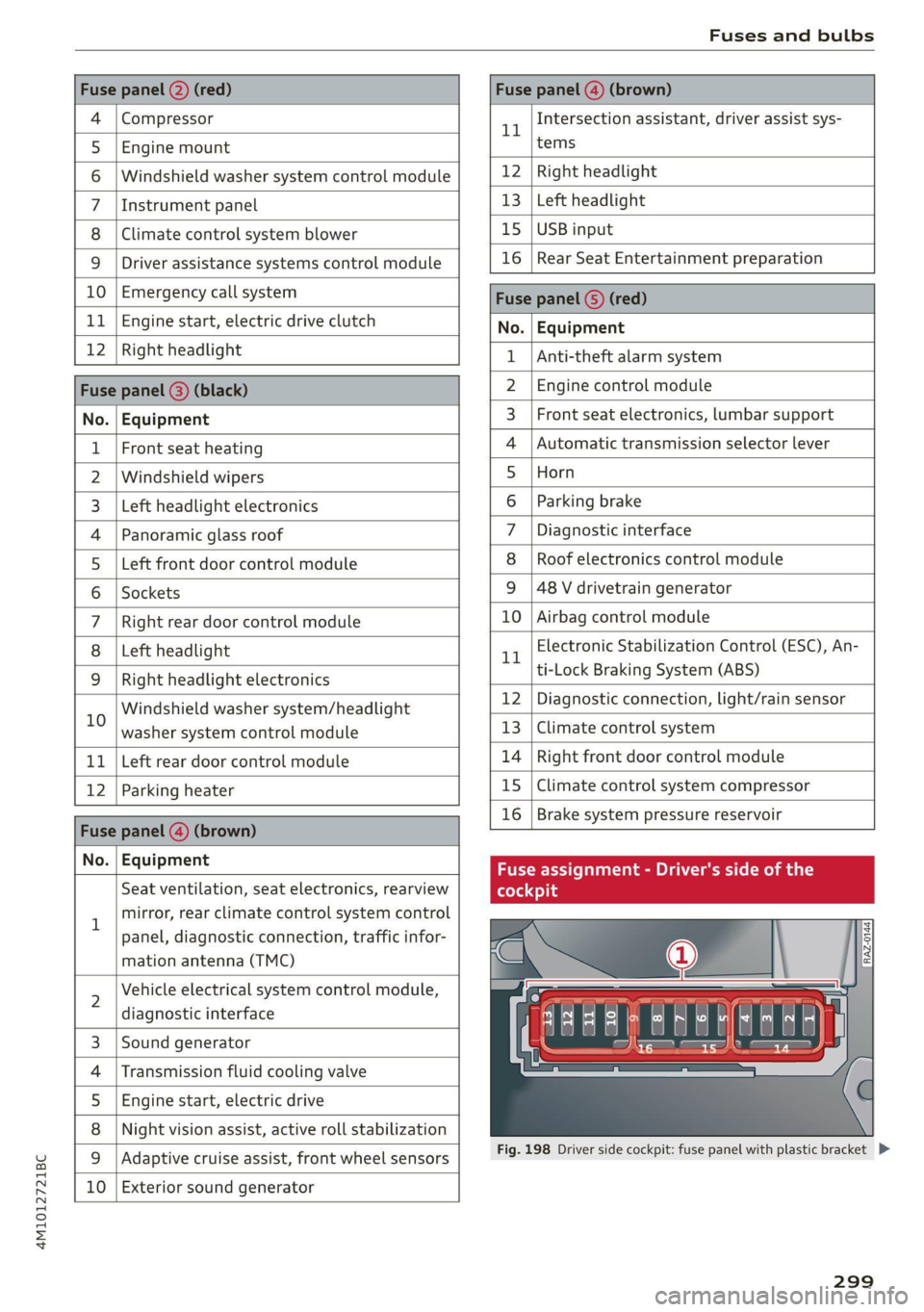
Fig. 198 Driver side cockpit: fuse panel with plastic bracket D>
299
Page 302 of 332

Fuses and bulbs
Fuse panel (d) (black)
No. | Equipment
Audi phone box
Climate control system, fragrance system
Head-up display
Audi music interface, USB input
Steering column lock
Upper/Lower display
W}OlN|/
Mm)
BR]
WIN
Instrument cluster
10 | DVD drive
11 | Light switch, switch panels
12 | Steering column electronics
13 | Volume control
14 | MMI Infotainment system control module
15 | Steering column adjustment
16 | Steering wheel heating
with plastic clip
Fig. 200 Left side of the luggage compartment: fuse panel
with plastic clip (plug-in hybrid drive*)
y 1 High-voltage heating, thermomanage-
ment
Air suspension/suspension control
6 |Automatic transmission control module
7 Rear seat heating, rear climate control sys-
tem controls
Third row seat adjustment
9 | Left tail light
10 | Front belt tensioner on driver's side
Luggage compartment lid central locking,
11 | fuel filler door, luggage compartment cov-
er
12 |Luggage compartment lid control module
Fuse panel @)
No. | Equipment
Fig. 199 Left side of the luggage compartment: fuse panel 1 | Rear climate control system blower
2 |Sound-amplifier
3 | Exhaust treatment, sound actuator
4 |Rear climate control system control panel
5 |Right trailer hitch light
300