All wheel drive AUDI Q7 2021 Owner´s Manual
[x] Cancel search | Manufacturer: AUDI, Model Year: 2021, Model line: Q7, Model: AUDI Q7 2021Pages: 332, PDF Size: 117.99 MB
Page 278 of 332
Wheels
wheel housings and other vehicle compo-
nents can be severely damaged.
@) Tips
When using snow chains, it may be advisable
to limit the ESC > page 118.
Low-profile tires
Applies to: vehicles with low-profile tires
Compared to other tire/rim combinations, low-
profile tires offer a wider tread surface and a
larger rim diameter with shorter tire sidewalls.
This results in an agile driving style. However, it
may reduce the level of comfort and increase
road noise when driving on roads in poor condi-
tion.
Low-profile tires can become damaged more
quickly than standard tires when driving over
large bumps, potholes, manhole covers, and
curbs. Therefore, it is particularly important to
maintain the correct tire pressure > page 269.
To reduce the risk of damage to the tires and
rims, drive very carefully on poor roads.
Check your wheels regularly every 2,000 mi
(3,000 km) for damage. For example, check for
bulges/cracks on the tires or deformations/cracks
on the rims.
After a heavy impact or damage, have the tires
and rims inspected or replaced immediately by
an authorized Audi dealer or authorized Audi
Service Facility.
Low-profile tires can wear out faster than stand-
ard tires.
Uniform tire quality grading
— Tread wear
— Traction AAABC
— Temperature A BC
Quality grades can be found where applicable on
the tire side wall between tread shoulder and
maximum section width > page 260, fig. 174.
For example: Tread wear 200, Traction AA, Tem-
perature A.
276
All passenger car tires must conform to Federal
Safety Requirements in addition to these grades.
Tread wear
The tread wear grade is a comparative rating
based on the wear rate of the tire when tested
under controlled conditions on a specified gov-
ernment test course.
For example, a tire graded 150 would wear one
and one half (1 1/2) times as well on the govern-
ment course as a tire graded 100.
The relative performance of tires depends upon
the actual conditions of their use, however, and
may depart significantly from the norm due to
variations in driving habits, service practices and
differences in road characteristics and climate.
Traction
The traction grades, from highest to lowest, are
AA, A, B and C. Those grades represent the tire's
ability to stop on wet pavement as measured un-
der controlled conditions on specified govern-
ment test surfaces of asphalt and concrete. A tire
marked C may have poor traction performance
SA.
Temperature
The temperature grades are A (the highest), B,
and C, representing the tire's resistance to the
generation of heat and its ability to dissipate
heat when tested under controlled conditions on
a specified indoor laboratory test wheel.
Sustained high temperature can cause the mate-
rial of the tire to degenerate and reduce tire life,
and excessive temperature can lead to sudden
tire failure > A.
The grade C corresponds to a level of perform-
ance which all passenger car tires must meet un-
der the Federal Motor Vehicle Safety Standard
No. 109. Grades B and A represent higher levels
of performance on the laboratory test wheel than
the minimum required by law.
ZA\ WARNING
The traction grade assigned to this tire is
based on straight-ahead braking traction >
Page 279 of 332
4M1012721BC
Wheels
tests, and does not include acceleration, cor-
nering, hydroplaning or peak traction charac-
teristics.
ZA WARNING
The temperature grade for this tire is estab-
lished for a tire that is properly inflated and
not overloaded. Excessive speed, underinfla-
tion, or excessive loading, either separately or
in combination, can cause heat buildup and
possible tire failure.
Z\ WARNING
Temperature grades apply to tires that are
properly inflated and not over or underinflat-
ed.
Tire pressure monitoring
system
(1) General notes
Each tire, including the spare (if provided),
should be checked monthly when cold and inflat-
ed to the inflation pressure recommended by the
vehicle manufacturer on the vehicle placard or
tire
inflation pressure label. (If your vehicle has
tires of a different size than the size indicated on
the vehicle placard or tire inflation pressure la-
bel, you should determine the proper tire infla-
tion pressure for those tires).
As an added safety feature, your vehicle has been
equipped with a tire pressure monitoring system
(TPMS) that illuminates a Low tire pressure tell-
tale when one or more of your tires is significant-
ly under-inflated. Accordingly, when the low tire
pressure telltale illuminates, you should stop and
check your tires as soon as possible, and inflate
them to the proper pressure. Driving on a signifi-
cantly under-inflated tire causes the tire to over-
heat and can lead to tire failure. Under-inflation
also reduces fuel efficiency and tire tread life,
and may affect the vehicle's handling and stop-
ping ability.
Please note that the TPMS is not a substitute for
proper tire maintenance, and it is the driver's re-
sponsibility to maintain correct tire pressure,
even if under-inflation has not reached the level
to trigger illumination of the TPMS low tire pres-
sure telltale.
Your vehicle has also been equipped with a TPMS
malfunction indicator to indicate when the sys-
tem is not operating properly. The TPMS mal-
function indicator is combined with the low tire
pressure telltale. When the system detects a
malfunction, the telltale will flash for approxi-
mately one minute and then remain continuously
illuminated. This sequence will continue upon
subsequent vehicle start-ups as long as the mal-
function exists.
When the malfunction indicator is illuminated,
the system may not be able to detect or signal
low
tire pressure as intended. TPMS malfunctions
may occur for a variety of reasons, including the
installation of replacement or alternate tires or
wheels on the vehicle that prevent the TPMS
from functioning properly. Always check the
TPMS malfunction telltale after replacing one or
more tires or wheels on your vehicle to ensure
that the replacement or alternate tires and
wheels allow the TPMS to continue to function
properly.
If the tire pressure monitoring indicator
Ey) ote Le
Applies to: vehicles with Tire Pressure Monitoring System in-
dicator
The tire pressure indicator in the instrument
cluster informs you if the tire pressure is too low
or if there is a system malfunction.
Using the ABS sensors, the tire pressure monitor-
ing system compares the tire tread circumference
and vibration characteristics of the individual
tires. If the pressure changes in one or more
tires, this is indicated in the instrument cluster
display with an indicator light @ and a message.
If only one tire is affected, the location of that
tire will be indicated.
The tire pressures must be stored again each
time you change the pressures (switching be-
tween partial and full load pressure) or after
changing or replacing a tire on your vehicle
= page 278. The tire pressure monitoring system >
277
Page 280 of 332

Wheels
only monitors the tire pressure you have stored.
Refer to the tire pressure label for the recom-
mended tire pressure for your vehicle
=> page 269, fig. 177.
Tire tread circumference and vibration character-
istics can change and cause a tire pressure warn-
ing if:
— The tire pressure in one or more tires is too low
— The tires have structural damage
— The tire was replaced or the tire pressure was
changed and it was not stored > page 278
— Tires that are only partially used are replaced
with new tires
Indicator lights
If the @ indicator light turns on, there is a loss
of pressure in at least one tire .> A\ Check the
tires and replace or repair if necessary. Check and
correct the pressures of all four tires and store
the pressure again > page 278.
ia Tire pressure: malfunction! See owner's
manual
iff appears after switching the ignition on or
while driving and the @ indicator light in the in-
strument cluster blinks for approximately one
minute and then stays on, there is system mal-
function. Try to store the correct tire pressures
= page 278. In some cases, you must drive for
several minutes after storing the pressures until
the indicator light turns off. If the indicator light
does turn off or turns on again after a short peri-
od of time, drive to an authorized Audi dealer or
authorized Audi Service Facility immediately to
have the malfunction corrected.
Z\ WARNING
— If the tire pressure indicator appears in the
display, reduce your speed immediately and
avoid any hard steering or braking maneu-
vers. Stop as soon as possible and check the
tires and their pressure.
— The driver is responsible for maintaining the
correct tire pressure. You must check the
tire pressure regularly.
— Under certain conditions (such as a sporty
driving style, winter conditions, or unpaved
278
roads), the tire pressure monitoring system
indicator may be delayed.
@) Tips
—The tire pressure monitoring system can al-
so stop working when there is an ESC mal-
function.
— Using snow chains may result in a system
malfunction.
—The tire pressure monitoring system in your
Audi was calibrated with “Audi Original
Tires” > page 266. Audi recommends using
these tires.
Storing tire pressures
Applies to: vehicles with Tire Pressure Monitoring System in-
dicator
If the tire pressure changes or a tire is replaced,
it must be confirmed in the MMI.
> Before storing the tire pressures, make sure the
tire pressures in all four tires meet the speci-
fied values and are adapted to the load
=> page 269.
» Switch the ignition on.
> Applies to MMI: Select on the home screen: VE-
HICLE > Settings & Service > Tire pressure
monitoring > Store tire pressure > Yes, store
now.
G) Tips
Do not store the tire pressures if snow chains
are installed.
Run-flat tires
Applies to: vehicles with run-flat tires
Run-flat tires can allow you to remain driving
when there is a loss of pressure.
Run-flat tires have reinforced sidewalls that pro-
tect
the tire if there is a loss of pressure.
If the tire pressure monitoring system indicates a
loss of pressure in one or several tires, you can
continue driving on run-flat tires for at least
20 mi (30 km). Drive to an authorized Audi dealer
or authorized Audi Service Facility immediately to
have the problem corrected.
Page 281 of 332

4M1012721BC
Wheels
Continuing to drive on run-flat tires is no
longer possible if:
— There is visible damage to the tires, such as
cracks in the sidewalls
— Strong vibrations are felt while driving, or the
tire begins to smoke due to a strong build-up of
heat
— The tire has been heavily damaged, for example
in an accident. There is a risk that parts of the
tire tread will detach and damage important
vehicle components.
—The Electronic Stabilization Control (ESC) is not
working or is continuously running
— The tire pressure monitoring system is not
working
If it is no longer possible to continue driving de-
spite having run-flat tires, see an authorized Audi
dealer or authorized Audi Service Facility for as-
sistance.
— See an authorized Audi dealer or author-
ized Audi Service Facility for assistance if
the tire is too heavily damaged.
— Have the faulty tires replaced and the rims
checked for damage by an authorized Audi
dealer or authorized Audi Service Facility.
— The driver is responsible for the vehicle, for
correcting the tire pressure, and for replac-
ing faulty parts. Therefore, always adjust
your driving to the current situation.
ZA WARNING
Run-flat tires may only be used on vehicles
that were equipped with them at the factory.
— The vehicle must have suspension designed
for run-flat tires and a factory-installed tire
pressure monitoring system.
— Incorrect use of run-flat tires can lead to ve-
hicle damage or accidents. Contact an au-
thorized Audi dealer or authorized Audi
Service Facility to learn if run-flat tires may
be used on your vehicle and if so, which
ones.
—If run-flat tires are used, they must be in-
stalled on all four wheels. Mixing tire types
is not permitted.
— If you have to drive when the tire pressure is
too low or there is no tire pressure, note the
following:
— Do not drive faster than 50 mph (80 km/h)
because this increases the risk of an acci-
dent. Observe any laws specific to the
country where you are driving.
— Avoid full-throttle acceleration, heavy
braking, and fast cornering, because this
increases the risk of an accident.
—The vehicle may become more difficult to
control.
@) Tips
— Audi Original run-flat tires can be identified
by the “AOE” labeling on the tire sidewall.
— You can use the tire mobility kit* on run-flat
tires > page 286.
279
Page 293 of 332
4M1012721BC
Emergency assistance
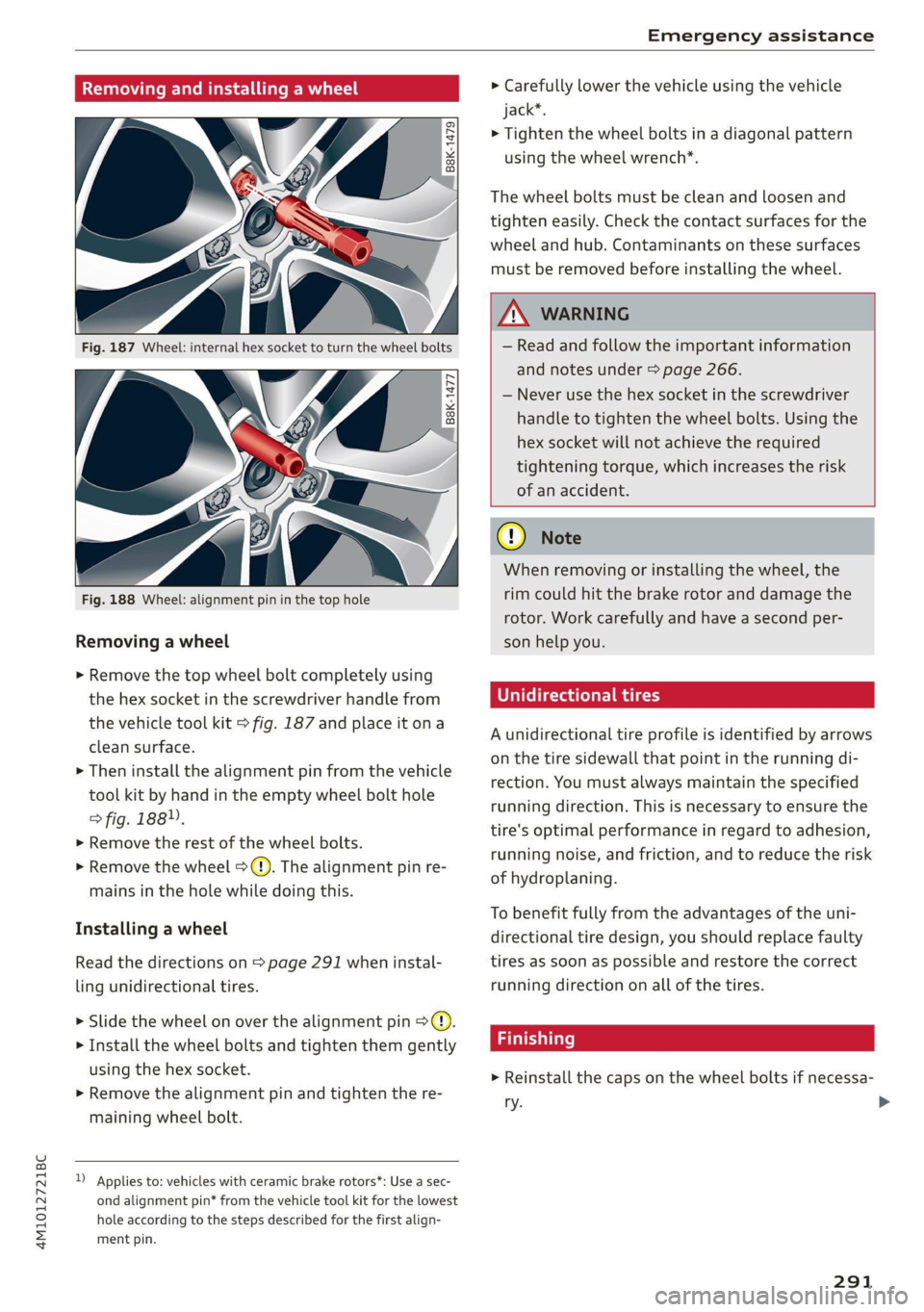
Removing and installing a wheel
@ Rg Tt
“ 0 oO
B8K-1477
Removing a wheel
> Remove the top wheel bolt completely using
the hex socket in the screwdriver handle from
the vehicle tool kit > fig. 187 and place it ona
clean surface.
> Then install the alignment pin from the vehicle
tool kit by hand in the empty wheel bolt hole
> fig. 188”.
> Remove the rest of the wheel bolts.
> Remove the wheel >(). The alignment pin re-
mains in the hole while doing this.
Installing a wheel
Read the directions on > page 291 when instal-
ling unidirectional tires.
> Slide the wheel on over the alignment pin >@.
> Install the wheel bolts and tighten them gently
using the hex socket.
> Remove the alignment pin and tighten the re-
maining wheel bolt.
D Applies to: vehicles with ceramic brake rotors*: Use a sec-
ond alignment pin* from the vehicle tool kit for the lowest
hole according to the steps described for the first align-
ment pin.
> Carefully lower the vehicle using the vehicle
jack*.
> Tighten the wheel bolts in a diagonal pattern
using the wheel wrench*.
The wheel bolts must be clean and loosen and
tighten easily. Check the contact surfaces for the
wheel and hub. Contaminants on these surfaces
must be removed before installing the wheel.
ZX WARNING
— Read and follow the important information
and notes under > page 266.
— Never use the hex socket in the screwdriver
handle to tighten the wheel bolts. Using the
hex
socket will not achieve the required
tightening torque, which increases the risk
of an accident.
() Note
When removing or installing the wheel, the
rim could hit the brake rotor and damage the
rotor. Work carefully and have a second per-
son help you.
Unidirectional tires
A unidirectional tire profile is identified by arrows
on the tire sidewall that point in the running di-
rection. You must always maintain the specified
running direction. This is necessary to ensure the
tire's optimal performance in regard to adhesion,
running noise, and friction, and to reduce the risk
of
hydroplaning.
To benefit fully from the advantages of the uni-
directional tire design, you should replace faulty
tires as soon as possible and restore the correct
running direction on all of the tires.
> Reinstall the caps on the wheel bolts if necessa-
ry.
291
>
Page 294 of 332
Emergency assistance
> Store the vehicle tool kit in its designated
place.
> Store the replaced tire securely in the luggage
compartment > page 87.
> Check the tire pressure on the installed wheel
as soon as possible.
> Correct the tire pressure and store it in the MMI
=> page 278.
> The wheel bolt tightening specification must be
120 ft lbs (160 Nm). Have it checked as soon as
possible with a torque wrench. Drive carefully
until then.
> Have the faulty wheel replaced as quickly as
possible.
Jump starting
You should only perform the steps that follow if
you have the necessary tools and technical ex-
pertise.
If the engine does not start because the vehicle
battery is drained, you can jump start your vehi-
cle using another vehicle. Jump start cables are
needed to do this.
Both vehicle batteries must have 12 V nominal
voltage. The voltage capacity (Ah) of the vehicle
battery that is giving power must not be less
than the capacity of the drained vehicle battery.
Jump start cable
Only use a jump start cable with a large enough
diameter. Note the manufacturer's specifica-
tions.
Only use a jump start cable with insulated termi-
nal clamps.
Positive cable - usually red.
Negative cable - usually black.
ZA WARNING
— A drained battery can freeze at tempera-
tures around 32 °F (0 °C). If the vehicle bat-
tery is frozen, it must be thawed before con-
necting the jump start cables. If it is not,
the risk of an explosion and chemical burns
292
increases. After jump starting the vehicle,
drive to an authorized Audi dealer or author-
ized Audi Service Facility immediately to
have the vehicle battery checked.
— Read the warnings when working in the en-
gine compartment > page 245.
— Handling the jump start cables incorrectly
may cause the vehicle battery to explode
and lead to serious injuries.
@) Note
Jump start cables can cause considerable
damage to the vehicle electrical system if
they are connected incorrectly.
Gi) Tips
— There must be no contact between the
vehicles, or else voltage could flow when
connecting the positive terminal and drain
the vehicle battery of the vehicle providing
the jump start.
— The drained vehicle battery must be con-
nected correctly to the electrical system.
— Switch off electrical equipment that is not
needed.
Page 297 of 332
4M1012721BC
Emergency assistance
Preparations
> Only secure the towing cable or tow bar at the
designated towing loops > page 295,
=> page 296.
> Make sure the towing cable is not twisted. Oth-
erwise it could disconnect from the towing loop
while towing.
> Switch the emergency flashers on in both
vehicles > page 53. However, do not do this if it
prohibited by law.
Towing vehicle (front)
> Only start to drive when the towing cable is
taut.
> Press the brake pedal very carefully.
> Avoid sudden braking or driving maneuvers.
Vehicle being towed (rear)
> Make sure the ignition is switched on so that
the steering wheel is not locked and so that you
can use the turn signals, the horn, and the
windshield wipers if needed > A\.
> Switching it off before the vehicle has stopped
may impair the function of the brake booster
and power steering. You would then need to
use more force to steer and brake the vehicle.
> Release the parking brake > page 108.
> Select the “N” selector lever position.
> Make sure the towing cable is always taut.
ZA WARNING
— Never tow a vehicle using a tow bar or tow-
ing cable if the vehicle does not have electri-
cal power.
— If the vehicle runs out of power while it is
being towed, stop towing the vehicle imme-
diately and consult an authorized Audi deal-
er or qualified repair facility.
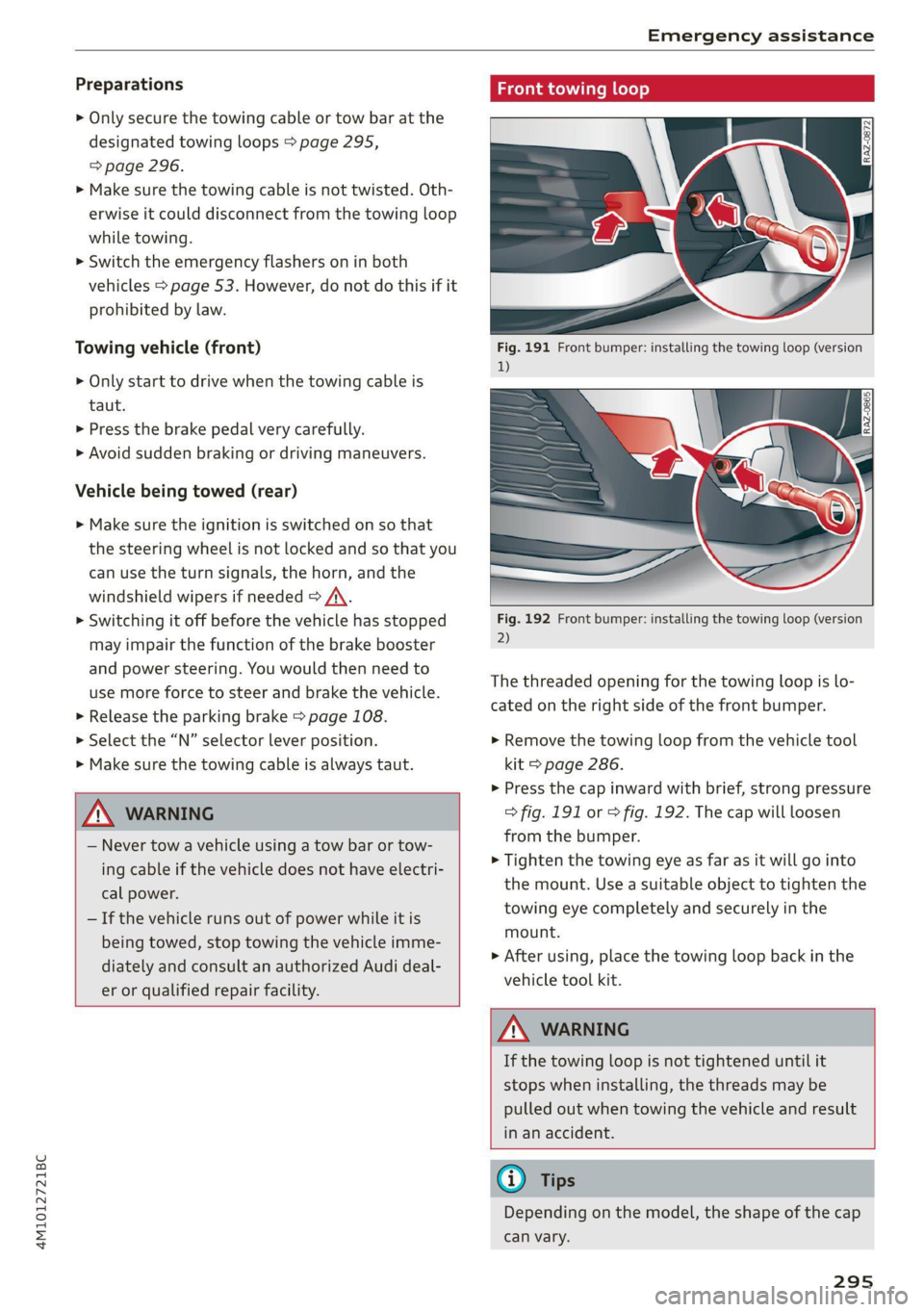
ing loop
Fig. 192 Front bumper: installing the towing loop (version
2)
The threaded opening for the towing loop is lo-
cated on the right side of the front bumper.
> Remove the towing loop from the vehicle tool
kit > page 286.
>» Press the cap inward with brief, strong pressure
> fig. 191 or > fig. 192. The cap will loosen
from the bumper.
> Tighten the towing eye as far as it will go into
the mount. Use a suitable object to tighten the
towing eye completely and securely in the
mount.
> After using, place the towing loop back in the
vehicle tool kit.
Z\ WARNING
If the towing loop is not tightened until it
stops when installing, the threads may be
pulled out when towing the vehicle and result
in an accident.
G) Tips
Depending on the model, the shape of the cap
can vary.
295
Page 301 of 332
4M1012721BC
Fuses and bulbs
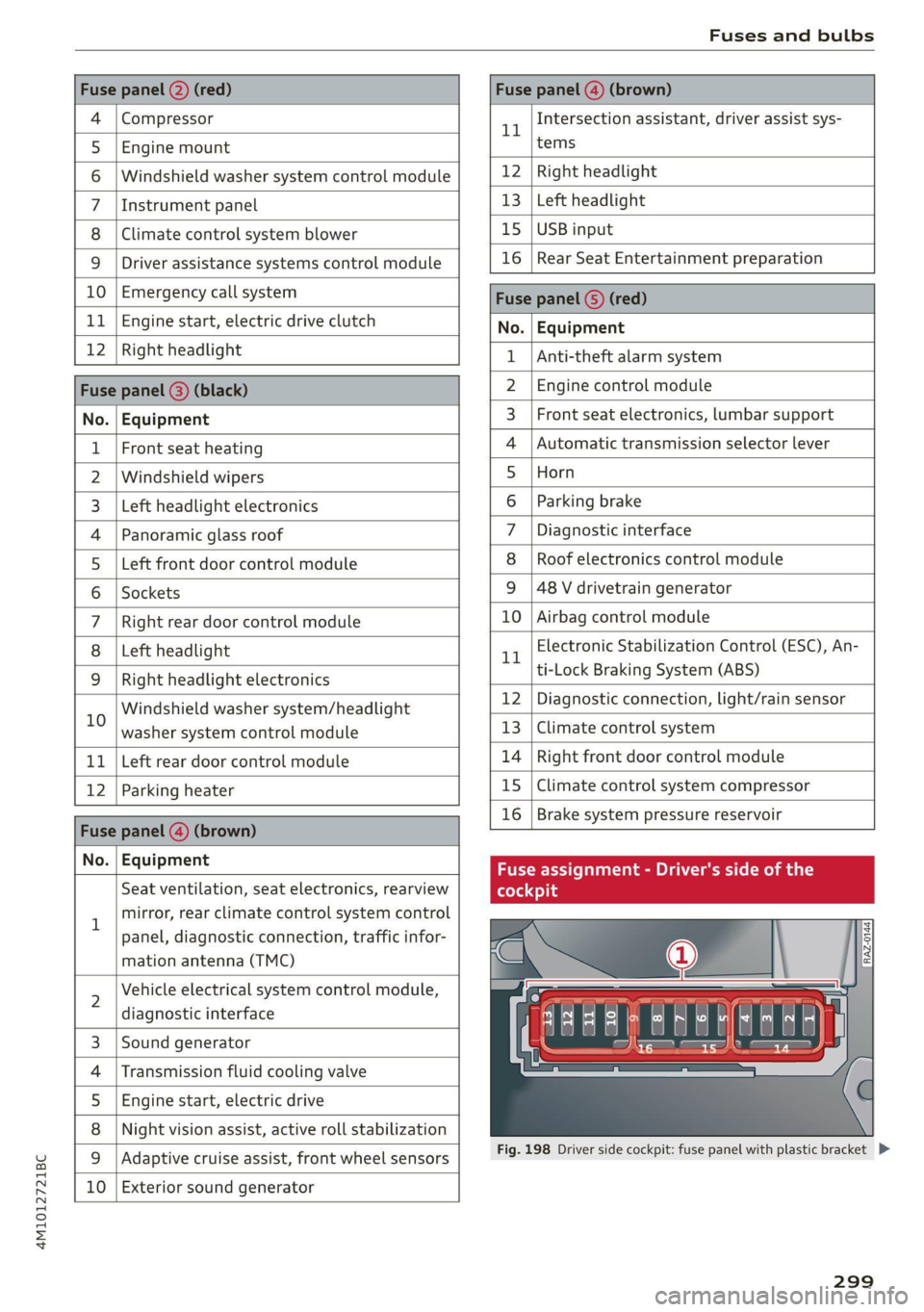
Fuse panel @) (red) Fuse panel (4) (brown)
4 |Compressor 1 Intersection assistant, driver assist sys-
5 |Engine mount tems
6 |Windshield washer system control module 12 | Right headlight
7 |Instrument panel 13 | Left headlight
8 | Climate control system blower 15 | USB input
9 | Driver assistance systems control module 16 | Rear Seat Entertainment preparation
10 | Emergency call system Fuca panel G) (DD)
11 | Engine start, electric drive clutch No. | Equipment
12 | Right Headlight 1 |Anti-theft alarm system
Fuse panel (8) (black) 2 |Engine control module
No. | Equipment 3 | Front seat electronics, lumbar support
1 | Front seat heating 4 |Automatic transmission selector lever
2 |Windshield wipers 5 |Horn
3 | Left headlight electronics 6 |Parking brake
4 |Panoramic glass roof 7 | Diagnostic interface
5 |Left front door control module 8 | Roof electronics control module
6 |Sockets 9 |48 V drivetrain generator
7 |Right rear door control module 10 | Airbag control module
8 | Left headlight 1 Electronic Stabilization Control (ESC), An-
9 |Right headlight electronics trtock Braking System cine
in Windshield washer systemn/headlight 12 Diagnostic connection, light/rain sensor
washer system control module 13 | Climate control system
11 | Left rear door control module 14 | Right front door control module
12 | Parking heater 15 |Climate control system compressor
Fase panel @ (brown) 16 | Brake system pressure reservoir
Nou) Faipmsns Fuse assignment - Driver's side of the
Seat ventilation, seat electronics, rearview (oleae
1 mirror, rear climate control system control
panel, diagnostic connection, traffic infor-
mation antenna (TMC)
N
Vehicle electrical system control module,
diagnostic interface
Sound generator
Transmission fluid cooling valve
Engine start, electric drive
Night vision assist, active roll stabilization
wW}oa;m|
&|w
Adaptive cruise assist, front wheel sensors
10 Exterior sound generator
LE EEEL|
Fig. 198 Driver side cockpit: fuse panel with plastic bracket D>
299
Page 317 of 332
4M1012721BC
A
A/C cooling mode..........-. eee eee eee ee 94
A/C system refrigerant oil............... 314
Accelerator pedal.............2--00000- 102
also refer to Accelerator pedal.......... 102
ACCESSOFICS 2. eee 310
Active lane assist
refer to Lane departure warning......... 149
refer to Lane guidance................ 149
Adaptive cruise assist................04. 139
Cleaning the sensors..............0055 281
Adaptive cruise control
Predictive control................0005 143
Adaptive dampers ........... 000000 eee 114
Adaptive speed assist
refer to Adaptive cruise assist.......... 139
Adjusting the air distribution............. 94
Adjusting the brightness................. 55
Adjusting the rear seats.................. 67
Adjusting the sound................0005 236
Adjusting the temperature............... 94
Adjusting the vents ccs <= csws + © sews +o oer 96
Adjusting the volume.............e eee eee 30
Adjusting the volume (announcements) .... 236
Adjusting the welcome sound............ 236
Airbag system... 2.2... eee eee 75
AIPSUSPENSION ix. o © aoewes « 2 menses + meme» 5, v0 114
Alarm system
refer to Anti-theft alarm system.......... 37
Alignment pin (changing the wheel)....... 286
All-weather lights...............-..00005 50
All-wheel steering.............---00005 115
ALUS@aSOntineSies. « 3 ssasess «x aimee a & iwesane sw a8 275
All wheel drive
refer to quattro.............0 0. eee 116
Amazon Alexa integration
Media playback................00000. 223
Operating « « seen s » ewes se eee G s FeeE Ys BOS 28
AMI
refer to Audi music interface........... 224
Android Auto
refer to Audi smartphone interface...... 234
Anti-lock braking system................ 117
AnitisSlip REQUlation ws a & sos se weae 9 oe 117
Anti-theft alarm system...............05. 37
Anti-theft wheel bolts...............0... 289
Apple CarPlay
refer to Audi smartphone interface...... 234
Aspect ratio
VIdCO eee eee eee eee eee 228, 230
ASR
refer to Anti-Slip Regulation............ 117
Audi adaptive light...............-.0000- 50
Audi connect
refer to CONnNect ; «= = sass ss sees ss eee ee ae 194
Audidrive'selecticy, « + scum oz scum « x pewe yoo 113
Audi entertainment mobile.............. 225
Audi entertainment mobile device
Removing « « sees « sews gs sees xe ees cee 226
SOGUMING's « « ssessie © ccerave 2 6 sesnew « araneos w @ are 226
Tilting... 2... eee eee eee 226
Audi music interface................00- 224
AUGIOFLES xo: 5, coc: i « commons ow cme = at sammie = 226
Audi phone Bx: « sccvise so eaves so emane oe meses 185
Audi pre sense .........0 seve cece ee eee 151
Messages ........... 0.00.0 eee eee 155
Audi pre sense front.............-...0-- 152
Audi side assist
refer to Side assist............-0000005 155
Audi smartphone interface.............. 234
Legalinformation..................0. 239
Audi virtual cockpit
refer to Instrument cluster.............. 12
AUTO
Automatic headlights .................. 50
Climate control system..............0-- 94
Auto Lock (central locking) ............... 34
Automatic climate control system
refer to Climate control system.......... 93
Automatic luggage compartment lid.... 42, 43
Automatic transmission................ 100
Parking lock emergency release......... 102
Automatic wipe/wash system............. 58
Average consumption................... 15
Average speed... 2.2... cee eee eee eee 15
B
Bagshooks3. « swiss o anewivs © ¥ arene 6 6 oman © oes 87
Band
refer to Frequency band............... 214
315
Page 321 of 332
4M1012721BC
Index
F
Factory default settings
Multi Media Interface................. 237
Fast mOUté sacs = & wanes = & Sees = 4 ew Fa 203
Favorites... 0... eee eee eee ee 21
Bluetooth = « sec : s gows es ees e Sewn ee we 239
Navigation. . « ccmes s + sximene «0 onmem = 6 meen « 204
Telephone .......... 0... e eee eee eee 188
Federal Communications Commission (FCC) . 311
File formats (media drives)...........005 231
FIXGURE'SC bisa 5 + sso a o cence 3 x canaems ov aunewas oo 91
Fog QWINKOWS) ace ee wesw wo armans a ¥ semen 6 ¥ coe 95
Folding the backrest down/up............. 68
Folding the rearseats.............-.000. 90
Footwell temperature................-4. 96
For the sake of the environment
Disposing of engine oil................ 250
Fueling... 02... cee cece eee eee 242
Leaks... 2... eee eee eee eee 246
Fragrance.......... 0.0... eee eee 95,96
Free text search
M@dia:: : seme ¢ 3 azn x 5 eG £ Eee TE 230
RadiOtes. x = meses oe acses vo nome ooo eH 216
also refer to Intelligent search.......... 203
Freeze protection
Coolant...... 2... eee eee eee eee 251
Windshield washer system............. 257
Fréqueticy batids « s sccs = s sees ss wees se ea 214
also refer to Frequency band........... 214
Front center arinrest « score « & mea 4s news a vo 66
Front collision warning
refer to Audi pre sense front............ 151
Front passenger’s seat adjustment
Front... 0.2.0... eee eee eee 66
ROaf seas ¢ s seas ¢ o ees Fe ees Ys ees 66
Front wiper blades
Changing s = = eees = 2 mews = stews e Sees coe 59
ClEATIIAG » x. seasios + swiesss ae a sumaes wo omoaas i 6 eens 59
ee ee 241
Additives ...... 0.00... cee cece eee 242
CUMFENt CONSUMPTION = csux « = wows «2 ems se 15
Fuel:display esses. + sue so enue ov eee ¥ os 12
Fuel tank capacity.................00-. 314
Gasoline : acs + ¢ ees +o aaa + 2 sates Fe ees 241
Reducing fuel consumption............ 104
Fueling
Fuel filler door..... 0... . cece eee eee ee 242
Fuel filler door emergency release....... 244
Fueltankcapacity'. « 5 soca es cence ao cman « 314
Functions on demand.................. 196
Functions that require a license.......... 196
also refer to Functions on demand....... 196
G
Garage door opener............--0e ee eee 47
GarMenthOOks eves sv severe oo snes o a wes oo 2 87
GaSOlIMG coy « x were g 2 emp = 2 eee 5 ¢ see & 241
Additives ...... 0... cece eee eee eee 242
Gasoline mixture.................0005 241
GAWR
refer to Gross Axle Weight Rating (GAWR) . 314
Gears... eee 100
Glossary of tire and loading terminology... 262
Glove compartment..............000 eee 87
Gross Axle Weight Rating (GAWR)........ 314
Gross Vehicle Weight Rating (GVWR)...... 314
GVWR
refer to Gross Vehicle Weight
Rating (GVWR) « sce se mee = 4 metas & 2 ee 314
H
Handsfree................-..0.0 00s ee 184
Hands Free Profile..................... 184
Head-up display
ACiUStiNGizes: 5 = :zexes 5 « eee ss ween § v eee 26
Adjusting the brightness................ 55
Operating...................0.00.0000. 26
Headlight range control................0. 50
Headlights
Cleaning ....... 6.06 281
Headlight range control................ 50
Washer'systems « ¢ wesa es mera. oemre + eas 58
Washer system (filling washer fluid) .... . 257
Head restraints
Adjusting... 2.0.02... . 0. c eee eee eee 70
Removing and installing............0065 70
Heated rear window............-. 000s eee 95
Heated steering wheel................0.. 96
Heating....... 0.0.0... eee eee eee eee 93
319