door lock AUDI Q7 2021 Owner´s Manual
[x] Cancel search | Manufacturer: AUDI, Model Year: 2021, Model line: Q7, Model: AUDI Q7 2021Pages: 332, PDF Size: 117.99 MB
Page 4 of 332
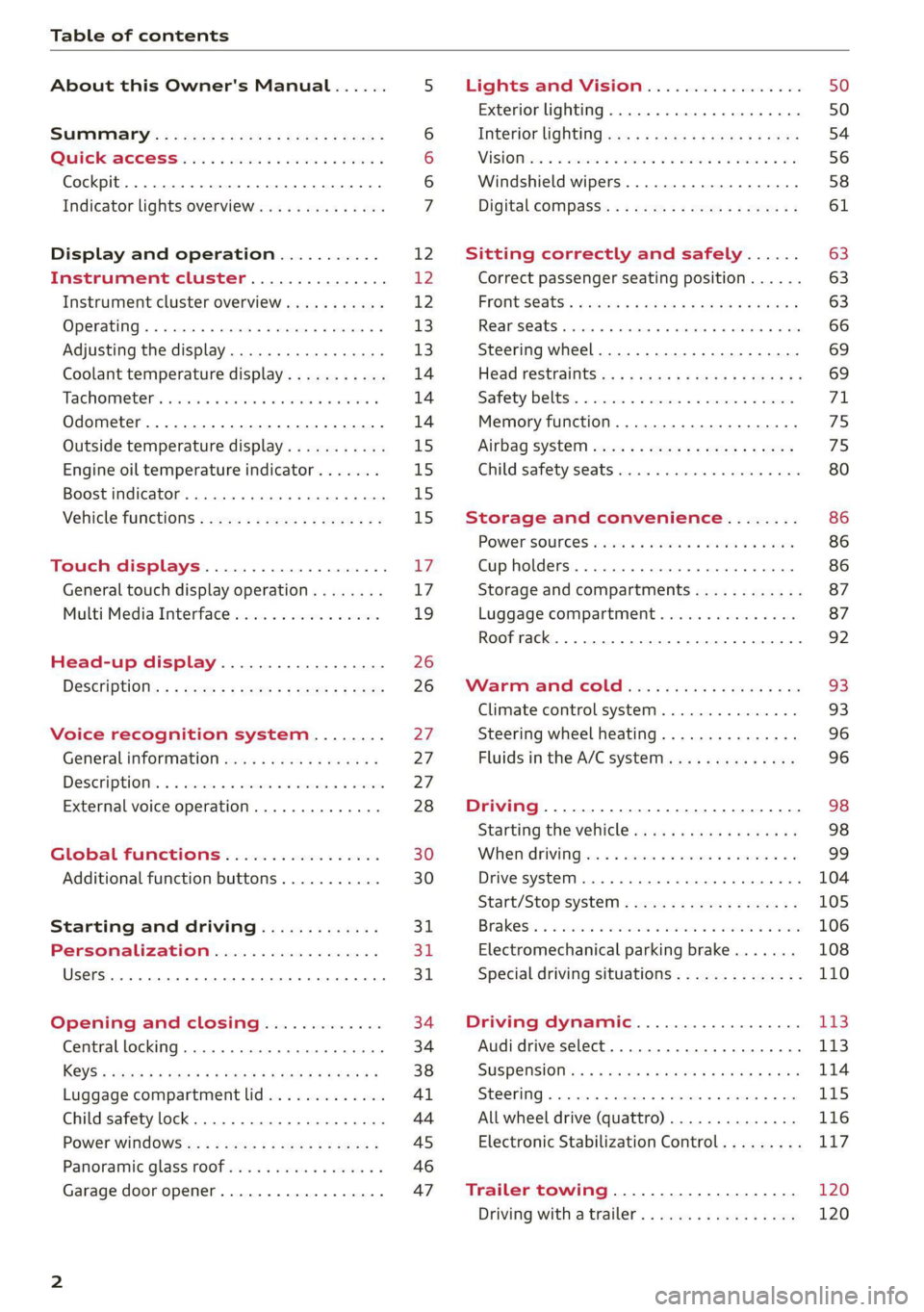
Table of contents
About this Owner's Manual......
SUMIMAry: < = exe : eens: Seen cs sens
QutckeaeCe ssh: «i esis se ois a eaves @
Cockpit. ...... 0... eee eee eee eee
Indicator lights overview...........4..
Display and operation...........
Instrument cluster...............
Instrument cluster overview...........
Operating. ecccuse w+ were oo wens oo ayes 9 ¥
Adjusting the display.................
Coolant temperature display...........
Tachometer’ series i ewe so snes ¥ & ome
Odometer.............. cee eee eee ee
Outside temperature display...........
Engine oil temperature indicator.......
Boost indicator...............0--000.
Vehicle functions...............-----
Touch displays....................
General touch display operation........
Multi Media Interface................
Head-up display..................
DeSeriptions: s wees « x wows ¢ cess so eee
Voice recognition system........
Generalinformation.................
DeSeriptions. «+ seams x x arucsms x 0 seine oo coer
External voice operation..............
Global FUNGtHIONS:. icc: 5 6 ese. 6 6 sce
Additional function buttons...........
Starting and driving.............
Personalization..................
Opening and closing.............
Central locking..............00-e eee
Child safety lock.............00.-000
Power WindOWSic« s < sews ys wey 5 2 em 5
Panoramic glass'roof seis ss sews se ewe ea
Garage door opener..................
NOD
OO
12 12 12
13
13
14 14 14
15
15
15
15
17 17 19
26
26
BY
27 27 28 30 30
31 31
311.
34
34
38
Al
44
45
46
Lights and Vision................. 50
Exterior lighting...............0000ee 50
Interior lightingissss « ¢ ews + ¢ ees es eee 54
MiSIOM iss +o seas os aroma oo ewe wo eS wars 56
Windshield wipers................05- 58
Digital compass’ « < sces ss sees sz wees ae 61
Sitting correctly and safely...... 63
Correct passenger seating position...... 63
PROMUSCStS: + wares x x nouns 6 e RawER ye eae 8 63
ReAarSeats verse a coecns oo area oo semen nw aie 66
Steering wheel.............2.200005. 69
Head restraintsts: « » gare x 2 oawa ys qe a 5 69
Safety belts..............00..00000. 71
Memory function............2..00 eee 75
Airbag syst@m aces ss cece se ees ee ees 75
Child safety seats cic «4 wessn « women © vane 80
Storage and convenience........ 86
POWer SOURCES sisson «+ women « ¥ oes 3 6 eos 86
Cup holders........ 00... e cece eee 86
Storage and compartments............ 87
Luggage compartment............... 87
Roof rack... 2.0... 0... eee eee eee eee 92
Warm and cold.................5. oe
Climate control system............... 93
Steering wheel heating............... 96
Fluids in the A/C system.............. 96
Driving................. 0.00.00 000. 98
Starting the vehicle. ..........eee cues 98
Whenrdrivingser. sess os eeu oe emcee ves 99
Drive system... 02... ee eee eee 104
Start/Stop System « ecw: se sees te sees de 105
Brakests «sais 2 wine 2 oem a 3 enon 2 o paws 106
Electromechanical parking brake....... 108
Special driving situations.............. 110
Driving dynamic.................. L3
Audi drive select...............00000. 113
SUSPENSION es « & saves ¥ & sie 9 & wares ov BE 114
SECOKIING « ccexscs 1 % ssewome w = wxwmome 6 a ceemTEE Hot 115
All wheel drive (quattro) .............. 116
Electronic Stabilization Control......... 117
Trailer towing.................... 120
Driving with atrailer................. 120
Page 8 of 332
Quick access
Quick access
Cockpit
©
©O®OOO
OOOO
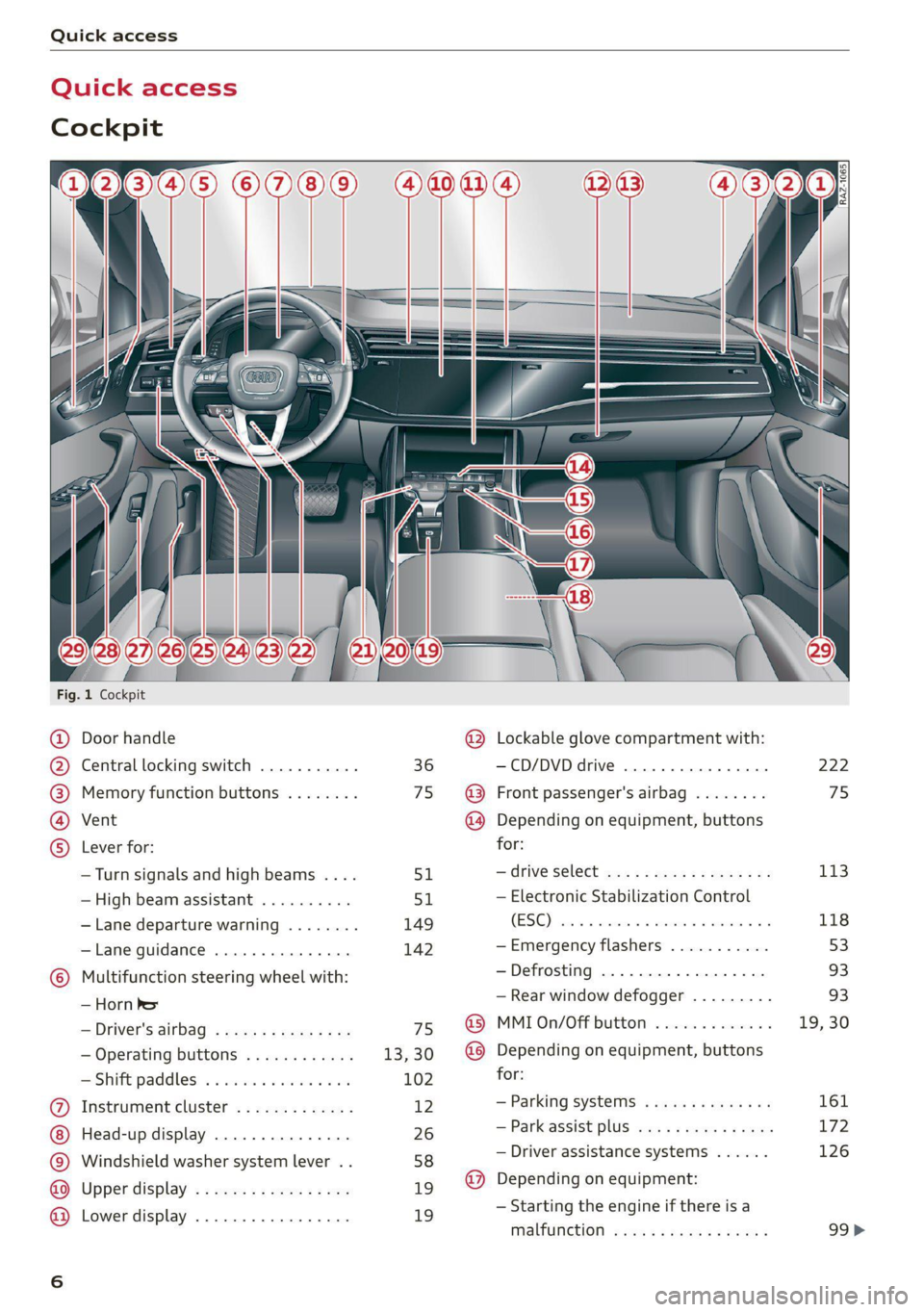
Fig. 1 Cockpit
&
Door handle
Central locking switch
Memory function buttons
Vent
Lever for:
—Turn signals and high beams ....
—High beam assistant ..........
— Lane departure warning
— Lane guidance
Multifunction steering wheel with:
— Horn be
— Driver's airbag
— Operating buttons
= Shift paddles: « « coi e ewes sv ove
Instrument cluster .............
Head-up display ...............
Windshield washer system lever . .
Upper display .................
Lower display .................
® @ @
@®
Lockable glove compartment with:
—CD/DVD drive ...........0005.
Front passenger's airbag
Depending on equipment, buttons
for:
—drive select ...............00.
— Electronic Stabilization Control
(ESC)
— Emergency flashers
— Defrosting
— Rear window defogger .........
MMI On/Off button
Depending on equipment, buttons
for:
— Parking systems
— Park assist plus ...............
— Driver assistance systems ......
Depending on equipment:
— Starting the engine if there is a
malfunction
222
75
113
118
53
93 93
19, 30
161 172
126
99>
Page 11 of 332
4M1012721BC
Quick access
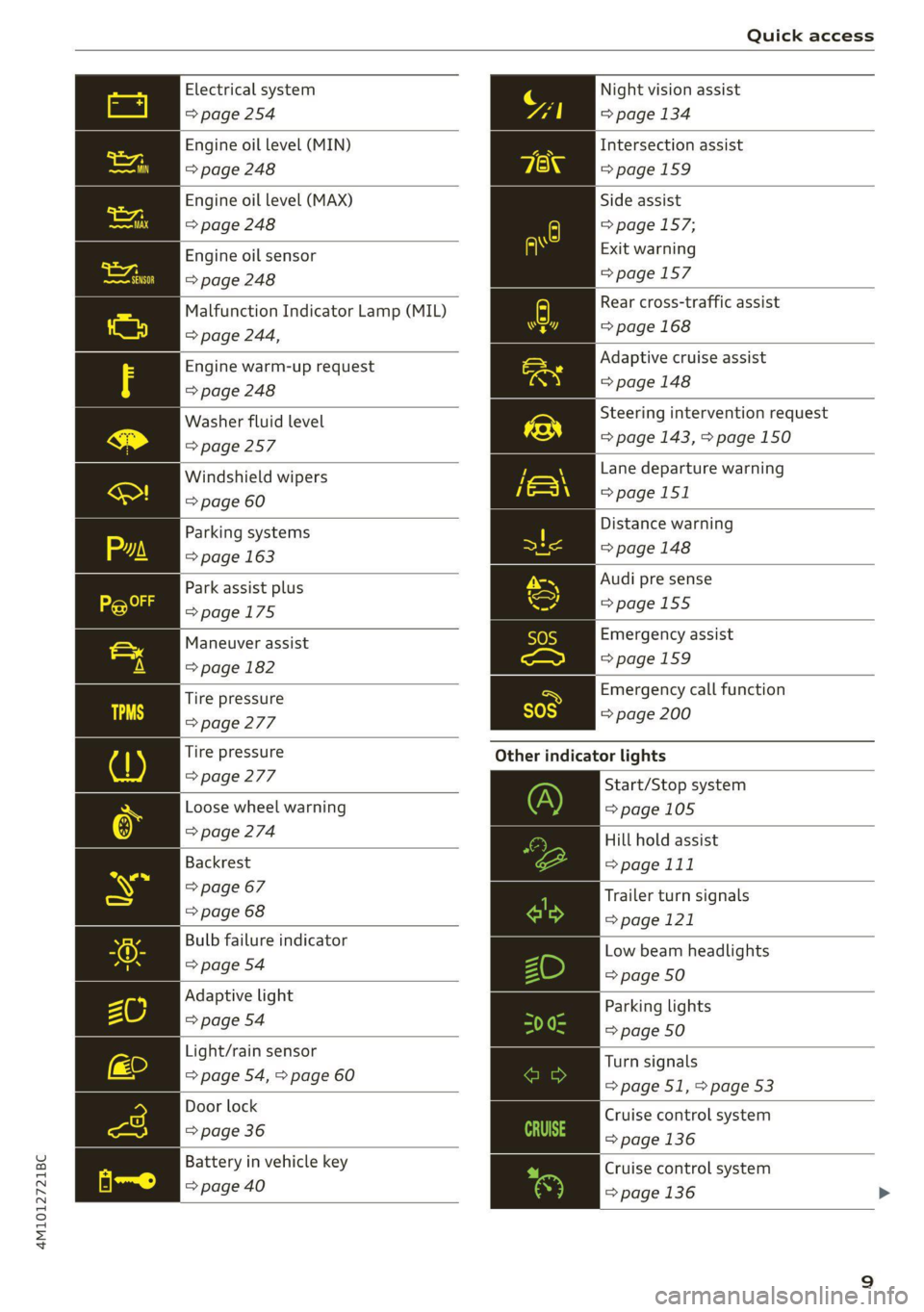
Electrical system Night vision assist
=> page 254 => page 134
Engine oil level (MIN)
Intersection assist
=> page 248 =>page 159
Engine oil level (MAX) Side assist
=> page 248 => page 157;
Exit warning
=>page 157
Engine oil sensor
=> page 248
Malfunction Indicator Lamp (MIL)
> page 244,
Rear cross-traffic assist
=> page 168
Engine warm-up request Adaptive cruise assist
=> page 248 => page 148
Washer fluid level Steering intervention request
=> page 257 => page 143, > page 150
Windshield wipers Lane departure warning
=> page 60 >page 151
Parking systems Distance warning
=> page 163 = page 148
Park assist plus Audi pre sense
>page 175 =>page 155
Maneuver assist Emergency assist
Spiga 1 pagemes
Tire pressure ra Emergency call function
=> page 277 = page 200
Tire pressure Other indicator lights
> page 277
Start/Stop system
Loose wheel warning => page 105
> page 274 Hill hold assist
Backrest => page 111
> page 67 Trailer turn signals
= page 68 >page 121
Bulb failure indicator Low beam headlights
© page.o4 => page 50
Adaptive light
Parking lights
=> page 54 a9
=> page 50
Light/rain sensor
Turn signals
=> page 54, > page 60
= page 51, > page 53
Door lock Cruise control system
=> page 36 => page 136
Battery in vehicle key Cruise control system
pppage400 > page 136 >
Page 12 of 332
Quick access
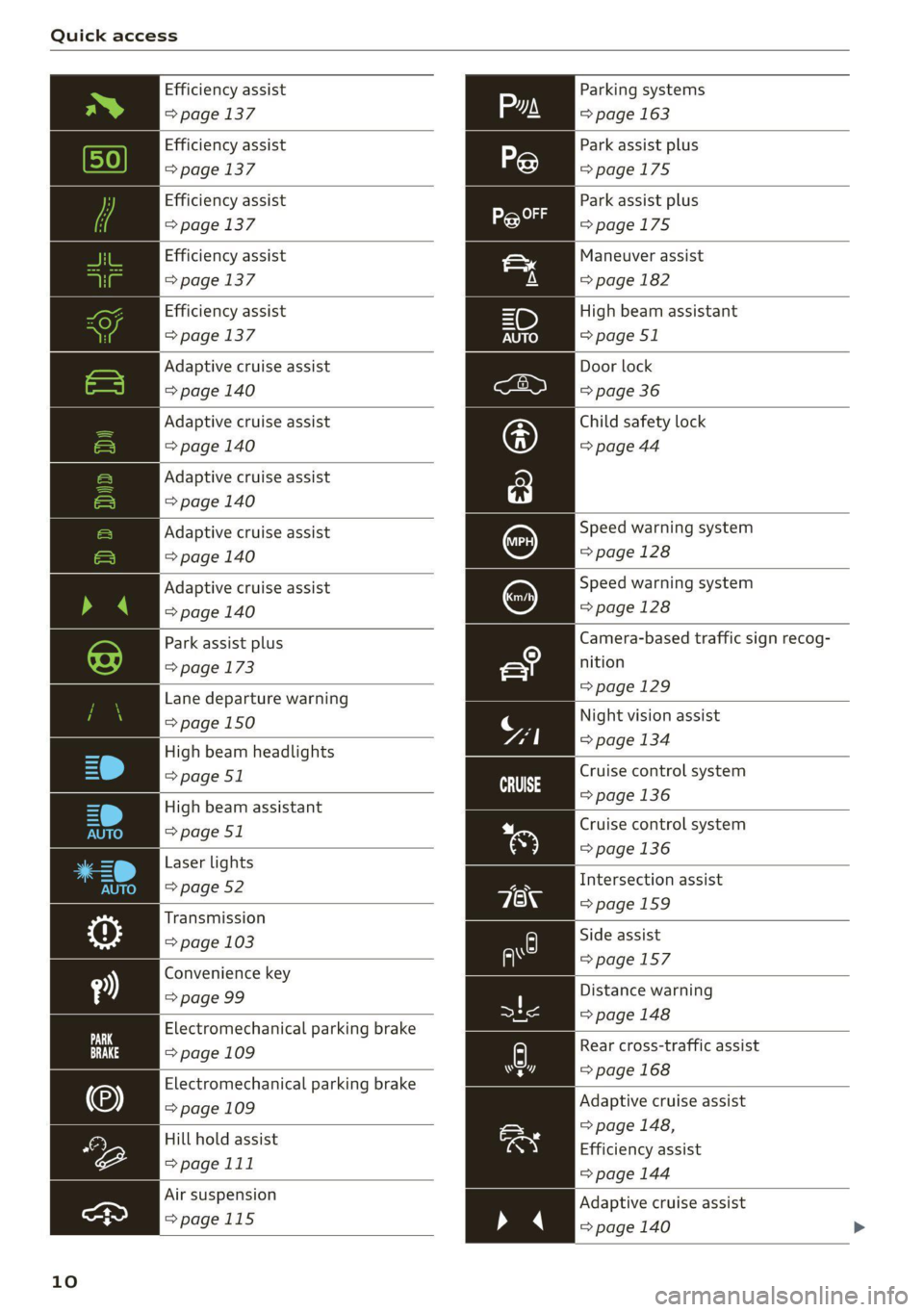
Efficiency assist
=> page 137
Efficiency assist
=> page 137
Efficiency assist
=> page 137
Efficiency assist
=> page 137
Efficiency assist
=> page 137
Adaptive cruise assist
=> page 140
Adaptive cruise assist
=> page 140
Adaptive cruise assist
=> page 140
Adaptive cruise assist
=> page 140
Adaptive cruise assist
=> page 140
Park assist plus
=> page 173
Lane departure warning
=> page 150
High beam headlights
=> page 51
High beam assistant
=> page 51
Laser lights
=> page 52
Transmission
=> page 103
Convenience key
=> page 99
Electromechanical parking brake
=> page 109
Electromechanical parking brake
=> page 109
Hill hold assist
=>page 111
Air suspension
>page 115
10
Parking systems
=> page 163
Park assist plus
=>page 175
Park assist plus
=>page 175
Maneuver assist
=> page 182
High beam assistant
=> page 51
Door lock
=> page 36
Child safety lock
=> page 44
Speed warning system
=> page 128
Speed warning system
=> page 128
Camera-based traffic sign recog-
nition
=>page 129
Night vision assist
=> page 134
Cruise control system
=>page
136
Cruise control system
=> page 136
Intersection assist
=>page 159
Side assist
=>page 157
Distance warning
= page 148
A) Rear cross-traffic assist
=> page 168 hr]
Adaptive cruise assist
> page 148,
Efficiency assist
=> page 144
Adaptive cruise assist
=> page 140 >
Page 36 of 332
Opening and closing
Opening and closing
Central locking
(eT e e eeu)
ZA WARNING
— If you leave the vehicle, switch the ignition
off and take the key with you. This applies
particularly when children remain in the ve-
hicle. Otherwise, children could start the ve-
hicle or operate electrical equipment (such
as power windows), which increases the risk
of an accident.
— Applies to vehicles with anti-theft alarm sys-
tem: When the vehicle is locked from the
outside, no one - especially children - should
remain in the vehicle, because the windows
can no longer open from the inside
= page 37, Anti-theft alarm system.
Locked doors make it more difficult for
emergency workers to enter the vehicle,
which puts lives at risk.
All doors and the luggage compartment lid can
be centrally unlocked and locked at once. You can
select in the MMI if the entire vehicle or only the
driver's door should unlock when unlocking the
vehicle > page 35. The turn signals flash twice
when you unlock the vehicle and flash once when
you lock the vehicle. If they do not flash when
locking, check if all doors and lids are closed.
Depending on the vehicle equipment, you may
have different options for centrally unlocking and
locking your vehicle.
— Vehicle key > page 39
— Sensors in the door handles > page 39
— Lock cylinder in the driver's door > page 37
— Interior central locking switch > page 36
Vehicle key
The term “vehicle key” refers to the remote con-
trol key or convenience key*. The convenience
key* is a remote control key with special func-
tions > page 39 and > page 98.
34
Power closing*
When closing a door or the luggage compart-
ment lid, you only have to let it fall lightly into
the latch. It then closes automatically > A\.
Automatic locking
If you unlock the vehicle but then do not open
any of the doors, the luggage compartment, or
the hood within a short period time, the vehicle
locks again automatically. This feature prevents
the vehicle from being accidentally left unlocked
for a long period of time.
Automatic locking (Auto Lock)
The Auto Lock function locks all doors and the
luggage compartment lid once the speed has ex-
ceeded approximately 9 mph (15 km/h). The ve-
hicle will unlock again if the unlock function in
the central locking switch is pressed, the “P” gear
is engaged, or the ignition is switched off.
You can open the doors individually from the in-
side by pulling the door handle one time. To open
the rear doors individually, you must pull the
door handle twice.
In the event of a crash with airbag deployment,
the doors will also automatically unlock to allow
access to the vehicle.
Unintentionally locking yourself out
Only lock your vehicle when all of the doors and
the luggage compartment lid are closed and
there is no key in the vehicle. This reduces the
risk of locking yourself out accidentally.
The
following features help to reduce the risk of
locking your vehicle key in the vehicle:
— If the driver's door is open, the vehicle cannot
be locked by pressing the & button on the re-
mote control key or by touching the locking
sensor* on a door.
— If the vehicle key that was used most recently is
inside the luggage compartment, the luggage
compartment lid will automatically open again
after it closes > ©.
— If the vehicle key that was last used is detected
inside the vehicle, then the vehicle cannot be
locked from the outside > ©.
Page 37 of 332
4M1012721BC
Opening and closing
ZA WARNING
Observe the safety precautions > page 34.
Z\ WARNING
Applies to: vehicles with power closing
—To reduce the risk of injury, make sure that
the area where the door is closing is clear
during the closing process.
— The closing process can be stopped at any
time by pulling on the outer or inner door
handle.
@) Note
The following applies when locking the vehi-
cle:
— If the vehicle key that was last used is de-
tected inside the passenger compartment,
then the vehicle cannot be locked from the
outside using the sensor. Take the vehicle
key with you and lock the vehicle again. Oth-
erwise, the vehicle will not be protected
against unauthorized access.
— If you try to lock the vehicle using the but-
ton on the vehicle key while the front pas-
senger's or rear door is open, and you acci-
dentally place the vehicle key inside the pas-
senger compartment and close the door,
the vehicle will lock at first. But if the key-
less system detects a vehicle key inside the
vehicle after it locks, then the vehicle will
unlock again. The turn signals will flash sev-
eral times to indicate this. If you do not
open the vehicle to remove the vehicle key
within a brief period, then the vehicle will
lock automatically. This prevents the vehicle
from being left unlocked for long periods of
time. The vehicle key will then be locked in-
side the vehicle.
— If the luggage compartment lid closes and
the system detects that the last vehicle key
that was used is inside the luggage com-
partment, then the luggage compartment
lid will open again. The turn signals will
flash several times to indicate this. The
doors will lock. Always take the vehicle key
with you, or unauthorized persons may be
able to enter the vehicle.
@) Tips
— Do not leave valuables unattended in the ve-
hicle. A locked vehicle is not a safe!
—The LED in the driver's door rail blinks when
you lock the vehicle. If the LED turns on for
approximately 30 seconds after locking,
there is a malfunction in the central locking
system. Have the problem corrected by an
authorized Audi dealer or authorized Audi
Service Facility.
atte Mn meee ol dia 1)
You can adjust the central locking system to your
preferences. The settings depend on the vehicle
equipment.
> Applies to MMI: Select on the home screen: VE-
HICLE > Settings & Service > Central locking.
Door unlocking
—If you select All, all doors and the luggage
compartment lid will be unlocked when unlock-
ing the vehicle.
— If you select Driver's door, only the driver's
door will be unlocked. To unlock all doors and
the luggage compartment lid, press the & but-
ton on the vehicle key twice. In vehicles with a
convenience key”, only the driver's door will un-
lock when you pull the driver's door handle. If
you pull another door handle, the entire vehicle
will be unlocked.
The entire vehicle will always be locked f you
press
the f button.
Long press to open windows
You can select if all windows and the panoramic
glass roof* should open using the vehicle key
=> page 46, Convenience opening and closing. If
you press and hold the ff button on the vehicle
key, all of the windows and the panoramic glass
roof* will close.
Disable rear lid handle
You can select if the luggage compartment lid
can open with the handle. If you activate this
function, the luggage compartment lid can only
be opened with the 4s button the vehicle key or >
35
Page 38 of 332
Opening and closing
on the driver's door. In vehicles with a conven-
ience key*, you can still open the luggage com-
partment lid using the handle if an authorized
convenience key is detected > page 41.
Fold mirrors
You can select if the exterior mirrors automatical-
ly fold in when locking.
Tone when locking!)
You can select if an audio signal sounds when
locking the vehicle.
Open with convenience key
Applies to: vehicles with convenience key
You can deactivate the feature for unlocking us-
ing
the sensor. The function for locking via the
sensor will still be enabled > page 39.
ete] ole cine uaa)
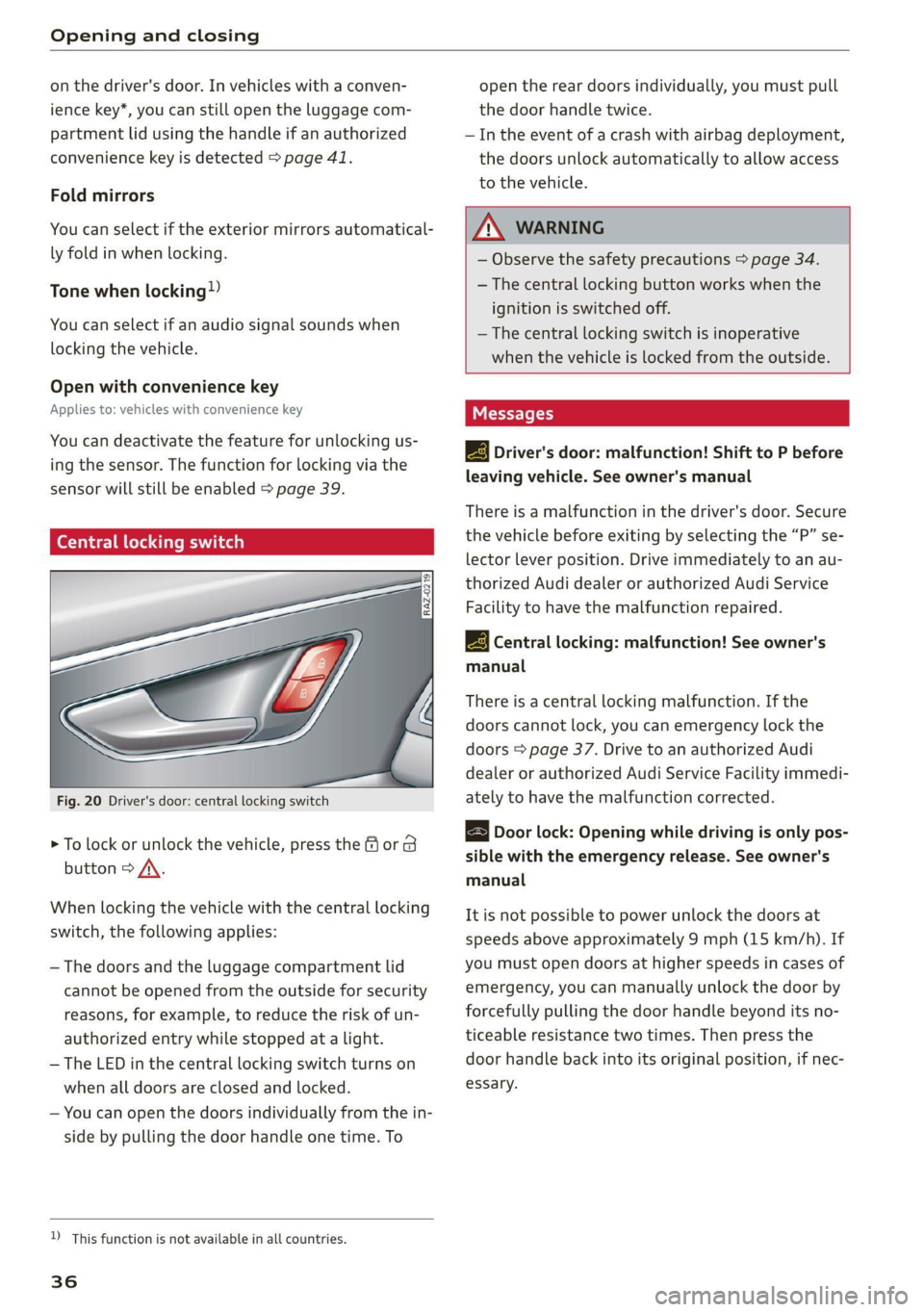
Fig. 20 Driver's door: central locking switch
> To lock or unlock the vehicle, press the for B
button > /\.
When locking the vehicle with the central locking
switch,
the following applies:
— The doors and the luggage compartment lid
cannot be opened from the outside for security
reasons, for example, to reduce the risk of un-
authorized entry while stopped at a light.
— The LED in the central locking switch turns on
when all doors are closed and locked.
— You can open the doors individually from the in-
side by pulling the door handle one time. To
D_ This function is not available in all countries.
36
open the rear doors individually, you must pull
the door handle twice.
— In the event of a crash with airbag deployment,
the doors unlock automatically to allow access
to the vehicle.
ZX WARNING
— Observe the safety precautions > page 34.
— The central locking button works when the
ignition is switched off.
— The central locking switch is inoperative
when the vehicle is locked from the outside.
Messages
EB Driver's door: malfunction! Shift to P before
leaving vehicle. See owner's manual
There is a malfunction in the driver's door. Secure
the vehicle before exiting by selecting the “P” se-
lector lever position. Drive immediately to an au-
thorized Audi dealer or authorized Audi Service
Facility to have the malfunction repaired.
2B Central locking: malfunction! See owner's
manual
There is a central locking malfunction. If the
doors cannot lock, you can emergency lock the
doors > page 37. Drive to an authorized Audi
dealer or authorized Audi Service Facility immedi-
ately to have the malfunction corrected.
Door lock: Opening while driving is only pos-
sible with the emergency release. See owner's
manual
It is not possible to power unlock the doors at
speeds above approximately 9 mph (15 km/h). If
you must open doors at higher speeds in cases of
emergency, you can manually unlock the door by
forcefully pulling the door handle beyond its no-
ticeable resistance two times. Then press the
door handle back into its original position, if nec-
essary.
Page 39 of 332

4M1012721BC
Opening and closing
Mechanically unlocking and locking the
doors
If the central locking fails, you must unlock or
lock the doors separately.
[RAZ-0026|
Fig. 22 Door: mechanically locking
Unlocking or locking the driver's door with
the mechanical key
> Remove the mechanical key > page 38.
> Insert the mechanical key into the slot under
the door handle and pry the cap off > fig. 21.
> To unlock the driver's door, turn the mechanical
key to the unlock position in the direction of ar-
row @) > fig. 21.
> Pull the door handle to open the driver's door.
> To lock the driver's door, select the "P" position
and turn the key once to the close position
@° A.
Locking the front passenger's door and rear
doors using the mechanical key
The mechanical lock is located on the edge of the
door (a) or in the latch opening @) ° fig. 22. It is
only visible when the door is open.
> Remove the mechanical key > page 38.
> If necessary, remove the cap from the opening
> fig. 22.
> Insert the mechanical key into the slot on the
inside and turn it all the way to the right (right
door) or left (left door).
> If necessary, install the cap in the opening and
close the door.
Once the front passenger’s door or rear doors
close, it will no longer be possible to open them
from the outside. The front doors can be opened
from the inside by pulling the door handle one
time. The rear doors can be unlocked from the in-
side by pulling the door handle one time and
then opened by pulling the door handle again. If
the child safety lock in one of the rear doors is ac-
tivated, you must first pull the door handle from
the inside. Then you can open the door from the
outside.
Z\ WARNING
Observe the safety precautions > page 34.
OMe aa)
Applies to: vehicles with anti-theft alarm system
If the anti-theft alarm system detects a vehicle
break-in, audio and visual warning signals are
triggered. The anti-theft alarm system is switch-
ed on or off when locking or unlocking your vehi-
cle. If the alarm is triggered, it will shut off auto-
matically after a certain amount of time.
Switching the alarm off manually
> To switch the alarm off, press the G button on
the vehicle key or switch the ignition on.
Depending on the vehicle equipment, the anti-
theft alarm system may have the following fea-
tures:
37
Page 40 of 332
Opening and closing
Break-in security feature
The alarm will sound if there is a break-in at the
doors, hood, and/or luggage compartment lid.
Interior/towing protection monitor
The alarm will be triggered if there are move-
ments detected in the vehicle interior (for exam-
ple, by animals) or if there is a change in the vehi-
cle angle (for example, when the vehicle is being
towed).
You can prevent the alarm from being triggered
by deactivating the interior/towing protection
monitor.
Deactivating the interior/towing protection
monitor
There are the following options for deactivating
the interior/towing protection monitor:
> Press the & button on the vehicle key a second
time within two seconds. Or
> Applies to: vehicles with convenience key:
Touch the sensor on the door handle a second
time within two seconds. Or
> Turn the mechanical key in the door lock to the
close position a second time within two sec-
onds.
> Applies to: vehicles with MMI: Select on the
home screen: VEHICLE > Settings & Service >
Interior monitoring.
If you lock the vehicle, then the interior/towing
protection monitor will stay off until the next
time the vehicle is unlocked.
ZA WARNING
No one, especially children, should stay in the
vehicle when it is locked from the outside, be-
cause the windows can no longer be opened
from the inside. Locked doors make it more
difficult for emergency workers to enter the
vehicle, which puts lives at risk.
@) Tips
The interior/towing protection monitor only
functions correctly when the windows and the
panorama glass roof* are closed.
38
RAZ-0621
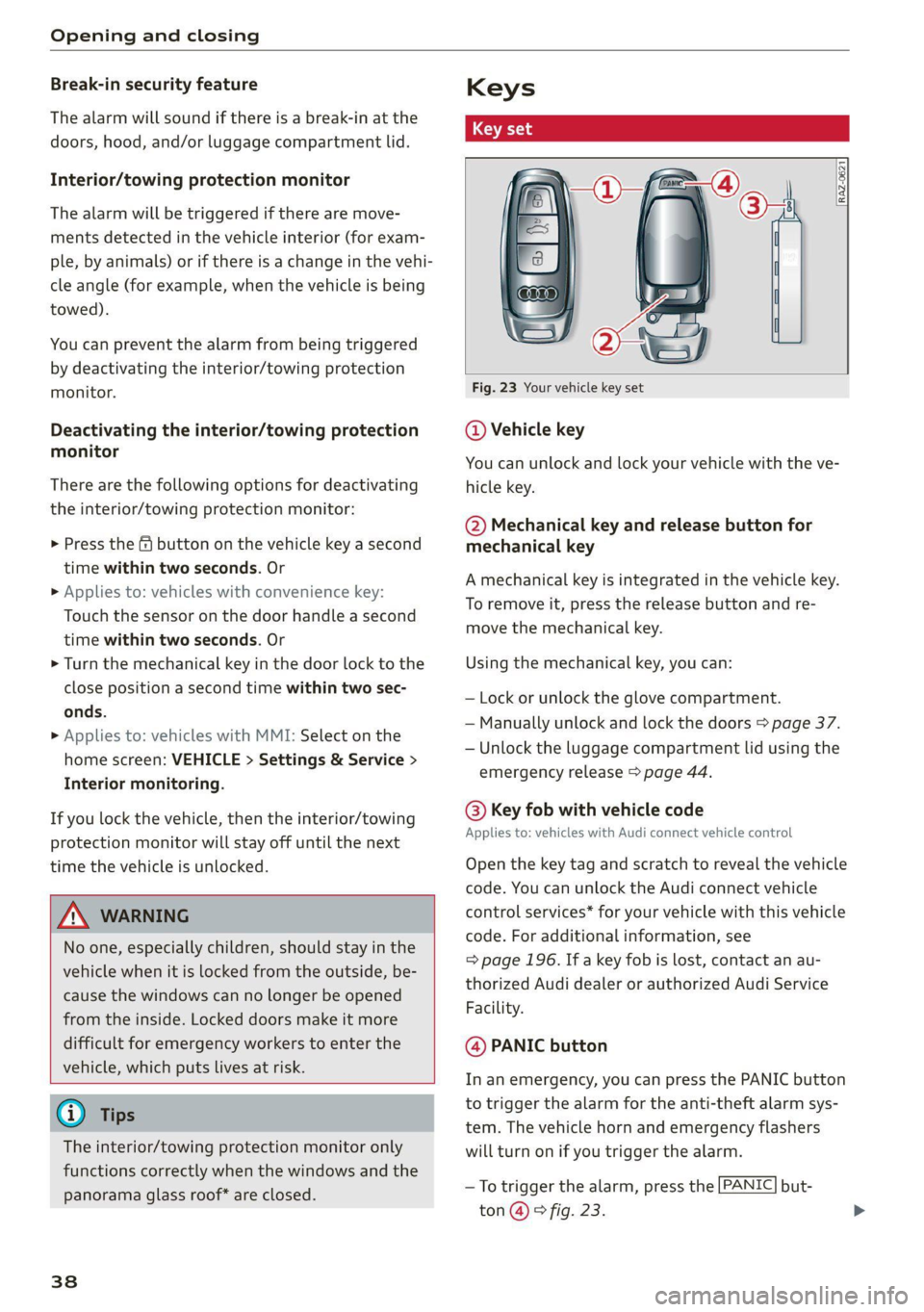
Fig. 23 Your vehicle key set
@ Vehicle key
You can unlock and lock your vehicle with the ve-
hicle key.
@ Mechanical key and release button for
mechanical key
A mechanical key is integrated in the vehicle key.
To remove it, press the release button and re-
move the mechanical key.
Using the mechanical key, you can:
— Lock or unlock the glove compartment.
— Manually unlock and lock the doors > page 37.
— Unlock the luggage compartment lid using the
emergency release > page 44.
@ Key fob with vehicle code
Applies to: vehicles with Audi connect vehicle control
Open the key tag and scratch to reveal the vehicle
code. You can unlock the Audi connect vehicle
control services* for your vehicle with this vehicle
code. For additional information, see
= page 196. If a key fob is lost, contact an au-
thorized Audi dealer or authorized Audi Service
Facility.
@ PANIC button
In an emergency, you can press the PANIC button
to trigger the alarm for the anti-theft alarm sys-
tem. The vehicle horn and emergency flashers
will turn on if you trigger the alarm.
— To trigger the alarm, press the [PANIC] but-
ton @ © fig. 23.
Page 41 of 332
![AUDI Q7 2021 Owner´s Manual 4M1012721BC
Opening and closing
—To turn the alarm off, press the [PANIC] button
again.
Lost key/replacing a key
If a vehicle key is lost, contact an authorized Audi
dealer or aut](/img/6/40285/w960_40285-40.png "AUDI Q7 2021 Owner´s Manual 4M1012721BC
Opening and closing
—To turn the alarm off, press the [PANIC] button
again.
Lost key/replacing a key
If a vehicle key is lost, contact an authorized Audi
dealer or aut")
4M1012721BC
Opening and closing
—To turn the alarm off, press the [PANIC] button
again.
Lost key/replacing a key
If a vehicle key is lost, contact an authorized Audi
dealer or authorized Audi Service Facility. Have
this vehicle key deactivated. It is important to
bring all keys with you.
If a key is lost, you should report it to your insur-
ance company.
Electronic immobilizer
The immobilizer prevents unauthorized use of
the vehicle.
In some cases, it may not be possible to start the
vehicle if there is a vehicle key from a different
vehicle manufacturer on the key chain.
Data in the vehicle key
When driving, service and maintenance-relevant
data is continuously stored in your vehicle key. An
authorized Audi dealer or authorized Audi Service
Facility can read out this data and tell you about
the work your vehicle needs.
ZA\ WARNING
Observe the safety precautions > page 34.
@) Note
Protect the key against high temperatures
and direct sunlight.
@ For the sake of the environment
XX Do not dispose of vehicle keys in household
trash. They contain materials that can be re-
cycled. Contact an authorized Audi dealer or
authorized Audi Service Facility for more in-
formation.
@ Tips
— The vehicle key function can be temporarily
disrupted by interference from transmitters
near the vehicle working in the same fre-
quency range (such as a mobile device or ra-
dio equipment). Always check if your vehicle
is locked.
— Applies to MMI: You can view the number of
keys programmed to the vehicle by selecting
on the home screen: VEHICLE > Settings &
Service > Vehicle information.
— The system complies with United States FCC
regulations and ISED regulations
=> page 311.
Unlocking and locking the vehicle
[RAZ-0025]
SS wy
Fig. 24 Door handle: sensor for locking
Depending on the vehicle equipment, you may
have various options for unlocking and locking
your vehicle. The settings in the MMI specify
which doors will unlock > page 35.
Unlocking or locking using the vehicle key
buttons
> To unlock the vehicle, press the @ button
=> page 38, fig. 23.
> To lock the vehicle, press the ff button once.
Unlocking or locking using the sensors
Applies to: vehicles with convenience key
> To unlock a door or the luggage compartment
lid, grasp the door handle or luggage compart-
ment lid handle.
> To lock the vehicle, close the door and touch
the sensor on the door handle once > fig. 24.
Do not grasp the door handle while locking the
vehicle, or else the vehicle will not lock. The
door cannot be opened for a brief period direct-
ly after locking it. This way you have the oppor-
tunity to check if the doors locked correctly.
39
>