night vision AUDI Q7 2021 Owner´s Manual
[x] Cancel search | Manufacturer: AUDI, Model Year: 2021, Model line: Q7, Model: AUDI Q7 2021Pages: 332, PDF Size: 117.99 MB
Page 5 of 332
4M1012721BC
Table of contents
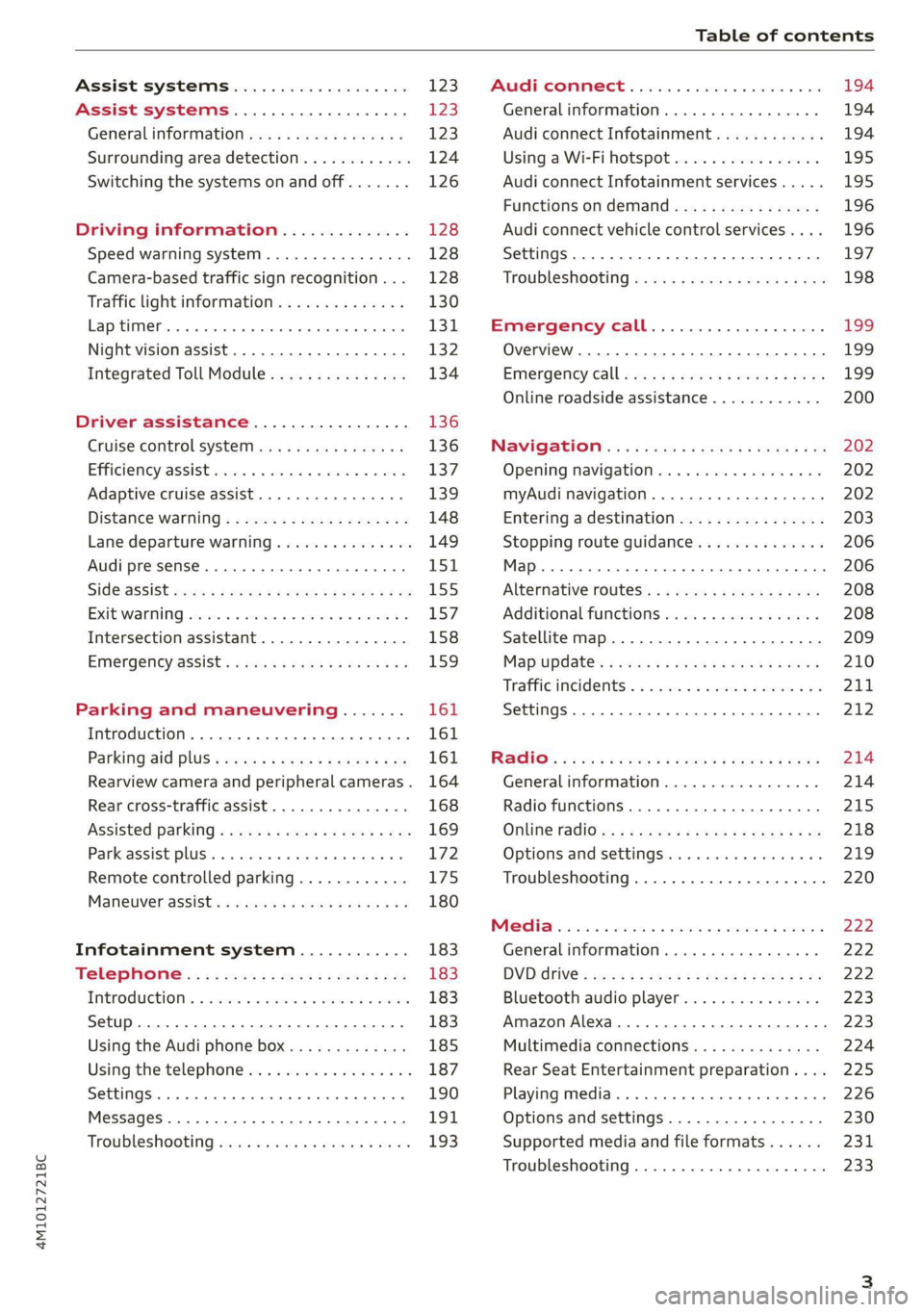
Assist systems................... £23
Assist systems................... 123
General informations s . cee ss wey as 123
Surrounding area detection............ 124
Switching the systems on and off....... 126
Driving information.............. 128
Speed warning system..............-. 128
Camera-based traffic sign recognition... 128
Traffic light information.............. 130
LAP SELMER rene 6» sxscase 0 osenene mw cession « vaccine 131
Night vision assist............00000.. 132
Integrated Toll Module............... 134
Driver assistance................. 136
Cruise control system............00-5 136
Efficiency assist sess x 2 sce © 2 eens oo aes 137
Adaptive cruise assist................ 139
Distance Warning « « wenn + + mews vv wes = 3 148
Lane departure warning............... 149
Audi presense........... eee eee eee 151
SIdGSSiSt wcwe » x sew cy eee ye eR es 155
Exit Waning swsese xo ames ao eeecus @ & poco ¥ 157
Intersection assistant................ 158
Emergency assist... ....:seeeeeeereee 159
Parking and maneuvering....... 161
Introduction... 0.0... . cc eee eee eee 161
Parking aid plUS ¢ escc se evens oust ew 161
Rearview camera and peripheral cameras. 164
Rear cross-traffic assist............... 168
Assisted
parking.........-...0--.00 ee 169
Parkeassistyplusts « caves » « caves ¥ © cuore » 6 172
Remote controlled parking............ 175
MarnSuVerassist: « = mans < e asm 3 pase a 3s 180
Infotainment system............ 183
Telephone................0 0c eee 183
IMEROMUCTION & & snawass oo sree & & sees ao arene 183
Setup. .... 0... eee eee eee 183
Using the Audi phone box............. 185
Using the telephone.................. 187
SettingS
0... . cee ee eee eee eee 190
MessageS.........-.. 2.02. e eee ee eee 191,
Troubleshooting sews + ease + view « 2 wea 193
PRCT COMMBCE 's. cosves 5 6 sivas 6 6 snes 8 oo
General information................-
Audi connect Infotainment............
Using a Wi-Fi hotspot................
Audi connect Infotainment services.....
Functions on demand................
Audi connect vehicle control services....
Settings............. 0.0.00 002 eee
TRGUBIESHOOLING sass ¢ scm s 3 Hae 5 tee
Emergency call...................
Overview... 12.0... eee eee eee
Emergenicy'call « css s sees 6 s gems © + eeu
Online roadside assistance............
NaViGGationtc: « « meus « & seu sc poms + «oe
Opening navigation............0..005
myAudi navigation...............000.
Entering a destination................
Stopping route guidance..............
Additional functions.................
Satellite map.......... 2.0... ee eee
Mapupdaté-: « 2cas ss ees 9 ¢ eews vs pee
Traffic incidents’. = vce se eeu ve exon ewe
SETEIIGS sseneie oo smeneie © oxemenene © sitadame @ © etnznis
Options and settings.............0005
Troubleshooting..............--000-5
Bluetooth audio player...............
Amazon Alexa......... 00000 e ee eee ee
Multimedia connections aE
Rear Seat Entertainment preparation... .
Playing media. ....... 0. cece ee eee eee
Options and settings.................
Supported media and file formats......
Troubleshooting...............-.0005
199
199
199
200
202 202 202 203
206
206 208 208 209 210
211 212
214 214
215
218 219 220
222
222 222 223 223
224
225
226 230
231
233
Page 10 of 332
Quick access
Air suspension
=>page 115
Electrical system
=> page 254
Engine oil level (MIN)
=> page 248
Engine oil pressure
=> page 248
Cooling system
=> page 251
Hood
=> page 247
Loose wheel warning
=> page 274
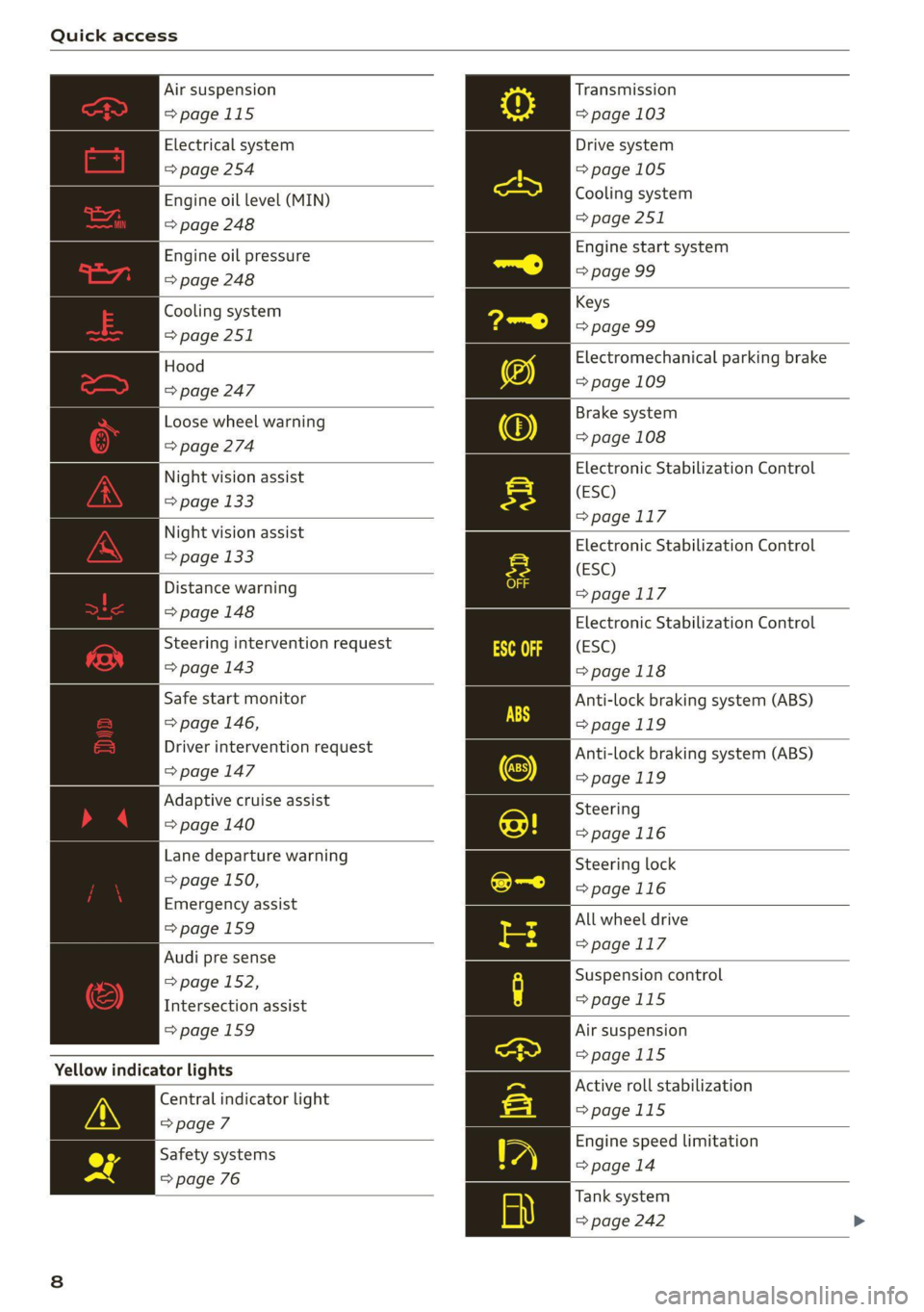
Night vision assist
=> page 133
Night vision assist
= page 133
Distance warning
=> page 148
Steering intervention request
=> page 143
Safe start monitor
=> page 146,
Driver intervention request
=> page 147
Adaptive cruise assist
=> page 140
Lane departure warning
= page 150,
Emergency assist
=>page 159
Audi pre sense
= page 152,
Intersection assist
=>page 159
Yellow indicator lights
Central indicator light
=> page 7
Safety systems
=> page 76
Transmission
=> page 103
Drive system
=>page 105
Cooling system
=> page 251
Engine start system
=> page 99
Keys
=> page 99
Electromechanical parking brake
=> page 109
Brake system
=> page 108
Electronic Stabilization Control
(ESC)
=>page 117
Electronic Stabilization Control
(ESC)
=>page 117
Electronic Stabilization Control
(ESC)
>page 118
Anti-lock braking system (ABS)
>page 119
Anti-lock braking system (ABS)
=>page 119
Steering
=>page 116
Steering lock
=>page 116
All wheel drive
=>page 117
Suspension control
>page 115
Air suspension
=>page 115
Active roll stabilization
>page 115
Engine speed limitation
=> page 14
Tank system
= page 242
Page 11 of 332
4M1012721BC
Quick access
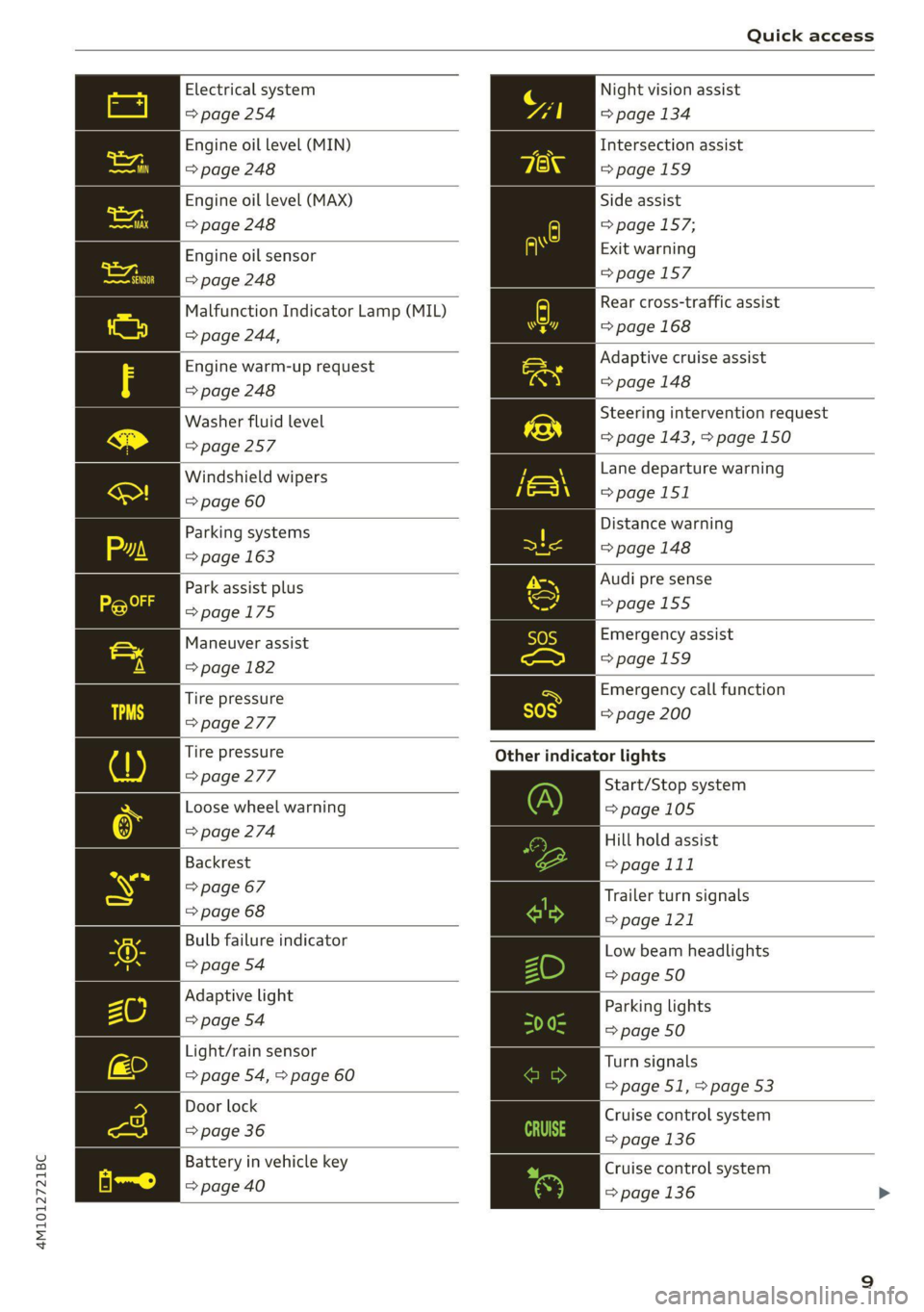
Electrical system Night vision assist
=> page 254 => page 134
Engine oil level (MIN)
Intersection assist
=> page 248 =>page 159
Engine oil level (MAX) Side assist
=> page 248 => page 157;
Exit warning
=>page 157
Engine oil sensor
=> page 248
Malfunction Indicator Lamp (MIL)
> page 244,
Rear cross-traffic assist
=> page 168
Engine warm-up request Adaptive cruise assist
=> page 248 => page 148
Washer fluid level Steering intervention request
=> page 257 => page 143, > page 150
Windshield wipers Lane departure warning
=> page 60 >page 151
Parking systems Distance warning
=> page 163 = page 148
Park assist plus Audi pre sense
>page 175 =>page 155
Maneuver assist Emergency assist
Spiga 1 pagemes
Tire pressure ra Emergency call function
=> page 277 = page 200
Tire pressure Other indicator lights
> page 277
Start/Stop system
Loose wheel warning => page 105
> page 274 Hill hold assist
Backrest => page 111
> page 67 Trailer turn signals
= page 68 >page 121
Bulb failure indicator Low beam headlights
© page.o4 => page 50
Adaptive light
Parking lights
=> page 54 a9
=> page 50
Light/rain sensor
Turn signals
=> page 54, > page 60
= page 51, > page 53
Door lock Cruise control system
=> page 36 => page 136
Battery in vehicle key Cruise control system
pppage400 > page 136 >
Page 12 of 332
Quick access
Efficiency assist
=> page 137
Efficiency assist
=> page 137
Efficiency assist
=> page 137
Efficiency assist
=> page 137
Efficiency assist
=> page 137
Adaptive cruise assist
=> page 140
Adaptive cruise assist
=> page 140
Adaptive cruise assist
=> page 140
Adaptive cruise assist
=> page 140
Adaptive cruise assist
=> page 140
Park assist plus
=> page 173
Lane departure warning
=> page 150
High beam headlights
=> page 51
High beam assistant
=> page 51
Laser lights
=> page 52
Transmission
=> page 103
Convenience key
=> page 99
Electromechanical parking brake
=> page 109
Electromechanical parking brake
=> page 109
Hill hold assist
=>page 111
Air suspension
>page 115
10
Parking systems
=> page 163
Park assist plus
=>page 175
Park assist plus
=>page 175
Maneuver assist
=> page 182
High beam assistant
=> page 51
Door lock
=> page 36
Child safety lock
=> page 44
Speed warning system
=> page 128
Speed warning system
=> page 128
Camera-based traffic sign recog-
nition
=>page 129
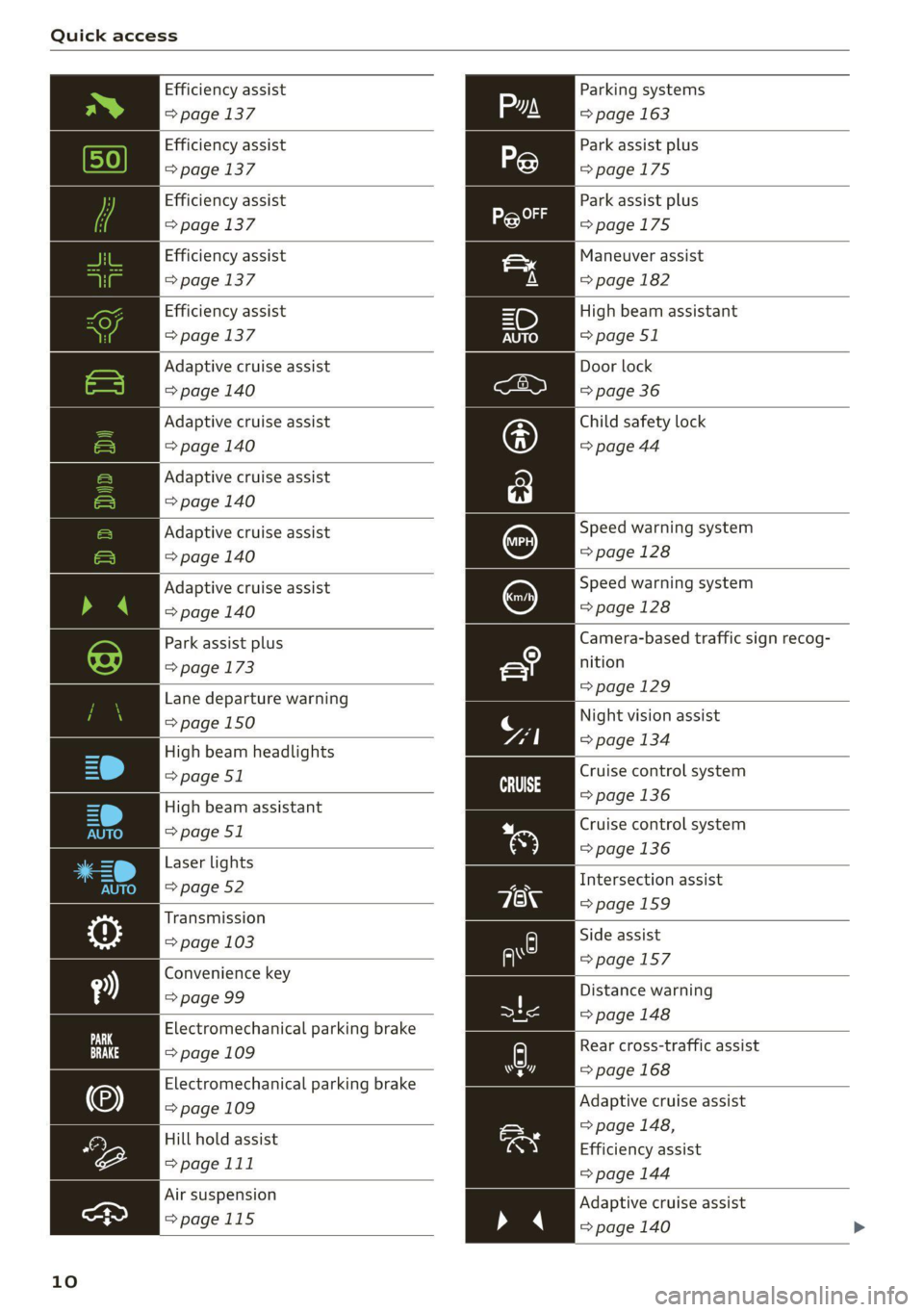
Night vision assist
=> page 134
Cruise control system
=>page
136
Cruise control system
=> page 136
Intersection assist
=>page 159
Side assist
=>page 157
Distance warning
= page 148
A) Rear cross-traffic assist
=> page 168 hr]
Adaptive cruise assist
> page 148,
Efficiency assist
=> page 144
Adaptive cruise assist
=> page 140 >
Page 15 of 332
4M1012721BC
Instrument cluster
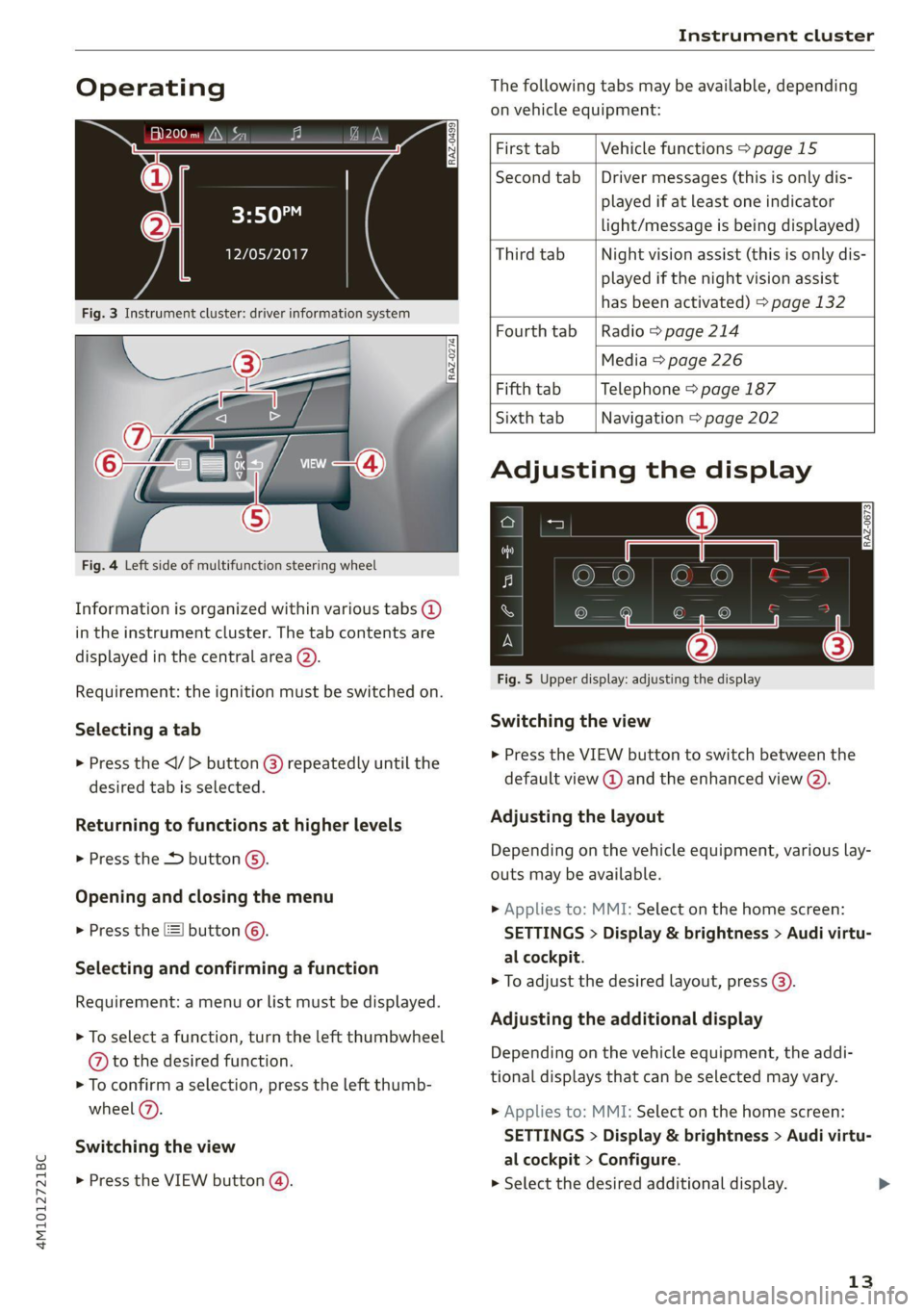
Operating The following tabs may be available, depending
on vehicle equipment:
First tab Vehicle functions > page 15
Second tab | Driver messages (this is only dis-
played if at least one indicator -5QPM
ce light/message is being displayed)
12/05/2017 Third tab Night vision assist (this is only dis-
played if the night vision assist
has been activated) > page 132
Fourth tab |Radio > page 214
Media > page 226
Fifth tab Telephone > page 187
Sixth tab Navigation > page 202
Fig. 3 Instrument cluster: driver information system
Adjusting the display
=I eR S| >| nN x ec
Fig. 4 Left side of multifunction steering wheel
Information is organized within various tabs @)
in the instrument cluster. The tab contents are
displayed in the central area (2).
i Bad P Fig. 5 Upper display: adjusting the display
Requirement: the ignition must be switched on.
Selecting a tab Switching the view
» Press the button @ repeatedly until the > Press the: VIEW button to switch between the
desired tab is selected. default view @ and the enhanced view (2).
Returning to functions at higher levels Adjusting the layout
> Press the *> button ©) Depending on the vehicle equipment, various lay-
outs may be available.
Opening and closing the menu
P 9 9 > Applies to: MMI: Select on the home screen:
> Press the [=] button ©). SETTINGS > Display & brightness > Audi virtu-
al cockpit.
Selecti d firmi functi
erecting ane’ confirming a function > To adjust the desired layout, press @).
Requirement: a menu or list must be displayed.
Adjusting the additional display
> To select a function, turn the left thumbwheel , ; ; ;
@ to the desired function. Depending on the vehicle equipment, the addi-
» To confirm a selection, press the left thumb- tional displays that can be selected may vary.
wheel (2). >» Applies to: MMI: Select on the home screen:
SETTINGS > Display & brightness > Audi virtu-
al cockpit > Configure.
> Press the VIEW button @). > Select the desired additional display.
Switching the view
13
Page 61 of 332
4M1012721BC
Lights and Vision
results from the wiping process from the edge of
the windshield. The function is available when
driving at speeds up to 75 mph (120 km/h).
The headlight washer system” operates only
when the low beam headlights are on. If you
move the lever to position ©), the headlights and
the night vision assist camera* are cleaned at in-
tervals.
@ Wipe the rear window . The number of
wipes depends on the windshield wiper move-
ment.
The rear wiper automatically switches on when
the reverse gear is selected and the front wind-
shield wipers are on and running.
Clean the rear window &. The number of
wipes depends on how long the Lever is held in
position (8). This may also clean the rearview
camera, depending on the vehicle equipment.
ZA\ WARNING
— The rain sensor is only intended to assist the
driver. The driver may still be responsible for
manually switching the wipers on based on
visibility
conditions.
— The windshield must not be treated with
water-repelling windshield coating agents.
Under unfavorable conditions, such as wet-
ness, darkness, and when the sun is low,
these coatings can cause increased glare,
which increases the risk of an accident. They
can also cause wiper blade chatter.
— Properly functioning windshield wiper
blades are required for a clear view and safe
driving > page 59, Cleaning/changing wip-
er blades.
@) Note
— If there is frost, make sure the windshield
wiper blades are not frozen to the wind-
shield. Switching on the windshield wipers
when the blades are frozen to the wind-
shield can damage the wiper blades.
— Prior to using a car wash, the windshield
wiper system must be switched off (lever in
position @). This prevents the wipers from
switching on unintentionally and causing
damage to the windshield wiper system.
i) Tips
— The windshield wipers switch off when the
ignition is switched off. You can activate the
windshield wipers after the ignition is
switched on again by moving the windshield
wiper lever to any position. The single wipe
function (lever in position @)) also functions
when the ignition is switched off.
— Worn or dirty windshield wiper blades result
in streaking. This can affect the rain sensor
function. Check your windshield wiper
blades regularly.
— The washer fluid nozzles for the windshield
washer system are heated when the ignition
is on if the outside temperature is low.
— When stopping temporarily, such as at a
traffic light, the speed of the windshield
wipers automatically reduces by one level.
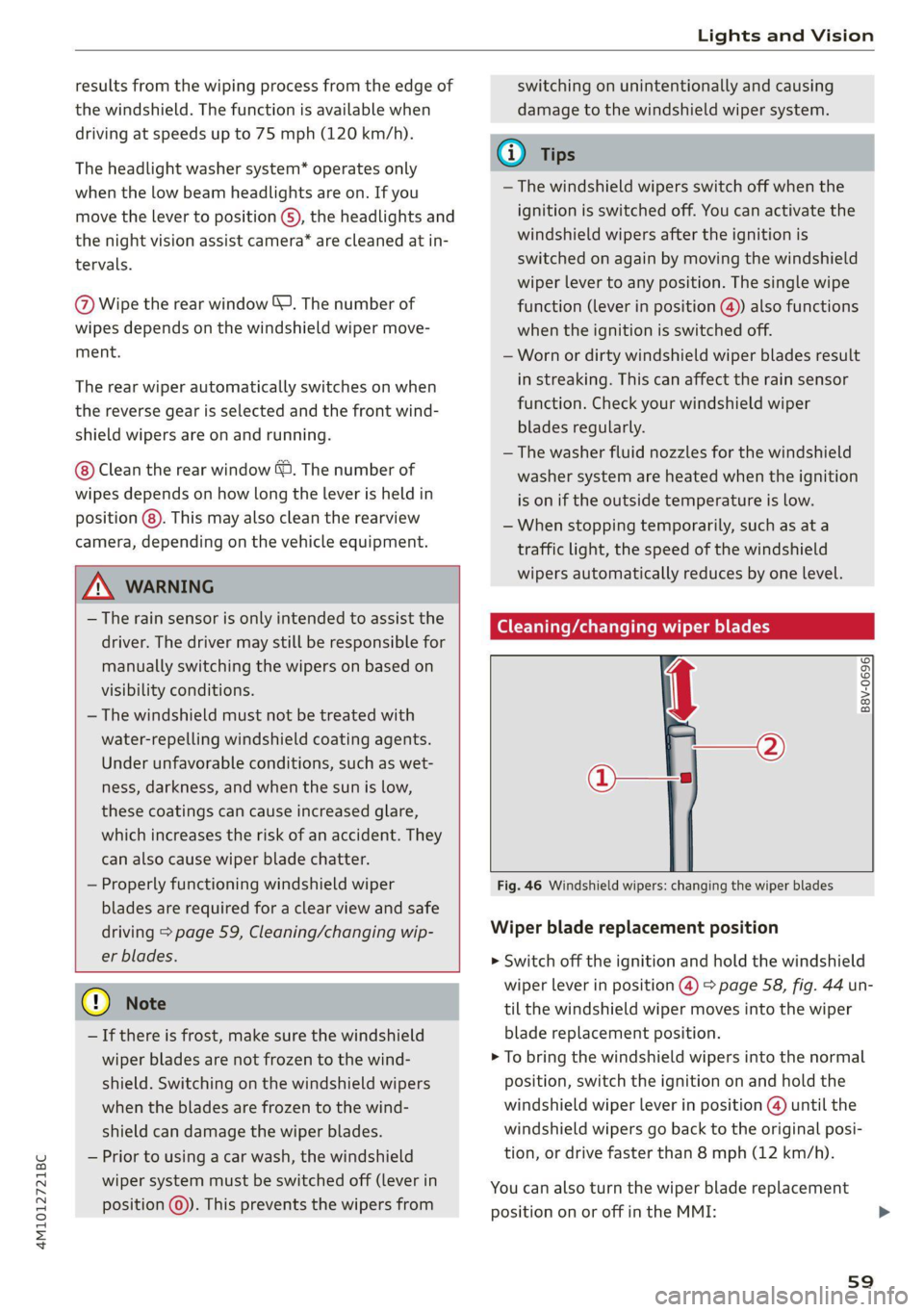
(eC ee a Ress wiper blades
Fig. 46 Windshield wipers: changing the wiper blades
B8V-0696)
Wiper blade replacement position
> Switch off the ignition and hold the windshield
wiper lever in position @) > page 58, fig. 44 un-
til the windshield wiper moves into the wiper
blade replacement position.
> To bring the windshield wipers into the normal
position, switch the ignition on and hold the
windshield wiper lever in position @ until the
windshield wipers go back to the original posi-
tion, or drive faster than 8 mph (12 km/h).
You can also turn the wiper blade replacement
position on or off in the MMI:
59
Page 127 of 332
4M1012721BC
Assist systems
with limitations may not be detected at all.
Always monitor the traffic and the vehicle's
surroundings directly and do not become dis-
tracted.
@) Note
— Obstacles may disappear from the measure-
ment range when approaching them, even if
they were already detected.
—Insome situations, the ability of the sen-
sors and cameras to detect and display cer-
tain objects may be limited.
— Objects located above the coverage area,
such as bumpers on parked cars, garage
doors that are partially open, or objects
that are hanging
— Low obstacles
— Narrow objects, such as barrier chains, fo-
liage, poles, or fences
— Projecting objects, such as trailer draw
bars
— Objects with certain surfaces and struc-
tures, such as fabric
@ Tips
— The sensors and cameras and the areas
around them must not be obstructed be-
cause this can impair the function of the
systems that depend on them. Make sure
that the sensors and cameras are free of
snow, ice, and other deposits. Do not use
any accessories, stickers, or other objects
that extend into the range of the sensors
and cameras.
— On vehicles that have factory-installed li-
cense plate brackets on the front of the ve-
hicle, the brackets may only be replaced
with ones that are the same size and made
of the same material. Do not install any li-
cense plate brackets on the front of vehicles
that do not have factory-installed brackets.
Otherwise, the function of the system could
be impaired.
— The function of the sensors and cameras
may be limited when light and visibility con-
ditions are poor, for example when driving
into a tunnel, when there is glare, or when
there are reflective objects.
— External ultrasonic sensors, such as those in
other vehicles, can interfere with the sen-
sors.
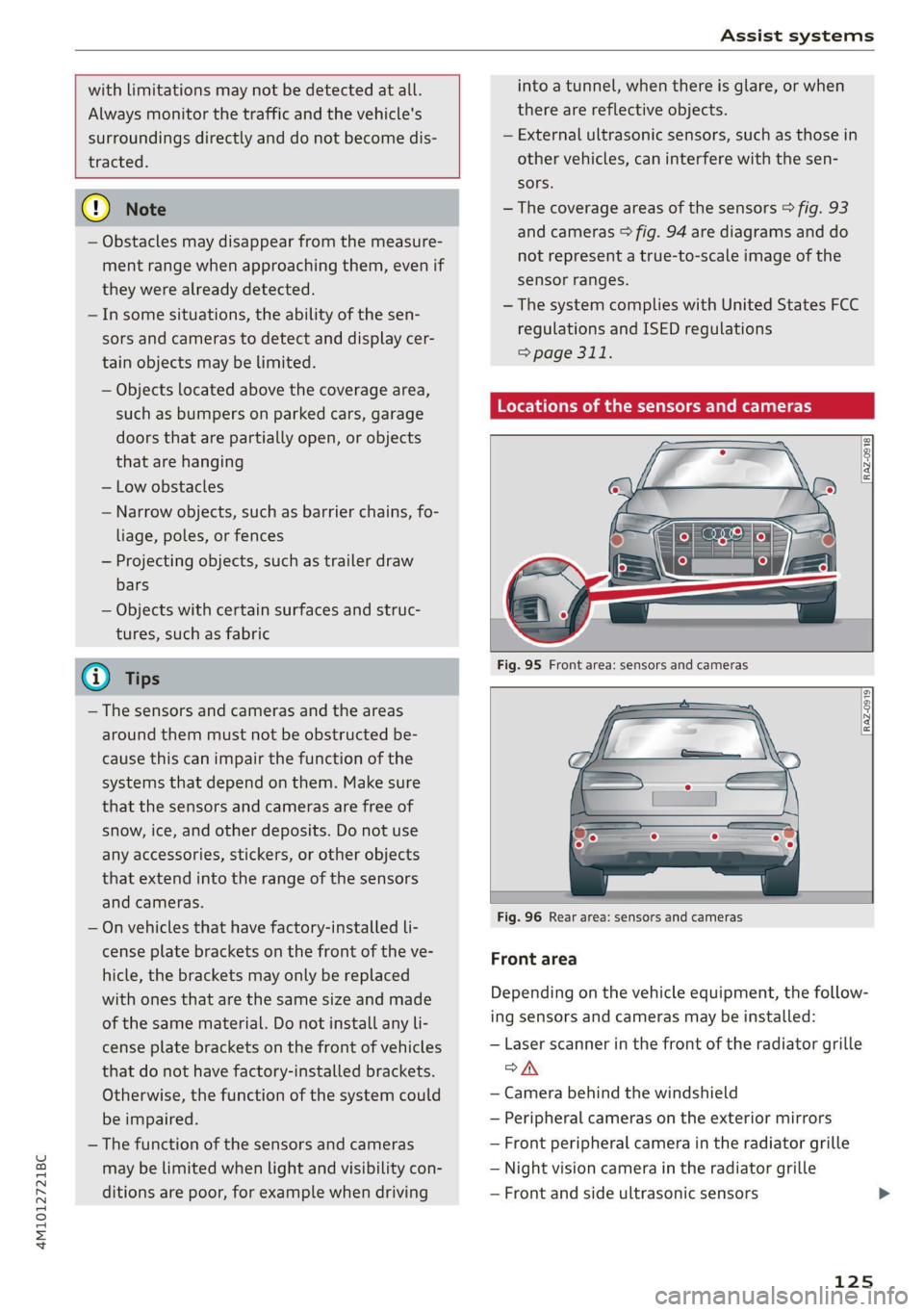
—The coverage areas of the sensors > fig. 93
and cameras > fig. 94 are diagrams and do
not represent a true-to-scale image of the
sensor ranges.
— The system complies with United States FCC
regulations and ISED regulations
=> page 311.
Locations of the sensors and cameras
Fig. 96 Rear area: sensors and cameras
Front area
Depending on the vehicle equipment, the follow-
ing sensors and cameras may be installed:
— Laser scanner in the front of the radiator grille
oA
— Camera behind the windshield
— Peripheral cameras on the exterior mirrors
— Front peripheral camera in the radiator grille
— Night vision camera in the radiator grille
— Front and side ultrasonic sensors
125
Page 134 of 332
Driving information
After completing a lap, the difference between
the last lap and the previous best lap time will be
indicated with a “—” or “+”.
Pausing timing and displaying a split time
> To insert a pause @ select Pause in the menu.
> To resume timing, select Resume in the menu.
> To display a split time, select Split time in the
menu. The split time appears for approxi-
mately ten seconds in the instrument cluster.
The current lap timing will continue running.
Canceling lap timing
The timing of the current lap will stop. The lap
time will be erased and will not be included in the
statistics.
> Select Cancel lap in the menu.
Resetting the time
> Select Reset lap times in the menu.
@ Tips
—A maximum of 99 lap times can be meas-
ured.
- If timing is paused, you can continue it later
even if you switch the ignition off.
— Saved lap times cannot be individually de-
leted from the total results.
— The saved lap timer values will remain after
switching the ignition off.
Lap statistics
Applies to: vehicles with lap timer
Displaying lap statistics
You can display the number of laps driven ES
the fastest lap “+”, the slowest lap “~”, and the
average time “®” in the instrument cluster.
> Select in the instrument cluster: Vehicle func-
tions tab > I button > Lap statistics.
> Turn the thumbwheel down or up to display the
individual lap times.
> To return to the lap timing that was started, se-
lect the =] button > Lap times.
132
Resetting lap statistics
Requirement: the lap statistics menu must be
displayed.
> To reset the lap statistics, press and hold the
left thumbwheel until the message No lap
times have been recorded yet. appears.
G) Tips
The lap statistics list the lap times for the last
30 laps. The fastest and slowest lap times out
of up to 99 measured laps are also displayed.
Night vision assist
Applies to: vehicles with night vision assist
Night vision assist helps you when it is dark by
using an infrared camera to monitor the area in
front of your vehicle, within the limits of the sys-
tem. It can display objects up to a distance of ap-
proximately 1000 feet (300 m).
Pedestrian and wild animals are detected by
measuring the temperature difference between
the object and the background. Pedestrians and
wild animals will not be detected if the tempera-
ture difference is too small. The pedestrian and
wild animal marking feature is deactivated at
temperatures above approximately 77 °F (25 °C)
and when it is light outside.
The thermal image detected by the camera is dis-
played in the instrument cluster. Warm areas
generally appear lighter and cold areas appear
darker.
The camera for the night vision assist is located
in the vehicle's radiator grille > page 125. Make
sure the night vision camera is not covered by
stickers, deposits, or any other obstructions be-
cause this can impair the night vision assist func-
tion. Follow the information about cleaning
=> page 280.
ZA WARNING
— Observe the safety precautions and note the
limits of the assist systems, sensors, and
cameras > page 123. >
Page 135 of 332
4M1012721BC
Driving information
— Night vision assist can only detect pedes-
trians and wild animals located within the
range of the infrared camera.
— Night vision assist cannot detect pedes-
trians or wild animals and mark them if:
— They are not in an upright position, for ex-
ample if they are sitting or lying down
and/or
—The silhouette in the display appears in-
complete or interrupted, for example be-
cause the pedestrian is partially behind a
vehicle or an animal is partially covered by
tall grass.
— Never attempt to swerve around animals if
doing so would endanger you or other road
users.
G) Tips
— Even though the system evaluates the
shape and heat given off by all detected ob-
jects, there are limits to the system. There
may be false warnings.
— For technical reasons, the image pauses in
split second intervals.
Switching on and off
Applies to: vehicles with night vision assist
The system can be switched on and off in the
MMI > page 126.
> The AUTO light function must be selected for
the night vision assist to automatically activate
when it is dark.
> Switch on the low beams manually to activate
night
vision assist immediately. To do so,
press (@) on the light switch module > page 50,
fig. 33 and select 20.
When activated, the $1 tab appears in the instru-
ment cluster.
> Select in the instrument cluster: % tab
G) Tips
When the night vision assist tab is selected in
the instrument cluster and the low beams are
switched off, the thermal image display dis-
appears only after you have exited the tab.
Marking and warning
Applies to: vehicles with night vision assist
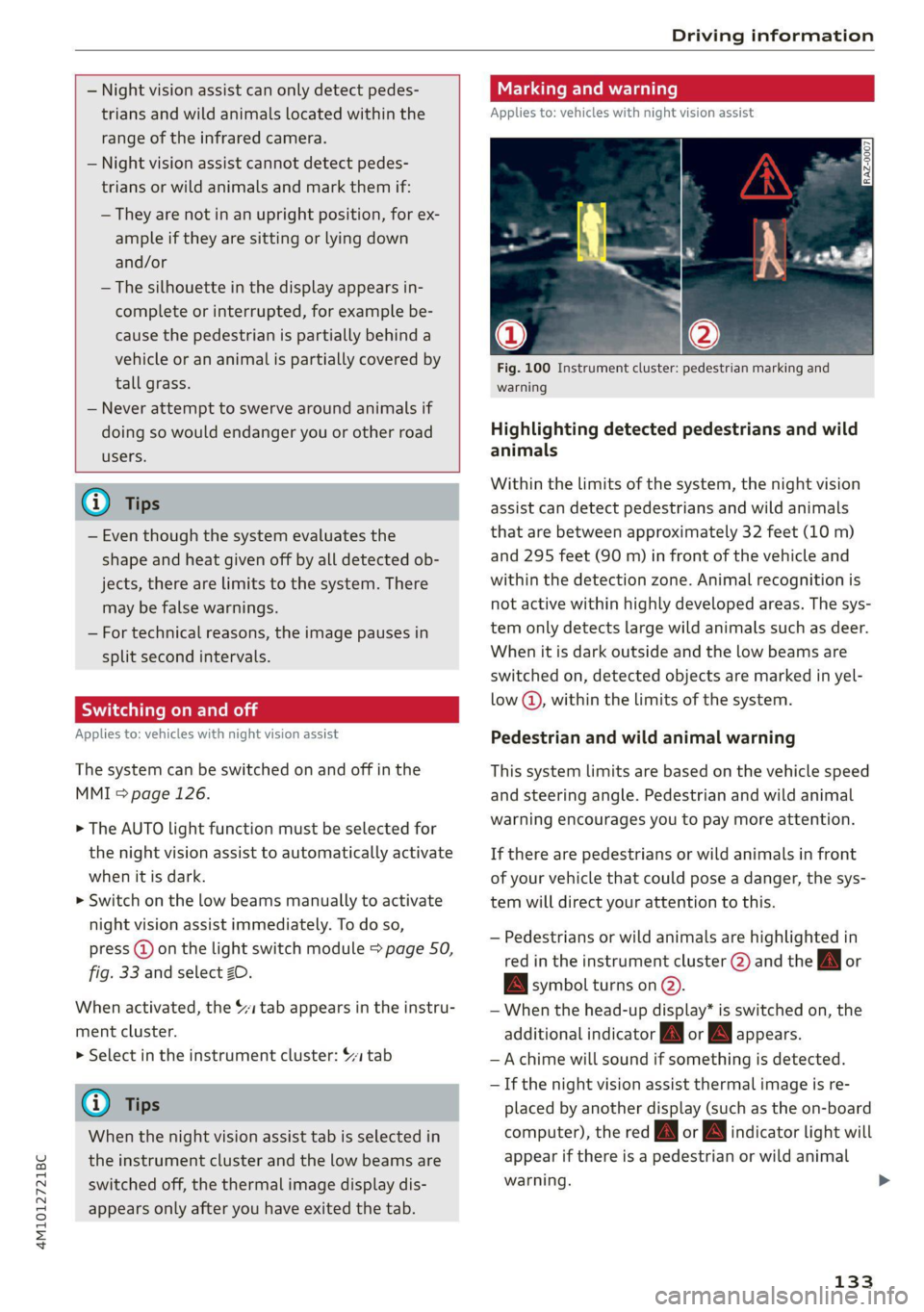
Fig. 100 Instrument cluster: pedestrian marking and
warning
Highlighting detected pedestrians and wild
animals
Within the limits of the system, the night vision
assist can detect pedestrians and wild animals
that are between approximately 32 feet (10 m)
and 295 feet (90 m) in front of the vehicle and
within the detection zone. Animal recognition is
not active within highly developed areas. The sys-
tem only detects large wild animals such as deer.
When it is dark outside and the low beams are
switched on, detected objects are marked in yel-
low @), within the limits of the system.
Pedestrian and wild animal warning
This system limits are based on the vehicle speed
and steering angle. Pedestrian and wild animal
warning encourages you to pay more attention.
If there are pedestrians or wild animals in front
of your vehicle that could pose a danger, the sys-
tem will direct your attention to this.
— Pedestrians or wild animals are highlighted in
red in the instrument cluster (2) and the Zl or
BA symbol turns on @.
— When the head-up display* is switched on, the
additional indicator [AM or EM appears.
—Achime will sound if something is detected.
—If the night vision assist thermal image is re-
placed by another display (such as the on-board
computer), the red /\| or Aw indicator light will
appear if there is a pedestrian or wild animal
warning.
133
Page 136 of 332

Driving information
The Sli symbol will appear when pedestrian and
wild animal detection is not available.
Marking light*
To direct the driver's attention to a pedestrian,
the headlights can flash on the pedestrian when
there is a pedestrian warning.
This occurs at speeds above approximately
35 mph (60 km/h) if you are outside of illuminat-
ed areas and no detected vehicles are shown. The
marking light is not used for wild animals. The
high beam assistant* controls the marking
light*> page 51.
Adjusting the contrast
Applies to: vehicles with night vision assist
Requirement: the night vision assist must be
switched on and the % tab must be displayed.
» Applies to MMI: Select on the home screen: VE-
HICLE > Driver assistance > (£23) > Night vision
assist.
> To set the desired contrast, move the slider.
Messages
Applies to: vehicles with night vision assist
Night vision assist: currently unavailable.
See owner's manual
The system is not functioning correctly at the
time, so it has been switched off. If the malfunc-
tion persists, drive immediately to an authorized
Audi dealer or authorized Audi Service Facility to
have the malfunction repaired.
Integrated Toll Module
Applies to: vehicles with Integrated Toll Module
Depending on the region, you can pay toll fees in
certain countries using the Integrated Toll Mod-
ule (ITM). It replaces a separate transponder for
detecting toll fees. The system electronics are in-
tegrated in the rearview mirror housing.
To use the ITM in toll zones, you must register
and activate it.
134
Registration
> Applies to MMI: Select on the home screen: VE-
HICLE > Settings & Service > Vehicle informa-
tion Toll module.
> Note the Integrated Toll Module ID.
> To register the ITM, go to the displayed web ad-
dress and follow the instructions.
Activation
> To activate the ITM, press CD in the MMI.
Entering the number of passengers
Depending on the number of passengers and the
region, a lower toll fee may be charged. You must
either enter the number of passengers or deacti-
vate the ITM based on the laws applicable in the
area where you are driving.
> To enter the number of passengers, select the
appropriate button in the MMI.
> To deactivate the ITM, press @ in the MMI.
(i) Tips
— The driver is responsible for specifying the
correct number of passengers and activat-
ing or deactivating the ITM.
— Malfunctions can occur when detecting tolls
if both the ITM and transponder are activat-
ed. Deactivate the system not being used or
remove it as necessary.
—Ifa rearview mirror is replaced, you must
register the new ITM and remove the old
ITM from the account.
— The system complies with United States FCC
regulations and ISED regulations
> page 311.
Display
Applies to: vehicles with Integrated Toll Module
The selected number of passengers is displayed
in the MMI status bar > page 22.
The i symbol in the status bar and a notifica-
tion in the MMI will indicate if there is a faulty
connection between the ITM and the MMI or if
the ITM is faulty. If the connection interference
continues or the ITM is faulty, drive immediately >