ignition AUDI R8 COUPE 2020 Owner's Manual
[x] Cancel search | Manufacturer: AUDI, Model Year: 2020, Model line: R8 COUPE, Model: AUDI R8 COUPE 2020Pages: 308, PDF Size: 82.41 MB
Page 49 of 308
4S1012721BA
Lights and Vision
Applies to: vehicles with vanity mirror
§ d g 3
Fig. 56 Sun visor
The vanity mirrors on the sun visors have covers.
Slide the cover in the direction of the arrow.
Windshield wipers
Switching the windshield wipers on
BFV-0019
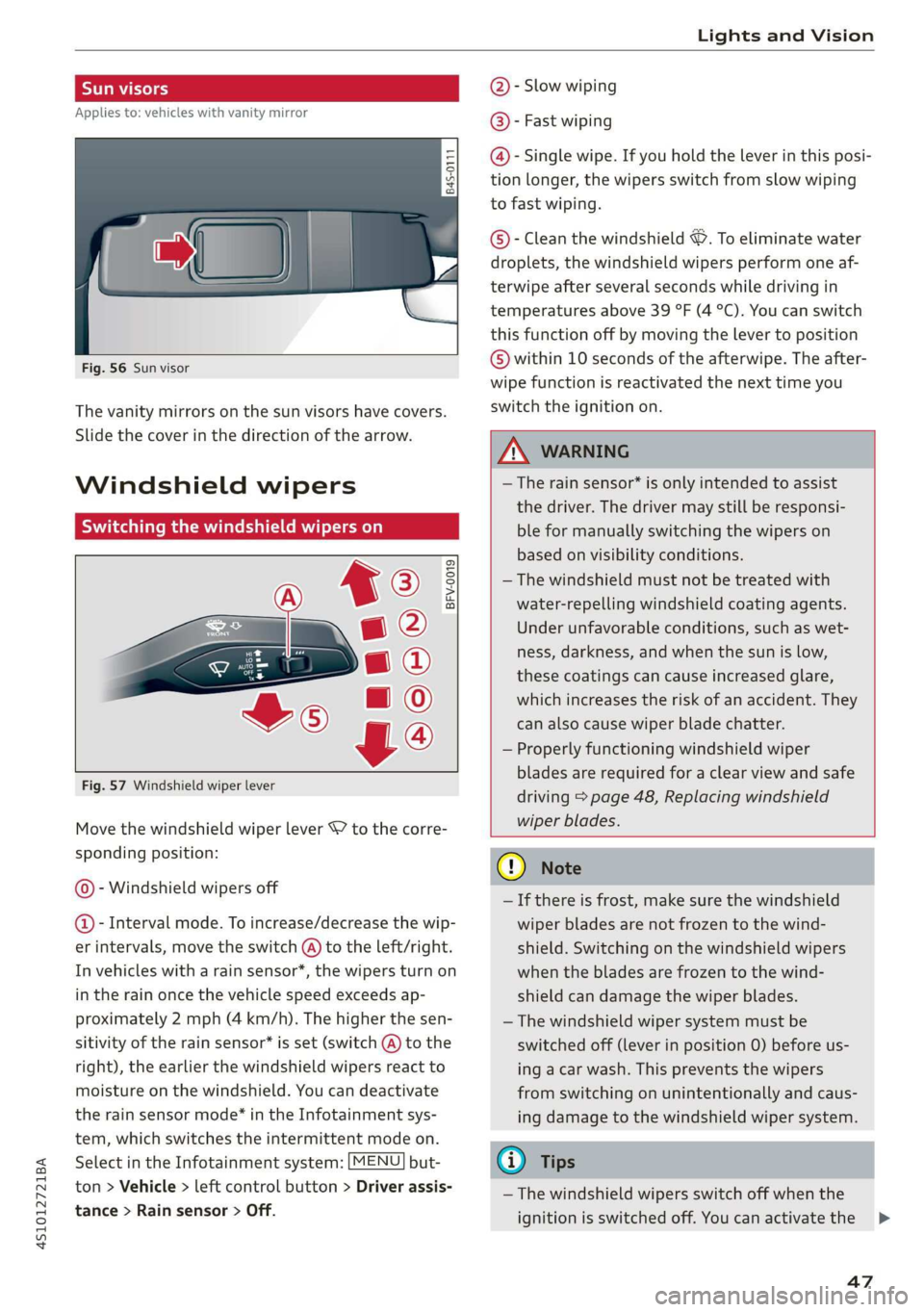
Fig. 57 Windshield wiper lever
Move the windshield wiper lever S7 to the corre-
sponding position:
@- Windshield wipers off
@- Interval mode. To increase/decrease the wip-
er intervals, move the switch @) to the left/right.
In vehicles with a rain sensor*, the wipers turn on
in the rain once the vehicle speed exceeds ap-
proximately 2 mph (4 km/h). The higher the sen-
sitivity of the rain sensor* is set (switch @) to the
right), the earlier the windshield wipers react to
moisture on the windshield. You can deactivate
the rain sensor mode®* in the Infotainment sys-
tem, which switches the intermittent mode on.
Select in the Infotainment system: [MENU] but-
ton > Vehicle > left control button > Driver assis-
tance > Rain sensor > Off.
@- Slow wiping
@®- Fast wiping
@- Single wipe. If you hold the lever in this posi-
tion longer, the wipers switch from slow wiping
to fast wiping.
©®- Clean the windshield ©. To eliminate water
droplets, the windshield wipers perform one af-
terwipe after several seconds while driving in
temperatures above 39 °F (4 °C). You can switch
this function off by moving the lever to position
© within 10 seconds of the afterwipe. The after-
wipe function is reactivated the next time you
switch the ignition on.
Z\ WARNING
—The rain sensor* is only intended to assist
the driver. The driver may still be responsi-
ble for manually switching the wipers on
based on visibility conditions.
—The windshield must not be treated with
water-repelling windshield coating agents.
Under unfavorable conditions, such as wet-
ness, darkness, and when the sun is low,
these coatings can cause increased glare,
which increases the risk of an accident. They
can also cause wiper blade chatter.
— Properly functioning windshield wiper
blades are required for a clear view and safe
driving > page 48, Replacing windshield
wiper blades.
CQ) Note
— If there is frost, make sure the windshield
wiper blades are not frozen to the wind-
shield. Switching on the windshield wipers
when the blades are frozen to the wind-
shield can damage the wiper blades.
— The windshield wiper system must be
switched off (lever in position 0) before us-
ing a car wash. This prevents the wipers
from switching on unintentionally and caus-
ing damage to the windshield wiper system.
@ Tips
— The windshield wipers switch off when the
ignition is switched off. You can activate the
47
>
Page 50 of 308
Lights and Vision
windshield wipers after the ignition is
switched on again by moving the windshield
wiper lever to any position.
— Worn or dirty windshield wiper blades result
in streaking. This can affect the rain sensor*
function. Check your windshield wiper
blades
regularly.
— The washer fluid nozzles in the windshield
washer system are heated* at low tempera-
tures when the ignition is on.
— When stopping temporarily, such as at a
traffic light, the speed of the windshield
wipers automatically reduces by one level.
Cleaning windshield wiper blades
Clean the wiper blades when you see wiper
streaks. Clean the wiper blades with a soft towel
and glass cleaner.
> Place the windshield wiper arms in the service
position > page 48.
> Fold the windshield wiper arms away from the
windshield.
ZA WARNING
Dirty windshield wiper blades can impair vi-
sion, which increases the risk of an accident.
Replacing windshield wiper blades
he
B8R-0379
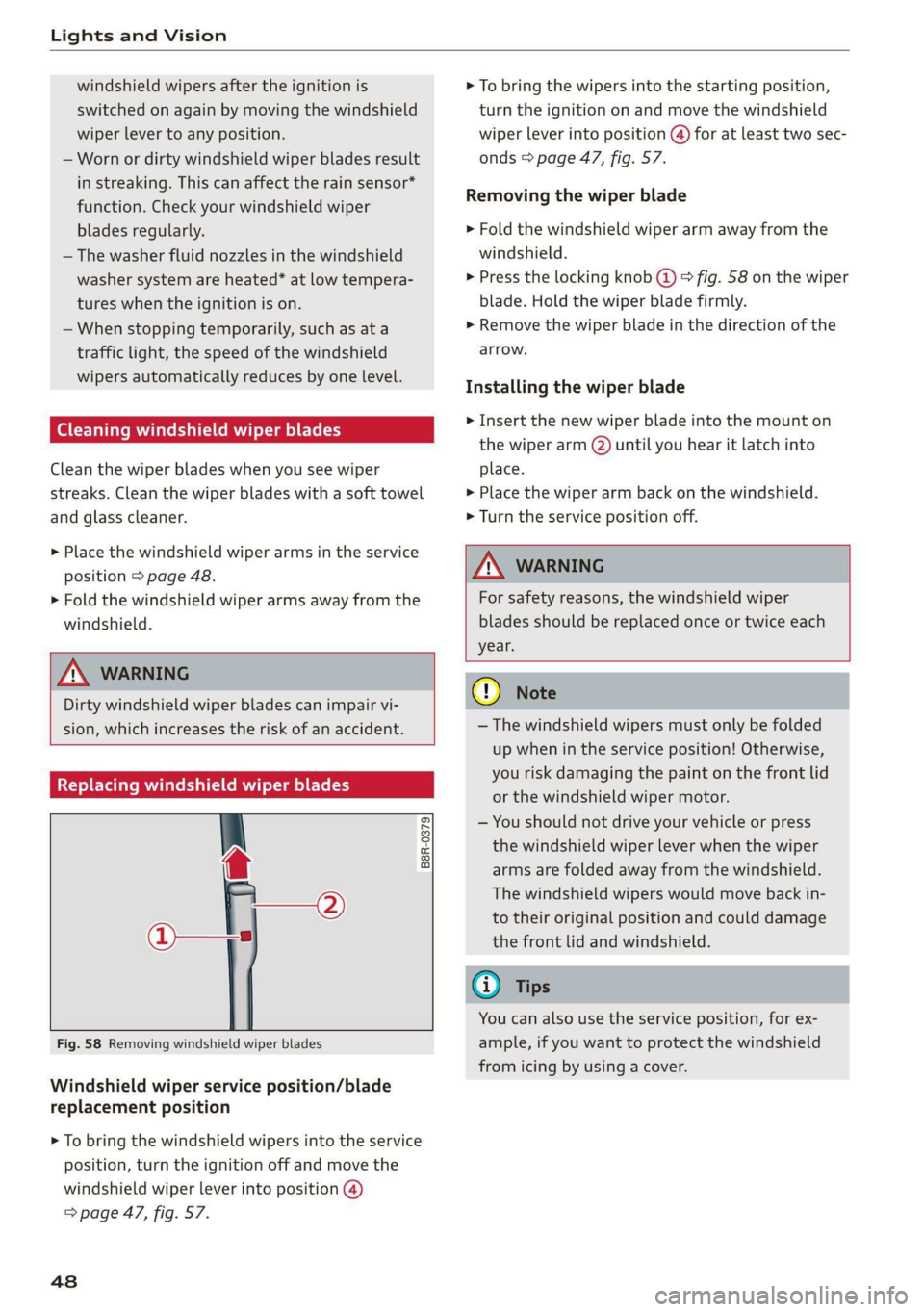
Fig. 58 Removing windshield wiper blades
Windshield wiper service position/blade
replacement position
> To bring the windshield wipers into the service
position, turn the ignition off and move the
windshield wiper lever into position @)
=> page 47, fig. 57.
48
> To bring the wipers into the starting position,
turn the ignition on and move the windshield
wiper lever into position @) for at least two sec-
onds > page 47, fig. 57.
Removing the wiper blade
> Fold the windshield wiper arm away from the
windshield.
> Press the locking knob (@ © fig. 58 on the wiper
blade. Hold the wiper blade firmly.
> Remove the wiper blade in the direction of the
arrow.
Installing the wiper blade
> Insert the new wiper blade into the mount on
the wiper arm (2) until you hear it latch into
place.
> Place the wiper arm back on the windshield.
> Turn the service position off.
ZA\ WARNING
For safety reasons, the windshield wiper
blades should be replaced once or twice each
year.
C) Note
— The windshield wipers must only be folded
up when in the service position! Otherwise,
you risk damaging the paint on the front lid
or the windshield wiper motor.
— You should not drive your vehicle or press
the windshield wiper lever when the wiper
arms are folded away from the windshield.
The windshield wipers would move back in-
to their original position and could damage
the front lid and windshield.
G) Tips
You can also use the service position, for ex-
ample, if you want to protect the windshield
from icing by using a cover.
Page 51 of 308
451012721BA
Lights and Vision
Digital compass
Switching the compass on and off
Applies to: vehicles with digital compass
@ ©, q
S| > a
ao.
Fig. 59 Rearview mirror: digital compass is switched on
> To turn the compass on or off, press the button
@ until the compass display in the mirror turns
on or off.
The digital compass only works when the ignition
is turned on. The directions are indicated with ab-
breviations: N (north), NE (northeast), E (east),
SE (southeast), S (south), SW (southwest), W
(west), NW (northwest).
To prevent inaccurate compass readings, do
not bring any remote controls, electrical devi-
ces or metallic objects near the mirror.
Adjusting the magnetic zone
Applies to: vehicles with digital compass
BFV-0293
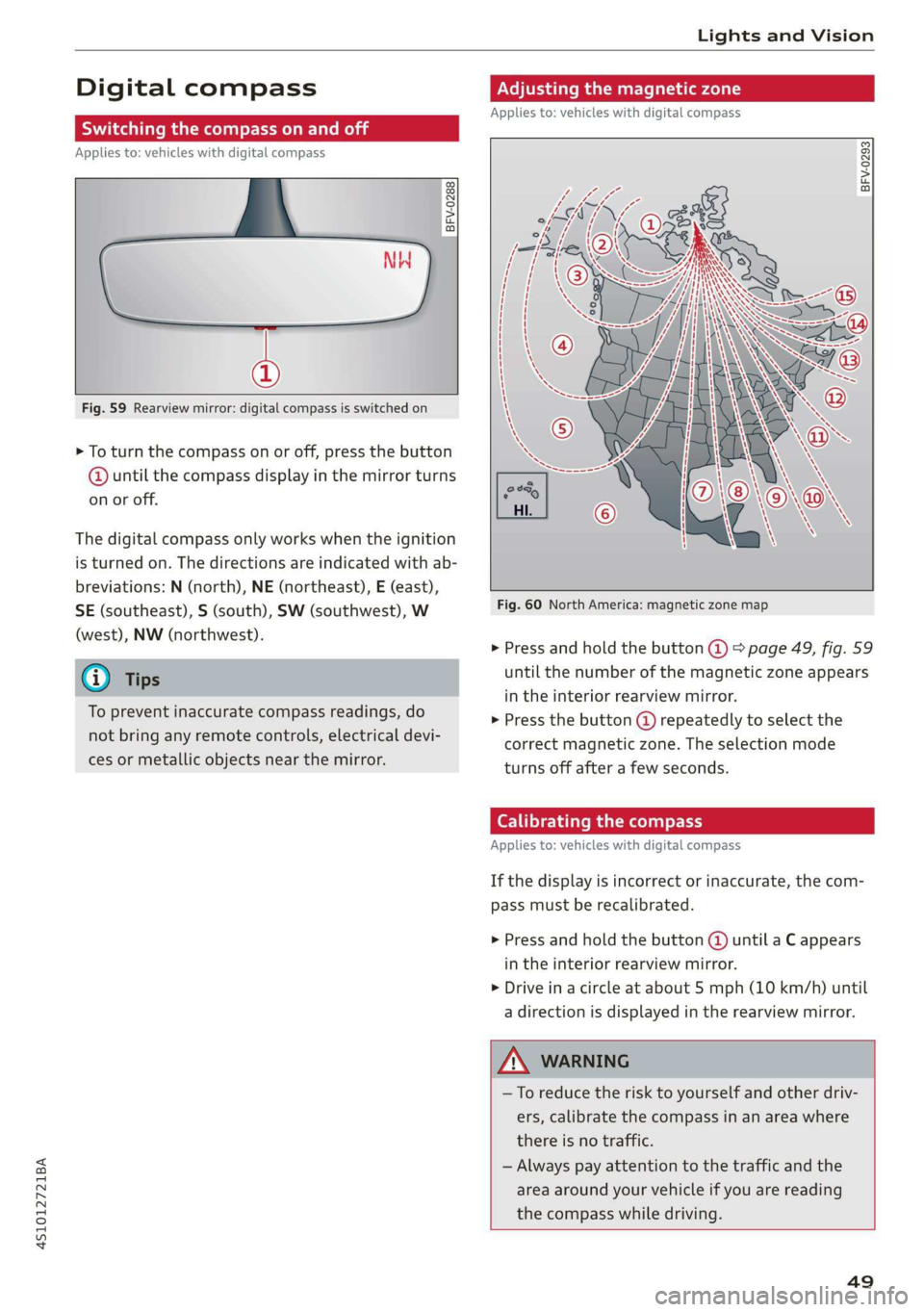
Fig. 60 North America: magnetic zone map
> Press and hold the button @ > page 49, fig. 59
until the number of the magnetic zone appears
in the interior rearview mirror.
> Press the button () repeatedly to select the
correct magnetic zone. The selection mode
turns off after a few seconds.
Calibrating the compass
Applies to: vehicles with digital compass
If the display is incorrect or inaccurate, the com-
pass must be recalibrated.
> Press and hold the button @ until a C appears
in the interior rearview mirror.
> Drive in a circle at about 5 mph (10 km/h) until
a direction is displayed in the rearview mirror.
—To reduce the risk to yourself and other driv-
ers, calibrate the compass in an area where
there is no traffic.
— Always pay attention to the traffic and the
area around your vehicle if you are reading
the compass while driving.
49
Page 53 of 308
4S1012721BA
Seats
Check the box is checked off /, the function is
switched on.
ZA\ WARNING
— Only adjust the front seat when the vehicle
is stationary. Otherwise, this increases the
risk of an accident
— The power front seats can also be adjusted
when the ignition is switched off. For this
reason, children should never be left unat-
tended in the vehicle because they could be
injured.
— Exercise caution when adjusting the seat
height. Unsupervised or careless seat adjust-
ment can pinch fingers or hands causing in-
juries.
— For safety reasons, the seat backrests must
always be locked while driving.
— The front seat backrests must not be re-
clined too far back when driving, because
this impairs the effectiveness of the safety
belts and airbag system, which increases the
risk of injury.
—To minimize the risk of injury during sudden
braking or a collision, the driver and the
front passenger must not drive or ride with
the backrest in the reclined position. The
safety belts and airbag system can only pro-
vide the greatest protection possible when
the backrests are in the upright position and
the safety belts are worn correctly. The more
a backrest is reclined, the greater the risk of
injury due to an incorrect seating position
and safety belt position.
@ Tips
If you do not wish to have the seat profile for
another driver assigned to the remote control
key, switch the memory function off in the In-
fotainment system.
Adjusting bucket seats
Applies to: vehicles with bucket seats
B4S-0078
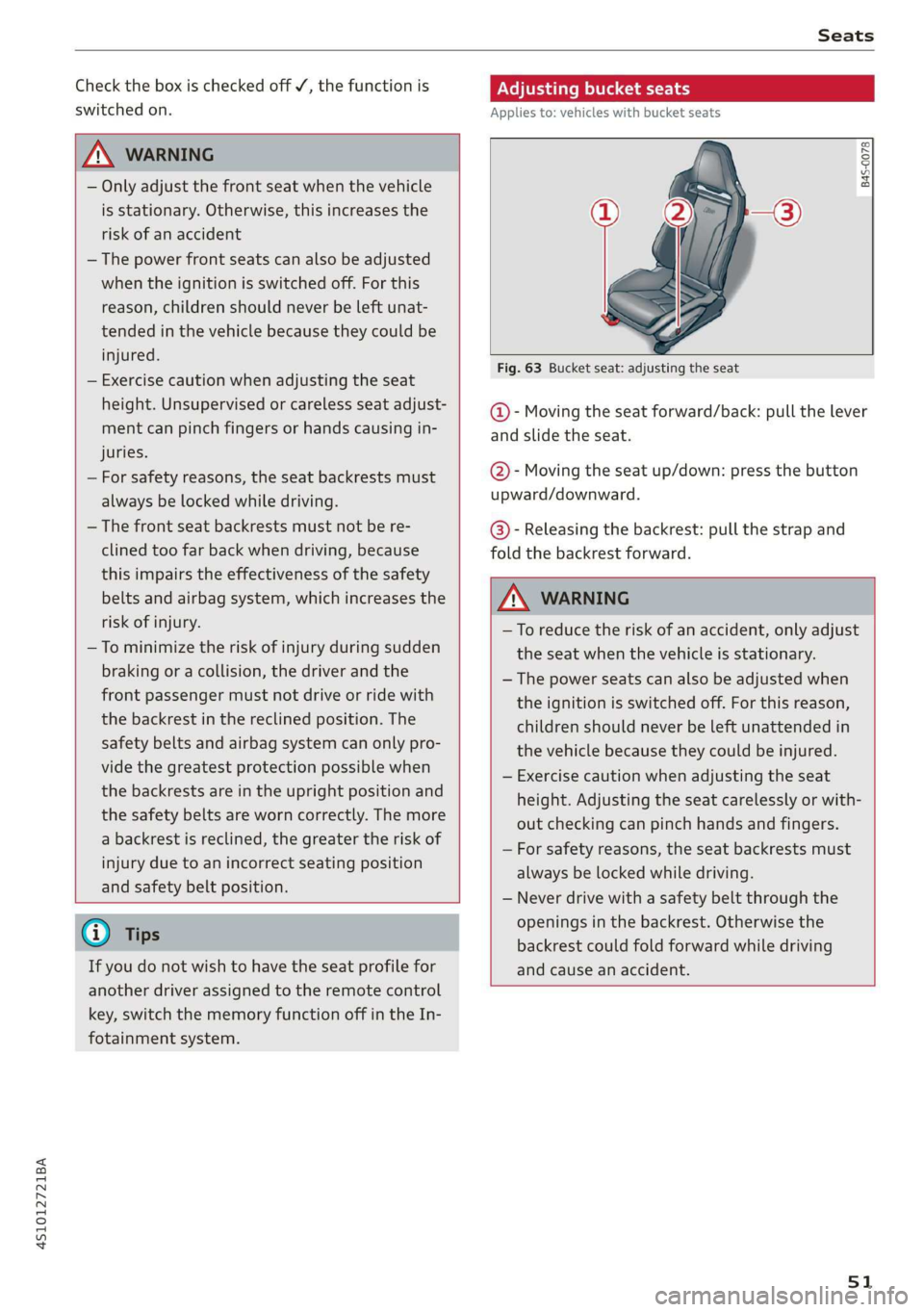
Fig. 63 Bucket seat: adjusting the seat
@- Moving the seat forward/back: pull the lever
and slide the seat.
@- Moving the seat up/down: press the button
upward/downward.
@- Releasing the backrest: pull the strap and
fold the backrest forward.
Z\ WARNING
—To reduce the risk of an accident, only adjust
the seat when the vehicle is stationary.
— The power seats can also be adjusted when
the ignition is switched off. For this reason,
children should never be left unattended in
the vehicle because they could be injured.
— Exercise caution when adjusting the seat
height. Adjusting the seat carelessly or with-
out checking can pinch hands and fingers.
— For safety reasons, the seat backrests must
always be locked while driving.
— Never drive with a safety belt through the
openings in the backrest. Otherwise the
backrest could fold forward while driving
and cause an accident.
51
Page 55 of 308
4S1012721BA
Stowing and using
Stowing and using
Power sources
When the ignition is switched on, you may be
able to use the electric power sources for exter-
nal devices, depending on the vehicle equipment.
12 volt sockets
You can connect electrical accessories to the 12
volt sockets. The power usage must not exceed
120 watts.
The 12 volt sockets are labeled with the & or
12V symbol. They are located in the front center
console* and on the side trim panel in the lug-
gage compartment*.
USB ports
Applies to: vehicles with USB port
You can charge mobile devices using the USB
ports. The USB ports are labeled with the «> or
[4 symbol or CHARGE ONLY.
Z\ WARNING
—To reduce the risk of fatal injury, store all
connected devices securely when driving so
that they do not move around inside the ve-
hicle when braking or in the event of an acci-
dent.
— Incorrect usage can lead to serious injuries
or burns. To reduce the risk of injuries, never
leave children unattended in the vehicle
with the vehicle key.
@) Note
— Read the operating manuals for the con-
nected devices.
—To reduce the risk of damage to the vehicle
electrical system, never attempt to charge
the vehicle battery by connecting accesso-
ries that provide power to the power sour-
ces.
— Do not connect any device whose network
class (voltage) does not match the network
class designed for the socket.
— Disconnect the connectors from the power
sources carefully to reduce the risk of dam-
aging them.
Storage
Cup holders
Applies to: vehicles with cup holders
Fre} KR So
g > c oO
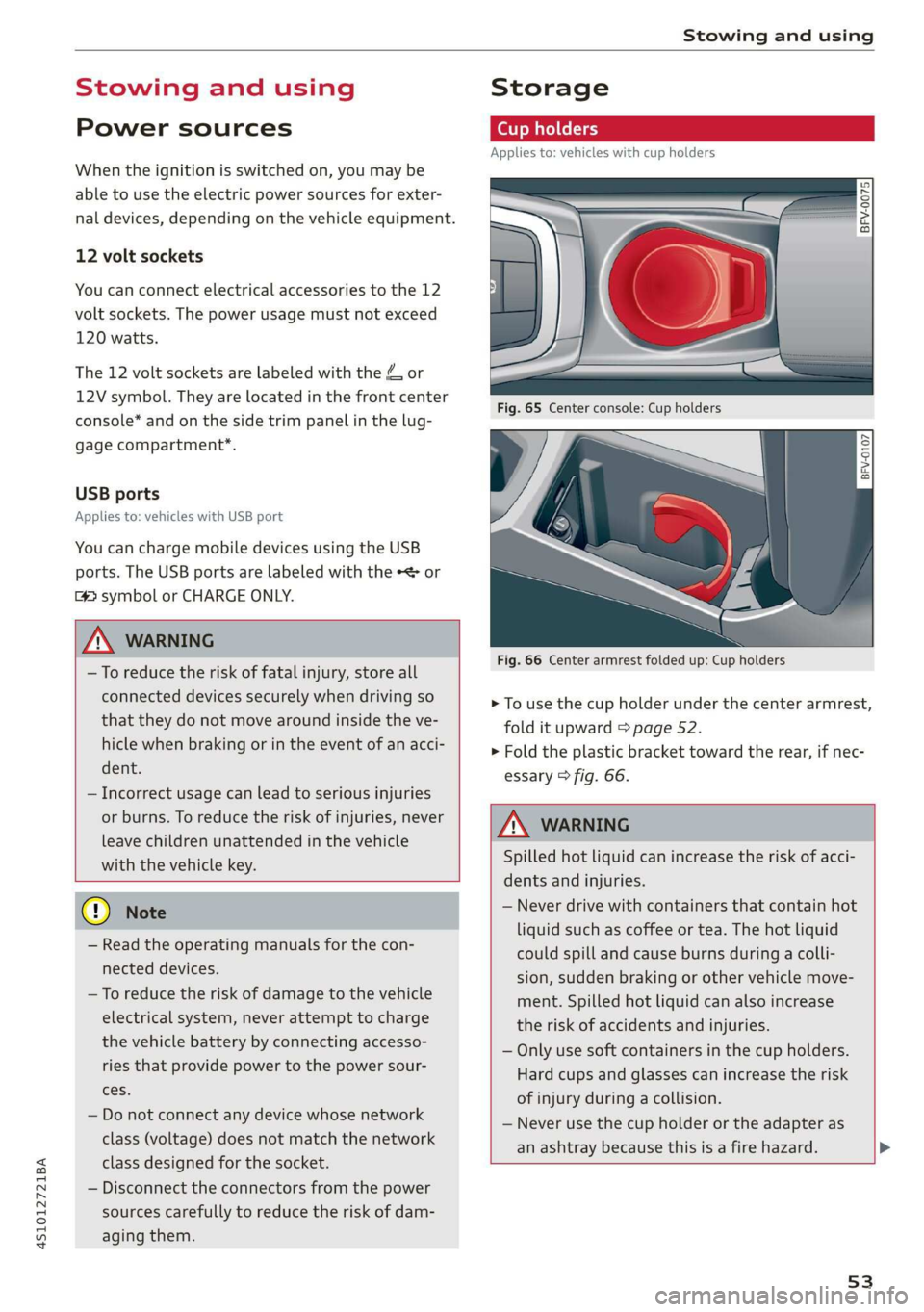
Fig. 66 Center armrest folded up: Cup holders
> To use the cup holder under the center armrest,
fold it upward > page 52.
> Fold the plastic bracket toward the rear, if nec-
essary > fig. 66.
Z\ WARNING
Spilled hot liquid can increase the risk of acci-
dents and injuries.
— Never drive with containers that contain hot
liquid such as coffee or tea. The hot liquid
could spill and cause burns during a colli-
sion, sudden braking or other vehicle move-
ment. Spilled hot liquid can also increase
the risk of accidents and injuries.
— Only use soft containers in the cup holders.
Hard cups and glasses can increase the risk
of injury during a collision.
— Never use the cup holder or the adapter as
an ashtray because this is a fire hazard.
53
Page 60 of 308
Warm and cold
— Switching manual recirculation mode on and
off: Press the > button.
— Automatic* recirculation mode: auto recircula-
tion needs to be activated in the Infotainment
system. Select in the Infotainment system:
[MENU] button > Vehicle > left control button >
Vehicle settings > Air conditioning > Auto re-
circulation. The air quality sensor that is de-
signed for diesel and gasoline exhaust auto-
matically switches the recirculation mode on or
off depending on the level of pollutants in the
outside air.
In recirculation mode, the air inside the vehicle is
circulated and filtered. This prevents the unfil-
tered air outside the vehicle from entering the
vehicle interior. Switching recirculation mode on
when driving through a tunnel or when sitting in
traffic is recommended > A.
Pressing the <> button, AUTO or the & button
switches recirculation mode off.
® Defrosting
The windshield and side windows are defrosted
or cleared of condensation as quickly as possible.
The optimum amount of air flows mainly out of
the vents under the windshield. Recirculation
mode switches off. The temperature is controlled
automatically.
The AUTO button switches the defroster off.
OFF climate control system
The climate control system is switched on and off
by pressing the button. It also switches on when
you press another button or a knob. Airflow from
outside is blocked when the climate control sys-
tem is switched off.
{s) Rear window defogger
If the rear window defogger is activated when
the ignition is switched on, the battery manage-
ment determines based on the battery charge if
it is possible to turn on. Otherwise, the rear win-
dow defogger functions with the engine running
and switches off automatically after approxi-
mately 10 - 20 minutes, depending on the out-
side temperature.
58
To prevent the rear window defogger from
switching
off automatically, press and hold the
® button for more than two seconds. This re-
mains stored up to approximately 15 minutes af-
ter turning off the ignition.
ss Seat heating*
If you press the button a the seat heating is
switched on at the highest level (3). The LEDs in-
dicate the temperature level. To reduce the tem-
perature, press the button again. To switch the
seat heating off, press the button repeatedly un-
til the LED turns off.
The seat heating switches automatically from
setting 3 to setting 2 after approximately ten mi-
nutes.
ZA WARNING
— You should not use the recirculation mode
for an extended period of time, because no
fresh air is drawn in and the windows can
fog when cooling mode is switched off. This
increases the risk of an accident.
— Individuals with reduced sensitivity to pain
or temperature could develop burns when
using the seat heating function. To reduce
the risk of injury, these individuals should
not use seat heating.
@) Note
To reduce the risk of damage to the seat heat-
ing elements, do not kneel on the seats or
place heavy pressure on one area of the seat.
(i) Tips
— The setting for the seat heating on the driv-
er's side is assigned to the key that is in use.
— If the front passenger's seat heating is
turned on, it will not turn on again automat-
ically if more than 10 minutes have passed
between switching the ignition off and
switching it on again.
Page 62 of 308
Driving
@ Tips
The amount of noise produced by the vehicle
can increase significantly when driving with a
sporty style. Show respect to others around
you and the environment with the way you op-
erate your vehicle, especially at night.
Steering
Adjusting the steering wheel position
The steering wheel position is fully adjustable up
and down and forward and back.
5 s
2 db t a
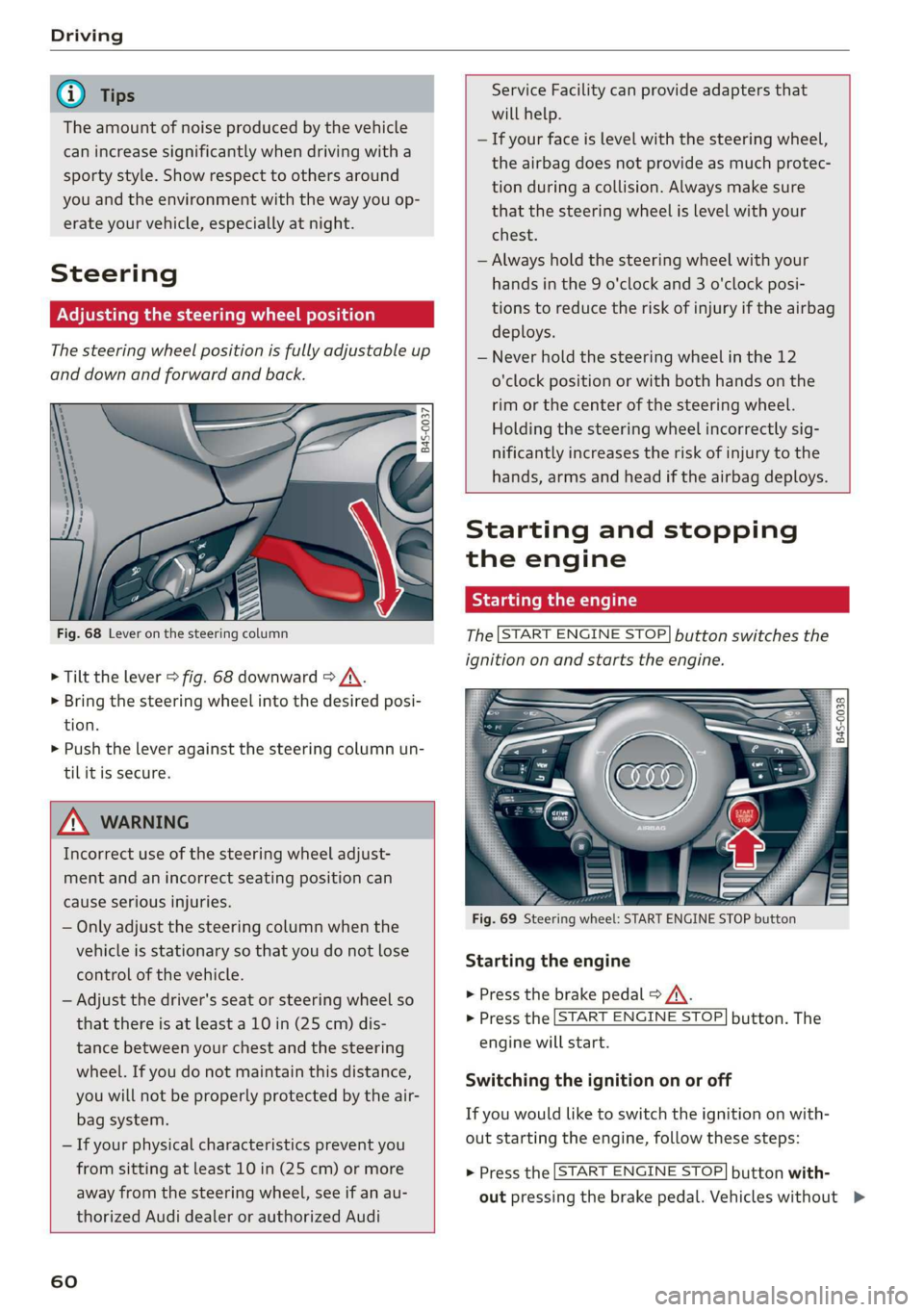
Fig. 68 Lever on the steering column
> Tilt the lever > fig. 68 downward > /\.
> Bring the steering wheel into the desired posi-
tion.
> Push the lever against the steering column un-
tilit is secure.
ZA WARNING
Incorrect use of the steering wheel adjust-
ment and an incorrect seating position can
cause serious injuries.
— Only adjust the steering column when the
vehicle is stationary so that you do not lose
control of the vehicle.
— Adjust the driver's seat or steering wheel so
that there is at least a 10 in (25 cm) dis-
tance between your chest and the steering
wheel. If you do not maintain this distance,
you will not be properly protected by the air-
bag system.
— If your physical characteristics prevent you
from sitting at least 10 in (25 cm) or more
away from the steering wheel, see if an au-
thorized Audi dealer or authorized Audi
60
Service Facility can provide adapters that
will help.
— If your face is level with the steering wheel,
the airbag does not provide as much protec-
tion during a collision. Always make sure
that the steering wheel is level with your
chest.
— Always hold the steering wheel with your
hands in the 9 o'clock and 3 o'clock posi-
tions to reduce the risk of injury if the airbag
deploys.
— Never hold the steering wheel in the 12
o'clock position or with both hands on the
rim or the center of the steering wheel.
Holding the steering wheel incorrectly sig-
nificantly increases the risk of injury to the
hands, arms and head if the airbag deploys.
Starting and stopping
the engine
Starting the engine
The [START ENGINE STOP] button switches the
ignition on and starts the engine.
utton
Starting the engine
> Press the brake pedal > A\.
> Press the [START ENGINE STOP] button. The
engine will start.
Switching the ignition on or off
If you would like to switch the ignition on with-
out starting the engine, follow these steps:
> Press the [START ENGINE STOP] button with-
out pressing the brake pedal. Vehicles without >
Page 63 of 308
4S1012721BA
Driving
the Start/Stop system*: the needle in the tach-
ometer moves into the READY position.
> To switch the ignition off, press the button
again. The needle in the tachometer moves into
the OFF position.
Equipment that uses a lot of electricity is switch-
ed off temporarily when you start the engine.
If the engine does not start immediately, the
starting procedure stops automatically after a
short time. If this is the case, repeat the starting
procedure after approximately 30 seconds.
Start/Stop system
See the information in > page 62, Start/Stop
system.
ZA\ WARNING
To reduce the risk of poisoning, never allow
the engine to run in confined spaces.
@) Note
Avoid high engine speed, full throttle, and
heavy engine load if the engine has not
reached operating temperature yet. You could
damage the engine.
@) For the sake of the environment
Do not let the engine run while parked to
warm up. Begin driving immediately. This re-
duces unnecessary emissions.
G) Tips
— Some noise after starting the engine is nor-
mal and is no cause for concern.
— If you leave the vehicle with the ignition
switched on, the ignition will switch off af-
ter a certain amount of time. Make sure that
electrical equipment such as the exterior
lights are switched off.
Stopping the engine
> Bring the vehicle to a full stop.
> Press the [START ENGINE STOP] button.
)_ This function is not available in all countries.
Steering lock!)
The steering is locked when you switch off the en-
gine and open the driver's door. The locked steer-
ing helps prevent vehicle theft.
Z\ WARNING
— Never turn off the engine before the vehicle
has come to a complete stop. Switching it
off before the vehicle has stopped may im-
pair the function of the brake booster and
power steering. You may need to use more
force when braking or steering. Because you
cannot brake and steer as you usually would,
this could lead to accidents and serious inju-
ries.
— If you leave the vehicle, switch the ignition
off and take the vehicle key with you. If you
do not do this, the engine could be started
and electrical equipment such as the power
windows could be activated. This can lead to
serious injuries.
— For safety reasons, always park the vehicle
with the selector lever in the P position.
Otherwise, there is the risk that the vehicle
could roll unintentionally.
() Note
If the engine has been under heavy load for
an extended period of time, heat builds up in
the engine compartment after the engine is
switched off and there is a risk of damaging
the engine. For this reason, let the engine run
at idle for approximately two minutes before
shutting it off.
@) Tips
For up to 10 minutes after stopping the en-
gine, the radiator fan may turn on again auto-
matically or it may continue to run, even if the
ignition is switched off.
Messages
Pressing the start/stop button again will switch
off the engine
61
>
Page 64 of 308
![AUDI R8 COUPE 2020 Owners Manual Driving
This message appears when you press the
START ENGINE STOP] button while driving.
Engine start system: malfunction! Please con-
tact Service
The engine automatic start system](/img/6/57639/w960_57639-63.png "AUDI R8 COUPE 2020 Owners Manual Driving
This message appears when you press the
START ENGINE STOP] button while driving.
Engine start system: malfunction! Please con-
tact Service
The engine automatic start system")
Driving
This message appears when you press the
START ENGINE STOP] button while driving.
Engine start system: malfunction! Please con-
tact Service
The engine automatic start system has a mal-
function.
Drive immediately to an authorized Au-
di dealer or authorized Audi Service Facility to
have the malfunction repaired. To start the en-
gine, press and hold the [START ENGINE STOP
button.
Remote control key: hold back of key
against the designated area. See owner's man-
ual
This message appears if there is no convenience
key inside the vehicle or if the system does not
recognize the key. The convenience key may not
be recognized, for example, if it is covered by an
object that disrupts the signal (such as a brief-
case), or if the key battery is weak. Electronic de-
vices such as cell phones can also interfere with
the signal.
To still be able to start or stop the engine, see
=> page 62, Starting the engine when there is a
malfunction.
B Remote control key: key not detected. Is the
key
still in the vehicle?
The B indicator light turns on and this message
appears if the convenience key was removed from
the vehicle when the engine was running. If the
convenience key is no longer in the vehicle, you
cannot switch the ignition on or start the engine
once you stop it. You also cannot lock the vehicle
from the outside.
Please press the brake pedal
This message appears if you do not press the
brake pedal when starting the engine.
Please select N or P
This message appears when starting or stopping
the engine if the selector lever is not in the "N" or
"P" position. The engine will not start/stop.
62
Starting the engine when there is a
area d ea)
It may not be possible to start the engine under
certain circumstances, for example, if the bat-
tery in the vehicle key is drained, if interference is
affecting the key or if there is a system malfunc-
tion.
2 3
9
db + a
Fig. 70 Steering column/remote control key: starting the
engine if there is a malfunction
As long as the message ?) Remote control key:
hold back of key against the designated area.
See owner's manual is displayed, you can emer-
gency start your vehicle.
> Press the brake pedal.
> Press the [START ENGINE STOP] button.
> Hold the master key in the location indicated in
the illustration ?) © fig. 70. The engine will
start.
> If the engine does not automatically start,
press the [START ENGINE STOP] button again.
(i) Tips
You can view the message again by pressing
the [START ENGINE STOP] button.
Start/Stop system
Applies to: vehicles with Start/Stop system
The Start/Stop system can help increase fuel
economy and reduce CO2 emissions.
In Start/Stop mode, the engine shuts off auto-
matically when the vehicle is stopped, such as at
a traffic light. The ignition remains switched on
during this stop phase. The engine will restart
automatically when needed.
Page 65 of 308
4S1012721BA
Driving
The Start/Stop system is automatically activated
once
the ignition is switched on.
Basic requirements for Start/Stop mode
— The driver's door must be closed.
— The driver's seat belt much be fastened.
— The engine compartment lid must be closed.
— The vehicle must have driven faster than 2 mph
(4 km/h) since the last time it stopped.
Z\ WARNING
— Never turn off the engine before the vehicle
has come to a complete stop. Switching it
off before the vehicle has stopped may im-
pair the function of the brake booster and
power steering. You would then need to use
more force to steer and brake the vehicle.
The fact that you cannot steer and brake as
usual may increase the risk of accidents and
serious
injuries.
— If you leave the vehicle, switch the ignition
off and take the vehicle key with you. This
applies particularly when children remain in
the vehicle. Otherwise the children could
start the engine or operate electrical equip-
ment such as power windows.
—To reduce the risk of injuries, make sure that
the Start/Stop system is turned off when
working in the engine compartment
=> page 64.
©) Note
Always switch the Start/Stop system off when
driving through water > page 64.
Stopping/starting the engine
Applies to: vehicles with Start/Stop system
eo Ss
2 db t a
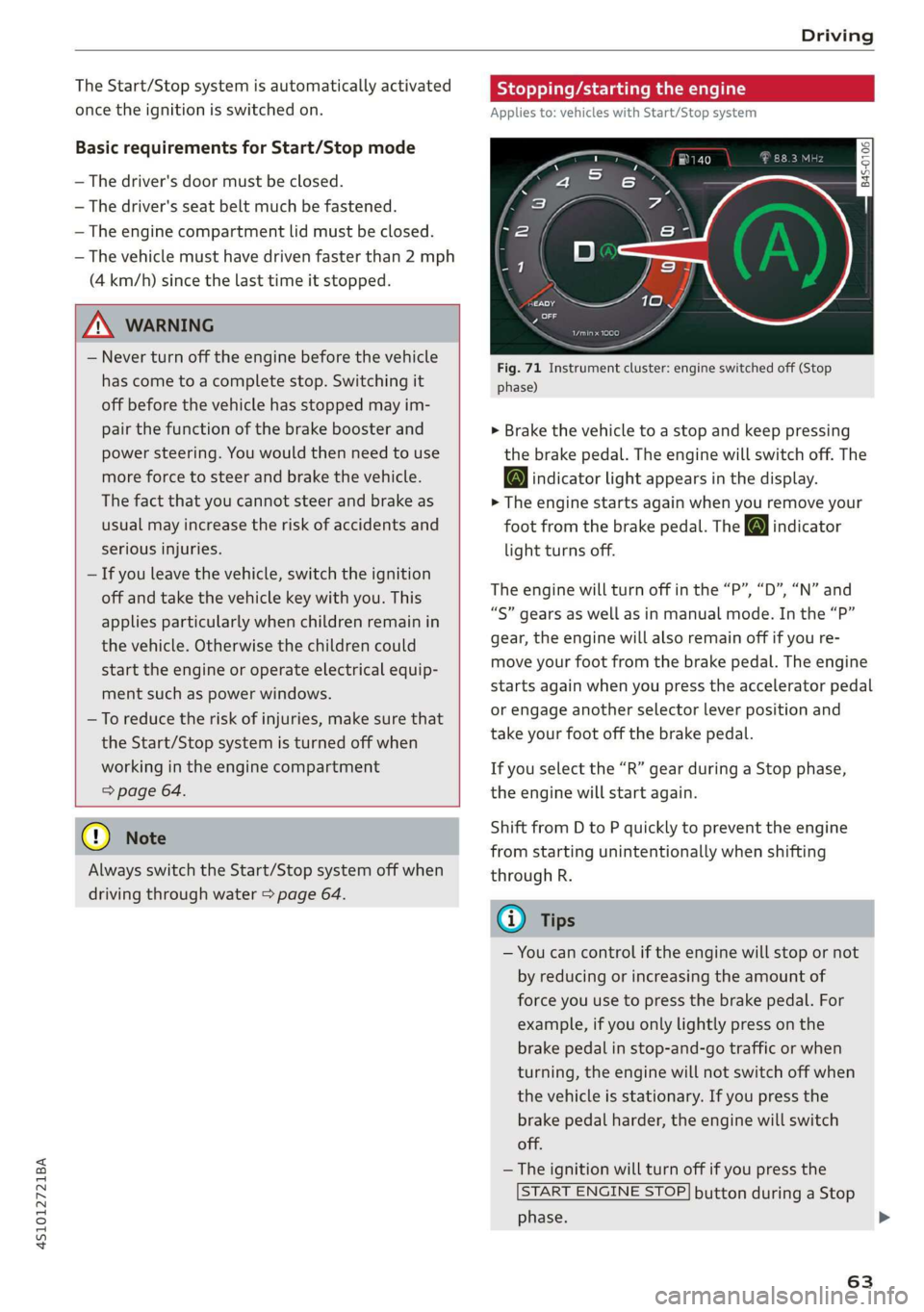
Fig. 71 Instrument cluster: engine switched off (Stop
phase)
> Brake the vehicle to a stop and keep pressing
the brake pedal. The engine will switch off. The
@ indicator light appears in the display.
> The engine starts again when you remove your
foot from the brake pedal. The o indicator
light turns off.
The engine will turn off in the “P”, “D”, “N” and
“S” gears as well as in manual mode. In the “P”
gear, the engine will also remain off if you re-
move your foot from the brake pedal. The engine
starts again when you press the accelerator pedal
or engage another selector lever position and
take your foot off the brake pedal.
If you select the “R” gear during a Stop phase,
the engine will start again.
Shift from D to P quickly to prevent the engine
from starting unintentionally when shifting
through R.
@) Tips
— You can control if the engine will stop or not
by reducing or increasing the amount of
force you use to press the brake pedal. For
example, if you only lightly press on the
brake pedal in stop-and-go traffic or when
turning, the engine will not switch off when
the vehicle is stationary. If you press the
brake pedal harder, the engine will switch
off.
— The ignition will turn off if you press the
START ENGINE STOP] button during a Stop
phase.
63
>