ignition AUDI R8 COUPE 2020 Workshop Manual
[x] Cancel search | Manufacturer: AUDI, Model Year: 2020, Model line: R8 COUPE, Model: AUDI R8 COUPE 2020Pages: 308, PDF Size: 82.41 MB
Page 131 of 308
4S1012721BA
Audi connect
Data connection settings
Using the Data connection settings menu, you
can set when the system should connect to the
Internet. The Internet connection disconnects
automatically once the requested Audi connect
Infotainment service no longer requires any data.
— Connection setup: you can select when a data
connection should be established.
— Audi connect (MMI): when this function is
switched on, a data connection is automatically
established in order to use Audi connect Info-
tainment services.
— Wi-Fi devices: when this function is switched
on, you can allow or deny Internet connections.
Connection settings
The connection is configured automatically based
on the SIM card being used. The following values
can be changed. You can obtain more information
from your cell phone service provider.
— APN: the access point depends on the cell
phone service provider and is assigned auto-
matically.
— User name: your cell phone service provider as-
signs the user name for your online profile.
— Password: your cell phone service provider as-
signs the password for your online profile.
TX WARNING
Always follow the information found in > AV
in General information on page 124.
C) Note
Always follow the information found in >@ in
General information on page 124.
@) Tips
For more information on roaming charges,
contact your cell phone service provider.
Applies to: vehicles with Wi-Fi hotspot
Requirement: the ignition must be switched on.
> Select: [MENU] button > Telephone > right con-
trol button > Wi-Fi settings.
Depending on the country and the vehicle equip-
ment, the following functions may be available:
Wi-Fi
When the function is switched on, the MMI's Wi-
Fi hotspot is active and Wi-Fi devices can be con-
nected to the hotspot.
Network key
The
Wi-Fi connection between the MMI and your
Wi-Fi device is encrypted. You can change the fol-
lowing information if needed.
— Access point (SSID): Wi-Fi hotspot name.
— Password: a random password was set in the
MMI at the factory. The password can be
changed. The encryption method requires a
password to be at least eight characters long.
Choose a secure password.
— Visible to others: you can switch the visibility
of the Wi-Fi hotspot on or off.
Network search
A list of available Wi-Fi networks in your area is
displayed.
Connection to personal hotspot
The MMI Wi-Fi hotspot is activated. An MMI In-
ternet connection to a personal Wi-Fi hotspot
(such as a smartphone) can be established. For
additional information, see > page 125.
ZA WARNING
Always follow the information found in > AV
in General information on page 124.
@) Note
Always follow the information found in >@ in
General information on page 124.
@ Tips
In vehicles without Audi connect Infotain-
ment, the use of the Wi-Fi hotspot is only
possible for the Wi-Fi audio player*. A data
connection to the Internet cannot be estab-
lished.
129
Page 155 of 308
4S1012721BA
Media
Bluetooth audio player
With the Bluetooth audio player, you can play
music wirelessly from your Bluetooth-capable de-
vice (such as a cell phone) through the MMI.
Requirement: the vehicle must be stationary and
the ignition must be switched on. The Bluetooth
settings will open on your mobile device during
the connection setup. The Bluetooth function and
visibility of the MMI > page 169 and mobile de-
vice must be switched on. The Bluetooth audio
player > page 169 must be switched on in the
MMI.
— Connecting a Bluetooth player: press the
MEDIA] button. Press the left control button
until the sources overview is displayed. Select
and confirm Bluetooth audio player ©)
=> page 157, fig. 137.
—If necessary, select and confirm, Not connected
> Connect Bluetooth audio player. The Blue-
tooth device search starts. Follow the instruc-
tions in the MMI.
— Select and confirm the desired Bluetooth device
from the list. The MMI generates a PIN for the
connection.
— Select and confirm Yes.
— Enter the PIN for connecting on your Bluetooth
device, or if the PIN is already displayed on your
Bluetooth device, confirm it on the Bluetooth
device. The time allowed for entering the PIN is
limited to approximately 30 seconds.
The media is started and operated through the
mobile device or the MMI, depending on the de-
vice being used.
@) Tips
— Check for any connection requests on your
Bluetooth device.
— Multiple Bluetooth audio players can be
connected to the MMI, but only one mobile
device can be active.
— Bluetooth protocols AVRCP (1.0/1.3/1.4)
and A2DP are supported.
— Note the volume setting on your Bluetooth
device. Audi recommends setting your mo-
bile device to the maximum volume when
using it as a Bluetooth audio player.
— The supported media functions (such as
shuffle) depend on the Bluetooth device be-
ing used.
— For more information on supported devices,
visit www.audiusa.com/bluetooth or con-
tact an authorized Audi dealer or authorized
Audi Service Facility.
Wi-Fi audio player
Using the Wi-Fi audio player media source on the
MMI, you can connect and operate your Wi-Fi-ca-
pable media player (such as a smartphone) to
wirelessly play music from your media player li-
brary. The media player is connected through the
vehicle's Wi-Fi hotspot. A UPnP Server app or an
integrated UPnP/DLNA server on your media
player is required to access your media player Li-
brary.
Requirement: the Wi-Fi function on your media
player must be switched on. The myAudi app or
an UPnP server app is installed on your media
player or your media player has an integrated
UPnP/DLNA server.
— Connecting a media player: press the [MEDIA
button. Press the left control button until the
sources overview > page 157 is displayed. Se-
lect and confirm Wi-Fi audio player (7)
=> page 157, fig. 137.
—If necessary, select and confirm Wi-Fi turned
off > Turn on Wi-Fi to activate Wi-Fi in the
MMI. Select Wi-Fi settings, if necessary. Select
the same settings on the wireless media player
that are used for the Wi-Fi hotspot.
— Starting the Wi-Fi audio player: Start the
myAudi app or an UPnP server app, or allow
media sharing on your device.
Operating the media player: the media player is
operated through the MMI.
— Press the left control button repeatedly until
the Folders menu item appears. Select and con-
firm Folders.
— Playing music from the media player: select
and confirm Media center.
Web radio: see > page 154.
153
Page 158 of 308
Media
ONC mata le)
Applies to: vehicles with Audi music interface
RAH-8345|
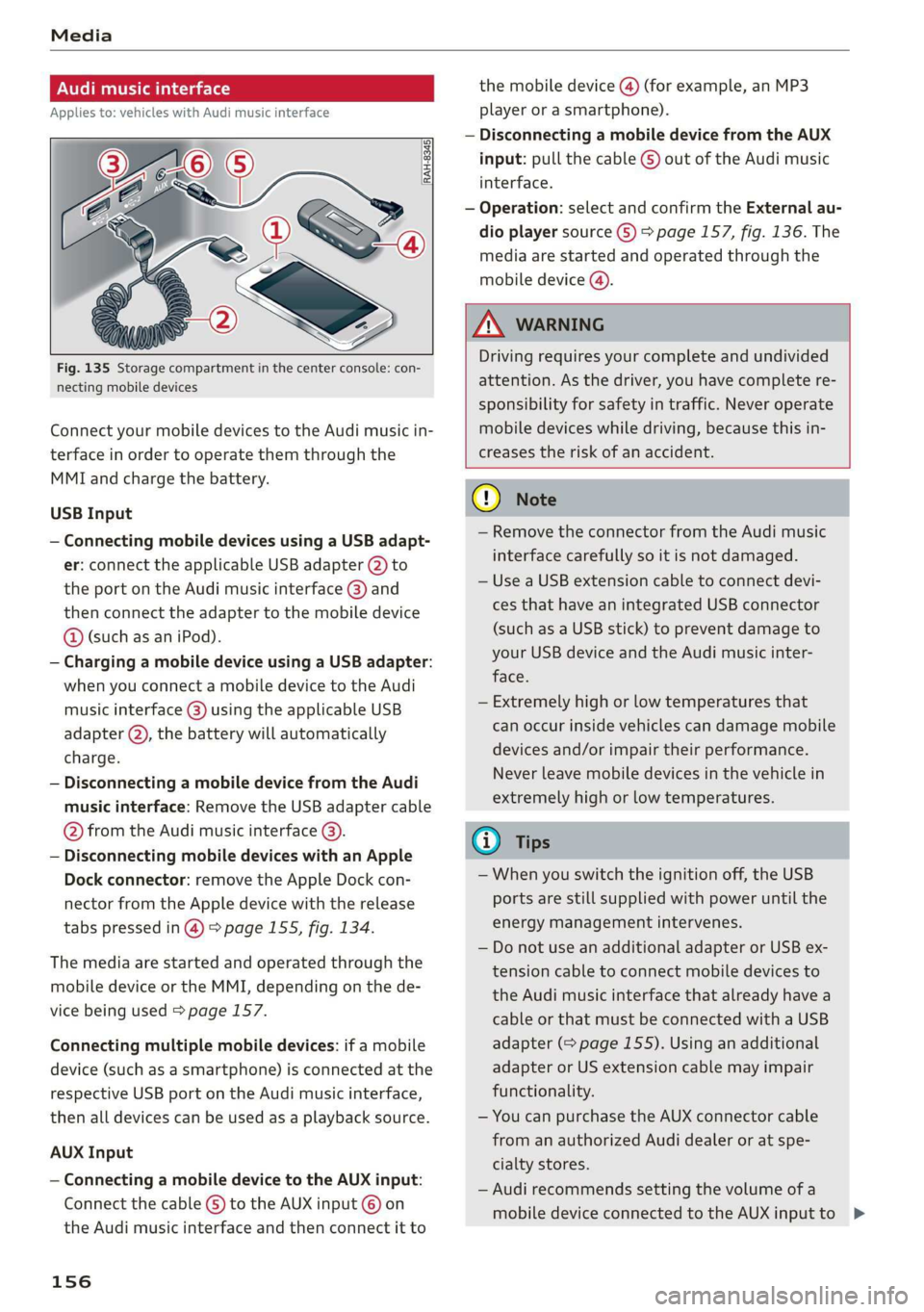
Fig. 135 Storage compartment in the center console: con-
necting mobile devices
Connect your mobile devices to the Audi music in-
terface in order to operate them through the
MMI and charge the battery.
USB Input
— Connecting mobile devices using a USB adapt-
er: connect the applicable USB adapter @) to
the port on the Audi music interface @) and
then connect the adapter to the mobile device
@ (such as an iPod).
— Charging a mobile device using a USB adapter:
when you connect a mobile device to the Audi
music interface @) using the applicable USB
adapter @), the battery will automatically
charge.
— Disconnecting a mobile device from the Audi
music interface: Remove the USB adapter cable
@ from the Audi music interface @).
— Disconnecting mobile devices with an Apple
Dock connector: remove the Apple Dock con-
nector from the Apple device with the release
tabs pressed in @) > page 155, fig. 134.
The media are started and operated through the
mobile device or the MMI, depending on the de-
vice being used > page 157.
Connecting multiple mobile devices: if a mobile
device (such as a smartphone) is connected at the
respective USB port on the Audi music interface,
then all devices can be used as a playback source.
AUX Input
— Connecting a mobile device to the AUX input:
Connect the cable G) to the AUX input © on
the Audi music interface and then connect it to
156
the mobile device @) (for example, an MP3
player or a smartphone).
— Disconnecting a mobile device from the AUX
input: pull the cable G) out of the Audi music
interface.
— Operation: select and confirm the External au-
dio player source G) > page 157, fig. 136. The
media are started and operated through the
mobile device (@).
Z\ WARNING
Driving requires your complete and undivided
attention. As the driver, you have complete re-
sponsibility for safety in traffic. Never operate
mobile devices while driving, because this in-
creases the risk of an accident.
(1) Note
— Remove the connector from the Audi music
interface carefully so it is not damaged.
— Use a USB extension cable to connect devi-
ces that have an integrated USB connector
(such as a USB stick) to prevent damage to
your USB device and the Audi music inter-
face.
— Extremely high or low temperatures that
can occur inside vehicles can damage mobile
devices and/or impair their performance.
Never leave mobile devices in the vehicle in
extremely high or low temperatures.
@) Tips
— When you switch the ignition off, the USB
ports are still supplied with power until the
energy management intervenes.
— Do not use an additional adapter or USB ex-
tension cable to connect mobile devices to
the Audi music interface that already have a
cable or that must be connected with a USB
adapter (= page 155). Using an additional
adapter or US extension cable may impair
functionality.
— You can purchase the AUX connector cable
from an authorized Audi dealer or at spe-
cialty stores.
— Audi recommends setting the volume of a
mobile device connected to the AUX inputto >
Page 167 of 308
4S1012721BA
Audi smartphone interface
Audi smartphone
interface
Setup
Applies to: vehicles with Audi smartphone interface
You can connect your smartphone to the MMI us-
ing the Audi smartphone interface. Certain con-
tent on your smartphone is adapted to the Info-
tainment system display while driving and can be
operated through the MMI control panel.
Requirement
The vehicle must be stationary and the ignition
must be switched on.
iPhone generation 5 or higher with Lightning
connector and iOS 7.1.2 operating system or
higher, or
A smartphone with the Android Auto app and An-
droid 5.0 Lollipop operating system or higher is
required.
> Connect your smartphone to the Audi music in-
terface > page 156 using the applicable USB
adapter > page 155, fig. 134.
> Select and confirm Activate Apple CarPlay or
Activate Android Auto now.
> Follow the system instructions.
> Pay attention to any additional system prompts
on your smartphone, if applicable.
If you chose not to use Apple CarPlay or Android
Auto when connecting your smartphone for the
first time, you can start the Audi smartphone in-
terface later on using the Connection manager.
> Select: [MENU] button > Audi smartphone in-
terface > Change to connection manager.
> Connect your smartphone to the Audi music in-
terface > page 156 using the applicable USB
adapter > page 155, fig. 134.
> Select and confirm Audi smartphone interface
in the Connection manager > page 168. You
can select your smartphone in the list of devi-
ces that are already paired > page 169.
> Follow the system instructions.
ZA WARNING
Driving requires your complete and undivided
attention. As the driver, you have complete re-
sponsibility for safety in traffic. Never operate
mobile devices while driving, because this in-
creases the risk of an accident.
) In preparation at the time of printing.
@) Note
Always follow the information found in >@ in
General information on page 124.
@ Tips
— The functions that can be used depend on
the following factors, among others:
—The brand of your smartphone
~The version of the operating system in
your smartphone
— The software version of the app used
— The USB adapter cable and correct connec-
tion
— Your cell phone service provider
— The customized settings on your smart-
phone
— One of the factors above or a combination
of any of them could cause your smart-
phone to be incompatible with the Audi
smartphone interface. Compatibility cannot
be guaranteed for all types of smartphones.
For more information and assistance, refer
to the user guide and the manufacturer of
your smartphone.
— If the connected smartphone has voice con-
trol, you can operate your smartphone using
the external voice recognition system
=> page 109.
— The menu language shown in the MMI is
based on the settings in your smartphone.
— The time displayed in the MMI is based on
the settings in your smartphone.
— Some MMI functions are not available when
Apple CarPlay or Android Auto is active.
— You cannot connect any mobile devices via
Bluetooth when an Apple CarPlay connec-
tion is active.
165
Page 170 of 308
System settings
Tool tips
When this function is switched on M, your MMI
shows you tips for input. The frequency of how
often it displays decreases with time. You can
switch off the operating tips at any time.
Speech dialog system
Command display: when this function is switch-
ed on, the MMI will show you the possible
commands for voice input in the respective
menu. You can switch the function off at any
time.
Short dialog: when this function is switched on
, a shorter form of the prompts is used. You
can switch the function off at any time.
Speech dialog system volume: you can adjust
the volume of the prompts by turning the control
knob.
Individual speech training (only when the vehi-
cle is stationary): you can adapt the voice recog-
nition system to your voice or pronunciation in or-
der to improve the system's ability to recognize
your speech. Individual speech training is com-
prised of 20 speech entries that consist of com-
mands and sequences of numbers. You can de-
lete the programmed voice training with the Re-
set individual speech training function.
Factory settings
The following functions can be reset to the facto-
ry default settings:
— Sound settings
— Radio
— Media settings
— Jukebox
— Directory
— Telephone
— Bluetooth and Wi-Fi
— Navigation settings
— Navigation and online memory
— Voice recognition system
— Message settings*
— Apps*
— Tool tips
— Audi connect*
168
You can select the desired functions individually
or all at once with the option Select all entries.
Select and confirm Restore factory settings.
G) Tips
Make sure that not only the settings were de-
leted but also the stored data, if necessary.
Connection manager
Introduction
The connection manager provides an overview of
your connected devices and their network status:
> Select: [MENU] button > Settings > left control
button > MMI settings > Connection manager.
» Select and confirm a menu item.
If a mobile device was already connected and you
select and confirm the corresponding menu item,
the device name and connection status are dis-
played under the menu item.
You can individually Connect () or Disconnect
(L) a paired device.
Requirement
— The vehicle must be stationary and the ignition
must be switched on.
— The Bluetooth settings will open on your mo-
bile device during the connection setup.
— The Bluetooth function and visibility of the MMI
=> page 169 and mobile device must be switch-
ed on.
— The mobile device to be connected must not be
connected to any other Bluetooth device.
Primary phone
— Connect new device: search for and connect a
cell phone.
— List of devices already paired: select your cell
phone from the list of all the devices that are
already paired.
Page 174 of 308
System settings
Microphone input level: you can adjust the vol-
ume during a phone call by turning the control
knob.
Navigation
Voice guidance: See > page 138.
Voice guidance during phone call: See
=> page 138.
Voice guidance volume: you can adjust the voice
guidance volume during active route guidance by
turning the control knob.
Entertainment fader: the volume of audio play-
back can be temporarily lowered when the park-
ing system or voice guidance is active.
Voice recognition system
Short dialog: prompts in a shorter format can be
switched on or off.
Speech dialog system volume: you can adjust
the volume of the prompts by turning the control
knob.
Parking aid*
You can adjust the signal tone volume by turning
the control knob.
— Adjusting the Front volume: select and con-
firm High, Medium or Low.
— Adjusting the Rear volume: select and confirm
High, Medium or Low.
MMI touch volume
You can adjust the volume of the prompts for the
MMI touch by turning the control knob.
Audi Heartbeat
You can adjust the volume of Audi Heartbeat by
turning the control knob.
172
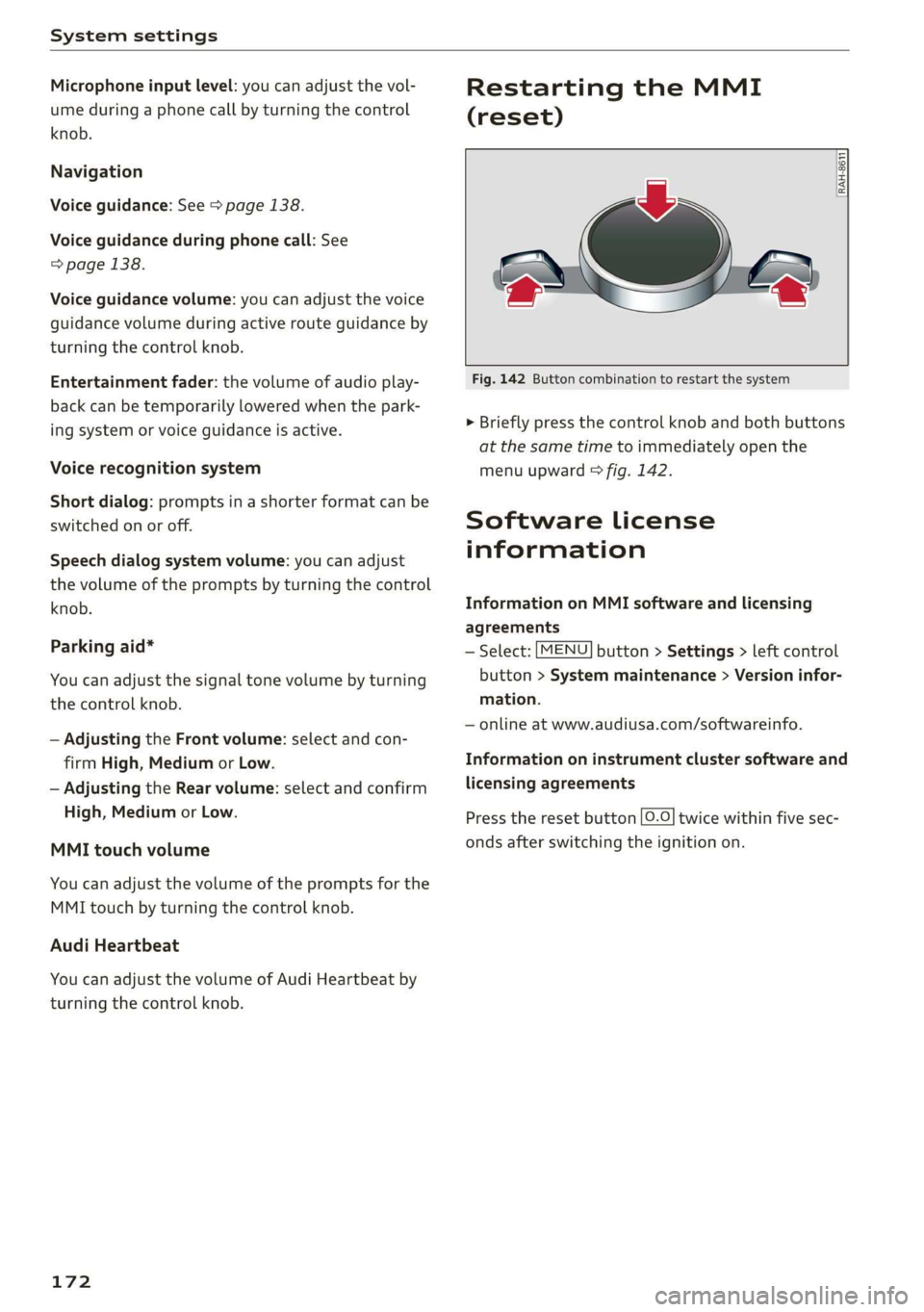
Restarting the MMI
(reset)
RAH-8611
ev
= ‘=
Fig. 142 Button combination to restart the system
> Briefly press the control knob and both buttons
at the same time to immediately open the
menu upward > fig. 142.
Software License
information
Information on MMI software and licensing
agreements
— Select: [MENU] button > Settings > left control
button > System maintenance > Version infor-
mation.
— online at www.audiusa.com/softwareinfo.
Information on instrument cluster software and
licensing agreements
Press the reset button [0.0] twice within five sec-
onds after switching the ignition on.
Page 182 of 308
Safety belts
Safety belts
General notes
Always wear safety belts!
Wearing safety belts correctly saves lives!
This chapter explains why safety belts are neces-
sary, how they work and how to adjust and wear
them correctly.
> Read all the information that follows and heed
all of the instructions and WARNINGS.
ZA\ WARNING
Not wearing safety belts or wearing them im-
properly increases the risk of serious personal
injury and death.
— Safety belts are the single most effective
means available to reduce the risk of serious
injury and death in automobile accidents.
For your protection and that of your passen-
gers, always correctly wear safety belts
when the vehicle is moving.
— Pregnant women, injured, or physically im-
paired persons must also use safety belts.
Like all vehicle occupants, they are more
likely to be seriously injured if they do not
wear Safety belts. The best way to protect a
fetus is to protect the mother - throughout
the entire pregnancy.
NT tet)
Your vehicle has two seating positions. Each seat-
ing position has a safety belt.
ZA\ WARNING
Not wearing safety belts or wearing them im-
properly increases the risk of serious personal
injury and death.
— Never strap more than one person, including
small children, into any belt. It is especially
dangerous to place a safety belt over a child
sitting on your lap.
— Never let more people ride in the vehicle
than there are safety belts available.
180
— Be sure everyone riding in the vehicle is
properly restrained with a separate safety
belt or child restraint.
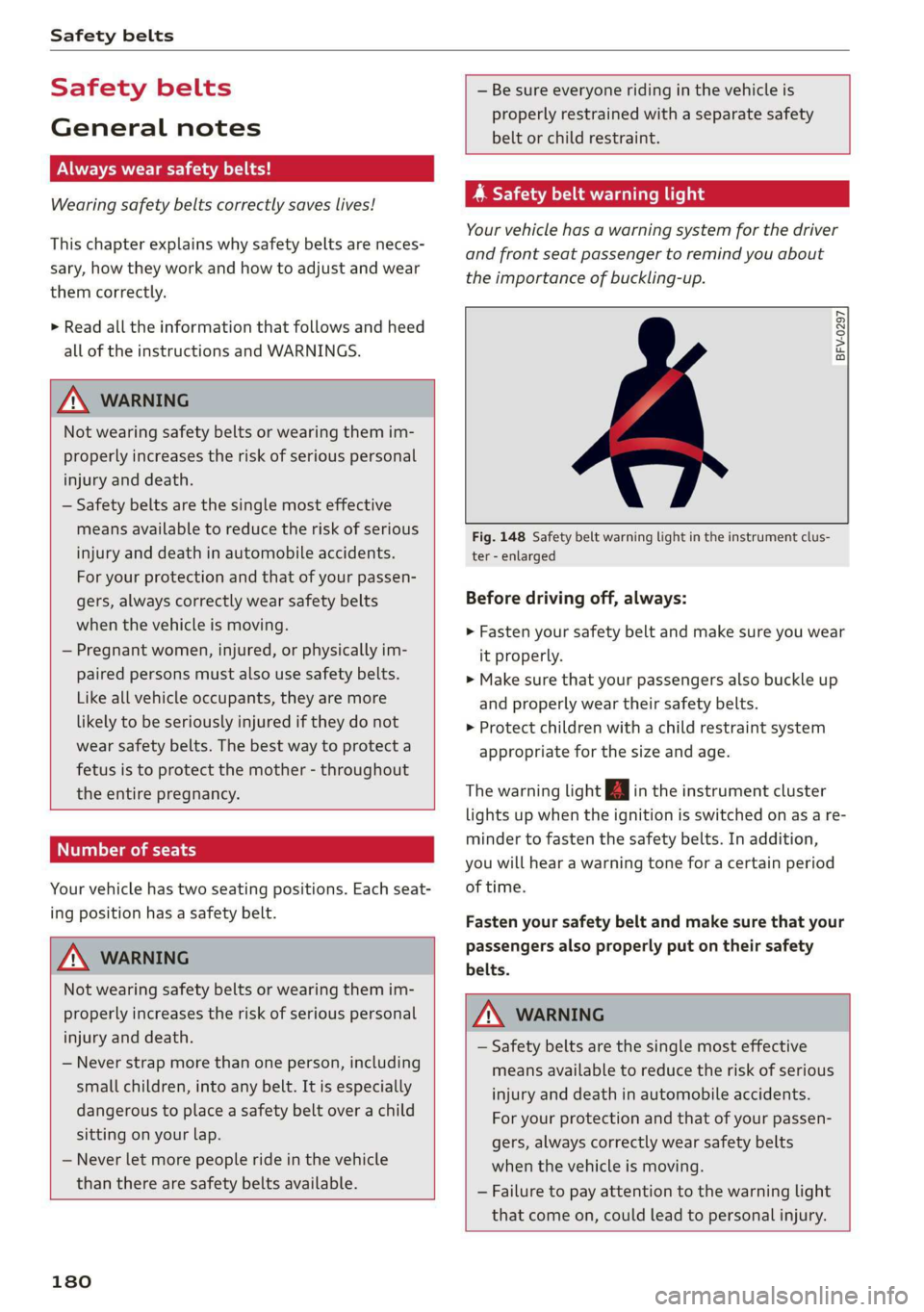
yr ae Caen Chi
Your vehicle has a warning system for the driver
and front seat passenger to remind you about
the importance of buckling-up.
BFV-0297
Fig. 148 Safety belt warning light in the instrument clus-
ter - enlarged
Before driving off, always:
> Fasten your safety belt and make sure you wear
it properly.
> Make sure that your passengers also buckle up
and properly wear their safety belts.
> Protect children with a child restraint system
appropriate for the size and age.
The warning light in the instrument cluster
lights up when the ignition is switched on as a re-
minder to fasten the safety belts. In addition,
you will hear a warning tone for a certain period
of time.
Fasten your safety belt and make sure that your
passengers also properly put on their safety
belts.
Z\ WARNING
— Safety belts are the single most effective
means available to reduce the risk of serious
injury and death in automobile accidents.
For your protection and that of your passen-
gers, always correctly wear safety belts
when the vehicle is moving.
— Failure to pay attention to the warning light
that come on, could lead to personal injury.
Page 191 of 308
4S1012721BA
Airbag system
12 month old and younger and for “low risk de-
ployment” for children aged 3 to 6 years old (as
defined in the standard).
The PASSENGER AIR BAG OFF 3; light in the
headliner tells you when the front Advanced Air-
bag on the passenger side has been turned off by
the electronic control unit.
Each time you turn on the ignition, the PASSEN-
GER AIR BAG OFF 3; ON @ light will come on
for a few seconds and:
— PASSENGER AIR BAG OFF 3; will come on if
the front passenger seat is not occupied,
— PASSENGER AIR BAG OFF 3; will come on if
the electrical capacitance measured by the ca-
pacitive passenger detection system for the
front passenger seat equals the combined ca-
pacitance of an infant up to about one year of
age and one of the rearward-facing or forward-
facing child restraints listed in Federal Motor
Vehicle Safety Standard 208 with which the Ad-
vanced Airbag System in your vehicle was certi-
fied. For a listing of the child restraints that
were used to certify your vehicle's compliance
with the U.S. Safety Standard > page 213.
— PASSENGER AIR BAG OFF #; will come on if
there is a small child or child restraint on the
front passenger seat,
— PASSENGER AIR BAG ON @ will go off if the
front passenger seat is occupied by an adult as
registered by the capacitive passenger detec-
tion system > page 198, Monitoring the Ad-
vanced Airbag System.
The PASSENGER AIR BAG OFF 3; light comes on
when electrical capacitance registered on the
front passenger seat is equal to or less than the
combined capacitance of a typical 1 year-old in-
fant and one of the rearward-facing or forward-
facing child restraints listed in Federal Motor Ve-
hicle Safety Standard 208 with which the Ad-
vanced Airbag System in your vehicle was certi-
fied.
If the total electrical capacitance registered on
the front passenger seat is more than that of a
typical 1 year-old child but less than the weight
of a small adult, the front airbag on the passen-
ger side can deploy (the PASSENGER AIR BAG
OFF 3¥; light does not come on).
If the PASSENGER AIR BAG OFF 3%; light does
not come on, the front airbag on the passenger
side has not been turned off by the electronic
control unit and can deploy if the control unit
senses an impact that meets the conditions stor-
ed in its memory.
For example, the airbag may deploy if:
—asmall child that is heavier than a typical 1
year-old child is on the front passenger seat (re-
gardless of whether the child is in one of the
child safety seats listed > page 213), or
—a child who has outgrown child restraints is on
the front passenger seat.
If the front passenger airbag is turned off, the
PASSENGER AIR BAG OFF #; light comes on in
the headliner and stays on.
If the front passenger airbag deploys, the Federal
Standard requires the airbag to meet the “low
risk” deployment criteria to reduce the risk of in-
jury through interaction with the airbag. “Low
risk” deployment occurs in those crashes that
take place at lower decelerations as defined in
the electronic control unit > page 199, PASSEN-
GER AIR BAG OFF $¥; ON ® light.
Always remember, a child seat or infant carrier
installed on the front seat may be struck and
knocked out of position by the rapidly inflating
passenger's airbag in a frontal collision. The air-
bag could greatly reduce the effectiveness of the
child restraint and even seriously injure the child
during inflation.
Z\ WARNING
A child in a rearward-facing child seat instal-
led on the front passenger seat will be seri-
ously injured and can be killed if the front air-
bag inflates - even with an Advanced Airbag
System.
— The inflating airbag will hit the child seat or
infant carrier with great force and will
smash the child seat and child against the
backrest, center armrest, door or roof. >
189
Page 192 of 308
Airbag system
— Forward-facing child seats installed on the
front passenger's seat may interfere with
the deployment of the airbag and cause seri-
ous personal injury to the child.
ZA WARNING
If, in exceptional circumstances, you must in-
stall a forward-facing child restraint on the
front passenger's seat:
— Always make sure the forward-facing seat
has been designed and certified by its manu-
facturer for use on a front seat with a pas-
senger front and side airbag.
— Never put the forward-facing child restraint
up against or very near the instrument pan-
el.
— Always move the front passenger seat to the
highest position in the up and down adjust-
ment range and move it back to the rear-
most position in the seat's fore and aft ad-
justment range, as far away from the airbag
as possible, before installing the forward-
facing child restraint.
— Always make sure that the safety belt upper
anchorage is behind the child restraint and
not next to or in front of the child restraint
so that the safety belt will be properly posi-
tioned.
— Make sure that the PASSENGER AIR BAG
OFF 7%; light comes on and stays on all the
time whenever the ignition is switched on.
Z\ WARNING
If, in exceptional circumstances, you must in-
stall a forward or rearward-facing child re-
straint on the front passenger's seat:
— Improper installation of child restraints can
reduce their effectiveness or even prevent
them from providing any protection.
— An improperly installed child restraint can
interfere with the airbag as it deploys and
seriously
injure or even kill the child - even
with an Advanced Airbag System.
— Always carefully follow the manufacturer's
instructions provided with the child seat or
carrier.
— Always make sure that there is nothing on
the front passenger seat that will cause the
capacitive passenger detection system in
the seat to signal to the Airbag System that
the seat is occupied by a person when it is
not, or to signal that it is occupied by some-
one who is heavier than the person actually
sitting on the seat. The presence of addi-
tional objects could cause the passenger
front airbag to be turned on when it should
be off, or could cause the airbag to work ina
way that is different from the way it would
have worked without the object on the seat.
ZA WARNING
To reduce the risk of serious injury, make sure
that the PASSENGER AIR BAG OFF 3; light
will be displayed whenever a child restraint is
installed on the front passenger seat and the
ignition is switched on.
— If the PASSENGER AIR BAG OFF 3; light
does not stay on, perform the checks descri-
bed > page 198, Monitoring the Advanced
Airbag System.
— Have the airbag system inspected by your
Audi dealer immediately.
— Always carefully follow instructions from
child restraint manufacturers when instal-
ling child restraints.
190
Page 196 of 308
Airbag system
— Always move the front passenger seat to the
highest position in the up and down adjust-
ment range and move it back to the rear-
most position in the seat's fore and aft ad-
justment range, as far away from the airbag
as possible, before installing the forward-
facing child restraint.
— Always make sure that the safety belt upper
anchorage is behind the child restraint and
not next to or in front of the child restraint
so that the safety belt will be properly posi-
tioned.
— Always make sure that there is nothing on
the front passenger seat that will cause the
capacitive passenger detection system in
the seat to signal to the Airbag System that
the seat is occupied by a person when it is
not, or to signal that it is occupied by some-
one who is heavier than the person actually
sitting on the seat. The presence of addi-
tional objects could cause the passenger
front airbag to be turned on when it should
be off, or could cause the airbag to work ina
way that is different from the way it would
have worked without the object on the seat.
— Make sure that the PASSENGER AIR BAG
OFF %; light comes on and stays on all the
time whenever the ignition is switched on.
Advanced Airbag System components
The front passenger seat in your vehicle has a lot
of very important parts of the Advanced Airbag
System in it. These parts include the capacitive
passenger detection system, wiring, brackets,
and more. The control unit monitors the system
on the front passenger seat when the ignition is
switched on and turns the airbag indicator light
on when a malfunction in the one of the system
components is detected > page 199. Because the
front passenger seat contains important parts of
the Advanced Airbag System, you must take care
to prevent it from being damaged. Damage to
the seat may prevent the Advanced Airbag Sys-
tem for the front passenger seat from doing its
job ina crash.
194
The front Advanced Airbag System consists
of the following:
— Crash sensors in the front of the vehicle that
measure vehicle acceleration/deceleration to
provide information to the Advanced Airbag
System about the severity of the crash.
—An electronic control unit, with integrated
crash sensors for front and side impacts. The
control unit “decides” whether to fire the front
airbags based on the information received from
the crash sensors. The control unit also “de-
cides” whether the safety belt pretensioners
should be activated.
— An Advanced Airbag with gas generator for the
driver inside the steering wheel hub.
— An Advanced Airbag with gas generator inside
the instrument panel for the front passenger.
— A capacitive passenger detection system under-
neath the front passenger seat cover. This sys-
tem measures the electrical capacitance of the
person in the seat. The information registered
is sent continuously to the electronic control
unit to regulate deployment of the front Ad-
vanced Airbag on the passenger side.
— An airbag monitoring system and indicator
light ka in the instrument cluster.
—Asensor in each front seat registers the dis-
tance between the respective seat and the
steering wheel or instrument panel. The infor-
mation registered is sent continuously to the
electronic control unit to regulate deployment
of the front Advanced Airbags.
— The PASSENGER AIR BAG OFF 3%; light comes
on and stays on in the headliner > page 199,
fig. 160 and tells you when the front Advanced
Airbag on the passenger side has been turned
off.
—Asensor in the safety belt latch for the driver
and for the front seat passenger that senses
whether that safety belt is latched or not and
transmits this information to the electronic
control unit.
ZA\ WARNING
Damage to the front passenger seat can pre-
vent the front airbag from working properly.
— Improper repair or disassembly of the front
passenger and driver seat will prevent the >