lock AUDI R8 COUPE 2020 Owner's Manual
[x] Cancel search | Manufacturer: AUDI, Model Year: 2020, Model line: R8 COUPE, Model: AUDI R8 COUPE 2020Pages: 308, PDF Size: 82.41 MB
Page 40 of 308
Power top
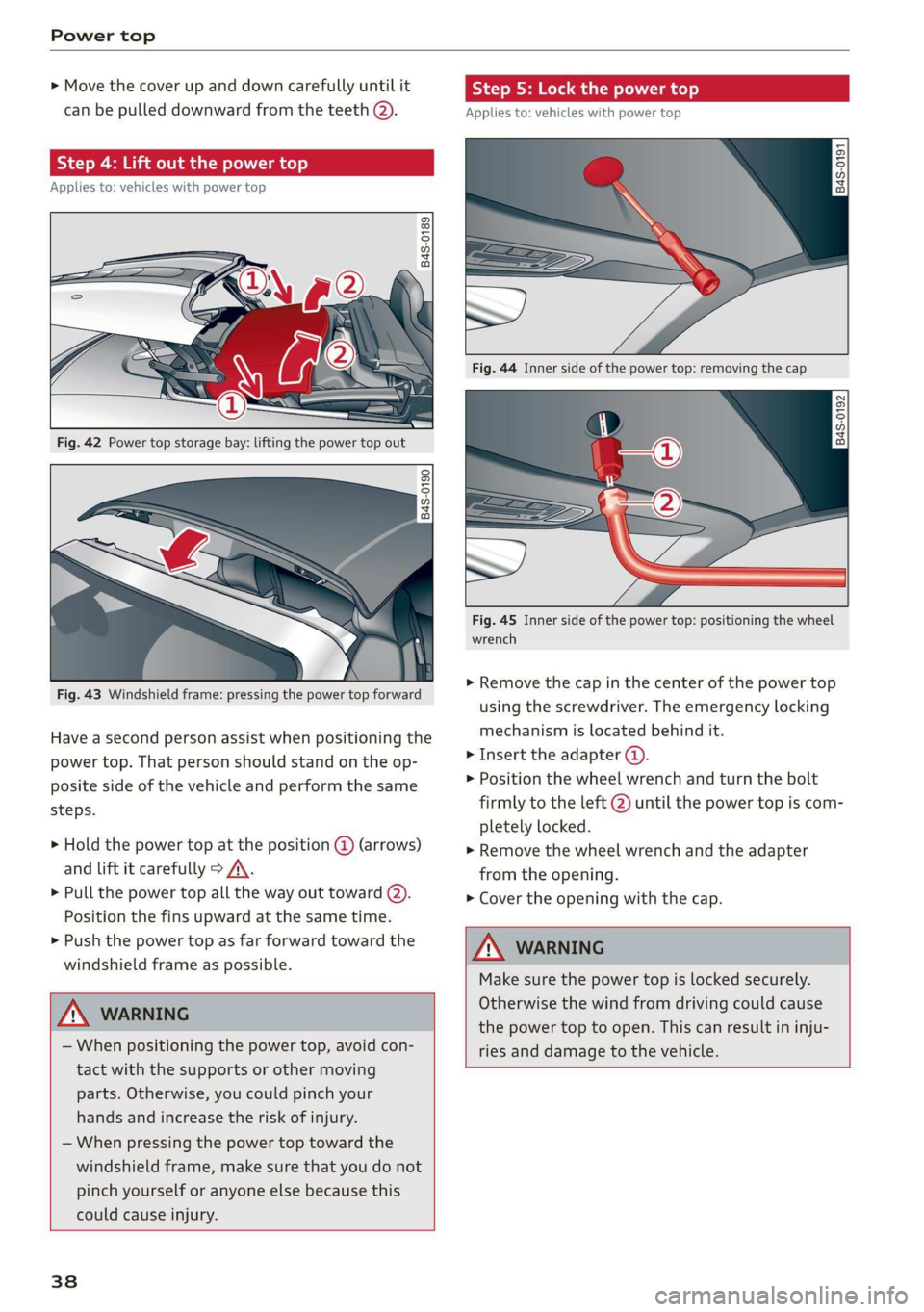
> Move the cover up and down carefully until it
can be pulled downward from the teeth @).
Step 4: Lift out the power top
Applies to: vehicles with power top
Q ©
5 Q + ao
Fig. 42 Power top storage bay: lifting the power top out
B4S-0190
Fig. 43 Windshield frame: pressing the power top forward
Have a second person assist when positioning the
power top. That person should stand on the op-
posite side of the vehicle and perform the same
steps.
> Hold the power top at the position @ (arrows)
and lift it carefully > A\.
> Pull the power top all the way out toward (2).
Position the fins upward at the same time.
> Push the power top as far forward toward the
windshield frame as possible.
ZX WARNING
— When positioning the power top, avoid con-
tact with the supports or other moving
parts. Otherwise, you could pinch your
hands and increase the risk of injury.
— When pressing the power top toward the
windshield frame, make sure that you do not
pinch yourself or anyone else because this
could cause injury.
38
Step 5: Lock the power top
Applies to: vehicles with power top
2
2 Q
+ a
B4s-0192
Fig. 45 Inner side of the power top: positioning the wheel
wrench
> Remove the cap in the center of the power top
using the screwdriver. The emergency locking
mechanism is located behind it.
> Insert the adapter ().
> Position the wheel wrench and turn the bolt
firmly to the left @ until the power top is com-
pletely locked.
> Remove the wheel wrench and the adapter
from the opening.
> Cover the opening with the cap.
WARNING
Make sure the power top is locked securely.
Otherwise the wind from driving could cause
the power top to open. This can result in inju-
ries and damage to the vehicle.
Page 41 of 308
4S1012721BA
Power top
Step 6: Secure the fins on the body
Applies to: vehicles with power top
B4S-0193
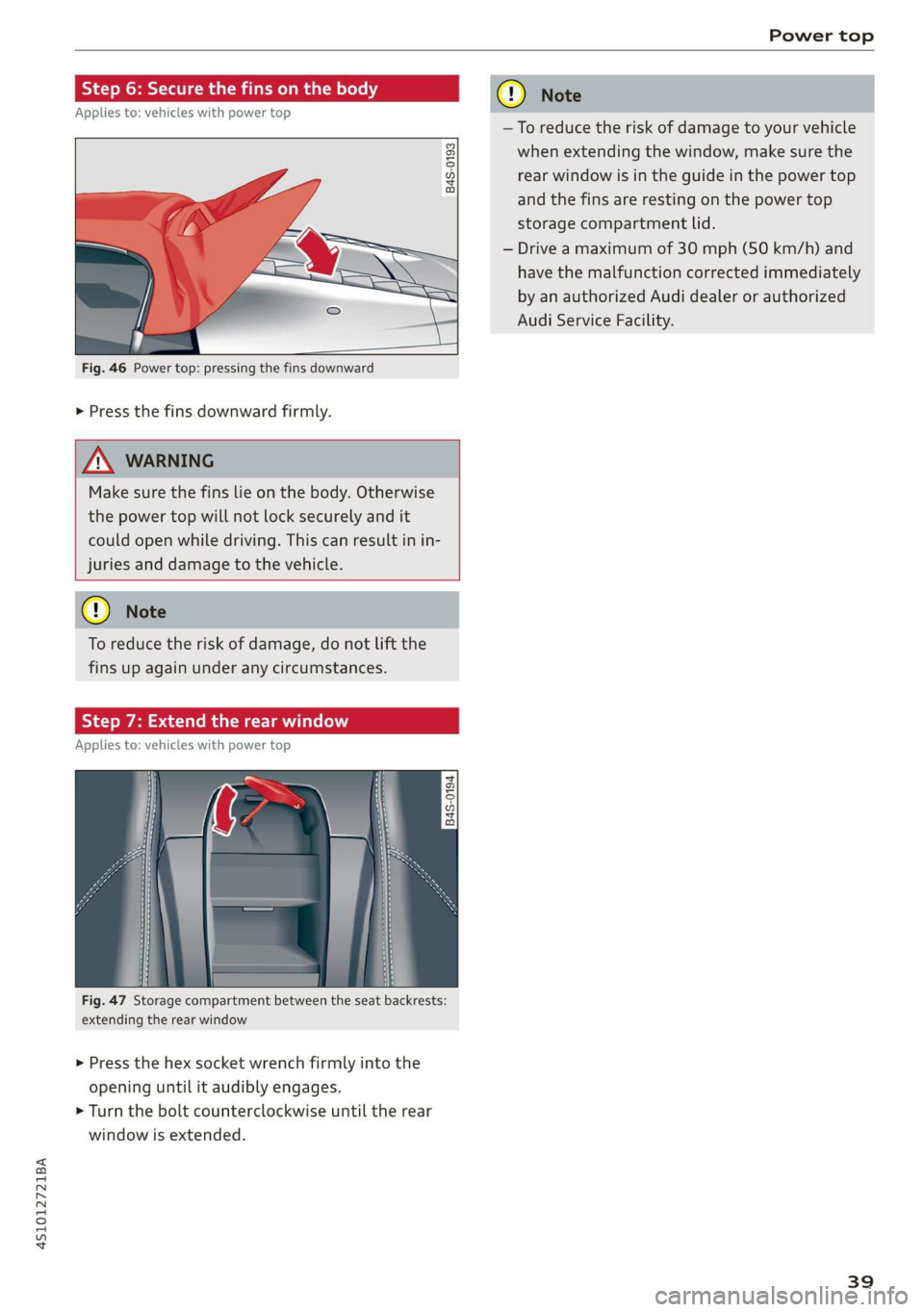
Fig. 46 Power top: pressing the fins downward
> Press the fins downward firmly.
Z\ WARNING
Make sure the fins lie on the body. Otherwise
the power top will not lock securely and it
could open while driving. This can result in in-
juries and damage to the vehicle.
GQ) Note
To reduce the risk of damage, do not lift the
fins up again under any circumstances.
Step 7: Extend the rear window
Applies to: vehicles with power top
+
2 5
QO g a
Fig. 47 Storage compartment between the seat backrests:
extending the rear window
> Press the hex socket wrench firmly into the
opening until it audibly engages.
> Turn the bolt counterclockwise until the rear
window is extended.
cy Note
—To reduce the risk of damage to your vehicle
when extending the window, make sure the
rear window is in the guide in the power top
and the fins are resting on the power top
storage compartment lid.
— Drive a maximum of 30 mph (50 km/h) and
have the malfunction corrected immediately
by an authorized Audi dealer or authorized
Audi Service Facility.
39
Page 45 of 308

4S1012721BA
Lights and Vision
ZA\ WARNING
High beams can cause glare for other drivers,
which increases the risk of an accident. For
this reason, only use the high beams or the
headlight flasher when they will not create
glare for other drivers.
thee
Applies to: vehicles with high beam assistant
The high beam assistant automatically turns the
high beams on or off depending on the surround-
ing conditions.
Asensor on the rearview mirror mount can detect
light sources from other road users. The high
beams switch on or off automatically depending
on the position of vehicles driving ahead and on-
coming vehicles, the vehicle speed, and other en-
vironmental and traffic conditions.
Activating high beam assistant
Requirement: the light switch must be set to AU-
TO, the low beams must be switched on and the
high beam assistant must be switched on in the
Infotainment system > page 44.
> To activate the high beam assistant, press the
lever forward @) > page 42, fig. 51. The 54 in-
dicator light appears in the Infotainment sys-
tem display and the high beams switch on/off
automatically. The indicator light Fad turns on if
the high beams were switched on.
Switching the high beams on or off manually
If the high beams did not switch on or off auto-
matically as expected, you may switch them on or
off manually instead:
> To switch the high beams on manually, press
the lever into position @). The ES indicator
light turns on.
> To switch the high beams off manually, pull the
lever back @). The high beam assistant is deac-
tivated.
Operating the headlight flasher
> To operate the headlight flasher when the high
beam assistant is activated and high beams are
switched off, pull the lever back @). The high
beam assistant remains active.
Messages in Infotainment display
High beam assistant: malfunction! See owner's
manual
Drive immediately to an authorized Audi dealer
or authorized Audi Service Facility to have the
malfunction repaired. You can still switch the
high beams on or off manually.
High beam assistant: currently unavailable.
Camera view limited due to surroundings. See
owner's manual
The camera view is blocked, for example by a
sticker or debris.
The sensor is located between the interior rear-
view mirror and the windshield. Do not place any
stickers
in this area on the windshield.
ZA WARNING
High beam assistant is only intended to assist
the driver. The driver is still responsible for
controlling the headlights and switching them
manually depending on light and visibility
conditions. It may be necessary to operate
them manually in situations such as:
— In adverse weather conditions such as fog,
heavy rain, blowing snow or spraying water.
— On roads where oncoming traffic may be
partially obscured, such as expressways.
— When there are road users that do not have
sufficient lighting, such as bicyclers or vehi-
cles with dirty tail lamps.
—In tight curves and on steep hills.
— In poorly lit areas.
— With strong reflectors, such as signs.
— If the area of the windshield near the sensor
is fogged over, dirty, icy or covered with a
sticker.
G@) Tips
The high beam assistant is deactivated if you
manually switch the high beam high beam
headlights on or off @) instead of waiting for
the system to do it automatically.
43
Page 46 of 308
![AUDI R8 COUPE 2020 Owners Manual Lights and Vision
Adjusting the exterior lighting
The functions are adjusted in the Infotainment
system.
> Select in the Infotainment system: [MENU] but-
ton > Vehicle > left control b](/img/6/57639/w960_57639-45.png "AUDI R8 COUPE 2020 Owners Manual Lights and Vision
Adjusting the exterior lighting
The functions are adjusted in the Infotainment
system.
> Select in the Infotainment system: [MENU] but-
ton > Vehicle > left control b")
Lights and Vision
Adjusting the exterior lighting
The functions are adjusted in the Infotainment
system.
> Select in the Infotainment system: [MENU] but-
ton > Vehicle > left control button > Vehicle
settings > Exterior lighting.
Automatic headlights
You can adjust the following settings in the Auto-
matic
headlights menu:
Activation time - You can adjust if the headlights
switch on Early, Medium, or Late according to
the sensitivity of the light sensor.
Headlight assistant* - You can switch the high
beam assistant* on and off. On vehicles with laser
high
beams, the laser light can be activated or
deactivated.
Daytime running lights*
USA models: the daytime running lights can be
switched on or off using the MMI. Select On or
Off.
Canada models: The daytime running lights can-
not be turned off. The lights activate automati-
cally each time the ignition is switched on. This
menu item is shown with a “gray background”.
Entry/exit lighting
The entry lighting function illuminates the area
outside the vehicle when you unlock the vehicle
when it is dark. To switch on the function, select
Entry/exit lighting.
The exit lighting function illuminates the area
outside the vehicle when you turn the ignition off
and open the driver's door when it is dark. To
switch on the function, select Entry/exit light-
ing.
The entry/exit lighting only works when it is dark
and the light switch is in the AUTO position.
44
Emergency flashers
[645-0027
|
Fig. 52 Center console: emergency flasher button
The emergency flashers makes other drivers
aware of your vehicle in dangerous situations.
> Press the A button to switch the emergency
flashers on or off.
You can indicate a lane change or a turn when the
emergency flashers are switched on by using the
turn signal lever. The emergency flashers stop
temporarily.
The emergency flashers also work when the igni-
tion is turned off.
@) Tips
You should switch the emergency flashers on
if:
— you are the last car in a traffic jam so that
all other vehicles approaching from behind
can see your vehicle
— your vehicle has broken down or you are
having an emergency
— your vehicle is being towed or if you are tow-
ing another vehicle
Page 47 of 308
4S1012721BA
Lights and Vision
Interior lighting
Interior lighting
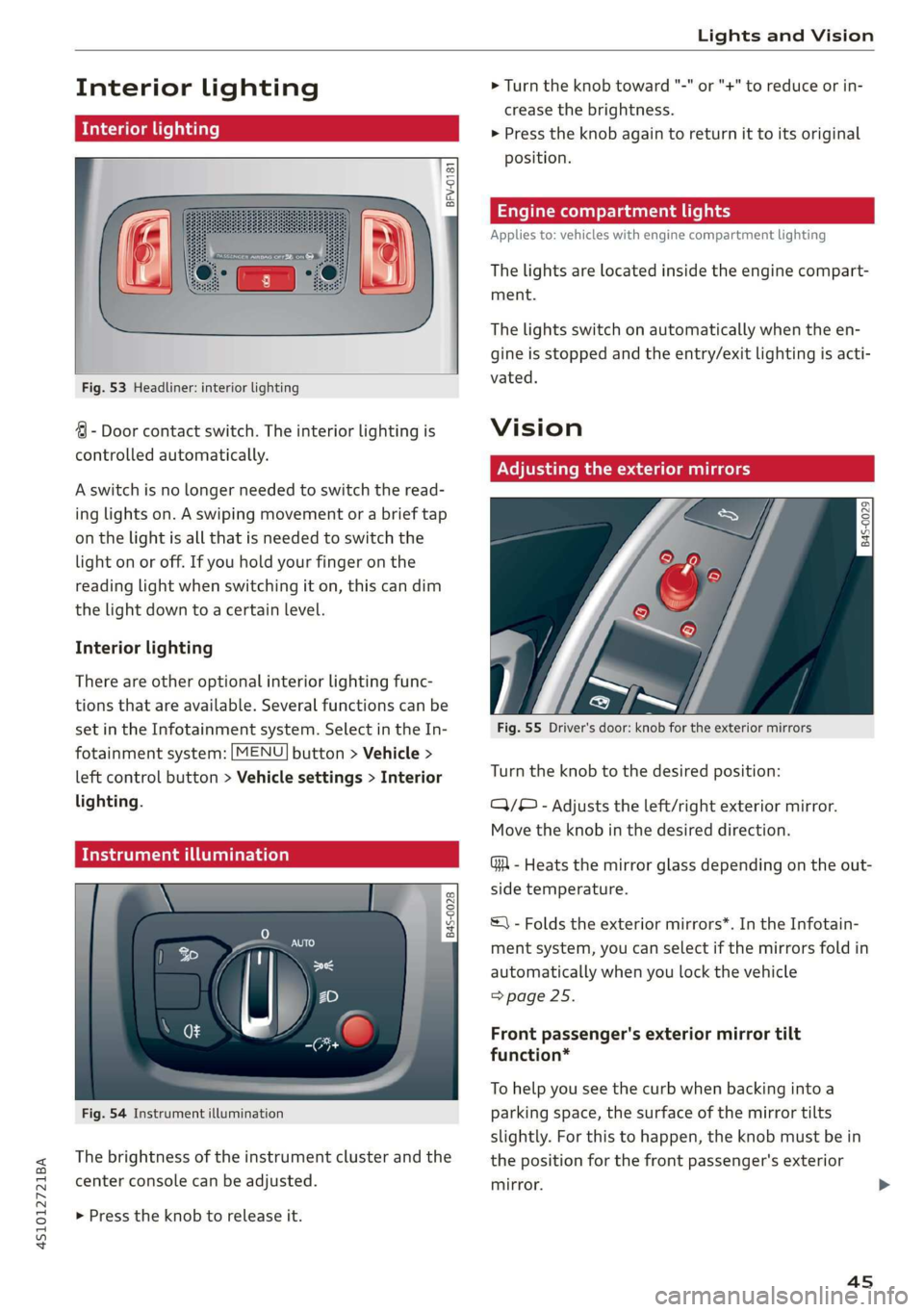
Fig. 53 Headliner: interior lighting
4 - Door contact switch. The interior lighting is
controlled automatically.
A switch is no longer needed to switch the read-
ing lights on. A swiping movement or a brief tap
on the light is all that is needed to switch the
light on or off. If you hold your finger on the
reading light when switching it on, this can dim
the light down to a certain level.
Interior lighting
There are other optional interior lighting func-
tions that are available. Several functions can be
set in the Infotainment system. Select in the In-
fotainment system: [MENU] button > Vehicle >
left control button > Vehicle settings > Interior
lighting.
Tide uae art ceya
© S
Ss Ss
od = a
Fig. 54 Instrument illumination
The brightness of the instrument cluster and the
center console can be adjusted.
> Press the knob to release it.
> Turn the knob toward "-" or "+" to reduce or in-
crease the brightness.
> Press the knob again to return it to its original
position.
Engine compartment lights
Applies to: vehicles with engine compartment lighting
The lights are located inside the engine compart-
ment.
The lights switch on automatically when the en-
gine is stopped and the entry/exit lighting is acti-
vated.
Vision
Adjusting the exterior mirrors
Fig. 55 Driver's door: knob for the exterior mirrors
Turn the knob to the desired position:
QQ/B - Adjusts the left/right exterior mirror.
Move the knob in the desired direction.
GA - Heats the mirror glass depending on the out-
side temperature.
©) - Folds the exterior mirrors*. In the Infotain-
ment system, you can select if the mirrors fold in
automatically when you lock the vehicle
=> page 25.
Front passenger's exterior mirror tilt
function*
To help you see the curb when backing into a
parking space, the surface of the mirror tilts
slightly. For this to happen, the knob must be in
the position for the front passenger's exterior
mirror.
45
Page 50 of 308
Lights and Vision
windshield wipers after the ignition is
switched on again by moving the windshield
wiper lever to any position.
— Worn or dirty windshield wiper blades result
in streaking. This can affect the rain sensor*
function. Check your windshield wiper
blades
regularly.
— The washer fluid nozzles in the windshield
washer system are heated* at low tempera-
tures when the ignition is on.
— When stopping temporarily, such as at a
traffic light, the speed of the windshield
wipers automatically reduces by one level.
Cleaning windshield wiper blades
Clean the wiper blades when you see wiper
streaks. Clean the wiper blades with a soft towel
and glass cleaner.
> Place the windshield wiper arms in the service
position > page 48.
> Fold the windshield wiper arms away from the
windshield.
ZA WARNING
Dirty windshield wiper blades can impair vi-
sion, which increases the risk of an accident.
Replacing windshield wiper blades
he
B8R-0379
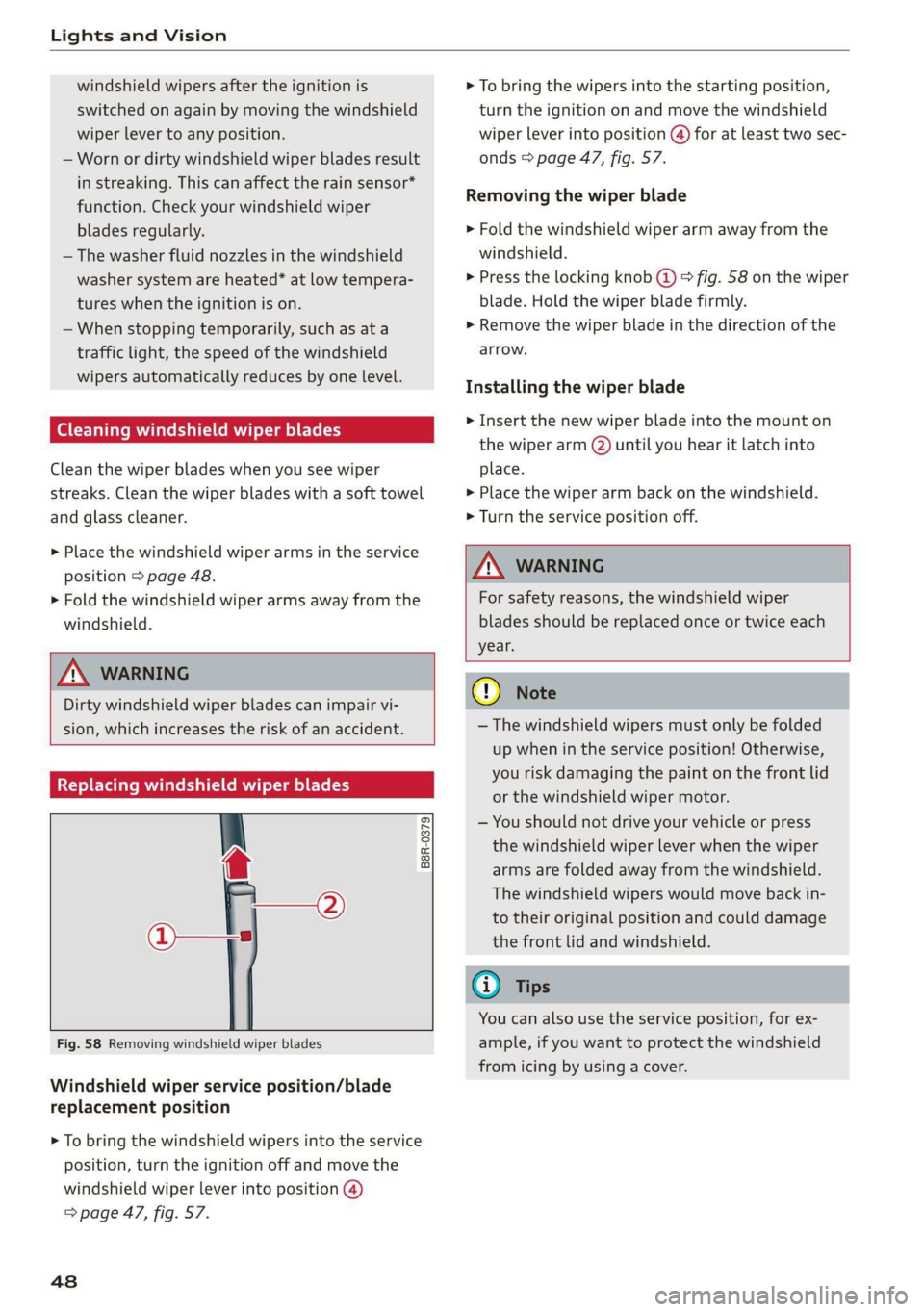
Fig. 58 Removing windshield wiper blades
Windshield wiper service position/blade
replacement position
> To bring the windshield wipers into the service
position, turn the ignition off and move the
windshield wiper lever into position @)
=> page 47, fig. 57.
48
> To bring the wipers into the starting position,
turn the ignition on and move the windshield
wiper lever into position @) for at least two sec-
onds > page 47, fig. 57.
Removing the wiper blade
> Fold the windshield wiper arm away from the
windshield.
> Press the locking knob (@ © fig. 58 on the wiper
blade. Hold the wiper blade firmly.
> Remove the wiper blade in the direction of the
arrow.
Installing the wiper blade
> Insert the new wiper blade into the mount on
the wiper arm (2) until you hear it latch into
place.
> Place the wiper arm back on the windshield.
> Turn the service position off.
ZA\ WARNING
For safety reasons, the windshield wiper
blades should be replaced once or twice each
year.
C) Note
— The windshield wipers must only be folded
up when in the service position! Otherwise,
you risk damaging the paint on the front lid
or the windshield wiper motor.
— You should not drive your vehicle or press
the windshield wiper lever when the wiper
arms are folded away from the windshield.
The windshield wipers would move back in-
to their original position and could damage
the front lid and windshield.
G) Tips
You can also use the service position, for ex-
ample, if you want to protect the windshield
from icing by using a cover.
Page 52 of 308
Seats
Seats
General information
Z\ WARNING
See > page 173, Safe driving for important
information, tips, suggestions and warnings
that you should read and follow for your own
safety and the safety of your passengers.
Front seats
Syeda
Applies to: vehicles with power adjustable seats
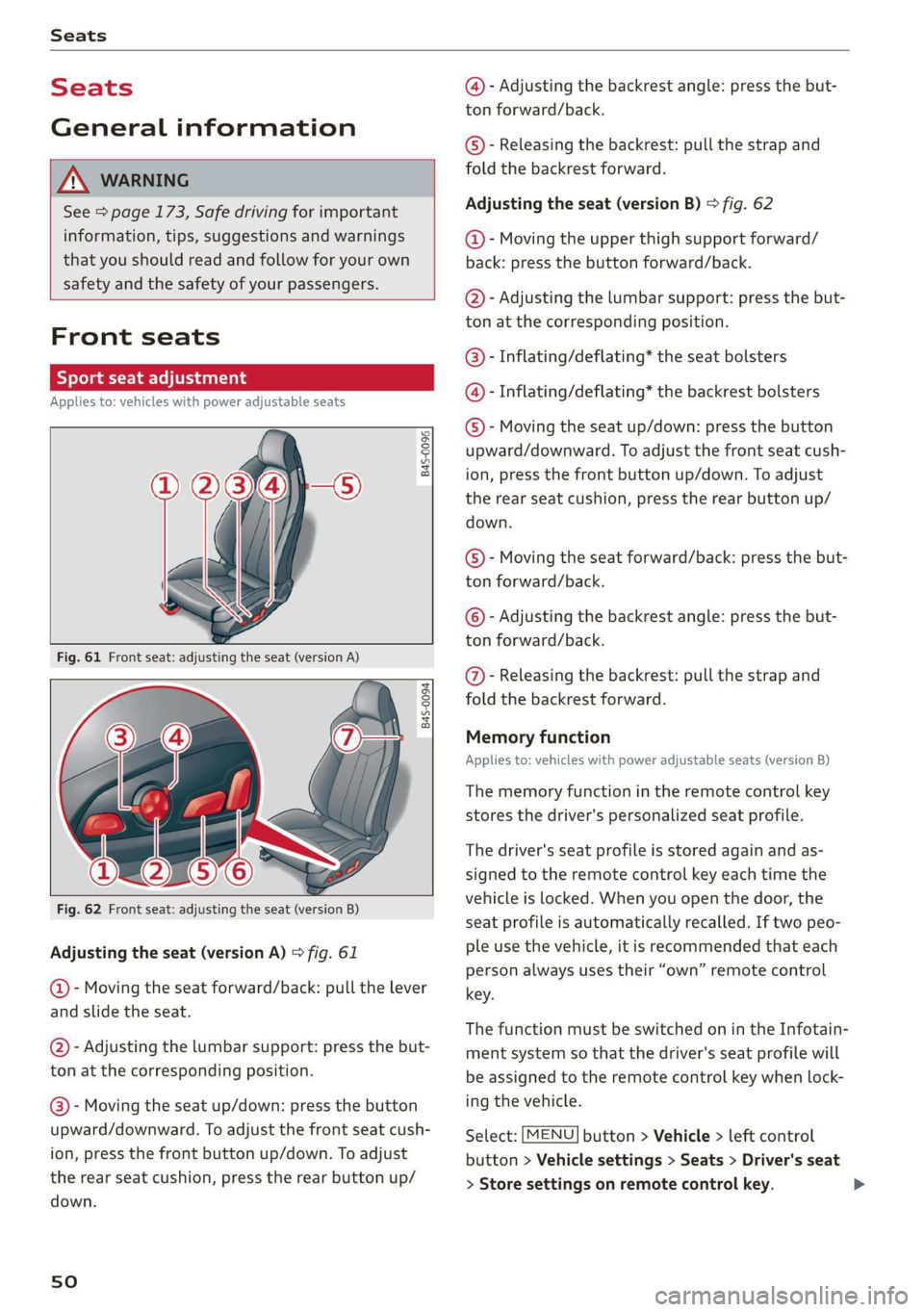
B4S-0096
B4s-0094
Fig. 62 Front seat: adjusting the seat (version B)
Adjusting the seat (version A) > fig. 61
@- Moving the seat forward/back: pull the lever
and slide the seat.
@- Adjusting the lumbar support: press the but-
ton at the corresponding position.
@- Moving the seat up/down: press the button
upward/downward. To adjust the front seat cush-
ion, press the front button up/down. To adjust
the rear seat cushion, press the rear button up/
down.
sO
@- Adjusting the backrest angle: press the but-
ton forward/back.
©)- Releasing the backrest: pull the strap and
fold the backrest forward.
Adjusting the seat (version B) > fig. 62
@- Moving the upper thigh support forward/
back: press the button forward/back.
@- Adjusting the lumbar support: press the but-
ton at the corresponding position.
@®- Inflating/deflating* the seat bolsters
@- Inflating/deflating* the backrest bolsters
©- Moving the seat up/down: press the button
upward/downward. To adjust the front seat cush-
ion, press the front button up/down. To adjust
the rear seat cushion, press the rear button up/
down.
©- Moving the seat forward/back: press the but-
ton forward/back.
© - Adjusting the backrest angle: press the but-
ton forward/back.
@- Releasing the backrest: pull the strap and
fold the backrest forward.
Memory function
Applies to: vehicles with power adjustable seats (version B)
The memory function in the remote control key
stores the driver's personalized seat profile.
The driver's seat profile is stored again and as-
signed to the remote control key each time the
vehicle is locked. When you open the door, the
seat profile is automatically recalled. If two peo-
ple use the vehicle, it is recommended that each
person always uses their “own” remote control
key.
The function must be switched on in the Infotain-
ment system so that the driver's seat profile will
be assigned to the remote control key when lock-
ing the vehicle.
Select: [MENU] button > Vehicle > left control
button > Vehicle settings > Seats > Driver's seat
> Store settings on remote control key.
Page 53 of 308
4S1012721BA
Seats
Check the box is checked off /, the function is
switched on.
ZA\ WARNING
— Only adjust the front seat when the vehicle
is stationary. Otherwise, this increases the
risk of an accident
— The power front seats can also be adjusted
when the ignition is switched off. For this
reason, children should never be left unat-
tended in the vehicle because they could be
injured.
— Exercise caution when adjusting the seat
height. Unsupervised or careless seat adjust-
ment can pinch fingers or hands causing in-
juries.
— For safety reasons, the seat backrests must
always be locked while driving.
— The front seat backrests must not be re-
clined too far back when driving, because
this impairs the effectiveness of the safety
belts and airbag system, which increases the
risk of injury.
—To minimize the risk of injury during sudden
braking or a collision, the driver and the
front passenger must not drive or ride with
the backrest in the reclined position. The
safety belts and airbag system can only pro-
vide the greatest protection possible when
the backrests are in the upright position and
the safety belts are worn correctly. The more
a backrest is reclined, the greater the risk of
injury due to an incorrect seating position
and safety belt position.
@ Tips
If you do not wish to have the seat profile for
another driver assigned to the remote control
key, switch the memory function off in the In-
fotainment system.
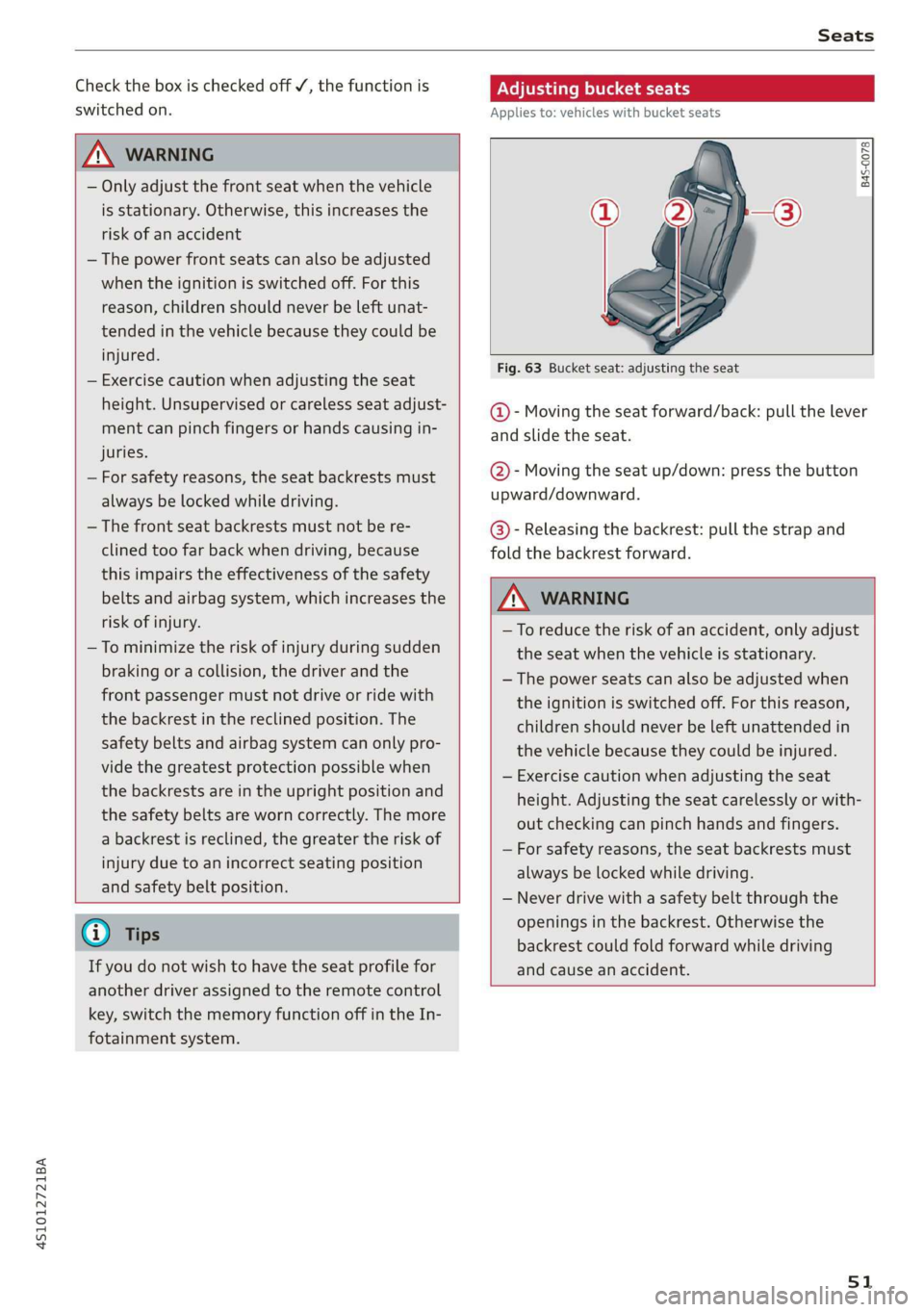
Adjusting bucket seats
Applies to: vehicles with bucket seats
B4S-0078
Fig. 63 Bucket seat: adjusting the seat
@- Moving the seat forward/back: pull the lever
and slide the seat.
@- Moving the seat up/down: press the button
upward/downward.
@- Releasing the backrest: pull the strap and
fold the backrest forward.
Z\ WARNING
—To reduce the risk of an accident, only adjust
the seat when the vehicle is stationary.
— The power seats can also be adjusted when
the ignition is switched off. For this reason,
children should never be left unattended in
the vehicle because they could be injured.
— Exercise caution when adjusting the seat
height. Adjusting the seat carelessly or with-
out checking can pinch hands and fingers.
— For safety reasons, the seat backrests must
always be locked while driving.
— Never drive with a safety belt through the
openings in the backrest. Otherwise the
backrest could fold forward while driving
and cause an accident.
51
Page 56 of 308
Stowing and using
@) Note
Beverage containers in the cup holders should
always
have a lid. Otherwise, the liquid inside
could spill and cause damage to vehicle
equipment.
Add
nal storage compartments
You will find a variety of storage compartments
and holders at various locations in the vehicle.
— Compartments in the doors
— Storage area in the glove compartment. The
glove compartment can be locked using the
mechanical key > page 23.
— Storage compartment under the center arm-
rest*
— Key compartment in the center console
— Coat hooks
— Storage compartment between the seat backr-
ests*
ZA\ WARNING
—To reduce the risk of injury, make sure all
storage compartments are always closed
while driving.
— Loose objects can be thrown around the ve-
hicle interior during sudden driving or brak-
ing maneuvers, which increases the risk of
an accident. Store objects securely while
driving.
— Only use the storage compartments in the
door trim panels to store small objects that
will not stick out of the compartment and
impair the function of the side airbags.
— Make sure your view toward the rear is not
blocked, for example by hanging clothing or
objects in the vehicle.
— Only lightweight clothing should be hung
from the garment hooks in the vehicle. Do
not use clothes hangers to hang clothing.
The pockets of the clothing must not con-
tain any heavy, breakable, or sharp-edged
objects. This could impair the effectiveness
of the side curtain airbags.
54
@) Note
Make sure that the heating grid strips for the
rear window defogger are not damaged by
abrasive objects.
Luggage compartment
General information
All pieces of luggage or objects must be securely
stowed.
Even small and light objects can absorb so much
energy during a collision or an accident that they
can cause severe injuries.
Z\ WARNING
—To reduce the risk of injury, always stow ob-
jects
securely in the luggage compartment.
— When transporting heavy objects, the vehi-
cle characteristics will change due to the
shift in the center of gravity, which increases
the risk of an accident. You may need to
adapt your driving style and speed to the
current conditions.
— Never exceed the permitted axle and load
and vehicle weight > page 290.
— Never leave your vehicle unattended, espe-
cially if the luggage compartment lid is
open. Children could enter the luggage com-
partment and close the luggage compart-
ment lid from the inside. This creates the
risk of fatal injury, since the children would
be locked in and may not be able to escape
by themselves.
— Do not allow children to play in or on the ve-
hicle. Close and lock the luggage compart-
ment lid as well as all other doors when you
leave the vehicle.
— Never transport passengers in the luggage
compartment. Every passenger must be cor-
rectly secured with the safety belts in the
vehicle > page 180.
() Note
Make sure that the heating grid strips for the
rear window defogger are not damaged by
abrasive objects.
Page 60 of 308
Warm and cold
— Switching manual recirculation mode on and
off: Press the > button.
— Automatic* recirculation mode: auto recircula-
tion needs to be activated in the Infotainment
system. Select in the Infotainment system:
[MENU] button > Vehicle > left control button >
Vehicle settings > Air conditioning > Auto re-
circulation. The air quality sensor that is de-
signed for diesel and gasoline exhaust auto-
matically switches the recirculation mode on or
off depending on the level of pollutants in the
outside air.
In recirculation mode, the air inside the vehicle is
circulated and filtered. This prevents the unfil-
tered air outside the vehicle from entering the
vehicle interior. Switching recirculation mode on
when driving through a tunnel or when sitting in
traffic is recommended > A.
Pressing the <> button, AUTO or the & button
switches recirculation mode off.
® Defrosting
The windshield and side windows are defrosted
or cleared of condensation as quickly as possible.
The optimum amount of air flows mainly out of
the vents under the windshield. Recirculation
mode switches off. The temperature is controlled
automatically.
The AUTO button switches the defroster off.
OFF climate control system
The climate control system is switched on and off
by pressing the button. It also switches on when
you press another button or a knob. Airflow from
outside is blocked when the climate control sys-
tem is switched off.
{s) Rear window defogger
If the rear window defogger is activated when
the ignition is switched on, the battery manage-
ment determines based on the battery charge if
it is possible to turn on. Otherwise, the rear win-
dow defogger functions with the engine running
and switches off automatically after approxi-
mately 10 - 20 minutes, depending on the out-
side temperature.
58
To prevent the rear window defogger from
switching
off automatically, press and hold the
® button for more than two seconds. This re-
mains stored up to approximately 15 minutes af-
ter turning off the ignition.
ss Seat heating*
If you press the button a the seat heating is
switched on at the highest level (3). The LEDs in-
dicate the temperature level. To reduce the tem-
perature, press the button again. To switch the
seat heating off, press the button repeatedly un-
til the LED turns off.
The seat heating switches automatically from
setting 3 to setting 2 after approximately ten mi-
nutes.
ZA WARNING
— You should not use the recirculation mode
for an extended period of time, because no
fresh air is drawn in and the windows can
fog when cooling mode is switched off. This
increases the risk of an accident.
— Individuals with reduced sensitivity to pain
or temperature could develop burns when
using the seat heating function. To reduce
the risk of injury, these individuals should
not use seat heating.
@) Note
To reduce the risk of damage to the seat heat-
ing elements, do not kneel on the seats or
place heavy pressure on one area of the seat.
(i) Tips
— The setting for the seat heating on the driv-
er's side is assigned to the key that is in use.
— If the front passenger's seat heating is
turned on, it will not turn on again automat-
ically if more than 10 minutes have passed
between switching the ignition off and
switching it on again.