ignition AUDI R8 SPYDER 2011 User Guide
[x] Cancel search | Manufacturer: AUDI, Model Year: 2011, Model line: R8 SPYDER, Model: AUDI R8 SPYDER 2011Pages: 244, PDF Size: 59.74 MB
Page 25 of 244
Average fuel mileage
The average fuel economy in MPG (l/ 100 km)
since you last clea red the memory appears in
this display .
Current fuel mileage
The instantaneous fue l consumption in miles
per gallo n (l/100 km) is shown in this d isp lay.
W hen the ve hicle is stationary, t he most re
cent fuel consumption is displayed.
Average speed
The average speed in mph (km/h) since the
l ast time the disp lay was reset appears i n the
d isp lay.
Elapsed t ime
T he length of time that you have been driving
since you last reset the memory appears in
this display . T he maximum time period that
can be recorded is 999 hours and 59 minutes .
Distance
The elapsed distance since the la st time the
memory was clea red appears i n the display .
The max imum d istance that can be recorded
i s 9,999 .9 m iles (9 ,999 .9 kilometers) .
(D Tips
All stored values will be lost if the vehicle
battery is disconnected .
Operation
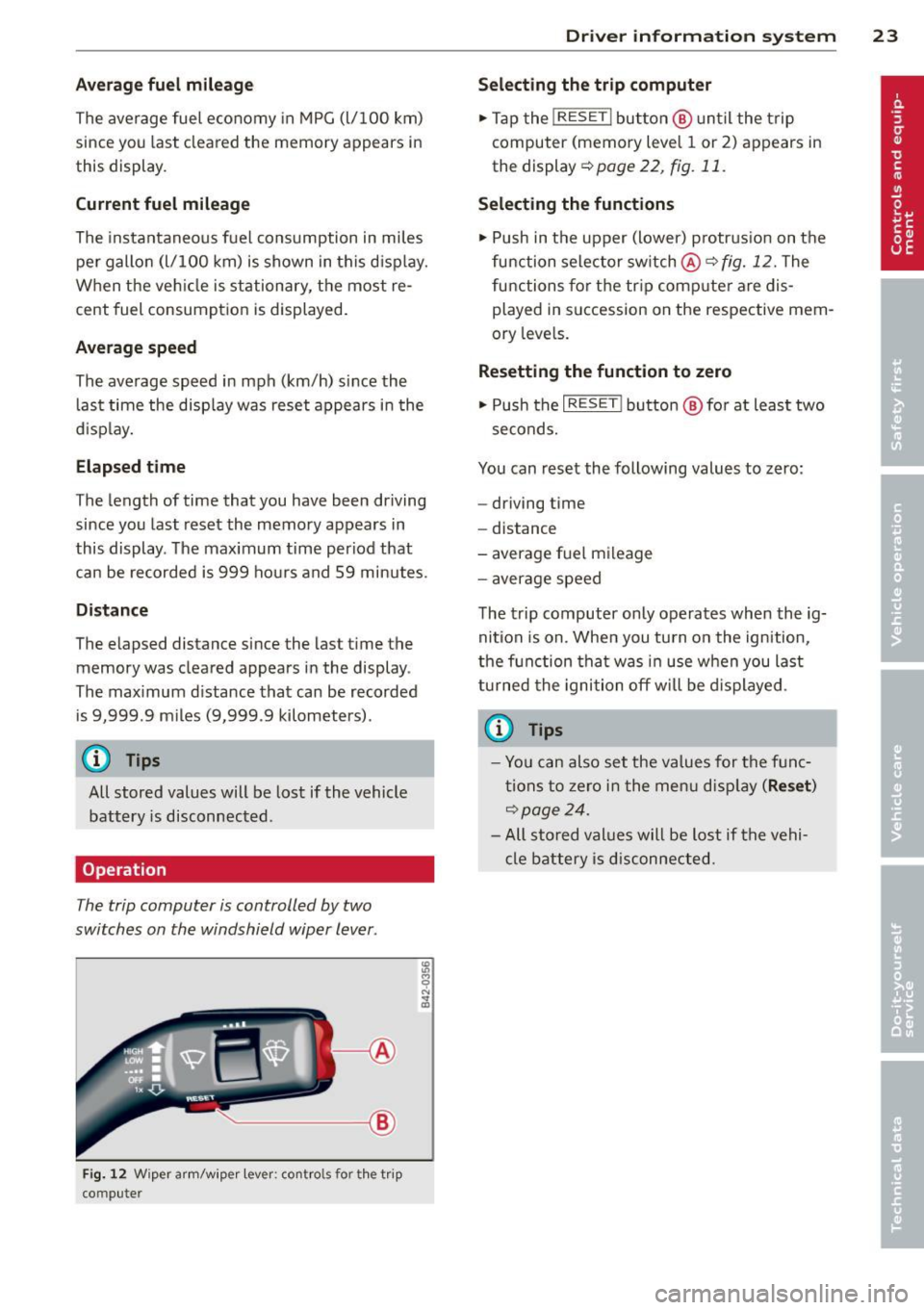
The trip computer is controlled by two
switches on the windshield wiper lever .
~---1@
Fig. 12 W iper a rm/w iper lev er: co ntro ls fo r the t rip
co mpute r
Dr iver in formation system 23
Selecting the trip computer
.,. Tap the !RESE T I button @ until the t rip
computer (memory leve l 1 or 2) ap pears in
the display ~poge22 ,
fig.11.
Selecting the functions
.,. Push in the upper (lower) p rotrus io n on t he
function selector sw itch
@ ~fig. 12. The
functions for t he tr ip comp ute r are dis
played in succession on the respective mem
ory leve ls.
Resetting the funct ion to zero
.,. Push the I RESE T! button @ for at leas t two
seconds.
You can reset the following values to zero:
- driving t ime
- distance
- average fue l m ileage
- a ver age speed
The trip computer only operates when the ig
nit ion is on . When you tu rn o n the ignition,
the f unction tha t was in use when you last
tu rned the ignition off will be displayed .
@ Tips
-Yo u can also set the va lues for the f unc
ti ons to ze ro i n t he me nu dis pl ay
(Re set )
~page 24.
-All sto red values will be lost if the vehi
cle battery i s disc onnected.
Page 28 of 244
26 Drive r in form ation sy stem
• If necessary, sc roll by selecting and activat
ing the symbol for "Next page" or "Prev ious
page" .
When you have selected the Computer menu
and activated it by pressing the
I RESE T I but
ton, two computer leve ls appear (computer 1
and computer 2). Now you have to select the
level you want using the rocker switch and ac
tivate it w ith the
I R ESET I button .
Lap timer
Introduction
The lap timer allows you to record and evalu
ate lap times .
The inst rumen t cluster display shows the t ime
i n minu tes, seconds and tenths o f a second.
F or lap times longer than one hour, the hour
is also shown automatically. The maximum re
cordab le time for a single measurement is 99
hours, 59 minutes and 59 and 9/10 seconds.
If the lap timer reaches th is value, the timing
stops on its own or it switches to pause mode
via ¢
page 2 7.
A WARNING
Pl ease d evote your f ull attent ion to driv
ing. As the d river, you have comp lete re
sponsibility fo r safety in traffic . Only use
the functions in such a way that you always
ma intain complete control over your veh i-
cle i n all traffic sit uations.
(j) Tips
All of the trip compu ter fu nctions are
availab le as usual when the lap time r stop
watch is running.
-
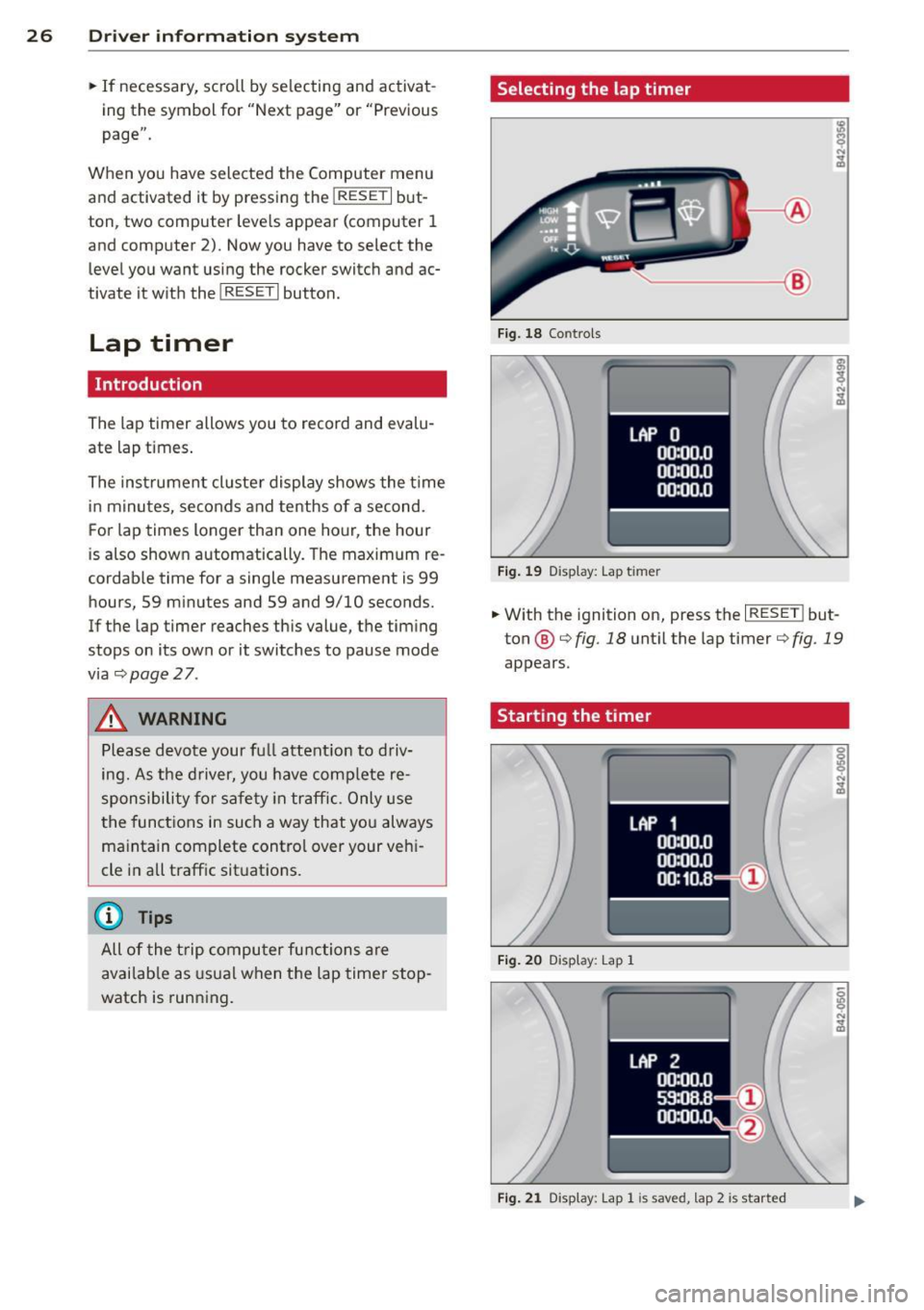
Selecting the lap timer
--- ®
Fig . 18 Co ntro ls
F ig . 19 D isplay: Lap t imer
• With the ignition on, press the I RESE T! but
ton @¢
fig. 18 unt il the lap timer¢ fig. 19
appears.
Starting the timer
Fig. 20 D isplay : Lap 1
F ig . 2 1 Display: Lap 1 is save d, lap 2 is started
Page 30 of 244
28 Driv e r in formation sy stem
Evaluating times, ending or resetting
timing
LAP 5
+ 45:12.9
59:08.B
0 51 :10.B
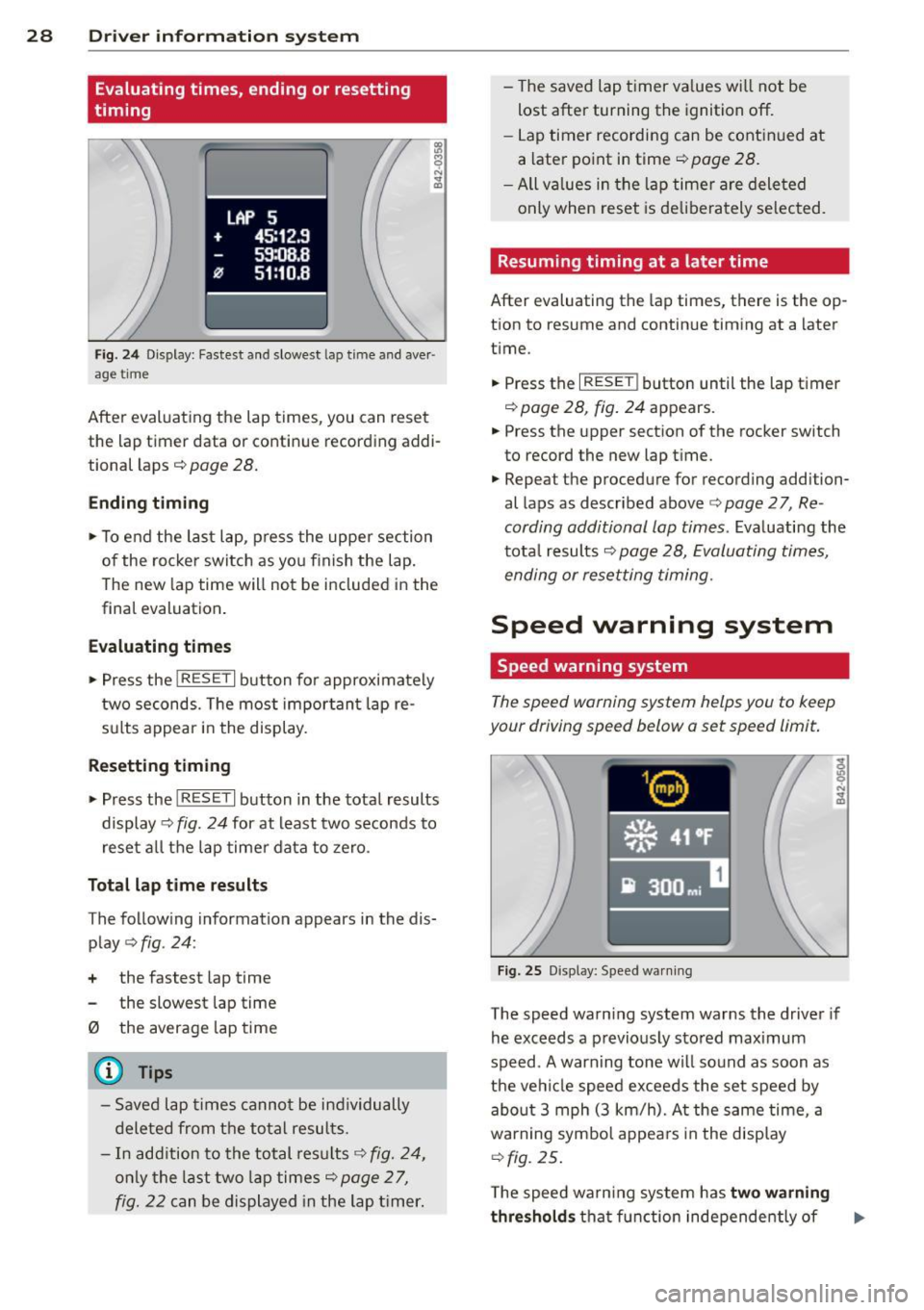
Fig . 2 4 Di spl ay: Faste st and slo west l ap tim e and aver ·
a ge ti me
After evaluating the lap times, you can r ese t
the lap time r data or contin ue recording addi
tional laps
c::> pag e 28.
Ending timing
.,. To end the last lap , press the upper section
of the rocker switch as you f inish the lap.
The new lap time will not be included in the
final evaluation .
Ev aluating times
... Press the I RESET I button for approximate ly
two seconds. The most impor tant lap re
sults appear in the display .
Resetting tim ing
... Press the I RES ET I button in the tota l results
display
c::> fig. 24 for at least two seconds to
reset a ll the lap timer data to zero .
Total lap time re sults
T he follow ing information appears in the dis
play
c::> fig . 24 :
+ the fastest lap time
the slowest lap time
0 the average lap time
@ Tips
- Saved lap times canno t be individually
deleted from the total resul ts.
- In add ition to the total results
c::> fig. 24,
only the last two lap times c::> page 2 7,
fig. 22 c an be displayed in the lap t imer. -
The saved lap timer va lues wi ll not be
lost after turning the ignition off.
- Lap timer recording can be cont in ued at
a later point in time
c::> page 28.
-All va lues in the lap timer are dele ted
only when reset is de liberately selected .
Resuming timing at a later time
After evaluating the lap t imes, there is the op
tion to resume and cont inue t iming at a later
time .
... Press the
I RESE T! button until the lap timer
c::> page 28, fig . 24 appears.
... Press the upper section of the rocker switch
to record the new lap time.
... Repea t the procedure for recording addi tion
al laps as described above <:>
page 2 7, Re
cording additional lap times .
Evaluating the
tota l results
c::> page 28, Evaluating times,
ending or resetting timing .
Speed warning system
Speed warning system
The speed warning system helps you to keep
your driving speed b elow a set speed limit.
F ig . 25 D isp lay: Spee d wa rnin g
The speed warn ing system warns the driver if
he exceeds a previous ly stored max imum
speed . A warn ing tone wi ll so und as soon as
the ve hicle speed exceeds the set speed by
abo ut 3 mph (3 km/h). A t the same time , a
warning symbol appea rs in the display
c::> fig. 25 .
The speed wa rn ing system has two w arn ing
thre shold s
that fu nction independently of ..,.
Page 39 of 244
Opening and closing Keys
Key set
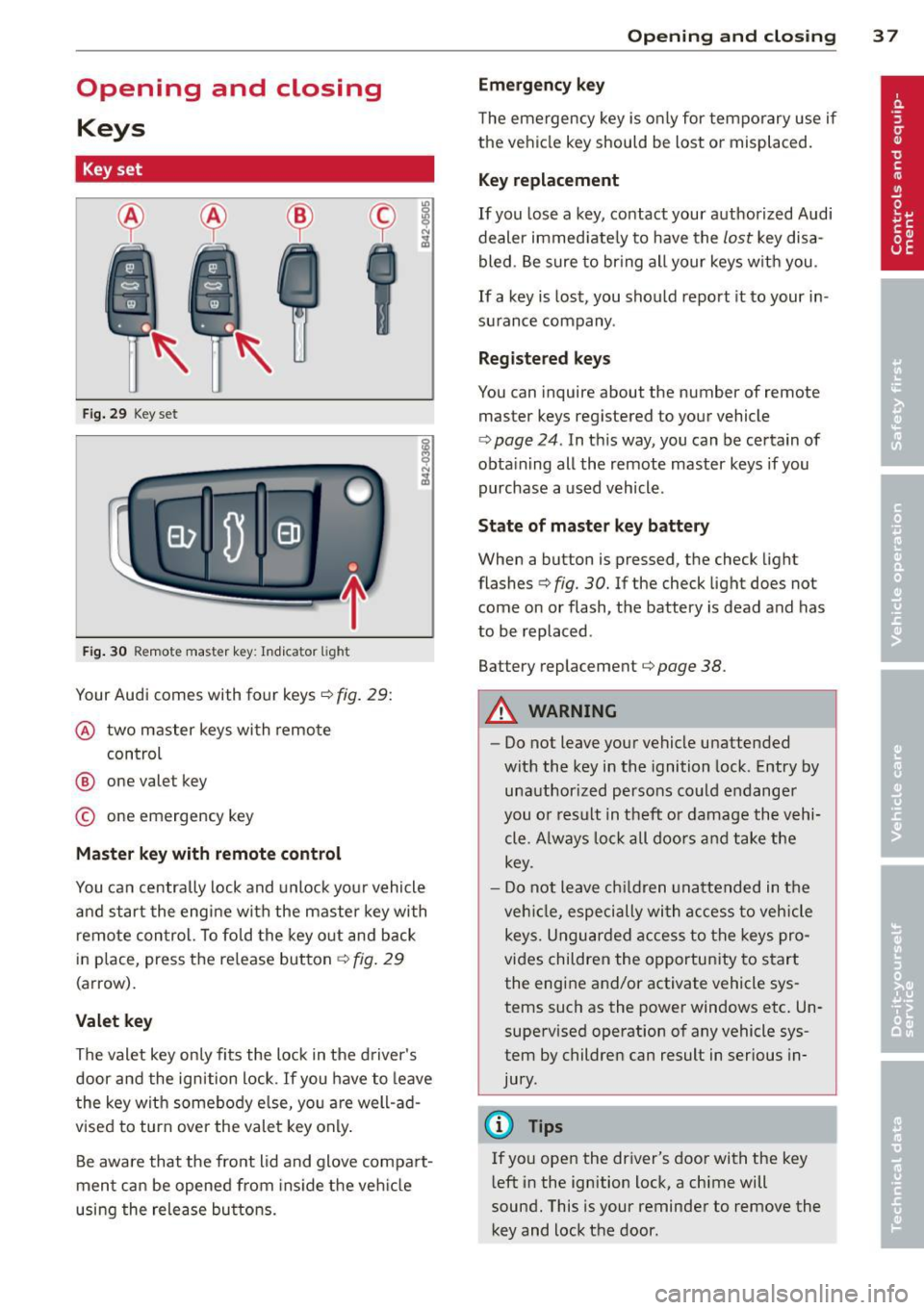
F ig. 29 Key set
Fig. 30 Remote master key: Indicator light
Your Audi comes with four keys¢ fig. 29:
@ two master keys with remo te
control
@ one valet key
© one emergency key
Master key with remote control
You ca n centrally lock and unlock you r vehicle
and star t the eng ine wi th the master key with
r emo te con trol. To fo ld the key o ut and back
i n place, press t he re lease button ¢
fig. 29
(arrow).
Valet key
The valet key on ly fi ts the lock in the d river's
door and the ignition l ock. If you have to leave
t he key with somebo dy e lse, yo u are well-ad
vised to turn
ove r the vale t key only .
Be aware that the fro nt lid and glove compa rt
men t ca n be opened from ins ide the ve hicle
using the release bu ttons .
Opening and clo sing 3 7
Emergency key
The emergency key is o nly for temporary use if
the ve hicl e key should be lost or misplaced.
Key replacement
If you lose a key, contact your authoriz ed Audi
dealer immed iate ly to have the
lost key disa
bled . B e sure t o br ing all your keys w it h you .
If a key is los t, you should report it to your in
su rance company .
Registered keys
You can inquire about the number of remote
master keys registered to your vehicle
¢
page 24 . In this way, you can be certain of
obta ining all the remote master keys if you
purchase a used vehicle .
State of master key battery
When a button is pressed, the check light
flashes ¢
fig. 30. If the check light does not
come on or flash, the battery is dead and has
to be replaced .
Battery replacement¢
page 38.
A WARNING
-
-Do not leave you r vehicle unattended
with the key in the ignition lock . Entry by
un authorized persons co uld e ndange r
you o r result in t heft or damage the v ehi
cle. A lways lo ck all do ors a nd take the
key.
- D o not leave children unattended in t he
ve hicl e, especi ally wi th access t o veh icle
keys. Ungu ard ed access to the keys pro
vi des children the opportun ity to s tart
the engine and/or activate vehicle sys tems such as the power windows etc . Un
supe rvised operation o f any vehicle sys
tem by children can result in ser ious in
jury.
@ Tips
If you ope n the dr iver's door with the key
l eft in the ignition lock, a chime will
sound. This is your reminder to
remove the
key and lock the door.
Page 40 of 244
38 Opening and clo sing
Master key with remote control
The remote control allows you to lock or un
lock the vehicle electronically .
The transmitter and battery are located in the
head of the remote control. The receiver is lo
cated inside the vehicle . T he maximum effec
tive range depends on several things . Remem
be r, if the battery is weak, the effective range
dec reases.
If you need to replace the remote control, or if
you need to have it repaired, you must see
your author ized Audi dealer. On ly then can
you use the key aga in .
@ Tips
- If the ignition is sw itched on, the remote
control system is d eactivated .
- The remote cont rol system can be affec t
ed by other systems operating in the
same frequency range close to the vehi
cle, such as mob ile telephones, televi
s ion broadc asting stat ions, etc.
- Fo r De clarat ion of Compliance to Uni ted
States FCC and I ndustry Canad a regula
tions
¢ page 21 2.
Resetting the remote control
The remote control must be reset if the vehi
cle does no t unlock.
,. Pr ess the unlock@ button on the remote
control.
,. Wi thin 30 second s, unlock or lock the vehi
cle once at the door lock using the stem of
the remote control key.
,. Press the unlock button@ or the lock but
ton
lliJ .
Master key battery replacement
Each master key contains a battery housed
under the cover .
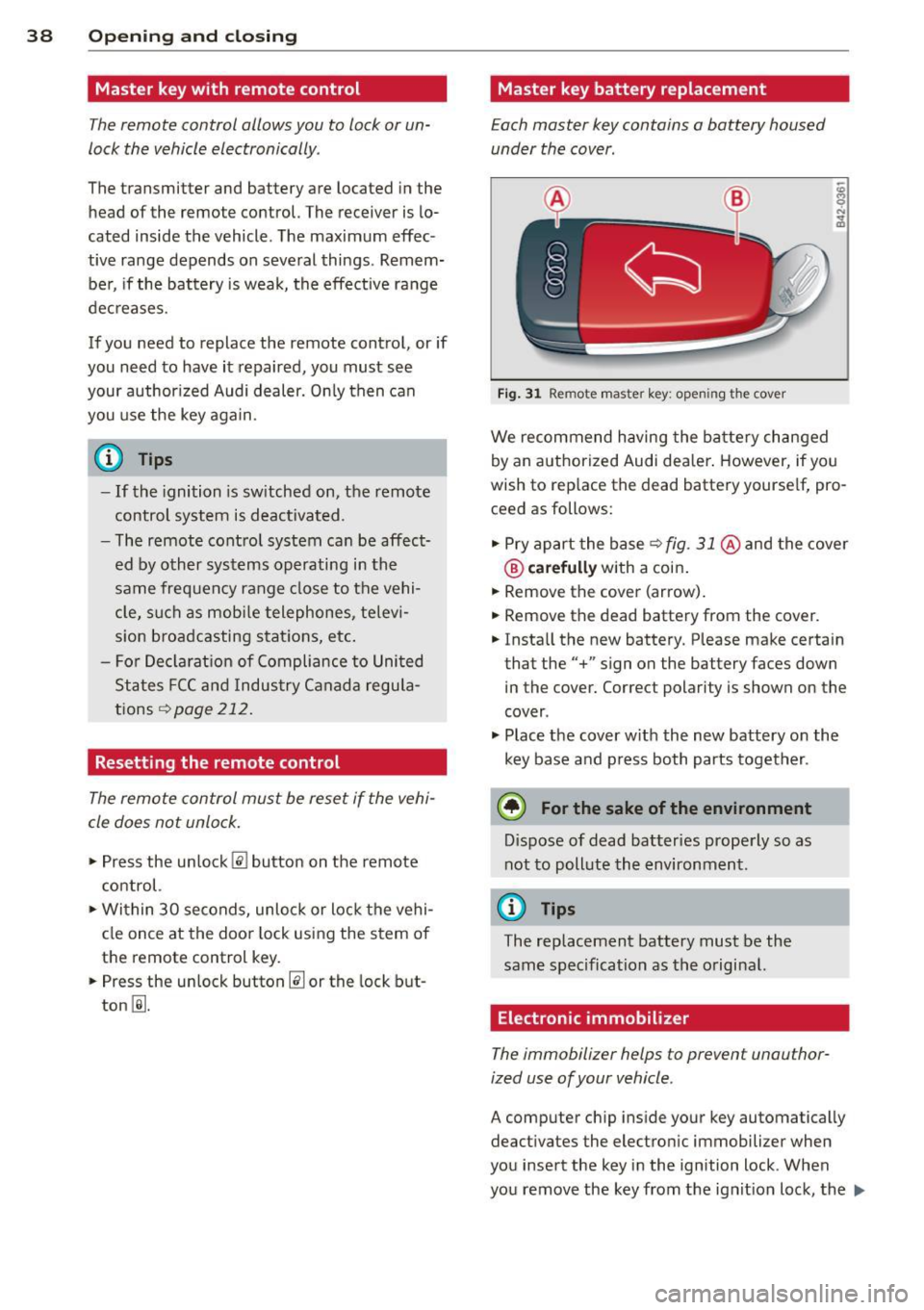
Fig . 31 Remote master key: opening t he cover
We recommend having the ba tte ry ch anged
by an authorized Audi dea ler . However, if yo u
wish to replace the dead battery yourse lf, pro
ceed as follows:
,. Pry apart the base ¢
fig. 31 @and the cove r
® carefully with a coin .
,. Remove the cover (arrow).
,. Remove the dead battery from the cover.
,. Insta ll the new battery. Please make certain
that the" +" sign on the battery faces down
in the cover. Correct polarity is shown on the
cover .
,. Plac e th e cover w it h the new battery o n the
key base and p ress both parts together.
@ For the sake of the environment
D ispose of dead batteries prope rly so as
not to poll ute the environment.
(0 Tips
The replacement battery must be the
sam e spec ificat ion as the o riginal.
Electronic immobilizer
The immobilizer helps to prevent unauthor
ized use of your vehicle.
A comp uter chip inside your key automatically
deactivates the electro nic immobilizer when
you insert the key in the ignition lock. When
you remove the key from the ignit ion lock, the .,.
Page 41 of 244
electronic immobilizer is automatically acti
vated once aga in.
If an unauthorized key was used, SAFE is dis
played continuously in the odometer display
field.
~ WARNING
-
Always take the key with you when you
leave the vehicle. The key can disarm the
electronic engine immobilizer and permit
an unauthorized person to start the engine
and enable operation of the vehicle sys
tems such as power window leading to se
rious personal injury.
@ Tips
- The vehicle cannot be started if an unau
thorized key is used . The vehicle may not
start if another radio device such as a key
for another vehicle or a transponder is
located on the key ring .
- For Declaration of Compliance to United
States FCC and Industry Canada regula
tions
r::;, page 212.
Power locking system
General description
The power locking system locks or unlocks oil
doors simultaneously.
When opening and closing the doors , the
power locking system locks or unlocks
both
doors together.
The remote master key locks and unlocks the
doors using a radio signal
r::;, page 40.
Locking and unlocking with the key
You can also lock and unlock your vehicle us
ing the key in the lock on the driver's door.
The unlocking and locking mode can be
changed in the Driver Information System
r::;,page24.
Both doors are locked automatically when the
vehicle is locked and the anti-theft alarm sys
tem is activated.
Opening and closing 39
Auto Lock
The Auto Lock function locks all doors and the
front lid once speed has exceeded approxi
mately 9 mph (15 km/h).
The car is unlocked automatically once the ig
nition key is removed . In addition, the vehicle
can be unlocked if the power locking system
opening function~ is activated or one of the
door levers is used.
Turn signals
All the turn signals flash to indicate when the
vehicle is locked and unlocked. The turn sig
nals flash twice when the vehicle is unlocked.
The turn signals flash once when all the doors
and the front lid are locked. The interior lights
are also switched on or off automatically ac
cording to the position of the door contact
switch.
A WARNING
- When you lock your vehicle from outside,
nobody -especially children -should re
main inside the vehicle. Remember,
when you lock the vehicle from the out
side the windows cannot be opened from
the inside.
- When you leave the vehicle, always re
move the ignition key and take it with
you. This will prevent passengers (chil
dren, for example) from accidentally be ing locked in the vehicle should they acci
dentally press the power locking switch
in one of the doors.
- Do not leave children inside the vehicle
unsupervised. In an emergency it would
be impossible to open the doors from
the outside without the key.
(D Tips
-The driver's door can be locked and un
locked with the key if the power locking
system fails. The passenger's door can
be locked manually
r::;, page 42.
Page 45 of 244
-When you close the front lid , check it to
make sure the safety catch has properly
engaged . The lid should be flush with the
surround ing vehicle body parts .
- If you notice while driving that the lid is
not secured properly, stop at once and
close it .
- Never leave your vehicle unattended es
pecially with the front lid left open. A
child could crawl into the luggage com
partment and pull the lid shut, becoming
trapped and unable to get out. To reduce
the risk of personal injury, never let chil
dren play in or around your vehicle. Al
ways keep the front lid as we ll as the ve
hicle doors closed when not in use.
(D Note
Make sure there are no objects are pro
t rud ing above the edge of the luggage
compartment . Otherwise, the front lid
could be damaged .
@ Tips
If the front lid is open or not properly
locked when the ignition is turned on, the
door and front lid warning appears in the
instrument cluster disp lay.
Emergency release for front lid
If the front lid cannot be opened, on emer
gency release is provided .
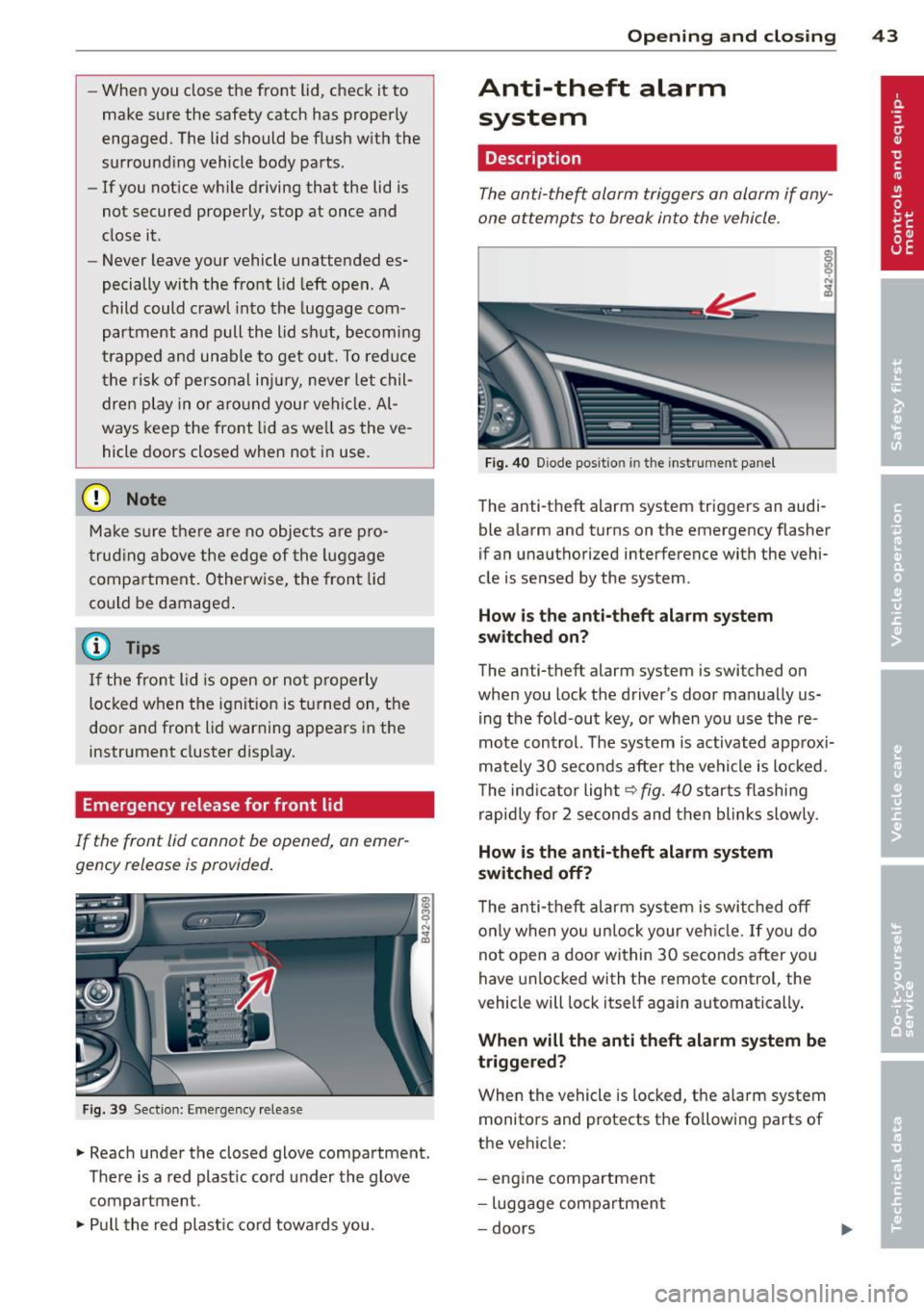
Fig. 39 Sectio n: Eme rgency release
" Reach under the closed glove compartment .
There is a red plast ic cord under the glove
compartment.
"Pu ll the red plastic cord towards you.
Opening and closing 43
Anti-theft alarm
system
Description
The anti-theft alarm triggers an alarm if any
one attempts to break into the vehicle .
Fig. 40 Diode posit io n in th e in str um ent panel
The anti-theft alarm system triggers an audi·
ble alarm and turns on the emergency flasher
if an unauthorized interference with the vehi
cle is sensed by the system .
How is the anti-theft alarm system
switched on?
The anti-theft alarm system is switched on
when you lock the driver's door manually us
ing the fold -out key, or when you use the re
mote control. The system is activated approxi
mately 30 seconds after the vehicle is locked.
T he ind icator light
9 fig. 40 starts flashing
rapidly for 2 seconds and then blinks slow ly.
How is the anti -theft alarm system
switched off?
T he anti-theft alarm system is switched off
o nly when yo u un lock your veh icle.
If you do
not open a door within 30 seconds after you
have unlocked with the remote control, the
vehicle will lock itself again automatically .
When will the anti theft alarm system be
triggered?
When the vehicle is locked, the a larm system
monitors and protects the fo llowing parts of
the vehicle:
- engine compartment
- luggage compartment
- doors
Page 46 of 244
44 Opening and clo sing
- ignition
When the sys tem is activated, the alarm w ill
be tr iggered if one of the doors , the eng ine
compartmen t lid or the front lid are opened.
The anti-theft a larm system will also go
off
when the ba tte ry is d isconne cted.
You can a lso trigger the alarm by pressing the
PANIC button on your remote-control key .
This will a lert other people in case of emer
gency. Press the PANIC button again to turn
off th e al ar m .
How is the anti-theft alarm switched off
when triggered?
To switch t he a larm off, press the button @l on
the master key o r swi tch t he ign ition on. The
ala rm w ill also sw itch i tse lf
off when i t comes
to the end of its cycle .
Emergency flasher
The emergency flasher w ill blink briefly when
the doo rs, e ngine compartment lid and front
lid are prope rly closed .
If the emergency flashe rs do not b link, check
the doors, engine compartment lid and front
lid to ma ke sure t hey a re p roperly closed. If
you close a doo r, the engine comp artment lid
or the front lid wit h the anti-theft alarm
switched on, t he emergency f lashers will blink
only after you have closed the door or lid .
Power windows
Controls
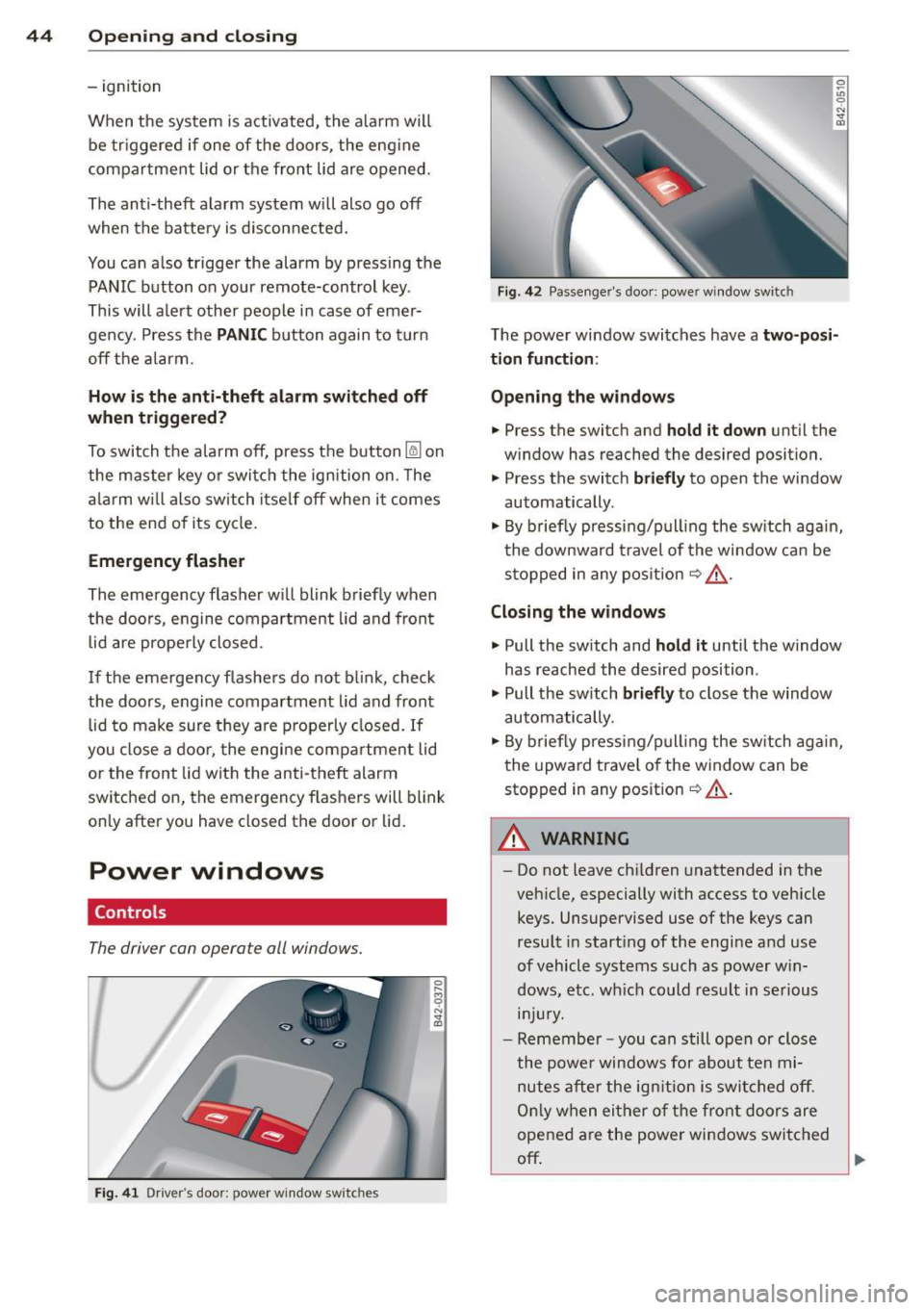
The driver can operate all windows.
Fig. 41 D rive r's doo r: p owe r w in dow sw it c h es
Fig. 42 Passen ger 's doo r: powe r wi ndow swit ch
0 ~
"' 0
"' "' OJ
The powe r wi ndow swi tches have a two-posi
tion function :
Opening the windows
• Press the switch and hold it down unt il the
w ind ow has reached the desired position.
"' Press the switc h
briefly to open the window
automatically .
"' By briefly pressi ng/p ull ing the sw itch again,
t he downward travel of the window ca n be
s toppe d in any pos it ion
~ .&, .
Closing the windows
"' Pull the sw itch and hold it until the window
has reached the desired position .
"' Pull the sw itch
briefly to close the window
automatically .
"' By briefly pressing/p ull ing the sw itch agai n,
t he upward trave l of the window can be
stopped in any position
~ .&, .
.&_ WARNING
-
-Do not leave ch ildren unattended in the
veh icle, especially with access to vehicle
keys. Unsupervised use of the keys can
resu lt in start ing of the engi ne and use
o f vehicle syst ems such as power w in
d ows, e tc. w hich could res ult in s erious
lnJUr y.
-Remember -you can still ope n or close
the powe r windows for about ten mi
nutes after the ig nition i s swi tched off.
On ly w hen ei ther o f th e fr ont d oors are
opened a re the power windows switched
off ~
Page 47 of 244
-Be careful when closing the windows.
Check to see that no one is in the way, or
serious injury could result!
- Always remove the ignition key whenever
you leave your vehicle .
-If you lock your vehicle from the outside ,
no one, especially children, should re
main in the vehicle .
- Do not stick anything on the windows or
the windshield that may interfere with
the driver's field of vision.
@ Tips
- When the doors are opened, the win
dows are automatically lowered 0.4 in
(10 mm) .
Reactivating the system after battery
disconnection
If the vehicle battery is disconnected and then
reconnected, the automatic closing and open
ing function will not work until it is reactivat
ed. To reactivate this feature, perform the fol
lowing steps:
- Pull and hold the power window switch until
the window is completely closed.
- Release the switch . Pull the switch again for
one second. The automatic closing/opening is now reactivated.
Opening and closing 45
Page 48 of 244
46 Convertible top
Convertible top
Convertible top
General information
The fabric convertible top opens and closes
automatically. When it is open, it is stored in
the convertible top storage bay. The converti
ble top may be opened or closed at speeds up
to 31 mph (SO km/h) .
The convertible top is wind- and waterproof
under normal conditions . Some moisture may
collect in the vehicle interior , but only under
extremely adverse weather conditions such as
torrential rain. That is normal and no cause
for concern.
Follow the cleaning and maintenance instruc
tions
~ page 163 to ensure the convertible
top remains wind- and waterproof. Also note
the following points:
- Only stow the convertible top when it is
clean and dry . Grains of sand or coarse dirt
particles can cause abrasions on the conver
tible top when stowed that can lead to dam
age to the fabric over time. Stowing the con
vertible top when it is damp can cause
marks or permanent mildew spots to form .
- Do not leave the convertible top open for
several weeks or the creases in it may be
come discolored . This is especially true if the
top was stowed when damp .
- Remove ice and snow before opening the
convertible top . Do not use any sharp edged
objects to remove ice and snow or the con
vertible top could be scratched or damaged.
The rear window may be cleared with a
standard ice scraper.
- The fabric in the convertible top loses elas
ticity in sub-zero temperatures. We recom
mend not opening or closing the convertible
top when the temperature is below 32 °F (0 QC). The convertible top will not open
when the temperature is 5 °F (-15 QC) or be
low.
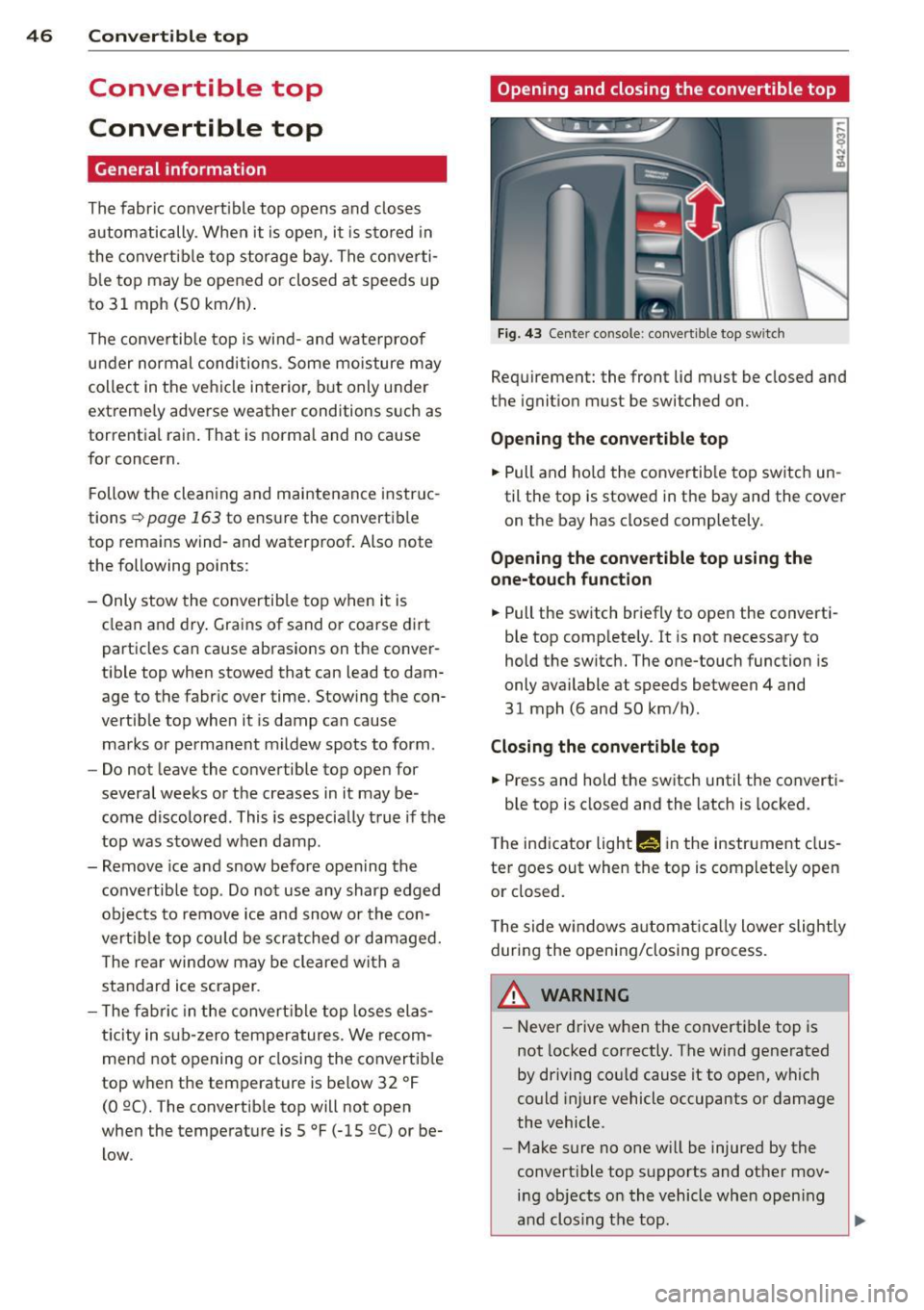
Opening and closing the convertible top
Fig. 43 Center co nsole : convertible top sw itc h
Requirement: the front lid must be closed and
the ignition must be switched on.
Opening the convertible top
.. Pull and hold the convertib le top switch un
til the top is stowed in the bay and the cover
on the bay has closed completely.
Opening the convertible top using the
one-touch function
.. Pull the switch briefly to open the converti
ble top completely . It is not necessary to
hold the switch. The one-touch function is
only available at speeds between 4 and
31 mph (6 and SO km/h) .
Closing the convertible top
.. Press and hold the switch until the converti-
ble top is closed and the latch is locked.
The indicator light
Min the instrument clus
ter goes out when the top is completely open
or closed.
The side windows automatical ly lower slightly
during the opening/closing process.
A WARNING ~
- Never drive when the convertible top is
not locked correctly. The wind generated
by driving could cause itto open, which
could injure vehicle occupants or damage
the vehicle.
- Make sure no one will be injured by the
convertible top supports and other mov ing objects on the vehicle when opening
and clos ing the top .
liJI,